lock MERCEDES-BENZ SPRINTER 2011 MY11 Operator’s Manual
[x] Cancel search | Manufacturer: MERCEDES-BENZ, Model Year: 2011, Model line: SPRINTER, Model: MERCEDES-BENZ SPRINTER 2011Pages: 292, PDF Size: 6.75 MB
Page 56 of 292
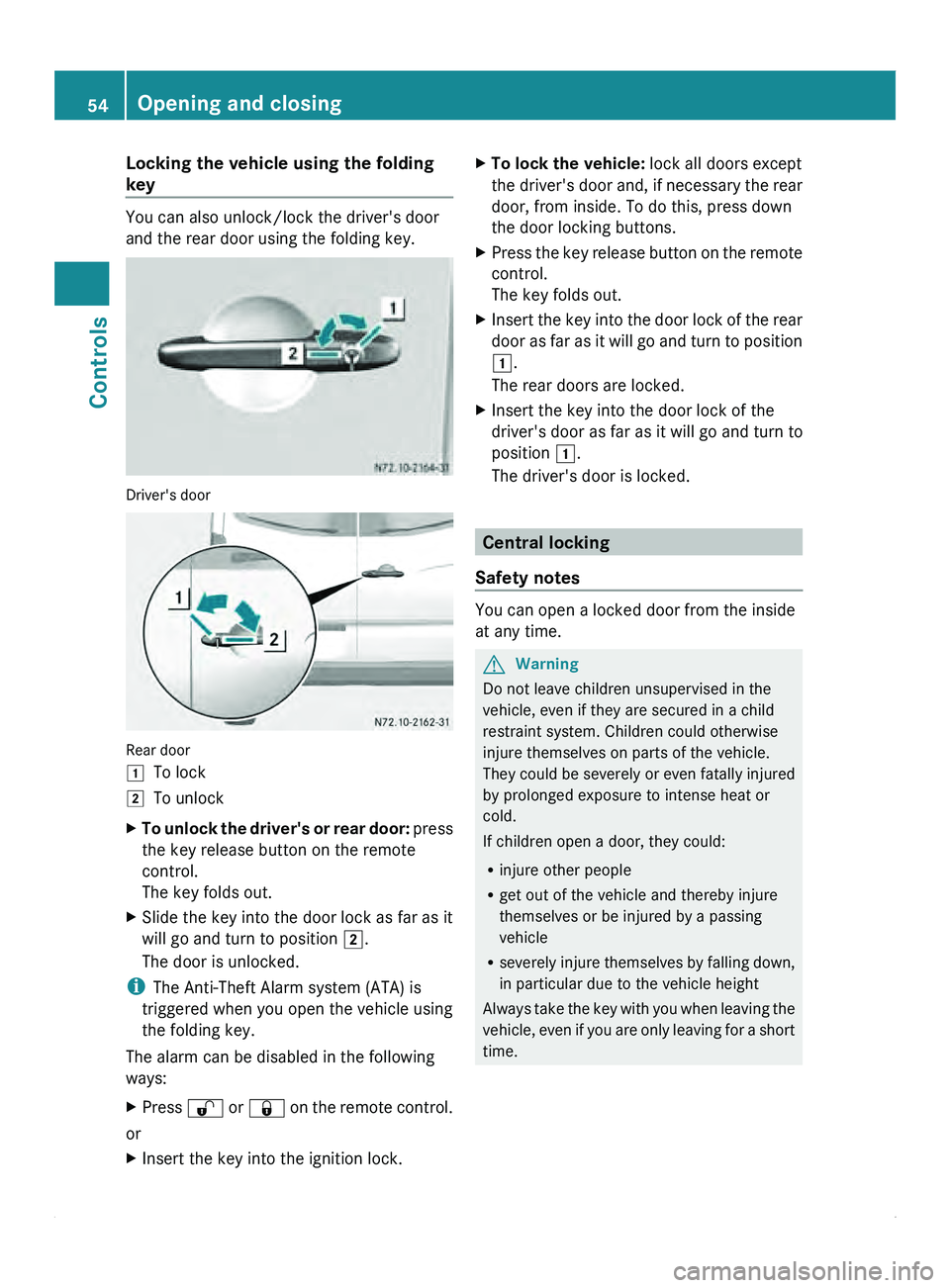
Locking the vehicle using the folding
key
You can also unlock/lock the driver's door
and the rear door using the folding key.
Driver's door
Rear door
004A
To lock
004B To unlock
X To unlock the driver's or rear door: press
the key release button on the remote
control.
The key folds out.
X Slide the key into the door lock as far as it
will go and turn to position 004B.
The door is unlocked.
i The Anti-Theft Alarm system (ATA) is
triggered when you open the vehicle using
the folding key.
The alarm can be disabled in the following
ways:
X Press 0036
or 0037
on the remote control.
or
X Insert the key into the ignition lock. X
To lock the vehicle: lock all doors except
the driver's door
and, if necessary the rear
door, from inside. To do this, press down
the door locking buttons.
X Press the key release button on the remote
control.
The key folds out.
X Insert the key into the door lock of the rear
door as far
as it will go and turn to position
004A.
The rear doors are locked.
X Insert the key into the door lock of the
driver's door as far as it will go and turn to
position 004A.
The driver's door is locked. Central locking
Safety notes You can open a locked door from the inside
at any time.
G
Warning
Do not leave children unsupervised in the
vehicle, even if they are secured in a child
restraint system. Children could otherwise
injure themselves on parts of the vehicle.
They could be
severely or even fatally injured
by prolonged exposure to intense heat or
cold.
If children open a door, they could:
R injure other people
R get out of the vehicle and thereby injure
themselves or be injured by a passing
vehicle
R severely injure themselves by falling down,
in particular due to the vehicle height
Always take the key with you when leaving the
vehicle, even if you are only leaving for a short
time. 54
Opening and closing
Controls
Page 57 of 292
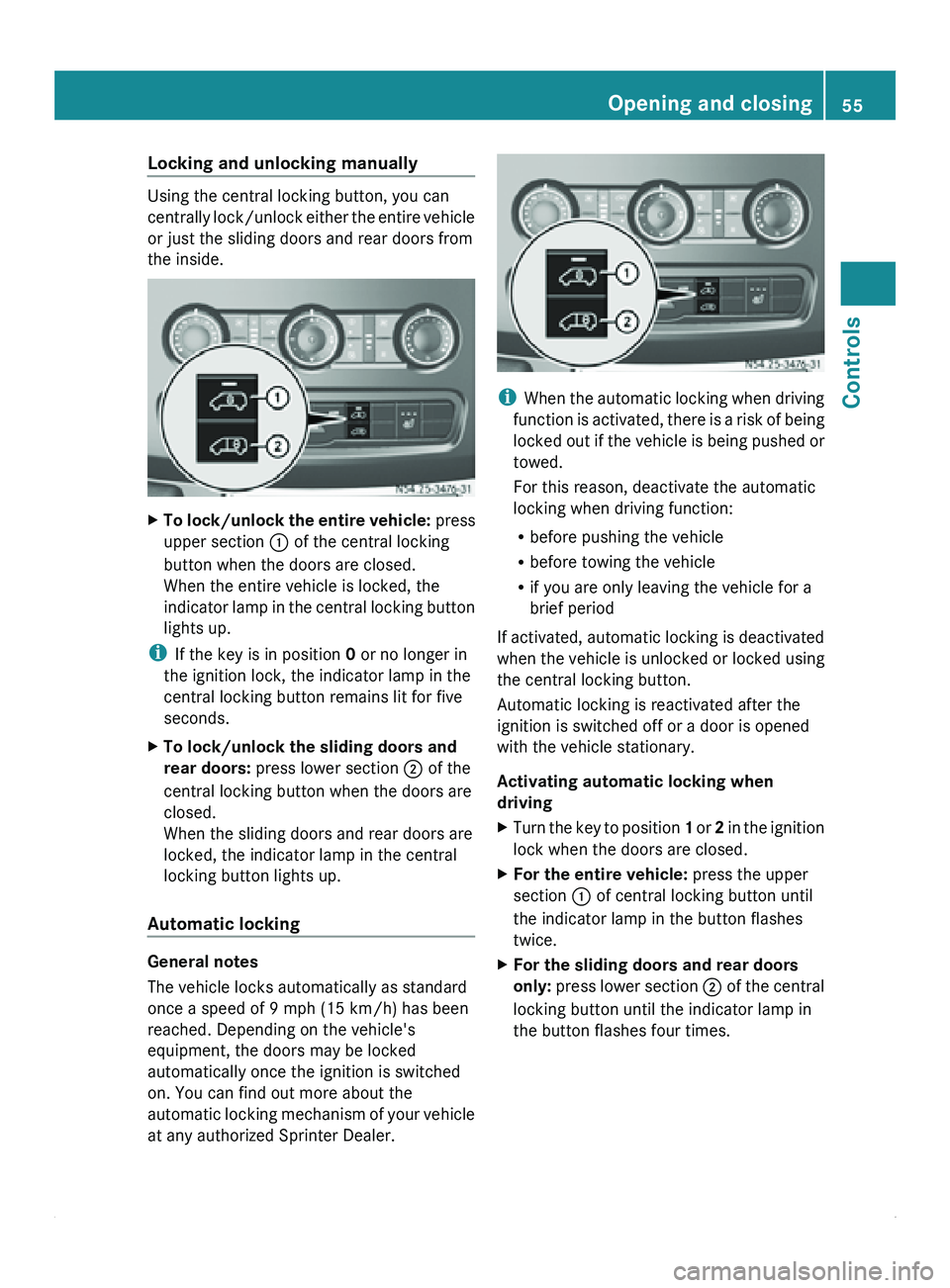
Locking and unlocking manually
Using the central locking button, you can
centrally lock/unlock
either
the entire vehicle
or just the sliding doors and rear doors from
the inside. X
To lock/unlock the entire vehicle: press
upper section 0046 of the central locking
button when the doors are closed.
When the entire vehicle is locked, the
indicator lamp in
the central locking button
lights up.
i If the key is in position 0 or no longer in
the ignition lock, the indicator lamp in the
central locking button remains lit for five
seconds.
X To lock/unlock the sliding doors and
rear doors: press lower section 0047 of the
central locking button when the doors are
closed.
When the sliding doors and rear doors are
locked, the indicator lamp in the central
locking button lights up.
Automatic locking General notes
The vehicle locks automatically as standard
once a speed of 9 mph (15 km/h) has been
reached. Depending on the vehicle's
equipment, the doors may be locked
automatically once the ignition is switched
on. You can find out more about the
automatic locking
mechanism
of your vehicle
at any authorized Sprinter Dealer. i
When the automatic
locking when driving
function is activated, there is a risk of being
locked out if the vehicle is being pushed or
towed.
For this reason, deactivate the automatic
locking when driving function:
R before pushing the vehicle
R before towing the vehicle
R if you are only leaving the vehicle for a
brief period
If activated, automatic locking is deactivated
when the vehicle is unlocked or locked using
the central locking button.
Automatic locking is reactivated after the
ignition is switched off or a door is opened
with the vehicle stationary.
Activating automatic locking when
driving
X Turn the key to position 1 or 2
in the ignition
lock when the doors are closed.
X For the entire vehicle: press the upper
section 0046 of central locking button until
the indicator lamp in the button flashes
twice.
X For the sliding doors and rear doors
only: press lower
section 0047 of the central
locking button until the indicator lamp in
the button flashes four times. Opening and closing
55
Controls Z
Page 58 of 292
Deactivating automatic locking when
driving
X
Turn the key to position 1 or 2 in the ignition
lock when the doors are closed.
X For the entire vehicle: press upper
section 0046 of central locking button until
the indicator lamp in the button flashes
twice.
X For the sliding doors and rear doors
only:
press lower section 0047 of the central
locking button until the indicator lamp in
the button flashes twice. Ignition lock
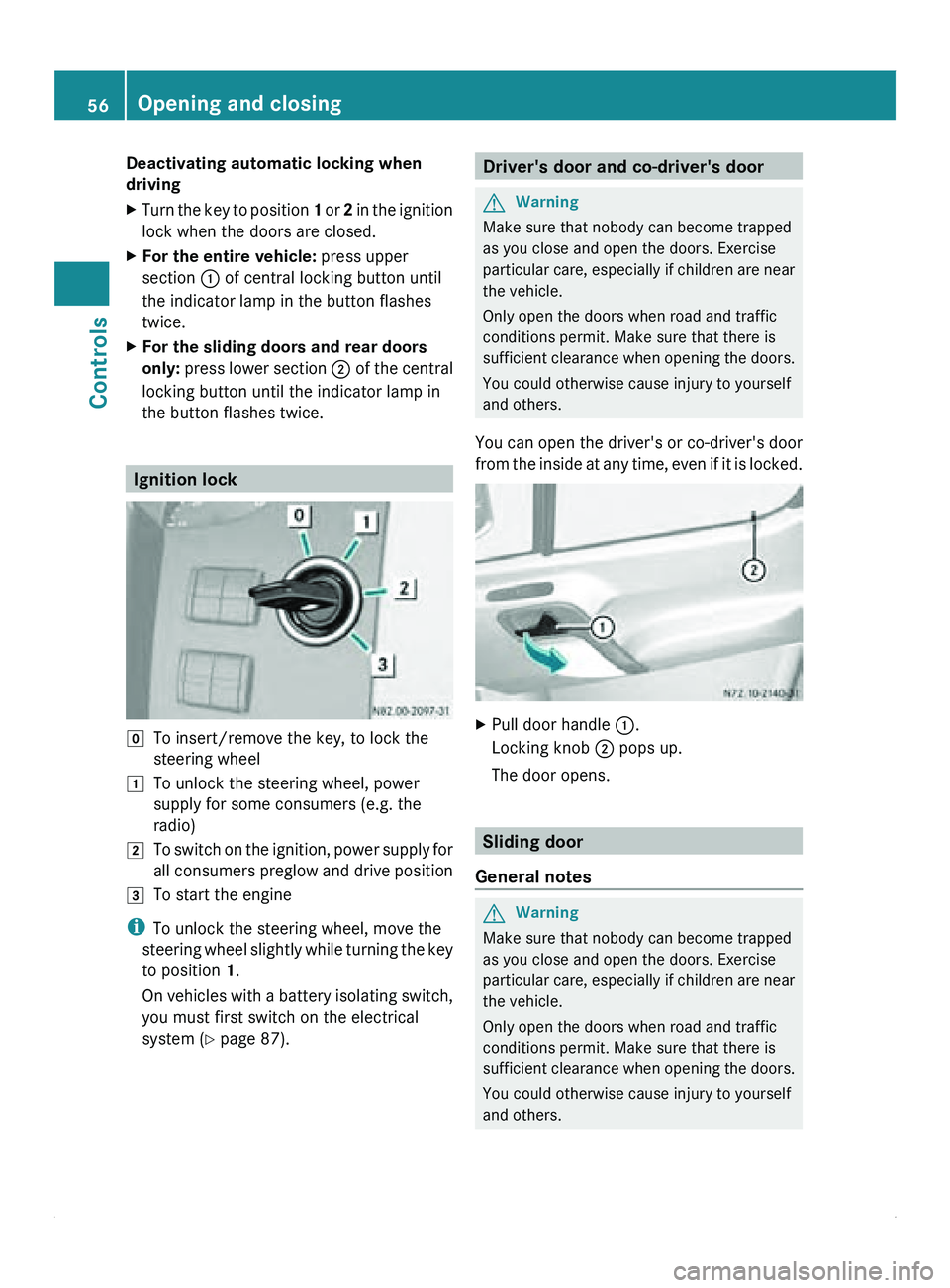
005D
To insert/remove the key, to lock the
steering wheel
004A To unlock the steering wheel, power
supply for some consumers (e.g. the
radio)
004B To switch on the ignition, power supply for
all consumers preglow and drive position
004C To start the engine
i To unlock the steering wheel, move the
steering wheel slightly while turning the key
to position 1.
On vehicles with a battery isolating switch,
you must first switch on the electrical
system (Y page 87). Driver's door and co-driver's door
G
Warning
Make sure that nobody can become trapped
as you close and open the doors. Exercise
particular care, especially if children are near
the vehicle.
Only open the doors when road and traffic
conditions permit. Make sure that there is
sufficient clearance when opening the doors.
You could otherwise cause injury to yourself
and others.
You can open the driver's or co-driver's door
from the inside at any time, even if it is locked. X
Pull door handle 0046.
Locking knob 0047 pops up.
The door opens. Sliding door
General notes G
Warning
Make sure that nobody can become trapped
as you close and open the doors. Exercise
particular care, especially if children are near
the vehicle.
Only open the doors when road and traffic
conditions permit. Make sure that there is
sufficient clearance when opening the doors.
You could otherwise cause injury to yourself
and others. 56
Opening and closing
Controls
Page 59 of 292
G
Warning
If the vehicle is parked on an incline, the
sliding door may move of its own accord if it
is open but
not engaged. You and others could
then become trapped.
Make sure that the sliding door is engaged in
the active retainer.
The sliding door is equipped with an active
retainer, which engages the door at the end
stop when opened.
i You can also lock the sliding door in place
around halfway when opening/closing. If
you do this, the door does not have to be
opened fully when getting into or out of the
vehicle. The intermediate detent does not
fully engage the sliding door. Opening/closing the sliding door from
the outside
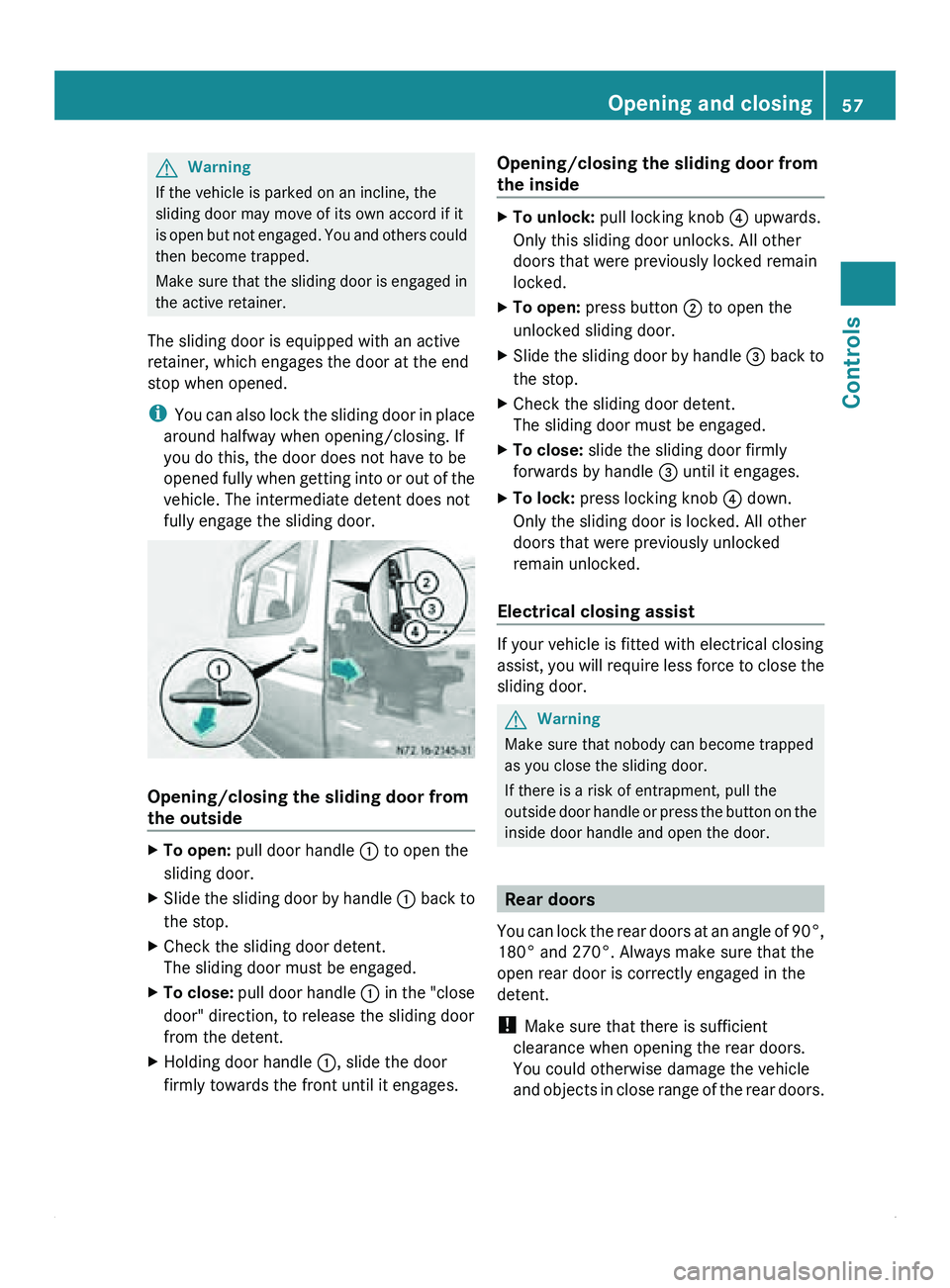
X
To open: pull door handle 0046
to open the
sliding door.
X Slide the sliding door by handle 0046 back
to
the stop.
X Check the sliding door detent.
The sliding door must be engaged.
X To close: pull
door handle 0046
in the "close
door" direction, to release the sliding door
from the detent.
X Holding door handle 0046, slide the door
firmly towards the front until it engages. Opening/closing the sliding door from
the inside X
To unlock: pull locking knob
0088 upwards.
Only this sliding door unlocks. All other
doors that were previously locked remain
locked.
X To open: press button 0047 to open the
unlocked sliding door.
X Slide the sliding door by handle 008A back
to
the stop.
X Check the sliding door detent.
The sliding door must be engaged.
X To close: slide the sliding door firmly
forwards by handle 008A
until it engages.
X To lock: press locking knob 0088 down.
Only the sliding door is locked. All other
doors that were previously unlocked
remain unlocked.
Electrical closing assist If your vehicle is fitted with electrical closing
assist, you
will
require less force to close the
sliding door. G
Warning
Make sure that nobody can become trapped
as you close the sliding door.
If there is a risk of entrapment, pull the
outside door handle
or press the button on the
inside door handle and open the door. Rear doors
You can lock
the rear doors at an angle of 90°,
180° and 270°. Always make sure that the
open rear door is correctly engaged in the
detent.
! Make sure that there is sufficient
clearance when opening the rear doors.
You could otherwise damage the vehicle
and objects in close range of the rear doors. Opening and closing
57
Controls Z
Page 61 of 292
X
Open the rear door to about 45°.
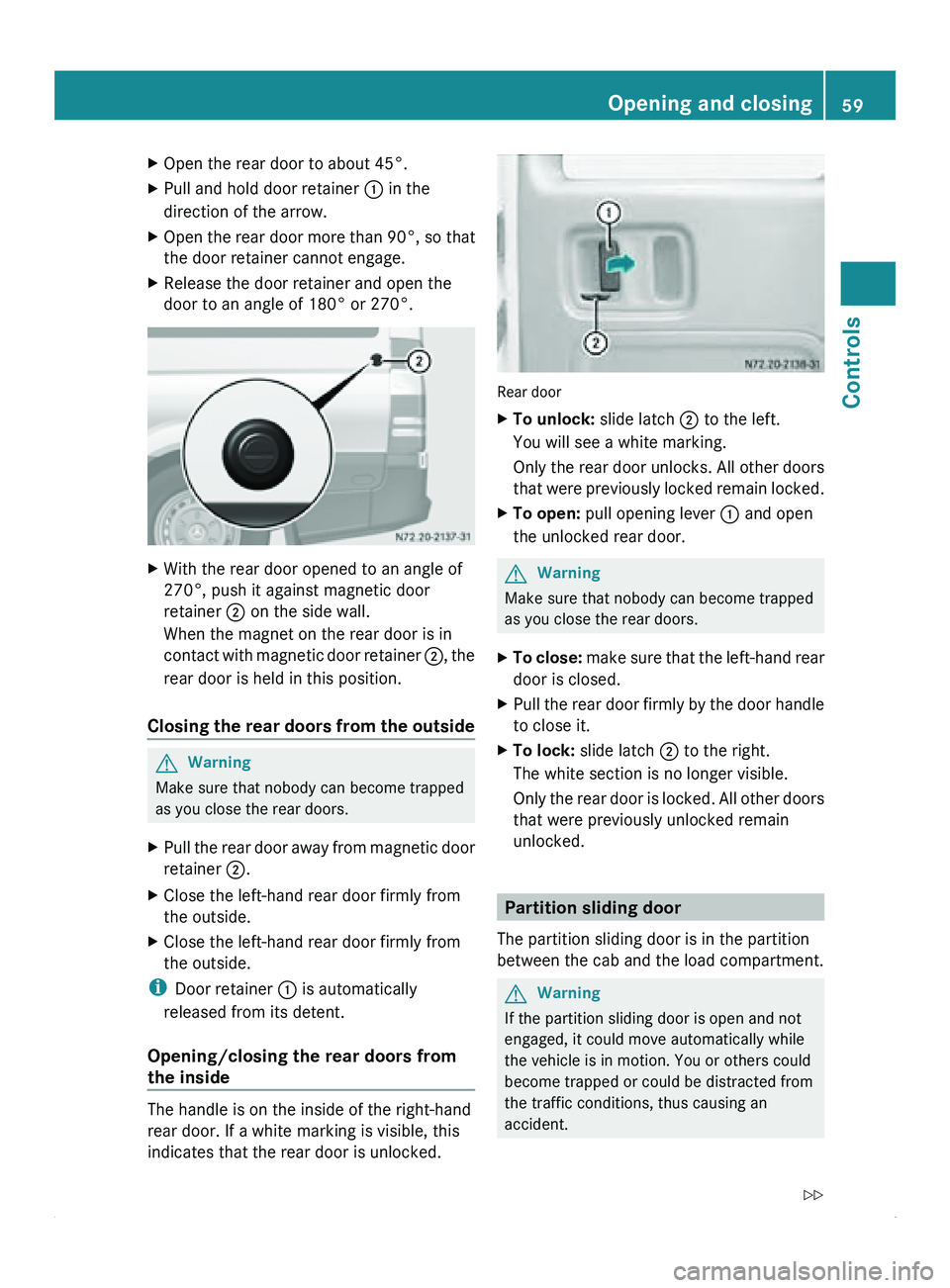
X Pull and hold door retainer 0046 in the
direction of the arrow.
X Open the rear door more than 90°, so that
the door retainer cannot engage.
X Release the door retainer and open the
door to an angle of 180° or 270°. X
With the rear door opened to an angle of
270°, push it against magnetic door
retainer 0047 on the side wall.
When the magnet on the rear door is in
contact with magnetic
door retainer 0047, the
rear door is held in this position.
Closing the rear doors from the outside G
Warning
Make sure that nobody can become trapped
as you close the rear doors.
X Pull the rear door away from magnetic door
retainer 0047.
X Close the left-hand rear door firmly from
the outside.
X Close the left-hand rear door firmly from
the outside.
i Door retainer 0046 is automatically
released from its detent.
Opening/closing the rear doors from
the inside The handle is on the inside of the right-hand
rear door. If a white marking is visible, this
indicates that the rear door is unlocked. Rear door
X
To unlock: slide latch 0047 to the left.
You will see a white marking.
Only the rear
door unlocks. All other doors
that were previously locked remain locked.
X To open: pull opening lever 0046 and open
the unlocked rear door. G
Warning
Make sure that nobody can become trapped
as you close the rear doors.
X To close:
make sure that the left-hand rear
door is closed.
X Pull the
rear door firmly by the door handle
to close it.
X To lock: slide latch 0047 to the right.
The white section is no longer visible.
Only the rear
door is locked. All other doors
that were previously unlocked remain
unlocked. Partition sliding door
The partition sliding door is in the partition
between the cab and the load compartment. G
Warning
If the partition sliding door is open and not
engaged, it could move automatically while
the vehicle is in motion. You or others could
become trapped or could be distracted from
the traffic conditions, thus causing an
accident. Opening and closing
59
Controls
Z
Page 62 of 292
Before driving off, make sure that the partition
sliding door is closed and that the lock is
engaged. G
Warning
Make sure that nobody can become trapped
as you close the partition sliding door.
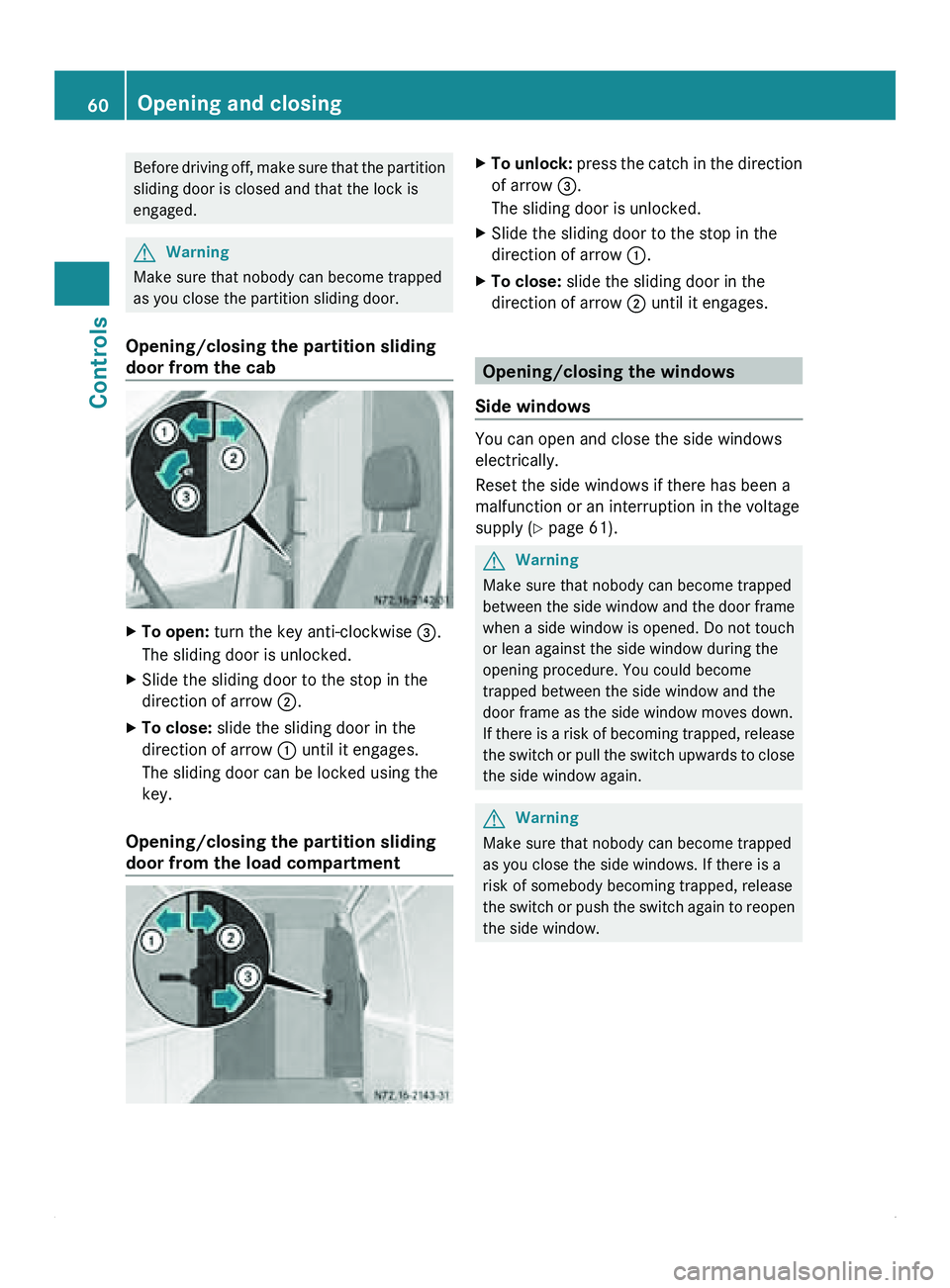
Opening/closing the partition sliding
door from the cab X
To open: turn the key anti-clockwise 008A.
The sliding door is unlocked.
X Slide the sliding door to the stop in the
direction of arrow 0047
.
X To close: slide the sliding door in the
direction of arrow 0046 until it engages.
The sliding door can be locked using the
key.
Opening/closing the partition sliding
door from the load compartment X
To unlock: press the catch in the direction
of arrow 008A.
The sliding door is unlocked.
X Slide the sliding door to the stop in the
direction of arrow 0046.
X To close: slide the sliding door in the
direction of arrow 0047 until it engages. Opening/closing the windows
Side windows You can open and close the side windows
electrically.
Reset the side windows if there has been a
malfunction or an interruption in the voltage
supply (
Y page 61). G
Warning
Make sure that nobody can become trapped
between the side window and the door frame
when a side window is opened. Do not touch
or lean against the side window during the
opening procedure. You could become
trapped between the side window and the
door frame as the side window moves down.
If there is a risk of becoming trapped, release
the switch or pull the switch upwards to close
the side window again. G
Warning
Make sure that nobody can become trapped
as you close the side windows. If there is a
risk of somebody becoming trapped, release
the switch or push the switch again to reopen
the side window. 60
Opening and closing
Controls
Page 63 of 292
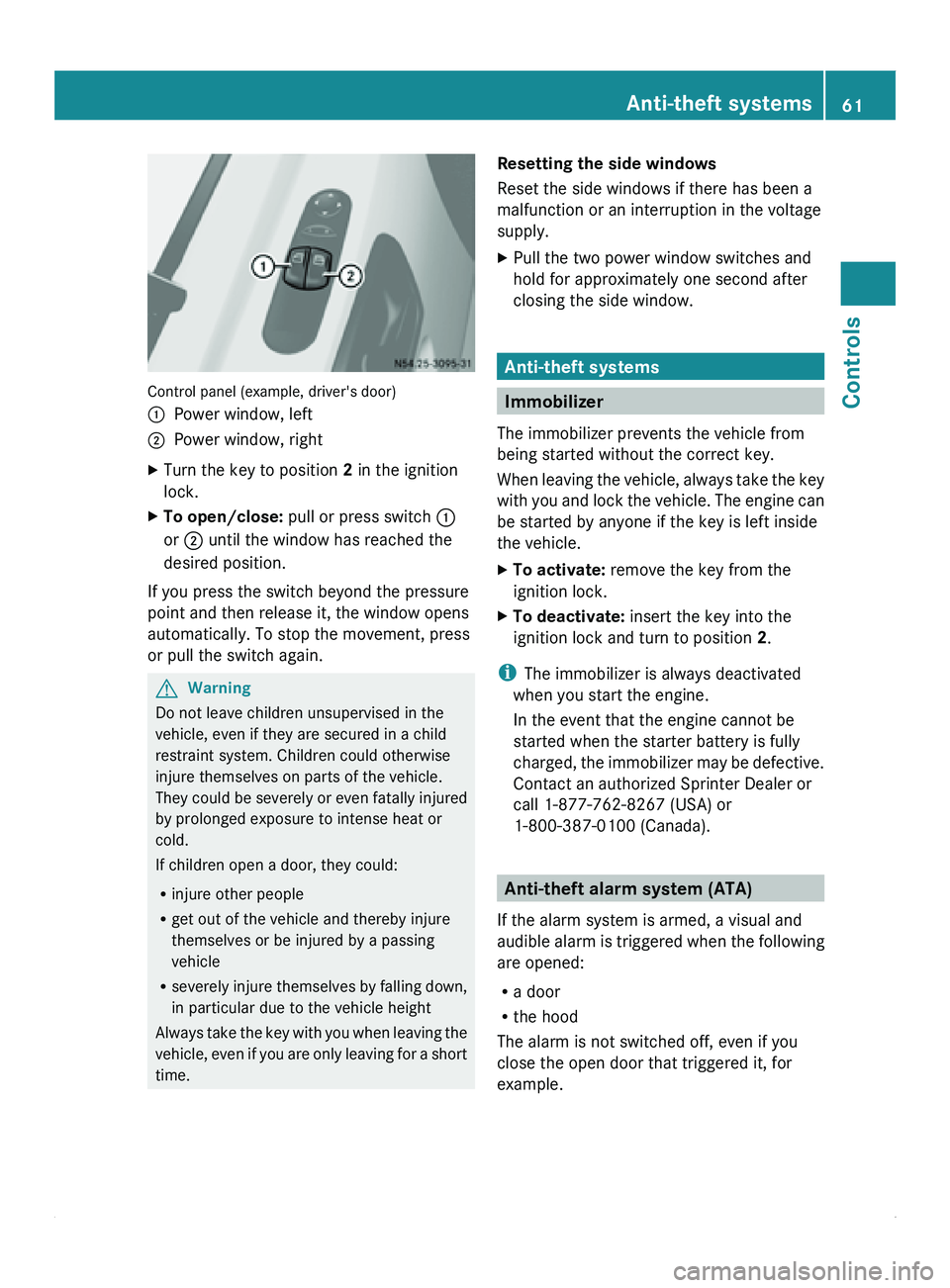
Control panel (example, driver's door)
0046
Power window, left
0047 Power window, right
X Turn the key to position 2 in the ignition
lock.
X To open/close: pull or press switch 0046
or 0047 until the window has reached the
desired position.
If you press the switch beyond the pressure
point and then release it, the window opens
automatically. To stop the movement, press
or pull the switch again. G
Warning
Do not leave children unsupervised in the
vehicle, even if they are secured in a child
restraint system. Children could otherwise
injure themselves on parts of the vehicle.
They could be
severely or even fatally injured
by prolonged exposure to intense heat or
cold.
If children open a door, they could:
R injure other people
R get out of the vehicle and thereby injure
themselves or be injured by a passing
vehicle
R severely injure themselves by falling down,
in particular due to the vehicle height
Always take the key with you when leaving the
vehicle, even if you are only leaving for a short
time. Resetting the side windows
Reset the side windows if there has been a
malfunction or an interruption in the voltage
supply.
X
Pull the two power window switches and
hold for approximately one second after
closing the side window. Anti-theft systems
Immobilizer
The immobilizer prevents the vehicle from
being started without the correct key.
When leaving the
vehicle, always take the key
with you and lock the vehicle. The engine can
be started by anyone if the key is left inside
the vehicle.
X To activate: remove the key from the
ignition lock.
X To deactivate: insert the key into the
ignition lock and turn to position 2.
i The immobilizer is always deactivated
when you start the engine.
In the event that the engine cannot be
started when the starter battery is fully
charged, the immobilizer
may be defective.
Contact an authorized Sprinter Dealer or
call 1-877-762-8267 (USA) or
1-800-387-0100 (Canada). Anti-theft alarm system (ATA)
If the alarm system is armed, a visual and
audible alarm is
triggered when the following
are opened:
R a door
R the hood
The alarm is not switched off, even if you
close the open door that triggered it, for
example. Anti-theft systems
61
Controls Z
Page 64 of 292
X
To arm: close all doors.
X Lock the vehicle using the 0037 button on
the key.
The indicator lamp in the upper central
locking button ( Y
page 55) flashes.
X To deactivate: unlock the
vehicle using the
0036 button on the remote control.
The indicator lamp in the upper central
locking button (Y page 55) goes out.
i Cargo van and passenger van only:
Unless you open
a door within 40 seconds
after unlocking the vehicle:
R the vehicle will be locked again.
R the anti-theft alarm system will be re-
armed.
i The alarm system will be triggered if the
vehicle was previously locked with the key
and is then unlocked from the inside.
X To stop the alarm: insert the key into the
ignition lock.
or
X Press the 0036 button on the remote
control.
The alarm is switched off. Tow-away alarm
A visual and audible alarm is triggered if the
inclination of the vehicle changes when tow-
away protection is armed.
i The alarm signal
is triggered, for example
if the vehicle is being jacked up on one side,
shortly before the wheel leaves the ground.
Tow-away protection is automatically armed
approximately 20 seconds after you lock the
vehicle.
Tow-away protection is automatically
deactivated when you unlock the vehicle.
Deactivate tow-away protection if the vehicle
is being transported or loaded onto another
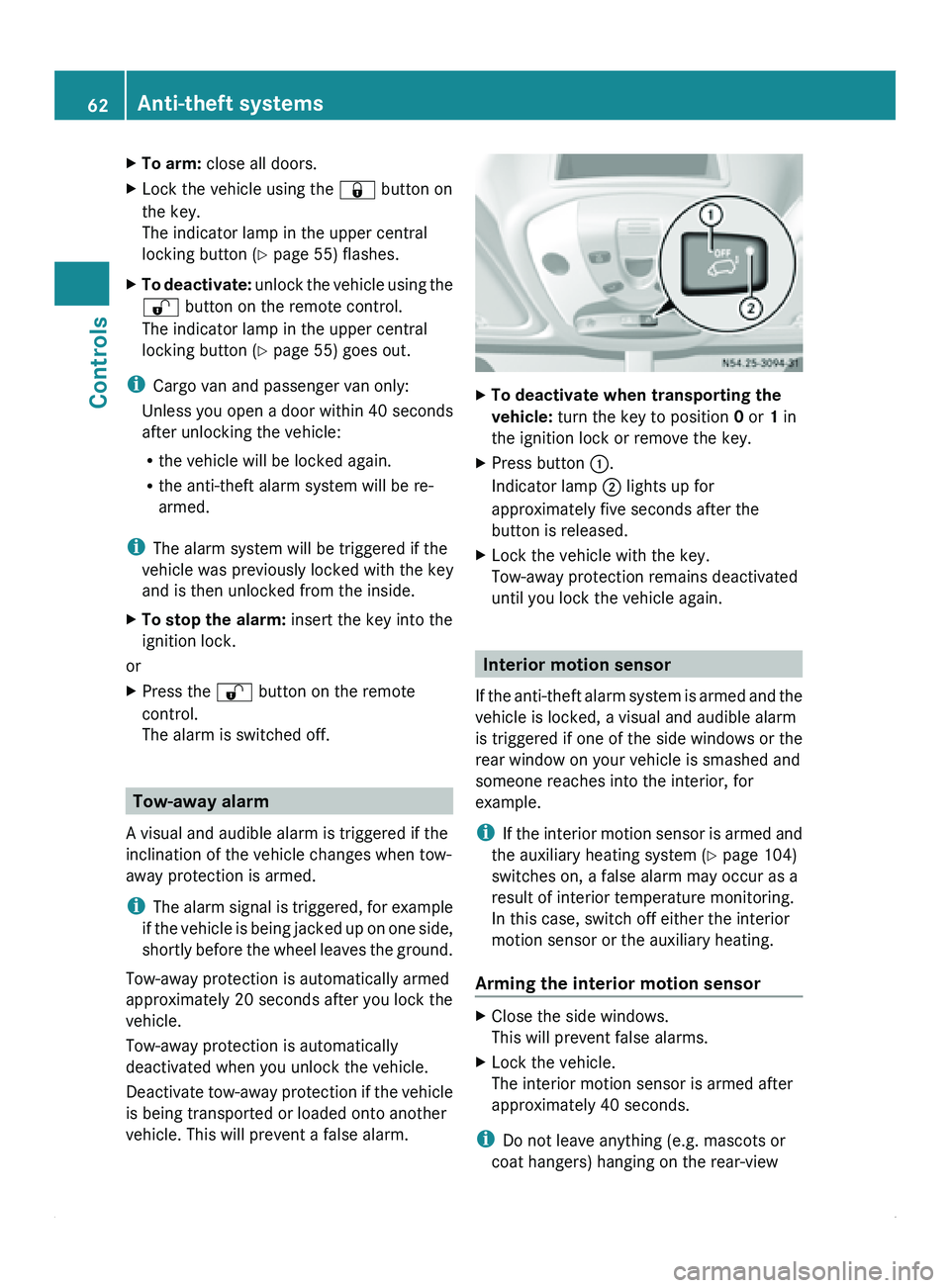
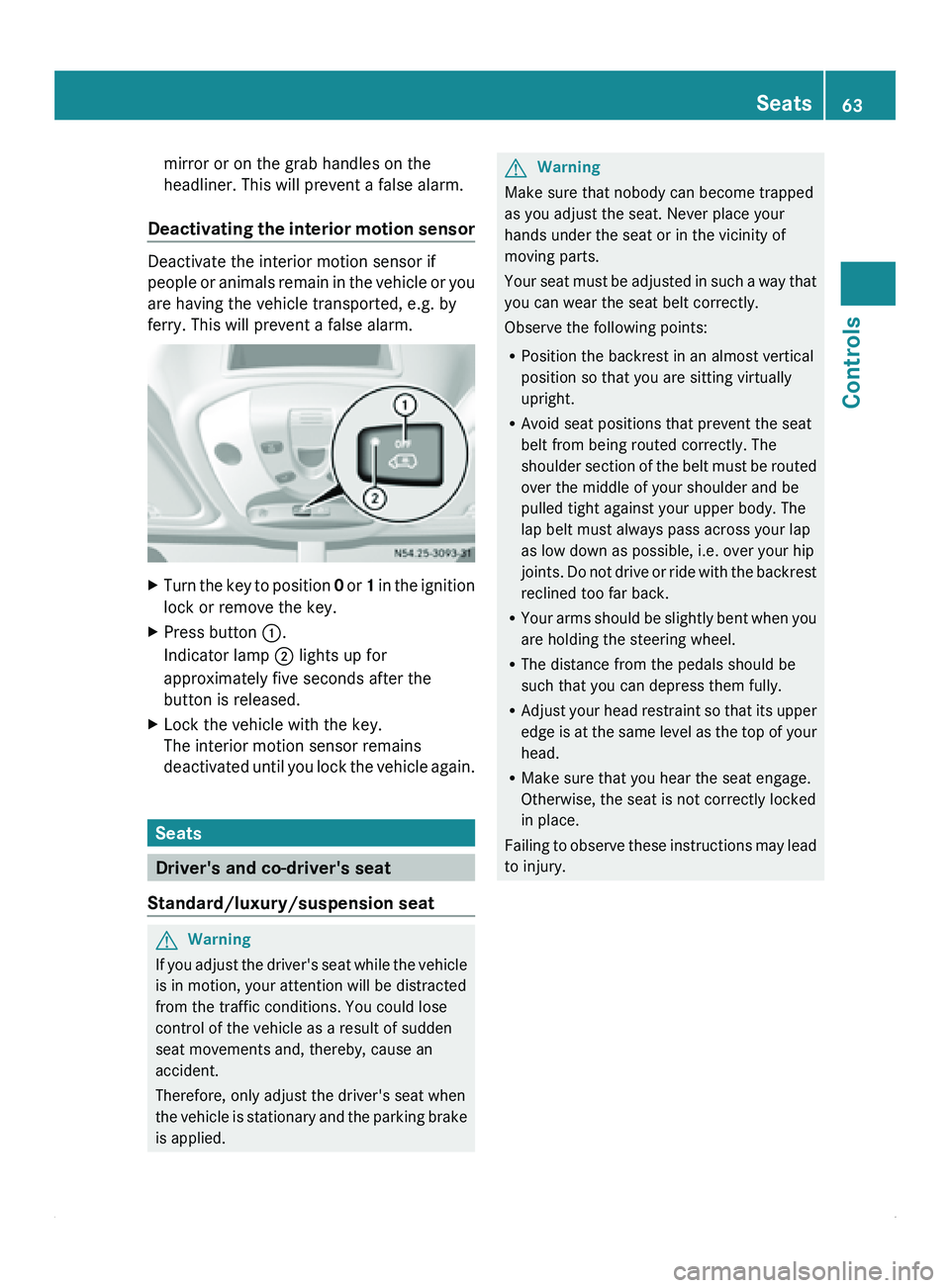
vehicle. This will prevent a false alarm. X
To deactivate when transporting the
vehicle: turn the key to position 0 or 1 in
the ignition lock or remove the key.
X Press button 0046.
Indicator lamp 0047 lights up for
approximately five seconds after the
button is released.
X Lock the vehicle with the key.
Tow-away protection remains deactivated
until you lock the vehicle again. Interior motion sensor
If the anti-theft
alarm system is armed and the
vehicle is locked, a visual and audible alarm
is triggered if one of the side windows or the
rear window on your vehicle is smashed and
someone reaches into the interior, for
example.
i If the interior motion sensor is armed and
the auxiliary heating system (Y page 104)
switches on, a false alarm may occur as a
result of interior temperature monitoring.
In this case, switch off either the interior
motion sensor or the auxiliary heating.
Arming the interior motion sensor X
Close the side windows.
This will prevent false alarms.
X Lock the vehicle.
The interior motion sensor is armed after
approximately 40 seconds.
i Do not leave anything (e.g. mascots or
coat hangers) hanging on the rear-view 62
Anti-theft systems
Controls
Page 65 of 292
mirror or on the grab handles on the
headliner. This will prevent a false alarm.
Deactivating the interior
motion sensorDeactivate the interior motion sensor if
people or
animals
remain in the vehicle or you
are having the vehicle transported, e.g. by
ferry. This will prevent a false alarm. X
Turn the key to position 0 or 1
in the ignition
lock or remove the key.
X Press button 0046.
Indicator lamp 0047 lights up for
approximately five seconds after the
button is released.
X Lock the vehicle with the key.
The interior motion sensor remains
deactivated until
you
lock the vehicle again.Seats
Driver's and co-driver's seat
Standard/luxury/suspension seat G
Warning
If you adjust the driver's seat while the vehicle
is in motion, your attention will be distracted
from the traffic conditions. You could lose
control of the vehicle as a result of sudden
seat movements and, thereby, cause an
accident.
Therefore, only adjust the driver's seat when
the vehicle is
stationary and the parking brake
is applied. G
Warning
Make sure that nobody can become trapped
as you adjust the seat. Never place your
hands under the seat or in the vicinity of
moving parts.
Your seat must
be adjusted in such a way that
you can wear the seat belt correctly.
Observe the following points:
R Position the backrest in an almost vertical
position so that you are sitting virtually
upright.
R Avoid seat positions that prevent the seat
belt from being routed correctly. The
shoulder section of the belt must be routed
over the middle of your shoulder and be
pulled tight against your upper body. The
lap belt must always pass across your lap
as low down as possible, i.e. over your hip
joints. Do not drive or ride with the backrest
reclined too far back.
R Your arms should be slightly bent when you
are holding the steering wheel.
R The distance from the pedals should be
such that you can depress them fully.
R Adjust your head restraint so that its upper
edge is at the same level as the top of your
head.
R Make sure that you hear the seat engage.
Otherwise, the seat is not correctly locked
in place.
Failing to observe these instructions may lead
to injury. Seats
63
Controls Z
Page 66 of 292
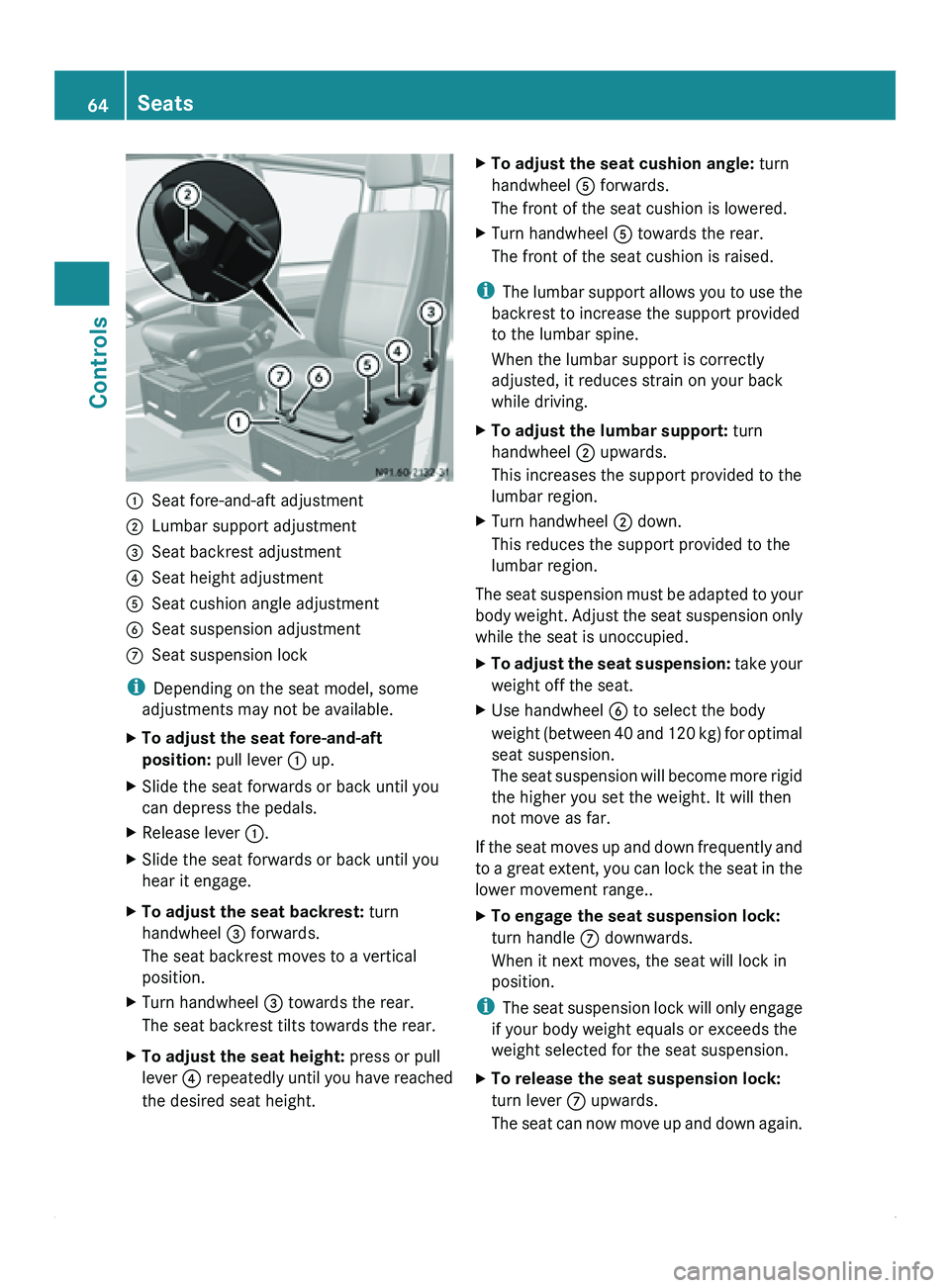
0046
Seat fore-and-aft adjustment
0047 Lumbar support adjustment
008A Seat backrest adjustment
0088 Seat height adjustment
0086 Seat cushion angle adjustment
0087 Seat suspension adjustment
006E Seat suspension lock
i Depending on the seat model, some
adjustments may not be available.
X To adjust the seat fore-and-aft
position: pull lever 0046 up.
X Slide the seat forwards or back until you
can depress the pedals.
X Release lever 0046.
X Slide the seat forwards or back until you
hear it engage.
X To adjust the seat backrest: turn
handwheel 008A forwards.
The seat backrest moves to a vertical
position.
X Turn handwheel 008A towards the rear.
The seat backrest tilts towards the rear.
X To adjust the seat height: press or pull
lever 0088 repeatedly
until
you have reached
the desired seat height. X
To adjust the seat cushion angle: turn
handwheel 0086 forwards.
The front of the seat cushion is lowered.
X Turn handwheel 0086 towards the rear.
The front of the seat cushion is raised.
i The lumbar
support
allows you to use the
backrest to increase the support provided
to the lumbar spine.
When the lumbar support is correctly
adjusted, it reduces strain on your back
while driving.
X To adjust the lumbar support: turn
handwheel 0047 upwards.
This increases the support provided to the
lumbar region.
X Turn handwheel 0047 down.
This reduces the support provided to the
lumbar region.
The seat suspension must be adapted to your
body weight.
Adjust
the seat suspension only
while the seat is unoccupied.
X To adjust the seat suspension: take your
weight off the seat.
X Use handwheel 0087
to select the body
weight (between 40
and 120 kg) for optimal
seat suspension.
The seat suspension will become more rigid
the higher you set the weight. It will then
not move as far.
If the seat moves up and down frequently and
to a great
extent, you can lock the seat in the
lower movement range..
X To engage the seat suspension lock:
turn handle 006E downwards.
When it next moves, the seat will lock in
position.
i The seat
suspension
lock will only engage
if your body weight equals or exceeds the
weight selected for the seat suspension.
X To release the seat suspension lock:
turn lever 006E upwards.
The seat can
now move up and down again.64
Seats
Controls