fuel MERCEDES-BENZ SPRINTER 2013 MY13 Operator’s Manual
[x] Cancel search | Manufacturer: MERCEDES-BENZ, Model Year: 2013, Model line: SPRINTER, Model: MERCEDES-BENZ SPRINTER 2013Pages: 334, PDF Size: 3.88 MB
Page 145 of 334
The fuel filler flap is beside the frontl
eft-hand
door when viewed in the direction of travel. It
is only possible to open the fuel filler flap
when the fron tdoor is open.
X Remove the key from the ignition lock.
X Switch off the auxiliary heating system
(Y page 118).
X Open the front left-hand door first, and then
the fuel filler flap.
X Close all vehicle doors to prevent fuel
vapors from entering the vehicle.
X Turn fuel filler cap 0006counter-clockwise,
remove it and let it hang from strap 0005.
X Completely insert the filler neck of the fuel
pump nozzle into the tank and refuel.
X Only fill the tank until the pump nozzle
switches off. Fuel may otherwise leak out.
X Replace tank filler cap 0006and turn
clockwise.
You will hear a click when the fuel filler cap
is closed fully.
X Open the front left-hand door first, and then
close the filler flap. Problems with the fuel and fuel tank
If your vehicle is losing fuel, the fuel lines or
the fuel tank are defective.
X Turn the key to position 0in the ignition
lock immediately and remove it.
X Do not restart the engine under any
circumstances.
X Consult a qualified specialist workshop. Diesel Exhaust Fluid (DEF)
Important safety notes H
Environmental note
Dispose of DEF in an environmentally
responsible manner.
! Only use DEF in accordance with
ISO 22241. Never mix DEF with additives or thin it with tap water. The exhaust gas
aftertreatmen
tmay otherwise be
damaged.
Observe the MB Specifications for Service
Products, Sheet 352.0.
Damage that results from the use of
additives or tap wate rleads to the loss of
the New Vehicle Limited Warranty.
! If DEF comes into contact with a painted
or aluminum surface, wash the surface off
immediately with plenty of water.
! DEFi s not a diesel additive and must not
be mixed with fuel in the tank. Even small
amounts of DEF can cause engine damage.
Damage that results from the blending of
DEF will not be covered by the New Vehicle
Limited Warranty.
The exhaust gas aftertreatmentr equires a
reducing agent, Diesel Exhaust Fluid (DEF), in
order to function correctly.
When opening the DEF tank filler cap at high
outside temperatures, ammonia vapors may
escape.
Ammonia vapors have a pungent smell and
primarily cause irritation of the:
R skin
R mucous membranes
R eyes
You may experience a burning sensation in
your eyes, nose and throat, as well as
coughing and watering of the eyes.
Do not inhale ammonia vapors. Avoid contact
with DEF.
Do not allow DEF to come intod irectcontact
with your skin; it is hazardous to your health.
Rinse any affected areas off with plenty of
clean water. Consult a doctor if necessary.
i If the DEFr eserve has fallen below the
reserve range, add at least 2.0 US gal
(7.6 l) of DEF at the latest after receiving
the second warning message
(Y page 178). Refueling
143Driving and parking Z
Page 146 of 334
i
If you switch off the engine at a low
outside temperature and add DEF, restart
the engine after refueling. If you leave the
vehicle parked withou trestarting the
engin eand the DEF freeze sin the DEF tank,
the on-board compute rwill only be able to
register the new fill level after a defrosting
period of up to 60 minutes. During this
time, you may not be able to start the
engine.
You will find further information on DE Finthe
"Service products" section (Y page 317).
Refueling procedure DEF filler neck in the engine compartment
X
Remove the key from the ignition lock.
X Switch off the auxiliary heating system
(Y page 125).
X Open the hood.
X Close all vehicle doors so that no ammonia
vapors can enter the vehicle.
i Do not inhale any ammonia vapor which
may escape when you unscrew cap 0005.
Ammonia vapors have a pungent odor.
However, they are neither toxic nor
hazardous to health in this concentration.
X Turn cap 0005counter-clockwise and remove
it.
X Only fill up the DEF tank until the DEF level
is visible in the filler neck.
X Replace DEF filler neck cap 0005on the filler
neck and turn clockwise. You will hear a click when cap
0005is fully
closed.
DEF filler neck on the right-hand vehicle
side The DEF reservoir on the right-hand side of the
vehicle (example: Chassis Cab)
Fuel filler cap
X
Remove the key from the ignition lock.
X Switch off the auxiliary heating system
(Y page 125).
X Remove tool 0023for unlocking tank filler
cap 0006from the footwell on the co-driver's
side (Y page 264).
X Close all vehicle doors so that no ammonia
vapors can enter the vehicle.
X Pull cover 0025up, turn 90° and release.
X Insert tool 0023into hole 0026of tank filler
cap 0006.
i Do not inhale any ammonia vapor that
may escape when you unscrew tank filler
cap 0006.A mmonia vapors have apungent
odor .However, they are neither toxic nor
hazardous to health in this concentration. 144
RefuelingDriving and parking
Page 150 of 334
Bear in mind that at a speed of just 30 mph
(approximately 50 km/h), your vehicle covers
a distance of 44 feet (approximatel
y14 m)
every second. G
WARNING
If you switch off the ignition while driving,
safety-relevant functions are only available
with limitations, or not at all. This could affect,
for example, the power steering and the brake
boosting effect. You will require considerably
more effort to steer and brake .There is a risk
of an accident.
Do not switch off the ignition while driving.
! Always observe the ground clearance of
the vehicle and avoid obstacles. On
vehicles with a step, ground clearance is
further restricted. Obstacles can damage
the vehicle.
If you must drive over obstacles, drive
especially slowly and carefully. If
necessary, have another person direct you.
Drive sensibly–s ave fuelIn orde
rto save fuel, observe the following
tips:
X The tires should always be inflated to the
recommended tire pressure.
X Remove unnecessary loads.
X Remove roof carriers when they are not
needed.
X Warm up the engine at low engine speeds.
X Avoid frequent acceleration or braking.
X Have all maintenance work carried out as
indicated by the service intervals in the
Maintenance Booklet or by the service
interval display.
Fuel consumption also increases when
driving in cold weather, in stop-start traffic
and in mountainous terrain. Overrun cutoff If you are in overrun mode and take your foot
off the accelerator pedal, the fuel supply is
cut off when the engine speed is out of the
idle speed control range.
Drinking and driving
G
WARNING
Drinking and driving and/or taking drugs and
driving are very dangerous combinations.
Even a small amount of alcohol or drugs can
affect your reflexes, perceptions and
judgment.
The possibility of a serious or even fatal
accident are greatly increased when you drink
or take drugs and drive.
Do not drink or take drugs and drive or allow
anyone to drive who has been drinking or
taking drugs.
Emission control G
WARNING
Combustion engines emit poisonous exhaust
gases such as carbon monoxide. Inhaling
these exhaust gases leads to poisoning. There
is a risk of fatal injury. Therefore never leave
the engine running in enclosed spaces
without sufficient ventilation.
Certain engine systems are designed to keep
the level of poisonous substances in exhaust
fumes within legal limits.
These systems only work optimally if they are
maintained exactly in accordance with the
manufacturer's specifications. Any work on
the engine should therefore be carried out by
qualified and authorized technicians at a
Sprinter dealer.
The engine settings must not be changed
under any circumstances. In addition, all
specific maintenance work must be carried
out at regular intervals and in accordance
with the service requirements of the dealer 148
Driving tipsDriving and parking
Page 151 of 334
listed here on the inside title page. Details can
be found in the Maintenance Booklet. Short journey
! If the vehicle is predominantly used for
short-distance driving, this could lead to a
malfunction in the automatic cleaning
function for the diesel particle filter. As a
result, fuel may accumulate in the engine
oil and cause engine failure.
Therefore, if you mainly drive short
distances, you should drive on a highway or
on rural roads for 20 minutes every
310 miles (50 0km). This ensures sufficient
regeneration of the diesel particle filter.
Therefore, if you mainl ydrive short distances,
drive on a freeway or an inter-urban road for
20 minutes every 300 miles (500 km). This
facilitates the diesel particl efilter's burn-off
process. Speed limiter
G
WARNING
Exceeding the stated tir eload-bearing
capacity and the approved maximum speed
could lead to tire damage or the tire bursting.
There is a risk of accident.
Therefore, only use tire types and sizes
approved for your vehicle model. Observe the
tire load rating and speed rating required for
your vehicle.
As the driver, you must find out about the
maximum speed of the vehicle and the
resulting permissible maximum speed of the
tires (tire and tire pressure). In particular, also
observe the tire approval regulations for each
country.
You must not exceed the speed limit for the
tires listed in the tire pressure tables. You can
find information on tire pressures in the
"Wheels and tires" section (Y page 278).You can permanently limit the maximum
speed of your vehicle to 75 mph (120 km/h).
We recommend that you use an authorized
Sprinter Dealer for the programming of the
maximum speed.
Before overtaking, take into consideration
that the engine speed limiter prevents the
speed increasing beyond the programmed
maximum speed. Driving abroad
Service An extensive network of authorized Sprinter
Dealers is also at your disposal when you are
traveling abroad. Nevertheless, please bear
in mind that service facilities or replacement
parts may not always be immediately
available. You can obtain
alist of workshops
at any authorized Sprinter Dealer.
Fuel In some countries, only fuels with a higher
sulfur conten
tare available.
Unsuitable fuel can cause engine damage.
You will find information on fuels in the
"Service products and capacities" section
(Y page 317).
Low-beam headlamps If you are traveling in countries where
vehicles are drive
nonthe opposite side of the
road to that in which the vehicle is registered,
you will need to:
R have the halogen headlamps partially
masked
R have the Bi-Xenon headlamps set to
symmetrical low beam
This prevents glare to oncoming traffic and no
longer illuminates the edge of the road to the
same height and distance.
Have the headlamps masked or adjusted at a
qualified specialist workshop before you Driving tips
149Driving and parking Z
Page 155 of 334
Driving off-road
Important safety notes G
WARNING
If you drive on a steep incline at an angle or
turn when driving on an incline, the vehicle
could slip sideways, tip and rollover. There is
a risk of an accident.
Always drive on a steep incline in the line of
fall (straight up or down )and do not turn the
vehicle. G
WARNING
Whe ndriving off-road, yourb ody is subject to
forces from all directions, due to the uneven
surface. You could be thrown from your seat,
for instance. There is a risk of injury.
Always wear a seat belt, even when driving off-
road. G
WARNING
If you drive over obstacles or in ruts, the
steering wheel may jerk out of your grip,
causing injury to your hands.
Always hold the steering wheel firmly with
both hands. When driving over obstacles, you
must expect steering forces to increase
briefly and suddenly. G
WARNING
Flammable materials, e.g. leaves, grass or
branches, may ignite if they come into contact
with hot parts of the exhaust system for
extended periods. There is arisk of fire.
When driving off-road or on unpaved surfaces,
chec kthe underside of the vehicle at regular
intervals. In particular, remove any trapped
parts of plants or other flammable material. If
there is any damage, inform a qualified
specialist workshop.
! When driving off-road or on unpaved
surfaces, check the underside of the
vehicle and the wheels and tires at regular
intervals. In particular, remove any trapped
foreign objects, e.g. stones and branches. Such foreign objects may:
R
damage the chassis, the fuel tank or the
brake system
R cause imbalances and thus vibrations
R be flung out when you continue driving
If there is any damage, inform a qualified
specialist workshop.
When driving off-road and on construction
sites, sand, mud and water mixed with oil, for
example, may get into the brakes. This may
lead to a reduction in braking performance or
total brake failure, also as a result of
increased wear. The braking characteristics
will vary depending on the material that has
got into the system. Cleant he brakes after
driving off-road. If you then notice reduced
braking performance or hear scraping noises,
have the brake system checked at a qualified
specialist workshop. Adjust your driving style
to the changed braking characteristics.
Driving off-road or on construction sites
increases the possibility of vehicle damage
which may in turn lead to the failure of certain
assemblies and systems. Adapt your driving
style to the off-road driving conditions. Drive
carefully. Have any vehicle damage rectified
at a qualified specialist workshop as soon as
possible.
When driving on rough terrain, do not shift the
transmission into the neutral position. You
could lose control when attempting to brake
the vehicle with the service brake. If your
vehicle cannot manage an uphill slope, drive
back down the slope in reverse gear.
When loading your vehicle for driving off-road
or on a construction site, keep the vehicle's
center of gravity as low as possible.
Rules for driving off-road !
Always bear the vehicle's ground
clearance in mind and avoid obstacles, e.g.
deep ruts. Driving tips
153Driving and parking Z
Page 156 of 334
Obstacles may damage the following parts
of the vehicle:
R
the chassis
R the drive train
R the fuel and supply tanks
For this reason, you should always drive
slowly when driving off-road. If you have to
drive over obstacles, have the co-driver
direct you.
i We recommend that you additionally
carry a shovel and a recovery rope with
shackle in the vehicle.
R Ensure that loads and items of luggage are
securely stowed or lashed down
(Y page 232).
R Before driving off-road, stop the vehicle and
shift to a low gear.
R If the surface demands it, temporarily
deactivate ASR when pulling away
(Y page 58).
R Only drive off-road with the engine running
and a gear engaged.
R Drive slowly and smoothly. Walking pace is
necessary in many situations.
R Avoid spinning the drive wheels.
R Make sure that the wheels always remain
in contact with the ground.
R Drive with extreme care over unknown
terrain where you can only see for a short
distance. As a precaution, get out of the
vehicle to take a look at the route to be
taken in advance.
R Check the water depth before fording.
R Watch out for obstacles (e.g. rocks, holes,
tree stumps and ruts).
R Avoid edges where the surface could
crumble or break away.
Checklist after driving off-road !
If you detect damage to the vehicle after
driving off-road, have the vehicle checked
immediately at a qualified specialist
workshop. Off-road driving places a higher demand on
your vehicle than normal road operation.
Check your vehicle after driving on rough
terrain. By doing so you will notice any
damage in good time and reduce the risk of
an accident for yourselfa
nd otherroad users.
Clean your vehicle thoroughly before driving
on public roads.
Observe the following points after driving off-
road, on construction sites and before driving
on public roads:
X Activate ASR (Y page 58).
X Clean the headlamps and tail lamps and
check them for damage.
X Clean the front and rear license plates.
X Clean the windshield, windows and exterior
mirrors.
X Clean the steps, door sills and grab
handles.
This increases safety of footing.
X Clean the wheels/tires, wheel housings
and the underbody of the vehicle with a
water jet.
This increases road grip, especially on wet
road surfaces.
X Check the wheels/tires and wheel
housings for trapped foreign objects and
remove them.
Trapped foreign objects can damage the
wheels/tires and may be flung out from the
vehicle when you continue driving.
X Check the underbody for trapped branches
or other parts of plants and remove them.
Trapped branches or other parts of plants
increase the risk of fire and can cause
damage to fuel lines, brake hoses and the
rubber bellows of axle jointsa nd drive
shafts.
X Clea nthe brake disks, brake pads and axle
joints, particularly after operation in sand,
mud, grit/gravel, water or similarly dirty
conditions.
X Check the entire floor assembly, the tires,
wheels, bodywork structure, brakes, 154
Driving tipsDriving and parking
Page 172 of 334
R
Do not install rented trailer couplings or
other detachable trailer couplings to the
bumpers.
R Minimize the risk of damage to the ball
coupling .Ifyou do not require the ball
coupling, remove it from the ball coupling
recess.
Weight information can be found in the
“Permissible trailer and drawbar
noseweights” section (Y page 169).
Note that, when towing atrailer,
PARKTRONIC is only available with limitations
or not at all (Y page 160).
i The height of the ball neck changes
according to the load on the vehicle. If this
is case, use a trailer with a height-
adjustable trailer drawbar.
Driving tips The maximu
mpermissible speed for vehicle/
trailer combination depends on the type of
trailer. Before setting off, check the vehicle
documents of the your trailer to find out the
permissible maximum speed. Observe the
legally prescribed maximum speed for
vehicle/trailer combinations in the relevant
country, state or Canadian province.
When towing a trailer, your vehicle's handling
characteristics will be differen tincomparison
to when driving without a trailer and it will
consume more fuel.
On long, steep downhill slopes you must
select shift range 3,2or 1in good time.
i This also applies if you have activated
cruise control.
This enables you to utilize the engine's
braking effect and you do not need to brake
so heavily to keep the correc tspeed. which
protects the brake system and prevents the
brakes from overheating and wearing too
quickly. If you need to brake additionally, to
not depress the brake pedal constantly, but
periodically. Driving tips If the trailer begins to swing from side to side:
X
Do not accelerate.
X Do not counter-steer.
X Brake if necessary.
i You can reduce the risk of the trailer
swinging and rocking by retrofitting anti-
roll bars or trailer stability programs .More
information is available from your
authorized Sprinter Dealer.
R Maintain a greater distance than you would
when driving without towing a trailer.
R Avoid sudden braking. Apply the brakes
gently at first to allow the trailer brake to
overrun. Then, increase the brake force
quickly.
R The figures for the gradient climbing
capabilities from a standstill refer to sea
level. When driving in mountainous areas,
note that the power output of the engine,
and with it its gradient climbing capability,
decrease with increasing altitude. Attaching and removing the ball
coupling
G
WARNING
If the ball coupling is not correctly installed
and secured, it could come loose while driving
and endanger other road users. There is a risk
of an accident and injury.
Install and secure the ball coupling as
described in the ball coupling manufacturer's
installation instructions. Make sure that the
ball coupling is correctly installed and
secured before every journey. G
WARNING
If the ball coupling is not installed and secured
correctly the trailer may come loose. There is
a risk of an accident.
Install and secure the ball coupling as
described in the ball coupling installation
instructions. Make sure that the ball coupling 170
Towing
atrailerDriving an d parking
Page 179 of 334
R
press the 0007reset button
R switch on the lights
The display switches off automatically after
approximately 30 seconds if:
R the vehicle lighting is not switched on.
R the key is in position 0in the ignition lock. Instrument lighting
When the lights are switched on, you can
adjust the brightness of the instrument
cluster lighting using the 000Eand 000Fbuttons.
X To brighten: press the000Ebutton.
X To dim: press the 000Fbutton.
i Vehicles with automatic headlamp mode:
the instrument lighting also adapts to
automatic headlamp mode. Tachometer
! Do not drive in the overrevving range, as
this could damage the engine. H
Environmental note
Avoid driving at high engine speeds. This
unnecessarily increases the fuel consumption
of your vehicle and harms the environmen tas
a result of increased emissions.
The red band in the tachometer indicates the
engine's overrevving range.
To protect the engine, the fuel supply is
interrupted when the red band is reached. Outside temperature
You should pay special attention to road
conditions when temperatures are around
the freezing point.
On vehicles without steering wheel buttons
(Y page 178) and on vehicles with steering
wheel buttons (Y page 182), the outside
temperature display is in the display. Changes in the outside temperature are
displayed after a shor
tdelay. Speedometer
The speed can also be shown in the display.
You can find information on the digital
speedometer for vehicles without steering
wheel buttons under (Y page 178) and for
vehicles with steering wheel buttons under
(Y page 182).
i In some countries, a warning sounds
when the vehicle reaches the maximum
speed limit, e.g. at 75 mph ( 120 km/h). Trip odometer
X To reset: make sure that the display is
showing the trip odometer if you have a
vehicle with steering wheel buttons
(Y page 182).
X Press and hold the 0007reset button until the
trip odometer is reset to 0.0 .
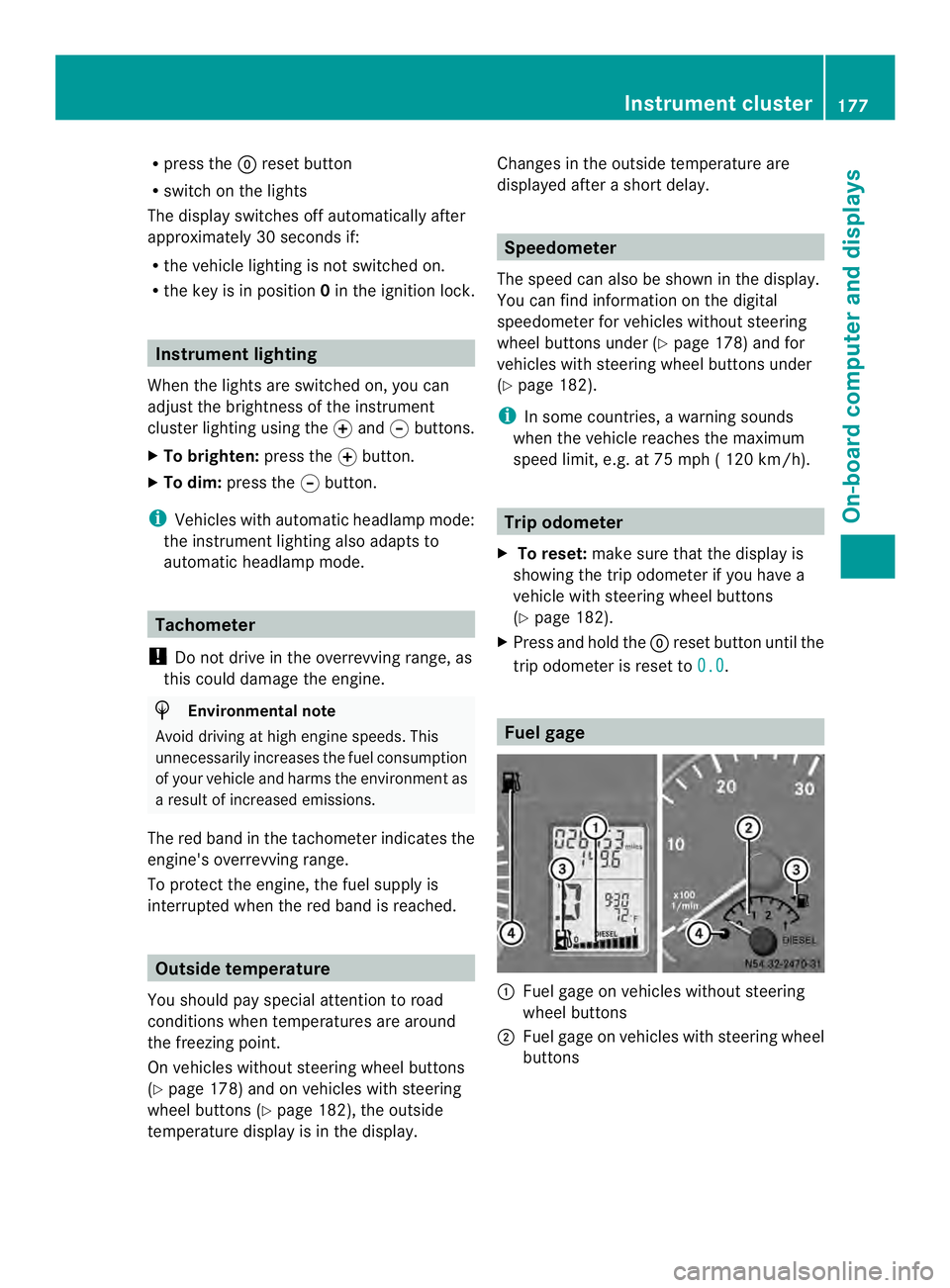
Fuel gage
0005
Fuel gage on vehicles without steering
wheel buttons
0006 Fuel gage on vehicles with steering wheel
buttons Instrument cluster
177On-board computer and displays Z
Page 180 of 334
0026
Fuel fille rflap location indicator 000F: the
fuel filler flap is on the left-hand side. Fuel
filler flap location indicator 001E:the fuel
filler flap is on the right-hand side
0025 Reserve fuel warning lamp (Y page 216)DEF gauge
Vehicles without steering wheel
buttons If the supply of DEF is less than 1.5 US gal
(5.5 l), the 0009indicator lamp lights up and
the 0002dEF Chk display message appears.
If the supply of DEF falls below the reserve
range of 0.8 US gal (3.0 l), the 0009indicator
lamp lights up and the 0002StArtS RExxdisplay message appears. In the display,
xxcorresponds to the number of possible
remaining engine starts (16
to
0 ).
Further information on DEF consumption can
be found in the "Service products and filling
capacity" section (Y page 320).
Vehicles with steering wheel buttons If the supply of DEF is less than 1.5 US gal
(5.5 l), the Check Diesel Exhaust Fluid See Operator's Manual message is shown
in the display.
If the supply of DEF falls below the reserve
range of 0.8 US gal (3.0 l), the 0009xxstarts remaining message is displayed. In
the display, xx corresponds to the number of
possible remaining engine starts (16 to
0 ).
Further information on DEF consumption can
be found in the "Service products and filling
capacity" section (Y page 320). On-board computer (vehicles without
steering wheel buttons)
Operating the on-board computer
General notes The on-board computer is activated as soon
as you turn the key to position
1in the ignition
lock.
The on-board computer shows vehicle
information and settings in the display.
You can control the displaya nd the settings
in the on-board compute rusing the
adjustment buttons on the instrument
cluster.
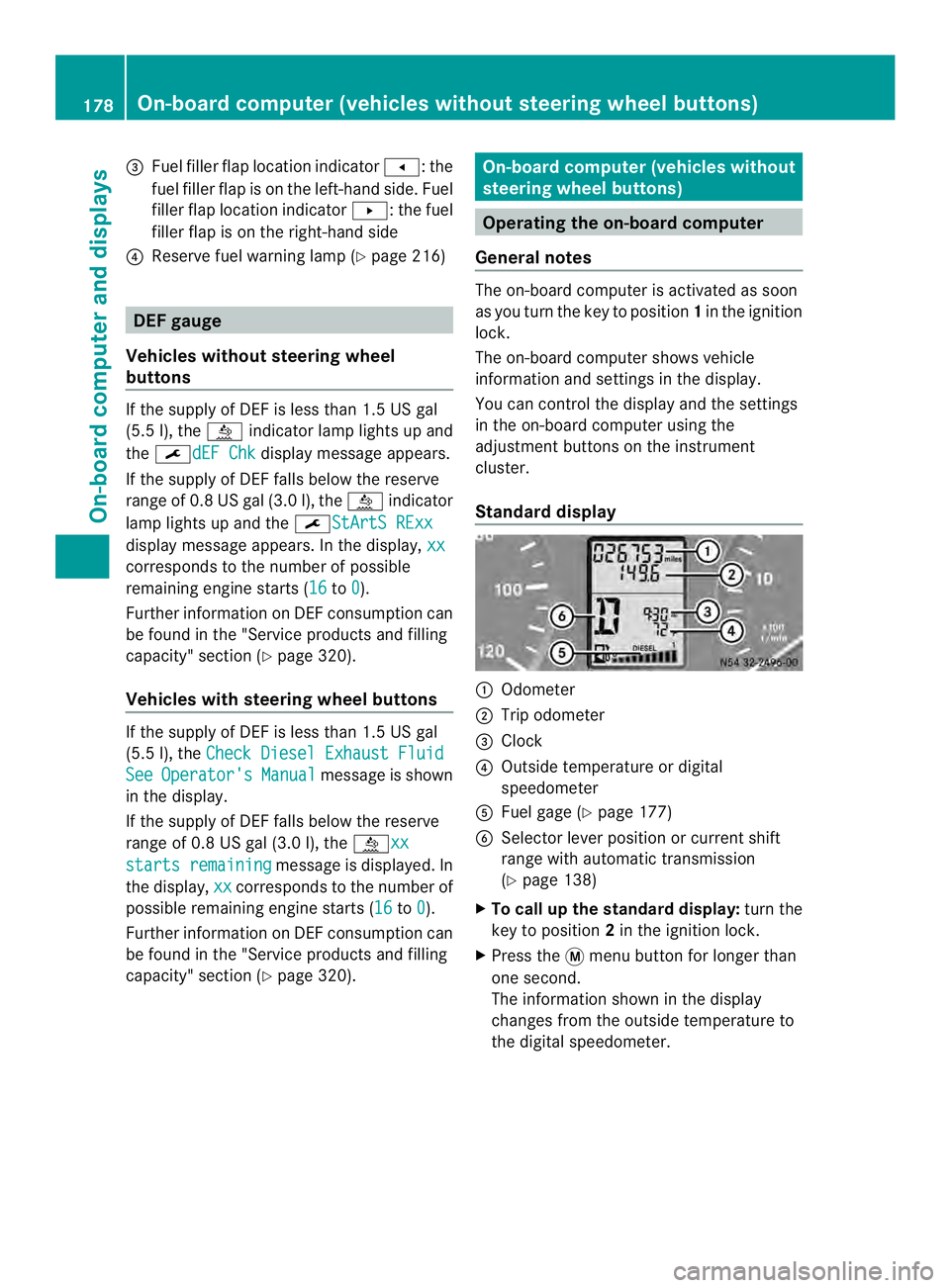
Standard display 0005
Odometer
0006 Trip odometer
0026 Clock
0025 Outside temperature or digital
speedometer
0023 Fuel gage (Y page 177)
0024 Selector lever position or current shift
range with automatic transmission
(Ypage 138)
X To call up the standard display: turn the
key to position 2in the ignition lock.
X Press the 0004menu button for longer than
one second.
The information shown in the display
changes from the outside temperature to
the digital speedometer. 178
On-board computer (vehicles without steering wheel buttons)On-board computer and displays
Page 192 of 334
i
When you call up the trip computer again,
it displays the last function called up.
The units of the statistical information
displayed are set permanently for each
specific country, and are therefore
independen tofthe units selected in the
Settings menu.
Trip computer "After start" or "After
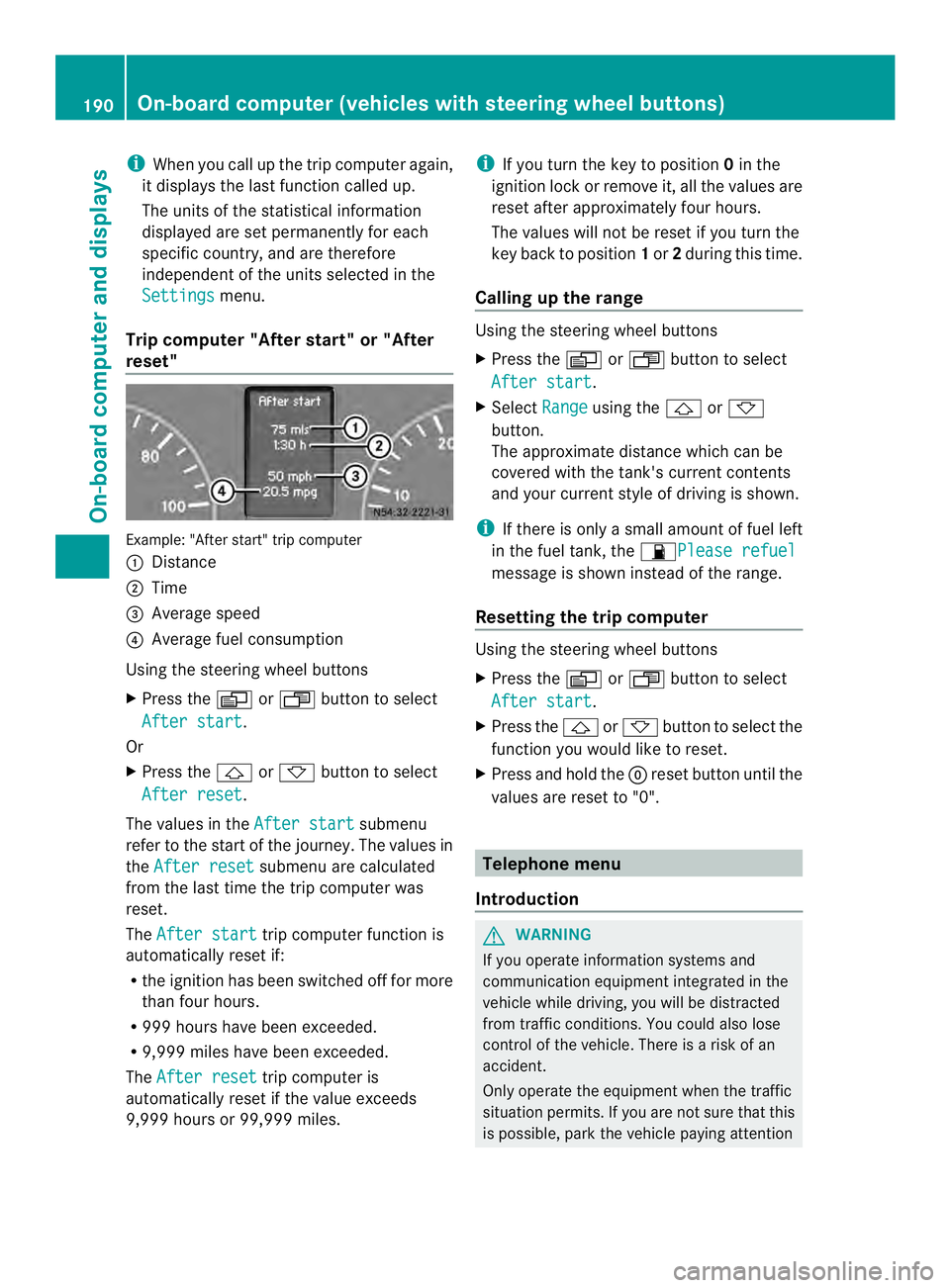
reset" Example: "After start" trip computer
0005
Distance
0006 Time
0026 Average speed
0025 Average fuel consumption
Using the steering wheel buttons
X Press the 0010or0007 button to select
After start .
Or
X Press the 0001or0009 button to select
After reset .
The values in the After start submenu
refer to the start of the journey. The values in
the After reset submenu are calculated
from the last time the trip computer was
reset.
The After start trip computer function is
automatically reset if:
R the ignition has been switched off for more
than four hours.
R 999 hours have been exceeded.
R 9,999 miles have been exceeded.
The After reset trip computer is
automatically reset if the value exceeds
9,999 hours or 99,999 miles. i
If you turn the key to position 0in the
ignition lock or remove it, all the values are
reset after approximately four hours.
The values will not be reset if you turn the
key back to position 1or 2during this time.
Calling up the range Using the steering wheel buttons
X
Press the 0010or0007 button to select
After start .
X Select Range using the
0001or0009
button.
The approximate distance which can be
covered with the tank's current contents
and your current style of driving is shown.
i If there is only a small amount of fuel left
in the fuel tank, the 0016Please refuel message is shown instead of the range.
Resetting the trip computer Using the steering wheel buttons
X
Press the 0010or0007 button to select
After start .
X Press the 0001or0009 button to select the
function you would like to reset.
X Press and hold the 0007reset button until the
values are reset to "0". Telephone menu
Introduction G
WARNING
If you operate information systems and
communication equipment integrated in the
vehicle while driving, you will be distracted
from traffic conditions. You could also lose
control of the vehicle. There is a risk of an
accident.
Only operate the equipment when the traffic
situation permits. If you are not sure that this
is possible, park the vehicle paying attention 190
On-board computer (vehicles with steering wheel buttons)On-board computer and displays