parking brake MERCEDES-BENZ SPRINTER 2013 MY13 Operator’s Manual
[x] Cancel search | Manufacturer: MERCEDES-BENZ, Model Year: 2013, Model line: SPRINTER, Model: MERCEDES-BENZ SPRINTER 2013Pages: 334, PDF Size: 3.88 MB
Page 150 of 334
Bear in mind that at a speed of just 30 mph
(approximately 50 km/h), your vehicle covers
a distance of 44 feet (approximatel
y14 m)
every second. G
WARNING
If you switch off the ignition while driving,
safety-relevant functions are only available
with limitations, or not at all. This could affect,
for example, the power steering and the brake
boosting effect. You will require considerably
more effort to steer and brake .There is a risk
of an accident.
Do not switch off the ignition while driving.
! Always observe the ground clearance of
the vehicle and avoid obstacles. On
vehicles with a step, ground clearance is
further restricted. Obstacles can damage
the vehicle.
If you must drive over obstacles, drive
especially slowly and carefully. If
necessary, have another person direct you.
Drive sensibly–s ave fuelIn orde
rto save fuel, observe the following
tips:
X The tires should always be inflated to the
recommended tire pressure.
X Remove unnecessary loads.
X Remove roof carriers when they are not
needed.
X Warm up the engine at low engine speeds.
X Avoid frequent acceleration or braking.
X Have all maintenance work carried out as
indicated by the service intervals in the
Maintenance Booklet or by the service
interval display.
Fuel consumption also increases when
driving in cold weather, in stop-start traffic
and in mountainous terrain. Overrun cutoff If you are in overrun mode and take your foot
off the accelerator pedal, the fuel supply is
cut off when the engine speed is out of the
idle speed control range.
Drinking and driving
G
WARNING
Drinking and driving and/or taking drugs and
driving are very dangerous combinations.
Even a small amount of alcohol or drugs can
affect your reflexes, perceptions and
judgment.
The possibility of a serious or even fatal
accident are greatly increased when you drink
or take drugs and drive.
Do not drink or take drugs and drive or allow
anyone to drive who has been drinking or
taking drugs.
Emission control G
WARNING
Combustion engines emit poisonous exhaust
gases such as carbon monoxide. Inhaling
these exhaust gases leads to poisoning. There
is a risk of fatal injury. Therefore never leave
the engine running in enclosed spaces
without sufficient ventilation.
Certain engine systems are designed to keep
the level of poisonous substances in exhaust
fumes within legal limits.
These systems only work optimally if they are
maintained exactly in accordance with the
manufacturer's specifications. Any work on
the engine should therefore be carried out by
qualified and authorized technicians at a
Sprinter dealer.
The engine settings must not be changed
under any circumstances. In addition, all
specific maintenance work must be carried
out at regular intervals and in accordance
with the service requirements of the dealer 148
Driving tipsDriving and parking
Page 152 of 334
cross the border, bu
tas close to it as
possible.
When you return from your journey, and as
close to the border as possible, you will need
to:
R remove the adhesive surfaces from your
halogen headlamps and clean the glass of
the headlamps if necessary
R have the Bi-Xenon headlamps reset to
asymmetrical low beam at aqualified
specialist workshop Transport by rail
Transporting your vehicle by rail may be
subject to certain restrictions or require
special measures to be taken in some
countries due to varying tunnel heights and
loading standards.
You can obtain further information from any
authorized Sprinte rdealer. Braking
Important safety notes G
WARNING
If you shift down on a slippery road surface in
an attempt to increase the engine's braking
effect, the drive wheels could lose their grip.
There is an increased danger of skidding and
accidents.
Do not shift down for additional engine
braking on a slippery road surface.
Downhill gradients !
Depressing the brake pedal constantly
results in excessive and premature wear to
the brake pads.
On long and steep downhill gradients, you
should change down to shift range 0009or0008
in good time. This should be observed in
particular when driving with a laden vehicle
and when towing a trailer. i
You must also change the shift range in
good time when cruise control is switched
on.
You thereby make use of the braking effec tof
the engine and do not have to brake as often
to maintain the speed. This relieves the load
on the service brake and prevents the brakes
fro mo verheating and wearing too quickly.
Heavy and light loads G
WARNING
If you rest yourf oot on the brake pedal while
driving, the braking system can overheat. This
increases the stopping distance and can even
cause the braking system to fail. There is a
risk of an accident.
Never use the brake pedal as a footrest .Never
depress the brake pedal and the accelerator
pedal at the same time.
! Depressing the brake pedal constantly
results in excessive and premature wear to
the brake pads.
If the brakes have been subjected to a heavy
load, do not stop the vehicle immediately.
Drive on for a short while. The brakes are
cooled down more quickly in the airflow.
Wet road surfaces If you have been driving for a long time in
heavy rain without braking
,there may be a
delayed response when you first apply the
brakes. This may also occur after driving
through a car wash or deep water.
You must depress the brake pedal more
firmly. Maintain a longer distance to the
vehicle in front.
While paying attention to the traffic
conditions, you should brake the vehicle
firmly after driving on a wet road surface or
through a car wash. This heats the brake
discs, so that they dry more quickly, which
protects them against corrosion. 150
Driving tipsDriving and parking
Page 153 of 334
Limited braking performance on salt-
treated roads When driving on salted roads, salt may start
to build up on the brak edisks and brake pads.
This can increase braking distances
considerably.
Maintain a greater distanc eto the vehicle in
front.
To remove any build up of salt that may have
formed:
X Apply the brakes at the start of the journey,
occasionally during journey and at the end
of the journey. Make sure that you do not
endanger other road users when doing so.
Parking brake G
WARNING
If you must brake the vehicle with the parking
brake, the braking distance is considerably
longer and the wheels could lock. There is an
increased danger of skidding and accidents.
Only use the parking brake to brake the
vehicle when the service brake is faulty. Do
not apply the parking brake too firmly. If the
wheels lock, release the parking brake until
the wheels begin turning again.
When driving on wet roads or dirt-covered
surfaces, road salt and/or dirt may get into
the parking brake. This causes corrosion and
a reduction of braking force.
In order to prevent this, drive with the parking
brake lightly applied from time to time. When
doing so, drive for a distance of approximately
110 yds (100 m) at a maximum speed of
12 mph (20 km/h).
The brake lamps are not illuminated when you
brake the vehicle using the parking brake. Driving in wet conditions
Hydroplaning G
WARNING
There is a danger of hydroplaning occurring,
even if you are driving slowly and your tires
have sufficient tread depth, depending on the
depth of water on the road. There is a risk of
an accident.
For this reason, avoid tire ruts and brake
carefully.
Therefore, in heavy rain or other conditions in
which hydroplaning can occur, drive as
follows:
R reduce your speed
R avoid tire ruts
R apply the brakes with care
Driving on flooded roads !
Do not drive through flooded areas.
Check the depth of any water before driving
through it. Drive slowly through standing
water. Otherwise, water may enter the
vehicle interior or the engine compartment.
This can damage the electronic
components in the engine or the automatic
transmission. Water can also be drawn in
by the engine's air suction nozzles and this
can cause engine damage.
If you have to drive on stretches of road on
which water has collected, please bear in
mind that:
R the water level of standing water should not
be above the lower edge of the front
bumper
R do not drive faster than walking speed Driving tips
151Driving and parking Z
Page 155 of 334
Driving off-road
Important safety notes G
WARNING
If you drive on a steep incline at an angle or
turn when driving on an incline, the vehicle
could slip sideways, tip and rollover. There is
a risk of an accident.
Always drive on a steep incline in the line of
fall (straight up or down )and do not turn the
vehicle. G
WARNING
Whe ndriving off-road, yourb ody is subject to
forces from all directions, due to the uneven
surface. You could be thrown from your seat,
for instance. There is a risk of injury.
Always wear a seat belt, even when driving off-
road. G
WARNING
If you drive over obstacles or in ruts, the
steering wheel may jerk out of your grip,
causing injury to your hands.
Always hold the steering wheel firmly with
both hands. When driving over obstacles, you
must expect steering forces to increase
briefly and suddenly. G
WARNING
Flammable materials, e.g. leaves, grass or
branches, may ignite if they come into contact
with hot parts of the exhaust system for
extended periods. There is arisk of fire.
When driving off-road or on unpaved surfaces,
chec kthe underside of the vehicle at regular
intervals. In particular, remove any trapped
parts of plants or other flammable material. If
there is any damage, inform a qualified
specialist workshop.
! When driving off-road or on unpaved
surfaces, check the underside of the
vehicle and the wheels and tires at regular
intervals. In particular, remove any trapped
foreign objects, e.g. stones and branches. Such foreign objects may:
R
damage the chassis, the fuel tank or the
brake system
R cause imbalances and thus vibrations
R be flung out when you continue driving
If there is any damage, inform a qualified
specialist workshop.
When driving off-road and on construction
sites, sand, mud and water mixed with oil, for
example, may get into the brakes. This may
lead to a reduction in braking performance or
total brake failure, also as a result of
increased wear. The braking characteristics
will vary depending on the material that has
got into the system. Cleant he brakes after
driving off-road. If you then notice reduced
braking performance or hear scraping noises,
have the brake system checked at a qualified
specialist workshop. Adjust your driving style
to the changed braking characteristics.
Driving off-road or on construction sites
increases the possibility of vehicle damage
which may in turn lead to the failure of certain
assemblies and systems. Adapt your driving
style to the off-road driving conditions. Drive
carefully. Have any vehicle damage rectified
at a qualified specialist workshop as soon as
possible.
When driving on rough terrain, do not shift the
transmission into the neutral position. You
could lose control when attempting to brake
the vehicle with the service brake. If your
vehicle cannot manage an uphill slope, drive
back down the slope in reverse gear.
When loading your vehicle for driving off-road
or on a construction site, keep the vehicle's
center of gravity as low as possible.
Rules for driving off-road !
Always bear the vehicle's ground
clearance in mind and avoid obstacles, e.g.
deep ruts. Driving tips
153Driving and parking Z
Page 156 of 334
Obstacles may damage the following parts
of the vehicle:
R
the chassis
R the drive train
R the fuel and supply tanks
For this reason, you should always drive
slowly when driving off-road. If you have to
drive over obstacles, have the co-driver
direct you.
i We recommend that you additionally
carry a shovel and a recovery rope with
shackle in the vehicle.
R Ensure that loads and items of luggage are
securely stowed or lashed down
(Y page 232).
R Before driving off-road, stop the vehicle and
shift to a low gear.
R If the surface demands it, temporarily
deactivate ASR when pulling away
(Y page 58).
R Only drive off-road with the engine running
and a gear engaged.
R Drive slowly and smoothly. Walking pace is
necessary in many situations.
R Avoid spinning the drive wheels.
R Make sure that the wheels always remain
in contact with the ground.
R Drive with extreme care over unknown
terrain where you can only see for a short
distance. As a precaution, get out of the
vehicle to take a look at the route to be
taken in advance.
R Check the water depth before fording.
R Watch out for obstacles (e.g. rocks, holes,
tree stumps and ruts).
R Avoid edges where the surface could
crumble or break away.
Checklist after driving off-road !
If you detect damage to the vehicle after
driving off-road, have the vehicle checked
immediately at a qualified specialist
workshop. Off-road driving places a higher demand on
your vehicle than normal road operation.
Check your vehicle after driving on rough
terrain. By doing so you will notice any
damage in good time and reduce the risk of
an accident for yourselfa
nd otherroad users.
Clean your vehicle thoroughly before driving
on public roads.
Observe the following points after driving off-
road, on construction sites and before driving
on public roads:
X Activate ASR (Y page 58).
X Clean the headlamps and tail lamps and
check them for damage.
X Clean the front and rear license plates.
X Clean the windshield, windows and exterior
mirrors.
X Clean the steps, door sills and grab
handles.
This increases safety of footing.
X Clean the wheels/tires, wheel housings
and the underbody of the vehicle with a
water jet.
This increases road grip, especially on wet
road surfaces.
X Check the wheels/tires and wheel
housings for trapped foreign objects and
remove them.
Trapped foreign objects can damage the
wheels/tires and may be flung out from the
vehicle when you continue driving.
X Check the underbody for trapped branches
or other parts of plants and remove them.
Trapped branches or other parts of plants
increase the risk of fire and can cause
damage to fuel lines, brake hoses and the
rubber bellows of axle jointsa nd drive
shafts.
X Clea nthe brake disks, brake pads and axle
joints, particularly after operation in sand,
mud, grit/gravel, water or similarly dirty
conditions.
X Check the entire floor assembly, the tires,
wheels, bodywork structure, brakes, 154
Driving tipsDriving and parking
Page 157 of 334
steering, chassis and exhaust system for
any damage.
X Check the service brake for operating
safety, e.g. carry out a brake test.
X If you notice strong vibrations after driving
off-road, check the wheels and drive train
for foreign objects again. Remove any
foreign objects which can lead to
imbalances and thus cause vibrations. Driving systems
Cruise control
Important safety notes Observe the notes on braking in the "Driving
tips" section (Y
page 150).
If you fail to adapty our driving style or if you
are inattentive, cruise control can neither
reduce the risk of an accident nor override the
laws of physics. Cruise control cannot take
road, weather and traffic conditions into
account .Cruise control is only an aid.Y ou are
responsible for the distance to the vehicle in
front, for vehicle speed and for braking in
good time.
Do not use cruise control:
R in traffic conditions that are unsuitable for
driving at a constant speed, e.g. in heavy
traffic, on winding roads or off-road
R on slippery roads. Brakin goraccelerating
may cause the drive wheel sto lose traction
and the vehicle could then skid.
R when there is poor visibility, e.g. due to fog,
heavy rain or snow
If there is a change of drivers, make sure that
you inform the new driver about the set cruise
speed.
General notes Cruise control maintains the speed of the
vehicle for you.
Use cruise control if road and traffic
conditions make it appropriate to maintain a steady speed for a prolonged period. You can
set any speed from 20 mph upwards in
increments of 1 mph.
Use cruise control if road and traffic
conditions make it appropriate to maintain a
steady speed for a prolonged period. You can
set any speed from 20 mph upwards in
increments of 1 mph.
i
If you have set km/h as the unit for the
digital speedometer (Y page 185), you can
set any speed from 30 km/h upwards in
increments of 1 km/h.
i Cruise control should not be activated
when driving off-road or on construction
sites.
Cruise control may not be able to maintain
the stored speed on uphill or downhill
gradients. If the gradient evens out and the
vehicle's speed does not fall below 20 mph
(30 km/h), the stored speed is resumed.
Cruise control lever 0005
To activate and store the current speed or
a higher speed
0006 To activate at the last stored speed
0026 To activate and store the current speed or
a lower speed
0025 To deactivate cruise control
The cruise control lever is the uppermost
lever on the left of the steering column. Driving systems
155Driving and parking Z
Page 158 of 334
LIM indicator lamp
0024shows you which
function you have selected:
R LIM indicator lamp off: cruise control is
selected.
R LIM indicator lamp lit: variable
SPEEDTRONIC is selected.
Activation conditions To activate cruise control, all of the following
activation conditions must be fulfilled:
R the parking brake must be released. The
000B indicator lamp in the instrument
cluster is off
R you are driving faster than 20 mph
(30 km/h)
R the brake pedal is depressed
i Other drive and brake systems not
described in this Operator's Manual, such
as a retarder, may affect cruise control. You
can find information on this in the separate
operating instructions provided by the
body manufacturer.
Storing and maintaining the current
speed X
Accelerate the vehicle to the desired speed
above 20 mph (30 km/h).
X Briefly push the cruise control lever up 0005
or down 0026.
X Release the accelerator pedal.
Cruise control is activated. The current
speed is stored.
Resuming the stored speed G
WARNING
If you call up the stored speed and it differs
from the current speed, the vehicle
accelerates or decelerates. If you do not know
the stored speed, the vehicle could accelerate
or brake unexpectedly .There is a risk of an
accident. Pay attention to the road and traffic
conditions before calling up the stored speed.
If you do not know the stored speed, store the
desired speed again.
X Briefly pull the cruise control lever towards
you 0006.
X Release the accelerator pedal.
Cruise control is activated and resumes the
vehicle's speed to the last speed stored.
i When you pull the cruise control level
towards you for the first time after starting
the engine, cruise control adopts the
current speed.
Setting the speed It may be a moment before the vehicle starts
to accelerate or brake to the set speed. Take
this delay into account when setting the
speed.
X
Briefly push the cruise control lever
upwards 0005to increase the speed or
downwards 0026to reduce the speed.
The last speed stored is increased/
reduced in increments of 1 mph (1 km/h).
Or
X Press and hold the cruise control lever
up 0005 or down 0026until the desired speed
has been reached.
X Release the cruise control lever.
The current speed is stored.
i Cruise control is not deactivated if you
depress the accelerator pedal. If you
accelerate briefly to overtake, for example,
cruise control resumes the vehicle’s speed
to the last speed stored after you have
finished overtaking. 156
Driving systemsDriving and parking
Page 159 of 334
Deactivating cruise control
There are various ways to deactivate cruise
control:
X Briefly press the cruise control lever
forwards 0025.
Or
X Apply the brakes.
The last speed set remains stored. The last
speed stored is deleted when you switch off
the engine.
Cruise control is deactivated automatically
when:
R you apply the brakes
R you apply the parking brake and the 000B
indicator lamp in the instrument cluster
lights up
R you are driving slower than 20 mph
(30 km/h)
R you shift the automatic transmissio nto
neutral position Nwhile the vehicle is in
motion
R ESP ®
or ASR intervenes
R there is a malfunction in the ESP ®
, ASR or
ABS system
Problems with cruise control On vehicles with steering wheel buttons, the
speed canno
tbe set when cruise control is
activated.
The display is showing a message of high
priority and cannot therefore show a change
in speed.
X Proceed as instructed by the message in
the display.
X Deactivate cruise control PARKTRONIC
Important safety notes PARKTRONIC is only an aid. It cannot replace
your own awareness of the immediate
surroundings. You are responsible for safe maneuvering, parking and pulling away. When
maneuvering, parking and pulling away, make
sure that there are no persons, animals or
objects in the maneuverin
garea.
PARKTRONIC does not account for obstacles
that are:
R beneath its detection range, e.g. persons,
animals or objects
R above its detection range, e.g. overhanging
loads, overhangs or truck loading ramps
PARKTRONIC is an electronic parking aid with
ultrasonic sensors. It indicates the distance
between yourv ehicle and an objec tvisually
and audibly.
Your vehicle features two separate sound
emitters with different frequencies for the
warning tones. The warning ranges in front of
and behind the vehicle are indicated by
different warning tones.
PARKTRONIC is activated automatically when
you:
R tur nthe key to position 2in the ignition lock
R release the parking brake and
R move the selector lever to D,Nor R.
PARKTRONIC is deactivated at speeds above
11 mph (18 km/h). PARKTRONIC is
reactivated at speeds below 10 mph
(16 km/h).
PARKTRONIC monitors the area around your
vehicle with sensors in the front and rear
bumpers.
Range of the sensors !
Pay particular attention to obstacles
above or below the sensors when parking,
such as flower pots or trailer towbars.
PARKTRONIC does not recognize such
objects when they are in the immediate
vicinity of the vehicle. You could damage
the vehicle or objects. Driving systems
157Driving and parking Z
Page 160 of 334
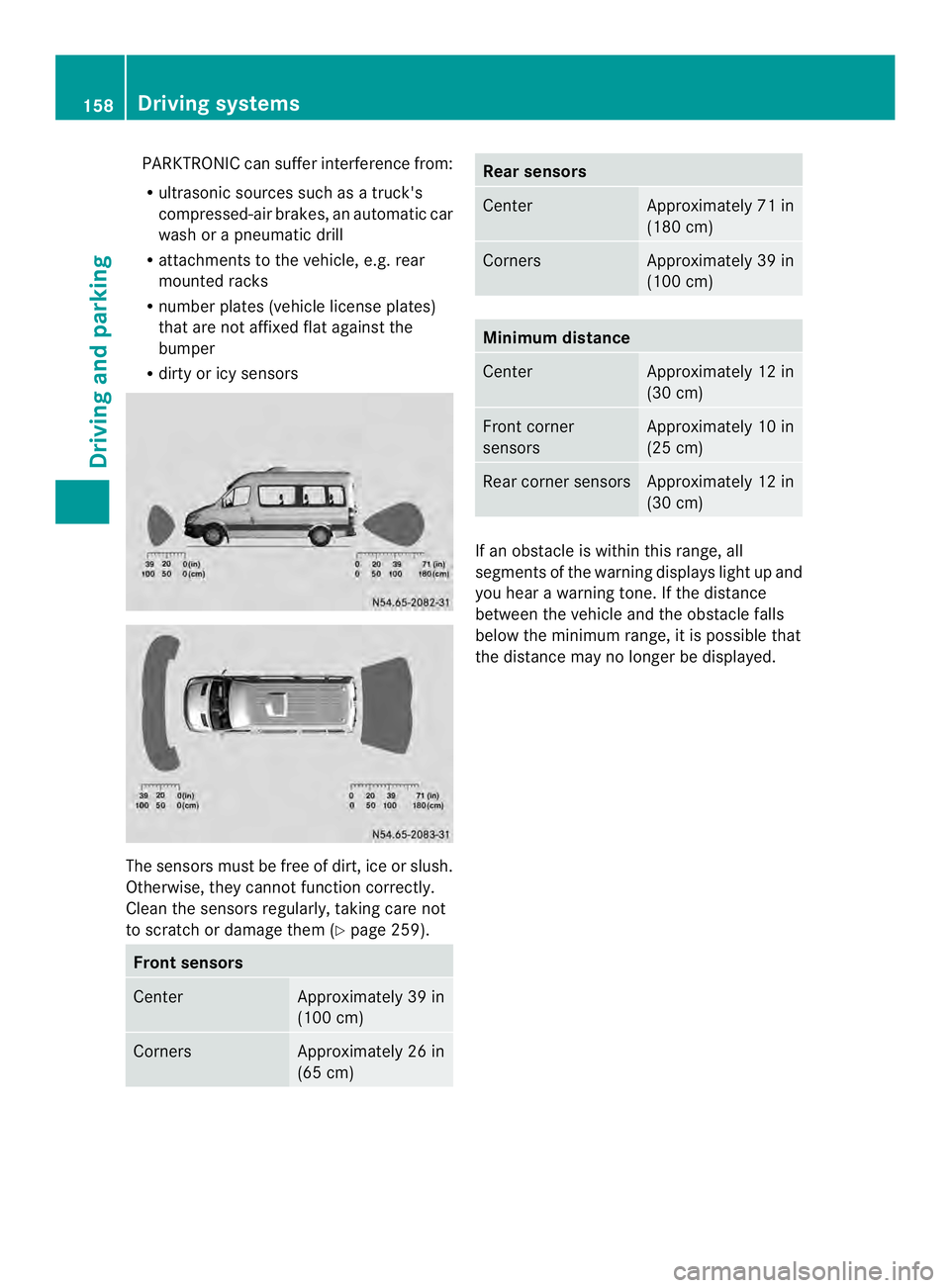
PARKTRONIC can suffer interferenc
efrom:
R ultrasonic sources such as atruck's
compressed-ai rbrakes, an automatic car
wash or a pneumatic drill
R attachments to the vehicle, e.g. rear
mounted racks
R number plates (vehicle license plates)
that are not affixed flat against the
bumper
R dirty or icy sensors The sensors must be free of dirt, ice or slush.
Otherwise, they cannot function correctly.
Clean the sensors regularly, taking care not
to scratch or damage them (Y
page 259).Fron
tsensors Center Approximately 39 in
(100 cm)
Corners Approximately 26 in
(65 cm) Rea
rsensors Center Approximately 71 in
(180 cm)
Corners Approximately 39 in
(100 cm)
Minimum distance
Center Approximately 12 in
(30 cm)
Front corner
sensors Approximately 10 in
(25 cm)
Rear corner sensors Approximately 12 in
(30 cm)
If an obstacle is within this range, all
segments of the warning displays light up and
you hear a warning tone. If the distance
between the vehicle and th
eobstacle falls
below the minimum range, it is possible that
the distance may no longer be displayed. 158
Driving systemsDriving and parking
Page 164 of 334
for safe maneuvering and parking. When
maneuvering and parking, make sure that
there are no persons, animals or objects in
the maneuvering area.
The rear view camera is
avisual parking aid.
It shows you the area behind the vehicle on a
separate monitor on the center console.
The camera is in the middle of the roof above
the high-mounted brake lamp (Y page 259).
The rear view camera may show obstacles in
perspectival distortion, incorrectly or not at
all. The rear view camera cannot display all
objects located very near and/or under the
rear bumper. It does not warn you of a
collision, persons or objects.
The area behind the vehicle is displayed in a
mirrored fashion, as in the rear-view mirror or
the exterior mirrors. The guide lines displayed
assist you in backing up.
The function of the rear view camera may be
partially or completely impaired in the
following circumstances:
R it is raining very heavily or snowing, or it is
foggy.
R the parking space is located in a very dark
place.
R the camera is exposed to very strong white
light .White stripes may appearont he
display.
R the surrounding area is illuminated with
fluorescent light. The displaym ay flicker.
R if the temperature changes very quickly, for
example if you drive int oaheated garage
in the winter.
R ambient temperatures are very high.
R the camera lens is dirty or obstructed.
R the rear of the vehicle is damaged. In this
case, have the position and setting
checked at a specialist workshop.
The rear view camera is switched on when
you engage reverse gear R.
You can find information on cleaning the
camera in the "Maintenance and care"
section (Y page 259). Monitor
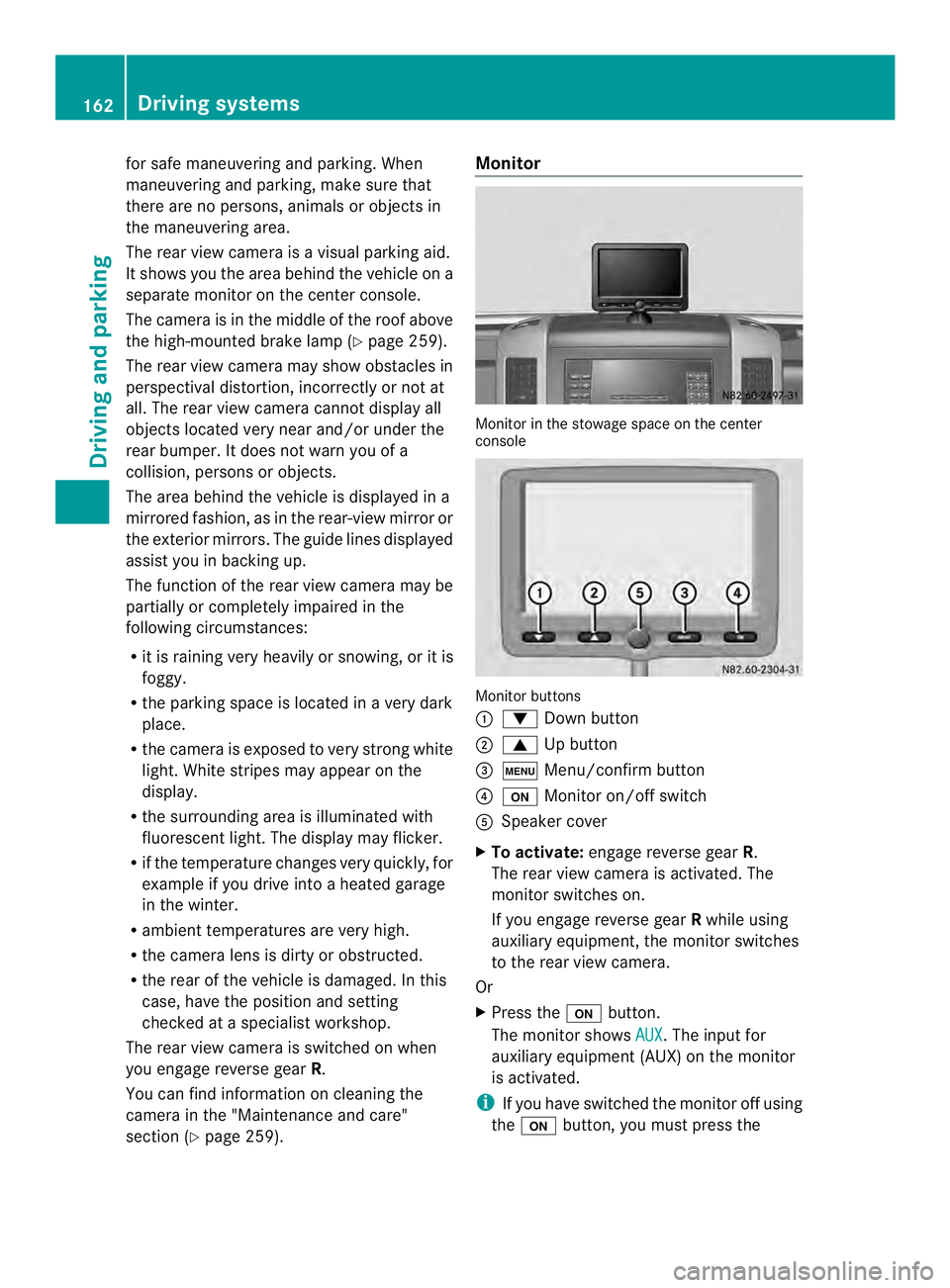
Monitor in the stowage space on the center
console
Monitor buttons
0005
0008 Down button
0006 0006 Up button
0026 0003 Menu/confirm button
0025 0004 Monitor on/off switch
0023 Speaker cover
X To activate: engage reverse gear R.
The rear view camera is activated. The
monitor switches on.
If you engage reverse gear Rwhile using
auxiliary equipment, the monitor switches
to the rear view camera.
Or
X Press the 0004button.
The monitor shows AUX .T
he input for
auxiliary equipment (AUX) on the monitor
is activated.
i If you have switched the monitor off using
the 0004 button, you must press the 162
Driving systemsDriving and parking