service MERCEDES-BENZ SPRINTER 2013 MY13 Operator’s Manual
[x] Cancel search | Manufacturer: MERCEDES-BENZ, Model Year: 2013, Model line: SPRINTER, Model: MERCEDES-BENZ SPRINTER 2013Pages: 334, PDF Size: 3.88 MB
Page 155 of 334
Driving off-road
Important safety notes G
WARNING
If you drive on a steep incline at an angle or
turn when driving on an incline, the vehicle
could slip sideways, tip and rollover. There is
a risk of an accident.
Always drive on a steep incline in the line of
fall (straight up or down )and do not turn the
vehicle. G
WARNING
Whe ndriving off-road, yourb ody is subject to
forces from all directions, due to the uneven
surface. You could be thrown from your seat,
for instance. There is a risk of injury.
Always wear a seat belt, even when driving off-
road. G
WARNING
If you drive over obstacles or in ruts, the
steering wheel may jerk out of your grip,
causing injury to your hands.
Always hold the steering wheel firmly with
both hands. When driving over obstacles, you
must expect steering forces to increase
briefly and suddenly. G
WARNING
Flammable materials, e.g. leaves, grass or
branches, may ignite if they come into contact
with hot parts of the exhaust system for
extended periods. There is arisk of fire.
When driving off-road or on unpaved surfaces,
chec kthe underside of the vehicle at regular
intervals. In particular, remove any trapped
parts of plants or other flammable material. If
there is any damage, inform a qualified
specialist workshop.
! When driving off-road or on unpaved
surfaces, check the underside of the
vehicle and the wheels and tires at regular
intervals. In particular, remove any trapped
foreign objects, e.g. stones and branches. Such foreign objects may:
R
damage the chassis, the fuel tank or the
brake system
R cause imbalances and thus vibrations
R be flung out when you continue driving
If there is any damage, inform a qualified
specialist workshop.
When driving off-road and on construction
sites, sand, mud and water mixed with oil, for
example, may get into the brakes. This may
lead to a reduction in braking performance or
total brake failure, also as a result of
increased wear. The braking characteristics
will vary depending on the material that has
got into the system. Cleant he brakes after
driving off-road. If you then notice reduced
braking performance or hear scraping noises,
have the brake system checked at a qualified
specialist workshop. Adjust your driving style
to the changed braking characteristics.
Driving off-road or on construction sites
increases the possibility of vehicle damage
which may in turn lead to the failure of certain
assemblies and systems. Adapt your driving
style to the off-road driving conditions. Drive
carefully. Have any vehicle damage rectified
at a qualified specialist workshop as soon as
possible.
When driving on rough terrain, do not shift the
transmission into the neutral position. You
could lose control when attempting to brake
the vehicle with the service brake. If your
vehicle cannot manage an uphill slope, drive
back down the slope in reverse gear.
When loading your vehicle for driving off-road
or on a construction site, keep the vehicle's
center of gravity as low as possible.
Rules for driving off-road !
Always bear the vehicle's ground
clearance in mind and avoid obstacles, e.g.
deep ruts. Driving tips
153Driving and parking Z
Page 157 of 334
steering, chassis and exhaust system for
any damage.
X Check the service brake for operating
safety, e.g. carry out a brake test.
X If you notice strong vibrations after driving
off-road, check the wheels and drive train
for foreign objects again. Remove any
foreign objects which can lead to
imbalances and thus cause vibrations. Driving systems
Cruise control
Important safety notes Observe the notes on braking in the "Driving
tips" section (Y
page 150).
If you fail to adapty our driving style or if you
are inattentive, cruise control can neither
reduce the risk of an accident nor override the
laws of physics. Cruise control cannot take
road, weather and traffic conditions into
account .Cruise control is only an aid.Y ou are
responsible for the distance to the vehicle in
front, for vehicle speed and for braking in
good time.
Do not use cruise control:
R in traffic conditions that are unsuitable for
driving at a constant speed, e.g. in heavy
traffic, on winding roads or off-road
R on slippery roads. Brakin goraccelerating
may cause the drive wheel sto lose traction
and the vehicle could then skid.
R when there is poor visibility, e.g. due to fog,
heavy rain or snow
If there is a change of drivers, make sure that
you inform the new driver about the set cruise
speed.
General notes Cruise control maintains the speed of the
vehicle for you.
Use cruise control if road and traffic
conditions make it appropriate to maintain a steady speed for a prolonged period. You can
set any speed from 20 mph upwards in
increments of 1 mph.
Use cruise control if road and traffic
conditions make it appropriate to maintain a
steady speed for a prolonged period. You can
set any speed from 20 mph upwards in
increments of 1 mph.
i
If you have set km/h as the unit for the
digital speedometer (Y page 185), you can
set any speed from 30 km/h upwards in
increments of 1 km/h.
i Cruise control should not be activated
when driving off-road or on construction
sites.
Cruise control may not be able to maintain
the stored speed on uphill or downhill
gradients. If the gradient evens out and the
vehicle's speed does not fall below 20 mph
(30 km/h), the stored speed is resumed.
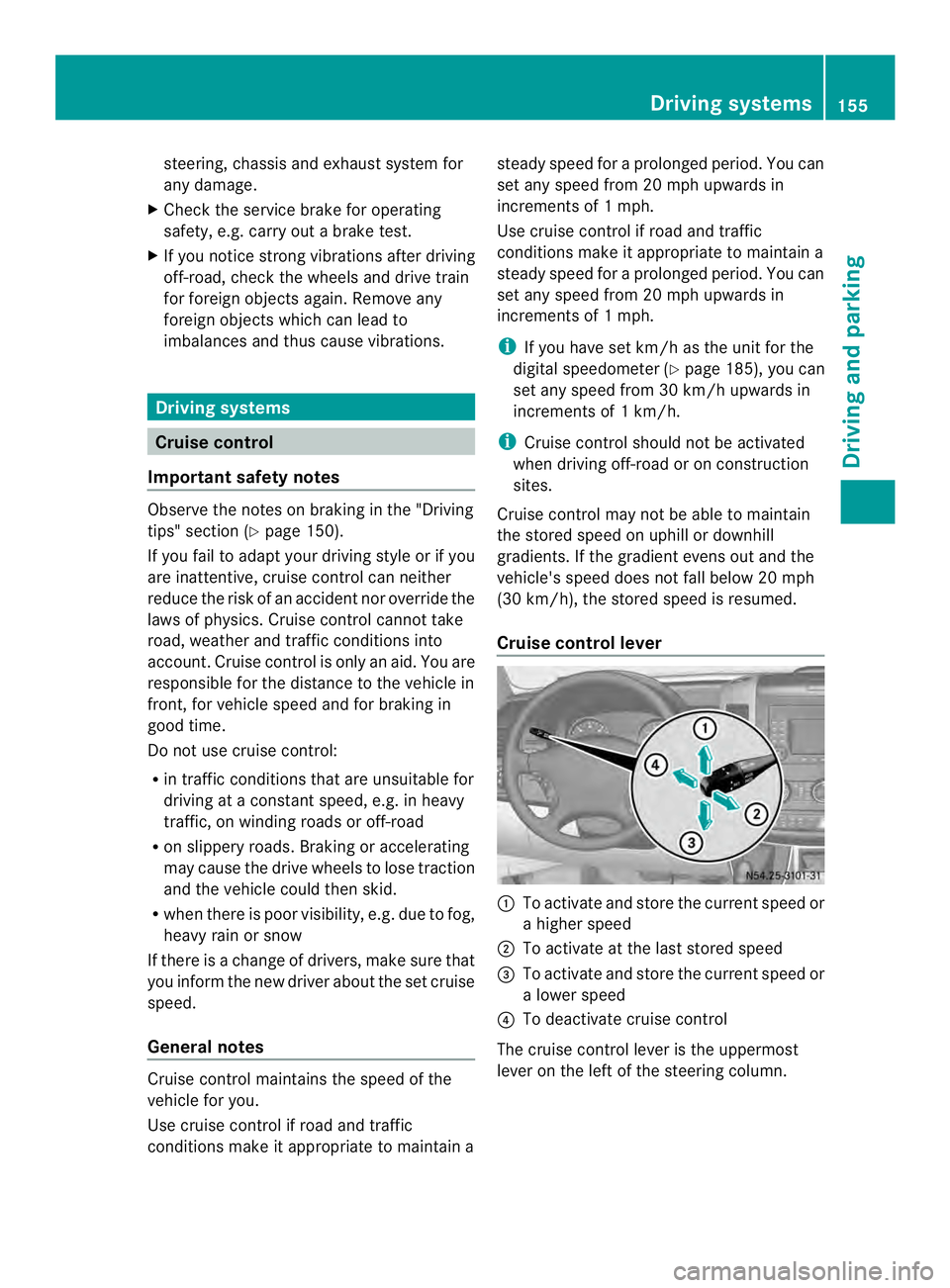
Cruise control lever 0005
To activate and store the current speed or
a higher speed
0006 To activate at the last stored speed
0026 To activate and store the current speed or
a lower speed
0025 To deactivate cruise control
The cruise control lever is the uppermost
lever on the left of the steering column. Driving systems
155Driving and parking Z
Page 178 of 334
Useful information
This Operator's Manual describes all models
as well as standard and optional equipment
of your vehicle that were available at the time
of going to print. Country-specific variations
are possible. Note that your vehicle may not
be equipped with all of the described
functions. This also applies to systems and
functions relevant to safety.
Read the information on qualified specialist
workshops (Y page 26). Important safety notes
G
WARNING
If you are driving and reach through the
steering wheel to operate the adjustment
knob, you could lose control of the vehicle.
There is a risk of an accident and injury.
Only operate the adjustment knobs when the
vehicle is stationary. Do not reach through the
steering wheel when driving. G
WARNING
If you operate information systems and
communication equipment integrated in the
vehicle while driving, you will be distracted
from traffic conditions. You could also lose
control of the vehicle. There is a risk of an
accident.
Only operate the equipment when the traffic
situatio npermits .Ifyou are not sure that this
is possible, park the vehicle paying attention
to traffic conditions and operate the
equipment when the vehicle is stationary. G
WARNING
If the instrument cluster has failed or
malfunctioned, you may not recognize
function restrictions in systems relevant to
safety. The operating safety of your vehicle
may be impaired. There is a risk of an
accident. Drive on carefully. Have the vehicle checked
at a qualified specialist workshop
immediately.
If uncertainties regarding the operating safety
of the vehicle arise when continuing the
journey, stop the vehicle, paying attention to
road and traffic conditions.
You must observe the legal requirements for
the country in which you are currently driving
when operating COMAND. Instrument cluster
Overview
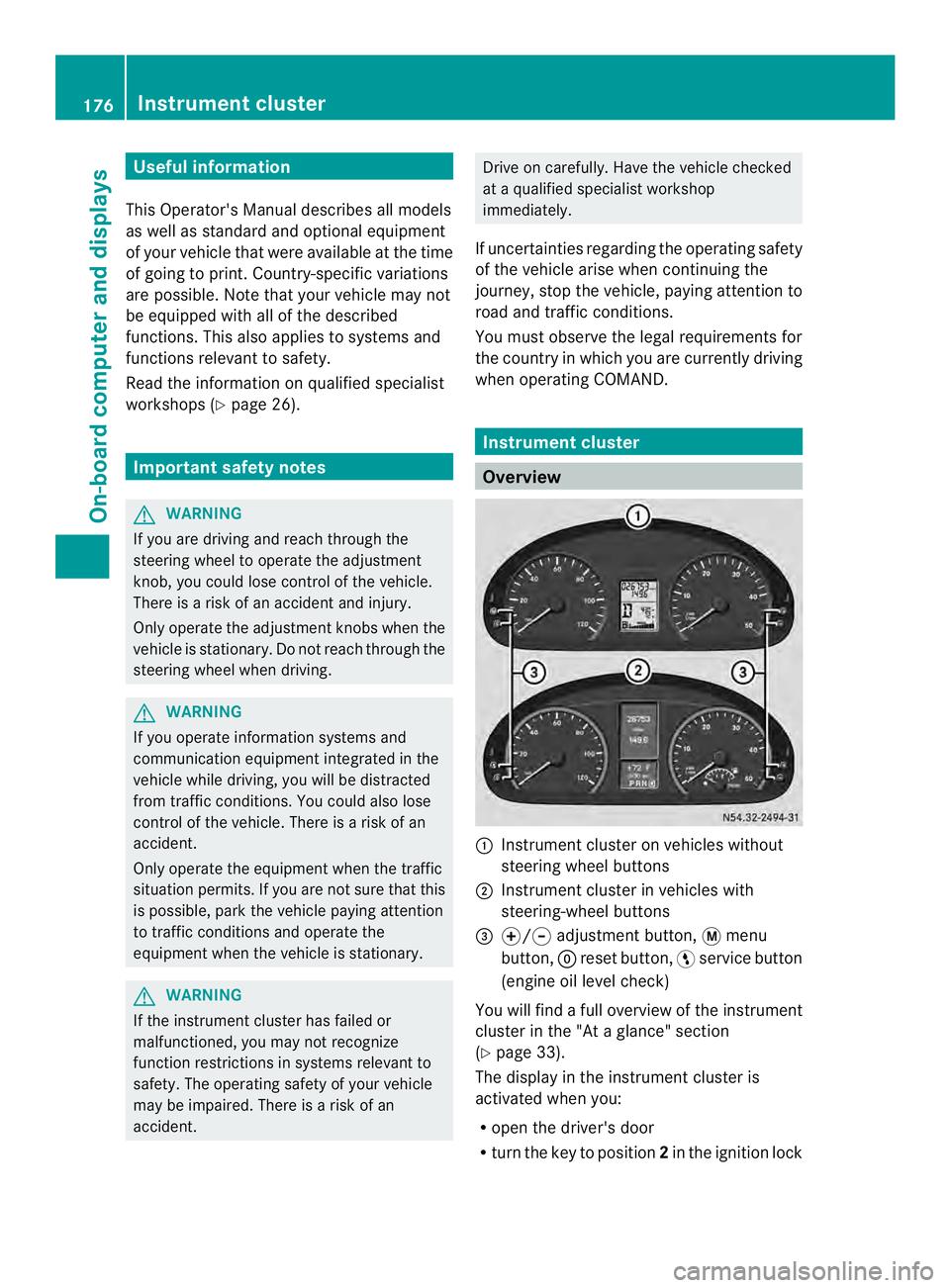
0005
Instrument cluster on vehicles without
steering wheel buttons
0006 Instrument cluster in vehicles with
steering-wheel buttons
0026 000E/000F adjustment button, 0004menu
button, 0007reset button, 0012service button
(engine oil level check)
You will find a full overview of the instrument
cluster in the "At a glance" section
(Y page 33).
The display in the instrument cluster is
activated when you:
R open the driver's door
R turn the key to position 2in the ignition lock 176
Instrument clusterOn-board computer and displays
Page 180 of 334
0026
Fuel fille rflap location indicator 000F: the
fuel filler flap is on the left-hand side. Fuel
filler flap location indicator 001E:the fuel
filler flap is on the right-hand side
0025 Reserve fuel warning lamp (Y page 216)DEF gauge
Vehicles without steering wheel
buttons If the supply of DEF is less than 1.5 US gal
(5.5 l), the 0009indicator lamp lights up and
the 0002dEF Chk display message appears.
If the supply of DEF falls below the reserve
range of 0.8 US gal (3.0 l), the 0009indicator
lamp lights up and the 0002StArtS RExxdisplay message appears. In the display,
xxcorresponds to the number of possible
remaining engine starts (16
to
0 ).
Further information on DEF consumption can
be found in the "Service products and filling
capacity" section (Y page 320).
Vehicles with steering wheel buttons If the supply of DEF is less than 1.5 US gal
(5.5 l), the Check Diesel Exhaust Fluid See Operator's Manual message is shown
in the display.
If the supply of DEF falls below the reserve
range of 0.8 US gal (3.0 l), the 0009xxstarts remaining message is displayed. In
the display, xx corresponds to the number of
possible remaining engine starts (16 to
0 ).
Further information on DEF consumption can
be found in the "Service products and filling
capacity" section (Y page 320). On-board computer (vehicles without
steering wheel buttons)
Operating the on-board computer
General notes The on-board computer is activated as soon
as you turn the key to position
1in the ignition
lock.
The on-board computer shows vehicle
information and settings in the display.
You can control the displaya nd the settings
in the on-board compute rusing the
adjustment buttons on the instrument
cluster.
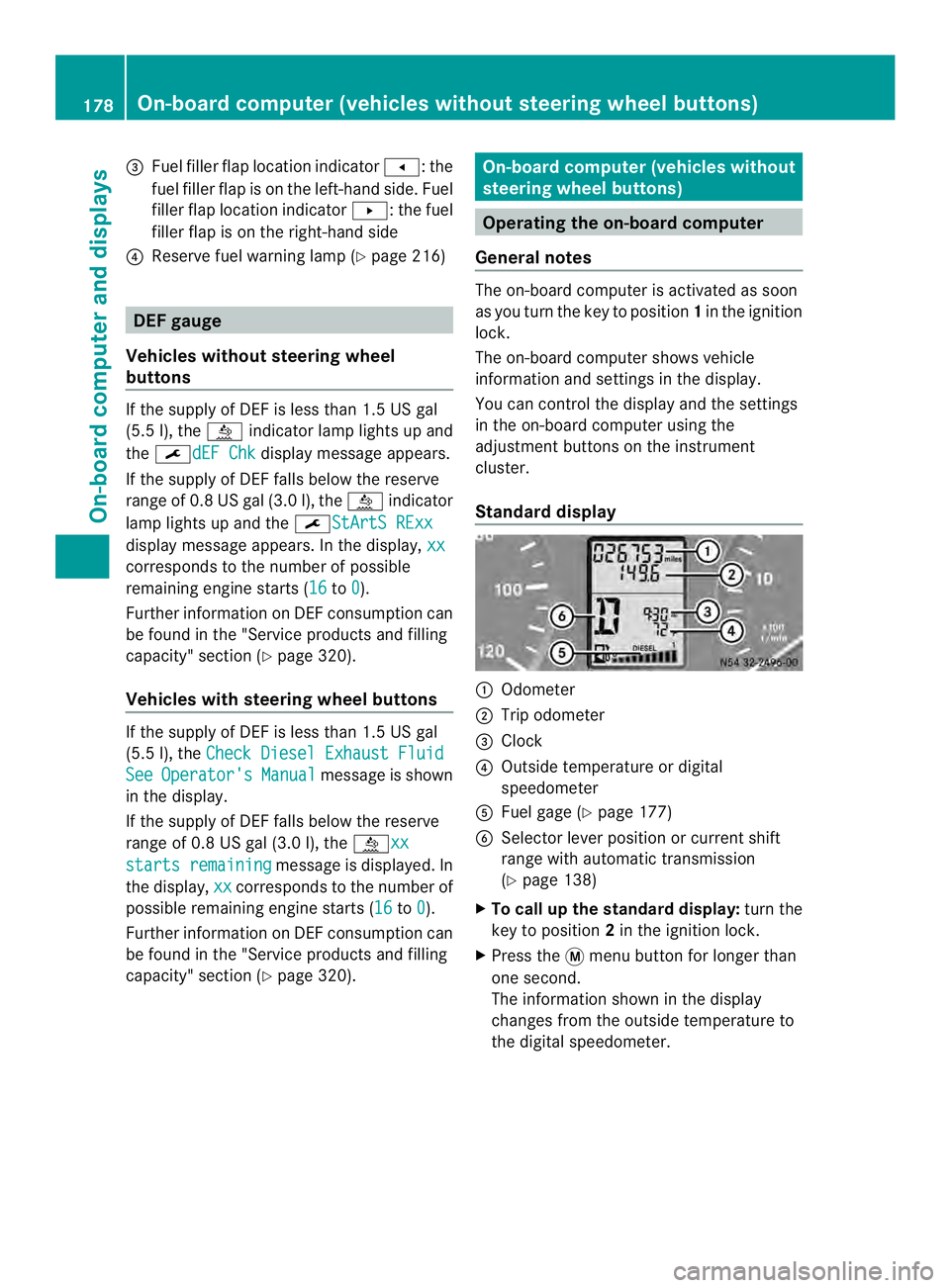
Standard display 0005
Odometer
0006 Trip odometer
0026 Clock
0025 Outside temperature or digital
speedometer
0023 Fuel gage (Y page 177)
0024 Selector lever position or current shift
range with automatic transmission
(Ypage 138)
X To call up the standard display: turn the
key to position 2in the ignition lock.
X Press the 0004menu button for longer than
one second.
The information shown in the display
changes from the outside temperature to
the digital speedometer. 178
On-board computer (vehicles without steering wheel buttons)On-board computer and displays
Page 181 of 334
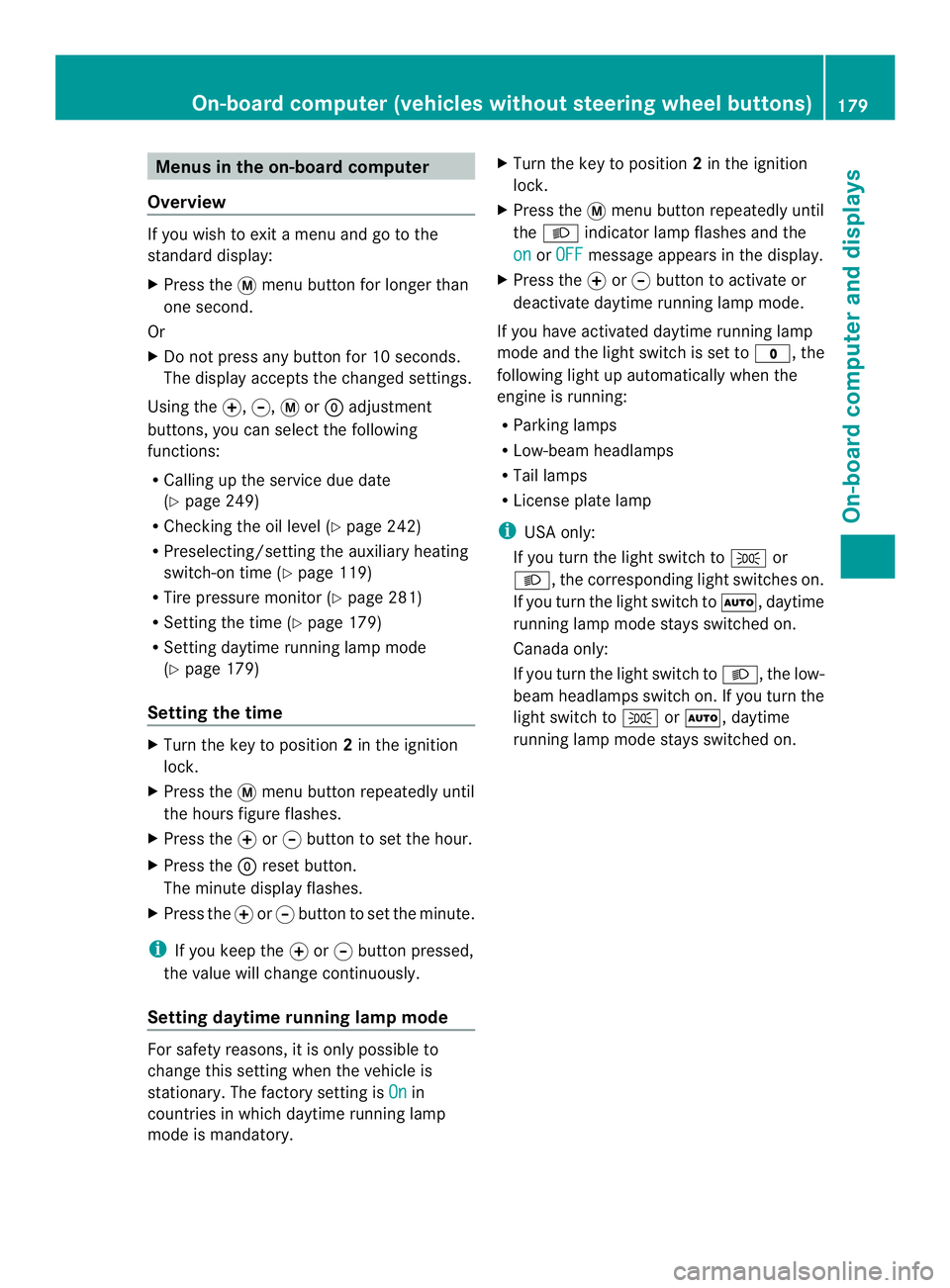
Menus in the on-board computer
Overview If you wish to exit a menu and go to the
standard display:
X Press the 0004menu button for longer than
one second.
Or
X Do not press any button for 10 seconds.
The display accepts the changed settings.
Using the 000E,000F,0004or0007 adjustment
buttons, you can select the following
functions:
R Calling up the service due date
(Y page 249)
R Checking the oil level (Y page 242)
R Preselecting/setting the auxiliary heating
switch-on time ( Ypage 119)
R Tire pressure monitor (Y page 281)
R Setting the time (Y page 179)
R Setting daytime running lamp mode
(Y page 179)
Setting the time X
Turn the key to position 2in the ignition
lock.
X Press the 0004menu button repeatedly until
the hours figure flashes.
X Press the 000Eor000F button to set the hour.
X Press the 0007reset button.
The minute display flashes.
X Press the 000Eor000F button to set the minute.
i If you keep the 000Eor000F button pressed,
the value will change continuously.
Setting daytime running lamp mode For safety reasons, it is only possible to
change this setting when the vehicle is
stationary. The factory setting is
On in
countries in which daytime running lamp
mode is mandatory. X
Turn the key to position 2in the ignition
lock.
X Press the 0004menu button repeatedly until
the 0004 indicator lamp flashes and the
on or
OFF message appears in the display.
X Press the 000Eor000F button to activate or
deactivate daytime running lamp mode.
If you have activated daytime running lamp
mode and the light switch is set to 000C, the
following light up automatically when the
engine is running:
R Parking lamps
R Low-beam headlamps
R Tail lamps
R License plate lamp
i USA only:
If you turn the light switch to 000Bor
0004, the corresponding light switches on.
If you turn the light switch to 0007, daytime
running lamp mode stays switched on.
Canada only:
If you turn the light switch to 0004, the low-
beamh eadlamps switch on. If you turn the
light switch to 000Bor0007, daytime
running lamp mode stays switched on. On-boar
dcomputer (vehicles without steering wheel buttons)
179On-board computer and displays Z
Page 183 of 334
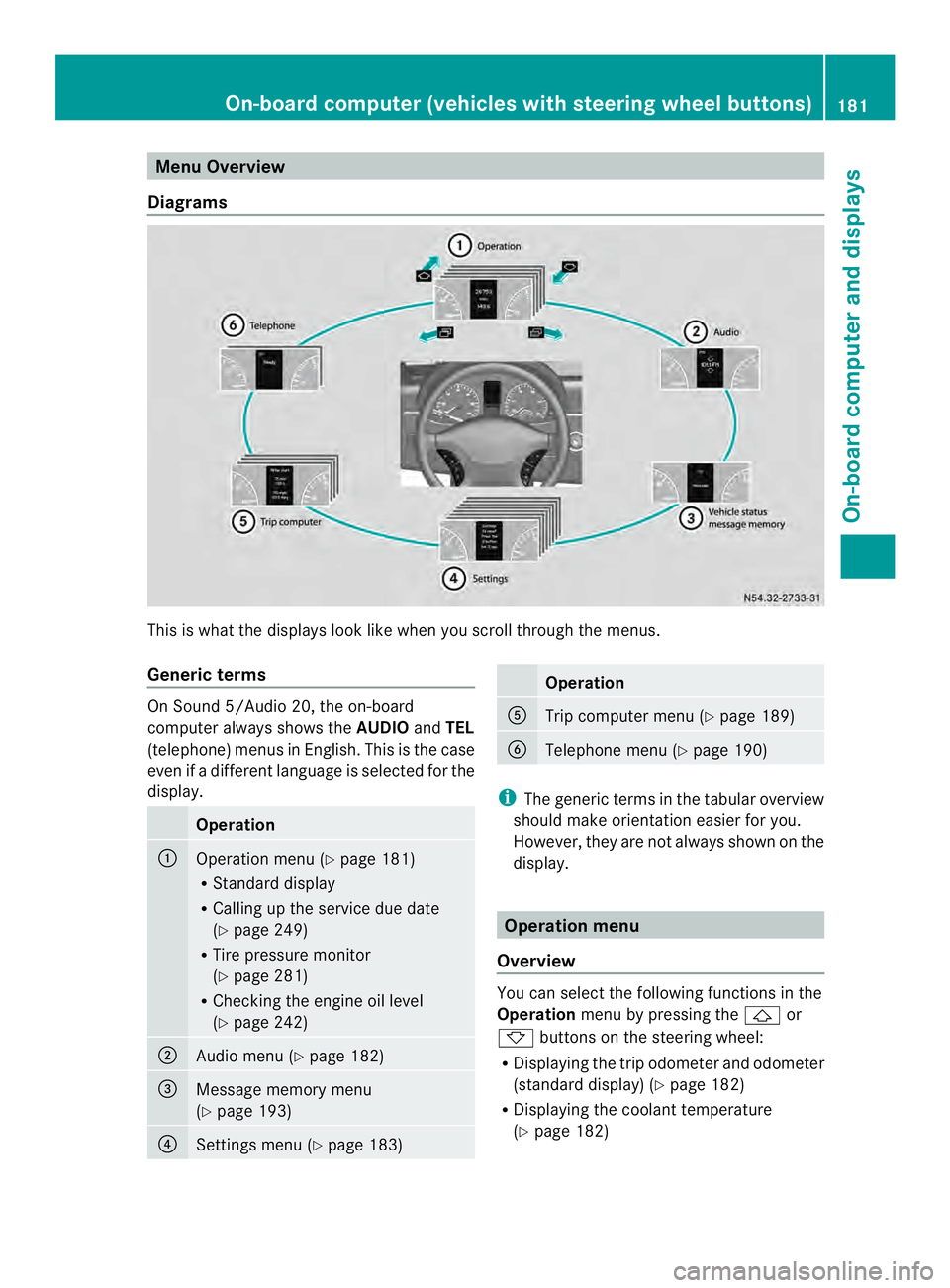
Menu Overview
Diagrams This is whatt
he displays look like when you scroll through the menus.
Generic terms On Sound 5/Audio 20, the on-board
computer always shows the
AUDIOandTEL
(telephone) menus in English. This is the case
even if a different language is selected for the
display. Operation
0005
Operation menu (Y
page 181)
R Standard display
R Calling up the service due date
(Y page 249)
R Tire pressure monitor
(Y page 281)
R Checking the engine oil level
(Y page 242) 0006
Audio menu (Y
page 182) 0026
Message memory menu
(Y
page 193) 0025
Settings menu (Y
page 183) Operation
0023
Trip computer menu (Y
page 189) 0024
Telephone menu (Y
page 190) i
The generic terms in the tabular overview
should make orientation easier for you.
However, they are not always shown on the
display. Operation menu
Overview You can select the following functions in the
Operation
menu by pressing the 0001or
0009 buttons on the steering wheel:
R Displaying the trip odometer and odometer
(standard display) (Y page 182)
R Displaying the coolant temperature
(Y page 182) On-board computer (vehicles with steering wheel buttons)
181On-board computer and displays Z
Page 184 of 334
R
Calling up the service due date
(Y page 249)
R Tire pressure monitor (Y page 281)
R Checking the oil level (Y page 242)
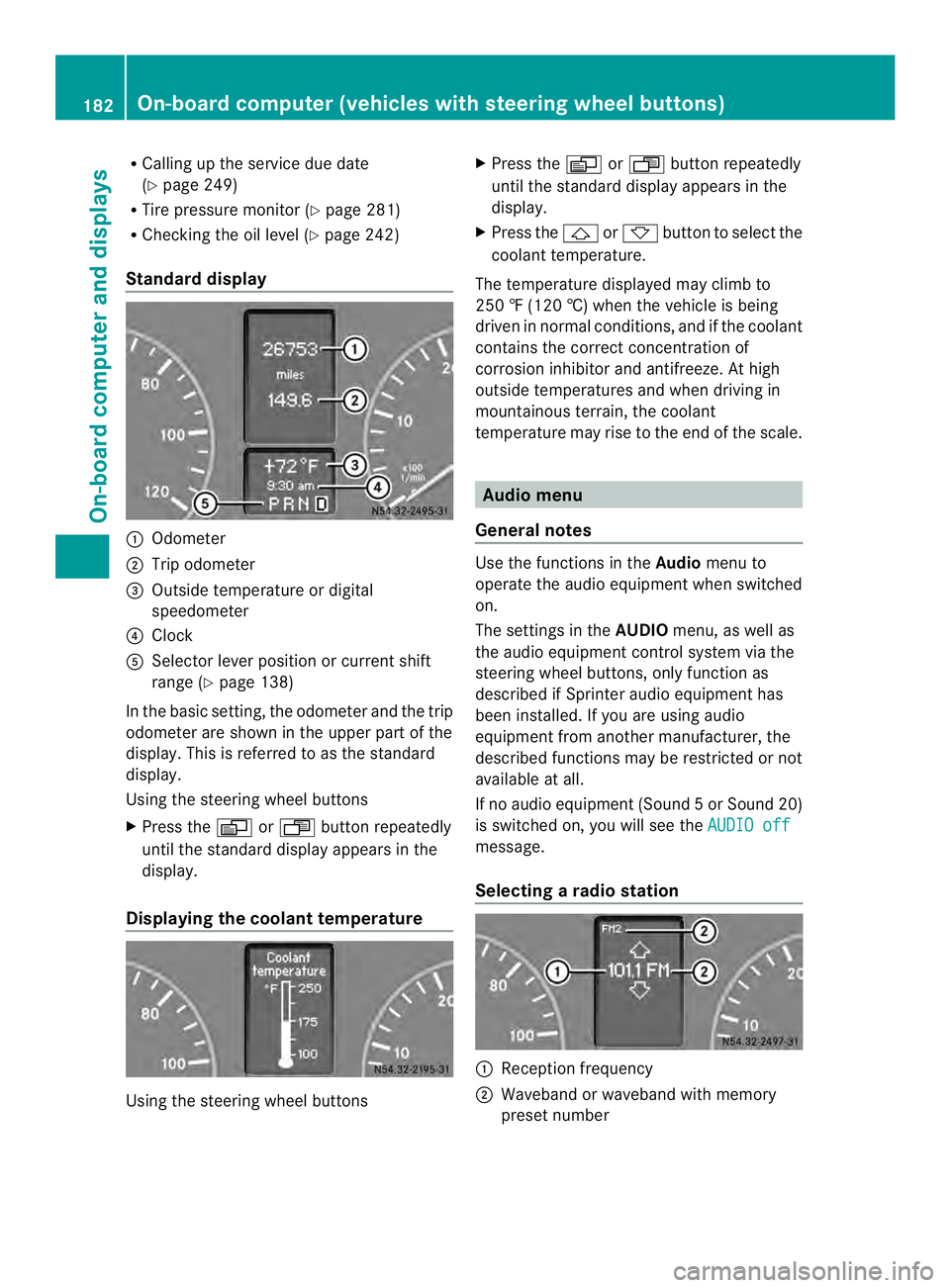
Standard display 0005
Odometer
0006 Trip odometer
0026 Outside temperature or digital
speedometer
0025 Clock
0023 Selector lever position or current shift
range (Y page 138)
In the basic setting, the odometer and the trip
odometer are shown in the upper part of the
display. This is referred to as the standard
display.
Using the steering wheel buttons
X Press the 0010or0007 buttonrepeatedly
until the standard display appears in the
display.
Displaying the coolant temperature Using the steering wheel buttons X
Press the 0010or0007 button repeatedly
until the standard display appears in the
display.
X Press the 0001or0009 button to select the
coolant temperature.
The temperature displayed may climb to
250 ‡ (120 †) when the vehicle is being
driven in normal conditions, and if the coolant
contains the correct concentration of
corrosion inhibitor and antifreeze. At high
outside temperatures and when driving in
mountainous terrain, the coolant
temperature may rise to the end of the scale. Audio menu
General notes Use the functions in the
Audiomenu to
operate the audio equipment when switched
on.
The settings in the AUDIOmenu, as well as
the audio equipment control system via the
steering wheel buttons, only function as
described if Sprinter audio equipment has
been installed. If you are using audio
equipment from another manufacturer, the
described functions may be restricted or not
available at all.
If no audio equipment (Sound 5orSound 20)
is switched on, you will see the AUDIO off message.
Selecting
aradio station 0005
Receptio nfrequency
0006 Waveband or waveband with memory
prese tnumber 182
On-boar
dcomputer (vehicles with steering wheel buttons)On-board computer and displays
Page 194 of 334
When a connection is established, the
name of the other person and/or the call
duration appear in the display.
X To exit the telephone book: press the
0005 button.
Redialing The on-board computer saves the last names
or numbers dialed in the redial memory.
Using the steering wheel buttons
X Use the 0010or0007 buttons to select the
TEL menu.
The display shows the mobile phone
operational readiness symbol.
X Press the 0001button.
The display shows the most recently dialed
numbers or names in the redial memory.
X Press the 0001or0009 button to select the
desired name or number.
X To start dialing: press the0001button.
The on-board computer dials the
corresponding phone number. The
Dialing (Audio 20) message appears in
the display.
When a connection is established, the
name of the other person and/or the call
duration appear in the display.
Or
X To exit the redial memory: press the
0005 button. Display messages
Notes on displa
ymessages
Important safety notes G
WARNING
No informatio nwill be displayed if either the
instrumen tcluster or the display is
inoperative.
As a result, you will not be able to see warning
and indicator lamps or information about the
driving conditions, such as speed or outside temperature. Driving characteristics may be
impaired
.Adjust your driving style and vehicle
speed accordingly.
Contac taqualified specialist workshop
immediately. G
WARNING
If service work is not carried out correctly, the
operating safety of your vehicle may be
affected. This could cause you to lose control
of your vehicle and cause an accident.
Moreover, the safety systems may no longer
be able to protect you or others as they are
designed to do.
Always have service work carried out at a
qualified specialist workshop.
i If you turn the key to position 2in the
ignition, a display chec kis performed. All
warning/indicator lamps (except the turn
signal indicator lamps) and the display are
activated. Before starting the journey,
check that the warning and indicator lamps
are operating correctly.
Vehicles without steering wheel
buttons Warnings, malfunctions or additional
information may also be shown in the display.
The following tables show all the display
messages.
Awarning tone sounds with
certain display messages.
Vehicles with steering wheel buttons The on-board computer shows warnings,
malfunctions or additional informatio
ninthe
display. Awarning tone sounds with certain
display messages .Display messages of a high
priority are shown in red.
Please respond in accordance with the
display messages and follow the additional
notes in this Operator's Manual.
You can hide low-priority display messages by
pressing the 0010,0007,0001or0009 192
Display messagesOn-board computer and displays
Page 211 of 334
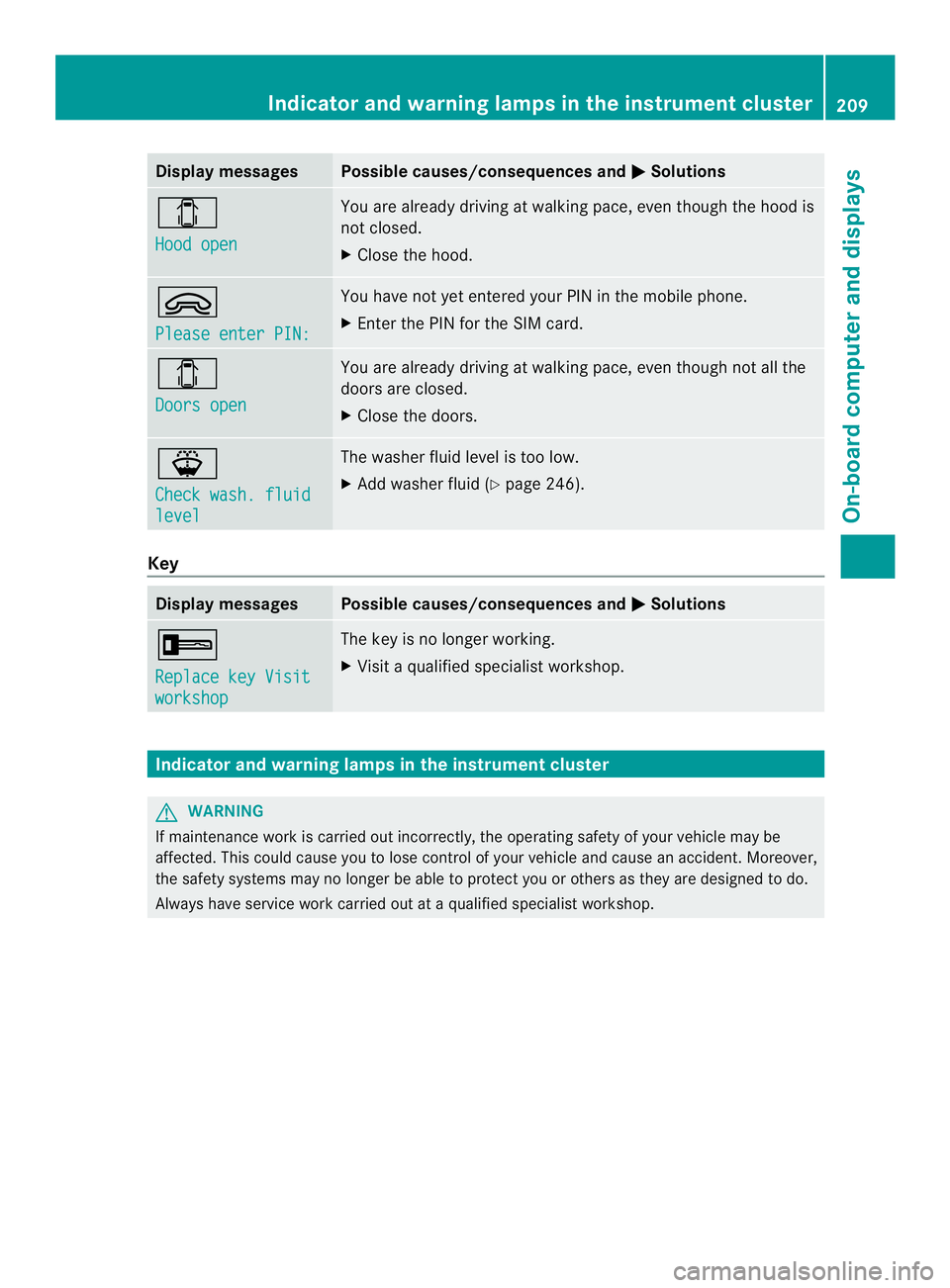
Display messages Possible causes/consequences and
0004 Solutions
0004
Hood open You are already driving at walking pace, eve
nthough the hood is
not closed.
X Close the hood. 0002
Please enter PIN: You have not yet entered your PIN in the mobile phone.
X
Enter the PIN for the SIM card. 0004
Doors open You are already driving at walking pace, even though not all the
doors are closed.
X
Close the doors. 000F
Check wash. fluid
level The washer fluid level is too low.
X
Add washer fluid (Y page 246).Key
Display messages Possible causes/consequences and
0004 Solutions
0005
Replace key Visit
workshop The key is no longer working.
X
Visit a qualified specialist workshop. Indicator and warning lamps in the instrument cluster
G
WARNING
If maintenance work is carried out incorrectly, the operating safety of your vehicle may be
affected. This could cause you to lose control of your vehicle and cause an accident. Moreover,
the safety systems may no longer be able to protect you or others as they are designed to do.
Always have service work carried out at a qualified specialist workshop. Indicator and warning lamps in the instrument cluster
209On-board computer and displays Z
Page 220 of 334
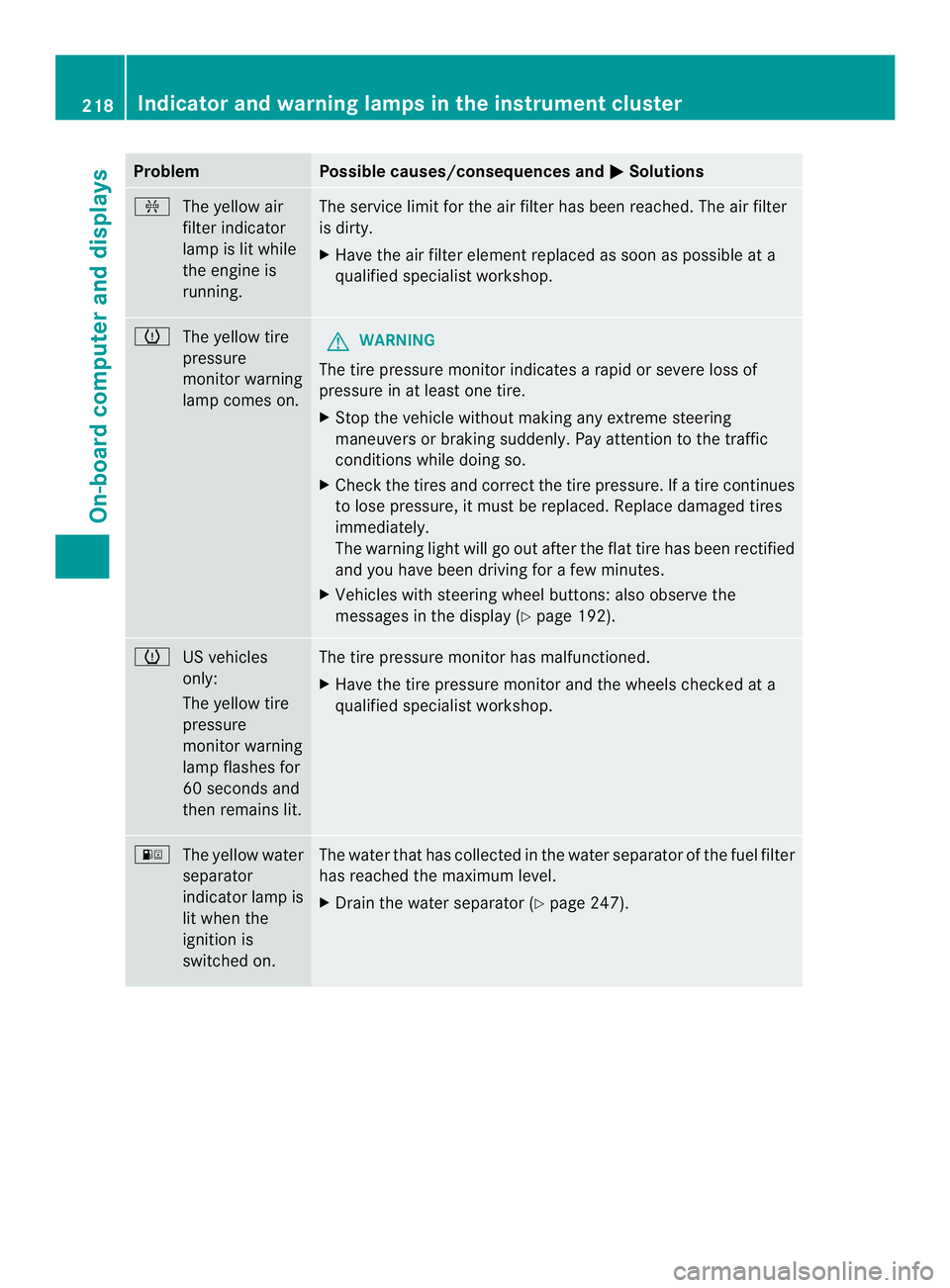
Problem Possible causes/consequences and
0004 Solutions
0013
The yellow air
filter indicator
lamp is lit while
the engine is
running. The service limit for the air filter has been reached. The air filter
is dirty.
X
Have the air filter element replaced as soon as possible at a
qualified specialist workshop. 000A
The yellow tire
pressure
monitor warning
lamp comes on. G
WARNING
The tire pressure monitor indicates a rapid or severe loss of
pressure in at least one tire.
X Stop the vehicle without making any extreme steering
maneuvers or braking suddenly. Pay attention to the traffic
conditions while doing so.
X Check the tires and correctt he tire pressure. If a tire continues
to lose pressure, it must be replaced. Replace damaged tires
immediately.
The warning light will go out after the flat tire has been rectified
and you have been driving for a few minutes.
X Vehicles with steering wheel buttons: also observe the
messages in the display (Y page 192).000A
US vehicles
only:
The yellow tire
pressure
monitor warning
lamp flashes for
60 seconds and
then remains lit. The tire pressure monitor has malfunctioned.
X
Have the tire pressure monitor and the wheels checked at a
qualified specialist workshop. 000E
The yellow water
separator
indicator lamp is
lit when the
ignition is
switched on. The water that has collected in the water separator of the fuel filter
has reached the maximum level.
X
Drain the water separator (Y page 247).218
Indicator and warning lamps in the instrument clusterOn-board computer and displays