warning light MERCEDES-BENZ SPRINTER 2013 MY13 Operator’s Manual
[x] Cancel search | Manufacturer: MERCEDES-BENZ, Model Year: 2013, Model line: SPRINTER, Model: MERCEDES-BENZ SPRINTER 2013Pages: 334, PDF Size: 3.88 MB
Page 68 of 334
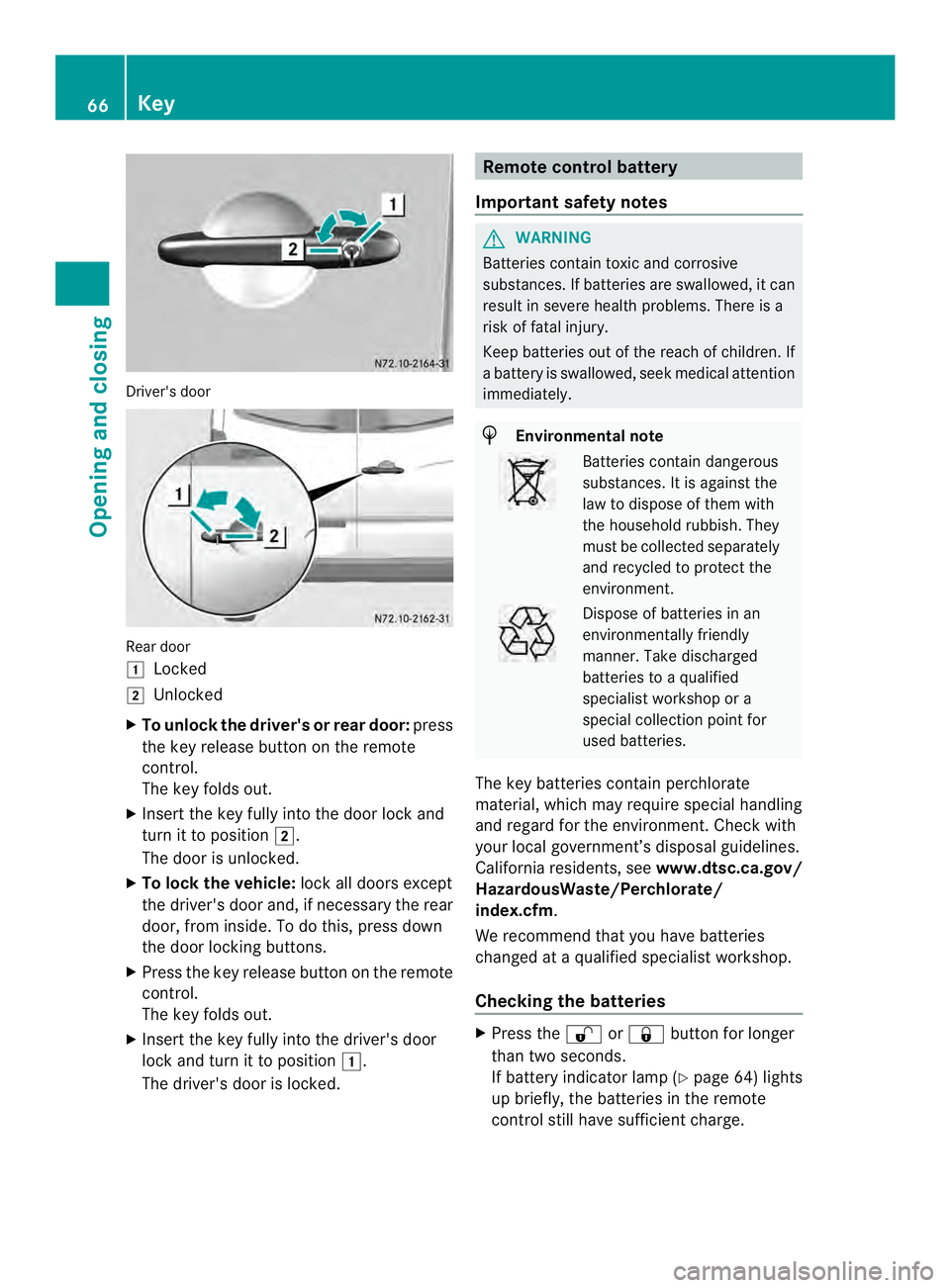
Driver's door
Rear door
0008
Locked
0009 Unlocked
X To unlock the driver' sor rear door: press
the key release button on the remote
control.
The key folds out.
X Insert the key fully into the door lock and
turn it to position 0009.
The door is unlocked.
X To lock the vehicle: lock all doors except
the driver's door and, if necessary the rear
door, fro minside .To do this, press down
the door locking buttons.
X Press the key release button on the remote
control.
The key folds out.
X Insert the key fully into the driver's door
lock and turn it to position 0008.
The driver's door is locked. Remote control battery
Important safety notes G
WARNING
Batteries contain toxic and corrosive
substances. If batteries are swallowed, it can
result in severe health problems. There is a
risk of fatal injury.
Keep batteries out of the reach of children. If
a battery is swallowed, seek medical attention
immediately. H
Environmental note Batteries contain dangerous
substances. It is against the
law to dispose of them with
the household rubbish. They
must be collected separately
and recycled to protect the
environment.
Dispose of batteries in an
environmentally friendly
manner
.Take discharged
batteries to a qualified
specialist workshop or a
special collectio npoint for
used batteries.
The key batteries contain perchlorate
material, which may require special handling
and regard for the environment. Check with
your local government’s disposal guidelines.
California residents, see www.dtsc.ca.gov/
HazardousWaste/Perchlorate/
index.cfm.
We recommend that you have batteries
changed at a qualified specialist workshop.
Checking the batteries X
Press the 0009or0008 button for longer
than two seconds.
If battery indicator lamp (Y page 64) lights
up briefly, the batteries in the remote
control still have sufficient charge. 66
KeyOpening and closing
Page 71 of 334
Central locking
Important safety notes
G
WARNING
Activate the child-proof door locks if children
are traveling in the vehicle .The children could
otherwise open the doors while the vehicle is
in motion, injuring themselves and others. G
WARNING
Do not leave children unsupervised in the
vehicle, even if they are secured in a child
restraint system. Children could otherwise
injure themselves on parts of the vehicle.
They could be severely or even fatally injured
by prolonged exposure to intense heat or
cold.
If children open a door, they could:
R injure other people
R get out of the vehicle and thereby injure
themselves or be injured by a passing
vehicle
R severely injure themselves by falling down,
in particular due to the vehicle height
Always take the key with you when leaving the
vehicle, even if you are only leaving for a short
time.
You can open a locked front door from the
inside at any time. You can only open a locked
sliding door or rear door from the inside if the
child-proof locks have not been activated. Locking and unlocking manually
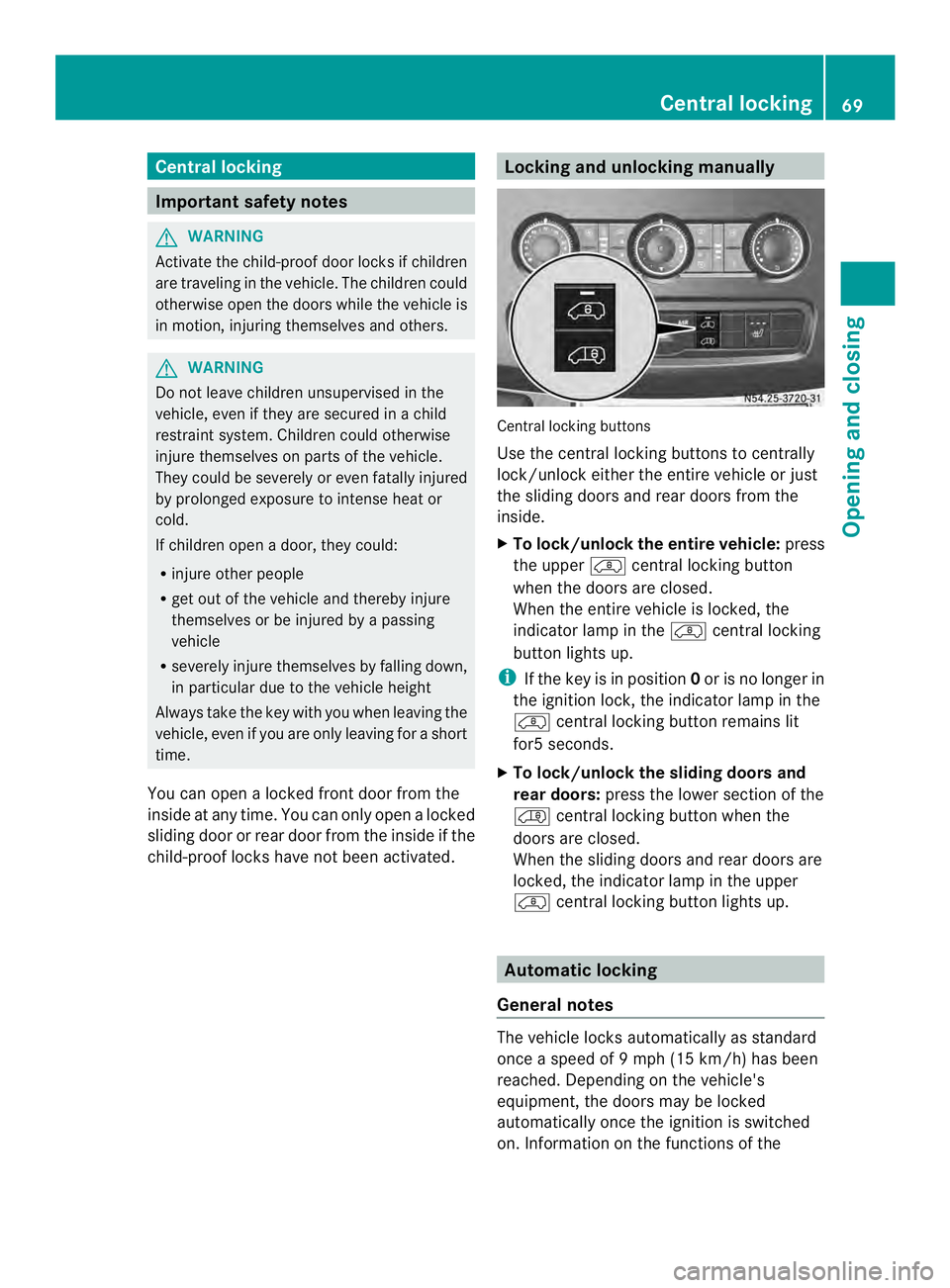
Central locking buttons
Use the central locking buttons to centrally
lock/unlocke
itherthe entire vehicle or just
the sliding doors and rear doors from the
inside.
X To lock/unlock the entire vehicle: press
the upper 0006central locking button
when the doors are closed.
When the entire vehicle is locked, the
indicator lamp in the 0006central locking
button lights up.
i If the key is in position 0or is no longer in
the ignition lock, the indicator lamp in the
0006 central locking button remains lit
for5 seconds.
X To lock/unlock the sliding doors and
rear doors: press the lower section of the
0001 central locking button when the
doors are closed.
When the sliding doors and rear doors are
locked, the indicator lamp in the upper
0006 central locking button lights up. Automatic locking
General notes The vehicle locks automatically as standard
once a speed of
9mph (15 km/h) has been
reached. Depending on the vehicle's
equipment, the doors may be locked
automatically once the ignition is switched
on. Information on the functions of the Central locking
69Opening and closing Z
Page 74 of 334
Electrical closing assist
If your vehicle is equipped with electrical
closing assist, you will require less force to
close the sliding door. Electrical step
Important safety notes
If you do no tuse the grab handle and the step,
you could injure yourselfw hen getting in and
out of the vehicle.
In order to reduce risks:
R draw the passengers' attention to the
electrical step. Wait until the electrical step
is fully extended.
R do not jump out of the vehicle.
R only use the grab handle and step. Only
they are designed for such a load.
R keep grab handles, access steps and entry
sills free from dirt, e.g. mud, clay, snow and
ice. Operation and obstacle detection
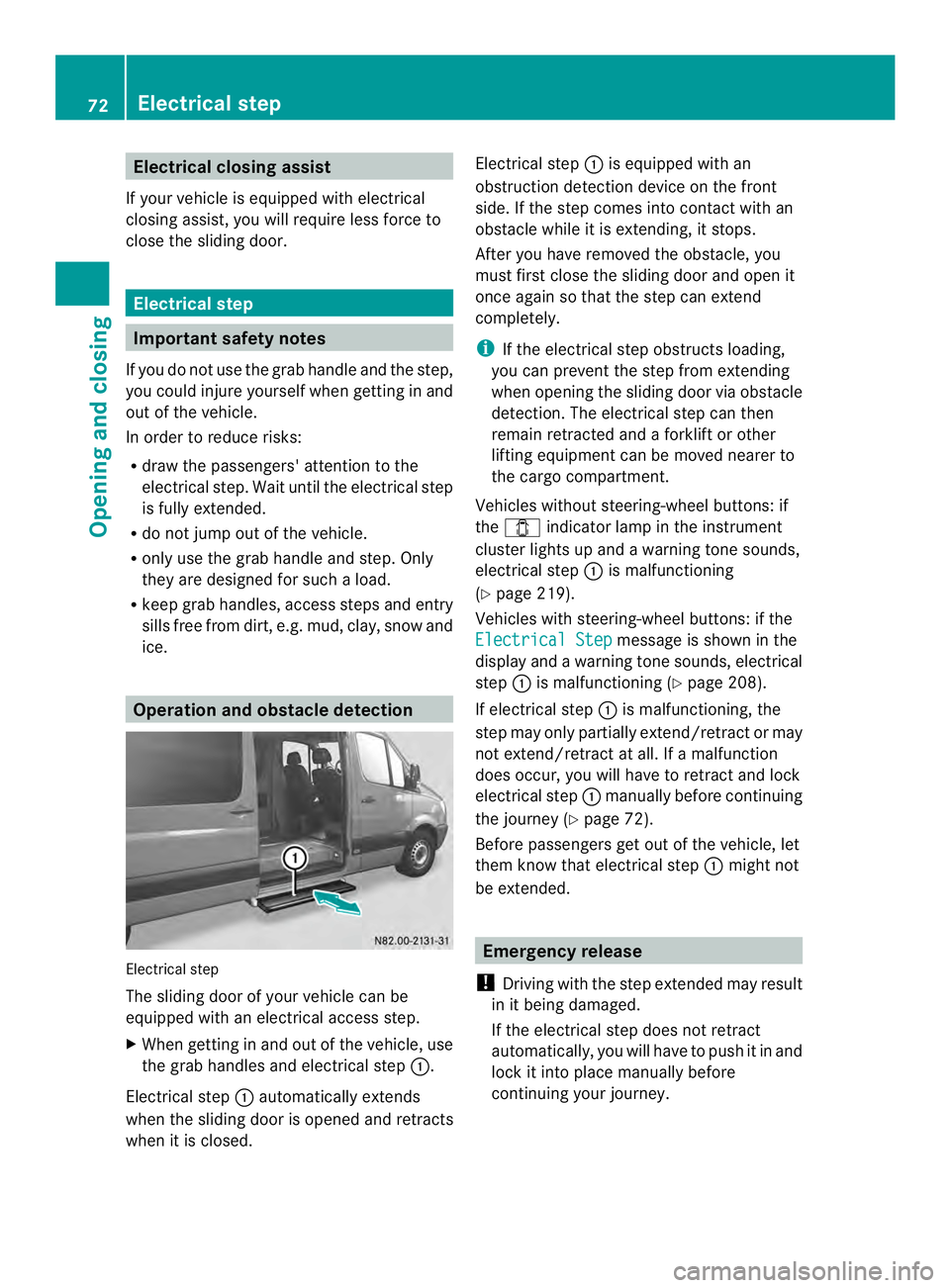
Electrical step
The sliding door of your vehicle can be
equipped with an electrical access step.
X When getting in and out of the vehicle, use
the grab handles and electrical step 0005.
Electrical step 0005automatically extends
when the sliding door is opened and retracts
when it is closed. Electrical step
0005is equipped with an
obstruction detection device on the front
side. If the step comes into contact with an
obstacle while it is extending, it stops.
After you have removed the obstacle, you
must first close the sliding door and open it
once again so that the step can extend
completely.
i If the electrical step obstructs loading,
you can prevent the step from extending
when opening the sliding door via obstacle
detection. The electrical step can then
remain retracted and aforklift or other
lifting equipment can be moved nearer to
the cargo compartment.
Vehicles without steering-wheel buttons: if
the 0004 indicator lamp in the instrument
cluster lights up and a warning tone sounds,
electrical step 0005is malfunctioning
(Y page 219).
Vehicles with steering-wheel buttons: if the
Electrical Step message is shown in the
display and a warning tones ounds, electrical
step 0005is malfunctioning (Y page 208).
If electrical step 0005is malfunctioning, the
step may only partially extend/retract or may
not extend/retract at all. If a malfunction
does occur, you will have to retrac tand lock
electrical step 0005manually before continuing
the journey (Y page 72).
Before passengers ge tout of the vehicle, let
them know that electrical step 0005might not
be extended. Emergency release
! Driving with the step extended may result
in it being damaged.
If the electrical step does not retract
automatically, you will have to push it in and
loc kiti nto place manually before
continuing your journey. 72
Electrical stepOpening and closing
Page 84 of 334
to provide the intended protection. There is
an increased ris kofinjury, possibly eve nfatal.
Engage the driver's and co-driver's seats so
they are facing th edirection of travel before
starting the engine.
! When rotating the seats, make sure that
there is sufficient space to do so.
Move the seat forward or back first. This
will help to avoid contac twith other parts
of the interior.
Push the handbrake lever down to the stop.
The parking brake or handbrake lever could
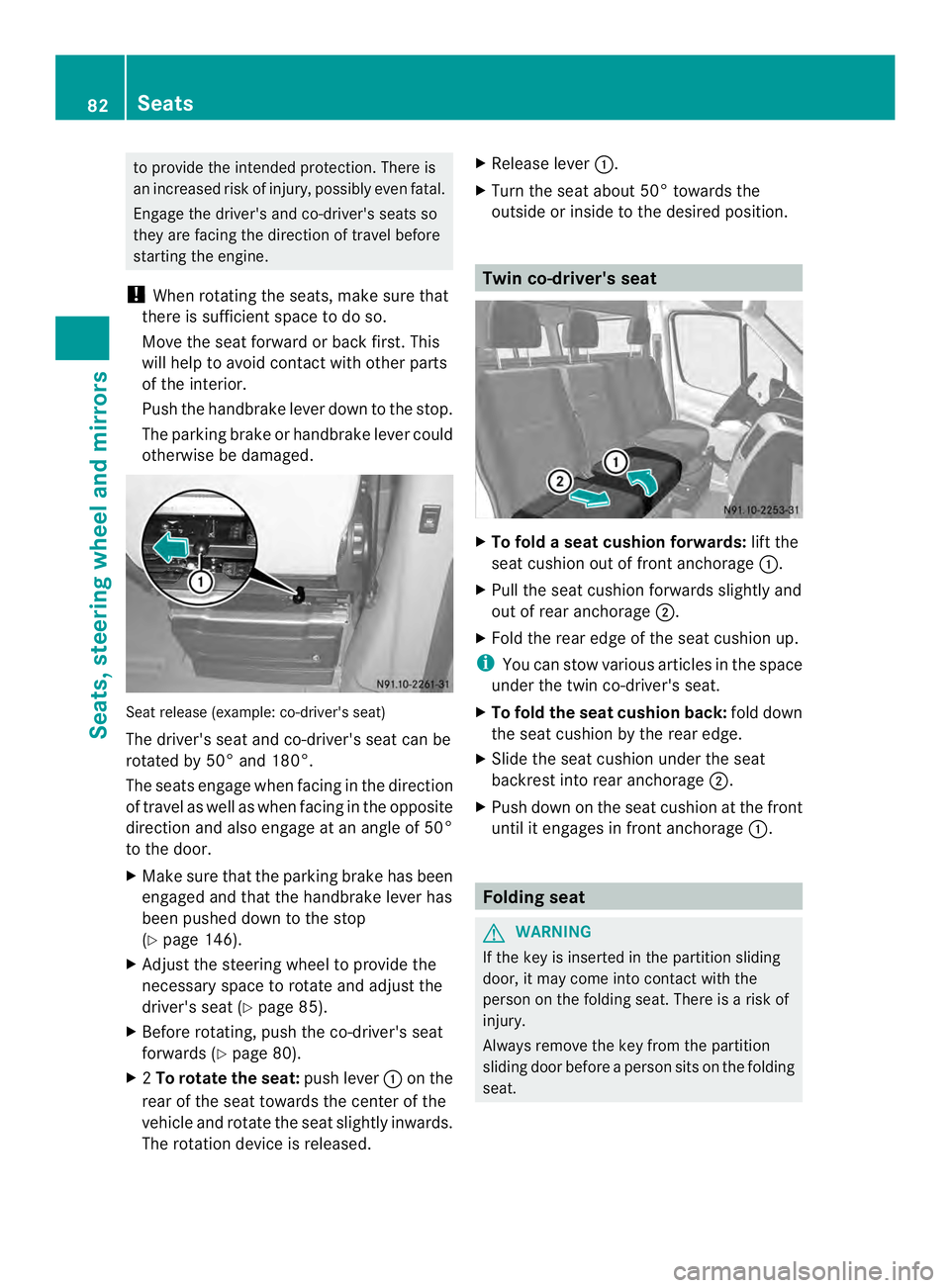
otherwise be damaged. Seat release (example: co-driver's seat)
The driver's seat and co-driver's seat can be
rotated by 50° and 180°.
The seats engage when facin
ginthe direction
of travel as well as when facing in the opposite
direction and also engage at an angle of 50°
to the door.
X Make sure that the parking brake has been
engaged and that the handbrake lever has
been pushed down to the stop
(Y page 146).
X Adjust the steering wheel to provide the
necessary space to rotate and adjust the
driver's seat (Y page 85).
X Before rotating, push the co-driver's seat
forwards (Y page 80).
X 2To rotatet he seat:push lever 0005on the
rear of the seat towards the center of the
vehicle and rotate the sea tslightly inwards.
The rotation device is released. X
Release lever 0005.
X Turn the seat about 50° towards the
outside or inside to the desired position. Twin co-driver's seat
X
To fold a seat cushion forwards: lift the
seat cushio nout of fron tanchorage 0005.
X Pull the sea tcushio nforwards slightly and
out of rear anchorage 0006.
X Fold the rear edge of the seat cushion up.
i You can stow various articles in the space
under the twin co-driver's seat.
X To fold the seat cushion back: fold down
the seat cushion by the rear edge.
X Slide the seat cushion under the seat
backrest into rear anchorage 0006.
X Push down on the seat cushion at the front
until it engages in front anchorage 0005. Folding seat
G
WARNING
If the key is inserted in the partition sliding
door, it may come into contact with the
person on the folding seat. There is a risk of
injury.
Always remove the key from the partition
sliding door before a person sits on the folding
seat. 82
SeatsSeats, steering wheel and mirrors
Page 92 of 334
Useful information
This Operator's Manual describes all models
as well as standard and optional equipment
of your vehicle that were available at the time
of going to print. Country-specific variations
are possible. Note that your vehicle may not
be equipped with all of the described
functions. This also applies to systems and
functions relevant to safety.
Read the information on qualified specialist
workshops (Y page 26). Exterior lighting
Important safety notes
For reasons of safety, we recommend that
you drive with the lights switched on even
during the daytime. There may be differences
in operation due to legal requirements and
voluntary recommendations in some
countries. Lamp failure indicator
The bulb failure indicator is only an aid. You
are responsible for the proper functioning of
the vehicle lighting. Insufficient or non-
functioning vehicle lightin gputs the operating
safety of the vehicle at risk.
For this reason, check the condition and
function of your vehicle's lighting system and,
if necessary, that of the trailer before each
journey.
The bulb failure indicator monitors all of the
exterio rlighting lamps, except the perimeter
lamp and the trailer lighting. If a bulb fails,
either the 0002(Ypage 34) indicator lamp
lights up, or you will see a corresponding
message in the display (Y page 201).
i Depending on the equipment, the bulb
failure indicator can fail for all lamps with
the exceptio nofthe turn signal lamps. Light switch
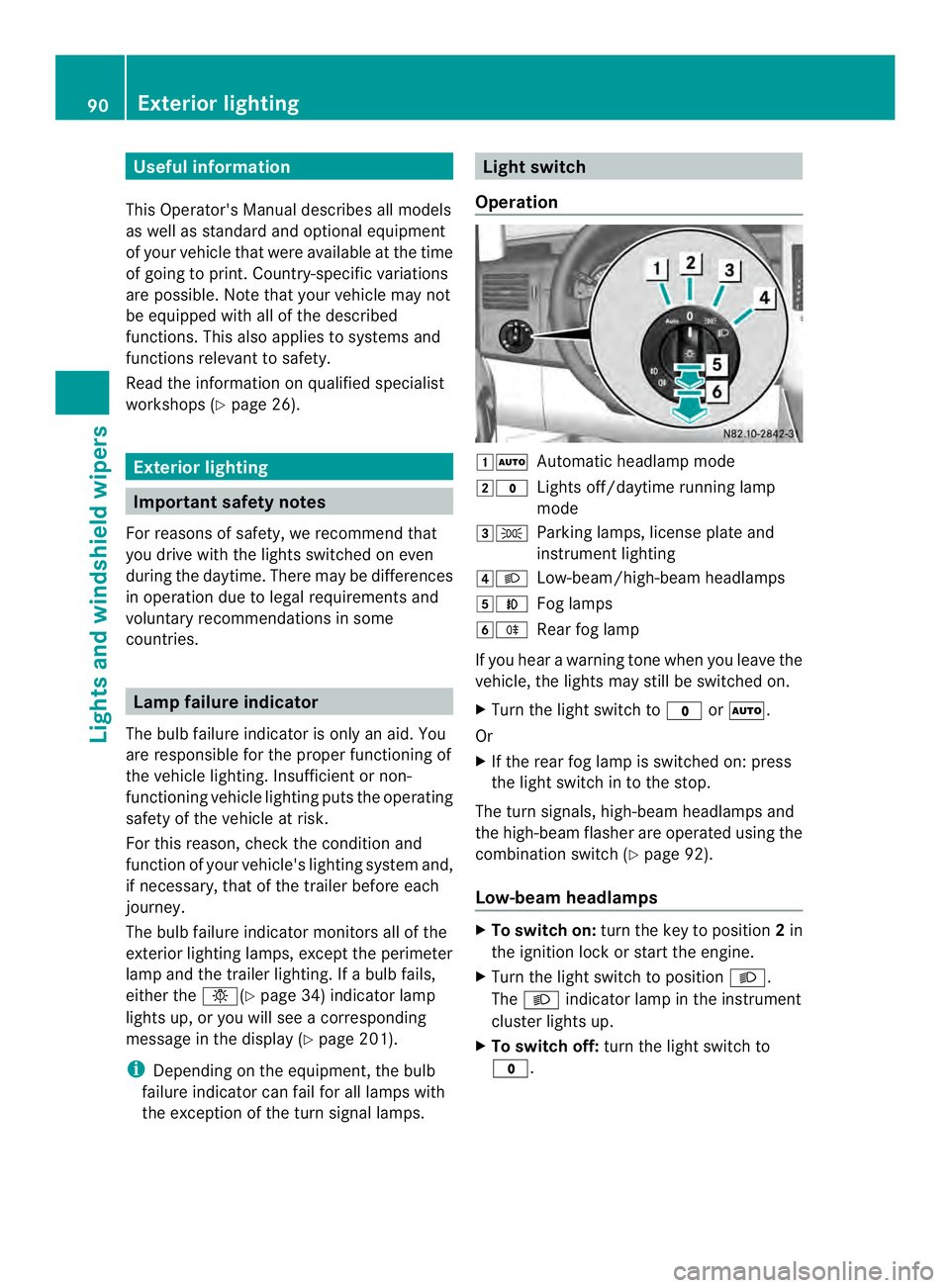
Operation 00080007
Automatic headlamp mode
0009000C Lights off/daytime running lamp
mode
000A000B Parking lamps, license plate and
instrumentl ighting
000E0004 Low-beam/high-beam headlamps
000F0005 Fog lamps
00100007 Rear fog lamp
If you hear a warning tone when you leave the
vehicle, the lights may still be switched on.
X Turn the light switch to 000Cor0007.
Or
X If the rear fog lamp is switched on: press
the light switch in to the stop.
The tur nsignals, high-beam headlamps and
the high-beam flasher are operated using the
combination switch (Y page 92).
Low-beam headlamps X
To switch on: turnthe key to position 2in
the ignition lock or start the engine.
X Turn the light switch to position 0004.
The 0004 indicator lamp in the instrument
cluster lights up.
X To switch off: turn the light switch to
000C. 90
Exterior lightingLights and windshield wipers
Page 93 of 334
Daytime running lamp mode
You can activate/deactivate daytime running
lamp mode using the on-board computer.
This is no tpossible in countries where
daytime running lamp mode is a legal
requirement.
Daytime running lamp mode must be
activated using the on-board computer:
R Vehicles with steering wheel
buttons(Y page 187)
R Vehicles without steering wheel buttons
(Y page 179)
X To switch on: turn the light switch to the
000C position.
The low-beam headlamps, parking lamps
and license plate lamp are switched on
when the engine is running. The 0004
indicator lamp in the instrument cluster
lights up.
i USA only:
If you turn the light switch to the 000Bor
0004 position, the parking lamps or low-
beam headlamps are switched on. If you
turn the light switch to the 0007position,
daytime running lamp mode stays switched
on.
i Canada only:
If you turn the light switch to the 0004
position, the low-beam headlamps are
switched on. If you turn the light switch to
the 000B or0007 position, daytime running
lamp mode stays switched on.
Automatic headlamp mode G
WARNING
If the light switch is set to 000Band it is foggy,
snowing or there is poor visibility, the low-
beam headlamps will not come on
automatically. There is a risk of an accident.
In such situations, turn the light switch to
0004. Automatic headlamp mode is only a driving
aid. You are responsible for the vehicle
lighting at all times.
If it is dark or foggy, turn the light switch
quickly from
0007to0004.Y ou could
otherwise briefly interrupt operation of the
headlamps.
Depending on ambient light, the rain and light
sensor automatically switches on the parking
lamps, low-beam headlamps and the license
plate lamp. This excludes weather-related
impairments to visibility, such as snow, fog or
spray.
X To switch on automatic headlamp
mode: turn the light switch to 0007.
Key in position 1in the ignition lock: the
parking lamps are switched on or off
automatically depending on the ambient
light.
When the engine is running: depending on
the ambient light, the parking lamps and
the low-beam headlamps are switched on
or off automatically.
When the low-beam headlamps are
switched on, the 0004indicator lamp in the
instrument cluster lights up.
Fog lamp/rear fog lamp G
WARNING
If you suspect that driving conditions will be
foggy, turn the light switch to 0004before you
start your journey. Your vehicle may
otherwise not be visible and you could
endanger yourself and others. G
WARNING
In low ambient lighting or foggy conditions,
only switch from position 0007to0004 with
the vehicle at a standstill in a safe location.
Switching from 0007to0004 will briefly
switch off the headlamps. Doing so while
driving in low ambient lighting conditions may
result in an accident. Exterior lighting
91Lights and windshiel dwipers Z
Page 95 of 334
X
To operate the high-beam flasher: turn
the key to position 1or 2in the ignition
lock.
X Pull the combinatio nswitch briefly in
directio nofarrow0006. Headlamp range adjustment
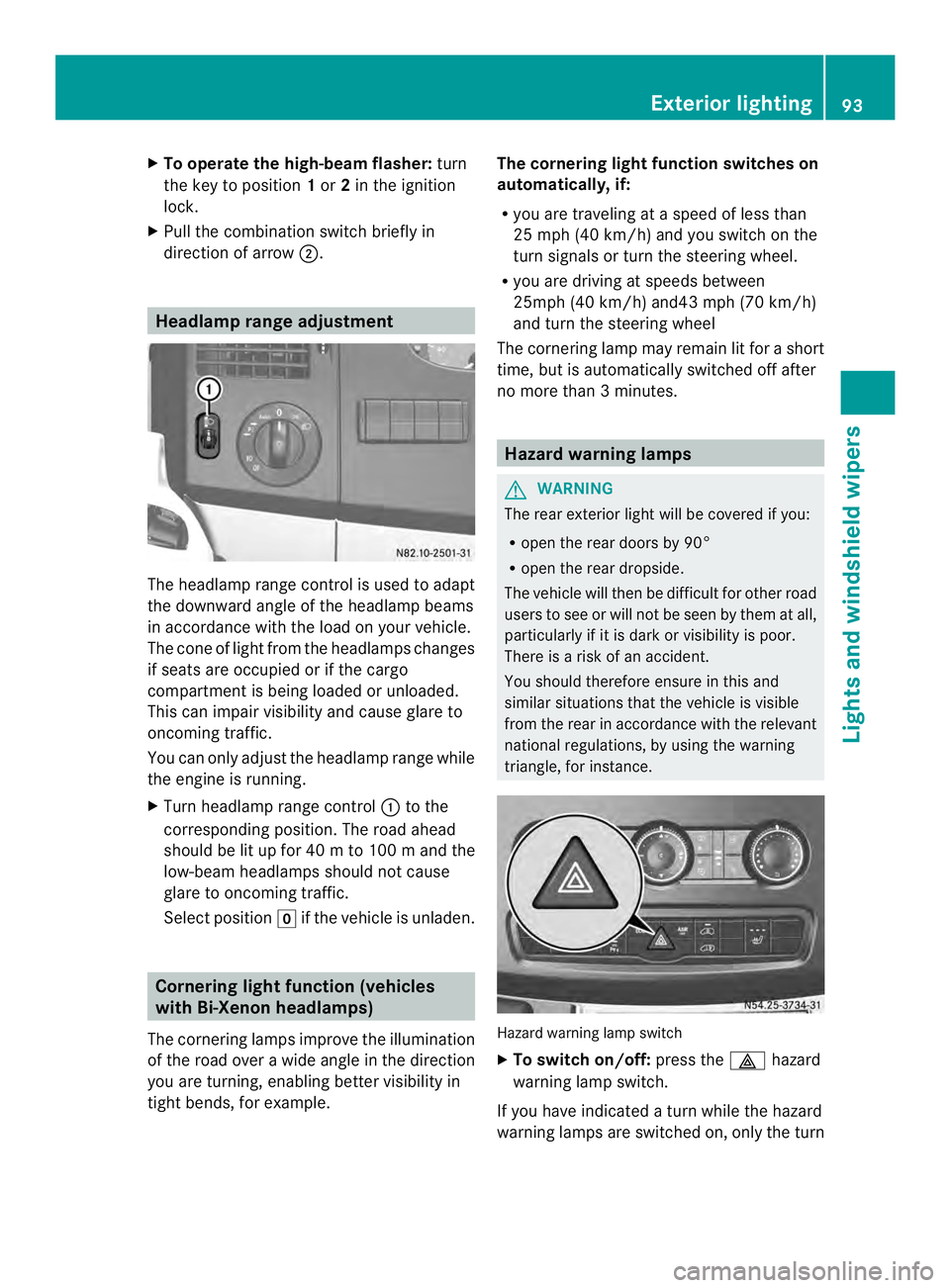
The headlamp range control is used to adapt
the downward angle of the headlamp beams
in accordance with the loadony our vehicle.
The cone of light from the headlamps changes
if seats are occupied or if the cargo
compartment is being loaded or unloaded.
This can impair visibility and cause glare to
oncoming traffic.
You can only adjust the headlamp range while
the engine is running.
X Turn headlamp range control 0005to the
corresponding position. The road ahead
should be lit up for 40 mto 100 mand the
low-bea mheadlamps should not cause
glare to oncoming traffic.
Select position 0011if the vehicle is unladen. Cornering light function (vehicles
with Bi-Xenon headlamps)
The cornering lamps improve the illumination
of the road over a wide angle in the direction
you are turning, enabling better visibility in
tight bends, for example. The cornering light function switches on
automatically, if:
R
you are traveling at a speed of less than
25 mph (40 km/h) and you switch on the
turn signals or turn the steering wheel.
R you are driving at speeds between
25mph (40 km/h) and43 mph (70 km/h)
and turn the steering wheel
The cornering lamp may remain lit for a short
time, but is automatically switched off after
no more than 3 minutes. Hazard warning lamps
G
WARNING
The rear exterior light will be covered if you:
R open the rear doors by 90°
R open the rear dropside.
The vehicle will then be difficult for other road
users to see or will not be seen by them at all,
particularly if it is dark or visibility is poor.
There is a risk of an accident.
You should therefore ensure in this and
similar situations that the vehicle is visible
from the rear in accordance with the relevant
national regulations, by using the warning
triangle, for instance. Hazard warning lamp switch
X
To switch on/off: press the0011hazard
warning lamp switch.
If you have indicated a turn while the hazard
warning lamps are switched on, only the turn Exterior lighting
93Lights and windshield wipers Z
Page 96 of 334
signal lamps on the side of the vehicle
selected will light up.
The hazard warning lamps switch on
automatically if:
R
an air bag is deployed.
R you brake sharply and bring the vehicle to
a halt from a speed of more than 45 mph
(70 km/h).
If the hazard warning lamps have been
switched on automatically, press the 0011
hazard warning lamp switch to switch them
off.
i The hazard warning lamps work even
when the ignition is switched off. Headlamp cleaning system
The headlamps are cleaned automatically
with a high-pressure water jet if the "Wipe
with washer fluid" function is activated
(Y page 103) while the low-beam headlamps
are on and the engine is running.
Information on checking the washer fluid
level can be found in the "Maintenance and
care" (Y page 246) section. Headlamps fogged up on the inside
The headlamps may fog up on the inside if
there is high atmospheric humidity.
X Switch on the low-beam headlamps and
drive off.
The level of moisture diminishes,
depending on the length of the journey and
the weather conditions (humidity and
temperature).
If the level of moisture does not diminish:
X Have the headlamps checked at a qualified
specialist workshop. Interior lighting
Switching the dashboard lighting on/
off
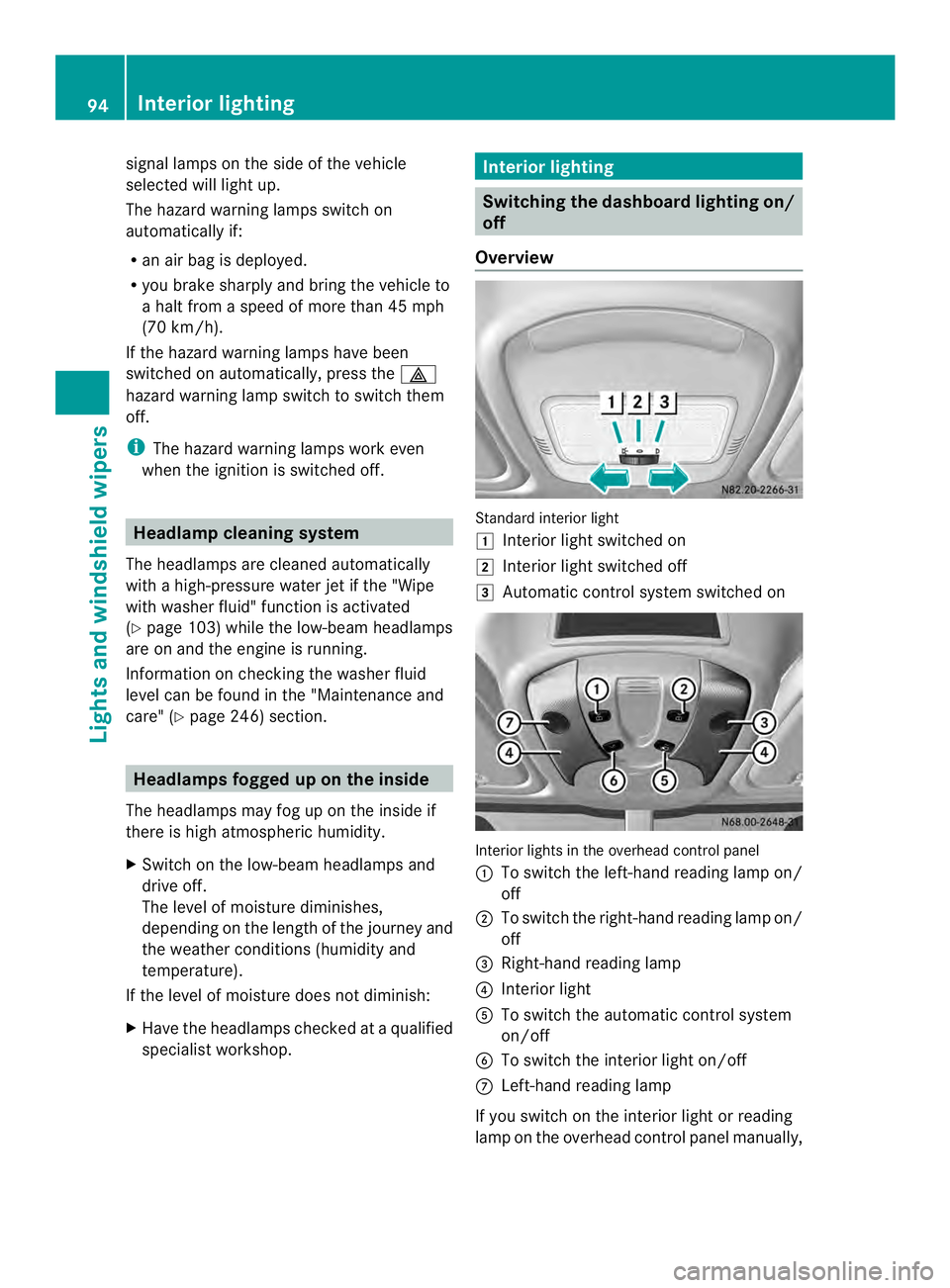
Overview Standard interior light
0008
Interior light switched on
0009 Interior light switched off
000A Automatic control system switched on Interior lights in the overhead control panel
0005 To switch the left-hand reading lamp on/
off
0006 To switch the right-hand reading lamp on/
off
0026 Right-hand reading lamp
0025 Interior light
0023 To switch the automatic control system
on/off
0024 To switch the interior light on/off
0018 Left-hand reading lamp
If you switch on the interior light or reading
lamp on the overhead control panel manually, 94
Interior lightingLights and windshield wipers
Page 98 of 334
If you move the switch to automatic control,
the rear/cargo compartment lamps go on
when you open a door or unlock the vehicle.
It switches off automatically after
20 minutes, or when you close the doors.
Motion detector
G
WARNING
The motion detector sends the invisible
infrared radiation emitted by LEDs (light
emitting diodes).
These LEDs are classified as class 1M lasers
and can damage the retina if you:
R look directly into the unfiltered laserb eam
of the motion detector for an extended
period
R look directly into the laser beam of the
motion detector using optical instruments,
e.g. eyeglasses or a magnifying glass.
There is a risk of injury.
Never look directly into the motion detector.
The cargo compartment lighting is also
switched on by the motion detector in the
cargo compartment of Cargo Vans equipped
with this feature.
If the motion detector detects a movemen tin
the cargo compartment when the vehicle is
stationary, the cargo compartment lighting
switches on for approximately two minutes.
The cargo compartment lighting can be
switched on by the motion detecto rwithin
four seconds if:
R the rear interior light switch (Y page 95) is
set to automatic control.
R the vehicle is stationary, the parking brake
is applied and the brake pedal is not being
depressed
Or R
the selector lever is in position Pon
vehicles with automatic transmission and
the brake pedal is not being depressed and
R the vehicle has not been locked fro mthe
outside using the key
The motion detector switches off
automatically if no change is detected in the
vehicle for several hours, e.g. if a door is
opened, if the ignition key is turned, etc. This
prevents the battery from becoming
discharged. Changing bulbs
Important safety notes
G
DANGER
Xenon bulbs carry a high voltage. You can get
an electric shock if you remove the cover of
the Xenon bulb and touch the electrical
contacts. There is a risk of fatal injury.
Never touch the parts or the electrical
contacts of the Xenon bulb. Always have work
on the Xenon bulbs carried out at a qualified
specialist workshop. G
WARNING
Bulbs, lamps and connectors can get very hot
when operating. If you change a bulb, you
could burn yourself on these components.
There is a risk of injury.
Allow these components to cool down before
changing a bulb.
! Make sure the bulbs are always securely
installed.
If your vehicle is equipped with Bi-Xenon
bulbs, you can recognize this by the following:
the cone of light from the Xenon bulbs moves
from the top to the bottom and back again
when you start the engine. For this to be
observed, the low-beam headlamps must be
switched on before startingt he engine.
The bulbs and lamps are an essential
componentofv ehicle safety. You must
therefore make sure that these function 96
Changing bulbsLights and windshield wipers
Page 106 of 334
X
Turn the key to position 1or 2in the
ignition lock.
X Turn the combination switch in the
direction of arrow 0005to the appropriate
setting depending on the intensity of the
rain.
X Single wipe: push the combination switch
briefly up to the pressure point in the
direction of arrow 0006.
X To wipe with washer fluid: press the
combination switch beyond the pressure
point in the direction of arrow 0006.
i Wipe the windshield using washer fluid
even if it is raining. By doing so, you will
prevent smears on the windshield.
The detent positions of the combination
switch correspond to the following wiper
speeds:
0W indshield wipers off
II ntermittent wipe
II Normal wipe
III Rapid wipe
i Canada only:
If the windshield wipers are switched on
and you stop the vehicle, the windshield
wipe rspeed is reduced. For example, if you
have selected level IIand stop the vehicle,
wiping continues with intermitten twipe
while the vehicle is stationary. If
intermitten twipe is selected, the intervals
become longer.
Vehicles with arain and light sensor:
you can use level Ias the universal setting.
The rai nand light sensor sets the
appropriate wiping frequency
automatically, according to the intensity of
the rain. Whe nyou stop the vehicle, levels
III and IIare switched down to level I
automatically.
The windshield wiper will return to the
original level when you drive faster than
5 mph (8 km/h) again. You can adjust the sensitivity of the rain and
light sensor using the on-board computer
(Y
page 189).
Information on checking the washer fluid
level can be found in the "Maintenance and
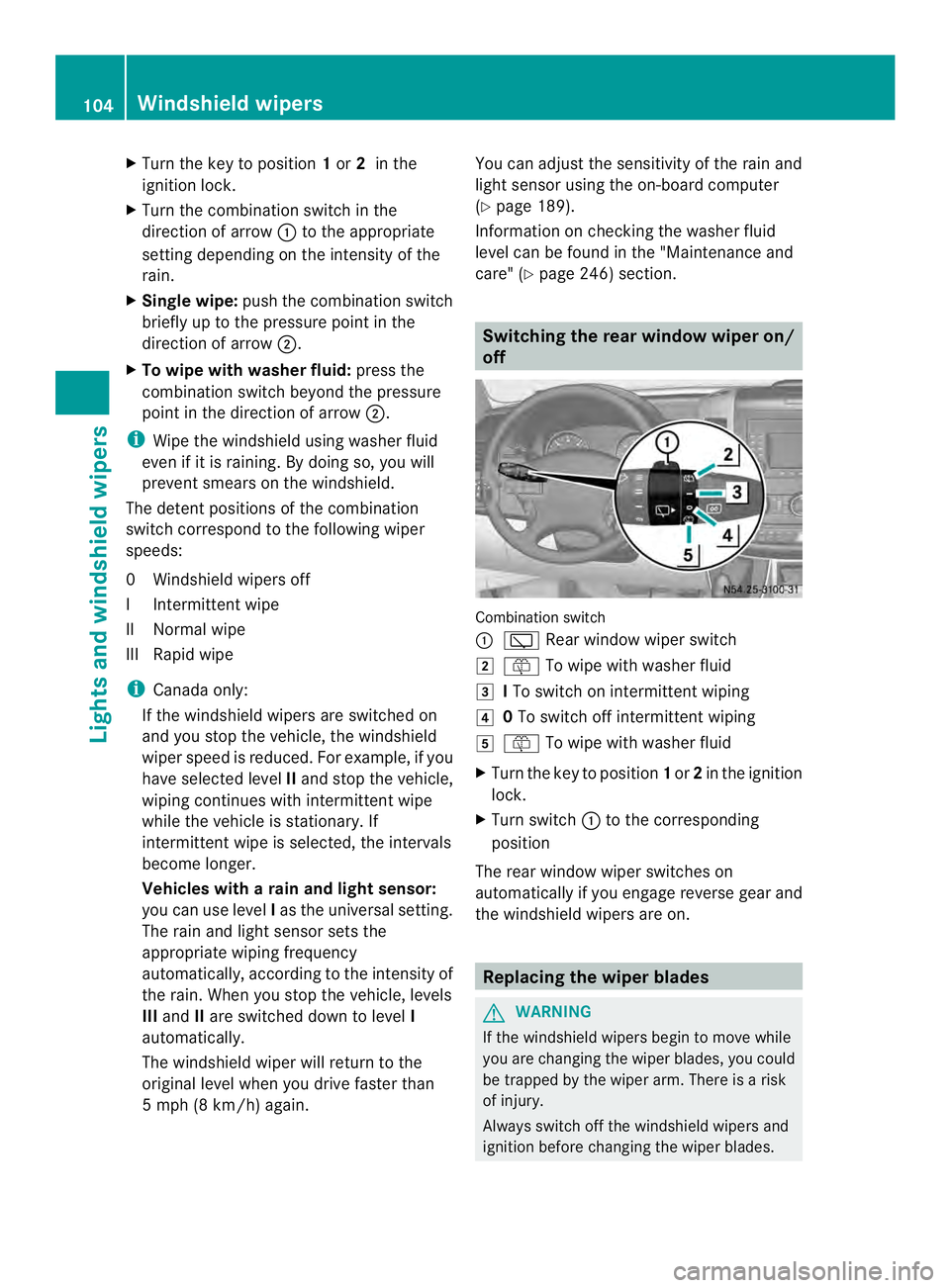
care" (Y page 246) section. Switching the rear window wiper on/
off
Combination switch
0005
0001 Rear window wiper switch
0009 0006 To wipe with washer fluid
000A ITo switch on intermittent wiping
000E 0To switch off intermittent wiping
000F 0006 To wipe with washer fluid
X Turn the key to position 1or 2in the ignition
lock.
X Turn switch 0005to the corresponding
position
The rear window wiper switches on
automatically if you engage reverse gear and
the windshield wipers are on. Replacing the wiper blades
G
WARNING
If the windshield wipers begin to move while
you are changing the wiper blades, you could
be trapped by the wiper arm. There is a risk
of injury.
Always switch off the windshield wipers and
ignition before changing the wiper blades. 104
Windshield wipersLights and windshiel
dwipers