key MERCEDES-BENZ SPRINTER 2013 MY13 Operator’s Manual
[x] Cancel search | Manufacturer: MERCEDES-BENZ, Model Year: 2013, Model line: SPRINTER, Model: MERCEDES-BENZ SPRINTER 2013Pages: 334, PDF Size: 3.88 MB
Page 182 of 334
On-boar
dcomputer (vehicles with
steering wheel buttons) Operating the on-board computer
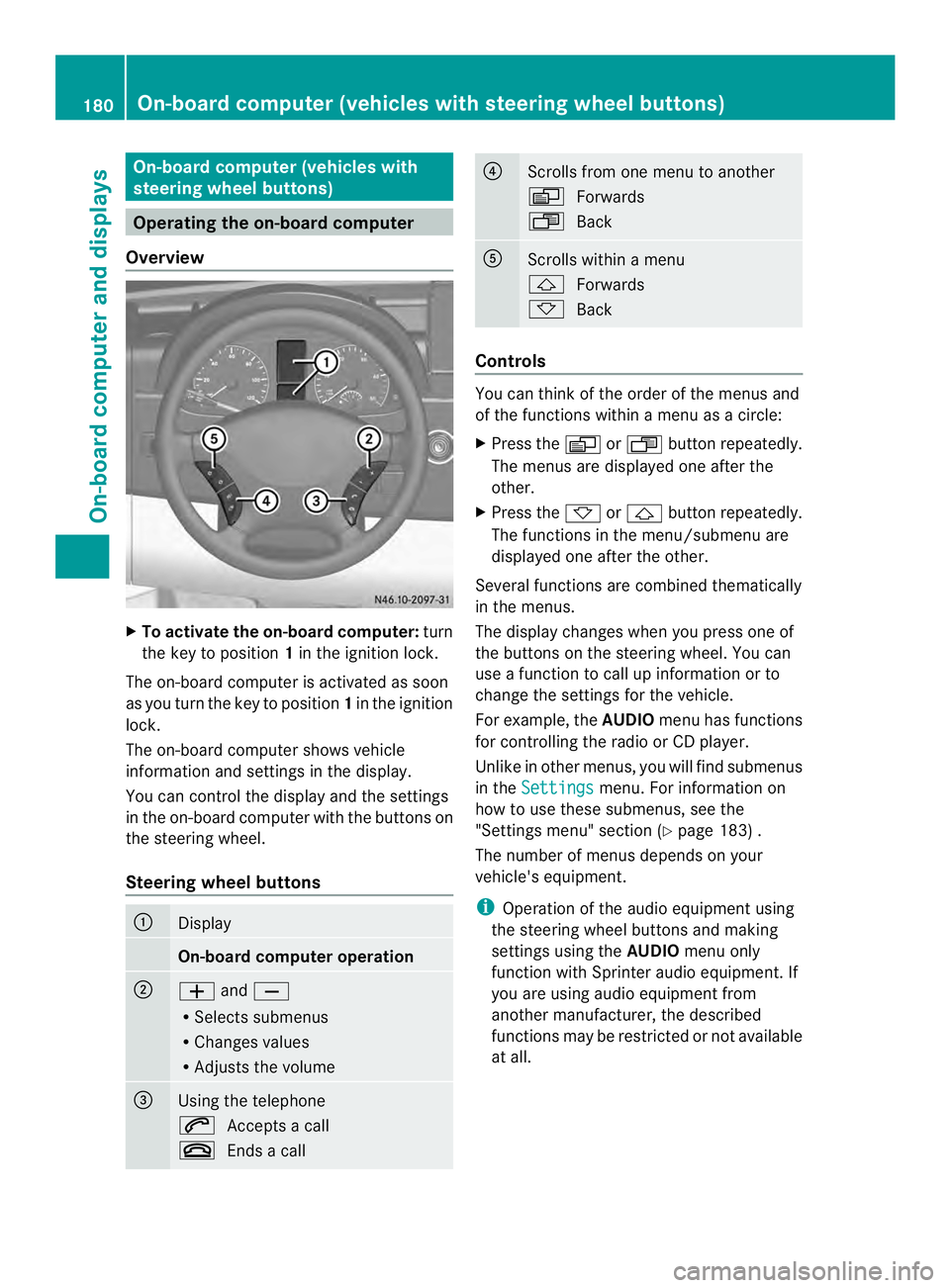
Overview X
To activat ethe on-board computer: turn
the key to position 1in the ignition lock.
The on-board computer is activated as soon
as you turn the key to position 1in the ignition
lock.
The on-board computer shows vehicle
information and settings in the display.
You can control the displaya nd the settings
in the on-board compute rwith the buttons on
the steering wheel.
Steering wheel buttons 0005
Display
On-board computer operation
0006
0011
and0012
R Selects submenus
R Changes values
R Adjusts the volume 0026
Using the telephone
0001
Accepts a call
0005 Ends a call 0025
Scrolls from one menu to another
0010
Forwards
0007 Back 0023
Scrolls within a menu
0001
Forwards
0009 Back Controls
You can think of the order of the menus and
of the functions within a menu as a circle:
X
Press the 0010or0007 button repeatedly.
The menus are displayed one after the
other.
X Press the 0009or0001 button repeatedly.
The functions in the menu/submenu are
displayed one after the other.
Several functions are combined thematically
in the menus.
The display changes when you press one of
the buttons on the steering wheel. You can
use a function to call up information or to
change the settings for the vehicle.
For example, the AUDIOmenu has functions
for controlling the radio or CD player.
Unlike in other menus, you will find submenus
in the Settings menu. For information on
how to use these submenus, see the
"Settings menu" section (Y page 183) .
The number of menus depends on your
vehicle's equipment.
i Operation of the audio equipmen tusing
the steering wheel buttons and making
settings using the AUDIOmenu only
function with Sprinter audio equipment. If
you are using audio equipment from
another manufacturer, the described
functions may be restricted or not available
at all. 180
On-board computer (vehicles with steering wheel buttons)On-board computer and displays
Page 185 of 334
Using the steering wheel buttons
X
Switch on the audio equipment (see the
separate operating instructions).
X Press the 0010or0007 button repeatedly
until the station selected appears in the
display.
The kind of search depends on the setting
for radio station selection (Y page 188).
The nearest stored station will be selected
or the station search starts (except on
Audio 20).
X Press the 0001or0009 button to select the
desired station.
i You can only store new stations on the
audio system itself. See the separate
operating instructions.
You can also operate the audioe quipment
in the same way as usual.
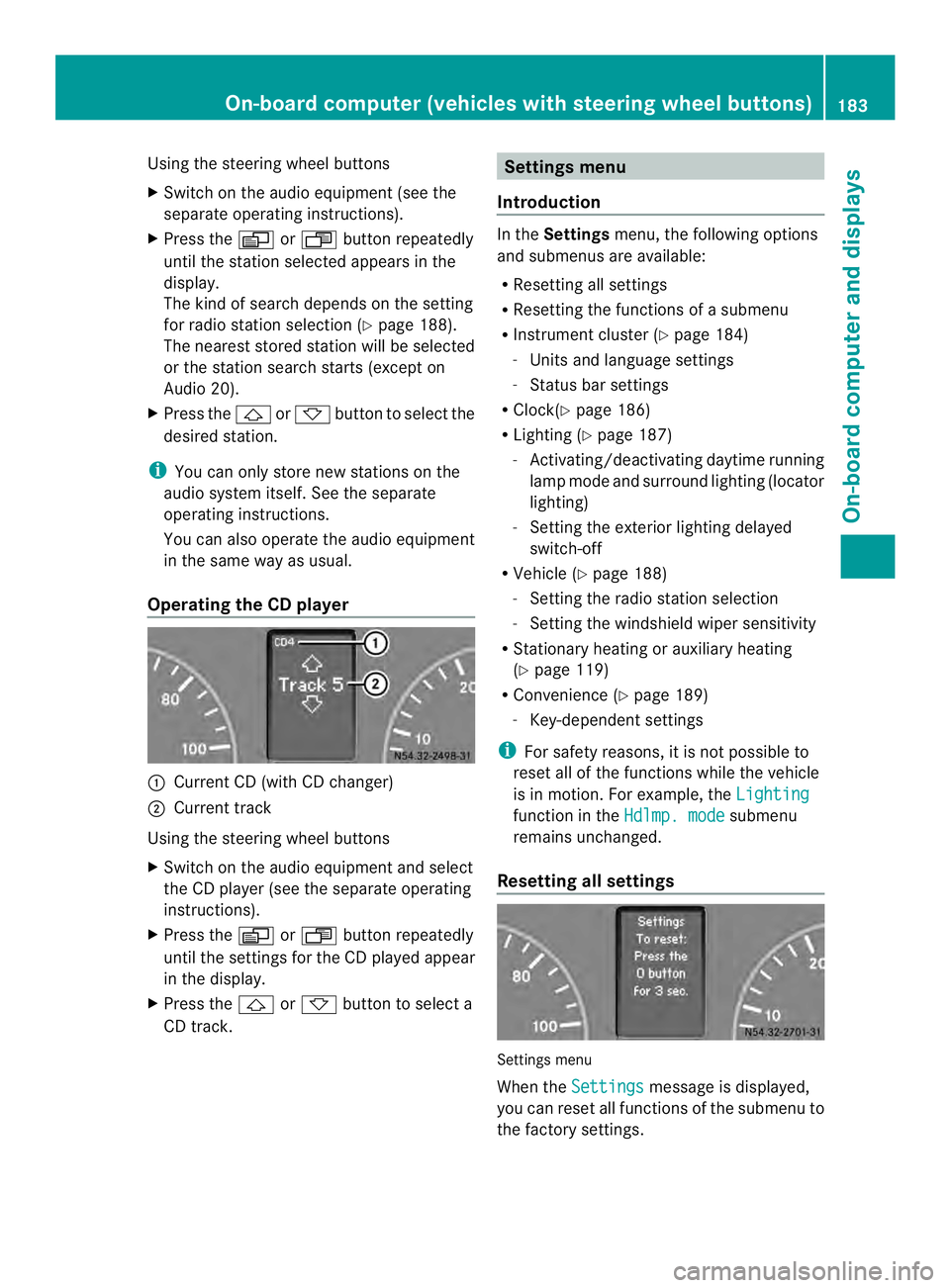
Operating the CD player 0005
Current CD (with CD changer)
0006 Current track
Using the steering wheel buttons
X Switch on the audio equipment and select
the CD player (see the separate operating
instructions).
X Press the 0010or0007 button repeatedly
until the settings for the CD played appear
in the display.
X Press the 0001or0009 button to select a
CD track. Settings menu
Introduction In the
Settings menu, the following options
and submenus are available:
R Resetting all settings
R Resetting the functions of a submenu
R Instrument cluster (Y page 184)
- Units and language settings
- Status bar settings
R Clock( Ypage 186)
R Lighting (Y page 187)
- Activating/deactivating daytime running
lamp mode and surround lighting (locator
lighting)
- Setting the exterior lighting delayed
switch-off
R Vehicle (Y page 188)
- Setting the radio station selection
- Setting the windshield wiper sensitivity
R Stationary heating or auxiliary heating
(Y page 119)
R Convenience (Y page 189)
- Key-dependent settings
i For safety reasons, it is not possible to
reset all of the functions while the vehicle
is in motion. For example, the Lighting function in the
Hdlmp. mode submenu
remains unchanged.
Resetting all settings Settings menu
When the
Settings message is displayed,
you can reset all functions of the submenu to
the factory settings. On-boar
dcomputer (vehicles with steering wheel buttons)
183On-board computer and displays Z
Page 190 of 334
Using the steering wheel buttons
X
Press the 0010or0007 button repeatedly
until the Settings menu appears in the
display.
X Press the 0001button to switch to the
submenu selection.
X Press the 0011or0012 button to select the
Lighting submenu.
X Press the 0001button to select the Loc.lighting function.
The selection marker is on the current
setting.
X Press the 0011or0012 button to switch
the surround lighting (locator lighting) On or
Off .
If you switch the surround lighting to On , the
following lamps light up in the dark after you
have unlocked the vehicle using the key:
R the parking lamps
R the tail lamps
R the license plate lamps
R the fog lamps
The surround lighting automatically switches
off after 40 seconds or when you:
R open the driver's door
R insert the key into the ignition lock
R lock the vehicle using the key
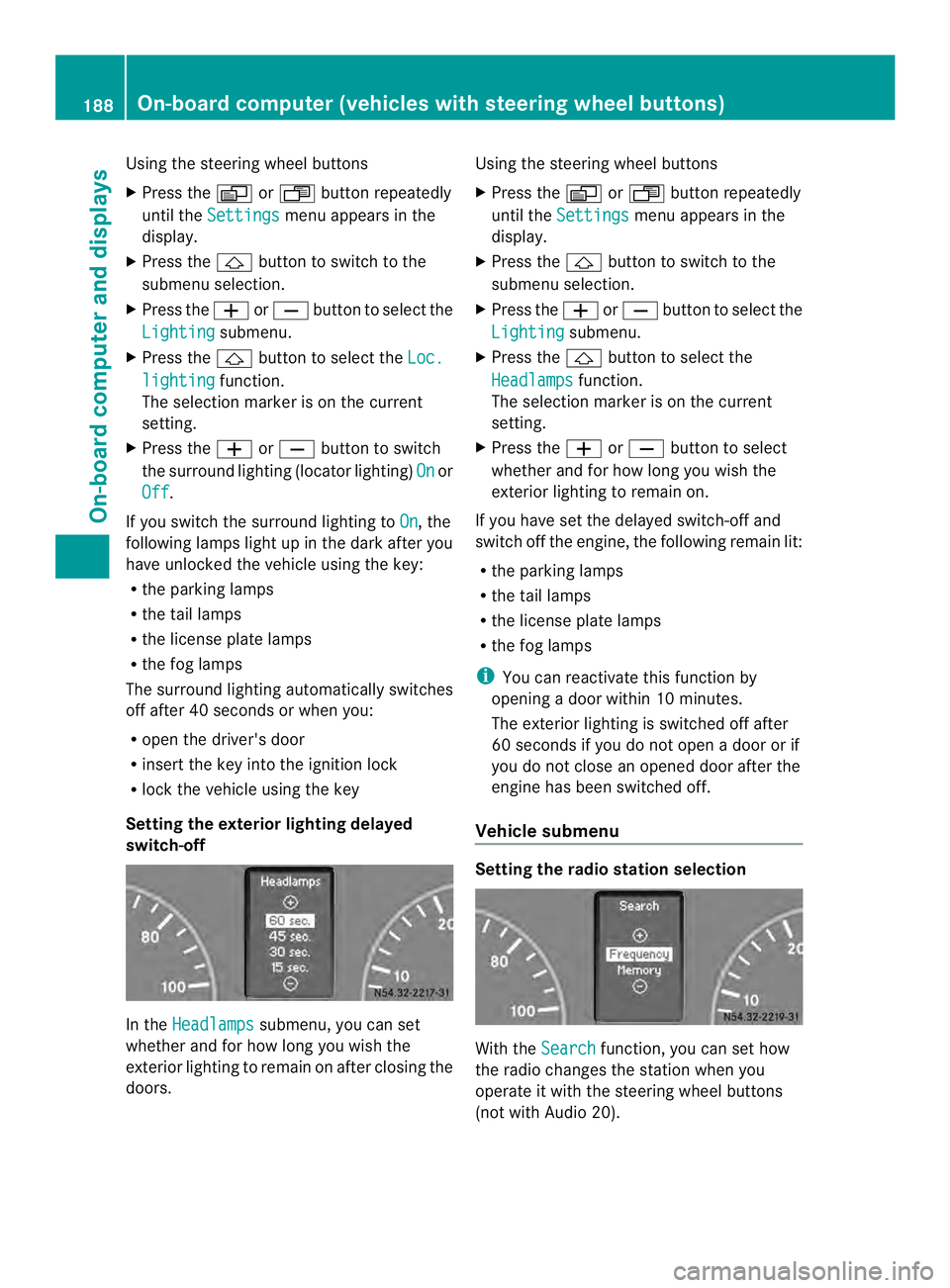
Setting the exterior lighting delayed
switch-off In the
Headlamps submenu, you can set
whether and for how long you wish the
exterior lighting to remain on after closing the
doors. Using the steering wheel buttons
X
Press the 0010or0007 button repeatedly
until the Settings menu appears in the
display.
X Press the 0001button to switch to the
submenu selection.
X Press the 0011or0012 button to select the
Lighting submenu.
X Press the 0001button to select the
Headlamps function.
The selection marker is on the current
setting.
X Press the 0011or0012 button to select
whether and for how long you wish the
exterior lighting to remain on.
If you have set the delayed switch-off and
switch off the engine, the following remain lit:
R the parking lamps
R the tail lamps
R the license plate lamps
R the fog lamps
i You can reactivate this function by
opening a door within 10 minutes.
The exterior lighting is switched off after
60 seconds if you do not open a door or if
you do not close an opened door after the
engine has been switched off.
Vehicle submenu Setting the radio station selection
With the
Search function, you can set how
the radio changes the station when you
operate it with the steering wheel buttons
(not with Audio 20). 188
On-board computer (vehicles with steering wheel buttons)On-board computer and displays
Page 191 of 334
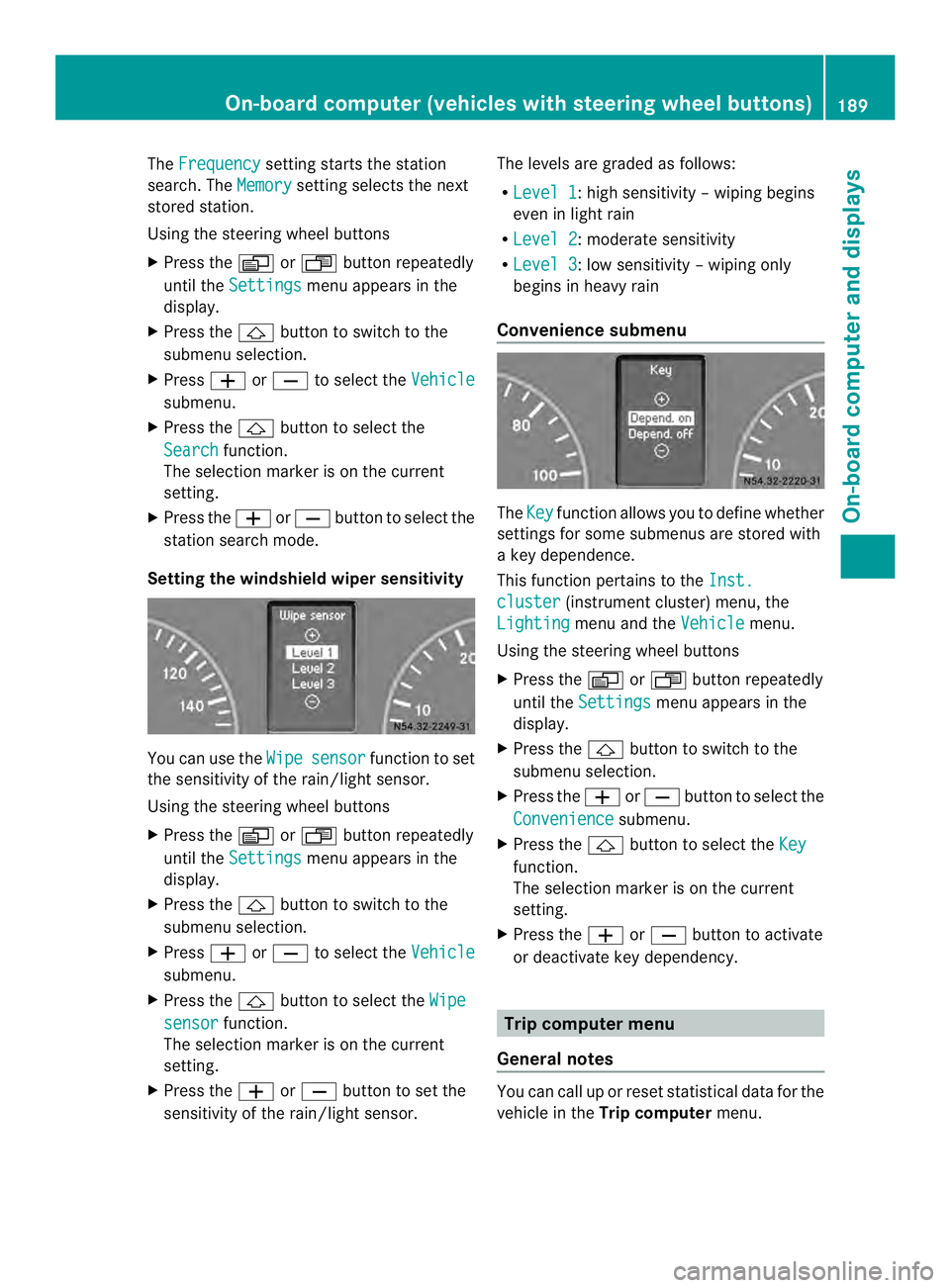
The
Frequency setting starts the station
search. The Memory setting selects the next
stored station.
Using the steering wheel buttons
X Press the 0010or0007 button repeatedly
until the Settings menu appears in the
display.
X Press the 0001button to switch to the
submenu selection.
X Press 0011or0012 to select the Vehicle submenu.
X Press the 0001button to select the
Search function.
The selection marker is on the current
setting.
X Press the 0011or0012 button to select the
station search mode.
Setting the windshield wiper sensitivity You can use the
Wipe sensor function to set
the sensitivity of the rain/light sensor.
Using the steering wheel buttons
X Press the 0010or0007 button repeatedly
until the Settings menu appears in the
display.
X Press the 0001button to switch to the
submenu selection.
X Press 0011or0012 to select the Vehicle submenu.
X Press the 0001button to select the Wipe sensor function.
The selection marker is on the current
setting.
X Press the 0011or0012 button to set the
sensitivity of the rain/light sensor. The levels are graded as follows:
R
Level 1 :h
igh sensitivity –wiping begins
even in light rain
R Level 2 :m
oderate sensitivity
R Level 3 :l
ow sensitivity –wiping only
begins in heavy rain
Convenience submenu The
Key function allows you to define whether
settings for some submenus are stored with
a key dependence.
This function pertains to the Inst. cluster (instrument cluster) menu, the
Lighting menu and the
Vehicle menu.
Using the steering wheel buttons
X Press the 0010or0007 button repeatedly
until the Settings menu appears in the
display.
X Press the 0001button to switch to the
submenu selection.
X Press the 0011or0012 button to selec tthe
Convenience submenu.
X Press the 0001button to select the Key function.
The selection marker is on the current
setting.
X Press the 0011or0012 button to activate
or deactivate key dependency. Trip computer menu
General notes You can call up or reset statistical data for the
vehicle in the
Trip computer menu. On-board computer (vehicles with steering wheel buttons)
189On-board computer and displays Z
Page 192 of 334
i
When you call up the trip computer again,
it displays the last function called up.
The units of the statistical information
displayed are set permanently for each
specific country, and are therefore
independen tofthe units selected in the
Settings menu.
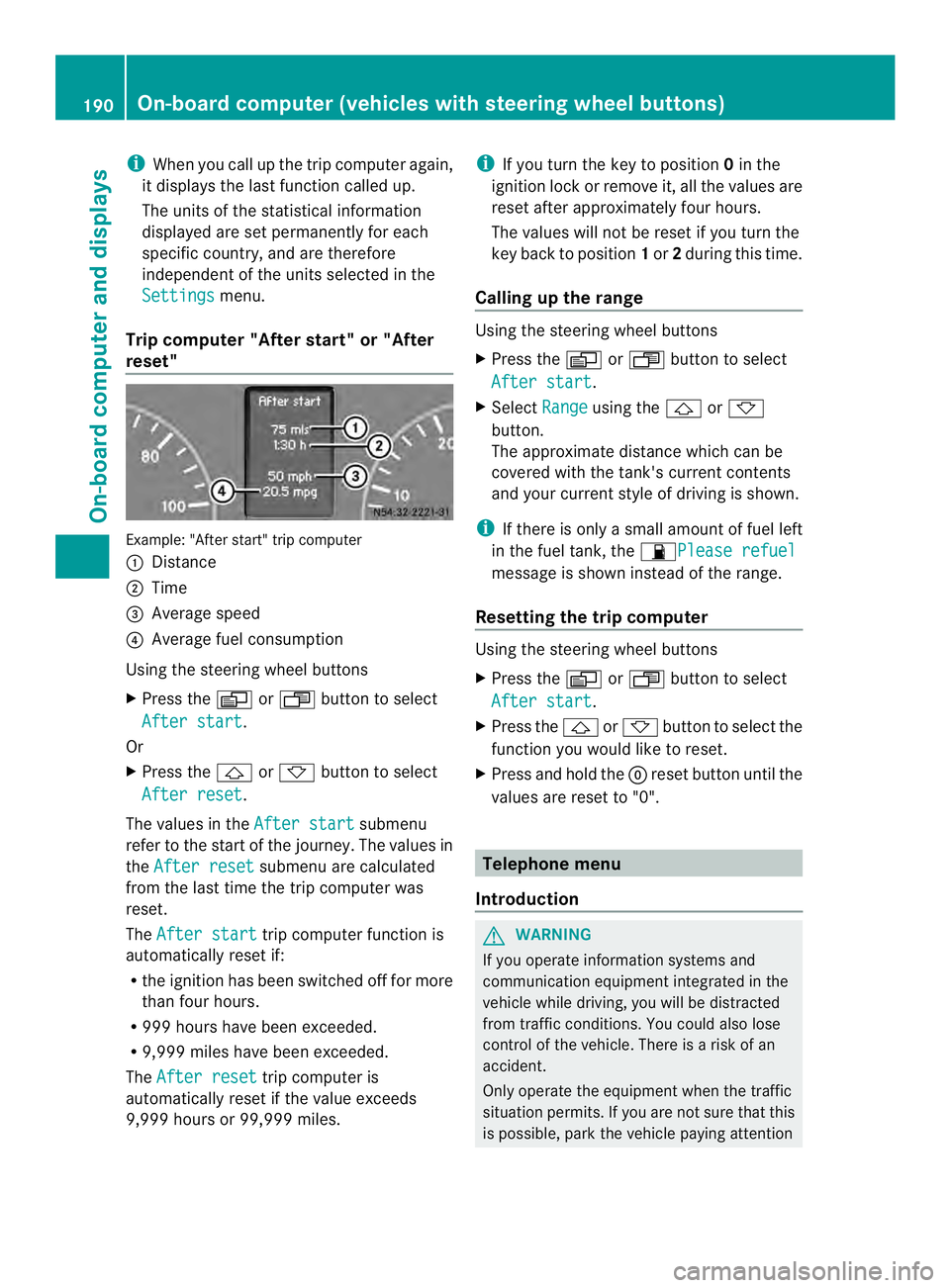
Trip computer "After start" or "After
reset" Example: "After start" trip computer
0005
Distance
0006 Time
0026 Average speed
0025 Average fuel consumption
Using the steering wheel buttons
X Press the 0010or0007 button to select
After start .
Or
X Press the 0001or0009 button to select
After reset .
The values in the After start submenu
refer to the start of the journey. The values in
the After reset submenu are calculated
from the last time the trip computer was
reset.
The After start trip computer function is
automatically reset if:
R the ignition has been switched off for more
than four hours.
R 999 hours have been exceeded.
R 9,999 miles have been exceeded.
The After reset trip computer is
automatically reset if the value exceeds
9,999 hours or 99,999 miles. i
If you turn the key to position 0in the
ignition lock or remove it, all the values are
reset after approximately four hours.
The values will not be reset if you turn the
key back to position 1or 2during this time.
Calling up the range Using the steering wheel buttons
X
Press the 0010or0007 button to select
After start .
X Select Range using the
0001or0009
button.
The approximate distance which can be
covered with the tank's current contents
and your current style of driving is shown.
i If there is only a small amount of fuel left
in the fuel tank, the 0016Please refuel message is shown instead of the range.
Resetting the trip computer Using the steering wheel buttons
X
Press the 0010or0007 button to select
After start .
X Press the 0001or0009 button to select the
function you would like to reset.
X Press and hold the 0007reset button until the
values are reset to "0". Telephone menu
Introduction G
WARNING
If you operate information systems and
communication equipment integrated in the
vehicle while driving, you will be distracted
from traffic conditions. You could also lose
control of the vehicle. There is a risk of an
accident.
Only operate the equipment when the traffic
situation permits. If you are not sure that this
is possible, park the vehicle paying attention 190
On-board computer (vehicles with steering wheel buttons)On-board computer and displays
Page 194 of 334
When a connection is established, the
name of the other person and/or the call
duration appear in the display.
X To exit the telephone book: press the
0005 button.
Redialing The on-board computer saves the last names
or numbers dialed in the redial memory.
Using the steering wheel buttons
X Use the 0010or0007 buttons to select the
TEL menu.
The display shows the mobile phone
operational readiness symbol.
X Press the 0001button.
The display shows the most recently dialed
numbers or names in the redial memory.
X Press the 0001or0009 button to select the
desired name or number.
X To start dialing: press the0001button.
The on-board computer dials the
corresponding phone number. The
Dialing (Audio 20) message appears in
the display.
When a connection is established, the
name of the other person and/or the call
duration appear in the display.
Or
X To exit the redial memory: press the
0005 button. Display messages
Notes on displa
ymessages
Important safety notes G
WARNING
No informatio nwill be displayed if either the
instrumen tcluster or the display is
inoperative.
As a result, you will not be able to see warning
and indicator lamps or information about the
driving conditions, such as speed or outside temperature. Driving characteristics may be
impaired
.Adjust your driving style and vehicle
speed accordingly.
Contac taqualified specialist workshop
immediately. G
WARNING
If service work is not carried out correctly, the
operating safety of your vehicle may be
affected. This could cause you to lose control
of your vehicle and cause an accident.
Moreover, the safety systems may no longer
be able to protect you or others as they are
designed to do.
Always have service work carried out at a
qualified specialist workshop.
i If you turn the key to position 2in the
ignition, a display chec kis performed. All
warning/indicator lamps (except the turn
signal indicator lamps) and the display are
activated. Before starting the journey,
check that the warning and indicator lamps
are operating correctly.
Vehicles without steering wheel
buttons Warnings, malfunctions or additional
information may also be shown in the display.
The following tables show all the display
messages.
Awarning tone sounds with
certain display messages.
Vehicles with steering wheel buttons The on-board computer shows warnings,
malfunctions or additional informatio
ninthe
display. Awarning tone sounds with certain
display messages .Display messages of a high
priority are shown in red.
Please respond in accordance with the
display messages and follow the additional
notes in this Operator's Manual.
You can hide low-priority display messages by
pressing the 0010,0007,0001or0009 192
Display messagesOn-board computer and displays
Page 204 of 334
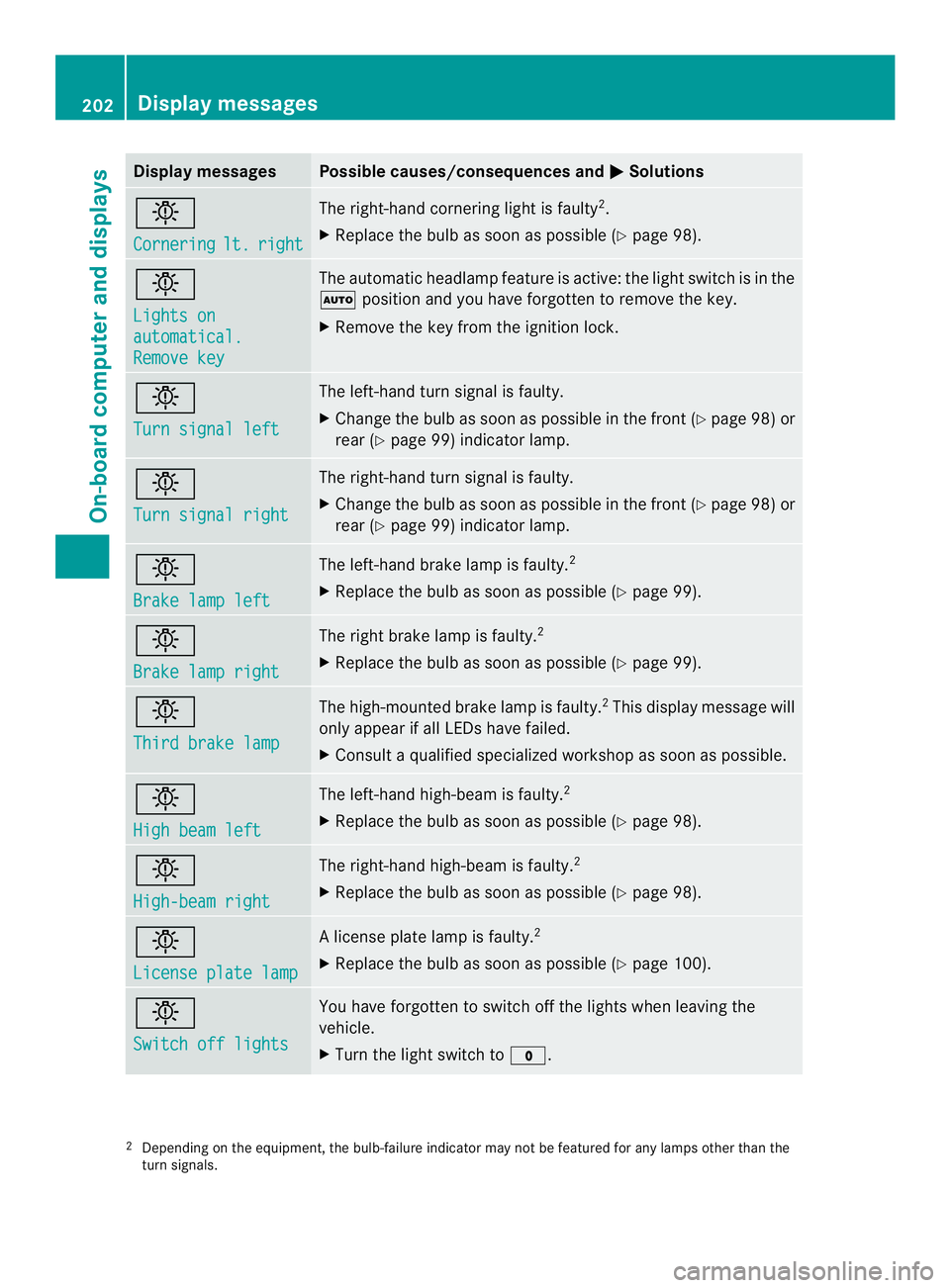
Display messages Possible causes/consequences and
0004 Solutions
0002
Cornering
lt. right The right-hand cornering ligh
tis faulty 2
.
X Replace the bulb as soon as possible (Y page 98).0002
Lights on
automatical.
Remove key The automatic headlamp feature is active: the light switch is in the
0007
position and you have forgotten to remove the key.
X Remove the key from the ignition lock. 0002
Turn signal left The left-hand turn signal is faulty.
X
Change the bulb as soon as possible in the front (Y page 98) or
rear (Y page 99) indicator lamp. 0002
Turn signal right The right-hand turn signal is faulty.
X
Change the bulb as soon as possible in the front (Y page 98) or
rear (Y page 99) indicator lamp. 0002
Brake lamp left The left-hand brake lamp is faulty.
2
X Replace the bulb as soon as possible (Y page 99).0002
Brake lamp right The right brake lamp is faulty.
2
X Replace the bulb as soon as possible (Y page 99).0002
Third brake lamp The high-mounted brake lamp is faulty.
2
This display message will
only appearifa ll LEDs have failed.
X Consult a qualified specialized workshop as soon as possible. 0002
High beam left The left-hand high-beam is faulty.
2
X Replace the bulb as soon as possible (Y page 98).0002
High-beam right The right-hand high-beam is faulty.
2
X Replace the bulb as soon as possible (Y page 98).0002
License plate lamp Al
icense plate lamp is faulty. 2
X Replace the bulb as soon as possible (Y page 100).0002
Switch off lights You have forgotten to switch off the lights when leaving the
vehicle.
X
Turn the light switch to 000C.2
Depending on the equipment, the bulb-failure indicator may not be featured for any lamps other than the
turn signals. 202
Display messagesOn-board computer and displays
Page 211 of 334
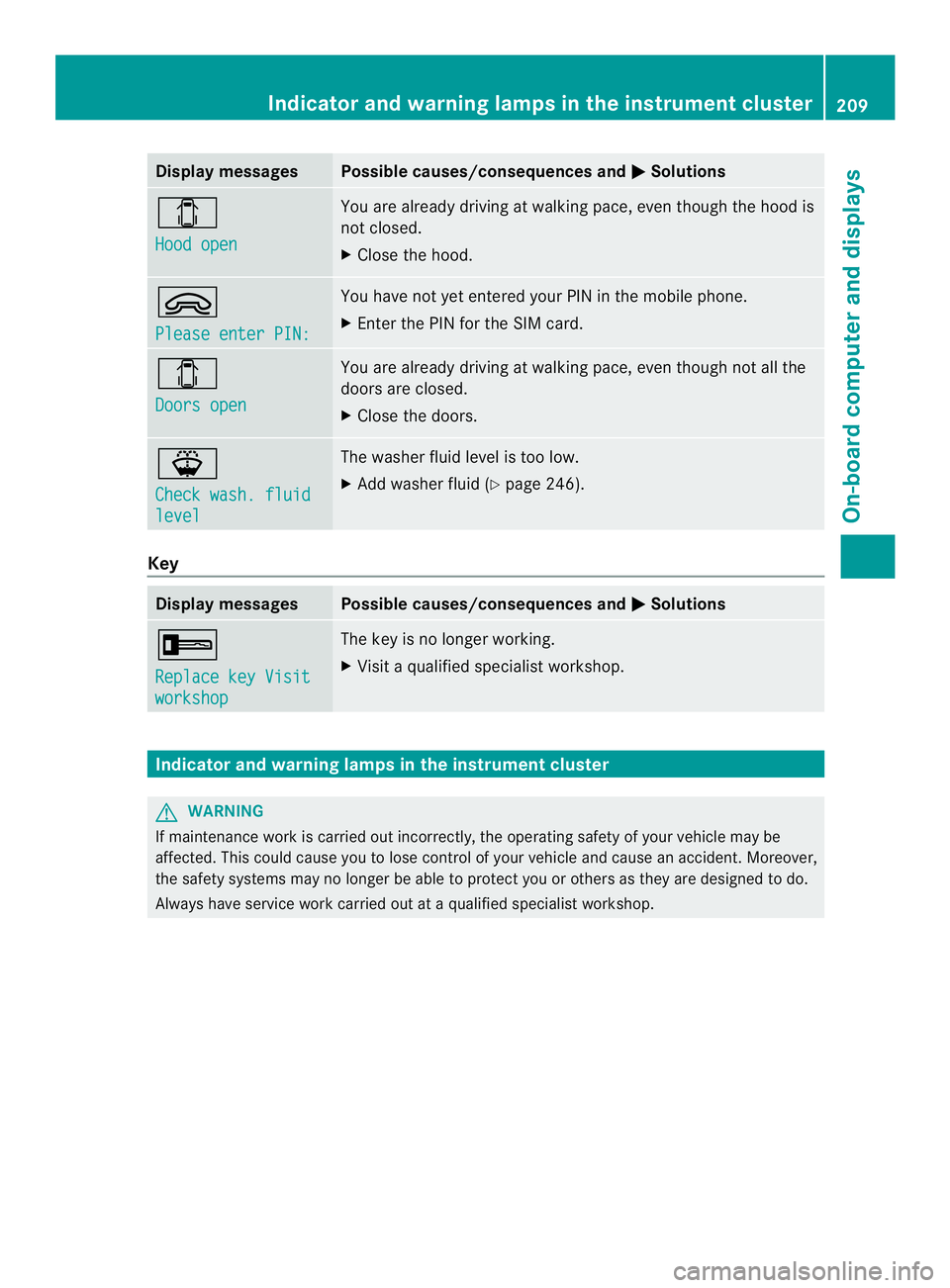
Display messages Possible causes/consequences and
0004 Solutions
0004
Hood open You are already driving at walking pace, eve
nthough the hood is
not closed.
X Close the hood. 0002
Please enter PIN: You have not yet entered your PIN in the mobile phone.
X
Enter the PIN for the SIM card. 0004
Doors open You are already driving at walking pace, even though not all the
doors are closed.
X
Close the doors. 000F
Check wash. fluid
level The washer fluid level is too low.
X
Add washer fluid (Y page 246).Key
Display messages Possible causes/consequences and
0004 Solutions
0005
Replace key Visit
workshop The key is no longer working.
X
Visit a qualified specialist workshop. Indicator and warning lamps in the instrument cluster
G
WARNING
If maintenance work is carried out incorrectly, the operating safety of your vehicle may be
affected. This could cause you to lose control of your vehicle and cause an accident. Moreover,
the safety systems may no longer be able to protect you or others as they are designed to do.
Always have service work carried out at a qualified specialist workshop. Indicator and warning lamps in the instrument cluster
209On-board computer and displays Z
Page 219 of 334
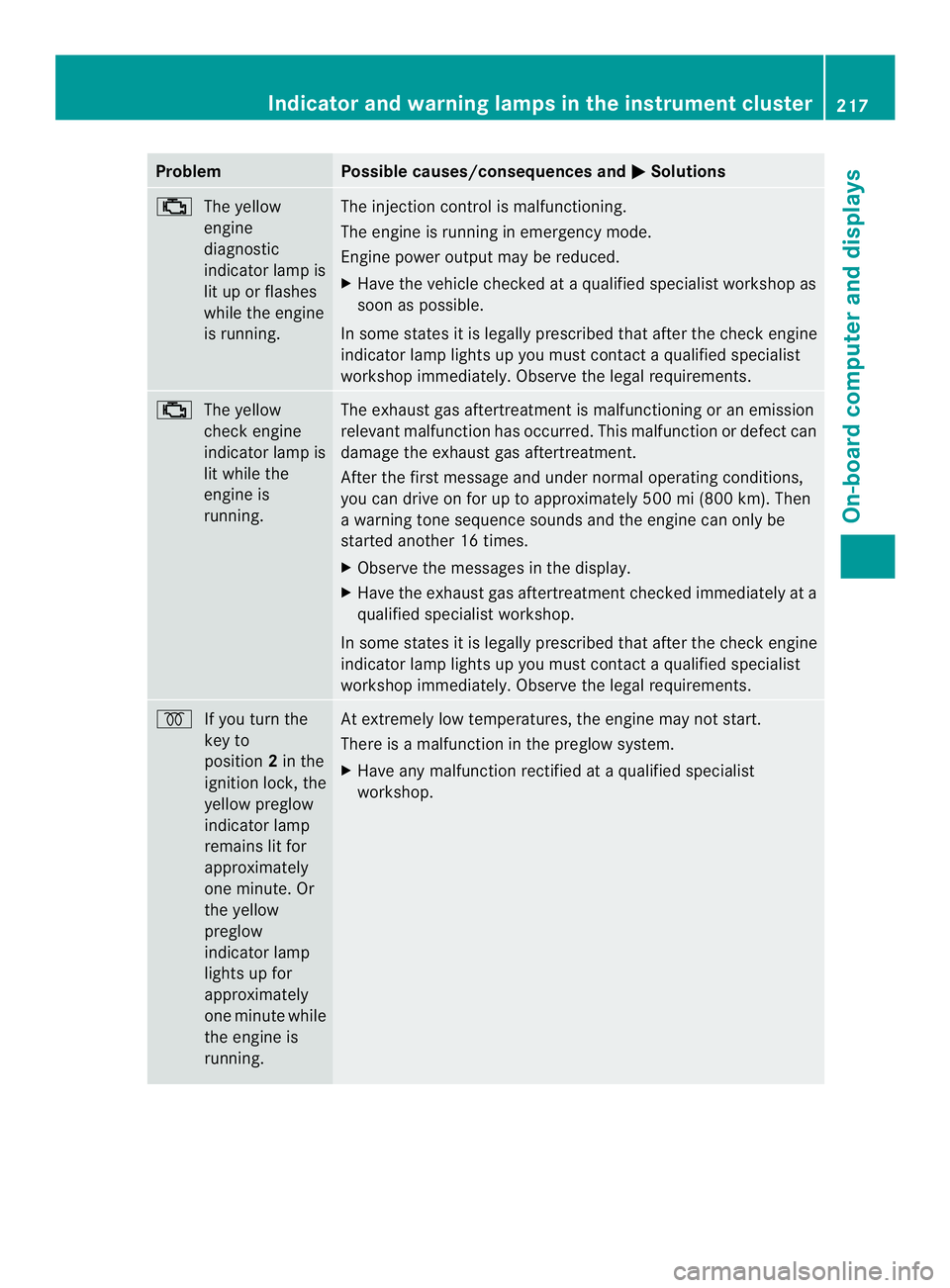
Problem Possible causes/consequences and
0004 Solutions
0018
The yellow
engine
diagnostic
indicator lamp is
lit up or flashes
while the engine
is running. The injection control is malfunctioning.
The engine is running in emergency mode.
Engine power output may be reduced.
X
Have the vehicle checked at a qualified specialist workshop as
soon as possible.
In some states it is legally prescribed that after the check engine
indicator lamp lights up you must contact a qualified specialist
workshop immediately. Observe the legal requirements. 0018
The yellow
check engine
indicator lamp is
lit while the
engine is
running. The exhaust gas aftertreatment is malfunctioning or an emission
relevant malfunction has occurred. This malfunction or defect can
damage the exhaust gas aftertreatment.
After the first message and under normal operating conditions,
you can drive on for up to approximately 500 mi (800 km). Then
a warning tone sequence sounds and the engine can only be
started another 16 times.
X
Observe the messages in the display.
X Have the exhaust gas aftertreatment checked immediately at a
qualified specialist workshop.
In some states it is legally prescribed that after the check engine
indicator lamp lights up you must contact a qualified specialist
workshop immediately. Observe the legal requirements. 000D
If you turn the
key to
position 2in the
ignition lock, the
yellow preglow
indicator lamp
remains lit for
approximately
one minute. Or
the yellow
preglow
indicator lamp
lights up for
approximately
one minute while
the engine is
running. At extremely low temperatures, the engine may not start.
There is a malfunction in the preglow system.
X
Have any malfunction rectified at a qualified specialist
workshop. Indicator and warning lamps in the instrument cluster
217On-board computer and displays Z
Page 221 of 334
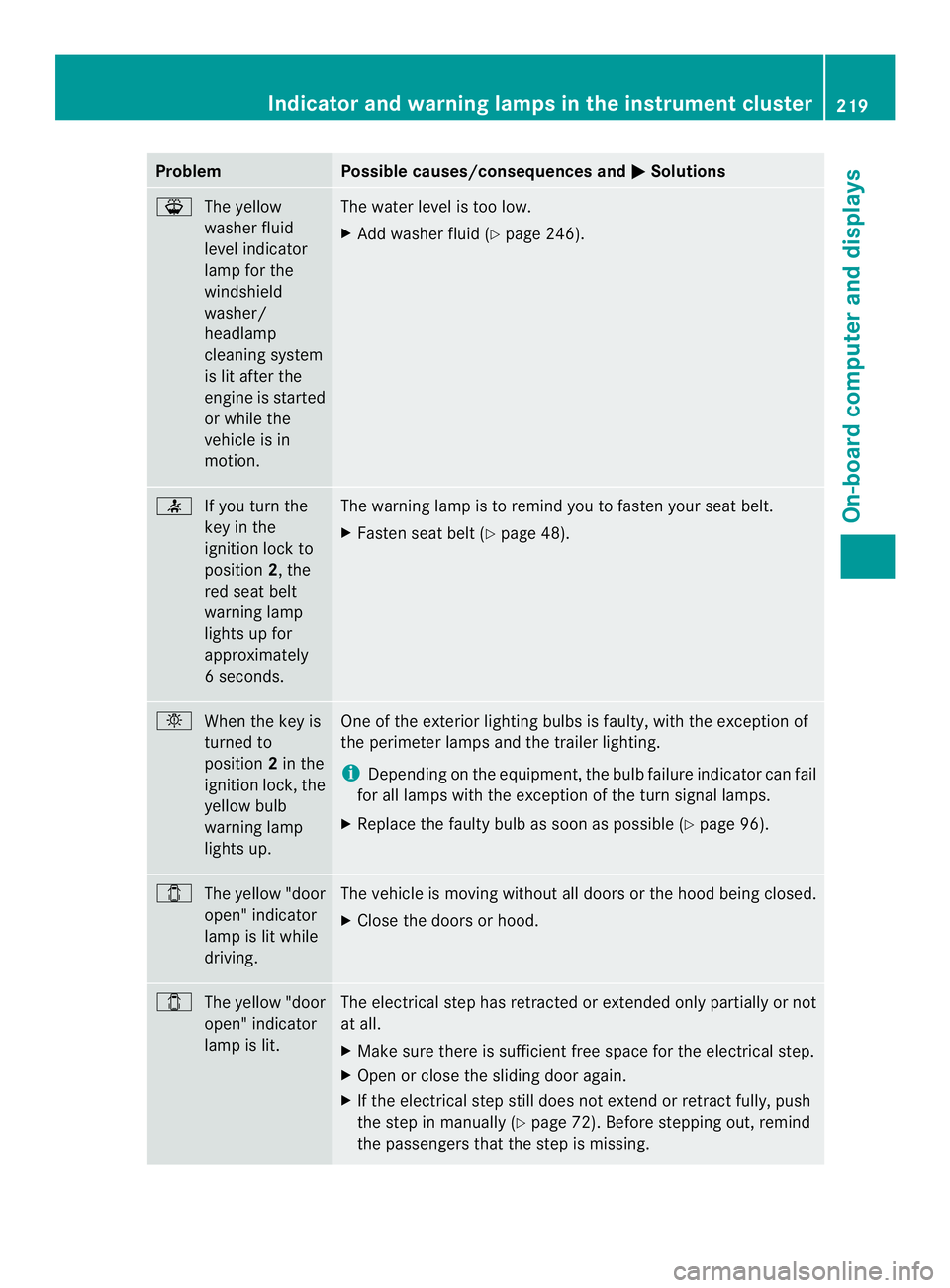
Problem Possible causes/consequences and
0004 Solutions
000F
The yellow
washer fluid
level indicator
lamp for the
windshield
washer/
headlamp
cleaning system
is lit after the
engine is started
or while the
vehicle is in
motion. The water level is too low.
X
Add washer fluid (Y page 246). 0014
If you turn the
key in the
ignition lock to
position 2, the
red seat belt
warning lamp
lights up for
approximately
6s econds. The warning lamp is to remind you to fasten your seat belt.
X
Fasten seat belt (Y page 48). 0002
When the key is
turned to
position 2in the
ignition lock, the
yellow bulb
warning lamp
lights up. One of the exterior lighting bulbs is faulty, with the exception of
the perimeter lamps and the trailer lighting.
i
Depending on the equipment, the bulb failure indicator can fail
for all lamps with the exception of the turn signal lamps.
X Replace the faulty bulb as soon as possible (Y page 96).0004
The yellow "door
open" indicator
lamp is lit while
driving. The vehicle is moving without all doors or the hood being closed.
X
Close the doors or hood. 0004
The yellow "door
open" indicator
lamp is lit. The electrical step has retracted or extended only partially or not
at all.
X Make sure there is sufficien tfree space for the electrical step.
X Open or close the sliding door again.
X If the electrical step still does not extend or retract fully, push
the step in manually (Y page 72). Before stepping out, remind
the passengers that the step is missing. Indicator and warnin
glamps in the instrument cluster
219On-board computer and displays Z