AUX MERCEDES-BENZ SPRINTER 2013 MY13 Operator’s Manual
[x] Cancel search | Manufacturer: MERCEDES-BENZ, Model Year: 2013, Model line: SPRINTER, Model: MERCEDES-BENZ SPRINTER 2013Pages: 334, PDF Size: 3.88 MB
Page 7 of 334
Automatic transmission
emergency mode
...............................141
Auxiliary heating Activating/deactivating heater
booster mode ................................ 125
Conditions for switching on ...........119
Important safety notes ..................118
Operating with the button (control
panel) ............................................ 119
Operation with the remote control .121
Operation with the timer ................122
Problem (malfunction) ...................128
Selecting a switch-on time ............. 119
Setting the switch-on time .............120
see Auxiliary heating
Axle load, permissible (trailer
towing) ............................................... 329B
Backup lamps Changing bulbs ........................ 99, 101
Backup lamps (Chassis Cab)
Changing bulbs .............................. 100
BAS (Brake Assist System)
Display message ............................ 198
Function/notes ................................ 56
Indicator lamp ................................ 210
Basic settings
see Settings
Battery
Isolating switch .............................. 132
Replacing (SmartKey) ................66, 67
Battery (SmartKey)
Checking .......................................... 66
Important safety notes ....................66
Replacing ................................... 66, 67
Battery (vehicle)
Care ............................................... 255
Charge indicator lamp ...................214
Charging ........................................ 254
Disconnecting and connecting
(driver's footwell) ........................... 251
Disconnecting and connecting
(engine compartment) ...................253
Display message ............................ 208
Important safety notes ..................250Installing/removing (driver's
footwell) ......................................... 252
Installing/removing (engine
compartment)
................................ 254
Jump starting ................................. 267
Location ......................................... 250
Removing/installing the floor
covering (driver's footwell) ............251
Belt
see Seat belts
Bio-diesel ........................................... 317
Bleeding the fuel system ..................137
Bodies Body/equipment mounting
directives for trucks .........................28
Bottle holder ...................................... 227
see Cuph older
Brake
EBD .................................................. 57
Brake Assist System
see BAS (Brake Assist System)
Brake fluid
Checking the level .........................245
Display message ............................ 199
Notes .................................... .245, 324
Warning lamp ................................. 211
Brake force distribution,
electronic
see EBD (electronic brake force
distribution)
Brake lamps
Changing bulbs ........................ 99, 101
Brake lamps (Chassis Cab)
Changing bulbs .............................. 100
Brake linings
Display message ............................ 199
Indicator lamp ................................ 214
Brakes
ABS .................................................. 56
Applying the parking brake ............146
BAS .................................................. 56
Brake fluid (notes) .................245, 324
Checking brake fluid leve l.............. 245
Display messages ..........................199
Driving tips .................................... 150
Important safety notes ..................150
Maintenance .................................. 210
Parking brake (notes) ..................... 151 Index
5
Page 9 of 334
Rear fog lamp (Chassis Cab)
..........100
Rea rinterior light ........................... 102
Standing lamps (front) .....................98
Standing lamps (rear, Chassis
Cab) ............................................... 100
Standing lamps (rear) ..............99, 101
Tai llamps ................................ 99, 101
Tail lamps (Chassis Cab) ................100
Turn signals (front) ...........................98
Turn signals (rear, Chassis Cab) ..... 100
Turn signals (rear) ....................99, 101
Warning and indicator lamps .........219
see Replacing bulbs
Child-proof locks
Important safety notes ....................54
Rea rdoor ......................................... 55
Sliding door ..................................... 55
Children
In the vehicle ................................... 50
Restraint systems ............................ 50
Specia lseat belt retractor ...............54
Child seat
LATCH-type (ISOFIX) child seat
anchors ............................................ 52
Top Tether ....................................... 53
Chock ................................................. 147
Cigarette lighter ................................ 227
Cleaning Mirro rturn signal ........................... 259
Trailer tow hitch ............................. 260
Climate control
Air-conditioning system .................110
Auxiliary heating ............................ 118
Checking/cleaning the airf ilter
(rear-compartment air
conditioning) .................................. 248
Cooling with air dehumidification ..113
Defrosting the windows .................114
Heating .......................................... 109
Important safety notes ..................108
Operating the cargo compartment
airv ents. ........................................ 129
Overview of systems ......................108
Problems with the windshield
heating .......................................... 115
Problem with the rear window
defroster ........................................ 116Rear-compartment air
conditioning
................................... 112
Rear-compartment heating ............111
Reheat function (air
dehumidification) ........................... 114
Setting the aird istribution.............113
Setting the airflow .........................114
Setting the airv ents...................... 117
Setting the temperature ................113
Switching air-recirculation mode
on/off ............................................ 116
Switching on/off ........................... 112
Switching the rear window
defroster on/off ............................ 116
Switching windshield heating on/
off .................................................. 115
Cockpit
Overview .......................................... 32
see Instrument cluster
COMAND display
Cleaning ......................................... 260
Combination switch ............................92
Communications equipment Operation ....................................... 229
Type approval/frequency ..............314
Consumption statistics (on-board
computer) .......................................... 190
Control panel Above the windshield .......................37
Center console ................................ 36
Climate control ................................ 36
Driver's door .................................... 38
Left and righ tside of the steering
wheel ............................................... 38
Conversions/equipment ....................27
Conversions and accessories see Add-on equipment
Coolan t(engine)
Adding ........................................... 245
Checking the leve l......................... 244
Displaying the temperature (on-
board computer) ............................ 182
Display message ............................ 205
Filling capacity ............................... 326
Important safety notes ..................244
Cooling
see Climate control Index
7
Page 17 of 334
Rear compartment
Activating/deactivating climate
control ........................................... 112
Setting the airv ents...................... 118
Rear-compartment air-
conditioning system
see Climate control
Rear-compartment heating
see Climate control
Rear door
Child-proof locks .............................. 55
Important safety notes ....................73
Opening/closing .............................. 73
Rear fog lamp
Changing bulbs ........................ 99, 101
Switching on/off .............................. 91
Rear fog lamp (Chassis Cab)
Changing bulbs .............................. 100
Rear interior light
Changing bulbs .............................. 102
Rear lamps
see Lights
Rear rack
Notes ............................................. 236
Rear view camera .............................. 161
Aspect ratio menu .........................165
Brightnes ssubmenu ...................... 164
Cleaning instructions .....................259
Color submenu .............................. 165
Contrast submenu .........................165
Default settings menu .................... 166
Display menu ................................. 164
Illumination submenu ....................164
Important safety notes ..................161
Mai nm enu .................................... .163
Menu language menu ....................166
Monitor menu ................................ 163
Problem (malfunction) ...................167
Standard menu .............................. 165
Switching off the monitor while
driving ............................................ 162
Switching on .................................. 161
Switching the monitor on/off ........162
Tint (color balance) submenu ......... 165
Rear-view mirror
Anti-glare mode ............................... 86Rear window defroster
Problem (malfunction) ...................116
Switching on/off ........................... 116
Rear window wiper ...........................104
Refilling DEF filler neck ............................... 144
Important safety notes (Diesel
Exhaus tFluid –DEF) ...................... 143
Refilling procedure (Diesel
Exhaus tFluid –DEF) ...................... 144
Refrigerant ......................................... 326
Refueling Fuel filler fla p................................. 142
Fuel gauge ..................................... 177
Important safety notes (fuel) .........142
Refueling procedure (fuel) .............142
see Fuel
Releasing the parking lock
manually (automatic
transmission) ..................................... 141
Remote control Changing the operating duration
(auxiliary heating) .......................... 122
Replacing the battery (auxiliary
heating )........................................ 126
Switching on/off (auxiliary
heating) ......................................... 121
Synchronizing (auxiliary heating) ...122
Replacing the battery (auxiliary
heating remote control) .................... 126
Reporting safety defects ....................29
Reserve (fuel tank) see Fuel
Restraint system
see SRS (Supplemental Restraint
System)
Reverse warning feature ..................136
Roof carrier Maximum payloa d.......................... 327
Note s............................................. 236
Roof load (roof carrier) .....................327 Index
15
Page 20 of 334
Tank content
Fuelgauge ..................................... 177
Range (vehicles with steering
wheel buttons) ............................... 190
Reserve fuel warning lamp .............216
Technical data
Capacities ...................................... 316
Cargo tie-down points .................... 327
Cargo tie-down rings ..................... .327
Loading rails .................................. 327
Roo fcarrier .................................... 327
Tires/wheel s................................. 285
Trailer tow hitch ............................. 328
Vehicle data ................................... 326
Telephone .......................................... 228
Telephone (on-board computer) Accepting an incoming call ............191
Display messages ..........................209
Numbers from the phone book ......191
Operating ...................................... .190
Redialing ........................................ 192
Rejecting or ending a call ..............191
Temperature
Outside temperature ..................... .177
Setting (climate control) ................113
Setting the unit (vehicle swith
steerin gwheel buttons) .................184
Theft deterrent systems
ATA (Anti-Theft Alarm system) .........60
Immobilize r...................................... 60
Theft-deterrent systems
Tow-awa yalarm ............................... 60
Thoraxbag ............................................ 45
Tightening torques for wheel nuts/
wheel bolts ........................................ 307
Time Setting the time (vehicles without
steering wheel buttons) .................179
Setting the time (vehicle swith
steerin gwheel buttons) .................186
Timer
Activating ....................................... 123
Important safety notes ..................122
Overview ........................................ 123
Setting the heating level (auxiliary
heating) ......................................... 125
Setting the preselectio ntime
(auxiliary heating) .......................... 124Setting weekday, time and
operating duratio
n(auxiliary
heating )......................................... 123
Switching immediate heating
mode on/off (auxiliary heating) .....124
Tire pressure
Calling up (on-board computer) .....281
Checking manually ........................280
Display messages (vehicles
without steering wheel buttons) ....194
Display messages (vehicles with
steering wheel buttons) .................207
Maximum ....................................... 280
Notes ............................................. 279
Not reached (tire sealant) ..............301
Reached (tire sealant) ....................301
Recommended ............................... 278
Setting the unit (vehicle swith
steerin gwheel buttons) .................186
Tire label ................................ 278, 279
Tire pressure loss warning system .282
Tire pressure monitor Display message ............................ 207
Indicator lamp ................................ 218
Tire pressure monitoring system
Checking the tire pressure
electronically ................................. 282
Function/notes ............................. 281
Restarting ...................................... 283
Warning lamp ................................. 282
Tire pressure table ............................285
Tires Aspect ratio (definition) .................294
Average weight of the vehicle
occupants (definition) ....................293
Bar (definition) ............................... 292
Changing awheel .......................... 302
Characteristics .............................. 292
Checking ........................................ 275
Definition of terms .........................292
Direction of rotatio n...................... 303
Distributio nofthe vehicle
occupants (definition) ....................295
DOT, Tire Identification Number
(TIN) .............................................. .292
DOT (Department of
Transportation) (definition) ............293 18
Index
Page 40 of 334
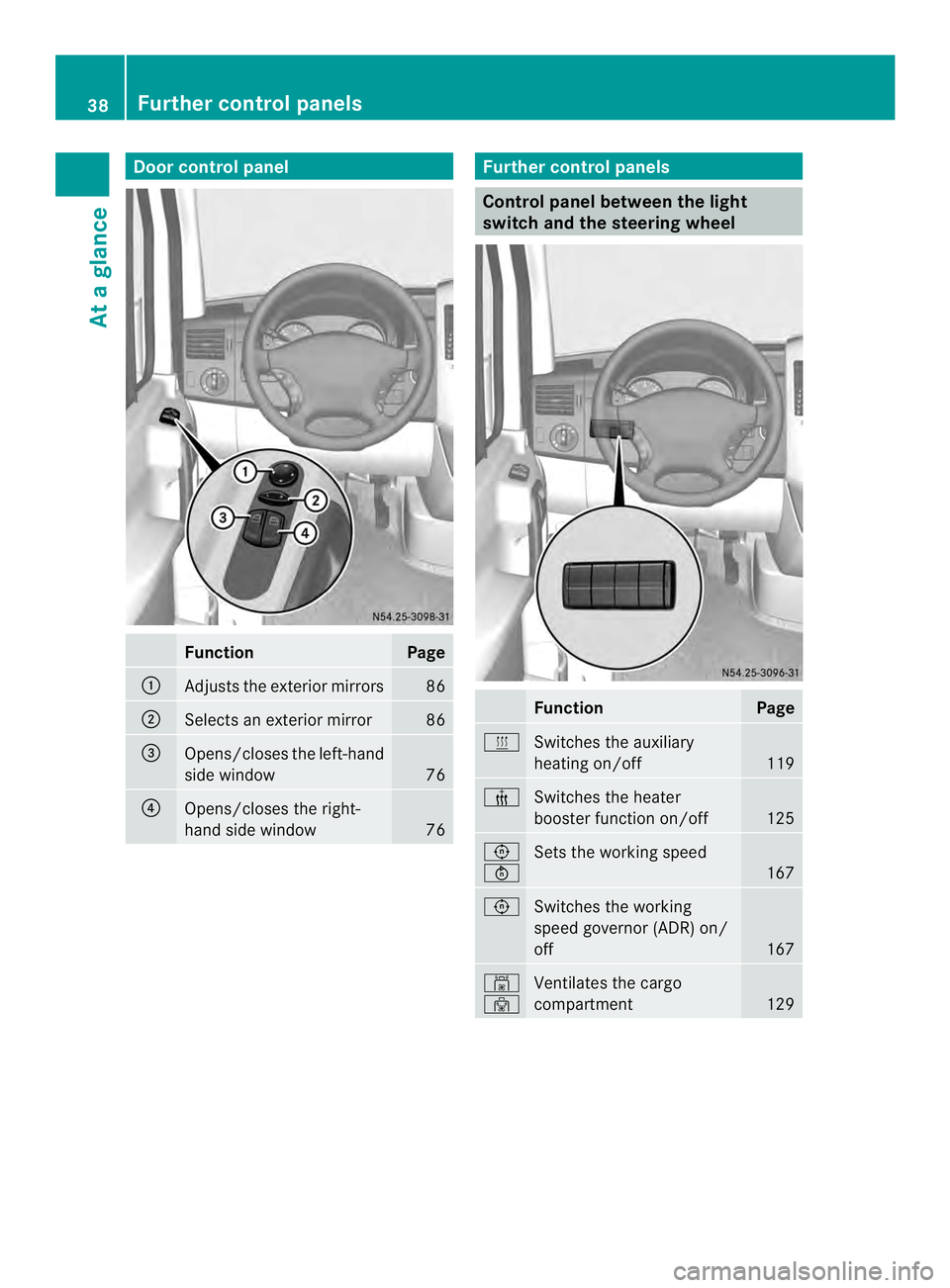
Door control panel
Function Page
0005
Adjusts the exterio
rmirrors 86
0006
Selects an exterior mirror 86
0026
Opens/closes the left-hand
side window
76
0025
Opens/closes the right-
hand side window
76 Further control panels
Control panel between the light
switch and the steering wheel
Function Page
0020
Switches the auxiliary
heating on/off
119
000C
Switches the heater
booster function on/off
125
0023
0024
Sets the working speed
167
0023
Switches the working
speed governor (ADR) on/
off
167
0009
0010
Ventilates the cargo
compartment
12938
Further control panelsAt a glance
Page 63 of 334
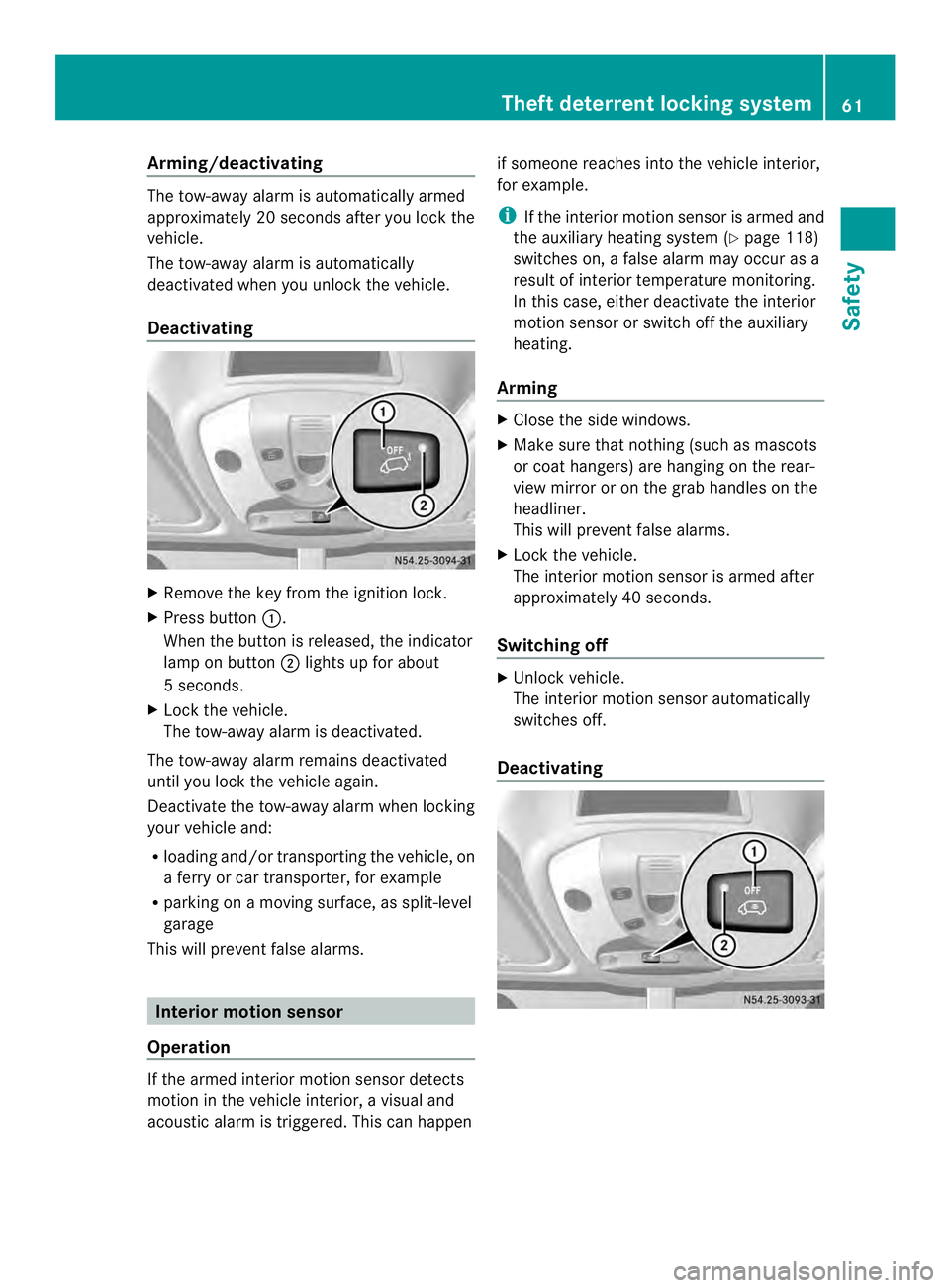
Arming/deactivating
The tow-away alarm is automatically armed
approximately 20 seconds after you loc kthe
vehicle.
The tow-away alarm is automatically
deactivated when you unlock the vehicle.
Deactivating X
Remove the key from the ignition lock.
X Press button 0005.
When the button is released, the indicator
lamp on button 0006lights up for about
5s econds.
X Lock the vehicle.
The tow-away alarm is deactivated.
The tow-away alarm remains deactivated
until you lock the vehicle again.
Deactivate the tow-away alarm when locking
your vehicle and:
R loading and/or transporting the vehicle, on
a ferry or car transporter, for example
R parking on a moving surface, as split-level
garage
This will preven tfalse alarms. Interior motion sensor
Operation If the armed interior motion sensor detects
motion in the vehicle interior, a visual and
acoustic alarm is triggered. This can happen if someone reaches into th
evehicle interior,
for example.
i If the interior motion sensor is armed and
the auxiliary heating system (Y page 118)
switches on, a false alarm may occur as a
result of interior temperature monitoring.
In this case, either deactivate the interior
motion sensor or switch off the auxiliary
heating.
Arming X
Close the side windows.
X Make sure that nothing (such as mascots
or coat hangers) are hanging on the rear-
view mirror or on the grab handles on the
headliner.
This will preven tfalse alarms.
X Loc kthe vehicle.
The interior motion sensor is armed after
approximately 40 seconds.
Switching off X
Unlock vehicle.
The interior motion sensor automatically
switches off.
Deactivating Theft deterrent locking system
61Safety Z
Page 109 of 334
Useful information
............................108
Overview of climate control sys-
tems ................................................... 108
Operating the climate control sys-
tem ..................................................... 112
Adjusting the air vents .....................117
Operating the auxiliary heating
system ............................................... 118
Operating the cargo compartment
air vents ............................................. 129 107Climate control
Page 120 of 334
X
To open: for the left-hand side of the
vehicle, tur nthumbwheel 0005or for the
right-hand side of the vehicle,
thumbwheel 0006of the air vents clockwise.
X To close: for the left-hand side of the
vehicle, turn thumbwheel 0005or for the
right-hand side of the vehicle,
thumbwheel 0006of the air vents counter-
clockwise. Adjusting the air vents in the roof duct
! Always leave at least one air vent open.
If the rear-compartment air conditioning is
switched on and all the air vents are closed,
the air-conditioning system may be
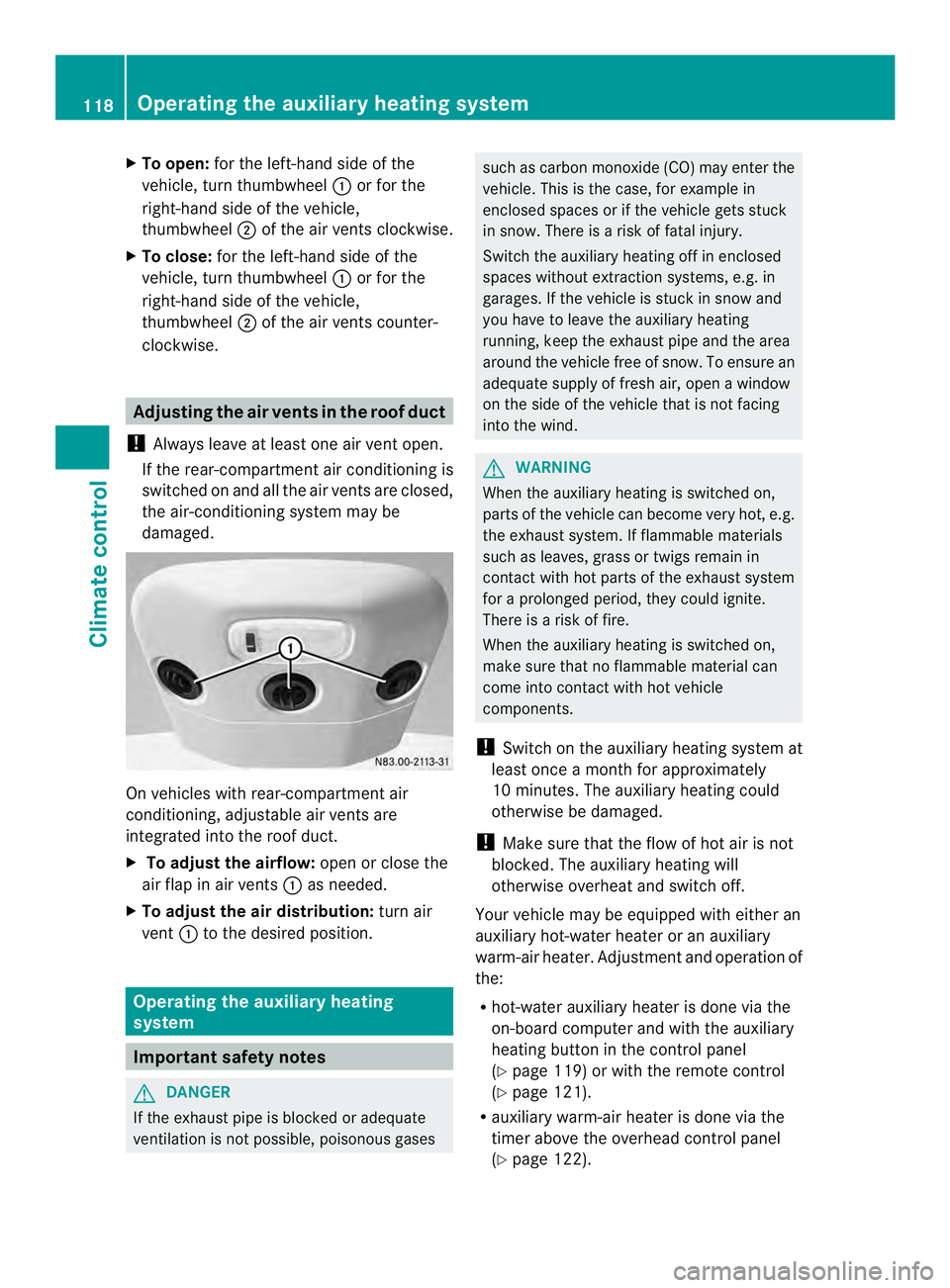
damaged. On vehicles with rear-compartment air
conditioning, adjustable air vents are
integrated into the roof duct.
X
To adjust the airflow: open or close the
air flap in air vents 0005as needed.
X To adjust the air distribution: turn air
vent 0005to the desired position. Operating the auxiliary heating
system
Important safety notes
G
DANGER
If the exhaust pipe is blocked or adequate
ventilation is not possible, poisonous gases such as carbon monoxide (CO) may enter the
vehicle. This is the case, for example in
enclosed spaces or if the vehicle gets stuck
in snow. There is a risk of fatal injury.
Switch the auxiliary heating off in enclosed
spaces without extraction systems, e.g. in
garages. If the vehicle is stuck in snow and
you have to leave the auxiliary heating
running, keep the exhaust pipe and the area
around the vehicle free of snow. To ensure an
adequate supply of fresh air, open a window
on the side of the vehicle that is not facing
into the wind. G
WARNING
When the auxiliary heating is switched on,
parts of the vehicle can become very hot, e.g.
the exhaust system. If flammable materials
such as leaves, grass or twigs remain in
contact with hot parts of the exhaust system
for a prolonged period, they could ignite.
There is a risk of fire.
When the auxiliary heating is switched on,
make sure that no flammable material can
come into contact with hot vehicle
components.
! Switch on the auxiliary heating system at
least once a month for approximately
10 minutes. The auxiliary heating could
otherwise be damaged.
! Make sure that the flow of hot air is not
blocked. The auxiliary heating will
otherwise overheat and switch off.
Your vehicle may be equipped with either an
auxiliary hot-water heater or an auxiliary
warm-air heater. Adjustment and operation of
the:
R hot-water auxiliary heater is done via the
on-board computer and with the auxiliary
heating button in the control panel
(Y page 119) or with the remote control
(Y page 121).
R auxiliary warm-air heater is done via the
timer above the overhead control panel
(Y page 122). 118
Operating the auxiliary heating systemClimate control
Page 121 of 334
The auxiliary heating works independently of
the engine and supplements the climate
control system in the vehicle. The auxiliary
heating heats the air in the vehicle interior to
the temperature set.
If your vehicle is equipped with a hot-water
auxiliary heater, the auxiliary heating also
keeps the coolant warm. This way, the load
on the engine is minimized and fuel is saved.
The heater booster function of the auxiliary
heating supports the climate control system
when the engine is runnin gand the outside
temperature is low.
You can use the auxiliary heating at an
outside temperature of up to 39 ‡ (4 †). At
an outside temperature above 39 ‡(4† ) the
auxiliary heating system and the heater
booster function switch off automatically.
i If the interior motion sensor (Y page 61)
is armed and the auxiliary heating is
switched on, it is possible that the interior
temperature monitoring may cause a false
alarm. In this case, either deactivate the
interior motion sensor or switch off the
auxiliary heating. Before switching on
X Check the fuel level and top up if necessary.
The auxiliary heating is operated directly
using the vehicle's fuel. The tan kmust be
at least a quarter full to ensure that the
auxiliary heating functions.
X Switch on climate control (Y page 112).
X Se tthe temperature control to the desired
temperature (Y page 113).
X Set the air distribution as required
(Y page 113).
X Open the center (Y page 117) and side air
vents (Y page 117) and set them to the
middle position.
i The auxiliary heating automatically
switches to heater booster mode after the
engine is started. Operating with the button (control
panel)
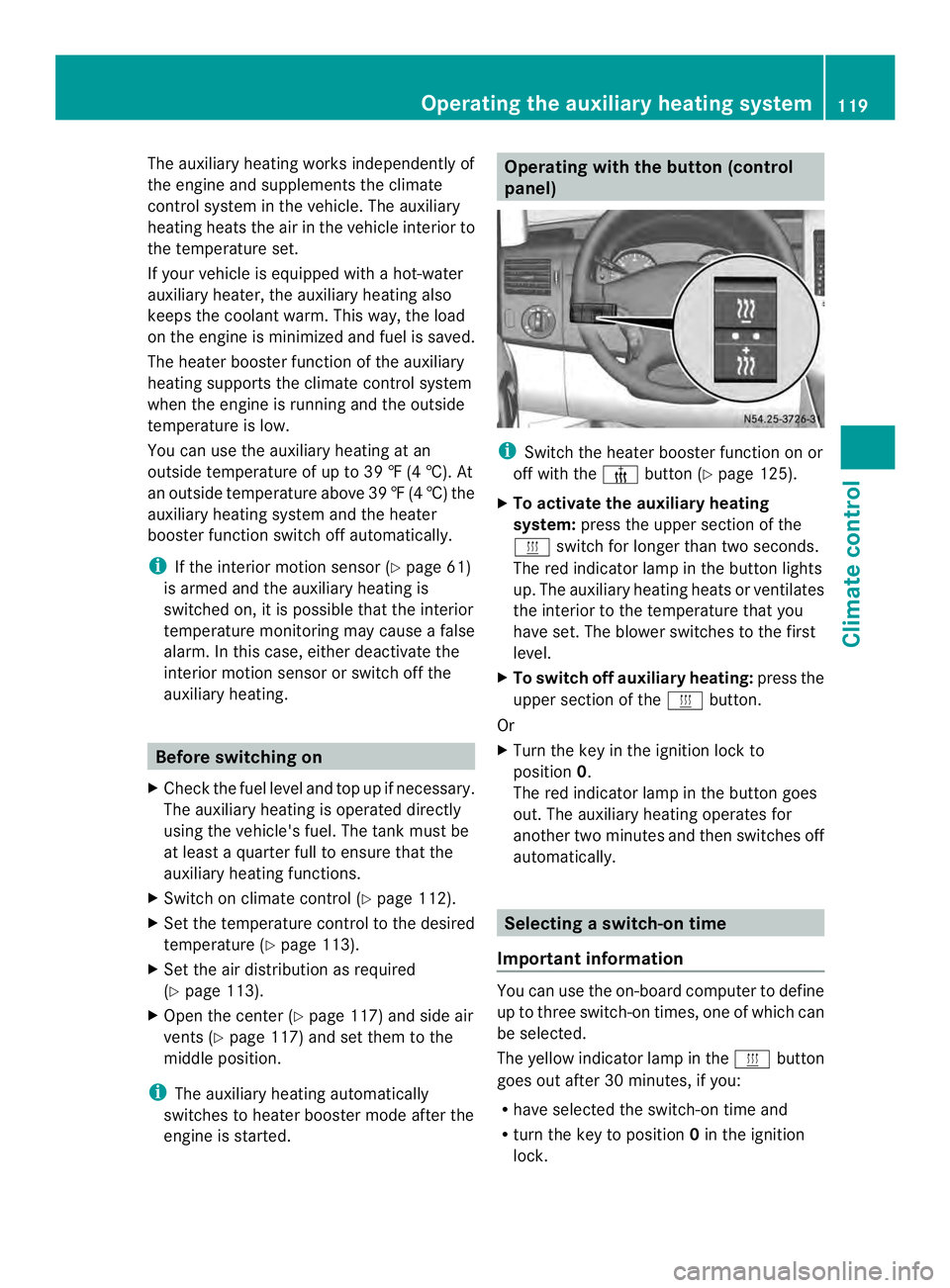
i
Switch the heater booster function on or
off with the 0013button (Y page 125).
X To activate the auxiliary heating
system: press the upper section of the
0020 switch for longer than two seconds.
The red indicator lamp in the button lights
up. The auxiliary heating heats or ventilates
the interior to the temperature that you
have set. The blower switches to the first
level.
X To switch off auxiliary heating: press the
upper section of the 0020button.
Or
X Turn the key in the ignition lock to
position 0.
The red indicator lamp in the button goes
out. The auxiliary heating operates for
another two minutes and then switches off
automatically. Selecting
aswitch-on time
Important information You can use the on-boar
dcomputer to define
up to three switch-on times, one of which can
be selected.
The yellow indicator lamp in the 0020button
goes out after 30 minutes, if you:
R have selected the switch-on time and
R turn the key to position 0in the ignition
lock. Operating the auxiliary heating system
119Climate control Z
Page 122 of 334
On-board computer without steering
wheel buttons
X
Turn the key to position 2in the ignition
lock.
X Press the 0020button.
The 0020 symbol flashes in the display.
Or
X Press the 0004menu button on the
instrument cluster repeatedly until the
0020 symbol flashes in the display.
X Use the 000Eor000F buttons on the instrument
cluster to select the switch-on time 1 to
3 .
The switch-on time selected is displayed.
X Wait 10 seconds for the standard display to
appear.
The switch-on time is selected. The yellow
indicator lamp in the 0020button lights up.
If you do not preselect a switch-on time,
and --:-- is shown in the display, this
means that the automatic switch-on mode
is switched off. The yellow indicator lamp
in the 0020button goes out.
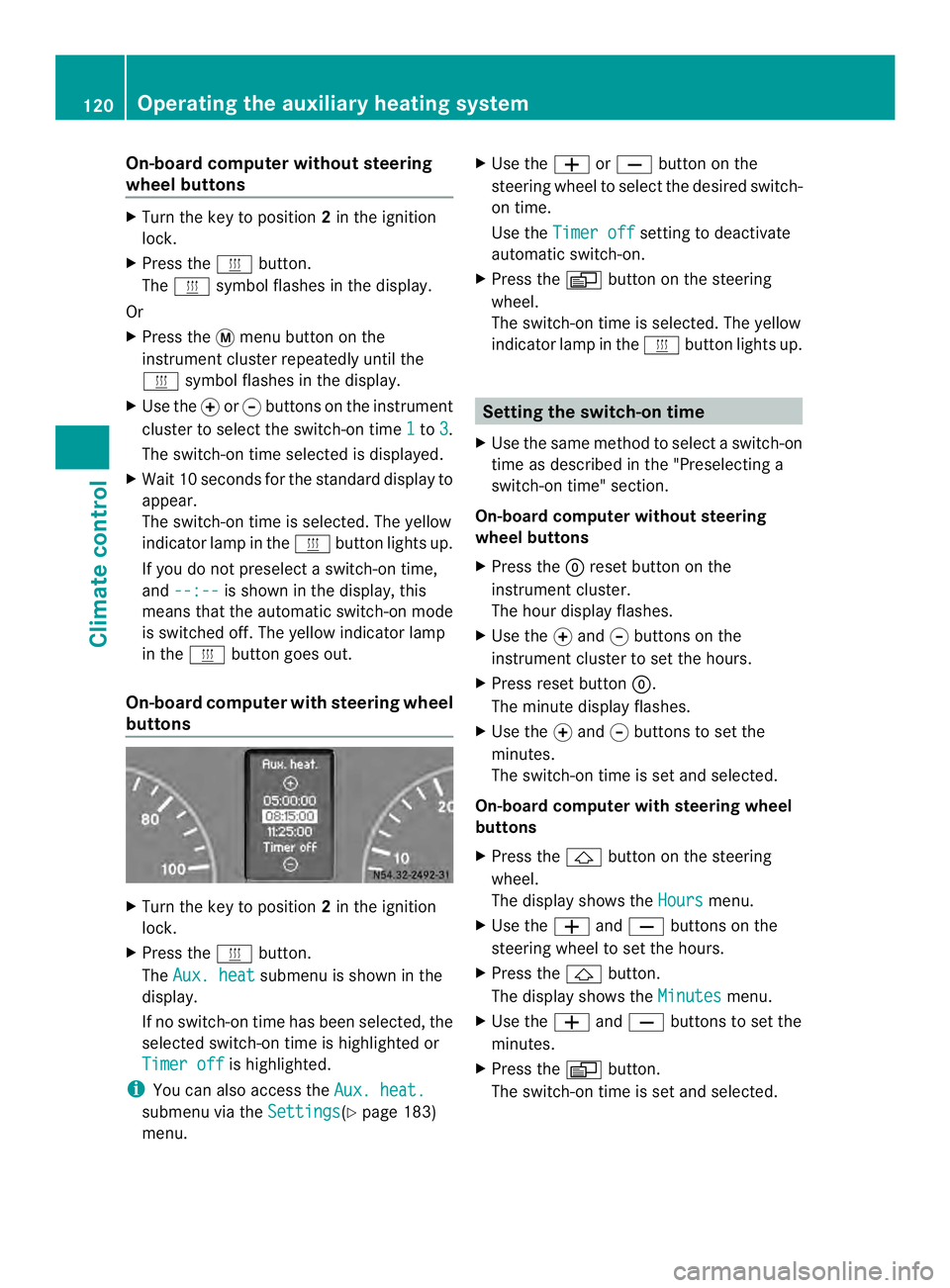
On-boar dcomputer with steering wheel
buttons X
Turn the key to position 2in the ignition
lock.
X Press the 0020button.
The Aux. heat submenu is shown in the
display.
If no switch-on time has been selected, the
selected switch-on time is highlighted or
Timer off is highlighted.
i You can also access the Aux. heat.submenu via the
Settings (Y
page 183)
menu. X
Use the 0011or0012 button on the
steering wheel to selec tthe desired switch-
on time.
Use the Timer off setting to deactivate
automatic switch-on.
X Press the 0010button on the steering
wheel.
The switch-on time is selected. The yellow
indicator lamp in the 0020button lights up. Setting the switch-on time
X Use the same method to select a switch-on
time as described in the "Preselecting a
switch-on time" section.
On-board computer without steering
wheel buttons
X Press the 0007reset button on the
instrument cluster.
The hour display flashes.
X Use the 000Eand 000Fbuttons on the
instrument cluster to set the hours.
X Press reset button 0007.
The minute display flashes.
X Use the 000Eand 000Fbuttons to set the
minutes.
The switch-on time is set and selected.
On-board computer with steering wheel
buttons
X Press the 0001button on the steering
wheel.
The display shows the Hours menu.
X Use the 0011and0012 buttons on the
steering wheel to set the hours.
X Press the 0001button.
The display shows the Minutes menu.
X Use the 0011and0012 buttons to set the
minutes.
X Press the 0010button.
The switch-on time is set and selected. 120
Operating the auxiliary heating systemClimate control