audio MERCEDES-BENZ SPRINTER 2013 MY13 Operator’s Manual
[x] Cancel search | Manufacturer: MERCEDES-BENZ, Model Year: 2013, Model line: SPRINTER, Model: MERCEDES-BENZ SPRINTER 2013Pages: 334, PDF Size: 3.88 MB
Page 182 of 334
On-boar
dcomputer (vehicles with
steering wheel buttons) Operating the on-board computer
Overview X
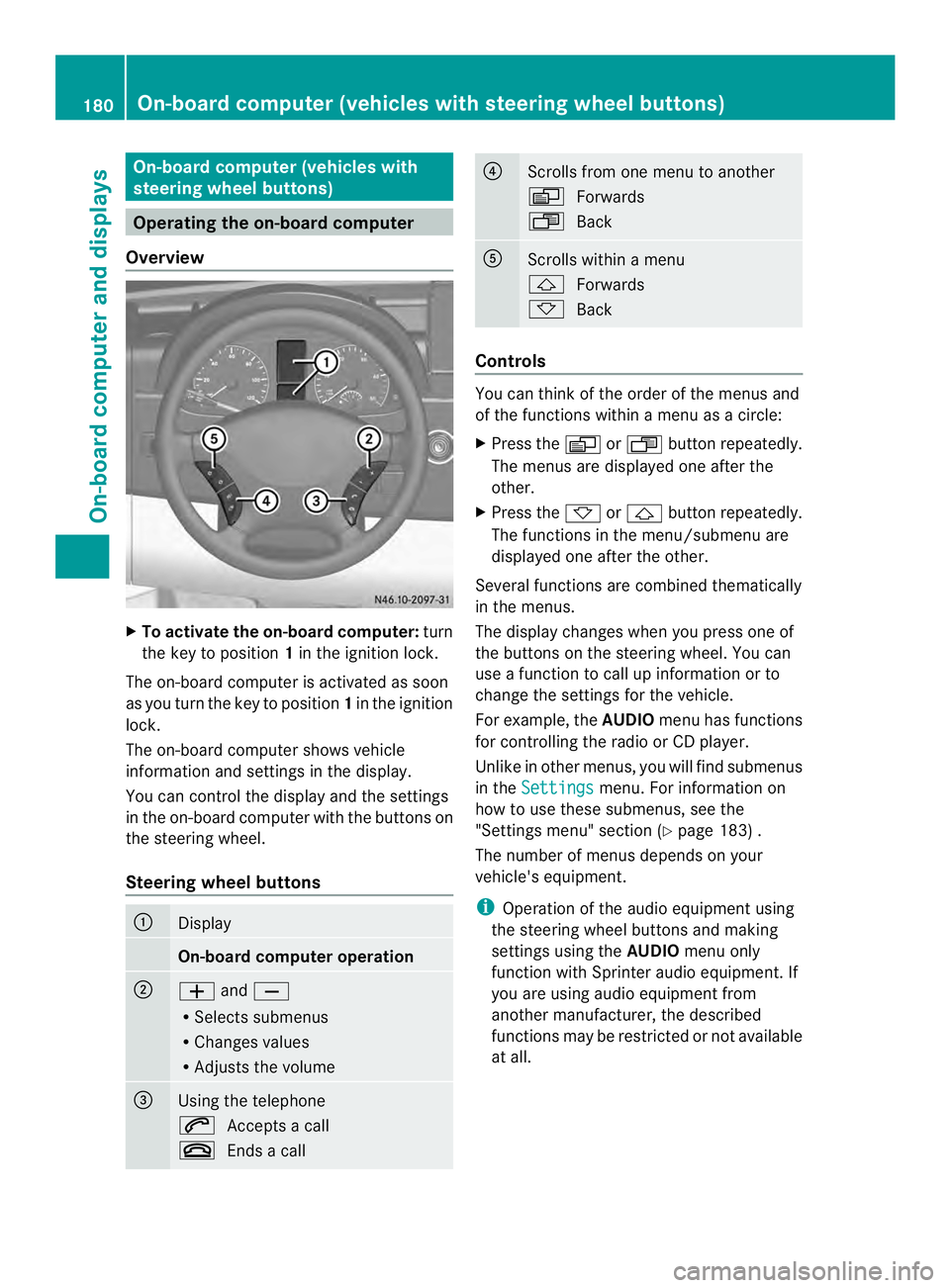
To activat ethe on-board computer: turn
the key to position 1in the ignition lock.
The on-board computer is activated as soon
as you turn the key to position 1in the ignition
lock.
The on-board computer shows vehicle
information and settings in the display.
You can control the displaya nd the settings
in the on-board compute rwith the buttons on
the steering wheel.
Steering wheel buttons 0005
Display
On-board computer operation
0006
0011
and0012
R Selects submenus
R Changes values
R Adjusts the volume 0026
Using the telephone
0001
Accepts a call
0005 Ends a call 0025
Scrolls from one menu to another
0010
Forwards
0007 Back 0023
Scrolls within a menu
0001
Forwards
0009 Back Controls
You can think of the order of the menus and
of the functions within a menu as a circle:
X
Press the 0010or0007 button repeatedly.
The menus are displayed one after the
other.
X Press the 0009or0001 button repeatedly.
The functions in the menu/submenu are
displayed one after the other.
Several functions are combined thematically
in the menus.
The display changes when you press one of
the buttons on the steering wheel. You can
use a function to call up information or to
change the settings for the vehicle.
For example, the AUDIOmenu has functions
for controlling the radio or CD player.
Unlike in other menus, you will find submenus
in the Settings menu. For information on
how to use these submenus, see the
"Settings menu" section (Y page 183) .
The number of menus depends on your
vehicle's equipment.
i Operation of the audio equipmen tusing
the steering wheel buttons and making
settings using the AUDIOmenu only
function with Sprinter audio equipment. If
you are using audio equipment from
another manufacturer, the described
functions may be restricted or not available
at all. 180
On-board computer (vehicles with steering wheel buttons)On-board computer and displays
Page 183 of 334
Menu Overview
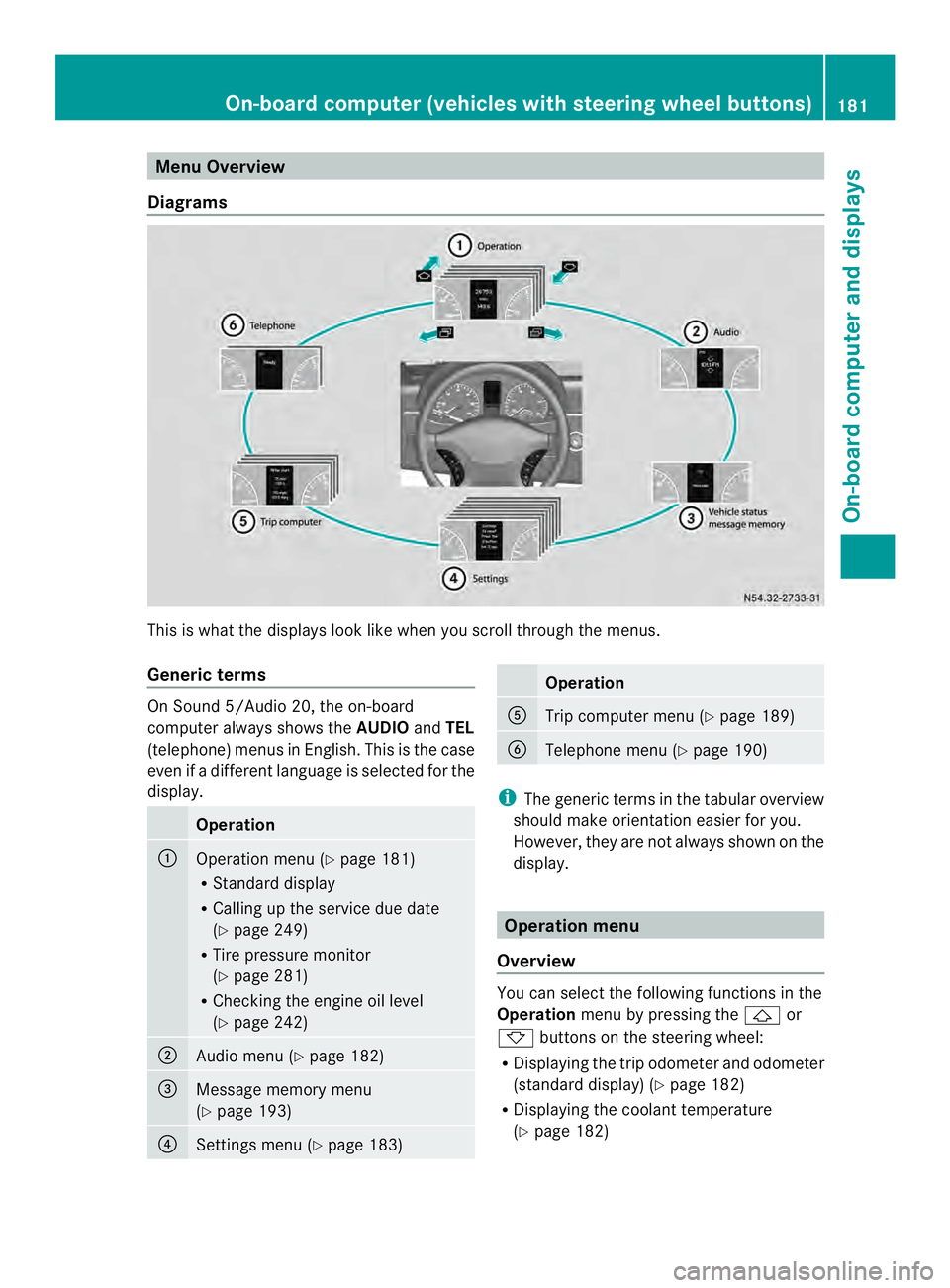
Diagrams This is whatt
he displays look like when you scroll through the menus.
Generic terms On Sound 5/Audio 20, the on-board
computer always shows the
AUDIOandTEL
(telephone) menus in English. This is the case
even if a different language is selected for the
display. Operation
0005
Operation menu (Y
page 181)
R Standard display
R Calling up the service due date
(Y page 249)
R Tire pressure monitor
(Y page 281)
R Checking the engine oil level
(Y page 242) 0006
Audio menu (Y
page 182) 0026
Message memory menu
(Y
page 193) 0025
Settings menu (Y
page 183) Operation
0023
Trip computer menu (Y
page 189) 0024
Telephone menu (Y
page 190) i
The generic terms in the tabular overview
should make orientation easier for you.
However, they are not always shown on the
display. Operation menu
Overview You can select the following functions in the
Operation
menu by pressing the 0001or
0009 buttons on the steering wheel:
R Displaying the trip odometer and odometer
(standard display) (Y page 182)
R Displaying the coolant temperature
(Y page 182) On-board computer (vehicles with steering wheel buttons)
181On-board computer and displays Z
Page 184 of 334
R
Calling up the service due date
(Y page 249)
R Tire pressure monitor (Y page 281)
R Checking the oil level (Y page 242)
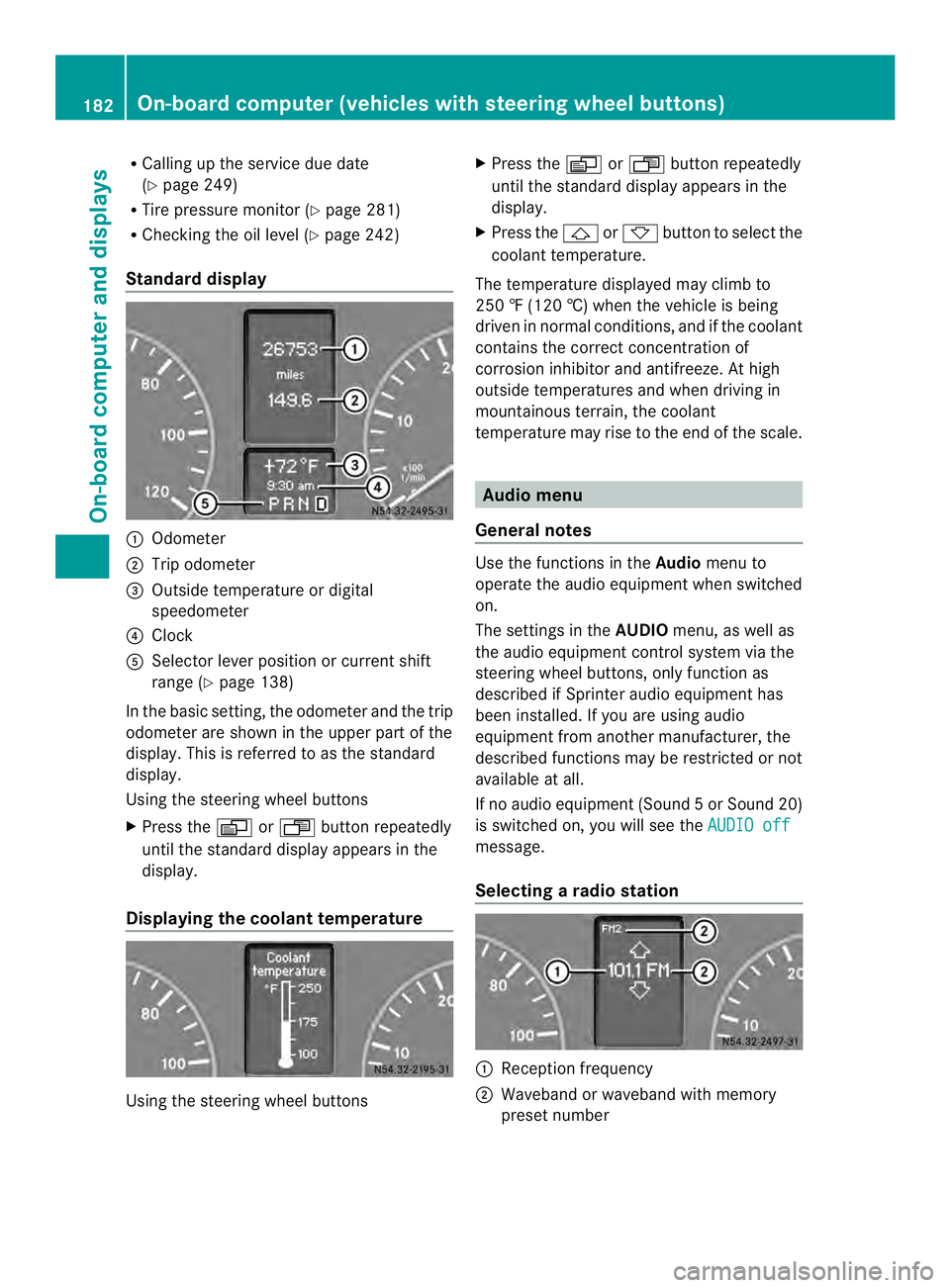
Standard display 0005
Odometer
0006 Trip odometer
0026 Outside temperature or digital
speedometer
0025 Clock
0023 Selector lever position or current shift
range (Y page 138)
In the basic setting, the odometer and the trip
odometer are shown in the upper part of the
display. This is referred to as the standard
display.
Using the steering wheel buttons
X Press the 0010or0007 buttonrepeatedly
until the standard display appears in the
display.
Displaying the coolant temperature Using the steering wheel buttons X
Press the 0010or0007 button repeatedly
until the standard display appears in the
display.
X Press the 0001or0009 button to select the
coolant temperature.
The temperature displayed may climb to
250 ‡ (120 †) when the vehicle is being
driven in normal conditions, and if the coolant
contains the correct concentration of
corrosion inhibitor and antifreeze. At high
outside temperatures and when driving in
mountainous terrain, the coolant
temperature may rise to the end of the scale. Audio menu
General notes Use the functions in the
Audiomenu to
operate the audio equipment when switched
on.
The settings in the AUDIOmenu, as well as
the audio equipment control system via the
steering wheel buttons, only function as
described if Sprinter audio equipment has
been installed. If you are using audio
equipment from another manufacturer, the
described functions may be restricted or not
available at all.
If no audio equipment (Sound 5orSound 20)
is switched on, you will see the AUDIO off message.
Selecting
aradio station 0005
Receptio nfrequency
0006 Waveband or waveband with memory
prese tnumber 182
On-boar
dcomputer (vehicles with steering wheel buttons)On-board computer and displays
Page 185 of 334
Using the steering wheel buttons
X
Switch on the audio equipment (see the
separate operating instructions).
X Press the 0010or0007 button repeatedly
until the station selected appears in the
display.
The kind of search depends on the setting
for radio station selection (Y page 188).
The nearest stored station will be selected
or the station search starts (except on
Audio 20).
X Press the 0001or0009 button to select the
desired station.
i You can only store new stations on the
audio system itself. See the separate
operating instructions.
You can also operate the audioe quipment
in the same way as usual.
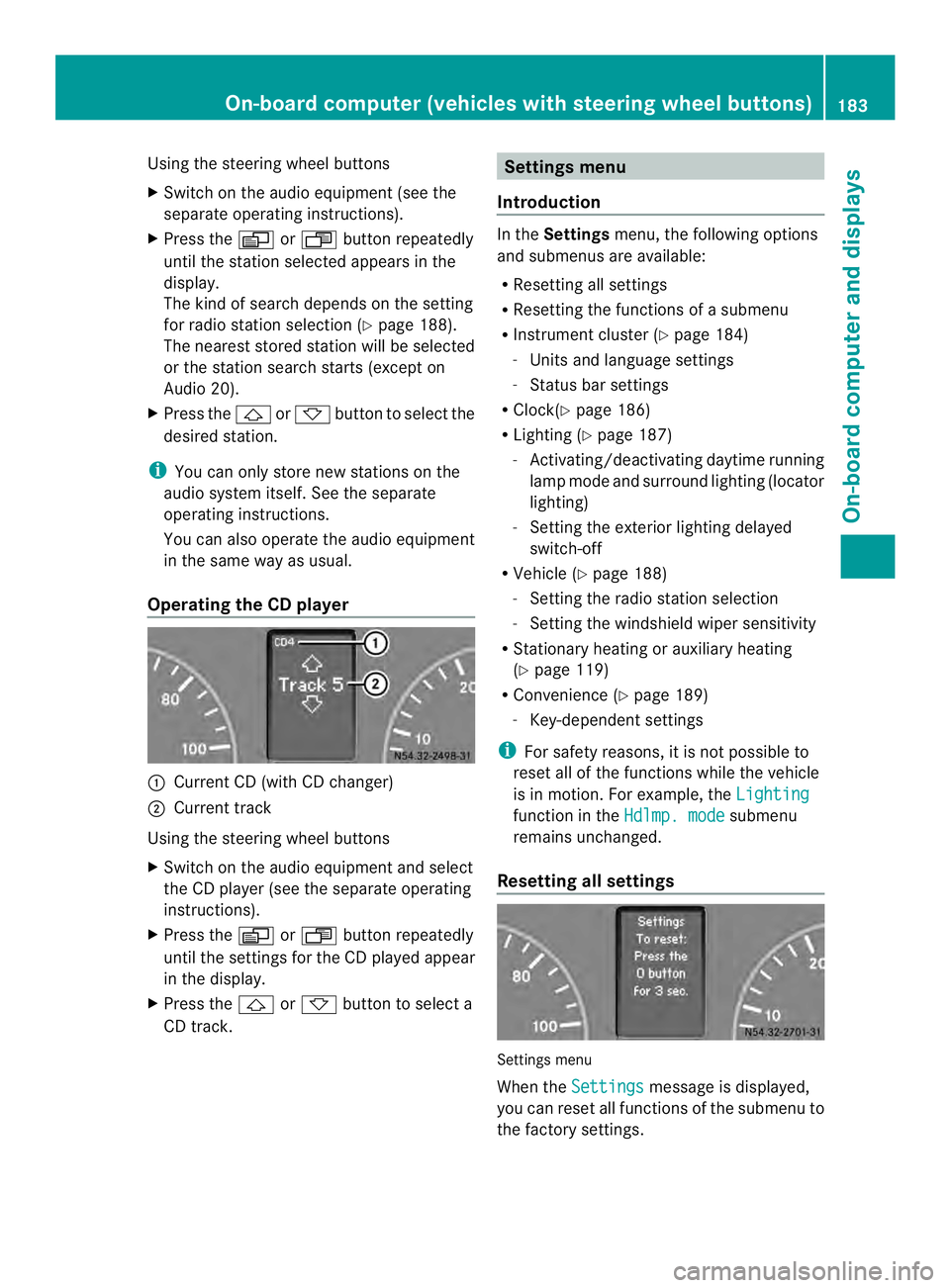
Operating the CD player 0005
Current CD (with CD changer)
0006 Current track
Using the steering wheel buttons
X Switch on the audio equipment and select
the CD player (see the separate operating
instructions).
X Press the 0010or0007 button repeatedly
until the settings for the CD played appear
in the display.
X Press the 0001or0009 button to select a
CD track. Settings menu
Introduction In the
Settings menu, the following options
and submenus are available:
R Resetting all settings
R Resetting the functions of a submenu
R Instrument cluster (Y page 184)
- Units and language settings
- Status bar settings
R Clock( Ypage 186)
R Lighting (Y page 187)
- Activating/deactivating daytime running
lamp mode and surround lighting (locator
lighting)
- Setting the exterior lighting delayed
switch-off
R Vehicle (Y page 188)
- Setting the radio station selection
- Setting the windshield wiper sensitivity
R Stationary heating or auxiliary heating
(Y page 119)
R Convenience (Y page 189)
- Key-dependent settings
i For safety reasons, it is not possible to
reset all of the functions while the vehicle
is in motion. For example, the Lighting function in the
Hdlmp. mode submenu
remains unchanged.
Resetting all settings Settings menu
When the
Settings message is displayed,
you can reset all functions of the submenu to
the factory settings. On-boar
dcomputer (vehicles with steering wheel buttons)
183On-board computer and displays Z
Page 190 of 334
Using the steering wheel buttons
X
Press the 0010or0007 button repeatedly
until the Settings menu appears in the
display.
X Press the 0001button to switch to the
submenu selection.
X Press the 0011or0012 button to select the
Lighting submenu.
X Press the 0001button to select the Loc.lighting function.
The selection marker is on the current
setting.
X Press the 0011or0012 button to switch
the surround lighting (locator lighting) On or
Off .
If you switch the surround lighting to On , the
following lamps light up in the dark after you
have unlocked the vehicle using the key:
R the parking lamps
R the tail lamps
R the license plate lamps
R the fog lamps
The surround lighting automatically switches
off after 40 seconds or when you:
R open the driver's door
R insert the key into the ignition lock
R lock the vehicle using the key
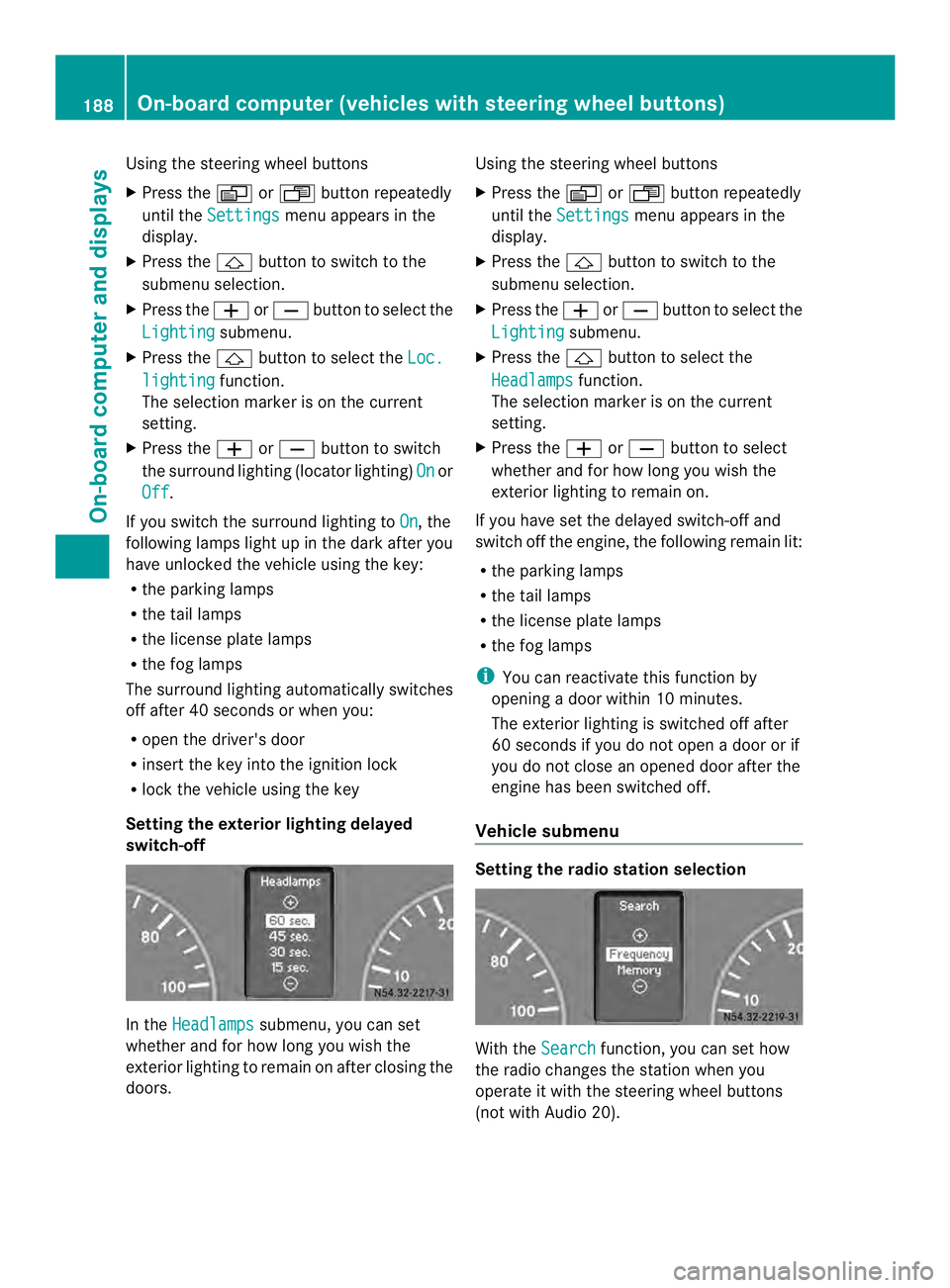
Setting the exterior lighting delayed
switch-off In the
Headlamps submenu, you can set
whether and for how long you wish the
exterior lighting to remain on after closing the
doors. Using the steering wheel buttons
X
Press the 0010or0007 button repeatedly
until the Settings menu appears in the
display.
X Press the 0001button to switch to the
submenu selection.
X Press the 0011or0012 button to select the
Lighting submenu.
X Press the 0001button to select the
Headlamps function.
The selection marker is on the current
setting.
X Press the 0011or0012 button to select
whether and for how long you wish the
exterior lighting to remain on.
If you have set the delayed switch-off and
switch off the engine, the following remain lit:
R the parking lamps
R the tail lamps
R the license plate lamps
R the fog lamps
i You can reactivate this function by
opening a door within 10 minutes.
The exterior lighting is switched off after
60 seconds if you do not open a door or if
you do not close an opened door after the
engine has been switched off.
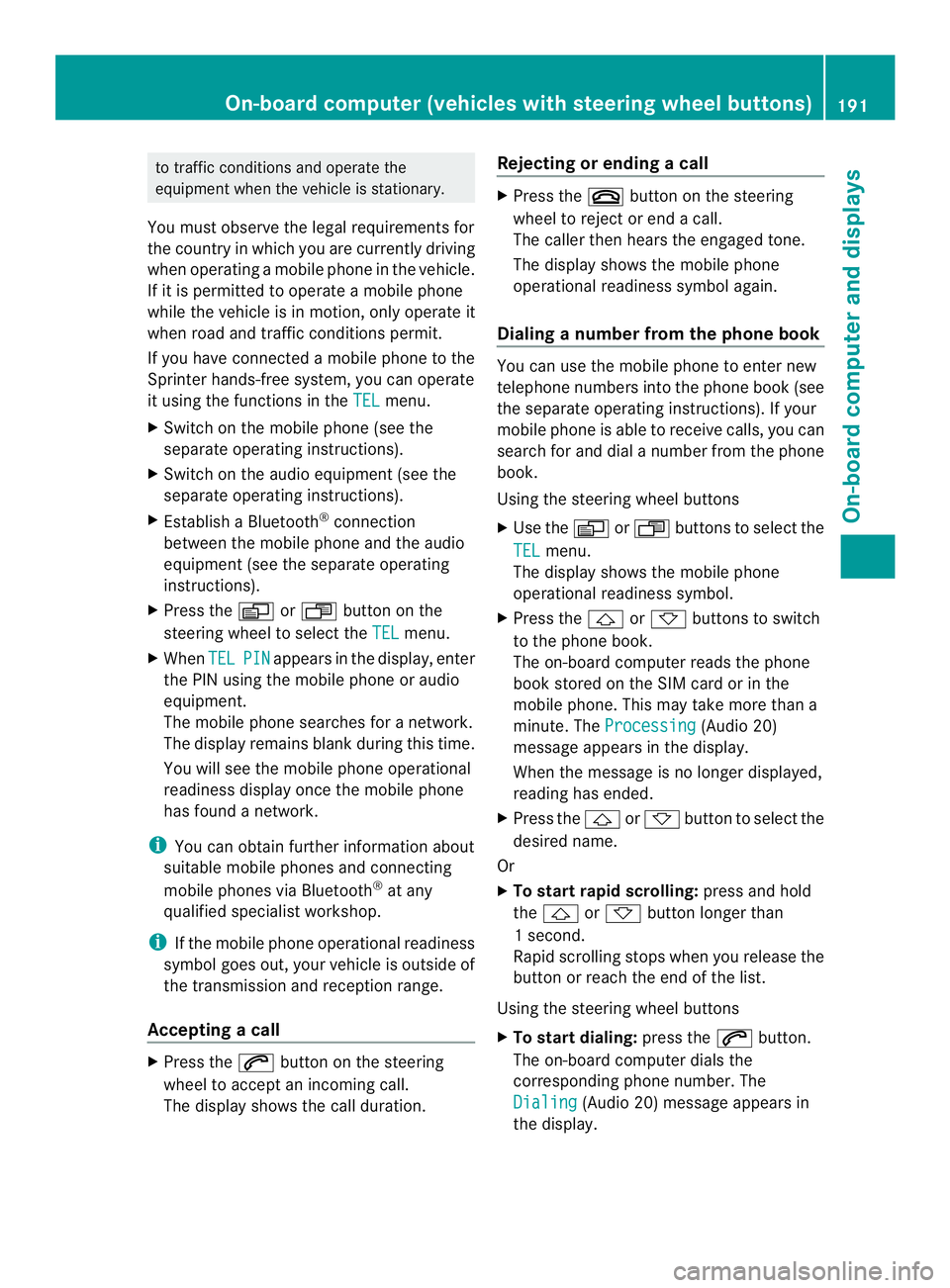
Vehicle submenu Setting the radio station selection
With the
Search function, you can set how
the radio changes the station when you
operate it with the steering wheel buttons
(not with Audio 20). 188
On-board computer (vehicles with steering wheel buttons)On-board computer and displays
Page 193 of 334
to traffic conditions and operate the
equipment when the vehicle is stationary.
You must observe the legal requirements for
the country in which you are currently driving
when operating a mobile phone in the vehicle.
If it is permitted to operate a mobile phone
while the vehicle is in motion, only operate it
when road and traffic conditions permit.
If you have connected amobile phone to the
Sprinter hands-free system, you can operate
it using the functions in the TEL menu.
X Switch on the mobile phone (see the
separate operating instructions).
X Switch on the audio equipment (see the
separate operating instructions).
X Establish a Bluetooth ®
connection
between the mobile phone and the audio
equipment (see the separate operating
instructions).
X Press the 0010or0007 button on the
steering wheel to select the TEL menu.
X When TEL PIN appears in the display, enter
the PIN using the mobile phone or audio
equipment.
The mobile phone searches for a network.
The display remains blank during this time.
You will see the mobile phone operational
readiness display once the mobile phone
has found a network.
i You can obtain further information about
suitable mobile phones and connecting
mobile phones via Bluetooth ®
at any
qualified specialist workshop.
i If the mobile phone operational readiness
symbol goes out, your vehicle is outside of
the transmission and reception range.
Accepting acall X
Press the 0001button on the steering
wheel to accep tanincoming call.
The display shows the call duration. Rejecting or ending
acall X
Press the 0005button on the steering
wheel to reject or end acall.
The calle rthen hears the engaged tone.
The display shows the mobile phone
operational readiness symbol again.
Dialing a number from the phone book You can use the mobile phone to enter new
telephone numbers into the phone book (see
the separate operating instructions). If your
mobile phone is able to receive calls, you can
search for and dial a number from the phone
book.
Using the steering wheel buttons
X
Use the 0010or0007 buttons to select the
TEL menu.
The display shows the mobile phone
operational readiness symbol.
X Press the 0001or0009 buttons to switch
to the phone book.
The on-board computer reads the phone
book stored on the SIM card or in the
mobile phone. This may take more than a
minute. The Processing (Audio 20)
message appears in the display.
When the message is no longer displayed,
reading has ended.
X Press the 0001or0009 button to select the
desired name.
Or
X To start rapid scrolling: press and hold
the 0001 or0009 button longer than
1s econd.
Rapid scrolling stops when you release the
button or reach the end of the list.
Using the steering wheel buttons
X To start dialing: press the0001button.
The on-board computer dials the
corresponding phone number. The
Dialing (Audio 20) message appears in
the display. On-boar
dcomputer (vehicles with steering wheel buttons)
191On-board computer and displays Z
Page 194 of 334
When a connection is established, the
name of the other person and/or the call
duration appear in the display.
X To exit the telephone book: press the
0005 button.
Redialing The on-board computer saves the last names
or numbers dialed in the redial memory.
Using the steering wheel buttons
X Use the 0010or0007 buttons to select the
TEL menu.
The display shows the mobile phone
operational readiness symbol.
X Press the 0001button.
The display shows the most recently dialed
numbers or names in the redial memory.
X Press the 0001or0009 button to select the
desired name or number.
X To start dialing: press the0001button.
The on-board computer dials the
corresponding phone number. The
Dialing (Audio 20) message appears in
the display.
When a connection is established, the
name of the other person and/or the call
duration appear in the display.
Or
X To exit the redial memory: press the
0005 button. Display messages
Notes on displa
ymessages
Important safety notes G
WARNING
No informatio nwill be displayed if either the
instrumen tcluster or the display is
inoperative.
As a result, you will not be able to see warning
and indicator lamps or information about the
driving conditions, such as speed or outside temperature. Driving characteristics may be
impaired
.Adjust your driving style and vehicle
speed accordingly.
Contac taqualified specialist workshop
immediately. G
WARNING
If service work is not carried out correctly, the
operating safety of your vehicle may be
affected. This could cause you to lose control
of your vehicle and cause an accident.
Moreover, the safety systems may no longer
be able to protect you or others as they are
designed to do.
Always have service work carried out at a
qualified specialist workshop.
i If you turn the key to position 2in the
ignition, a display chec kis performed. All
warning/indicator lamps (except the turn
signal indicator lamps) and the display are
activated. Before starting the journey,
check that the warning and indicator lamps
are operating correctly.
Vehicles without steering wheel
buttons Warnings, malfunctions or additional
information may also be shown in the display.
The following tables show all the display
messages.
Awarning tone sounds with
certain display messages.
Vehicles with steering wheel buttons The on-board computer shows warnings,
malfunctions or additional informatio
ninthe
display. Awarning tone sounds with certain
display messages .Display messages of a high
priority are shown in red.
Please respond in accordance with the
display messages and follow the additional
notes in this Operator's Manual.
You can hide low-priority display messages by
pressing the 0010,0007,0001or0009 192
Display messagesOn-board computer and displays
Page 262 of 334
Cleaning the electrical step
Clean the electrical step at least once a
month
.Make sure that no dirt accumulates in
the housing or on the step.
X Extend the electrical step (Y page 72).
X Close the sliding door until the door lock
engages.
The electrical step remains extended for
cleaning.
X Clean the electrical step and the housing
with a power washer.
X Afte rcleaning, spray the step guides on
each side with silicone spray when the
housing and electrical step are dry.
Do not use oil or grease as a lubricant.
X Retract the electric step.
Cleaning the trailer tow hitch !
Do not clean the ball coupling with a
power washer. Do not use solvents.
! Observe the notes on care in the
Operator's Manual for the trailer tow hitch
and the ball coupling manufacturer.
You can also have the maintenance work on
the ball coupling and the trailer tow hitch
carried out by a qualified specialist workshop. Interior
Cleaning the display !
For cleaning, do not use any of the
following:
R alcohol-based thinner or gasoline
R abrasive cleaning agents
R commercially-available household
cleaning agents
These may damage the display surface. Do
not put pressure on the display surface
when cleaning. This could lead to
irreparable damage to the display. X
Switch off the audio equipmen tormonitor
of the rear-view camera and allow to cool.
X Clean the display surface with a
commercially available microfiber cloth
and cleaner for TFT/LCD displays.
X Dry the display surface using a dry
microfiber cloth.
Cleaning the plastic trim G
WARNING
Care products and cleaning agents containing
solvents cause surfaces in the cockpit to
become porous. As a result, plastic parts may
come loose in the event of air bag
deployment. There is a risk of injury.
Do not use any care products and cleaning
agents to clean the cockpit.
! Do not affix the following to plastic
surfaces:
R stickers
R films
R scented oil bottles or similar items
You can otherwise damage the plastic.
! Do not allow cosmetics, insect repellent
or sunscreen to come into contact with the
plastic trim. This maintains the high-quality
look of the surfaces.
X Wipe the plastic trim and the cockpit with
a damp, lint-free cloth, e.g. a microfiber
cloth.
X Heavy soiling: use a mild detergent.
Cleaning the steering wheel and
selector lever X
Thoroughly wipe with a damp cloth.
Cleaning the trim elements !
Do not use solvent-based cleaning agents
such as tar remover, wheel cleaners,
polishes or waxes. There is otherwise a risk
of damaging the surface. 260
CareMaintenance and care
Page 269 of 334
Jump-starting
Important safety notes
G
WARNING
During charging and jump-starting, explosive
gases can escape from the battery. There is a
risk of an explosion.
Particularly avoid fire, open flames, creating
sparks and smoking. Ensure there is sufficient
ventilation while charging and jump-starting.
Do not lean over a battery. G
WARNING
Battery acid is caustic. There is a risk of injury.
Avoid contact with the skin, eyes or clothing.
Do not inhale any battery gases. Do not lean
over the battery. Keep children away from
batteries. Wash battery acid immediately with
water and seek medical attention. G
WARNING
Non-combusted fuel can collect in the
exhaust system and ignite. There is a risk of
fire. Avoid repeated and lengthy starting
attempts.
Do not use a rapid charging device to start
the vehicle. If your vehicle's battery is
discharged, the engine can be jump-started
from another vehicle or from a donor battery
using jumper cables. For this purpose, the
vehicle has a jump-starting connection point
in the engine compartment.
The additional battery in the engine
compartmenti s not suitable for jump-starting
operations. If your vehicle requires jump-
starting, or if you use it to jump-start another
vehicle, use the jump-starting connection
point in the engine compartment.
When jump-starting, observe the following
points:
R The battery is not accessible in all vehicles.
If the other vehicle's battery is not accessible, jump-start the vehicle using a
donor battery or a jump-starting device.
R Do not start the engine if the battery is
frozen. Let the battery thaw first.
R Jump-starting may only be performed from
batteries with a nominal voltage of 12 V.
R Only use jumper cables that have a
sufficient cross-section and insulated
terminal clamps.
R If the battery is fully discharged, attach the
battery of another vehicle for a few minutes
before attempting to start. This charges the
empty battery a little.
R Make sure that the two vehicles do not
touch.
Make sure that:
R the jumper cables are not damaged.
R bare parts of the terminal clamps do not
come into contact with other metal parts
while the jumper cables are connected to
the battery.
R the jumper cables cannot come into
contact with parts such as the V-belt pulley
or the fan. These parts move when the
engine is started and while it is running.
i Jumper cables and further information
regarding jump starting can be obtained at
any qualified specialist workshop. Before connecting the jumper cables
On vehicles with a battery main switch, check
whether the battery main switch is switched
on (Y page 132).
X Apply the parking brake.
X Move the selector lever of the automatic
transmission to position P.
X Switch off all electrical consumers, e.g.
audio equipment, blower.
X Turn the key to position 0in the ignition
lock and remove it (Y page 133).
X Open the hood (Y page 240). Jump-starting
267Breakdown assistance Z
Page 316 of 334
Genuine Sprinter parts
! Air bags and Emergency Tensioning
Devices, as well as control units and
sensors for these restraint systems, may be
installed in the following areas of your
vehicle:
R doors
R door pillars
R door sills
R seats
R cockpit
R instrument cluster
R center console
Do not install accessories such as audio
systems in these areas. Do not carry out
repairs or welding. You could impair the
operating efficiency of the restraint
systems.
Have aftermarket accessories installed at
a qualified specialist workshop. H
Environmental note
We supply reconditioned assembliesa nd
parts which are of the same quality as new
parts. The same New Vehicl eLimited
Warranty applies as for new parts.
We tes tgenuine Sprinter parts, as well as
conversion parts and accessories that have
been specifically approved for the type of
vehicle, for:
R reliability
R safety
R suitability
Despite ongoing market research, we are
unable to assess other parts. If individual or
official approval is given, we assume no
responsibility for use in Sprinter vehicles.
In some countries, certain parts are only
officially approved for installation or
modification if they comply with legal
requirements. All genuine Sprinter parts
satisfy these requirements. Make sure that all
parts are suitable for your vehicle. All authorized Sprinter Dealers maintain a
supply of genuine Sprinter parts for required
service and repair work. Also, the
strategically distributed parts delivery
centers provide quick and reliable parts
service.
Always specify the vehicle identification
number (VIN) and engin
enumbe rwhen
ordering genuine Sprinter parts
(Y page 315). Vehicle electronics
Tampering with the engine
electronics
G
WARNING
Always have work on the engine electronics
and related components carried out at a
qualified specialist workshop. Otherwise, the
vehicle's operating safety could be affected.
! Only have engine electronics and the
corresponding parts, such as control units,
sensors or connector leads, serviced in a
qualified specialist workshop. Otherwise,
the vehicle parts may wear more quickly.
This can lead to loss of the New Vehicle
Limited Warranty. Installing electrical or electronic
equipment
G
WARNING
You and others may damage your health due
to excessive electromagnetic radiation. By
using an external antenna, the possible health
risks of electromagnetic fields, which are
under discussion among the scientific
community, should be largely prevented.
Therefore, only have the exterior antenna
installed at a qualified specialist workshop.
Electrical and electronic devices may have a
detrimental effect on both the comfort and
the operating safety of the vehicle. If 314
Vehicle electronicsTechnical data