air conditioning MERCEDES-BENZ SPRINTER 2013 MY13 Operator’s Manual
[x] Cancel search | Manufacturer: MERCEDES-BENZ, Model Year: 2013, Model line: SPRINTER, Model: MERCEDES-BENZ SPRINTER 2013Pages: 334, PDF Size: 3.88 MB
Page 6 of 334
1, 2, 3 ...
12 Vsocket ........................................ 228 A
ABS (Anti-lock Braking System) Display message ............................ 197
Function/notes ................................ 56
Important safety notes ....................56
Indicator lamp ................................ 210
Accessories and conversions
see Add-on equipment
Activating/deactivating cooling
with air dehumidification .................113
Activating/deactivating the roof
ventilator ........................................... 129
Additional indicators Changing bulbs (roof) ....................101
Additives
Diese l............................................ 318
Engine oil ....................................... 322
Flow improver ................................ 318
Add-on equipment ............................... 27
Adjusting Air vents ........................................ 117
Adjusting the headlamp range ...........93
ADR( working speed governor) ........167
Airb ags
Front air bag (driver, front
passenger )....................................... 45
Important safety notes ....................44
Safety guidelines ............................. 43
Thoraxbag ........................................ 45
Windo wcurtain air bag .................... 46
Air-conditioning system
Refrigerant ..................................... 326
see Climate control
Airf ilter
Indicator lamp ................................ 218
Air pressure
see Tire pressure
Air-recirculation mode
Importan tsafet ynotes .................. 116
Switching on/off ........................... 116
Airv ents ............................................ .117
Adjusting for the passenger
compartment ................................. 117Adjusting on the roof
.....................118
Important safety notes ..................117
Setting the center air vents ...........117
Setting the side air vents ...............117
see Climate control
Anti-loc kBraking System
see ABS (Anti-lock Braking System)
Anti-theft system
Interio rmotion sensor ..................... 61
Armrests .............................................. 84
Ashtray ............................................... 227
ASR (acceleration skid control) Activating/deactivating ...................58
Display message ............................ 198
Function/notes ................................ 58
Important safety notes ....................58
Indicator lamp ................................ 210
ATA (Anti-Theft Alarm system)
Activating/deactivating ...................60
Switching off the alarm ....................60
Attachments
see Add-on equipment
Authorized workshop
see Qualified specialist workshop
Automatic climate control
see Climate control
Automatic headlamp mode ................91
Automatic locking ............................... 69
Automatic transmission Accelerator pedal position .............140
Changing gea r............................... 139
Changing gea ryourself .................. 139
Driving tips .................................... 140
Emergency running mode ..............141
Important safety notes ..................138
Kickdow n....................................... 140
Maneuvering .................................. 140
Overview ........................................ 138
Problem (malfunction) ...................141
Releasing the parking lock
manually ........................................ 141
Selector leve r................................ 138
Selector leve rpositions ................. 139
Shift range s................................... 140
Starting the engine ........................134
Touchshift ...................................... 139
Trailer towing ................................. 140
Transmission oil change ................323 4
Index
Page 9 of 334
Rear fog lamp (Chassis Cab)
..........100
Rea rinterior light ........................... 102
Standing lamps (front) .....................98
Standing lamps (rear, Chassis
Cab) ............................................... 100
Standing lamps (rear) ..............99, 101
Tai llamps ................................ 99, 101
Tail lamps (Chassis Cab) ................100
Turn signals (front) ...........................98
Turn signals (rear, Chassis Cab) ..... 100
Turn signals (rear) ....................99, 101
Warning and indicator lamps .........219
see Replacing bulbs
Child-proof locks
Important safety notes ....................54
Rea rdoor ......................................... 55
Sliding door ..................................... 55
Children
In the vehicle ................................... 50
Restraint systems ............................ 50
Specia lseat belt retractor ...............54
Child seat
LATCH-type (ISOFIX) child seat
anchors ............................................ 52
Top Tether ....................................... 53
Chock ................................................. 147
Cigarette lighter ................................ 227
Cleaning Mirro rturn signal ........................... 259
Trailer tow hitch ............................. 260
Climate control
Air-conditioning system .................110
Auxiliary heating ............................ 118
Checking/cleaning the airf ilter
(rear-compartment air
conditioning) .................................. 248
Cooling with air dehumidification ..113
Defrosting the windows .................114
Heating .......................................... 109
Important safety notes ..................108
Operating the cargo compartment
airv ents. ........................................ 129
Overview of systems ......................108
Problems with the windshield
heating .......................................... 115
Problem with the rear window
defroster ........................................ 116Rear-compartment air
conditioning
................................... 112
Rear-compartment heating ............111
Reheat function (air
dehumidification) ........................... 114
Setting the aird istribution.............113
Setting the airflow .........................114
Setting the airv ents...................... 117
Setting the temperature ................113
Switching air-recirculation mode
on/off ............................................ 116
Switching on/off ........................... 112
Switching the rear window
defroster on/off ............................ 116
Switching windshield heating on/
off .................................................. 115
Cockpit
Overview .......................................... 32
see Instrument cluster
COMAND display
Cleaning ......................................... 260
Combination switch ............................92
Communications equipment Operation ....................................... 229
Type approval/frequency ..............314
Consumption statistics (on-board
computer) .......................................... 190
Control panel Above the windshield .......................37
Center console ................................ 36
Climate control ................................ 36
Driver's door .................................... 38
Left and righ tside of the steering
wheel ............................................... 38
Conversions/equipment ....................27
Conversions and accessories see Add-on equipment
Coolan t(engine)
Adding ........................................... 245
Checking the leve l......................... 244
Displaying the temperature (on-
board computer) ............................ 182
Display message ............................ 205
Filling capacity ............................... 326
Important safety notes ..................244
Cooling
see Climate control Index
7
Page 16 of 334
Operating system
see On-board computer
Operator's Manual
General notes .................................. 23
Vehicle equipment ...........................23
Outline lamp
Changing bulbs .............................. 101
Outside temperature display ...........177
Overhead control panel ......................37
Overrevving range .............................177
Overrun cutoff ................................... 148P
Pain tcode number ............................ 315
Paintwork (cleaning instructions) ...257
Paper holder ...................................... 225
Parking ............................................... 145
Important safety notes ..................145
Parking brake ................................ 146
Rea rview camera .......................... 161
Whee lchock .................................. 147
see PARKTRONIC
Parking aid
see PARKTRONIC
see Rea rview camera
Parking brake
Display message ............................ 201
Notes/function .............................. 146
Parking lamps
Changing bulbs ................................ 98
PARKTRONIC
Deactivating/activating .................159
Driving system ............................... 157
Function/notes ............................. 157
Important safety notes ..................157
Problem (malfunction) ...................161
Range of the sensors .....................157
Roll-back warning .......................... 159
Trailer towing ................................. 160
Warning displa y............................. 159
Partition sliding door
Important safety notes ....................75
Opening/closing .............................. 75
Passenger compartment air-
conditioning system
see Climate control Passenge
rcompartment heating
see Climat econtrol
Perimeter lamp
Changing bulbs .............................. 101
Plastic trim (cleaning instructions) .260
Power supply Battery isolating switch .................132
Switching off .................................. 133
Switching on .................................. 133
Power take-off
Engine spee dsetting ..................... 167
Power washers .................................. 257
Power windows see Side windows
Preparing for a journey
Checks in the vehicle .....................134
Visual check of the vehicle
exterio r.......................................... 134
Product information ............................22
Protection of the environment General notes .................................. 22
Pulling away ...................................... 135 Q
Qualifie dspecialis tworkshop ...........26 R
Radiator cover ..................................... 28
Radio Changing stations (vehicles with
steering wheel buttons) .................182
Setting statio nselection (vehicles
with steering wheel buttons) .........188
see separate operating instructions
Radio-based vehicle components
Declaratio nofconformity ................ 25
Rain and light sensor
Setting the sensitivity (vehicles
with steering wheel buttons) .........189
Windshield wiper ........................... 103
Range (vehicles with steering
wheel buttons) .................................. 190
Rear bench seat Installing/removing (Passenger
Van) ................................................. 83
Stowage compartment (crewcab) ..224 14
Index
Page 17 of 334
Rear compartment
Activating/deactivating climate
control ........................................... 112
Setting the airv ents...................... 118
Rear-compartment air-
conditioning system
see Climate control
Rear-compartment heating
see Climate control
Rear door
Child-proof locks .............................. 55
Important safety notes ....................73
Opening/closing .............................. 73
Rear fog lamp
Changing bulbs ........................ 99, 101
Switching on/off .............................. 91
Rear fog lamp (Chassis Cab)
Changing bulbs .............................. 100
Rear interior light
Changing bulbs .............................. 102
Rear lamps
see Lights
Rear rack
Notes ............................................. 236
Rear view camera .............................. 161
Aspect ratio menu .........................165
Brightnes ssubmenu ...................... 164
Cleaning instructions .....................259
Color submenu .............................. 165
Contrast submenu .........................165
Default settings menu .................... 166
Display menu ................................. 164
Illumination submenu ....................164
Important safety notes ..................161
Mai nm enu .................................... .163
Menu language menu ....................166
Monitor menu ................................ 163
Problem (malfunction) ...................167
Standard menu .............................. 165
Switching off the monitor while
driving ............................................ 162
Switching on .................................. 161
Switching the monitor on/off ........162
Tint (color balance) submenu ......... 165
Rear-view mirror
Anti-glare mode ............................... 86Rear window defroster
Problem (malfunction) ...................116
Switching on/off ........................... 116
Rear window wiper ...........................104
Refilling DEF filler neck ............................... 144
Important safety notes (Diesel
Exhaus tFluid –DEF) ...................... 143
Refilling procedure (Diesel
Exhaus tFluid –DEF) ...................... 144
Refrigerant ......................................... 326
Refueling Fuel filler fla p................................. 142
Fuel gauge ..................................... 177
Important safety notes (fuel) .........142
Refueling procedure (fuel) .............142
see Fuel
Releasing the parking lock
manually (automatic
transmission) ..................................... 141
Remote control Changing the operating duration
(auxiliary heating) .......................... 122
Replacing the battery (auxiliary
heating )........................................ 126
Switching on/off (auxiliary
heating) ......................................... 121
Synchronizing (auxiliary heating) ...122
Replacing the battery (auxiliary
heating remote control) .................... 126
Reporting safety defects ....................29
Reserve (fuel tank) see Fuel
Restraint system
see SRS (Supplemental Restraint
System)
Reverse warning feature ..................136
Roof carrier Maximum payloa d.......................... 327
Note s............................................. 236
Roof load (roof carrier) .....................327 Index
15
Page 38 of 334
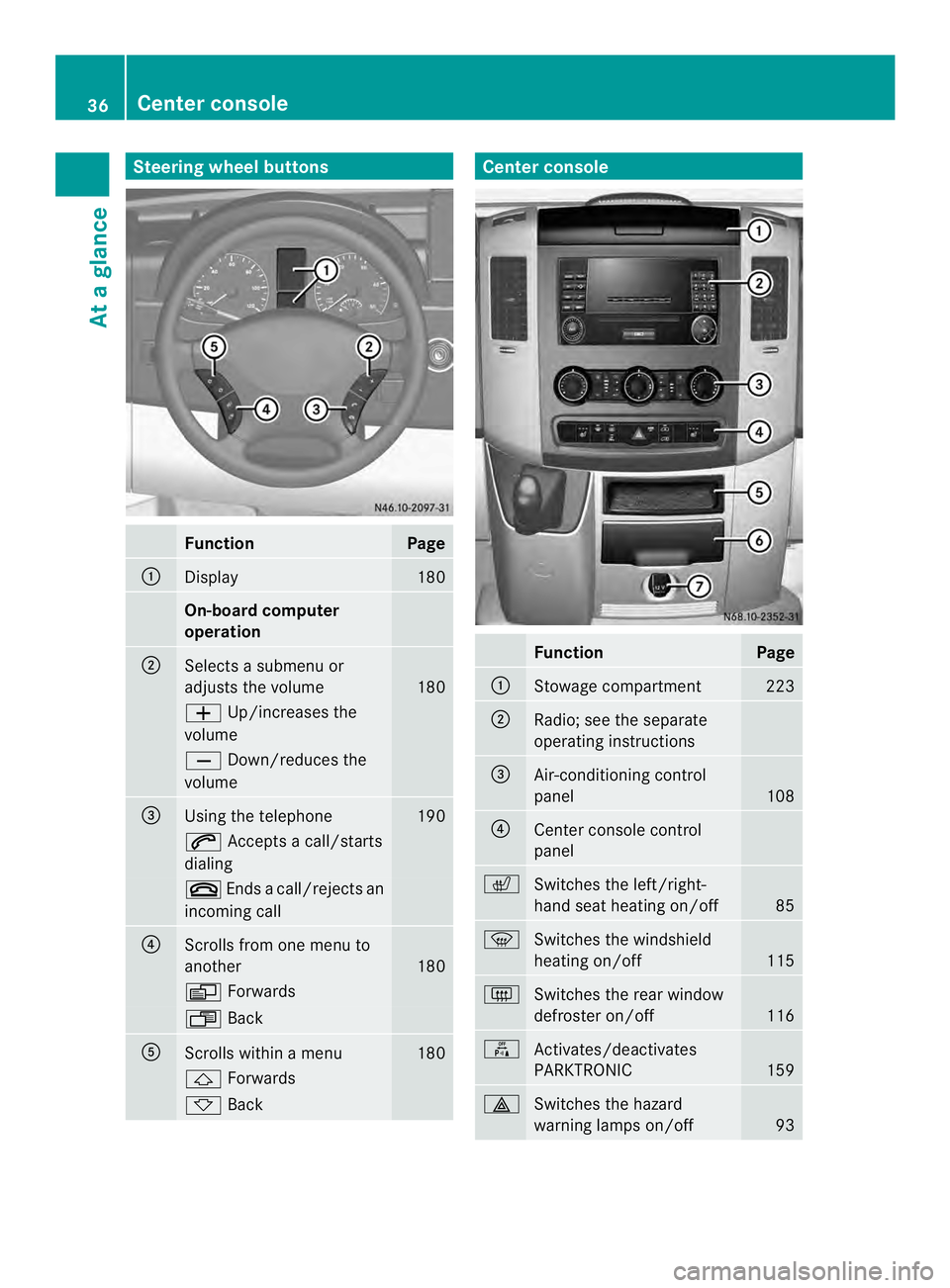
Steering wheel buttons
Function Page
0005
Display 180
On-board computer
operation
0006
Selects a submenu or
adjusts the volume
180
0011
Up/increases the
volume 0012
Down/reduces the
volume 0026
Using the telephone 190
0001
Accepts a call/starts
dialing 0005
Ends a call/rejects an
incoming call 0025
Scrolls from one menu to
another
180
0010
Forwards 0007
Back 0023
Scrolls within a menu 180
0001
Forwards 0009
Back Center console
Function Page
0005
Stowage compartment 223
0006
Radio; see the separate
operating instructions
0026
Air-conditioning control
panel
108
0025
Center console control
panel
0007
Switches the left/right-
hand seat heating on/off
85
0021
Switches the windshield
heating on/off
115
0019
Switches the rear window
defroster on/off
116
000C
Activates/deactivates
PARKTRONIC
159
0011
Switches the hazard
warning lamps on/off
9336
Center consoleAt a glance
Page 97 of 334
it switches off automatically after
20 minutes.
Automatic control
The interior light comes on if you:
R
unloc kthe vehicle
R open the driver's or the co-driver's door
R remove the key from the ignition lock
The interior light switches off again
automatically.
If a door is left open, the interior lighting
switches off after approximately 20 minutes. Switching the rear compartment
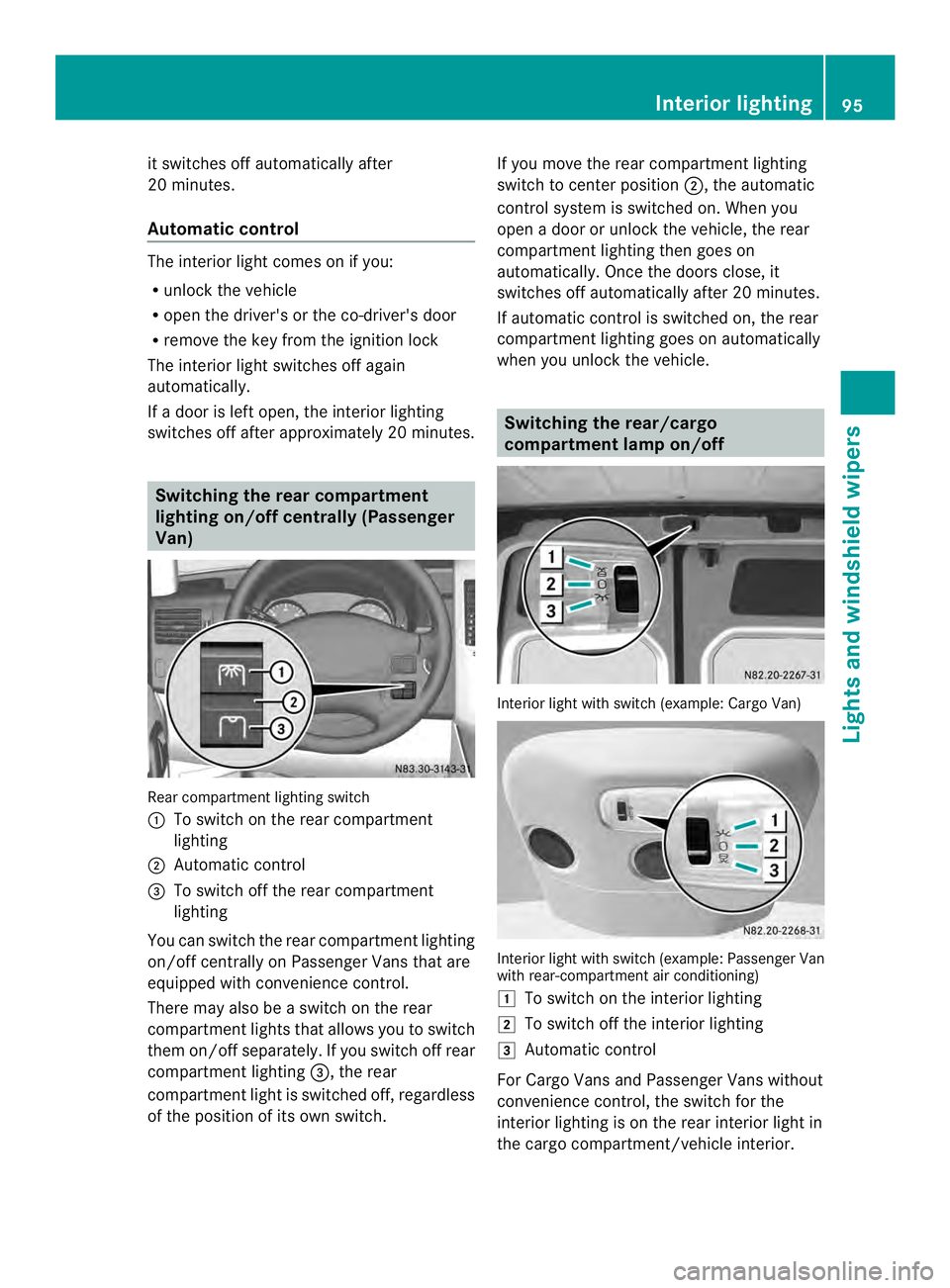
lighting on/off centrally (Passenger
Van) Rear compartmen
tlighting switch
0005 To switch on the rear compartment
lighting
0006 Automatic control
0026 To switch off the rear compartment
lighting
You can switch the rear compartmen tlighting
on/off centrally on Passenger Vans that are
equipped with convenience control.
There may also be a switch on the rear
compartmen tlights that allows you to switch
the mo n/off separately .Ifyou switch off rear
compartment lighting 0026, the rear
compartment light is switched off, regardless
of the position of its own switch. If you move the rear compartment lighting
switch to center position
0006, the automatic
control system is switched on. When you
open a door or unlock the vehicle, the rear
compartment lighting then goes on
automatically. Once the doors close, it
switches off automatically after 20 minutes.
If automatic control is switched on, the rear
compartment lighting goes on automatically
when you unlock the vehicle. Switching the rear/cargo
compartment lamp on/off
Interior light with switch (example: Cargo Van)
Interior light with switch (example: Passenger Van
with rear-compartment air conditioning)
0008
To switch on the interior lighting
0009 To switch off the interior lighting
000A Automatic control
For Cargo Vans and Passenger Vans without
convenience control, the switch for the
interior lighting is on the rear interior light in
the cargo compartment/vehicle interior. Interior lighting
95Lights and windshiel dwipers Z
Page 112 of 334
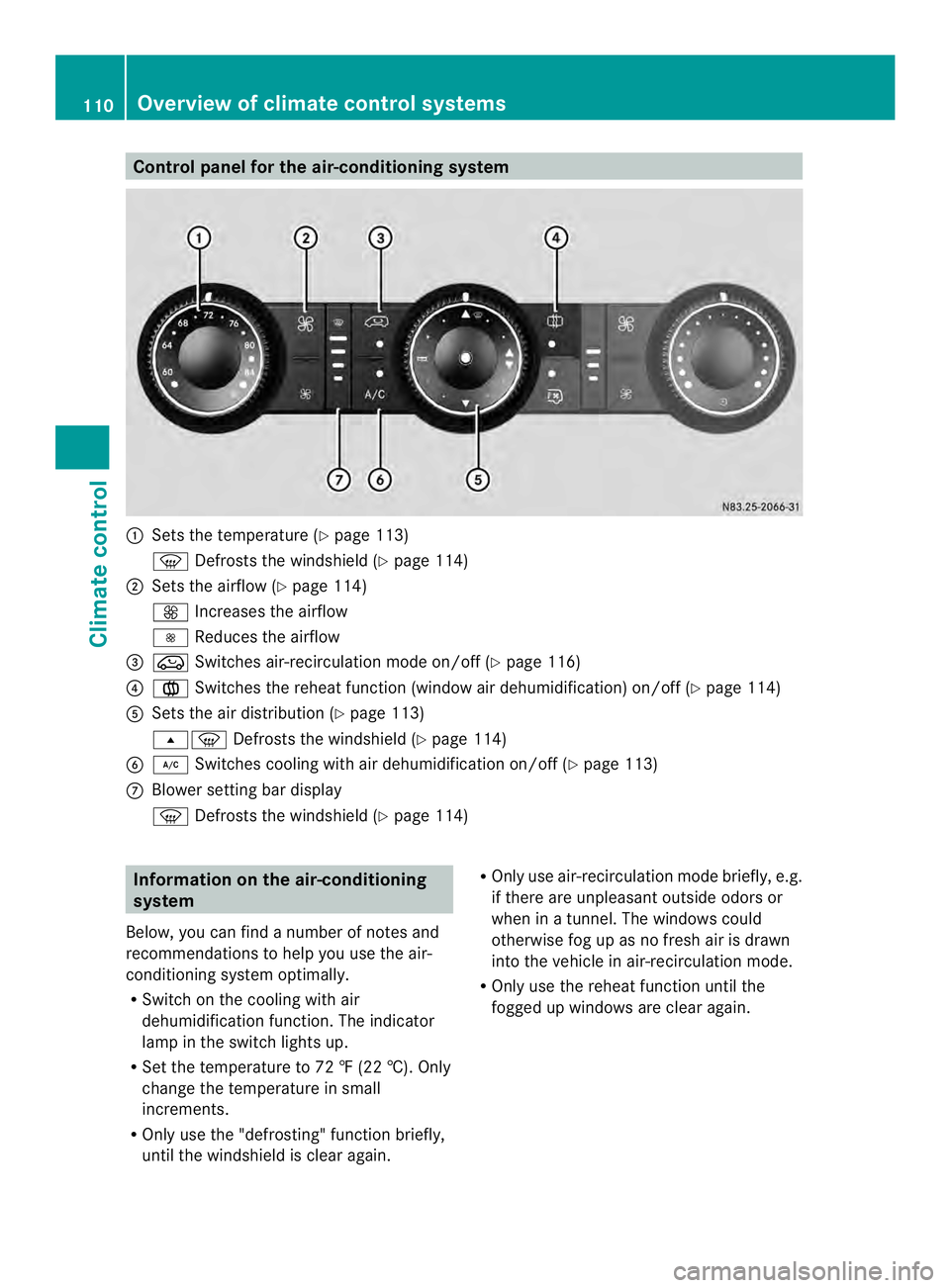
Control panel for the air-conditioning system
0005
Sets the temperature (Y page 113)
0021 Defrosts the windshield (Y page 114)
0006 Sets the airflow (Y page 114)
0026 Increases the airflow
0025 Reduces the airflow
0026 0022 Switches air-recirculation mode on/off (Y page 116)
0025 001F Switches the reheat function (window air dehumidification) on/of f(Ypage 114)
0023 Sets the air distribution (Y page 113)
000B0021 Defrosts the windshield (Y page 114)
0024 0008 Switches cooling with air dehumidification on/off ( Ypage 113)
0018 Blower setting bar display
0021 Defrosts the windshield (Y page 114)Information on the air-conditioning
system
Below, you can find a number of notes and
recommendations to help you use the air-
conditioning system optimally.
R Switch on the cooling with air
dehumidification function .The indicator
lamp in the switch lights up.
R Set the temperature to 72 ‡ (22 †). Only
change the temperature in small
increments.
R Only use the "defrosting" function briefly,
until the windshield is clear again. R
Only use air-recirculation mode briefly, e.g.
if there are unpleasant outside odors or
when in a tunnel. The windows could
otherwise fog up as no fresh air is drawn
into the vehicle in air-recirculation mode.
R Only use the reheat function until the
fogged up windows are clear again. 110
Overview of climate control systemsClimate control
Page 114 of 334
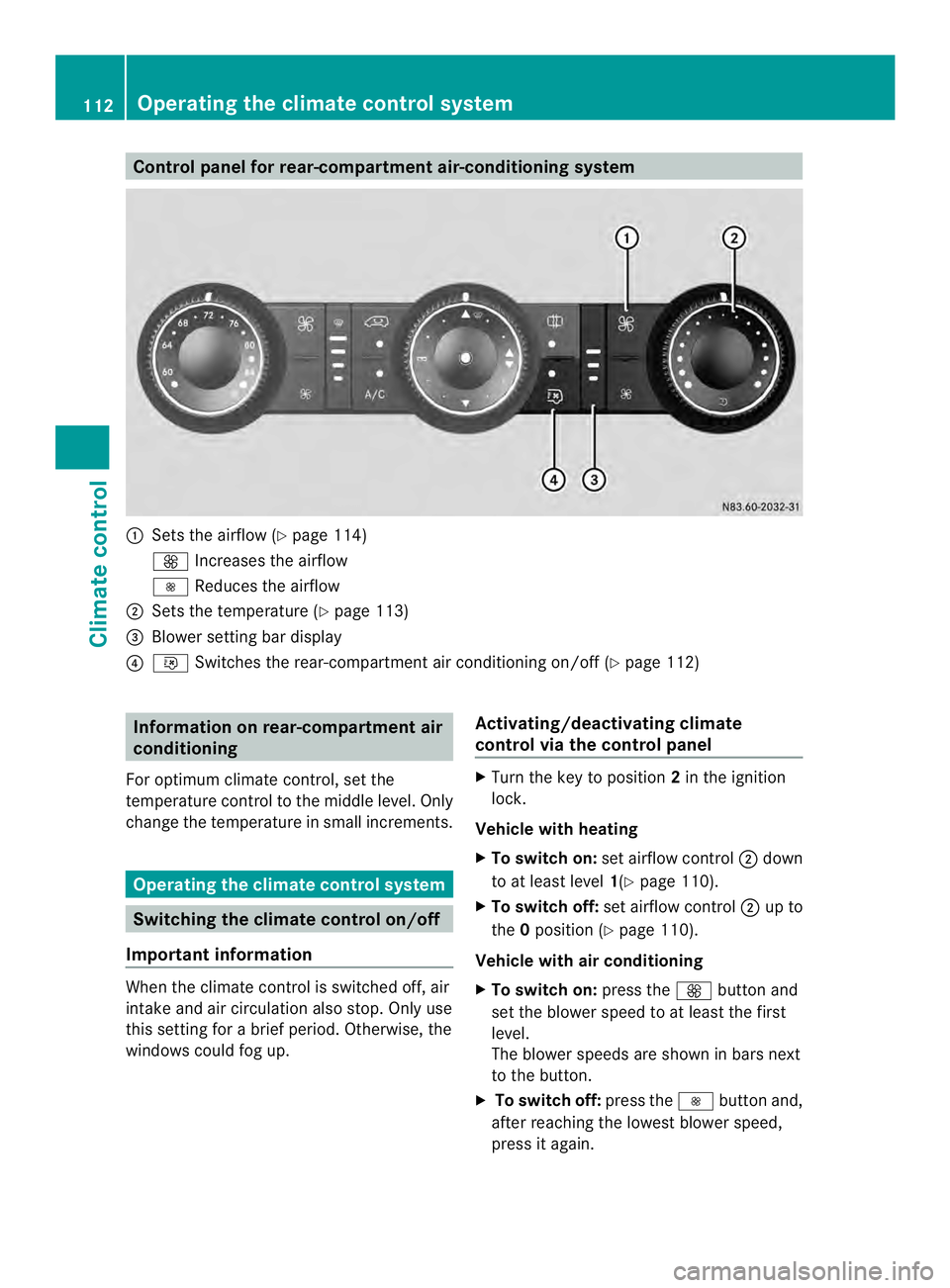
Control panel for rear-compartment air-conditioning system
0005
Sets the airflow (Y page 114)
0026 Increases the airflow
0025 Reduces the airflow
0006 Sets the temperature (Y page 113)
0026 Blower setting bar display
0025 001B Switches the rear-compartment air conditioning on/off (Y page 112)Information on rear-compartment air
conditioning
For optimum climate control, set the
temperature control to the middle level. Only
change the temperature in small increments. Operating the climate control system
Switching the climate control on/off
Important information When the climate control is switched off, air
intake and air circulation also stop. Only use
this setting for a brie
fperiod. Otherwise, the
windows could fog up. Activating/deactivating climate
control via the control panel X
Turn the key to position 2in the ignition
lock.
Vehicle with heating
X To switch on: set airflow control 0006down
to at least level 1(Ypage 110).
X To switch off: set airflow control 0006up to
the 0position (Y page 110).
Vehicle with air conditioning
X To switch on: press the0026button and
set the blower speed to at least the first
level.
The blower speeds are shown in bars next
to the button.
X To switch off: press the0025button and,
after reaching the lowest blower speed,
press it again. 112
Operating the climate control systemClimate control
Page 115 of 334
Activating/deactivating rear-
compartment climate control via the
control panel X
Turn the key to position 2in the ignition
lock.
Vehicle with rear-compartment heating/
rear-compartment air conditioning
X To switch on/off: press the001Bswitch.
If the indicator lamp in the butto nlights up,
the rear-compartment heating/rear-
compartmen tair conditioning is switched
on. Switching the cooling with air
dehumidification function on/off
Important information If you switch off the "Cooling with air
dehumidification" function, the air inside the
vehicle will not be cooled (in warm weather)
or dehumidified. The windows could fog up
more quickly.
The cooling with air dehumidification function
is only available when the engine is running.
The air inside the vehicle is cooled and
dehumidified according to the temperature
selected.
Condensatio nmay appear on the underside
of the vehicle when in cooling mode. This is
normal and not a sign that there is a
malfunction.
Switching on/off Vehicle with air conditioning
X
Press the 0008button.
If the indicator lamp in the butto nlights up,
cooling with air dehumidification is
switched on. Setting the temperature
Increasing/reducing temperature in
the front compartment via the control
panel Only change the temperature in small
increments. Start at the center position, or at
22 †.
X
Switch on climate control (Y page 112).
X Turn temperature control 0005clockwise to
increase or counterclockwise to reduce the
temperature (Y page 110).
Increasing/reducing temperature in
the rear compartment via the control
panel Only change the temperature in small
increments.
X
Switch on climate control (Y page 112).
X Turn rear-compartment temperature
control 0026(Ypage 111) or rear-
compartment air-conditioning system 0006
(Y page 112) clockwise to increase or
counterclockwise to reduce the
temperature.
i Vehicles with additional air conditioning
and heating in the rear compartment: if you
set the temperature control to the center
position, only one of the two climate
control systems works in the rear
compartmen tand in air-recirculation mode
(Y page 116). Setting the air distribution
Ai rd istribution settings The air distribution symbols have the
following meanings:
0027
Directs air through the center
and side air vents
000B0021 Directs air to the windshield and
the air vents Operating the climate control system
113Climate control
Page 116 of 334
000C
Directs airto the windshield, the
air vents and into the footwell
000D Directs air to the air vents and
into the footwell
Adjusting X
Switch on climate control (Y page 112).
X Set air-distribution control 0025for the
heating (Y page 109) or air-conditioning
system 0023(Ypage 110) to the
corresponding symbol. Setting the airflow
X Switch on climate control (Y page 112).
X Vehicle with heating/rear-
compartment heating: set airflow
control 0006of the heating (Y page 109) or
of the rear-compartment heating
(Y page 111) to the desired level.
X Vehicle with air conditioning/rear-
compartment air conditioning: press the
0025 button to reduce or the 0026button
to increase the airflow.
The blower speeds are shown in bars next
to the buttons. Defrosting the windows
You can use the "defrosting" function to
defrost the windshield or to demist the inside
of the windshield and the side windows.
Only use the following settings until the
windows are clear again.
X Vehicle with window heating: switch on
the front (Y page 115) and/or rear window
defroster (Y page 116) .
X Switch on climate control (Y page 112).Vehicle with heating
X
Set temperature control 0005and airflow
control 0006to0021 (Ypage 109).
X Set air-distribution control 0025to
000B0021(Y page 109).
X Close the center air vents (Y page 117) and
the air outlets for the headroom and the
rear compartment (Y page 117).
X Direct the side air vents towards the side
windows and open the defroster vents for
the side windows (Y page 117).
Vehicle with air conditioning
X Set temperature control 0005to
0021 (Ypage 110).
X Press the 0026button until the maximum
blower output is reached.
All bars in the display next to the button
light up.
X Set air-distribution control 0023to
000B0021(Y page 110).
X Close the center air vents (Y page 117) and
the air outlets for the headroom and the
rear compartment (Y page 117).
X Direct the side air vents towards the side
windows and open the defroster vents for
the side windows (Y page 117). Defrosting the windows
Windows fogged up on the inside You should only select this setting until the
windows are clear again.
X
Vehicle with window heating: switch on
the front (Y page 115) and/or rear window
defroster (Y page 116) .
X Switch on climate control (Y page 112).
X Switch off air-recirculation mode
(Y page 116). 114
Operating the climate control systemClimate control