clock MERCEDES-BENZ SPRINTER 2015 MY15 Operator’s Manual
[x] Cancel search | Manufacturer: MERCEDES-BENZ, Model Year: 2015, Model line: SPRINTER, Model: MERCEDES-BENZ SPRINTER 2015Pages: 334, PDF Size: 5.94 MB
Page 16 of 334
Off-road driving
Checklist after driving off-road ...... 158
Important safety notes .................. 156
Rules for driving off-road ............... 158
Oil
see Engine oil
On-board computer
Display message ............................1 97
Lighting submenu .......................... 192
On-board computer (vehicles with
steering wheel buttons)
Audio menu ................................... 187
Display message ............................ 184
Menu overview .............................. 186
Operating ....................................... 184
Operation menu ............................ .186
Settings menu ............................... 188
Standard displa y............................ 187
Telephone menu ............................ 196
Trip computer menu ...................... 195
On-board computer (vehicles with-
out steering wheel buttons)
Display message ............................ 198
General notes ................................ 182
Setting the clock ............................ 183
Standard display ............................ 182
Operating Instructions
Before the first journey .................... 22
Limited Warranty ............................. 22
Operating safety
Vehicle registration .......................... 28
Operating safety and vehicle
approval
Attachments and bodie s.................. 26
BlueTEC exhaust gas aftertreat-
ment ................................................ 25
Changing the engine power out-
put ................................................... 25
Correct use ...................................... 22
Declaration of conformity ................ 24
Equipment and conversions ............. 26
Important safety notes .................... 24
Information about body/equip-
ment mounting directives ................ 26
Notes on operating the vehicle ........ 24
Qualified specialist worksho p.......... 25
Registering your vehicl e................... 25 Operating system
see On-board computer
Operator's Manual
General notes .................................. 22
Vehicle equipment ........................... 22
Outline lamp
Replacing bulb s............................. 105
Outside temperature display ........... 181
Overhead control panel ...................... 38
Overrevving range ............................. 181
Overrun cutoff ................................... 152 P
Paintwork (cleaning instructions) ... 267
Paper holder ...................................... 233
Parking ............................................... 149
Important safety notes .................. 149
Parking brake ................................ 150
Wheel chock .................................. 151
see PARKTRONIC
Parking aid
see PARKTRONIC
Parking assistance
see PARKTRONIC
Parking brake
Display message ............................ 207
Notes/function .............................. 150
Parking lamps
Replacing bulb s............................. 100
PARKTRONIC
Deactivating/activating ................. 169
Driving system ............................... 167
Function/note s............................. 167
Important safety notes .................. 167
Problem (malfunction) ................... 171
Range of the sensors ..................... 168
Roll-back warning .......................... 169
Trailer towing ................................. 170
Warning display ............................. 169
Partition sliding door
Important safety notes .................... 77
Opening/closing .............................. 77
Passenger compartment air-condi-
tioning system
see Climate control
Passenger compartment heating
see Climate control 14
Index
Page 18 of 334
Releasing the parking lock man-
ually (automatic transmission)
........ 145
Remote control
Changing the operating duration
(auxiliary heating) .......................... 126
Replacing the battery (auxiliary
heating ) ........................................ 130
Switching on/off (auxiliary heat-
ing) ................................................ 126
Synchronizing (auxiliary heating) ... 126
Replacing bulbs
Important safety notes .................... 99
Replacing the battery (auxiliary
heating remote control) .................... 130
Restraint system
Introduction ..................................... 42
Warning lamp (function) .......... 42, 222
Reverse warning feature .................. 140
Roof carrier
Maximum payloa d.......................... 328
Notes ............................................. 245
Roof load (roof carrier) ..................... 328S
Safety Child restraint systems .................... 52
Children in the vehicle ..................... 51
Safety system
see Driving safety systems
Seat belts
Adjusting the height ......................... 45
Cleaning ......................................... 271
Correct usage .................................. 45
Display message ............................ 207
Fastening ......................................... 45
Important safety guidelines ............. 44
Introduction ..................................... 43
Releasing ......................................... 46
Warning lamp ................................. 227
Warning lamp (function) ................... 46
Seat heating ......................................... 87
Seats
Adjusting lumbar support ................ 83
Adjusting the co-driver's sea t.......... 83
Adjusting the head restraint ............ 86
Armrest ............................................ 87
Cleaning the cover ......................... 271 Correct driver's seat position ........... 82
Folding seat ..................................... 85
Important safety notes .................... 82
Rear bench seat ............................... 85
Seat heating .................................... 87
Setting the driver's seat ................... 83
Swivel seat ....................................... 84
Twin co-driver's seat ........................ 85
Securing loads
Important safety notes .................. 242
Selector lever
Cleaning ......................................... 270
Sensors (cleaning instructions) ....... 268
Service center
see Qualified specialist workshop
Service interval display
Calling up the service due date ...... 258
Exceeding a service due date ........ 258
Notes ............................................. 257
Service due date (automatic dis-
play) ............................................... 257
Service products
Brake fluid ..................................... 324
Coolant (engine) ............................ 325
Diesel ............................................ 318
Diesel Exhaust Fluid (DEF) ............. 320
Engine oil ....................................... 322
Fuel ................................................ 318
Important safety notes .................. 318
Power steering fluid ....................... 324
Refrigerant ..................................... 326
Transmission oil ............................. 324
Washer fluid ................................... 326
Setting the air distribution ............... 117
Setting the airflow ............................ 118
Setting the clock
Vehicles with steering wheel but-
tons ............................................... 191
Vehicles without steering wheel
buttons .......................................... 183
Settings
Resetting all (vehicles with steer-
ing wheel buttons) ......................... 188
Resetting submenus (vehicles
with steering wheel buttons) ......... 189
Short journeys (diesel particle fil-
ter) ...................................................... 153 16
Index
Page 79 of 334
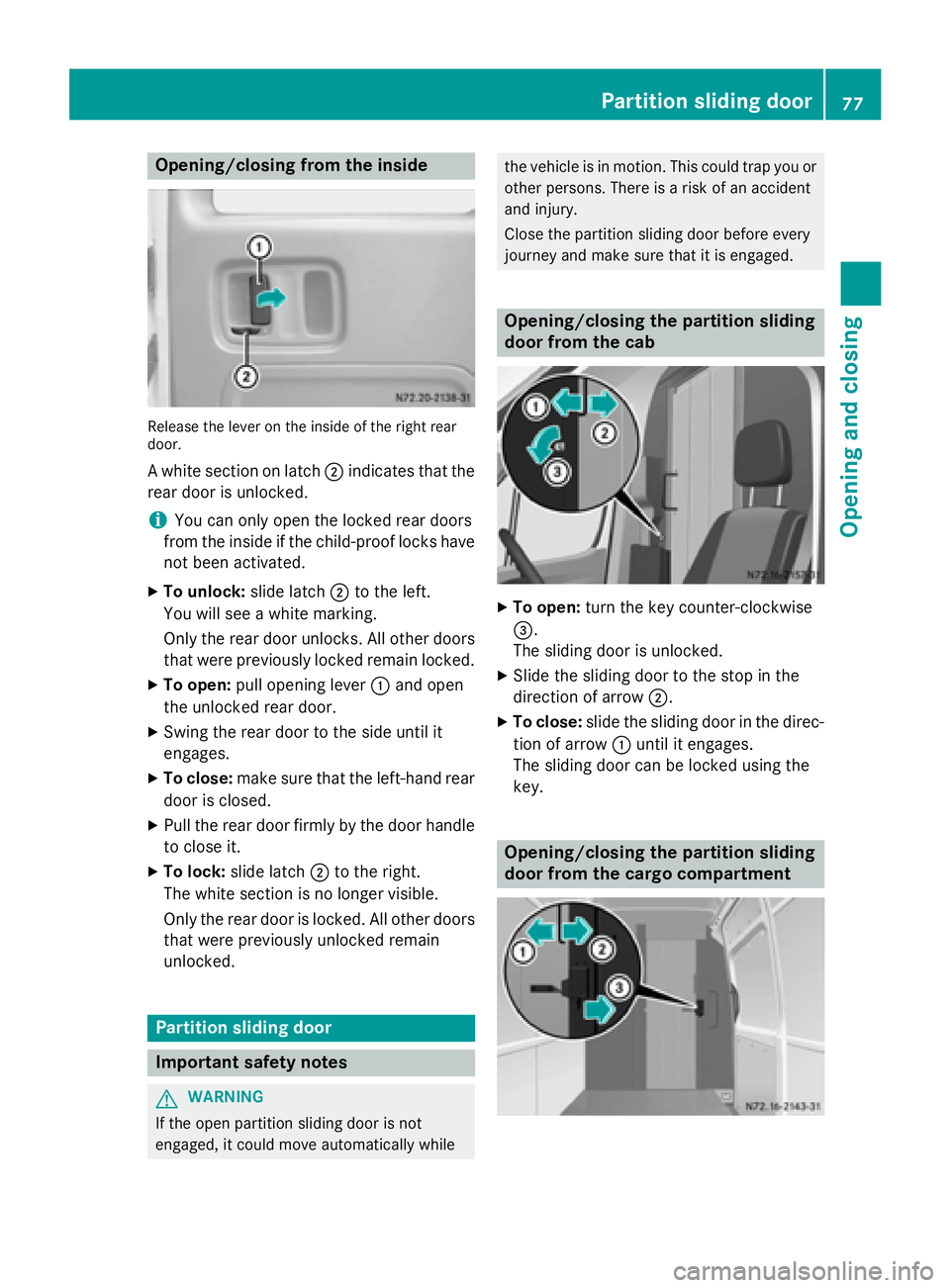
Opening/closing from the inside
Release the lever on the inside of the right rear
door.
A white section on latch 0044indicates that the
rear door is unlocked.
i You can only open the locked rear doors
from the inside if the child-proof locks have
not been activated.
X To unlock: slide latch0044to the left.
You will see a white marking.
Only the rear door unlocks. All other doors that were previously locked remain locked.
X To open: pull opening lever 0043and open
the unlocked rear door.
X Swing the rear door to the side until it
engages.
X To close: make sure that the left-hand rear
door is closed.
X Pull the rear door firmly by the door handle
to close it.
X To lock: slide latch 0044to the right.
The white section is no longer visible.
Only the rear door is locked. All other doors that were previously unlocked remain
unlocked. Partition sliding door
Important safety notes
G
WARNING
If the open partition sliding door is not
engaged, it could move automatically while the vehicle is in motion. This could trap you or
other persons. There is a risk of an accident
and injury.
Close the partition sliding door before every
journey and make sure that it is engaged. Opening/closing the partition sliding
door from the cab
X
To open: turn the key counter-clockwise
0087.
The sliding door is unlocked.
X Slide the sliding door to the stop in the
direction of arrow 0044.
X To close: slide the sliding door in the direc-
tion of arrow 0043until it engages.
The sliding door can be locked using the
key. Opening/closing the partition sliding
door from the cargo compartment Partition sliding door
77Opening and closing Z
Page 103 of 334
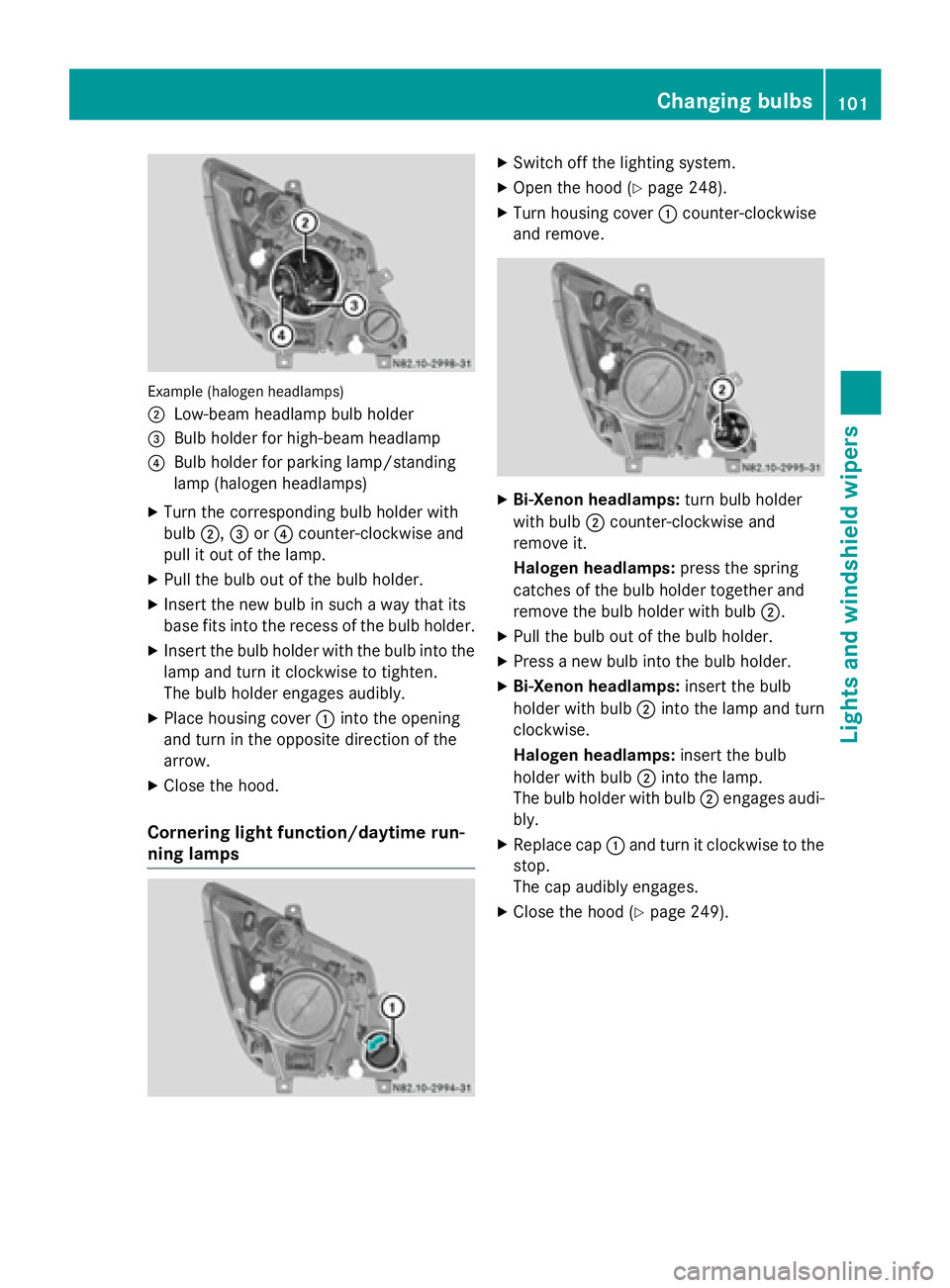
Example (halogen headlamps)
0044
Low-beam headlamp bulb holder
0087 Bulb holder for high-beam headlamp
0085 Bulb holder for parking lamp/standing
lamp (halogen headlamps)
X Turn the corresponding bulb holder with
bulb 0044,0087or0085 counter-clockwise and
pull it out of the lamp.
X Pull the bulb out of the bulb holder.
X Insert the new bulb in such a way that its
base fits into the recess of the bulb holder.
X Insert the bulb holder with the bulb into the
lamp and turn it clockwise to tighten.
The bulb holder engages audibly.
X Place housing cover 0043into the opening
and turn in the opposite direction of the
arrow.
X Close the hood.
Cornering light function/daytime run-
ning lamps X
Switch off the lighting system.
X Open the hood (Y page 248).
X Turn housing cover 0043counter-clockwise
and remove. X
Bi-Xenon headlamps: turn bulb holder
with bulb 0044counter-clockwise and
remove it.
Halogen headlamps: press the spring
catches of the bulb holder together and
remove the bulb holder with bulb 0044.
X Pull the bulb out of the bulb holder.
X Press a new bulb into the bulb holder.
X Bi-Xenon headlamps: insert the bulb
holder with bulb 0044into the lamp and turn
clockwise.
Halogen headlamps: insert the bulb
holder with bulb 0044into the lamp.
The bulb holder with bulb 0044engages audi-
bly.
X Replace cap 0043and turn it clockwise to the
stop.
The cap audibly engages.
X Close the hood (Y page 249). Changing bulbs
101Lights andwindshield wipers Z
Page 104 of 334
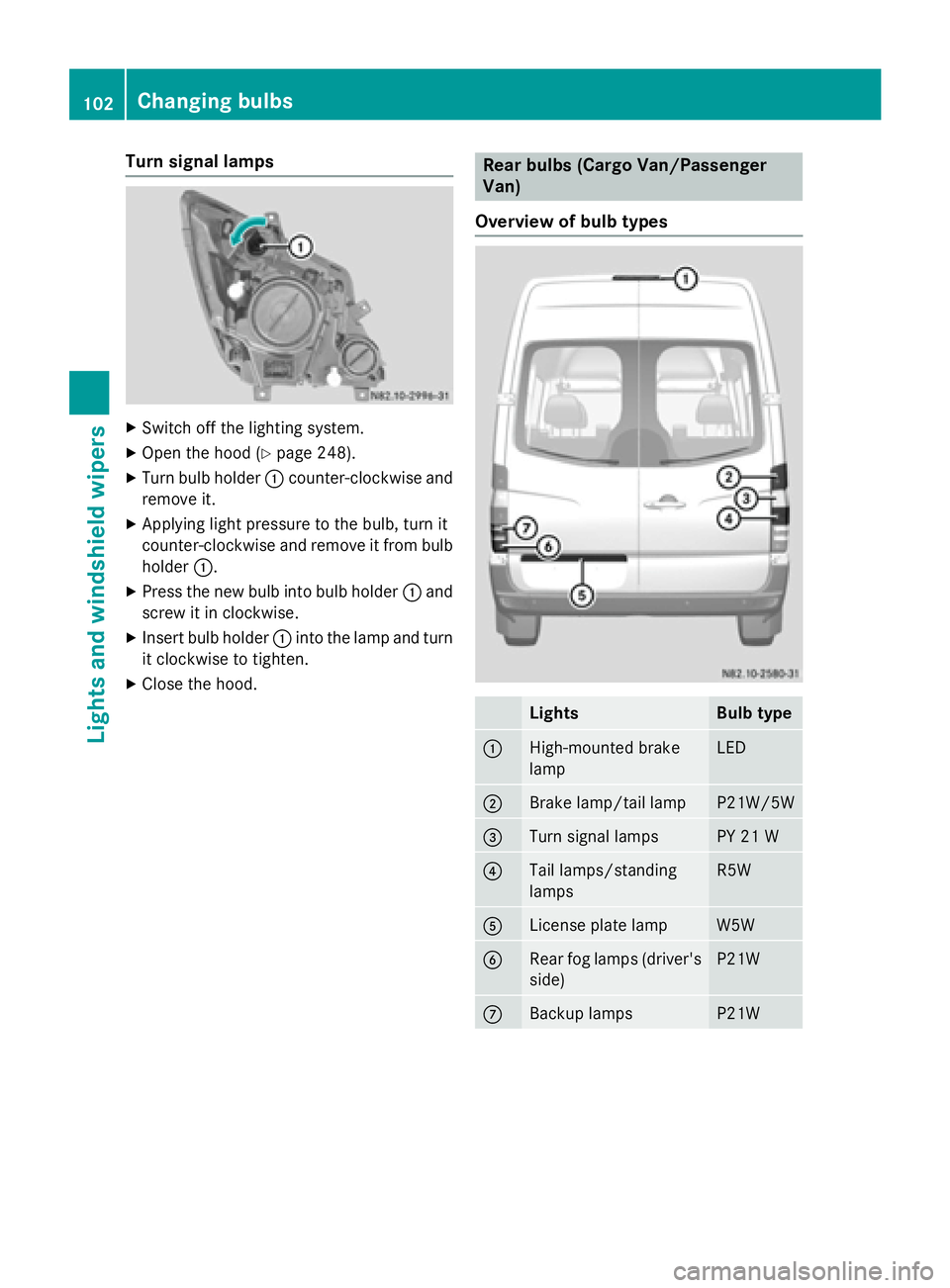
Turn signal lamps
X
Switch off the lighting system.
X Open the hood (Y page 248).
X Turn bulb holder 0043counter-clockwise and
remove it.
X Applying light pressure to the bulb, turn it
counter-clockwise and remove it from bulb
holder 0043.
X Press the new bulb into bulb holder 0043and
screw it in clockwise.
X Insert bulb holder 0043into the lamp and turn
it clockwise to tighten.
X Close the hood. Rear bulbs (Cargo Van/Passenger
Van)
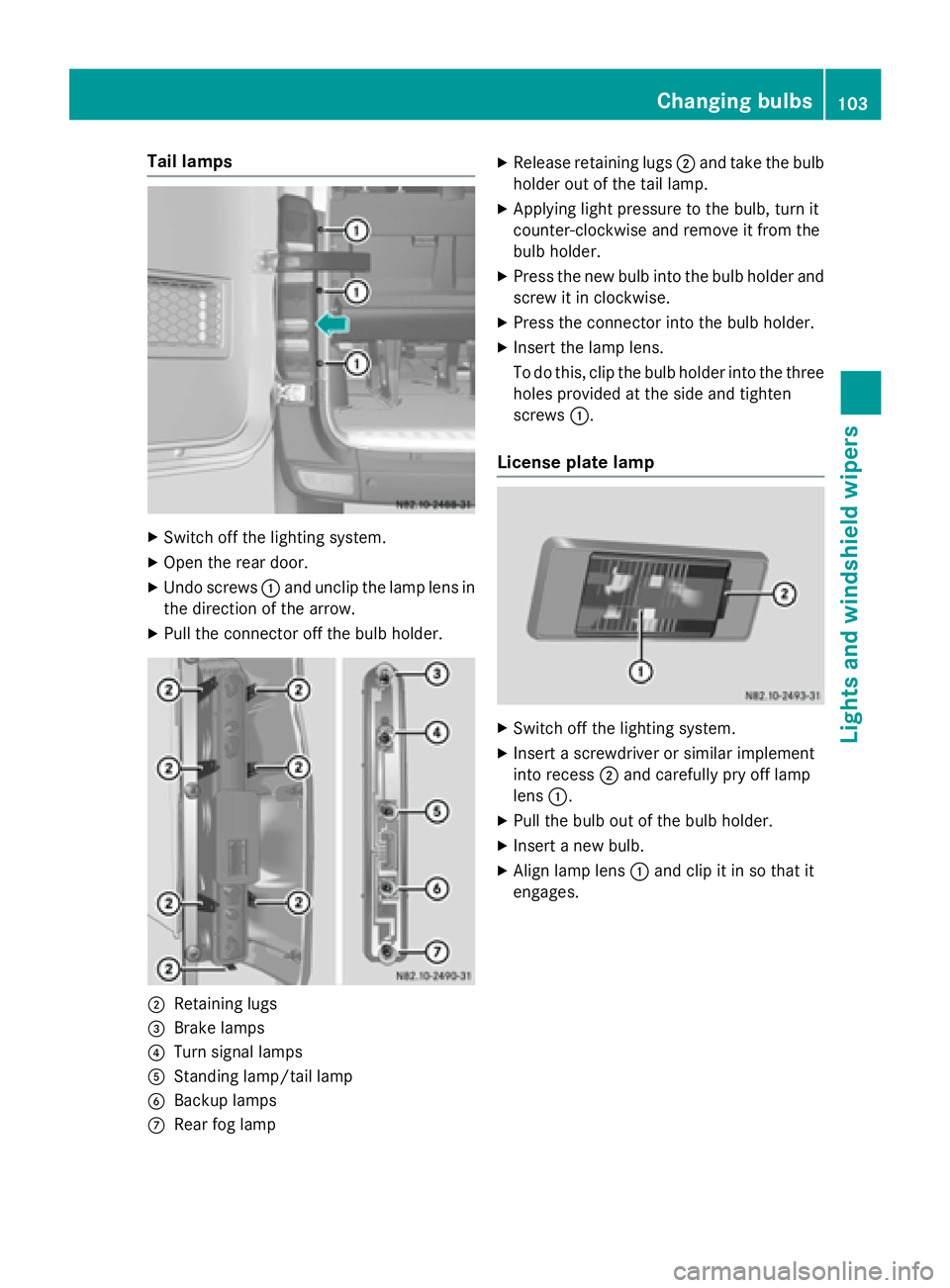
Overview of bulb types Lights Bulb type
0043
High-mounted brake
lamp LED
0044
Brake lamp/tail lamp P21W/5W
0087
Turn signal lamps PY 21 W
0085
Tail lamps/standing
lamps R5W
0083
License plate lamp W5W
0084
Rear fog lamps (driver's
side) P21W
006B
Backup lamps P21W102
Changing bulbsLights and
windshield wipers
Page 105 of 334
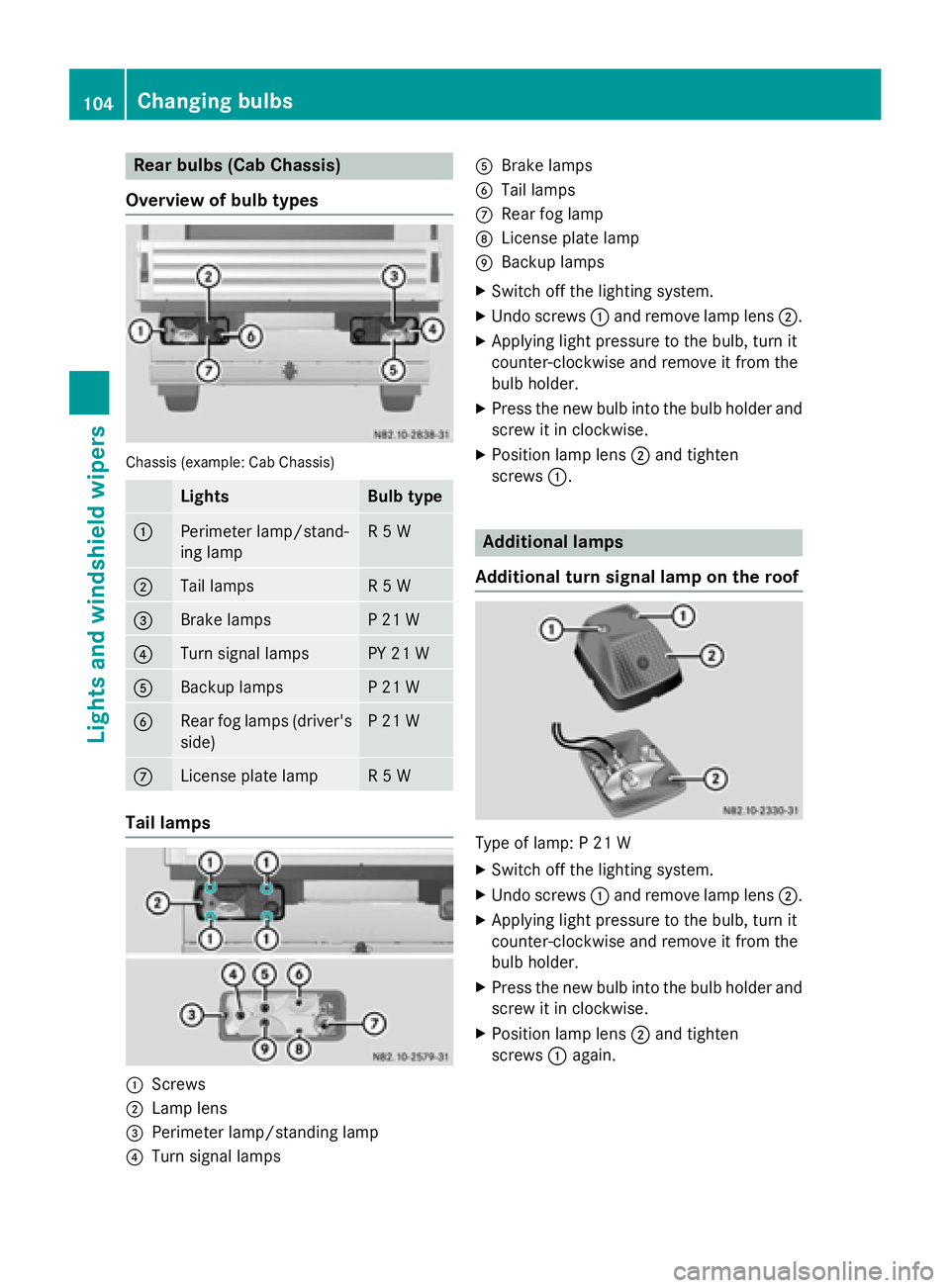
Tail lamps
X
Switch off the lighting system.
X Open the rear door.
X Undo screws 0043and unclip the lamp lens in
the direction of the arrow.
X Pull the connector off the bulb holder. 0044
Retaining lugs
0087 Brake lamps
0085 Turn signal lamps
0083 Standing lamp/tail lamp
0084 Backup lamps
006B Rear fog lamp X
Release retaining lugs 0044and take the bulb
holder out of the tail lamp.
X Applying light pressure to the bulb, turn it
counter-clockwise and remove it from the
bulb holder.
X Press the new bulb into the bulb holder and
screw it in clockwise.
X Press the connector into the bulb holder.
X Insert the lamp lens.
To do this, clip the bulb holder into the three
holes provided at the side and tighten
screws 0043.
License plate lamp X
Switch off the lighting system.
X Insert a screwdriver or similar implement
into recess 0044and carefully pry off lamp
lens 0043.
X Pull the bulb out of the bulb holder.
X Insert a new bulb.
X Align lamp lens 0043and clip it in so that it
engages. Changing bulbs
103Lights andwindshield wipers Z
Page 106 of 334
Rear bulbs (Cab Chassis)
Overview of bulb types Chassis (example: Cab Chassis)
Lights Bulb type
0043
Perimeter lamp/stand-
ing lamp R 5 W
0044
Tail lamps R 5 W
0087
Brake lamps P 21 W
0085
Turn signal lamps PY 21 W
0083
Backup lamps P 21 W
0084
Rear fog lamps (driver's
side) P 21 W
006B
License plate lamp R 5 W
Tail lamps
0043
Screws
0044 Lamp lens
0087 Perimeter lamp/standing lamp
0085 Turn signal lamps 0083
Brake lamps
0084 Tail lamps
006B Rear fog lamp
006C License plate lamp
006D Backup lamps
X Switch off the lighting system.
X Undo screws 0043and remove lamp lens 0044.
X Applying light pressure to the bulb, turn it
counter-clockwise and remove it from the
bulb holder.
X Press the new bulb into the bulb holder and
screw it in clockwise.
X Position lamp lens 0044and tighten
screws 0043. Additional lamps
Additional turn signal lamp on the roof Type of lamp: P 21 W
X
Switch off the lighting system.
X Undo screws 0043and remove lamp lens 0044.
X Applying light pressure to the bulb, turn it
counter-clockwise and remove it from the
bulb holder.
X Press the new bulb into the bulb holder and
screw it in clockwise.
X Position lamp lens 0044and tighten
screws 0043again. 104
Changing bulbsLights and windshield wipers
Page 108 of 334
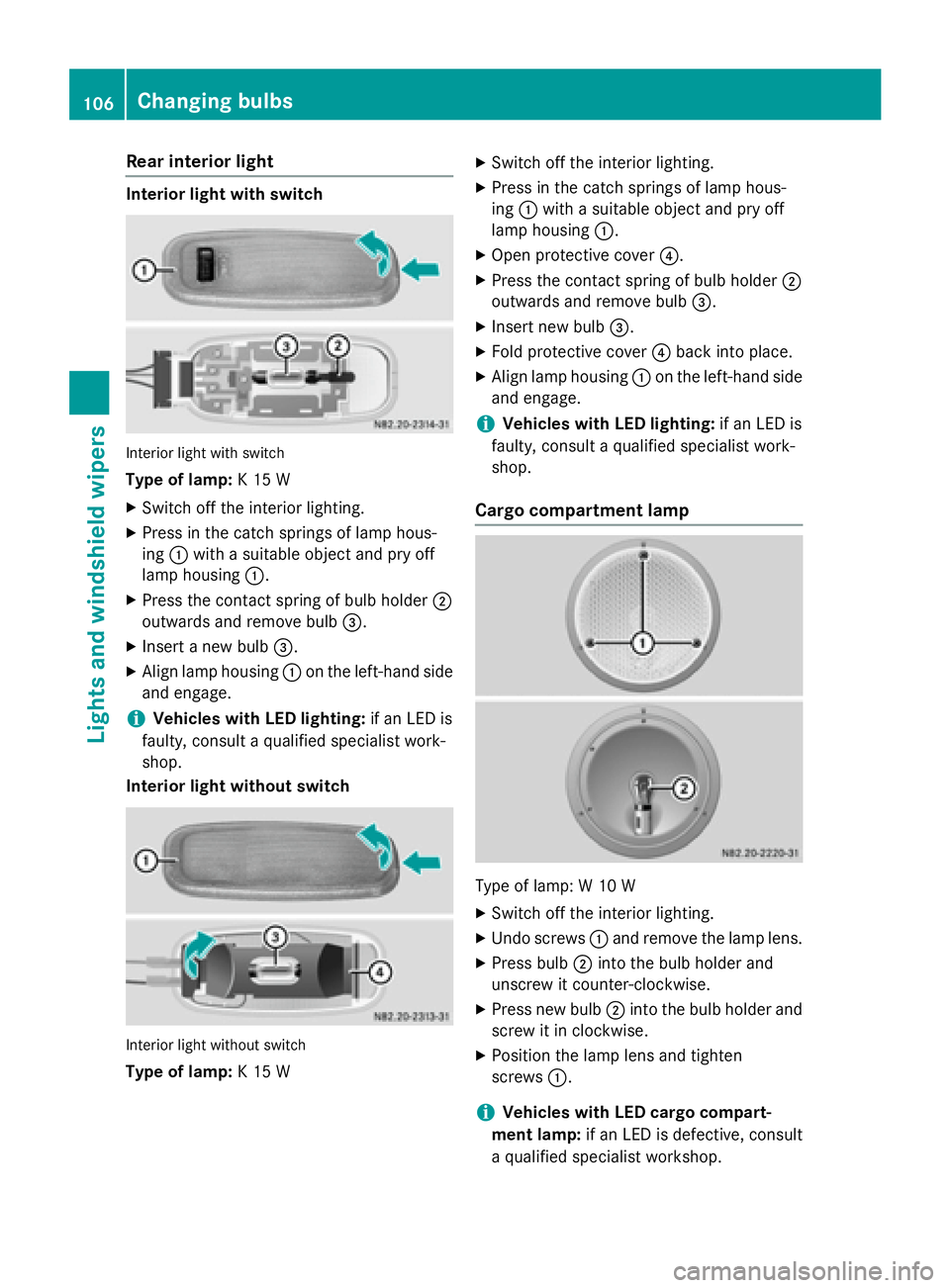
Rear interior light
Interior light with switch
Interior light with switch
Type of lamp: K 15 W
X Switch off the interior lighting.
X Press in the catch springs of lamp hous-
ing 0043with a suitable object and pry off
lamp housing 0043.
X Press the contact spring of bulb holder 0044
outwards and remove bulb 0087.
X Insert a new bulb 0087.
X Align lamp housing 0043on the left-hand side
and engage.
i Vehicles with LED lighting:
if an LED is
faulty, consult a qualified specialist work-
shop.
Interior light without switch Interior light without switch
Type of lamp: K 15 W X
Switch off the interior lighting.
X Press in the catch springs of lamp hous-
ing 0043with a suitable object and pry off
lamp housing 0043.
X Open protective cover 0085.
X Press the contact spring of bulb holder 0044
outwards and remove bulb 0087.
X Insert new bulb 0087.
X Fold protective cover 0085back into place.
X Align lamp housing 0043on the left-hand side
and engage.
i Vehicles with LED lighting:
if an LED is
faulty, consult a qualified specialist work-
shop.
Cargo compartment lamp Type of lamp: W 10 W
X Switch off the interior lighting.
X Undo screws 0043and remove the lamp lens.
X Press bulb 0044into the bulb holder and
unscrew it counter-clockwise.
X Press new bulb 0044into the bulb holder and
screw it in clockwise.
X Position the lamp lens and tighten
screws 0043.
i Vehicles with LED cargo compart-
ment lamp: if an LED is defective, consult
a qualified specialist workshop. 106
Changing bulbsLights and windshield wipers
Page 119 of 334
Activating/deactivating rear-compart-
ment climate control via the control
panel X
Turn the key to position 2in the ignition
lock.
Vehicle with rear-compartment heating/
rear-compartment air conditioning
X To switch on/off: press the0074switch.
If the indicator lamp in the button lights up, the rear-compartment heating/rear-com-
partment air conditioning is switched on. Switching the cooling with air dehu-
midification function on/off
Important information If you switch off the "Cooling with air dehu-
midification" function, the air inside the vehi- cle will not be cooled (in warm weather) or
dehumidified. The windows could fog up morequickly.
The cooling with air dehumidification function
is only available when the engine is running.
The air inside the vehicle is cooled and dehu- midified according to the temperature selec-
ted.
Condensation may appear on the underside
of the vehicle when in cooling mode. This is
normal and not a sign that there is a malfunc- tion.
Switching on/off Vehicle with air conditioning
X Press the 005Abutton.
If the indicator lamp in the button lights up, cooling with air dehumidification is
switched on. Setting the temperature
Increasing/reducing temperature in
the front compartment via the control
panel Only change the temperature in small incre-
ments. Start at the center position, or at 72 ‡
(22 †).
X Switch on climate control (Y page 116).
X Turn temperature control 0043clockwise to
increase or counterclockwise to reduce the temperature (Y page 114).
Increasing/reducing temperature in
the rear compartment via the control
panel Only change the temperature in small incre-
ments.
X Switch on climate control (Y page 116).
X Turn rear-compartment temperature con-
trol 0087(Ypage 115) or rear-compartment
air-conditioning system 0044(Ypage 116)
clockwise to increase or counterclockwise
to reduce the temperature.
i Vehicles with additional air conditioning
and heating in the rear compartment: if you set the temperature control to the center
position, only one of the two climate con-
trol systems works in the rear compart-
ment and in air-recirculation mode
(Y page 120). Setting the air distribution
Air distribution settings The air distribution symbols have the follow-
ing meanings:
0078
Directs air through the center and
side air vents
007E
0085 Directs air to the windshield and the
air vents Operating the climate control system
117Climate control
Page 122 of 334
switched off prematurely or cannot be acti-
vated.
X Switch off any consumers that are not
required, e.g. reading lamps or interior
lighting.
If enough on-board voltage is available again
within 30 seconds, the rear window heating
automatically switches on again. It otherwise
remains switched off. Switching air-recirculation mode
on/off
Important safety notes When you switch on air-recirculation mode,
the windows could fog up more quickly, in
particular at low outside temperatures. Only
switch on air-recirculation mode for a short
time.
You can deactivate the intake of fresh air if
unpleasant odors enter the vehicle from out-
side. The air inside the vehicle will only be
circulated.
Heating/air-conditioning system Air-recirculation mode switches off automat-
ically after about 10 to 30 minutes, depending
on the outside temperature.
X Switch on climate control (Y page 116).
X To switch on/off: press the008Aswitch.
If the indicator lamp in the 008Abutton
lights up, air-recirculation mode is activa-
ted.
Rear-compartment heating/rear-com-
partment air conditioning On vehicles with a rear-compartment heating
and air-conditioning system, you can acti-
vate/deactivate air-recirculation mode for
the rear-compartment climate control.
X Switch on climate control (Y page 116).
X To activate: set the temperature control of
rear-compartment heating 0087(Ypage 115) or rear-compartment air conditioning sys-
tem
0044(Ypage 116) to the center position.
Only one of the two climate control sys-
tems in the rear compartment is activated
and is in air-recirculation mode.
X To deactivate: turn the temperature con-
trol of rear-compartment heating 0087
(Y page 115) or rear-compartment air-con-
ditioning system 0044(Ypage 116) clock-
wise or counterclockwise. Only change the
temperature in small increments. Adjusting the air vents
Important safety notes
G
WARNING
Very hot or very cold air can flow from the air vents. This could result in burns or frostbite in the immediate vicinity of the air vents. There
is a risk of injury.
Make sure that all vehicle occupants always
maintain a sufficient distance to the air out-
lets. If necessary, redirect the airflow to
another area of the vehicle interior.
The center and side air vents are adjustable.
On vehicles with a rear-compartment air-con-
ditioning system, you can also adjust the air
vents in the roof duct.
i For virtually draft-free ventilation, adjust
the sliders of the center air vents to the
center position.
In order to ensure the direct flow of fresh air
through the air vents into the vehicle interior, please observe the following notes:
R keep the air inlet grille on the hood free of
blockages, such as ice, snow or leaves.
R never cover the vents or the ventilation
grilles in the vehicle interior. 120
Adjusting the air ventsClimate control