light MERCEDES-BENZ SPRINTER 2015 MY15 Operator’s Manual
[x] Cancel search | Manufacturer: MERCEDES-BENZ, Model Year: 2015, Model line: SPRINTER, Model: MERCEDES-BENZ SPRINTER 2015Pages: 334, PDF Size: 5.94 MB
Page 260 of 334
Service due date has been exceeded
Vehicles with steering wheel buttons:
if
you have missed the service due date, one of
the following messages appears in the display and warning tone also sounds.
R 0099 Service A overdue by ... days Service A overdue by ... days
R 0099 Service
Service A
Aoverdue
overdue by
by...
... km
km(kmkm)
Vehicles without steering wheel buttons:
if you have missed the service due date, the
0099 or009A symbol for the service flashes
for 10 seconds after the ignition is switched
on. A minus sign also appears in front of the
service due date.
Calling up the service due date X
Turn the key to position 2in the ignition
lock.
The display is activated.
Vehicles without steering wheel buttons X Press the 0079menu button on the instru-
ment cluster repeatedly until the 0099or
009A symbol for the service appears in the
display.
Additionally, you will see the remaining dis-
tance in miles (mi mi) or kilometers ( km km) or the
remaining time in days ( d
d).
Vehicles with steering wheel buttons
X Press the 0080or007F button on the steer-
ing wheel until the standard display
(Y page 187) appears in the display.
X Press the 0041or0068 button on the steer-
ing wheel repeatedly until the service mes-
sage appears in the display, for example:
R 0099 Service A due in ... days
Service A due in ... days
R 0099 Service A due in ... km Service A due in ... km (kmkm) Battery
Important safety notes
Work on the battery, e.g. removing or instal-
ling, requires specialist knowledge and the
use of special tools. Therefore, always have work on the battery carried out at a qualified
specialist workshop. G
WARNING
Work carried out incorrectly on the battery
can lead, for example, to a short circuit and
thus damage the vehicle electronics. This can lead to function restrictions applying to
safety-relevant systems, e.g. the lighting sys-
tem, ABS (anti-lock braking system) or ESP ®
(Electronic Stability Program). The operating
safety of your vehicle may be restricted. You
could lose control of the vehicle, for example:
R braking
R in the event of abrupt steering maneuver
and/or when the vehicle's speed is not
adapted to the road conditions
There is a risk of an accident.
In the event of a short circuit or a similar inci- dent, contact a qualified specialist workshop
immediately. Do not drive any further. You
should have all work involving the battery car-
ried out at a qualified specialist workshop.
Further information can be found under "ABS"
(Y page 57) and under "ESP ®
" (Y page 59). G
WARNING
Electrostatic build-up can lead to the creation of sparks, which could ignite the highly explo-
sive gases of a battery. There is a risk of an
explosion.
Before handling the battery, touch the vehicle body to remove any existing electrostatic
build-up.
The flammable gas mix is produced when the
battery is charged or when the vehicle is
jump-started.
Always make sure that neither you nor the
battery are electrostatically charged. Electro- static charging results, for example, from:
R wearing synthetic clothing
R friction between clothing and the seat 258
BatteryMaintenance and care
Page 266 of 334
If the indicator/warning lamps do not light up
in the instrument cluster when temperatures
are low, it is probably because the discharged
battery has frozen. Should this be the case, do
not jump-start the vehicle or charge the bat-
tery. The service life of a thawed battery may be shorter. Start-up behavior may deterio-
rate, in particular at low temperatures. Have
the thawed battery checked at a qualified
specialist workshop. G
WARNING
During charging and jump-starting, explosive
gases can escape from the battery. There is a risk of an explosion.
Particularly avoid fire, open flames, creating
sparks and smoking. Ensure there is sufficient
ventilation while charging and jump-starting.
Do not lean over a battery. G
WARNING
Battery acid is caustic. There is a risk of injury. Avoid contact with skin, eyes or clothing. Do
not inhale any battery gases. Do not lean over
the battery. Keep children away from batter-
ies. Wash away battery acid immediately with
plenty of clean water and seek medical atten- tion.
! Only charge the installed battery with a
battery charger that has been tested and
approved by the distributor named on the
inside of the front cover. This device allows the battery to be charged when it is instal-
led in the vehicle. The vehicle's electronics
may otherwise be damaged.
A battery charger unit specially adapted for
Mercedes-Benz vehicles and tested and
approved by Mercedes-Benz is available as an accessory. Only this device permits the
charging of the battery in its installed posi-
tion. Only charge the installed battery with a
battery charger that has been tested and
approved by Mercedes-Benz, using the jump-
start connection point in the engine compart-
ment. Contact an authorized Mercedes-Benz
Center for information and availability. Read the operating instructions for your charger
before charging the battery.
The additional battery can not be charged
from the jump-starting connection point.
Recharge the battery more frequently if you
use the vehicle mainly for short trips and/or
drive at low outside temperatures.
X Charge the battery. Observe the notes in
the operating instructions for your battery
charger.
X If necessary, install battery. Observe the
notes on reconnecting the battery.
i Recharge uninstalled, out of service bat-
teries every three months. This will counter
self-discharging and prevent battery dam-
age. Care
! Dirty battery clamps and battery surfaces
cause leak currents which lead to the bat-
teries discharging.
! Do not use cleaning agents containing
fuel. Cleaning agents containing fuel cor-
rode the battery housing.
! If dirt gets into the battery cell, battery
self-discharge will increase and the battery
may be damaged.
The following points on battery care must be
observed: X Regularly check the battery terminals and
the fastening of the negative cable to the
chassis to ensure that they are firmly
seated.
X Always keep the battery terminals and bat-
tery surfaces clean and dry.
X Lightly grease the undersides of the battery
terminals with acid-resistant grease.
X Only clean the battery casing with a com-
mercially available cleaning product. 264
BatteryMaintenance and care
Page 268 of 334
The vehicle could otherwise be damaged.
You can wash the vehicle in an automatic car
wash from the very start.
Wash off excess dirt before cleaning the vehi- cle in an automatic car wash.
After putting the vehicle through an auto-
matic car wash, wipe off wax from:
R the rear view camera lens (Y page 269)
R the windshield
R the windshield wiper blades
This will prevent smears and reduce wiping noises caused by residue on the wind-
shield.
Washing by hand In some countries, washing by hand is only
allowed at specially equipped washing bays.
Observe the legal requirements of the coun-
try you are currently in when washing by
hand.
X Do not use hot water and do not wash the
vehicle in direct sunlight.
X Use a soft car sponge.
X Use a mild cleaning agent, e.g. a car sham-
poo approved for use with Sprinter vehi-
cles.
X Thoroughly hose down the vehicle with a
gentle jet of water.
X Do not point the water jet directly towards
the air inlets.
X Use plenty of water and rinse out the
sponge frequently.
X Rinse the vehicle with clean water and dry
thoroughly with a chamois.
X Do not let the cleaning agents dry on the
paintwork.
When using the vehicle in winter, remove all
traces of road salt deposits carefully and as
soon as possible. Power washers G
WARNING
The water jet from a circular jet nozzle (dirt
blasters) can cause invisible exterior damage to the tires or chassis components. Compo-
nents damaged in this way may fail unexpect-edly. There is a risk of an accident.
Do not use power washers with circular jet
nozzles to clean the vehicle. Have damaged
tires or chassis components replaced imme-
diately.
! Under no circumstances use power wash-
ers in the vehicle interior. The pressurized
water and associated spray produced by
the power washer could cause extensive
damage to the vehicle.
! Observe the minimum distance to be
maintained between the nozzle of the
power washer and object to be cleaned, as
outlined below:
R approximately 2.2 ft(70 cm) when using
round-jet nozzles
R approximately 1 ft (30 cm) when using
25°flat-spray jets and dirt blasters
Keep the water jet moving while cleaning.
To avoid causing damage, do not point the
water jet directly at:
R door joints
R brake hoses
R electrical components
R electrical connections
R seals
R drive train, especially not at the inter-
mediate bearing of the propeller shaft
R rear view camera (camera lens and
microphone opening on the bottom)
Keep a minimum distance of
1.6 ft(50 cm).
Cleaning the engine !
Water must not enter intake or ventilation
openings. When cleaning with high pres- 266
CareMaintenance and care
Page 269 of 334
sure water or steam cleaners, the spray
must not be aimed directly at electrical
components or the terminals of electrical
lines.
Preserve the engine after the engine has
been cleaned. Protect the belt drive system from exposure to the preservative agent.
Also observe the information under "Power
washers" (Y page 266).
Cleaning the paintwork !
Do not affix:
R stickers
R films
R magnetic plates or similar items
to painted surfaces. You could otherwise
damage the paintwork.
Scratches, corrosive deposits, areas affected
by corrosion and damage caused by inade-
quate care cannot always be completely
repaired. In such cases, visit a qualified spe-
cialist workshop.
X Remove impurities immediately, where
possible, whilst avoiding rubbing too hard.
X Soak insect remains with insect remover
and rinse off the treated areas afterwards.
X Soak bird droppings with water and rinse
off the treated areas afterwards.
X Remove coolant, brake fluid, tree resin,
oils, fuels and greases by rubbing gently
with a cloth soaked in petroleum ether or
lighter fluid.
X Use tar remover to remove tar stains.
X Use silicone remover to remove wax.
Cleaning the windows G
WARNING
You could become trapped by the windshield wipers if they start moving while cleaning the
windshield or wiper blades. There is a risk of
injury. Always switch off the windshield wipers and
the ignition before cleaning the windshield or
wiper blades.
! Do not fold the windshield wipers away
from the windshield unless the hood is
closed. Otherwise, you could damage the
hood.
! Hold the wiper arm securely when folding
back. The windshield could be damaged if
the wiper arm smacks against it suddenly.
! Do not use dry cloths, abrasive products,
solvents or cleaning agents containing sol- vents to clean the inside of the windows. Do
not touch the insides of the windows with
hard objects, e.g. an ice scraper or ring.
There is otherwise a risk of damaging the
windows.
Before cleaning the windshield
X Turn the key to position 0in the ignition
lock or remove it.
X Fold the windshield wiper arms away from
the windshield until you feel them engage.
Before switching the ignition on again, fold
the windshield wipers back into position.
Cleaning the windows X Clean the inside and outside of the win-
dows with a damp cloth and a cleaning
agent that is recommended and approved
for Sprinter vehicles. Exterior
Cleaning the wheels !
Do not use any acidic or alkaline cleaning
agents. They can cause corrosion on the
wheel bolts (wheel nuts) or the retainer
springs for the wheel-balancing weights.
! Do not park the vehicle for an extended
period straight after cleaning it, particularly after having cleaned the wheels with wheel cleaner. Wheel cleaners could cause
increased corrosion of the brake discs and Care
267Maintenance and care Z
Page 270 of 334
brake pads/linings. For this reason, you
should drive for a few minutes after clean-
ing. Braking heats the brake discs and the
brake pads/linings, thus drying them. The
vehicle can then be parked.
If you clean the wheels with a power washer,
observe the safety notes for the power
washer (Y page 266). You could otherwise
damage the tires.
Cleaning the wiper blades G
WARNING
You could become trapped by the windshield wipers if they start moving while cleaning the
windshield or wiper blades. There is a risk of
injury.
Always switch off the windshield wipers and
the ignition before cleaning the windshield or
wiper blades.
! Do not fold the windshield wipers away
from the windshield unless the hood is
closed. Otherwise, you could damage the
hood.
! Do not pull the wiper blade. Otherwise,
the wiper blade could be damaged.
! Do not clean wiper blades too often and
do not rub them too hard. Otherwise, the
graphite coating could be damaged. This
could cause wiper noise.
! Hold the wiper arm securely when folding
back. The windshield could be damaged if
the wiper arm smacks against it suddenly.
X Turn the key to position 0in the ignition
lock or remove it.
X Fold the windshield wiper arms away from
the windshield until you feel them engage.
X Carefully clean the wiper blades with a
damp cloth.
X Fold back the wiper arms before switching
on the ignition. Cleaning the exterior lighting !
Only use cleaning agents or cleaning
cloths which are suitable for plastic light
lenses. Unsuitable cleaning agents or
cleaning cloths could scratch or damage
the plastic light lenses.
X Clean the plastic covers of the exterior
lighting with a damp sponge and a mild
cleaning agent, e.g. car shampoo for
Sprinter vehicles, or with cleaning cloths.
Cleaning the mirror turn signal !
Only use cleaning agents or cleaning
cloths that are suitable for plastic lenses.
Unsuitable cleaning agents or cleaning
cloths could scratch or damage the plastic lenses of the mirror turn signals.
X Clean the plastic lenses of the mirror turn
signals in the exterior mirror housing using
a wet sponge and mild cleaning agent, e.g.
car shampoo or cleaning cloths.
Cleaning the sensors !
Do not use dry, coarse or hard cloths and
do not scrub. You will otherwise scratch or
damage the sensors.
If you clean the sensors with a power
washer or steam cleaner, observe the infor- mation provided by the manufacturer
regarding the distance to be maintained
between the vehicle and the nozzle of the
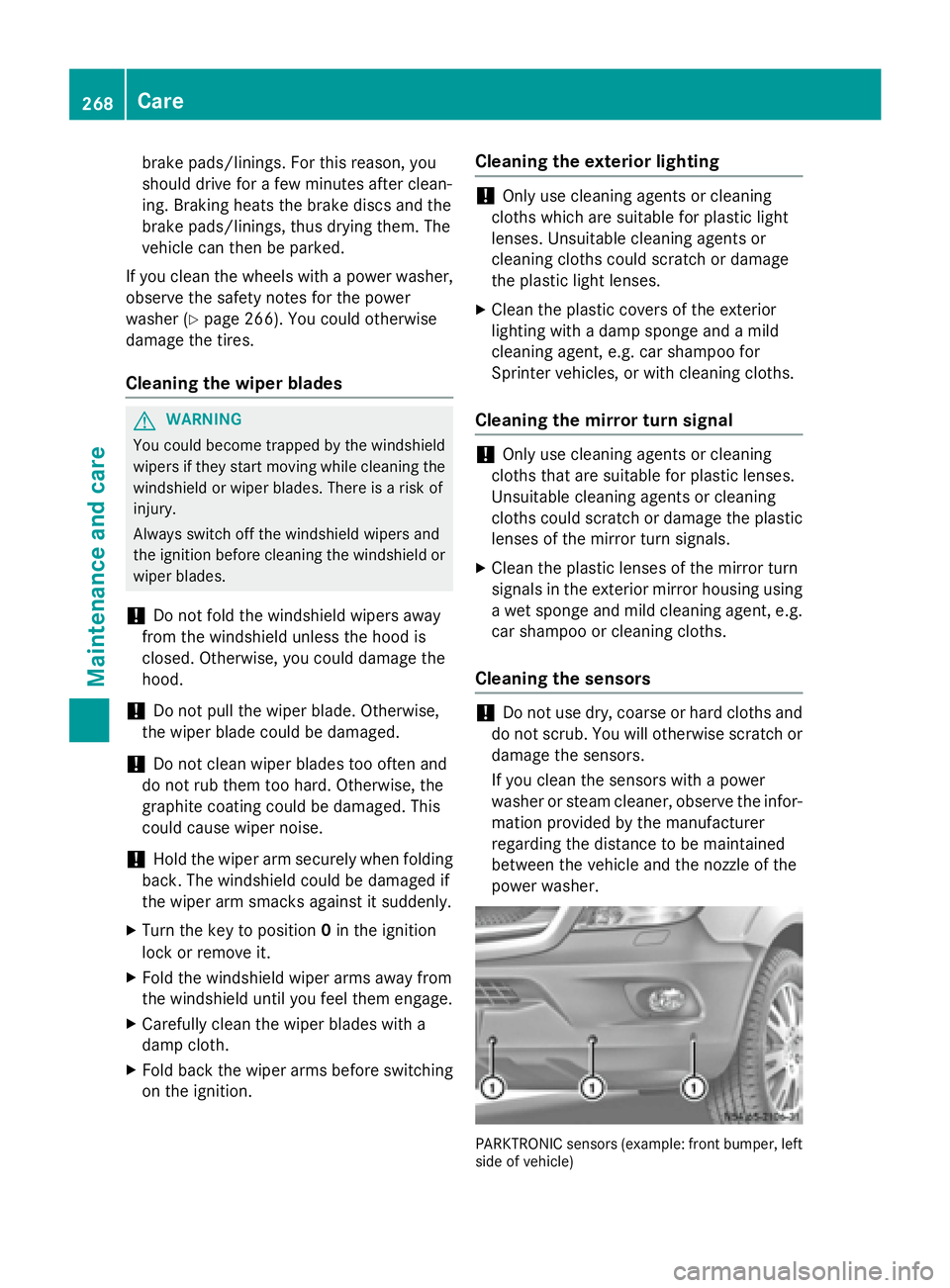
power washer. PARKTRONIC sensors (example: front bumper, left
side of vehicle) 268
CareMaintenance and care
Page 273 of 334
ishes or waxes. There is otherwise a risk of
damaging the surface.
X Wipe the trim elements with a damp, lint-
free cloth, e.g. a microfiber cloth.
X Heavy soiling: use care products and
cleaning agents recommended and
approved for Sprinter vehicles.
Cleaning the seat covers !
Do not use microfiber cloths to clean arti-
ficial leather covers. If used often, a micro- fiber cloth can damage the cover.
! Clean:
R artificial leather covers with a cloth mois-
tened with a solution containing 1%
detergent, e.g. dish washing liquid.
R cloth covers with a microfiber cloth mois-
tened with a solution containing 1%
detergent, e.g. dish washing liquid. Wipeentire seat sections carefully to avoid
leaving visible lines. Leave the seat to dry
afterwards. Cleaning results depend on
the type of dirt and how long it has been
there.
Cleaning the seat belts G
WARNING
Seat belts can become severely weakened if
bleached or dyed. This could cause the seat
belts to tear or fail, for instance, in the event of an accident. This poses an increased risk of
injury or fatal injury.
Never bleach or dye the seat belts.
! Do not clean the seat belts using chemical
cleaning agents. Do not dry the seat belts
by heating at temperatures above 176 ‡
(80 †) or in direct sunlight.
Remove any stains or dirt immediately. This
will avoid residue or damage.
X Use clean, lukewarm water and soap solu-
tion. Cleaning the headliner X
Use a soft brush or dry shampoo to remove
heavy soiling.
Cleaning the curtains !
The curtains must not be washed. Wash-
ing could cause the curtains to shrink and
lose their fire-retardant properties. Always
have the curtains dry-cleaned. Care
271Maintenance and care Z
Page 276 of 334
Useful information
This Operator's Manual describes all models
as well as standard and optional equipment of your vehicle that were available at the time of going to print. Country-specific variations are
possible. Note that your vehicle may not be
equipped with all of the described functions.
This also applies to systems and functions
relevant to safety.
Read the information on qualified specialist
workshops (Y page 25). Where will I find...?
Vehicle tool kit
General notes The vehicle tool kit is in the stowage com-
partment in the footwell on the co-driver's
side.
The vehicle tool kit consists of:
R a towing eye
R a screwdriver with Torx, Phillips and slotted
bits
If your vehicle is equipped with a spare wheel bracket and a jack, the vehicle tool kit addi-
tionally contains:
R a wheel wrench
R a spanner
R a pump lever rod
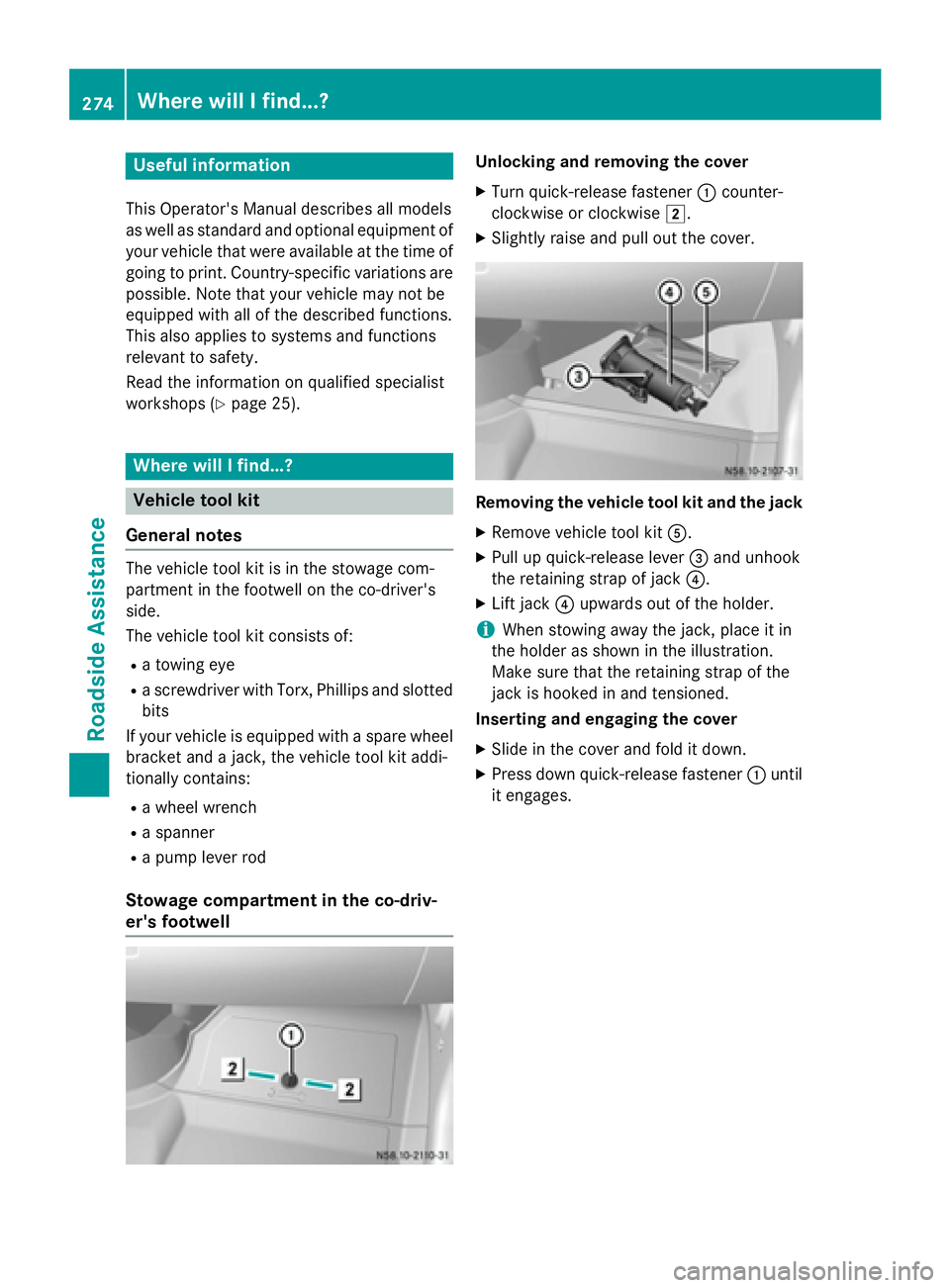
Stowage compartment in the co-driv-
er's footwell Unlocking and removing the cover
X Turn quick-release fastener 0043counter-
clockwise or clockwise 0048.
X Slightly raise and pull out the cover. Removing the vehicle tool kit and the jack
X Remove vehicle tool kit 0083.
X Pull up quick-release lever 0087and unhook
the retaining strap of jack 0085.
X Lift jack 0085upwards out of the holder.
i When stowing away the jack, place it in
the holder as shown in the illustration.
Make sure that the retaining strap of the
jack is hooked in and tensioned.
Inserting and engaging the cover
X Slide in the cover and fold it down.
X Press down quick-release fastener 0043until
it engages. 274
Where will I find...?Roadside Assistance
Page 291 of 334
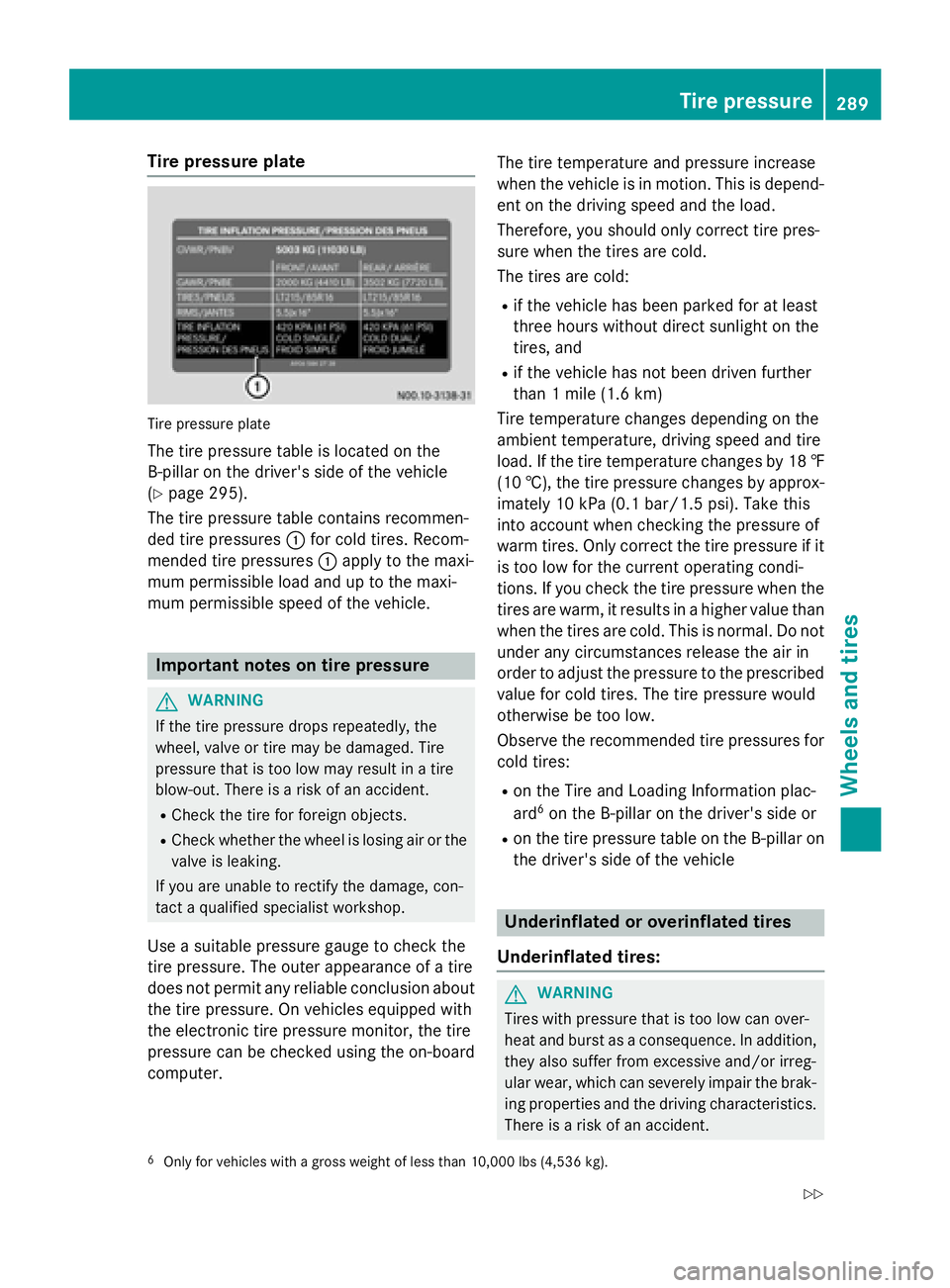
Tire pressure plate
Tire pressure plate
The tire pressure table is located on the
B-pillar on the driver's side of the vehicle
(Y page 295).
The tire pressure table contains recommen-
ded tire pressures 0043for cold tires. Recom-
mended tire pressures 0043apply to the maxi-
mum permissible load and up to the maxi-
mum permissible speed of the vehicle. Important notes on tire pressure
G
WARNING
If the tire pressure drops repeatedly, the
wheel, valve or tire may be damaged. Tire
pressure that is too low may result in a tire
blow-out. There is a risk of an accident. R Check the tire for foreign objects.
R Check whether the wheel is losing air or the
valve is leaking.
If you are unable to rectify the damage, con-
tact a qualified specialist workshop.
Use a suitable pressure gauge to check the
tire pressure. The outer appearance of a tire
does not permit any reliable conclusion about the tire pressure. On vehicles equipped with
the electronic tire pressure monitor, the tire
pressure can be checked using the on-board
computer. The tire temperature and pressure increase
when the vehicle is in motion. This is depend- ent on the driving speed and the load.
Therefore, you should only correct tire pres-
sure when the tires are cold.
The tires are cold:
R if the vehicle has been parked for at least
three hours without direct sunlight on the
tires, and
R if the vehicle has not been driven further
than 1 mile (1.6 km)
Tire temperature changes depending on the
ambient temperature, driving speed and tire
load. If the tire temperature changes by 18 ‡ (10 †), the tire pressure changes by approx-
imately 10 kPa (0.1 bar/1.5 psi). Take this
into account when checking the pressure of
warm tires. Only correct the tire pressure if it is too low for the current operating condi-
tions. If you check the tire pressure when thetires are warm, it results in a higher value than
when the tires are cold. This is normal. Do not under any circumstances release the air in
order to adjust the pressure to the prescribed
value for cold tires. The tire pressure would
otherwise be too low.
Observe the recommended tire pressures for
cold tires:
R on the Tire and Loading Information plac-
ard 6
on the B-pillar on the driver's side or
R on the tire pressure table on the B-pillar on
the driver's side of the vehicle Underinflated or overinflated tires
Underinflated tires: G
WARNING
Tires with pressure that is too low can over-
heat and burst as a consequence. In addition, they also suffer from excessive and/or irreg-
ular wear, which can severely impair the brak-ing properties and the driving characteristics.There is a risk of an accident.
6 Only for vehicles with a gross weight of less than 10,000 lbs (4,536 kg). Tire pressure
289Wheels and tires
Z
Page 294 of 334
standstill. Do not carry out any sudden steer-
ing maneuvers.
The tire pressure monitor has a yellow 0077
warning lamp in the instrument cluster for
indicating pressure loss/malfunctions (USA)
or pressure loss (Canada). Depending on how
the warning lamp flashes or lights up, an
underinflated tire or a malfunction in the tire
pressure monitor is displayed:
R if the 0077 warning lamp is lit continuously,
the tire pressure on one or more tires is
significantly too low. The tire pressure mon-
itor is not malfunctioning.
R USA only: if the 0077warning lamp flashes
for 60 seconds and then remains lit con-
stantly, the tire pressure monitor is mal-
functioning.
Only vehicles with steering wheel buttons: the on-board computer displays information on
tire pressure. After a few minutes of driving,
the current tire pressure of each tire is shown
in the on-board computer.
USA only: if the tire pressure monitor is mal-
functioning, it may be more than 10 minutes
before the malfunction is shown. The 0077
tire pressure warning lamp flashes for
60 seconds and then remains lit. When the
malfunction has been rectified, the 0077tire
pressure warning lamp goes out after a few
minutes of driving.
The tire pressure values indicated by the on-
board computer may differ from those meas-
ured at a gas station with a pressure gage.
The tire pressures shown by the on-board
computer refer to those measured at sea
level. At high altitudes, the tire pressure val-
ues indicated by a pressure gage are higher
than those shown by the on-board computer. In this case, do not reduce the tire pressures.
If radio transmitting equipment (e.g. wireless headphones, two-way radios) is operated
inside the vehicle or in the vicinity of the vehi-
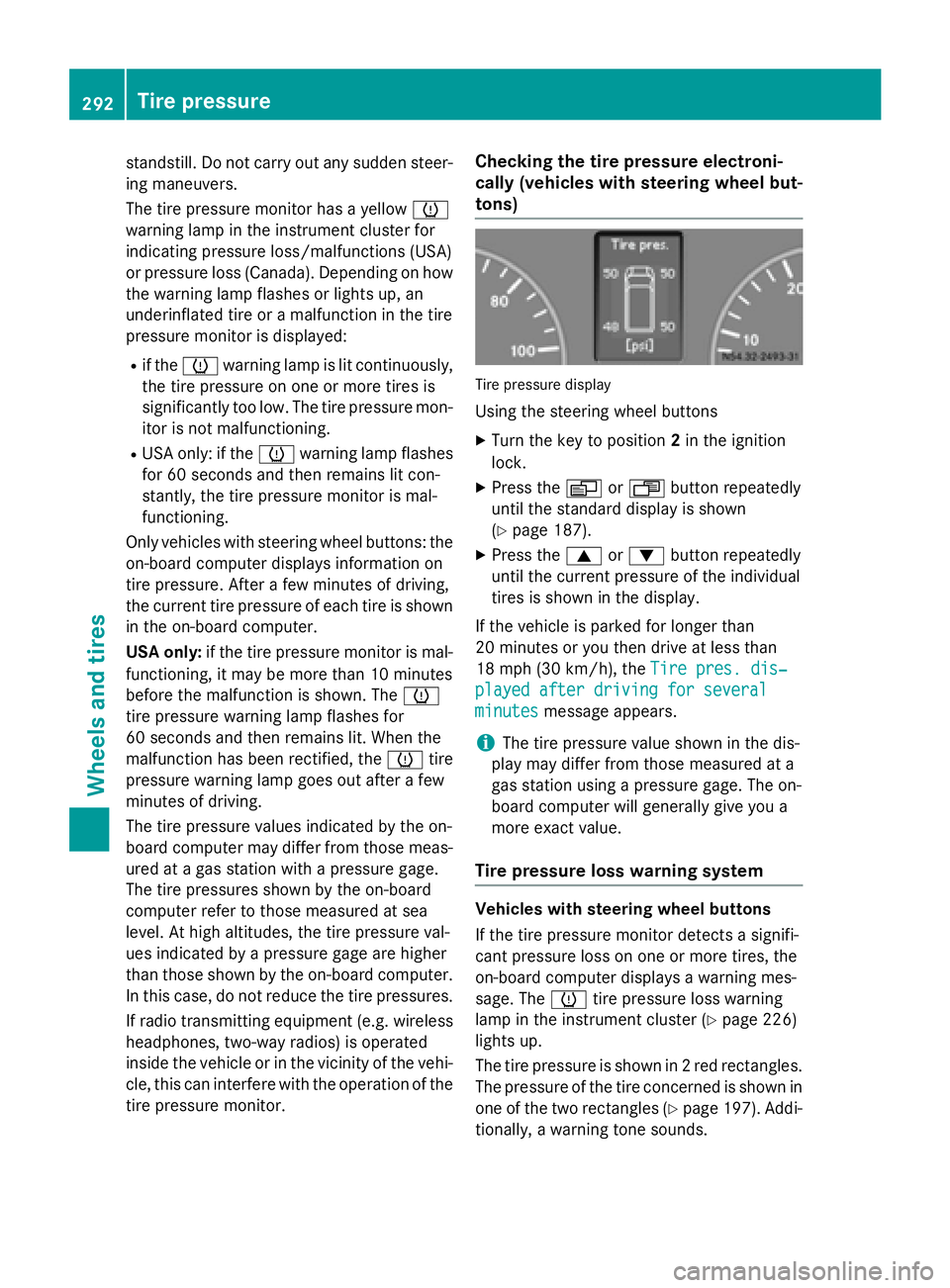
cle, this can interfere with the operation of the tire pressure monitor. Checking the tire pressure electroni-
cally (vehicles with steering wheel but-
tons)
Tire pressure display
Using the steering wheel buttons
X Turn the key to position 2in the ignition
lock.
X Press the 0080or007F button repeatedly
until the standard display is shown
(Y page 187).
X Press the 0063or0064 button repeatedly
until the current pressure of the individual
tires is shown in the display.
If the vehicle is parked for longer than
20 minutes or you then drive at less than
18 mph (30 km/h), the Tire pres. dis‐ Tire pres. dis‐
played after driving for several played after driving for several
minutes minutes message appears.
i The tire pressure value shown in the dis-
play may differ from those measured at a
gas station using a pressure gage. The on-
board computer will generally give you a
more exact value.
Tire pressure loss warning system Vehicles with steering wheel buttons
If the tire pressure monitor detects a signifi-
cant pressure loss on one or more tires, the
on-board computer displays a warning mes-
sage. The 0077tire pressure loss warning
lamp in the instrument cluster (Y page 226)
lights up.
The tire pressure is shown in 2 red rectangles. The pressure of the tire concerned is shown in
one of the two rectangles (Y page 197). Addi-
tionally, a warning tone sounds. 292
Tire pressureWheels and tires
Page 295 of 334
Each tire that is affected by a significant loss
of pressure is highlighted in the pressure dis-
play.
Restarting the tire pressure monitor When you restart the tire pressure monitor,
the currently set tire pressure are taken as
reference values for monitoring.
In most cases, the tire pressure monitor
detects the new reference values automati-
cally, e.g. after you have:
R changed the tire pressure
R changed wheels or tires
R installed new wheels or tires
However, you can also define reference val-
ues manually as described here.
Before restarting the tire pressure moni-
tor:
X Set the tire pressure to the value recom-
mended on the Tire and Loading Informa-
tion placard or the tire pressure table on
the B-pillar on the driver's side
(Y page 288).
Observe the notes on tire pressure when
doing so (Y page 288).
X Make sure that the tire pressure is correct
on all four wheels.
Restarting the tire pressure monitor
(vehicles without steering wheel but-
tons):
X Turn the key to position 2in the ignition
lock.
X Press the 0079menu button on the instru-
ment cluster repeatedly until the display
shows the following message:
+CAL- TPMS
+CAL- TPMS
X Press the 0074button on the instrument clus-
ter.
The display shows:
OK TPMS
OK TPMS
The tire pressure monitor activation proc-
ess has begun. The tire pressures meas-
ured for the individual wheels are stored as the new reference values, provided that the
tire pressure monitor considers them to be plausible.
If you wish to cancel the restart:
X Press the 0075button or the 0079menu button
on the instrument cluster.
The activation process is canceled auto-
matically if 30 second s elapse without
input.
Restarting the tire pressure monitor
(vehicles with steering wheel buttons): X Turn the key to position 2in the ignition
lock.
X Press the 0080or007F button on the steer-
ing wheel until the standard display
(Y page 187) appears in the display.
X Press the 0063or0064 button on the steer-
ing wheel repeatedly until the current pres-
sure of the individual tires is displayed or
the display shows the following message:
Tire
Tire pres. pres. displayed
displayed after
afterdriving
driving
for several minutes
for several minutes
X Press the 0045reset button on the instru-
ment cluster.
The display shows the following message:
Monitor current tire pressure? Monitor current tire pressure?
X Press the 0081button on the steering
wheel.
The display shows the following message:
Tire pres. monitor reactivated Tire pres. monitor reactivated
The tire pressure monitor activation proc-
ess has begun. The tire pressures meas-
ured for the individual wheels are stored as the new reference values, provided that the
tire pressure monitor considers them to be plausible.
If you wish to cancel the restart:
X Press the 0082button on the steering
wheel. Tire pressure
293Wheels and tires Z