park assist MERCEDES-BENZ SPRINTER 2015 MY15 Operator’s Manual
[x] Cancel search | Manufacturer: MERCEDES-BENZ, Model Year: 2015, Model line: SPRINTER, Model: MERCEDES-BENZ SPRINTER 2015Pages: 334, PDF Size: 5.94 MB
Page 142 of 334
i
Depending on the equipment installed,
the vehicle either automatically locks cen-
trally after switching on the ignition or after pulling away. The locking knobs in the
doors drop down.
You can open the doors from the inside at
any time.
Automatic door locking can be deactivated
(Y page 71). Driving off
G
WARNING
If the engine speed is above the idling speed
and you engage transmission position Dor R,
the vehicle could pull away suddenly. There is a risk of an accident.
When engaging transmission position Dor R,
always firmly depress the brake pedal and do not simultaneously accelerate.
! Only shift into reverse gear
Rwhen the
vehicle is stationary. Otherwise, you could
damage the transmission.
X Depress the brake pedal and keep it
depressed.
The selector lever lock is released.
X Move the selector lever to position Dor R.
On vehicles with a reverse warning feature, when reverse gear is engaged a warning
tone sounds to alert other road users
(Y page 140).
X Release the parking brake (Y page 150).
The 0066 indicator lamp in the instrument
cluster goes out.
X Release the brake pedal.
X Carefully depress the accelerator pedal.
i After pulling away or switching on the
ignition, the vehicle automatically locks
centrally. The locking knobs in the doors
drop down.
You can open the doors from the inside at
any time. You can also deactivate the automatic lock-
ing feature (Y page 71). Reverse warning device
G
WARNING
Other road users may ignore or fail to hear the warning tone of the reverse warning feature.
There is a risk of injury if you fail to ensure that
the area in which you are maneuvering is
clear.
Make sure that there are no persons or
objects in the area in which you are maneu-
vering. It may be necessary to enlist the help
of a second person when maneuvering.
The reverse warning feature is a system
designed to assist you in ensuring the safety
of other road users.
A warning signal sounds to alert other road
users when reverse gear is engaged. The vol-
ume of the warning tone can be reduced for
night-time driving.
X To reduce the volume of the warning
tone: engage reverse gear twice in quick
succession.
The warning tone is now quieter.
i The warning tone sounds at a normal vol-
ume by default. The volume of the warning
tone has to be reduced each time you
engage reverse gear if necessary. 140
DrivingDriving an
d parking
Page 148 of 334
engine and, if applicable, the auxiliary heating
before refueling. G
WARNING
Fuel is poisonous and hazardous to health.
There is a risk of injury.
You must make sure that fuel does not come into contact with your skin, eyes or clothing
and that it is not swallowed. Do not inhale fuel
vapors. Keep fuel away from children.
If you or others come into contact with fuel,
observe the following:
R Wash away fuel from skin immediately
using soap and water.
R If fuel comes into contact with your eyes,
immediately rinse them thoroughly with
clean water. Seek medical assistance with-
out delay.
R If fuel is swallowed, seek medical assis-
tance without delay. Do not induce vomit-
ing.
R Immediately change out of clothing which
has come into contact with fuel. G
WARNING
If you mix diesel fuel with gasoline, the flash
point is lower than that of pure diesel fuel.
When the engine is running, exhaust system
components could overheat without being
noticed. There is a risk of fire.
Never refuel with gasoline. Never mix gasoline with diesel fuel. H
Environmental note
If fuels are handled improperly, they pose a
danger to persons and the environment. Do
not allow fuels to run into the sewage system, the surface waters, the ground water or into
the ground.
! Do not use gasoline to refuel vehicles with
a diesel engine. Even small amounts of gas-
oline will cause damage to the fuel system and engine. !
Do not switch on the ignition if you acci-
dentally refuel with the wrong fuel. Other-
wise, the fuel will enter the fuel lines. Notify a qualified specialist workshop and have
the fuel tank and fuel lines drained com-
pletely.
! Overfilling the fuel tank could damage the
fuel system.
! Take care not to spill any fuel on painted
surfaces. You could otherwise damage the paintwork.
! Filter the fuel before transferring it to the
vehicle if you are refueling the vehicle from
barrels or containers.
This will prevent malfunctions in the fuel
system due to contaminated fuel.
Further information on fuel and on fuel grades can be found in the "Technical data" section
(Y page 318). Refueling procedure
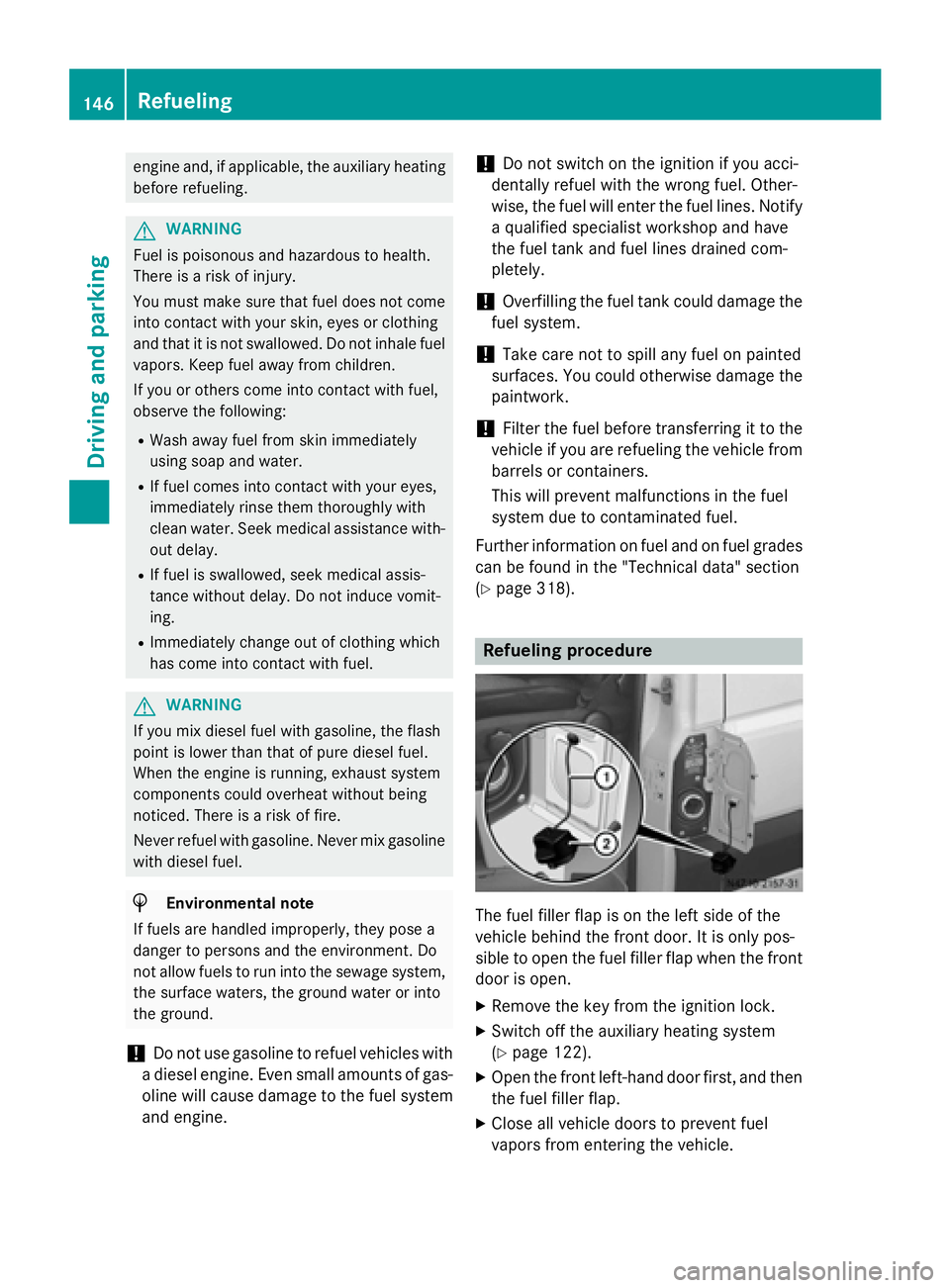
The fuel filler flap is on the left side of the
vehicle behind the front door. It is only pos-
sible to open the fuel filler flap when the front door is open.
X Remove the key from the ignition lock.
X Switch off the auxiliary heating system
(Y page 122).
X Open the front left-hand door first, and then
the fuel filler flap.
X Close all vehicle doors to prevent fuel
vapors from entering the vehicle. 146
RefuelingDriving and parking
Page 163 of 334
Problems with cruise control
Problem
Possible causes/consequences and
0050
0050Solutions On vehicles with steer-
ing wheel buttons, the
speed cannot be set
when cruise control is
activated. The display shows a high-priority message. Thus a change in speed
is not possible.
X Proceed as instructed by the message in the display.
X Deactivate cruise control COLLISION PREVENTION ASSIST
General notes COLLISION PREVENTION ASSIST comprises
the distance warning function and adaptive
Brake Assist.
Distance warning function Important safety notes
i Note the section on 'Important safety
notes' (Y page 57). G
WARNING
The distance warning function does not react:
R to people or animals
R to oncoming vehicles
R to crossing traffic
R when cornering
Thus, the distance warning function cannot
provide a warning in all critical situations.
There is a risk of an accident.
Always pay careful attention to the traffic sit-
uation and be ready to brake. G
WARNING
The distance warning function cannot always
clearly identify objects and complex traffic
situations.
In such cases, the distance warning function
may:
R give an unnecessary warning
R not give a warning
There is a risk of an accident. Always pay careful attention to the traffic sit-
uation and do not rely solely on the distance
warning function.
Operation
The distance warning function can help you to
minimize the risk of a front-end collision with
a vehicle ahead or reduce the effects of such a collision. If the distance warning function
detects that there is a risk of a collision, you
will be warned visually and acoustically. With-out your intervention, the distance warning
function cannot prevent a collision.
The distance warning function will issue a
warning at speeds of around 20 mph
(30 km/h) or more if:
R you approach a vehicle ahead of you very
quickly. You will then hear an intermittent
warning tone and the 00C7warning lamp in
the instrument cluster flashes.
X Brake immediately in order to increase the
distance from the vehicle in front.
or
X Take evasive action provided it is safe to do
so.
If you want the distance warning function to
assist you, the function must be activated and operational.
Due to the nature of the system, particularly
complicated driving conditions may cause thesystem to display an unnecessary warning.
With the help of the radar sensor system, the
distance warning function can detect obsta-
cles that are in the path of your vehicle for an
extended period of time. Driving systems
161Driving and parking Z
Page 164 of 334
Up to a speed of about 45 mph (70 km/h), the
distance warning function can also react to
stationary obstacles, such as stopped or
parked vehicles.
If you approach an obstacle and the distance
warning function detects a risk of a collision,
the system will alert you both visually and
acoustically.
In particular, the detection of obstacles can
be impaired in the case of:
R there is dirt on the sensors or anything else
covering the sensors
R it is snowing or raining heavily
R there is interference from other radar sour-
ces
R there are strong radar reflections, for
example in parking garages
R a narrow vehicle traveling in front, e.g. a
motorbike
R a vehicle traveling in front on a different line
Following damage to the front end of the vehi-
cle, have the configuration and operation of
the radar sensor checked at a qualified spe-
cialist workshop. This also applies to colli-
sions at slow speeds where there is no visible
damage to the front of the vehicle.
Activating/deactivating the distance
warning function
When you switch on the engine, the distance
warning function switches on after a few sec-
onds.
X To deactivate: press the00D4button
(Y page 37).
Vehicles without steering wheel but-
tons: the00C7 warning lamp in the instru-
ment cluster lights up and the OFF
OFF message
flashes.
Vehicles with steering wheel buttons:
the 00C7 warning lamp in the instrument cluster lights up and the
Distance Warn‐ Distance Warn‐
ing Deactivated
ing Deactivated message appears.
X To activate: press the00D4button again
(Y page 37).
Vehicles without steering wheel but-
tons: the00C7 warning lamp in the instru-
ment cluster goes out and the ON
ON message
flashes.
Vehicles with steering wheel buttons:
the 00C7 warning lamp in the instrument
cluster goes out and the Distance Warn‐ Distance Warn‐
ing Activated
ing Activated message appears in the
multifunction display.
Adaptive Brake Assist i
Observe the "Important safety notes" sec-
tion for driving safety systems (Y page 57). G
WARNING
Adaptive Brake Assist cannot always clearly
identify objects and complex traffic situa-
tions.
In such cases, Adaptive Brake Assist can:
R intervene unnecessarily
R not intervene
There is a risk of an accident.
Always pay careful attention to the traffic sit- uation and be ready to brake. Terminate the
intervention in a non-critical driving situation. G
WARNING
Adaptive Brake Assist does not react:
R to people or animals
R to oncoming vehicles
R to crossing traffic
R to stationary obstacles
R when cornering
As a result, the Adaptive Brake Assist may not intervene in all critical conditions. There is a
risk of an accident.
Always pay careful attention to the traffic sit- uation and be ready to brake. 162
Driving systemsDriving and parking
Page 165 of 334
Adaptive Brake Assist aids you when braking
during hazardous situations at speeds above
20 mph (30 km/h). With the help of Adaptive Brake Assist, the distance warning signal can
detect obstacles that are in the path of your
vehicle for an extended period of time.
When you approach an obstacle and adaptive Brake Assist detects that there is a risk of a
collision, adaptive Brake Assist calculates the
braking force necessary to avoid a collision.
Should you apply the brakes forcefully, adap- tive Brake Assist will automatically increase
the braking force to the calculated level.
X Keep the brake pedal depressed until the
emergency braking situation is over.
ABS prevents the wheels from locking.
The brakes function as usual again if:
R you release the brake pedal
R there is no longer any danger of a collision
R no obstacle is detected in front of your
vehicle
Adaptive Brake Assist is then deactivated.
Up to the maximum vehicle speed, adaptive
Brake Assist can react to moving obstacles
that have already been recognized as such at least once over the period of observation.
Adaptive Brake Assist does not react to sta-
tionary obstacles.
In particular, the detection of obstacles can
be impaired if:
R there is dirt on the sensors or anything else
covering the sensors
R it is snowing or raining heavily
R there is interference from other radar sour-
ces
R there are strong radar reflections, for
example in parking garages
R a narrow vehicle traveling in front, e.g. a
motorbike
R a vehicle traveling in front on a different line
If adaptive Brake Assist is not available due to a malfunction in the radar sensor system, thefull brake boosting effect with the help of BAS
remains available. Following damage to the front end of the vehi-
cle, have the configuration and operation of
the radar sensor checked at a qualified spe-
cialist workshop. This also applies to colli-
sions at slow speeds where there is no visible damage to the front of the vehicle. Lane Tracking package
Blind Spot Assist General notes
Blind Spot Assist uses a radar sensor system
to monitor the areas on both sides of your
vehicle. It supports you from speeds of
approximately 20 mph (30 km/h). A warning
display in the exterior mirrors draws your
attention to vehicles detected in the moni-
tored area. If you then switch on the corre-
sponding turn signal to change lane, you will
also receive an optical and audible collision
warning. For this purpose, Blind Spot Assist
uses sensors in the rear bumper and behind
the protective strips of the B-pillars.
Important safety notes G
WARNING
Blind Spot Assist does not react to:
R vehicles overtaken too closely on the side,
placing them in the blind spot area
R vehicles which approach with a large speed
differential and overtake your vehicle
As a result, Blind Spot Assist may not give
warnings in such situations. There is a risk of an accident.
Always observe the traffic conditions care-
fully, and maintain a safe lateral distance.
Blind Spot Assist is only an aid. It may fail to
detect some vehicles and is no substitute for
attentive driving.
i USA only:
This device has been approved by the FCC as a "Vehicular Radar System". The radar
sensor is intended for use in an automotive Driving systems
163Driving and parking Z
Page 166 of 334
radar system only. Removal, tampering, or
altering of the device will void any warran-
ties, and is not permitted by the FCC. Do
not tamper with, alter, or use in any non-
approved way.
Any unauthorized modification to this
device could void the user’s authority to
operate the equipment.
Monitoring range of the sensors
In particular, the detection of obstacles can
be impaired in the case of:
R dirt on the sensors or anything else cover-
ing the sensors
R poor visibility, e.g. due to fog, heavy rain or
snow
R narrow and short vehicles, e.g. motorcy-
cles or bicycles
R very wide lanes
R narrow lanes
R vehicles not driving in the middle of their
lane
R barriers or other road boundaries
Vehicles in the monitoring range are then not
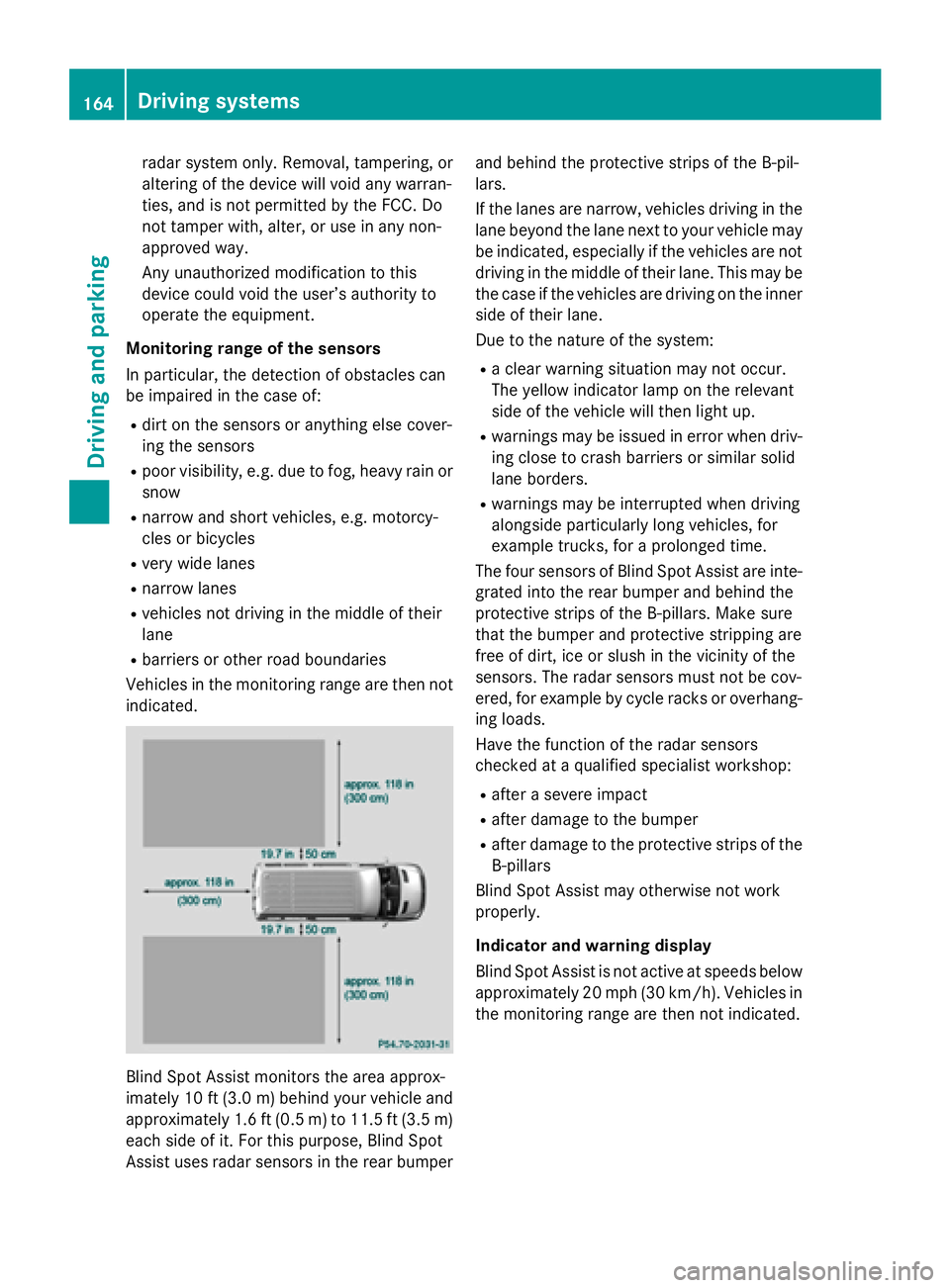
indicated. Blind Spot Assist monitors the area approx-
imately 10 ft (3.0 m)behind your vehicle and
approximately 1.6 ft (0.5 m) to 11.5 ft (3.5 m) each side of it. For this purpose, Blind Spot
Assist uses radar sensors in the rear bumper and behind the protective strips of the B-pil-
lars.
If the lanes are narrow, vehicles driving in the
lane beyond the lane next to your vehicle may
be indicated, especially if the vehicles are not
driving in the middle of their lane. This may be the case if the vehicles are driving on the inner
side of their lane.
Due to the nature of the system:
R a clear warning situation may not occur.
The yellow indicator lamp on the relevant
side of the vehicle will then light up.
R warnings may be issued in error when driv-
ing close to crash barriers or similar solid
lane borders.
R warnings may be interrupted when driving
alongside particularly long vehicles, for
example trucks, for a prolonged time.
The four sensors of Blind Spot Assist are inte-
grated into the rear bumper and behind the
protective strips of the B-pillars. Make sure
that the bumper and protective stripping are
free of dirt, ice or slush in the vicinity of the
sensors. The radar sensors must not be cov-
ered, for example by cycle racks or overhang- ing loads.
Have the function of the radar sensors
checked at a qualified specialist workshop:
R after a severe impact
R after damage to the bumper
R after damage to the protective strips of the
B-pillars
Blind Spot Assist may otherwise not work
properly.
Indicator and warning display
Blind Spot Assist is not active at speeds below approximately 20 mph (30 km/h). Vehicles in the monitoring range are then not indicated. 164
Driving systemsDriving and parking
Page 167 of 334
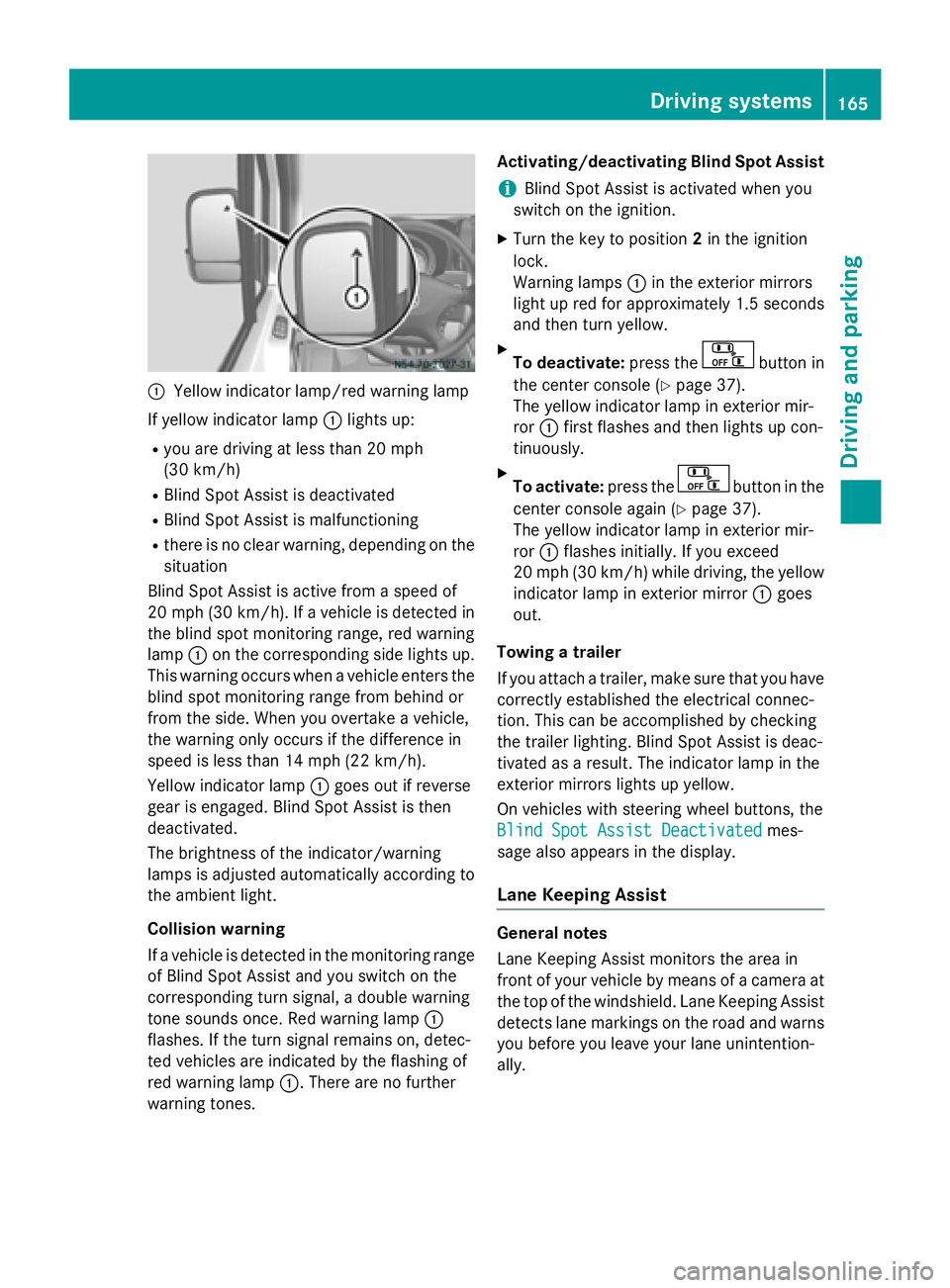
0043
Yellow indicator lamp/red warning lamp
If yellow indicator lamp 0043lights up:
R you are driving at less than 20 mph
(30 km/h)
R Blind Spot Assist is deactivated
R Blind Spot Assist is malfunctioning
R there is no clear warning, depending on the
situation
Blind Spot Assist is active from a speed of
20 mph (30 km/h). If a vehicle is detected in
the blind spot monitoring range, red warning
lamp 0043on the corresponding side lights up.
This warning occurs when a vehicle enters the blind spot monitoring range from behind or
from the side. When you overtake a vehicle,
the warning only occurs if the difference in
speed is less than 14 mph (22 km/h).
Yellow indicator lamp 0043goes out if reverse
gear is engaged. Blind Spot Assist is then
deactivated.
The brightness of the indicator/warning
lamps is adjusted automatically according to
the ambient light.
Collision warning
If a vehicle is detected in the monitoring range of Blind Spot Assist and you switch on the
corresponding turn signal, a double warning
tone sounds once. Red warning lamp 0043
flashes. If the turn signal remains on, detec-
ted vehicles are indicated by the flashing of
red warning lamp 0043. There are no further
warning tones. Activating/deactivating Blind Spot Assist
i Blind Spot Assist is activated when you
switch on the ignition.
X Turn the key to position 2in the ignition
lock.
Warning lamps 0043in the exterior mirrors
light up red for approximately 1.5 seconds
and then turn yellow.
X To deactivate: press the button in
the center console (Y page 37).
The yellow indicator lamp in exterior mir-
ror 0043first flashes and then lights up con-
tinuously.
X To activate: press the button in the
center console again (Y page 37).
The yellow indicator lamp in exterior mir-
ror 0043flashes initially. If you exceed
20 mph (30 km/h) while driving, the yellow
indicator lamp in exterior mirror 0043goes
out.
Towing a trailer
If you attach a trailer, make sure that you have
correctly established the electrical connec-
tion. This can be accomplished by checking
the trailer lighting. Blind Spot Assist is deac-
tivated as a result. The indicator lamp in the
exterior mirrors lights up yellow.
On vehicles with steering wheel buttons, the
Blind Spot Assist Deactivated
Blind Spot Assist Deactivated mes-
sage also appears in the display.
Lane Keeping Assist General notes
Lane Keeping Assist monitors the area in
front of your vehicle by means of a camera at
the top of the windshield. Lane Keeping Assist detects lane markings on the road and warns you before you leave your lane unintention-
ally. Driving systems
165Driving and parking Z
Page 168 of 334
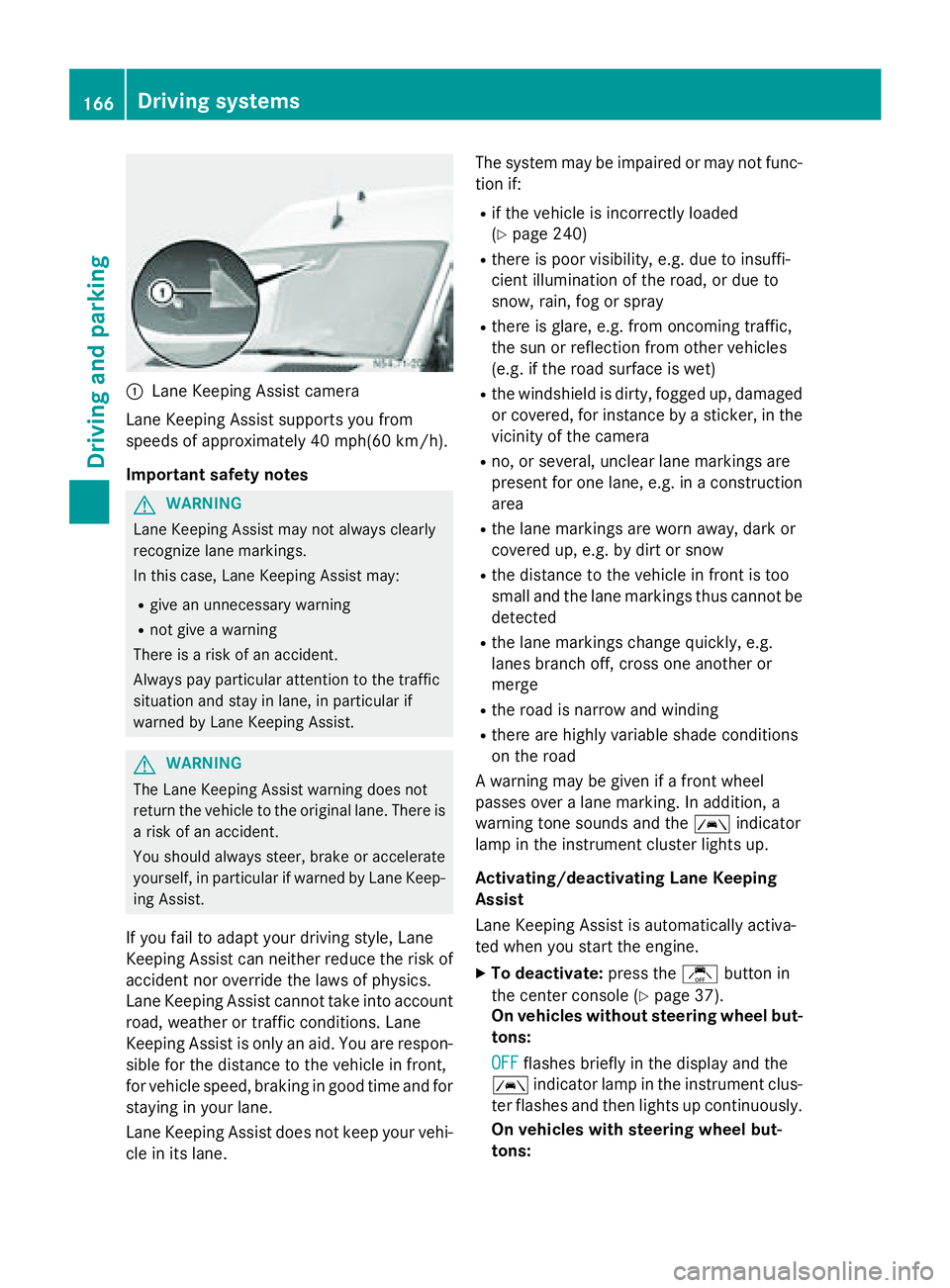
0043
Lane Keeping Assist camera
Lane Keeping Assist supports you from
speeds of approximately 40 mph(60 km/h).
Important safety notes G
WARNING
Lane Keeping Assist may not always clearly
recognize lane markings.
In this case, Lane Keeping Assist may:
R give an unnecessary warning
R not give a warning
There is a risk of an accident.
Always pay particular attention to the traffic
situation and stay in lane, in particular if
warned by Lane Keeping Assist. G
WARNING
The Lane Keeping Assist warning does not
return the vehicle to the original lane. There is a risk of an accident.
You should always steer, brake or accelerate
yourself, in particular if warned by Lane Keep-ing Assist.
If you fail to adapt your driving style, Lane
Keeping Assist can neither reduce the risk of
accident nor override the laws of physics.
Lane Keeping Assist cannot take into account road, weather or traffic conditions. Lane
Keeping Assist is only an aid. You are respon-
sible for the distance to the vehicle in front,
for vehicle speed, braking in good time and for
staying in your lane.
Lane Keeping Assist does not keep your vehi- cle in its lane. The system may be impaired or may not func-
tion if:
R if the vehicle is incorrectly loaded
(Y page 240)
R there is poor visibility, e.g. due to insuffi-
cient illumination of the road, or due to
snow, rain, fog or spray
R there is glare, e.g. from oncoming traffic,
the sun or reflection from other vehicles
(e.g. if the road surface is wet)
R the windshield is dirty, fogged up, damaged
or covered, for instance by a sticker, in the
vicinity of the camera
R no, or several, unclear lane markings are
present for one lane, e.g. in a construction
area
R the lane markings are worn away, dark or
covered up, e.g. by dirt or snow
R the distance to the vehicle in front is too
small and the lane markings thus cannot be
detected
R the lane markings change quickly, e.g.
lanes branch off, cross one another or
merge
R the road is narrow and winding
R there are highly variable shade conditions
on the road
A warning may be given if a front wheel
passes over a lane marking. In addition, a
warning tone sounds and the 00B0indicator
lamp in the instrument cluster lights up.
Activating/deactivating Lane Keeping
Assist
Lane Keeping Assist is automatically activa-
ted when you start the engine.
X To deactivate: press thejbutton in
the center console (Y page 37).
On vehicles without steering wheel but-
tons:
OFF
OFF flashes briefly in the display and the
00B0 indicator lamp in the instrument clus-
ter flashes and then lights up continuously.
On vehicles with steering wheel but-
tons: 166
Driving systemsDriving and parking
Page 169 of 334
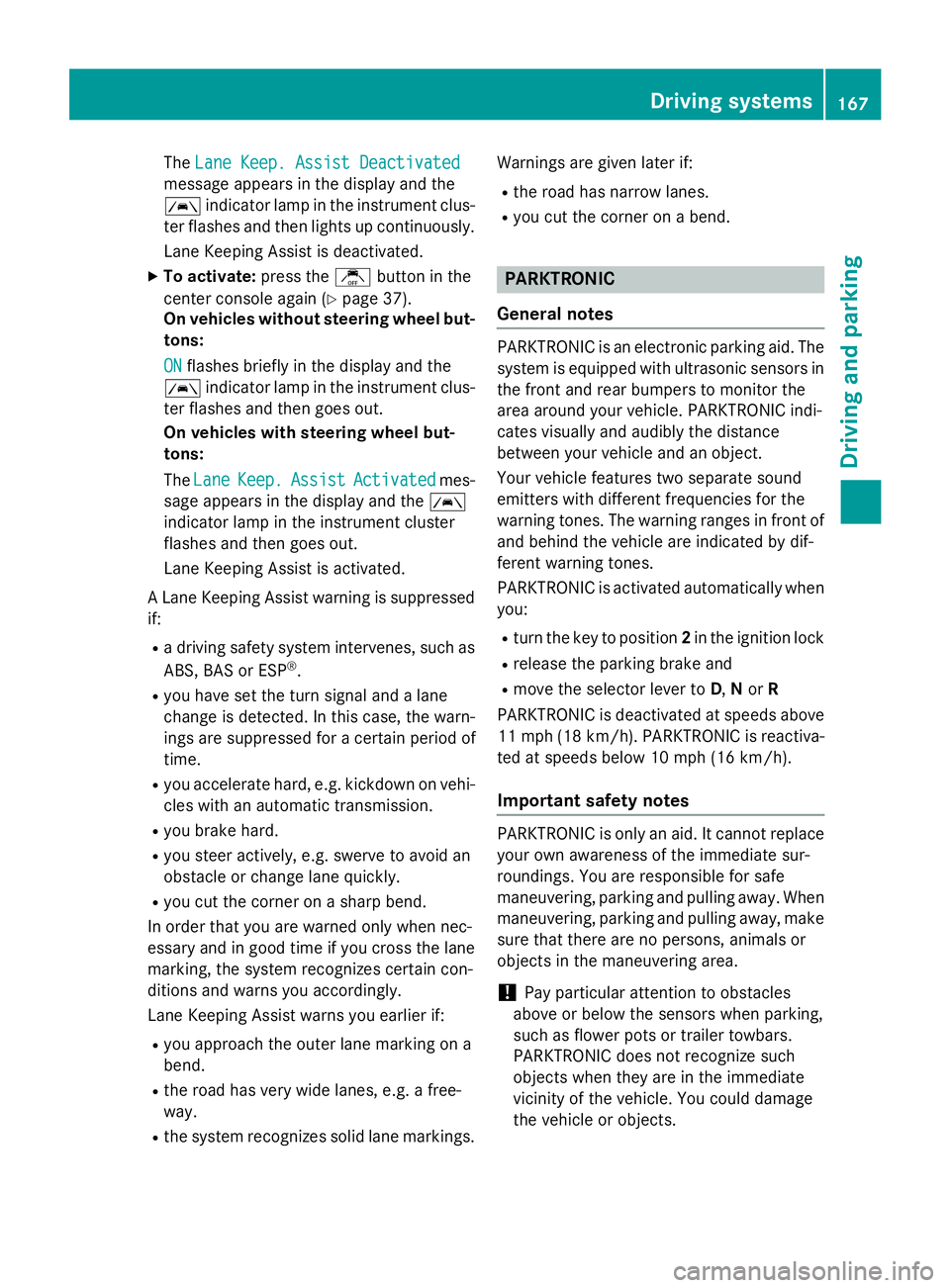
The
Lane Keep. Assist Deactivated
Lane Keep. Assist Deactivated
message appears in the display and the
00B0 indicator lamp in the instrument clus-
ter flashes and then lights up continuously.
Lane Keeping Assist is deactivated.
X To activate: press thejbutton in the
center console again (Y page 37).
On vehicles without steering wheel but-
tons:
ON ON flashes briefly in the display and the
00B0 indicator lamp in the instrument clus-
ter flashes and then goes out.
On vehicles with steering wheel but-
tons:
The Lane Lane Keep.
Keep. Assist
Assist Activated
Activated mes-
sage appears in the display and the 00B0
indicator lamp in the instrument cluster
flashes and then goes out.
Lane Keeping Assist is activated.
A Lane Keeping Assist warning is suppressed if:
R a driving safety system intervenes, such as
ABS, BAS or ESP ®
.
R you have set the turn signal and a lane
change is detected. In this case, the warn-
ings are suppressed for a certain period of
time.
R you accelerate hard, e.g. kickdown on vehi-
cles with an automatic transmission.
R you brake hard.
R you steer actively, e.g. swerve to avoid an
obstacle or change lane quickly.
R you cut the corner on a sharp bend.
In order that you are warned only when nec-
essary and in good time if you cross the lane marking, the system recognizes certain con-
ditions and warns you accordingly.
Lane Keeping Assist warns you earlier if:
R you approach the outer lane marking on a
bend.
R the road has very wide lanes, e.g. a free-
way.
R the system recognizes solid lane markings. Warnings are given later if:
R the road has narrow lanes.
R you cut the corner on a bend. PARKTRONIC
General notes PARKTRONIC is an electronic parking aid. The
system is equipped with ultrasonic sensors inthe front and rear bumpers to monitor the
area around your vehicle. PARKTRONIC indi-
cates visually and audibly the distance
between your vehicle and an object.
Your vehicle features two separate sound
emitters with different frequencies for the
warning tones. The warning ranges in front of
and behind the vehicle are indicated by dif-
ferent warning tones.
PARKTRONIC is activated automatically when you:
R turn the key to position 2in the ignition lock
R release the parking brake and
R move the selector lever to D,Nor R
PARKTRONIC is deactivated at speeds above
11 mph (18 km/h) . PARKTRONIC is reactiva-
ted at speeds below 10 mph (16 km/h).
Important safety notes PARKTRONIC is only an aid. It cannot replace
your own awareness of the immediate sur-
roundings. You are responsible for safe
maneuvering, parking and pulling away. Whenmaneuvering, parking and pulling away, make
sure that there are no persons, animals or
objects in the maneuvering area.
! Pay particular attention to obstacles
above or below the sensors when parking,
such as flower pots or trailer towbars.
PARKTRONIC does not recognize such
objects when they are in the immediate
vicinity of the vehicle. You could damage
the vehicle or objects. Driving systems
167Driving and parking Z
Page 217 of 334
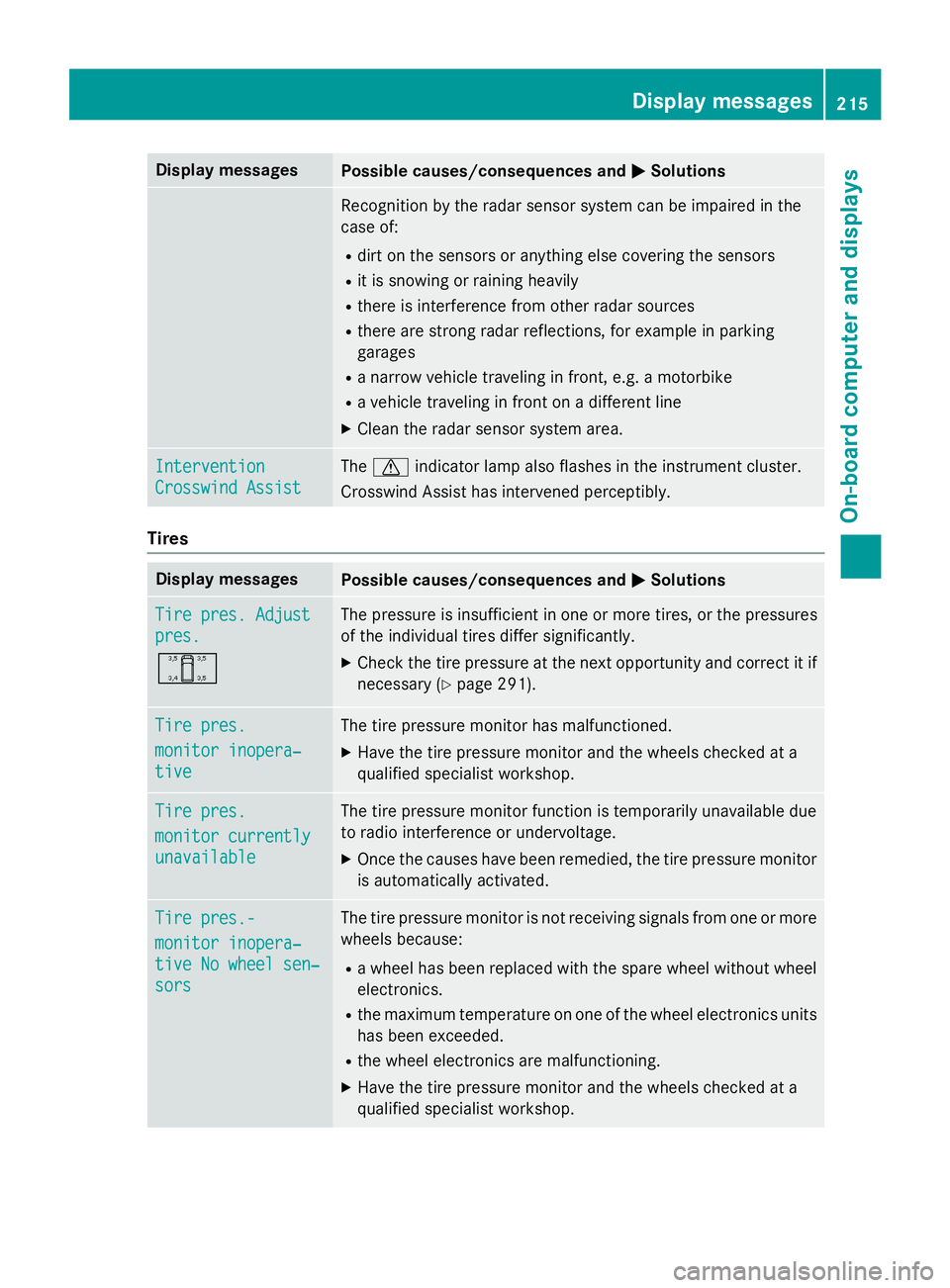
Display messages
Possible causes/consequences and
0050
0050Solutions Recognition by the radar sensor system can be impaired in the
case of:
R dirt on the sensors or anything else covering the sensors
R it is snowing or raining heavily
R there is interference from other radar sources
R there are strong radar reflections, for example in parking
garages
R a narrow vehicle traveling in front, e.g. a motorbike
R a vehicle traveling in front on a different line
X Clean the radar sensor system area. Intervention Intervention
Crosswind Assist Crosswind Assist The
0072 indicator lamp also flashes in the instrument cluster.
Crosswind Assist has intervened perceptibly. Tires
Display messages
Possible causes/consequences and
0050
0050Solutions Tire pres. Adjust
Tire pres. Adjust
pres. pres.
0054 The pressure is insufficient in one or more tires, or the pressures
of the individual tires differ significantly.
X Check the tire pressure at the next opportunity and correct it if
necessary (Y page 291). Tire pres. Tire pres.
monitor inopera‐ monitor inopera‐
tive tive The tire pressure monitor has malfunctioned.
X Have the tire pressure monitor and the wheels checked at a
qualified specialist workshop. Tire pres.
Tire pres.
monitor currently monitor currently
unavailable unavailable The tire pressure monitor function is temporarily unavailable due
to radio interference or undervoltage.
X Once the causes have been remedied, the tire pressure monitor
is automatically activated. Tire pres.- Tire pres.-
monitor inopera‐ monitor inopera‐
tive No wheel sen‐ tive No wheel sen‐
sors sors The tire pressure monitor is not receiving signals from one or more
wheels because:
R a wheel has been replaced with the spare wheel without wheel
electronics.
R the maximum temperature on one of the wheel electronics units
has been exceeded.
R the wheel electronics are malfunctioning.
X Have the tire pressure monitor and the wheels checked at a
qualified specialist workshop. Display
messages
215On-board computer and displays Z