door lock MERCEDES-BENZ SPRINTER 2015 MY15 Operator’s Manual
[x] Cancel search | Manufacturer: MERCEDES-BENZ, Model Year: 2015, Model line: SPRINTER, Model: MERCEDES-BENZ SPRINTER 2015Pages: 334, PDF Size: 5.94 MB
Page 79 of 334
Opening/closing from the inside
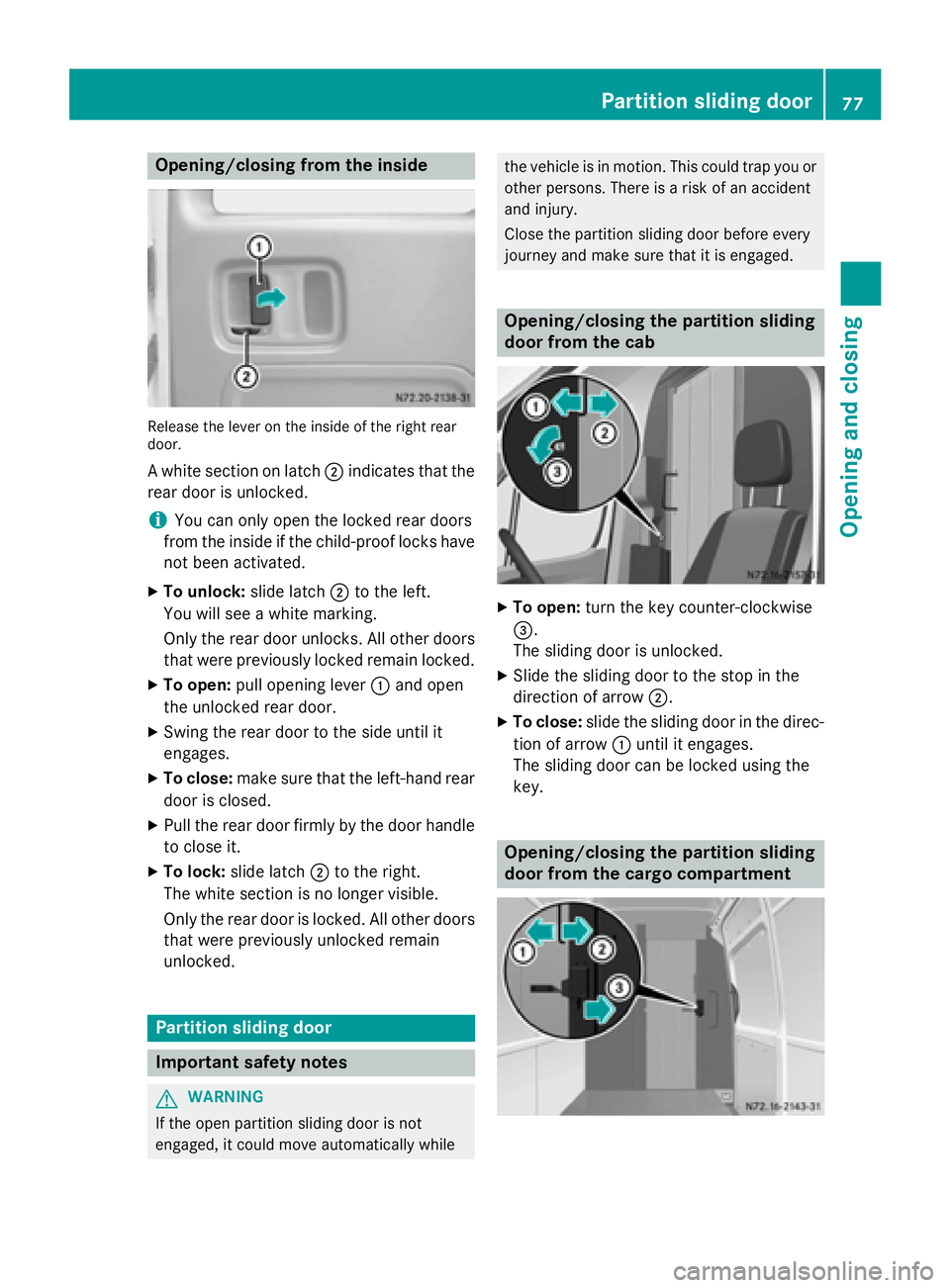
Release the lever on the inside of the right rear
door.
A white section on latch 0044indicates that the
rear door is unlocked.
i You can only open the locked rear doors
from the inside if the child-proof locks have
not been activated.
X To unlock: slide latch0044to the left.
You will see a white marking.
Only the rear door unlocks. All other doors that were previously locked remain locked.
X To open: pull opening lever 0043and open
the unlocked rear door.
X Swing the rear door to the side until it
engages.
X To close: make sure that the left-hand rear
door is closed.
X Pull the rear door firmly by the door handle
to close it.
X To lock: slide latch 0044to the right.
The white section is no longer visible.
Only the rear door is locked. All other doors that were previously unlocked remain
unlocked. Partition sliding door
Important safety notes
G
WARNING
If the open partition sliding door is not
engaged, it could move automatically while the vehicle is in motion. This could trap you or
other persons. There is a risk of an accident
and injury.
Close the partition sliding door before every
journey and make sure that it is engaged. Opening/closing the partition sliding
door from the cab
X
To open: turn the key counter-clockwise
0087.
The sliding door is unlocked.
X Slide the sliding door to the stop in the
direction of arrow 0044.
X To close: slide the sliding door in the direc-
tion of arrow 0043until it engages.
The sliding door can be locked using the
key. Opening/closing the partition sliding
door from the cargo compartment Partition sliding door
77Opening and closing Z
Page 80 of 334
X
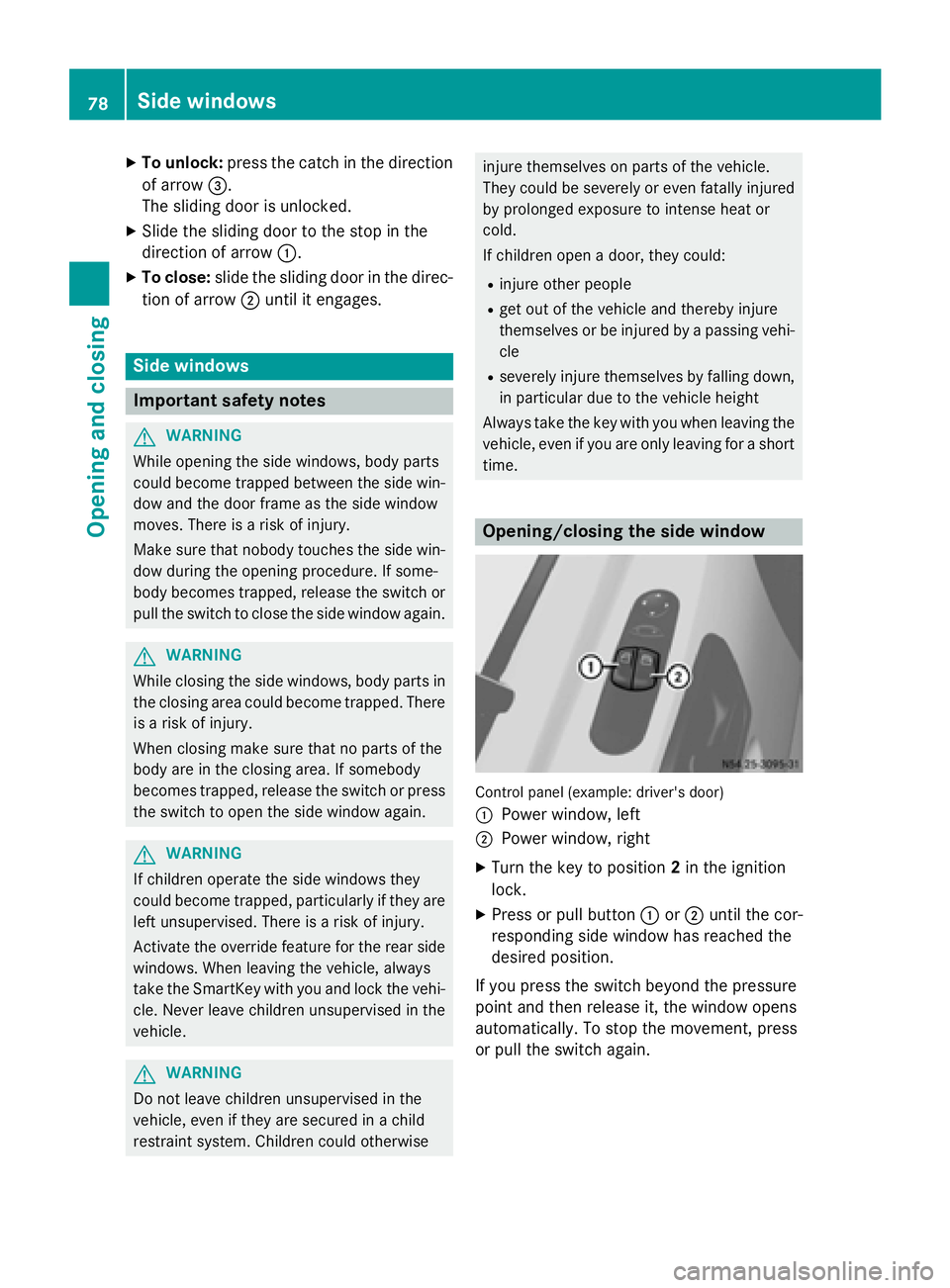
To unlock: press the catch in the direction
of arrow 0087.
The sliding door is unlocked.
X Slide the sliding door to the stop in the
direction of arrow 0043.
X To close: slide the sliding door in the direc-
tion of arrow 0044until it engages. Side windows
Important safety notes
G
WARNING
While opening the side windows, body parts
could become trapped between the side win- dow and the door frame as the side window
moves. There is a risk of injury.
Make sure that nobody touches the side win-
dow during the opening procedure. If some-
body becomes trapped, release the switch or pull the switch to close the side window again. G
WARNING
While closing the side windows, body parts in the closing area could become trapped. There is a risk of injury.
When closing make sure that no parts of the
body are in the closing area. If somebody
becomes trapped, release the switch or press
the switch to open the side window again. G
WARNING
If children operate the side windows they
could become trapped, particularly if they are left unsupervised. There is a risk of injury.
Activate the override feature for the rear side
windows. When leaving the vehicle, always
take the SmartKey with you and lock the vehi-
cle. Never leave children unsupervised in the
vehicle. G
WARNING
Do not leave children unsupervised in the
vehicle, even if they are secured in a child
restraint system. Children could otherwise injure themselves on parts of the vehicle.
They could be severely or even fatally injured
by prolonged exposure to intense heat or
cold.
If children open a door, they could:
R injure other people
R get out of the vehicle and thereby injure
themselves or be injured by a passing vehi-
cle
R severely injure themselves by falling down,
in particular due to the vehicle height
Always take the key with you when leaving the
vehicle, even if you are only leaving for a short time. Opening/closing the side window
Control panel (example: driver's door)
0043
Power window, left
0044 Power window, right
X Turn the key to position 2in the ignition
lock.
X Press or pull button 0043or0044 until the cor-
responding side window has reached the
desired position.
If you press the switch beyond the pressure
point and then release it, the window opens
automatically. To stop the movement, press
or pull the switch again. 78
Side windowsOpening and closing
Page 86 of 334
The seat suspension must be adapted to your
body weight. Adjust the seat suspension only while the seat is unoccupied.
X To adjust the seat suspension: take your
weight off the seat.
X Using handwheel 0084, set your body weight
(40 to 120 kg) for optimum seat suspen-
sion.
The seat suspension will become more rigid the higher you set the weight. It will then
not move as far.
If the seat moves up and down frequently and
to a great extent, you can lock the seat in the lower range.
X To engage the seat suspension lock:
turn lever 006Bupwards.
When it next moves, the seat will lock in
position.
X To release the seat suspension lock:
turn lever 006Bto the right.
The seat can now move up and down again. Swiveling front seats
G
WARNING
If the driver's and co-driver's seats are not
engaged facing the direction of travel while
driving, the restraint systems may not be able to provide the intended protection. There is an
increased risk of injury, possibly even fatal.
Engage the driver's and co-driver's seats so
they are facing the direction of travel before
starting the engine.
! When rotating the seats, make sure that
there is sufficient space to do so.
Move the seat forward or back first. This
will help to avoid contact with other parts of
the interior.
Push the handbrake lever down to the stop.
The parking brake or handbrake lever could
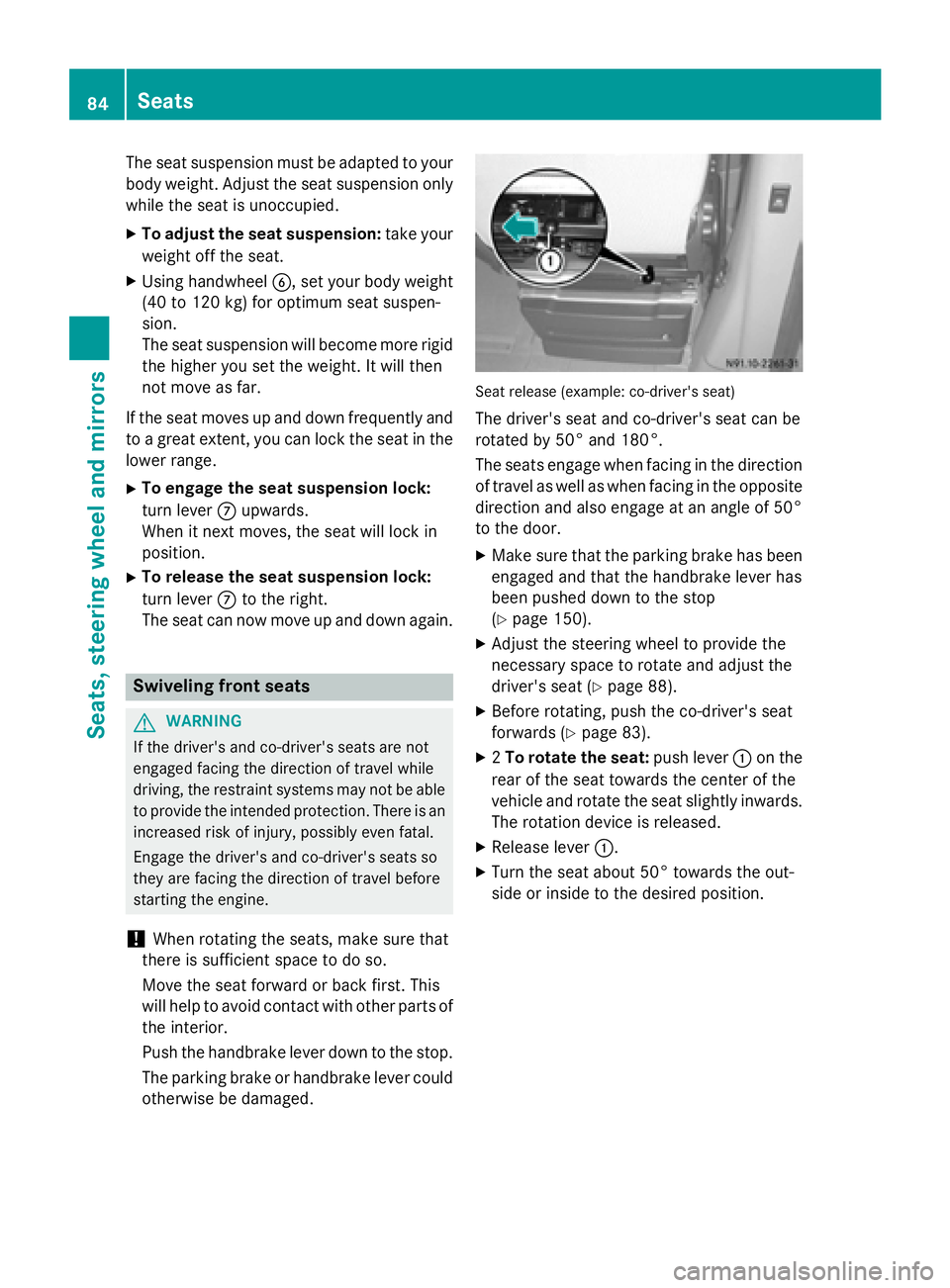
otherwise be damaged. Seat release (example: co-driver's seat)
The driver's seat and co-driver's seat can be
rotated by 50° and 180°.
The seats engage when facing in the direction of travel as well as when facing in the oppositedirection and also engage at an angle of 50°
to the door.
X Make sure that the parking brake has been
engaged and that the handbrake lever has
been pushed down to the stop
(Y page 150).
X Adjust the steering wheel to provide the
necessary space to rotate and adjust the
driver's seat (Y page 88).
X Before rotating, push the co-driver's seat
forwards (Y page 83).
X 2To rotate the seat: push lever0043on the
rear of the seat towards the center of the
vehicle and rotate the seat slightly inwards. The rotation device is released.
X Release lever 0043.
X Turn the seat about 50° towards the out-
side or inside to the desired position. 84
SeatsSeats, steering wheel and mirrors
Page 99 of 334
Headlamps fogged up on the inside
The headlamps may fog up on the inside if
there is high atmospheric humidity.
X Switch on the low-beam headlamps and
drive off.
The level of moisture diminishes, depend-
ing on the length of the journey and the
weather conditions (humidity and temper-
ature).
If the level of moisture does not diminish:
X Have the headlamps checked at a qualified
specialist workshop. Interior lighting
Switching the dashboard lighting on/
off
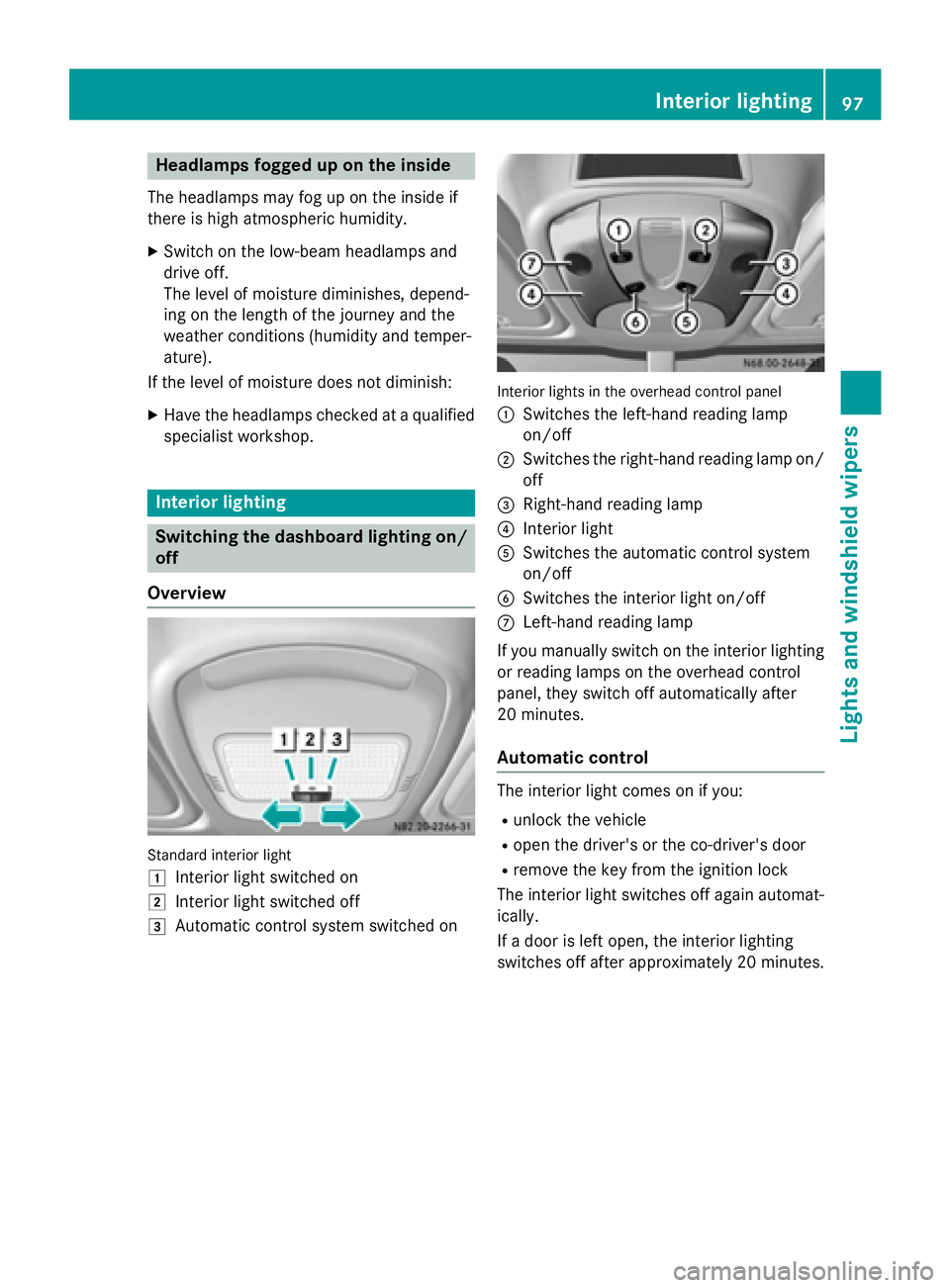
Overview Standard interior light
0047 Interior light switched on
0048 Interior light switched off
0049 Automatic control system switched on Interior lights in the overhead control panel
0043
Switches the left-hand reading lamp
on/off
0044 Switches the right-hand reading lamp on/
off
0087 Right-hand reading lamp
0085 Interior light
0083 Switches the automatic control system
on/off
0084 Switches the interior light on/off
006B Left-hand reading lamp
If you manually switch on the interior lighting
or reading lamps on the overhead control
panel, they switch off automatically after
20 minutes.
Automatic control The interior light comes on if you:
R unlock the vehicle
R open the driver's or the co-driver's door
R remove the key from the ignition lock
The interior light switches off again automat- ically.
If a door is left open, the interior lighting
switches off after approximately 20 minutes. Interior lighting
97Lights and windshield wipers Z
Page 100 of 334
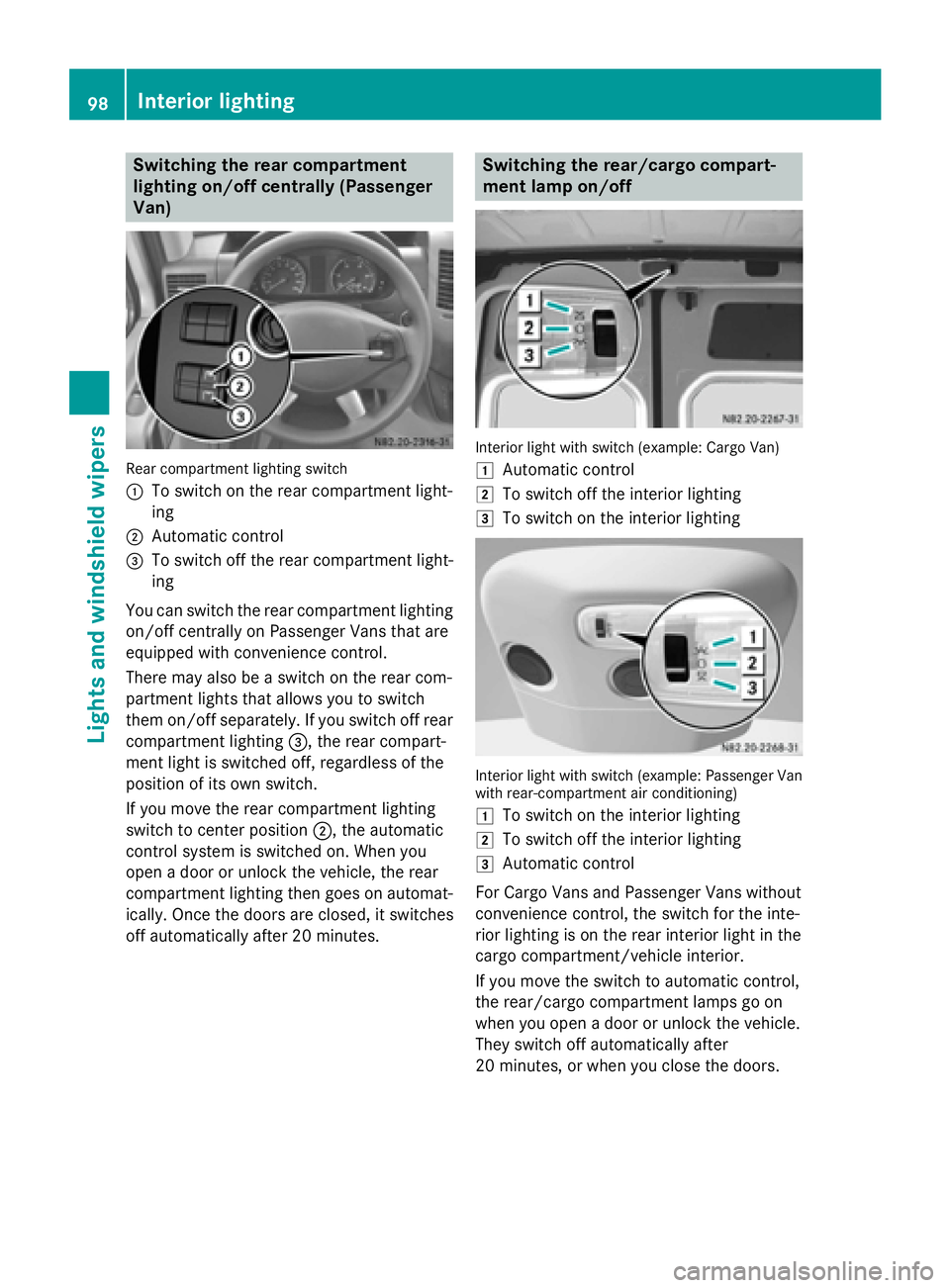
Switching the rear compartment
lighting on/off centrally (Passenger
Van) Rear compartment lighting switch
0043
To switch on the rear compartment light-
ing
0044 Automatic control
0087 To switch off the rear compartment light-
ing
You can switch the rear compartment lighting on/off centrally on Passenger Vans that are
equipped with convenience control.
There may also be a switch on the rear com-
partment lights that allows you to switch
them on/off separately. If you switch off rear compartment lighting 0087, the rear compart-
ment light is switched off, regardless of the
position of its own switch.
If you move the rear compartment lighting
switch to center position 0044, the automatic
control system is switched on. When you
open a door or unlock the vehicle, the rear
compartment lighting then goes on automat-
ically. Once the doors are closed, it switches
off automatically after 20 minutes. Switching the rear/cargo compart-
ment lamp on/off
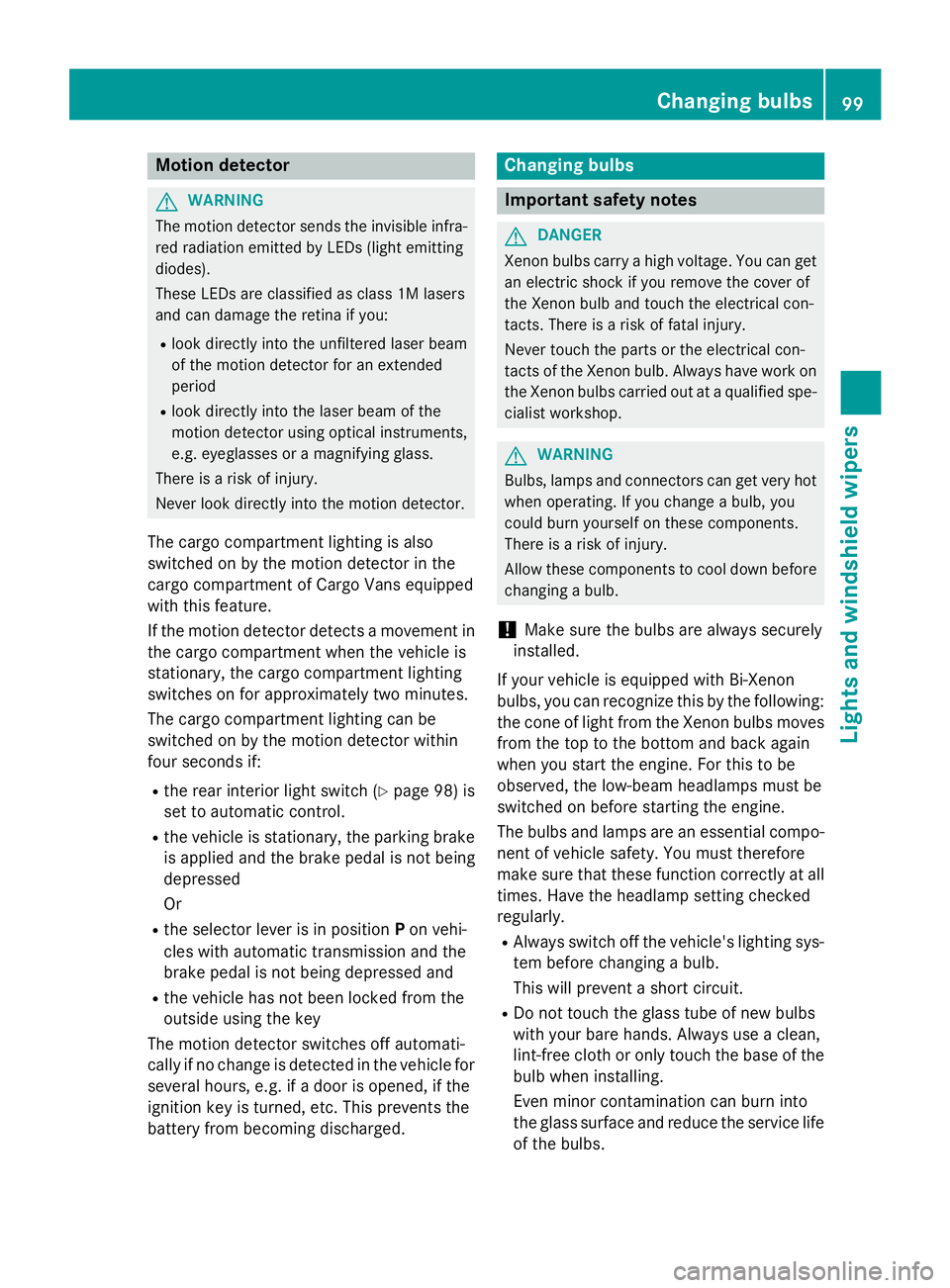
Interior light with switch (example: Cargo Van)
0047
Automatic control
0048 To switch off the interior lighting
0049 To switch on the interior lighting Interior light with switch (example: Passenger Van
with rear-compartment air conditioning)
0047 To switch on the interior lighting
0048 To switch off the interior lighting
0049 Automatic control
For Cargo Vans and Passenger Vans without
convenience control, the switch for the inte-
rior lighting is on the rear interior light in the
cargo compartment/vehicle interior.
If you move the switch to automatic control,
the rear/cargo compartment lamps go on
when you open a door or unlock the vehicle.
They switch off automatically after
20 minutes, or when you close the doors. 98
Interior lightingLights and windshield wipers
Page 101 of 334
Motion detector
G
WARNING
The motion detector sends the invisible infra- red radiation emitted by LEDs (light emitting
diodes).
These LEDs are classified as class 1M lasers
and can damage the retina if you:
R look directly into the unfiltered laser beam
of the motion detector for an extended
period
R look directly into the laser beam of the
motion detector using optical instruments,
e.g. eyeglasses or a magnifying glass.
There is a risk of injury.
Never look directly into the motion detector.
The cargo compartment lighting is also
switched on by the motion detector in the
cargo compartment of Cargo Vans equipped
with this feature.
If the motion detector detects a movement in the cargo compartment when the vehicle is
stationary, the cargo compartment lighting
switches on for approximately two minutes.
The cargo compartment lighting can be
switched on by the motion detector within
four seconds if:
R the rear interior light switch (Y page 98) is
set to automatic control.
R the vehicle is stationary, the parking brake
is applied and the brake pedal is not being
depressed
Or
R the selector lever is in position Pon vehi-
cles with automatic transmission and the
brake pedal is not being depressed and
R the vehicle has not been locked from the
outside using the key
The motion detector switches off automati-
cally if no change is detected in the vehicle for
several hours, e.g. if a door is opened, if the
ignition key is turned, etc. This prevents the
battery from becoming discharged. Changing bulbs
Important safety notes
G
DANGER
Xenon bulbs carry a high voltage. You can get an electric shock if you remove the cover of
the Xenon bulb and touch the electrical con-
tacts. There is a risk of fatal injury.
Never touch the parts or the electrical con-
tacts of the Xenon bulb. Always have work on
the Xenon bulbs carried out at a qualified spe-
cialist workshop. G
WARNING
Bulbs, lamps and connectors can get very hot when operating. If you change a bulb, you
could burn yourself on these components.
There is a risk of injury.
Allow these components to cool down before changing a bulb.
! Make sure the bulbs are always securely
installed.
If your vehicle is equipped with Bi-Xenon
bulbs, you can recognize this by the following: the cone of light from the Xenon bulbs moves
from the top to the bottom and back again
when you start the engine. For this to be
observed, the low-beam headlamps must be
switched on before starting the engine.
The bulbs and lamps are an essential compo- nent of vehicle safety. You must therefore
make sure that these function correctly at all
times. Have the headlamp setting checked
regularly.
R Always switch off the vehicle's lighting sys-
tem before changing a bulb.
This will prevent a short circuit.
R Do not touch the glass tube of new bulbs
with your bare hands. Always use a clean,
lint-free cloth or only touch the base of the bulb when installing.
Even minor contamination can burn into
the glass surface and reduce the service life
of the bulbs. Changing bulbs
99Lights and windshield wipers Z
Page 105 of 334
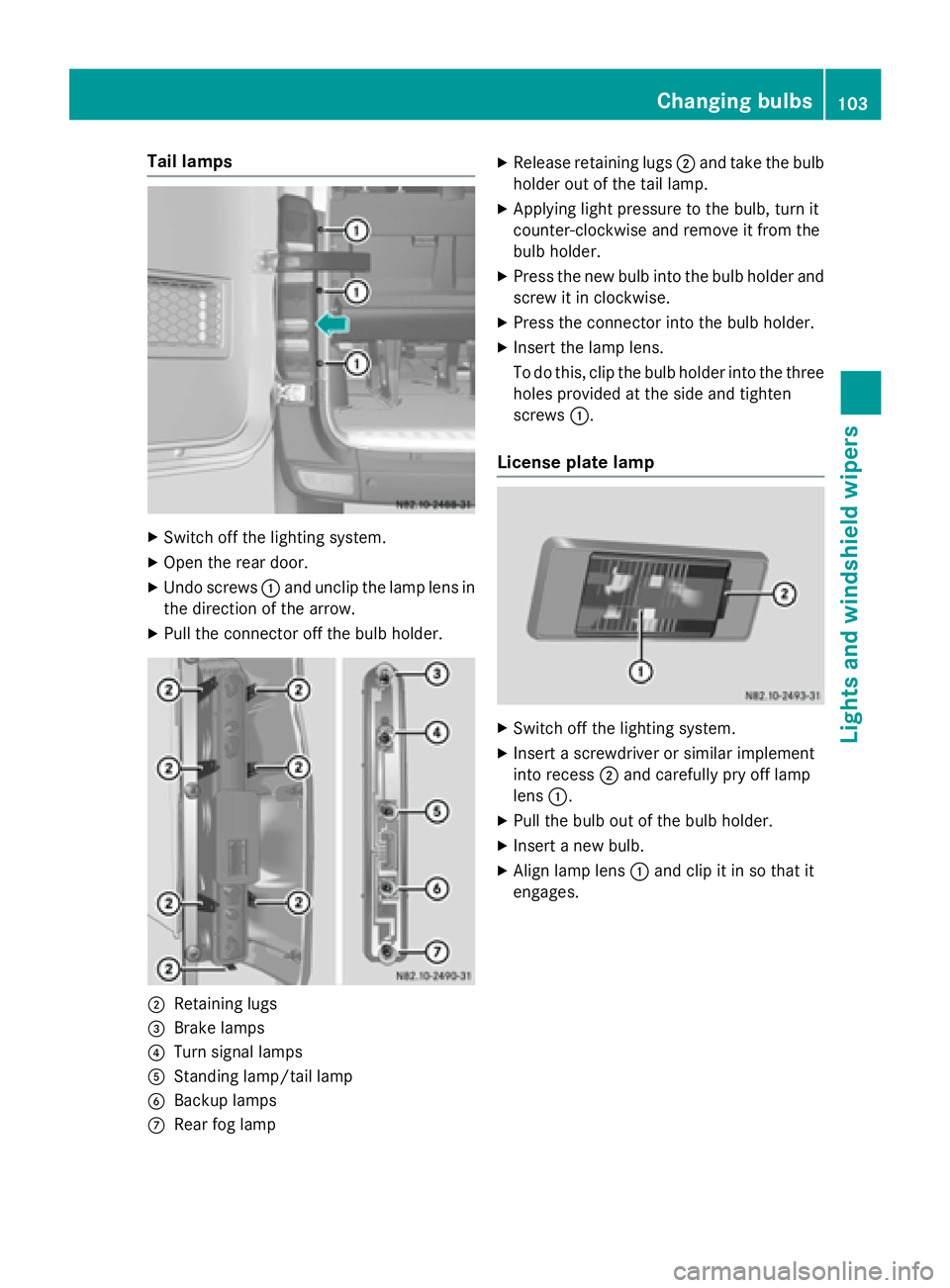
Tail lamps
X
Switch off the lighting system.
X Open the rear door.
X Undo screws 0043and unclip the lamp lens in
the direction of the arrow.
X Pull the connector off the bulb holder. 0044
Retaining lugs
0087 Brake lamps
0085 Turn signal lamps
0083 Standing lamp/tail lamp
0084 Backup lamps
006B Rear fog lamp X
Release retaining lugs 0044and take the bulb
holder out of the tail lamp.
X Applying light pressure to the bulb, turn it
counter-clockwise and remove it from the
bulb holder.
X Press the new bulb into the bulb holder and
screw it in clockwise.
X Press the connector into the bulb holder.
X Insert the lamp lens.
To do this, clip the bulb holder into the three
holes provided at the side and tighten
screws 0043.
License plate lamp X
Switch off the lighting system.
X Insert a screwdriver or similar implement
into recess 0044and carefully pry off lamp
lens 0043.
X Pull the bulb out of the bulb holder.
X Insert a new bulb.
X Align lamp lens 0043and clip it in so that it
engages. Changing bulbs
103Lights andwindshield wipers Z
Page 140 of 334
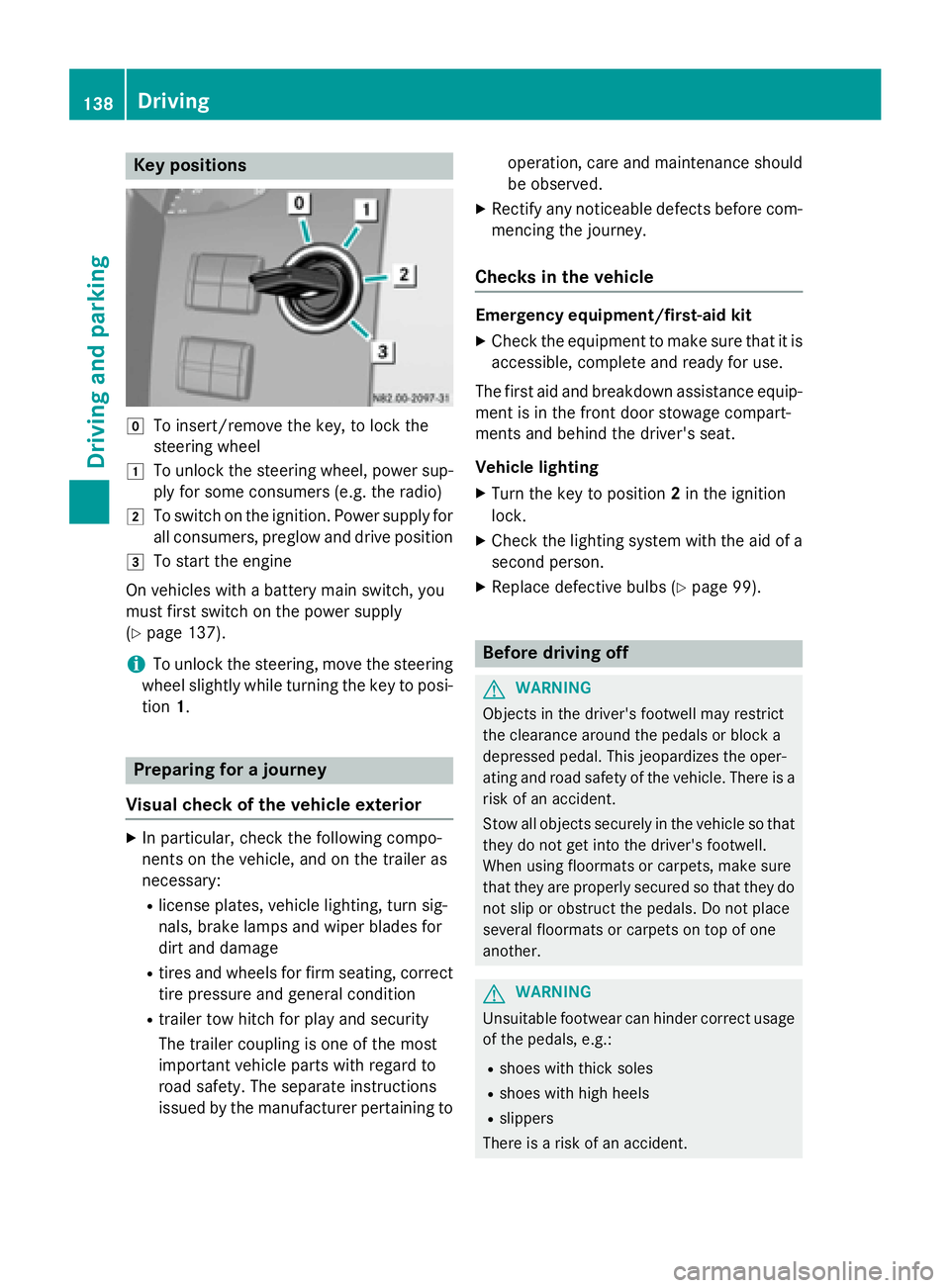
Key positions
005A
To insert/remove the key, to lock the
steering wheel
0047 To unlock the steering wheel, power sup-
ply for some consumers (e.g. the radio)
0048 To switch on the ignition. Power supply for
all consumers, preglow and drive position
0049 To start the engine
On vehicles with a battery main switch, you
must first switch on the power supply
(Y page 137).
i To unlock the steering, move the steering
wheel slightly while turning the key to posi- tion 1. Preparing for a journey
Visual check of the vehicle exterior X
In particular, check the following compo-
nents on the vehicle, and on the trailer as
necessary:
R license plates, vehicle lighting, turn sig-
nals, brake lamps and wiper blades for
dirt and damage
R tires and wheels for firm seating, correct
tire pressure and general condition
R trailer tow hitch for play and security
The trailer coupling is one of the most
important vehicle parts with regard to
road safety. The separate instructions
issued by the manufacturer pertaining to operation, care and maintenance should
be observed.
X Rectify any noticeable defects before com-
mencing the journey.
Checks in the vehicle Emergency equipment/first-aid kit
X Check the equipment to make sure that it is
accessible, complete and ready for use.
The first aid and breakdown assistance equip-
ment is in the front door stowage compart-
ments and behind the driver's seat.
Vehicle lighting
X Turn the key to position 2in the ignition
lock.
X Check the lighting system with the aid of a
second person.
X Replace defective bulbs (Y page 99). Before driving off
G
WARNING
Objects in the driver's footwell may restrict
the clearance around the pedals or block a
depressed pedal. This jeopardizes the oper-
ating and road safety of the vehicle. There is a risk of an accident.
Stow all objects securely in the vehicle so that
they do not get into the driver's footwell.
When using floormats or carpets, make sure
that they are properly secured so that they do not slip or obstruct the pedals. Do not place
several floormats or carpets on top of one
another. G
WARNING
Unsuitable footwear can hinder correct usage of the pedals, e.g.:
R shoes with thick soles
R shoes with high heels
R slippers
There is a risk of an accident. 138
DrivingDriving and pa
rking
Page 141 of 334
Wear suitable footwear to ensure correct
usage of the pedals.
X Secure the load as per the loading guide-
lines (Y page 240).
X Make sure that the floormats and carpets
are properly secured so that they cannot
slip and obstruct the pedals.
X Close all doors. Starting the engine
G
WARNING
Combustion engines emit poisonous exhaust
gases such as carbon monoxide. Inhaling
these exhaust gases leads to poisoning. There is a risk of fatal injury. Therefore never leave
the engine running in enclosed spaces with-
out sufficient ventilation.
! Do not depress the accelerator pedal
when starting the engine.
X Before starting the engine, make sure that:
R all the doors are closed.
R all the vehicle occupants are wearing
their seat belts correctly.
R the parking brake is applied.
i If you depress the brake pedal before
starting the engine, the pedal travel is short
and pedal resistance is high.
If you depress the brake pedal again after
starting the engine, pedal travel and resist-
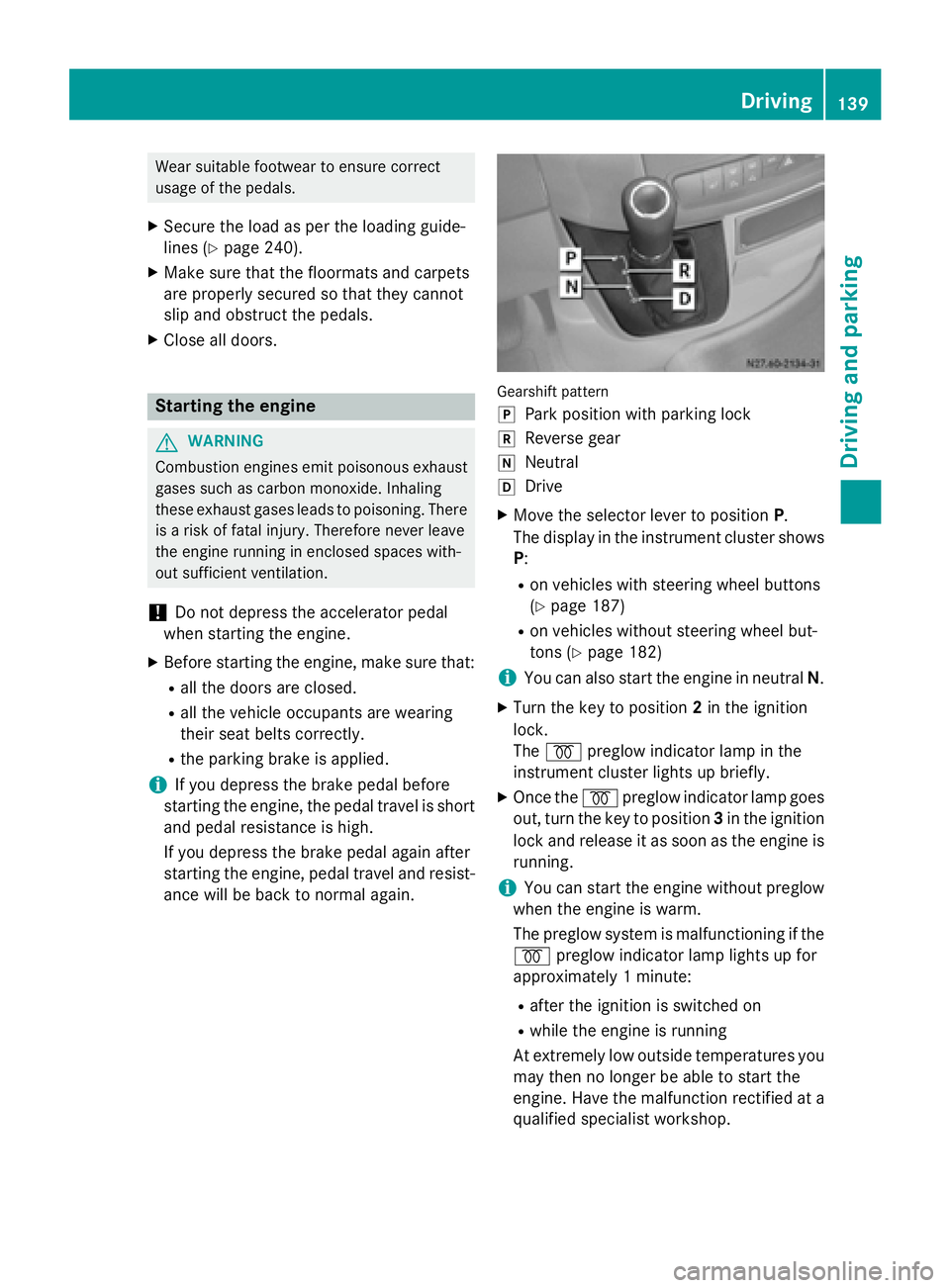
ance will be back to normal again. Gearshift pattern
005D
Park position with parking lock
005E Reverse gear
005C Neutral
005B Drive
X Move the selector lever to position P.
The display in the instrument cluster shows
P:
R on vehicles with steering wheel buttons
(Y page 187)
R on vehicles without steering wheel but-
tons (Y page 182)
i You can also start the engine in neutral
N.
X Turn the key to position 2in the ignition
lock.
The 0028 preglow indicator lamp in the
instrument cluster lights up briefly.
X Once the 0028preglow indicator lamp goes
out, turn the key to position 3in the ignition
lock and release it as soon as the engine is running.
i You can start the engine without preglow
when the engine is warm.
The preglow system is malfunctioning if the
0028 preglow indicator lamp lights up for
approximately 1 minute:
R after the ignition is switched on
R while the engine is running
At extremely low outside temperatures you
may then no longer be able to start the
engine. Have the malfunction rectified at a qualified specialist workshop. Driving
139Driving and parking Z
Page 142 of 334
i
Depending on the equipment installed,
the vehicle either automatically locks cen-
trally after switching on the ignition or after pulling away. The locking knobs in the
doors drop down.
You can open the doors from the inside at
any time.
Automatic door locking can be deactivated
(Y page 71). Driving off
G
WARNING
If the engine speed is above the idling speed
and you engage transmission position Dor R,
the vehicle could pull away suddenly. There is a risk of an accident.
When engaging transmission position Dor R,
always firmly depress the brake pedal and do not simultaneously accelerate.
! Only shift into reverse gear
Rwhen the
vehicle is stationary. Otherwise, you could
damage the transmission.
X Depress the brake pedal and keep it
depressed.
The selector lever lock is released.
X Move the selector lever to position Dor R.
On vehicles with a reverse warning feature, when reverse gear is engaged a warning
tone sounds to alert other road users
(Y page 140).
X Release the parking brake (Y page 150).
The 0066 indicator lamp in the instrument
cluster goes out.
X Release the brake pedal.
X Carefully depress the accelerator pedal.
i After pulling away or switching on the
ignition, the vehicle automatically locks
centrally. The locking knobs in the doors
drop down.
You can open the doors from the inside at
any time. You can also deactivate the automatic lock-
ing feature (Y page 71). Reverse warning device
G
WARNING
Other road users may ignore or fail to hear the warning tone of the reverse warning feature.
There is a risk of injury if you fail to ensure that
the area in which you are maneuvering is
clear.
Make sure that there are no persons or
objects in the area in which you are maneu-
vering. It may be necessary to enlist the help
of a second person when maneuvering.
The reverse warning feature is a system
designed to assist you in ensuring the safety
of other road users.
A warning signal sounds to alert other road
users when reverse gear is engaged. The vol-
ume of the warning tone can be reduced for
night-time driving.
X To reduce the volume of the warning
tone: engage reverse gear twice in quick
succession.
The warning tone is now quieter.
i The warning tone sounds at a normal vol-
ume by default. The volume of the warning
tone has to be reduced each time you
engage reverse gear if necessary. 140
DrivingDriving an
d parking