door lock MERCEDES-BENZ SPRINTER 2015 MY15 Operator’s Manual
[x] Cancel search | Manufacturer: MERCEDES-BENZ, Model Year: 2015, Model line: SPRINTER, Model: MERCEDES-BENZ SPRINTER 2015Pages: 334, PDF Size: 5.94 MB
Page 148 of 334
engine and, if applicable, the auxiliary heating
before refueling. G
WARNING
Fuel is poisonous and hazardous to health.
There is a risk of injury.
You must make sure that fuel does not come into contact with your skin, eyes or clothing
and that it is not swallowed. Do not inhale fuel
vapors. Keep fuel away from children.
If you or others come into contact with fuel,
observe the following:
R Wash away fuel from skin immediately
using soap and water.
R If fuel comes into contact with your eyes,
immediately rinse them thoroughly with
clean water. Seek medical assistance with-
out delay.
R If fuel is swallowed, seek medical assis-
tance without delay. Do not induce vomit-
ing.
R Immediately change out of clothing which
has come into contact with fuel. G
WARNING
If you mix diesel fuel with gasoline, the flash
point is lower than that of pure diesel fuel.
When the engine is running, exhaust system
components could overheat without being
noticed. There is a risk of fire.
Never refuel with gasoline. Never mix gasoline with diesel fuel. H
Environmental note
If fuels are handled improperly, they pose a
danger to persons and the environment. Do
not allow fuels to run into the sewage system, the surface waters, the ground water or into
the ground.
! Do not use gasoline to refuel vehicles with
a diesel engine. Even small amounts of gas-
oline will cause damage to the fuel system and engine. !
Do not switch on the ignition if you acci-
dentally refuel with the wrong fuel. Other-
wise, the fuel will enter the fuel lines. Notify a qualified specialist workshop and have
the fuel tank and fuel lines drained com-
pletely.
! Overfilling the fuel tank could damage the
fuel system.
! Take care not to spill any fuel on painted
surfaces. You could otherwise damage the paintwork.
! Filter the fuel before transferring it to the
vehicle if you are refueling the vehicle from
barrels or containers.
This will prevent malfunctions in the fuel
system due to contaminated fuel.
Further information on fuel and on fuel grades can be found in the "Technical data" section
(Y page 318). Refueling procedure
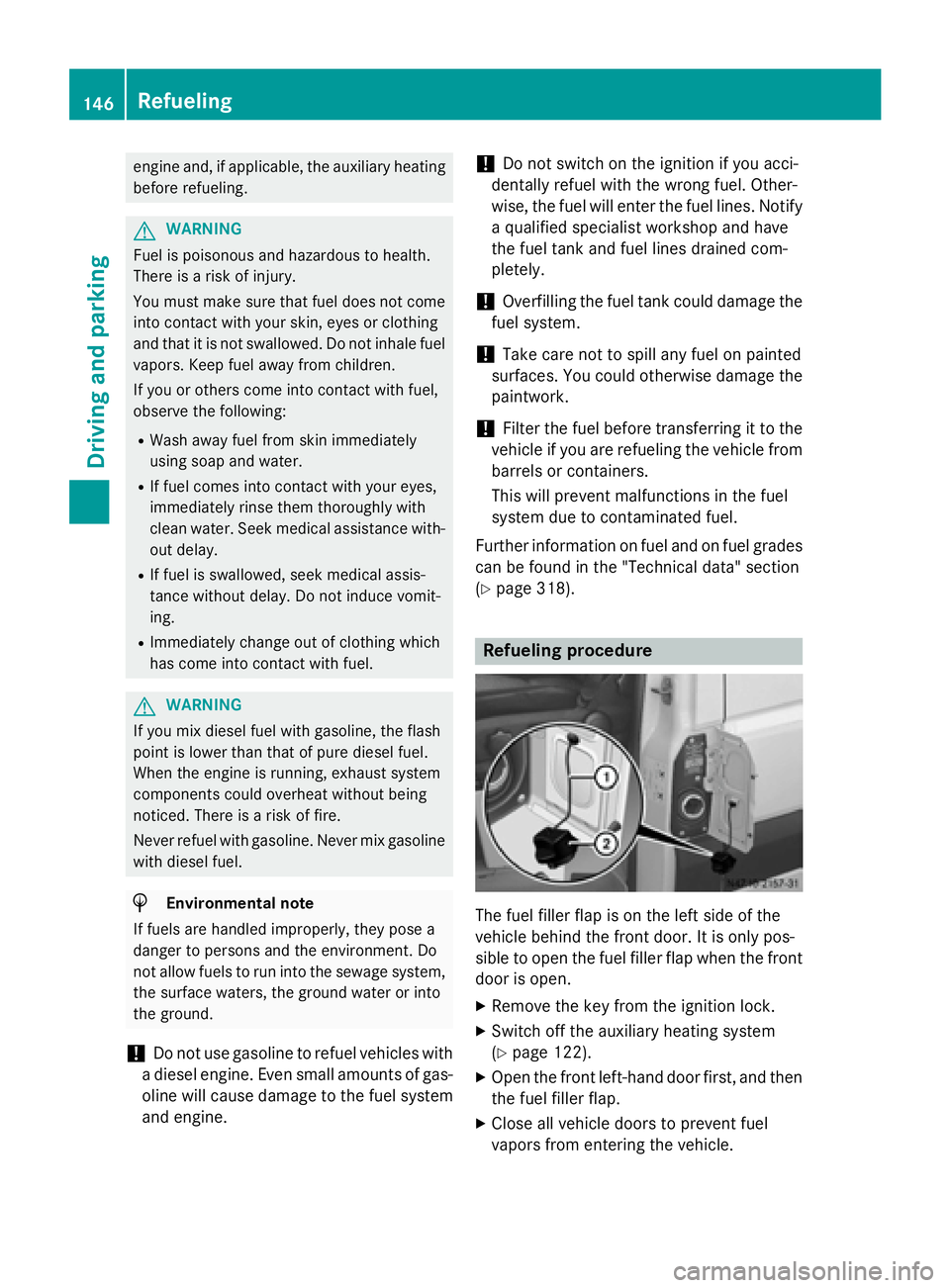
The fuel filler flap is on the left side of the
vehicle behind the front door. It is only pos-
sible to open the fuel filler flap when the front door is open.
X Remove the key from the ignition lock.
X Switch off the auxiliary heating system
(Y page 122).
X Open the front left-hand door first, and then
the fuel filler flap.
X Close all vehicle doors to prevent fuel
vapors from entering the vehicle. 146
RefuelingDriving and parking
Page 149 of 334
X
Turn fuel filler cap 0044counter-clockwise,
remove it and let it hang from strap 0043.
X Completely insert the filler neck of the fuel
pump nozzle into the tank and refuel.
X Only fill the tank until the pump nozzle
switches off. Fuel may otherwise leak out.
X Replace tank filler cap 0044on tank and turn
clockwise.
You will hear a click when the fuel filler cap
is closed fully.
X Open the front left-hand door first, and then
close the filler flap. Problems with the fuel and fuel tank
If your vehicle is losing fuel, the fuel lines or
the fuel tank are defective.
X Turn the key to position 0in the ignition
lock immediately and remove it.
X Do not restart the engine under any cir-
cumstances.
X Consult a qualified specialist workshop.
If the fuel tank has been run dry, after refuel-
ing carry out the following steps:
X Before starting the engine: switch on the
ignition three or four times.
X Turn the key to position 2in the ignition
lock (Y page 138).
The 0028 preglow indicator lamp in the
instrument cluster lights up briefly.
X Once the 0028preglow indicator lamp goes
out, turn the key to position 3in the ignition
lock and release it as soon as the engine is running.
You can start the diesel engine without pre-
glow when the engine is warm. Diesel Exhaust Fluid (DEF)
Important safety notes H
Environmental note
Dispose of DEF in an environmentally respon- sible manner.
! Only use DEF in accordance with
ISO 22241. Never mix DEF with additives or
thin it with tap water. The exhaust gas after- treatment may otherwise be damaged.
Observe the MB Specifications for Service
Products, Sheet 352.0.
Damage that results from the use of addi-
tives or tap water leads to the loss of the
New Vehicle Limited Warranty.
! If DEF comes into contact with a painted
or aluminum surface, wash the surface off
immediately with plenty of water.
! DEF is not a diesel additive and must not
be mixed with fuel in the tank. Even small
amounts of DEF can cause engine damage.
Damage that results from the blending of
DEF will not be covered by the New Vehicle Limited Warranty.
The exhaust gas aftertreatment requires a
reducing agent, Diesel Exhaust Fluid (DEF), in order to function correctly.
When opening the DEF tank filler cap at high
outside temperatures, ammonia vapors may
escape.
Ammonia vapors have a pungent smell and
primarily cause irritation of the:
R skin
R mucous membranes
R eyes
You may experience a burning sensation in
your eyes, nose and throat, as well as cough- ing and watering of the eyes.
Do not inhale ammonia vapors. Avoid contact
with DEF.
Do not allow DEF to come into direct contact with your skin; it is hazardous to your health. Refueling
147Driving and parking Z
Page 177 of 334
is case, use a trailer with a height-adjusta-
ble trailer drawbar.
Driving tips The maximum permissible speed for vehicle/
trailer combination depends on the type of
trailer. Before setting off, check the vehicle
documents of the your trailer to find out the
permissible maximum speed. Observe the
legally prescribed maximum speed for vehi-
cle/trailer combinations in the relevant coun-
try, state or Canadian province.
When towing a trailer, your vehicle's handling
characteristics will be different in comparison to when driving without a trailer and it will
consume more fuel.
On long, steep downhill slopes you must
select shift range 3,2or 1in good time.
i This also applies if cruise control is acti-
vated.
This enables you to utilize the engine's brak-
ing effect and you do not need to brake so
heavily to keep the correct speed, which pro-
tects the brake system and prevents the
brakes from overheating and wearing too
quickly. If you need to brake additionally, to
not depress the brake pedal constantly, but
periodically.
Driving tips If the trailer begins to swing from side to side:
X Do not accelerate.
X Do not counter-steer.
X Brake if necessary.
i You can reduce the risk of the trailer
swinging and rocking by retrofitting anti-
roll bars or trailer stability programs. More information is available from your author-
ized Sprinter Dealer.
R Maintain a greater distance than you would
when driving without towing a trailer.
R Avoid sudden braking. Apply the brakes
gently at first to allow the trailer brake to overrun. Then, increase the brake force
quickly.
R The figures for the gradient climbing capa-
bilities from a standstill refer to sea level.
When driving in mountainous areas, note
that the power output of the engine, and
with it its gradient climbing capability,
decrease with increasing altitude. Coupling up a trailer
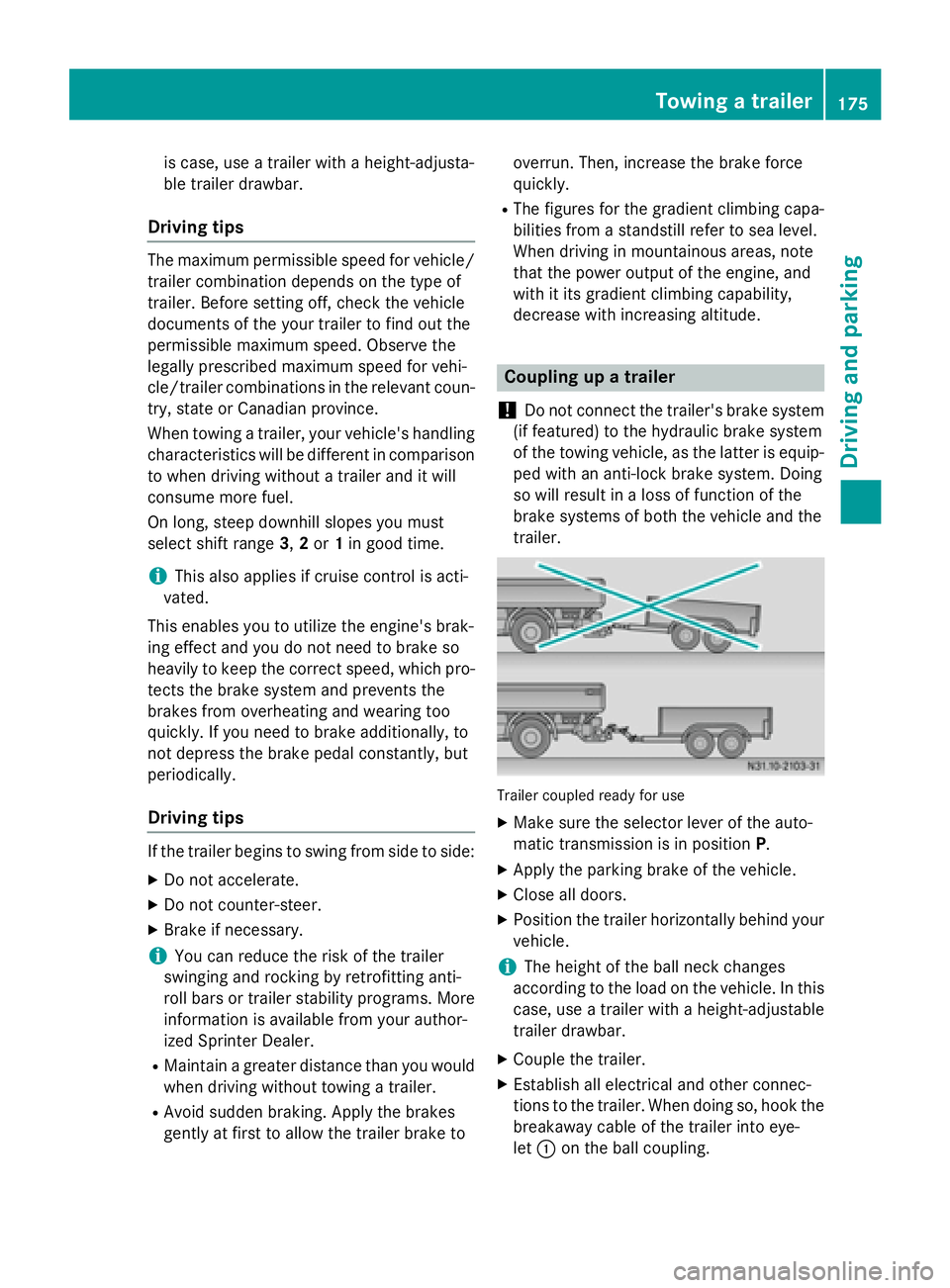
! Do not connect the trailer's brake system
(if featured) to the hydraulic brake system
of the towing vehicle, as the latter is equip- ped with an anti-lock brake system. Doing
so will result in a loss of function of the
brake systems of both the vehicle and the
trailer. Trailer coupled ready for use
X Make sure the selector lever of the auto-
matic transmission is in position P.
X Apply the parking brake of the vehicle.
X Close all doors.
X Position the trailer horizontally behind your
vehicle.
i The height of the ball neck changes
according to the load on the vehicle. In this
case, use a trailer with a height-adjustable
trailer drawbar.
X Couple the trailer.
X Establish all electrical and other connec-
tions to the trailer. When doing so, hook the
breakaway cable of the trailer into eye-
let 0043 on the ball coupling. Towing a trailer
175Driving and parking Z
Page 183 of 334
The display in the instrument cluster is acti-
vated when you:
R open the driver's door
R turn the key to position 2in the ignition lock
R press the 0045reset button
R switch on the lights
The display switches off automatically after
approximately 30 seconds if:
R the key is in position 0in the ignition lock.
R the vehicle lighting is not switched on. Instrument lighting
When the lights are switched on, you can
adjust the brightness of the instrument clus-
ter lighting using the 0074and 0075buttons.
X To brighten: press the0074button.
X To dim: press the 0075button.
i Vehicles with automatic headlamp mode:
the instrument lighting also adapts to auto-
matic headlamp mode. Tachometer
! Do not drive in the overrevving range, as
this could damage the engine. H
Environmental note
Avoid driving at high engine speeds. This
unnecessarily increases the fuel consumption of your vehicle and harms the environment asa result of increased emissions.
The red band in the tachometer indicates the engine's overrevving range.
To protect the engine, the fuel supply is inter-
rupted when the red band is reached. Outside temperature
You should pay special attention to road con-
ditions when temperatures are around the
freezing point. On vehicles without steering wheel buttons
(Y page 182) and on vehicles with steering
wheel buttons (Y page 187), the outside tem-
perature display is in the display.
Changes in the outside temperature are dis-
played after a short delay. Speedometer
The speed can also be shown in the display.
You can find information on the digital speed-
ometer for vehicles without steering wheel
buttons under (Y page 182) and for vehicles
with steering wheel buttons under
(Y page 187).
i In some countries, a warning sounds
when the vehicle reaches the maximum
speed limit, e.g. at 75 mph (120 km/h). Trip odometer
X To reset: make sure that the display is
showing the trip odometer if you have a
vehicle with steering wheel buttons
(Y page 187).
X Press and hold the 0045reset button until the
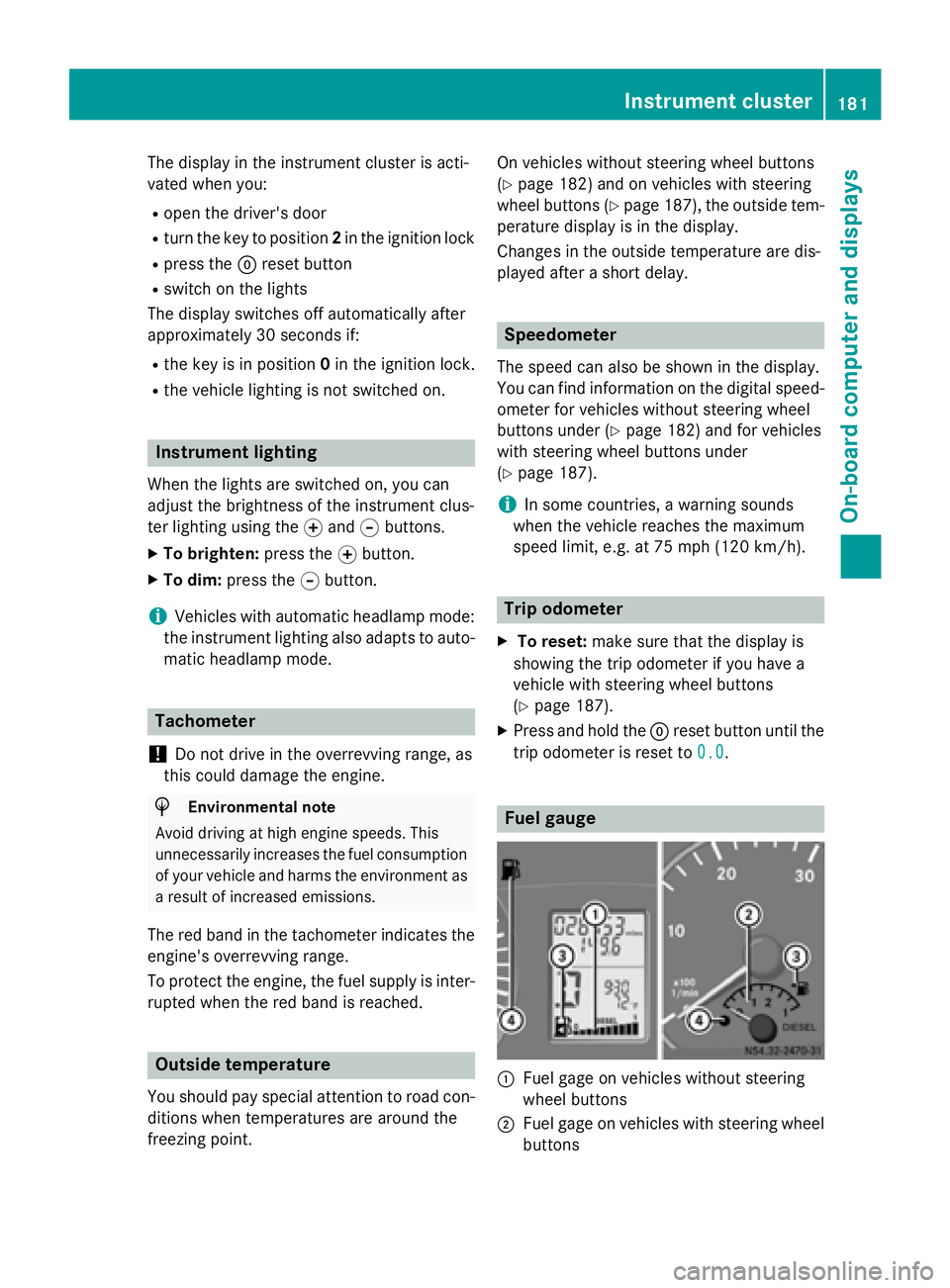
trip odometer is reset to 0.0 0.0. Fuel gauge
0043
Fuel gage on vehicles without steering
wheel buttons
0044 Fuel gage on vehicles with steering wheel
buttons Instrument cluster
181On-board computer and displays Z
Page 195 of 334
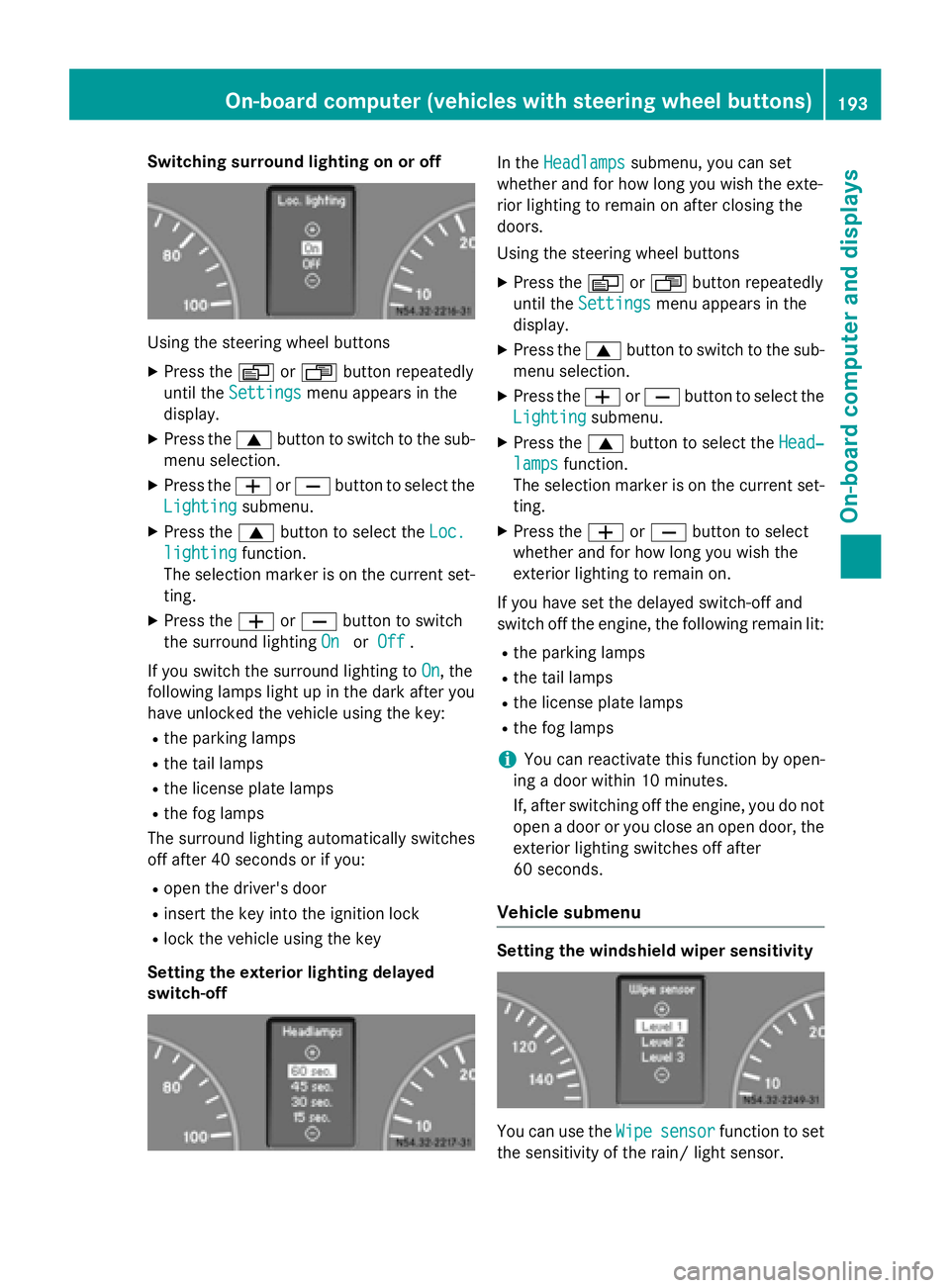
Switching surround lighting on or off
Using the steering wheel buttons
X Press the 0080or007F button repeatedly
until the Settings
Settings menu appears in the
display.
X Press the 0063button to switch to the sub-
menu selection.
X Press the 0081or0082 button to select the
Lighting
Lighting submenu.
X Press the 0063button to select the Loc.
Loc.
lighting
lighting function.
The selection marker is on the current set-
ting.
X Press the 0081or0082 button to switch
the surround lighting On
OnorOff
Off .
If you switch the surround lighting to On
On, the
following lamps light up in the dark after you
have unlocked the vehicle using the key:
R the parking lamps
R the tail lamps
R the license plate lamps
R the fog lamps
The surround lighting automatically switches
off after 40 seconds or if you:
R open the driver's door
R insert the key into the ignition lock
R lock the vehicle using the key
Setting the exterior lighting delayed
switch-off In the
Headlamps Headlamps submenu, you can set
whether and for how long you wish the exte-
rior lighting to remain on after closing the
doors.
Using the steering wheel buttons
X Press the 0080or007F button repeatedly
until the Settings Settings menu appears in the
display.
X Press the 0063button to switch to the sub-
menu selection.
X Press the 0081or0082 button to select the
Lighting
Lighting submenu.
X Press the 0063button to select the Head‐
Head‐
lamps
lamps function.
The selection marker is on the current set-
ting.
X Press the 0081or0082 button to select
whether and for how long you wish the
exterior lighting to remain on.
If you have set the delayed switch-off and
switch off the engine, the following remain lit:
R the parking lamps
R the tail lamps
R the license plate lamps
R the fog lamps
i You can reactivate this function by open-
ing a door within 10 minutes.
If, after switching off the engine, you do not open a door or you close an open door, the
exterior lighting switches off after
60 seconds.
Vehicle submenu Setting the windshield wiper sensitivity
You can use the
Wipe Wipesensor
sensor function to set
the sensitivity of the rain/ light sensor. On-board computer (vehicles with steering wheel buttons)
193On-board computer and displays Z
Page 229 of 334
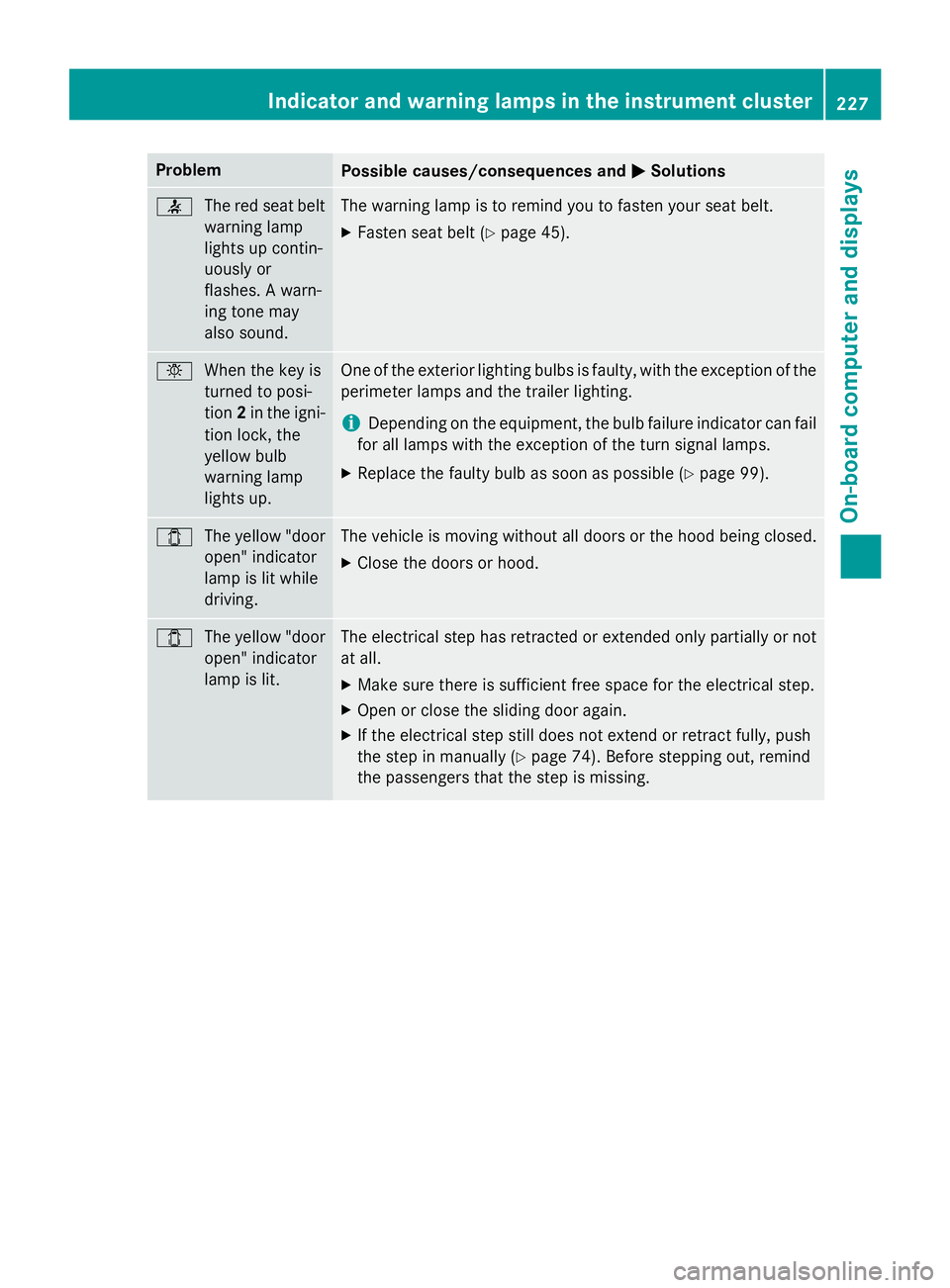
Problem
Possible causes/consequences and
0050
0050Solutions 0076
The red seat belt
warning lamp
lights up contin-
uously or
flashes. A warn-
ing tone may
also sound. The warning lamp is to remind you to fasten your seat belt.
X Fasten seat belt (Y page 45). 0049
When the key is
turned to posi-
tion2in the igni-
tion lock, the
yellow bulb
warning lamp
lights up. One of the exterior lighting bulbs is faulty, with the exception of the
perimeter lamps and the trailer lighting.
i Depending on the equipment, the bulb failure indicator can fail
for all lamps with the exception of the turn signal lamps.
X Replace the faulty bulb as soon as possible (Y page 99).003E
The yellow "door
open" indicator
lamp is lit while
driving. The vehicle is moving without all doors or the hood being closed.
X Close the doors or hood. 003E
The yellow "door
open" indicator
lamp is lit. The electrical step has retracted or extended only partially or not
at all.
X Make sure there is sufficient free space for the electrical step.
X Open or close the sliding door again.
X If the electrical step still does not extend or retract fully, push
the step in manually (Y page 74). Before stepping out, remind
the passengers that the step is missing. Indicator and warning lamps in the instrument cluster
227On-board computer and displays Z
Page 238 of 334
In addition, flammable materials can ignite if:
R the hot cigarette lighter falls
R a child holds the hot cigarette lighter to
objects, for example
There is a risk of fire and injury.
Always hold the cigarette lighter by the knob.
Always make sure that the cigarette lighter is
out of reach of children. Never leave children unsupervised in the vehicle. X
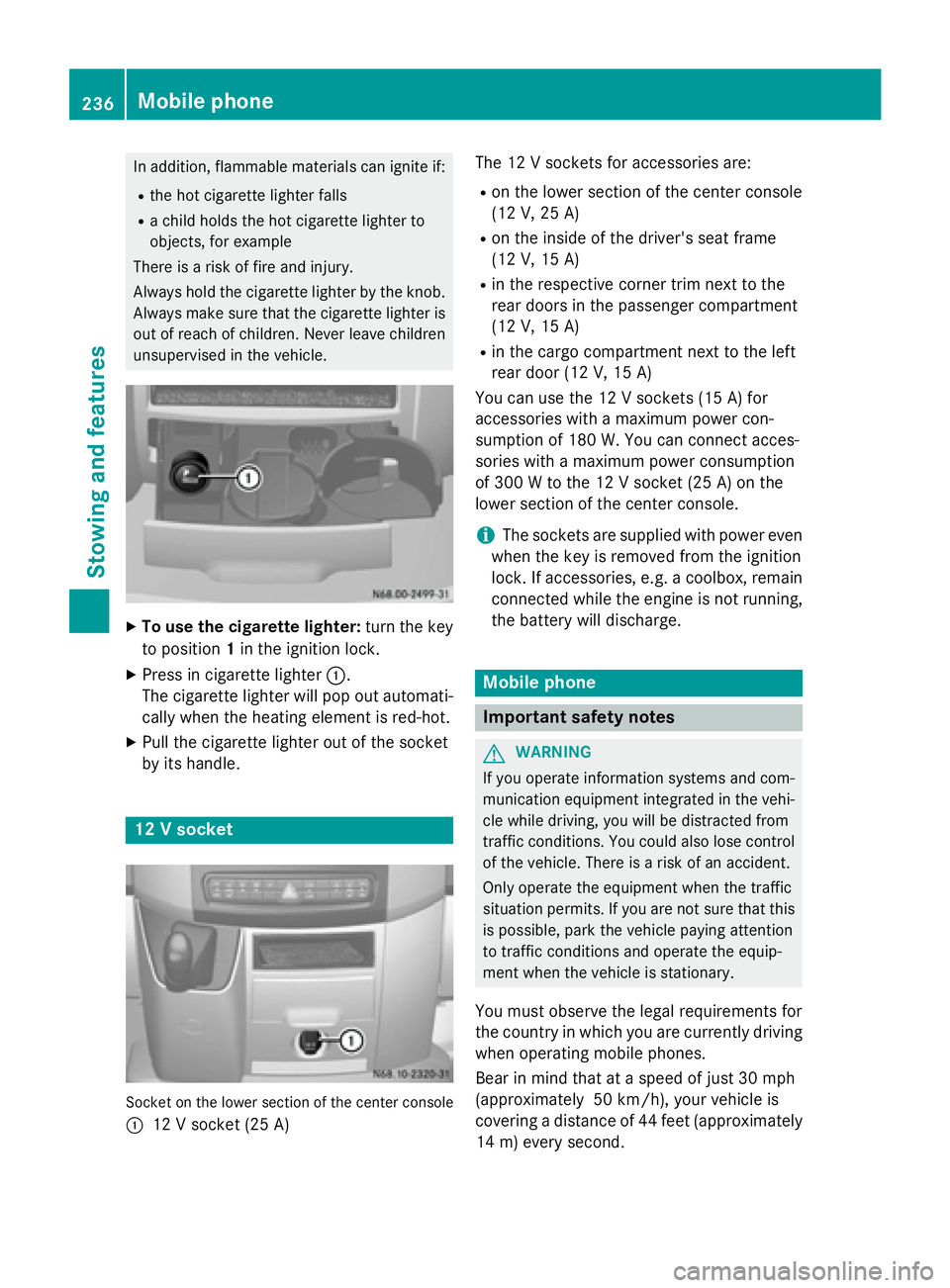
To use the cigarette lighter: turn the key
to position 1in the ignition lock.
X Press in cigarette lighter 0043.
The cigarette lighter will pop out automati- cally when the heating element is red-hot.
X Pull the cigarette lighter out of the socket
by its handle. 12 V socket
Socket on the lower section of the center console
0043 12 V socket (25 A) The 12 V sockets for accessories are:
R
on the lower section of the center console
(12 V, 25 A)
R on the inside of the driver's seat frame
(12 V, 15 A)
R in the respective corner trim next to the
rear doors in the passenger compartment
(12 V, 15 A)
R in the cargo compartment next to the left
rear door (12 V, 15 A)
You can use the 12 V sockets (15 A) for
accessories with a maximum power con-
sumption of 180 W. Youcan connect acces-
sories with a maximum power consumption
of 300 Wto the 12 V socket (25 A) on the
lower section of the center console.
i The sockets are supplied with power even
when the key is removed from the ignition
lock. If accessories, e.g. a coolbox, remain
connected while the engine is not running, the battery will discharge. Mobile phone
Important safety notes
G
WARNING
If you operate information systems and com-
munication equipment integrated in the vehi- cle while driving, you will be distracted from
traffic conditions. You could also lose control of the vehicle. There is a risk of an accident.
Only operate the equipment when the traffic
situation permits. If you are not sure that this
is possible, park the vehicle paying attention
to traffic conditions and operate the equip-
ment when the vehicle is stationary.
You must observe the legal requirements for
the country in which you are currently driving when operating mobile phones.
Bear in mind that at a speed of just 30 mph
(approximately 50 km/h), your vehicle is
covering a distance of 44 fee t(approximately
14 m) every second. 236
Mobile phoneStowing and features
Page 262 of 334
Be sure to observe the notes on charging
the batteries (Y
page 263). Installation locations
Your vehicle may be equipped with three bat-
teries, depending on the equipment version:
R a starter battery in the battery case in the
driver's footwell
R additional battery in the engine compart-
ment
R auxiliary battery under the driver's seat
Have the auxiliary battery removed at a quali-
fied specialist workshop. Installing/removing the floor cover-
ing (starter battery) G
WARNING
Objects in the driver's footwell can restrict the pedal travel or obstruct a depressed pedal.
The operating and road safety of the vehicle is
jeopardized. There is a risk of an accident.
Make sure that all objects in the vehicle are
stowed correctly, and that they cannot enter
the driver's footwell. Install the floormats
securely and as specified in order to ensure
sufficient clearance for the pedals. Do not use loose floormats and do not place floormats on
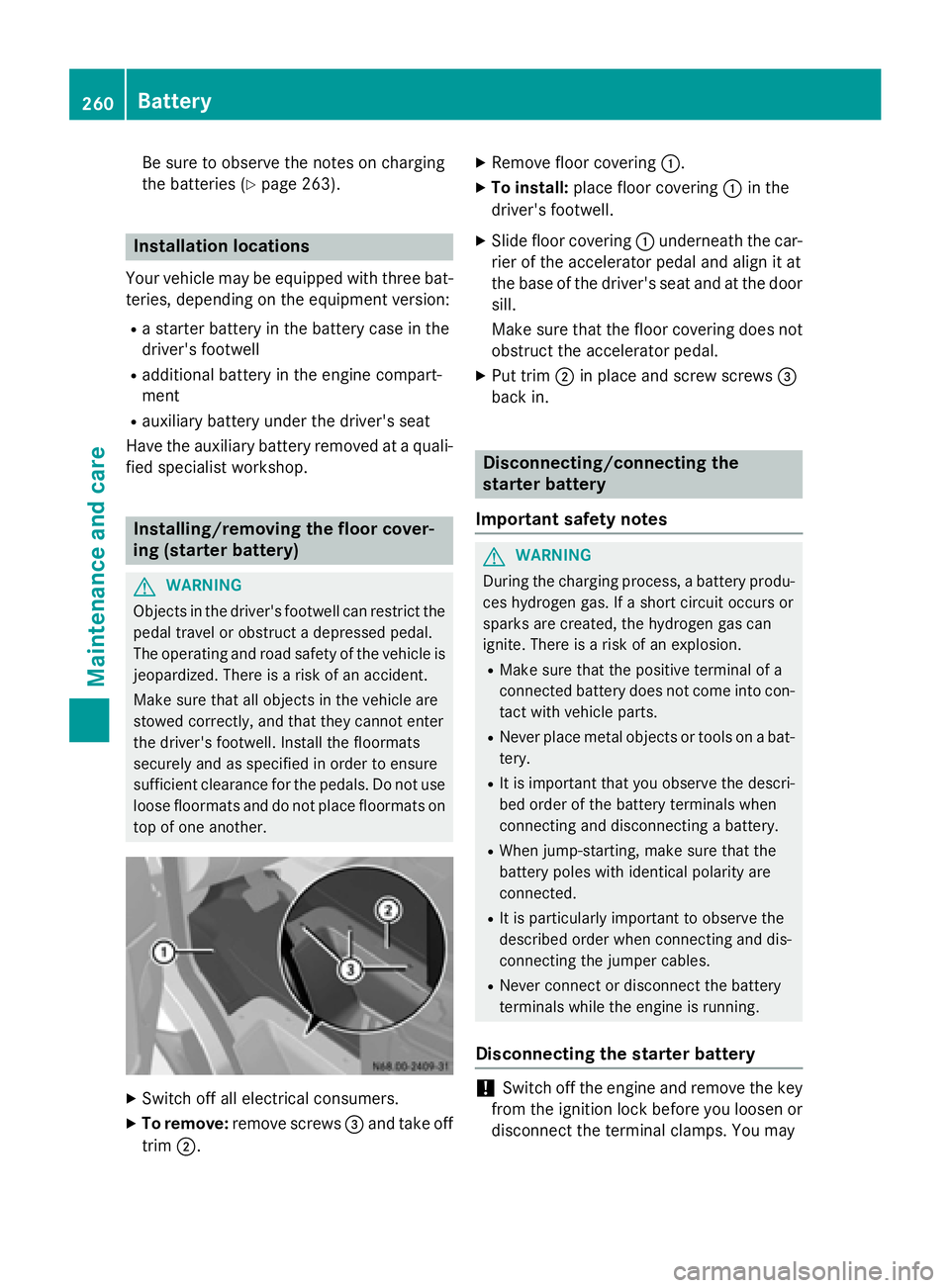
top of one another. X
Switch off all electrical consumers.
X To remove: remove screws 0087and take off
trim 0044. X
Remove floor covering 0043.
X To install: place floor covering 0043in the
driver's footwell.
X Slide floor covering 0043underneath the car-
rier of the accelerator pedal and align it at
the base of the driver's seat and at the door sill.
Make sure that the floor covering does notobstruct the accelerator pedal.
X Put trim 0044in place and screw screws 0087
back in. Disconnecting/connecting the
starter battery
Important safety notes G
WARNING
During the charging process, a battery produ- ces hydrogen gas. If a short circuit occurs or
sparks are created, the hydrogen gas can
ignite. There is a risk of an explosion.
R Make sure that the positive terminal of a
connected battery does not come into con-
tact with vehicle parts.
R Never place metal objects or tools on a bat-
tery.
R It is important that you observe the descri-
bed order of the battery terminals when
connecting and disconnecting a battery.
R When jump-starting, make sure that the
battery poles with identical polarity are
connected.
R It is particularly important to observe the
described order when connecting and dis-
connecting the jumper cables.
R Never connect or disconnect the battery
terminals while the engine is running.
Disconnecting the starter battery !
Switch off the engine and remove the key
from the ignition lock before you loosen or
disconnect the terminal clamps. You may 260
BatteryMaintenance and care
Page 271 of 334
X
Clean all sensors 0043in the front and rear
bumpers with water, shampoo and a soft
cloth.
Cleaning the rear view camera !
Do not use dry, coarse or hard cloths and
do not scrub. Otherwise, you will scratch or damage the lens of the rear-view camera.
If you clean the vehicle with a high-pressure or steam cleaner, maintain a distance of atleast 1.650 cm from the rear-view camera.
Do not aim directly at the rear-view camera
or at the microphone opening on the under- side of the rear-view camera. You could
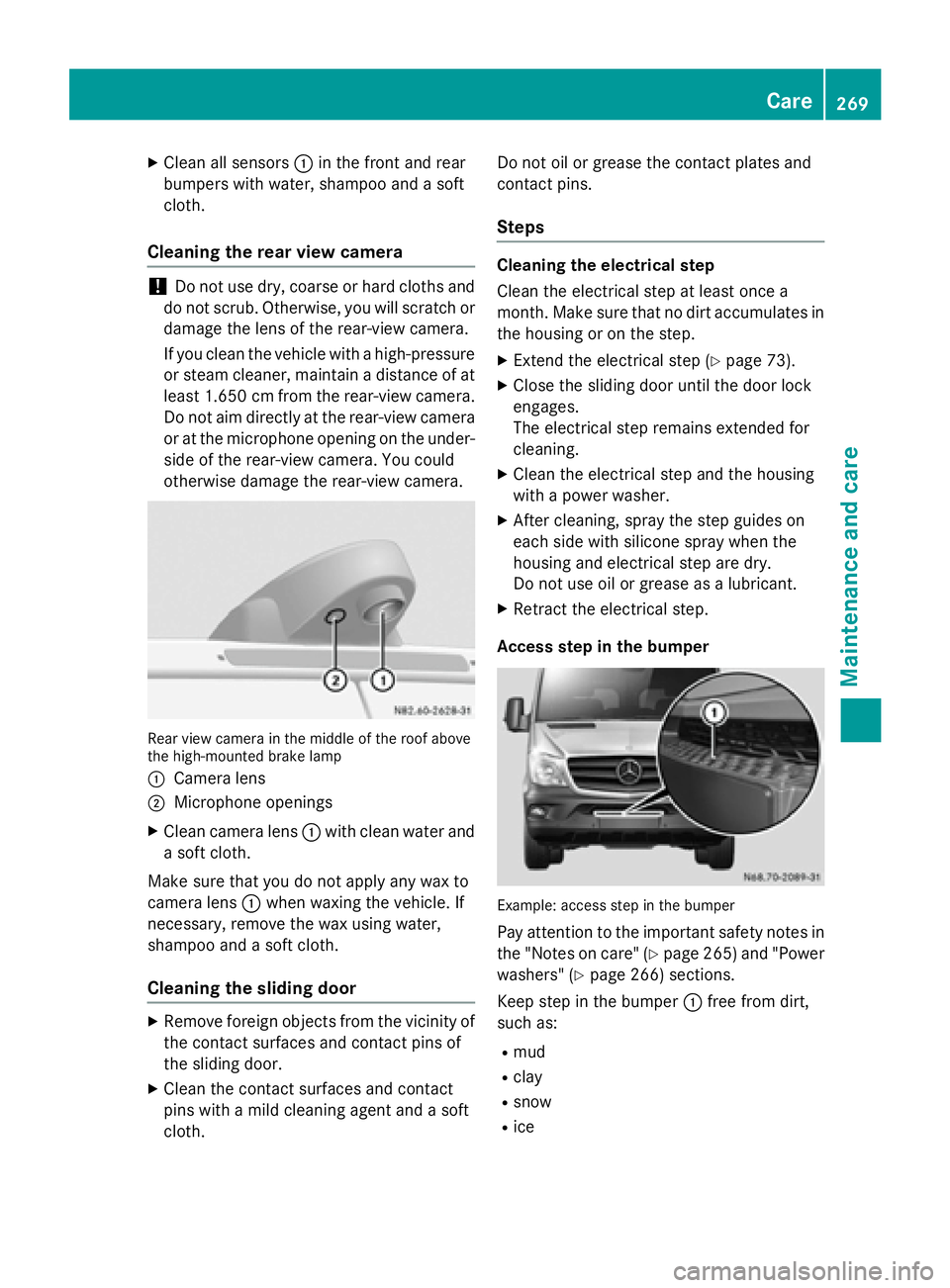
otherwise damage the rear-view camera. Rear view camera in the middle of the roof above
the high-mounted brake lamp
0043 Camera lens
0044 Microphone openings
X Clean camera lens 0043with clean water and
a soft cloth.
Make sure that you do not apply any wax to
camera lens 0043when waxing the vehicle. If
necessary, remove the wax using water,
shampoo and a soft cloth.
Cleaning the sliding door X
Remove foreign objects from the vicinity of
the contact surfaces and contact pins of
the sliding door.
X Clean the contact surfaces and contact
pins with a mild cleaning agent and a soft
cloth. Do not oil or grease the contact plates and
contact pins.
Steps Cleaning the electrical step
Clean the electrical step at least once a
month. Make sure that no dirt accumulates in the housing or on the step.
X Extend the electrical step (Y page 73).
X Close the sliding door until the door lock
engages.
The electrical step remains extended for
cleaning.
X Clean the electrical step and the housing
with a power washer.
X After cleaning, spray the step guides on
each side with silicone spray when the
housing and electrical step are dry.
Do not use oil or grease as a lubricant.
X Retract the electrical step.
Access step in the bumper Example: access step in the bumper
Pay attention to the important safety notes inthe "Notes on care" (Y page 265) and "Power
washers" (Y page 266) sections.
Keep step in the bumper 0043free from dirt,
such as:
R mud
R clay
R snow
R ice Care
269Maintenance and care Z
Page 315 of 334
i
If you have mounted a spare wheel, the
tire pressure monitor (Y page 291) will not
function for this wheel. The spare wheel is
not equipped with a sensor for monitoring
tire pressure. Removing and installing the spare
wheel
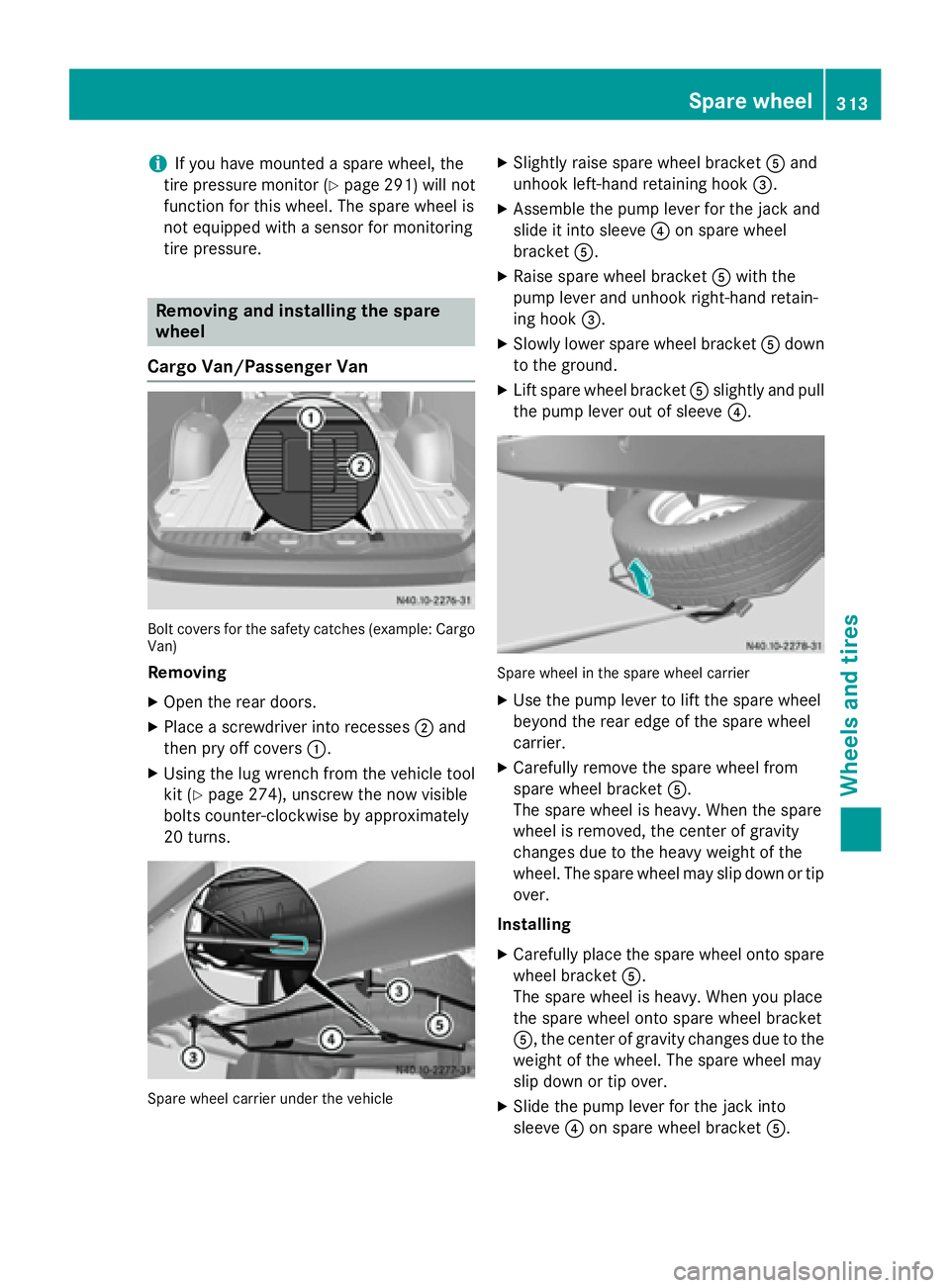
Cargo Van/Passenger Van Bolt covers for the safety catches (example: Cargo
Van)
Removing
X Open the rear doors.
X Place a screwdriver into recesses 0044and
then pry off covers 0043.
X Using the lug wrench from the vehicle tool
kit (Y page 274), unscrew the now visible
bolts counter-clockwise by approximately
20 turns. Spare wheel carrier under the vehicle X
Slightly raise spare wheel bracket 0083and
unhook left-hand retaining hook 0087.
X Assemble the pump lever for the jack and
slide it into sleeve 0085on spare wheel
bracket 0083.
X Raise spare wheel bracket 0083with the
pump lever and unhook right-hand retain-
ing hook 0087.
X Slowly lower spare wheel bracket 0083down
to the ground.
X Lift spare wheel bracket 0083slightly and pull
the pump lever out of sleeve 0085. Spare wheel in the spare wheel carrier
X Use the pump lever to lift the spare wheel
beyond the rear edge of the spare wheel
carrier.
X Carefully remove the spare wheel from
spare wheel bracket 0083.
The spare wheel is heavy. When the spare
wheel is removed, the center of gravity
changes due to the heavy weight of the
wheel. The spare wheel may slip down or tip over.
Installing X Carefully place the spare wheel onto spare
wheel bracket 0083.
The spare wheel is heavy. When you place
the spare wheel onto spare wheel bracket
0083, the center of gravity changes due to the
weight of the wheel. The spare wheel may
slip down or tip over.
X Slide the pump lever for the jack into
sleeve 0085on spare wheel bracket 0083. Spare wheel
313Wheels and tires Z