speed MERCEDES-BENZ SPRINTER 2015 MY15 Operator’s Manual
[x] Cancel search | Manufacturer: MERCEDES-BENZ, Model Year: 2015, Model line: SPRINTER, Model: MERCEDES-BENZ SPRINTER 2015Pages: 334, PDF Size: 5.94 MB
Page 59 of 334
As a result, they could:
R activate vehicle equipment and become
trapped, for example
R activate or deactivate systems, thereby
endangering other road users
Unsecured animals could also be flung around the vehicle in the event of an accident or sud-
den steering or braking, thereby injuring vehi- cle occupants. There is a risk of an accident
and injury.
Never leave animals unattended in the vehi-
cle. Always secure animals properly during
the journey, e.g. use a suitable animal trans-
port box. Driving safety systems
Overview
In this section, you will find information about the following driving safety systems:
R ABS ( Anti-lock BrakingSystem)
R ASR (A cceleration SkidControl)
R BAS (B rakeAssist System)
R EBD ( Electronic Brake Force Distribution)
R ESP ®
(E lectronic StabilityProgram) Important safety notes
If you fail to adapt your driving style or if you
are inattentive, the driving safety systems can
neither reduce the risk of accident nor over-
ride the laws of physics. Driving safety sys-
tems are merely aids designed to assist driv- ing. You are responsible for the distance to
the vehicle in front, for vehicle speed, braking in good time and for staying in your lane.
Always adapt your driving style to the prevail-
ing road and weather conditions and maintain a sufficient, safe distance from other road
users. Drive carefully.
The driving safety systems described can only
attain their maximum effectiveness when
there is optimum contact between the tires and the road can. Pay particular attention to
the information regarding tires, recommen-
ded minimum tire tread depth etc. under
"Wheels and tires" (Y page 284).
In wintry driving conditions, always use winter
tires (M+S tires) and if necessary, snow
chains. This is the only way to get the full
benefit from the driving safety systems
described. ABS (Anti-lock Braking System)
Important safety notes Observe the important safety guidelines for
the driving safety system (Y
page 57). G
WARNING
If ABS is faulty, the wheels could lock when
braking. The steerability and braking charac-
teristics may be severely impaired. Addition-
ally, further driving safety systems are deac-
tivated. There is an increased danger of skid- ding and accidents.
Drive on carefully. Have ABS checked imme-
diately at a qualified specialist workshop.
If ABS is malfunctioning, other systems will
also fail, including driving safety systems.
Observe the information relating to the 0025
warning lamp (Y page 218).
ABS regulates brake pressure in such a way
that the wheels do not lock when you brake.
This allows you to continue steering the vehi-
cle when braking.
ABS works from a speed of about 5 mph
(8 km/h), regardless of road-surface condi-
tions. ABS works on slippery surfaces, even
when you only brake gently.
The yellow 0025warning lamp in the instru-
ment cluster lights up when the ignition is
switched on. The lamp goes out when the
engine starts running. Driving safety systems
57Safety Z
Page 62 of 334
Crosswind Assist does not react:
R in the event of severe jolts and vibrations,
e.g. as a result of uneven surfaces or pot-
holes
R if the vehicle loses traction, e.g. on snow or
ice or when aquaplaning
R to large and sudden steering movements
by the driver
Crosswind Assist is operational again as soon as the driving conditions return to normal.
Crosswind Assist detects strong crosswind
gusts that can impair the road holding of your
vehicle when driving straight ahead. Cross-
wind Assist intervenes depending on the
direction and strength of the crosswind.
A stabilizing brake application helps you to
keep the vehicle on track.
Information appears in the instrument cluster
In the event that Crosswind Assist intervenes noticeably.
On vehicles without steering wheel but-
tons: the0072 indicator lamp in the instru-
ment cluster flashes.
On vehicles with steering wheel buttons:
the 0072 indicator lamp in the instrument
cluster flashes and the message Crosswind
Crosswind
Assist Active Assist Active appears in the multifunction
display.
Crosswind Assist is active above a vehicle
speed of 50 mph (80 km/h)when the vehicle
is driving straight ahead or cornering gently. Emergency exit
Emergency exit window
G
WARNING
The emergency exit window cannot be locked in place. You risk injury if you exit the vehicle
through the emergency exit window.
R Make sure that nobody becomes trapped,
both when closing and when opening the
emergency exit window.
R The opened emergency exit window must
be held in place by another person. Pay attention to traffic conditions.
G
WARNING
If the emergency exit window is unlocked
while driving, it could open and slam shut and consequently fall down. There is a risk of an
accident and injury.
Before starting off, make sure that the emer-
gency exit window is locked and the locking
pins are undamaged.
! Make sure there is sufficient clearance
when opening the emergency exit window. Hold the open window in position. You
could otherwise damage the emergency
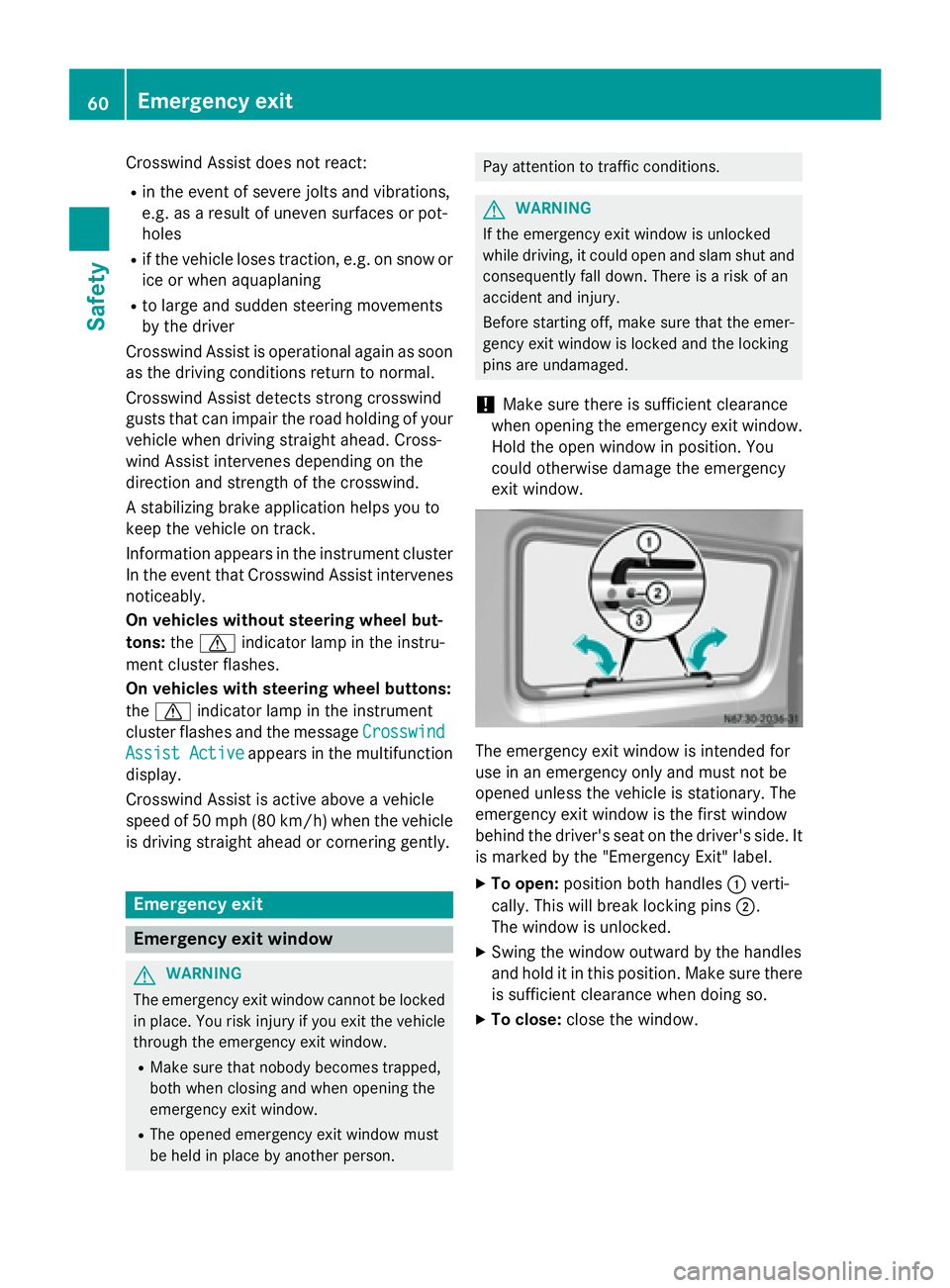
exit window. The emergency exit window is intended for
use in an emergency only and must not be
opened unless the vehicle is stationary. The
emergency exit window is the first window
behind the driver's seat on the driver's side. It
is marked by the "Emergency Exit" label.
X To open: position both handles 0043verti-
cally. This will break locking pins 0044.
The window is unlocked.
X Swing the window outward by the handles
and hold it in this position. Make sure there
is sufficient clearance when doing so.
X To close: close the window. 60
Emergency exitSafety
Page 73 of 334
Central locking
Important safety notes
G
WARNING
Activate the child-proof door locks if children are traveling in the vehicle. The children could
otherwise open the doors while the vehicle is
in motion, injuring themselves and others. G
WARNING
Do not leave children unsupervised in the
vehicle, even if they are secured in a child
restraint system. Children could otherwise
injure themselves on parts of the vehicle.
They could be severely or even fatally injured by prolonged exposure to intense heat or
cold.
If children open a door, they could:
R injure other people
R get out of the vehicle and thereby injure
themselves or be injured by a passing vehi-
cle
R severely injure themselves by falling down,
in particular due to the vehicle height
Always take the key with you when leaving the
vehicle, even if you are only leaving for a short time.
You can open a locked front door from the
inside at any time. You can open a locked
sliding door or rear door from the inside if it
has been previously unlocked from inside. Locking and unlocking manually
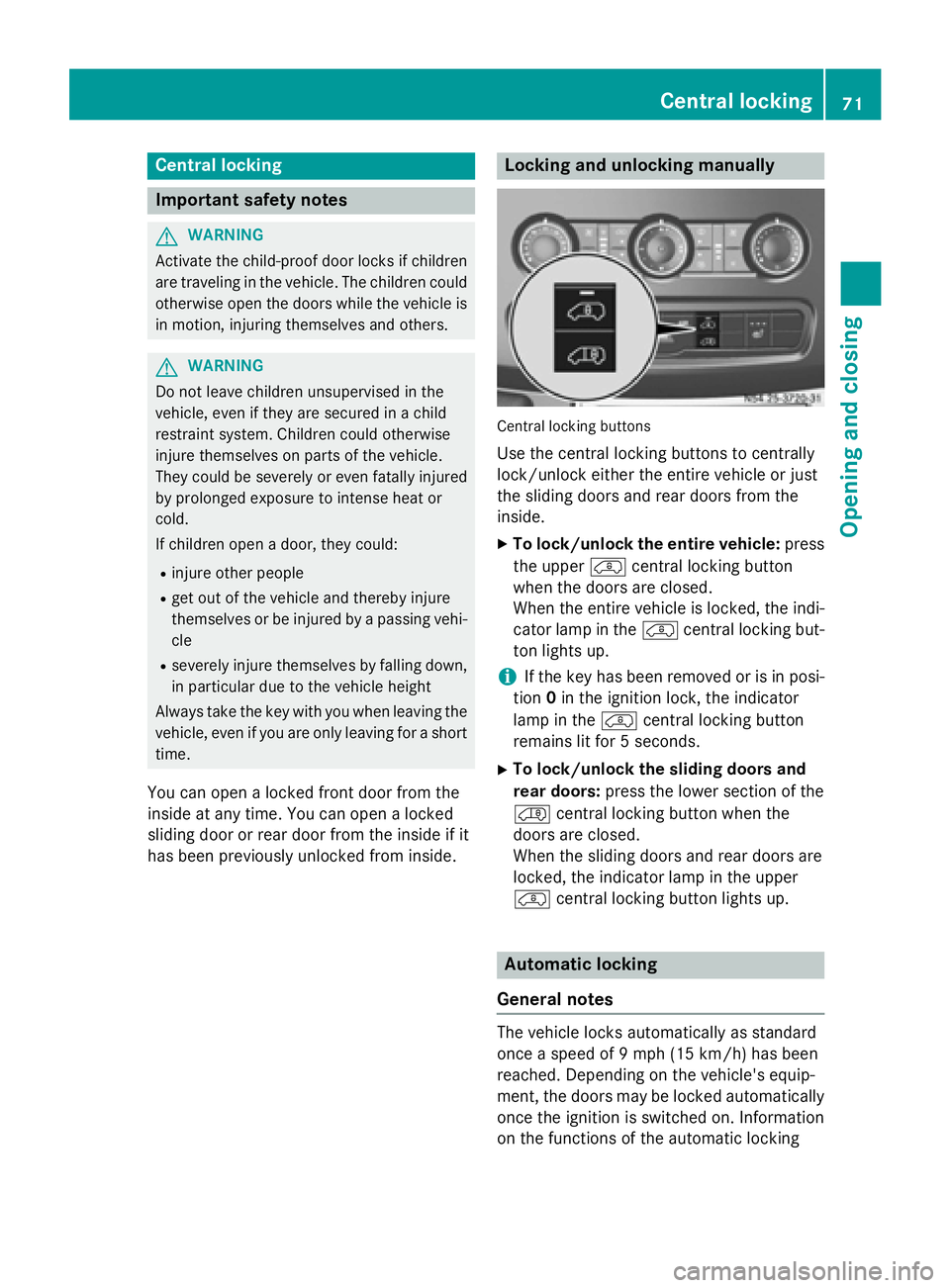
Central locking buttons
Use the central locking buttons to centrally
lock/unlock either the entire vehicle or just
the sliding doors and rear doors from the
inside.
X To lock/unlock the entire vehicle: press
the upper 00BFcentral locking button
when the doors are closed.
When the entire vehicle is locked, the indi-
cator lamp in the 00BFcentral locking but-
ton lights up.
i If the key has been removed or is in posi-
tion 0in the ignition lock, the indicator
lamp in the 00BFcentral locking button
remains lit for 5 seconds.
X To lock/unlock the sliding doors and
rear doors: press the lower section of the
00C0 central locking button when the
doors are closed.
When the sliding doors and rear doors are
locked, the indicator lamp in the upper
00BF central locking button lights up. Automatic locking
General notes The vehicle locks automatically as standard
once a speed of 9 mph
(15 km/h)has been
reached. Depending on the vehicle's equip-
ment, the doors may be locked automatically once the ignition is switched on. Information
on the functions of the automatic locking Central locking
71Opening and closing Z
Page 97 of 334
Cornering lamps
The cornering lamps improve the illumination of the road over a wide angle in the direction
you are turning, enabling better visibility in
tight bends, for example.
The cornering light function switches on
automatically, if:
R you are traveling at a speed of less than
25 mph (40 km/h) and you switch on a turn signal or turn the steering wheel.
R you are traveling at a speed between
25 mph (40 km/ h)and 43 mph (70 km/h)
and turn the steering wheel.
The cornering lamp may remain lit for a short
time, but is automatically switched off after
no more than 3 minutes.
i If reverse gear is engaged the lamp on the
opposite side of the vehicle switches on
instead. Hazard warning lamps
G
WARNING
The rear exterior light will be covered if you:
R open the rear doors by 90°
R open the rear dropside.
The vehicle will then be difficult for other road users to see or will not be seen by them at all,
particularly if it is dark or visibility is poor.
There is a risk of an accident.
You should therefore ensure in this and simi-
lar situations that the vehicle is visible from
the rear in accordance with the relevant
national regulations, by using the warning tri- angle, for instance. Hazard warning lamp switch
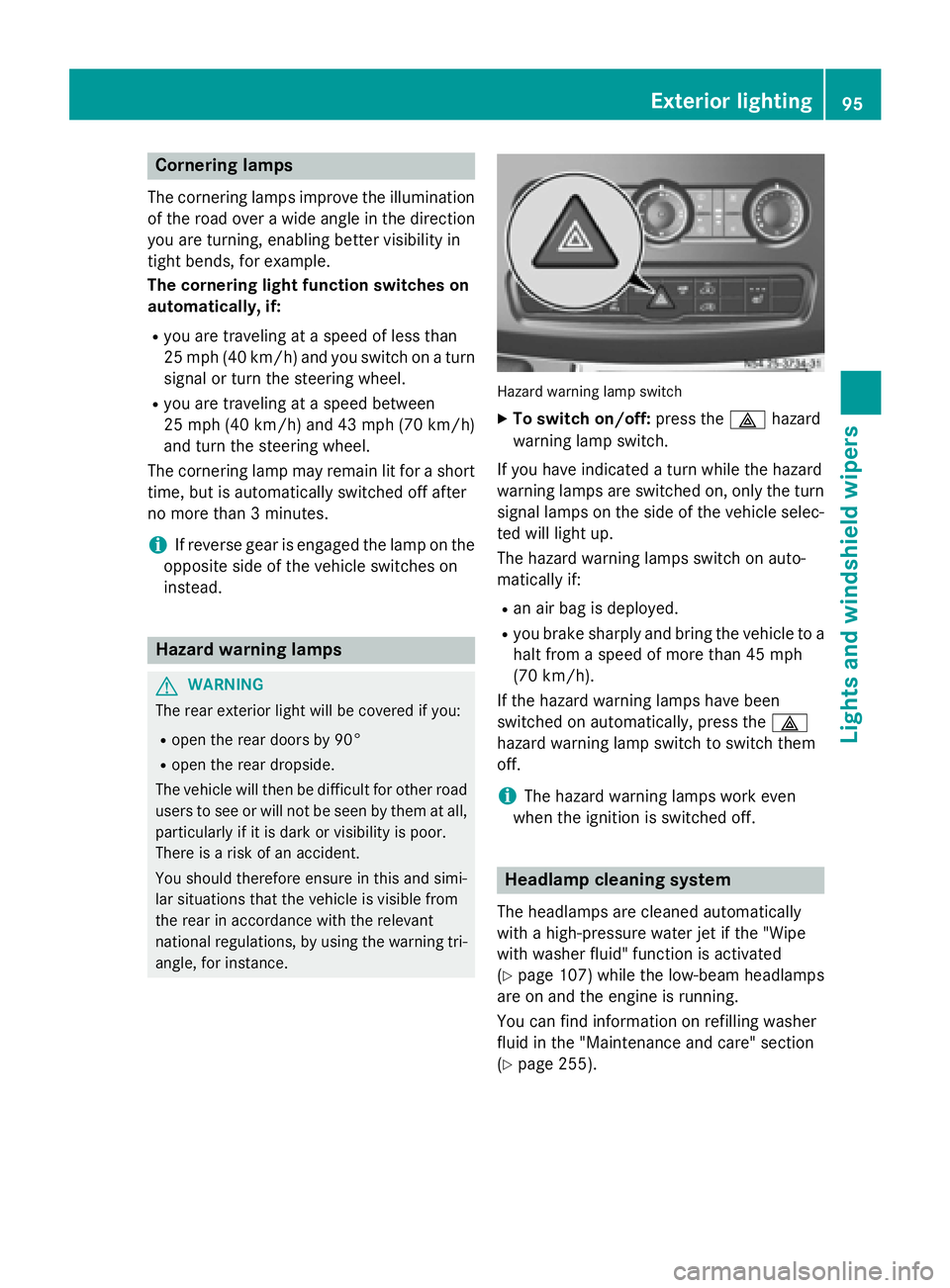
X
To switch on/off: press the002Fhazard
warning lamp switch.
If you have indicated a turn while the hazard
warning lamps are switched on, only the turn signal lamps on the side of the vehicle selec- ted will light up.
The hazard warning lamps switch on auto-
matically if:
R an air bag is deployed.
R you brake sharply and bring the vehicle to a
halt from a speed of more than 45 mph
(70 km/h).
If the hazard warning lamps have been
switched on automatically, press the 002F
hazard warning lamp switch to switch them
off.
i The hazard warning lamps work even
when the ignition is switched off. Headlamp cleaning system
The headlamps are cleaned automatically
with a high-pressure water jet if the "Wipe
with washer fluid" function is activated
(Y page 107) while the low-beam headlamps
are on and the engine is running.
You can find information on refilling washer
fluid in the "Maintenance and care" section
(Y page 255). Exterior lighting
95Lights and windshield wipers Z
Page 98 of 334
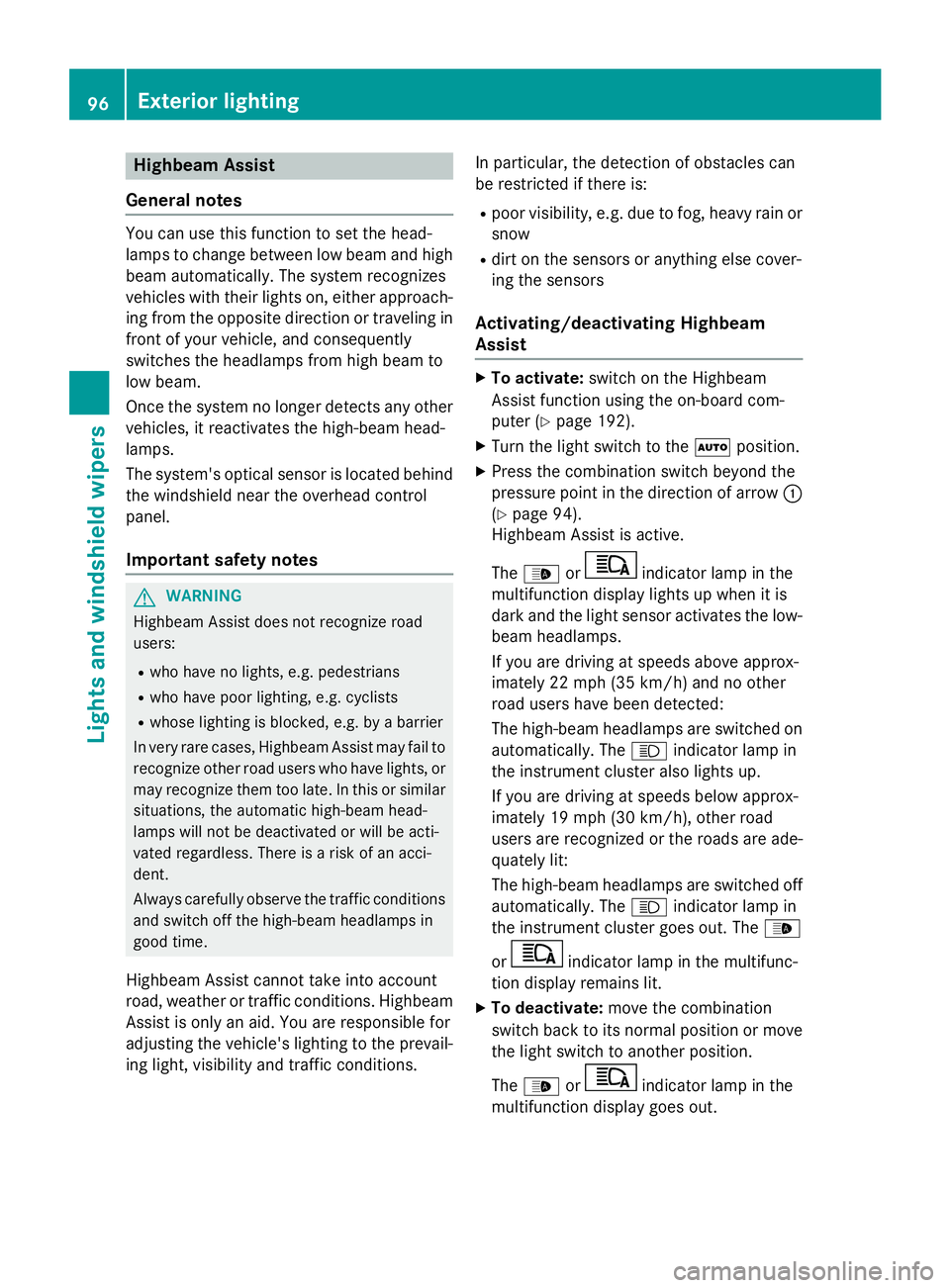
Highbeam Assist
General notes You can use this function to set the head-
lamps to change between low beam and high beam automatically. The system recognizes
vehicles with their lights on, either approach-
ing from the opposite direction or traveling in front of your vehicle, and consequently
switches the headlamps from high beam to
low beam.
Once the system no longer detects any other
vehicles, it reactivates the high-beam head-
lamps.
The system's optical sensor is located behind the windshield near the overhead control
panel.
Important safety notes G
WARNING
Highbeam Assist does not recognize road
users:
R who have no lights, e.g. pedestrians
R who have poor lighting, e.g. cyclists
R whose lighting is blocked, e.g. by a barrier
In very rare cases, Highbeam Assist may fail to
recognize other road users who have lights, or
may recognize them too late. In this or similar situations, the automatic high-beam head-
lamps will not be deactivated or will be acti-
vated regardless. There is a risk of an acci-
dent.
Always carefully observe the traffic conditions and switch off the high-beam headlamps in
good time.
Highbeam Assist cannot take into account
road, weather or traffic conditions. Highbeam Assist is only an aid. You are responsible for
adjusting the vehicle's lighting to the prevail-
ing light, visibility and traffic conditions. In particular, the detection of obstacles can
be restricted if there is:
R poor visibility, e.g. due to fog, heavy rain or
snow
R dirt on the sensors or anything else cover-
ing the sensors
Activating/deactivating Highbeam
Assist X
To activate: switch on the Highbeam
Assist function using the on-board com-
puter (Y page 192).
X Turn the light switch to the 0058position.
X Press the combination switch beyond the
pressure point in the direction of arrow 0043
(Y page 94).
Highbeam Assist is active.
The 00CE or indicator lamp in the
multifunction display lights up when it is
dark and the light sensor activates the low-
beam headlamps.
If you are driving at speeds above approx-
imately 22 mph (35 km/h) and no other
road users have been detected:
The high-beam headlamps are switched on
automatically. The 0057indicator lamp in
the instrument cluster also lights up.
If you are driving at speeds below approx-
imately 19 mph (30 km/h), other road
users are recognized or the roads are ade-
quately lit:
The high-beam headlamps are switched off automatically. The 0057indicator lamp in
the instrument cluster goes out. The 00CE
or indicator lamp in the multifunc-
tion display remains lit.
X To deactivate: move the combination
switch back to its normal position or move the light switch to another position.
The 00CE or indicator lamp in the
multifunction display goes out. 96
Exterior lightingLights and windshield wipers
Page 109 of 334
Windshield wipers
Switching the windshield wiper
on/off
! Do not operate the windshield wipers
when the windshield is dry, as this could
damage the wiper blades. Moreover, dust
that has collected on the windshield can
scratch the glass if wiping takes place when the windshield is dry.
If it is necessary to switch on the windshield wipers in dry weather conditions, always
use washer fluid when operating the wind-
shield wipers.
! If the windshield wipers leave smears on
the windshield after the vehicle has been
washed in an automatic car wash, wax or
other residues may be the reason for this.
Clean the windshield using washer fluid
after washing the vehicle in an automatic
car wash.
! Vehicles with rain/light sensor:
Switch the wipers off in dry weather. Oth-
erwise, dirt or optical effects may cause
undesired windshield wiper sweeps. This
could then damage the windshield wiper
blades or scratch the windshield.
The windshield will no longer be wiped prop-
erly if the wiper blades are worn. Replace the wiper blades twice a year (Y page 108), ide-
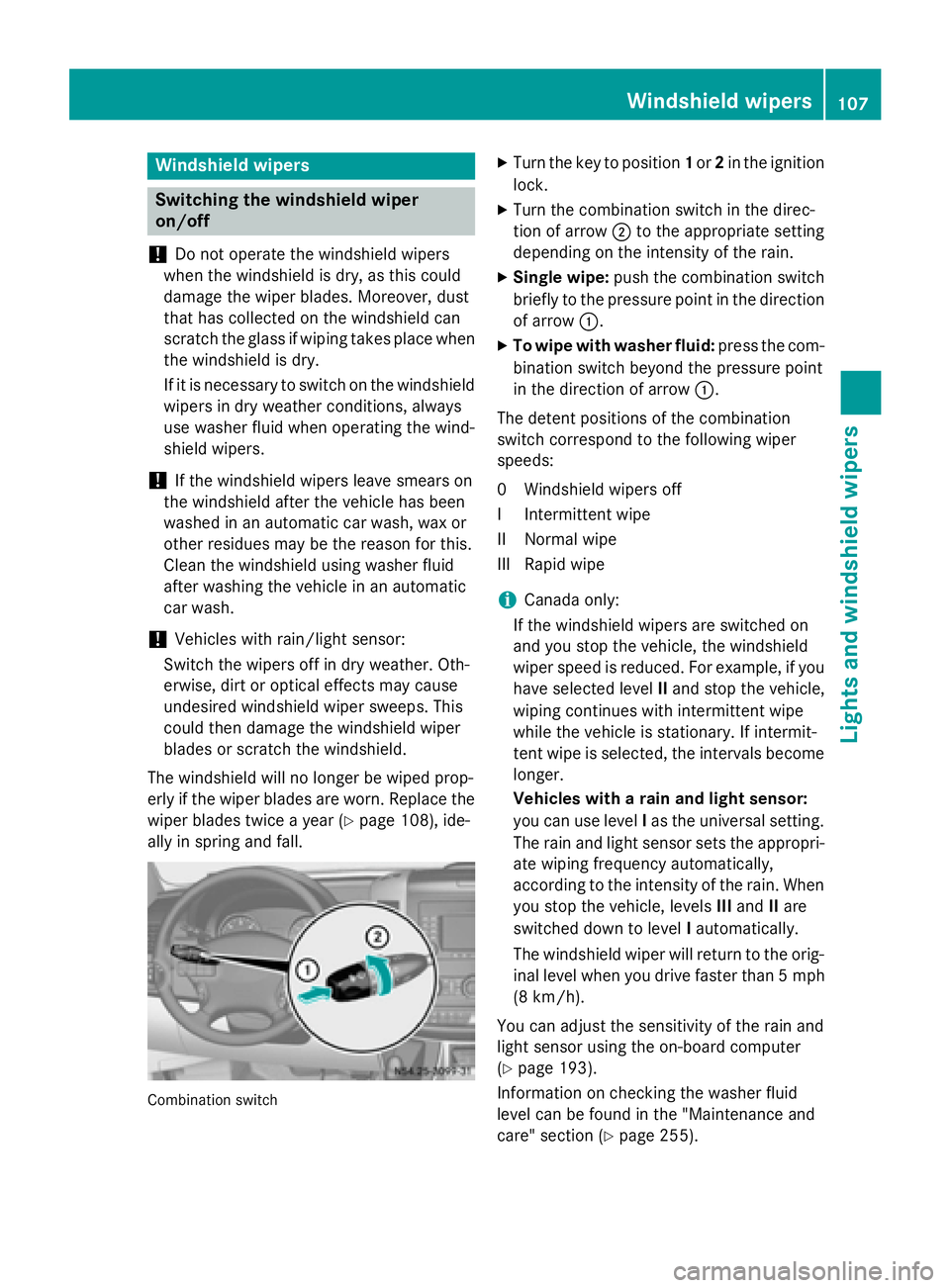
ally in spring and fall. Combination switch X
Turn the key to position 1or 2in the ignition
lock.
X Turn the combination switch in the direc-
tion of arrow 0044to the appropriate setting
depending on the intensity of the rain.
X Single wipe: push the combination switch
briefly to the pressure point in the direction
of arrow 0043.
X To wipe with washer fluid: press the com-
bination switch beyond the pressure point
in the direction of arrow 0043.
The detent positions of the combination
switch correspond to the following wiper
speeds:
0W indshield wipers off
II ntermittent wipe
II Normal wipe
III Rapid wipe
i Canada only:
If the windshield wipers are switched on
and you stop the vehicle, the windshield
wiper speed is reduced. For example, if you have selected level IIand stop the vehicle,
wiping continues with intermittent wipe
while the vehicle is stationary. If intermit-
tent wipe is selected, the intervals become
longer.
Vehicles with a rain and light sensor:
you can use level Ias the universal setting.
The rain and light sensor sets the appropri-
ate wiping frequency automatically,
according to the intensity of the rain. When
you stop the vehicle, levels IIIand IIare
switched down to level Iautomatically.
The windshield wiper will return to the orig- inal level when you drive faster than 5 mph
(8 km/h).
You can adjust the sensitivity of the rain and
light sensor using the on-board computer
(Y page 193).
Information on checking the washer fluid
level can be found in the "Maintenance and
care" section (Y page 255). Windshield wipers
107Lights andwindshield wipers Z
Page 111 of 334
Problems with the windshield wipers
Problem
Possible causes/consequences and
0050
0050Solutions The windshield wiper
jams. Leaves or snow, for example, may be obstructing the windshield
wiper movement. The wiper motor has switched off.
X Stop the vehicle as soon as possible, paying attention to road
and traffic conditions.
X For safety reasons, you should remove the key from the ignition
lock.
X Remove the cause of the obstruction.
X Switch on the windshield wipers again. The windshield wiper
does not move at all. There is a malfunction in the windshield wiper drive.
X Select another wiper speed on the combination switch.
X Have the windshield wipers checked at a qualified specialist
workshop. The washer fluid com-
ing from the spray noz-
zles no longer hits the
center of the wind-
shield. The spray nozzles are misaligned.
X Have the spray nozzles checked at a qualified specialist work-
shop. Windshield wipers
109Lights and windshield wipers Z
Page 114 of 334
Useful information
This Operator's Manual describes all models
as well as standard and optional equipment of your vehicle that were available at the time of going to print. Country-specific variations are
possible. Note that your vehicle may not be
equipped with all of the described functions.
This also applies to systems and functions
relevant to safety.
Read the information on qualified specialist
workshops (Y page 25). Overview of climate control systems
Important safety notes
Observe the recommended settings on the
following pages. Otherwise, the windows
could fog up.
Climate control regulates the temperature
and the humidity in the vehicle interior and
filters undesirable substances from the air.
Climate control is only operational when the
engine is running. The system only functions
optimally when the side windows are closed.
i Ventilate the vehicle for a brief period
during warm weather. In order to cool the
vehicle more rapidly, switch climate control
to air-recirculation mode briefly. This will
speed up the cooling process and the
desired vehicle interior temperature will be reached more quickly.
i The integrated filter can filter out most
particles of dust and completely filters out
pollen. A clogged filter reduces the airflow
into the vehicle interior. For this reason,
you should always observe the interval for
replacing the filter, which is specified in the Maintenance Booklet. As it depends on
environmental conditions, e.g. heavy air
pollution, the interval may be shorter than
that stated in the Maintenance Booklet. 112
Overview of climate control systemsClimate control
Page 118 of 334
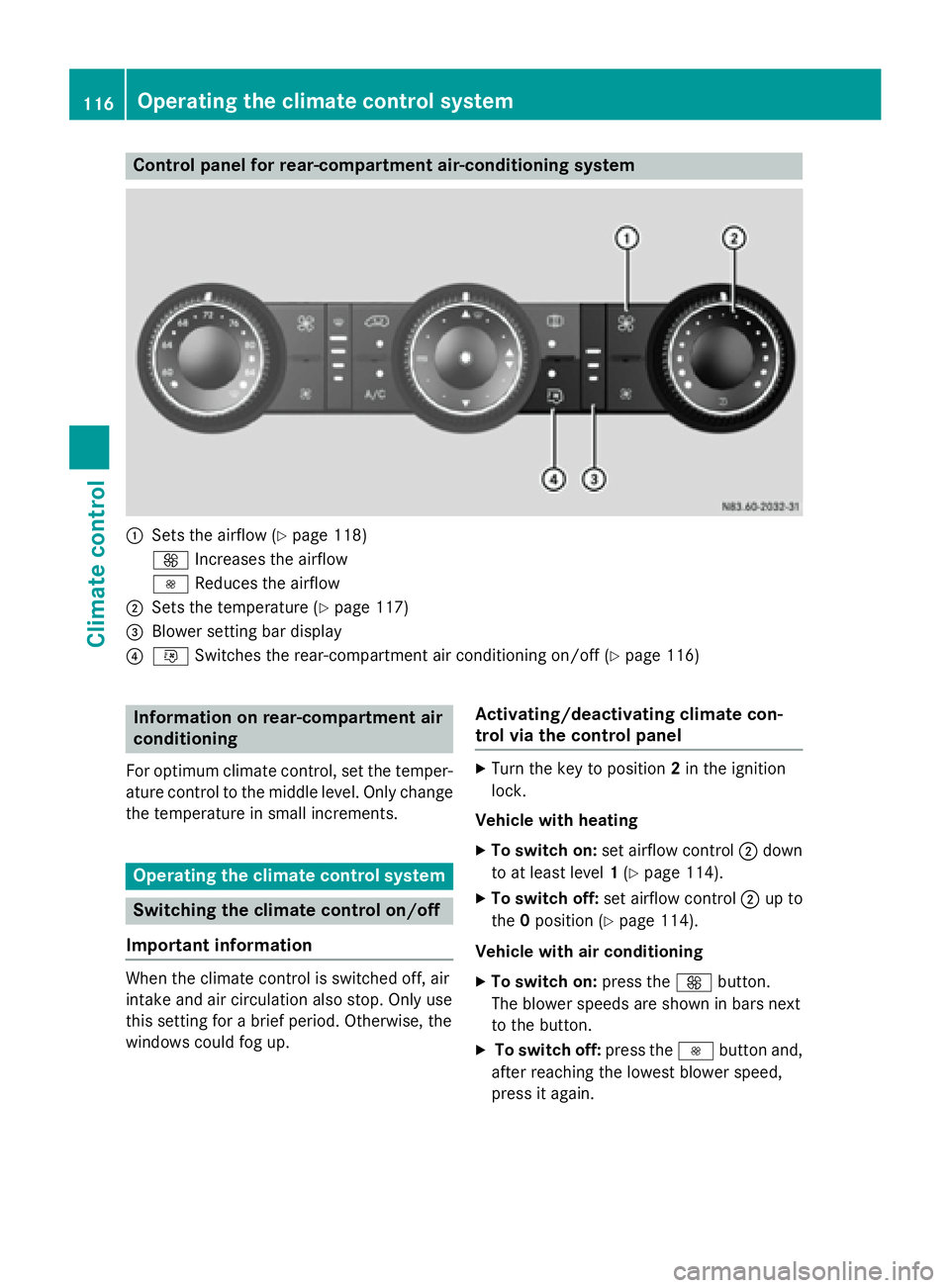
Control panel for rear-compartment air-conditioning system
0043
Sets the airflow (Y page 118)
0097 Increases the airflow
0095 Reduces the airflow
0044 Sets the temperature (Y page 117)
0087 Blower setting bar display
0085 0074 Switches the rear-compartment air conditioning on/off (Y page 116)Information on rear-compartment air
conditioning
For optimum climate control, set the temper- ature control to the middle level. Only change
the temperature in small increments. Operating the climate control system
Switching the climate control on/off
Important information When the climate control is switched off, air
intake and air circulation also stop. Only use
this setting for a brief period. Otherwise, the
windows could fog up. Activating/deactivating climate con-
trol via the control panel X
Turn the key to position 2in the ignition
lock.
Vehicle with heating
X To switch on: set airflow control 0044down
to at least level 1(Y page 114).
X To switch off: set airflow control 0044up to
the 0position (Y page 114).
Vehicle with air conditioning
X To switch on: press the0097button.
The blower speeds are shown in bars next
to the button.
X To switch off: press the0095button and,
after reaching the lowest blower speed,
press it again. 116
Operating the climate control systemClimate control
Page 120 of 334
007C
Directs air to the windshield, the air
vents and into the footwell
007D Directs air to the air vents and into
the footwell
Adjusting X
Switch on climate control (Y page 116).
X Set air-distribution control 0085for the heat-
ing (Y page 113 )or air-conditioning system
0083 (Ypage 114) to the corresponding sym-
bol. Setting the airflow
X Switch on climate control (Y page 116).
X Vehicle with heating/rear-compart-
ment heating: set airflow control 0044of the
heating (Y page 113) or of the rear-com-
partment heating (Y page 115) to the
desired level.
X Vehicle with air conditioning/rear-com-
partment air conditioning: press the
0095 button to reduce or the 0097button
to increase the airflow.
The blower speeds are shown in bars next
to the buttons. Defrosting the windows
You can use the "defrosting" function to
defrost the windshield or to demist the inside of the windshield and the side windows.
Only use the following settings until the win-
dows are clear again.
X Vehicle with window heating: switch on
the front (Y page 119) and/or rear window
defroster (Y page 119) .
X Switch on climate control (Y page 116).
Vehicle with heating
X Set temperature control 0043and airflow
control 0044to0085 (Ypage 113).
X Set air-distribution control 0085to007E
0085 (Ypage 113). X
Close the center air vents (Y page 121) and
the air outlets for the headroom and the
rear compartment (Y page 121).
X Direct the side air vents towards the side
windows and open the defroster vents for
the side windows (Y page 121).
Vehicle with air conditioning X Set temperature control 0043to
0085 (Ypage 114).
X Press the 0097button until the maximum
blower output is reached.
All bars in the display next to the button
light up.
X Set air-distribution control 0083to007E
0085 (Ypage 114).
X Close the center air vents (Y page 121) and
the air outlets for the headroom and the
rear compartment (Y page 121).
X Direct the side air vents towards the side
windows and open the defroster vents for
the side windows (Y page 121). Clearing condensation from the win-
dows
Windows fogged up on the inside You should only select this setting until the
windows are clear again.
X Vehicle with window heating: switch on
the front (Y page 119) and/or rear window
defroster (Y page 119) .
X Switch on climate control (Y page 116).
X Switch off air-recirculation mode
(Y page 120).
Vehicle with heating
X Set temperature control 0043to a higher tem-
perature (Y page 113).
X Set airflow control 0044to a higher blower
setting. It should be set at least to level two
(Y page 113).
X Set air-distribution control 0085to007E
0085 (Ypage 113). 118
Operating the climate control systemClimate control