light MERCEDES-BENZ SPRINTER 2015 MY15 Operator’s Manual
[x] Cancel search | Manufacturer: MERCEDES-BENZ, Model Year: 2015, Model line: SPRINTER, Model: MERCEDES-BENZ SPRINTER 2015Pages: 334, PDF Size: 5.94 MB
Page 120 of 334
007C
Directs air to the windshield, the air
vents and into the footwell
007D Directs air to the air vents and into
the footwell
Adjusting X
Switch on climate control (Y page 116).
X Set air-distribution control 0085for the heat-
ing (Y page 113 )or air-conditioning system
0083 (Ypage 114) to the corresponding sym-
bol. Setting the airflow
X Switch on climate control (Y page 116).
X Vehicle with heating/rear-compart-
ment heating: set airflow control 0044of the
heating (Y page 113) or of the rear-com-
partment heating (Y page 115) to the
desired level.
X Vehicle with air conditioning/rear-com-
partment air conditioning: press the
0095 button to reduce or the 0097button
to increase the airflow.
The blower speeds are shown in bars next
to the buttons. Defrosting the windows
You can use the "defrosting" function to
defrost the windshield or to demist the inside of the windshield and the side windows.
Only use the following settings until the win-
dows are clear again.
X Vehicle with window heating: switch on
the front (Y page 119) and/or rear window
defroster (Y page 119) .
X Switch on climate control (Y page 116).
Vehicle with heating
X Set temperature control 0043and airflow
control 0044to0085 (Ypage 113).
X Set air-distribution control 0085to007E
0085 (Ypage 113). X
Close the center air vents (Y page 121) and
the air outlets for the headroom and the
rear compartment (Y page 121).
X Direct the side air vents towards the side
windows and open the defroster vents for
the side windows (Y page 121).
Vehicle with air conditioning X Set temperature control 0043to
0085 (Ypage 114).
X Press the 0097button until the maximum
blower output is reached.
All bars in the display next to the button
light up.
X Set air-distribution control 0083to007E
0085 (Ypage 114).
X Close the center air vents (Y page 121) and
the air outlets for the headroom and the
rear compartment (Y page 121).
X Direct the side air vents towards the side
windows and open the defroster vents for
the side windows (Y page 121). Clearing condensation from the win-
dows
Windows fogged up on the inside You should only select this setting until the
windows are clear again.
X Vehicle with window heating: switch on
the front (Y page 119) and/or rear window
defroster (Y page 119) .
X Switch on climate control (Y page 116).
X Switch off air-recirculation mode
(Y page 120).
Vehicle with heating
X Set temperature control 0043to a higher tem-
perature (Y page 113).
X Set airflow control 0044to a higher blower
setting. It should be set at least to level two
(Y page 113).
X Set air-distribution control 0085to007E
0085 (Ypage 113). 118
Operating the climate control systemClimate control
Page 121 of 334
i
If the windows still fog up, set the control
as described for defrosting (Y page 118).
Vehicle with air conditioning
X Activate cooling with air dehumidification
(Y page 117).
X Press the 0066button (Y page 114).
The reheat function is switched on. The
indicator lamp in the switch lights up.
To switch off the reheat function, press the
0066 button again. The indicator lamp in
the button goes out.
Windows fogged up on the outside You should only select this setting until the
windshield is clear again.
X Switch on the windshield wipers
(Y page 107).
X Switch on climate control (Y page 116).
X Adjust air distribution to the footwell
(Y page 117).
X Close the air vents (Y page 120).Window heating
Windshield heater Windshield heater switch
The windshield heater consumes a lot of
power. You should therefore switch it off as
soon as the windshield is clear. The wind-
shield heating otherwise switches off auto-
matically after 5 minutes. X
Start the engine.
X To switch on/off: press the0085switch.
The indicator lamp in the 0085button
comes on when the windshield heating is
switched on.
If the indicator lamp in the 0085windshield
heating button flashes, the on-board voltage
is too low. The windshield heating has
switched off prematurely or cannot be acti-
vated.
X Switch off any consumers that are not
required, e.g. reading lamps or interior
lighting.
If enough on-board voltage is available again
within 30 seconds, the windshield heating
automatically switches on again. It otherwise
remains switched off.
Rear window defroster Rear window defroster switch
The rear window defroster consumes a lot of
power. You should therefore switch it off as
soon as the window is clear. The rear window
heating otherwise only switches off automat- ically after 12 minutes.
X Start the engine.
X To switch on/off: press the0071switch.
The indicator lamp in the 0071button
comes on when the rear window defroster
is switched on.
If the indicator lamp in the 0071rear window
defroster button flashes, the on-board volt-
age is too low. The rear window defroster has Operating the climate control system
119Climate control
Page 122 of 334
switched off prematurely or cannot be acti-
vated.
X Switch off any consumers that are not
required, e.g. reading lamps or interior
lighting.
If enough on-board voltage is available again
within 30 seconds, the rear window heating
automatically switches on again. It otherwise
remains switched off. Switching air-recirculation mode
on/off
Important safety notes When you switch on air-recirculation mode,
the windows could fog up more quickly, in
particular at low outside temperatures. Only
switch on air-recirculation mode for a short
time.
You can deactivate the intake of fresh air if
unpleasant odors enter the vehicle from out-
side. The air inside the vehicle will only be
circulated.
Heating/air-conditioning system Air-recirculation mode switches off automat-
ically after about 10 to 30 minutes, depending
on the outside temperature.
X Switch on climate control (Y page 116).
X To switch on/off: press the008Aswitch.
If the indicator lamp in the 008Abutton
lights up, air-recirculation mode is activa-
ted.
Rear-compartment heating/rear-com-
partment air conditioning On vehicles with a rear-compartment heating
and air-conditioning system, you can acti-
vate/deactivate air-recirculation mode for
the rear-compartment climate control.
X Switch on climate control (Y page 116).
X To activate: set the temperature control of
rear-compartment heating 0087(Ypage 115) or rear-compartment air conditioning sys-
tem
0044(Ypage 116) to the center position.
Only one of the two climate control sys-
tems in the rear compartment is activated
and is in air-recirculation mode.
X To deactivate: turn the temperature con-
trol of rear-compartment heating 0087
(Y page 115) or rear-compartment air-con-
ditioning system 0044(Ypage 116) clock-
wise or counterclockwise. Only change the
temperature in small increments. Adjusting the air vents
Important safety notes
G
WARNING
Very hot or very cold air can flow from the air vents. This could result in burns or frostbite in the immediate vicinity of the air vents. There
is a risk of injury.
Make sure that all vehicle occupants always
maintain a sufficient distance to the air out-
lets. If necessary, redirect the airflow to
another area of the vehicle interior.
The center and side air vents are adjustable.
On vehicles with a rear-compartment air-con-
ditioning system, you can also adjust the air
vents in the roof duct.
i For virtually draft-free ventilation, adjust
the sliders of the center air vents to the
center position.
In order to ensure the direct flow of fresh air
through the air vents into the vehicle interior, please observe the following notes:
R keep the air inlet grille on the hood free of
blockages, such as ice, snow or leaves.
R never cover the vents or the ventilation
grilles in the vehicle interior. 120
Adjusting the air ventsClimate control
Page 126 of 334
i
Switch the heater booster function on or
off with the 006Abutton (Y page 130).
X To activate the auxiliary heating sys-
tem: press and hold the upper section of
the 0084 switch for longer than 2 seconds.
The red indicator lamp in the button lights
up. The auxiliary heating heats or ventilates the interior to the temperature that you
have set. The blower switches to the first
level.
X To switch off auxiliary heating: press the
upper section of the 0084button.
or
X Turn the key in the ignition lock to posi-
tion 0.
The red indicator lamp in the button goes
out. The auxiliary heating operates for
another 2 minutes and then switches off
automatically. Selecting a switch-on time
Important information You can use the on-board computer to define
up to three switch-on times, one of which canbe selected.
The yellow indicator lamp in the 0084button
goes out after 30 minutes, if you:
R have selected the switch-on time and
R turn the key to position 0in the ignition lock
On-board computer without steering
wheel buttons X
Turn the key to position 2in the ignition
lock.
X Press the 0084button.
The 0084 symbol flashes in the display.
or
X Press the 0079menu button on the instru-
ment cluster repeatedly until the 0084
symbol flashes in the display.
X Use the 0074or0075 buttons on the instrument
cluster to select the switch-on time 1 1to 3
3. The switch-on time selected is displayed.
X Wait 10 seconds for the standard display to
appear.
The switch-on time is selected. The yellow
indicator lamp in the 0084button lights up.
If you do not preselect a switch-on time,
and --:-- --:-- is shown in the display, this
means that the automatic switch-on mode
is switched off. The yellow indicator lamp in the 0084 button goes out.
On-board computer with steering wheel
buttons X
Turn the key to position 2in the ignition
lock.
X Press the 0084button.
The Aux. heat Aux. heat submenu is shown in the
display.
If no switch-on time has been selected, the
selected switch-on time is highlighted or
Timer off Timer off is highlighted.
i You can also access the
Aux.
Aux.heat.
heat. sub-
menu via the Settings
Settings(Ypage 188)
menu.
X Use the 0081or0082 button on the steer-
ing wheel to select the desired switch-on
time.
Use the Timer off Timer off setting to deactivate
automatic switch-on.
X Press the 0080button on the steering
wheel.
The switch-on time is selected. The yellow
indicator lamp in the 0084button lights up. 124
Operating the auxiliary heating systemClimate control
Page 127 of 334
Setting the switch-on time
X Use the same method to select a switch-on
time as described in the "Preselecting a
switch-on time" section.
On-board computer without steering
wheel buttons
X Press the 0045reset button on the instru-
ment cluster.
The hour display flashes.
X Use the 0074and 0075buttons on the instru-
ment cluster to set the hours.
X Press the 0045reset button
The minute display flashes.
X Use the 0074and 0075buttons to set the
minutes.
The switch-on time is set and selected.
On-board computer with steering wheel
buttons
X Press the 0063button on the steering
wheel.
The display shows the Hours
Hours menu.
X Use the 0081and0082 buttons on the
steering wheel to set the hours.
X Press the 0063button.
The display shows the Minutes
Minutes menu.
X Use the 0081and0082 buttons to set the
minutes.
X Press the 0080button.
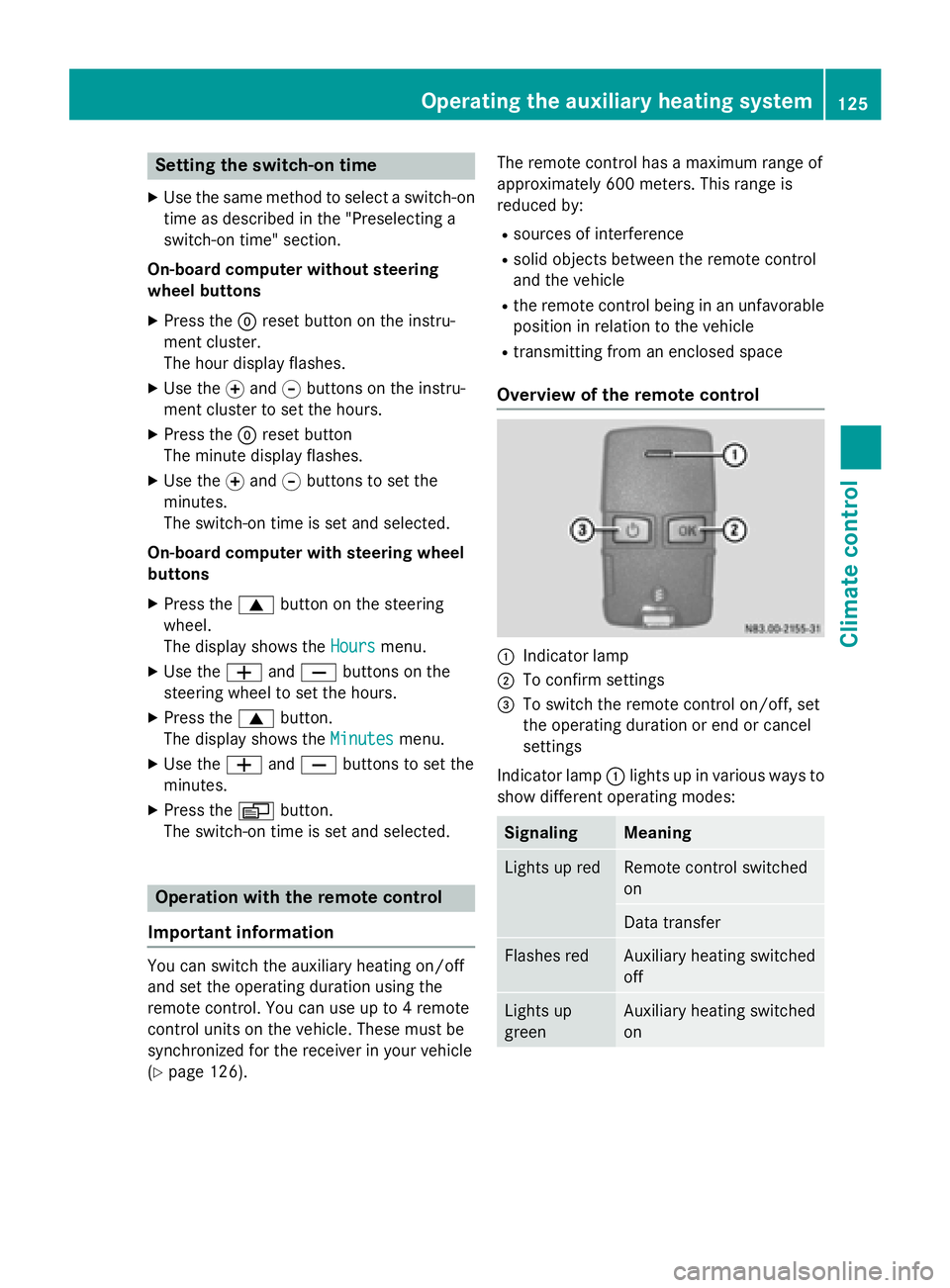
The switch-on time is set and selected. Operation with the remote control
Important information You can switch the auxiliary heating on/off
and set the operating duration using the
remote control. You can use up to 4 remote
control units on the vehicle. These must be
synchronized for the receiver in your vehicle
(Y page 126). The remote control has a maximum range of
approximately 600 meters. This range is
reduced by:
R sources of interference
R solid objects between the remote control
and the vehicle
R the remote control being in an unfavorable
position in relation to the vehicle
R transmitting from an enclosed space
Overview of the remote control 0043
Indicator lamp
0044 To confirm settings
0087 To switch the remote control on/off, set
the operating duration or end or cancel
settings
Indicator lamp 0043lights up in various ways to
show different operating modes: Signaling Meaning
Lights up red Remote control switched
on
Data transfer
Flashes red Auxiliary heating switched
off
Lights up
green Auxiliary heating switched
onOperating the auxiliary heating system
125Climate control Z
Page 128 of 334
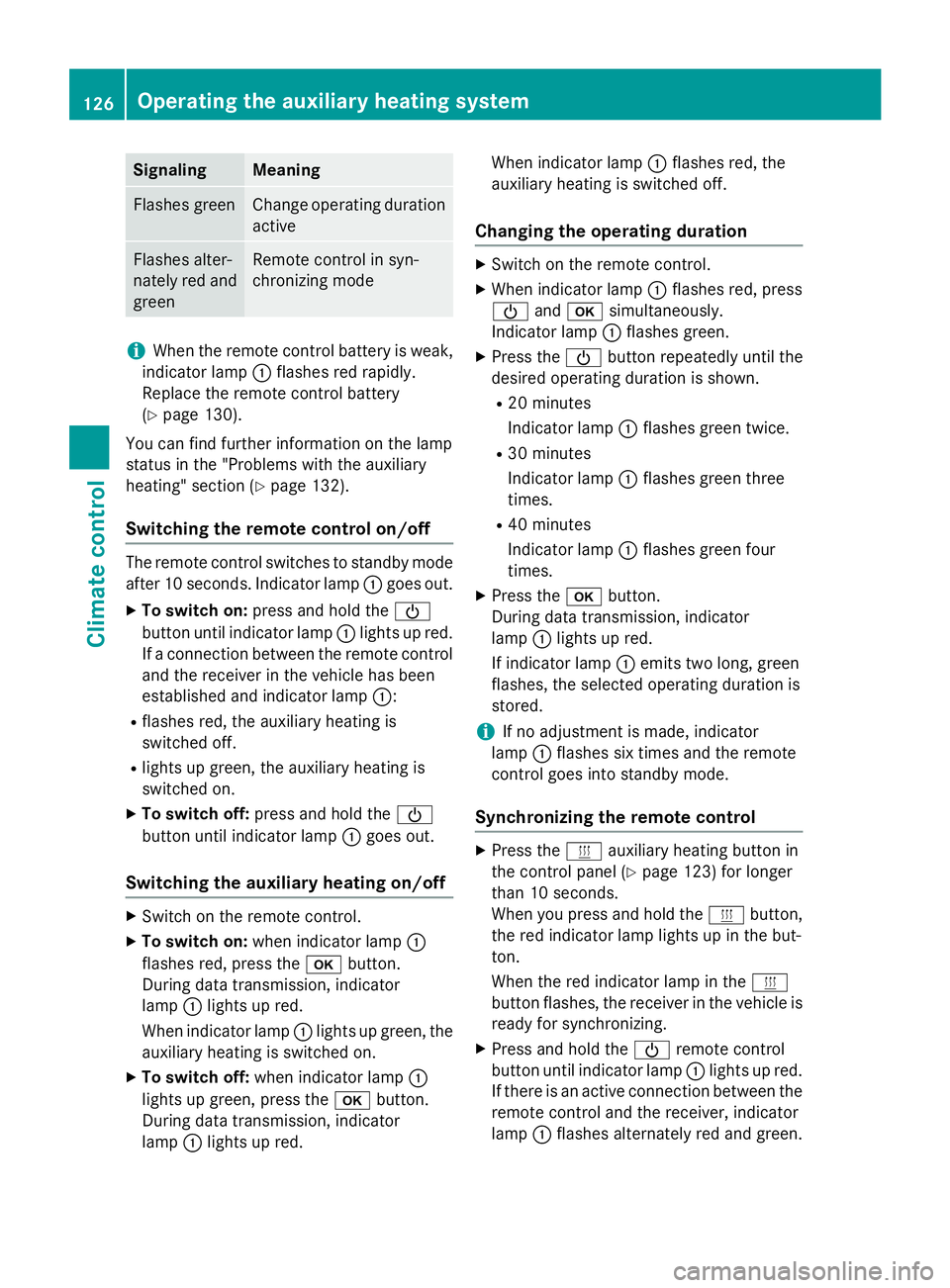
Signaling Meaning
Flashes green Change operating duration
active Flashes alter-
nately red and
green Remote control in syn-
chronizing mode
i
When the remote control battery is weak,
indicator lamp 0043flashes red rapidly.
Replace the remote control battery
(Y page 130).
You can find further information on the lamp
status in the "Problems with the auxiliary
heating" section (Y page 132).
Switching the remote control on/off The remote control switches to standby mode
after 10 seconds. Indicator lamp 0043goes out.
X To switch on: press and hold the 00D0
button until indicator lamp 0043lights up red.
If a connection between the remote control and the receiver in the vehicle has been
established and indicator lamp 0043:
R flashes red, the auxiliary heating is
switched off.
R lights up green, the auxiliary heating is
switched on.
X To switch off: press and hold the 00D0
button until indicator lamp 0043goes out.
Switching the auxiliary heating on/off X
Switch on the remote control.
X To switch on: when indicator lamp 0043
flashes red, press the 0070button.
During data transmission, indicator
lamp 0043lights up red.
When indicator lamp 0043lights up green, the
auxiliary heating is switched on.
X To switch off: when indicator lamp 0043
lights up green, press the 0070button.
During data transmission, indicator
lamp 0043lights up red. When indicator lamp
0043flashes red, the
auxiliary heating is switched off.
Changing the operating duration X
Switch on the remote control.
X When indicator lamp 0043flashes red, press
00D0 and0070 simultaneously.
Indicator lamp 0043flashes green.
X Press the 00D0button repeatedly until the
desired operating duration is shown.
R 20 minutes
Indicator lamp 0043flashes green twice.
R 30 minutes
Indicator lamp 0043flashes green three
times.
R 40 minutes
Indicator lamp 0043flashes green four
times.
X Press the 0070button.
During data transmission, indicator
lamp 0043lights up red.
If indicator lamp 0043emits two long, green
flashes, the selected operating duration is
stored.
i If no adjustment is made, indicator
lamp 0043flashes six times and the remote
control goes into standby mode.
Synchronizing the remote control X
Press the 0084auxiliary heating button in
the control panel (Y page 123) for longer
than 10 seconds.
When you press and hold the 0084button,
the red indicator lamp lights up in the but-
ton.
When the red indicator lamp in the 0084
button flashes, the receiver in the vehicle is ready for synchronizing.
X Press and hold the 00D0remote control
button until indicator lamp 0043lights up red.
If there is an active connection between the remote control and the receiver, indicator
lamp 0043flashes alternately red and green. 126
Operating the auxiliary heating systemClimate control
Page 129 of 334
The remote control is in synchronizing
mode.
i If you press the
00D0button again on the
remote control after starting synchroniza-
tion, you will only synchronize this remote
control unit with the receiver. Any other
remote control units that were synchron-
ized will be cleared. Indicator lamp 0043
flashes alternately red and green (very
slowly).
X Press the 0070button on the remote con-
trol.
During data transmission, indicator
lamp 0043lights up red.
When remote control indicator lamp 0043
emits two long green flashes, the selected
operating time is synchronized. The indica-
tor lamp in the 0084auxiliary heating but-
ton goes out. Operation with the timer
Important safety notes This is only for vehicles with a hot-water aux-
iliary heater. G
DANGER
If a switch-on time has been selected, the
auxiliary heating switches on automatically.
R If the ventilation is insufficient, poisonous
exhaust gases can collect, in particular car-
bon monoxide. This is the case in enclosed
spaces, for example. There is a risk of fatal
injuries.
R If highly flammable substances or flamma-
ble materials are nearby, there is a risk of a
risk of fire and explosion.
Always deactivate the preselected switch-on
times if you stop the vehicle in such or similar situations.
Use the timer to: R activate/deactivate immediate heating
mode
R set up to three switch-on times R
set the operating duration from 10to
120 minutes or to continuous operation
R set the heating level (preselected temper-
ature) to a range between 10 and 30
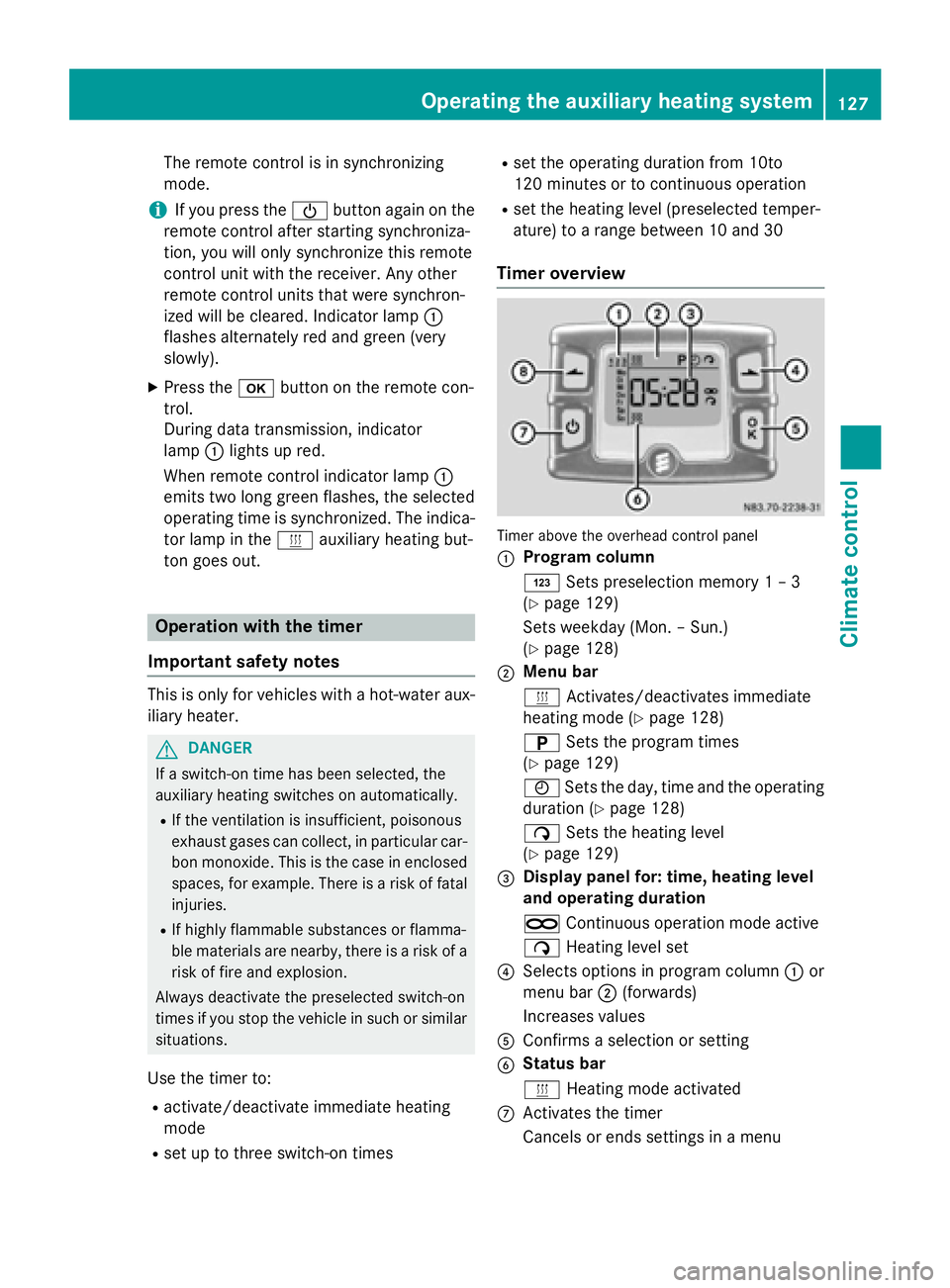
Timer overview Timer above the overhead control panel
0043
Program column
0059
Sets preselection memory 1 – 3
(Y page 129)
Sets weekday (Mon. – Sun.)
(Y page 128)
0044 Menu bar
0084
Activates/deactivates immediate
heating mode (Y page 128)
0045 Sets the program times
(Y page 129)
0045 Sets the day, time and the operating
duration (Y page 128)
00D1 Sets the heating level
(Y page 129)
0087 Display panel for: time, heating level
and operating duration
00D5 Continuous operation mode active
00D1 Heating level set
0085 Selects options in program column 0043or
menu bar 0044(forwards)
Increases values
0083 Confirms a selection or setting
0084 Status bar
0084
Heating mode activated
006B Activates the timer
Cancels or ends settings in a menu Operating the auxiliary heating system
127Climate control Z
Page 132 of 334
X
Using the 00CFand00DB buttons, set the
desired heating level to a range between 10 and 30.
X Press the 0070button.
The heating level is set and the 0084sym-
bol appears. Switching the heater booster function
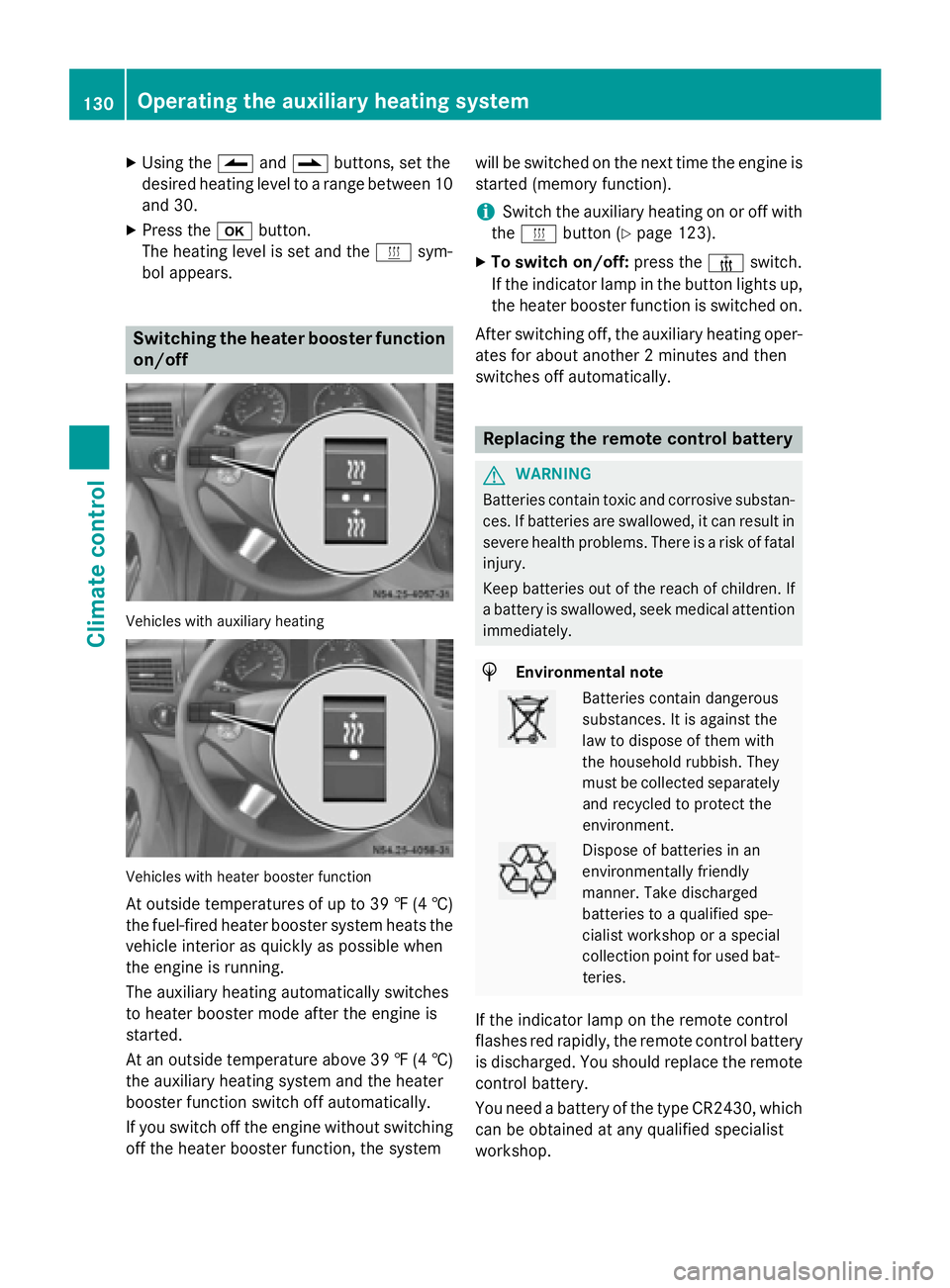
on/off Vehicles with auxiliary heating
Vehicles with heater booster function
At outside temperatures of up to 39 ‡ (4 †)
the fuel-fired heater booster system heats the vehicle interior as quickly as possible when
the engine is running.
The auxiliary heating automatically switches
to heater booster mode after the engine is
started.
At an outside temperature above 39 ‡ (4 †)
the auxiliary heating system and the heater
booster function switch off automatically.
If you switch off the engine without switching off the heater booster function, the system will be switched on the next time the engine is
started (memory function).
i Switch the auxiliary heating on or off with
the 0084 button (Y page 123).
X To switch on/off: press the006Aswitch.
If the indicator lamp in the button lights up,
the heater booster function is switched on.
After switching off, the auxiliary heating oper-
ates for about another 2 minutes and then
switches off automatically. Replacing the remote control battery
G
WARNING
Batteries contain toxic and corrosive substan- ces. If batteries are swallowed, it can result in
severe health problems. There is a risk of fatal injury.
Keep batteries out of the reach of children. If
a battery is swallowed, seek medical attention immediately. H
Environmental note Batteries contain dangerous
substances. It is against the
law to dispose of them with
the household rubbish. They
must be collected separately
and recycled to protect the
environment. Dispose of batteries in an
environmentally friendly
manner. Take discharged
batteries to a qualified spe-
cialist workshop or a special
collection point for used bat-
teries.
If the indicator lamp on the remote control
flashes red rapidly, the remote control battery
is discharged. You should replace the remote
control battery.
You need a battery of the type CR2430, which can be obtained at any qualified specialist
workshop. 130
Operating the auxiliary heating systemClimate control
Page 140 of 334
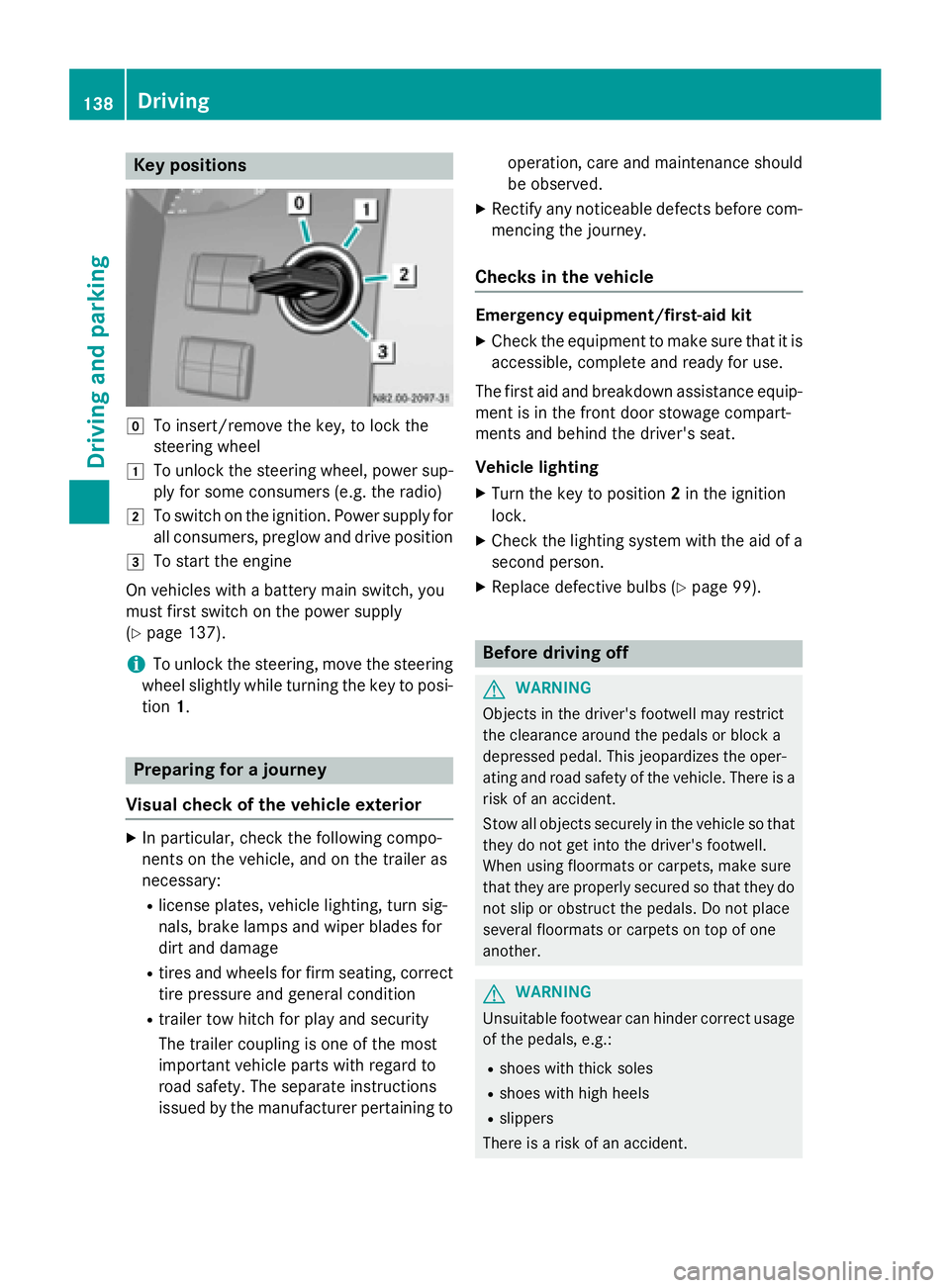
Key positions
005A
To insert/remove the key, to lock the
steering wheel
0047 To unlock the steering wheel, power sup-
ply for some consumers (e.g. the radio)
0048 To switch on the ignition. Power supply for
all consumers, preglow and drive position
0049 To start the engine
On vehicles with a battery main switch, you
must first switch on the power supply
(Y page 137).
i To unlock the steering, move the steering
wheel slightly while turning the key to posi- tion 1. Preparing for a journey
Visual check of the vehicle exterior X
In particular, check the following compo-
nents on the vehicle, and on the trailer as
necessary:
R license plates, vehicle lighting, turn sig-
nals, brake lamps and wiper blades for
dirt and damage
R tires and wheels for firm seating, correct
tire pressure and general condition
R trailer tow hitch for play and security
The trailer coupling is one of the most
important vehicle parts with regard to
road safety. The separate instructions
issued by the manufacturer pertaining to operation, care and maintenance should
be observed.
X Rectify any noticeable defects before com-
mencing the journey.
Checks in the vehicle Emergency equipment/first-aid kit
X Check the equipment to make sure that it is
accessible, complete and ready for use.
The first aid and breakdown assistance equip-
ment is in the front door stowage compart-
ments and behind the driver's seat.
Vehicle lighting
X Turn the key to position 2in the ignition
lock.
X Check the lighting system with the aid of a
second person.
X Replace defective bulbs (Y page 99). Before driving off
G
WARNING
Objects in the driver's footwell may restrict
the clearance around the pedals or block a
depressed pedal. This jeopardizes the oper-
ating and road safety of the vehicle. There is a risk of an accident.
Stow all objects securely in the vehicle so that
they do not get into the driver's footwell.
When using floormats or carpets, make sure
that they are properly secured so that they do not slip or obstruct the pedals. Do not place
several floormats or carpets on top of one
another. G
WARNING
Unsuitable footwear can hinder correct usage of the pedals, e.g.:
R shoes with thick soles
R shoes with high heels
R slippers
There is a risk of an accident. 138
DrivingDriving and pa
rking
Page 141 of 334
Wear suitable footwear to ensure correct
usage of the pedals.
X Secure the load as per the loading guide-
lines (Y page 240).
X Make sure that the floormats and carpets
are properly secured so that they cannot
slip and obstruct the pedals.
X Close all doors. Starting the engine
G
WARNING
Combustion engines emit poisonous exhaust
gases such as carbon monoxide. Inhaling
these exhaust gases leads to poisoning. There is a risk of fatal injury. Therefore never leave
the engine running in enclosed spaces with-
out sufficient ventilation.
! Do not depress the accelerator pedal
when starting the engine.
X Before starting the engine, make sure that:
R all the doors are closed.
R all the vehicle occupants are wearing
their seat belts correctly.
R the parking brake is applied.
i If you depress the brake pedal before
starting the engine, the pedal travel is short
and pedal resistance is high.
If you depress the brake pedal again after
starting the engine, pedal travel and resist-
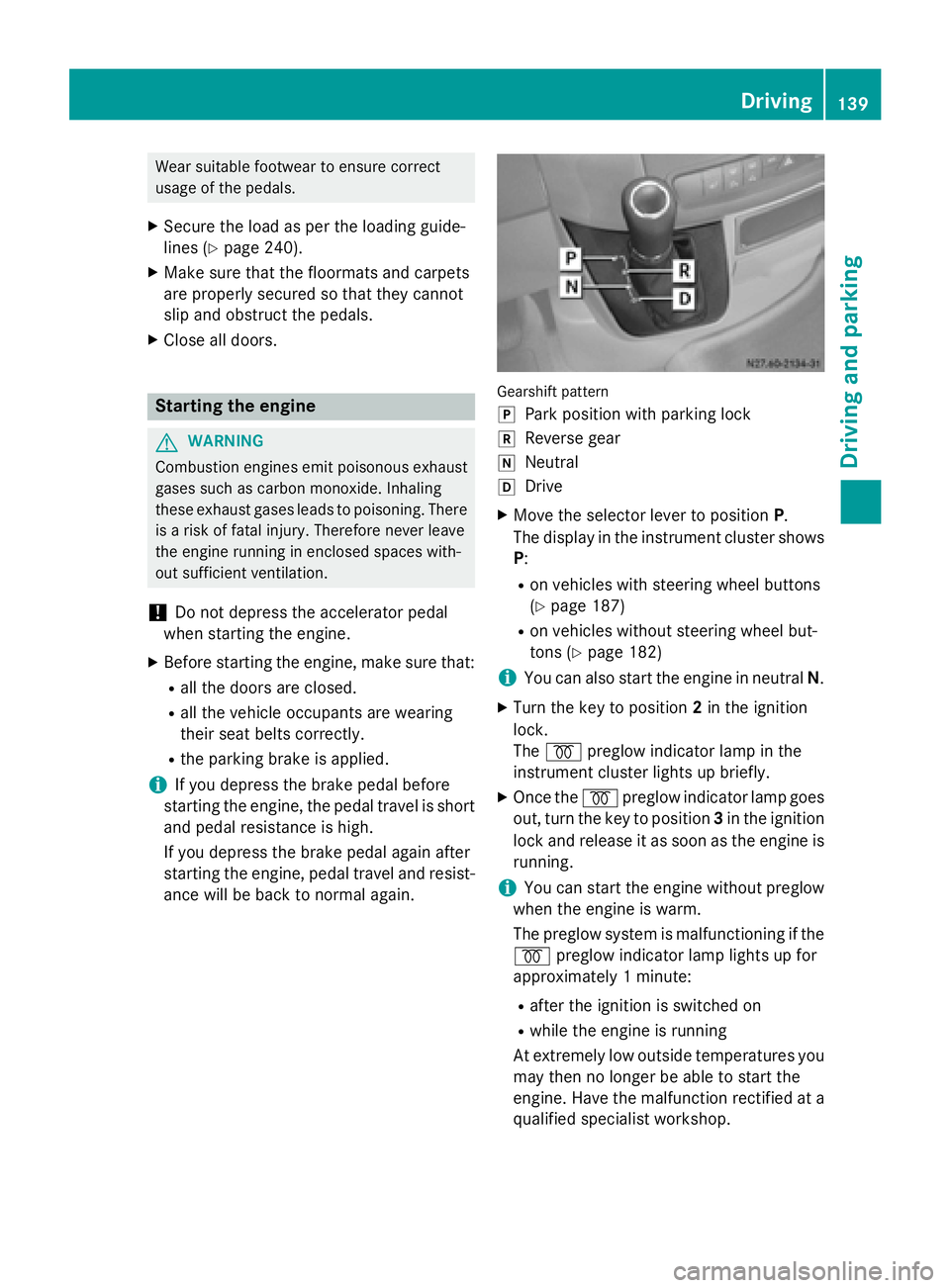
ance will be back to normal again. Gearshift pattern
005D
Park position with parking lock
005E Reverse gear
005C Neutral
005B Drive
X Move the selector lever to position P.
The display in the instrument cluster shows
P:
R on vehicles with steering wheel buttons
(Y page 187)
R on vehicles without steering wheel but-
tons (Y page 182)
i You can also start the engine in neutral
N.
X Turn the key to position 2in the ignition
lock.
The 0028 preglow indicator lamp in the
instrument cluster lights up briefly.
X Once the 0028preglow indicator lamp goes
out, turn the key to position 3in the ignition
lock and release it as soon as the engine is running.
i You can start the engine without preglow
when the engine is warm.
The preglow system is malfunctioning if the
0028 preglow indicator lamp lights up for
approximately 1 minute:
R after the ignition is switched on
R while the engine is running
At extremely low outside temperatures you
may then no longer be able to start the
engine. Have the malfunction rectified at a qualified specialist workshop. Driving
139Driving and parking Z