ABS MERCEDES-BENZ SPRINTER 2018 MY18 Operator’s Manual
[x] Cancel search | Manufacturer: MERCEDES-BENZ, Model Year: 2018, Model line: SPRINTER, Model: MERCEDES-BENZ SPRINTER 2018Pages: 294, PDF Size: 4.36 MB
Page 121 of 294
the battery main switch. You could otherwise
damage components of the electrical system.
You can use the battery isolating switch to dis-
connect the power supply to all your vehicle's
consumers. This will prevent uncontrolled bat-
tery discharge caused by off-load current con-
sumption.
If your vehicle is equipped with an auxiliary bat-
tery in the engine compartment, you will need to
disconnect both batteries. Only then is the elec- trical system fully disconnected from the power
supply.
iOnly switch the vehicle to de-energized
using the battery main switch if:
Rthe vehicle is stationary for a lengthy period
Rit is absolutely necessary
After the power supply has been activated,
you will need to reset the side windows
(
Ypage 73).
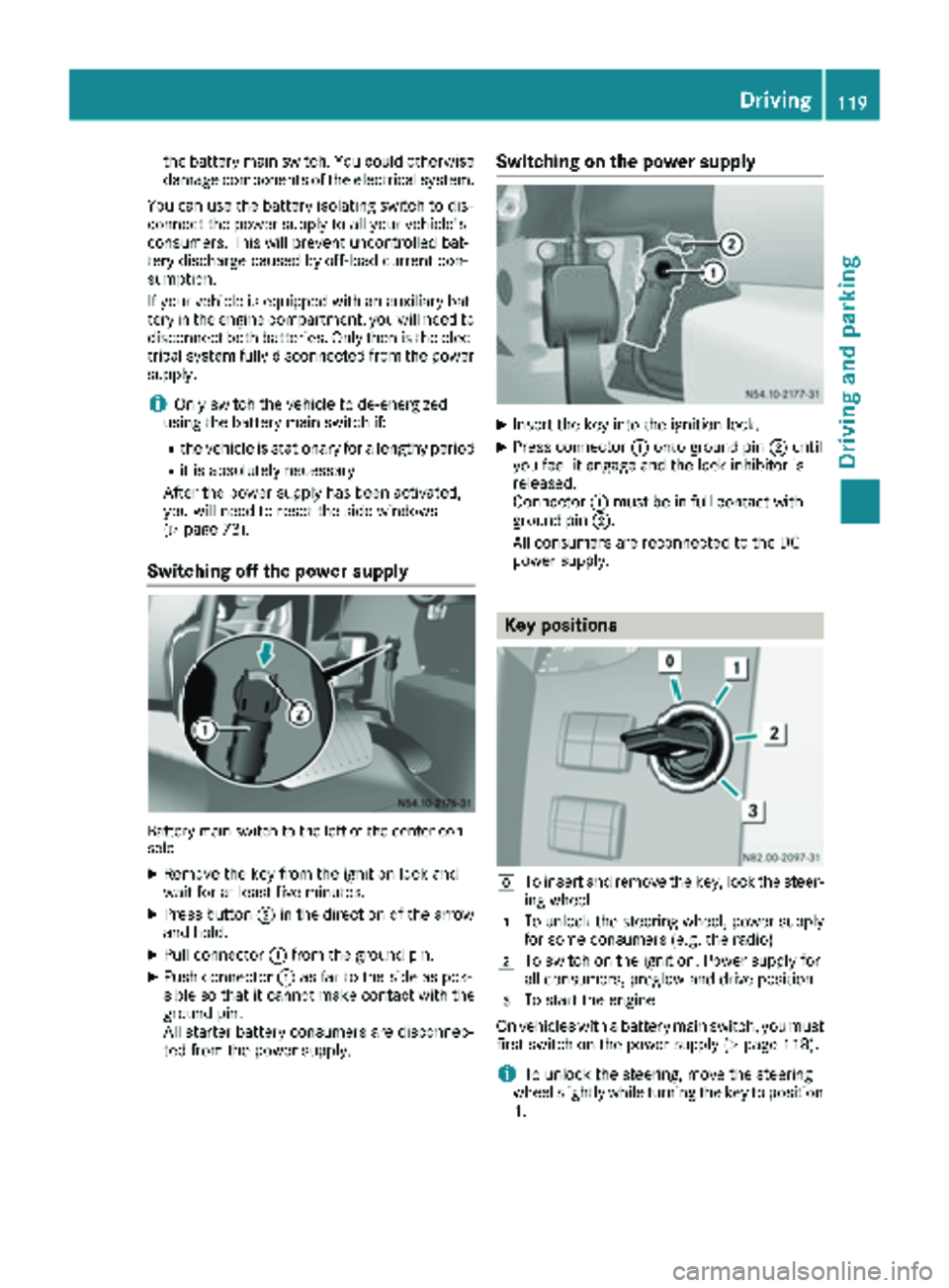
Switching off the power supply
Battery main switch to the left of the center con-
sole
XRemove the key from the ignition lock and
wait for at least five minutes.
XPress button ;in the direction of the arrow
and hold.
XPull connector :from the ground pin.
XPush connector :as far to the side as pos-
sible so that it cannot make contact with the
ground pin.
All starter battery consumers are disconnec-
ted from the power supply.
Switching on the power supply
XInsert the key into the ignition lock.
XPress connector :onto ground pin ;until
you feel it engage and the lock inhibitor is
released.
Connector :must be in full contact with
ground pin ;.
All consumers are reconnected to the DC
power supply.
Key positions
gTo insert and remove the key, lock the steer-
ing wheel
1To unlock the steering wheel, power supply
for some consumers (e.g. the radio)
2To switch on the ignition. Power supply for
all consumers, preglow and drive position
3To start the engine
On vehicles with a battery main switch, you must
first switch on the power supply (
Ypage 118).
iTo unlock the steering, move the steering
wheel slightly while turning the key to position
1 .
Driving119
Dr iving an d parking
Z
Page 143 of 294
Cruise controlisdeactivated automatically
when:
Ryou apply the brakes
Ryouapply the parking brake and the c
indicator lamp inthe instrument cluster lights
up
Ryou are driving slower than 20 mph (30 km/h)
Ryou shift the automat ictransmission to neu-
tral position Nwhile the vehicle is inmotion
RESP®or ASR intervenes
Rthere isa malfunction inthe ESP®, ASR or ABS
system
Problems with cruise control
ProblemPossible causes/consequences and MSolutions
On vehicleswit h steering
wheel buttons, the
speed cannot beset
when cruise control is
activated.The displ ay shows a high-priority message. Thus a change in speed is
not possible.
XProceed as instructed by the message inthe display.
XDeactivate cruise control
COLLISION PREVENTION ASSIST
General notes
COLL ISION PREVENTION AS SISTcomprises the
dist ance warning function and adaptive Brake
Assist.
Distance warning function
Important safety notes
iNote the section on 'Important safety notes'
(Ypage 54).
GWAR NING
The distance warning function does not react:
Rto people or animals
Rto oncoming veh icles
Rto crossing traff ic
Rwhen cornering
The distance warning function may not give
warnings inall critical situations. There isa
risk of an acc ident.
Alwa ys pay careful attention to the traff icsit-
uation and beready to brake.
Alwa ys adapt your speed to suit the pre vailing
road and traff icconditions.
GWARNING
The distance warning function cannot always
clearly identify objects and co mplex traffic
situations.
In such cases, the distance warning function
may:
Rgive an unnecessary warning
Rnot give a warning
There isa risk of an accident.
Always pay careful attention to the traffic sit-
uation and donot rely solely on the distance
warning function.
Operation
The distance warning function can help you to
minimize the risk of a front-end collision with a
vehicle ahead or reduce the effects of such a
collision. If the distance warning function
detects that there is a risk of a collision, you will
be warned visually and acoustically. Without
your intervention, the distance warning function
cannot prevent a collision.
The distance warning function willissue a warn-
ing at speeds of around 20 mph (30 km/h)or
more if:
Ryou approach a vehicle ahead of you very
quickly. You will then hear an intermittent
warning tone and the red ·warning lamp
in the instrument cluster flashes.
Driving systems141
Driving and parking
Z
Page 145 of 294
Always pay careful attention to the traffic sit-uation and be ready to brake.
Adaptive Brake Assist aids you when braking
during hazardous situations at speeds above
20 mph (30 km/h). With the help of Adaptive
Brake Assist, the distance warning signal can
detect obstacles that are in the path of your
vehicle for an extended period of time.
When you approach an obstacle and adaptive
Brake Assist detects that there is a risk of a col- lision, adaptive Brake Assist calculates the brak-
ing force necessary to avoid a collision. Should
you apply the brakes forcefully, adaptive Brake
Assist will automatically increase the braking
force to the calculated level.
XKeep the brake pedal depressed until the
emergency braking situation is over.
ABS prevents the wheels from locking.
The brakes function as usual again if:
Ryou release the brake pedal
Rthere is no longer any danger of a collision
Rno obstacle is detected in front of your vehicle
Adaptive Brake Assist is then deactivated.
Up to the maximum vehicle speed, adaptive
Brake Assist can react to moving obstacles that
have already been recognized as such at least
once over the period of observa tion. Ad
aptive
Brake Assist does not react to stationary obsta-
cles.
In particular, the detection of obstacles can be
impaired if:
Rdirt, ice or anything else covering the sensors
Rsnow or heavy rain
Rinterference from other radar sources
Rthere are strong radar reflections, for exam-
ple in parking garages
Ra narrow vehicle traveling in front, e.g. a
motorbike
Ra vehicle traveling in front on a different line
If adaptive Brake Assist is not available due to a
malfunction in the radar sensor system, the full
brake boosting effect with the help of BAS
remains available.
Following damage to the front end of the vehicle,
have the configuration and operation of the
radar sensor checked at a qualified specialist
workshop. This also applies to collisions at slow
speeds where there is no visible damage to the
front of the vehicle.
Lane Tracking package
Blind Spot Assist
General notes
Blind Spot Assist monitors the areas on either
side of the vehicle that are not visible to the
driver with two lateral, rear-facing radar sensors
in the bumper. It supports you from speeds of
approximately 20 mph (30 km/h). A warning
display in the exterior mirrors draws your atten-
tion to vehicles detected in the monitored area. If you then switch on the corresponding turn
signal to change lane, you will also receive an
optical and audible collision warning.
Important safety notes
GWARNING
Blind Spot Assist does not react to:
Rvehicles overtaken too closely on the side,
placing them in the blind spot area
Rvehicles which approach with a large speed
differential and overtake your vehicle
As a result, Blind Spot Assist may not give
warnings in such situations. There is a risk of
an accident.
Always observe the traffic conditions care-
fully, and maintain a safe lateral distance.
Blind Spot Assist is only an aid. It may fail to
detect some vehicles and is no substitute for
attentive driving. Always ensure that there is
sufficient distance to the side for other road
users and obstacles.
iUSA only:
This device has been approved by the FCC as
a "Vehicular Radar System". The radar sensor
is intended for use in an automotive radar
system only. Removal, tampering, or altering
of the device will void any warranties, and is
not permitted by the FCC. Do not tamper with, alter, or use in any non-approved way.
Any unauthorized modification to this device
could void the user’s authority to operate the
equipment.
Driving systems143
Driving an d parking
Z
Page 148 of 294
Lane Keeping Assist does not keep your vehicle
in its lane.
The system may be impaired or may not function
if:
Rif the vehicle is incorrectly loaded
(Ypage 213)
Rthere is poor visibility, e.g. due to insufficient
illumination of the road, or due to snow, rain,
fog or spray
Rthere is glare, e.g. from oncoming traffic, the
sun or reflection from other vehicles (e.g. if
the road surface is wet)
Rthe windshield is dirty, fogged up, damaged or
covered, for instance by a sticker, in the vicin-
ity of the camera
Rno, or several, unclear lane markings are pres-
ent for one lane, e.g. in a construction area
Rthe lane markings are worn away, dark or cov-
ered up, e.g. by dirt or snow
Rthe distance to the vehicle in front is too small
and the lane markings thus cannot be detec-
ted
Rthe lane markings change quickly, e.g. lanes
branch off, cross one another or merge
Rthe road is narrow and winding
Rthere are highly variable shade conditions on
the road
A warning may be given if a front wheel passes
over a lane marking. In addition, a warning tone
sounds and the Ãindicator lamp in the
instrument cluster flashes red.
Activating/deactivating Lane Keeping
Assist
Lane Keeping Assist is automatically activated
when you start the engine.
XTo deactivate: press thejbutton in the
center console (Ypage 37).
On vehicles without steering wheel but-
tons:
OFF
flashes briefly in the display and the Ã
indicator lamp in the instrument cluster
flashes yellow and then lights up continu-
ously.
On vehicles with steering wheel buttons:
The Lane
Keep.AssistDeactivatedmes-
sage appears in the display and the Ã
indicator lamp in the instrument cluster
flashes yellow and then lights up continu-
ously. Lane Keeping Assist is deactivated.
XTo activate:
press thejbutton in the
center console again (Ypage 37).
On vehicles without steering wheel but-
tons:
on
flashes briefly in the display and the Ã
indicator lamp in the instrument cluster goes
out. If a lane marking is detected, the Ã
indicator lamp lights up green.
On vehicles with steering wheel buttons:
The Lane Keep. Assist Activated
mes-
sage appears in the display and the Ã
indicator lamp in the instrument cluster goes
out. If a lane marking is detected, the Ã
indicator lamp lights up green.
Lane Keeping Assist is activated.
A Lane Keeping Assist warning is suppressed if:
Ra driving safety system intervenes, such as
ABS, BAS or ESP®.
Ryou have set the turn signal and a lane change is detected. In this case, the warnings are
suppressed for a certain period of time.
Ryou accelerate hard, e.g. kickdown on vehi-
cles with an automatic transmission.
Ryou brake hard.
Ryou steer actively, e.g. swerve to avoid an
obstacle or change lane quickly.
Ryou cut the corner on a sharp bend.
In order that you are warned only when neces-
sary and in good time if you cross the lane mark-
ing, the system recognizes certain conditions
and warns you accordingly.
Lane Keeping Assist warns you earlier if:
Ryou approach the outer lane marking on a
bend.
Rthe road has very wide lanes, e.g. a freeway.
Rthe system recognizes solid lane markings.
Warnings are given later if:
Rthe road has narrow lanes.
Ryou cut the corner on a bend.
All-wheel drive
Important safety notes
!Never tow the vehicle with one axle raised.
This may damage the transfer case. Damage
of this sort is not covered by the Mercedes-
Benz Limited Warranty. All wheels must
146Driving systems
Driving and parking
Page 183 of 294
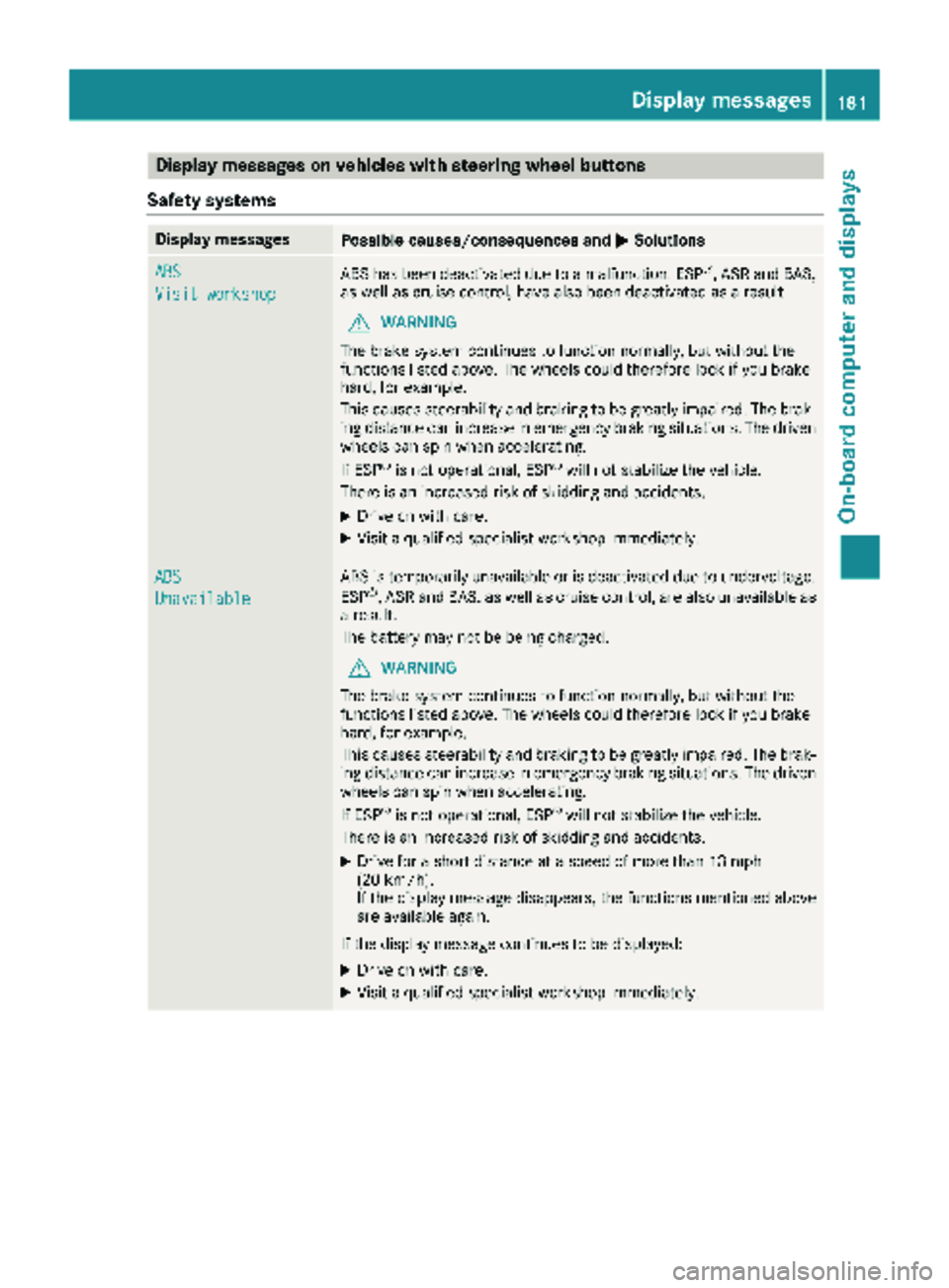
Display messages on vehicles withsteering wheel buttons
Safet ysystems
Display messagesPossible causes/consequences an dMSolutions
ABS
Visit workshop
AB Shas bee ndeactivated due to amalfunction .ES P®,AS Rand BAS,
as well as cruise control, hav ealso bee ndeactivated as aresult .
GWARNING
The brake syste mcontinues to function normally, but without th e
function slisted above. The wheels could therefore loc kif you brake
hard, fo rexample.
Thi scauses steerability and braking to be greatly impaired. The brak-
in gdistanc ecan increase in emergency braking situations. The driven
wheels can spi nwhen accelerating.
If ES P
®is no toperational, ES P®will notstabilize th evehicle.
There is an increase dris kof skidding and accidents .
XDrive on withcare.
XVisit aqualified specialis tworkshop immediately.
ABS
Unavailable
AB Sis temporarily unavailable or is deactivated due to undervoltage.
ES P®,AS Rand BAS, as well as cruise control, are also unavailable as
a result .
The battery may no tbe bein gcharged.
GWARNING
The brake syste mcontinues to function normally, but without th e
function slisted above. The wheels could therefore loc kif you brake
hard, fo rexample.
Thi scauses steerability and braking to be greatly impaired. The brak-
in gdistanc ecan increase in emergency braking situations. The driven
wheels can spi nwhen accelerating.
If ES P
®is no toperational, ES P®will notstabilize th evehicle.
There is an increase dris kof skidding and accidents .
XDrive for ashort distanc eat aspeed of more than 13 mph
(20 km/h).
If th edisplay messag edisappears ,th efunction smentioned abov e
are available again .
If th edisplay messag econtinues to be displayed:
XDrive on wit hcare.
XVisit aqualified specialis tworkshop immediately.
Display messages18 1
On-board computer and displays
Z
Page 198 of 294
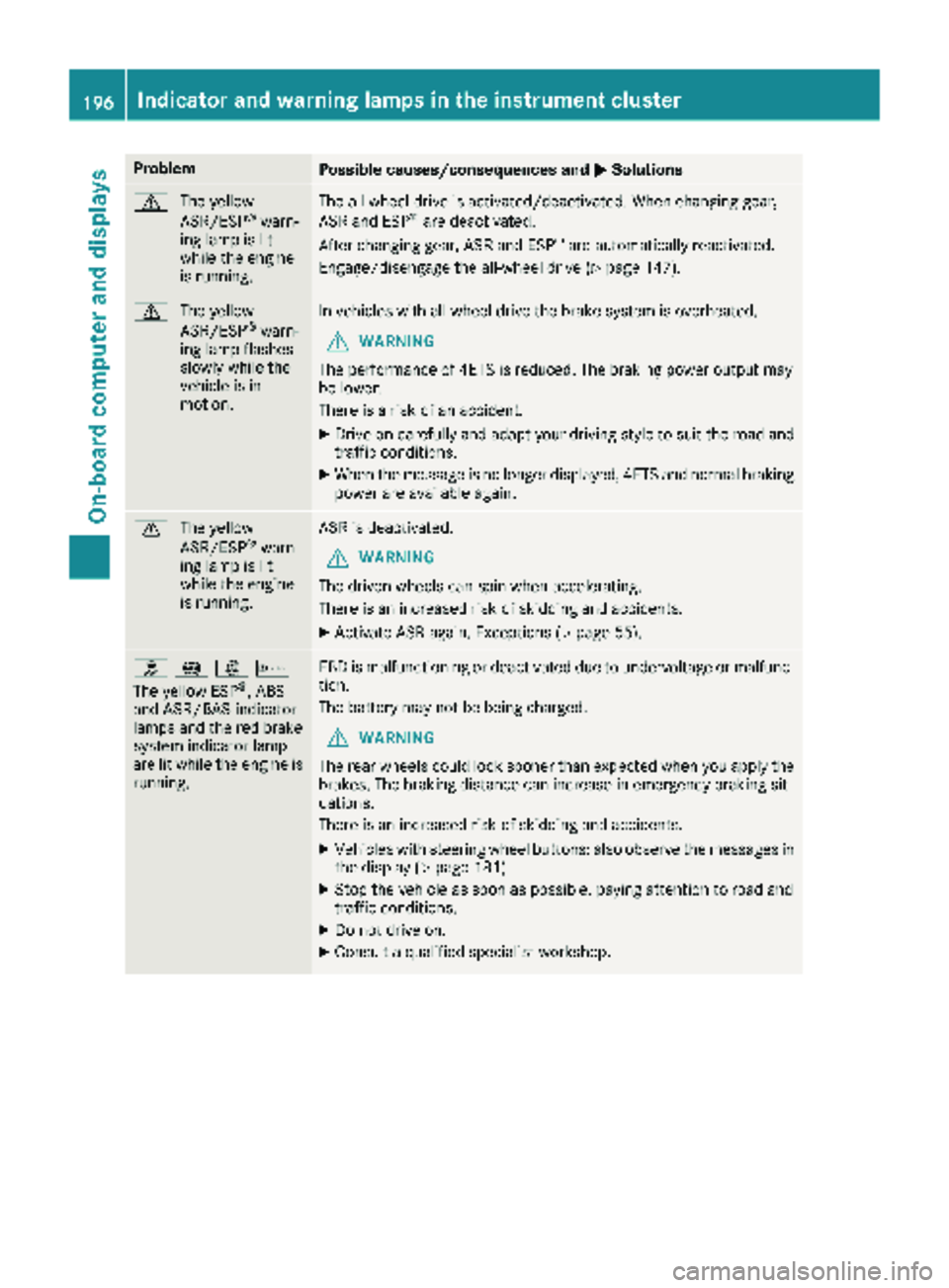
ProblemPossible causes/consequences andMSolutions
d
The yellow
ASR/ESP®warn-
ing lamp is lit
while the engine
is running.
The all-wheel drive is activated/deactivated. When changing gear,
ASR and ESP®are deactivated.
After changing gear, ASR and ESP®are automatically reactivated.
Engage/disengage the all-wheel drive (
Ypage 147).
d The yellow
ASR/ESP®warn-
ing lamp flashes
slowly while the
vehicle is in
motion.
In vehicles with all-wheel drive the brake system is overheated.
GWARNING
The performance of 4ETS is reduced. The braking power output may
be lower.
There is a risk of an accident.
XDrive on carefully and adapt your driving style to suit the road and
traffic conditions.
XWhen the message is no longer displayed, 4ETS and normal braking
power are available again.
d The yellow
ASR/ESP®warn-
ing lamp is lit
while the engine
is running.
ASR is deactivated.
GWARNING
The driven wheels can spin when accelerating.
There is an increased risk of skidding and accidents.
XActivate ASR again. Exceptions (Ypage 55).
h !:b
The yellow ESP®, ABS
and ASR/BAS indicator
lamps and the red brake
system indicator lamp
are lit while the engine is
running.
EBD is malfunctioning or deactivated due to undervoltage or malfunc-
tion.
The battery may not be being charged.
GWARNING
The rear wheels could lock sooner than expected when you apply the
brakes. The braking distance can increase in emergency braking sit-
uations.
There is an increased risk of skidding and accidents.
XVehicles with steering wheel buttons: also observe the messages in
the display (Ypage 181).
XStop the vehicle as soon as possible, paying attention to road and
traffic conditions.
XDo not drive on.
XConsult a qualified specialist workshop.
196Indicator and warning lamps in the instrument cluster
On-board computer and displays
Page 200 of 294
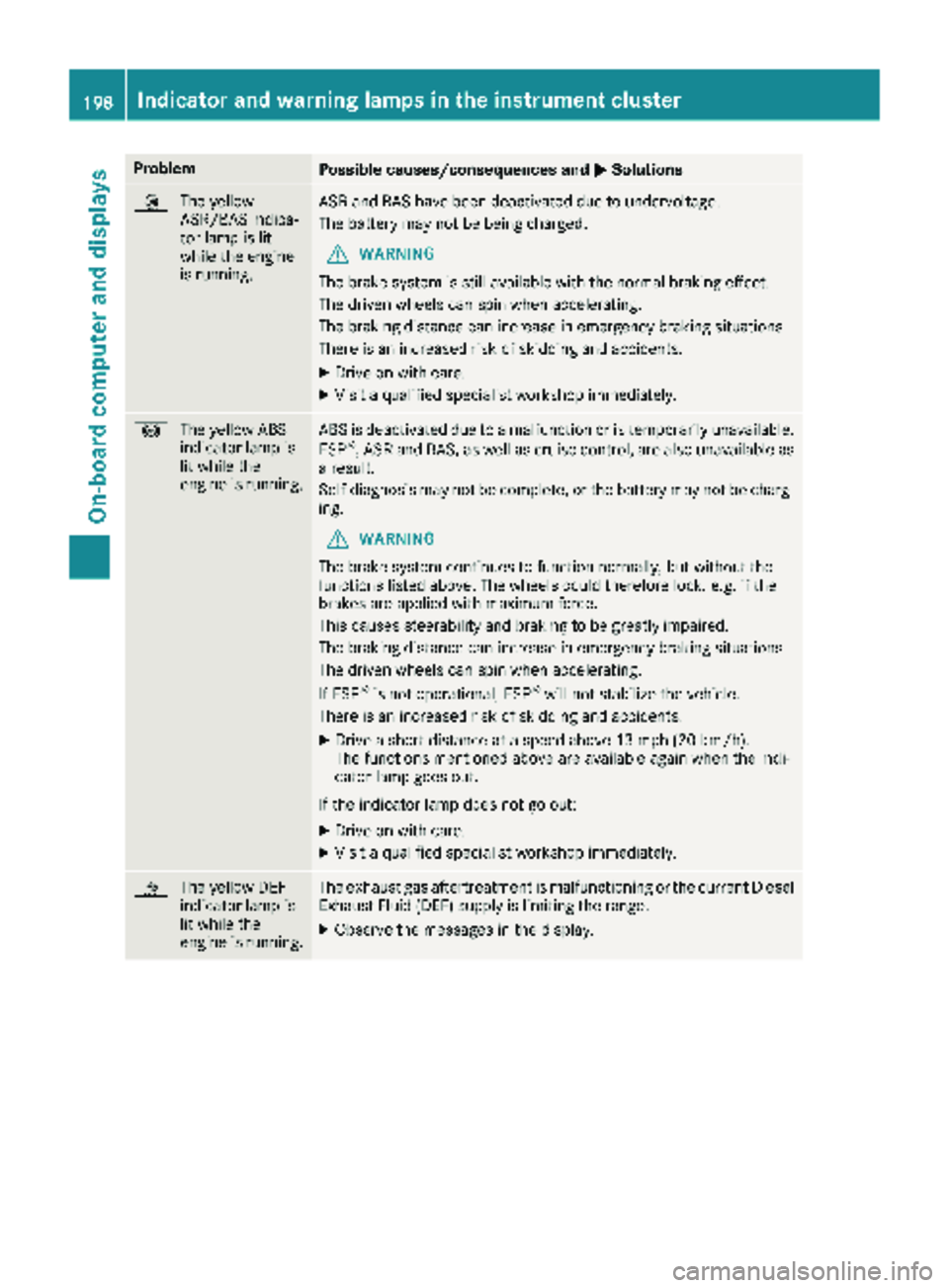
ProblemPossible causes/consequences andMSolutions
:
The yellow
ASR/BAS indica-
tor lamp is lit
while the engine
is running.ASR and BAS have been deactivated due to undervoltage.
The battery may not be being charged.
GWARNING
The brake system is still available with the normal braking effect.
The driven wheels can spin when accelerating.
The braking distance can increase in emergency braking situations.
There is an increased risk of skidding and accidents.
XDrive on with care.
XVisit a qualified specialist workshop immediately.
! The yellow ABS
indicator lamp is
lit while the
engine is running.ABS is deactivated due to a malfunction or is temporarily unavailable.
ESP®, ASR and BAS, as well as cruise control, are also unavailable as
a result.
Self-diagnosis may not be complete, or the battery may not be charg-
ing.
GWARNING
The brake system continues to function normally, but without the
functions listed above. The wheels could therefore lock, e.g. if the
brakes are applied with maximum force.
This causes steerability and braking to be greatly impaired.
The braking distance can increase in emergency braking situations.
The driven wheels can spin when accelerating.
If ESP
®is not operational, ESP®will not stabilize the vehicle.
There is an increased risk of skidding and accidents.
XDrive a short distance at a speed above 13 mph (20 km/h).
The functions mentioned above are available again when the indi-
cator lamp goes out.
If the indicator lamp does not go out:
XDrive on with care.
XVisit a qualified specialist workshop immediately.
å The yellow DEF
indicator lamp is
lit while the
engine is running.The exhaust gas aftertreatment is malfunctioning or the current Diesel
Exhaust Fluid (DEF) supply is limiting the range.
XObserve the messages in the display.
198Indicator and warning lamps in the instrument cluster
On-board computer and displays
Page 217 of 294
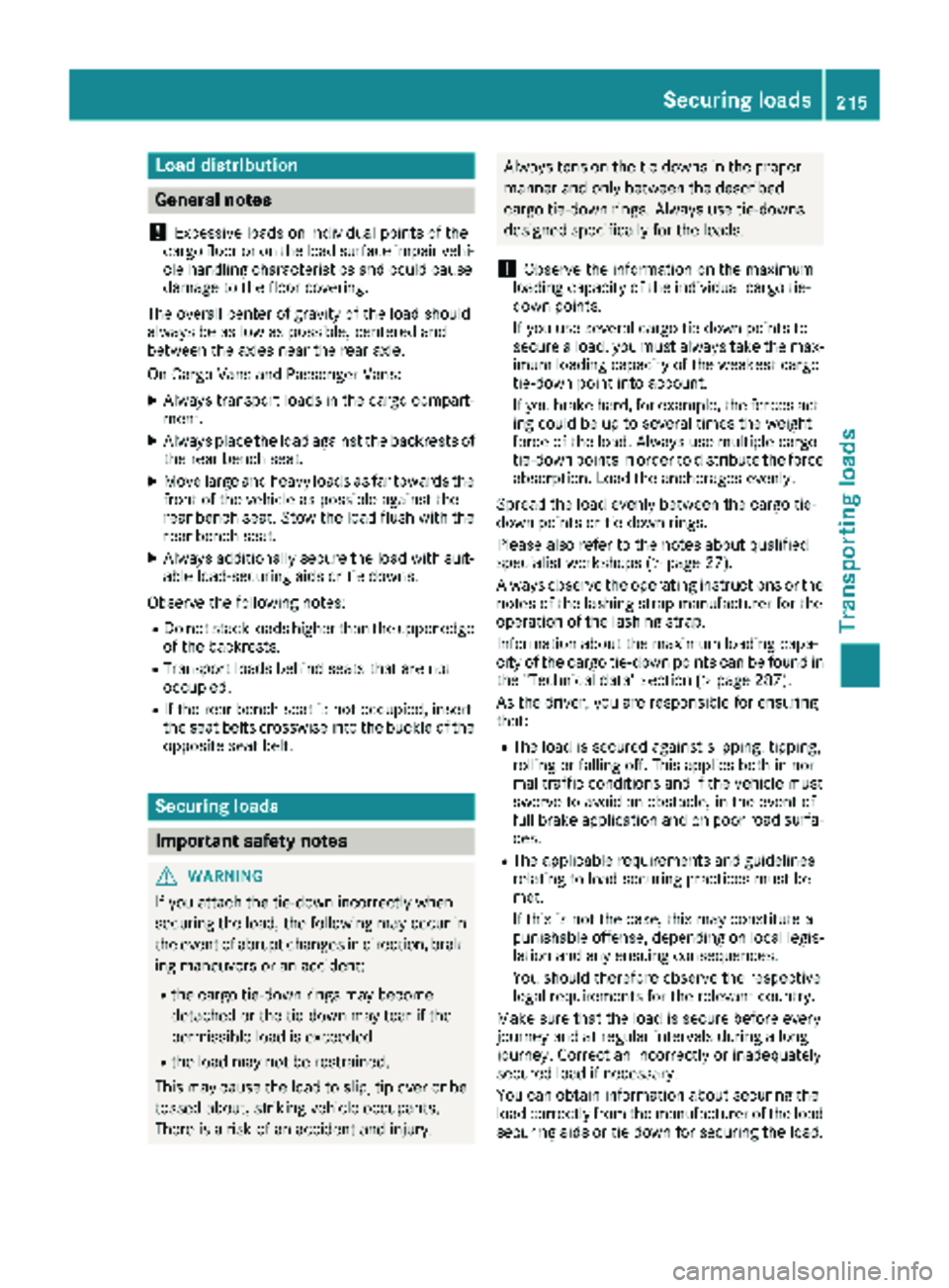
Load distribution
General notes
!
Excessive loads on individual points of the
cargo floor or on the load surface impair vehi-
cle handling characteristics and could cause
damage to the floor covering.
The overall center of gravity of the load should
always be as low as possible, centered and
between the axles near the rear axle.
On Cargo Vans and Passenger Vans:
XAlways transport loads in the cargo compart-
ment.
XAlways place the load against the backrests of the rear bench seat.
XMove large and heavy loads as far towards the
front of the vehicle as possible against the
rear bench seat. Stow the load flush with the
rear bench seat.
XAlways additionally secure the load with suit-
able load-securing aids or tie downs.
Observe the following notes:
RDo not stack loads higher than the upper edge
of the backrests.
RTransport loads behind seats that are not
occupied.
RIf the rear bench seat is not occupied, insert
the seat belts crosswise into the buckle of the
opposite seat belt.
Securing loads
Important safety notes
GWARNING
If you attach the tie-down incorrectly when
securing the load, the following may occur in
the event of abrupt changes in direction, brak- ing maneuvers or an accident:
Rthe cargo tie-down rings may become
detached or the tie-down may tear if the
permissible load is exceeded
Rthe load may not be restrained.
This may cause the load to slip, tip over or be
tossed about, striking vehicle occupants.
There is a risk of an accident and injury.
Always tension the tie-downs in the proper
manner and only between the described
cargo tie-down rings. Always use tie-downs
designed specifically for the loads.
!Observe the information on the maximum
loading capacity of the individual cargo tie-
down points.
If you use several cargo tie-down points to
secure a load, you must always take the max-
imum loading capacity of the weakest cargo
tie-down point into account.
If you brake hard, for example, the forces act- ing could be up to several times the weight
force of the load. Always use multiple cargo
tie-down points in order to distribute the force
absorption. Load the anchorages evenly.
Spread the load evenly between the cargo tie-
down points or tie-down rings.
Please also refer to the notes about qualified
specialist workshops (
Ypage 27).
Always observe the operating instructions or the
notes of the lashing strap manufacturer for the
operation of the lashing strap.
Information about the maximum loading capa-
city of the cargo tie-down points can be found in
the "Technical data" section (
Ypage 287).
As the driver, you are responsible for ensuring
that:
RThe load is secured against slipping, tipping,
rolling or falling off. This applies both in nor-
mal traffic conditions and if the vehicle must
swerve to avoid an obstacle, in the event of
full brake application and on poor road sur
fa-
ces.
RThe applicable requirements and guidelines
relating to load-securing practices must be
met.
If this is not the case, this may constitute a
punishable offense, depending on local legis-
lation and any ensuing consequences.
You should therefore observe the respective
legal requirements for the relevant country.
Make sure that the load is secure before every
journey and at regular intervals during a long
journey. Correct an incorrectly or inadequately
secured load if necessary.
You can obtain information about securing the
load correctly from the manufacturer of the load
securing aids or tie down for securing the load.
Securing loads215
Transporting loads
Z
Page 218 of 294
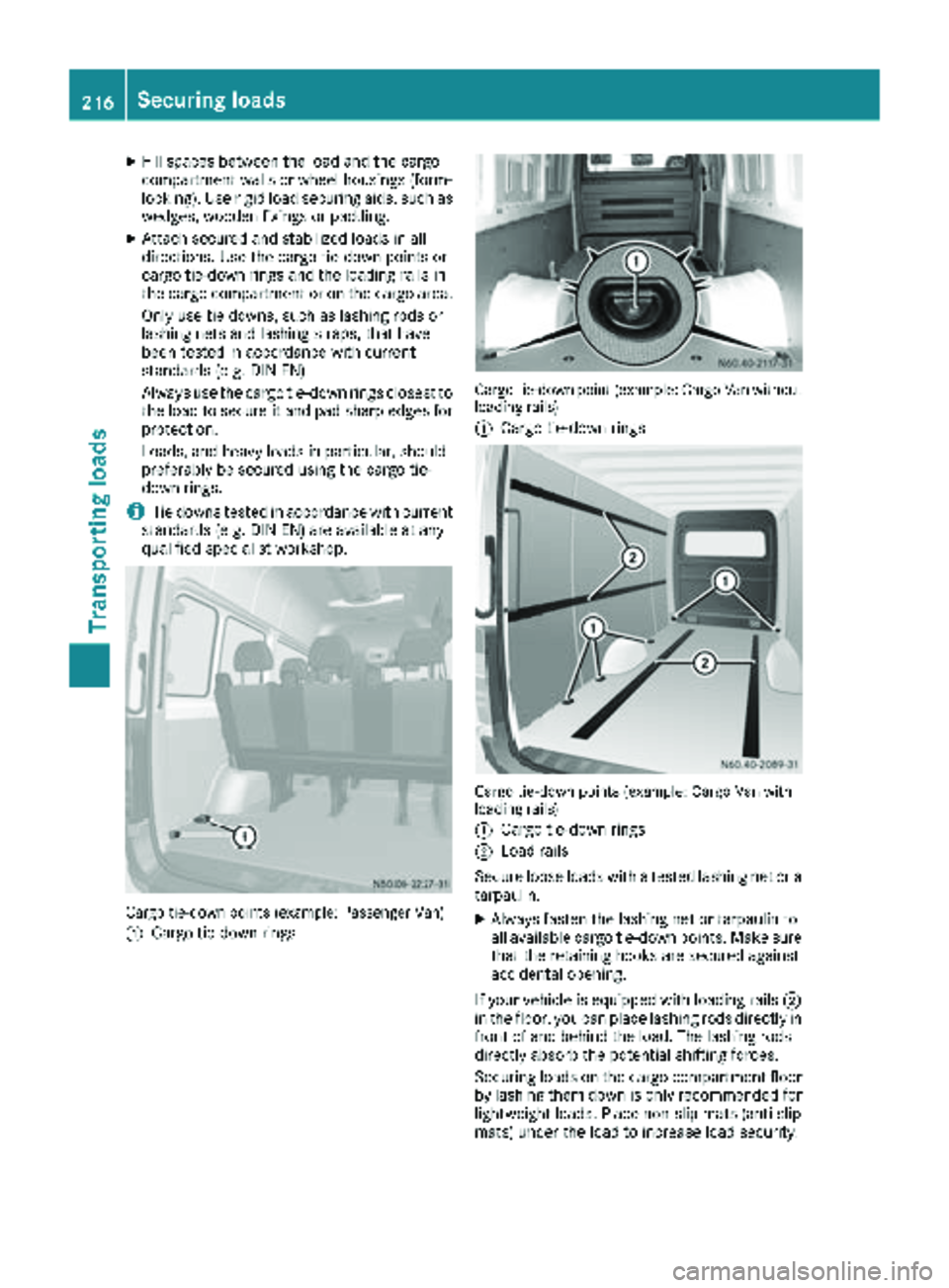
XFill spaces between the load and the cargo
compartment walls or wheel housings (form-
locking). Use rigid load securing aids, such as
wedges, wooden fixings or padding.
XAttach secured and stabilized loads in all
directions. Use the cargo tie-down points or
cargo tie-down rings and the loading rails in
the cargo compartment or on the cargo area.
Only use tie downs, such as lashing rods or
lashing nets and lashing straps, that have
been tested in accordance with current
standards (e.g. DIN EN).
Always use the cargo tie-down rings closest to
the load to secure it and pad sharp edges for
protection.
Loads, and heavy loads in particular, should
preferably be secured using the cargo tie-
down rings.
iTie downs tested in accordance with current
standards (e.g. DIN EN) are available at any
qualified specialist workshop.
Cargo tie-down points (example: Passenger Van)
:
Cargo tie-down rings
Cargo tie-down point (example: Cargo Van without
loading rails)
:
Cargo tie-down rings
Cargo tie-down points (example: Cargo Van with
loading rails)
:
Cargo tie-down rings
;Load rails
Secure loose loads with a tested lashing net or a
tarpaulin.
XAlways fasten the lashing net or tarpaulin to
all available cargo tie-down points. Make sure
that the retaining hooks are secured against
accidental opening.
If your vehicle is equipped with loading rails ;
in the floor, you can place lashing rods directly in
front of and behind the load. The lashing rods
directly absorb the potential shifting forces.
Securing loads on the cargo compartment floor
by lashing them down is only recommended for
lightweight loads. Place non-slip mats (anti-slip
mats) under the load to increase load security.
216Securing loads
Transporting loads
Page 226 of 294
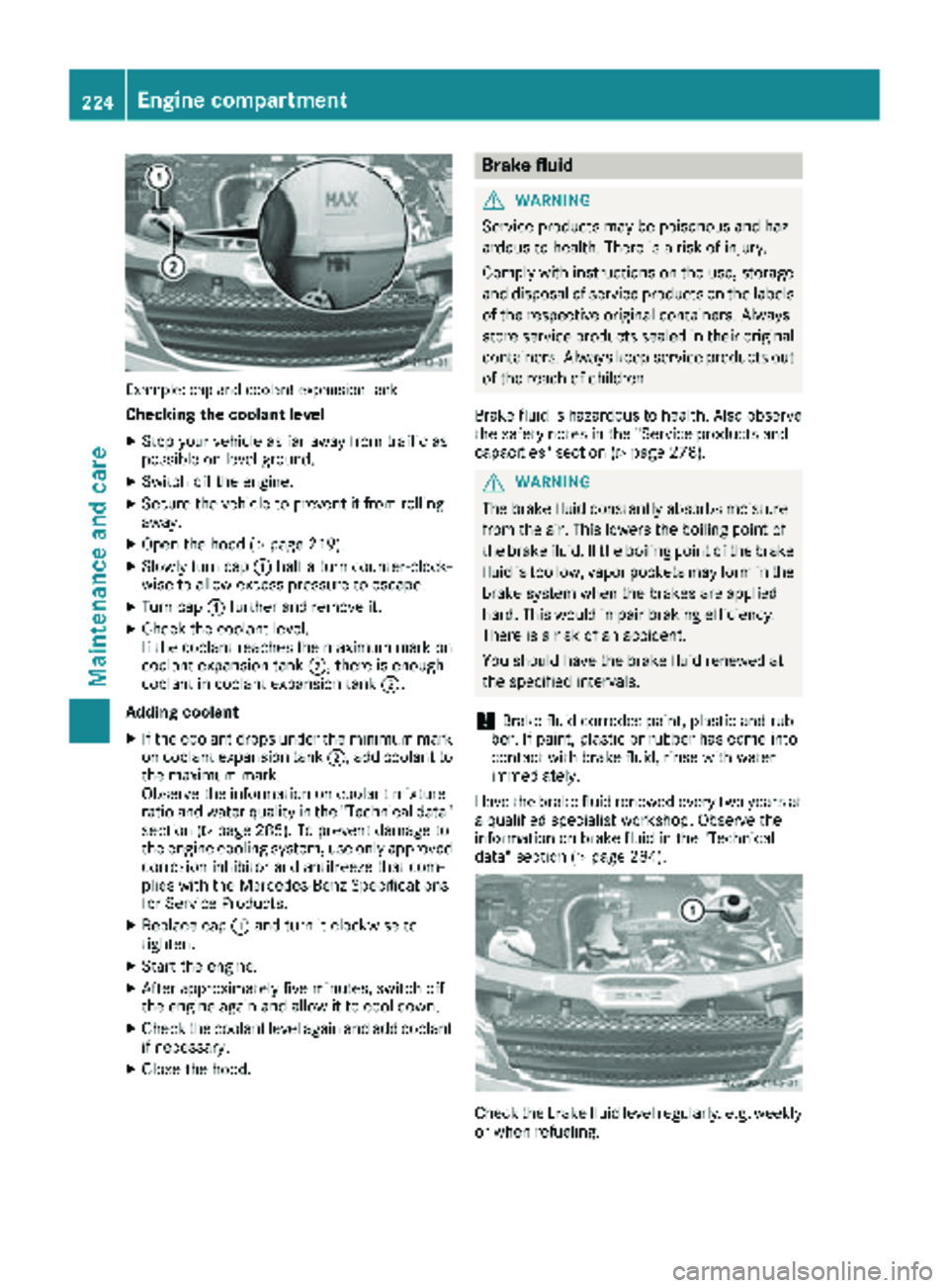
Example: cap and coolant expansion tank
Checking the coolant level
XStop your vehicle as far away from traffic as
possible on level ground.
XSwitch off the engine.
XSecure the vehicle to prevent it from rolling
away.
XOpen the hood (Ypage 219).
XSlowly turn cap:half a turn counter-clock-
wise to allow excess pressure to escape.
XTurn cap :further and remove it.
XCheck the coolant level.
If the coolant reaches the maximum mark on
coolant expansion tank ;, there is enough
coolant in coolant expansion tank ;.
Adding coolant
XIf the coolant drops under the minimum mark
on coolant expansion tank ;, add coolant to
the maximum mark.
Observe the information on coolant mixture
ratio and water quality in the "Technical data"
section (
Ypage 285). To prevent damage to
the engine cooling system, use only approved
corrosion inhibitor and antifreeze that com-
plies with the Mercedes-Benz Specifications
for Service Products.
XReplace cap :and turn it clockwise to
tighten.
XStart the engine.
XAfter approximately five minutes, switch off
the engine again and allow it to cool down.
XCheck the coolant level again and add coolant
if necessa ry.
XClose the hood.
Brake fluid
GWARNING
Service products may be poisonous and haz-
ardous to health. There is a risk of injury.
Comply with instructions on the use, storage
and disposal of service products on the labels
of the respective original containers. Always
store service products sealed in their original
containers. Always keep service products out
of the reach of children.
Brake fluid is hazardous to health. Also observe
the safety notes in the "Service products and
capacities" section (
Ypage 278).
GWARNING
The brake fluid constantly absorbs moisture
from the air. This lowers the boiling point of
the brake fluid. If the boiling point of the brake
fluid is too low, vapor pockets may form in the
brake system when the brakes are applied
hard. This would impair braking efficiency.
There is a risk of an accident.
You should have the brake fluid renewed at
the specified intervals.
!Brake fluid corrodes paint, plastic and rub-
ber. If paint, plastic or rubber has come into
contact with brake fluid, rinse with water
immediately.
Have the brake fluid renewed every two years at
a qualified specialist workshop. Observe the
information on brake fluid in the "Technical
data" section (
Ypage 284).
Check the brake fluid level regularly, e.g. weekly
or when refueling.
224Engine compartment
Maintenance and care