brake sensor MERCEDES-BENZ SPRINTER 2019 MY19 with 7” screen
[x] Cancel search | Manufacturer: MERCEDES-BENZ, Model Year: 2019, Model line: SPRINTER, Model: MERCEDES-BENZ SPRINTER 2019Pages: 354, PDF Size: 6.15 MB
Page 168 of 354
&
WARNING Risk of accident if de tection
function of Active Dis tance Assi st
DISTRONIC is impaired
Ac tive Dis tance Assi stDISTRONIC does not
re act or has a limited reaction:
R when driving on a dif fere nt lane or when
ch anging lanes
R topedestrians, animals, bicycles or sta‐
tionary vehicles, or unexpected obs tacles
R tocomplex traf fic conditions
R tooncoming vehicles and crossing traf fic
As a result, Active Dis tance Assi stDISTRONIC
may nei ther give warnings nor inter vene in
su ch situations. #
Always obser vethe tra ffic conditions
carefully and react according ly. Ac
tive Dis tance Assi stDISTRONIC may not de tect
nar row vehicles driving in front, e.g. mo torcyc les
and vehicles driving on a dif fere nt line.
Ope rating Active Di stance Assist DIST RONIC
Re quirements:
R The vehicle has been star ted.
R The parking brake has been released.
R ESP ®
is activated and is not inter vening.
R The transmission is in position 005B.
R The driver's and the front-passenger door are
closed.
R The seat occupancy recognition on the driv‐
er's seat has de tected that the driver has fas‐
te ned the seat belt.
R The check of thera dar sensor sy stem has
been successfully comple ted. Ac
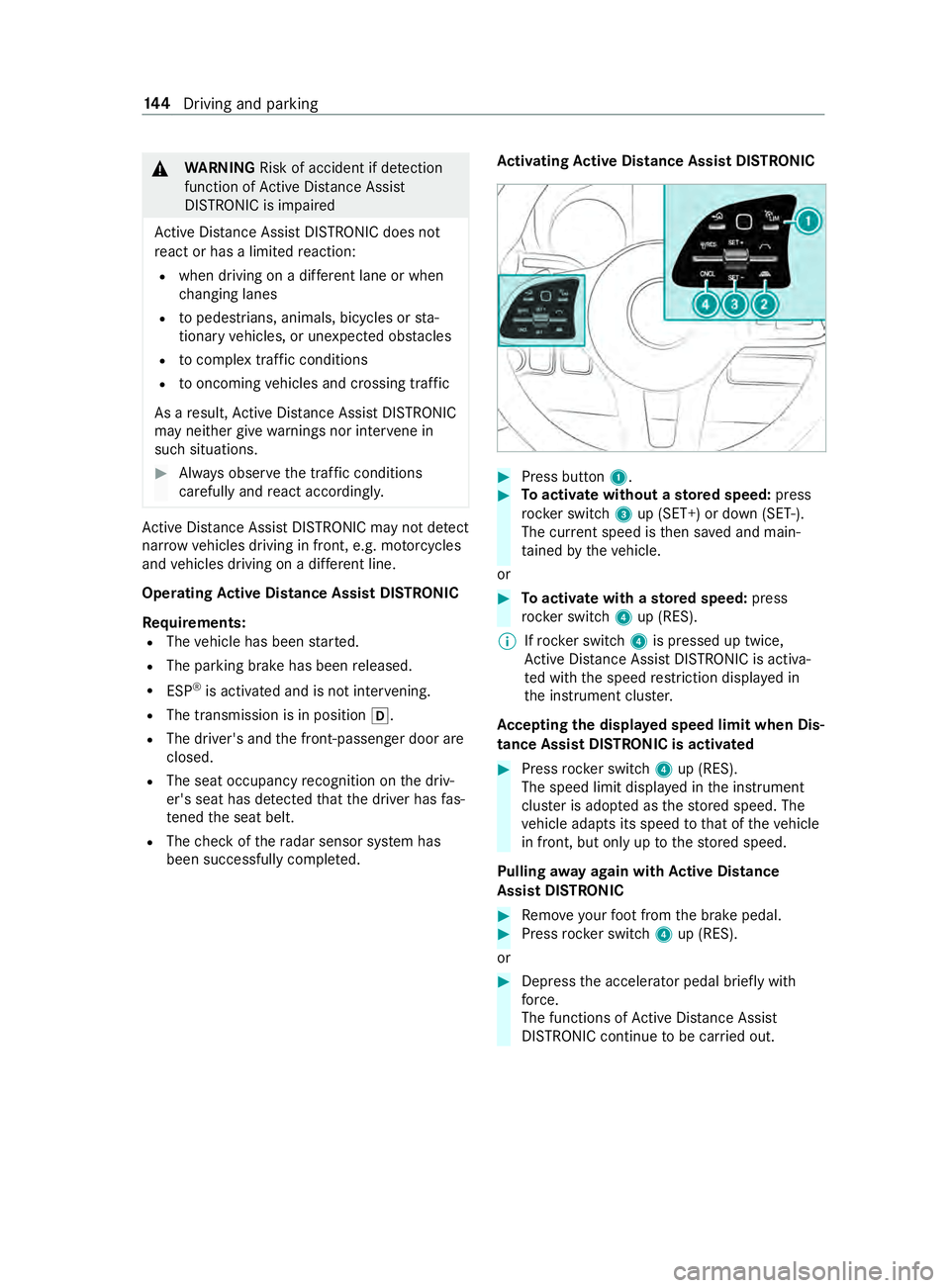
tivating Active Di stance Assist DISTRO NIC #
Press button 1. #
Toactivate without a stored speed: press
rock er switch 3up (SET+) or down (SET-).
The cur rent speed is then sa ved and main‐
ta ined bytheve hicle.
or #
Toactivate with a stored speed: press
rock er switch 4up (RES).
% If
rock er switch 4is pressed up twice,
Ac tive Dis tance Assi stDISTRONIC is acti va‐
te d with the speed restriction displa yed in
th e instrument clus ter.
Ac cepting the displa yed speed limit when Dis‐
tance Assist DI STRO NIC is acti vated #
Press rocker switch 4up (RES).
The speed limit displa yed in the instrument
clus ter is adop ted as thestored speed. The
ve hicle adapts its speed tothat of theve hicle
in front, but only up tothestored speed.
Pulling away again with Active Di stance
Assist DIST RONIC #
Remo veyour foot from the brake pedal. #
Press rocker switch 4up (RES).
or #
Depress the accelerator pedal briefly with
fo rc e.
The functions of Active Dis tance Assi st
DISTRONIC continue tobe car ried out. 14 4
Driving and pa rking
Page 169 of 354
Deactivating
Active Di stance Assist
DISTRO NIC &
WARNING Risk of accident due toActive
Dis tance Assi stDISTRONIC still being
activated when you lea vethe driver's
seat
If yo u lea vethe driver's seat while theve hicle
is being braked byActive Dis tance Assi st
DISTRONIC only, theve hicle can rollaw ay. #
Always deactivate Active Dis tance
Assi stDISTRONIC and secure theve hi‐
cle topreve nt it from rolling away before
yo u lea vethe driver's seat. #
Press rocker switch 4down (CNCL). #
Depress the brake pedal.
Increasing or reducing the speed #
Push rocker switch 3up (SET+) or down
(SET-).
The stored speed is increased or reduced by
1 mp h (1 km/h).
or #
Press and hold rocker switch 3up (SET+)/
down (SET-).
The stored speed is increased or reduced in
1 mp h (1 km/h) increments.
or #
Push rocker switch 3beyond the pressure
point.
The stored speed is increased or reduced by
5 mp h (10 km/h).
or #
Push rocker switch 3beyond the pressure
point and hold.
The stored speed is increased or reduced in
5 mp h (10 km/h) increments.
Increasing or reducing the specified distance
from the vehicle in front #
Toincrease the specified distance: press
rock er switch 2down ( ).
#
Toreduce the specified distance: press
rock er switch 2up ( ). Information on Hill
Start Assist Hill
Start Assist holds theve hicle for a short time
when pulling away on a hill under thefo llowing
conditions:
R Vehicles with automatic transmission: the
transmission is in position 005Bor005E.
R The pa rking brake has been released.
This gives you enough time tomo veyour foot
from the brake pedal tothe accelerator pedal and
depress it before theve hicle begins toroll. &
WARNING Risk of accident and injury
due totheve hicle rolling away
Af ter a short time, Hill Start Assist no lon ger
holds theve hicle and it can rollaw ay. #
Therefore, swiftly mo veyour foot from
th e brake pedal tothe accelerator
pedal. Ne ver attem pttolea vetheve hi‐
cle if it is being held byHill Start Assist. HOLD function
HOLD function
Re
quirements:
R The seat occupancy recognition on the driv‐
er's seat has de tected that the driver has fas‐
te ned the seat belt.
The HOLD function holds theve hicle at a stand‐
st ill without requ iring youto depress the brake
pedal, e.g. when pulling away on steep slopes.
When you depress the accelera tor pedal topull
aw ay,th e braking ef fect is canceled and the
HOLD function is deactivated.
Sy stem limitations
R The incline must not be greaterth an 30%. Park
ing Assist PARKTRONIC Fu
nction of Parking Assist PARKTRONIC
Pa rking Assist PARKTRONIC is an electronic park‐
ing assi stance sy stem with ultrasound. It moni‐
to rs the area around your vehicle using six sen‐
sors on the front bumper and six sensors on the
re ar bumper. Parking Assist PARKTRONIC indi‐
cates visually and audibly the dis tance between
yo ur vehicle and an object.
Pa rking Assist PARKTRONIC is on ly an aid. It is
not a substitu teforyo ur attention tothe sur‐
ro undings. The responsibility for safe maneu ver‐ Driving and parking
14 5
Page 178 of 354
Ac
tivating/deactivating Blind Spot Assi st
Multimedia sy stem:
4 © 5
Settings 5
Assistance #
Activate or deacti vate Blind Spot Assist . Fu
nction of Drive Away Assist %
Drive
Away Assistis only available forve hi‐
cles with automatic transmission.
Drive Away Assistcan reduce the se verity of an
impact when pulling away. If an obs tacle is de tec‐
te d in the direction of tra vel,th eve hicle's speed
is brief lyreduced toappr ox. 1 mph (2 km/h). If a
critical situation is de tected, a symbol appea rson
th e camera image of the multimedia sy stem. &
WARNING Risk of accident caused by
limited de tection per form ance of Drive
Aw ayAssi st
Drive AwayAssi stcannot al ways clea rly iden‐
tify objects and traf fic situations.
In such cases, Drive AwayAssi stmight:
R Warnyou without reason and limit the
ve hicle speed.
R Not warnyou or not limit theve hicle
speed. #
Always pay careful attention tothe traf‐
fi c situation; do not relyon Drive Away
Assi stalone. #
Be prepared tobrake or swer veas nec‐
essar y,prov ided the tra ffic situation
permits and that it is safe totake eva‐
sive action. Drive
Away Assistis only an aid. It is not a substi‐
tute foryo ur attention tothe sur roundings. The
re sponsibility for safe maneu vering and pa rking
re mains with you. Make sure that no persons,
animals or objects etc. are in the maneuvering
ra nge.
A risk of a collision may arise in thefo llowing sit‐
uations, forex ample:
R Ifth e driver mixes up the accelerator and
brake pedals.
R Ifth e wrong gear is selec ted.
The Drive AwayAssi stfunction is active under the
fo llowing conditions:
R IfPa rking Assist PARKTRONIC is activated. R
Every time thege ar is changed to005E or005B
when theve hicle is at a standstill.
R Ifth e de tected obs tacle is less than appr ox.
3.3 ft(1.0 m) away.
R Ifth e maneuvering assis tance function is acti‐
va ted in the multimedia sy stem.
Sy stem limitations
Drive AwayAssi stis not available on inclines and
when driving with a trailer. Fu
nction of Rear Cross Traf fic Alert The
radar sensors in the bumper are used forthe
sy stem. This wayth e area adjacent totheve hicle
is continually monitored. If thera dar sensors are
obscured byvehicles or other objects, de tection
is not possible.
% Also
read the no tes on Blind Spot Assist
(/ page 152).
Ve hicles with Blind Spot Assis t:drivers can
also be warned of any crossing tra ffic when back‐
ing up out of a parking space. If a vehicle is
de tected, thewa rning lamp in the outside mir ror
on there leva nt side lights up red. If it de tects a
critical situation, a warning tone also sounds.
Ve hicles with Blind Spot Assist and Parking
Assist PARKTRONIC: drivers can also be warned
of any crossing tra ffic when backing up out of a
parking space. If a critical situation is de tected, a
wa rning symbol appears on the camera image of
th e multimedia sy stem. If the driver does not
re spond tothewa rning, theve hicle's brakes can
be applied automatically. In this case, a warning
to ne sounds.
The Rear Cross Traf fic Alert function is acti ve
under thefo llowing conditions:
R Blind Spot Assist is activated.
R Reversege ar is engaged or theve hicle is
backing up at walking pace.
R Ifth e maneuvering assis tance function is acti‐
va ted in the multimedia sy stem.
The Rear Cross Traf fic Alert function is una vaila‐
ble when driving with a trailer. 15 4
Driving and pa rking
Page 237 of 354
Obser
vethefo llowing no tes: Note
s on cleaning and car ePreve nting damage totheve hicle
Wheels/rims Usewate r and acid-free wheel cleaner. R
Do not use acidic wheel cleaners to
re mo vebrake dust. Otherwise, wheel
bolts and brake components may be
damaged.
R Toavo id cor rosion of brake discs and
brakepads, drive for a few minutes
af te r cleaning before parking the
ve hicle. The brake discs and brake‐
pads warm up and dry out.
Wi ndo ws
Clean wind owsinside and outside with a
damp clo thand with a cleaning agent
re commended for Mercedes-Benz . Do not use dry clo
ths or abrasive or sol‐
ve nt-based cleaning agents toclean the
inside of windo ws.
Wi per blades
Carefully clean thefo lded-a way wiper
blades with a damp clo th.Do not clean
the wiper blades too of ten.
Ex terior
lighting Clean
the lenses with a wet sponge and
mild cleaning agent, e.g. car sha mpoo. Only use cleaning agents or clo
ths suita‐
ble for plast ic lenses.
Sensors Cleanthe sensors in the front and rear
bumper and in thera diator grill with a
soft clo thand car shampoo. When using a po
werwa sher, keep a min‐
imum dis tance of 11.8 in (30 cm).
Re ar view
camera and
360° Cam‐
era Use clean
water and a soft clo thtoclean
th e camera lens. Do not use a po
werwa sher.
Tr ailer hitch
R
Remo vetraces of rust on the ball,
e.g. with a wire brush.
R Remo vedirt with a lint-free clo th.
R After cleaning, lightly oil or grease
th e ball head.
R Obser vethe no tes on care in the
trailer hitch manufactu rer's operat‐
ing instructions. Do not clean
the ball neck with a po wer
wa sher or sol vent.
Sliding door R
Remo vefore ign objects from the
vicinity of the contact plates and
contact pins of the sliding door.
R Clean the contact plates and contact
pins with a mild cleaning agent and a
soft clo th. Do not oil or grease
the contact plates
and the contact pins. Maintenance and care
213
Page 273 of 354
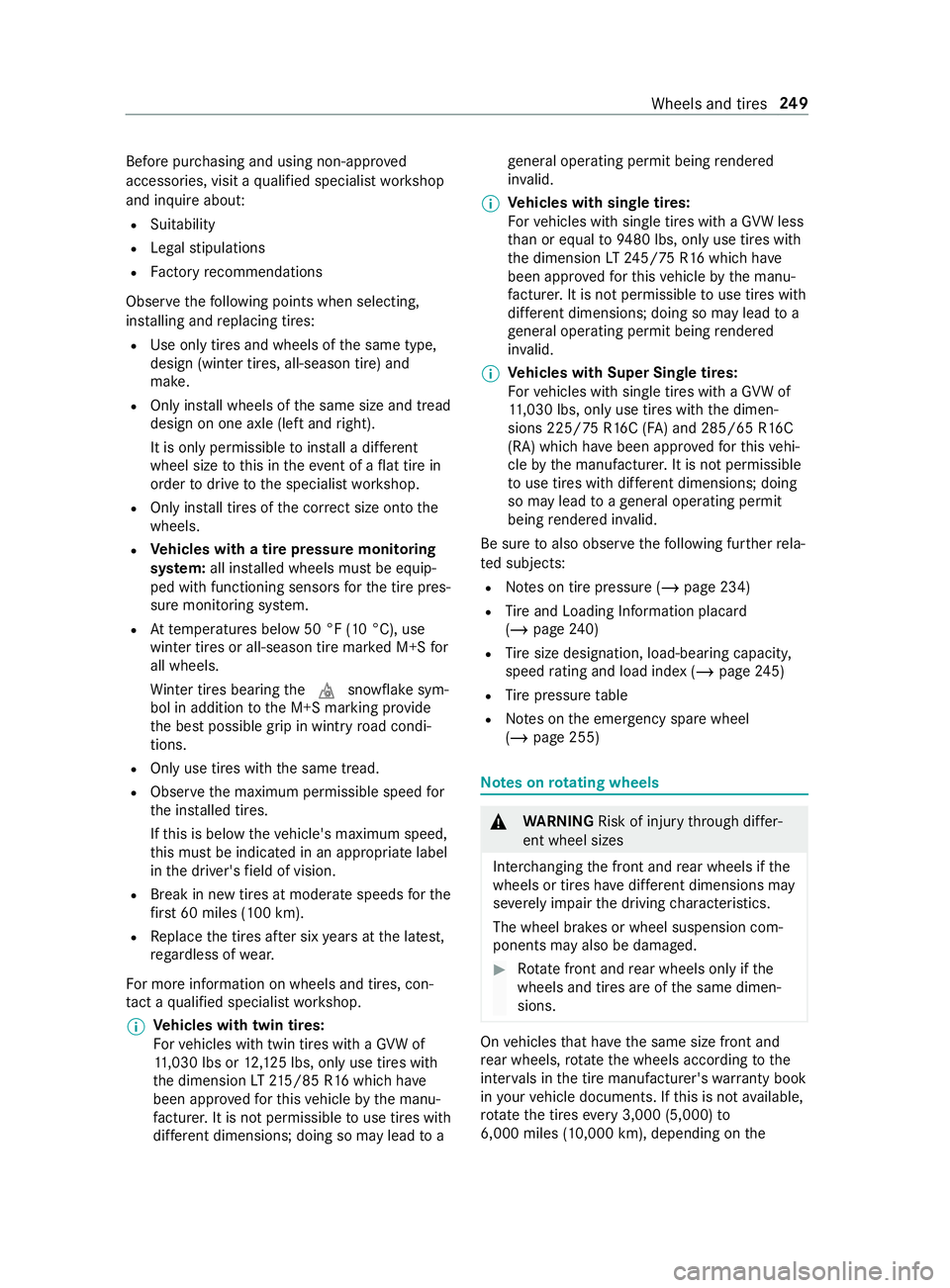
Before pu
rchasing and using non-appr oved
accesso ries, visit a qualified specialist workshop
and inquire about:
R Suitability
R Legal stipulations
R Factory recommendations
Obser vethefo llowing points when selecting,
ins talling and replacing tires:
R Use only tires and wheels of the same type,
design (winter tires, all-season tire) and
make.
R Only ins tall wheels of the same size and tread
design on one axle (left and right).
It is only permissible toins tall a dif fere nt
wheel size tothis in theeve nt of a flat tire in
order todrive tothe specialist workshop.
R Only ins tall tires of the cor rect size onto the
wheels.
R Ve
hicles with a tire pressure monitoring
sy stem: all ins talled wheels must be equip‐
ped with functioning sensors forth e tire pres‐
sure monitoring sy stem.
R Attemp eratures below 50 °F (10 °C), use
winter tires or all-season tire mar ked M+S for
all wheels.
Wi nter tires bearing the004D snowflake sym‐
bol in addition tothe M+S marking pr ovide
th e best possible grip in wintry road condi‐
tions.
R Only use tires with the same tread.
R Obser vethe maximum permissible speed for
th e ins talled tires.
If th is is below theve hicle's maximum speed,
th is must be indicated in an appropriate label
in the driver's field of vision.
R Break in new tires at moderate speeds forthe
fi rs t 60 miles (100 km).
R Replace the tires af ter six years at the latest,
re ga rdless of wear.
Fo r more information on wheels and tires, con‐
ta ct a qualified specialist workshop.
% Ve
hicles with twin tires:
Fo rve hicles with twin tires with a GVW of
11 ,030 lbs or 12,125 lbs, only use tires with
th e dimension LT215/85 R16 whi chhave
been appr ovedfo rth is vehicle bythe manu‐
fa cturer. It is not permissible touse tires with
dif fere nt dimensions; doing so may lead to age
neral ope rating pe rmit being rende red
in va lid.
% Ve
hicles with single tires:
Fo rve hicles with single tires with a GVW less
th an or equal to9480 lbs, only use tires with
th e dimension LT245/75 R16 whi chhave
been appr ovedfo rth is vehicle bythe manu‐
fa cturer. It is not permissible touse tires with
dif fere nt dimensions; doing so may lead to a
ge neral ope rating pe rmit being rende red
in va lid.
% Ve
hicles with Super Single tires:
Fo rve hicles with single tires with a GVW of
11 ,030 lbs, only use tires with the dimen‐
sions 225/ 75R16C (FA) and 285/65 R16C
(RA) which ha vebeen appr ovedfo rth is vehi‐
cle bythe manufacturer. It is not permissible
to use tires with dif fere nt dimensions; doing
so may lead toage neral ope rating pe rmit
being rende red in valid.
Be sure toalso obse rveth efo llowing fur ther rela‐
te d subjects:
R Notes on tire pressure (/ page 234)
R Tire and Loading In form ation placard
(/ page 240)
R Tire size designation, load-beari ng capacity,
speed rating and load ind ex (/page 245)
R Tire pressure table
R Notes on the emer gency spa rewheel
(/ page 255) Note
s onrotating wheels &
WARNING Risk of inju rythro ugh dif fer‐
ent wheel sizes
Inter changing the front and rear wheels if the
wheels or tires ha vediffere nt dimensions may
se verely impair the driving characteristics.
The wheel brakes or wheel suspension com‐
ponents may also be damaged. #
Rotate front and rear wheels only if the
wheels and tires are of the same dimen‐
sions. On
vehicles that ha vethe same size front and
re ar wheels, rotate the wheels according tothe
inter vals in the tire manufacturer's warranty book
in your vehicle documents. If this is not available,
ro tate the tires every3,000 (5,000) to
6,000 miles (10,000 km), depending on the Wheels and tires
249
Page 304 of 354
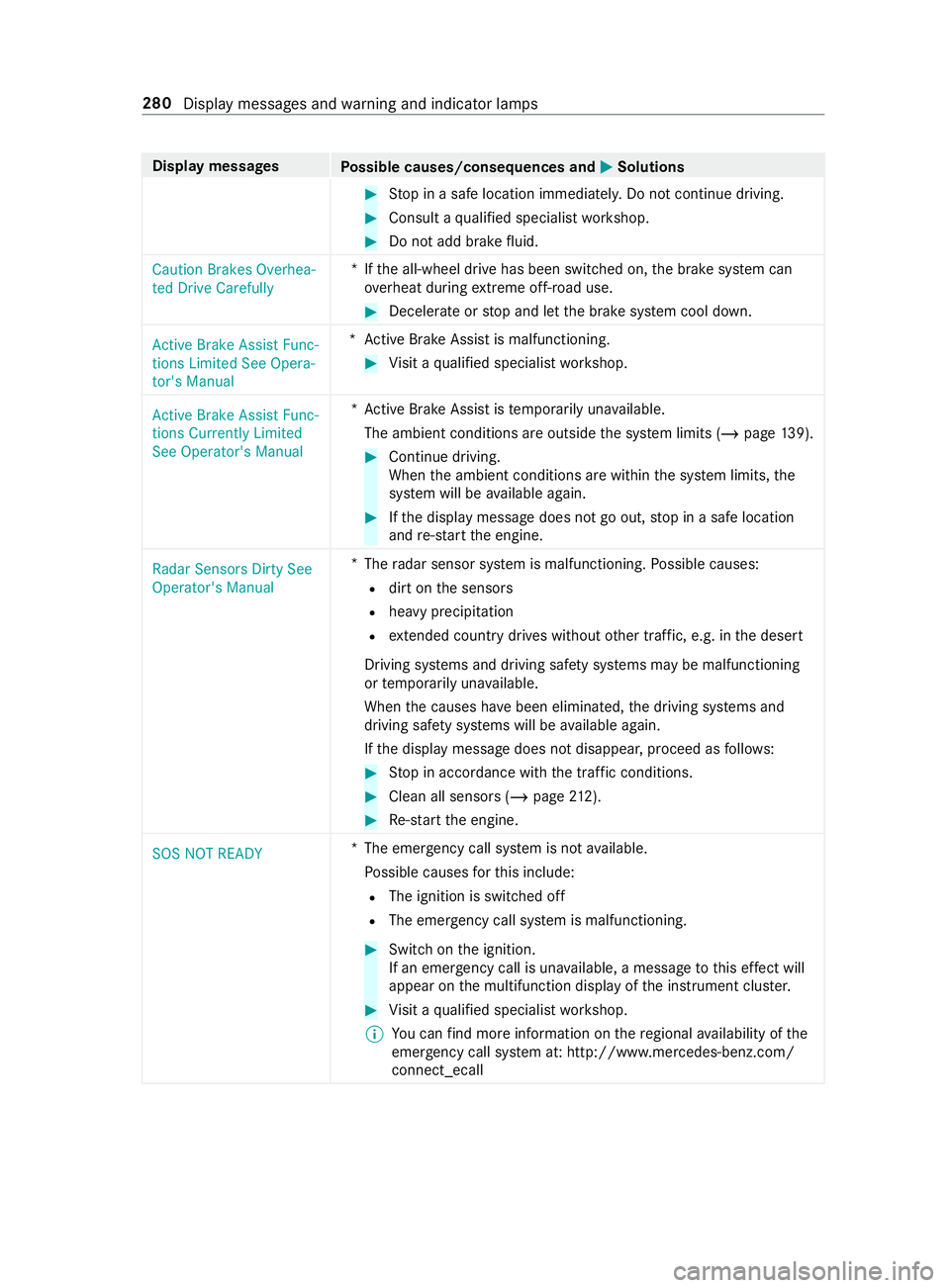
Display messages
Possible causes/consequences and 0050 0050Solutions #
Stop in a safe location immediately. Do not continue driving. #
Consult a qualified specialist workshop. #
Do not add brake fluid.
Caution Brakes Overhea-
ted Drive Carefully *I
fth e all-wheel drive has been switched on, the brake sy stem can
ove rheat during extreme off-road use. #
Decele rate or stop and let the brake sy stem cool down.
Active Brake Assist Func-
tions Limited See Opera-
tor's Manual *A
ctive Brake Assi stis malfunctioning. #
Visit a qualified specialist workshop.
Active Brake Assist Func-
tions Currently Limited
See Operator's Manual *A
ctive Brake Assi stistemp orarily una vailable.
The ambient conditions are outside the sy stem limits (/ page139). #
Continue driving.
When the ambient conditions are within the sy stem limits, the
sy stem will be available again. #
Ifth e display message does not go out, stop in a safe location
and re-sta rt the engine.
Radar Sensors Dirty See
Operator's Manual *
The radar sensor sy stem is malfunctioning. Possible causes:
R dirt on the sensors
R heavy precipitation
R extended country drives wi thout other traf fic, e.g. in the desert
Driving sy stems and driving saf ety sy stems may be malfunctioning
or temp orarily una vailable.
When the causes ha vebeen eliminated, the driving sy stems and
driving saf ety sy stems will be available again.
If th e display message does not disappear, proceed as follo ws: #
Stop in accordance with the tra ffic conditions. #
Clean all sensors (/ page212). #
Re-sta rt the engine.
SOS NOT READY *T
he emergency call sy stem is not available.
Po ssible causes forth is include:
R The ignition is switched off
R The emer gency call sy stem is malfunctioning. #
Switch on the ignition.
If an emer gency call is una vailable, a message tothis ef fect will
appear on the multifunction display of the instrument clus ter. #
Visit a qualified specialist workshop.
% Yo
u can find more information on there gional availability of the
emer gency call sy stem at: http://www.mercedes-benz.com/
connect_ecall 280
Display messages and warning and indicator lamps
Page 308 of 354
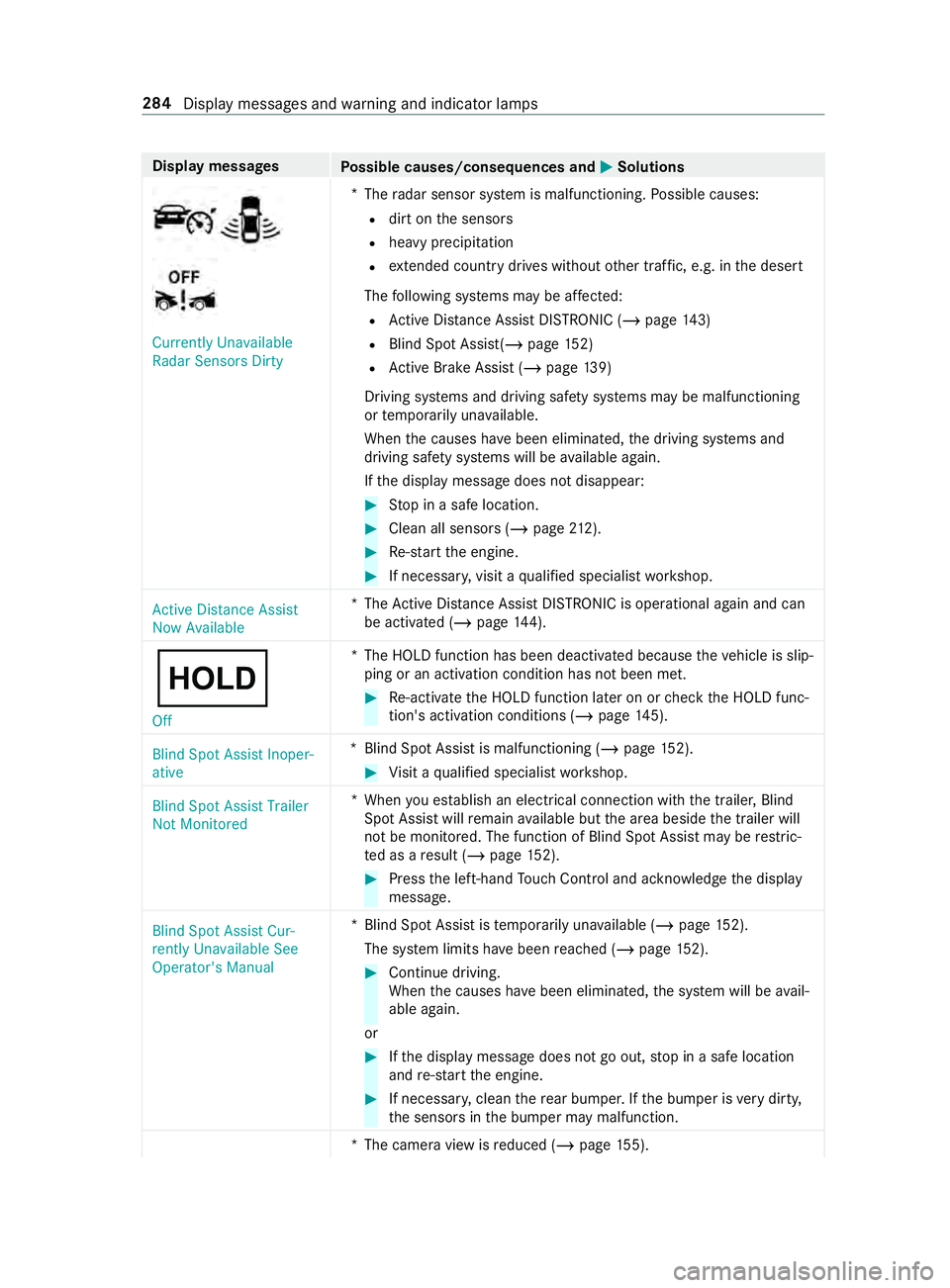
Display messages
Possible causes/consequences and 0050 0050Solutions Currently Unavailable
Radar Sensors Dirty
*
The radar sensor sy stem is malfunctioning. Possible causes:
R dirt on the sensors
R heavy precipitation
R extended country drives wi thout other traf fic, e.g. in the desert
The following sy stems may be af fected:
R Active Dis tance Assi stDISTRONIC (/ page 143)
R Blind Spot Assist(/ page152)
R Active Brake Assi st (/ page 139)
Driving sy stems and driving saf ety sy stems may be malfunctioning
or temp orarily una vailable.
When the causes ha vebeen eliminated, the driving sy stems and
driving saf ety sy stems will be available again.
If th e display message does not disappear: #
Stop in a safe location. #
Clean all sensors (/ page212). #
Re-sta rt the engine. #
If necessar y,visit a qualified specialist workshop.
Active Distance Assist
Now Available *T
heActive Dis tance Assi stDISTRONIC is operational again and can
be acti vated (/ page144).
00D9 Off *T
he HOLD function has been deactivated because theve hicle is slip‐
ping or an activation condition has not been met. #
Re-acti vate the HOLD function later on or check the HOLD func‐
tion's activation conditions (/ page145).
Blind Spot Assist Inoper-
ative *B
lind Spot Assist is malfunctioning (/ page152). #
Visit a qualified specialist workshop.
Blind Spot Assist Trailer
Not Monitored *W
hen you es tablish an electrical connection with the trailer, Blind
Spot Assist will remain available but the area beside the trailer will
not be monitored. The function of Blind Spot Assist may be restric‐
te d as a result (/ page152). #
Press the left-hand Touch Control and ackn owledge the display
message.
Blind Spot Assist Cur-
rently Unavailable See
Operator's Manual *B
lind Spot Assist is temp orarily una vailable (/ page152).
The sy stem limits ha vebeen reached (/ page152). #
Continue driving.
When the causes ha vebeen eliminated, the sy stem will be avail‐
able again.
or #
Ifth e display message does not go out, stop in a safe location
and re-sta rt the engine. #
If necessar y,clean there ar bumper. If the bumper is very dirty,
th e sensors in the bumper may malfunction.
*T he camera view is reduced (/ page155). 284
Displaymessa ges and warning and indicator lamps
Page 320 of 354
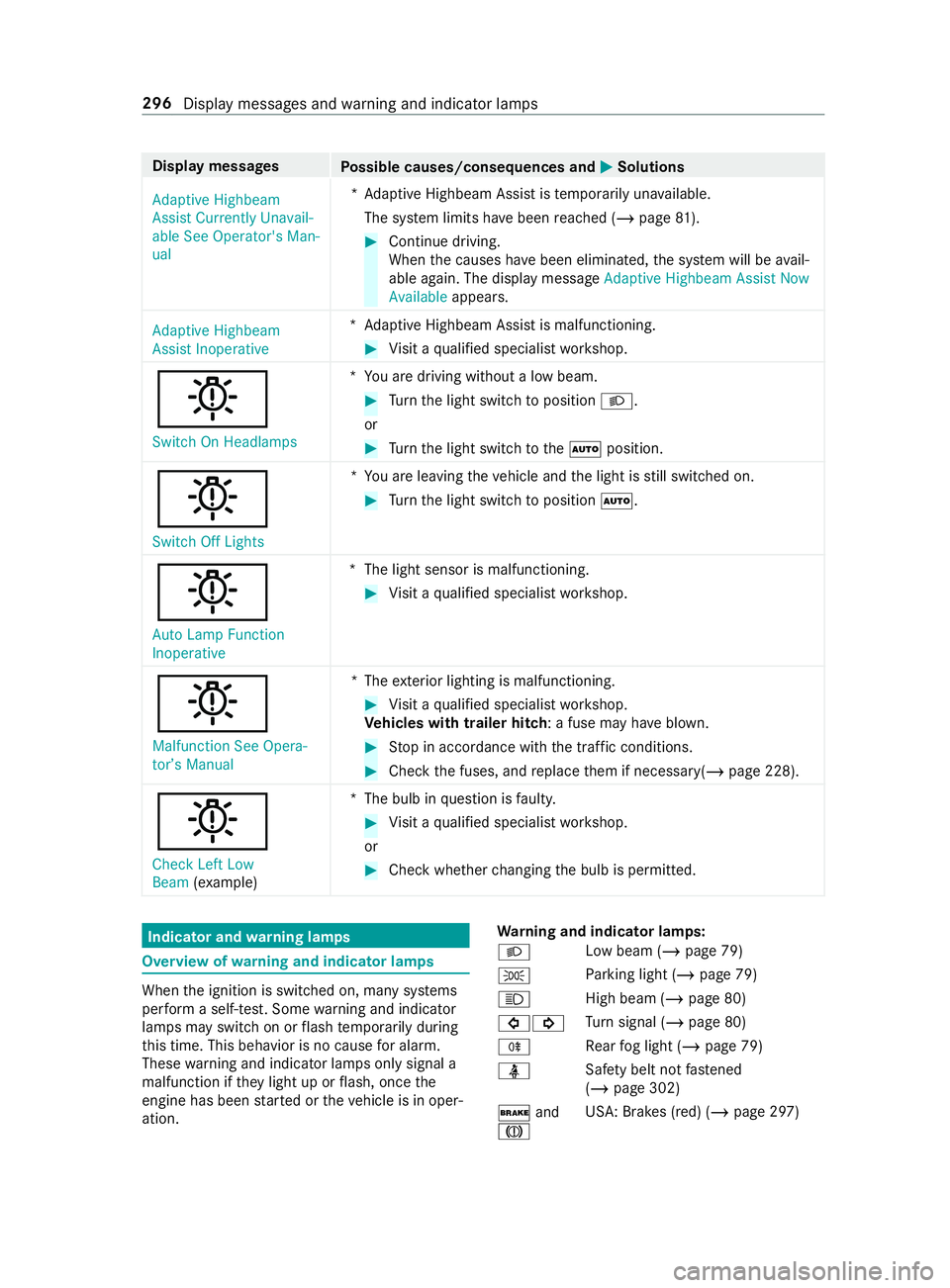
Display messages
Possible causes/consequences and 0050 0050Solutions
Adaptive Highbeam
Assist Currently Unavail-
able See Operator's Man-
ual *A
daptive Highbeam Assist is temp orarily una vailable.
The sy stem limits ha vebeen reached (/ page81). #
Continue driving.
When the causes ha vebeen eliminated, the sy stem will be avail‐
able again. The display message Adaptive Highbeam Assist Now
Available appears.
Adaptive Highbeam
Assist Inoperative *A
daptive Highbeam Assist is malfunctioning. #
Visit a qualified specialist workshop.
0049
Switch On Headlamps *Y
ou are driving without a low beam. #
Turn the light switch toposition 0058.
or #
Turn the light switch tothe0058 position.
0049
Switch Off Lights *Y
ou are leaving theve hicle and the light is still switched on. #
Turn the light switch toposition 0058.
0049
Auto Lamp Function
Inoperative *T
he light sensor is malfunctioning. #
Visit a qualified specialist workshop.
0049
Malfunction See Opera-
tor’s Manual *T
heexterior lighting is malfunctioning. #
Visit a qualified specialist workshop.
Ve hicles with trailer hitch: a fuse may ha veblown. #
Stop in accordance with the tra ffic conditions. #
Check the fuses, and replace them if necessary(/ page 228).
0049
Check Left Low
Beam (exa mp le) *T
he bulb in question is faulty. #
Visit a qualified specialist workshop.
or #
Check whe ther changing the bulb is permitted. Indicator and
warning lamps Overview of
warning and indicator lamps When
the ignition is switched on, many sy stems
per form a self-test. Some warning and indicator
lamps may switch on or flash temp orarily during
th is time. This behavior is no cause for alarm.
These warning and indicator lamps only signal a
malfunction if they light up or flash, once the
engine has been star ted or theve hicle is in oper‐
ation. Wa
rning and indicator lamps:
0058 Low beam (/
page 79)
0060 Pa
rking light (/ page 79)
0057 High beam (/
page 80)
003E003D Tu
rn signal (/ page 80)
005E Re
ar fog light (/ page 79)
00E9 Saf
ety belt not fastened
(/ page 302)
0027 and
004D USA: Brakes (red) (/
page 297)296
Display messages and warning and indicator lamps
Page 327 of 354
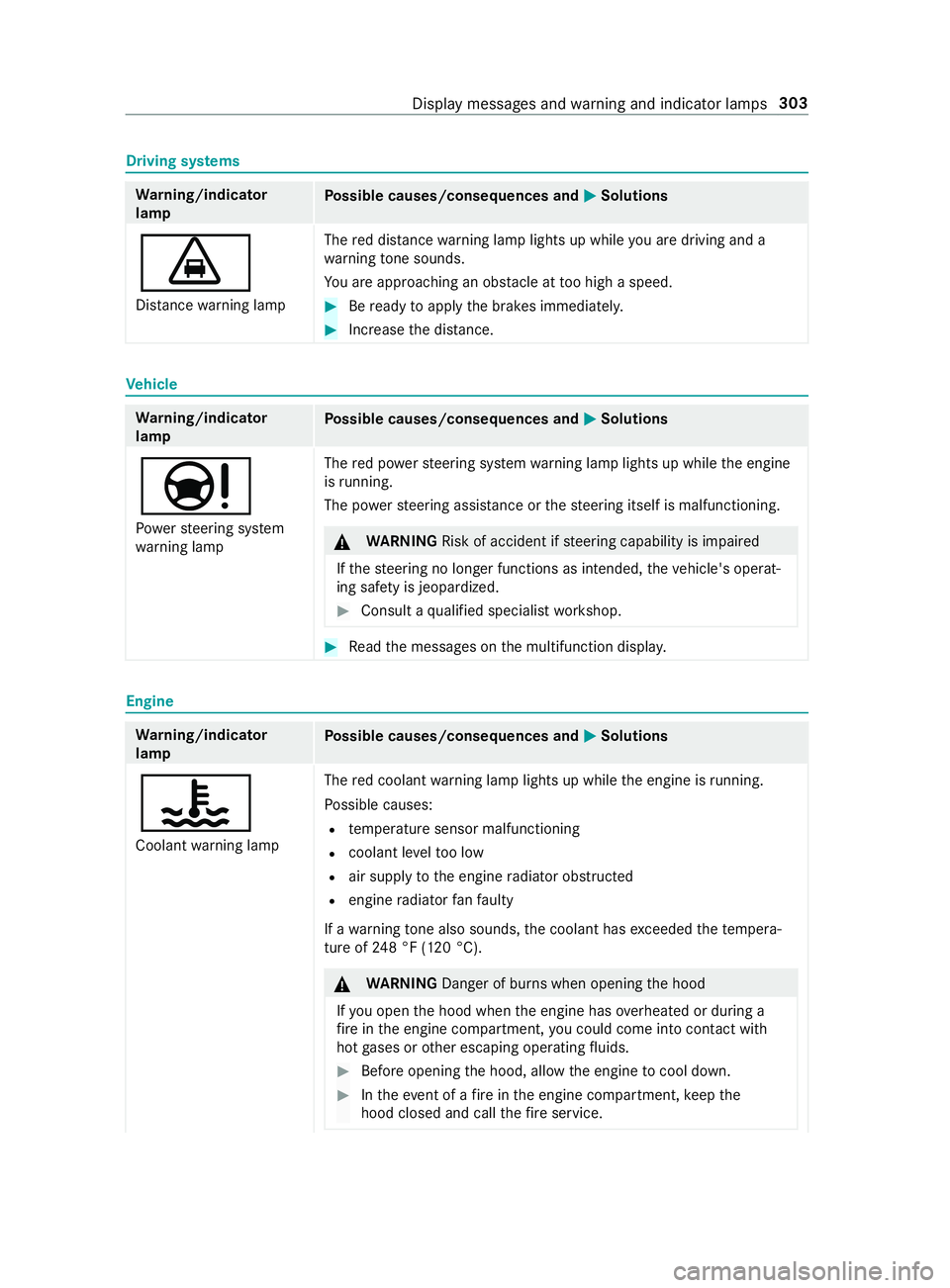
Driving sy
stems Wa
rning/indicator
lamp Po
ssible causes/consequences and 0050 0050Solutions
00BA
Dis tance warning lamp The
red dis tance warning lamp lights up while you are driving and a
wa rning tone sounds.
Yo u are approaching an obs tacle at too high a speed. #
Beready toapply the brakes immediatel y. #
Increase the dis tance. Ve
hicle Wa
rning/indicator
lamp Po
ssible causes/consequences and 0050 0050Solutions
00CC
Po we rst eering sy stem
wa rning lamp The
red po werst eering sy stem warning lamp lights up while the engine
is running.
The po werst eering assis tance or thesteering itself is malfunctioning. &
WARNING Risk of accident if steering capability is impaired
If th esteering no longer functions as intended, theve hicle's operat‐
ing saf ety is jeopardized. #
Consult a qualified specialist workshop. #
Read the messages on the multifunction displa y.Engine
Wa
rning/indicator
lamp Po
ssible causes/consequences and 0050 0050Solutions
00AC
Coolant warning lamp The
red coolant warning lamp lights up while the engine is running.
Po ssible causes:
R temp erature sensor malfunctioning
R coolant le velto o low
R air supply tothe engine radiator obstructed
R engine radiator fanfa ulty
If a warning tone also sounds, the coolant has exceeded thete mp era‐
ture of 248 °F (120 °C). &
WARNING Danger of bu rns when opening the hood
If yo u open the hood when the engine has overheated or during a
fi re inthe engine compartment, you could come into con tact wi th
hot gases or other escaping operating fluids. #
Before opening the hood, allow the engine tocool down. #
Intheeve nt of a fire inthe engine compartment, keep the
hood closed and call thefire service. Display messages and
warning and indicator lamps 303
Page 331 of 354
Sound settings .................................
188
Tr ans ferred vehicle data ...................1 88
Animals Pets in theve hicle .............................. 40
Anti-lock braking sy stem
see ABS (Anti-lock Braking Sy stem)
Anti-skid chains
see Snow chains
Anti-theft Alarm sy stem
see ATA (Anti -Theft Alarm sy stem)
Anti-theft pr otection
Immobilizer ........................................ 55
Anti- theft pr otection
see ATA (Anti -Theft Alarm sy stem)
Apple CarPlay™ .................................... 186
Connecting an iPhone ®
............ 186, 187
Ending .............................................. 187
No tes ................................................ 186
Overview .......................................... 186
Sound settings .................................. 187
Tr ans ferred vehicle data ...................1 88
Ashtr ays
In the windshield stowage com‐
partment ............................................ .74
ASR (accele ration skid control) ...........137
Assistance graphic (on-board com‐
puter) ..................................................... 16 6
ASS YST PLUS ........................................ 202
Battery disconnection pe riods ......... 202
Displaying the service due date .......2 02
Fu nction/no tes ................................ 202
Re gular maintenance work ............... 202
Special service requirements .......... .202
ATA (Anti-Theft Alarm sy stem) .............. 56
Ac tivating/deactivating the interior
motion sensor .................................... 57
Fu nction ............................................. 56
Interior motion sensor function .......... 57
St opping the alarm ............................. 56
Switching theto w- aw ay alarm
on/off ................................................ 57
To w- aw ay alarm function .................... 56
At tachments .......................................... .19
AT TENTION ASSI ST....................... 151, 15 2
Fu nction ............................................ 151
Setting .............................................. 15 2
Sy stem limitations ............................1 51
Au thorized workshop
see Qualified specialist workshop Au
tomatic distance control
see Active Dis tance Assi stDISTRONIC
Au tomatic driving lights ........................79
Au tomatic transmission
DIRECT SELECT le ver ........................ 11 5
Engaging drive position ..................... 11 7
Engaging neutral ............................... 11 6
Engaging reve rsege ar ...................... .116
Kickdown .......................................... 11 8
Re stricting the shift range ................. 11 7
Selecting pa rkposition .....................1 16
Tr ansmission position display .......... .115
Tr ansmission positions ...................... 11 5
Au xiliary heating .................................... 99
Fu nction ............................................. 99
Axle load ................................................ 261 B
Back suppo rt
see Lumbar support (4-w ay)
BA S (Brake Assist Sy stem) .................. 137
Battery Charging ........................................... 219
Charging a vehicle battery ................2 19
Disconnecting the auxiliary battery
in the engine compartment .............. 224
Disconnecting thest ar ter battery .... 222
Jump -sta rting (vehicle) ...................... 219
Ke y .................................................... .42
No tes (vehicle) ..................................2 18
Re moving or ins talling thest ar ter
battery .............................................2 23
St arter battery .................................. 221
Battery main switch Notes ................................................ 11 4
Switching the po wer supp lyon/off ... 11 4
Belt see Seat belt
Blind Spot Assi st.................................. 15 2
Ac tivating/deactivating .................... 154
Fu nction ........................................... 15 2
Re ar Cross Traf fic Alert .................... 154
Sy stem limitations ............................1 52
Blue tooth ®
............................................ 180
Ac tivating/deactivating .................... 180
Information .......................................1 80
Bottle holder .......................................... .74
Brake ABS (Anti-lo ckBraking Sy stem) ........ 137
Ac tive Brake Assi st........................... 13 9
BA S (Brake Assi stSystem) ............... 137 Index
307