display MERCEDES-BENZ SPRINTER 2019 MY19 with 7” screen
[x] Cancel search | Manufacturer: MERCEDES-BENZ, Model Year: 2019, Model line: SPRINTER, Model: MERCEDES-BENZ SPRINTER 2019Pages: 354, PDF Size: 6.15 MB
Page 42 of 354
Environmental pr
otection
+ ENVIRONMENTAL
NOTEEnvironmental
damage due tooperating conditions and
personal driving style The pollutant emission of
your vehicle is
directly related totheve hicle's operation.
Yo u can make a contribution toenvironmen tal
pr otection byoperating your vehicle in an
environmentally responsible manner. Todo
th is, obser vethefo llowing recommendations
on ope rating conditions and your personal
driving style.
Operating conditions: #
Make sure that the tire pressures are
alw ays cor rect. #
Do not transport any unnecessa ry
we ight (e.g. a roof rack which is no lon‐
ge rre qu ired). #
Obser vethe service inter vals.
A regularly serviced vehicle will contri b‐
ute toenvironmen tal pr otection. #
Always ha vemaintenance workcar ried
out at a qualified specialist workshop.
Pe rsonal driving style: #
Do not depress the accelera tor pedal
when starting the engine. #
Do not warm upthe engine while sta‐
tionar y. #
Drive carefully and maintain a su fficient
dis tance to ot hervehicles. #
Avoid frequent, sudden acceleration and
braking. #
Shift gears in good time and use each
ge ar only up to00C3 of its maximum
engine speed. #
Switch off the engine when in stationary
traf fic fo r a prolonged time. #
Drive in a fuel-ef ficient manne r.Pay
attention tothe ECO display for a fuel-
ef ficient driving style. Environmental issues and
recommendations
It is recommended torege nerate and recycle sub‐
st ances ins tead of immediately disposing of
th em.
The releva nt environmental guidelines and regula‐
tions ser vetoprotect the environment and
should be follo we d carefully. Mercedes-Benz Genuine
Parts
+ ENVIRONMENTAL
NOTEEnvironmental
damage caused bynot using recycled
re conditioned components Daimler
AGoffers recycled reconditioned
components and pa rts with the same quality
as new parts. The same entitlement from the
Limited Warranty is valid as for new parts. #
Use recycled reconditioned components
and pa rts from Daimler AG. *
NO
TEThe ef fectiveness of there stra int
sy stems can be impaired byinstalling
accessory parts, per form ing repairs or
we lding operations Airbags, Emer
gency Tensioning Devices as
we ll as control units and sensors forthe
re stra int sy stems can be ins talled in thefo l‐
lowing areas of theve hicle:
R Door frames
R Roof frames
R Doors
R Door pillars
R Door sills
R Seats
R Cockpit
R Instrument clus ter
R Center console #
Do not ins tall any accessories such as
audio sy stems in these areas. #
Do not per form repairs or welding oper‐
ations. #
Have accesso ryparts ins talled at a
qu alified specialist workshop. If
yo u use parts, tires, wheels or saf ety-re leva nt
accesso ries which ha venot been appr ovedby
Mercedes-Benz, the operating saf ety of theve hi‐
cle may be jeopardized. Saf ety-re leva nt sy stems,
e.g. the brake sy stem, may malfunction. Only use
Mercedes-Benz Genuine Parts or parts of equal
qu ality. Use only tires, wheels and accesso ry
parts that are appr oved foryo ur vehicle model.
Mercedes-Benz tests original parts, con version
parts and accessory parts that ha vebeen
appr ovedfo ryo ur vehicle model forre liability,
saf ety and suitabilit y.Despite ongoing ma rket
re sear ch,we are unable toassess other parts. 18
General no tes
Page 49 of 354
card contains, in compact
form ,th e most impor‐
ta nt information about your vehicle e.g. thero ut‐
ing of electric cables.
Fu rther information can be found at http://
www.mercedes-benz.de/qr-code. Data
storage Electronic control units
Electronic control units are ins
talled in your vehi‐
cle. Some of these are necessary forth e safe
operation of your vehicle, while some assist you
when driving (driver assis tance sy stems). In addi‐
tion, your vehicle pr ovides com fort and enter tain‐
ment functions, which are also made possible by
electronic cont rol units.
The elect ronic control units contain da tamemo‐
ri es which can temp orarily or permanently store
te ch nical information about theve hicle's operat‐
ing state, component loads, main tenance requ ire‐
ments and tech nical events or malfunctions.
In general, this information documents thest ate
of a component part, a module, a sy stem or the
sur roundings such as:
R operating states of sy stem components (e.g.
fl uid le vels, battery status, tire pressure)
R status messages concerning theve hicle and
its individual components (e.g. number of
wheel revo lutions/speed, deceleration, lateral
acceleration, display of thefast ened seat
belts)
R malfunctions or defects in impor tant sy stem
components (e.g. lights, brakes)
R information on events leading tovehicle dam‐
age
R system reactions in special driving situations
(e.g. airbag deployment, inter vention of sta‐
bility control sy stems)
R ambient conditions (e.g. temp erature, rain
sensor)
In addition toprov iding the actual cont rol unit
function, this data assists the manufacturer in
de tecting and rectifying malfunctions and opti‐
mizing vehicle functions. The majority of this data
is temp orary and is only processed in theve hicle
itself. Only a small portion of the data is stored in
th eeve nt or malfunction memo ry.
When your vehicle is serviced, tech nical da ta
from theve hicle can be read out byservice net‐
wo rkemplo yees (e.g. workshops, manufacturers)
or third parties (e.g. breakdown services). Serv‐ ices include
repair services, maintenance pro‐
cesses, warranty claims and quality assurance
measures, forex ample. The read out is per‐
fo rm ed via the legally prescribed port forthe
diagnostics connection in theve hicle. The
re spective service network locations or third par‐
ties collect, process and use this data. They
document tech nical statuses of theve hicle,
assist in finding malfunctions and impr oving qual‐
ity and are transmitted tothe manufacturer, if
necessar y.Fu rthermore, the manufacturer is sub‐
ject toproduct liability. Forth is, the manufacturer
re qu ires tech nical da tafrom vehicles.
Malfunction memories in theve hicle can be reset
by a service outlet as part of repair or mainte‐
nance work.
Depending on the selected equipment, you can
import data into vehicle con venience and info‐
ta inment functions yourself.
This includes, forex ample:
R multimedia data such as music, films or pho‐
to sfo r playback in an integrated multimedia
sy stem
R address book data for use in connection with
an integrated hands-free sy stem or an inte‐
grated navigation sy stem
R entered navigation destinations
R data about the use of Internet services
This data can be sa ved locally in theve hicle or it
is located on a device which you ha veconnected
to theve hicle (e.g. smartphone, USB flash drive
or MP3 pla yer). If this data is stored in theve hi‐
cle, you can dele teit at any time. This data is
sent tothird parties only at your requ est, particu‐
lar lywhen you use online services in accordance
with the settings that you ha veselected.
Yo u can store or change con venience settings/
individualization in theve hicle at any time.
Depending on the equipment, this includes, for
ex ample:
R seat and steering wheel position settings
R suspension and climate cont rol settings
R Individualization such as interior lighting
If yo ur vehicle is accordingly equipped, you can
connect your smartphone or ano ther mobile end
device totheve hicle. You can control this by
means of the cont rol elements integrated in the
ve hicle. Images and audio from the smartphone
can be output via the multimedia sy stem. Cer tain General no
tes25
Page 56 of 354
Re
leasing seat belts #
Press there lease button in the seat belt
buckle and guide the seat belt back with the
seat belt tongue. Fu
nction of the seat belt warning sy stem for
driver and co-driver The
00E9 seat belt warning lamp in the Instru‐
ment Display reminds youth at all vehicle occu‐
pants must fastentheir seat belts cor rectl y.
The 00E9 seat belt warning lamp lights up for six
seconds everytime af ter switching on the igni‐
tion.
A wa rning tone may also sound.
Af terth e engine is star ted, the seat belt warning
goes out as soon as the driver's and the front-
passenger seat belts are fastened.
While driving the seat belt warning lights up in
th efo llowing cases:
R ifth eve hicle's speed is higher than 15 mph
(25 km/h) and the driver's or front-passenger
seat belt is not fastened
R ifth e driver or co-driver unfas tenth eir seat
belt during the journey Airbags
Overview of airbags
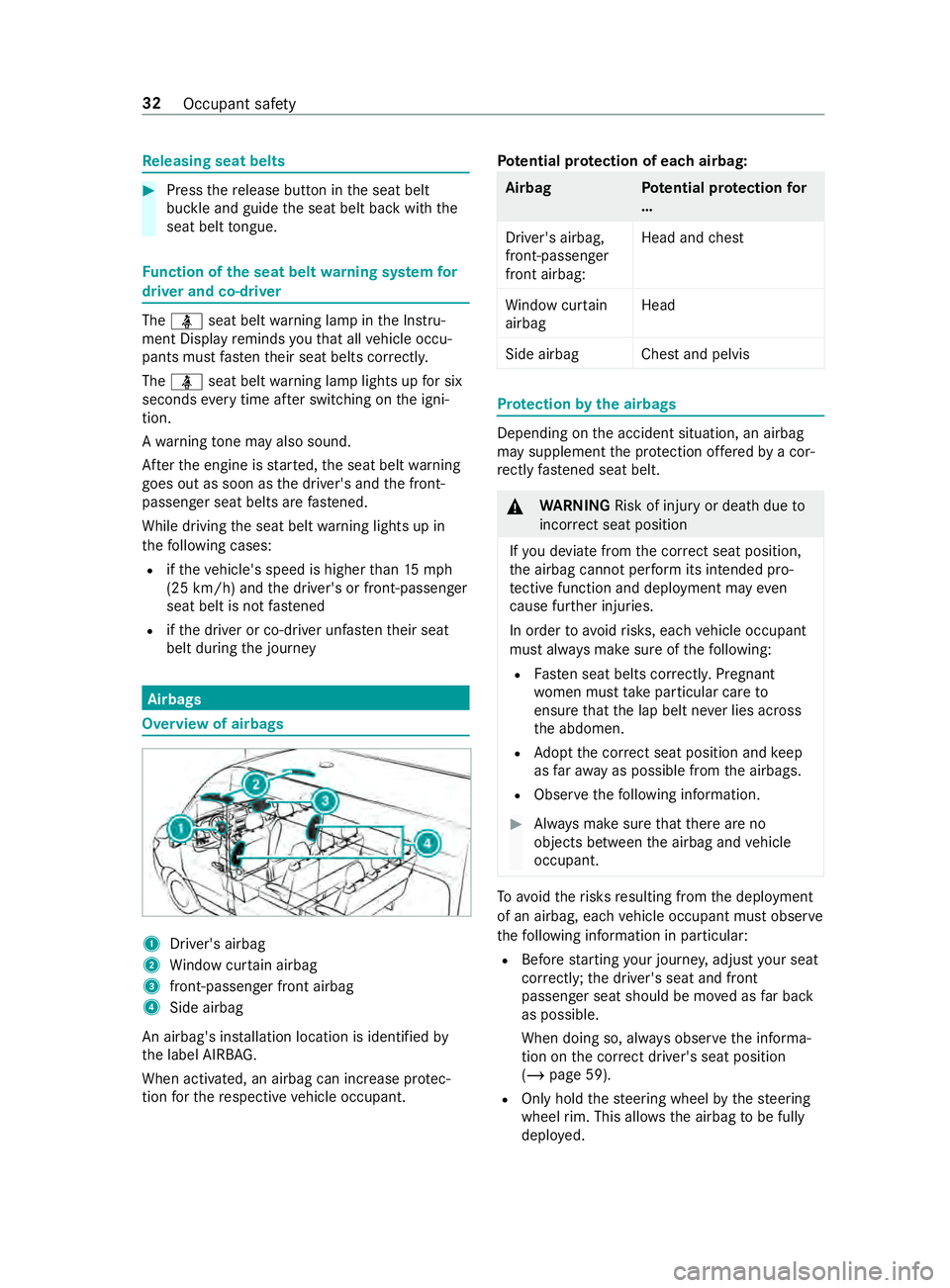
1
Driver's airbag
2 Window cur tain airbag
3 front-passenger front airbag
4 Side airbag
An airbag's ins tallation location is identified by
th e label AIRB AG.
When activated, an airbag can increase pr otec‐
tion forth ere spective vehicle occupant. Pot
ential pr otection of each airbag: Airba
gP otential pr otection for
…
Driver's airbag,
front-passenger
front airbag: Head and
chest
Wi ndow cur tain
airbag Head
Side airbag Chest and pelvis Pr
otection bythe airbags Depending on
the accident situation, an airbag
may supplement the pr otection of fere dby a cor‐
re ctly fastened seat belt. &
WARNING Risk of inju ryor death due to
incor rect seat position
If yo u deviate from the cor rect seat position,
th e airbag cann otper form its intended pro‐
te ctive function and deployment may even
cause fur ther injuries.
In order toavo idrisks, each vehicle occupant
must alw ays make sure of thefo llowing:
R Fasten seat belts cor rectly. Pregnant
wo men must take particular care to
ensure that the lap belt ne ver lies across
th e abdomen.
R Adopt the cor rect seat position and keep
as faraw ay as possible from the airbags.
R Obser vethefo llowing information. #
Always make sure that there are no
objects between the airbag and vehicle
occupant. To
avo idtherisks resulting from the deployment
of an airbag, each vehicle occupant must obser ve
th efo llowing information in particular:
R Before starting your journe y,adjust your seat
cor rectl y;the driver's seat and front
passenger seat should be mo ved as far back
as possible.
When doing so, alw ays obser vethe informa‐
tion on the cor rect driver's seat position
(/ page 59).
R Only hold thesteering wheel bythesteering
wheel rim. This allows the airbag tobe fully
deplo yed. 32
Occupant saf ety
Page 76 of 354
Electrical
step Fu
nction of the electrical step Yo
ur vehicle's sliding door may be equipped with
an electrical step.
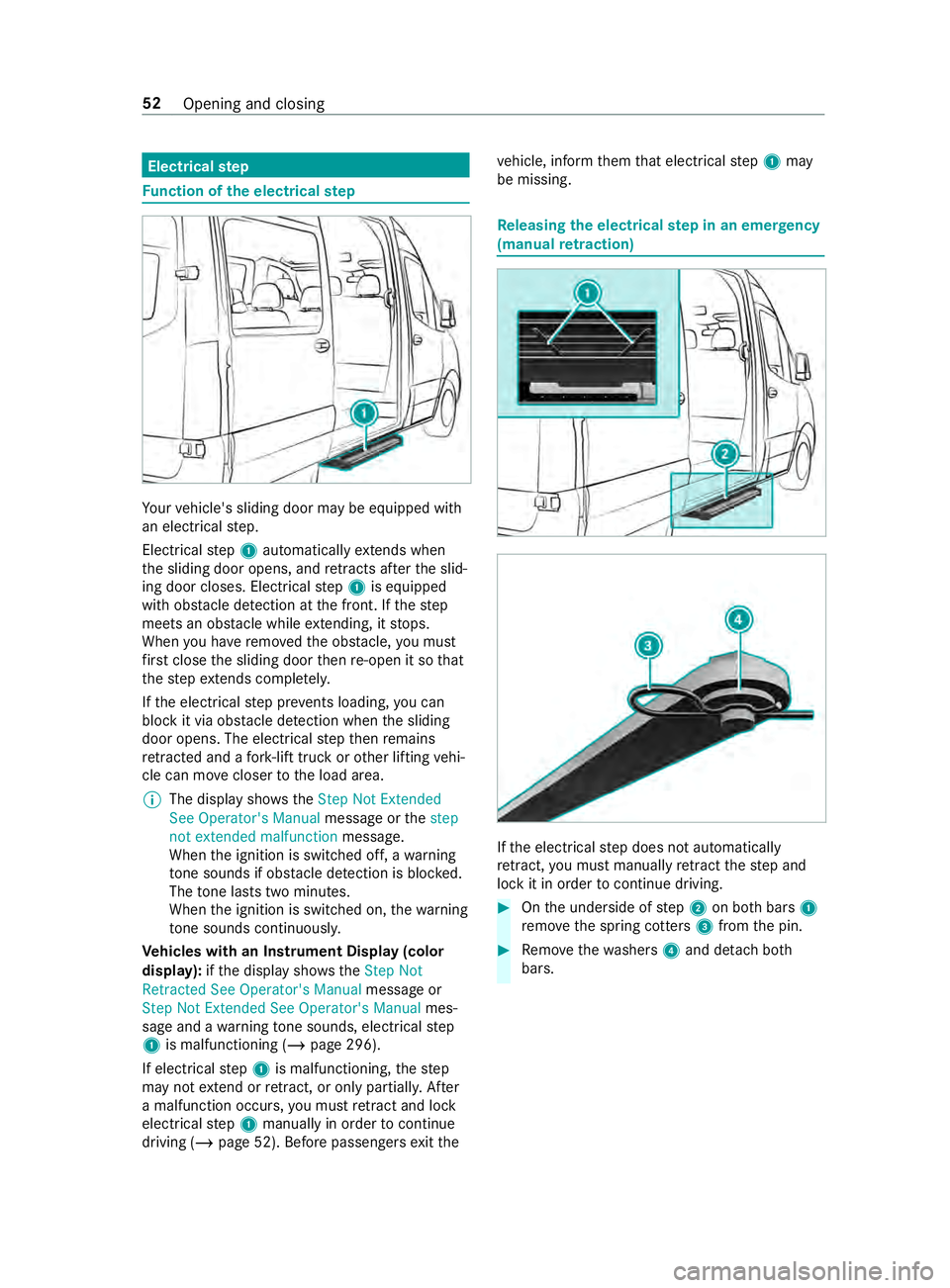
Elect rical step 1 automatically extends when
th e sliding door opens, and retracts af terth e slid‐
ing door closes. Elect rical step 1 is equipped
with obs tacle de tection at the front. If thestep
meets an obs tacle while extending, it stops.
When you ha veremo vedth e obs tacle, you must
fi rs t close the sliding door then re-open it so that
th estep extends compl etely.
If th e electrical step pr events loading, you can
block it via obs tacle de tection when the sliding
door opens. The electrical step then remains
re tracted and a fork -lift truck or other lifting vehi‐
cle can mo vecloser tothe load area.
% The display sho ws theStep Not Extended
See Operator's Manual message orthestep
not extended malfunction message.
When the ignition is switched off, a warning
to ne sounds if obs tacle de tection is blo cked.
The tone la sts two minutes.
When the ignition is switched on, thewa rning
to ne sounds continuous ly.
Ve hicles with an Instrument Display (color
display): ifth e display sho ws theStep Not
Retracted See Operator's Manual message or
Step Not Extended See Operator's Manual mes‐
sage and a warning tone sounds, electrical step
1 is malfunctioning (/ page 296).
If electrical step 1 is malfunctioning, thestep
may not extend or retract, or only pa rtiall y.After
a malfunction occurs, you must retract and lo ck
electrical step 1 manually in order tocontinue
driving (/ page 52). Before passengers exitthe ve
hicle, inform them that electrical step 1 may
be missing. Re
leasing the electrical step in an emer gency
(manual retraction) If
th e electrical step does not automatically
re tract, you must manually retract thestep and
lock it in order tocontinue driving. #
Onthe underside of step 2 on bo thbars 1
re mo vethe spring cotters 3from the pin. #
Remo vethewa shers 4and de tach both
bars. 52
Opening and closing
Page 102 of 354
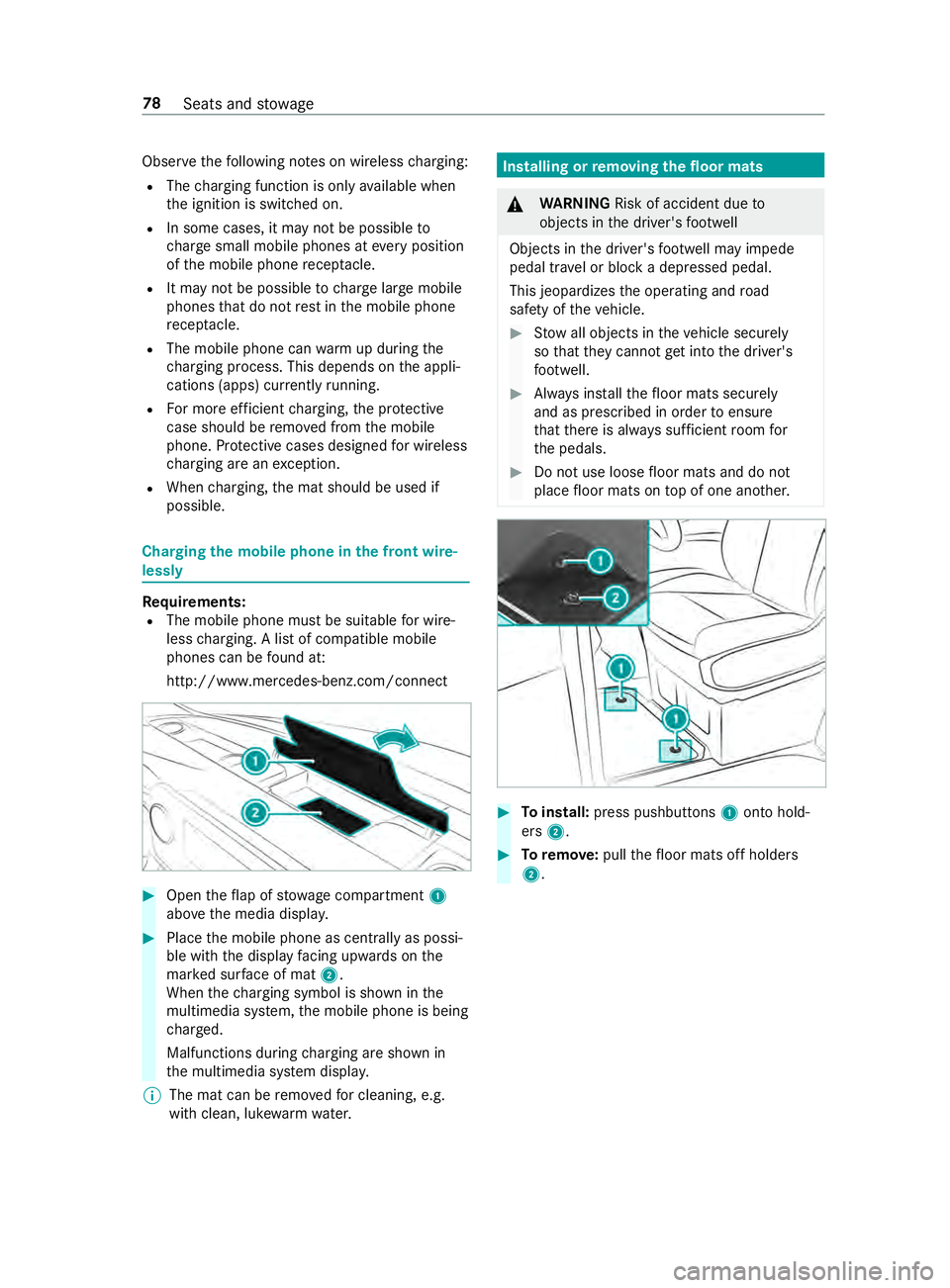
Obser
vethefo llowing no tes on wireless charging:
R The charging function is only available when
th e ignition is switched on.
R In some cases, it may not be possible to
ch arge small mobile phones at every position
of the mobile phone recep tacle.
R It may not be possible tocharge large mobile
phones that do not rest inthe mobile phone
re cep tacle.
R The mobile phone can warm up during the
ch arging process. This depends on the appli‐
cations (apps) cur rently running.
R For more ef ficient charging, the pr otective
case should be remo ved from the mobile
phone. Pr otective cases designed for wireless
ch arging are an exception.
R When charging, the mat should be used if
possible. Charging
the mobile phone in the front wire‐
lessly Requ
irements:
R The mobile phone must be suitable for wire‐
less charging. A list of compatible mobile
phones can be found at:
http://www.mercedes-benz.com/connect #
Open theflap of stowage compartment 1
abo vethe media displa y. #
Place the mobile phone as cent rally as possi‐
ble with the display facing up wards on the
mar ked sur face of mat 2.
When thech arging symbol is shown in the
multimedia sy stem, the mobile phone is being
ch arge d.
Malfunctions during charging are shown in
th e multimedia sy stem displa y.
% The mat can be
remo vedfo r cleaning, e.g.
with clean, luk ewarmwater. Installing or
removing the floor mats &
WARNING Risk of accident due to
objects in the driver's foot we ll
Objects in the driver's foot we ll may impede
pedal tr avel or block a depressed pedal.
This jeopardizes the operating and road
saf ety of theve hicle. #
Stow all objects in theve hicle securely
so that they cannot getinto the driver's
fo ot we ll. #
Always ins tallth efloor mats securely
and as prescribed in order toensure
th at there is alw ays suf ficient room for
th e pedals. #
Do not use loose floor mats and do not
place floor mats on top of one ano ther. #
Toinstall: press pushbuttons 1onto hold‐
ers 2. #
Toremo ve: pull thefloor mats off holders
2. 78
Seats and stowage
Page 105 of 354
The function is active under
thefo llowing condi‐
tions:
R The speed is less than 37 mph (60 km/h) and
th e indicator has been switched on or the
st eering wheel is turned.
R The speed is between 37mph (60 km/h) and
50 mph (8 0 km/h) and thesteering wheel is
turned.
The cornering light may still light up for a short
time but is switched off automatically af ter a
maximum of thre e minutes.
% When
reve rsege ar is engaged, the lighting
switches tothe opposite side. Highbeam Assist
Ad
aptive Highbeam Assist function &
WARNING Risk of accident despite
Ad aptive Highbeam Assist
Ad aptive Highbeam Assist does not recognize
th efo llowing road users:
R Road users without lights, e.g. pedes‐
trians
R Road users with poor lighting, e.g. cyclists
R Road users whose lighting is obstructed,
e.g. bya bar rier
On very rare occasions, Adaptive Highbeam
Assist may failto recognize other road users
with their own lighting, or may recognize
th em too late.
In these or similar situations, the automatic
high beam is not deactivated or is activated
despite the presence of other road users. #
Always obser vethe tra ffic carefully and
switch off the high beam in good time. The
Adaptive Highbeam Assist automatically
swit ches between thefo llowing settings:
R Low beam
R High beam
The sy stem de tects that vehicle lights are
approaching in the opposite direction or driving
ahead of theve hicle.
At speeds greater than 19 mp h (30 km/h), a
ch ange is made tothefo llowing setting:
R If no other road users are de tected, the high
beam switches on automaticall y.At
speeds less than 16 mp h (25 km/h) or if there
is suf ficient road lighting, a change is made to
th efo llowing setting:
R The high beam automatically switches off.
Sy stem limitations
Ad aptive Highbeam Assist cannot take thero ad,
we ather or traf fic conditions into consideration.
The de tection of obs tacles can be restricted if:
R Visibility is impaired, e.g. in fog, heavy rain or
snow
R The sensors are dirty or co vered
Ad aptive Highbeam Assist is only an aid. You are
re sponsible for ensuring cor rect vehicle lighting
in accordance with the pr evailing light, visibility
and traf fic conditions.
The sy stem's optical sensor is located behind the
windshield near theove rhead cont rol panel.
Switching Highbeam Assist on or off #
Toswitch on: turnthe light switch tothe
0058 position. #
Switch the highbeam on using the combina‐
tion switch.
If th e highbeam is automatically switched on
in darkness, the 00CE indicator lamp on the
multifunction display lights up. #
Toswitch off: switch offthe highbeam using
th e combination switch. Setting
theex terior lighting switch-off delay
time Re
quirements:
R The light switch is in position 0058.
Multimedia sy stem:
4 © 5
Settings 5
Light
5 Ext. Light Switch-off #
Set a switch-off delay time.
When theve hicle engine is switched off, theex te‐
ri or lighting will be activated forth e set time. Ac
tivating and deactivating the sur round
lighting Multimedia sy
stem:
4 © 5
Settings 5
Light
5 Locator Lighting #
Activate or deacti vate the function. Light and vision
81
Page 118 of 354
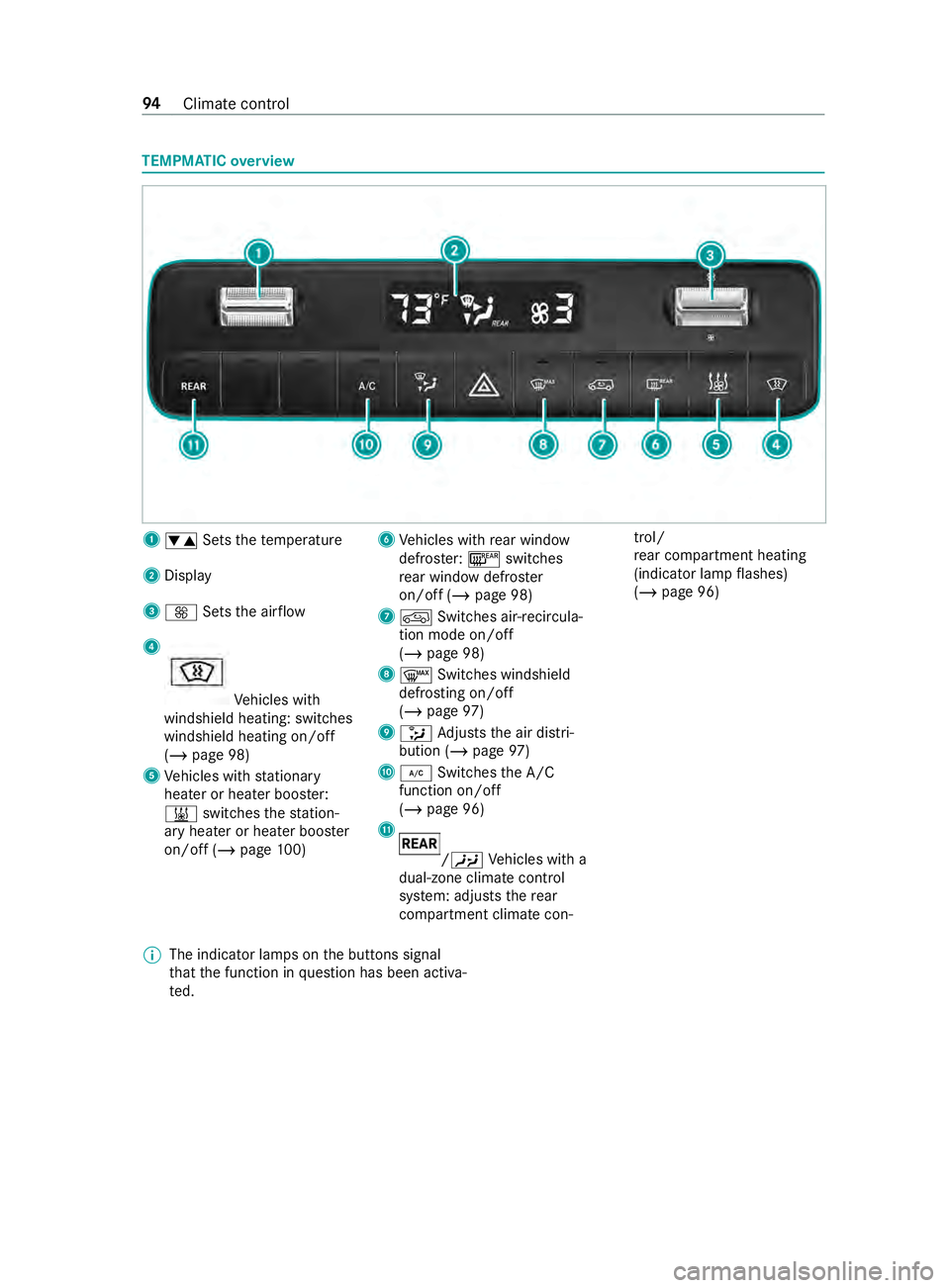
TEMPMATIC
overview 1
0082 Setsthete mp erature
2 Display
3 0097 Setsthe air flow
4 Ve
hicles with
windshield heating: switches
windshield heating on/off
(/ page 98)
5 Vehicles with stationary
heater or heater boos ter:
003B switches thest ation‐
ary heater or heater boos ter
on/off (/ page100) 6
Vehicles with rear wind ow
defros ter: 006C switches
re ar wind owdefros ter
on/off (/ page 98)
7 0089 Switches air-recircula‐
tion mode on/off
(/ page 98)
8 0064 Switches windshield
defrosting on/off
(/ page 97)
9 008F Adjusts the air distri‐
bution (/ page97)
A 005A Switches the A/C
function on/o ff
( / page 96)
B /00A4
Vehicles with a
dual-zone climate control
sy stem: adjusts there ar
compartment climate con‐ trol/
re
ar compartment heating
(indicator lamp flashes)
(/ page 96)
% The indicator lamps on
the buttons signal
th at the function in question has been activa‐
te d. 94
Climate cont rol
Page 119 of 354
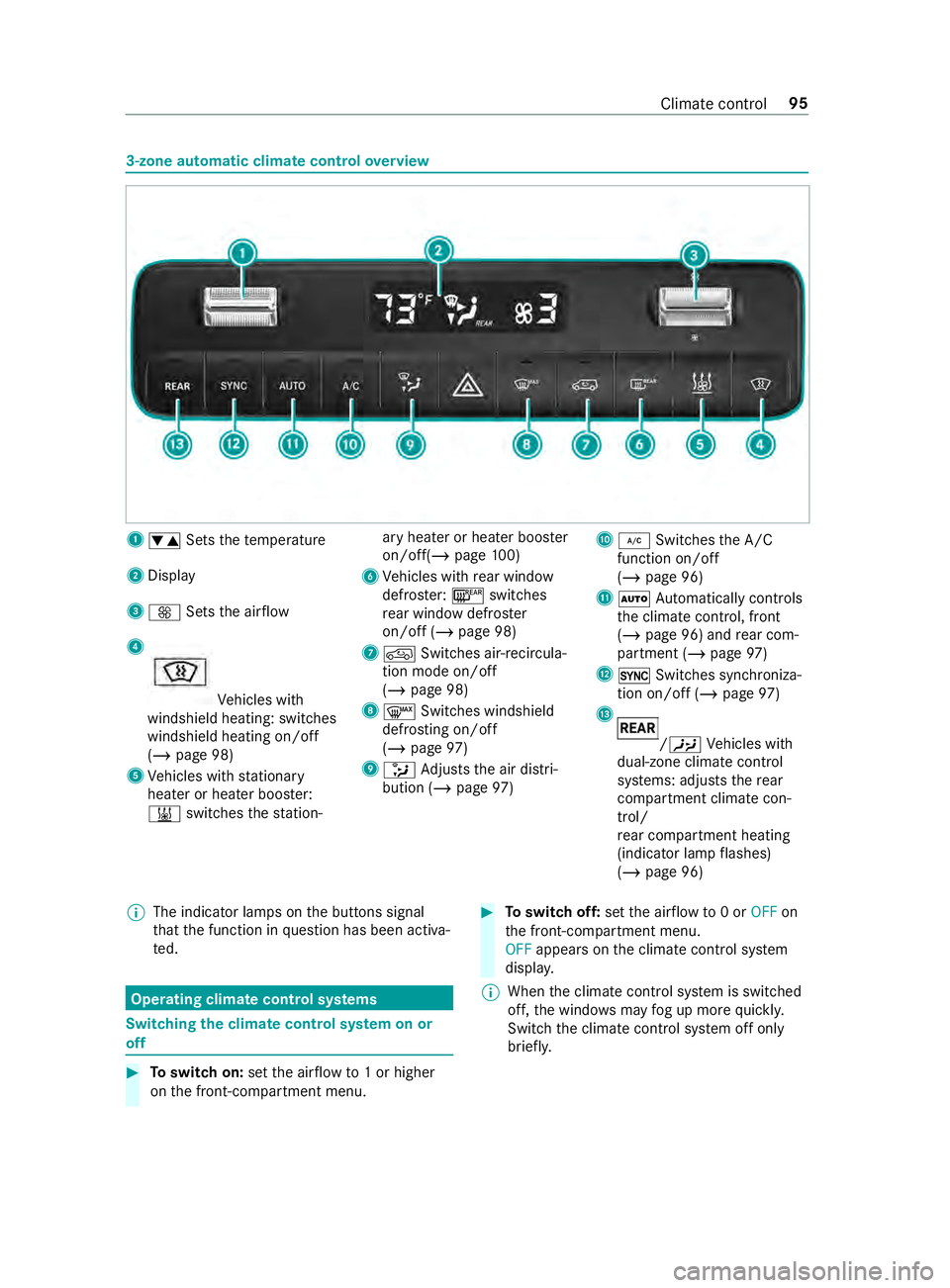
3-zone automatic climate control
overview 1
0082 Setsthete mp erature
2 Display
3 0097 Setsthe air flow
4 Ve
hicles with
windshield heating: switches
windshield heating on/off
(/ page 98)
5 Vehicles with stationary
heater or heater boos ter:
003B switches thest ation‐ ary heater or heater boos
ter
on/off(/ page100)
6 Vehicles with rear wind ow
defros ter: 006C switches
re ar wind owdefros ter
on/off (/ page 98)
7 0089 Switches air-recircula‐
tion mode on/off
(/ page 98)
8 0064 Switches windshield
defrosting on/off
(/ page 97)
9 008F Adjusts the air distri‐
bution (/ page97) A
005A Switches the A/C
function on/o ff
( / page 96)
B 0058 Automatically controls
th e climate cont rol, front
(/ page 96) and rear com‐
partment (/ page97)
C 0015 Switches synchroniza‐
tion on/off (/ page 97)
D /
00A4 Vehicles with
dual-zone climate control
sy stems: adjusts there ar
compartment climate con‐
trol/
re ar compartment heating
(indicator lamp flashes)
(/ page 96)
% The indicator lamps on
the buttons signal
th at the function in question has been activa‐
te d. Operating climate control sy
stems Switching
the clima tecontrol sy stem on or
off #
Toswitch on: setthe air flow to1 or higher
on the front-compartment menu. #
Toswitch off: setthe air flow to0 or OFF on
th e front-compartment menu.
OFF appears on the climate cont rol sy stem
displa y.
% When
the climate cont rol sy stem is switched
off, the windo wsmay fog up more quickl y.
Switch the climate cont rol sy stem off only
brief ly. Climate cont
rol95
Page 120 of 354
%
If
th e front-compartment sy stem has already
been switched on and there ar-compartment
sy stem has been switched off, you can
swit chit on byturning up thefa n on there ar-
compartment menu. If the front-compart‐
ment sy stem is switched on, there ar-com‐
partment sy stem will automatically switch on
as well. Ad
justing the rear comp artment climate con‐
trol Re
quirements:
R The climate control sy stem has been
switched on (/ page 95).
Switching on thetemp erature and airflow
and adju sting dual-zone and 3-zone automatic
climate control #
Press the /00A4
button.
The indicator lamp on the /00A4
but‐
to n and the /00A4
symbol on the cli‐
mate cont rol sy stem display will flash.
The display swit ches tothete mp erature and
th e blo wer in there ar menu. #
Use rocker switches 0082and0097 toset
th ere qu ired temp erature and air flow onthe
re ar menu.
% If
th ere are significant dif fere nces between
th ete mp erature settings of the front and rear
sy stems, these cann otbe controlled accu‐
ra tely.
% If
th ere ar compartment climate control has
been swit ched off, you can swit chit on auto‐
matically bypressing the0015 button.
Depending on theve hicle equipment, climate
contro l switches on theove rhead air-conditioning
sy stem or rear compartment heating as requ ired:
R Ve
hicles with an overhead air-condition‐
ing sy stem: there ar compartment can be
cooled onl y.
R Ve
hicles with rear comp artment heating:
th ere ar compartment can be heated onl y.Switching off
rear comp artment air condition‐
ing with dual and 3-zone automatic climate
control #
Press the /00A4
button. #
Ifth e indicator lamp on the /00A4
but‐
to n and the /00A4
symbol on the cli‐
mate cont rol sy stem display flash, set the air‐
fl ow to0 on there ar menu.
% Indicator lamp on:
rear compartment climate
control has been swit ched on.
Indicator lamp off: rear compartment climate
control has been swit ched off.
Indicator lamp flashes: the setting mode of
th ere ar compartment climate control is
active. Swit
ching the A/C function on and off Re
quirements:
R The climate control sy stem has been
switched on (/ page 95).
The A/C function cont rols the climate and dries
th e air inside theve hicle. #
Press the 005A button.
% Switch off
the A/C function only brief ly. Oth‐
erwise, the windo wscould fog up faster.
% Condensation may leak from
the underside of
th eve hicle in cooling mode. This is not a sign
of a defect. Au
tomatically regulating climate control Re
quirements:
R The climate control sy stem is switched on
(/ page 95).
Switching on automatic climate control
In automatic mode, thete mp erature, air flow and
air distribution are regulated and kept cons tant. #
Press the 0058 button.
The display will show thete mp erature. The
air flow and air distribution will disappear from
th e displa y.
If th ere ar-compartment climate control has
been swit ched on, the setting forth ere ar
compartment is car ried over. 96
Climate cont rol
Page 121 of 354
Switching off automatic climate control
#
Use the0097 rocker switch tochange the air‐
fl ow setting and air distribution
(/ page 97) .
The other setting remains unaf fected bythe
ch ange. Au
tomatically controlling the climate control
in the rear comp artment Re
quirements:
R Rear-compartment climate control has been
swit ched on (/ page 96).
In automatic mode, thete mp erature, air flow and
air distribution are regulated and kept cons tant. #
Press the /00A4
button. #
Press the 0058 button.
% Even if
the front-compartment sy stem is in
automatic mode, there ar-compartment sys‐
te m can exit automatic mode if you adjust
th e blo wer on there ar-compartment menu.
% If
th e air is cooled and the driver, front
passenger or sliding door is opened, there ar
air conditioning sy stem blo wer is turned
down af ter around 15minutes.
When all doors ha vebeen closed again, the
blo wer will be reset tothe pr evious setting
af te r around one minute. Information on
the air distribution settings The symbols on
the display indicate theve nts
th ro ugh which the air is being directed.
TEMPMATIC R 0087 Defros ter and center vents
R 008F Allvents
R 009C Center vents
R 009F Center and foot we llve nts
3-zone au tomatic clima tecontrol
R 0061 Defros terve nts
R 0087 Defros ter and center vents
R 008F Allvents
R 0086 Defros ter and foot we llve nts
R 009C Center vents
R 009F Center and foot we llve nts
R 009B Footwe llve nts Setting the air distribution
Re
quirements:
R The climate control sy stem is switched on. #
Press the 008F button repeatedly until the
desired air distribution appears in the air con‐
ditioning sy stem displa y. Switching
the synchronization function on
and off Re
quirements:
R The climate control sy stem has been
switched on (/ page 95).
The synchronization function cont rols the climate
cont rol function centrally. The settings forthe
te mp erature and air flow inthe front zone are
automatically adop tedfo rth ere ar zone. #
Press the 0015 button.
% If
th ere ar-compartment climate control has
been swit ched off, you can swit chit on auto‐
matically bypressing the0015 button. Re
moving condensation from the windo ws Misting on
the inside of windo ws #
Press the 0064 button.
When the windshield defros ter is switched on,
th ete mp erature and air flow cannot be adjus‐
te d. #
Invehicles with a heating sy stem and a man‐
ual air-conditioning sy stem, also close the
side and center air vent (/ page 98) as well
as the air vents forth ere ar compartment
(/ page 99). #
Vehicles with dual or 3-zone automatic cli‐
mate control: pressthe005A button and, if
necessar y,use the008F button todirect the
air onto the windshield 0061. #
Incre asethe air flow as necessary and close
all air vents (/ page 98). #
Ifth e windo wsremain fogged up: press
th e0064 button.
When the windshield defros ter is switched on,
th ete mp erature and air flow cannot be adjus‐
te d.
0064 or no symbol will appear on the climate
cont rol sy stem displa y. Climate cont
rol97