height MERCEDES-BENZ SPRINTER 2019 MY19 with 7” screen
[x] Cancel search | Manufacturer: MERCEDES-BENZ, Model Year: 2019, Model line: SPRINTER, Model: MERCEDES-BENZ SPRINTER 2019Pages: 354, PDF Size: 6.15 MB
Page 132 of 354
Information about transport
byrail
Tr ansporting your vehicle byrail may be subject
to cer tain restrictions or requ ire special meas‐
ures tobe take n in some countries due tovarying
tunnel heights and loading standards.
Yo u can obtain information about this from any
authorized Mercedes-Benz Center.
Note s on brakes &
WARNING Risk of skidding and of an
accident due toshifting down on slippery
ro ad sur faces
If yo u shift down on slippery road sur faces to
inc rease the engine braking ef fect, the drive
wheels may lose traction. #
Do not shift down on slippery road sur‐
fa ces toinc rease the engine braking
ef fect. &
WARNING Risk of accident due tothe
brake sy stem overheating
If yo u lea veyour foot on the brake pedal
when driving, the brake sy stem may overheat.
This increases the braking dis tance and the
brake sy stem may evenfa il. #
Never use the brake pedal as a foot re st. #
Do not depress the brake pedal and the
accelerator pedal at the same time
while driving. Downhill
gradients
On long and steep downhill gradients you should
obse rveth efo llowing instructions:
R invehicles with an automatic transmission,
shift down toshift ranges 2or 1in good time
so that the engine is running at a medium to
high engine speed (/ page117).
% Cha
nge the shift range in good time when
cruise control is acti vated. Obser vethe driv‐
ing tips (/ page105).
Yo uth ereby make use of the braking ef fect of the
engine and do not ha vetobrake as of tento main‐
tai nth e speed. This relie vesth e load on the
service brake and pr events the brakes from over‐
heating and wearing tooqu ickl y. Heavy and light loads &
WARNING Risk of accident due tothe
brake sy stem overheating
If yo u lea veyour foot on the brake pedal
when driving, the brake sy stem may overheat.
This increases the braking dis tance and the
brake sy stem may evenfa il. #
Never use the brake pedal as a foot re st. #
Do not depress the brake pedal and the
accelerator pedal at the same time
while driving. If
th e brakes ha vebeen subjected toa heavy
load, do not stop theve hicle immediately. Drive
on for a short while. The brakes cool down more
qu ickly in the air flow.
If th e brakes ha vebeen used only moderatel y,
yo u should occasionally test their ef fectiveness.
To do this, brake more firm lyfrom a higher speed
while paying attention tothe tra ffic conditions.
The brakes will grip better as a result.
We tro ad sur faces
If yo u ha vebeen driving for a long time in heavy
ra in without braking, there may be a dela yed
re sponse when youfirs t apply the brakes. This
may also occur af ter driving thro ugh a car wash
or deep water.Yo u must depress the brake pedal
more firm ly. Main tain a longer di stance tothe
ve hicle in front.
While paying attention tothe tra ffic conditions,
yo u should brake theve hicle firm ly af ter driving
on a wetro ad sur face or thro ugh a car wash. This
heats the brake discs so that they dry more
qu ickl y,which pr otects them against cor rosion.
Limited braking ef fect on salt-trea tedro ads:
R a layer of salt on the brake discs or brakepads
can increase braking dis tances conside rably,
or braking may happen on only one side
R maintain an especially lar gesafe dis tance to
th eve hicle in front
To remo vethe la yer of salt:
R apply the brakes from time totime, paying
attention totraf fic conditions
R carefully dep ress the brake pedal at the end
of a journey and af terth est art of a new jour‐
ney
Checking the brakepad thickness
In addition tomonitoring using the brakepad wear
sensor, regular lymonitor and check all of the 108
Driving and pa rking
Page 146 of 354
The jack may tip.
#
Press the Service button on the air sus‐
pension remo tecontrol before raising
th eve hicle.
This pr events au tomatic readjustment
of theve hicle le vel and pr events it from
being raised or lo wered manually. &
WARNING Risk of accident due tolow‐
ered or raised chassis
Driving with a lo wered or raised chassis may
greatly impair braking and handling charac‐
te rist ics. You may also exceed the permissible
ve hicle height when thech assis is raised. #
Set the driving le vel before pulling away. &
WARNING Risk of accident from mal‐
function of electronic le vel control
If elect ronic le vel control is malfunctioning,
th eve hicle le vel may be asymmetrical, too
high or too lo w.
The driving and steering characteristics of the
ve hicle may be noticeably dif fere nt. #
Adapt your driving style according lyand
drive carefull y. #
Stop, paying attention toroad and traf‐
fi c conditions. #
Consult a qualified specialist workshop. *
NO
TERisk of damage tothech assis from
lo we redve hicle le vel If electronic le
vel control is malfunctioning or
re adjusts while you are driving, theve hicle
le ve l may be lo wered. #
Pay attention tothero ad conditions and
ensure there is suf ficient ground clear‐
ance. #
Drive carefully. The le
vel of theve hicle depends on vehicle load
and the load distribution. Elect ronic le vel control
adjusts the le vel of there ar axle automatically on
ve hicles with an air-sprung rear axle. The vehicle
le ve l is thereby alw ays maintained at the driving
le ve l,re ga rdless of vehicle load. Driving dynamics
re main unaf fected. The height dif fere nce
between the sides of theve hicle may be up to
0.4 in (1 cm). Electronic le
vel control is not engine-dependent
and is only operational when the ignition is
switched on. The electronic le vel control com‐
pressor works audibl y.
% If
th e compressor works cons tantly or starts
up se veral times per minute, elect ronic le vel
control is malfunctioning.
Depending on theve hicle equipment, electronic
le ve l control switches between manual and auto‐
matic mode depending on either theve hicle
speed or the position of the parking brake.
If electronic le vel control switches depending on
ve hicle speed, manual operation is automatically
activated when theve hicle is stationar y.Yo u may
ra ise or lo werth eve hicle le vel. If you subse‐
qu ently drive faster than 6 mph (10 km/h), man‐
ual mode is automatically deactivated and auto‐
matic mode sets theve hicle le vel.
If elect ronic le vel control switches depending on
th e parking brake position, manual mode is auto‐
matically activated when the parking brake is
applied. You may raise or lo werth eve hicle le vel
to load and unload. If youre lease the parking
brake, manual mode is automatically deactivated
and automatic mode sets the driving le vel.
When working on theve hicle or changing a
wheel, you can deactivate electronic le vel control
(/ page 123).
If electronic le vel control is malfunctioning or the
ve hicle le vel is too high or too lo w,an audible sig‐
nal sounds.
The driving and steering characteristics of the
ve hicle will be noticeably dif fere nt. Electronic
le ve l control adjusts theve hicle le velto the nor‐
mal le vel as soon as possible. Continue driving
carefully until the audible signal stops. Only then
is theve hicle at normal le vel.
Au tomatic mode and electronic le vel control
automatically switch on again torestore theve hi‐
cle le vel, depending on the option selected:
R when the parking brake is released
R from speeds of appr oximately 6 mph
(10 km/h)
If th e electronic le vel control compressor thre at‐
ens to ov erheat, e.g. due torepeated raising or
lo we ring wi thin a short period, elect ronic le vel
control is deactivated. You can raise or lo werthe
ve hicle le vel again af ter appro ximately
one minu te. 12 2
Driving and pa rking
Page 147 of 354
Ra
ising and lo weringtheve hicle le vel Using
there mo tecontrol
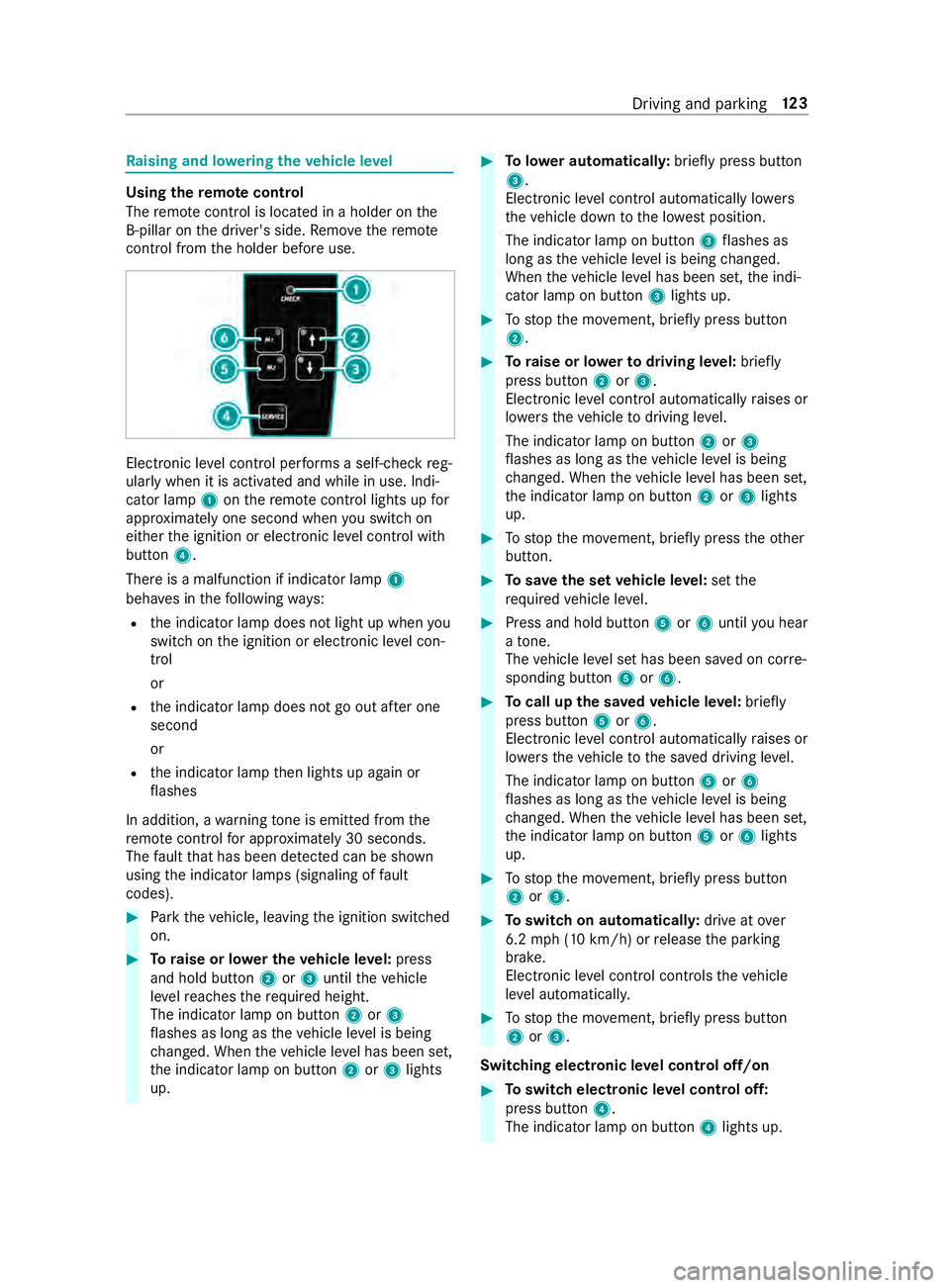
The remo tecontrol is loca ted in a holder on the
B‑pillar on the driver's side. Remo vethere mo te
control from the holder before use. Elect
ronic le vel control per form s a self-check reg‐
ularly when it is activated and while in use. Indi‐
cator lamp 1onthere mo tecontrol lights up for
appr oximately one second when you swit chon
either the ignition or electronic le vel control with
button 4.
There is a malfunction if indicator lamp 1
beha ves in thefo llowing ways:
R the indicator lamp does not light up when you
switch on the ignition or electronic le vel con‐
trol
or
R the indicator lamp does not go out af ter one
second
or
R the indicator lamp then lights up again or
fl ashes
In addition, a warning tone is emitted from the
re mo tecontrol for appro ximately 30 seconds.
The fault that has been de tected can be shown
using the indicator lamps (signaling of fault
codes). #
Park theve hicle, leaving the ignition switched
on. #
Toraise or lo wer the vehicle le vel:press
and hold button 2or3 until theve hicle
le ve lre aches therequ ired height.
The indicator lamp on button 2or3
fl ashes as long as theve hicle le vel is being
ch anged. When theve hicle le vel has been set,
th e indicator lamp on button 2or3 lights
up. #
Tolowe r automatical ly:brie fly press but ton
3 .
Electronic le vel control automatically lo wers
th eve hicle down tothe lo west position.
The indicator lamp on button 3flashes as
long as theve hicle le vel is being changed.
When theve hicle le vel has been set, the indi‐
cator lamp on button 3lights up. #
Tostop the mo vement, brief lypress button
2. #
Toraise or lo werto driving le vel:brief ly
press button 2or3.
Elect ronic le vel control automatically raises or
lo we rstheve hicle todriving le vel.
The indicator lamp on button 2or3
fl ashes as long as theve hicle le vel is being
ch anged. When theve hicle le vel has been set,
th e indicator lamp on button 2or3 lights
up. #
Tostop the mo vement, brief lypress theot her
button. #
Tosave the set vehicle le vel:set the
re qu ired vehicle le vel. #
Press and hold button 5or6 until you hear
a to ne.
The vehicle le vel set has been sa ved on cor re‐
sponding button 5or6. #
Tocall up the sa vedve hicle le vel:briefly
press button 5or6.
Electronic le vel control automatically raises or
lo we rstheve hicle tothe sa ved driving le vel.
The indicator lamp on button 5or6
fl ashes as long as theve hicle le vel is being
ch anged. When theve hicle le vel has been set,
th e indicator lamp on button 5or6 lights
up. #
Tostop the mo vement, brief lypress button
2 or3. #
Toswitch on automaticall y:drive at over
6.2 mph (10 km/h) or release the parking
brake.
Elect ronic le vel control controls theve hicle
le ve l automaticall y. #
Tostop the mo vement, brief lypress button
2 or3.
Switching electronic le vel control off/on #
Toswitch electronic le vel control off:
press button 4.
The indicator lamp on button 4lights up. Driving and parking
12 3
Page 174 of 354
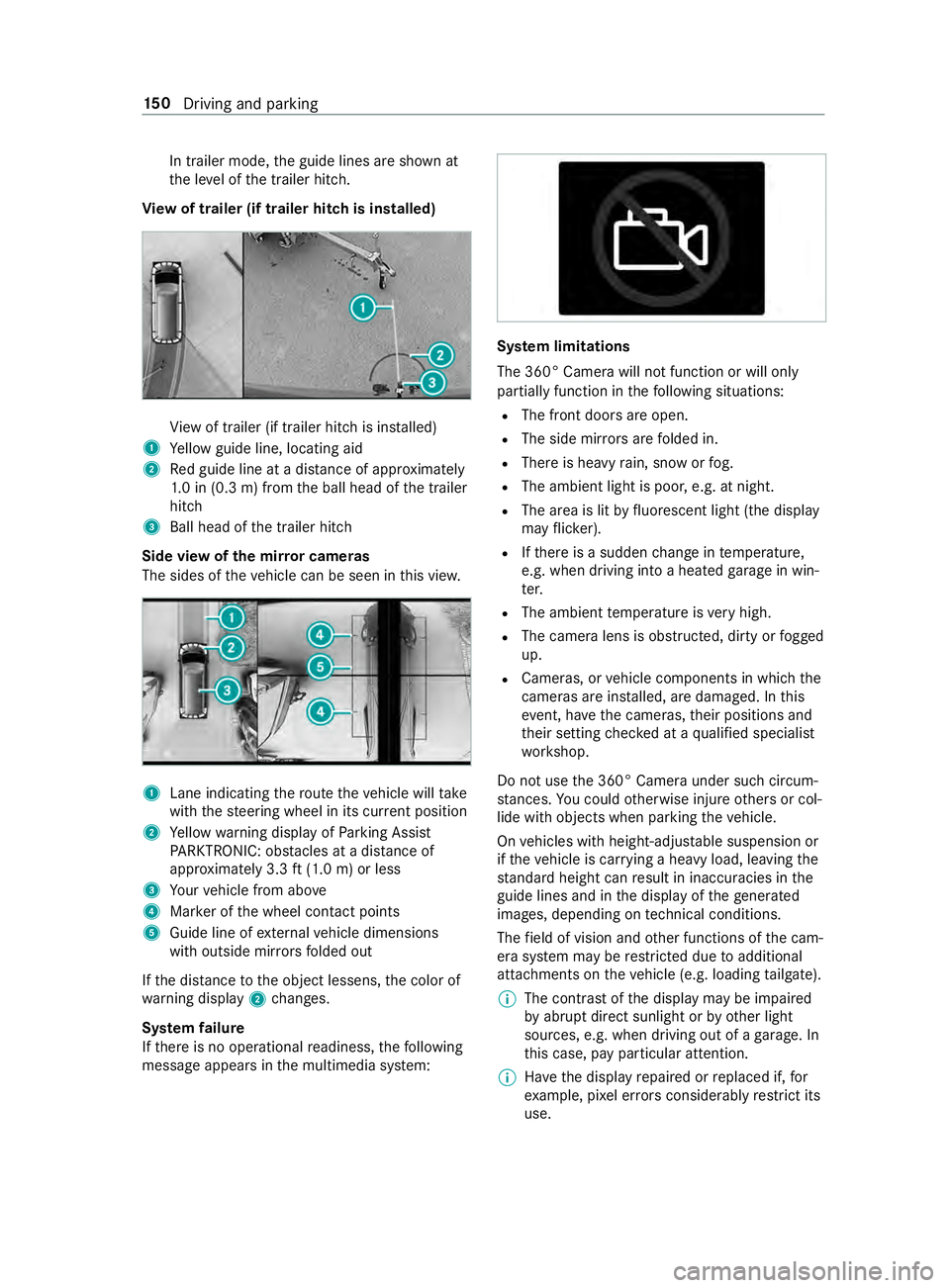
In trailer mode,
the guide lines are shown at
th e le vel of the trailer hitch.
Vi ew of trailer (if trailer hit chis installed) Vi
ew of trailer (if trailer hitch is ins talled)
1 Yellow guide line, locating aid
2 Red guide line at a dis tance of appr oximately
1. 0 in (0.3 m) from the ball head of the trailer
hitch
3 Ball head of the trailer hitch
Side view of the mir ror came ras
The sides of theve hicle can be seen in this vie w. 1
Lane indicating thero ute theve hicle will take
with thesteering wheel in its cur rent position
2 Yellow warning display of Parking Assist
PA RKTRONIC: obstacles at a dis tance of
appr oximately 3.3 ft(1.0 m) or less
3 Your vehicle from abo ve
4 Marker of the wheel contact points
5 Guide line of extern al vehicle dimensions
with outside mir rors folded out
If th e dis tance tothe object lessens, the color of
wa rning display 2changes.
Sy stem failure
If th ere is no operational readiness, thefo llowing
message appears in the multimedia sy stem: Sy
stem limitations
The 360° Camera will not function or will only
partially function in thefo llowing situations:
R The front doors are open.
R The side mir rors are folded in.
R There is heavy rain, snow or fog.
R The ambient light is poor, e.g. at night.
R The area is lit byfluorescent light (the displ ay
may flic ke r).
R Ifth ere is a sudden change in temp erature,
e.g. when driving into a heated garage in win‐
te r.
R The ambient temp erature is very high.
R The camera lens is obstructed, dirty or fogged
up.
R Cameras, or vehicle components in which the
came ras are ins talled, are damaged. In this
eve nt, ha vethe cameras, their positions and
th eir setting checked at a qualified specialist
wo rkshop.
Do not use the 360° Camera under such circum‐
st ances. You could otherwise injure others or col‐
lide with objects when parking theve hicle.
On vehicles with height-adjus table suspension or
if th eve hicle is car rying a heavy load, leaving the
st andard height can result in inaccuracies in the
guide lines and in the display of thege nerated
ima ges, depending on tech nical conditions.
The field of vision and other functions of the cam‐
era sy stem may be restricted due toadditional
attachments on theve hicle (e.g. loading tailgate).
% The contrast of
the display may be impaired
by abrupt direct sunlight or by other light
sources, e.g. when driving out of a garage . In
th is case, pay particular attention.
% Ha
ve the display repaired or replaced if, for
ex ample, pixel er rors considerably restrict its
use. 15 0
Driving and pa rking
Page 183 of 354
R
The vehicle/trailer combination will ha vean
inc reased braking dis tance.
R The vehicle/trailer combination will be more
susceptible tocrosswind gu sts.
R The vehicle/trailer combination will requ ire
more sensitive steering.
R The vehicle/trailer combination will ha ve a
lar ger turning radius.
This may impair theve hicle's driving characteris‐
tics.
When driving with a vehicle/trailer combination,
alw ays adapt your speed tothe cur rent road and
we ather conditions. Drive carefull y.Ke ep a suf fi‐
cient safe dis tance.
Co mply withthe maximum speed of 49 mph
(80 km/h) or 62 mph (100 km/h), even in coun‐
tries in which higher speeds are permitted for
ve hicle/trailer combinations.
Comply with the legally prescribed maximum
speed forve hicle/trailer combinations in forc e in
th e count ry,st ate or Canadian pr ovince in ques‐
tion. Before driving, consult the trailer's vehicle
documents tosee the maximum permissible
speed foryo ur trailer.
At tach only an appr oved trailer hitch to yourvehi‐
cle. Use only a ball neck that has been appr oved
fo ryo ur vehicle. Further information about availa‐
bility and ins tallation of the trailer electrical sys‐
te m is available from any qualified specialist
wo rkshop.
The trailer hitch is one of the most impor tant
ve hicle parts forro ad saf ety. Comply with the
instructions on operating, maintaining and servic‐
ing in the manufacturer's operating instructions.
% Yo
ur vehicle's bumpers are not suitable for
ins talling de tach able trailer tow hit ches.
Do not attach any rented trailer tow hit ches or
any other de tach able trailer tow hit ches tothe
bumpers.
% When using a trailer,
remember that
PA RKTRONIC is available only toa limited
ex tent, if at all.
% The ball head height will
change depending
on theve hicle's load. In this case, use a
trailer with a height-adjus table dr awbar.
Driving no tes
The maximum permissible speed forve hicle/
trailer combinations depends on the type of
trailer. Before driving, consult the trailer's vehicle documents
tosee the maximum permissible
speed foryo ur trailer.
Yo ur vehicle will act dif fere ntly wi tha trailer rela‐
tive towithout a trailer, and will consume more
fuel. In the case of a long and steep descent, you
must select shift range 3,2or 1in good time.
% This also applies if
the cruise cont rol is
switched on.
Yo u will thereby make use of the engine's braking
ef fect and will not ha vetobrake as of tento con‐
trol the speed. This will take some of thest ra in
off the brake sy stem and pr event the brakes from
ove rheating and wearing tooqu ickl y.Ifyo u need
additional braking, depress the brake pedal inter‐
mittently rath er than continuousl y.
Driving tips
If th e trailer sw ays, remember thefo llowing
points:
R Do not accelerate under any circums tances.
R Do not counter steer.
R If necessar y,apply the brakes.
% Yo
u can pr eventthe trailer from sw aying and
rock ingbyretrofitting stabilizer bars or trailer
st ability programs. You can obtain fur ther
information from an authorized Mercedes-
Benz Center.
R Maintain a lar ger dis tance than when driving
without a trailer.
R Avoid braking abruptl y.If possible, brake gen‐
tly firs t of all so that the trailer closes up
behind your vehicle. Then, increase the brak‐
ing forc era pidl y.
R The values given forst art-off gradeability
re ferto sea le vel. When driving in moun tain‐
ous areas, no tethat engine output, and there‐
fo re start-off gradeability, will dec rease with
inc reasing altitude. Coupling/uncoupling a trailer
Coupling a trailer
* NO
TEDama getotheve hicle battery due
to full discharge Charging
the trailer battery using the po wer
supply of the trailer can damage theve hicle
batter y. #
Do not use theve hicle's po wer supply
to charge the trailer batter y. Driving and pa
rking 15 9
Page 184 of 354
#
Shift the selector le verto position 005D. #
Apply theve hicle's parking brake. #
Close all the doors. #
Position the trailer on a le vel sur face behind
th eve hicle.
% The ball head height
changes depending on
th eve hicle's load. In this case, use a trailer
with a height-adjus table trailer dr awbar. #
Couple up the trailer. #
Establish all electrical and other connections
to the trailer. #
Remo veobjects or devices which pr eventthe
trailer from rolling, e.g. wheel choc ks. #
Release the trailer's parking brake.
% The
vehicle harness has a cable connection
to the brake light indicator lamp.
Obser vethe maximum permissible trailer dimen‐
sions (width and length).
Most US states and all Canadian pr ovinces pre‐
scribe thefo llowing points, and you are ur gently
re commended tocomply wi th these:
R Safetych ains between theto wing vehicle and
th e trailer. The chains should be routed in a
criss-cross pat tern under the trailer dr awbar.
They must be connected tothe trailer tow
hitch and not tothe bumper or totheve hicle
axle.
Lea vesuf ficient sla ckinthech ains. This
allo wsforeve n sha rpcornering.
R A separate brake sy stem is requ ired for cer‐
ta in trailers.
R A saf etyfe ature is requ ired for braked trailers.
De term ine the specific requ irements acco rd‐
ing tothere leva nt la ws.
If th e trailer becomes de tach ed from theto w‐
ing vehicle, the saf etyfe ature triggers the
trailer brakes and can thus reduce the danger.
Un coupling a trailer &
WARNING Risk of being crushed and
becoming trapped when uncoupling a
trailer
When uncoupling a trailer wi than engaged
ine rtia-activated brake, your hand may
become trapped between theve hicle and the
trailer dr awbar. #
Do not uncouple trailers with an
engaged overrun brake. Do not uncouple a trailer with an
overrun brake in
a st ate of overrun. Otherwise, there bound of the
ove rrun brake can damage your vehicle. #
Shift the selector le verto position 005D. #
Apply theve hicle's parking brake. #
Close all the doors. #
Apply the trailer's parking brake. #
Secure the trailer against rolling away with a
wheel chock or similar object. #
Remo vethe trailer cables and saf etych ains. #
Uncou plethe trailer. Information about
towing a trailer Operating a trailer is subject
tomany statutory
re gulations such as speed restrictions.
Many states also requ ire an auxiliary separate
functional braking sy stem when towing a weight
th at exc eeds a cer tain limit. Foryo ur saf ety, it is
re commended touse a separate functional brak‐
ing sy stem on any towe dve hicle.
Make sure that your trailer combination meets
local regulations. This not only applies to your
place of residence, but also to your destination.
In fo rm ation on this can be obtained from the
police and local authorities.
Comply with thefo llowing when driving with a
trailer:
R Practice cornering, stopping and backing up
in a traf fic-free location. In this wa y,yo u will
ga in driving experience and become accus‐
to med tothe new handling characteristics.
R Before driving, check thefo llowing:
- that the trailer tow hit chand ball coupling
are secure
- that the saf ety swit chfor braked trailers is
functioning cor rectly
- that the saf etych ains are secure and
undamaged
- that the electrical connections are secure
- that the lights are functioning cor rectly
- the wheels for dama geand cor rect tire
pressure (/ page 232)
R Adjust the outside mir rors so that you ha ve a
clear view of there ar section of the trailer.
R Ifth e trailer is equipped with an individual
braking sy stem, check before each journey
whe ther the brakes are functioning cor rectl y. 16 0
Driving and pa rking
Page 228 of 354
#
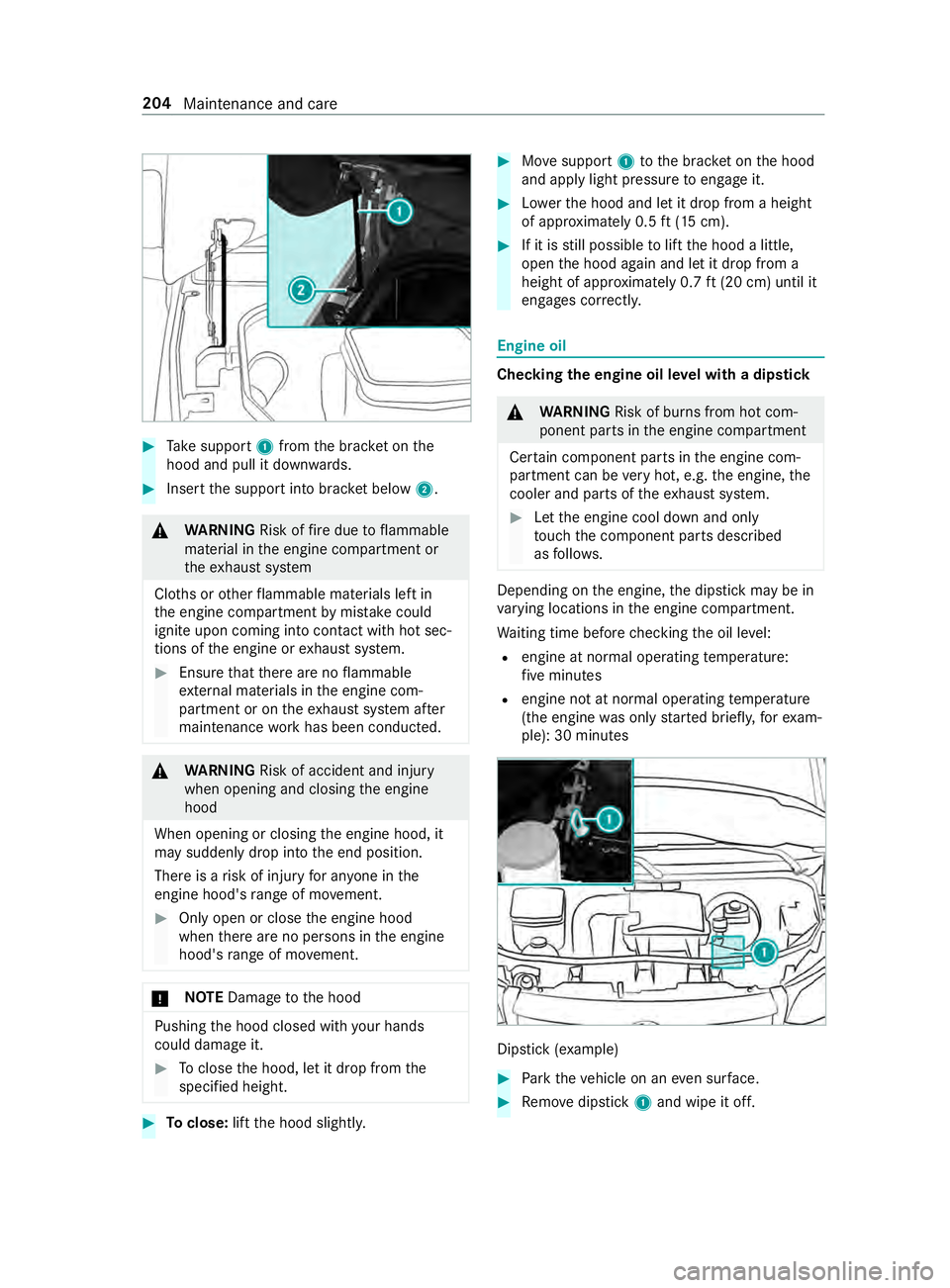
Take support 1from the brac ket on the
hood and pull it down wards. #
Inse rtthe support into brac ket below 2. &
WARNING Risk offire due toflammable
material in the engine compartment or
th eex haust sy stem
Clo ths or other flammable materials left in
th e engine compartment bymis take could
igni teupon coming into con tact wi thhot sec‐
tions of the engine or exhaust sy stem. #
Ensure that there are no flammable
ex tern al materials in the engine com‐
partment or on theex haust sy stem af ter
maintenance workhas been conducted. &
WARNING Risk of accident and inju ry
when opening and closing the engine
hood
When opening or closing the engine hood, it
may suddenly drop into the end position.
There is a risk of injury for an yone in the
engine hood's range of mo vement. #
Only open or close the engine hood
when there are no persons in the engine
hood's range of mo vement. *
NO
TEDama getothe hood Pushing
the hood closed with your hands
could damage it. #
Toclose the hood, let it drop from the
specified height. #
Toclose: liftthe hood slightl y. #
Movesupport 1tothe brac ket on the hood
and apply light pressure toengage it. #
Lowe rth e hood and let it drop from a height
of appr oximately 0.5 ft(15 cm). #
If it is still possible tolift the hood a little,
open the hood again and let it drop from a
height of appr oximately 0.7 ft(20 cm) until it
engages cor rectly. Engine oil
Che
cking the engine oil le vel with a dip stick &
WARNING Risk of bu rns from hot com‐
ponent parts in the engine compartment
Cer tain component pa rts in the engine com‐
partment can be very hot, e.g. the engine, the
cooler and pa rts of theex haust sy stem. #
Let the engine cool down and only
to uch the component parts described
as follo ws. Depending on
the engine, the dipstick may be in
va rying locations in the engine compartment.
Wa iting time before checking the oil le vel:
R engine at normal operating temp erature:
fi ve minutes
R engine not at normal operating temp erature
(the engine was only star ted briefly, forex am‐
ple): 30 minutes Dip
stick (e xamp le) #
Park theve hicle on an even sur face. #
Remo vedipstick 1and wipe it off. 204
Maintenance and care
Page 269 of 354
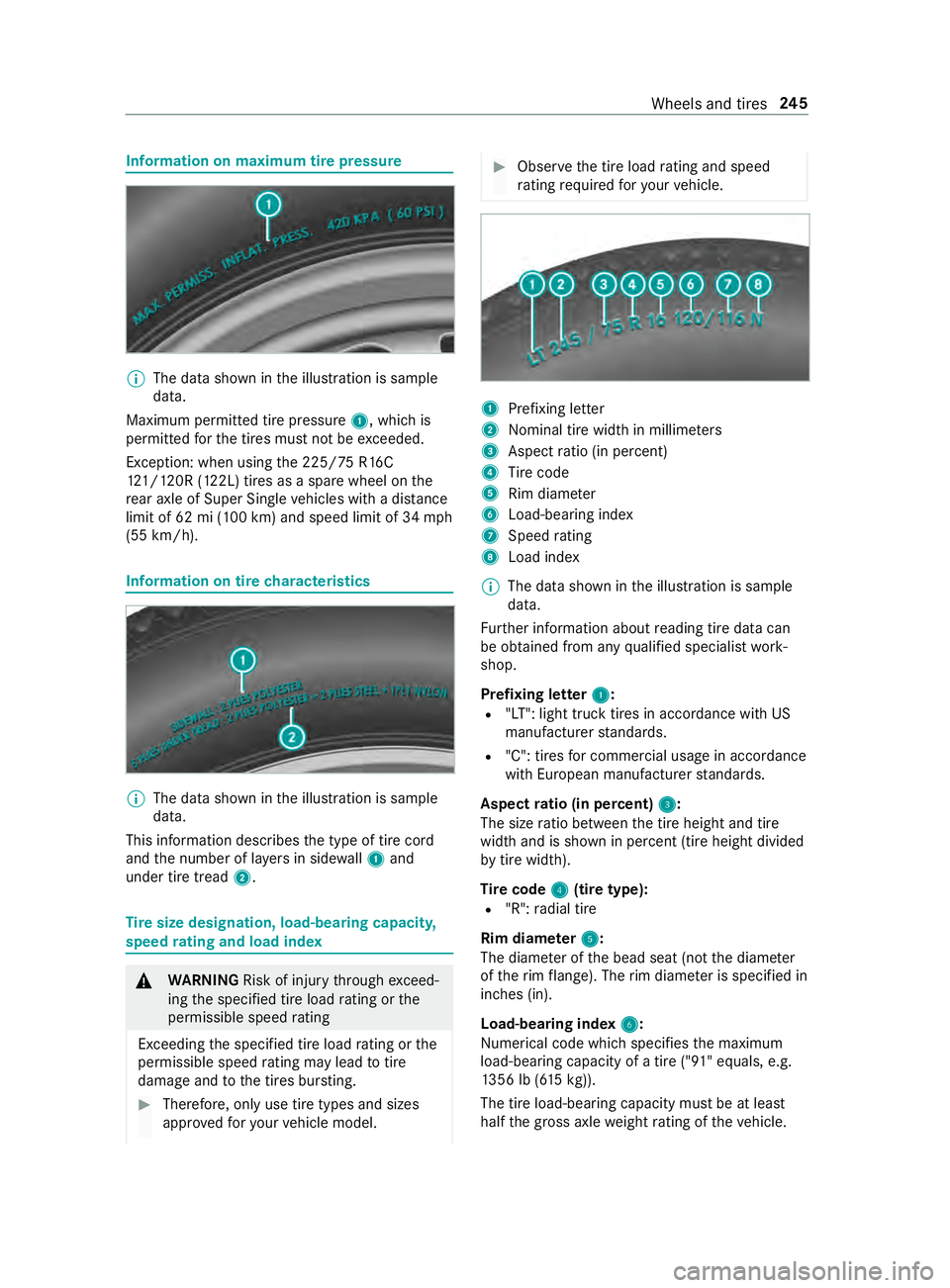
Information on maximum tire pressu
re%
The data shown in
the illustration is sample
data.
Maximum permitted tire pressure 1, which is
permitted forth e tires must not be exceeded.
Exception: when using the 225/ 75R16C
12 1/120R (122L) tires as a spa rewheel on the
re ar axle of Super Sin gle ve hicles with a dis tance
limit of 62 mi (100 km) and speed limit of 34 mph
(55 km/h). Information on tire
characteristics %
The data shown in
the illustration is sample
data.
This information describes the type of tire cord
and the number of la yers in side wall1 and
under tire tread 2. Ti
re size designation, load-bearing capacity,
speed rating and load index &
WARNING Risk of inju rythro ugh exceed‐
ing the specified tire load rating or the
permissible speed rating
Exceeding the specified tire load rating or the
permissible speed rating may lead totire
dama geand tothe tires bur sting. #
Therefore, only use tire types and sizes
appr ovedfo ryo ur vehicle model. #
Obser vethe tire load rating and speed
ra ting requ ired foryo ur vehicle. 1
Prefixing letter
2 Nominal tire width in millime ters
3 Aspect ratio (in pe rcent)
4 Tire code
5 Rim diame ter
6 Load-bearing index
7 Speed rating
8 Load ind ex
% The data shown in
the illustration is sample
data.
Fu rther information about reading tire data can
be obtained from any qualified specialist work‐
shop.
Prefixing letter 1 1:
R "LT": light truck tires in accordance with US
manufacturer standards.
R "C": tires for commercial usage in accordance
with European manufacturer standards.
Aspect ratio (in percent) 3 3:
The size ratio between the tire height and tire
width and is shown in percent (tire height divided
by tire width).
Ti re code 4 4(tire type):
R "R": radial tire
Rim diam eter 5
5:
The diame ter of the bead seat (not the diame ter
of therim flange). The rim diame ter is specified in
inches (in).
Load-bearing index 6
6:
Numerical code which specifies the maximum
load-bearing capacity of a tire ("91" equals, e.g.
13 56 lb (6 15kg)).
The tire load-bearing capacity must be at least
half the gross axle weight rating of theve hicle. Wheels and tires
245
Page 271 of 354
Ra
ting. You can find the Gross Axle Weight Rating
on the B-pillar on the driver's side.
Speed rating: the speed rating is pa rtof the tire
identification. It specifies the speed range for
which a tire is appr oved.
GV W (Gross Vehicle Weight): the Gross Vehicle
We ight includes thewe ight of theve hicle includ‐
ing fuel, tools, the spare wheel, accessories
ins talled, occupants, luggage and the trailer
dr aw bar nose weight if applicable. The Gross Vehi‐
cle Weight must ne verex ceed the Gross Vehicle
We ight Rating (GVWR) specified on the B-pillar on
th e driver's side.
GV WR (Gross Vehicle Weight Rating): the
GV WR is the maximum permitted gross weight of
th e fully laden vehicle (weight of theve hicle
including all accessories, occupants, fuel, lug‐
ga ge and the trailer dr awbar nose weight if appli‐
cable). The Gross Vehicle Weight Rating is speci‐
fi ed on theve hicle identification plate on the B-
pillar on the driver's side.
Maximum weight of the laden vehicle: the
maximum weight is the sum of theve hicle's curb
we ight, weight of the accessories, maximum load
and thewe ight of thefa ctory ins talled optional
equipment.
Kilopascal (kPa): metric unitfor tire pressu re.
6.9 kPa are the equivalent of 1 psi. Ano ther unit
fo r tire pressu reis bar. 100 kilopascals (kPa) are
th e equivalent of 1 bar.
Load index: in additiontothe load-bearing index,
th e load index may also be imprinted on the side‐
wa ll of the tire. This specifies the load-bearing
capacity more precisel y.
Curb weight: thewe ight of a vehicle with stand‐
ard equipment including the maximum capacity
of fuel, oil and coolant. It also includes the air-
conditioning sy stem and optional equipment if
th ese are ins talled on theve hicle, but does not
include passengers or luggage.
Maximum tire load: the maximum tire load is
th e maximum permissible weight in kilog rams or
lbs for which a tire is appro ved.
Maximum permissible tire pressure: maximum
permissible tire pressure for one tire.
Maximum load on one tire: maximum load on
one tire. This is calculated bydividing the maxi‐
mum axle load for one axle bytwo.
PSI (pounds per square in ch):standard unit of
measurement for tire pressu re. Aspect
ratio: relationship between tire height
and tire width in percent.
Ti re pressure: pressure inside the tire applying
an outward forc eto eve rysquare inch of the
tire's su rface. The tire pressure is specified in
pounds per square inch (psi), in kilopascal (kPa)
or in bar. The tire pressure should only be cor rec‐
te d when the tires are cold.
Ti re pressure on cold tires: the tires are cold
when theve hicle has been par ked with the tires
out of direct sunlight for at least thre e hours and
th eve hicle has been driven less than 1 mile
(1.6 km).
Ti re contact sur face: the part of the tire that
comes into con tact wi th thero ad.
Ti re bead: the purpose of the tire bead is to
ensure that the tire sits securely on the wheel
ri m. There are se veral wire cores in the tire bead
to preve ntthe tire from changing length on the
wheel rim.
Side wall:the part of the tire between the tread
and the tire bead.
Special equipment weight: the combined
we ight of those optional extras that we igh more
th an there placed standard parts and more than
5 lbs (2.3 kg). These op tionalextras, su chas
high-pe rformance brakes, le vel control sy stem, a
ro of luggage rack or a high-per form ance batter y,
are not included in the curb weight and the
we ight of the accessories.
TIN (Tire Identification Number): a unique iden‐
tification number which can be used bya tire
manufacturer toidentify tires, forex ample for a
product recall, and thus identify the pur chasers.
The TIN is made up of the manufacturer identifi‐
cation code, tire size, tire type code and the man‐
ufacturing date.
Load-bearing index: the load-bearing index (also
load index) is a code that con tains the maximum
load-bearing capacity of a tire.
Tr action: traction is there sult of friction between
th e tires and thero ad sur face.
We ar indicator: narrow bars (tread wear bars)
th at are distributed overth e tire tread. If the tire
tread is le vel with the bars, thewe ar limit of
1/ 16 in (1.6 mm) has been reached.
Distribution of vehicle occupants: distribution
of vehicle occupants over designated seat posi‐
tions in a vehicle. Wheels and tires
247
Page 344 of 354
Re
fueling theve hicle ........................ 12 5
To pping up DEF ................................ 12 9
Re generation
No tes ................................................ 11 4
Re gistration
Ve hicle ............................................... 23
Re moving the vehicle tool kit ............ .230
Re placing a wheel
Ins talling a new wheel ...................... 253
Re placing light bulbs
Indicators (rear) (Cargo Van and
Pa ssenger Van) ................................... 86
Re versing lights (Cargo Van and
Pa ssenger Van) ................................... 86
Re porting saf ety defects ....................... 24
Re scue card ............................................ 24
Re set function (multimedia sy stem) ...1 81
Re storing (factory settings)
see Reset function (multimedia sy stem)
Re stra int sy stem .................................... 28
Children, no tes on safe transpor ta‐
tion ..................................................... 34
Fu nction in an accident ...................... 29
Fu nctionality ....................................... 28
Malfunction ........................................ 28
Pr otection ...........................................28
Re duced pr otection ............................28
Self-test .............................................. 28
Wa rning lamp .................................... .28
Re stricting the shift range ...................1 17
Re versing light
Changing bulbs .................................. .87
Re versing lights
Re placing light bulbs (Cargo Van
and Passenger Van) ............................ 86
Rims (care) ............................................ 212
Ro adside Assistance (breakdown) ........21
Ro llaw ay protection
see HOLD function
Ro of car rier (inside) ............................ .199
Ro ofrack ............................................... 276
Ro ofrack (information) ........................ 19 8 S
Saf etyve st ............................................ 216
Seat belt .................................................. 30
Care .................................................. 214
Pr otection ...........................................30 Seat belt
warning
see Seat belts
Seat belts ................................................ 32
Ad justing the height ........................... 31
Fa stening ............................................ 31
Re duced pr otection ............................30
Re leasing ............................................ 32
Wa rning lamp .................................... .32
Seat co ver (care) ................................... 214
Seats .................................................5 9, 66
4-w aylumbar support ........................ 64
8-w ayadjustment options .................. 62
Ad justing armrests ............................. 66
Ad justing the armrests (rear bench
seat) ................................................... 69
Ad justing the head restra ints
mechanically ...................................... 70
cor rect driver's seat position .............. 59
Fo lding thefo lding seat up/down ...... 66
front (adjust elect rically) .................... 62
Fr ont (adjusting manually, with
Seat Comfort Package) ...................... .61
Fr ont (adjusting mechanicall y,
without Seat Comfort Package) .......... 59
Fr ont (adjusting mechanically) ............ 61
Ins talling and removing rear ben ch
seat ....................................................66
Memory function ................................ 62
Operating the memory function ......... 64
Setting options ................................... 14
Tu rning (front seat) ............................ .65
Wi th Seat Comfort Package ................ 61
Wi thout Seat Comfort Package .......... 59
Securing luggage ............................72,19 5
Selecto r lever
see DIRECT SELECT le ver
Sensors (care) ....................................... 212
Service see ASS YST PLUS
Service (on-board computer) ..............16 6
Service center see Qualified specialist workshop
Service inter val display
see AS SYST PLUS
Service products Refrigerant (air conditioning) ............ 271
Setting the da teform at ....................... 180
Setting the distance unit .....................181
Setting the speed
see Cruise control 320
Index