lights MERCEDES-BENZ SPRINTER 2019 MY19 with 7” screen
[x] Cancel search | Manufacturer: MERCEDES-BENZ, Model Year: 2019, Model line: SPRINTER, Model: MERCEDES-BENZ SPRINTER 2019Pages: 354, PDF Size: 6.15 MB
Page 100 of 354
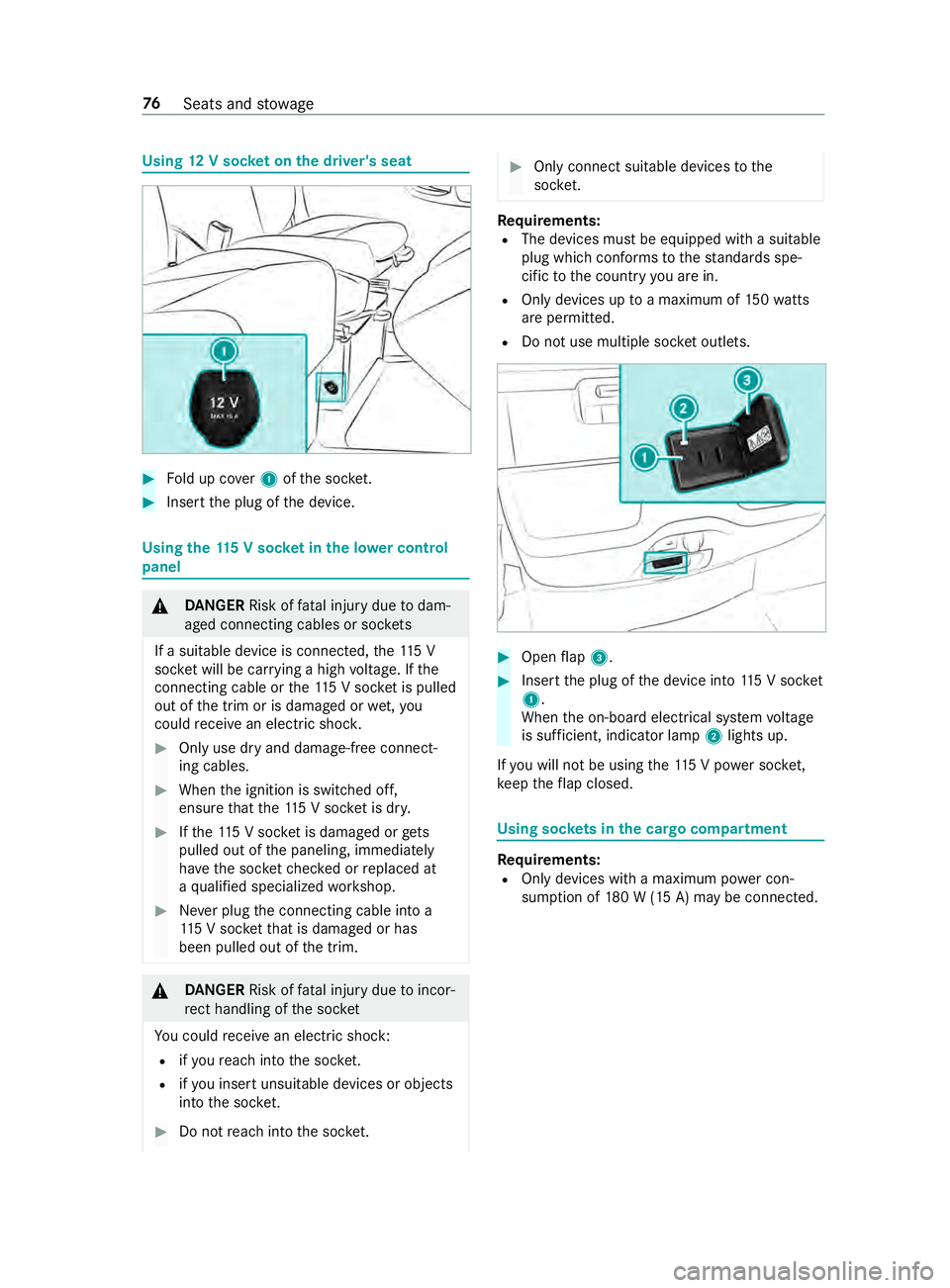
Using
12V so cket on the driver's seat #
Fold up co ver1 ofthe soc ket. #
Inse rtthe plug of the device. Using
the11 5 V soc ket in the lo wer control
panel &
DANG ER Risk of fata l injury due todam‐
aged connecting cables or soc kets
If a suitable device is connected, the11 5 V
soc ket will be car rying a high voltage. If the
connecting cable or the11 5 V soc ket is pulled
out of the trim or is damaged or wet,you
could receive an electric shoc k. #
Only use dry and damage-free connect‐
ing cables. #
When the ignition is switched off,
ensure that the11 5 V soc ket is dr y. #
Ifth e11 5 V soc ket is dama ged or gets
pulled out of the paneling, immediately
ha ve the soc ketch ecked or replaced at
a qu alified specialized workshop. #
Never plug the connecting cable into a
11 5 V soc ketth at is damaged or has
been pulled out of the trim. &
DANG ER Risk of fata l injury due toincor‐
re ct handling of the soc ket
Yo u could receive an electric shock:
R ifyo ure ach into the soc ket.
R ifyo u insert unsuitable devices or objects
into the soc ket. #
Do not reach into the soc ket. #
Only connect suitable devices tothe
soc ket. Re
quirements:
R The devices must be equipped with a suitable
plug which con form sto thest andards spe‐
cific tothe count ryyou are in.
R Only devices up toa maximum of 150wa tts
are pe rmitted.
R Do not use multiple soc ket outlets. #
Open flap 3. #
Insert the plug of the device into 115 V soc ket
1 .
When the on-board electrical sy stem voltage
is suf ficient, indicator la mp2lights up.
If yo u will not be using the11 5 V po wer soc ket,
ke ep theflap closed. Using soc
kets in the cargo co mpartment Re
quirements:
R Only devices with a maximum po wer con‐
sum ption of 180 W (15 A) may be connected. 76
Seats and stowage
Page 103 of 354
Exterior lighting
Note
s onchanging the lights when driving
abroad Ve
hicles with halogen or static LED head‐
lamps: Changing the headlamps is not neces‐
sar y.The legal requ irements will also be fulfilled
in countries with left and right-hand traf fic. In
fo rm ation about lighting sy stems and your
re sponsibility The
vehicle's various lighting sy stems are only
aids. The vehicle driver is responsible for adjust‐
ing theve hicle's lighting tothe pr evailing light,
visibilit y,statutory conditions and traf fic condi‐
tions. Light switch
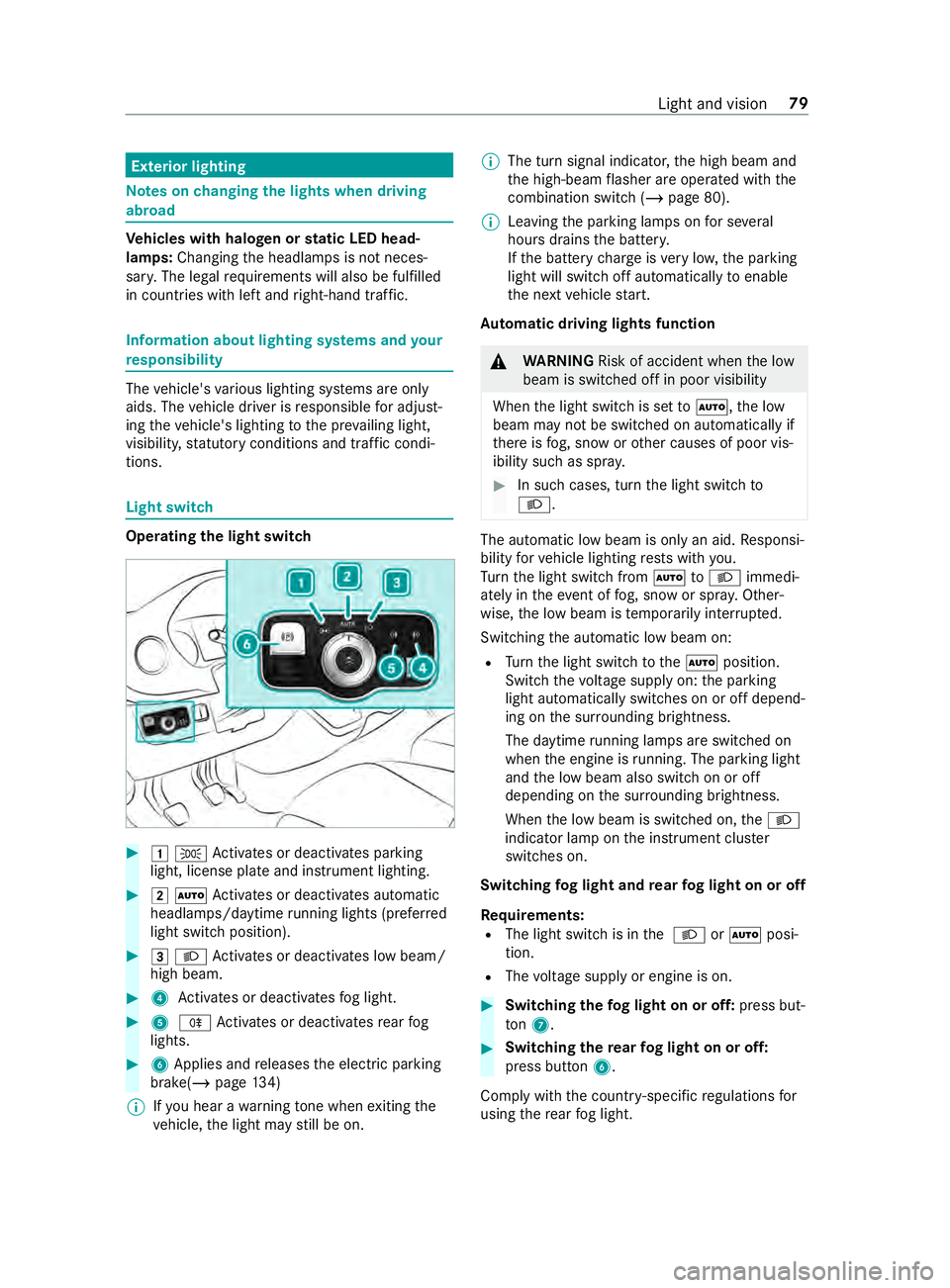
Operating the light switch
#
00470060 Activates or deacti vates parking
light, license plate and instrument lighting. #
00480058 Activates or deacti vates automatic
headlamp s/daytime running lights (p referred
light switch position). #
00490058 Activates or deacti vates low beam/
high beam. #
4 Activates or deacti vatesfo g light. #
5 005E Activates or deacti vatesre ar fog
lights. #
6Applies and releases the electric parking
brake(/ page134)
% If
yo u hear a warning tone when exiting the
ve hicle, the light may still be on. %
The turn signal indicator,
the high beam and
th e high-beam flasher are operated with the
combination switch (/ page 80).
% Leaving
the parking lamps on for se veral
hours drains the batter y.
If th e battery charge isvery low, the parking
light will switch off automatically toenable
th e next vehicle start.
Au tomatic driving lights function &
WARNING Risk of accident when the low
beam is switched off in poor visibility
When the light switch is set to0058 ,th e low
beam may not be switched on automatically if
th ere is fog, snow or other causes of poor vis‐
ibility such as spr ay. #
In such cases, turn the light switch to
0058 . The automatic low beam is only an aid.
Responsi‐
bility forve hicle lighting rests with you.
Tu rn the light switch from 0058to0058 immedi‐
ately in theev ent of fog, snow or spr ay. Other‐
wise, the low beam is temp orarily inter rupte d.
Switching the automatic low beam on:
R Turn the light switch tothe0058 position.
Switch thevo ltage supply on: the parking
light automatically switches on or off depend‐
ing on the sur rounding brightness.
The daytime running la mps are switched on
when the engine is running. The pa rking light
and the low beam also switch on or off
depending on the sur rounding brightness.
When the low beam is switched on, the0058
indicator lamp on the instrument clus ter
switches on.
Switching fog light and rear fog light on or off
Requ irements:
R The light switch is in the 0058 or0058 posi‐
tion.
R The voltage supply or engine is on. #
Switching thefo g light on or off: press but‐
to n7. #
Switching the rear fog light on or off:
press button 6.
Comply with the count ry-specific regulations for
using there ar fog light. Light and vision
79
Page 104 of 354
Operating
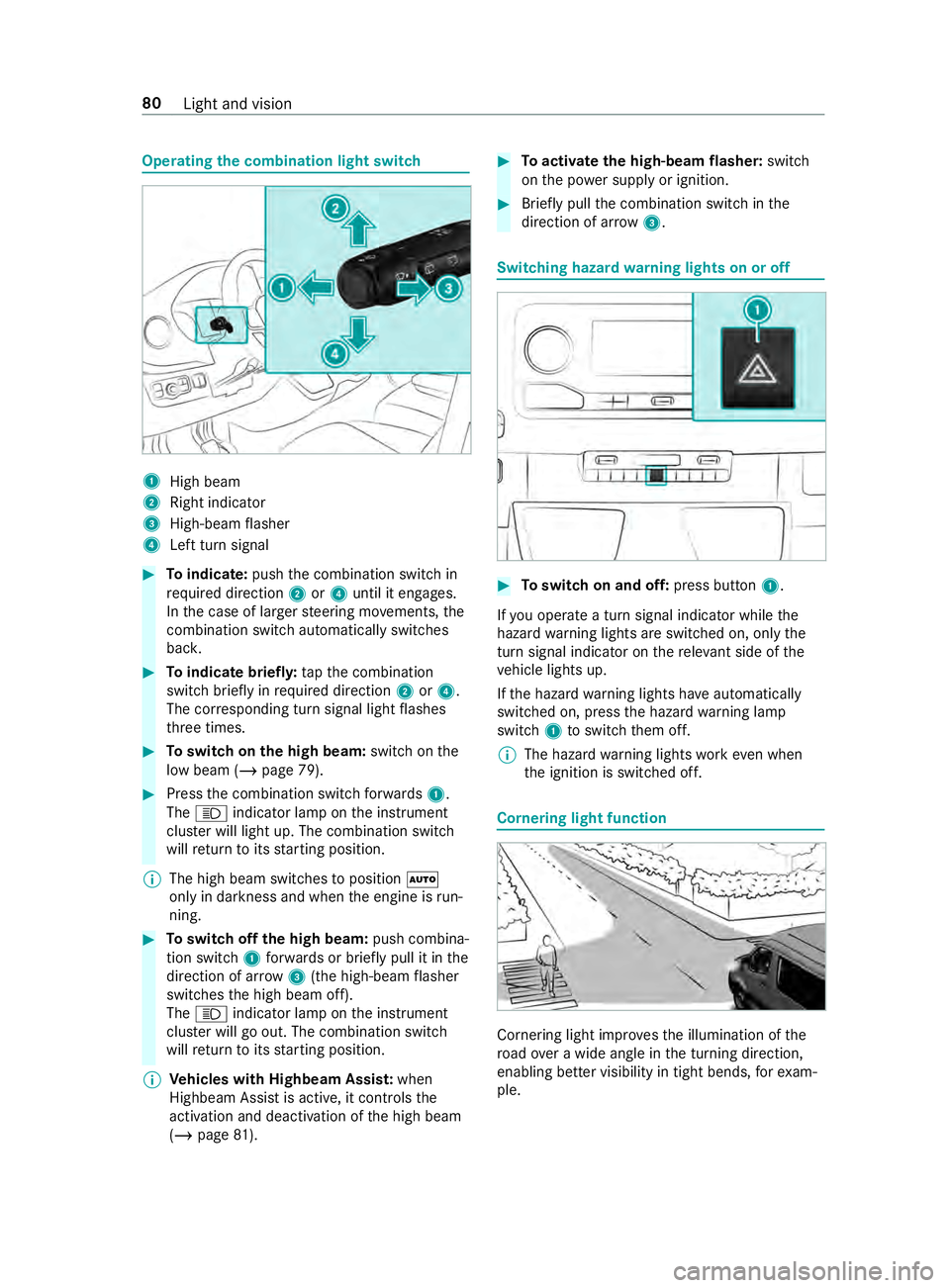
the combination light switch 1
High beam
2 Right indicator
3 High-beam flasher
4 Left turn signal #
Toindicate: pushthe combination switch in
re qu ired direction 2or4 until it engages.
In the case of larger steering mo vements, the
combination switch au tomatically switches
bac k. #
Toindicate briefl y:tapth e combination
switch briefly in required direction 2or4.
The cor responding turn signal light flashes
th re e times. #
Toswitch on the high beam: switchon the
low beam (/ page 79). #
Press the combination switch forw ards 1.
The 0057 indicator lamp on the instrument
clus ter will light up. The combination switch
will return toits starting position.
% The high beam swit ches toposition 0058
only in darkness and when the engine is run‐
ning. #
Toswitch off the high beam: push combina‐
tion swit ch1 forw ards or briefly pull it in the
direction of ar row3(the high-beam flasher
swit ches the high beam off).
The 0057 indicator lamp on the instrument
clus ter will go out. The combination switch
will return toits starting position.
% Ve
hicles with Highbeam Assis t:when
Highbeam Assist is active, it controls the
activation and deactivation of the high beam
(/ page 81). #
Toactivate the high-beam flasher: switch
on the po wer supp lyor ignition. #
Brief lypull the combination switch in the
direction of ar row3. Switching hazard
warning lights on or off #
Toswitch on and off: press button1.
If yo u operate a turn signal indicator while the
hazard warning lights are switched on, only the
turn signal indica tor on there leva nt side of the
ve hicle lights up.
If th e hazard warning lights ha veautomatically
swit ched on, press the hazard warning lamp
switch 1toswitch them off.
% The hazard
warning lights workeve n when
th e ignition is switched off. Cornering light function
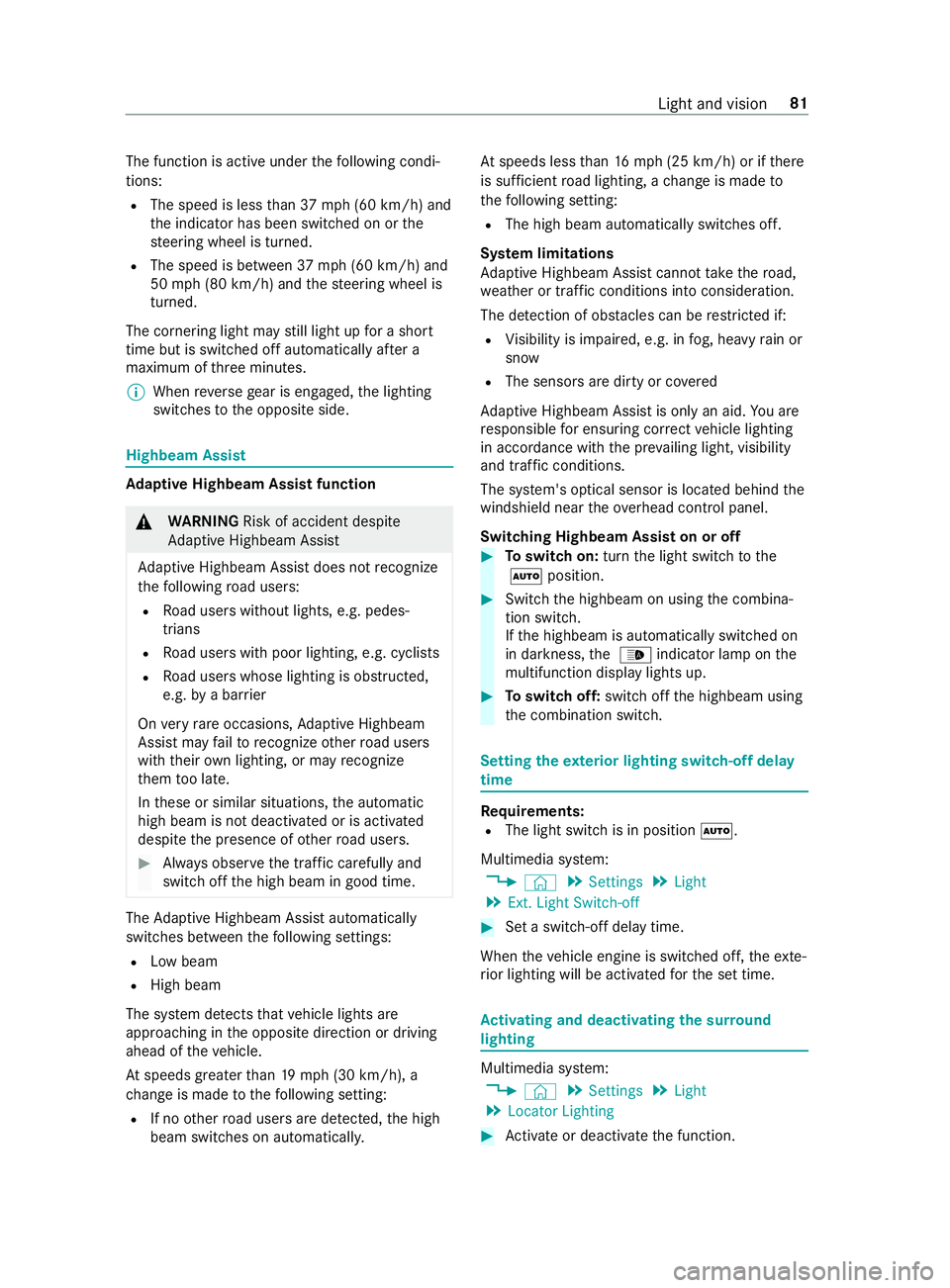
Cornering light impr
ovesth e illumination of the
ro ad ove r a wide angle in the turning direction,
enabling better visibility in tight bends, forex am‐
ple. 80
Light and vision
Page 105 of 354
The function is active under
thefo llowing condi‐
tions:
R The speed is less than 37 mph (60 km/h) and
th e indicator has been switched on or the
st eering wheel is turned.
R The speed is between 37mph (60 km/h) and
50 mph (8 0 km/h) and thesteering wheel is
turned.
The cornering light may still light up for a short
time but is switched off automatically af ter a
maximum of thre e minutes.
% When
reve rsege ar is engaged, the lighting
switches tothe opposite side. Highbeam Assist
Ad
aptive Highbeam Assist function &
WARNING Risk of accident despite
Ad aptive Highbeam Assist
Ad aptive Highbeam Assist does not recognize
th efo llowing road users:
R Road users without lights, e.g. pedes‐
trians
R Road users with poor lighting, e.g. cyclists
R Road users whose lighting is obstructed,
e.g. bya bar rier
On very rare occasions, Adaptive Highbeam
Assist may failto recognize other road users
with their own lighting, or may recognize
th em too late.
In these or similar situations, the automatic
high beam is not deactivated or is activated
despite the presence of other road users. #
Always obser vethe tra ffic carefully and
switch off the high beam in good time. The
Adaptive Highbeam Assist automatically
swit ches between thefo llowing settings:
R Low beam
R High beam
The sy stem de tects that vehicle lights are
approaching in the opposite direction or driving
ahead of theve hicle.
At speeds greater than 19 mp h (30 km/h), a
ch ange is made tothefo llowing setting:
R If no other road users are de tected, the high
beam switches on automaticall y.At
speeds less than 16 mp h (25 km/h) or if there
is suf ficient road lighting, a change is made to
th efo llowing setting:
R The high beam automatically switches off.
Sy stem limitations
Ad aptive Highbeam Assist cannot take thero ad,
we ather or traf fic conditions into consideration.
The de tection of obs tacles can be restricted if:
R Visibility is impaired, e.g. in fog, heavy rain or
snow
R The sensors are dirty or co vered
Ad aptive Highbeam Assist is only an aid. You are
re sponsible for ensuring cor rect vehicle lighting
in accordance with the pr evailing light, visibility
and traf fic conditions.
The sy stem's optical sensor is located behind the
windshield near theove rhead cont rol panel.
Switching Highbeam Assist on or off #
Toswitch on: turnthe light switch tothe
0058 position. #
Switch the highbeam on using the combina‐
tion switch.
If th e highbeam is automatically switched on
in darkness, the 00CE indicator lamp on the
multifunction display lights up. #
Toswitch off: switch offthe highbeam using
th e combination switch. Setting
theex terior lighting switch-off delay
time Re
quirements:
R The light switch is in position 0058.
Multimedia sy stem:
4 © 5
Settings 5
Light
5 Ext. Light Switch-off #
Set a switch-off delay time.
When theve hicle engine is switched off, theex te‐
ri or lighting will be activated forth e set time. Ac
tivating and deactivating the sur round
lighting Multimedia sy
stem:
4 © 5
Settings 5
Light
5 Locator Lighting #
Activate or deacti vate the function. Light and vision
81
Page 106 of 354
The
exterior lighting remains on for 40 seconds
af te rth eve hicle is unloc ked. When youstart the
ve hicle, the sur round lighting will be deactivated
and the automatic driving lights activated. Ad
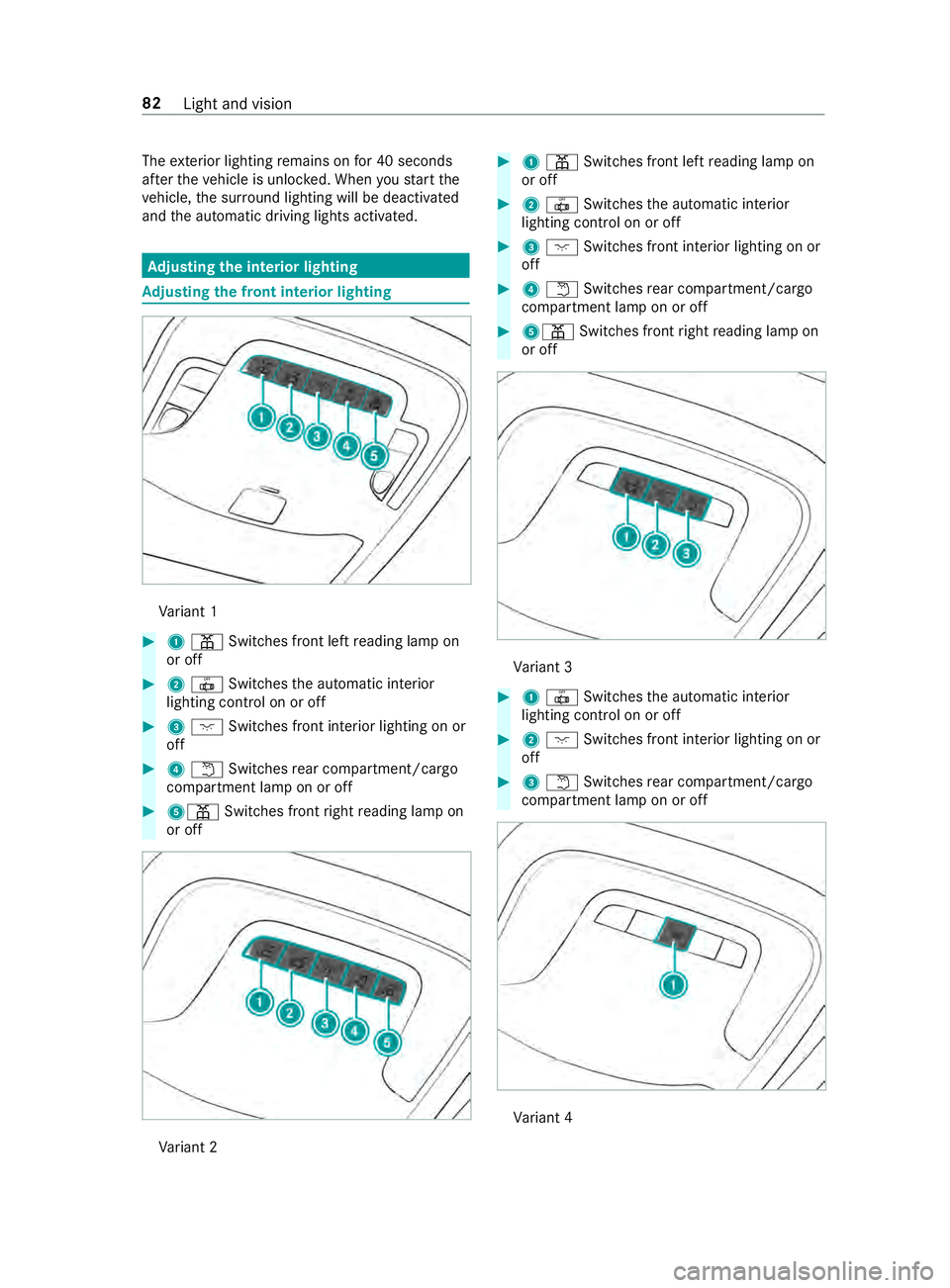
justing the in terior lighting Ad
justing the front in terior lighting Va
riant 1 #
1003D Switches front left reading lamp on
or off #
20033 Switches the automatic interior
lighting cont rol on or off #
3004A Switches front interior lighting on or
off #
40044 Switches rear compartment/cargo
compartment lamp on or off #
5003D Switches front right reading lamp on
or off Va
riant 2 #
1003D Switches front left reading lamp on
or off #
20033 Switches the automatic interior
lighting cont rol on or off #
3004A Switches front interior lighting on or
off #
40044 Switches rear compartment/cargo
compartment lamp on or off #
5003D Switches front right reading lamp on
or off Va
riant 3 #
10033 Switches the automatic interior
lighting cont rol on or off #
2004A Switches front interior lighting on or
off #
30044 Switches rear compartment/cargo
compartment lamp on or off Va
riant 4 82
Light and vision
Page 108 of 354
#
Allow the component parts tocool
down before replacing the bulbs. When
you are replacing the light bulb, obser ve
th efo llowing:
R Do not use any bulb that has been dropped or
has scratches on its glass tube. Otherwise,
th e bulb may explode.
R The bulb may explode if it is hot or if you
to uch, drop or sc ratch it.
R Stains on theglass tube reduce the bulb's
service life. Do not touch theglass tube with
yo ur bare hands. If necessar y,clean theglass
tube with alcohol or spirits in a cold state and
wipe it down with a lint-f ree clo th.
R Protect bulbs from humidity and do not bring
th em into contact with liquids.
Alw ays ensure the bulbs are firm lysecured.
If yo ur vehicle is equipped with LED lamps, you
can check this as follo ws :th e light cone will mo ve
from topto bottom and back again when the
engine starts. Forth is to wo rk,th e low beam
needs tohave been switched on before the
engine is star ted.
Bulbs and lights are a major part of vehicle
saf ety. Therefore, ensure that they are alw ays
wo rking. Ha vethe headlamp setting checkedre g‐
ular ly.
R Before changing the lamps, switch off the
ve hicle's lighting sy stem. This will pr event a
sho rtcircuit.
R Use bulbs only in closed lights that ha vebeen
designed forth em.
R Use only spare bulbs of the same type and
with the cor rect voltage.
If th e new bulb also does not light up, consult a
qu alified specialist workshop. Re
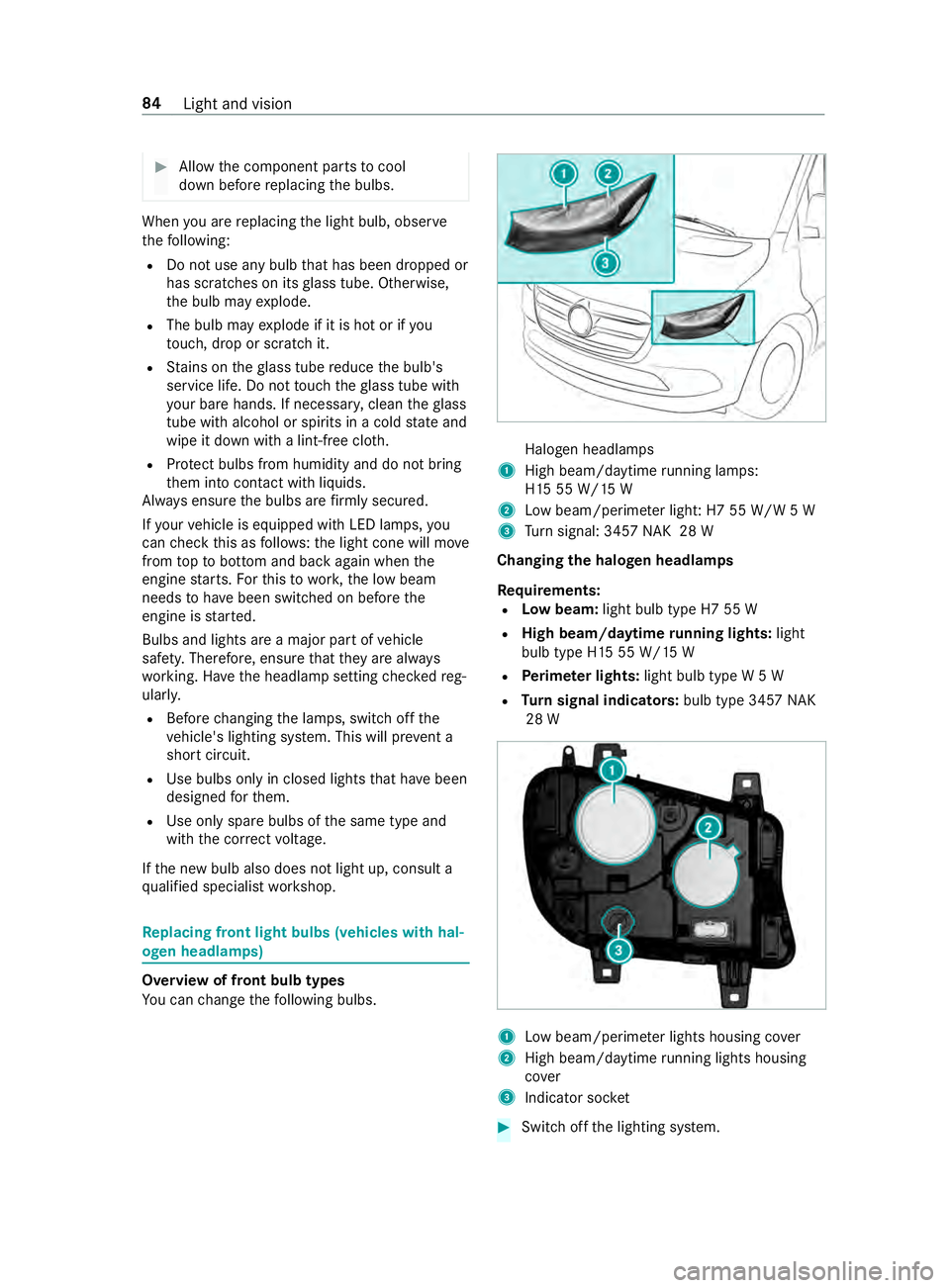
placing front light bulbs (vehicles with hal‐
ogen headlamps) Overview of front bulb types
Yo
u can change thefo llowing bulbs. Halogen headlamps
1 High beam/daytime running la mps:
H15 55 W/15 W
2 Low beam/perime ter ligh t:H7 55 W/W 5 W
3 Turn signal: 3457 NAK 28 W
Changing the halogen headlamps
Re quirements:
R Low beam: light bulb type H7 55 W
R High beam/daytime running lights: light
bulb type H15 55 W/15 W
R Perime ter lights: light bulb type W 5 W
R Turn signal indicators: bulb type 3457NAK
28 W 1
Low beam/perime ter lights housing co ver
2 High beam/daytime running lights housing
co ver
3 Indicator soc ket #
Switch off the lighting sy stem. 84
Light and vision
Page 109 of 354
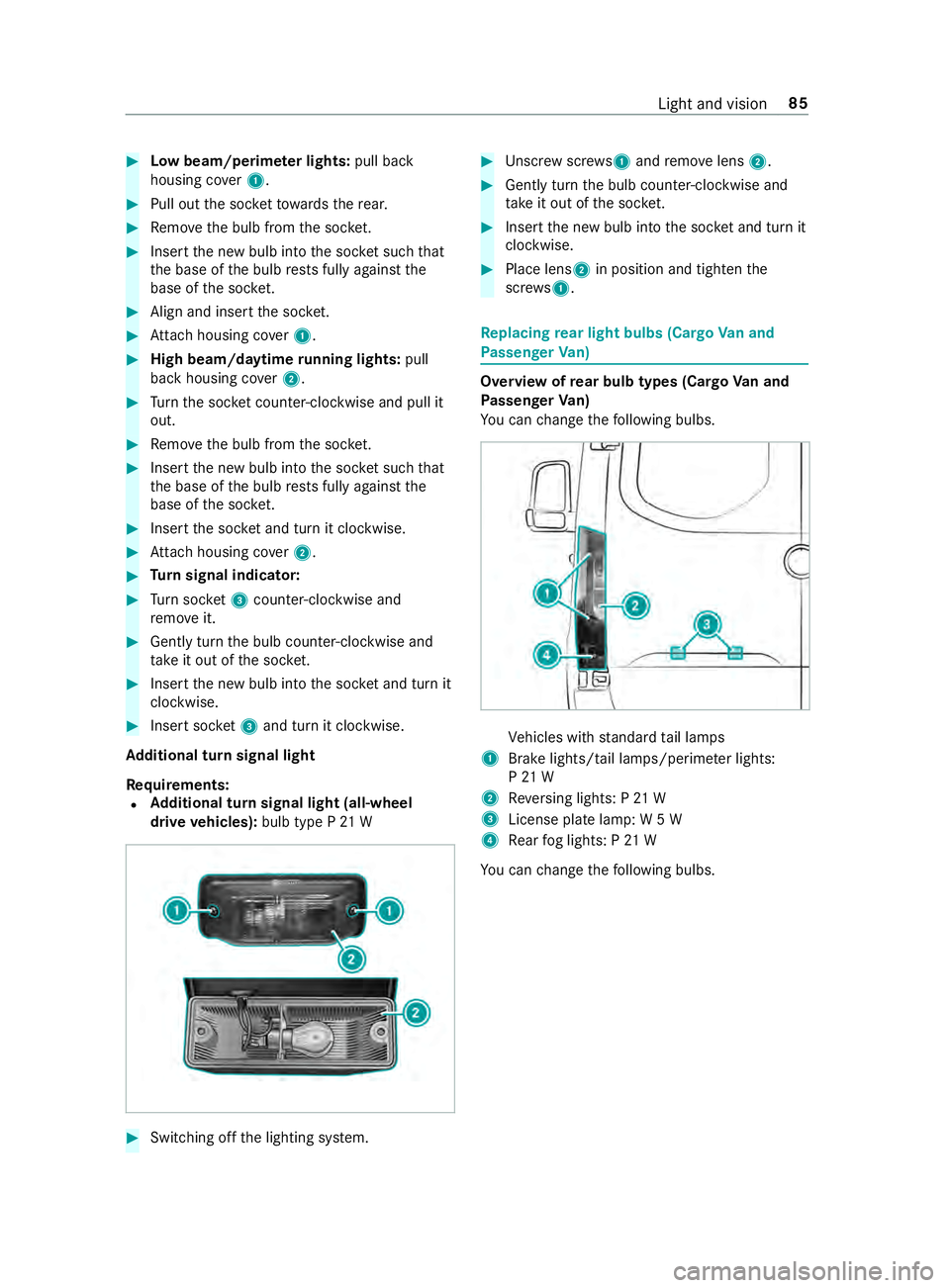
#
Low beam/perime ter lights: pull back
housing co ver1. #
Pull out the soc ketto wa rdsth ere ar. #
Remo vethe bulb from the soc ket. #
Inse rtthe new bulb into the soc ket su chthat
th e base of the bulb rests fully against the
base of the soc ket. #
Align and insert the soc ket. #
Attach housing co ver1. #
High beam/daytime running lights: pull
back housing co ver2. #
Turn the soc ket counter-clo ckwise and pull it
out. #
Remo vethe bulb from the soc ket. #
Inse rtthe new bulb into the soc ket su chthat
th e base of the bulb rests fully against the
base of the soc ket. #
Inse rtthe soc ket and turn it clo ckwise. #
Attach housing co ver2. #
Turn signal indicator: #
Turn soc ket3 counter-clo ckwise and
re mo veit. #
Gently turn the bulb counter-clockwise and
ta ke it out of the soc ket. #
Inse rtthe new bulb into the soc ket and turn it
clo ckwise. #
Insert soc ket3 and turn it clo ckwise.
Ad ditional turn signal light
Re quirements:
R Ad
ditional turn signal light (all-wheel
drive vehicles): bulb type P 21 W #
Switching off the lighting sy stem. #
Unscr ewscrews 1and remo velens 2. #
Gently turn the bulb counter-clockwise and
ta ke it out of the soc ket. #
Inse rtthe new bulb into the soc ket and turn it
clo ckwise. #
Place lens 2in position and tigh tenthe
scr ews 1. Re
placing rear light bulbs (Cargo Van and
Pa ssenger Van) Overview of
rear bulb types (Cargo Van and
Pa ssenger Van)
Yo u can change thefo llowing bulbs. Ve
hicles with standard tail lamps
1 Brake lights/tail lamps/pe rime ter lights:
P 21 W
2 Reversing lights: P 21 W
3 License plate lamp: W 5 W
4 Rear fog lights: P 21 W
Yo u can change thefo llowing bulbs. Light and vision
85
Page 110 of 354
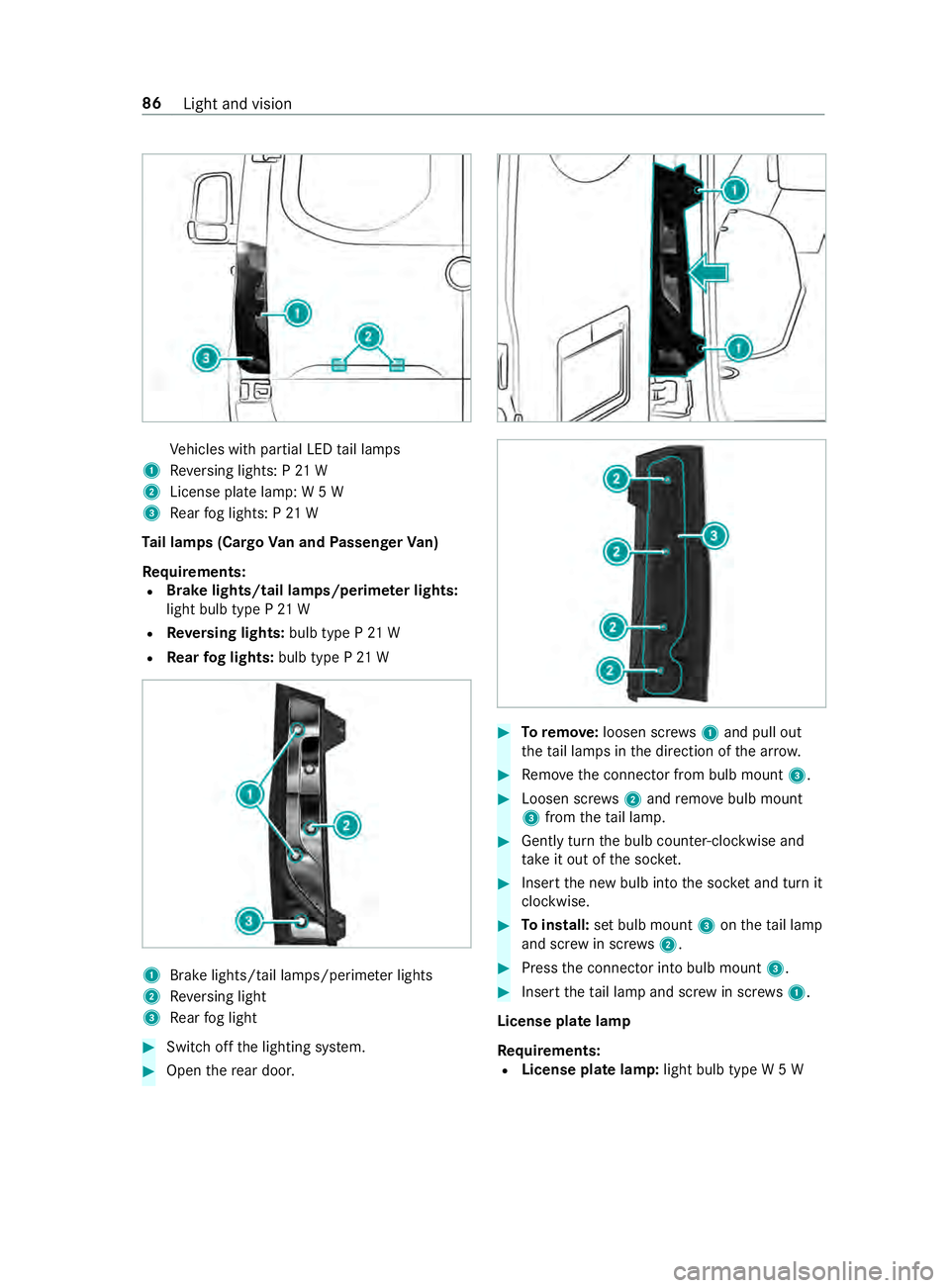
Ve
hicles with partial LED tail lamps
1 Reversing lights: P 21 W
2 License plate lamp: W 5 W
3 Rear fog lights: P 21 W
Ta il lamps (Cargo Van and Passenger Van)
Re quirements:
R Brake lights/tail lamps/perime
ter lights:
light bulb type P 21 W
R Reversing lights: bulb type P 21 W
R Rear fog lights: bulb type P 21 W 1
Brake lights/tail la mps/perime ter lights
2 Reversing light
3 Rear fog light #
Switch off the lighting sy stem. #
Open there ar door. #
Toremo ve:loosen scr ews1 and pull out
th eta il lamps in the direction of the ar row. #
Remo vethe connector from bulb mount 3. #
Loosen scr ews2 and remo vebulb mount
3 from theta il lamp. #
Gently turn the bulb counter-clockwise and
ta ke it out of the soc ket. #
Inse rtthe new bulb into the soc ket and turn it
clo ckwise. #
Toinstall: set bulb mount 3ontheta il lamp
and scr ewin scr ews2. #
Press the connector into bulb mount 3. #
Insert theta il lamp and scr ewin scr ews1.
License plate lamp
Re quirements:
R License plate lamp: light bulb type W 5 W86
Light and vision
Page 111 of 354
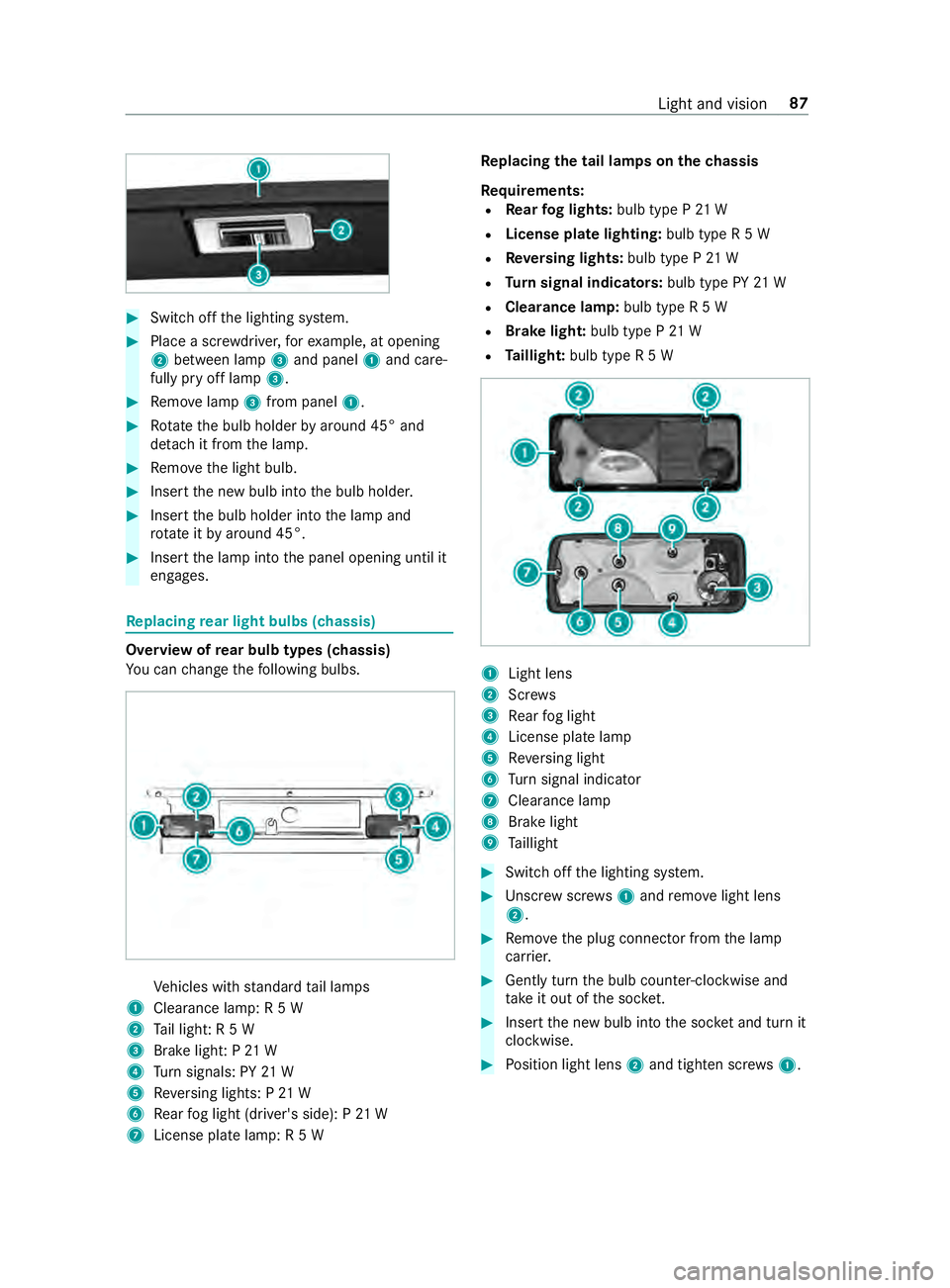
#
Switch off the lighting sy stem. #
Place a scr ewdriver, forex ample, at opening
2 between lamp 3and panel 1and care‐
fully pry off lamp 3. #
Remo velamp 3from panel 1. #
Rotate the bulb holder byaround 45° and
de tach it from the lamp. #
Remo vethe light bulb. #
Insert the new bulb into the bulb holder. #
Insert the bulb holder into the lamp and
ro tate itby around 45°. #
Insert the lamp into the panel opening until it
engages. Re
placing rear light bulbs (chassis) Overview of
rear bulb types (chassis)
Yo u can change thefo llowing bulbs. Ve
hicles with standard tail lamps
1 Clearance lamp: R 5 W
2 Tail light: R 5 W
3 Brake light: P 21 W
4 Turn signals: PY 21 W
5 Reversing lights: P 21 W
6 Rear fog light (driver's side): P 21 W
7 License plate lamp: R 5 W Re
placing the tail lamps on the chassis
Re quirements:
R Rear fog lights: bulb type P 21 W
R License pla telighting: bulb type R 5 W
R Reversing lights: bulb type P 21 W
R Turn signal indicators: bulb type PY21 W
R Clearance lamp: bulb type R 5 W
R Brake light: bulb type P21 W
R Taillight: bulb type R 5 W 1
Light lens
2 Screws
3 Rear fog light
4 License plate lamp
5 Reversing light
6 Turn signal indicator
7 Cleara nce lamp
8 Brake light
9 Taillight #
Swit choff the lighting sy stem. #
Unscr ewscrews1 and remo velight lens
2. #
Remo vethe plug connector from the lamp
car rier. #
Gently turn the bulb counter-clockwise and
ta ke it out of the soc ket. #
Inse rtthe new bulb into the soc ket and turn it
clo ckwise. #
Position light lens 2and tighten scr ews1. Light and vision
87
Page 112 of 354
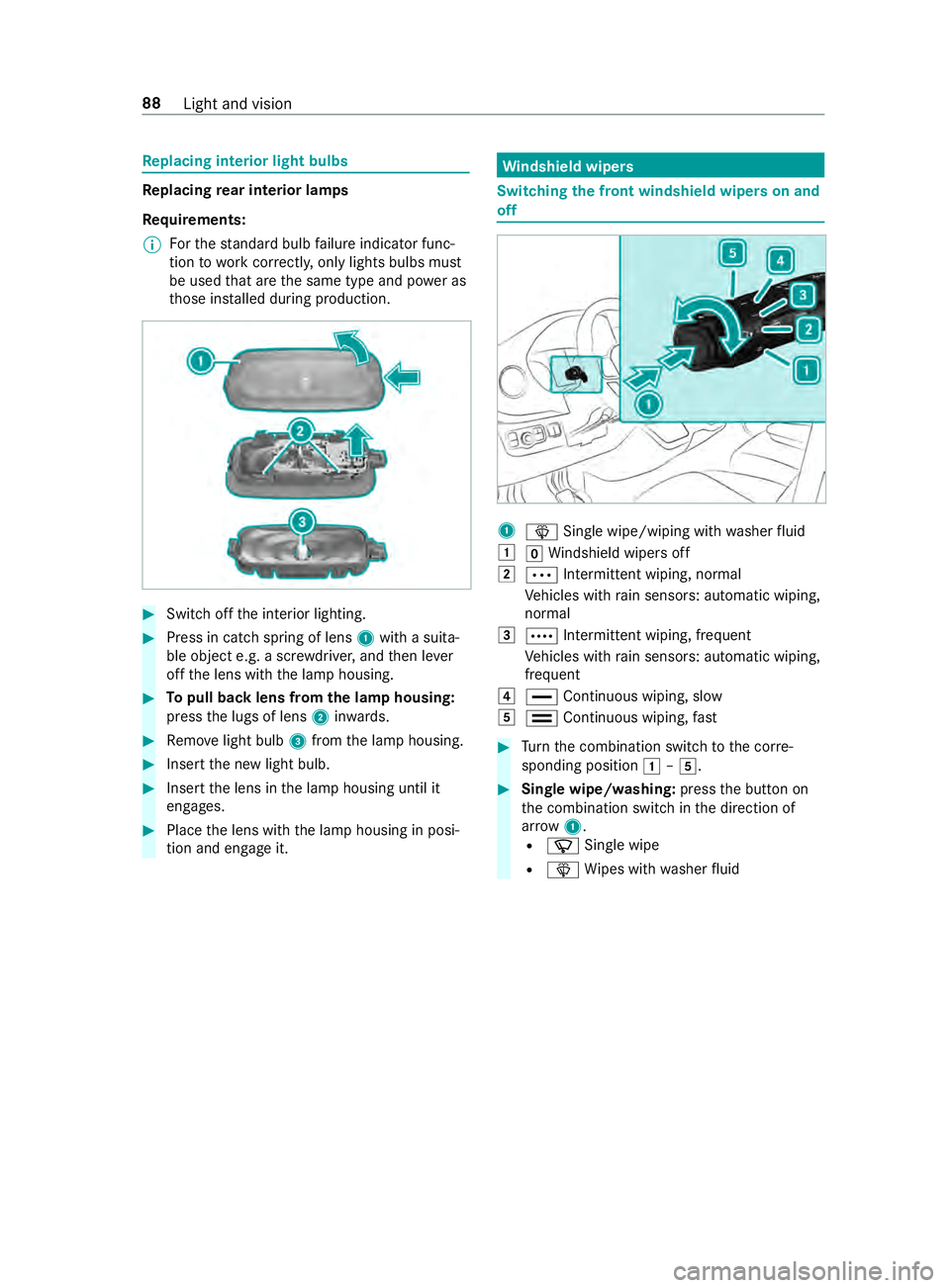
Re
placing interior light bulbs Re
placing rear interior lamps
Re quirements:
% Fo
rth est andard bulb failure indicator func‐
tion towo rkcor rectly, only lights bulbs must
be used that are the same type and po wer as
th ose ins talled during production. #
Swit choff the interior lighting. #
Press in catch spring of lens 1with a suita‐
ble object e.g. a scr ewdriver, and then le ver
off the lens with the lamp housing. #
Topull back lens from the lamp housing:
press the lugs of lens 2inwa rds. #
Remo velight bulb 3from the lamp housing. #
Insert the new light bulb. #
Insert the lens in the lamp housing until it
engages. #
Place the lens with the lamp housing in posi‐
tion and engage it. Wi
ndshield wipers Switching
the front windshield wipers on and
off 1
00D4 Single wipe/wiping with washer fluid
0047 005AWindshield wipe rsoff
0048 0062 Intermittent wiping, normal
Ve hicles with rain sensors: automatic wiping,
normal
0049 0063 Intermit tent wiping, frequent
Ve hicles with rain sensors: automatic wiping,
frequent
004A 00AA Continuous wiping, slow
004B 00A9 Continuous wiping, fast #
Turn the combination switch tothe cor re‐
sponding position 0047–004B. #
Single wipe/washing: pressthe button on
th e combination switch in the direction of
ar row 1.
R 00D3 Single wipe
R 00D4 Wipes with washer fluid 88
Light and vision