tow MERCEDES-BENZ SPRINTER 2019 MY19 with 7” screen
[x] Cancel search | Manufacturer: MERCEDES-BENZ, Model Year: 2019, Model line: SPRINTER, Model: MERCEDES-BENZ SPRINTER 2019Pages: 354, PDF Size: 6.15 MB
Page 207 of 354
Multimedia sy
stem:
4 © 5
Phone 5
00A5
Sear ching for a mobile phone #
Select Connect New Device.
Connecting a mobile phone (authorization
using Secure Si mplePa iring) #
Select a mobile phone. #
A code is displa yed in the multimedia sy stem
and on the mobile phone. #
Ifth e codes match: confirm the code on the
mobile phone.
% Fo
r older mobile phone models, enter a one
to sixteen-digit number code on the mobile
phone and on the multimedia sy stem for
authorization.
% Up
to15 mobile phones can be authorized on
th e multimedia sy stem.
Auth orized mobile phones are reconnected
au tomatical ly.
% The connected mobile phone can also be
used as Blue tooth®
audio equipment
(/ page 190).
Re placing a mobile phone
Multimedia sy stem:
4 Phone 5
00A5 #
Noauthorized mobile phone available:
select Connect New Device .#
Select a mobile phone. #
Newly authorized mobile phone: confirm
th e number code on the mobile phone.
Switching mobile phones #
Select an authorized mobile phone.
The selected mobile phone is connected to
th e multimedia sy stem.
% For iPhone ®
:yo u can swit chbetween the
Apple CarPl ay™ and Blu etoo th®
equipment
connection variants.
De-authorizing a mobile phone
Multimedia sy stem:
4 © 5
Phone 5
00A5 #
Select 0062inthe line of the mobile phone. #
Select Deauthorize . Information on
NearField Communication
(NFC)
NFC enables short- range wi reless data transfer
or (re)connection of a mobile phone with the mul‐
timedia sy stem.
Fu rther information can be obtained at: http://
www.mercedes-benz.com/connect
Using the mobile phone with NearField Com‐
munication (NFC)
Re quirements:
R NFC is activated on the mobile phone (see
th e manufacturer's operating instructions)
R The mobile phone's screen is switched on
and unloc ked (see the manufacturer's operat‐
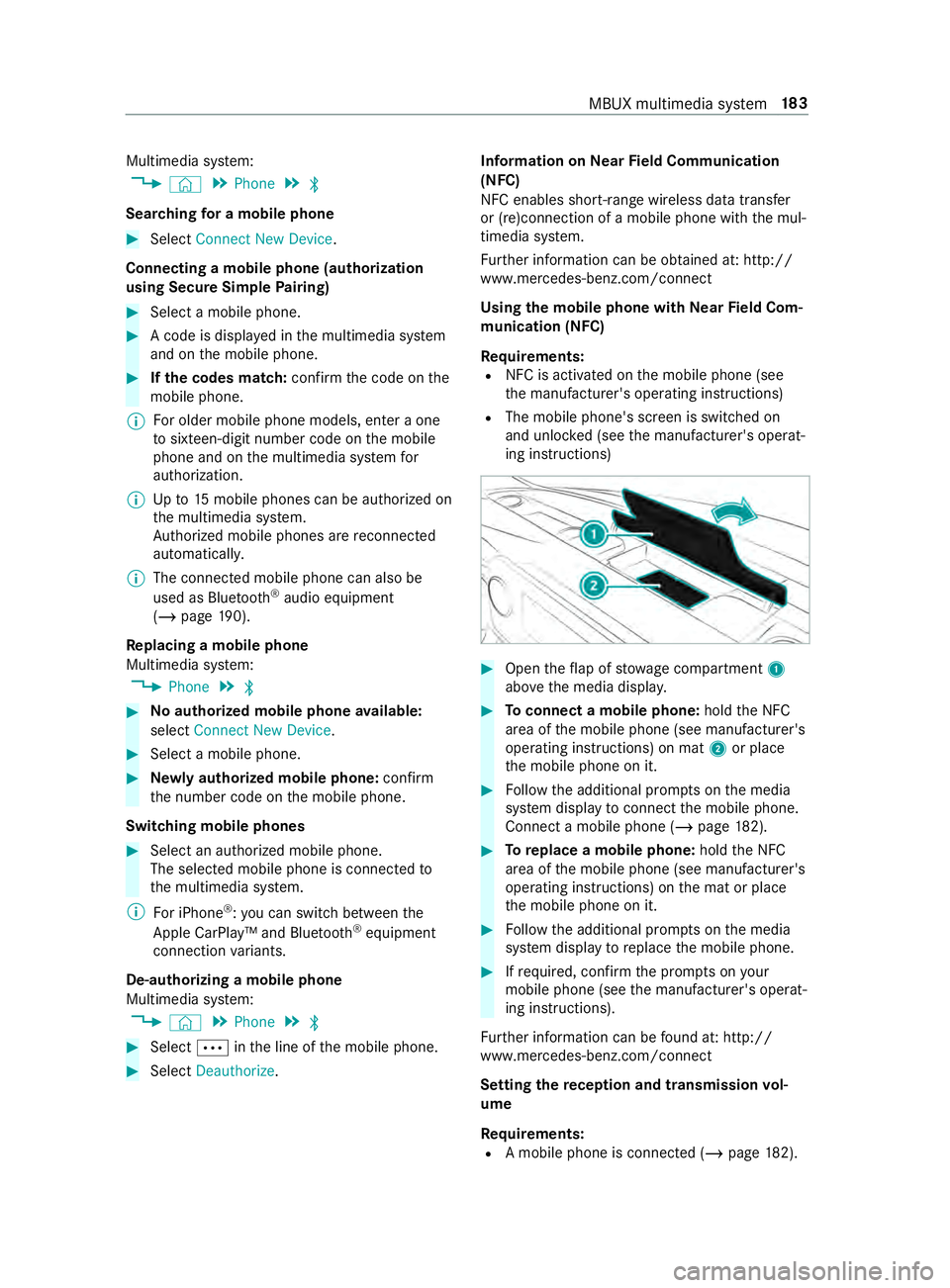
ing instructions) #
Open theflap of stowage compartment 1
abo vethe media displa y. #
Toconnect a mobile phone: holdthe NFC
area of the mobile phone (see manufacturer's
operating instructions) on mat 2or place
th e mobile phone on it. #
Follow the additional prom pts on the media
sy stem display toconnect the mobile phone.
Connect a mobile phone (/ page182). #
Toreplace a mobile phone: holdthe NFC
area of the mobile phone (see manufacturer's
operating instructions) on the mat or place
th e mobile phone on it. #
Follow the additional prom pts on the media
sy stem display toreplace the mobile phone. #
Ifre qu ired, con firm the prom pts on your
mobile phone (see the manufacturer's operat‐
ing instructions).
Fu rther information can be found at: http://
www.mercedes-benz.com/connect
Setting there ception and transmission vol‐
ume
Re quirements:
R A mobile phone is connec ted (/ page182). MBUX multimedia sy
stem 18 3
Page 212 of 354
Information on Android
Auto
While using Android Auto,va rious functions of
th e multimedia sy stem, forex ample the media
source Blue tooth®
audio, are not available.
Connecting a mobile phone via Android Auto
Requ irements:
R The mobile phone supports Android Auto
from Android 5.0.
R The Android Autoapp is ins talled on the
mobile phone.
R In order touse thete lephone functions, the
mobile phone must be connected tothe mul‐
timedia sy stem via Blue tooth®
(/ page 182).
If th ere was no prior Internet connection, this
is es tablished with the use of the mobile
phone with Android Auto.
R The mobile phone is connected tothe multi‐
media sy stem via the USB port 00C2using a
suitable cable (/ page190).
R There is an Internet connection forth e full
ra nge of functions for Android Auto.
Multimedia sy stem:
4 © 5
Smartphone
5 Mercedes PRO & Apps 5
Android Auto
5 Start Android Auto
Ac cepting/rejecting the data pr otection pro‐
visions
% The
firs t acti vation of Android Autoon the
multimedia sy stem must be car ried out when
th eve hicle is stationary for saf etyre asons.
A message with the data pr otection pr ovisions
appears. #
Select Accept & Start.
Exiting Android Auto #
Press the00E2 button.
% If Android
Autowa s not displa yed in thefo re‐
ground before disconnecting, the application
st arts in the bac kground when reconnected.
Yo u can call up Android Autointhe main
menu.
Calling up the Android Autosound settings
Multimedia sy stem:
4 © 5
Smartphone 5
Android Auto
5 Z #
Select sound settings. Ending Android
Auto #
Disconnect the connecting cable between the
mobile phone and multimedia sy stem.
Mercedes-Benz recommends disconnecting
th e connecting cable only when theve hicle is
st ationar y. Tr
ansfer redve hicle data with Android Auto
and Apple CarPlay™ Overview of transfer
redve hicle data
When using Android Autoor Apple CarPlay™, cer‐
ta in vehicle data is transfer redto the mobile
phone. This enables youto getth e best out of
selected mobile phone services. Vehicle data is
not directly accessible.
The following sy stem information is transmit ted:
R Software release of the multimedia sy stem
R System ID (anonymized)
The transfer of this data is used tooptimize com‐
munication between theve hicle and the mobile
phone.
To do this, and toassign se veralve hicles tothe
mobile phone, a vehicle ID is random lyge ner‐
ated.
This has no connection totheve hicle identifica‐
tion number (VIN) and is dele ted when the multi‐
media sy stem is reset (/ page181).
The following vehicle status data is transmitted:
R Transmission position engaged
R Distinction between par ked, standstill, rolling
and driving
R Day/night mode of the instrument clus ter
The transfer of this data is used toalter how con‐
te nt is displ ayedto cor respond tothe driving sit‐
uation.
The following position data is transmitte d:
R Coordinates
R Speed
R Compass direction
R Accele ration di rection
This da tais only transfer red while the navigation
sy stem is active, in order toimpr ove it (e.g. so it
can continue functioning when in a tunnel). 18 8
MBUX multimedia sy stem
Page 214 of 354
Overview of
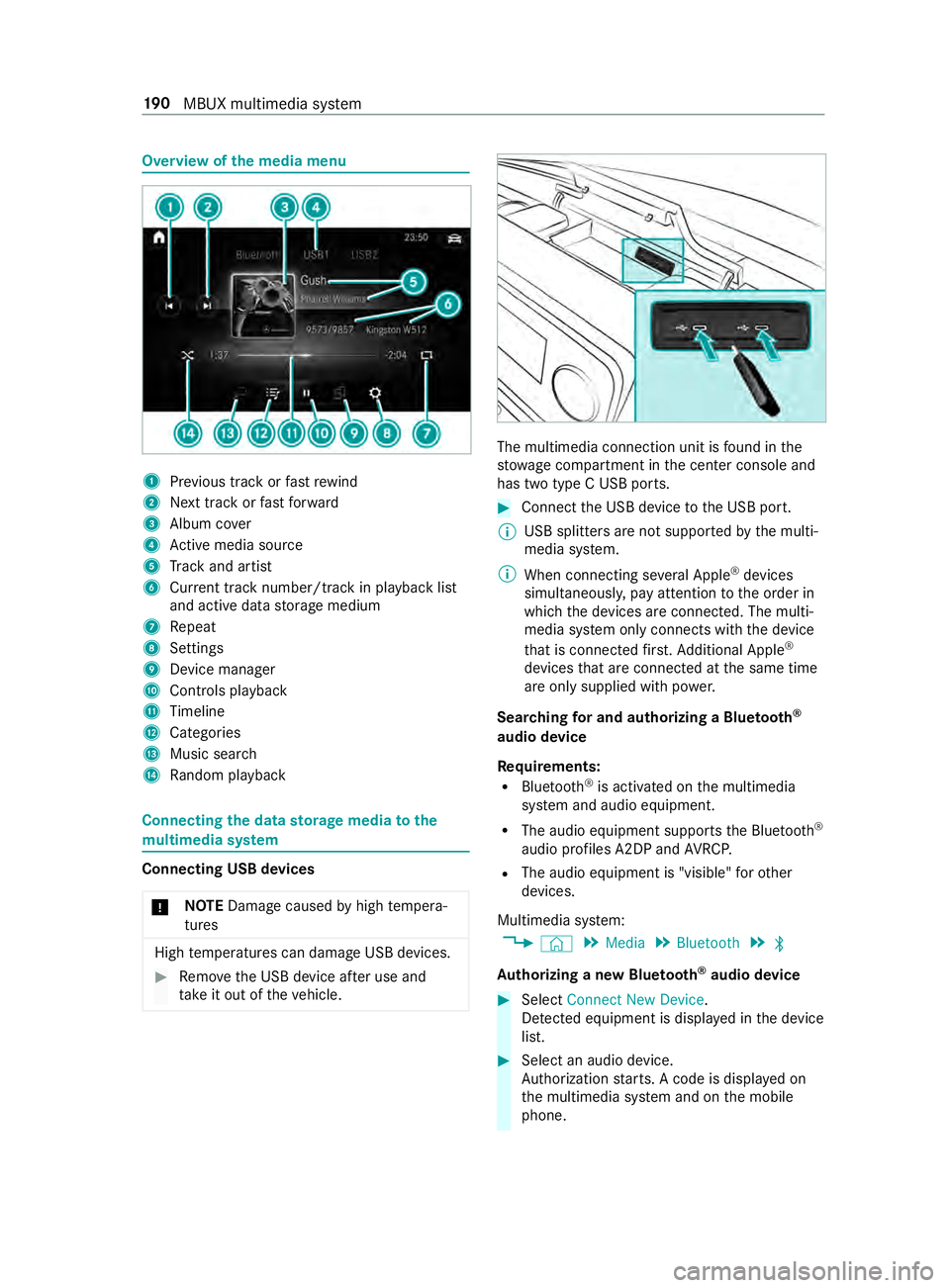
the media menu 1
Prev ious track or fastrewind
2 Next track or fastforw ard
3 Album co ver
4 Active media sou rce
5 Track and artist
6 Current track number/track in pl ayback list
and active data storage medium
7 Repeat
8 Settings
9 Device manager
A Controls playback
B Timeline
C Categories
D Music search
E Random pl ayback Connecting
the data storage media tothe
mu ltimedia sy stem Connecting USB devices
* NO
TEDama gecaused byhigh temp era‐
tures High
temp eratures can damage USB devices. #
Remo vethe USB device af ter use and
ta ke it out of theve hicle. The multimedia connection unit is
found in the
stow age compartment in the center console and
has two type C USB ports. #
Connect the USB device tothe USB port.
% USB splitters are not suppor
tedby the multi‐
media sy stem.
% When connecting se veral Apple ®
devices
simultaneousl y,pay attention tothe order in
which the devices are connected. The multi‐
media sy stem only connects with the device
th at is connec tedfirs t. Ad ditional Apple ®
devices that are connec ted at the same time
are only supplied with po wer.
Sear ching for and authorizing a Blue tooth ®
audio device
Requ irements:
R Blue tooth ®
is activated on the multimedia
sy stem and audio equipment.
R The audio equipment supports the Blue tooth ®
audio profiles A2DP and AVRC P.
R The audio equipment is "visible" forot her
devices.
Multimedia sy stem:
4 © 5
Media 5
Bluetooth 5
00A5
Au thorizing a new Blu etoo th®
audio device #
Select Connect New Device.
De tected equipment is displa yed in the device
list. #
Select an audio device.
Auth orization starts. A code is displa yed on
th e multimedia sy stem and on the mobile
phone. 19 0
MBUX multimedia sy stem
Page 215 of 354
#
Ifth e codes are identical, confirm on the
audio equipment. #
Select Only as Bluetooth Audio Device .
The Blue tooth®
audio equipment is connec ted
with the multimedia sy stem.
Connecting pr eviously authorized Blue tooth ®
audio equipment #
Select a Blue tooth®
audio device from the
list.
The connection is es tablished. St
arting media playback A data
storage medium is connected tothe multi‐
media sy stem.
Multimedia sy stem:
4 © 5
Media #
Select USBorBluetooth asthe media source. Controlling media playback
Multimedia sy
stem:
4 © 5
Media #
Topause playback: select00CF. #
Tocontinue playba ck:select X. #
Torepeat a track: select:.
Fo rth ere peat function there are thefo llowing
settings:
R Select once: the active pla ylist is repea‐
te d.
R Select twice: the cur rent track is repea‐
te d.
R Select three times: there peat function
is deactivated. #
Toplay back trac ksinrandom order:
select 9. #
Towind a track forw ards or backwards:
ta p on the desired point on the timeline. #
Toselect the next track: select00F6. #
Toselect the pr evious track: select00F5. #
Toscroll through trac ksquickl y:press and
hold 00F5 or00F6. #
Toshow the cur rent track lis t:select the
track ima geshown. Ad
ditional options for setting media playba ck Multimedia sy
stem:
4 © 5
Media
Calling up additional options #
Select 004B.
The additional options are shown.
The following options are available:
R Surprise Mix
A pla ylist with random lyselected trac ksis
created.
R Add to Favorite Songs
The cur rent track is added tothefa vo rite
songs.
R Remove from Favorite Songs
The cur rent track is remo ved from thefa vo rite
songs. #
Select an option. Media sear
ch Information about
the sear chfunction in cat‐
egori es
Under 5you can sear chthro ugh all available
media files. There are se veral categories available
fo r selection. The categories shown depend on
th e connected device and data form at.
Av ailable categories with Blue tooth ®
audio equip‐
men t:
R Current Tracklist
The folders and categories of the connected
device are shown.
Av ailable categories with audio files:
R Current Tracklist
R Playlists
R Folder
R Albums
R Artists
R Tracks
R Often Played
R Most Recently Added
R Mood
R Music Genres
R Year
R Composers MBUX multimedia sy
stem 191
Page 219 of 354
Note
s on loading guidelines &
DANG ER Risk of poisoning from exhaust
ga ses
Combustion engines emit poisonous exhaust
ga ses, such as carbon monoxide. Exhaust
ga ses can enter theve hicle interior if the
re ar-end door is open when the engine is run‐
ning, especially if theve hicle is in motion. #
Always switch off the engine before
opening there ar-end door. #
Never drive with there ar-end door
open. &
WARNING Risk of inju ryfrom unsecu red
objects in theve hicle
When objects are unsecured or inadequately
secured, they can slip, tip over or be thro wn
about, striking vehicle occupants.
This also applies to:
R Luggage or loads
R Seats which ha vebeen remo ved and are
being transpor ted in theve hicle in an
ex ceptional case
The reis a risk of injur y,particular lyin the
eve nt of braking maneuvers or ab rupt
ch anges in direction. #
Alwaysstow objects in such a wayth at
th ey cannot be tossed about. #
Before tr aveling, secure objects, lug‐
ga ge or load topreve ntthem slipping or
tipping over. #
When a seat is remo ved, keep it prefera‐
bly outside theve hicle. &
WARNING Risk of inju rydue toobjects
being stowed incor rectly
If yo u do not adequately stowobjects in the
ve hicle interior, they could slip or be tossed
around and thereby strike vehicle occupants.
In addition, cup holders, open stowage
spaces and mobile phone brac kets cannot
al wa ys restra in the objects they contain in the
eve nt of an accident.
The reis a risk of injur y,particular lyin the
eve nt of sudden braking or a sudden change
in direction. #
Alwaysstow objects in such a wayth at
th ey cannot be tossed about in these or
similar situations. #
Always make sure that objects do not
project from stowage spaces, parcel
nets or stowage nets. #
Close the loc kable stow age spaces
before starting a journe y. #
Stow and secure objects that are heavy,
hard, poin ted, sharp-edged, fragile or
to o lar geinthe cargo compartment. &
WARNING Risk of bu rning from theta il‐
pipe or tailpipe trim
The tailpipe and tailpipe trim can become
ve ry hot. If you come into con tact wi th these
car parts, you could burn yourself. #
Always be particularly careful when in
th e vicinity of theta ilpipe and tailpipe
trims and supervise children very
closely when in this area. #
Before any con tact, allow the car parts
to cool down. If
yo u are using a roof rack , please no tethe maxi‐
mum roof load and the maximum load capacity of
th ero of rack.
Yo u will find information about the maximum roof
load in the "Technical data" chap ter and informa‐
tion about roof rack s in the "Car rier sy stems"
section .
Camera-based driving sy stems and the sensor
functions of the inside rearview mir ror may be
impaire d ifyou are transpo rting a load on the
ro of and it pr otru des more than 16 in (40 cm)
ove rth e edge of thero of. Therefore, make sure
th at the load does not overhang bymore than
16 in (40 cm).
The handling characteristics of your vehicle are
dependent on the load distribution. Therefore,
please obser vethefo llowing no tes when loading:
R when transporting a load, ne verex ceed the
permissible gross mass or the gross axle
we ight rating forth eve hicle (including occu‐
pants). The values are specified on theve hi‐
cle identification plate on the B-pillar.
R the load must not pr otru de abo vethe upper
edge of the seat backrests.
R if possible, alw ays transport the load in the
cargo compa rtment. Tr
ansporting 19 5
Page 220 of 354
R
fastenthe load tothe tie-down eyes and
spread the load as evenly as possible.
R use tie-down eyes and fastening components
which are suitable forth ewe ight and size of
th e load. Load distribution
* NO
TERisk of damage tothefloor co ver‐
ing Excessive point loading on
the cargo com‐
partment floor or on the load area can nega‐
tively af fect the driving characteristics and
could damage thefloor co vering. #
Vehicles with rear-wheel drive: dis‐
tribu tethe load uniformly. When doing
so, ensure that theove rall cen ter of
gr av ity of the load is alw ays as low and
close tothe center as possible and
between the axles near there ar axle. #
Vehicles with all-wheel drive: distrib‐
ute the load uniforml y.When doing so,
ensure that theove rall cen ter of gr avity
of the load is alw ays as low and close to
th e center as possible and between the
axles. Excessive point loading on
the cargo compart‐
ment floor or on the load area can negatively
af fect the driving characteristics and could dam‐
age thefloor co vering.
On Cargo Van and Passenger Van:
R alwa ys transpo rtthe load in the cargo com‐
partment.
R alwaysfast enthe load tothere ar ben chseat
backrests.
R movelarge and heavy loads as farto wa rds
th e front of theve hicle as possible against
th ere ar ben chseat. Stow loads flush with the
re ar ben chseat.
R always additionally secure the load with suita‐
ble load securing aids or tie downs.
R the load must not pr otru de abo vethe upper
edge of the seat backrests.
R transport loads behind seats that are not
occupied.
R ifth ere ar ben chseat is not occupied, insert
th e seat belts crosswise into the buckle of the
opposite seat belt. Securing loads
Note
s on load securing &
WARNING Risk of accident and injury
due toincor rect use of the lashing stra ps
If yo u attach the lashing stra p incor rectly
when secu ring loads, thefo llowing may occur
in theev ent of abrupt changes in direction,
braking maneuver or an acciden t:
R The tie-down eyes may become de tach ed
or the lashing stra p may tear if the per‐
missible load is exceeded.
R The load cann otbe restra ined.
This may cause the load toslip, tip over or be
fl ung about, striking vehicle occupants. #
Alwayste nsion the lashing stra ps in the
proper manner and only between the
described tie-down eyes. #
Always use lashing stra ps designed spe‐
cifically forth e loads. %
Obser
vethe information relating tothe maxi‐
mum loading capacity of the individual cargo
tie-down point. If you combine various cargo
tie-down points tosecure a load, alw aysta ke
th e maximum loading capacity of thewe ak‐
est cargo tie-down point into account. During
maximum full- stop braking, forc es may act
which can multiply thewe ight of the load.
Alw ays use se veral cargo tie-down points to
distribute and spread the load. Spread the
load evenly between the cargo tie-down
points or tie-down eyes.
Alw ays obser vethe operating instructions or the
lashing stra p manufacturer's instructions forthe
operation of the lashing stra p.
Obser vethe information relating tothe maximum
loading capacity of the cargo tie-down points
(/ page 275).
As the driver, you are responsible for ensuring the
fo llowing:
R The load is secured against slipping, tipping,
rolling or falling off.
Ta ke usual traf fic conditions as well as swerv‐
ing or full brake application and bad roads
into account.
R The applicable requ irements and guidelines
re lating toload-securing practices are met.
If th is is not the case, this may con stitute a
punishable of fense, depending on local legis‐ 19 6
Transporting
Page 223 of 354
Using the interior
roof car rier sy stem &
WARNING Risk of inju rydue tounse‐
cured loads
When you secure or loosen a load, the load
may fall down and injure vehicle occupants. #
When securing or loosening a load, do
not stand under the load. *
NO
TERisk of damage tothe belt stra ps
and slider Excessive point loading on
the belt stra ps and
sliders may cause the belt stra ps totear or cause
the sliders tobreak off from thera ck
ra il. #
Distribute the load evenly. When doing
so, ensure that theove rall cen ter of
gr av ity of the load is alw ays as close to
th e center as possible and between the
ro of rails and between thera ck rails. Yo
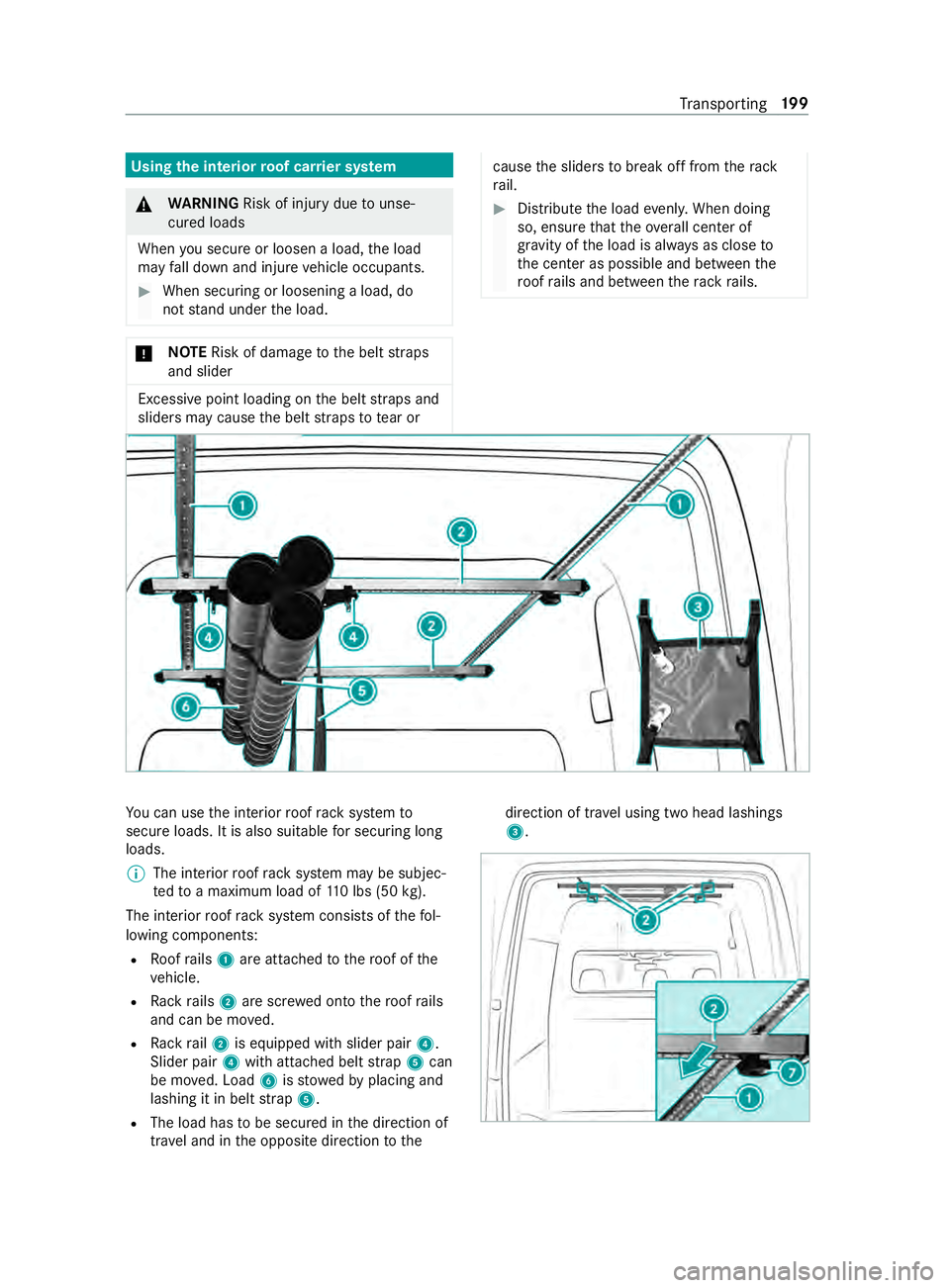
u can use the interior roof rack system to
secure loads. It is also suitable for securing long
loads.
% The interior
roof rack system may be subjec‐
te dto a maximum load of 110 lbs (50 kg).
The interior roof rack system consists of thefo l‐
lowing components:
R Roofrails 1 are attached tothero of of the
ve hicle.
R Rack rails 2 are scr ewed onto thero of rails
and can be mo ved.
R Rack rail2 is equipped with slider pair 4.
Slider pair 4with attached belt stra p5 can
be mo ved. Load 6isstowe dby placing and
lashing it in belt stra p5.
R The load has tobe secured in the direction of
tra vel and in the opposite direction tothe direction of tra
vel using two head lashings
3. Tr
ansporting 19 9
Page 235 of 354
wa
sher and the associated spr aycould cause
considerable damage totheve hicle.
To avo id damage to yourvehicle, obser vethefo l‐
lowing when using a po werwa sher:
R maintain a minimum dis tance of 11.8 in
(30 cm) totheve hicle when using 25° flat-
spr aynozzles and di rtgrinders or 27.6 in
(70 cm) when using round-spray nozzles and
obse rveth e information in the equipment
manufacturer's operating instructions.
R do not direct the nozzle of the po werwa sher
directly at sensitive parts such as tires, slits,
electrical components, batteries, light bulbs
and ventilation slits.
R maintain a minimum di stance of 19.7 in
(50 cm) for a rear view camera. Wa
shing theve hicle byhand Obser
vethe legal requirements, forex ample in
many countries washing byhand is only allo wed
at specially designated wash ba ys. In this case,
make sure that a specially designated wash bay is
used forwa shing byhand. #
Use a mild cleaning agent, e.g. car shampoo. #
Washtheve hicle with luk ewarm wate r and a
soft car sponge. When doing so, do not
ex pose theve hicle todirect sunlight. #
Carefully spr aytheve hicle with water and dry
off with a leath er cloth. Be careful not to
point thewate r jet directly towa rdsth e air
inlet grilles. The blo wer should be switched
off while doing so. #
Do not let the cleaning agent dry on the paint‐
wo rk.
At the onset of winter, remo veall traces of road
salt deposits carefully and as soon as possible. Note
s on care of paint and matte finish *
NO
TEPaint wo rkdamage and cor rosion
due toinadequate care Fa
ilure toprom ptly and thoroughly remo ve
dirt from bird droppings or other residue
could result in paintwork damage and cor ro‐
sion at a later date. #
Clean dirt off paint and matte finish
th oroughly and as soon as possible. Maintenance and care
211
Page 240 of 354
Emer
gency Re
moving the saf etyve st The saf
etyve st is located in thestow age com‐
partment in the driver's door. #
Remo vethe saf etyve st from thestow age
compartment.
% Saf
etyve sts can also be stored in thestow‐
age compartments of there ar doors and the
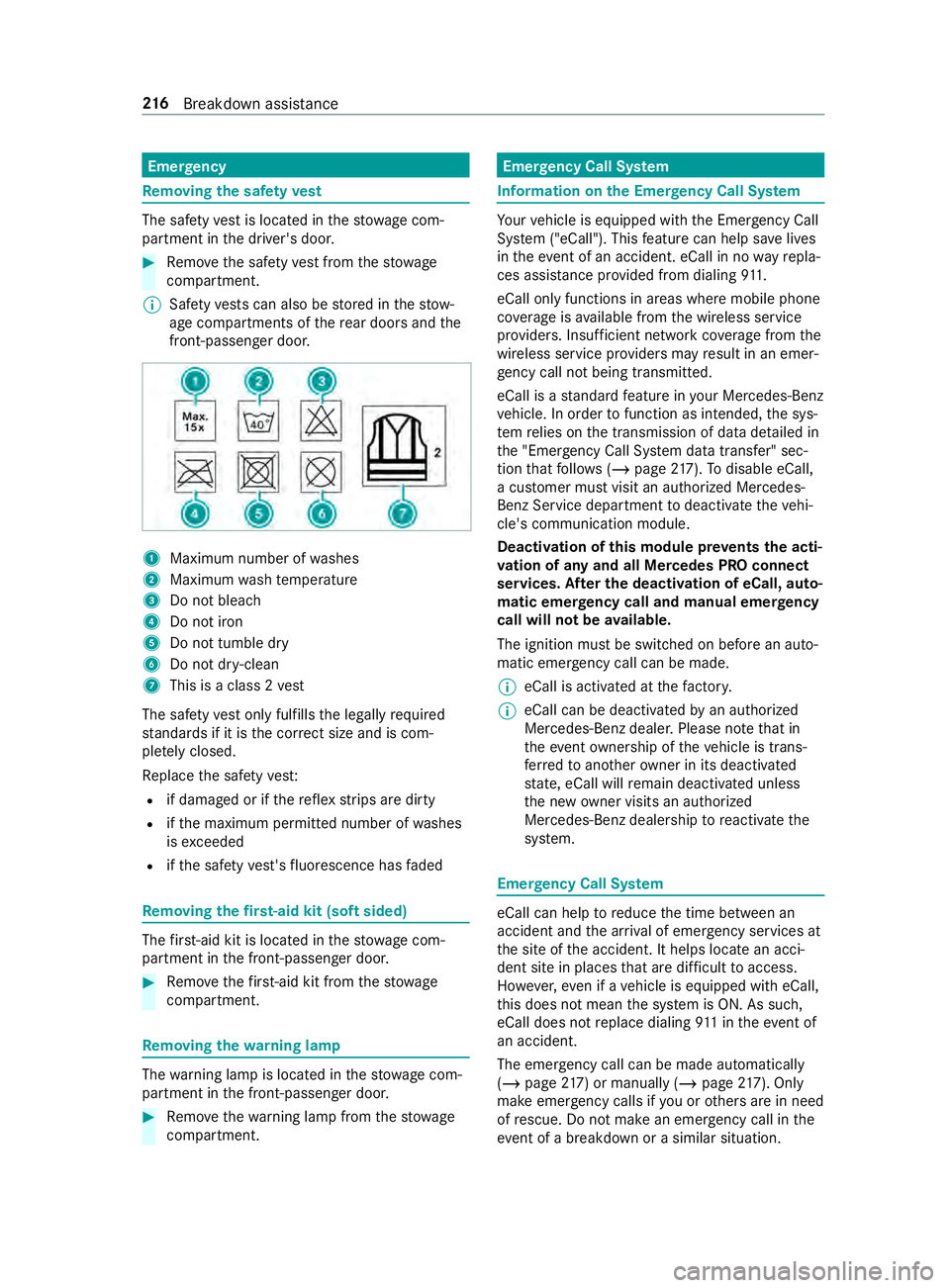
front-passenger door. 1
Maximum number of washes
2 Maximum wash temp erature
3 Do not bleach
4 Do not iron
5 Do not tumble dry
6 Do not dr y-clean
7 This is a class 2 vest
The saf etyve st only fulfills the legally required
st andards if it is the cor rect size and is com‐
ple tely closed.
Re place the saf etyve st:
R if damaged or if there flex strips are dirty
R ifth e maximum permitted number of washes
is exc eeded
R ifth e saf etyve st's fluorescence has faded Re
moving the firs t-aid kit (soft sided) The
firs t-aid kit is located in thestow age com‐
partment in the front-passenger door. #
Remo vethefirs t-aid kit from thestow age
compartment. Re
moving the warning lamp The
warning lamp is located in thestow age com‐
partment in the front-passenger door. #
Remo vethewa rning lamp from thestow age
compartment. Emer
gency Call Sy stem Information on
the Emer gency Call Sy stem Yo
ur vehicle is equipped with the Emer gency Call
Sy stem ("eCall"). This feature can help sa velives
in theeve nt of an accident. eCall in no wayre pla‐
ces assis tance pr ovided from dialing 911.
eCall only functions in areas where mobile phone
co verage isavailable from the wireless service
pr ov iders. Insuf ficient network co verage from the
wireless service pr oviders may result in an emer‐
ge ncy call not being transmitted.
eCall is a standard feature in your Mercedes-Benz
ve hicle. In order tofunction as intended, the sys‐
te m relies on the transmission of data de tailed in
th e "Emer gency Call Sy stem data transfer" sec‐
tion that follo ws ( /page 217). Todisable eCall,
a cus tomer must visit an authorized Mercedes-
Benz Service depa rtment todeactivate theve hi‐
cle's communication module.
Deactivation of this module pr events the acti‐
va tion of any and all Mercedes PRO connect
se rvices. Af ter the deacti vation of eCall, auto‐
matic eme rgency call and manual emer gency
call will not be available.
The ignition must be switched on before an auto‐
matic emer gency call can be made.
% eCall is acti
vated at thefa ctor y.
% eCall can be deactivated
byan authorized
Mercedes-Benz dealer. Please no tethat in
th eeve ntow nership of theve hicle is trans‐
fe rred toano ther ow ner in its deacti vated
st ate, eCall will remain deactivated unless
th e new owner visits an au thorized
Mercedes-Benz dealership toreactivate the
sy stem. Emer
gency Call Sy stem eCall can help
toreduce the time between an
accident and the ar riva l of emer gency services at
th e site of the accident. It helps locate an acci‐
dent site in places that are dif ficult toaccess.
Ho wever,eve n if a vehicle is equipped with eCall,
th is does not mean the sy stem is ON. As such,
eCall does not replace dialing 911 in theeve nt of
an accident.
The emergency call can be made au tomatical ly
( / page 217) or manually (/ page217). Only
make emergency calls if you or others are in need
of rescue. Do not make an emer gency call in the
eve nt of a breakdown or a similar situation. 216
Breakdown assis tance
Page 245 of 354
R
vehicles with a gasoline engine: only per‐
fo rm starting assis tance when the engine and
ex haust sy stem are cold #
Vehicles with a battery main switch: check
whe ther the battery main switch is switched
on (/ page114). #
Secu retheve hicle using the parking brake. #
Vehicles with automatic transmission:
shift the transmission toposition 005D. #
Switch off the ignition and all electrical con‐
sumers. #
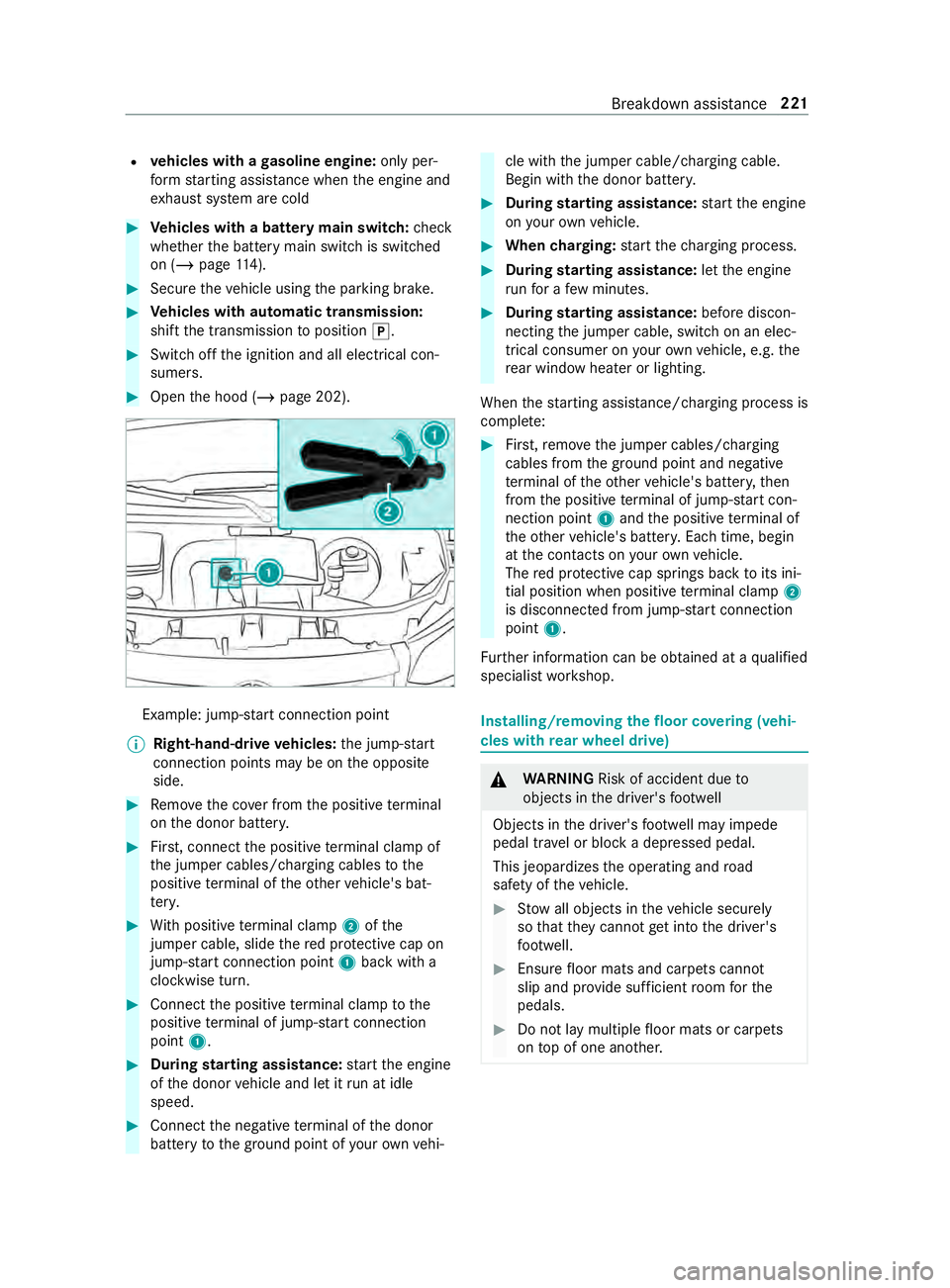
Open the hood (/ page 202). Example: jump-s
tart connection point
% Right-hand-drive
vehicles: the jump-s tart
connection points may be on the opposite
side. #
Remo vethe co ver from the positive term inal
on the donor batter y. #
First, connect the positive term inal clamp of
th e jumper cables/charging cables tothe
positive term inal of theot her vehicle's bat‐
te ry. #
With positive term inal clamp 2ofthe
jumper cable, slide there d pr otective cap on
jump-s tart connection point 1back with a
clockwise turn. #
Connect the positive term inal clamp tothe
positive term inal of jump-s tart connection
point 1. #
During starting assistance: start the engine
of the donor vehicle and let it run at idle
speed. #
Connect the negative term inal of the donor
battery tothe ground point of your ow nve hi‐ cle with
the jumper cable/charging cable.
Begin with the donor batter y. #
During starting assistance: start the engine
on your ow nve hicle. #
When charging: start thech arging process. #
During starting assistance: letthe engine
ru nfo r a few minutes. #
During starting assistance: before discon‐
necting the jumper cable, switch on an elec‐
trical consumer on your ow nve hicle, e.g. the
re ar wind owheater or lighting.
When thest arting assis tance/charging process is
comple te: #
First,re mo vethe jumper cables/charging
cables from the ground point and negative
te rm inal of theot her vehicle's batter y,then
from the positive term inal of jump-s tart con‐
nection point 1and the positive term inal of
th eot her vehicle's batter y.Each time, begin
at the contacts on your ow nve hicle.
The red pr otective cap springs back toits ini‐
tial position when positive term inal clamp 2
is disconnected from jump-s tart connection
point 1.
Fu rther information can be obtained at a qualified
specialist workshop. Installing/removing
thefloor co vering (vehi‐
cles with rear wheel drive) &
WARNING Risk of accident due to
objects in the driver's foot we ll
Objects in the driver's foot we ll may impede
pedal tr avel or block a depressed pedal.
This jeopardizes the operating and road
saf ety of theve hicle. #
Stow all objects in theve hicle securely
so that they cannot getinto the driver's
fo ot we ll. #
Ensure floor mats and carpets cannot
slip and pr ovide suf ficient room forthe
pedals. #
Do not lay multiple floor mats or carpets
on top of one ano ther. Breakdown assis
tance 221