change time MERCEDES-BENZ SPRINTER 2019 MY19 with 7” screen
[x] Cancel search | Manufacturer: MERCEDES-BENZ, Model Year: 2019, Model line: SPRINTER, Model: MERCEDES-BENZ SPRINTER 2019Pages: 354, PDF Size: 6.15 MB
Page 45 of 354
Daimler
VANS US A,LLC
European Delivery Department
One Mercedes-Benz Drive
Sandy Springs, GA 30328
In Canada:
Mercedes-Benz Canada, Inc.
European Delivery Department
98 Vande rhoof Avenue
To ronto, Ontario M4G 4C9 Main
tenance information Yo
ur cus tomer service advisor will record every
service foryo u in the Service and Warranty In for‐
mation booklet. Information on
Roadside Assistance Ro
adside Assis tance of fers tech nical help in the
eve nt of a breakdown. Your calls totheto ll-f ree
Ro adside Assis tance Hotline are ans weredby our
agents 24hours a da y,365 da ysaye ar.
1- 87 7-762-826 7(USA)
1-800-387-0 100(Canada)
Yo u can find fur ther information in theRo adside
Assis tance brochu re(USA) or the "Roadside
Assis tance" section in the Service and Warranty
booklet (Canada). You will find bo thintheve hicle
document wallet. Information on
changing address or owner In
theeve nt of a change of address, please send
us the "Notification of Address Change" in the
Service and Warranty In form ation booklet or sim‐
ply call the Cus tomer Assis tance Center (USA) at
th e hotline number 1-8 77-762-826 7or Cus tomer
Service (Canada) at 1-800-387-0 100. So, if nec‐
essar y,we can reach you in a timely fashion.
If yo u sell your Mercedes, please lea vethe entire
literature in theve hicle so that it is available to
th e next owner. If you ha vepur chased a used
ve hicle, please send us the "Notification of Pur‐
ch ase of Used Car" in the Service and Warranty
In fo rm ation booklet or call the Cus tomer Assis‐
ta nce Center (USA) at the hotline number
1-8 77-762-826 7or Cus tomer Service (Canada) at
1-800-387-0 100. Po
ssible danger due tosubstances haza rdous
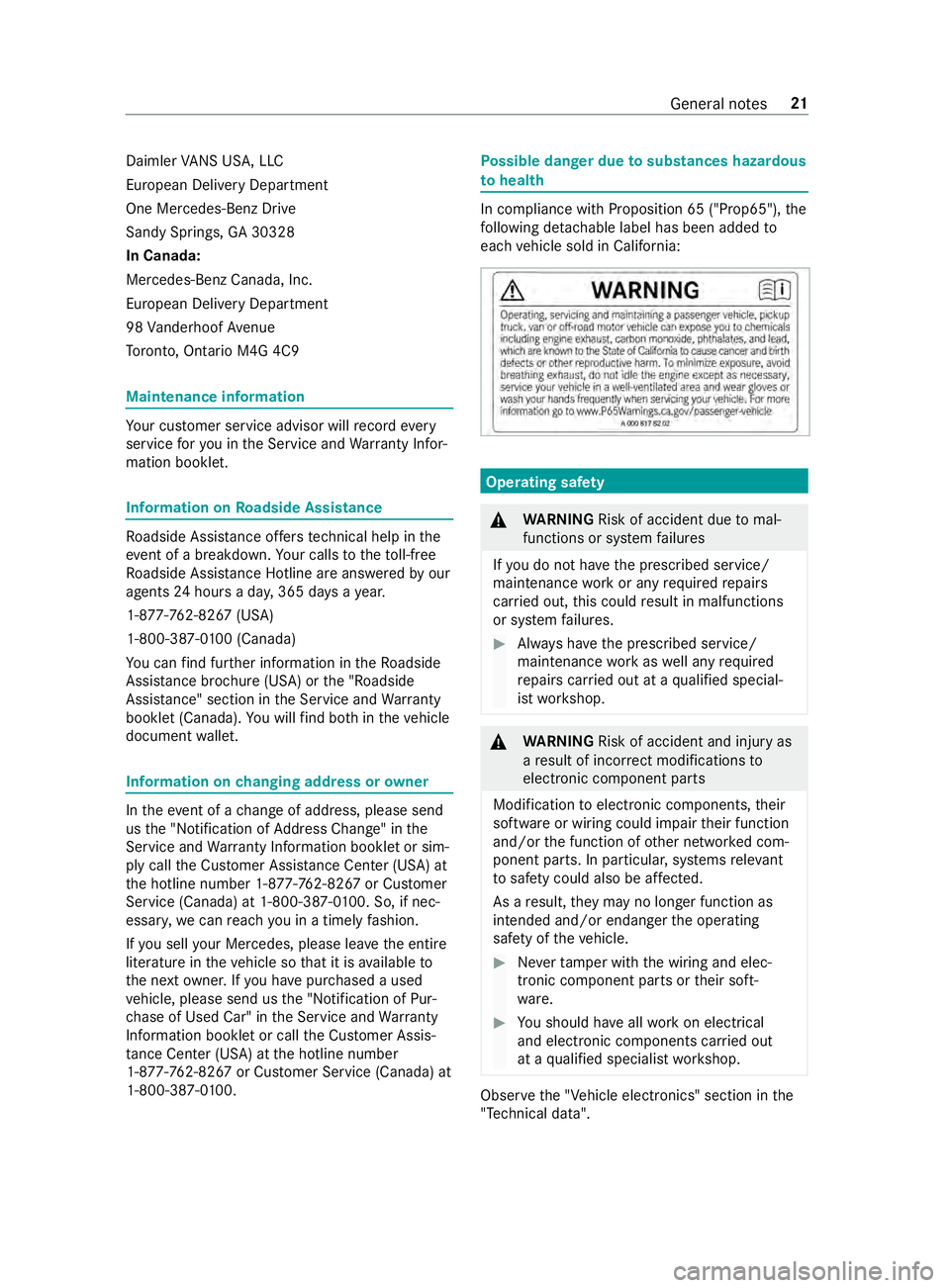
to health In compliance with Proposition 65 ("P
rop65"), the
fo llowing de tach able label has been added to
each vehicle sold in Califo rnia: Operating saf
ety &
WARNING Risk of accident due tomal‐
functions or sy stem failures
If yo u do not ha vethe prescribed service/
maintenance workor any requiredrepairs
car ried out, this could result in malfunctions
or sy stem failures. #
Always ha vethe prescribed service/
maintenance workas well any required
re pairs car ried out at a qualified special‐
ist workshop. &
WARNING Risk of accident and injury as
a re sult of incor rect modi fications to
electronic component parts
Modification toelectronic components, their
software or wiring could impair their function
and/or the function of other networ ked com‐
ponent parts. In particular, sy stems releva nt
to saf ety could also be af fected.
As a result, they may no longer function as
intended and/or endanger the operating
saf ety of theve hicle. #
Neverta mp er with the wiring and elec‐
tronic component parts or their soft‐
wa re. #
You should ha veall workon electrical
and electronic components car ried out
at a qualified specialist workshop. Obser
vethe "Vehicle electronics" section in the
"Technical data". Gene
ral no tes 21
Page 49 of 354
card contains, in compact
form ,th e most impor‐
ta nt information about your vehicle e.g. thero ut‐
ing of electric cables.
Fu rther information can be found at http://
www.mercedes-benz.de/qr-code. Data
storage Electronic control units
Electronic control units are ins
talled in your vehi‐
cle. Some of these are necessary forth e safe
operation of your vehicle, while some assist you
when driving (driver assis tance sy stems). In addi‐
tion, your vehicle pr ovides com fort and enter tain‐
ment functions, which are also made possible by
electronic cont rol units.
The elect ronic control units contain da tamemo‐
ri es which can temp orarily or permanently store
te ch nical information about theve hicle's operat‐
ing state, component loads, main tenance requ ire‐
ments and tech nical events or malfunctions.
In general, this information documents thest ate
of a component part, a module, a sy stem or the
sur roundings such as:
R operating states of sy stem components (e.g.
fl uid le vels, battery status, tire pressure)
R status messages concerning theve hicle and
its individual components (e.g. number of
wheel revo lutions/speed, deceleration, lateral
acceleration, display of thefast ened seat
belts)
R malfunctions or defects in impor tant sy stem
components (e.g. lights, brakes)
R information on events leading tovehicle dam‐
age
R system reactions in special driving situations
(e.g. airbag deployment, inter vention of sta‐
bility control sy stems)
R ambient conditions (e.g. temp erature, rain
sensor)
In addition toprov iding the actual cont rol unit
function, this data assists the manufacturer in
de tecting and rectifying malfunctions and opti‐
mizing vehicle functions. The majority of this data
is temp orary and is only processed in theve hicle
itself. Only a small portion of the data is stored in
th eeve nt or malfunction memo ry.
When your vehicle is serviced, tech nical da ta
from theve hicle can be read out byservice net‐
wo rkemplo yees (e.g. workshops, manufacturers)
or third parties (e.g. breakdown services). Serv‐ ices include
repair services, maintenance pro‐
cesses, warranty claims and quality assurance
measures, forex ample. The read out is per‐
fo rm ed via the legally prescribed port forthe
diagnostics connection in theve hicle. The
re spective service network locations or third par‐
ties collect, process and use this data. They
document tech nical statuses of theve hicle,
assist in finding malfunctions and impr oving qual‐
ity and are transmitted tothe manufacturer, if
necessar y.Fu rthermore, the manufacturer is sub‐
ject toproduct liability. Forth is, the manufacturer
re qu ires tech nical da tafrom vehicles.
Malfunction memories in theve hicle can be reset
by a service outlet as part of repair or mainte‐
nance work.
Depending on the selected equipment, you can
import data into vehicle con venience and info‐
ta inment functions yourself.
This includes, forex ample:
R multimedia data such as music, films or pho‐
to sfo r playback in an integrated multimedia
sy stem
R address book data for use in connection with
an integrated hands-free sy stem or an inte‐
grated navigation sy stem
R entered navigation destinations
R data about the use of Internet services
This data can be sa ved locally in theve hicle or it
is located on a device which you ha veconnected
to theve hicle (e.g. smartphone, USB flash drive
or MP3 pla yer). If this data is stored in theve hi‐
cle, you can dele teit at any time. This data is
sent tothird parties only at your requ est, particu‐
lar lywhen you use online services in accordance
with the settings that you ha veselected.
Yo u can store or change con venience settings/
individualization in theve hicle at any time.
Depending on the equipment, this includes, for
ex ample:
R seat and steering wheel position settings
R suspension and climate cont rol settings
R Individualization such as interior lighting
If yo ur vehicle is accordingly equipped, you can
connect your smartphone or ano ther mobile end
device totheve hicle. You can control this by
means of the cont rol elements integrated in the
ve hicle. Images and audio from the smartphone
can be output via the multimedia sy stem. Cer tain General no
tes25
Page 50 of 354
information is simultaneously transfer
redto yo ur
smartphone.
Depending on the type of integration, this can
include:
R general vehicle data
R position data
This allo wsyouto use selec ted apps on your
smartphone, such as navigation or music play‐
bac k.There is no fur ther interaction between the
smartphone and theve hicle; in particular, vehicle
data is not directly accessible. Which type of fur‐
th er data processing occurs is de term ined bythe
pr ov ider of the specific app used. Which settings
yo u can make, if an y,depends on the specific app
and the operating sy stem of your smartphone. Online services
Wire
less network connection
If yo ur vehicle has a wireless network connection,
data can be exchanged between your vehicle and
ot her sy stems. The wireless network connection
is enabled via theve hicle's transmission and
re ception unit or via connected mobile end devi‐
ces (e.g. sma rtphones). Online functions can be
used via this wireless network connection. These
include online services and applications/apps,
which are pr ovided bythe manufacturer or by
ot her pr oviders.
Manu factu rer's own services
In the case of the manufacturer's online services,
th e manufacturer describes the functions in a
suitable place (e.g. operating instructions, manu‐
fa cturer's website) and pr ovides the associated
information subject todata pr otection legislation.
Pe rsonal identification data may be used topro‐
vide online services. The data exchange forth is
ta ke s place via a secure connection, e.g. with the
manufacturer's IT sy stems intended forth e pur‐
pose. The collecting, processing, and use of per‐
sonal identification data be yond the pr ovision of
services occurs exclusively on the basis of a legal
permit or af ter due consent.
Generally, you can activate or deactivate the
services and functions (partly subject toafe e). In
some cases, this also applies tothe whole data
connection of theve hicle. Excluded from this are
special legally prescribed functions and services.
Services of third parties
If it is possible touse online services from other
pr ov iders, these services are subject tothe data
pr otection and term s of use of there sponsible pr
ov ider. The manufacturer has no influence on
th e contents exchanged whilst using these serv‐
ices.
Please ask there spective service pr ovider for
de tails on the type, extent and pu rpose of the
collection and use of personal da tainthe cont ext
of third party services. Event Data
Recorders USA onl
y:
This vehicle is equipped with an event da ta
re corder (EDR). The main pu rpose of an EDR is to
re cord, in cer tain crash or near crash-like situa‐
tions, su chas an air bag deployment or hitting a
ro ad obs tacle, da tathat will assist in unde rsta nd‐
ing how a vehicle's sy stems per form ed. The EDR
is designed torecord da tarelated tovehicle
dynamics and saf ety sy stems for a short period
of time, typically 30 seconds or less.
The EDR in this vehicle is designed torecord such
da ta as:
R How various sy stems in your vehicle were
operating;
R Whe ther or not the driver and passenger
saf ety belts werebuckled/fas tened;
R How far (if at all) the driver was depressing
th e accelera tor and/or brake pedal; and,
R How fasttheve hicle was tr ave ling.
This data can help pr ovide a better under standing
of the circums tances in whi chcrashes and inju‐
ri es occur. NOTE: EDR data are recorded by your
ve hicle only if a non-trivial crash situation occurs;
no data are recorded bythe EDR under normal
driving conditions and no personal data (e.g.
name, gende r,age and crash location) are recor‐
ded. Ho wever,ot her parties such as law enforce‐
ment could combine the EDR data with the type
of personally identifying data routinely acquired
during a crash in vestigation.
Ac cess totheve hicle and/or the EDR is needed
to read data that is recorded byan EDR, and spe‐
cial equipment is requ ired. In addition totheve hi‐
cle manufacturer, other parties that ha vethe spe‐
cial equipment, such as law enforcement, can
re ad the information byaccessing theve hicle or
th e EDR.
EDR data may be used in civil and criminal mat‐
te rs as a tool in accident reconstruction, accident
claims and vehicle saf ety. Since the Crash Data
Re trie val CDR tool that is used toextract da ta
from the EDR is commercially available, Daimler 26
General no tes
Page 105 of 354
The function is active under
thefo llowing condi‐
tions:
R The speed is less than 37 mph (60 km/h) and
th e indicator has been switched on or the
st eering wheel is turned.
R The speed is between 37mph (60 km/h) and
50 mph (8 0 km/h) and thesteering wheel is
turned.
The cornering light may still light up for a short
time but is switched off automatically af ter a
maximum of thre e minutes.
% When
reve rsege ar is engaged, the lighting
switches tothe opposite side. Highbeam Assist
Ad
aptive Highbeam Assist function &
WARNING Risk of accident despite
Ad aptive Highbeam Assist
Ad aptive Highbeam Assist does not recognize
th efo llowing road users:
R Road users without lights, e.g. pedes‐
trians
R Road users with poor lighting, e.g. cyclists
R Road users whose lighting is obstructed,
e.g. bya bar rier
On very rare occasions, Adaptive Highbeam
Assist may failto recognize other road users
with their own lighting, or may recognize
th em too late.
In these or similar situations, the automatic
high beam is not deactivated or is activated
despite the presence of other road users. #
Always obser vethe tra ffic carefully and
switch off the high beam in good time. The
Adaptive Highbeam Assist automatically
swit ches between thefo llowing settings:
R Low beam
R High beam
The sy stem de tects that vehicle lights are
approaching in the opposite direction or driving
ahead of theve hicle.
At speeds greater than 19 mp h (30 km/h), a
ch ange is made tothefo llowing setting:
R If no other road users are de tected, the high
beam switches on automaticall y.At
speeds less than 16 mp h (25 km/h) or if there
is suf ficient road lighting, a change is made to
th efo llowing setting:
R The high beam automatically switches off.
Sy stem limitations
Ad aptive Highbeam Assist cannot take thero ad,
we ather or traf fic conditions into consideration.
The de tection of obs tacles can be restricted if:
R Visibility is impaired, e.g. in fog, heavy rain or
snow
R The sensors are dirty or co vered
Ad aptive Highbeam Assist is only an aid. You are
re sponsible for ensuring cor rect vehicle lighting
in accordance with the pr evailing light, visibility
and traf fic conditions.
The sy stem's optical sensor is located behind the
windshield near theove rhead cont rol panel.
Switching Highbeam Assist on or off #
Toswitch on: turnthe light switch tothe
0058 position. #
Switch the highbeam on using the combina‐
tion switch.
If th e highbeam is automatically switched on
in darkness, the 00CE indicator lamp on the
multifunction display lights up. #
Toswitch off: switch offthe highbeam using
th e combination switch. Setting
theex terior lighting switch-off delay
time Re
quirements:
R The light switch is in position 0058.
Multimedia sy stem:
4 © 5
Settings 5
Light
5 Ext. Light Switch-off #
Set a switch-off delay time.
When theve hicle engine is switched off, theex te‐
ri or lighting will be activated forth e set time. Ac
tivating and deactivating the sur round
lighting Multimedia sy
stem:
4 © 5
Settings 5
Light
5 Locator Lighting #
Activate or deacti vate the function. Light and vision
81
Page 107 of 354
#
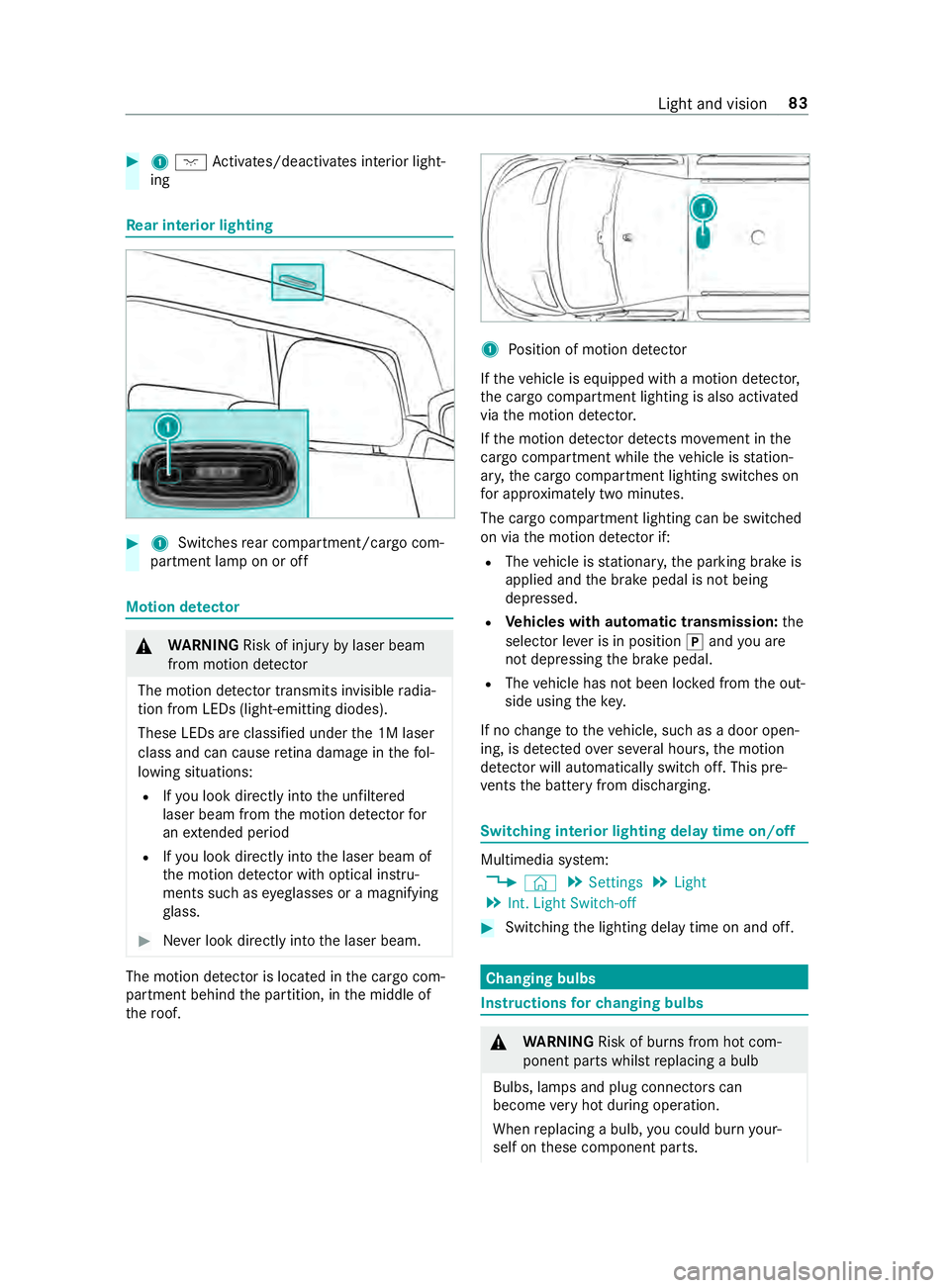
1004A Activates/deacti vates interior light‐
ing Re
ar interior lighting #
1 Switches rear compartment/cargo com‐
partment lamp on or off Motion de
tector &
WARNING Risk of inju ryby laser beam
from motion de tector
The motion de tector transmits invisible radia‐
tion from LEDs (light-emitting diodes).
These LEDs are classified under the 1M laser
class and can cause retina dama geinthefo l‐
lowing situations:
R Ifyo u look directly into the unfiltered
laser beam from the motion de tector for
an extended pe riod
R Ifyo u look direct lyinto the laser beam of
th e motion de tector wi thoptical instru‐
ments such as eyeglasses or a magnifying
gl ass. #
Never look directly into the laser beam. The motion de
tector is loca ted in the cargo com‐
partment behind the partition, in the middle of
th ero of. 1
Position of motion de tector
If th eve hicle is equipped with a motion de tector,
th e cargo compartment lighting is also activated
via the motion de tector.
If th e motion de tector de tects mo vement in the
cargo compa rtment while theve hicle is station‐
ar y, the cargo compartment lighting switches on
fo r appro ximately two minu tes.
The cargo compartment lighting can be switched
on via the motion de tector if:
R The vehicle is stationar y,the parking brake is
applied and the brake pedal is not being
depressed.
R Vehicles with automatic transmission: the
selector le ver is in position 005Dand you are
not depressing the brake pedal.
R The vehicle has not been loc ked from the out‐
side using thekey.
If no change totheve hicle, such as a door open‐
ing, is de tected over se veral hours, the motion
de tector will au tomatically switch off. This pre‐
ve nts the battery from discharging. Switching interior lighting delay time on/off
Multimedia sy
stem:
4 © 5
Settings 5
Light
5 Int. Light Switch-off #
Switching the lighting delay time on and off. Changing bulbs
Instructions
forch anging bulbs &
WARNING Risk of bu rns from hot com‐
ponent parts whilst replacing a bulb
Bulbs, lamps and plug connectors can
become very hot during operation.
When replacing a bulb, you could burn your‐
self on these component parts. Light and vision
83
Page 108 of 354
#
Allow the component parts tocool
down before replacing the bulbs. When
you are replacing the light bulb, obser ve
th efo llowing:
R Do not use any bulb that has been dropped or
has scratches on its glass tube. Otherwise,
th e bulb may explode.
R The bulb may explode if it is hot or if you
to uch, drop or sc ratch it.
R Stains on theglass tube reduce the bulb's
service life. Do not touch theglass tube with
yo ur bare hands. If necessar y,clean theglass
tube with alcohol or spirits in a cold state and
wipe it down with a lint-f ree clo th.
R Protect bulbs from humidity and do not bring
th em into contact with liquids.
Alw ays ensure the bulbs are firm lysecured.
If yo ur vehicle is equipped with LED lamps, you
can check this as follo ws :th e light cone will mo ve
from topto bottom and back again when the
engine starts. Forth is to wo rk,th e low beam
needs tohave been switched on before the
engine is star ted.
Bulbs and lights are a major part of vehicle
saf ety. Therefore, ensure that they are alw ays
wo rking. Ha vethe headlamp setting checkedre g‐
ular ly.
R Before changing the lamps, switch off the
ve hicle's lighting sy stem. This will pr event a
sho rtcircuit.
R Use bulbs only in closed lights that ha vebeen
designed forth em.
R Use only spare bulbs of the same type and
with the cor rect voltage.
If th e new bulb also does not light up, consult a
qu alified specialist workshop. Re
placing front light bulbs (vehicles with hal‐
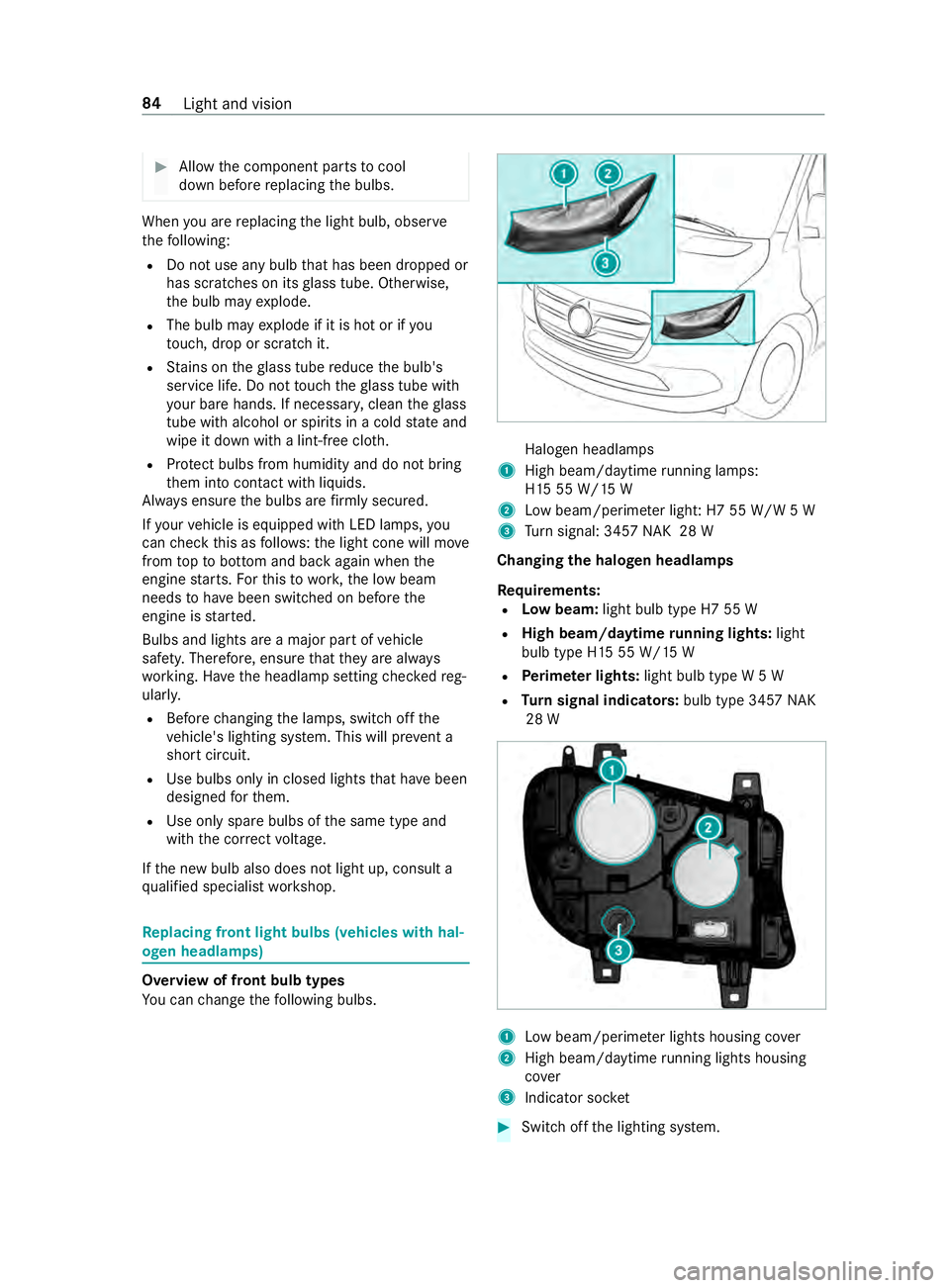
ogen headlamps) Overview of front bulb types
Yo
u can change thefo llowing bulbs. Halogen headlamps
1 High beam/daytime running la mps:
H15 55 W/15 W
2 Low beam/perime ter ligh t:H7 55 W/W 5 W
3 Turn signal: 3457 NAK 28 W
Changing the halogen headlamps
Re quirements:
R Low beam: light bulb type H7 55 W
R High beam/daytime running lights: light
bulb type H15 55 W/15 W
R Perime ter lights: light bulb type W 5 W
R Turn signal indicators: bulb type 3457NAK
28 W 1
Low beam/perime ter lights housing co ver
2 High beam/daytime running lights housing
co ver
3 Indicator soc ket #
Switch off the lighting sy stem. 84
Light and vision
Page 109 of 354
#
Low beam/perime ter lights: pull back
housing co ver1. #
Pull out the soc ketto wa rdsth ere ar. #
Remo vethe bulb from the soc ket. #
Inse rtthe new bulb into the soc ket su chthat
th e base of the bulb rests fully against the
base of the soc ket. #
Align and insert the soc ket. #
Attach housing co ver1. #
High beam/daytime running lights: pull
back housing co ver2. #
Turn the soc ket counter-clo ckwise and pull it
out. #
Remo vethe bulb from the soc ket. #
Inse rtthe new bulb into the soc ket su chthat
th e base of the bulb rests fully against the
base of the soc ket. #
Inse rtthe soc ket and turn it clo ckwise. #
Attach housing co ver2. #
Turn signal indicator: #
Turn soc ket3 counter-clo ckwise and
re mo veit. #
Gently turn the bulb counter-clockwise and
ta ke it out of the soc ket. #
Inse rtthe new bulb into the soc ket and turn it
clo ckwise. #
Insert soc ket3 and turn it clo ckwise.
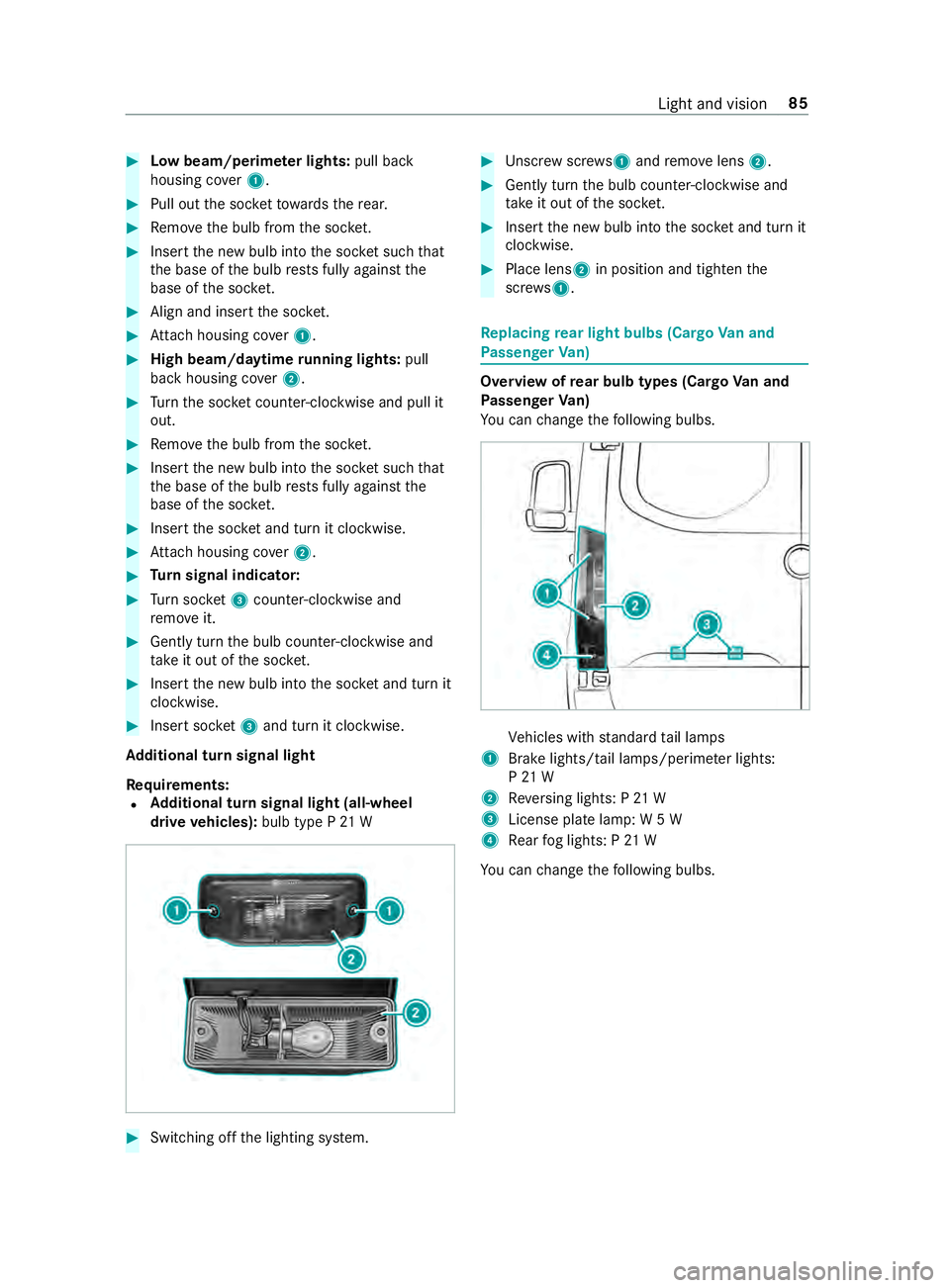
Ad ditional turn signal light
Re quirements:
R Ad
ditional turn signal light (all-wheel
drive vehicles): bulb type P 21 W #
Switching off the lighting sy stem. #
Unscr ewscrews 1and remo velens 2. #
Gently turn the bulb counter-clockwise and
ta ke it out of the soc ket. #
Inse rtthe new bulb into the soc ket and turn it
clo ckwise. #
Place lens 2in position and tigh tenthe
scr ews 1. Re
placing rear light bulbs (Cargo Van and
Pa ssenger Van) Overview of
rear bulb types (Cargo Van and
Pa ssenger Van)
Yo u can change thefo llowing bulbs. Ve
hicles with standard tail lamps
1 Brake lights/tail lamps/pe rime ter lights:
P 21 W
2 Reversing lights: P 21 W
3 License plate lamp: W 5 W
4 Rear fog lights: P 21 W
Yo u can change thefo llowing bulbs. Light and vision
85
Page 125 of 354
Switching auxiliary heating on and off
#
Toswitch on: pressthe003B button. #
Toswitch off: pressthe003B button.
Switching on the specified temperature #
Swit chon the ignition. #
Toswitch on: pressthe003B button. #
Toswitch off: pressthe003B button. #
Set thete mp erature using the0082 button. #
Press the 003B button.
The red or blue indicator lamp on the003B
button goes on or off.
Colors of the indicator lamp:
R Blue: auxiliary ventilation has been switched
on.
R Red:auxilia ryheating has been switched on.
R Yello w: departure time has been pre-selec‐
te d.
Au xilia ryheating or ventilation switches off af ter
a maximum of 50 minutes.
Swit ching heater boos ter mode on and off #
Toswitch on: start the engine. #
Press the 003B button. #
Toswitch off: pressthe003B button.
Heater boos ter mode will be switched on at
an outside temp erature of less than 32 °F
(0 °C) when necessar y.
% Heater boo
ster mode is available only for
ve hicles with hot-water auxiliary heatings.Ad
justing the hot-water auxiliary hea ter with
the on-board co mputer
Re quirements:
R The fuel tank is filled abo vethere ser vefuel
le ve l.
R The ignition is switched on.
On-board computer: 4 Settings 5
Heating
Setting the switch-on time #
Select Settings. #
Select the desired departure time.
Ac tivating the departure time #
Activate the departure time byticking the
box.
% Ensure
that A, B and C ea chcor respond to a
programmed departure time.
% The programmed time
remains set only until
th e next time the engine is star ted.
Selecting prog rammed time #
Set therequ ired programmed time A,B or C.
% The
requ ired prog rammed time A,B or C will
appear only if the box toactivate the depar‐
ture time is tic ked. #
Select there qu ired prog rammed time by
swiping left or right, e.g. A,B or C.
Problems with hot water auxiliary heating Problem
Possible causes/consequences and 0050 0050Solutions
FA IL00A3 Signal transmission between transmitter and
vehicle is malfunctioning. #
Change your position in relation totheve hicle, moving closer if nec‐
essar y.
FA IL Thestar ter battery is not suf ficiently charge d. #
Charge thest ar ter batter y.
The fuel tank is not filled up tothere ser veleve l. #
Refuel at the nearest gasst ation.
FA IL0099 Au
xilia ryheating is malfunctioning. #
Have the auxiliary heating checked at a qualified specialist work‐
shop. Climate
control 101
Page 131 of 354
*
NO
TEWearing out the brake linings by
continuously dep ressing the brake pedal #
Do not depress the brake pedal continu‐
ously whilst driving. #
Touse the braking ef fect of the engine,
shift toa lo werge ar in good time. *
NO
TEDama getothe driv etra in and
engine when pulling away #
Do not warm upthe engine while the
ve hicle is stationar y.Pull away immedi‐
atel y. #
Avoid high engine speeds and driving at
full thro ttle until the engine has reached
its operating temp erature. *
NO
TEDama getothe catalytic con verter
due tonon-combu sted fuel The engine is not
running smo othly and is
misfiring.
Non-combus ted fuel may getinto the cata‐
lytic con verter. #
Only depress the accelera tor pedal
slightly. #
Have the cause rectified immedia tely at
a qualified speciali st workshop. Exhaust emission monitoring
Specific engine sy
stems are designed tokeep
poisonous components of exhaust emissions
within legal limits.
These sy stems only workoptimally if they are
main tained exactly according tomanufacturer's
specifications. It is forth is reason that all work
on the engine should only be per form ed byquali‐
fi ed and authorized Mercedes-Benz Center tech‐
nicians.
Under no circum stances should engine settings
be changed. In addition, all specific main tenance
wo rkmust be per form ed at regular inter vals and
in compliance with the service regulations of the
dealer named in the imprint. Referto the mainte‐
nance booklet for de tails.
Information about short-distance trips
If th eve hicle is predominantly used for short-dis‐
ta nce driving, fuel may accumulate in the engine
oil and cause engine damage.
If yo u main lydrive short dis tances, you should
drive on a free way or go for a country drive for 20 minutes
every300 km (480 miles). This facili‐
ta testh ere ge neration of the diesel particulate fil‐
te r.
Note s onthe speed limitation &
WARNING Risk of inju rythro ugh exceed‐
ing the specified tire load rating or the
permissible speed rating
Exceeding the specified tire load rating or the
permissible speed rating may lead totire
dama geand tothe tires bur sting. #
Therefore, only use tire types and sizes
appr ovedfo ryo ur vehicle model. #
Obser vethe tire load rating and speed
ra ting requ ired foryo ur vehicle. As
the driver, you must find out about the maxi‐
mum permissible speed forth e tires (tire and tire
pressure). In particular, obser vethe legal requ ire‐
ments for tires forth e count ryyou are in.
Yo u can permanently limit the speed of your vehi‐
cle.
Mercedes-Benz recommends a qualified special‐
ist workshop for programming the speed limita‐
tion.
Before overtaking, take into consideration that
th e engine speed limiter pr events the speed
increasing be yond the programmed speed limita‐
tion.
On downhill gradients, the speed limitation may
be exc eeded. Apply the brakes if necessar y.
Displ aymessages indica tethat you are approach‐
ing the limit speed.
Information about fore ign trips
Service
An extensive Mercedes-Benz service is also avail‐
able abroad. Ne vertheless, please remember that
services or spare parts may not be available
immediatel y.The releva nt wo rkshop directories
are available from an authorized Mercedes-Benz
Center.
Fu el
In some countries, only fuels with an inc reased
sulfur con tent are available.
Uns uitable fuel can cause engine damage. In for‐
mation about fuel can be found in the "Fuel" sec‐
tion (/ page 264). Driving and parking
107
Page 141 of 354
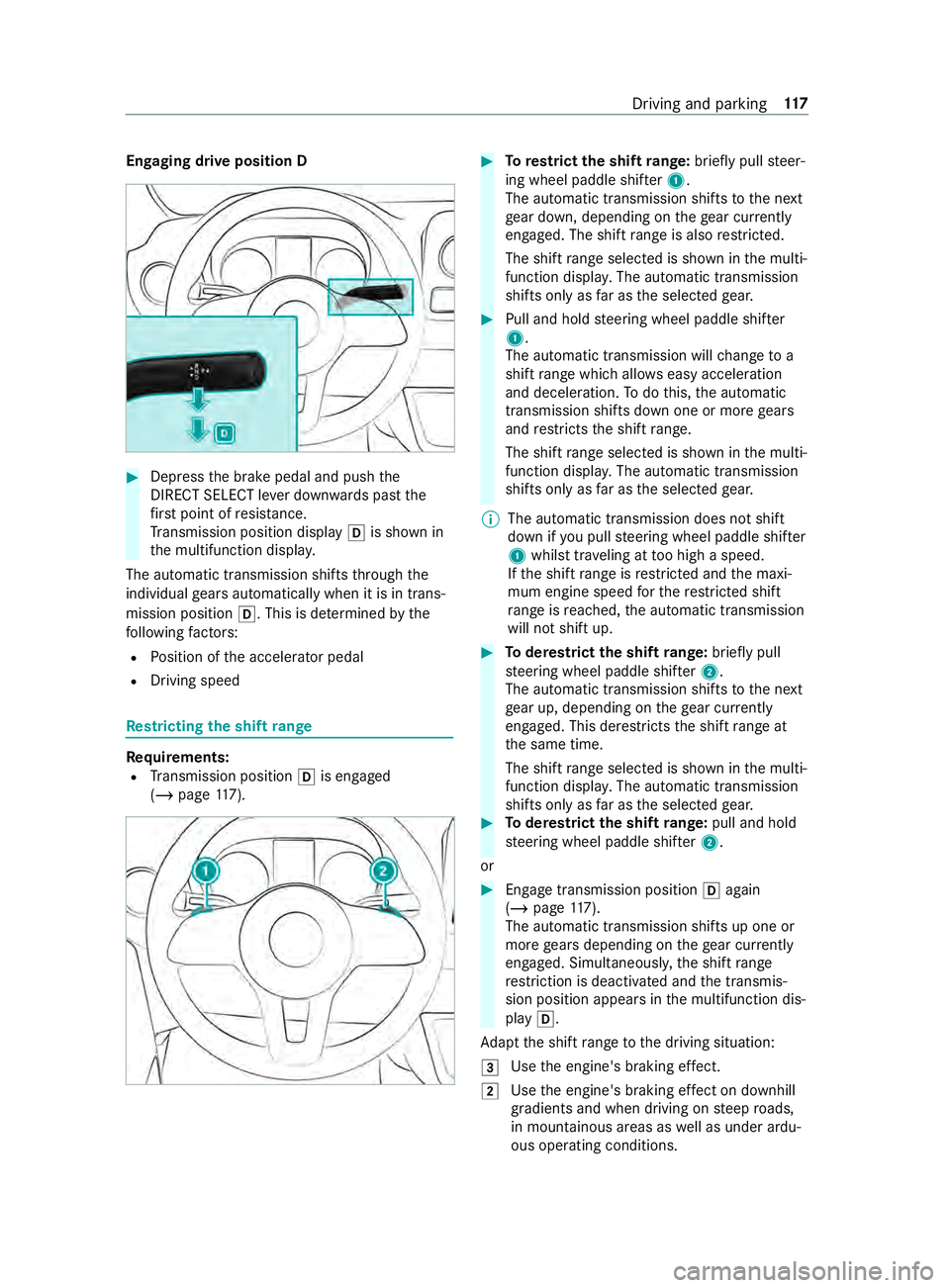
Engaging drive position D
#
Dep ress the brake pedal and push the
DIRECT SELECT le ver down wards past the
fi rs t point of resis tance.
Tr ansmission position display 005Bis shown in
th e multifunction displa y.
The automatic transmission shifts thro ugh the
individual gears automatically when it is in trans‐
mission position 005B. This is determ ined bythe
fo llowing factors:
R Position of the accelerator pedal
R Driving speed Re
stricting the shift range Re
quirements:
R Transmission position 005Bis engaged
(/ page 117). #
Torestrict the shift range: briefly pull steer‐
ing wheel paddle shif ter1.
The automatic transmission shifts tothe next
ge ar down, depending on thege ar cur rently
engaged. The shi ftrange is also restricted.
The shi ftrange selected is shown in the multi‐
function displa y.The automatic transmission
shifts only as far as the selected gear. #
Pull and hold steering wheel paddle shif ter
1 .
The automatic transmission will change to a
shift range which allo wseasy acceleration
and deceleration. Todo this, the automatic
transmission shifts down one or more gears
and restricts the shift range.
The shi ftrange selected is shown in the multi‐
function displa y.The automatic transmission
shifts only as far as the selected gear.
% The automatic transmission does not shift
down if
you pull steering wheel paddle shif ter
1 whilst tr aveling at too high a speed.
If th e shift range is restricted and the maxi‐
mum engine speed forth ere stricted shi ft
ra nge is reached, the automatic transmission
will not shift up. #
Toderestrict the shi ftrange: briefly pull
st eering wheel paddle shif ter2.
The automatic transmission shifts tothe next
ge ar up, depending on thege ar cur rently
engaged. This de restricts the shift range at
th e same time.
The shift range selected is shown in the multi‐
function displa y.The automatic transmission
shifts only as far as the selected gear. #
Toderestrict the shi ftrange: pull and hold
st eering wheel paddle shif ter2.
or #
Engage transmission position 005Bagain
(/ page 117).
The automatic transmission shi fts up one or
more gears depending on thege ar cur rently
engaged. Simultaneously, the shift range
re striction is deactivated and the transmis‐
sion position appears in the multifunction dis‐
play 005B.
Ad apt the shift range tothe driving situation:
0049 Use
the engine's braking ef fect.
0048 Use
the engine's braking ef fect on downhill
gradients and when driving on steep roads,
in mountainous areas as well as under ardu‐
ous operating conditions. Driving and parking
117