suspension MITSUBISHI 3000GT 1991 Owner's Guide
[x] Cancel search | Manufacturer: MITSUBISHI, Model Year: 1991, Model line: 3000GT, Model: MITSUBISHI 3000GT 1991Pages: 1146, PDF Size: 76.68 MB
Page 675 of 1146
![MITSUBISHI 3000GT 1991 Owners Guide Service AdjustmentELECTRONIC CONTROL SUSPENSION (ECS) - Procedures33B-13Fail Safe and Diagnosis List
Output Code
Diagnosis Item
Fail SafeCode No.Indication Pattern
0[Good]
[Good]
l-l
11G sensor defect](/img/19/57085/w960_57085-674.png "MITSUBISHI 3000GT 1991 Owners Guide Service AdjustmentELECTRONIC CONTROL SUSPENSION (ECS) - Procedures33B-13Fail Safe and Diagnosis List
Output Code
Diagnosis Item
Fail SafeCode No.Indication Pattern
0[Good]
[Good]
l-l
11G sensor defect")
Service AdjustmentELECTRONIC CONTROL SUSPENSION (ECS) - Procedures33B-13Fail Safe and Diagnosis List
Output Code
Diagnosis Item
Fail SafeCode No.Indication Pattern
0[Good]
[Good]
l-l
11G sensor defective*l Ride controls (pinching and bouncingcontrol, bad road detection control) sl:op.
21Steering angularvelocity sensor open-circuited*
l Anti-roll control stops.
24Vehicle speed sensor*nn open-crrcurtedl Steering stability controls (anti-roll, high
speed sensitive controls) and attitude
controls (anti-dive, anti-squat) stop.l Shock absorber damping force fixed
F. L. damping forcefl-~-~-j 11c$i;z;;Fr actuator
R. R. damping force
I /
64 j-jMJ-~-~-~ ~t$ec~Z$rn&ftYrrZ& /
NOTE(1)Control stop, warning indication and fixed damping force return to normal when the ignition switch is set to OFF.
When any of the problems marked* occurs, if no subsequent problem occurs (for example, when the problem IStransient) normal operation will be restored even if the ignition switch is not set to OFF.(2)Even if control stop warning indication and fixed damping force return to normal as described above, the
self-diagnosis code’is stored in the memory in the ECS control unrt.
(3)The self-diagnosis code can be force-cleared by use of the MUT or by stopping the power supply to the ECS controlunit. In addition
it is automatically cleared if the ON/OFF control of the ignition swatch is repeated 60 times after the
self-diagnosis code has been output, provided that no new self-diagnosis code is output during the period.TSB Revision
Page 676 of 1146
339-l 4ELECTRONIC CONTROL SUSPENSION (ECS) - ~;:i%?tment
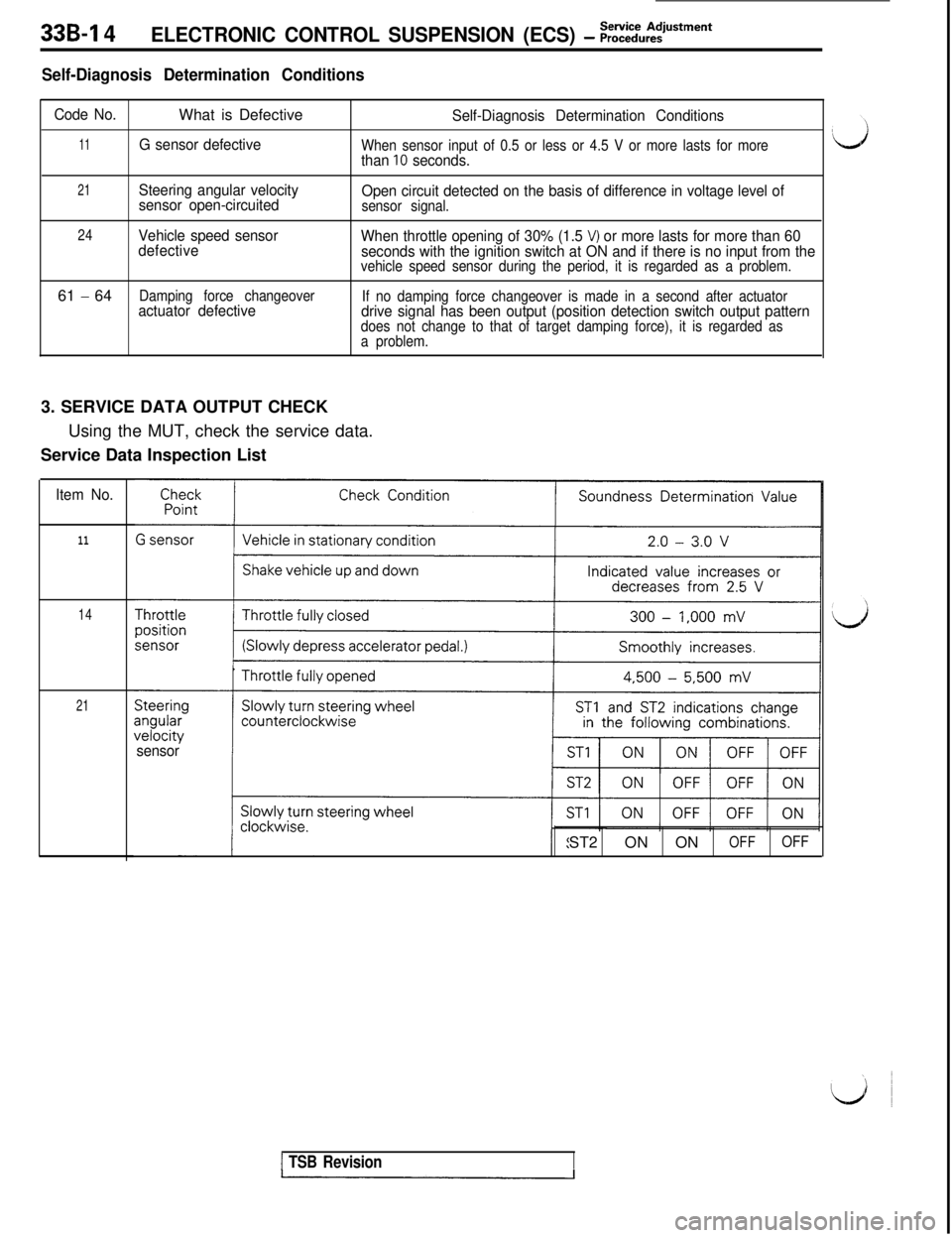
Self-Diagnosis Determination Conditions
Code No.What is DefectiveSelf-Diagnosis Determination Conditions
11G sensor defectiveWhen sensor input of 0.5 or less or 4.5 V or more lasts for morethan 10 seconds.
21Steering angular velocity
sensor open-circuitedOpen circuit detected on the basis of difference in voltage level of
sensor signal.
24Vehicle speed sensor
defectiveWhen throttle opening of 30% (1.5 V) or more lasts for more than 60
seconds with the ignition switch at ON and if there is no input from the
vehicle speed sensor during the period, it is regarded as a problem.61
- 64Damping force changeoveractuator defectiveIf no damping force changeover is made in a second after actuatordrive signal has been output (position detection switch output patterndoes not change to that of target damping force), it is regarded as
a problem.3. SERVICE DATA OUTPUT CHECK
Using the MUT, check the service data.
Service Data Inspection List
Item No.
11
14
21
sensorST2 ON ON
OFFOFF
1 TSB Revision
Page 677 of 1146
I,
ELECTRONIC CONTROL SUSPENSION (ECS) - ;;~i%:~ustment339-15
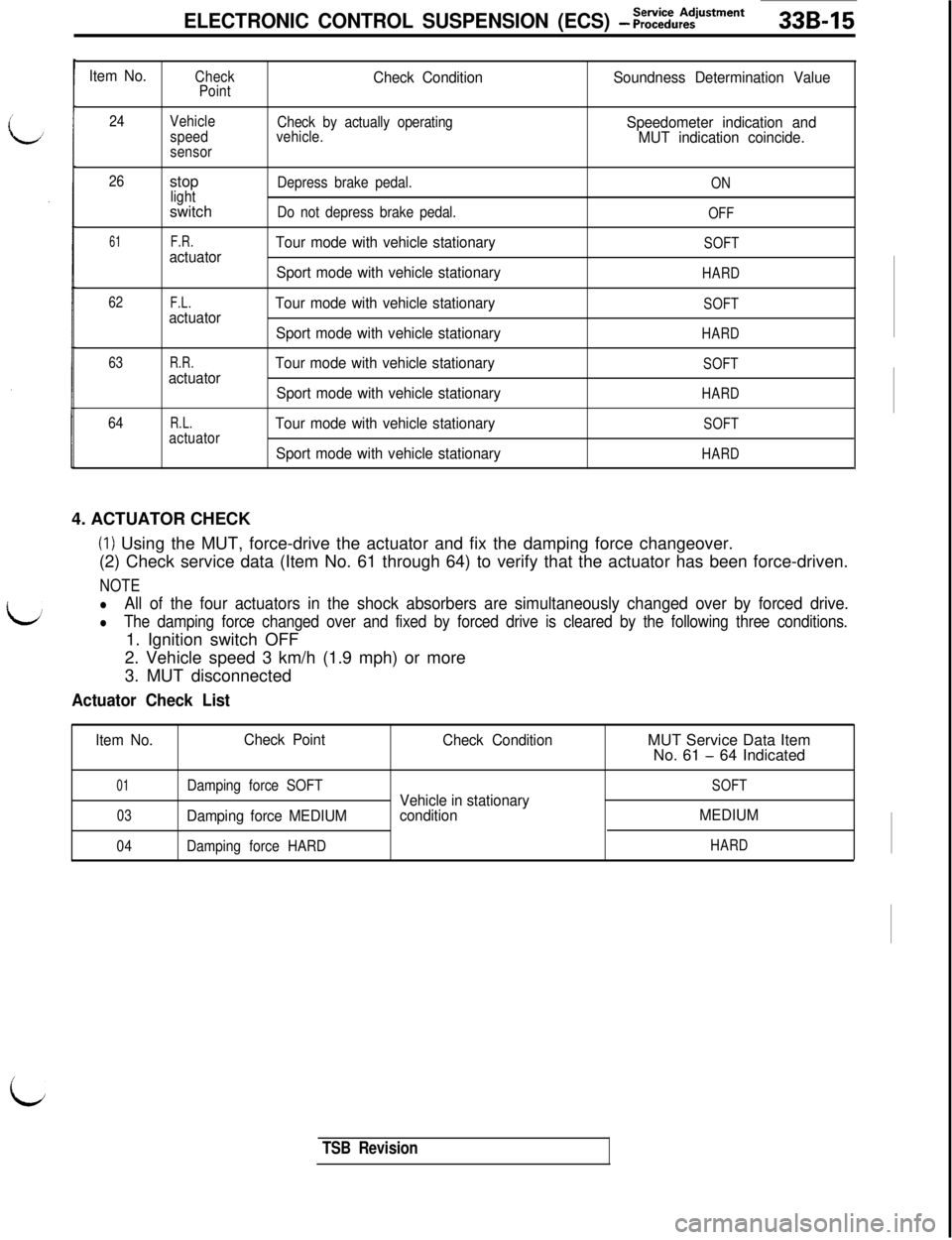
Item No.Check
PointCheck ConditionSoundness Determination Value
24
Check by actually operating
vehicle.Speedometer indication and
MUT indication coincide.
26
61
62
63
64Vehicle
speed
sensorstop
lightswitch
F.R.actuator
F.L.actuator
R.R.actuator
R.L.actuatorDepress brake pedal.
ON
Do not depress brake pedal.OFF
Tour mode with vehicle stationarySOFT
Sport mode with vehicle stationaryHARD
Tour mode with vehicle stationarySOFT
Sport mode with vehicle stationaryHARD
Tour mode with vehicle stationarySOFT
Sport mode with vehicle stationaryHARD
Tour mode with vehicle stationarySOFT
Sport mode with vehicle stationaryHARD4. ACTUATOR CHECK
(I) Using the MUT, force-drive the actuator and fix the damping force changeover.
(2) Check service data (Item No. 61 through 64) to verify that the actuator has been force-driven.
NOTE
lAll of the four actuators in the shock absorbers are simultaneously changed over by forced drive.
lThe damping force changed over and fixed by forced drive is cleared by the following three conditions.1. Ignition switch OFF
2. Vehicle speed 3 km/h (1.9 mph) or more
3. MUT disconnected
Actuator Check List
Item No.Check Point
Check ConditionMUT Service Data Item
No. 61 - 64 Indicated
01Damping force SOFT
03Damping force MEDIUM
04Damping force HARD
Vehicle in stationary
conditionSOFT
MEDIUM
HARD
i
TSB Revision
Page 678 of 1146
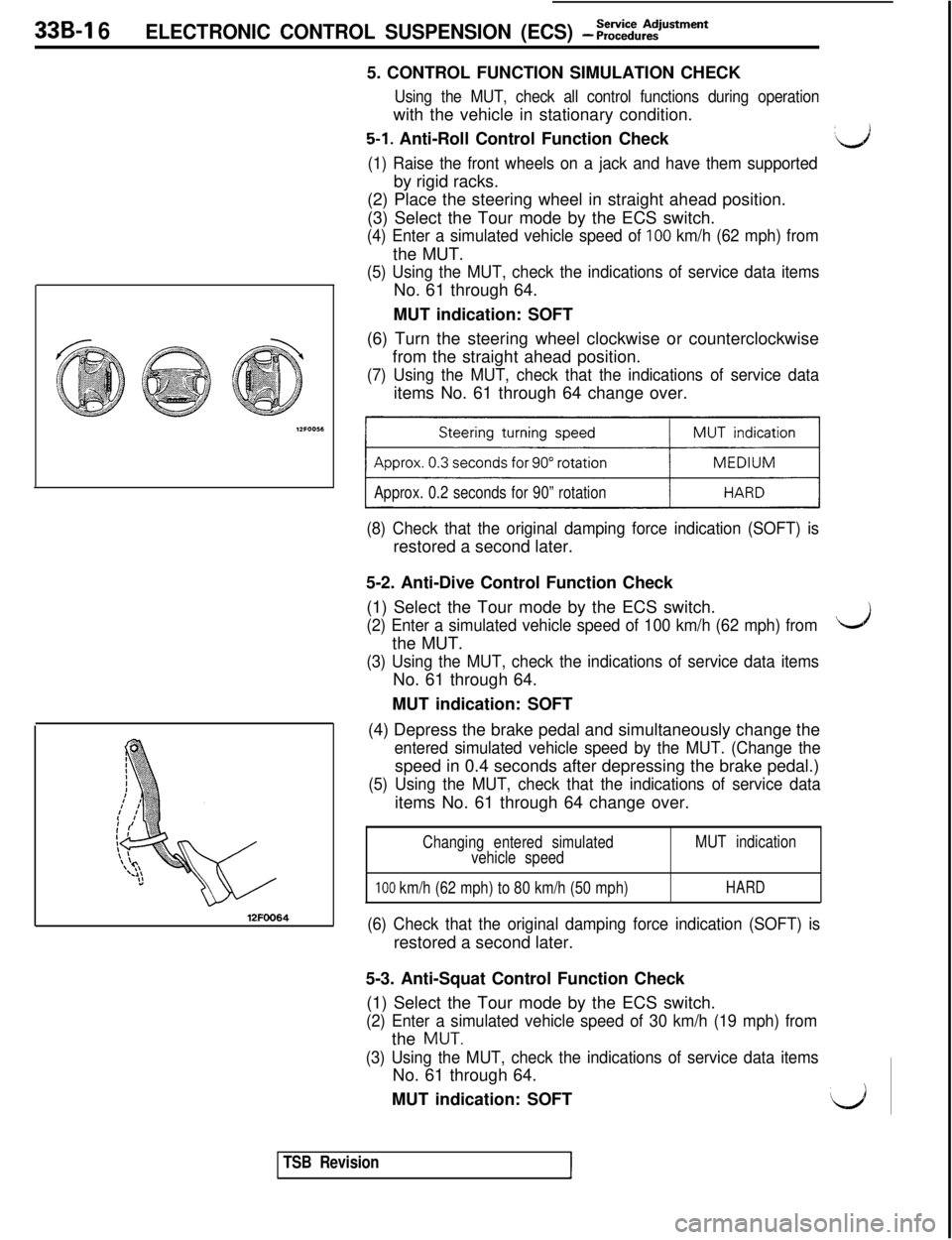
339-l 6ELECTRONIC CONTROL SUSPENSION (ECS) - ;;:%,:?‘Stment5. CONTROL FUNCTION SIMULATION CHECK
Using the MUT, check all control functions during operationwith the vehicle in stationary condition.
5-1. Anti-Roll Control Function Check:d
(1) Raise the front wheels on a jack and have them supportedby rigid racks.
(2) Place the steering wheel in straight ahead position.
(3) Select the Tour mode by the ECS switch.
(4) Enter a simulated vehicle speed of 100 km/h (62 mph) fromthe MUT.
(5) Using the MUT, check the indications of service data itemsNo. 61 through 64.
MUT indication: SOFT
12FOO64(6) Turn the steering wheel clockwise or counterclockwise
from the straight ahead position.
(7) Using the MUT, check that the indications of service dataitems No. 61 through 64 change over.
Approx. 0.2 seconds for 90” rotation
(8) Check that the original damping force indication (SOFT) isrestored a second later.
5-2. Anti-Dive Control Function Check
(1) Select the Tour mode by the ECS switch.
(2) Enter a simulated vehicle speed of 100 km/h (62 mph) fromthe MUT.
(3) Using the MUT, check the indications of service data itemsNo. 61 through 64.
MUT indication: SOFT
(4) Depress the brake pedal and simultaneously change the
entered simulated vehicle speed by the MUT. (Change thespeed in 0.4 seconds after depressing the brake pedal.)
(5) Using the MUT, check that the indications of service dataitems No. 61 through 64 change over.
Changing entered simulated
vehicle speedMUT indication
100 km/h (62 mph) to 80 km/h (50 mph)HARD
(6) Check that the original damping force indication (SOFT) isrestored a second later.
Ls5-3. Anti-Squat Control Function Check
(1) Select the Tour mode by the ECS switch.
(2) Enter a simulated vehicle speed of 30 km/h (19 mph) fromthe
MUT.
(3) Using the MUT, check the indications of service data itemsNo. 61 through 64.
MUT indication: SOFT
l/i
TSB Revision
Page 679 of 1146
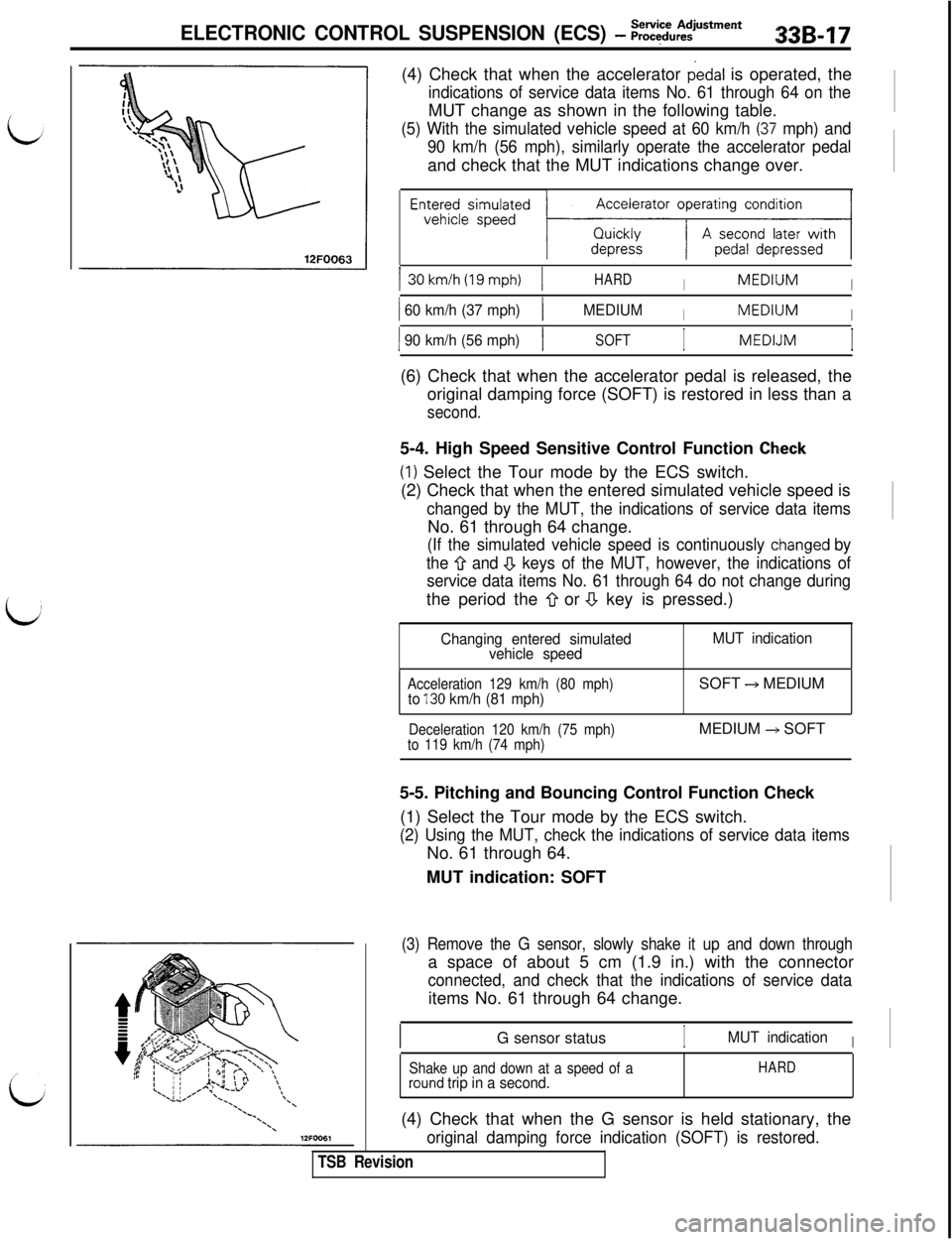
ELECTRONIC CONTROL SUSPENSION (ECS) - :;:~u:~men*33B17(4) Check that when the accelerator
dedal is operated, the
indications of service data items No. 61 through 64 on theMUT change as shown in the following table.
(5) With the simulated vehicle speed at 60 km/h (37’ mph) and
90 km/h (56 mph), similarly operate the accelerator pedaland check that the MUT indications change over.
Accelerator operating condition
EnE~~esismp~~ed ~;zz-KzxJ130km/h(19mph)
1HARDIMEDllJMI
1 60 km/h (37 mph)1MEDIUMIMEDllJMI
1 90 km/h (56 mph)1SOFTIMEDLJMI(6) Check that when the accelerator pedal is released, the
original damping force (SOFT) is restored in less than a
second.5-4. High Speed Sensitive Control Function
Chleck(I) Select the Tour mode by the ECS switch.
(2) Check that when the entered simulated vehicle speed is
changed by the MUT, the indications of service data itemsNo. 61 through 64 change.
(If the simulated vehicle speed is continuously cihanged by
the
Q and .!J keys of the MUT, however, the indications of
service data items No. 61 through 64 do not change duringthe period the
0 or a key is pressed.)
Changing entered simulated
vehicle speedMUT indication
Acceleration 129 km/h (80 mph)to 130 km/h (81 mph)SOFT + MEDIUM
Deceleration 120 km/h (75 mph)
to 119 km/h (74 mph)MEDIUM +, SOFT
5-5. Pitching and Bouncing Control Function Check
(1) Select the Tour mode by the ECS switch.
(2) Using the MUT, check the indications of service data itemsNo. 61 through 64.
MUT indication: SOFT
(3) Remove the G sensor, slowly shake it up and down througha space of about 5 cm (1.9 in.) with the connector
connected, and check that the indications of service dataitems No. 61 through 64 change.
G sensor status
IMUT indicationI
Shake up and down at a speed of arou.nd trip in a second.HARD(4) Check that when the G sensor is held stationary, the
original damping force indication (SOFT) is restored.
TSB Revision
Page 680 of 1146
33B-18ELECTRONIC CONTROL SUSPENSION (EC9 - ~::::u:?‘s*men*
\/I
I(Front)(Rear)I
12FOOG
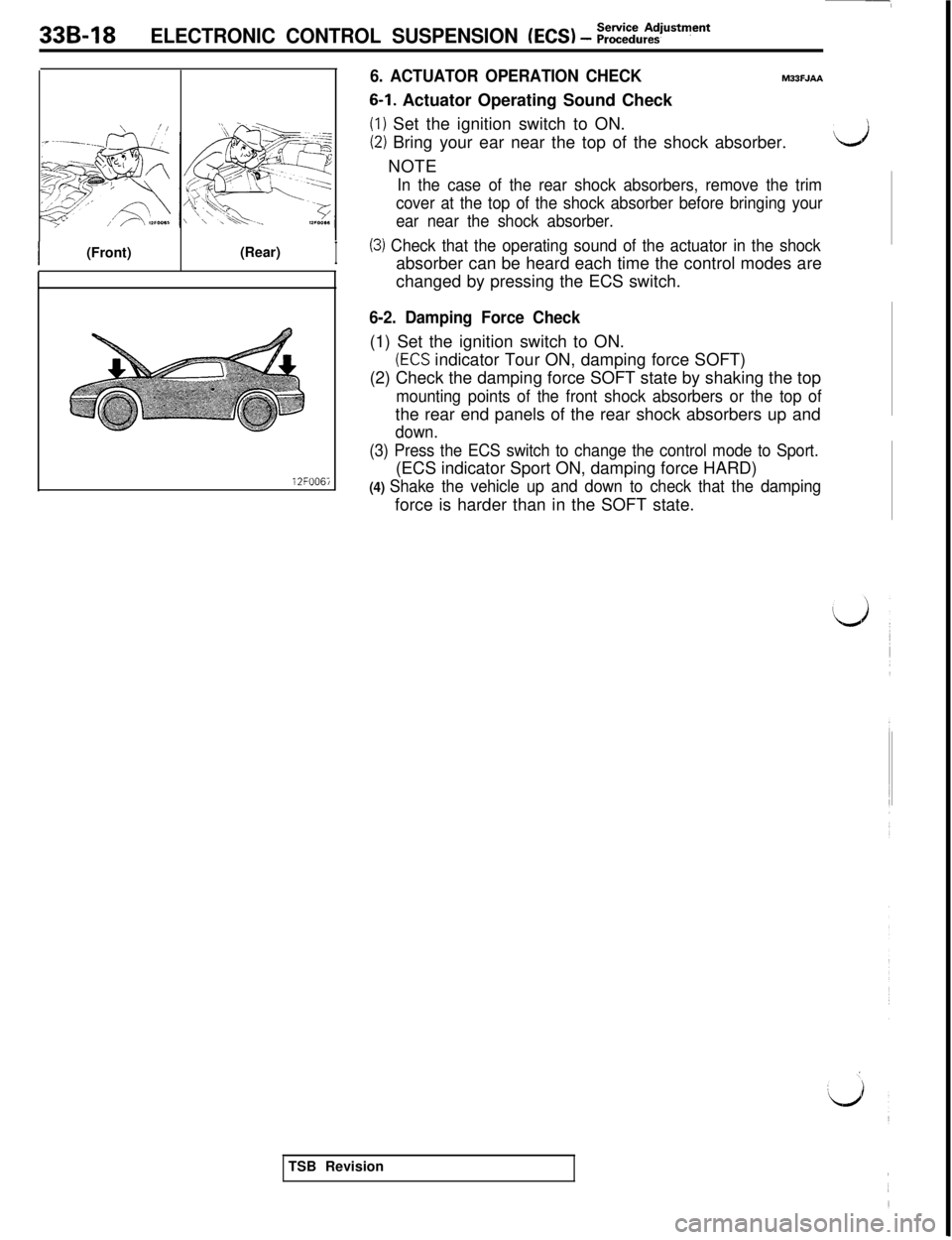
6. ACTUATOR OPERATION CHECKM33FJAA
6-1. Actuator Operating Sound Check
(I) Set the ignition switch to ON.
(2) Bring your ear near the top of the shock absorber.dNOTE
In the case of the rear shock absorbers, remove the trim
cover at the top of the shock absorber before bringing your
ear near the shock absorber.
(3) Check that the operating sound of the actuator in the shockabsorber can be heard each time the control modes are
changed by pressing the ECS switch.
6-2. Damping Force Check(1) Set the ignition switch to ON.
(ECS indicator Tour ON, damping force SOFT)
(2) Check the damping force SOFT state by shaking the top
mounting points of the front shock absorbers or the top ofthe rear end panels of the rear shock absorbers up and
down.
(3) Press the ECS switch to change the control mode to Sport.(ECS indicator Sport ON, damping force HARD)
(4) Shake the vehicle up and down to check that the dampingforce is harder than in the SOFT state.
TSB Revision
Page 681 of 1146
ELECTRONIC CONTROL SUSPENSION (ECS)ECS Switch I Steering Angular Velocity- Sensor I G Sensor I Vehicle Speed Sensor3:3B-19
12FOO6t3INSPECTION12FOO71
i
\\12FOO72
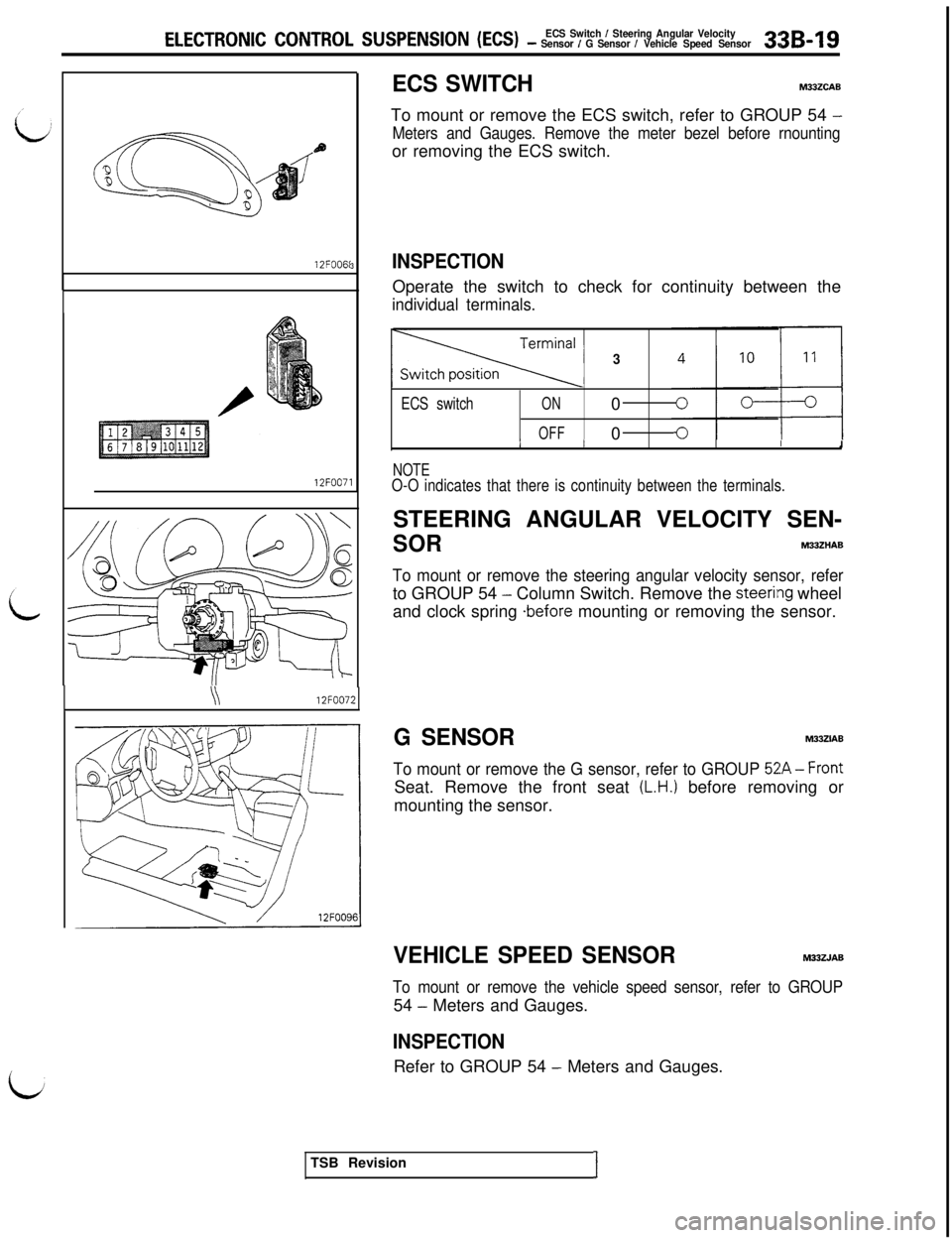
ECS SWITCHMUZCAB
To mount or remove the ECS switch, refer to GROUP 54
-
Meters and Gauges. Remove the meter bezel before rnountingor removing the ECS switch.
Operate the switch to check for continuity between the
individual terminals.
3
ECS switchON0
OFF0IIIIII1
NOTEO-O indicates that there is continuity between the terminals.STEERING ANGULAR VELOCITY SEN-
SORM33ZHAB
To mount or remove the steering angular velocity sensor, referto GROUP 54
- Column Switch. Remove the steerilng wheel
and clock spring
*before mounting or removing the sensor.
G SENSORM33ZIAB
To mount or remove the G sensor, refer to GROUP 52A-Front
Seat. Remove the front seat
(L.H.) before removing or
mounting the sensor.
VEHICLE SPEED SENSORM33ZJAB
To mount or remove the vehicle speed sensor, refer to GROUP54
- Meters and Gauges.
INSPECTIONRefer to GROUP 54
- Meters and Gauges.
TSB Revision
I
Page 682 of 1146
33B-20 ELECTRONIC CONTROL SUSPENSION (ECS)-llwmtk Positkm .semor I stop tight switch I POriticm DetsctionSWitEh 1 DPmping Force changeover Acluatc., / EC3 Indii.ar l.igil*
THROTTLE POSITION SENSORM33ZKA6
INSPECTION AND ADJUSTMENTIRefer to GROUP 13
- Fuel System.‘lJ ’
STOP LIGHT SWITCHM33ZCAC
To remove or mount the stop light switch, refer to GROUP 35 -
Brake Pedal.
INSPECTIONRefer to GROUP 35
- Brake Pedal.
POSITION DETECTION SWITCH and
DAMPING FORCE CHANGEOVER
ACTUATORM33ZCAD
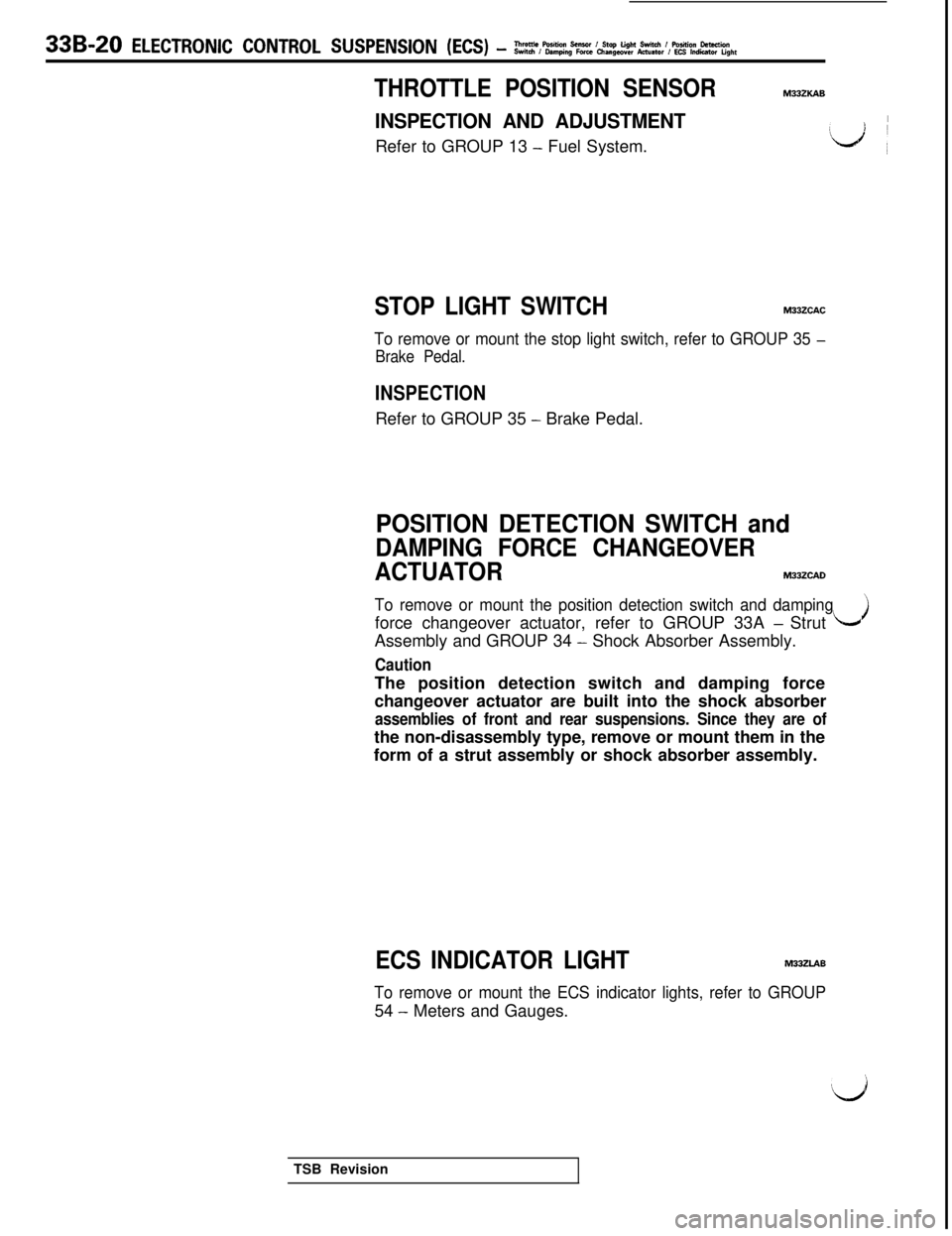
To remove or mount the position detection switch and dampingforce changeover actuator, refer to GROUP 33A
- Strut LJAssembly and GROUP 34
- Shock Absorber Assembly.
CautionThe position detection switch and damping force
changeover actuator are built into the shock absorber
assemblies of front and rear suspensions. Since they are ofthe non-disassembly type, remove or mount them in the
form of a strut assembly or shock absorber assembly.
ECS INDICATOR LIGHTM33ZLAB
To remove or mount the ECS indicator lights, refer to GROUP54
- Meters and Gauges.
TSB Revision
Page 683 of 1146

ELECTRONIC CONTROL SUSPENSION (ECS) - ECS Control Unit 33B-21
ECS CONTROL UNITM33ZXAD
REMOVAL AND INSTALLATIONRemoval steps
\12FOO98I.
Cargo floor box (R.H.)2. Lid
3. ECS control unitTSB Revision
Page 684 of 1146
33B-22 ELECTRONIC CONTROL SUSPENSION (ECS) - Circuit Diagram
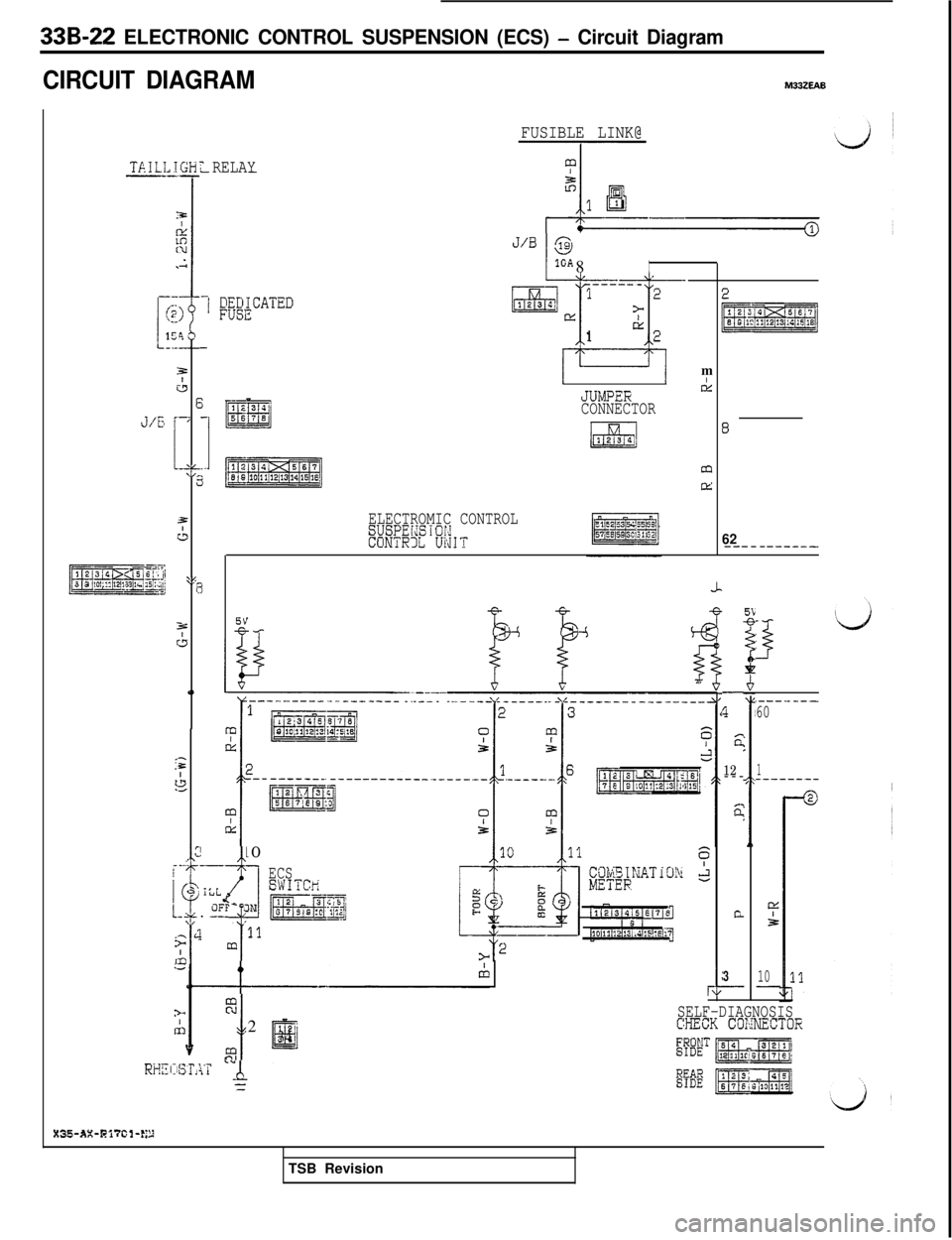
CIRCUIT DIAGRAMM33ZEAB
TAILL-_
-
!
!-1
J/G
pyspq3 2 10’1? 12!~3 Ir. Eli
,lGH-.-
3&
Eiv,I
1 \L-2
E
s=
43
21_r
%c;
0
,-:=
J.4
T RELAY--
-1 F;;;CATED
-
1234
-m5578
__p7zERmj
FUSIBLE LINK@J/B
@
I 81GAI
ELECTROMIC CONTROLSUSPEldSiOi,dCONTRllL Ui'dIT
----- -m12123E>[1:
II
1u2m
II
JUIvPERBCONNECTOR
LEd1254
m
M
,p 10___. _
lt f“u 1
0, iLL
1-L. ET- JN
i;4 m'llm
i I
ECSSWITCr;
pg&-jqq-.
E
t2
12’
II334
%
-
rk
8
62-------____
-
q
ET
12---c.
n
G
3-
I
.---._-__60
1------.--
Q2A
10-
SELF-DIAGNOSISCXECK COKNECTOR
X35-AX-Bi?Gl-E,TSB Revision