time MITSUBISHI COLT 2009 10.G User Guide
[x] Cancel search | Manufacturer: MITSUBISHI, Model Year: 2009, Model line: COLT, Model: MITSUBISHI COLT 2009 10.GPages: 273, PDF Size: 17.28 MB
Page 82 of 273
Downloaded from www.Manualslib.com manuals search engine lWhen the ignition switch is switch-
ed from “ACC” or “LOCK” to
“ON”, the mode setting is automat-
ically switched from manual to au-
to.
Switching to auto occurs automati-
cally. If switching to manual
mode is done, however, the data
from the last reset is displayed.
Auto reset mode l When the average fuel consump-
tion is being displayed, if you hold
down the MODE/SET switch, the
average fuel consumption and aver-
age speed displayed at that time
are reset.
l If the ignition switch is at “ACC”
or “LOCK” for about 4 hours or
longer, the average fuel consump-
tion display is automatically reset.
NOTE l “
---” is displayed when the aver-
age fuel consumption cannot be
measured.
l The initial (default) setting is “Au-
to reset mode”.
l The average fuel consumption de-
pends on the driving condition
(road condition, driving behavior,
etc.). The displayed fuel consump-
tion may vary from the actual fuel
consumption. Treat the fuel con-
sumption displayed as just a rough
guideline.l The memory of the auto reset
mode or manual reset mode for
the average fuel consumption dis-
play is erased if the battery is dis-
connected.
l The display setting can be
changed to the preferred units
(L/100 km, km/L).
Refer to “Changing the function
settings (when the ignition switch
is “ON”)” on page 3-12.
l For vehicles equipped with multi-
information displays that show fig-
ures in miles, the fuel consump-
tion can only be displayed in
miles per gallon (“mpg”).Average speed display* E00521600744
This displays the average speed (km/h or
mph ) from the last reset to the present
time.
There are the following 2 mode settings.
For the method for changing the average
speed display setting, refer to “Changing
the function settings (when the ignition
switch is “ON”)” on page 3-12.
Manual reset mode
l When the average speed is being
displayed, if you hold down the
MODE/SET switch, the average
speed and average fuel consump-
tion displayed at that time are reset.l When the ignition switch is switch-
ed from “ACC” or “LOCK” to
“ON”, the mode setting is automat-
ically switched from manual to au-
to.
Switching to auto occurs automati-
cally. If switching to manual
mode is done, however, the data
from the last reset is displayed.
Auto reset mode l When the average speed is being
displayed, if you hold down the
MODE/SET switch, the average
speed and average fuel consump-
tion displayed at that time are reset.
l If the ignition switch is at “ACC”
or “LOCK” for about 4 hours or
longer, the average speed display
is automatically reset.
NOTE l “
---” is displayed when the aver-
age speed cannot be measured.
l The initial (default) setting is “Au-
to reset mode”.
l The memory of the auto reset
mode or manual reset mode for
the average speed display is
erased if the battery is disconnec-
ted.Allshift lever position display* E00528100012
Shows the position of the allshift lever.
Refer to “Allshift lever position and mul-
ti-information display” on page 4-20.
Instruments and controls
3-09
3
Page 84 of 273
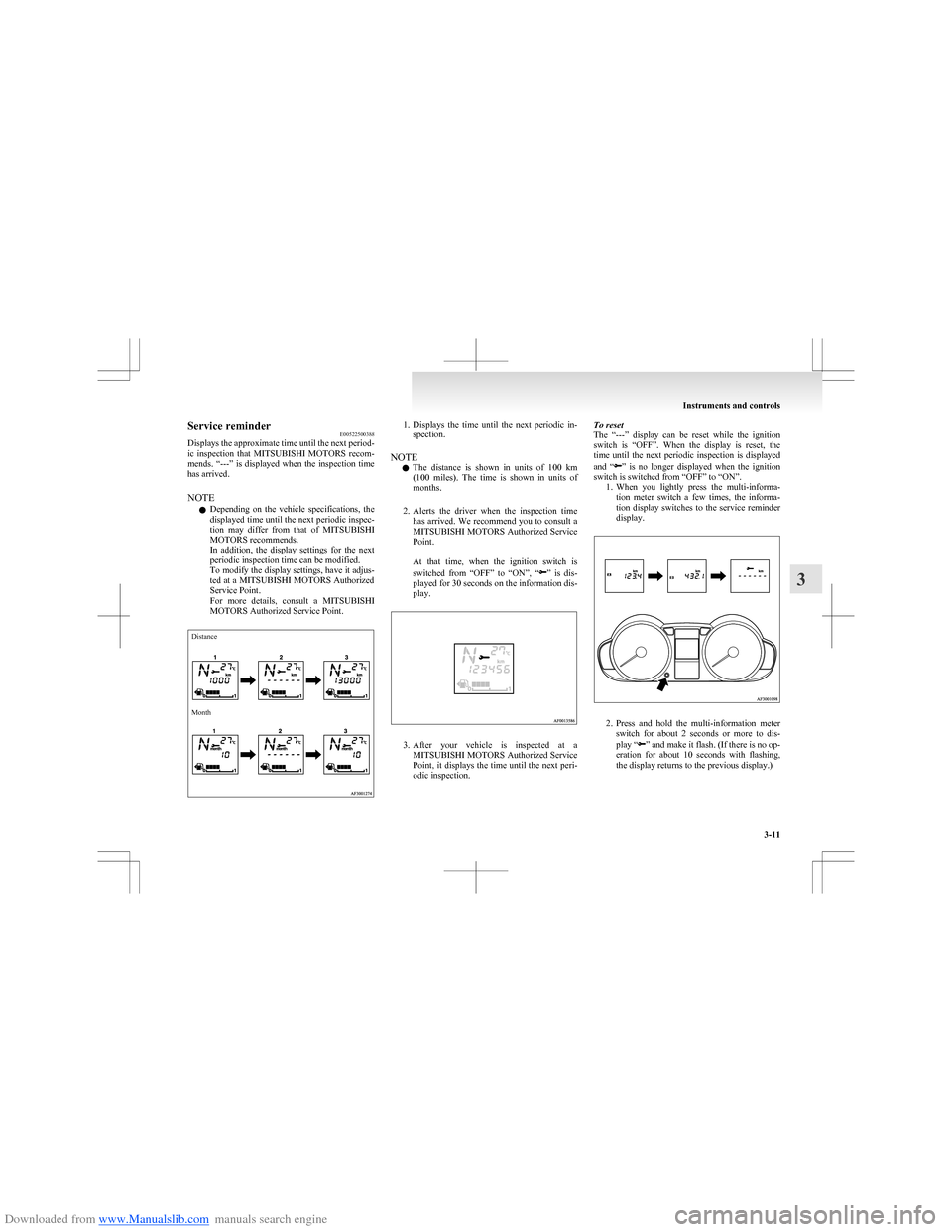
Downloaded from www.Manualslib.com manuals search engine Service reminderE00522500388
Displays the approximate time until the next period-
ic inspection that MITSUBISHI MOTORS recom-
mends. “---” is displayed when the inspection time
has arrived.
NOTE l Depending on the vehicle specifications, the
displayed time until the next periodic inspec-
tion may differ from that of MITSUBISHI
MOTORS recommends.
In addition, the display settings for the next
periodic inspection time can be modified.
To modify the display settings, have it adjus-
ted at a MITSUBISHI MOTORS Authorized
Service Point.
For more details, consult a MITSUBISHI
MOTORS Authorized Service Point.DistanceMonth1. Displays the time until the next periodic in-
spection.
NOTE l The distance is shown in units of 100 km
( 100 miles). The time is shown in units of
months.
2. Alerts the driver when the inspection time
has arrived. We recommend you to consult a
MITSUBISHI MOTORS Authorized Service
Point.
At that time, when the ignition switch is
switched from “OFF” to “ON”, “
” is dis-
played for 30 seconds on the information dis-
play.
3. After your vehicle is inspected at a
MITSUBISHI MOTORS Authorized Service
Point, it displays the time until the next peri-
odic inspection.
To reset
The “---” display can be reset while the ignition
switch is “OFF”. When the display is reset, the
time until the next periodic inspection is displayed
and “
” is no longer displayed when the ignition
switch is switched from “OFF” to “ON”. 1.When you lightly press the multi-informa-
tion meter switch a few times, the informa-
tion display switches to the service reminder
display.
2. Press and hold the multi-information meter
switch for about 2 seconds or more to dis-
play “
” and make it flash. (If there is no op-
eration for about 10 seconds with flashing,
the display returns to the previous display.)
Instruments and controls
3-11
3
Page 85 of 273
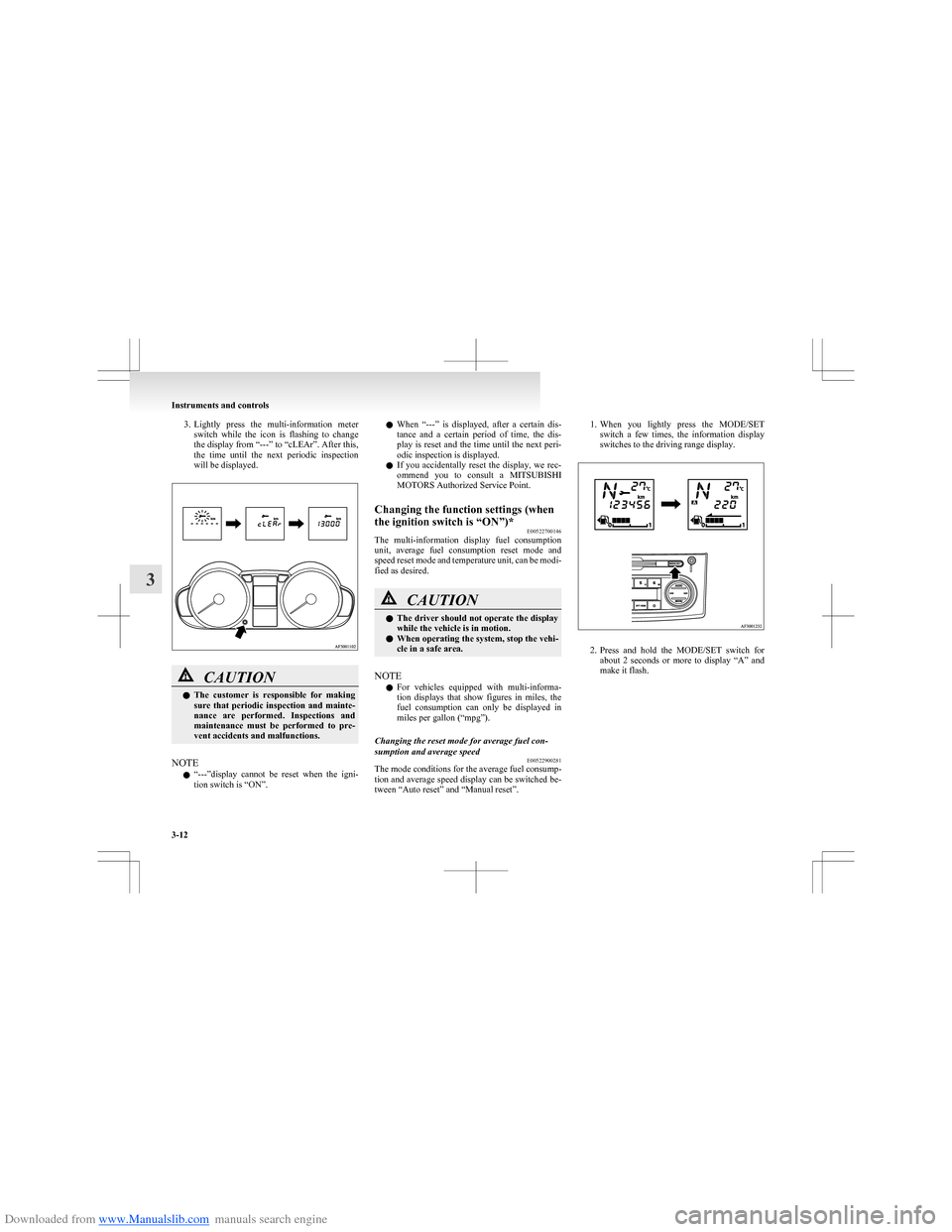
Downloaded from www.Manualslib.com manuals search engine 3.Lightly press the multi-information meter
switch while the icon is flashing to change
the display from “---” to “cLEAr”. After this,
the time until the next periodic inspection
will be displayed.CAUTIONl The customer is responsible for making
sure that periodic inspection and mainte-
nance are performed. Inspections and
maintenance must be performed to pre-
vent accidents and malfunctions.
NOTE
l “
---”display cannot be reset when the igni-
tion switch is “ON”.
l When “---” is displayed, after a certain dis-
tance and a certain period of time, the dis-
play is reset and the time until the next peri-
odic inspection is displayed.
l If you accidentally reset the display, we rec-
ommend you to consult a MITSUBISHI
MOTORS Authorized Service Point.Changing the function settings (when
the ignition switch is “ON”)* E00522700146
The multi-information display fuel consumption
unit, average fuel consumption reset mode and
speed reset mode and temperature unit, can be modi-
fied as desired.
CAUTIONl The driver should not operate the display
while the vehicle is in motion.
l When operating the system, stop the vehi-
cle in a safe area.
NOTE
l For vehicles equipped with multi-informa-
tion displays that show figures in miles, the
fuel consumption can only be displayed in
miles per gallon (“mpg”).
Changing the reset mode for average fuel con-
sumption and average speed E00522900281
The mode conditions for the average fuel consump-
tion and average speed display can be switched be-
tween “Auto reset” and “Manual reset”.
1. When you lightly press the MODE/SET
switch a few times, the information display
switches to the driving range display.
2. Press and hold the MODE/SET switch for
about 2 seconds or more to display “A” and
make it flash.
Instruments and controls
3-12
3
Page 86 of 273
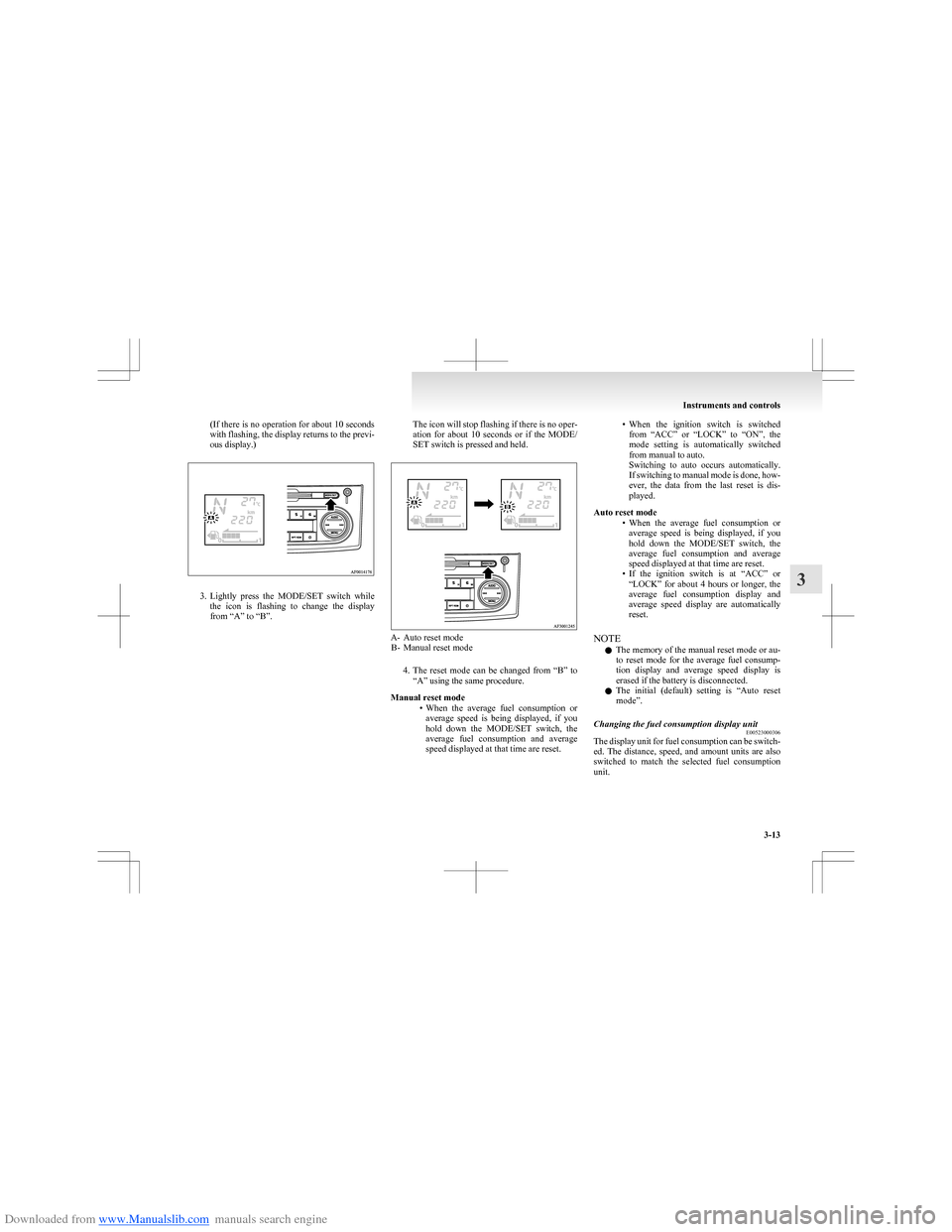
Downloaded from www.Manualslib.com manuals search engine (If there is no operation for about 10 seconds
with flashing, the display returns to the previ-
ous display.)
3. Lightly press the MODE/SET switch while
the icon is flashing to change the display
from “A” to “B”.
The icon will stop flashing if there is no oper-
ation for about 10 seconds or if the MODE/
SET switch is pressed and held.
A- Auto reset mode B- Manual reset mode
4.The reset mode can be changed from “B” to
“A” using the same procedure.
Manual reset mode •When the average fuel consumption or
average speed is being displayed, if you
hold down the MODE/SET switch, the
average fuel consumption and average
speed displayed at that time are reset.
• When the ignition switch is switched
from “ACC” or “LOCK” to “ON”, the
mode setting is automatically switched
from manual to auto.
Switching to auto occurs automatically.
If switching to manual mode is done, how-
ever, the data from the last reset is dis-
played.
Auto reset mode •When the average fuel consumption or
average speed is being displayed, if you
hold down the MODE/SET switch, the
average fuel consumption and average
speed displayed at that time are reset.
• If the ignition switch is at “ACC” or
“LOCK” for about 4 hours or longer, the
average fuel consumption display and
average speed display are automatically
reset.
NOTE l The memory of the manual reset mode or au-
to reset mode for the average fuel consump-
tion display and average speed display is
erased if the battery is disconnected.
l The initial (default) setting is “Auto reset
mode”.Changing the fuel consumption display unit E00523000306
The display unit for fuel consumption can be switch-
ed. The distance, speed, and amount units are also
switched to match the selected fuel consumption
unit.
Instruments and controls
3-13
3
Page 87 of 273
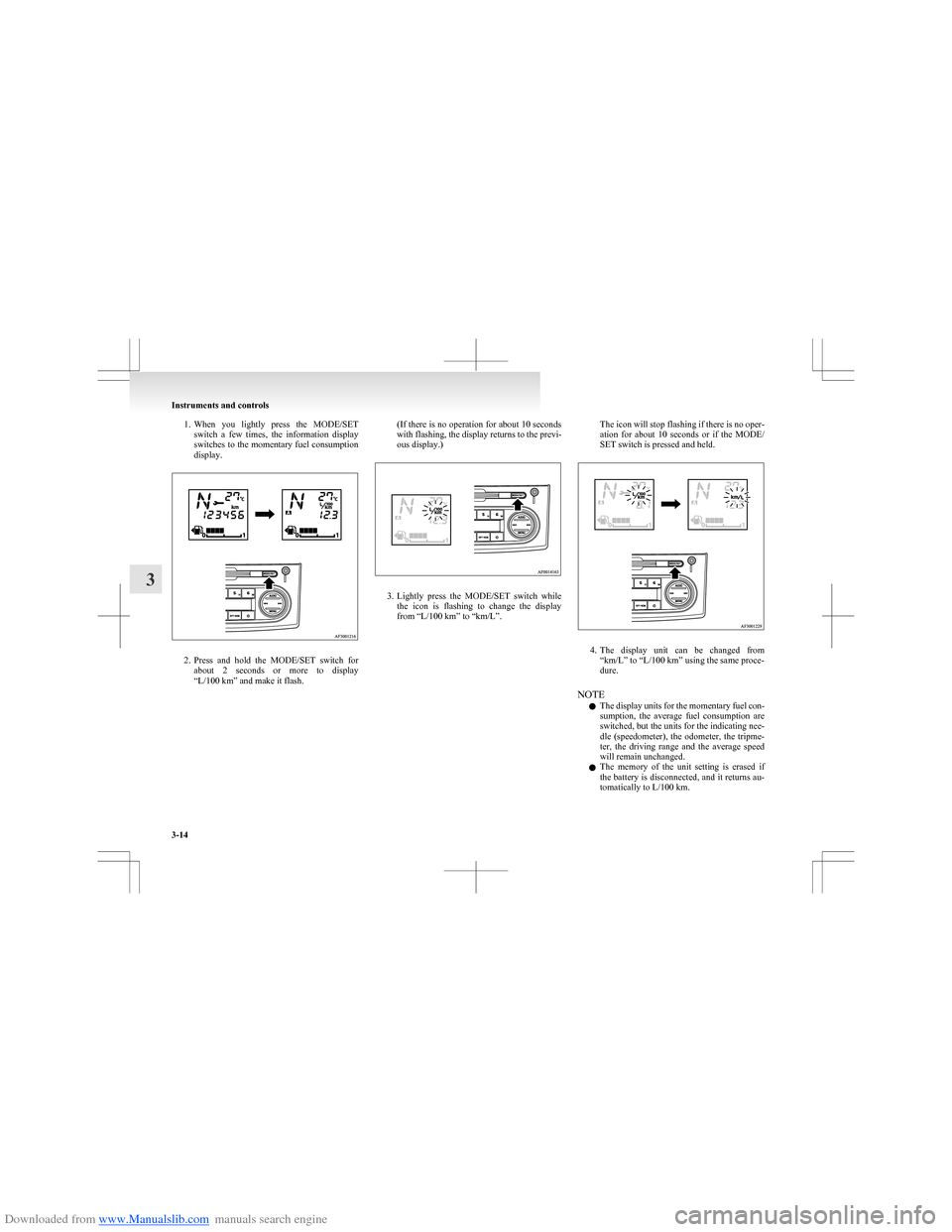
Downloaded from www.Manualslib.com manuals search engine 1.When you lightly press the MODE/SET
switch a few times, the information display
switches to the momentary fuel consumption
display.
2. Press and hold the MODE/SET switch for
about 2 seconds or more to display
“L/100 km” and make it flash.
( If there is no operation for about 10 seconds
with flashing, the display returns to the previ-
ous display.)
3. Lightly press the MODE/SET switch while
the icon is flashing to change the display
from “L/100 km” to “km/L”.
The icon will stop flashing if there is no oper-
ation for about 10 seconds or if the MODE/
SET switch is pressed and held.
4. The display unit can be changed from
“km/L” to “L/100 km” using the same proce-
dure.
NOTE l The display units for the momentary fuel con-
sumption, the average fuel consumption are
switched, but the units for the indicating nee-
dle (speedometer), the odometer, the tripme-
ter, the driving range and the average speed
will remain unchanged.
l The memory of the unit setting is erased if
the battery is disconnected, and it returns au-
tomatically to L/100 km.
Instruments and controls
3-14
3
Page 88 of 273
Downloaded from www.Manualslib.com manuals search engine Changing the temperature unitE00523100206
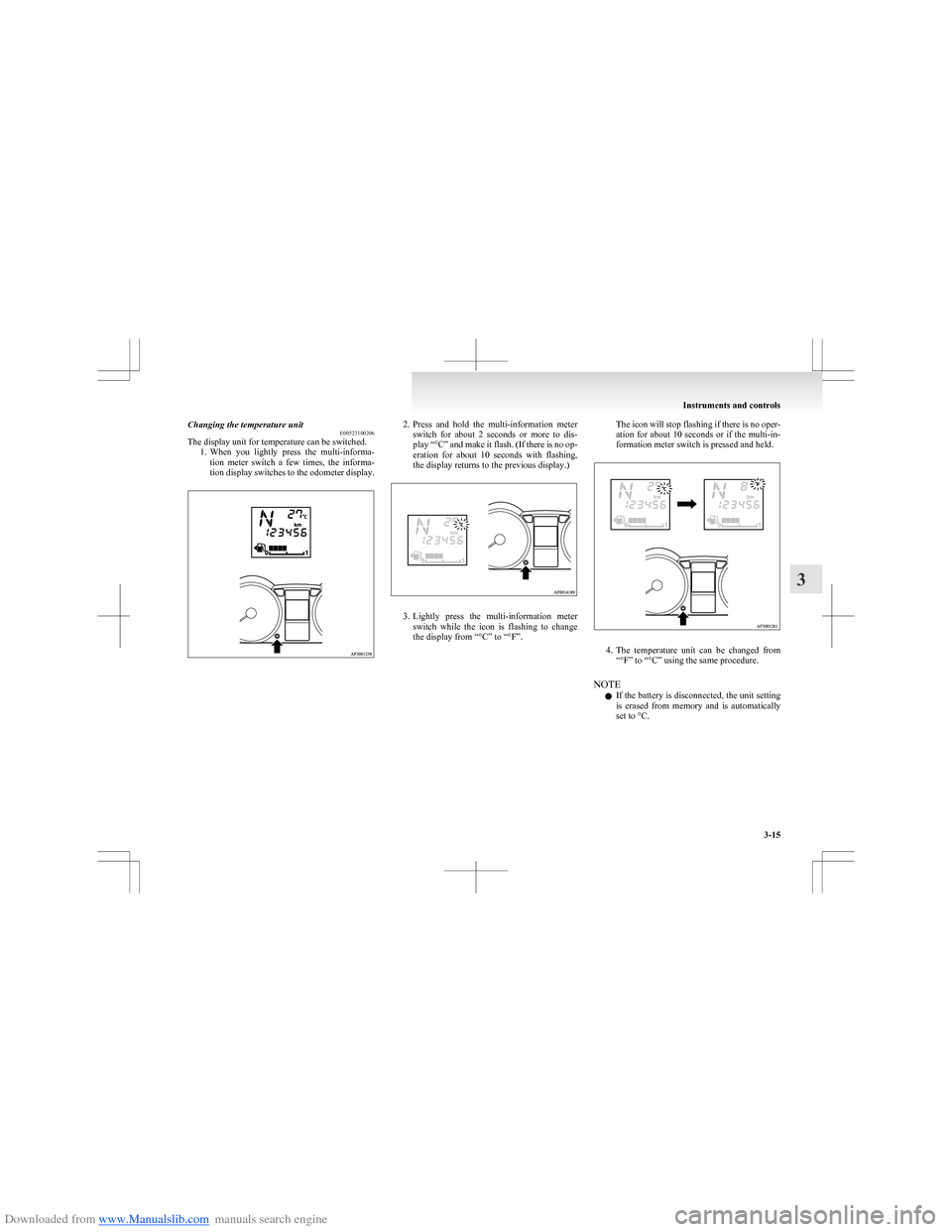
The display unit for temperature can be switched.
1.When you lightly press the multi-informa-
tion meter switch a few times, the informa-
tion display switches to the odometer display.2. Press and hold the multi-information meter
switch for about 2 seconds or more to dis-
play “ °C” and make it flash. (If there is no op-
eration for about 10 seconds with flashing,
the display returns to the previous display.)
3. Lightly press the multi-information meter
switch while the icon is flashing to change
the display from “°C” to “°F”.
The icon will stop flashing if there is no oper-
ation for about 10 seconds or if the multi-in-
formation meter switch is pressed and held.
4. The temperature unit can be changed from
“°F” to “°C” using the same procedure.
NOTE l If the battery is disconnected, the unit setting
is erased from memory and is automatically
set to °C.
Instruments and controls
3-15
3
Page 91 of 273
Downloaded from www.Manualslib.com manuals search engine CAUTIONFurthermore, the vehicle
should be brought immediately
to a stop in a safe location and
we recommend you to have it
checked. •The brake warning lamp
does not illuminate when
the parking brake is applied
or does not turn off when
the parking brake is re-
leased.
• The ABS warning lamp and
brake warning lamp illumi-
nate at the same time.
For details, refer to “ABS
warning lamp” on page
4-28.
• The brake warning lamp re-
mains illuminated during
driving.
l The vehicle should be brought
to a halt in the following man-
ner when brake performance
has deteriorated. •Depress the brake pedal
harder than usual.
Even if the brake pedal
moves down to the very end
of its possible stroke, keep it
pressed down hard.CAUTION• Should the brakes fail, use
engine braking to reduce
your speed and pull the park-
ing brake lever.
Depress the brake pedal to
operate the stop lamp to
alert the vehicles behind you.Check engine warning lamp E00502601683
This lamp is a part of an onboard diag-
nostic system which monitors the emis-
sions, engine or automated manual trans-
mission control system/AS&G control
system.
If a problem is detected in one of these
systems, this lamp illuminates and a buz-
zer sounds.
Although your vehicle will usually be
drivable and not need towing, we recom-
mend you to have the system checked as
soon as possible.
This lamp will also illuminate for a few
seconds when the ignition switch is
turned to the “ON” position. If it does
not go off after a few seconds, we recom-
mend you to have the vehicle checked.CAUTIONl Prolonged driving with this
lamp on may cause further dam-
age to the emission control sys-
tem. It could also affect fuel
economy and drivability.
l If the lamp does not illuminate
when the ignition switch is
turned to the “ON” position,
we recommend you to have the
system checked.
l If the lamp illuminates while
the engine is running, avoid
driving at high speeds and we
recommend you to have the sys-
tem checked.
During vehicle operation with
the lamp illuminated, the vehi-
cle may not accelerate when
you depress the accelerator ped-
al.
NOTE
l The engine electronic control mod-
ule accommodating the onboard di-
agnostic system has various fault
data (especially about the exhaust
emission) stored.
This data will be erased if a bat-
tery cable is disconnected which
will make a rapid diagnosis diffi-
cult. Do not disconnect a battery
cable when the check engine warn-
ing lamp is ON.
Instruments and controls
3-18
3
Page 93 of 273
Downloaded from www.Manualslib.com manuals search engine CAUTIONlBefore moving your vehicle,
check that the warning lamp is
OFF.Combination headlamps and
dipper switch E00506000923
Headlamps
NOTE l Do not leave the headlamps and other lamps
on for a long time while the engine is station-
ary (not running). A rundown battery could
result.
l When it rains, or when the vehicle has been
washed, the inside of the lens sometimes be-
comes foggy. This is the same phenomenon
as when window glass mists up on a humid
day, and does not indicate a functional prob-
lem. When the lamp is switched on, the heat
will remove the fog. However, if water gath-
ers inside the lamp, we recommend you to
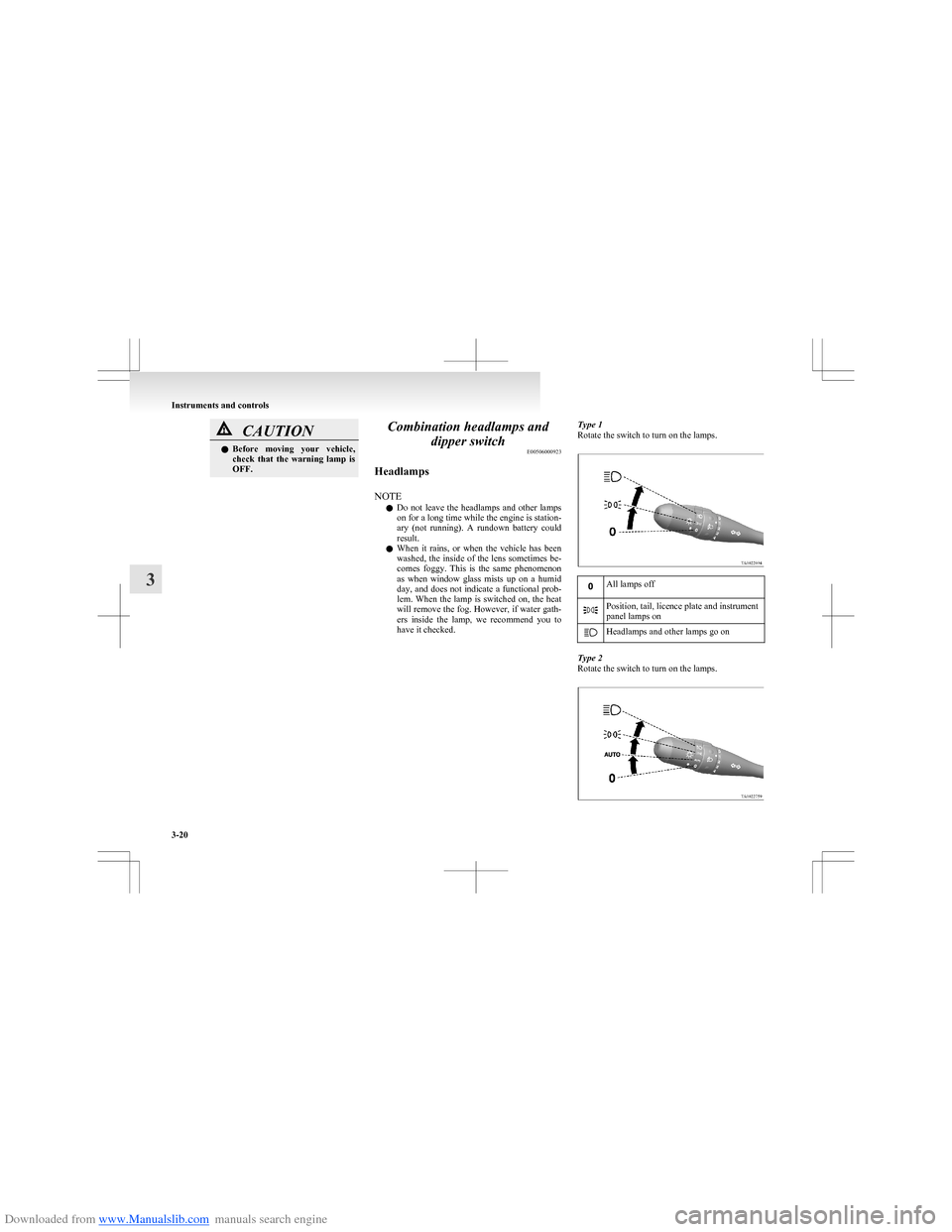
have it checked.Type 1
Rotate the switch to turn on the lamps.All lamps offPosition, tail, licence plate and instrument
panel lamps onHeadlamps and other lamps go on
Type 2
Rotate the switch to turn on the lamps.
Instruments and controls
3-20
3
Page 94 of 273
Downloaded from www.Manualslib.com manuals search engine All lamps off
AUTO
With the ignition switch in the
“ON” position, headlamps, posi-
tion, tail, licence plate, and in-
strument panel lamps turn on
and off automatically in accord-
ance with outside light level.
All lamps turn off automatically
when the ignition switch is
turned to “OFF” position.Position, tail, licence plate and
instrument panel lamps onHeadlamps and other lamps go
on
NOTE
l If the front fog lamps (if so equipped) turn
on when they are supposed to with the
switch in the “AUTO” position, the lamps
turn off automatically with the engine switch
off.
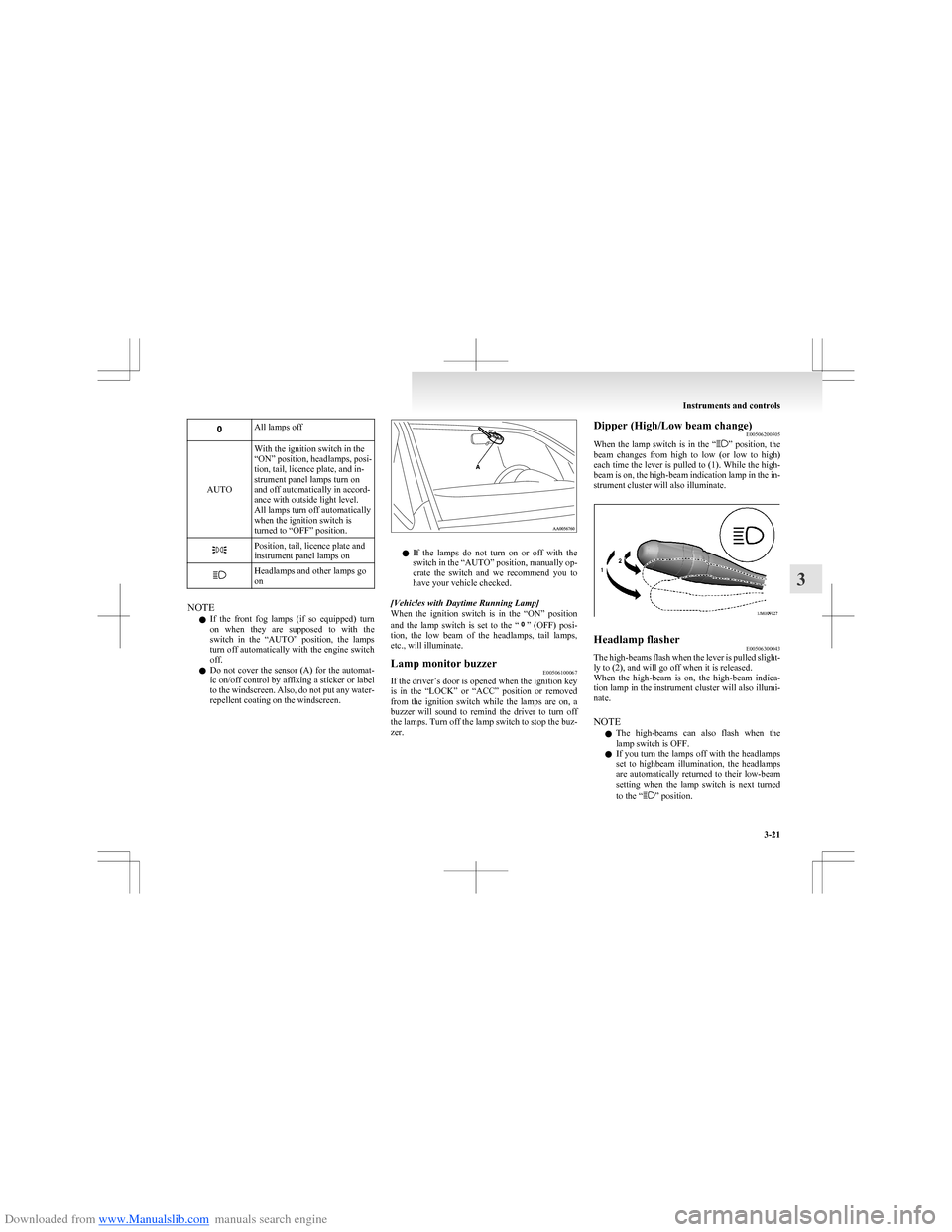
l Do not cover the sensor (A) for the automat-
ic on/off control by affixing a sticker or label
to the windscreen. Also, do not put any water-
repellent coating on the windscreen.
l If the lamps do not turn on or off with the
switch in the “AUTO” position, manually op-
erate the switch and we recommend you to
have your vehicle checked.
[Vehicles with Daytime Running Lamp]
When the ignition switch is in the “ON” position
and the lamp switch is set to the “
” (OFF) posi-
tion, the low beam of the headlamps, tail lamps,
etc., will illuminate.
Lamp monitor buzzer E00506100067
If the driver’s door is opened when the ignition key
is in the “LOCK” or “ACC” position or removed
from the ignition switch while the lamps are on, a
buzzer will sound to remind the driver to turn off
the lamps. Turn off the lamp switch to stop the buz-
zer.
Dipper (High/Low beam change) E00506200505
When the lamp switch is in the “
” position, the
beam changes from high to low (or low to high)
each time the lever is pulled to (1). While the high-
beam is on, the high-beam indication lamp in the in-
strument cluster will also illuminate.
Headlamp flasher E00506300043
The high-beams flash when the lever is pulled slight-
ly to (2), and will go off when it is released.
When the high-beam is on, the high-beam indica-
tion lamp in the instrument cluster will also illumi-
nate.
NOTE l The high-beams can also flash when the
lamp switch is OFF.
l If you turn the lamps off with the headlamps
set to highbeam illumination, the headlamps
are automatically returned to their low-beam
setting when the lamp switch is next turned
to the “
” position.
Instruments and controls
3-21
3
Page 95 of 273
Downloaded from www.Manualslib.com manuals search engine Coming home lightE00529000366
This function turns on the headlamps in the low-
beam setting for about 30 seconds after the ignition
switch is turned to the “OFF” position. 1.Turn the combination headlamps and dipper
switch to the “0” (OFF) or “AUTO” position
(for vehicles equipped with the automatic
lamp control).
2. Turn the ignition switch to the “OFF” posi-
tion and remove the ignition key.
3. Within 60 seconds of turning the ignition
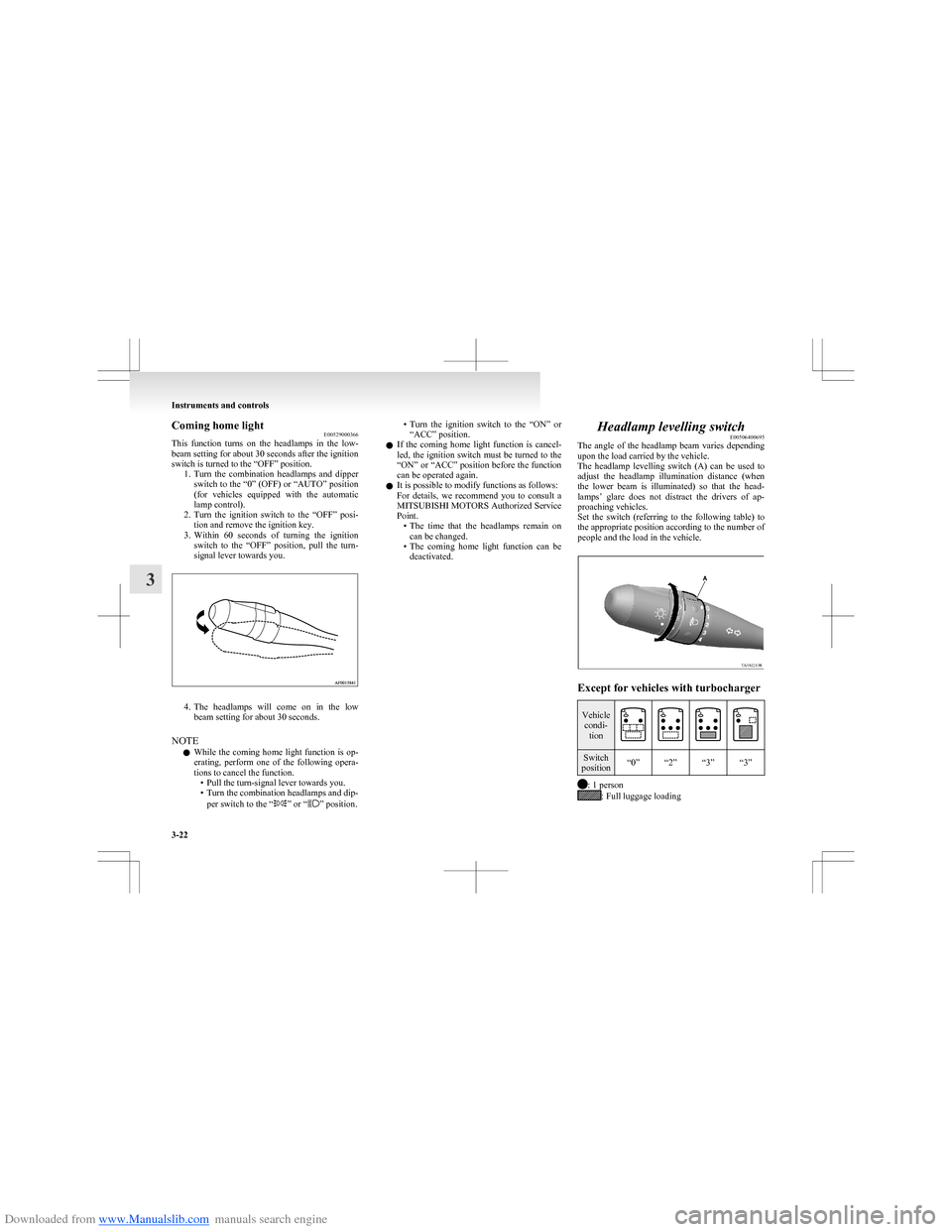
switch to the “OFF” position, pull the turn-
signal lever towards you.
4. The headlamps will come on in the low
beam setting for about 30 seconds.
NOTE l While the coming home light function is op-
erating, perform one of the following opera-
tions to cancel the function. • Pull the turn-signal lever towards you.
• Turn the combination headlamps and dip-
per switch to the “
” or “” position.
•Turn the ignition switch to the “ON” or
“ACC” position.
l If the coming home light function is cancel-
led, the ignition switch must be turned to the
“ON” or “ACC” position before the function
can be operated again.
l It is possible to modify functions as follows:
For details, we recommend you to consult a
MITSUBISHI MOTORS Authorized Service
Point. •The time that the headlamps remain on
can be changed.
• The coming home light function can be
deactivated.Headlamp levelling switch E00506400695
The angle of the headlamp beam varies depending
upon the load carried by the vehicle.
The headlamp levelling switch (A) can be used to
adjust the headlamp illumination distance (when
the lower beam is illuminated) so that the head-
lamps’ glare does not distract the drivers of ap-
proaching vehicles.
Set the switch (referring to the following table) to
the appropriate position according to the number of
people and the load in the vehicle.
Except for vehicles with turbocharger
Vehicle condi- tionSwitch
position“0”“2”“3”“3”
: 1 person: Full luggage loading
Instruments and controls
3-22
3