time MITSUBISHI COLT 2009 10.G Owner's Guide
[x] Cancel search | Manufacturer: MITSUBISHI, Model Year: 2009, Model line: COLT, Model: MITSUBISHI COLT 2009 10.GPages: 273, PDF Size: 17.28 MB
Page 118 of 273
Downloaded from www.Manualslib.com manuals search engine lIf the Auto Stop & Go (AS&G) system oper-
ates while the air conditioner is operating,
both the engine and the air conditioning com-
pressor will stop. Therefore, only the blower
will operate.
l If air is flowing from the demister and the en-
gine is stopped automatically, it is recommen-
ded to set the mode selection dial to the De-
mister/Face or Foot/Demister position.
Refer to “Changing the mode selection” on
pages 5-02, 5-02.
l If the air conditioner is operating, set the tem-
perature control dial to 22°C or higher to
lengthen the time that the engine is stopped
automatically.
l If the air conditioner is operating when the
ambient temperature is high, such as during
the summer, change the air selection from out-
side air to recirculated air to lengthen the
time that the engine is stopped automatically.Automatically restarting the engine E00627600066
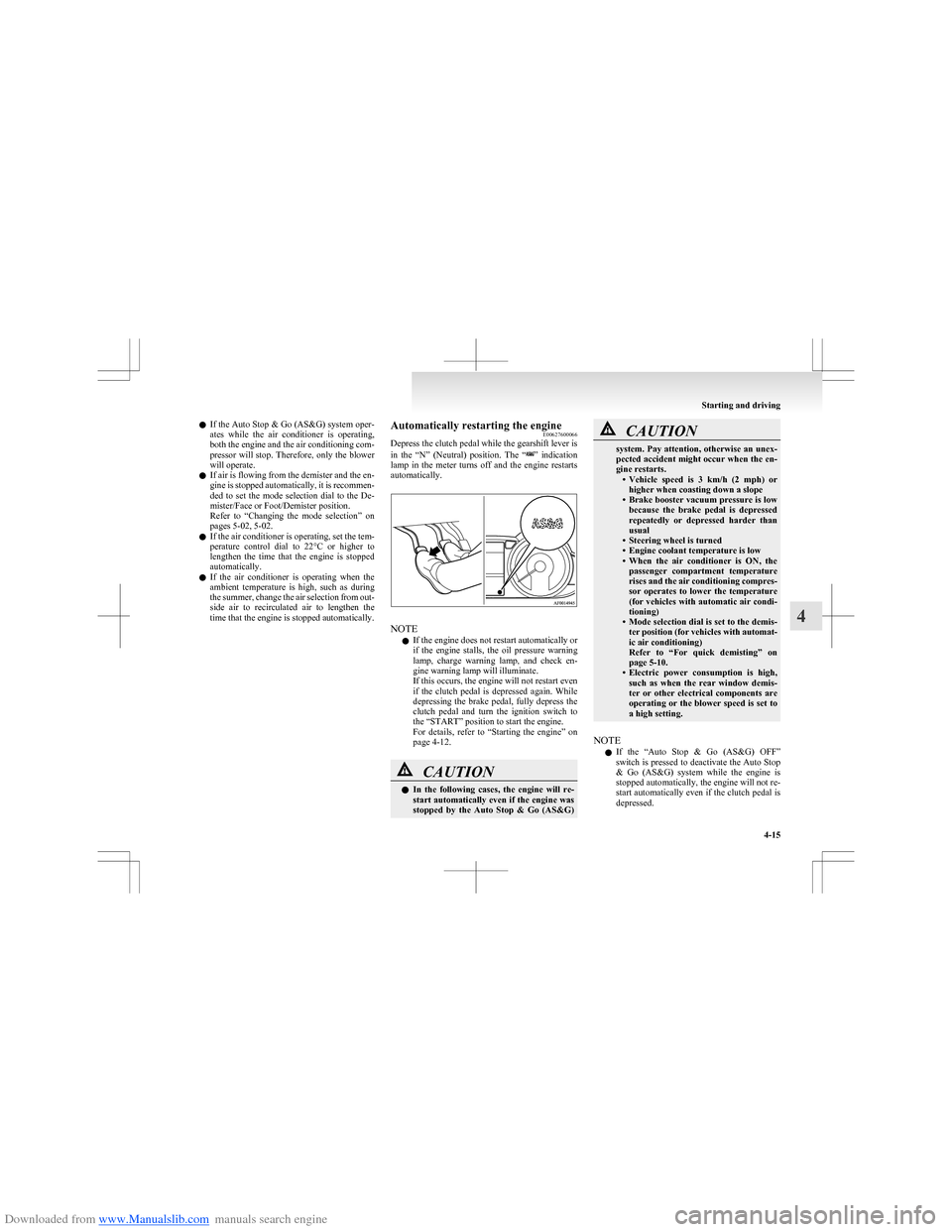
Depress the clutch pedal while the gearshift lever is
in the “N” (Neutral) position. The “
” indication
lamp in the meter turns off and the engine restarts
automatically.
NOTE
l If the engine does not restart automatically or
if the engine stalls, the oil pressure warning
lamp, charge warning lamp, and check en-
gine warning lamp will illuminate.
If this occurs, the engine will not restart even
if the clutch pedal is depressed again. While
depressing the brake pedal, fully depress the
clutch pedal and turn the ignition switch to
the “START” position to start the engine.
For details, refer to “Starting the engine” on
page 4-12.
CAUTIONl In the following cases, the engine will re-
start automatically even if the engine was
stopped by the Auto Stop & Go (AS&G)CAUTIONsystem. Pay attention, otherwise an unex-
pected accident might occur when the en-
gine restarts. •Vehicle speed is 3 km/h (2 mph) or
higher when coasting down a slope
• Brake booster vacuum pressure is low
because the brake pedal is depressed
repeatedly or depressed harder than
usual
• Steering wheel is turned
• Engine coolant temperature is low
• When the air conditioner is ON, the
passenger compartment temperature
rises and the air conditioning compres-
sor operates to lower the temperature
(for vehicles with automatic air condi-
tioning)
• Mode selection dial is set to the demis-
ter position (for vehicles with automat-
ic air conditioning)
Refer to “For quick demisting” on
page 5-10.
• Electric power consumption is high,
such as when the rear window demis-
ter or other electrical components are
operating or the blower speed is set to
a high setting.
NOTE
l If the “Auto Stop & Go (AS&G) OFF”
switch is pressed to deactivate the Auto Stop
& Go (AS&G) system while the engine is
stopped automatically, the engine will not re-
start automatically even if the clutch pedal is
depressed.
Starting and driving
4-15
4
Page 124 of 273
Downloaded from www.Manualslib.com manuals search engine Moving the allshift leverE00612700014
The allshift lever is operated as follows;Moving the allshift lever between “N” (Neutral)
position ↔ “S” (Stand by) position, “N” (Neutral)
position ↔ “R” (Reverse) position E00613700053
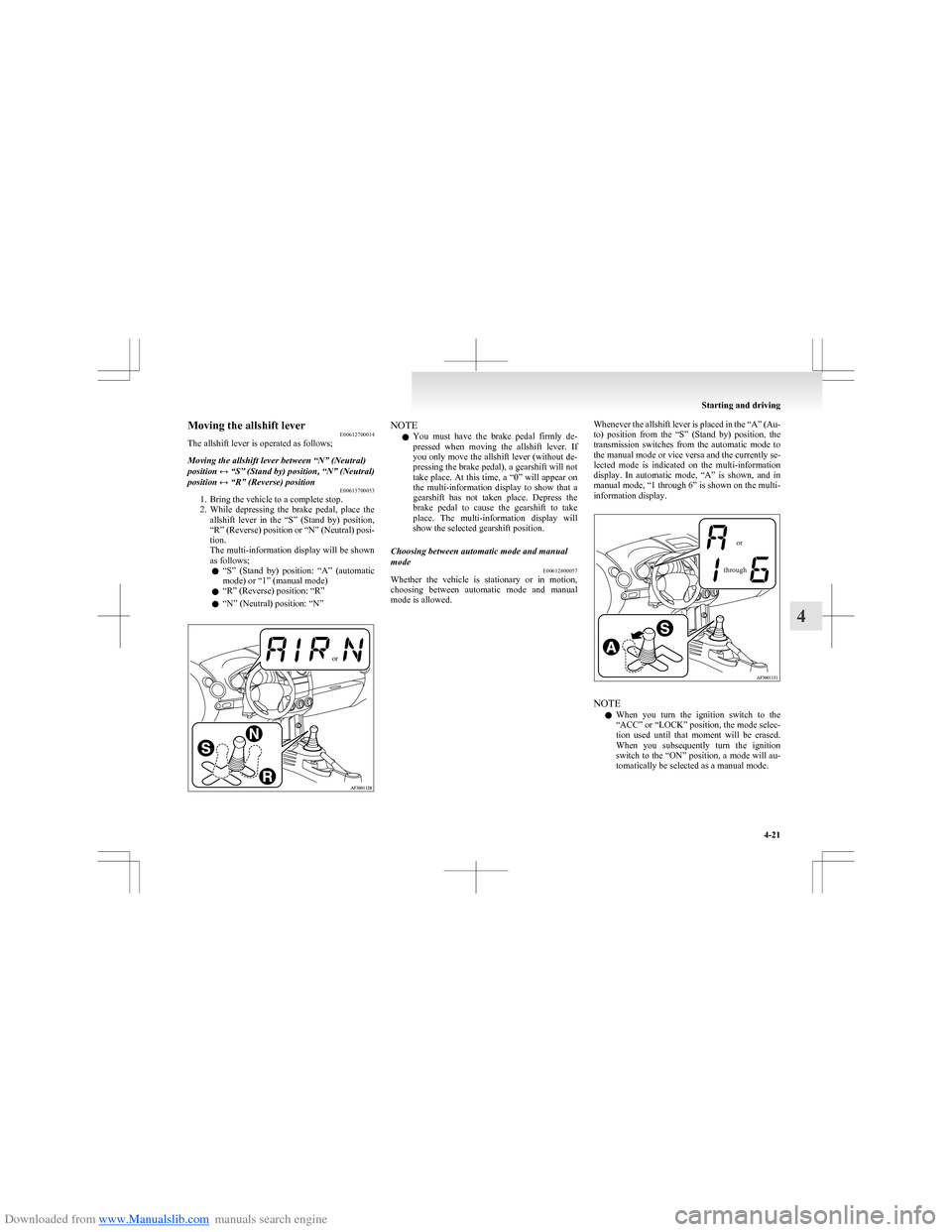
1. Bring the vehicle to a complete stop.
2. While depressing the brake pedal, place the
allshift lever in the “S” (Stand by) position,
“R” (Reverse) position or “N” (Neutral) posi-
tion.
The multi-information display will be shown
as follows;
l “
S” (Stand by) position: “A” (automatic
mode) or “1” (manual mode)
l “R” (Reverse) position: “R”
l “N” (Neutral) position: “N”
orNOTE
l You must have the brake pedal firmly de-
pressed when moving the allshift lever. If
you only move the allshift lever (without de-
pressing the brake pedal), a gearshift will not
take place. At this time, a “0” will appear on
the multi-information display to show that a
gearshift has not taken place. Depress the
brake pedal to cause the gearshift to take
place. The multi-information display will
show the selected gearshift position.Choosing between automatic mode and manual
mode E00612800057
Whether the vehicle is stationary or in motion,
choosing between automatic mode and manual
mode is allowed.
Whenever the allshift lever is placed in the “A” (Au-
to) position from the “S” (Stand by) position, the
transmission switches from the automatic mode to
the manual mode or vice versa and the currently se-
lected mode is indicated on the multi-information
display. In automatic mode, “A” is shown, and in
manual mode, “1 through 6” is shown on the multi-
information display.orthrough
NOTE
l When you turn the ignition switch to the
“ACC” or “LOCK” position, the mode selec-
tion used until that moment will be erased.
When you subsequently turn the ignition
switch to the “ON” position, a mode will au-
tomatically be selected as a manual mode.
Starting and driving
4-21
4
Page 126 of 273
Downloaded from www.Manualslib.com manuals search engine NOTEl If the brake pedal is not depressed when the
allshift lever is moved, a gearshift will not
take place. At this time, the driver is notified
by a “0” on the multi-information display. De-
press the brake pedal to cause the gearshift to
take place. The multi-information display
will show the selected gearshift position.
3. Choose between the automatic mode and man-
ual mode with the allshift lever. Refer to
“ Choosing between automatic mode and man-
ual mode” on page 4-21.
4. Confirm safety around the vehicle, then re-
lease the parking brake.
5. Start moving by gradually easing off the
brake pedal while gently applying pressure
to the accelerator pedal.
NOTE l When driving away on a slippery road, push
the allshift lever forward into the “+ (UP
SHIFT)” position from the “S” (Stand by) po-
sition. This causes the transmission to shift in-
to the 2 nd
gear which is better for smooth driv-
ing away on a slippery road. At this time, the
multi-information display shows “2”. Push
the allshift lever to the “- (DOWN SHIFT)”
side to shift back to the 1 st
gear.
Starting from a standstill on an uphill slope 1.To prevent unwanted movement of the vehi-
cle, release the brake pedal while leaving the
parking brake applied.
2. Gently apply pressure to the accelerator ped-
al. As you feel the vehicle starts to move, re-
lease the parking brake and pull away.CAUTIONl When pulling away from a standstill on
an uphill slope, be sure to start with the
parking brake applied. If you released
the brake pedal without the parking
brake applied, therefore, the vehicle
would roll backward, possibly causing an
accident.Driving E00613200058WARNINGlNever move the allshift lever to the “N”
(NEUTRAL) position while driving. A se-
rious accident could occur since you will
lose engine braking.
Automatic mode
Drive with the allshift lever in the “S” (Stand by)
position. Gearshifts will take place automatically in
accordance with the vehicle speed.
Manual mode
Select appropriate gears using the allshift lever. Al-
ways select the gear that suits the speed at which
you wish to drive.
NOTE
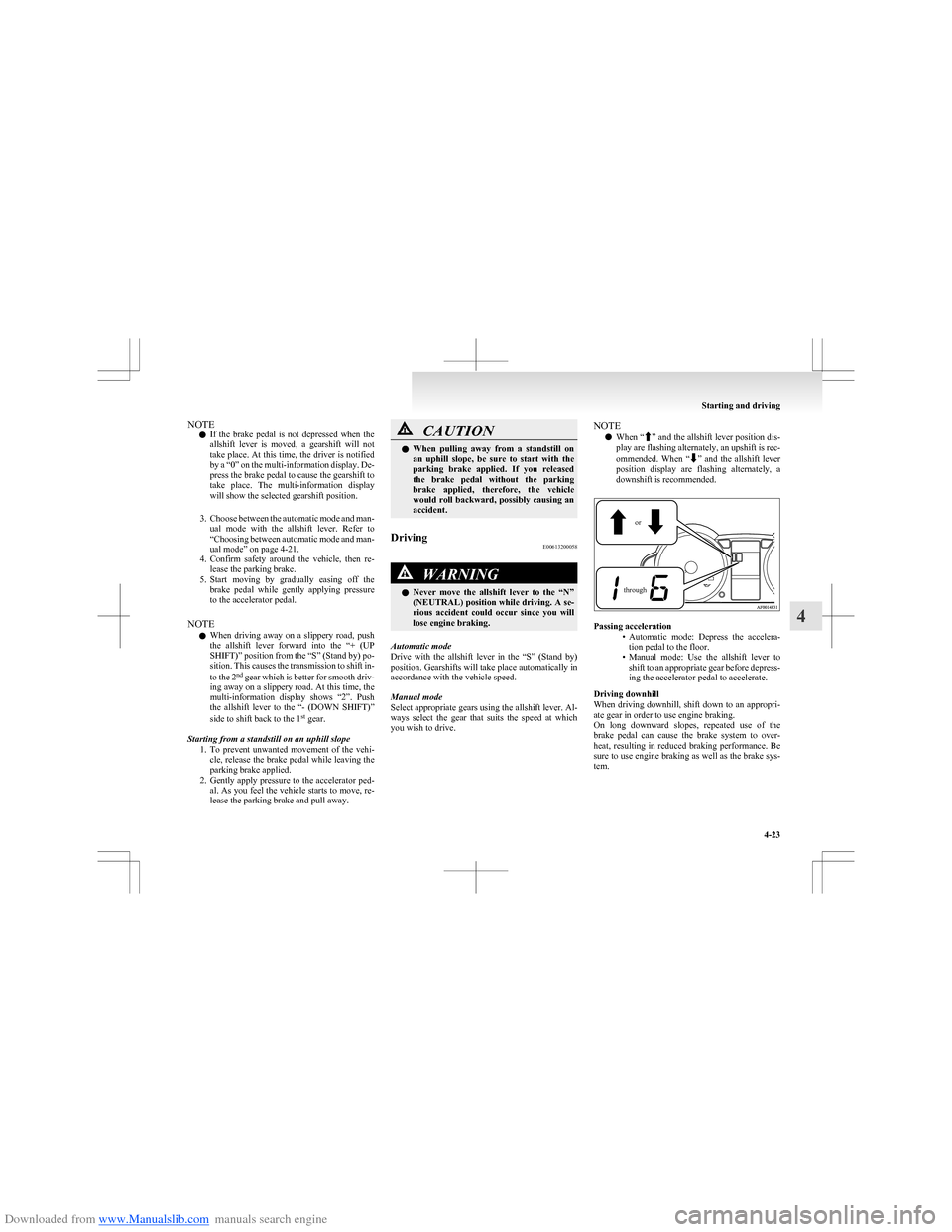
l When “
”
and the allshift lever position dis-
play are flashing alternately, an upshift is rec-
ommended. When “
” and the allshift lever
position display are flashing alternately, a
downshift is recommended.
orthrough
Passing acceleration
•Automatic mode: Depress the accelera-
tion pedal to the floor.
• Manual mode: Use the allshift lever to
shift to an appropriate gear before depress-
ing the accelerator pedal to accelerate.
Driving downhill
When driving downhill, shift down to an appropri-
ate gear in order to use engine braking.
On long downward slopes, repeated use of the
brake pedal can cause the brake system to over-
heat, resulting in reduced braking performance. Be
sure to use engine braking as well as the brake sys-
tem.
Starting and driving
4-23
4
Page 127 of 273
Downloaded from www.Manualslib.com manuals search engine WARNINGlHard engine braking can cause the tyres
to slip on the road surface, possibly lead-
ing to a serious accident.Waiting E00613300059
1.With the allshift lever in the “S” (Stand by)
position, firmly depress the brake pedal.
2. If necessary, apply the parking brake.
CAUTIONl On an uphill slope, the transmission’s
creep effect may not stop the vehicle from
rolling backward if the brakes are not ap-
plied. There is no creep effect while
2 nd
gear is selected. When stopping, be
sure to depress the brake pedal and se-
curely apply the parking brake.
l Do not attempt to hold the vehicle in
place on an uphill road in 1st
gear by de-
pressing on the accelerator pedal. The
transmission could malfunction if you do.
3. When you are stationary for a long period
(for example, when stuck in a traffic jam),
place the allshift lever in the “N” (Neutral)
position.
CAUTIONl Continue to pay attention to the vehicle
while stationary. If you allow your atten-
tion to wander and the allshift lever is in
any position other than “N” (Neutral),
the vehicle could move suddenly and un-
expectedly.
4. When you are ready to start moving again,
first confirm that the allshift lever is in the
“S” (Stand by) position or “R” (Reverse) po-
sition and that an “A”, “1”, or “R” is shown
on the multi-information display.
NOTE l During vehicle operation, the transmission au-
tomatically shifts down when the vehicle
speed decreases. It selects 1st
gear just before
the vehicle reaches a standstill.
CAUTIONl The actions described below cause rapid
clutch wear and can cause clutch dam-
age. Do not perform them. •Depressing the brake and accelerator
pedals at the same time.
• Holding the vehicle in place on an up-
hill road by depressing the accelerator
pedal (and not depressing the brake
pedal) with 1 st
gear selected.Parking
E00613400034
1. Bring the vehicle to a complete stop.
2.While depressing the brake pedal, securely
apply the parking brake.
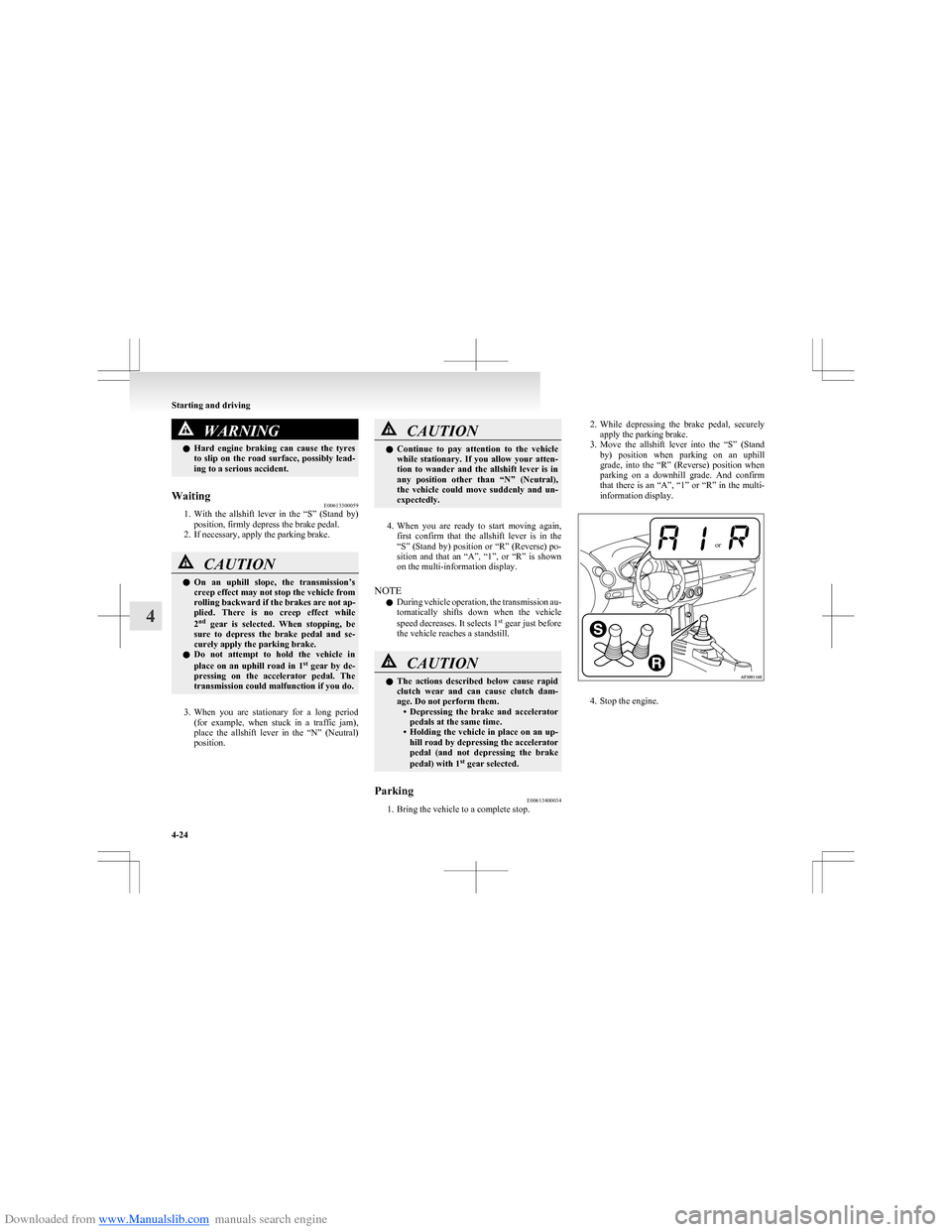
3. Move the allshift lever into the “S” (Stand
by) position when parking on an uphill
grade, into the “R” (Reverse) position when
parking on a downhill grade. And confirm
that there is an “A”, “1” or “R” in the multi-
information display.or
4. Stop the engine.
Starting and driving
4-24
4
Page 129 of 273
Downloaded from www.Manualslib.com manuals search engine WARNINGlDo not leave any objects near the brake
pedal or let a floor mat slide under it; do-
ing so could prevent the full pedal stroke
that would be necessary in an emergency.
Make sure that the pedal can be operated
freely at all times. Make sure the floor
mat is securely held in place.
Brake pads and linings
l With new brake pads or linings, avoid where
possible sudden full application of the brakes
for the first 200 km (124 miles) of driving.
l The disc brakes are provided with a warning
device which emits a shrieking metallic
sound while braking if the brake pads have
reached their wear limit.
If you hear this sound, have the brake pads re-
placed immediately.
WARNINGl Driving with worn brake pads will make
it harder to stop, and can cause an acci-
dent.Emergency stop signal system E00626000021
This is a device that reduces the possibility of rear
end collisions by the rapid and automatic blinking
of the hazard warning lamps to alert vehicles ap-
proaching from behind during sudden braking.
When the emergency stop signal system operates,
the hazard warning indication lamp in the instru-
ment cluster blinks rapidly at the same time.CAUTIONl If the ABS warning lamp or TCL/ASC in-
dication lamp is illuminated, the emergen-
cy stop signal system may not operate. Re-
fer to “ABS warning lamp” on page
4-28.
Refer to “Traction control system (TCL)/
Active stability control system (ASC) indi-
cation lamp” on page 4-31.
NOTE
l [
Activating condition for the emergency stop
signal system]
It activates when all of the following condi-
tions are met. •The vehicle speed is approximately
55 km/h (34 mph) or higher.
• The brake pedal has been depressed, and
the system judges that it was sudden brak-
ing from the vehicle deceleration and the
operating condition of the anti-lock brake
system (ABS).
[ Deactivating condition for the emergency
stop signal system]
It deactivates when one of the following con-
ditions is met. • The brake pedal is released.
• The hazard warning flasher switch is
pressed.
• The system judges that it was not sudden
braking from the vehicle deceleration and
the operating condition of the anti-lock
brake system (ABS).
Starting and driving
4-26
4
Page 131 of 273
Downloaded from www.Manualslib.com manuals search engine lOperation of ABS is not restricted to situa-
tions where brakes are applied suddenly.
This system may also operate to prevent
wheel lock when you are driving over man-
holes, steel road-work plates, or the vehicle
is driven over steps or level differences in
the road, road markings, or other surfaces
which are difficult for the wheels to grip.
l When the ABS is activated, you may feel the
brake pedal pulsating and hear a characteris-
tic noise. Also at this time, it may feel as if
the pedal attempts to resist being depressed.
In this situation, to let the ABS work for
you, just hold the brake pedal down more
firmly. Do not pump the brake. This will
result in reduced braking performance.CAUTIONl Even the ABS cannot prevent the natural
laws of physics from acting on the vehi-
cle. It cannot for instance avoid accidents
that may result from excessive speed on
bends or following another vehicle too
closely or aquaplaning. It should remain
the driver’s task to observe safety precau-
tions to judge speeds and brake applica-
tions correctly in such conditions.
l Be sure to use tyres of the same type and
size on 4 wheels.
If tyre types or sizes are mixed, ABS may
not function properly.CAUTIONl Never install a limited-slip differential,
which is not MITSUBISHI MOTORS gen-
uine parts, as the ABS may not function
properly.
We recommend to consult a
MITSUBISHI MOTORS Authorized
Service Point.ABS warning lamp E00607200835
The ABS warning lamp comes on and a buzzer
sounds in the event of a malfunction in the anti-
lock brake system. It will also come on as a self-
check for a few seconds when the ignition switch is
turned to the “ON” position, and the lamp goes off
after a few seconds. Always make sure that the
lamp goes out before beginning to drive.
CAUTIONl If the warning lamp stays on or does not
illuminate when you start the vehicle, it in-
dicates that the ABS is not functioning
and that only the standard brake system
is in operation. (In this condition the stand-
ard hydraulic brake system will still func-
tion.) We recommend you to consult a
MITSUBISHI MOTORS Authorized
Service Point.If the warning lamp illuminates while
driving E00607301035
If only the ABS warning lamp illuminates
l Avoid hard braking and high-speed driving.
Stop the vehicle in a safe place.
Restart the engine and check to see whether
the lamp goes out after a few minutes driv-
ing; if it then remains off during driving,
there is no problem.
However, if the lamp does not go out, or if it
lights up again when the vehicle is driven,
we recommend you to consult a
MITSUBISHI MOTORS Authorized Service
Point.
Starting and driving
4-28
4
Page 132 of 273
Downloaded from www.Manualslib.com manuals search engine lThe ABS warning lamp can illuminate if the
battery voltage is insufficient when the en-
gine is started. In this case, it does not indi-
cate an ABS fault.
Charge the battery by allowing the engine to
idle for a while.
If the battery has been charged but the ABS
warning lamp continues to illuminate or illu-
minates intermittently, we recommend you
to consult a MITSUBISHI MOTORS Author-
ized Service Point.
If the ABS warning lamp and brake warning
lamp illuminate at the same time
l The brake force distribution function may
not work, so hard braking could make the ve-
hicle unstable.
Avoid hard braking and high-speed driving.
Stop the vehicle in a safe place and we rec-
ommend you to consult a MITSUBISHI
MOTORS Authorized Service Point.
NOTE l Immediately after the vehicle starts moving
after engine start up, a whining sound of a mo-
tor will be heard from the engine compart-
ment. If the brake pedal is depressed at that
moment, a brake pedal pulsating is felt.
This whining sound and pulsation are due to
the self-diagnosis operation of the ABS and
does not indicate a malfunction.
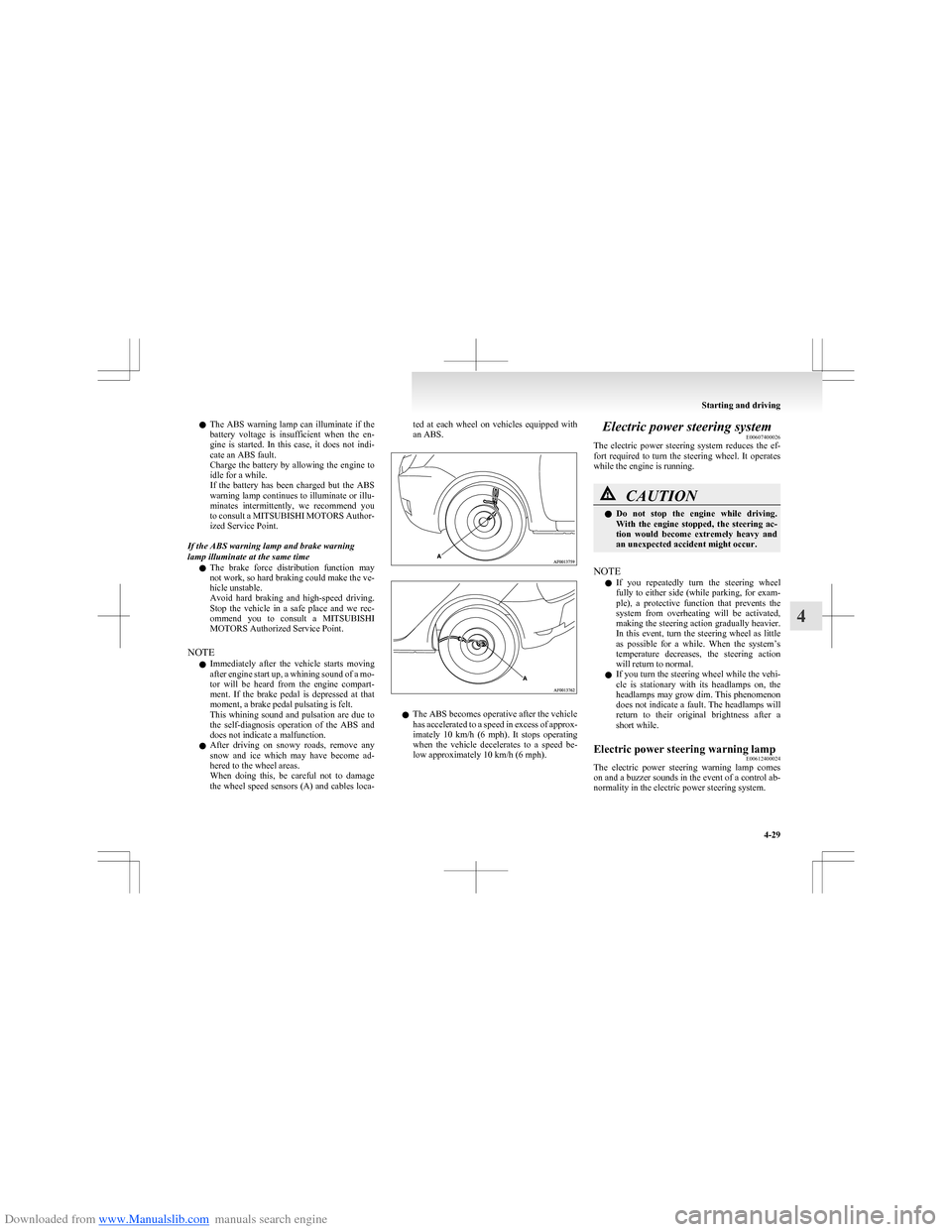
l After driving on snowy roads, remove any
snow and ice which may have become ad-
hered to the wheel areas.
When doing this, be careful not to damage
the wheel speed sensors (A) and cables loca-ted at each wheel on vehicles equipped with
an ABS.
l The ABS becomes operative after the vehicle
has accelerated to a speed in excess of approx-
imately 10 km/h (6 mph). It stops operating
when the vehicle decelerates to a speed be-
low approximately 10 km/h (6 mph).
Electric power steering system E00607400026
The electric power steering system reduces the ef-
fort required to turn the steering wheel. It operates
while the engine is running.CAUTIONl Do not stop the engine while driving.
With the engine stopped, the steering ac-
tion would become extremely heavy and
an unexpected accident might occur.
NOTE
l If you repeatedly turn the steering wheel
fully to either side (while parking, for exam-
ple), a protective function that prevents the
system from overheating will be activated,
making the steering action gradually heavier.
In this event, turn the steering wheel as little
as possible for a while. When the system’s
temperature decreases, the steering action
will return to normal.
l If you turn the steering wheel while the vehi-
cle is stationary with its headlamps on, the
headlamps may grow dim. This phenomenon
does not indicate a fault. The headlamps will
return to their original brightness after a
short while.
Electric power steering warning lamp E00612400024
The electric power steering warning lamp comes
on and a buzzer sounds in the event of a control ab-
normality in the electric power steering system.
Starting and driving
4-29
4
Page 135 of 273
Downloaded from www.Manualslib.com manuals search engine Cruise control*E00609100623
Cruise control is an automatic speed control system
that keeps a set speed. It can be activated at about
40 km/h (25 mph) or more.CAUTIONl When you do not wish to drive at a set
speed, turn off the cruise control for safety.
l Do not use cruise control when driving
conditions will not allow you to stay at
the same speed, such as in heavy traffic
or on roads that are winding, icy, snow-
covered, wet, slippery, on a steep down-
hill slope.
l On vehicles with M/T, do not move the
gearshift lever to the “N” (Neutral) posi-
tion while driving at a set speed without
depressing the clutch pedal. The engine
will run too fast and might be damaged.
NOTE
l Cruise control may not be able to keep your
speed on uphills or downhills.
l Your speed may decrease on a steep uphill.
You may use the accelerator pedal if you
want to stay at your set speed.
l Your speed may increase to more than the
set speed on a steep downhill. You have to
use the brake to control your speed. As a re-
sult, the set speed driving is deactivated.
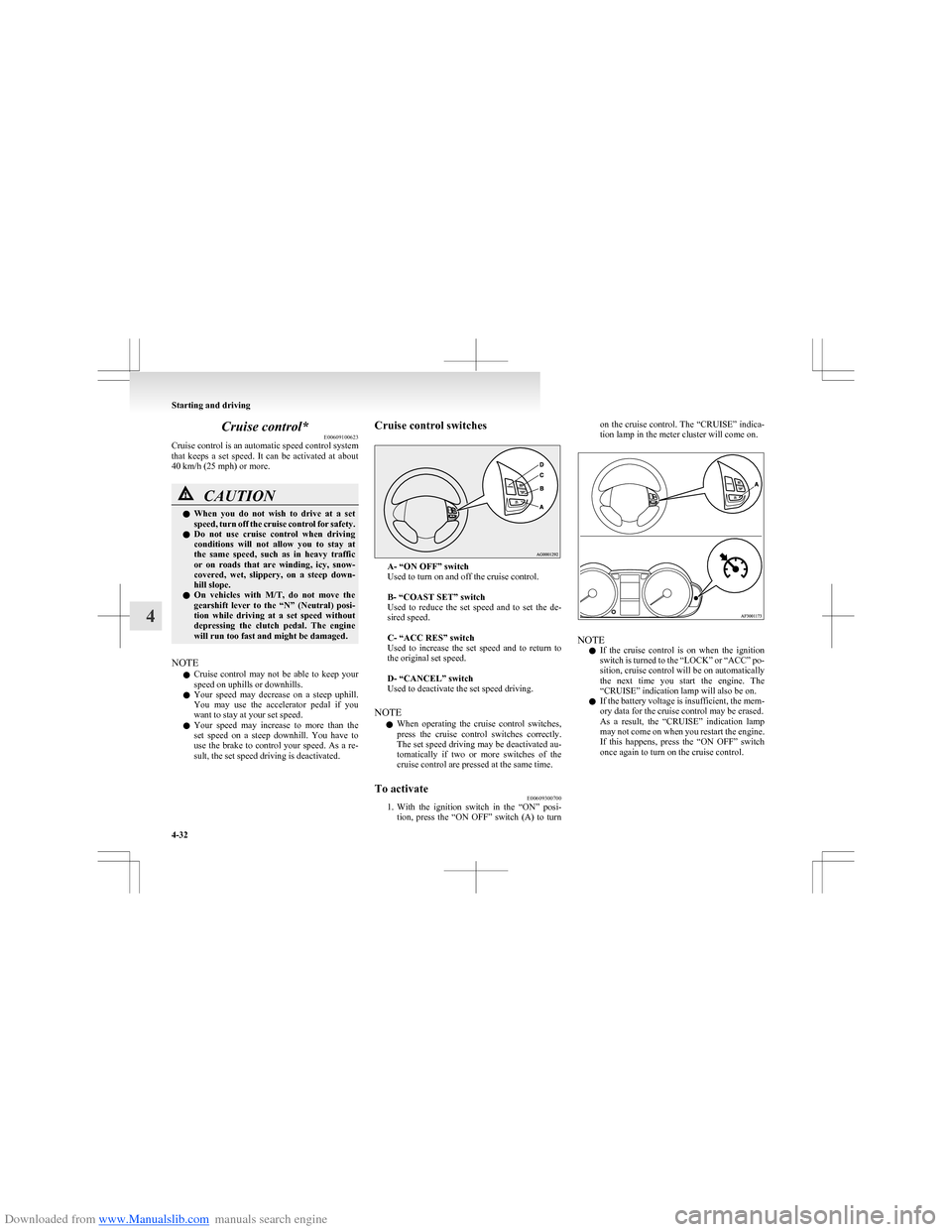
Cruise control switches
A- “ON OFF” switch
Used to turn on and off the cruise control.
B- “COAST SET” switch
Used to reduce the set speed and to set the de-
sired speed.
C- “ACC RES” switch
Used to increase the set speed and to return to
the original set speed.
D- “CANCEL” switch
Used to deactivate the set speed driving.
NOTE l When operating the cruise control switches,
press the cruise control switches correctly.
The set speed driving may be deactivated au-
tomatically if two or more switches of the
cruise control are pressed at the same time.
To activate E00609300700
1.With the ignition switch in the “ON” posi-
tion, press the “ON OFF” switch (A) to turn
on the cruise control. The “CRUISE” indica-
tion lamp in the meter cluster will come on.
NOTE
l If the cruise control is on when the ignition
switch is turned to the “LOCK” or “ACC” po-
sition, cruise control will be on automatically
the next time you start the engine. The
“CRUISE” indication lamp will also be on.
l If the battery voltage is insufficient, the mem-
ory data for the cruise control may be erased.
As a result, the “CRUISE” indication lamp
may not come on when you restart the engine.
If this happens, press the “ON OFF” switch
once again to turn on the cruise control.
Starting and driving
4-32
4
Page 136 of 273
Downloaded from www.Manualslib.com manuals search engine 2.Accelerate or decelerate to your desired
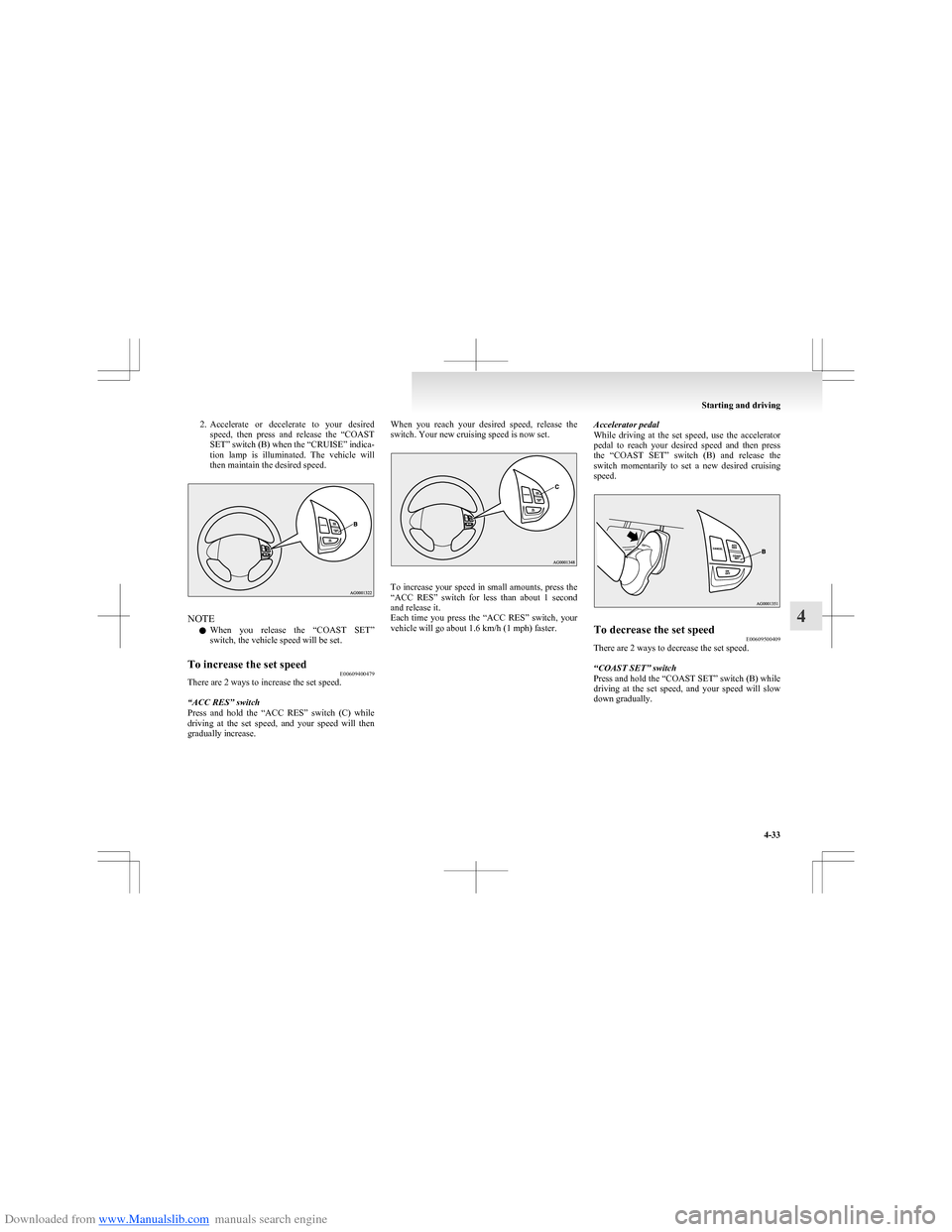
speed, then press and release the “COAST
SET” switch (B) when the “CRUISE” indica-
tion lamp is illuminated. The vehicle will
then maintain the desired speed.
NOTE
l When you release the “COAST SET”
switch, the vehicle speed will be set.
To increase the set speed E00609400479
There are 2 ways to increase the set speed.
“ACC RES” switch
Press and hold the “ACC RES” switch (C) while
driving at the set speed, and your speed will then
gradually increase.
When you reach your desired speed, release the
switch. Your new cruising speed is now set.
To increase your speed in small amounts, press the
“ACC RES” switch for less than about 1 second
and release it.
Each time you press the “ACC RES” switch, your
vehicle will go about 1.6 km/h (1 mph) faster.
Accelerator pedal
While driving at the set speed, use the accelerator
pedal to reach your desired speed and then press
the “COAST SET” switch (B) and release the
switch momentarily to set a new desired cruising
speed.To decrease the set speed E00609500409
There are 2 ways to decrease the set speed.
“COAST SET” switch
Press and hold the “COAST SET” switch (B) while
driving at the set speed, and your speed will slow
down gradually.
Starting and driving
4-33
4
Page 137 of 273
Downloaded from www.Manualslib.com manuals search engine When you reach your desired speed, release the
switch. Your new cruising speed is now set.
To slow down your speed in small amounts, press
the “COAST SET” switch for less than about 1 sec-
ond and release it.
Each time you press the “COAST SET” switch,
your vehicle will slow down by about 1.6 km/h
(1 mph).
Brake pedal
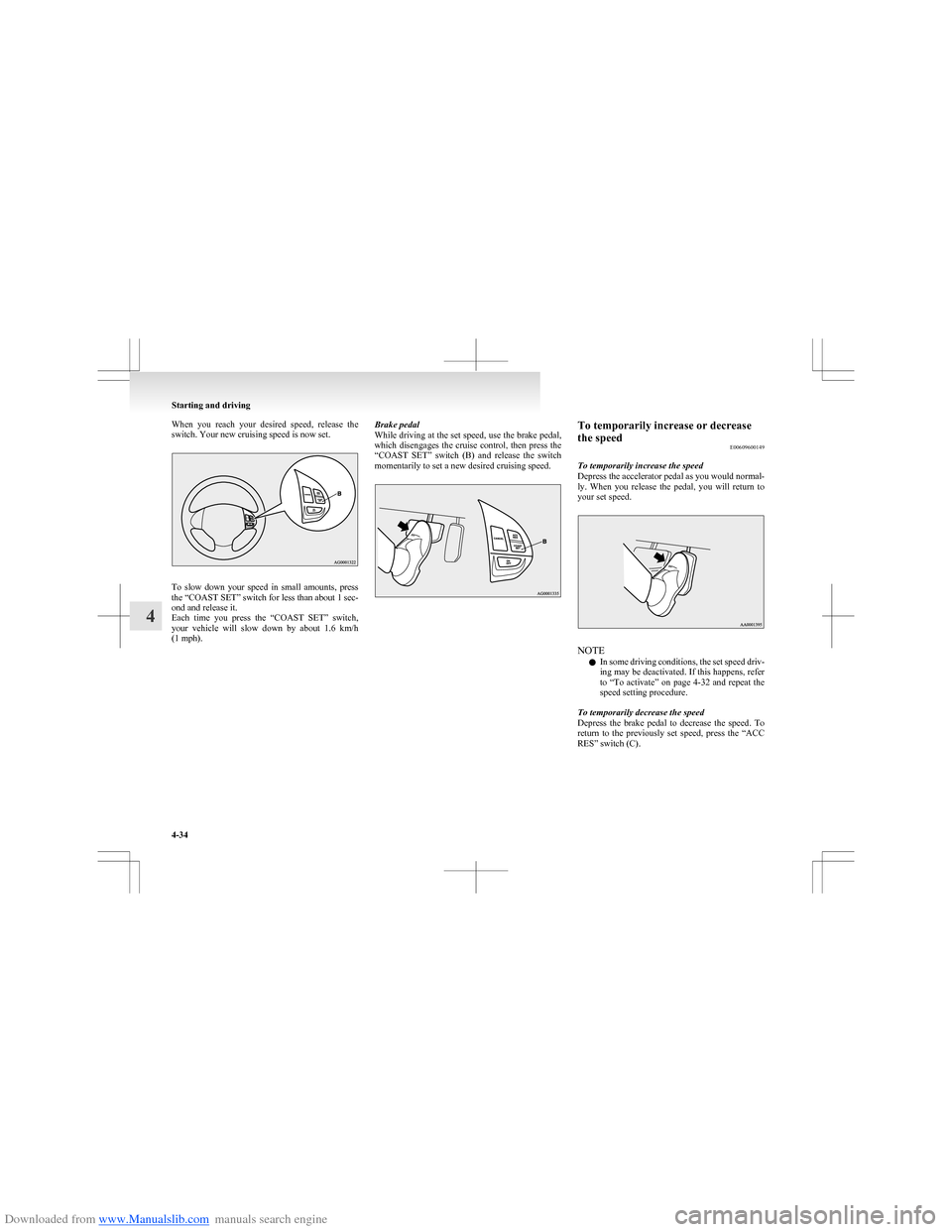
While driving at the set speed, use the brake pedal,
which disengages the cruise control, then press the
“COAST SET” switch (B) and release the switch
momentarily to set a new desired cruising speed.To temporarily increase or decrease
the speed E00609600149
To temporarily increase the speed
Depress the accelerator pedal as you would normal-
ly. When you release the pedal, you will return to
your set speed.
NOTE
l In some driving conditions, the set speed driv-
ing may be deactivated. If this happens, refer
to “To activate” on page 4-32 and repeat the
speed setting procedure.
To temporarily decrease the speed
Depress the brake pedal to decrease the speed. To
return to the previously set speed, press the “ACC
RES” switch (C).
Starting and driving
4-34
4