Sound MITSUBISHI ECLIPSE CROSS 2019 Owner's Manual (in English)
[x] Cancel search | Manufacturer: MITSUBISHI, Model Year: 2019, Model line: ECLIPSE CROSS, Model: MITSUBISHI ECLIPSE CROSS 2019Pages: 423, PDF Size: 75.41 MB
Page 18 of 423
If this problem occurs...
Quick index 2-5
2
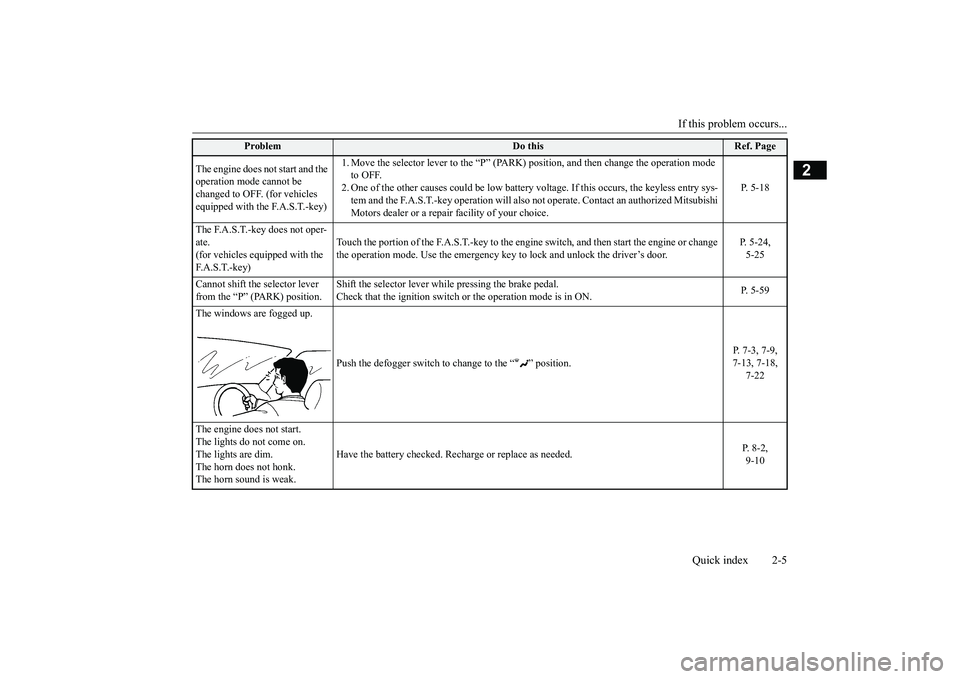
The engine does not start and the operation mode cannot be changed to OFF. (for vehicles equipped with the F.A.S.T.-key)
1. Move the selector lever to the “P” (PARK)
position, and then change the operation mode
to OFF. 2. One of the other causes could be low battery
voltage. If this occurs, the keyless entry sys-
tem and the F.A.S.T.-key operation will also no
t operate. Contact an authorized Mitsubishi
Motors dealer or a repair facility of your choice.
P. 5-18
The F.A.S.T.-key does not oper- ate.(for vehicles equipped with the F. A . S . T. - k e y )
Touch the portion of the F.A.S.T.-key to the engine
switch, and then start the engine or change
the operation mode. Use the emergency key to lock and unlock the driver’s door.
P. 5-24, 5-25
Cannot shift the selector lever from the “P” (PARK) position.
Shift the selector lever while pressing the brake pedal. Check that the ignition switch or the operation mode is in ON.
P. 5-59
The windows are fogged up.
Push the defogger switch to
change to the “ ” position.
P. 7-3, 7-9, 7-13, 7-18,
7-22
The engine does not start. The lights do not come on. The lights are dim.The horn does not honk. The horn sound is weak.
Have the battery checked. Recharge or replace as needed.
P. 8-2, 9-10
Problem
Do this
Ref. Page
BK0266800US.bo
ok 5 ページ 2018年6月27日 水曜日 午後5時6分
Page 25 of 423
Filling the fuel tank 3-4 General information
3
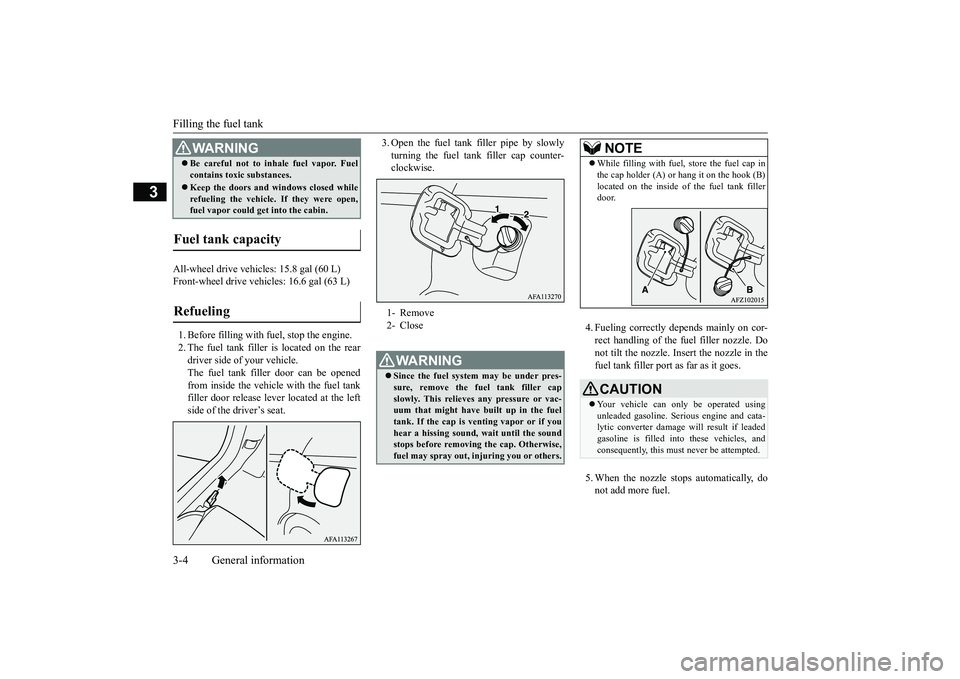
All-wheel drive vehicles: 15.8 gal (60 L) Front-wheel drive vehicles: 16.6 gal (63 L) 1. Before filling with fuel, stop the engine. 2. The fuel tank filler is located on the rear driver side of your vehicle. The fuel tank filler door can be openedfrom inside the vehicle with the fuel tank filler door release le
ver located at the left
side of the driver’s seat.
3. Open the fuel tank filler pipe by slowly turning the fuel tank filler cap counter- clockwise.
4. Fueling correctly depends mainly on cor- rect handling of the fuel filler nozzle. Do not tilt the nozzle. Insert the nozzle in thefuel tank filler port as far as it goes. 5. When the nozzle stops automatically, do not add more fuel.
Be careful not to inhale fuel vapor. Fuel contains toxic substances. Keep the doors and windows closed while refueling the vehicle. If they were open,fuel vapor could get into the cabin.
Fuel tank capacity Refueling
WA R N I N G
1- Remove 2- CloseWA R N I N G Since the fuel system may be under pres- sure, remove the fuel tank filler cap slowly. This relieves any pressure or vac- uum that might have built up in the fueltank. If the cap is venting vapor or if you hear a hissing sound, wait until the sound stops before removing the cap. Otherwise,fuel may spray out, injuring you or others.
NOTE
While filling with fuel, store the fuel cap in the cap holder (A) or hang it on the hook (B) located on the inside of the fuel tank filler door.CAUTION Your vehicle can only be operated using unleaded gasoline. Serious engine and cata- lytic converter damage will result if leadedgasoline is filled into these vehicles, and consequently, this must never be attempted.
BK0266800US.bo
ok 4 ページ 2018年6月27日 水曜日 午後5時6分
Page 26 of 423
Telematics Control Unit (TCU) (if so equipped)
General information 3-5
3
6. To re-install, turn the fuel tank filler pipe cap slowly clockwise until you hear click- ing sounds, then gently push the fuel tank filler door closed.
N00302500028
The Telematics Control Unit (TCU) uses amobile communication network to transmitnotifications (SOS emergency assist/Informa- tion assist) in case of emergency and vehicle information. The TCU also allows you to useyour smartphone to operate some vehicle functions remotely.
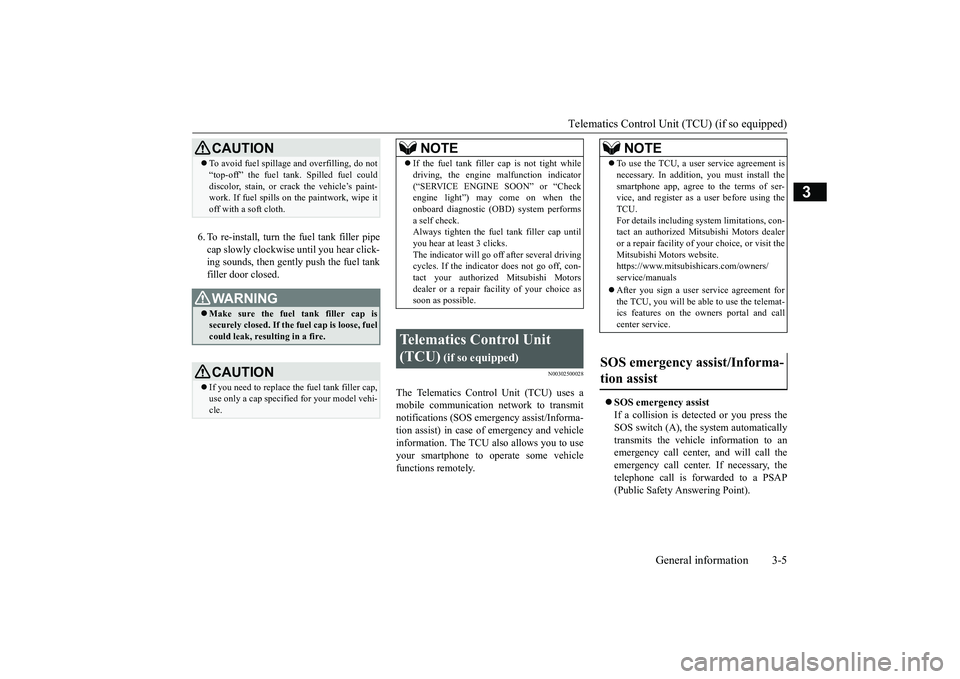
SOS emergency assist If a collision is detected or you press the SOS switch (A), the system automaticallytransmits the vehicle information to an emergency call center, and will call the emergency call center. If necessary, thetelephone call is forwarded to a PSAP (Public Safety Answering Point).
CAUTION To avoid fuel spillage and overfilling, do not “top-off” the fuel tank. Spilled fuel could discolor, stain, or crack the vehicle’s paint- work. If fuel spills on the paintwork, wipe it off with a soft cloth.WA R N I N G Make sure the fuel tank filler cap is securely closed. If the fuel cap is loose, fuel could leak, resulting in a fire.CAUTION If you need to replace the fuel tank filler cap, use only a cap specified for your model vehi- cle.
NOTE
If the fuel tank filler
cap is not tight while
driving, the engine malfunction indicator (“SERVICE ENGINE SOON” or “Check engine light”) may come on when the onboard diagnostic (OBD) system performsa self check. Always tighten the fuel tank filler cap until you hear at least 3 clicks.The indicator will go off after several driving cycles. If the indicator does not go off, con- tact your authorized Mitsubishi Motorsdealer or a repair facility of your choice as soon as possible.
Telematics Control Unit (TCU)
(if so equipped)
NOTE
To use the TCU, a user service agreement is necessary. In addition, you must install the smartphone app, agree to the terms of ser- vice, and register as a user before using the TCU.For details including system limitations, con- tact an authorized Mitsubishi Motors dealer or a repair facility of
your choice, or visit the
Mitsubishi Motors website. https://www.mitsubishicars.com/owners/ service/manuals After you sign a user service agreement for the TCU, you will be able to use the telemat-ics features on the owners portal and call center service.
SOS emergency assist/Informa- tion assist
BK0266800US.bo
ok 5 ページ 2018年6月27日 水曜日 午後5時6分
Page 31 of 423
Telematics Control Unit (TCU) (if so equipped) 3-10 General information
3
Alarm notification When the vehicle's theft-alarm system is activated, an alert is sent to the smart- phone using a short message service(SMS), e-mail, or push notification.
Stolen vehicle tracking The vehicle tracking function can be usedby the call center to provide the vehicle location information quickly to police. Remote door lock/unlock The vehicle doors and liftgate can be locked and unlocked using the smart- phone app.
Remote climate control The engine can be started and the air con-ditioning can be operated using the smart- phone app. Car finder The location of the parked vehicle can be confirmed using the smartphone app. Remote horn You can make the horn sound using thesmartphone app. Remote light The lights can be turned on using thesmartphone app. Speed alert If you set a vehicle speed limit beforehandusing the smartphone app, an alert is sent to the smartphone app when the vehicle speed exceeds that limit.
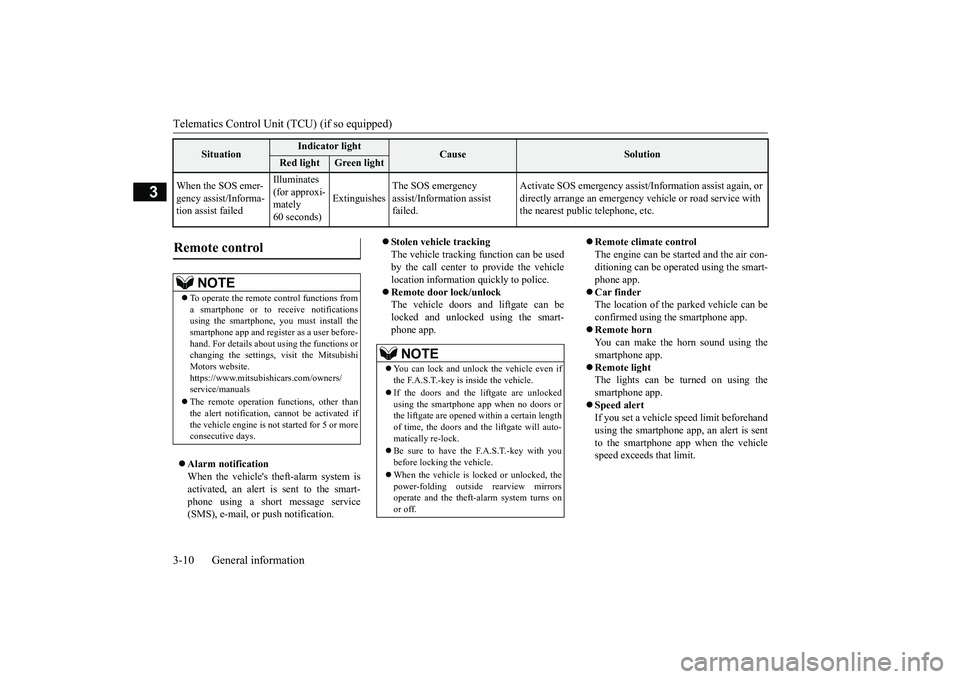
When the SOS emer- gency assist/Informa- tion assist failed
Illuminates (for approxi-mately 60 seconds)
Extinguishes
The SOS emergency assist/Information assist failed.
Activate SOS emergency assist/I
nformation assist again, or
directly arrange an emergency
vehicle or road service with
the nearest public telephone, etc.
Situation
Indicator light
Cause
Solution
Red light
Green light
Remote control
NOTE
To operate the remote control functions from a smartphone or to receive notifications using the smartphone, you must install thesmartphone app and register as a user before- hand. For details about using the functions or changing the settings,
visit the Mitsubishi
Motors website. https://www.mitsubishicars.com/owners/ service/manuals The remote operation functions, other than the alert notification, cannot be activated ifthe vehicle engine is not started for 5 or more consecutive days.
NOTE
You can lock and unlock the vehicle even if the F.A.S.T.-key is inside the vehicle. If the doors and the liftgate are unlocked using the smartphone app when no doors or the liftgate are opened within a certain length of time, the doors and the liftgate will auto-matically re-lock. Be sure to have the F.A.S.T.-key with you before locking the vehicle. When the vehicle is locked or unlocked, the power-folding outside rearview mirrors operate and the theft-alarm system turns on or off.
BK0266800US.bo
ok 10 ページ 2018年6月27日 水曜日 午後5時6分
Page 56 of 423
Seat belts
Seat and restraint systems 4-19
4
If the ignition switch is turned to the “ON” position or the operation mode is put in ON without the driver’s seat belt being fastened, a warning light will come on and a tone willsound for approximately 6 seconds to remind you to fasten your seat belt. If the vehicle is driven with the seat belt stillunfastened, the warning light will blink and the tone will sound intermittently until the seat belt is fastened. At the same time, “FAS-TEN SEAT BELT” is displayed on the infor-mation screen in the multi-information display.
N00418301276
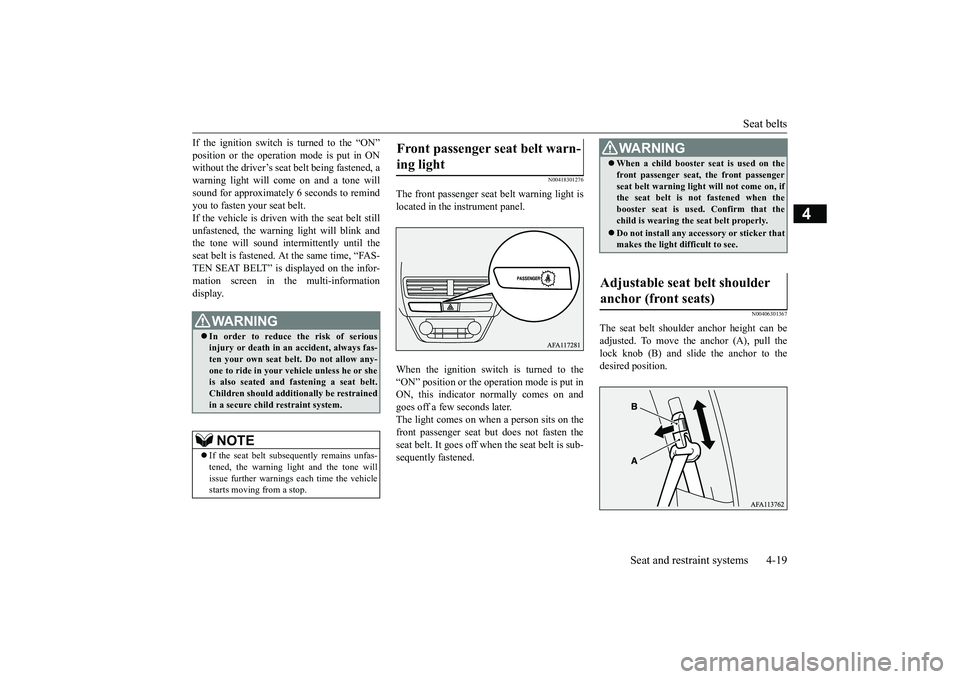
The front passenger seat belt warning light is located in the instrument panel. When the ignition switch is turned to the “ON” position or the operation mode is put inON, this indicator normally comes on and goes off a few seconds later. The light comes on when a person sits on thefront passenger seat but does not fasten the seat belt. It goes off when the seat belt is sub- sequently fastened.
N00406301367
The seat belt shoulder anchor height can beadjusted. To move the anchor (A), pull the lock knob (B) and slide the anchor to the desired position.
WA R N I N G In order to reduce the risk of serious injury or death in an accident, always fas-ten your own seat belt. Do not allow any- one to ride in your vehicle unless he or she is also seated and fastening a seat belt.Children should additionally be restrained in a secure child restraint system.NOTE
If the seat belt subsequently remains unfas- tened, the warning light and the tone will issue further warnings each time the vehiclestarts moving from a stop.
Front passenger seat belt warn- ing light
WA R N I N G When a child booster seat is used on the front passenger seat, the front passenger seat belt warning light will not come on, if the seat belt is not fastened when the booster seat is used. Confirm that thechild is wearing the seat belt properly. Do not install any accessory or sticker that makes the light difficult to see.
Adjustable seat belt shoulder anchor (front seats)
BK0266800US.bo
ok 19 ページ 2018年6月27日 水曜日 午後5時6分
Page 90 of 423
Keyless entry system (if so equipped)
Features and controls 5-7
5
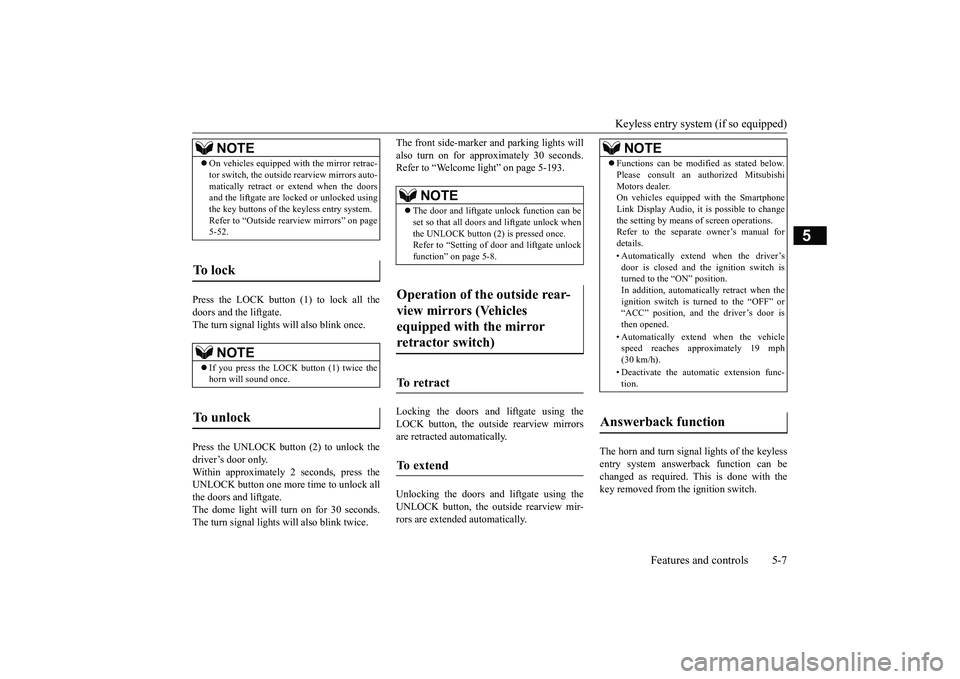
Press the LOCK button (1) to lock all the doors and the liftgate. The turn signal lights will also blink once. Press the UNLOCK button (2) to unlock the driver’s door only. Within approximately 2 seconds, press theUNLOCK button one more time to unlock all the doors and liftgate. The dome light will turn on for 30 seconds.The turn signal lights will also blink twice.
The front side-marker and parking lights will also turn on for approximately 30 seconds. Refer to “Welcome light” on page 5-193. Locking the doors and liftgate using the LOCK button, the outside rearview mirrorsare retracted automatically. Unlocking the doors and liftgate using the UNLOCK button, the outs
ide rearview mir-
rors are extended automatically.
The horn and turn signal lights of the keyless entry system answerback function can be changed as required. This is done with the key removed from the ignition switch.
NOTE
On vehicles equipped with the mirror retrac- tor switch, the outside rearview mirrors auto- matically retract or extend when the doors and the liftgate are lock
ed or unlocked using
the key buttons of the keyless entry system.Refer to “Outside rearview mirrors” on page 5-52.
To l o c k
NOTE
If you press the LOCK button (1) twice the horn will sound once.
To u n l o c k
NOTE
The door and liftgate unlock function can be set so that all doors and liftgate unlock when the UNLOCK button (2) is pressed once. Refer to “Setting of door and liftgate unlockfunction” on page 5-8.
Operation of the outside rear- view mirrors (Vehicles equipped with the mirror retractor switch)
To retract
To e x t e n d
NOTE
Functions can be modified as stated below. Please consult an authorized Mitsubishi Motors dealer. On vehicles equipped with the Smartphone Link Display Audio, it is possible to changethe setting by means of screen operations. Refer to the separate owner’s manual for details. • Automatically extend when the driver’s door is closed and the ignition switch isturned to the “ON” position. In addition, automatically retract when the ignition switch is turned to the “OFF” or“ACC” position, and the driver’s door is then opened. • Automatically extend when the vehicle speed reaches approximately 19 mph (30 km/h). • Deactivate the automatic extension func- tion.
Answerback function
BK0266800US.bo
ok 7 ページ 2018年6月27日 水曜日 午後5時6分
Page 91 of 423
Keyless entry system (if so equipped) 5-8 Features and controls
5
The answerback function can be set in the following three ways. Each time the answerback function is set, achime will sound to tell
you the condition of
the answerback function. One chime: The horn will not sound. Two chimes: The horn will sound. Four chimes: The horn will sound if theLOCK button is pressed twice within 1 sec- ond. 1. Remove the key from the ignition switch. 2. Open the driver’s door and turn the com-bination headlights and dimmer switch to the “OFF” position. 3. Press the LOCK button (1) for 4 to 10 sec-onds and press the UNLOCK button (2) during this time. 4. Release in sequence the UNLOCK andLOCK buttons within 5 seconds of press- ing the UNLOCK button in step 3.
The answerback function can be turned ON or OFF separately. 1. Remove the key from the ignition switch. 2. Open the driver’s door and turn the com- bination headlights and dimmer switch tothe “OFF” position. 3. Press the UNLOCK button (2) for 4 to 10 seconds and press the LOCK button(1) during this time. 4. Release in sequence the UNLOCK and LOCK buttons within 5 seconds of press-ing the LOCK button in step 3.
N00543601216
The door and liftgate unlock function can beset to the following two conditions. Each time the door and liftgate unlock func- tion is set, a chime will sound to tell you thecondition of the door and liftgate unlock function.
NOTE
The answerback function will not operate if any of the doors are open.
Horn deactivation/reactivation
NOTE
On vehicles equipped with the Smartphone Link Display Audio, the functions can be adjusted on the screen. For details, refer to the separate owner’s manual.
Turn signal lights deactiva- tion/reactivation
Number of chimes
To l o c k
To u n l o c k
One chime One flash Two flashes Two chimes One flash No flashThree chimes No flash Two flashesFour chimes Two flashes One flash
Five chimes No flash One flashSix chimes Two flashes No flashSeven chimes
No flash No flash
NOTE
On vehicles equipped with the Smartphone Link Display Audio, the functions can be adjusted on the screen. For details, refer tothe separate owner’s manual.
Setting of door and liftgate unlock function
Number of chimes
Condition
One chime
When the UNLOCK button is pressed one time, all doors and the liftgate unlock.
Number of chimes
To l o c k
To u n l o c k
BK0266800US.bo
ok 8 ページ 2018年6月27日 水曜日 午後5時6分
Page 92 of 423
Keyless entry system (if so equipped)
Features and controls 5-9
5
1. Remove the key from the ignition switch. 2. Open the driver’s door and turn the com- bination headlights and dimmer switch tothe “OFF” position.3. Press the LOCK button (1) for 4 to 10 sec- onds and press the UNLOCK button (2) during this time.4. Release in sequence the LOCK and UNLOCK buttons within 10 seconds of pressing the LOCK button in step 3.
N00543701086
If you are near your vehicle and feel threat-ened, you may activate the alarm to call atten-tion as follows: 1. Press the PANIC button (3) for more than 1 second. 2. The headlights will blink on and off andthe horn will sound intermittently forapproximately 3 minutes. 3. To turn off the alarm, press any button on the key.
N00543801104
Only keys programmed with the vehicle’selectronics can lock
or unlock all doors and
the liftgate. If you lose the key, you can order a key from your authorized Mitsubishi Motors dealer by referring to the key number.To prevent vehicle theft, the ID code for the key must be changed. Take your vehicle and all keys to your autho-rized Mitsubishi Motors dealer to have your ID code changed.
N00543901075
To add a key, you must already have one reg- istered key.Registering the ID code can be done by your- self or by your authorized Mitsubishi Motors dealer. For you to register the ID code your-self, follow the “Customer key program- ming” procedure below. If you choose to have your authorizedMitsubishi Motors dealer register the IDcode, take your vehicle and any remaining keys to your authorized Mitsubishi Motors dealer.
N00544001246
You can program new keys to the system ifyou have one valid (already registered) key by doing the following: 1. Have available all (current and new) keys you wish to register.
Two chimes
When the UNLOCK button is pressed one time, only the driver’s door unlocks. Within approximately 2 seconds, press the UNLOCK button one more time to unlock all the doors and the liftgate. [Factory setting]
NOTE
On vehicles equipped with the Smartphone Link Display Audio, the functions can be adjusted on the screen. For details, refer tothe separate owner’s manual.Number of chimes
Condition
Using the panic alarm
Replacement keys
Additional keys
NOTE
You are provided with two keys, but you may register up to eight keys.
Customer key programming (Except for vehicles sold in Canada)
BK0266800US.bo
ok 9 ページ 2018年6月27日 水曜日 午後5時6分
Page 97 of 423
Free-hand Advanced Security Transmitter (F.A.S.T.-key) (if so equipped) 5-14 Features and controls
5
N00503301107
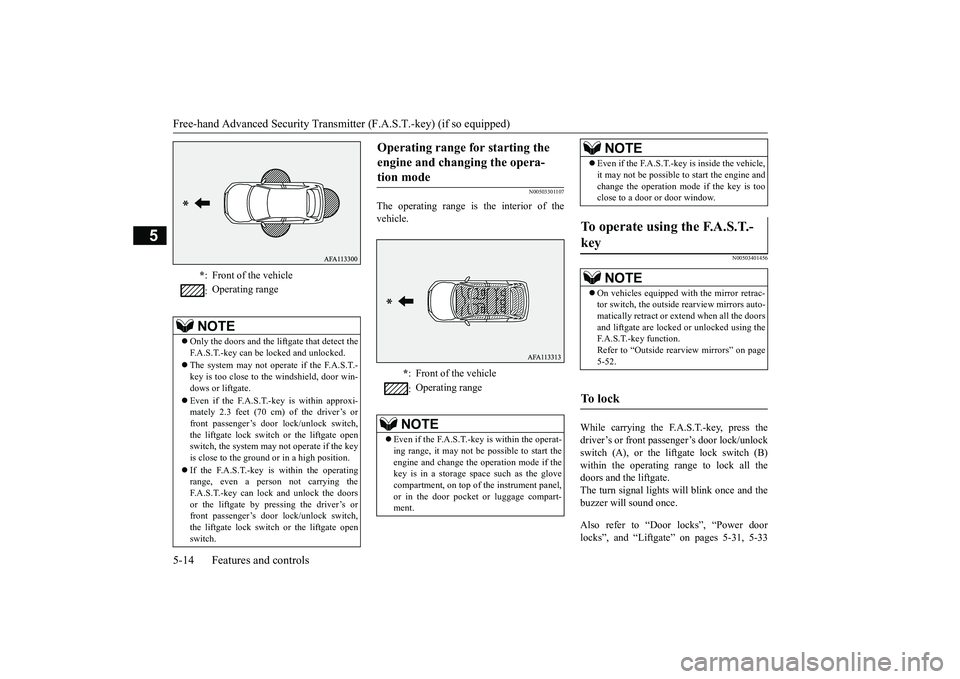
The operating range is the interior of the vehicle.
N00503401456
While carrying the F.A.S.T.-key, press thedriver’s or front passenger’s door lock/unlock switch (A), or the liftgate lock switch (B) within the operating range to lock all thedoors and the liftgate. The turn signal lights will blink once and the buzzer will sound once. Also refer to “Door locks”, “Power door locks”, and “Liftgate” on pages 5-31, 5-33
* : Front of the vehicle : Operating range
NOTE
Only the doors and the liftgate that detect the F.A.S.T.-key can be locked and unlocked. The system may not operate if the F.A.S.T.- key is too close to the windshield, door win- dows or liftgate. Even if the F.A.S.T.-key is within approxi- mately 2.3 feet (70 cm) of the driver’s or front passenger’s door lock/unlock switch,the liftgate lock switch or the liftgate open switch, the system may not operate if the key is close to the ground or in a high position. If the F.A.S.T.-key is within the operating range, even a person not carrying theF.A.S.T.-key can lock and unlock the doors or the liftgate by pressing the driver’s or front passenger’s door lock/unlock switch,the liftgate lock switch or the liftgate open switch.
Operating range for starting the engine and changing the opera- tion mode
* : Front of the vehicle : Operating range
NOTE
Even if the F.A.S.T.-key is within the operat- ing range, it may not be possible to start theengine and change the operation mode if the key is in a storage space such as the glove compartment, on top of
the instrument panel,
or in the door pocket or luggage compart- ment.
Even if the F.A.S.T.-key is inside the vehicle, it may not be possible to start the engine and change the operation mode if the key is too close to a door or door window.
To operate using the F.A.S.T.- key
NOTE
On vehicles equipped with the mirror retrac- tor switch, the outside rearview mirrors auto- matically retract or extend when all the doors and liftgate are locked or unlocked using theF.A.S.T.-key function. Refer to “Outside rearview mirrors” on page 5-52.
To l o c k
NOTE
BK0266800US.bo
ok 14 ページ 2018年6月27日 水曜日 午後5時6分
Page 98 of 423
Free-hand Advanced Security Transmit
ter (F.A.S.T.-key) (if so equipped)
Features and controls 5-15
5
and 5-35 respectively.
While carrying the F.A.S.T.-key within the operating range, you can unlock the doors
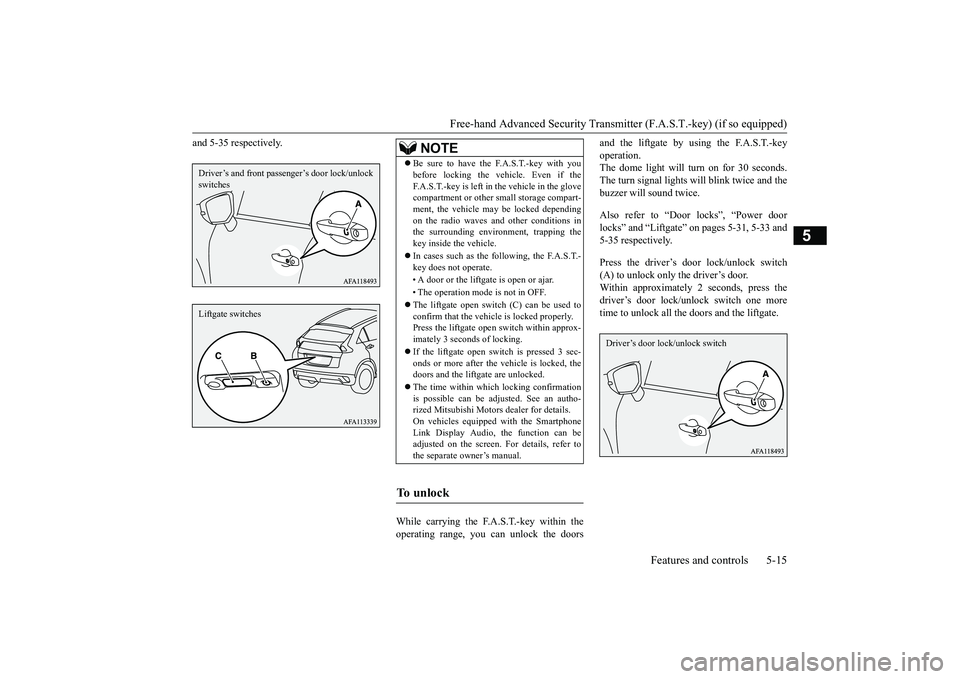
and the liftgate by using the F.A.S.T.-key operation. The dome light will turn on for 30 seconds. The turn signal lights will blink twice and thebuzzer will sound twice. Also refer to “Door locks”, “Power door locks” and “Liftgate” on pages 5-31, 5-33 and 5-35 respectively. Press the driver’s door lock/unlock switch (A) to unlock only the driver’s door.Within approximately 2 seconds, press the driver’s door lock/unlock switch one more time to unlock all the doors and the liftgate.
Driver’s and front passen
ger’s door lock/unlock
switchesLiftgate switches
NOTE
Be sure to have the F.A.S.T.-key with you before locking the vehicle. Even if the F.A.S.T.-key is left in the vehicle in the glove compartment or other small storage compart- ment, the vehicle may be locked dependingon the radio waves and other conditions in the surrounding environment, trapping the key inside the vehicle. In cases such as the following, the F.A.S.T.- key does not operate. • A door or the liftga
te is open or ajar.
• The operation mode is not in OFF. The liftgate open switch (C) can be used to confirm that the vehicle is locked properly. Press the liftgate open switch within approx- imately 3 seconds of locking. If the liftgate open switch is pressed 3 sec- onds or more after the vehicle is locked, thedoors and the liftgate are unlocked. The time within which locking confirmation is possible can be adjusted. See an autho- rized Mitsubishi Motors dealer for details. On vehicles equipped with the SmartphoneLink Display Audio, the function can be adjusted on the screen. For details, refer to the separate owner’s manual.
To u n l o c k
Driver’s door lock/unlock switch
BK0266800US.bo
ok 15 ページ 2018年6月27日 水曜日 午後5時6分