tcl MITSUBISHI ENDEAVOR 2004 Service Repair Manual
[x] Cancel search | Manufacturer: MITSUBISHI, Model Year: 2004, Model line: ENDEAVOR, Model: MITSUBISHI ENDEAVOR 2004Pages: 3870, PDF Size: 98.47 MB
Page 2 of 3870
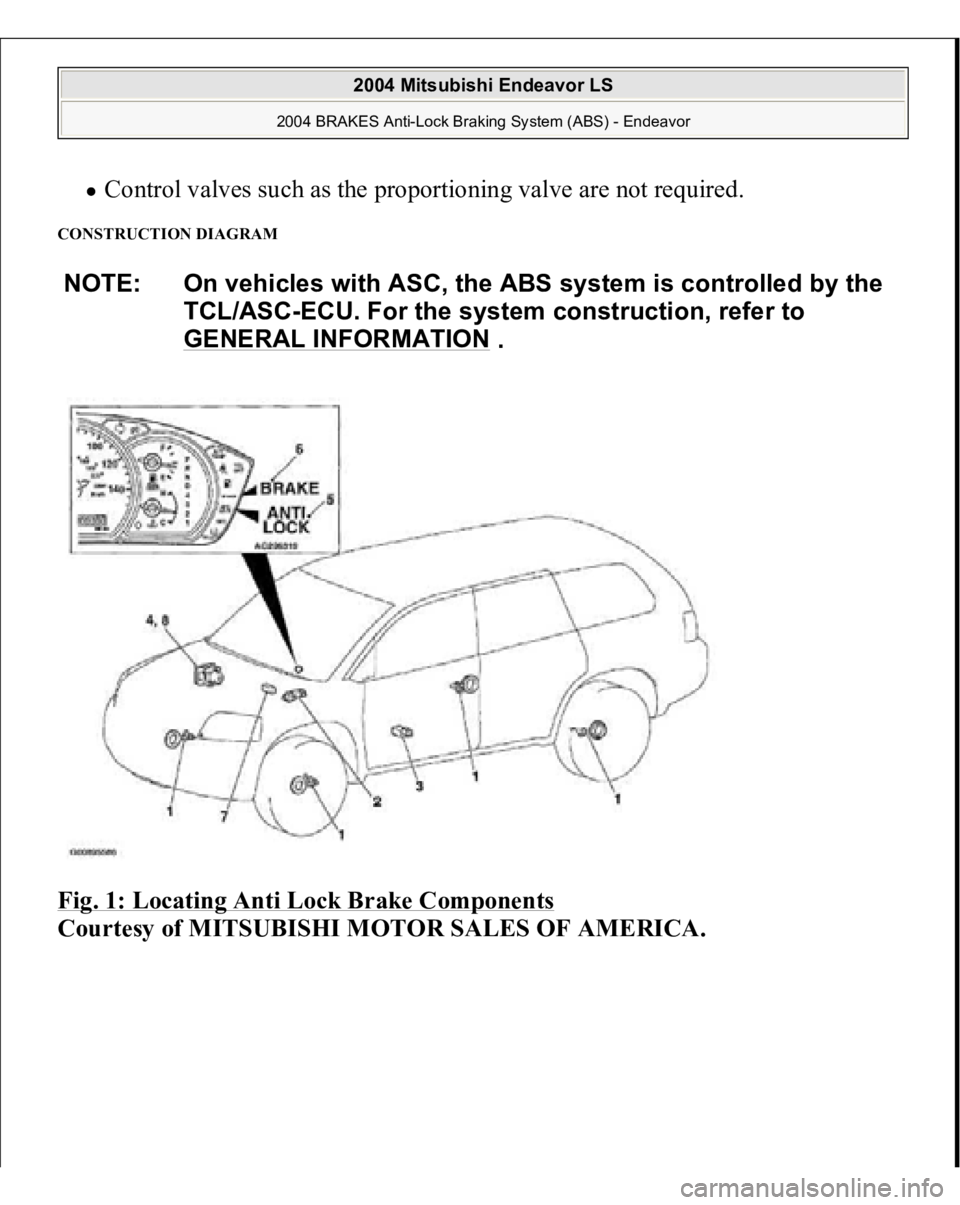
Control valves such as the proportioning valve are not required.
CONSTRUCTION DIAGRAM Fig. 1: Locating Anti Lock Brake Components
Courtesy of MITSUBISHI MOTOR SALES OF AMERICA.NOTE: On vehicles with ASC, the ABS system is controlled by the
TCL/ASC-ECU. For the system construction, refer to
GENERAL INFORMATION
.
2004 Mitsubishi Endeavor LS
2004 BRAKES Anti-Lock Braking System (ABS) - Endeavor
Page 17 of 3870
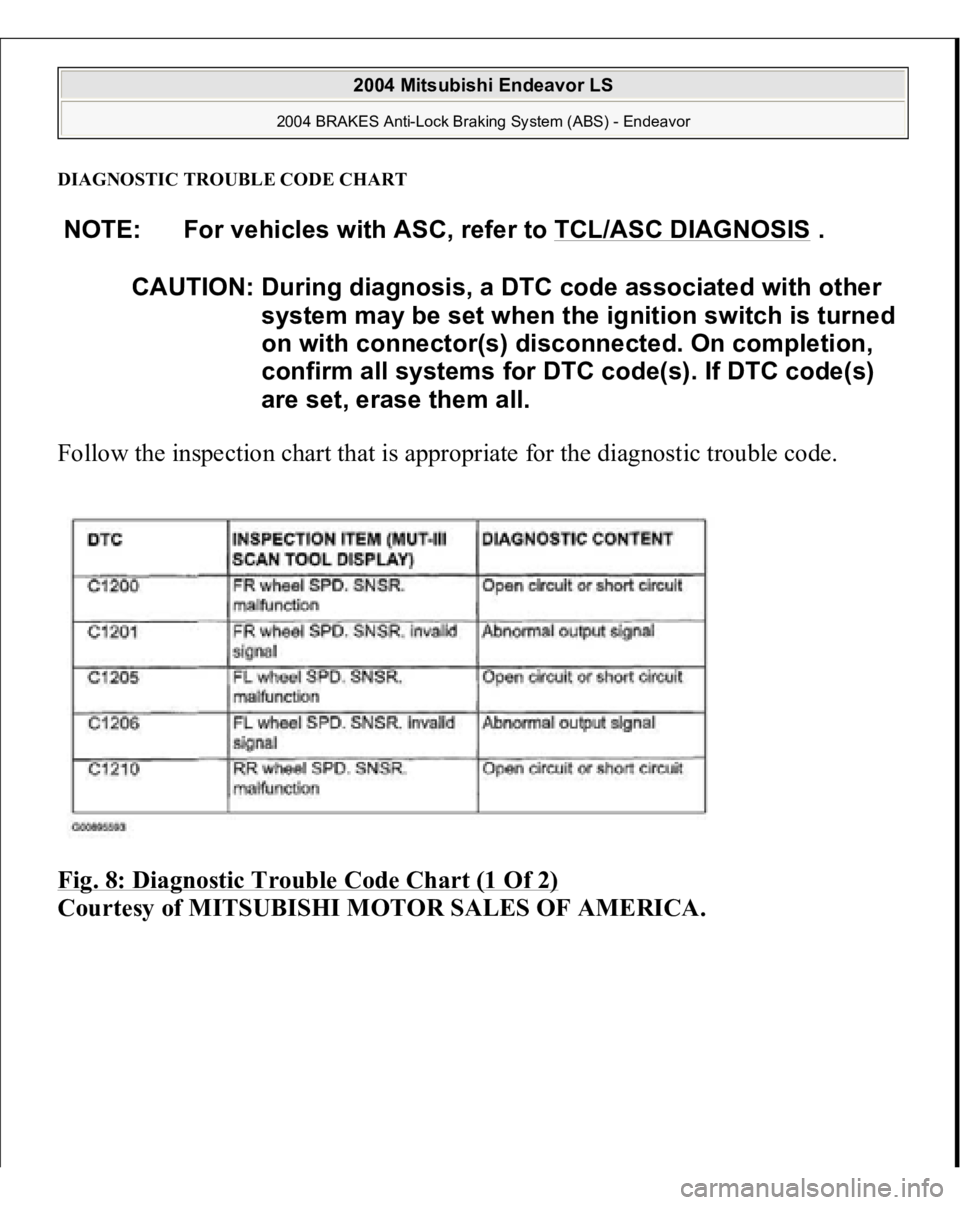
DIAGNOSTIC TROUBLE CODE CHARTFollow the inspection chart that is appropriate for the diagnostic trouble code.
Fig. 8: Diagnostic Trouble Code Chart (1 Of 2)
Courtesy of MITSUBISHI MOTOR SALES OF AMERICA.NOTE: For vehicles with ASC, refer to TCL/ASC DIAGNOSIS
.
CAUTION: During diagnosis, a DTC code associated with other
system may be set when the ignition switch is turned
on with connector(s) disconnected. On completion,
confirm all systems for DTC code(s). If DTC code(s)
are set, erase them all.
2004 Mitsubishi Endeavor LS
2004 BRAKES Anti-Lock Braking System (ABS) - Endeavor
Page 24 of 3870
2. Turn the ignition switch to the "ON" position.
3. Diagnose the CAN bus line.
4. Turn the ignition switch to the "LOCK" (OFF) position.
Q: Is the CAN bus line found to be normal?
YES: Go to Step 3
NO: Repair the CAN bus line (Refer to TCL/ASC DIAGNOSIS
, ). Then
go to Step 2.
STEP 2. Recheck for diagnostic trouble code.
1. Turn the ignition switch to the "ON" position.
2. Erase the DTC. CAUTION: To prevent damage to scan tool MB991958,
always turn the ignition switch to the
"LOCK" (OFF) position before connecting or
disconnecting scan tool MB991958.
2004 Mitsubishi Endeavor LS
2004 BRAKES Anti-Lock Braking System (ABS) - Endeavor
Page 93 of 3870
2. Turn the ignition switch to the "ON" position.
3. Diagnose the CAN bus line.
4. Turn the ignition switch to the "LOCK" (OFF) position.
Q: Is the CAN bus line found to be normal?
YES: Go to Step 3 .
NO: Repair the CAN bus line (Refer to TCL/ASC DIAGNOSIS
, or
DIAGNOSIS < VEHICLES WITHOUT ADVANCED AIR BAG
).
Then go to Step 2.
STEP 2. Recheck for diagnostic trouble code.
1. Erase the DTC.
2. Turn the ignition switch to the "ON" position.
3. Check if the DTC is set. CAUTION: To prevent damage to scan tool MB991958,
always turn the ignition switch to the
"LOCK" (OFF) position before connecting or
disconnecting scan tool MB991958.
2004 Mitsubishi Endeavor LS
2004 BRAKES Anti-Lock Braking System (ABS) - Endeavor
Page 129 of 3870
Courtesy of MITSUBISHI MOTOR SALES OF AMERICA
.
2. Turn the ignition switch to the "ON" position.
3. Diagnose the CAN bus line.
4. Turn the ignition switch to the "LOCK" (OFF) position.
Q: Is the CAN bus line found to be normal?
YES: Go to Step 3 .
NO: Repair the CAN bus line (Refer to TCL/ASC DIAGNOSIS , or
DIAGNOSIS < VEHICLES WITHOUT ADVANCED AIR BAG
).
Then go to Step 2.
STEP 2. Recheck for diagnostic trouble code.
1. Turn the ignition switch to the "ON" position.
2. Erase the DTC.
3. Turn the ignition switch to the "LOCK" (OFF) position.
4. Turn the ignition switch to the "ON" position.
5. Check if the DTC is set. CAUTION: To prevent damage to scan tool MB991958,
always turn the ignition switch to the
"LOCK" (OFF) position before connecting or
disconnecting scan tool MB991958.
2004 Mitsubishi Endeavor LS
2004 BRAKES Anti-Lock Braking System (ABS) - Endeavor
Page 149 of 3870
2. Turn the ignition switch to the "ON" position.
3. Diagnose the CAN bus line.
4. Turn the ignition switch to the "LOCK" (OFF) position.
Q: Is the CAN bus line found to be normal?
YES: Go to Step 3 .
NO: Repair the CAN bus line (Refer to , TCL/ASC DIAGNOSIS
or
DIAGNOSIS < VEHICLES WITHOUT ADVANCED AIR BAG ).
Then go to Step 2.
STEP 2. Recheck for diagnostic trouble code.
1. Turn the ignition switch to the "ON" position.
2. Erase the DTC.
3. Turn the ignition switch to the "LOCK" (OFF) position.
4. Turn the ignition switch to the "ON" position.
5. Check if the DTC is set. CAUTION: To prevent damage to scan tool MB991958,
always turn the ignition switch to the
"LOCK" (OFF) position before connecting or
disconnecting scan tool MB991958.
2004 Mitsubishi Endeavor LS
2004 BRAKES Anti-Lock Braking System (ABS) - Endeavor
Page 178 of 3870
2. Turn the ignition switch to the "ON" position.
3. Diagnose the CAN bus line.
4. Turn the ignition switch to the "LOCK" (OFF) position.
Q: Is the CAN bus line found to be normal?
YES: Go to Step 2.
NO: Repair the CAN bus line (Refer to TCL/ASC DIAGNOSIS
,
DIAGNOSIS or DIAGNOSIS < VEHICLES WITHOUT ADVANCED
AIR BAG
). Then go to Step 2.
STEP 2. Recheck for diagnostic trouble code.
1. Turn the ignition switch to the "ON" position.
2. Erase the DTC.
3. Turn the ignition switch to the "LOCK" (OFF) position.
4. Turn the ignition switch to the "ON" position.
5. Check if the DTC is set. CAUTION: To prevent damage to scan tool MB991958,
always turn the ignition switch to the
"LOCK" (OFF) position before connecting or
disconnecting scan tool MB991958.
2004 Mitsubishi Endeavor LS
2004 BRAKES Anti-Lock Braking System (ABS) - Endeavor
Page 183 of 3870
Courtesy of MITSUBISHI MOTOR SALES OF AMERICA
.
2. Turn the ignition switch to the "ON" position.
3. Diagnose the CAN bus line.
4. Turn the ignition switch to the "LOCK" (OFF) position.
Q: Is the CAN bus line found to be normal?
YES: Go to Step 2.
NO: Repair the CAN bus line (Refer to TCL/ASC DIAGNOSIS , or
DIAGNOSIS < VEHICLES WITHOUT ADVANCED AIR BAG
).
Then go to Step 2.
STEP 2. Recheck for diagnostic trouble code.
1. Turn the ignition switch to the "ON" position.
2. Erase the DTC.
3. Turn the ignition switch to the "LOCK" (OFF) position.
4. Turn the ignition switch to the "ON" position.
5. Check if the DTC is set. CAUTION: To prevent damage to scan tool MB991958,
always turn the ignition switch to the
"LOCK" (OFF) position before connecting or
disconnecting scan tool MB991958.
2004 Mitsubishi Endeavor LS
2004 BRAKES Anti-Lock Braking System (ABS) - Endeavor
Page 189 of 3870
Courtesy of MITSUBISHI MOTOR SALES OF AMERICA
.
2. Turn the ignition switch to the "ON" position.
3. Diagnose the CAN bus line.
4. Turn the ignition switch to the "LOCK" (OFF) position.
Q: Is the CAN bus line found to be normal?
YES: Go to Step 3 .
NO: Repair the CAN bus line (Refer to TCL/ASC DIAGNOSIS or
DIAGNOSIS < VEHICLES WITHOUT ADVANCED AIR BAG
).
Then go to Step 2.
STEP 2. Recheck for diagnostic trouble code.
1. Turn the ignition switch to the "ON" position.
2. Erase the DTC.
3. Turn the ignition switch to the "LOCK" (OFF) position.
4. Turn the ignition switch to the "ON" position.
5. Check if the DTC is set. CAUTION: To prevent damage to scan tool MB991958,
always turn the ignition switch to the
"LOCK" (OFF) position before connecting or
disconnecting scan tool MB991958.
2004 Mitsubishi Endeavor LS
2004 BRAKES Anti-Lock Braking System (ABS) - Endeavor
Page 209 of 3870
Courtesy of MITSUBISHI MOTOR SALES OF AMERICA
.
6. Turn the ignition switch to the "LOCK" (OFF) position.
Q: Is DTC U1073 set?
YES: Go to Step 1 .
NO: The procedure is complete.
SYMPTOM CHART NOTE: For vehicle with TCL/ASC, refer to SYMTOM CHART
.
CAUTION: During diagnosis, a DTC code associated with other
system may be set when the ignition switch is turned
on with connector(s) disconnected. On completion,
confirm all systems for DTC code(s). If DTC code(s)
are set, erase them all.
NOTE: If steering movements are made when driving at high
speed, or when driving on road surfaces with low frictional
resistance, or when passing over bumps, the ABS may
operate although sudden braking is not being applied.
Because of this, when getting information from the
customer, check if the problem occurred while driving
under such conditions as these.
NOTE: During ABS operation, the brake pedal may vibrate a little
or may not be able to be pressed. Such conditions are due
to intermittent changes in hydraulic pressure inside the
brake line to prevent the wheels from locking. This is
normal.
2004 Mitsubishi Endeavor LS
2004 BRAKES Anti-Lock Braking System (ABS) - Endeavor