check engine MITSUBISHI LANCER EVOLUTION 2007 Service Repair Manual
[x] Cancel search | Manufacturer: MITSUBISHI, Model Year: 2007, Model line: LANCER EVOLUTION, Model: MITSUBISHI LANCER EVOLUTION 2007Pages: 1449, PDF Size: 56.82 MB
Page 795 of 1449
CLUTCH -On-Vehicle Service/Clutch Pedal21A-5
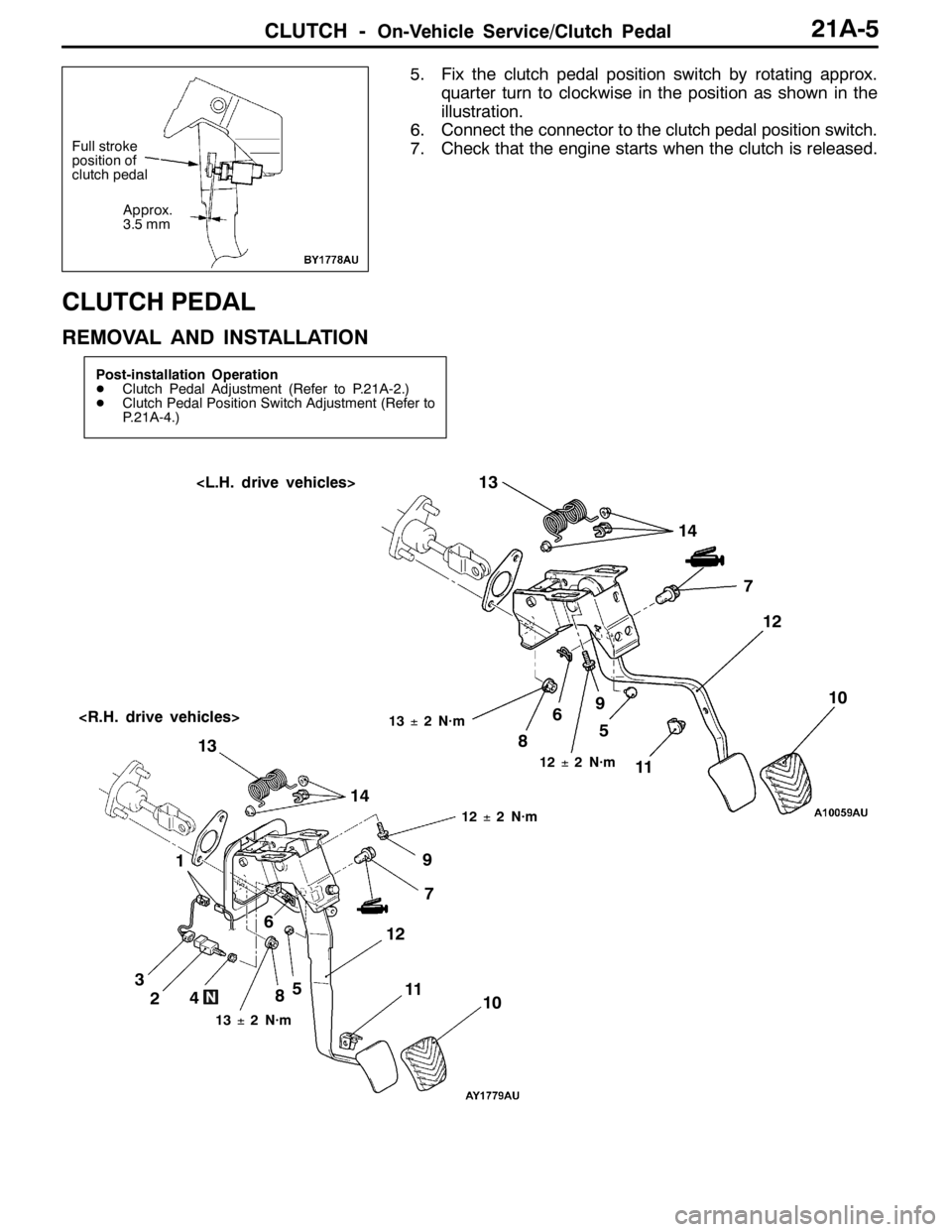
5. Fix the clutch pedal position switch by rotating approx.
quarter turn to clockwise in the position as shown in the
illustration.
6. Connect the connector to the clutch pedal position switch.
7. Check that the engine starts when the clutch is released.
CLUTCH PEDAL
REMOVAL AND INSTALLATION
Post-installation Operation
DClutch Pedal Adjustment (Refer to P.21A-2.)
DClutch Pedal Position Switch Adjustment (Refer to
P.21A-4.)
6713±2 N·m
1
12±2 N·m
8
11
2459
12±2 N·m
67
13±2 N·m
10 8
12 13
3145 910
1112 13
14
Full stroke
position of
clutch pedal
Approx.
3.5 mm
Page 812 of 1449

MANUAL TRANSMISSION - Special Tools22A-4
SPECIAL TOOLS
ToolNumberNameUse
MB991502MUT-IISub as-
semblyDiagnosis code checking
MB991529Diagnosis code
checking harness
MB991348Test harness setGsensor check
MD998330
(including
MD998331)Oil pressure gauge
(3.0 MPa)Hydraulic pressure measurement
MB991705Adapter
MB990635,
MB991113 or
MB991406
Steering linkage
pullerTie rod end and lower disconnection
GENERAL
SERVICE
TOOL
MZ203827Engine lifterSupporting the engine assembly during
removal and installation of the transmission
MB991453Engine hangerat-
tachment set
MB991721Slide hammerOutput shaft removal
Page 813 of 1449

MANUAL TRANSMISSION - Troubleshooting
TROUBLESHOOTING
BASIC TROUBLESHOOTING CONDITIONS
Refer to GROUP 00 - How to Use Troubleshooting/Inspection Service Points.
NOTE
Before starting the troubleshooting procedure, make sure that the following items have been checked
okay.
DIs the appropriate steering wheel installed at the center of the steering column shaft correctly?
DAre the tire, wheel size, specifications, air pressure, balance, and wear state normal?
DIs the wheel alignment normal?
DHas the engine, suspension, etc. been remodeled in such a way that it will affect the ACD and AYC
systems?
DIAGNOSIS FUNCTION
READING DIAGNOSIS CODE
Read a diagnosis code by the MUT-IIor ACD mode indicator
lamp. (Refer to GROUP 00 - How to Use Troubleshooting/
Inspection Service Points.)
NOTE
Connect the MUT-IIto the diagnosis connector (16-pin).
ERASING DIAGNOSIS CODES
When using the MUT-II
Connect the MUT-IIto the diagnosis connector (16-pin) and
erase the diagnosis code.
Caution
Turn the ignition switch to the “LOCK”(OFF) position
before connecting or disconnecting the MUT-II.
ACDmode indicator lamp
Page 839 of 1449
MANUAL TRANSMISSION - Troubleshooting
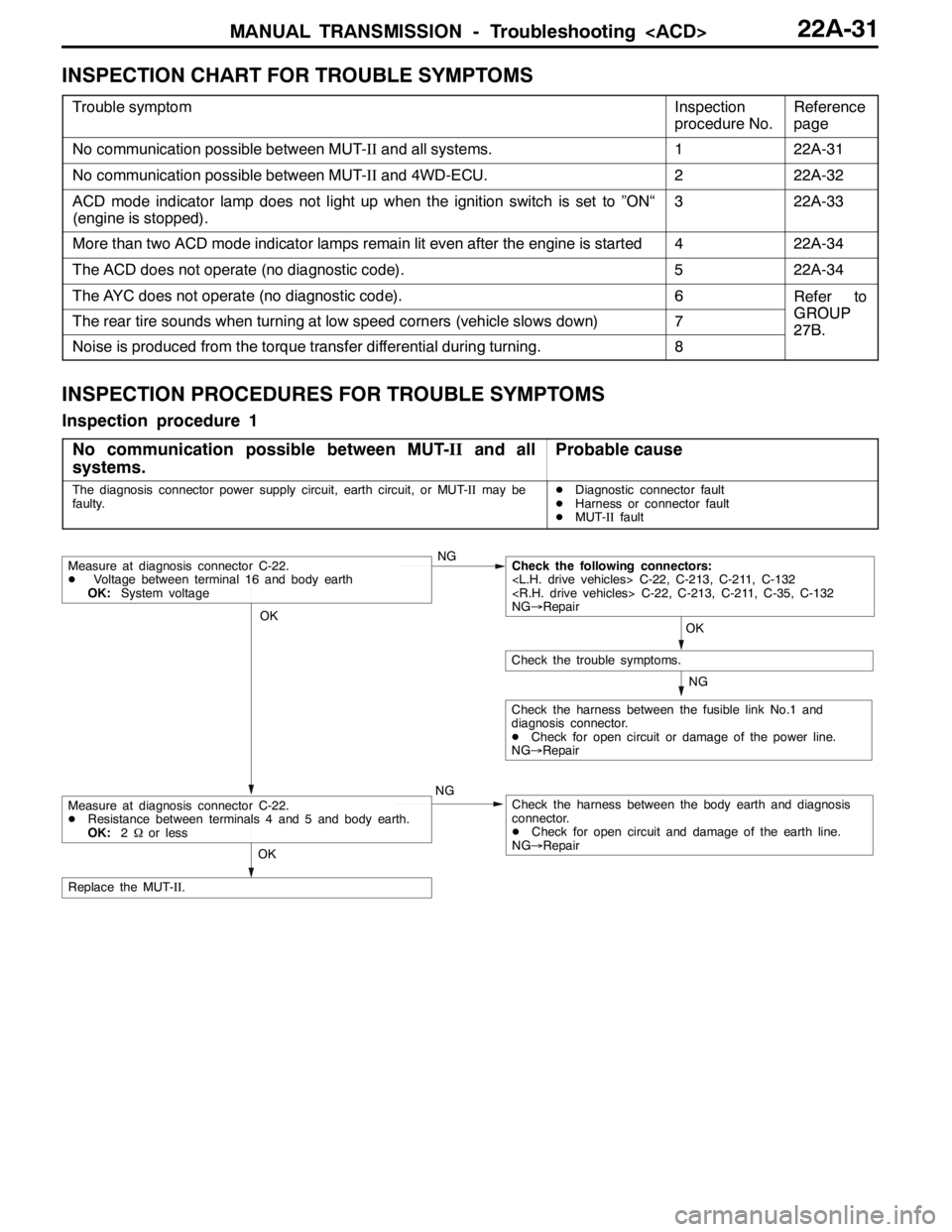
INSPECTION CHART FOR TROUBLE SYMPTOMS
Trouble symptomInspection
procedure No.Reference
page
No communication possible between MUT-IIand all systems.122A-31
No communication possible between MUT-IIand 4WD-ECU.222A-32
ACD mode indicator lamp does not light up when the ignition switch is set to ”ON“
(engine is stopped).322A-33
More than two ACD mode indicator lamps remain lit even after the engine is started422A-34
The ACD does not operate (no diagnostic code).522A-34
The AYC does not operate (no diagnostic code).6Refer to
GROUPThe rear tire sounds when turning at low speed corners (vehicle slows down)7GROUP
27B.
Noise is produced from the torque transfer differential during turning.8
27B.
INSPECTION PROCEDURES FOR TROUBLE SYMPTOMS
Inspection procedure 1
No communication possible between MUT-IIand all
systems.
Probable cause
The diagnosis connector power supply circuit, earth circuit, or MUT-IImay be
faulty.DDiagnostic connector fault
DHarness or connector fault
DMUT-IIfault
OK
NG
NG
Check the harness between the fusible link No.1 and
diagnosis connector.
DCheck for open circuit or damage of the power line.
NG→Repair
OK
Check the trouble symptoms.
Measure at diagnosis connector C-22.
DVoltage between terminal 16 and body earth
OK:System voltageNGCheck the following connectors:
NG→Repair
Check the harness between the body earth and diagnosis
connector.
DCheck for open circuit and damage of the earth line.
NG→Repair
OK
Replace the MUT-II.
Measure at diagnosis connector C-22.
DResistance between terminals 4 and 5 and body earth.
OK:2Ωor less
Page 841 of 1449
MANUAL TRANSMISSION - Troubleshooting
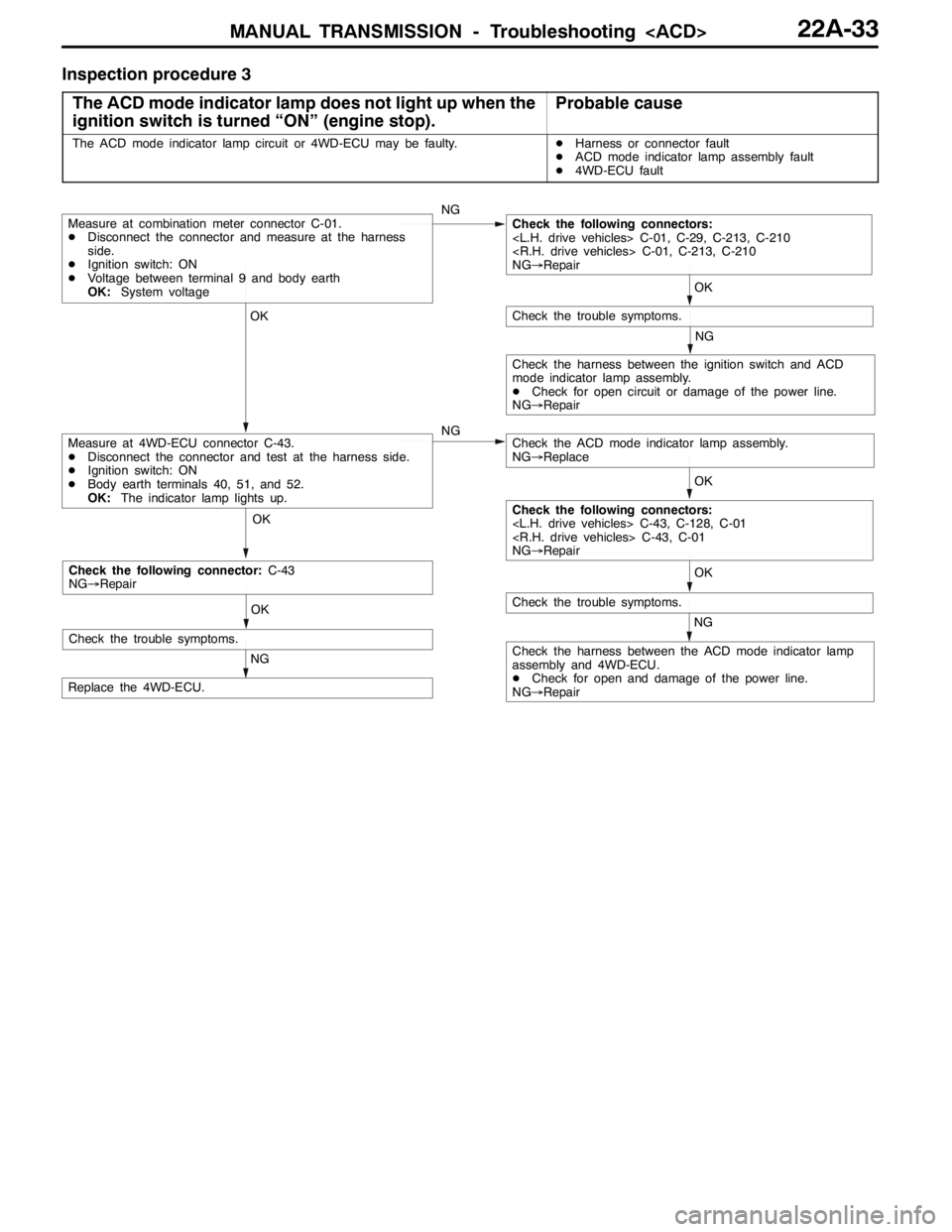
Inspection procedure 3
The ACD mode indicator lamp does not light up when the
ignition switch is turned “ON” (engine stop).
Probable cause
The ACD mode indicator lamp circuit or 4WD-ECU may be faulty.DHarness or connector fault
DACD mode indicator lamp assembly fault
D4WD-ECU fault
OK OK OKOK
NG
OK
NG
NG
NG
Check the harness between the ACD mode indicator lamp
assembly and 4WD-ECU.
DCheck for open and damage of the power line.
NG→Repair
Replace the 4WD-ECU.
Measure at 4WD-ECU connector C-43.
DDisconnect the connector and test at the harness side.
DIgnition switch: ON
DBody earth terminals 40, 51, and 52.
OK:The indicator lamp lights up.
Check the trouble symptoms.
Measure at combination meter connector C-01.
DDisconnect the connector and measure at the harness
side.
DIgnition switch: ON
DVoltage between terminal 9 and body earth
OK:System voltageCheck the following connectors:
NG→Repair
Check the trouble symptoms.
Check the ACD mode indicator lamp assembly.
NG→Replace
Check the harness between the ignition switch and ACD
mode indicator lamp assembly.
DCheck for open circuit or damage of the power line.
NG→Repair
Check the following connectors:
NG→Repair
OK
NG
Check the trouble symptoms.
Check the following connector:C-43
NG→Repair
Page 842 of 1449
MANUAL TRANSMISSION - Troubleshooting
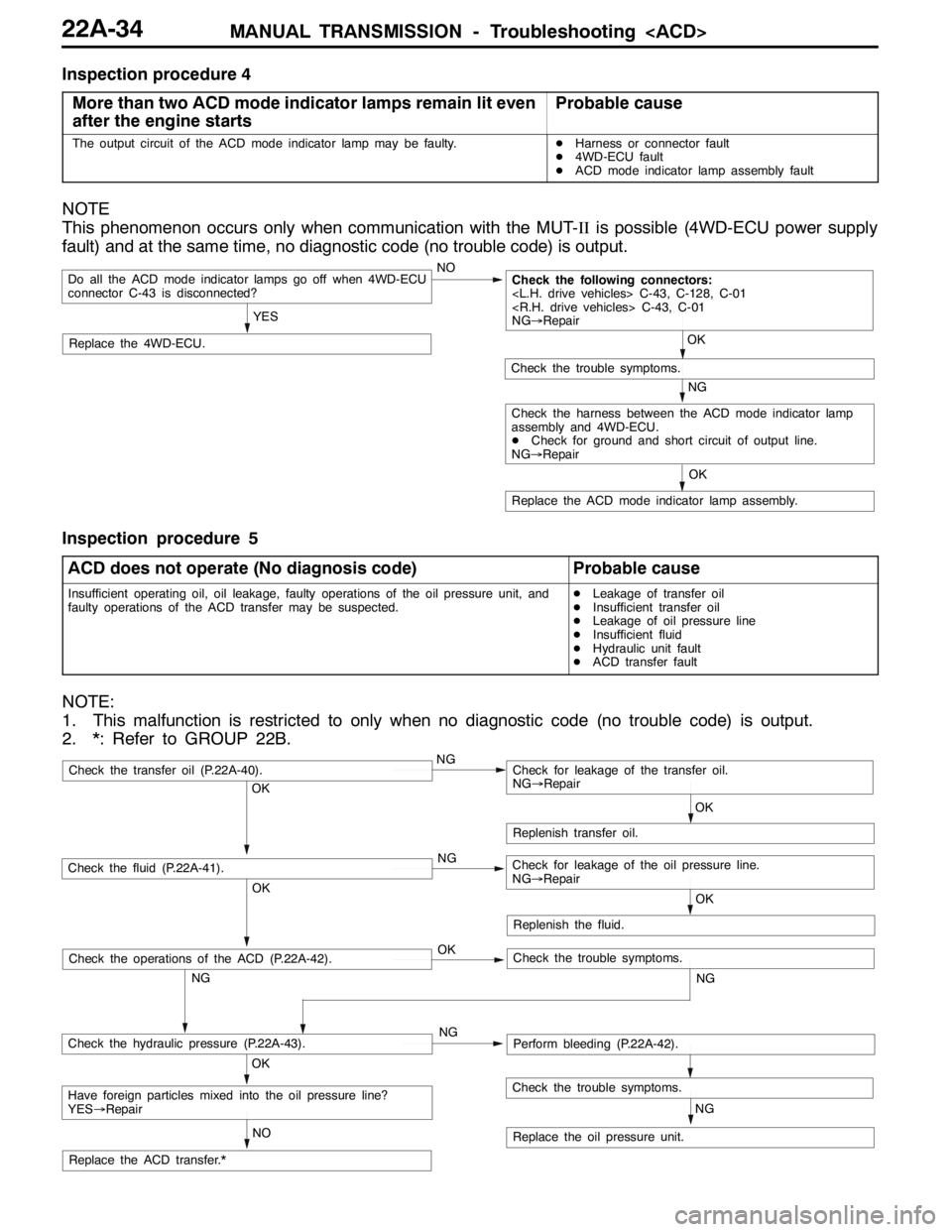
Inspection procedure 4
More than two ACD mode indicator lamps remain lit even
after the engine starts
Probable cause
The output circuit of the ACD mode indicator lamp may be faulty.DHarness or connector fault
D4WD-ECU fault
DACD mode indicator lamp assembly fault
NOTE
This phenomenon occurs only when communication with the MUT-IIis possible (4WD-ECU power supply
fault) and at the same time, no diagnostic code (no trouble code) is output.
NO
Replace the 4WD-ECU.
Do all the ACD mode indicator lamps go off when 4WD-ECU
connector C-43 is disconnected?
YES
Replace the ACD mode indicator lamp assembly.OK
NG
Check the trouble symptoms.
Check the following connectors:
NG→Repair
OK
Check the harness between the ACD mode indicator lamp
assembly and 4WD-ECU.
DCheck for ground and short circuit of output line.
NG→Repair
Inspection procedure 5
ACD does not operate (No diagnosis code)
Probable cause
Insufficient operating oil, oil leakage, faulty operations of the oil pressure unit, and
faulty operations of the ACD transfer may be suspected.DLeakage of transfer oil
DInsufficient transfer oil
DLeakage of oil pressure line
DInsufficient fluid
DHydraulic unit fault
DACD transfer fault
NOTE:
1. This malfunction is restricted to only when no diagnostic code (no trouble code) is output.
2. *: Refer to GROUP 22B.
OK
NG OKNG OKNG
NG
NO
NG
OK
Replenish transfer oil.
Replace the oil pressure unit.
Have foreign particles mixed into the oil pressure line?
YES→Repair
Check the hydraulic pressure (P.22A-43).Perform bleeding (P.22A-42).
Check the fluid (P.22A-41).Check for leakage of the oil pressure line.
NG→Repair
Check the transfer oil (P.22A-40).Check for leakage of the transfer oil.
NG→Repair
Check the trouble symptoms.
Replace the ACD transfer.*OK
Replenish the fluid.
OK
NG
Check the operations of the ACD (P.22A-42).Check the trouble symptoms.
Page 843 of 1449

MANUAL TRANSMISSION - Troubleshooting
DATA LIST REFERENCE TABLE
Item
no.Check itemCheck conditionNormal conditions
01Wheel speed sensor
play and MUT-IIdis-
lth02Wheel speed sensor
py
play match.
03Wheel speed sensor
04Wheel speed sensor
05Wheel speed sensor
06Wheel speed sensor
07Wheel speed sensor
08Wheel speed sensor
09Vehicle speed
10Battery voltageIgnition switch: ONSystem voltage
11Proportional valve cur-
rent
12Proportional valve cur-
rent
13TPS voltageIgnition switch: ON
Engine: StoppedAccelerator pedal: Full
closed535 - 735 mV
Engine:Stopped
Accelerator pedal: PressGradually rises from
the above value
Accelerator pedal: Full
throttle4,500 - 5,000 mV
14Longitudinal G sensor
voltageIgnition switch: ONVehicle stopped (horizon-
tal) state2.4 - 2.6 V
g
Actual drivingThe displayed value
increases and de-
creases mainly around
2.5 V.
15Lateral G sensor volt-
ageIgnition switch: ONVehicle stopped (horizon-
tal) state2.4 - 2.6 V
g
Perform actual drivingThe displayed value
increases and de-
creases mainly around
2.5 V.
16Steering operation
angleIgnition switch: ONSteering wheel: Steer by 90
degrees to the rightR90 deg
g
Steering wheel: Steer by 90
degrees to the leftL90 deg
17Steering angle velocityIgnition switch: ONSteering wheel: No steering0 deg/sggyg
Steering wheel: SteerThe display changes
according to the revolu-
tion speed.
18Pressure sensorDuring electric pump motor operations1.0 - 1.6 MPa
Page 844 of 1449

MANUAL TRANSMISSION - Troubleshooting
Item
no.Normal conditions Check condition Check item
19Pressure sensor power
supplyIgnition switch: ONApprox.5 V
20Valve power supplyIgnition switch: ONSystem voltage
21Steering wheel sensor
voltage
are displayed alter-
nately.
22Steering wheel sensor
voltage
are displayed alter-
nately.
23Steering wheel sensor
ltSTN
Ignition switch: ONSteering wheel: Neutral1-2Vg
voltage
g
Steering wheel: Turn2.5 - 4.5 V
51Idle switchIgnition switch: ONAccelerator pedal: Full
closedON
Accelerator pedal: PressOFF
52Steering wheel sensor
STN
Ignition switch: ONsteering wheel: NeutralONg
g
Steering wheel: Turn from
the neutral positionOFF
53Steering wheel sensor
played alternaltely.
54Steering wheel sensor
played alternately
55Steering wheel sensor
learning
tral position learning exe-
cutedON
Steering wheel sensor neu-
tral position learning unex-
ecutedOFF
56Stop lamp switchIgnition switch: ONBrake pedal: DepressONppg
Engine: StoppedBrake pedal: ReleaseOFF
57Motor monitorElectric pump motor is currently operatingON
Electric pump motor is currently not operatingOFF
58Oil pressure stateElectric pump motor is currently operatingLOWp
Electric pump motor is currently not operatingHIGH
59Directional valve
Ri ht
AYC clutch right side is currently operatingON
60Directional valve
Lft
AYC clutch left side is currently operatingON
61ABS monitorABS is currently operatingON
ABS is currently not operatingOFF
62Parking brake switchIgnition switch: ONParking brake lever: PullONgg
Engine:StoppedParking brake lever: Re-
leaseOFF
63ACD mode switchIgnition switch: ONACD mode switch: PressONg
Engine:StoppedACD mode switch: ReleaseOFF
Page 850 of 1449

MANUAL TRANSMISSION - On-vehicle Service22A-42
BLEEDING
1. Lift up the vehicle.
2. Set the MUT-IIto the 16-pin diagnosis connector.
Caution
Turn the ignition switch to the “LOCK”(OFF) position
before connecting or disconnecting the MUT-II.
3. Turn the ignition switch to the “ON” position.
4. Set the steering wheel in the straight-ahead position.
5. Perform the MUT-IIactuator test (Item No.02), and forcibly
drive the hydraulic unit.
NOTE
(1) The actuator test (Item No.01: Bleeding Mode) will
be performed for 5 minutes, after which it will be
cleared automatically. Drive can also be cleared during
forced driving using the clear key of the MUT-II.
(2) If the hydraulic unit function has been stopped by
fail-safe, the hydraulic unit cannot be forcibly driven.
6. Remove the cap of the bleeder screw on the transfer,
and connect the vinyl hose.
7
.Slowly turn the steering wheel to the left or right from
the neutral state. Loosen the bleeder screw, and check
that air is discharged together with the fluid.
8
.After the air is discharged, tighten the bleeder screw,
and return the steering wheel to the neutral state.
Caution
During bleeding, replenish the fluid so that some
always remains in the oil reservoir.
9. Repeat steps 6 and 7 several 2 to 3 times, and after
checking that no more air mixes in, tighten the bleeder
screw at the specified torque.
Tightening torque: 5±1 N·m
10. After bleeding, check the fluid level. (Refer to P. 22A-41.)
Caution
If bleeding is not performed completely, noise may
be produced from the hydraulic unit, or the durability
of the pump, etc. may drop.
11. On vehicles with AYC, perform bleeding when the
hydraulic unit is removed. (Refer to GROUP 27B -
On-vehicle Service.)
ACD OPERATION CHECK
1. Lift up the vehicle.
2
.Set the MUT-IIto the 16-pin diagnosis connector.
Caution
Turn the ignition switch to the “LOCK”(OFF) position
before connecting or disconnecting the MUT-II.
3. Start the engine.
Bleeder screw
Front exhaust pipe
Page 851 of 1449

MANUAL TRANSMISSION - On-vehicle Service22A-43
4. Set the gear to the 2nd gear or above, operate the MUT-II,
and check from the service data (Item No.09) that the
wheel speed is within 10 km/h to 20 km/h.
NOTE
(1) Set the steering wheel to the neutral position
(2) The ACD may continue operating (operation sounds
can be heard) when the steering wheel is steered,
this is not a system fault. In this case, set the steering
wheel to the neutral position, and perform the following
operations to stop the ACD.
DRelease the clutch.
DSet the gear to “N”.
DStop the engine
5. Perform the MUT-IIactuator test (Item No.05), and forcibly
drive the transfer.
NOTE
(1) The actuator test (Item No. 05: ACD Operation Check
Mode) is performed for 1 minute, after which it will
be cleared automatically. Drive can also be cleared
during forced driving using the clear key of the MUT-II.
(2) If the hydraulic unit function has been stopped by
fail-safe, the transfer cannot be forcibly driven.
6. Check that the front and rear wheel speeds satisfy the
following in the MUT-IIactuator test (Item No.05).
The front wheel will be faster than the back wheels by
more than 2 km/h.
NOTE
If the above are not satisfied, check the oil pressure as
the system may be faulty.
HYDRAULIC PRESSURE CHECK
1. Lift up the vehicle.
2. Set the MUT-IIto the 16-pin diagnosis connector.
Caution
Turn the ignition switch to the “LOCK”(OFF) position
before connecting or disconnecting the MUT-II.
3. Disconnect the hydraulic unit and transfer connector
assembly, and connect the special tool to the hydraulic
unit.
4. Turn the ignition switch to “ON”.
5. Perform the MUT-IIactuator test (Item No.05), and forcibly
drive the hydraulic unit.
NOTE
(1) The actuator test (Item No. 05 ACD Operation Check
Mode) is performed for 1 minute, after which it will
be cleared automatically. Drive can also be cleared
during forced driving using the clear key of the MUT-II.
MD998330
MB991705