speci MITSUBISHI MIRAGE 2017 6.G User Guide
[x] Cancel search | Manufacturer: MITSUBISHI, Model Year: 2017, Model line: MIRAGE, Model: MITSUBISHI MIRAGE 2017 6.GPages: 307, PDF Size: 9.02 MB
Page 66 of 307

Electronic immobilizer (Ant
i-theft starting system)
Features and controls 5-5
5
To add a key, you must already have 2 regis- tered keys. You need to register the ID code to the vehicle.Registering the ID code can be done by your- self (except for vehicles
sold in Canada), or
by your authorized Mits
ubishi Motors dealer.
For you to register the ID code yourself, fol- low the “Customer key programming” proce- dure below. If you choose to have your authorized Mitsubishi Motors dealer register the IDcode, take your vehicle and all remaining keys to your authorized Mitsubishi Motors dealer.
N00562201178
You can program new keys to the system if you have two valid (already registered) keys and blank immobilizer ke
y (specially cut for
your vehicle at your Mitsubishi Motors dealer) by doing the following: 1. Insert the first valid key into the ignition switch and turn the key to the “ON” posi- tion for 5 seconds. 2. Turn the key to the “OFF” position andremove the first key. 3. Within 30 seconds of removing the first key, insert the second valid key into theignition and turn it
to the “ON” position.
About 10 seconds late
r, the immobilizer
indicator will start to blink. 4. When the immobilizer indicator starts blinking, turn the second valid key to the“OFF” position and remove it. Within 30 seconds after doing so, insert a blank immobilizer key into the ignition switchand turn it to the “ON” position. Perform this operation no more than 30 seconds after the immobilizer indicator startsblinking. When registration of the ID code is complete, the immobilizer indica- tor will come on for 3 seconds then go off.If an error occurs, the immobilizer indica- tor will go off during the procedure.
5. If you wish to register another key, per- form the process again from step 1.
Additional keys
NOTE
You are provided with 2 keys, but you may register up to 8 keys.
Customer key programming (Except for vehicles sold in Canada)
NOTE
When the key registration is completed, the immobilizer indicator wi
ll come on within 3
seconds of turning the ignition switch to the“ON” position with th
e blank immobilizer
key (specially cut for your vehicle at your Mitsubishi Motors dealer). NOTE
It is not possible to register a key if: • the immobilizer indicator goes off during the procedure • the immobilizer indi
cator does not come on
within 30 seconds after step 4.
The procedure will be
terminated automati-
cally if: • a period of 30 seconds
or longer elapses
from the moment when the first key isturned to the “OFF” position to the moment when the second key is turned to the “ON” • a period of 30 seconds
or longer elapses
from the moment when the second key isturned to the “OFF” position to the momentwhen the blank immobilizer key is turned to the “ON” position • more than 20 seconds elapses after the immobilizer indicato
r starts blinking
BK0236100US.book 5 ページ 2016年2月1日 月曜日 午前10時15分
Page 85 of 307
Door locks 5-24 Features and controls
5
5. Close the case firmly. 6. Check the keyless entry system to see thatit works.
N00509201573
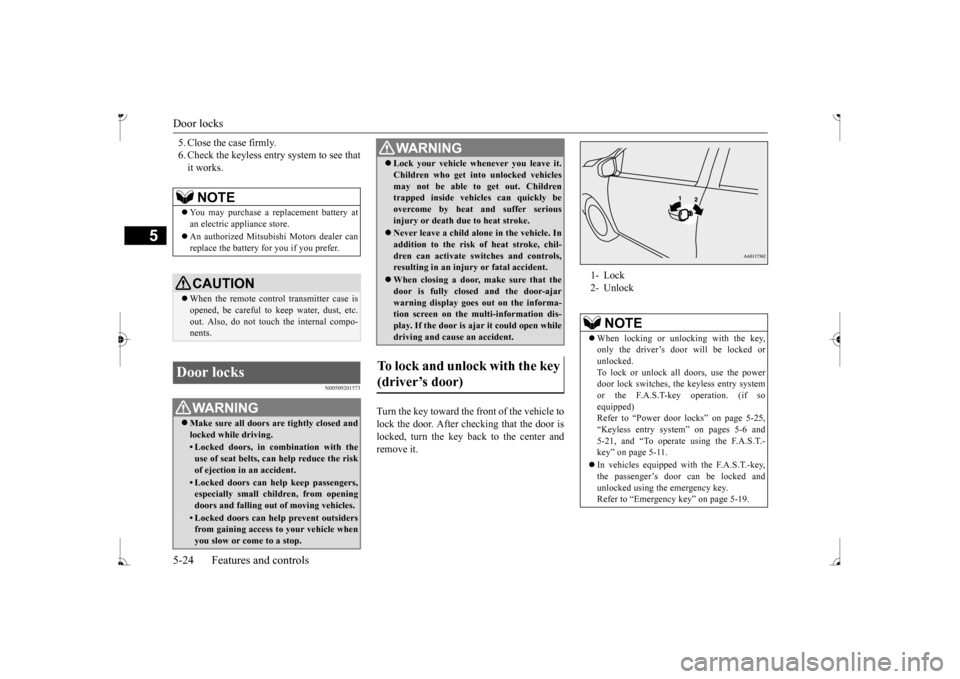
Turn the key toward the front of the vehicle to lock the door. After checking that the door is locked, turn the key back to the center andremove it.
NOTE
You may purchase a re
placement battery at
an electric appliance store. An authorized Mitsubishi Motors dealer can replace the battery for you if you prefer.CAUTION When the remote control transmitter case is opened, be careful to
keep water, dust, etc.
out. Also, do not touch the internal compo- nents.
Door locks
WA R N I N G Make sure all doors are tightly closed and locked while driving.• Locked doors, in co
mbination with the
use of seat belts, can help reduce the riskof ejection in an accident.• Locked doors can help keep passengers,especially small children, from opening doors and falling out
of moving vehicles.
• Locked doors can help prevent outsiders from gaining access
to your vehicle when
you slow or come to a stop.
Lock your vehicle when
ever you leave it.
Children who get into
unlocked vehicles
may not be able to get out. Childrentrapped inside vehicles can quickly be overcome by heat
and suffer serious
injury or death due to heat stroke. Never leave a ch
ild alone in the vehicle. In
addition to the risk
of heat stroke, chil-
dren can activate switches and controls, resulting in an injury
or fatal accident.
When closing a door,
make sure that the
door is fully closed and the door-ajar warning display goes
out on the informa-
tion screen on the multi-information dis- play. If the door is aj
ar it could open while
driving and cause an accident.
To lock and unlock with the key (driver’s door)
WA R N I N G
1- Lock 2- Unlock
NOTE
When locking or unlocking with the key, only the driver’s door will be locked orunlocked. To lock or unlock all doors, use the power door lock switches, th
e keyless entry system
or the F.A.S.T-key operation. (if so equipped) Refer to “Power door locks” on page 5-25,“Keyless entry system” on pages 5-6 and 5-21, and “To operate using the F.A.S.T.- key” on page 5-11. In vehicles equipped wi
th the F.A.S.T.-key,
the passenger’s door can be locked andunlocked using the emergency key. Refer to “Emergency key” on page 5-19.
BK0236100US.book 24 ページ 2016年2月1日 月曜日 午前10時15分
Page 88 of 307
Trunk lid
Features and controls 5-27
5
Child safety locks help prevent rear passen- gers, especially children, from opening therear door using the inside door handle. A lock lever for the child safety lock is pro- vided on each rear door.When the lever is in the lock position (1), the rear door cannot be opened using the inside door handle.To open the rear door when the child safety lock lever is in the lock position, pull the out- side door handle. When the lever is in the release position (2), the child safety lock is released and the reardoor can be opened using the inside door han- dle.
N00509501215
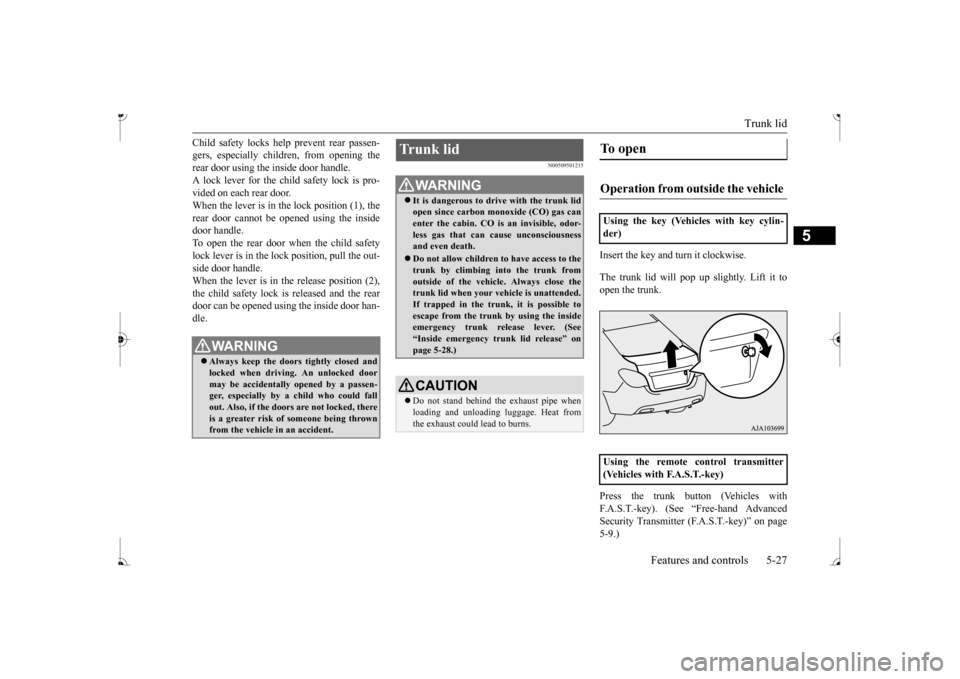
Insert the key and turn it clockwise. The trunk lid will pop up
slightly. Lift it to
open the trunk. Press the trunk button (Vehicles with F.A.S.T.-key). (See “Free-hand Advanced Security Transmitter
(F.A.S.T.-key)” on page
5-9.)
WA R N I N G Always keep the door
s tightly closed and
locked when driving. An unlocked doormay be accidentally
opened by a passen-
ger, especially by
a child who could fall
out. Also, if the doors are not locked, thereis a greater risk of
someone being thrown
from the vehicle
in an accident.
Trunk lid
WA R N I N GIt is dangerous to drive with the trunk lid open since carbon mo
noxide (CO) gas can
enter the cabin. CO is an invisible, odor- less gas that can cause unconsciousness and even death. Do not allow children to have access to the trunk by climbing into the trunk fromoutside of the vehicl
e. Always close the
trunk lid when your vehicle is unattended. If trapped in the trunk, it is possible toescape from the trunk by using the inside emergency trunk re
lease lever. (See
“Inside emergency trunk lid release” onpage 5-28.)CAUTION Do not stand behind the exhaust pipe when loading and unloading
luggage. Heat from
the exhaust could lead to burns.
To open Operation from outside the vehicle Using the key (Vehicles with key cylin- der)
ntrol transmitter
(Vehicles with F.A.S.T.-key)
BK0236100US.book 27 ページ 2016年2月1日 月曜日 午前10時15分
Page 90 of 307
Manual window control (if so equipped)
Features and controls 5-29
5
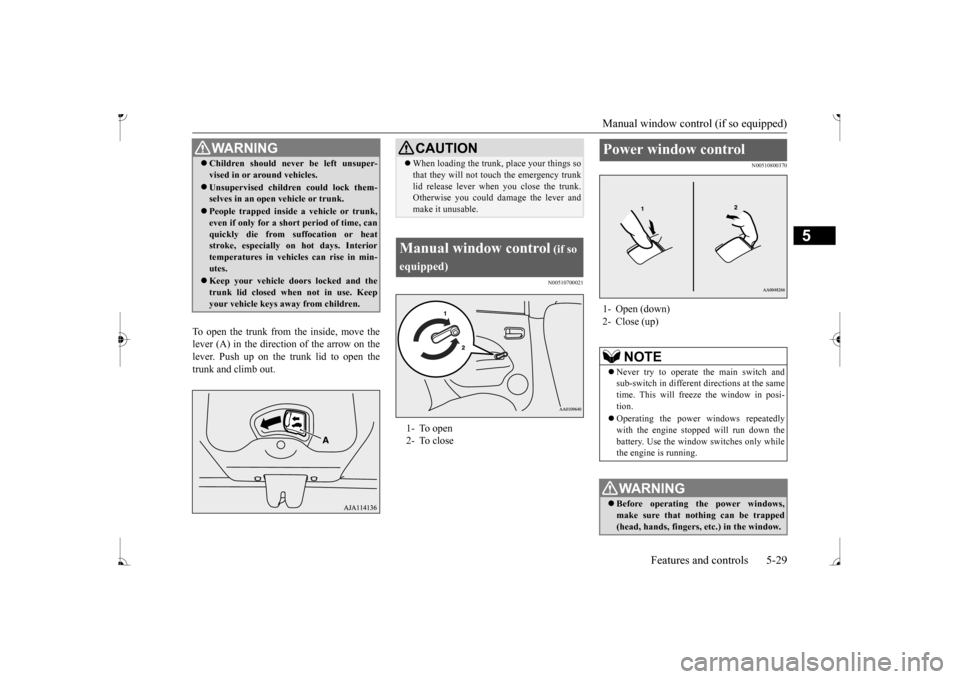
To open the trunk from the inside, move the lever (A) in the direction of the arrow on thelever. Push up on the trunk lid to open the trunk and climb out.
N00510700021
N00510800370
WA R N I N G Children should never be left unsuper- vised in or ar
ound vehicles.
Unsupervised children could lock them- selves in an open vehicle or trunk. People trapped inside
a vehicle or trunk,
even if only for a shor
t period of time, can
quickly die from su
ffocation or heat
stroke, especially on hot days. Interior temperatures in vehicles can rise in min- utes. Keep your vehicle d
oors locked and the
trunk lid closed when not in use. Keepyour vehicle keys aw
ay from children.
CAUTIONWhen loading the trunk, place your things so that they will not touch the emergency trunklid release lever when you close the trunk.Otherwise you could damage the lever and make it unusable.
Manual window control
(if so
equipped) 2- To close
Power window control 1- Open (down)2- Close (up)
NOTE
Never try to operate the main switch and sub-switch in different directions at the same time. This will freeze the window in posi- tion. Operating the power
windows repeatedly
with the engine st
opped will run down the
battery. Use the window
switches only while
the engine is running.WA R N I N G Before operating the power windows, make sure that nothing can be trapped (head, hands, fingers, etc.) in the window.
BK0236100US.book 29 ページ 2016年2月1日 月曜日 午前10時15分
Page 92 of 307
Power window control
Features and controls 5-31
5
stopped. However, once the driver’s door or the front passenger’s
door is opened, the
power windows cannot be operated.
N00549000169
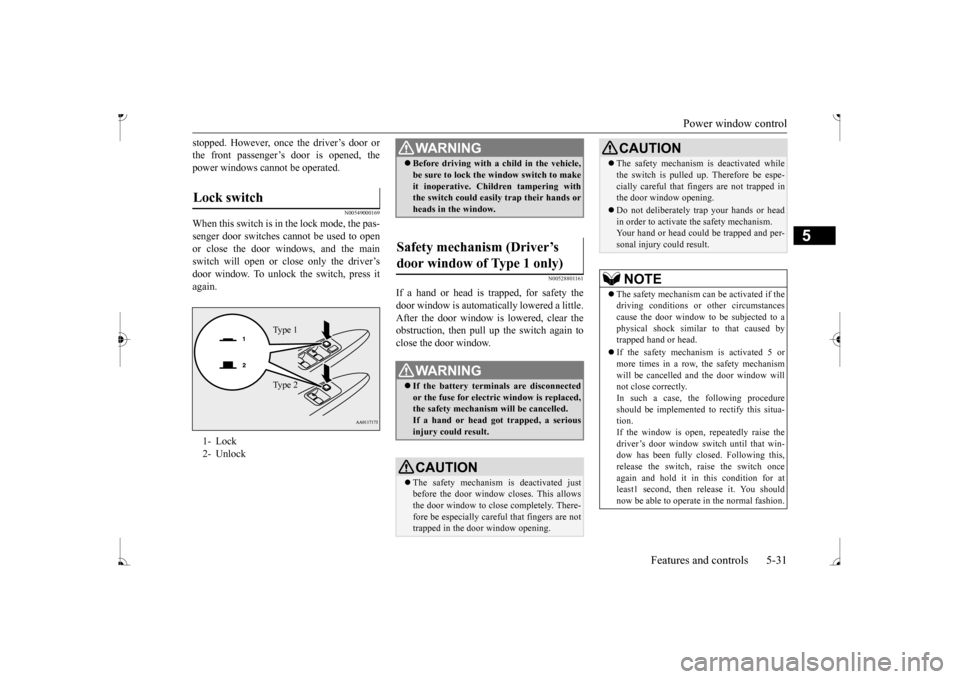
When this switch is in the lock mode, the pas-senger door switches cannot be used to open or close the door windows, and the main switch will open or close only the driver’s door window. To unlock the switch, press it again.
N00528801161
If a hand or head is trapped, for safety thedoor window is automatically lowered a little. After the door window is lowered, clear the obstruction, then pull up the switch again toclose the door window.
Lock switch 1- Lock2- Unlock
Ty p e 1 Ty p e 2
WA R N I N G Before driving with a child in the vehicle, be sure to lock the window switch to makeit inoperative. Children tampering withthe switch could easily trap their hands or heads in the window.
Safety mechanism (Driver’s door window of Type 1 only)
WA R N I N G If the battery terminals are disconnected or the fuse for electric window is replaced, the safety mechanism will be cancelled. If a hand or head got
trapped, a serious
injury could result.CAUTION The safety mechanism is deactivated just before the door window closes. This allows the door window to close completely. There- fore be especially careful that fingers are nottrapped in the door window opening.
The safety mechanism is deactivated while the switch is pulled up.
Therefore be espe-
cially careful that fi
ngers are not trapped in
the door window opening. Do not deliberately tr
ap your hands or head
in order to activate the safety mechanism. Your hand or head coul
d be trapped and per-
sonal injury could result.NOTE
The safety mechanism can be activated if the driving conditions or
other circumstances
cause the door window to be subjected to a physical shock similar
to that caused by
trapped hand or head. If the safety mechanism is activated 5 or more times in a row, the safety mechanismwill be cancelled a
nd the door window will
not close correctly. In such a case, the following procedureshould be implemented to rectify this situa- tion. If the window is open, repeatedly raise thedriver’s door window sw
itch until that win-
dow has been fully closed. Following this, release the switch, raise the switch once again and hold it in this condition for atleast1 second, then release it. You should now be able to operate in the normal fashion.CAUTION
BK0236100US.book 31 ページ 2016年2月1日 月曜日 午前10時15分
Page 106 of 307
Continuously variable transmission (CVT) (if so equipped)
Features and controls 5-45
5
N00549500018 N00574601036
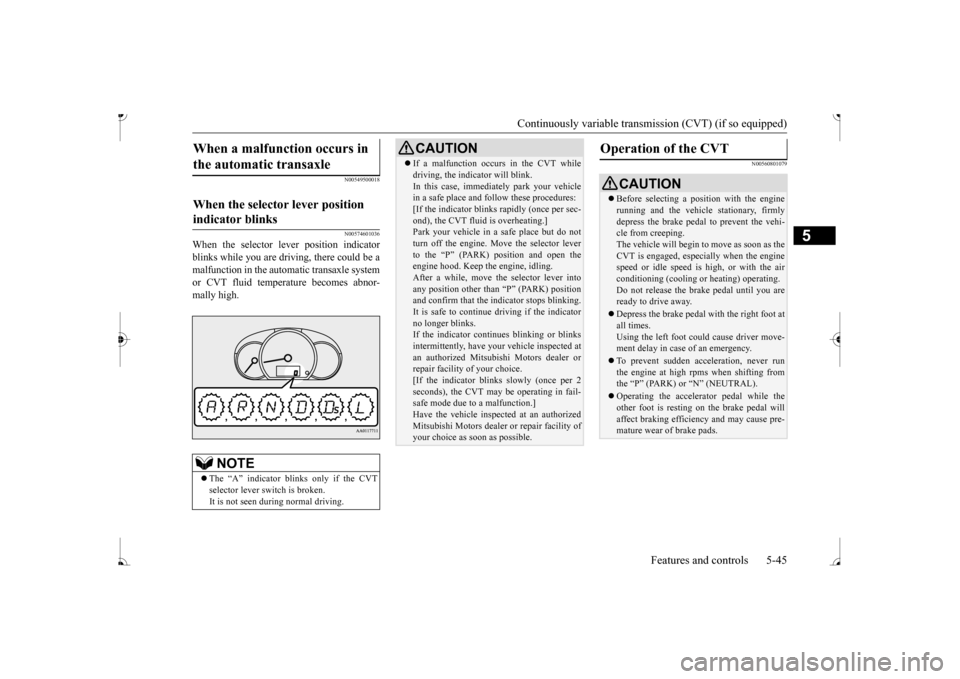
When the selector le
ver position indicator
blinks while you are driv
ing, there could be a
malfunction in the automatic transaxle system or CVT fluid temperature becomes abnor- mally high.
N00560801079
When a malfunction occurs in the automatic transaxle
When the selector lever position indicator blinks
NOTE
The “A” indicator blinks only if the CVT selector lever sw
itch is broken.
It is not seen during normal driving.
CAUTION If a malfunction occurs in the CVT while driving, the indicator will blink.In this case, immediat
ely park your vehicle
in a safe place and fo
llow these procedures:
[If the indicator blinks
rapidly (once per sec-
ond), the CVT fluid is overheating.]Park your vehicle in a safe place but do not turn off the engine. M
ove the selector lever
to the “P” (PARK) position and open theengine hood. Keep th
e engine, idling.
After a while, move the selector lever into any position other than “P” (PARK) positionand confirm that the i
ndicator stops blinking.
It is safe to continue driving if the indicator no longer blinks.If the indicator conti
nues blinking or blinks
intermittently, have your
vehicle inspected at
an authorized Mitsubishi Motors dealer orrepair facility
of your choice.
[If the indicator blinks slowly (once per 2 seconds), the CVT may
be operating in fail-
safe mode due to a malfunction.] Have the vehicle inspected at an authorized Mitsubishi Motors dealer
or repair facility of
your choice as soon as possible.
Operation of the CVT
CAUTION Before selecting a pos
ition with the engine
running and the vehicl
e stationary, firmly
depress the brake pedal to prevent the vehi- cle from creeping. The vehicle will begin to move as soon as theCVT is engaged, especi
ally when the engine
speed or idle speed is
high, or with the air
conditioning (cooling or
heating) operating.
Do not release the brak
e pedal until you are
ready to drive away. Depress the brake pedal
with the right foot at
all times. Using the left foot could cause driver move-ment delay in case of an emergency. To prevent sudden acce
leration, never run
the engine at high rpms when shifting from the
Page 113 of 307
Active stability control (ASC)
5
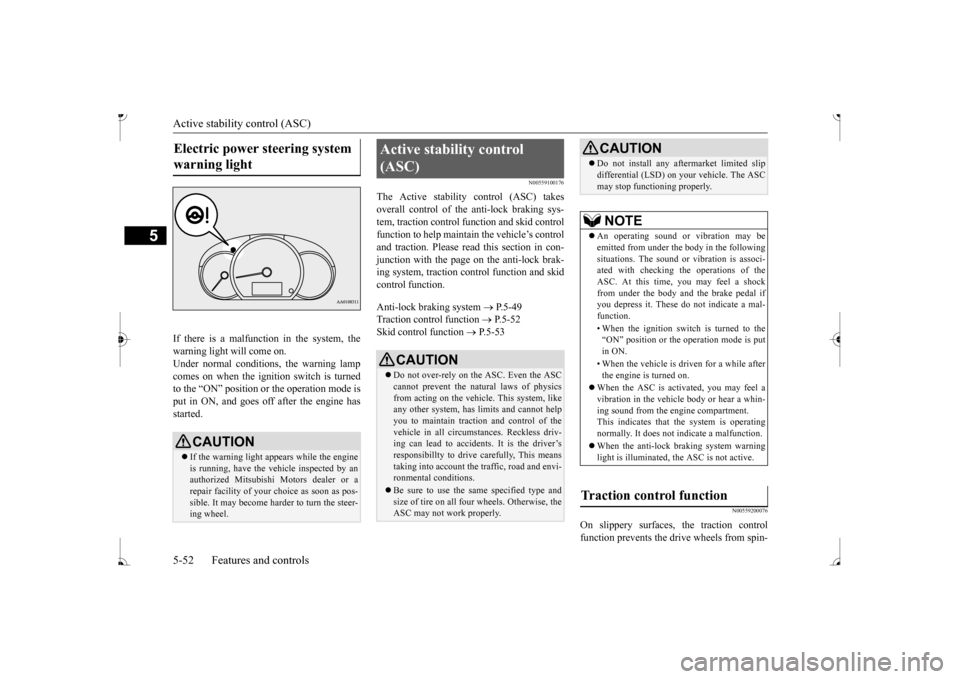
If there is a malfunction in the system, the warning light will come on. Under normal conditions, the warning lamp comes on when the ignition switch is turnedto the “ON” position or the operation mode is put in ON, and goes off after the engine has started.
N00559100176
The Active stability control (ASC) takes overall control of the anti-lock braking sys- tem, traction control function and skid controlfunction to help maintain
the vehicle’s control
and traction. Please read
this section in con-
junction with the page on the anti-lock brak-ing system, traction c
ontrol function and skid
control function. Anti-lock braking system
P.5-49
Traction control function
P.5-52
Skid control function
P.5-53
N00559200076
On slippery surfaces, the traction control function prevents the drive wheels from spin-
Electric power steering system warning light
CAUTION If the warning light appears while the engine is running, have the vehicle inspected by an authorized Mitsubishi Motors dealer or arepair facility of your
choice as soon as pos-
sible. It may become ha
rder to turn the steer-
ing wheel.
Active stability control (ASC)
CAUTION Do not over-rely on the ASC. Even the ASC cannot prevent the natural laws of physicsfrom acting on the vehicle. This system, like any other system, has
limits and cannot help
you to maintain traction and control of thevehicle in all circumstances. Reckless driv- ing can lead to accident
s. It is the driver’s
responsibillty to drive carefully, This meanstaking into account the traffic, road and envi- ronmental conditions. Be sure to use the same specified type and size of tire on all four
wheels. Otherwise, the
ASC may not work properly.
Do not install any aftermarket limited slip differential (LSD) on
your vehicle. The ASC
may stop functioning properly.NOTE
An operating sound or vibration may be emitted from under the body in the followingsituations. The sound or vibration is associ- ated with checking th
e operations of the
ASC. At this time,
you may feel a shock
from under the body and the brake pedal if you depress it. These do
not indicate a mal-
function. • When the ignition switch is turned to the “ON” position or the
operation mode is put
in ON. • When the vehicle is driven for a while after the engine is turned on.
When the ASC is acti
vated, you may feel a
vibration in the vehicl
e body or hear a whin-
ing sound from the engine compartment. This indicates that th
e system is operating
normally. It does not i
ndicate a malfunction.
When the anti-lock braking system warning light is illuminated, the ASC is not active.
Traction control function
CAUTION
BK0236100US.book 52 ページ 2016年2月1日 月曜日 午前10時15分
Page 139 of 307
Warning lights 5-78 Features and controls
5
N00520600313
This light comes on in the event of a malfunc- tion in the charging system or when the igni-tion switch is turned to the “ON” position (engine off) or the operation mode is put in ON. When the engine
is started, the light
should go out. Check to make sure that the light has gone out before driving.
N00520700170
This light comes on when the engine oil pres-sure is below normal. If the light stays on while driving, stop the
engine as soon as pos-
sible. Do not run the e
ngine until the cause of
the low oil pressure is corrected.
N00575700011
This light comes on in red if the coolant tem- perature becomes excessively high.
N00520901342
This light comes on when any door is open ornot completely closed. When the vehicle is moving at more than 5 mph (8 km/h) and any door is open or ajar, atone will sound 4 times to inform the driver that any door is not properly shut.
NOTE
Do not disconnect the ba
ttery cable when the
engine malfunction i
ndicator (“SERVICE
ENGINE SOON” or “Che
ck engine light”) is
on. The engine electronic
control module stores
critical OBD information (especially exhaustemission data), which ma
y be lost if the bat-
tery cable is disconne
cted while the engine
malfunction indicator is
on. This will make it
difficult to diagnose th
e cause of future prob-
lems.
Charging system warning light
CAUTION If the warning light stays on while the engine is running, park your ve
hicle in a safe place
as soon as possible and
contact an authorized
Mitsubishi Motors dealer
or a repair facility
of your choice to have the system checked.
Oil pressure warning light
CAUTION If this light comes on when the engine oil level is not low, have
your vehicle checked at
an authorized Mitsubish
i Motors dealer or a
repair facility of your choice. This warning light does not show the amount of oil in the crankcase. This can only be determined by checking the oil level with the dipstick with the engine turned off.
High coolant temperature warning light - red
CAUTION If the light comes on
during vehicle opera-
tion, it indicates that
the engine is possibly
overheating. Continued driving could makethe engine fail. Immedi
ately stop the vehicle
in a safe place and ta
ke appropriate action.
(Refer to “Engine overh
eating” on page 8-4.)
NOTE
The high coolant temp
erature warning light
may illuminate when
the vehicle has been
driven at high speeds or on hilly roads. This illuminating does not ne
cessarily indicate a
problem. It should stop if you keep the engine running for a wh
ile or continue driv-
ing the vehicle.
Door-ajar warning light and buzzer
CAUTION Before driving, make sure that the door-ajar warning light is off.
BK0236100US.book 78 ページ 2016年2月1日 月曜日 午前10時15分
Page 154 of 307
Bluetooth® 2.0 interface (if so equipped)
Features and controls 5-93
5
5. Enter in the Bluetooth
® device the 4-digit
number that has been read out in Step 4. 6. The voice guide will
say “Please say the
name of the device after the beep.” You can assign a desired name for the Blue- tooth
® device and register it as a device
tag. Say the name you want to register after the beep.
7. The voice guide will say “Pairing Com- plete. Would you like to import the con-tacts from your mobi
le device now?”
Answer “Yes,” and the voice guide will say “Please wait while the contacts areimported. This may ta
ke several minutes.”
Answer “No” to end the pairing process.
If your device requires a specific pairing code, you need to set the pairing code. Follow the procedures below. 1. Press the SPEECH button. 2. Say “Setup.”3. Say “Pairing Options.” 4. Say “Set Code.” 5. The voice guide will say “Do you wantthe pairing code to be random or fixed?”digit pairing code.”
Say a 4-digit number.
7. The voice guide will
say “Pairing code set
to
whether the number
said is acceptable. Answer “Yes.” Step 6. 8. The voice guide will say “Do you want topair a device now?” Answer “Yes,” the system will proc
eed to Step 3 in the pair-
ing process. Refer to the previous section “To pair.”
N00565100025
If multiple paired Bluetooth
® devices are
available in the vehicl
e, the cellular phone or
music player most recent
ly connected is auto-
matically connected
to the Bluetooth
® 2.0
interface. You can connect to the
other paired cellular
phone or music player
by following setting
change procedures. 1. Press the SPEECH button. 2. Say “Setup.”3. Say “Select phone.”
NOTE
Depending on the Bluetooth
® device, it may
take a few minutes to pair it with the Blue- tooth
® 2.0 interface.
If the Bluetooth
® 2.0 interface cannot recog-
nize the Bluetooth
® device, the voice guide
will say “Pairing has tim
ed out” and the pair-
ing process will be cancelled. Confirm that the devi
ce you are pairing sup-
ports Bluetooth
®, and try pairing it again.
If you enter the wrong number, the voice guide will say “Pairing
failed” and the pair-
ing process will be cancelled.Confirm the number is right, and try pairing it again. If your device requires
a specific pairing
code, you need to set th
e pairing code. Refer
to the device manual for pairing code requirements and read
the next section “If
your device requires a
specific pairing code”
on page 5-93.
NOTE
When the confirmation
function is on, after
repeating the device
tag you have said, the
voice guide will as
k “Is this correct?”
then say the device tag again.
If your device requires
a specific pairing
code
Selecting a device
To select a cellular phone
BK0236100US.book 93 ページ 2016年2月1日 月曜日 午前10時15分
Page 165 of 307
Bluetooth® 2.0 interface (if so equipped) 5-104 Features and controls
5
Follow the steps below to transfer to the mobile phonebook the phonebook stored in the cellular phone.
1. Press the SPEECH button. 2. Say “Phonebook.” 3. The voice guide will
say “Select one of
the following: new entry, edit number,edit name, list names, delete, erase all, or import contact.
” Say “Import contact.”
to import a single entr
y or all contacts?”
Say “All contacts.” 5. The voice guide will say “Importing thecontact list from the mobile phonebook. This may take several minutes to com- plete. Would you like to continue?” phonebook the phonebook stored in the cellular phone will start.Answer “No,” the system will return to the main menu.
6. When the transfer is complete, the voice guide will say “Import complete” and then the system will return to the main menu.
N00566301119
Model name: MMC or MDGMY10FCC ID: CB2MDGMY10 orNT8MDGMY10 IC: 279B-MDGMY10 or 3043A-MDGMY10 Your Bluetooth
® 2.0 interface operates on a
radio frequency subject
to Federal Communi-
You cannot change the names and telephone numbers in the phonebook entries registeredin the mobile phonebook. You cannot selectand delete specific
phonebook entries, either.
To change or delete any of the above, change the applicable information in the sourcephonebook of the cellular phone and then transfer the phonebook again.
To import a devices phonebook
NOTE
Transfer should be completed while the vehi- cle is parked. Before transferring, make surethat the vehicle is parked in a safe location. The already stored phonebook in the mobile phonebook is overwritten by the stored phonebook in the cellular phone. All or part of data
may not be transferred,
even when the cellular phone supports Blue- tooth
®, depending on the compatibility of
the device. Only a home, a work, and a mobile number can be imported. The maximum supported telephone number length is 19 digits.
Any telephone number of
20 digits or more will be truncated to the first19 digits.NOTE
If telephone numbers
contain characters
other than 0 to 9,
*, # or +, these characters
are deleted before the transfer. For the connection set
tings on the cellular
phone side, refer to the
instructions for the
cellular phone.NOTE
The transfer may take some time to complete depending on the numb
er of contacts.
NOTE
If the Bluetooth
® 2.0 interface could not be
connected to the Bluetooth
® compatible cel-
lular phone, the voice gui
de will sa
y “Unable
to transfer contact list from phone” and then the system will return to the main menu. If you press the HANG-UP button or press and hold the SPEECH button during the data transfer, the transfer will be cancelled andthe system will return to the main menu. If an error occurs during the data transfer, all transfer will be canc
elled and the voice guide
will say “Unable to complete the phonebook import” and then the system will return tothe main menu. If there are no contacts in the phonebook, the voice guide will say
“There are no contacts
on the connected phone.”
General information
NOTE
BK0236100US.book 104 ページ 2016年2月1日 月曜日 午前10時15分