check MITSUBISHI OUTLANDER 2014 3.G MMCS Manual
[x] Cancel search | Manufacturer: MITSUBISHI, Model Year: 2014, Model line: OUTLANDER, Model: MITSUBISHI OUTLANDER 2014 3.GPages: 226, PDF Size: 31.21 MB
Page 2 of 226
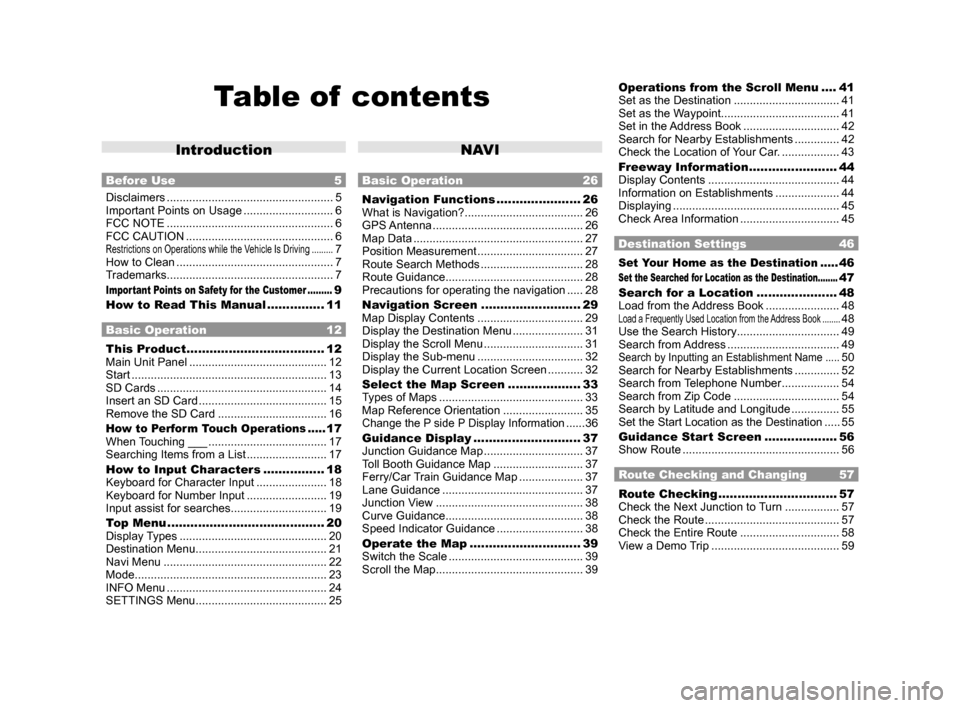
Table of contents
Introduction
Before Use 5
Disclaimers .................................................... 5
Important Points on Usage ............................ 6
FCC NOTE .................................................... 6
FCC CAUTION .............................................. 6
Restrictions on Operations while the Vehicle Is Driving .........7
How to Clean ................................................. 7
Trademarks .................................................... 7
Important Points on Safety for the Customer .........9
How to Read This Manual ............... 11
Basic Operation 12
This Product .................................... 12
Main Unit Panel ........................................... 12
Start ............................................................. 13
SD Cards ..................................................... 14
Insert an SD Card ........................................ 15
Remove the SD Card .................................. 16
How to Perform Touch Operations .....17
When Touching ___ ..................................... 17
Searching Items from a List ......................... 17
How to Input Characters ................ 18
Keyboard for Character Input ...................... 18
Keyboard for Number Input ......................... 19
Input assist for searches .............................. 19
Top Menu ......................................... 20
Display Types .............................................. 20
Destination Menu ......................................... 21
Navi Menu ................................................... 22
Mode ............................................................ 23
INFO Menu .................................................. 24
SETTINGS Menu ......................................... 25
NAV I
Basic Operation 26
Navigation Functions ......................26
What is Navigation? ..................................... 26
GPS Antenna ............................................... 26
Map Data ..................................................... 27
Position Measurement ................................. 27
Route Search Methods ................................ 28
Route Guidance ........................................... 28
Precautions for operating the navigation ..... 28
Navigation Screen .......................... 29
Map Display Contents ................................. 29
Display the Destination Menu ...................... 31
Display the Scroll Menu ............................... 31
Display the Sub-menu ................................. 32
Display the Current Location Screen ...........32
Select the Map Screen ................... 33
Types of Maps ............................................. 33
Map Reference Orientation ......................... 35
Change the P side P Display Information ......36
Guidance Display ............................ 37
Junction Guidance Map ............................... 37
Toll Booth Guidance Map ............................ 37
Ferry/Car Train Guidance Map .................... 37
Lane Guidance ............................................ 37
Junction View .............................................. 38
Curve Guidance ........................................... 38
Speed Indicator Guidance ...........................38
Operate the Map ............................. 39
Switch the Scale .......................................... 39
Scroll the Map .............................................. 39
Operations from the Scroll Menu ....41
Set as the Destination ................................. 41
Set as the Waypoint ..................................... 41
Set in the Address Book .............................. 42
Search for Nearby Establishments ..............42
Check the Location of Your Car. ..................43
Freeway Information ....................... 44
Display Contents ......................................... 44
Information on Establishments ....................44
Displaying .................................................... 45
Check Area Information ............................... 45
Destination Settings 46
Set Your Home as the Destination .....46
Set the Searched for Location as the Destination ........47
Search for a Location ..................... 48
Load from the Address Book ....................... 48
Load a Frequently Used Location from the Address Book ........48
Use the Search History ................................ 49
Search from Address ................................... 49
Search by Inputting an Establishment Name .....50
Search for Nearby Establishments ..............52
Search from Telephone Number .................. 54
Search from Zip Code ................................. 54
Search by Latitude and Longitude ............... 55
Set the Start Location as the Destination .....55
Guidance Start Screen ...................56
Show Route ................................................. 56
Route Checking and Changing 57
Route Checking ............................... 57
Check the Next Junction to Turn ................. 57
Check the Route .......................................... 57
Check the Entire Route ............................... 58
View a Demo Trip ........................................ 59
Page 3 of 226
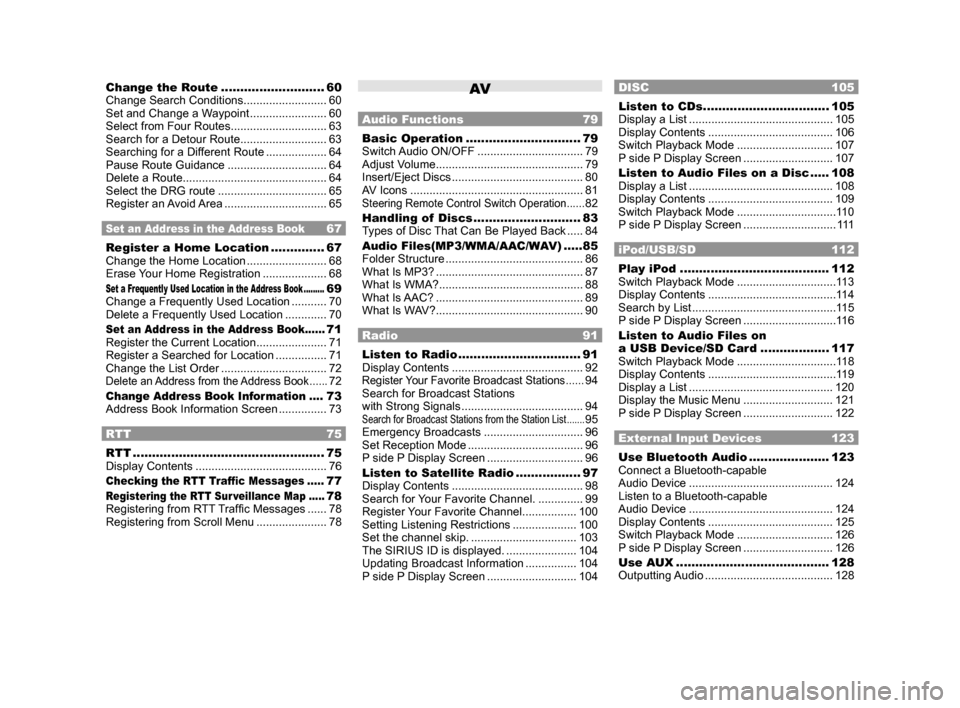
Change the Route ...........................60
Change Search Conditions .......................... 60
Set and Change a Waypoint ........................ 60
Select from Four Routes .............................. 63
Search for a Detour Route ........................... 63
Searching for a Different Route ...................64
Pause Route Guidance ...............................64
Delete a Route ............................................. 64
Select the DRG route .................................. 65
Register an Avoid Area ................................ 65
Set an Address in the Address Book 67
Register a Home Location ..............67
Change the Home Location ......................... 68
Erase Your Home Registration .................... 68
Set a Frequently Used Location in the Address Book .........69
Change a Frequently Used Location ........... 70
Delete a Frequently Used Location ............. 70
Set an Address in the Address Book ......71
Register the Current Location ...................... 71
Register a Searched for Location ................71
Change the List Order ................................. 72
Delete an Address from the Address Book ......72
Change Address Book Information ....73
Address Book Information Screen ............... 73
RTT 75
RTT .................................................. 75
Display Contents ......................................... 76
Checking the RTT Traffic Messages .....77
Registering the RTT Sur veillance Map .....78
Registering from RTT Traffic Messages ...... 78
Registering from Scroll Menu ......................78
AV
Audio Functions 79
Basic Operation .............................. 79
Switch Audio ON/OFF ................................. 79
Adjust Volume .............................................. 79
Insert/Eject Discs ......................................... 80
AV Icons ...................................................... 81
Steering Remote Control Switch Operation ......82
Handling of Discs ............................ 83
Types of Disc That Can Be Played Back ..... 84
Audio Files(MP3/WMA/AAC/WAV) .....85
Folder Structure ........................................... 86
What Is MP3? .............................................. 87
What Is WMA? ............................................. 88
What Is AAC? .............................................. 89
What Is WAV? .............................................. 90
Radio 91
Listen to Radio ................................ 91
Display Contents ......................................... 92
Register Your Favorite Broadcast Stations ......94
Search for Broadcast Stations
with Strong Signals ...................................... 94
Search for Broadcast Stations from the Station List .......95
Emergency Broadcasts ............................... 96
Set Reception Mode .................................... 96
P side P Display Screen ..............................96
Listen to Satellite Radio .................97
Display Contents ......................................... 98
Search for Your Favorite Channel. ..............99
Register Your Favorite Channel ................. 100
Setting Listening Restrictions .................... 100
Set the channel skip. ................................. 103
The SIRIUS ID is displayed. ...................... 104
Updating Broadcast Information ................ 104
P side P Display Screen ............................104
DISC 105
Listen to CDs ................................. 105
Display a List ............................................. 105
Display Contents ....................................... 106
Switch Playback Mode .............................. 107
P side P Display Screen ............................107
Listen to Audio Files on a Disc ..... 108
Display a List ............................................. 108
Display Contents ....................................... 109
Switch Playback Mode ............................... 11 0
P side P Display Screen .............................111
iPod/USB/SD 112
Play iPod ....................................... 112
Switch Playback Mode ............................... 11 3
Display Contents ........................................ 11 4
Search by List ............................................. 11 5
P side P Display Screen .............................11 6
Listen to Audio Files on
a USB Device/SD Card ..................117
Switch Playback Mode ............................... 11 8
Display Contents ........................................ 11 9
Display a List ............................................. 120
Display the Music Menu ............................ 121
P side P Display Screen ............................122
External Input Devices 123
Use Bluetooth Audio .....................123
Connect a Bluetooth-capable
Audio Device ............................................. 124
Listen to a Bluetooth-capable
Audio Device ............................................. 124
Display Contents ....................................... 125
Switch Playback Mode .............................. 126
P side P Display Screen ............................126
Use AUX ........................................ 128
Outputting Audio ........................................ 128
Page 4 of 226
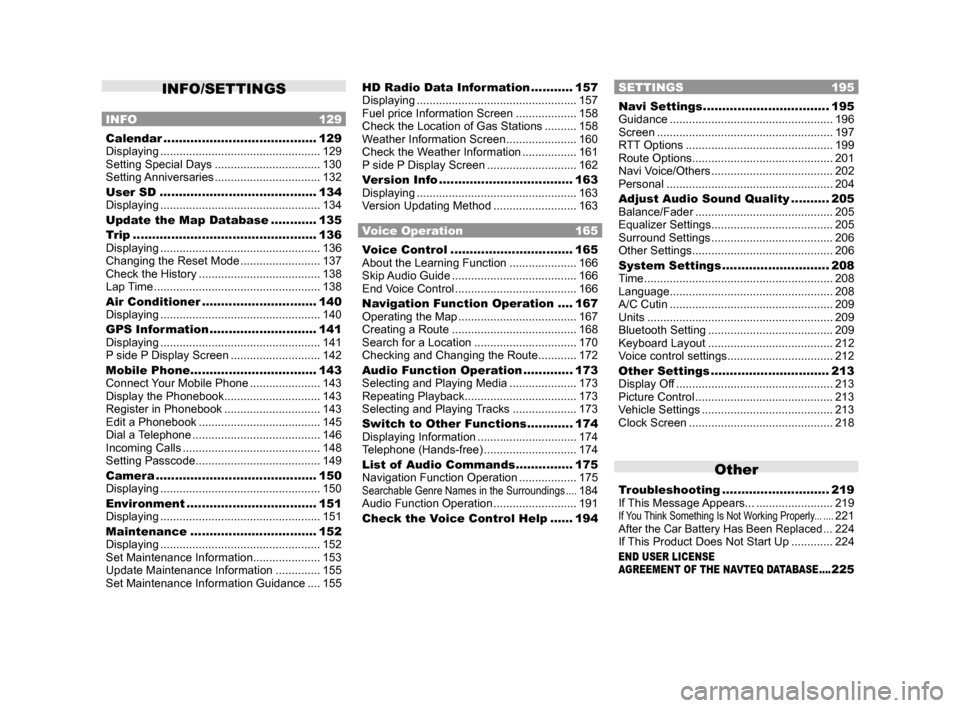
INFO/SETTINGS
INFO 129
Calendar ........................................129
Displaying .................................................. 129
Setting Special Days ................................. 130
Setting Anniversaries ................................. 132
User SD ......................................... 134
Displaying .................................................. 134
Update the Map Database ............ 135
Trip ................................................ 136
Displaying .................................................. 136
Changing the Reset Mode .........................137
Check the History ...................................... 138
Lap Time .................................................... 138
Air Conditioner .............................. 140
Displaying .................................................. 140
GPS Information ............................ 141
Displaying .................................................. 141
P side P Display Screen ............................142
Mobile Phone ................................. 143
Connect Your Mobile Phone ......................143
Display the Phonebook .............................. 143
Register in Phonebook .............................. 143
Edit a Phonebook ...................................... 145
Dial a Telephone ........................................ 146
Incoming Calls ........................................... 148
Setting Passcode ....................................... 149
Camera .......................................... 150
Displaying .................................................. 150
Environment .................................. 151
Displaying .................................................. 151
Maintenance ................................. 152
Displaying .................................................. 152
Set Maintenance Information ..................... 153
Update Maintenance Information ..............155
Set Maintenance Information Guidance .... 155
HD Radio Data Information ...........157
Displaying .................................................. 157
Fuel price Information Screen ................... 158
Check the Location of Gas Stations .......... 158
Weather Information Screen ...................... 160
Check the Weather Information ................. 161
P side P Display Screen ............................162
Version Info ................................... 163
Displaying .................................................. 163
Version Updating Method .......................... 163
Voice Operation 165
Voice Control ................................ 165
About the Learning Function ..................... 166
Skip Audio Guide ....................................... 166
End Voice Control ...................................... 166
Navigation Function Operation .... 167
Operating the Map ..................................... 167
Creating a Route ....................................... 168
Search for a Location ................................ 170
Checking and Changing the Route ............ 172
Audio Function Operation .............173
Selecting and Playing Media ..................... 173
Repeating Playback ................................... 173
Selecting and Playing Tracks .................... 173
Switch to Other Functions ............174
Displaying Information ...............................174
Telephone (Hands-free) ............................. 174
List of Audio Commands ............... 175
Navigation Function Operation .................. 175
Searchable Genre Names in the Surroundings ....184
Audio Function Operation .......................... 191
Check the Voice Control Help ...... 194
SETTINGS 195
Navi Settings .................................195
Guidance ................................................... 196
Screen ....................................................... 197
RTT Options .............................................. 199
Route Options ............................................ 201
Navi Voice/Others ...................................... 202
Personal .................................................... 204
Adjust Audio Sound Quality .......... 205
Balance/Fader ........................................... 205
Equalizer Settings ...................................... 205
Surround Settings ...................................... 206
Other Settings ............................................ 206
System Settings ............................ 208
Time ........................................................... 208
Language ................................................... 208
A/C Cutin ................................................... 209
Units .......................................................... 209
Bluetooth Setting ....................................... 209
Keyboard Layout ....................................... 212
Voice control settings .................................212
Other Settings ............................... 213
Display Off ................................................. 213
Picture Control ........................................... 213
Vehicle Settings ......................................... 213
Clock Screen ............................................. 218
Other
Troubleshooting ............................ 219
If This Message Appears... ........................ 219
If You Think Something Is Not Working Properly... ....221After the Car Battery Has Been Replaced ...224
If This Product Does Not Start Up ............. 224
END USER LICENSE
AGREEMENT OF THE NAVTEQ DATABASE ....225
Page 11 of 226
How to Read This Manual 11
IntroductionBefore Use
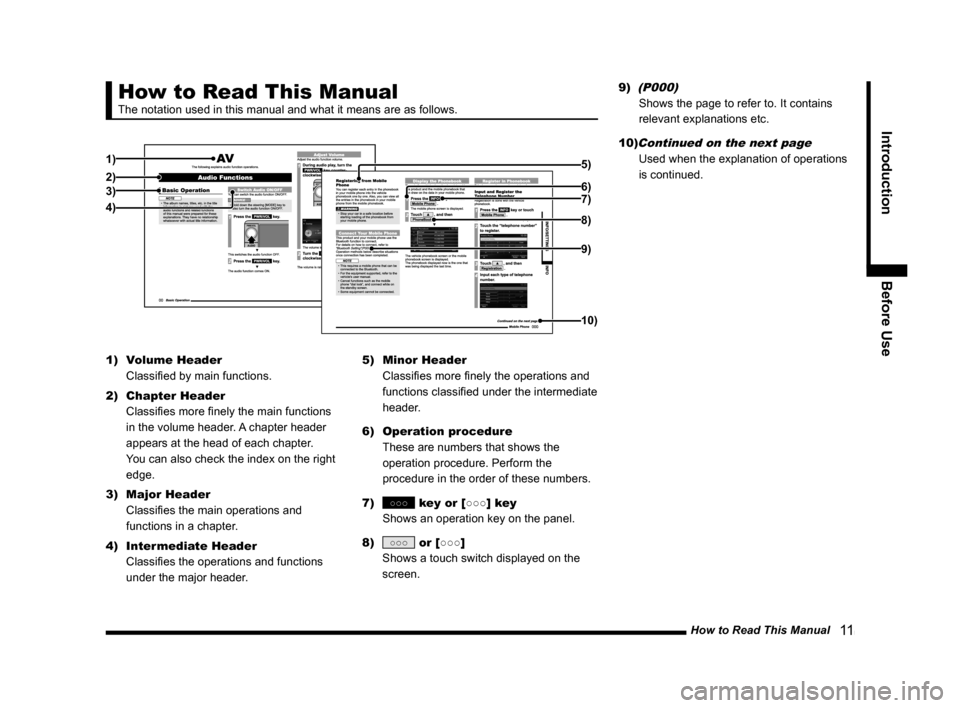
How to Read This Manual
The notation used in this manual and what it means are as follows.
1)
2)3)
4) 7) 5)
6)
8)
9)
10)
1)
Volume Header
Classified by main functions.
2) Chapter Header
Classifies more finely the main functions
in the volume header. A chapter header
appears at the head of each chapter.
You can also check the index on the right
edge.
3) Major Header
Classifies the main operations and
functions in a chapter.
4) Intermediate Header
Classifies the operations and functions
under the major header. 5)
Minor Header
Classifies more finely the operations and
functions classified under the intermediate
header.
6) Operation procedure
These are numbers that shows the
operation procedure. Perform the
procedure in the order of these numbers.
7)
○○○ key or [○○○] key
Shows an operation key on the panel.
8)
○○○ or [○○○]
Shows a touch switch displayed on the
screen. 9)
(P000)
Shows the page to refer to. It contains
relevant explanations etc.
10)
Continued on the next page
Used when the explanation of operations
is continued.
Page 12 of 226

2) 9)
3)
4)
5)
6)")
12 This Product
Basic Operation
This Product
Main Unit Panel
This gives the names of each section of the main unit panel and explains\
their functions.
When the panel is closed
1)
2) 9)
3)
4)
5)
6)
7)
8)
10)
11)
12)
13)
14)
1) Display
Operations can be performed by touching
the touch switches.
→“How to Perform Touch Operations”(P17)
2) PWR/VOL key (P79)
Allows you to adjust the volume for the
audio function and telephone function.
It also allows you to switch the audio
function ON/OFF. 3)
AUDIO key
Displays the audio source screen (for the
last source used).
4)
key/ key
Allows you to select a CD or radio station.
Also, holding down either of these keys
allows you to fast-forward/fast-rewind a
CD or to seek a radio station.
5)
MODE key (P23)
Used to select an audio source. 6)
OPEN key
Displays the monitor panel open/close
screen.
Used to open/close the monitor panel or
insert or remove a disc
(P80).
7)
SETTINGS key (P195)
Used to make settings.
8)
INFO key (P24)
Used to check information.
9)
FOLDER/TUNE key
Allows to select an audio file folder or a
radio station by turning.
SOUND key (P205)
Pressing the key displays the sound
quality setting screen.
Used to adjust the sound quality.
10)
MAP key
Used to display the current location
screen of the navigation
(P29).
11)
- ZOOM key/ ZOOM + key
Zooms in or zooms out the map.
→“Switch the Scale”(P39)
12) key (P46)
Used to set a navigation destination.
13)
key
Allows you to switch the map screen color
Auto, Daytime, and Nighttime according to
the car lighting state.
14)
NAVI MENU key (P22)
Used to make navigation settings.
Page 13 of 226
This Product 13
Introduction Basic Operation
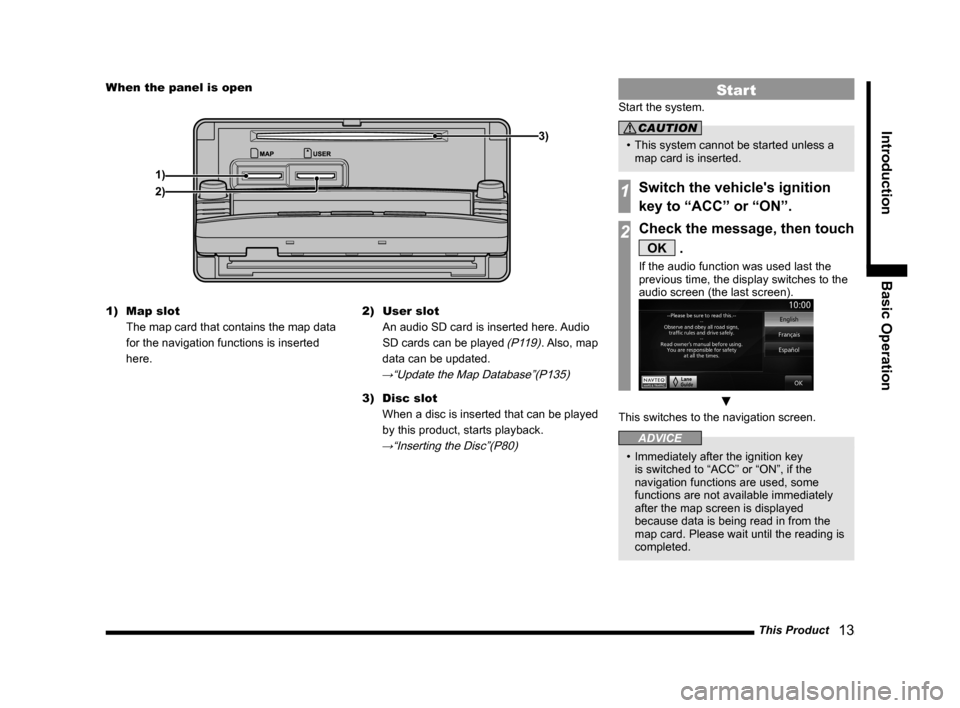
When the panel is open
1) 3)
2)
1) Map slot
The map card that contains the map data
for the navigation functions is inserted
here. 2)
User slot
An audio SD card is inserted here. Audio
SD cards can be played
(P119). Also, map
data can be updated.
→“Update the Map Database”(P135)
3) Disc slot
When a disc is inserted that can be played
by this product, starts playback.
→“Inserting the Disc”(P80)
Start
Start the system.
CAUTION
• This system cannot be started unless a
map card is inserted.
1Switch the vehicle's ignition
key to “ACC” or “ON”.
2Check the message, then touch
OK .
If the audio function was used last the
previous time, the display switches to the
audio screen (the last screen).
▼
This switches to the navigation screen.
ADVICE
• Immediately after the ignition key
is switched to “ACC” or “ON”, if the
navigation functions are used, some
functions are not available immediately
after the map screen is displayed
because data is being read in from the
map card. Please wait until the reading is
completed.
Page 22 of 226
22 Top Menu
Navi Menu
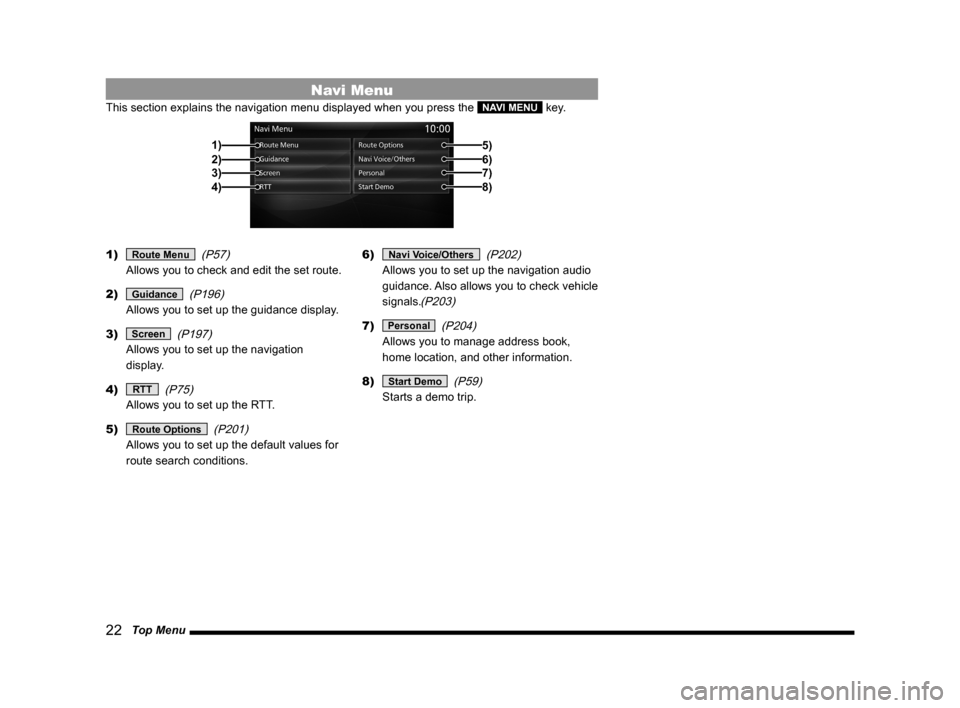
This section explains the navigation menu displayed when you press the NAVI MENU key.
2)3)
4) 1)
5)6)7)8)
1) Route Menu (P57)
Allows you to check and edit the set route.
2)
Guidance (P196)
Allows you to set up the guidance display.
3)
Screen (P197)
Allows you to set up the navigation
display.
4)
RTT (P75)
Allows you to set up the RTT.
5)
Route Options (P201)
Allows you to set up the default values for
route search conditions. 6)
Navi Voice/Others
(P202)
Allows you to set up the navigation audio
guidance. Also allows you to check vehicle
signals.
(P203)
7) Personal (P204)
Allows you to manage address book,
home location, and other information.
8)
Start Demo (P59)
Starts a demo trip.
Page 24 of 226
24 Top Menu
INFO Menu
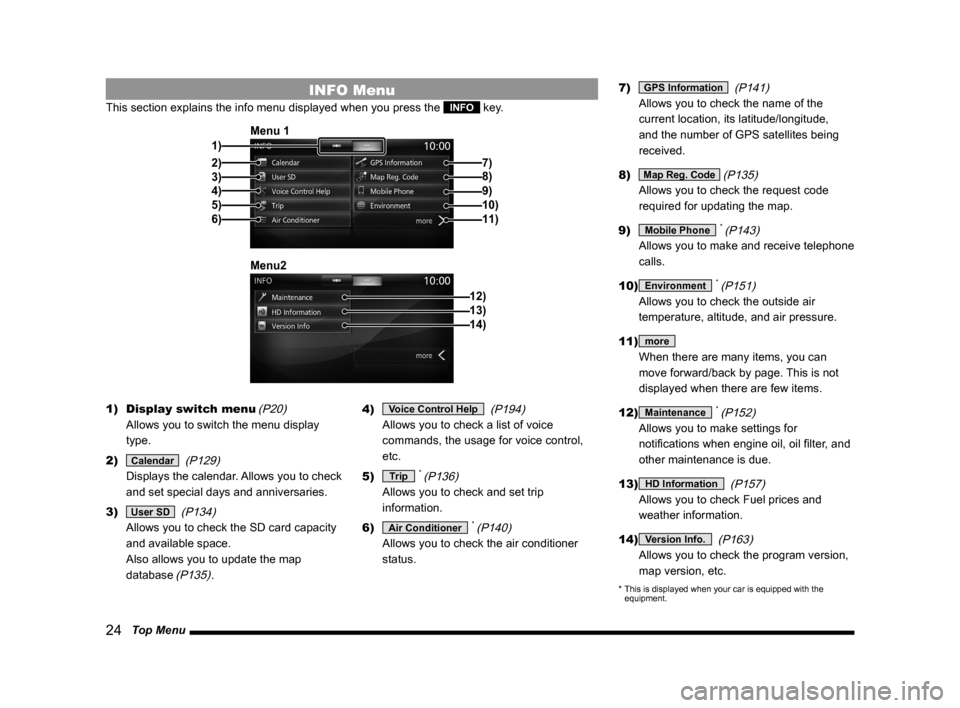
This section explains the info menu displayed when you press the INFO key.
2)3)
4)
5)
6) 1) Menu 1
7)
8)
9)10)11)
12)
Menu213)14)
1)
Display switch menu (P20)
Allows you to switch the menu display
type.
2)
Calendar (P129)
Displays the calendar. Allows you to check
and set special days and anniversaries.
3)
User SD (P134)
Allows you to check the SD card capacity
and available space.
Also allows you to update the map
database
(P135). 4)
Voice Control Help
(P194)
Allows you to check a list of voice
commands, the usage for voice control,
etc.
5)
Trip * (P136)
Allows you to check and set trip
information.
6)
Air Conditioner * (P140)
Allows you to check the air conditioner
status. 7)
GPS Information
(P141)
Allows you to check the name of the
current location, its latitude/longitude,
and the number of GPS satellites being
received.
8)
Map Reg. Code (P135)
Allows you to check the request code
required for updating the map.
9)
Mobile Phone * (P143)
Allows you to make and receive telephone
calls.
10)
Environment * (P151)
Allows you to check the outside air
temperature, altitude, and air pressure.
11)
more
When there are many items, you can
move forward/back by page. This is not
displayed when there are few items.
12)
Maintenance * (P152)
Allows you to make settings for
notifications when engine oil, oil filter, and
other maintenance is due.
13)
HD Information (P157)
Allows you to check Fuel prices and
weather information.
14)
Version Info. (P163)
Allows you to check the program version,
map version, etc.
* This is displayed when your car is equipped with the
equipment.
Page 29 of 226

Navigation Screen 29
NAVIBasic Operation
Navigation Screen
This section explains the navigation map screen and the display contents\
for the menu
screens.
Map Display Contents
The map screens include the current location screen and scroll screens (P30).
Current Location Screen
This section explains the contents displayed on the current location scr\
een, which is displayed
when you press the MAP key.
3)
4) 1) 6) 5)
8)
7)
2)
9)
10)
1) Route guidance mark
The road you are to drive is indicated by
an arrow.
With the [Screen] “Searched Root”, you
can select [Arrow] or [Line].
→“Navi Settings”(P195)
2) Car's location mark
The arrow shows the location of your car
and the direction of the arrow shows the
direction you are traveling in.
3) Junction guidance icon
Shows the distance until the next junction
to turn and which way to turn. Touching
this displays the junction guidance map.
→“Check the Next Junction to Turn”(P57)
4) ▲ (P32)
Displays a sub-menu.
5) Icons
(P31)
Displays the current telephone and audio
status.
6) Clock
Displays the current time using 12- or 24-
hour time.
7)
RTT
Displays traffic congestion information and
traffic rule information etc. Touching RTT
symbol allows you to check the detailed
information.
→ “Checking the RTT Traffic Messages” (P77)
8) Direction icon
Touching this displays the map switching
screen.
→“Select the Map Screen”(P33)
9) Scale icon
Shows the scale of the displayed map.
Touching this changes the scale.
→“Switch the Scale”(P39)
10) Destination/waypoint information
Shows the time, direction, and distance
to the destination or waypoint. Each time
you touch this, the display switches to the
estimated time of arrival, time remaining,
and local time. The time and distance at
this time are the expected time of arrival,
time remaining, or local time and distance
to the destination or waypoint from a
location off the route.
ADVICE
• The menu items vary with the navigation
settings and travel status. Some items
may not be displayed.
• To make the explanation clearer, the
navigation images in this manual leave
out some landmarks.
Page 32 of 226
32 Navigation Screen
Set as Dest.
The location can be set as the
destination.
→“Set as the Destination”(P41)
Address Book The location can be
registered.→“Set in the Address
Book”(P42)
POI nearby Establishments around the
location can be searched for.
→“Search for Nearby
Establishments”(P42)
Location check The position of location
relative to the current location can
be checked.
→“Check the Location of Your
Car.”(P43)
Set as RTT
sur veillance Areas (around the location)
can be registered to check traffic
messages.
→“Registering the
RTT Surveillance Map”(P78)
Back Returns to the previous screen.
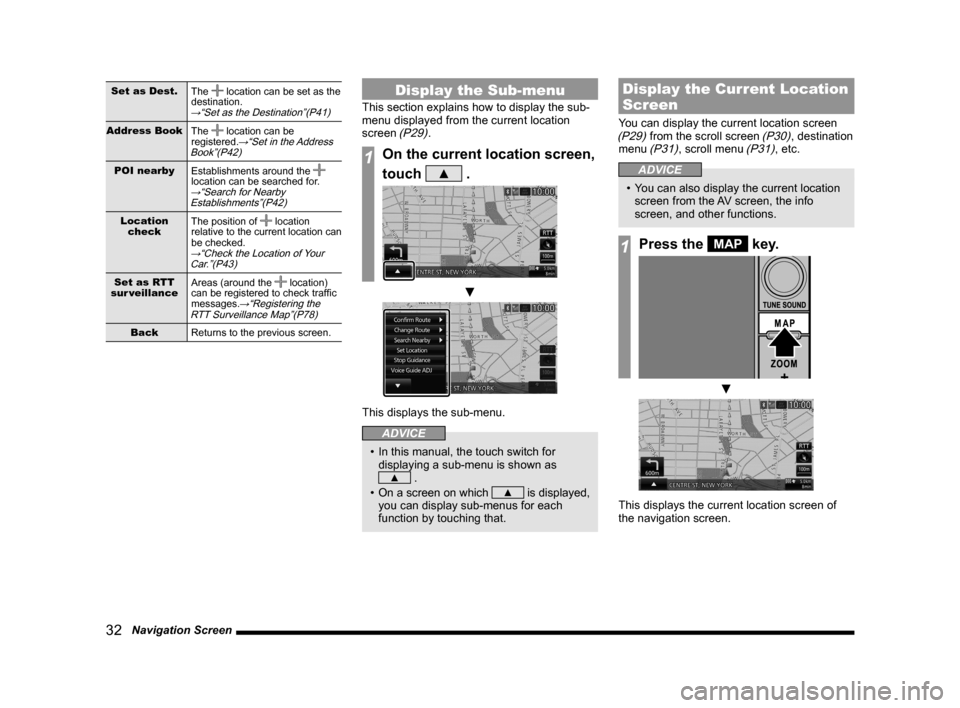
Display the Sub-menu
This section explains how to display the sub-
menu displayed from the current location
screen
(P29).
1On the current location screen,
touch
▲ .
▼
This displays the sub-menu.
ADVICE
• In this manual, the touch switch for
displaying a sub-menu is shown as
▲ .
• On a screen on which
▲ is displayed,
you can display sub-menus for each
function by touching that.
Display the Current Location
Screen
You can display the current location screen (P29) from the scroll screen (P30), destination
menu (P31), scroll menu (P31), etc.
ADVICE
• You can also display the current location
screen from the AV screen, the info
screen, and other functions.
1Press the MAP key.
▼
This displays the current location screen of
the navigation screen.