safe driving MITSUBISHI OUTLANDER 2017 3.G Service Manual
[x] Cancel search | Manufacturer: MITSUBISHI, Model Year: 2017, Model line: OUTLANDER, Model: MITSUBISHI OUTLANDER 2017 3.GPages: 521, PDF Size: 14.91 MB
Page 253 of 521
Multi Information display - Type 1 5-172 Features and controls
5
N00556601180
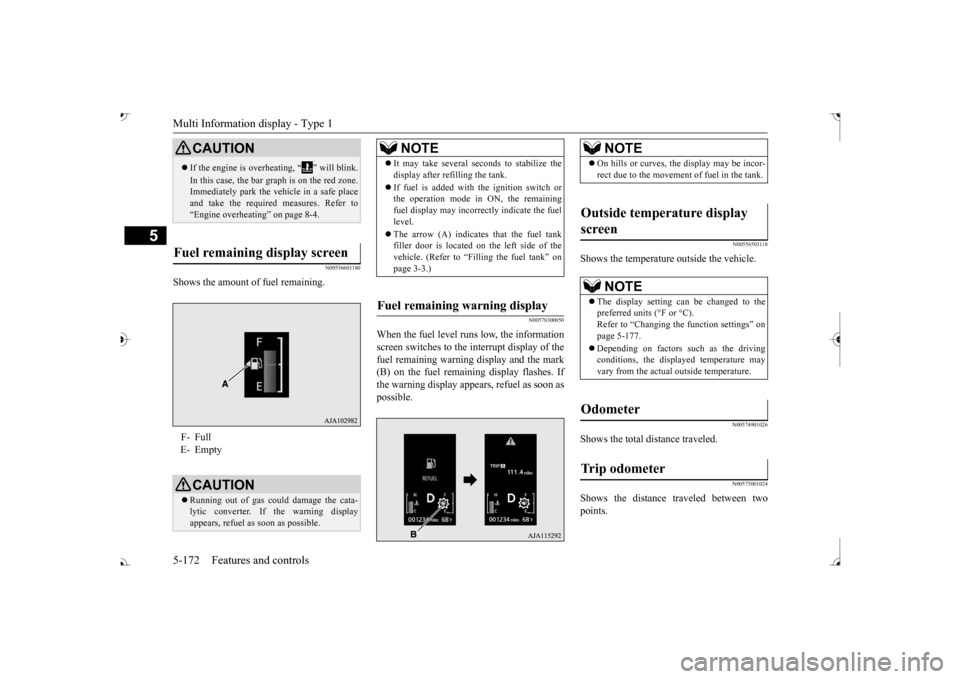
Shows the amount of fuel remaining.
N00578300050
When the fuel level runs low, the information screen switches to the interrupt display of the fuel remaining warning display and the mark(B) on the fuel remaini
ng display flashes. If
the warning display appear
s, refuel as soon as
possible.
N00556501118
Shows the temperature outside the vehicle.
N00574901026
Shows the total distance traveled.
N00575001024
Shows the distance traveled between twopoints.
CAUTION If the engine is overheating, “ ” will blink. In this case, the bar graph is on the red zone. Immediately park the vehicle in a safe place and take the require
d measures. Refer to
“Engine overheating” on page 8-4.
Fuel remaining display screen F- Full E- Empty
CAUTION Running out of gas coul
d damage the cata-
lytic converter. If the warning display appears, refuel as soon as possible.
NOTE
It may take several se
conds to stabilize the
display after re
filling the tank.
If fuel is added with
the ignition switch or
the operation mode in ON, the remaining fuel display may incorre
ctly indicate the fuel
level. The arrow (A) indicates that the fuel tank filler door is located on
the left side of the
vehicle. (Refer to “F
illing the fuel tank” on
page 3-3.)
Fuel remaining warning display
NOTE
On hills or curves, the display may be incor- rect due to the movement
of fuel in the tank.
Outside temperature display screen
NOTE
The display setting ca
n be changed to the
preferred units (°F or °C).
e function settings” on
page 5-177. Depending on factors such as the driving conditions, the displa
yed temperature may
vary from the actual outside temperature.
Odometer Trip odometer
BK0239700US.book 172 ページ 2016年6月16日 木曜日 午前10時58分
Page 258 of 521
![MITSUBISHI OUTLANDER 2017 3.G Service Manual Multi Information display - Type 1
Features and controls 5-177
5
[When the ignition switch is turned to the “OFF” or “LOCK” position or the operationmode is put in OFF] The display shows the](/img/19/7536/w960_7536-257.png "MITSUBISHI OUTLANDER 2017 3.G Service Manual Multi Information display - Type 1
Features and controls 5-177
5
[When the ignition switch is turned to the “OFF” or “LOCK” position or the operationmode is put in OFF] The display shows the")
Multi Information display - Type 1
Features and controls 5-177
5
[When the ignition switch is turned to the “OFF” or “LOCK” position or the operationmode is put in OFF] The display shows the overall ECO score the function has counted from the time when theignition switch is turn
ed to the “ON” position
to the time when it is turned to the “OFF” or “LOCK” or “ACC” position, or from the timewhen the operation mode is set to “ON” to the time when it is set to “OFF”.
N00556801270
1. Park your vehicle in a safe place.Firmly apply the parking brake and move the selector lever into the “P” (PARK)position.
2. When you lightly press the multi informa- tion meter switch, the information screenswitches to the function setting screen. Refer to “Information screen” on page 5-169. 3. Press and hold the multi information dis- play switch (for about 2 seconds or more) to switch from the setting mode screen to the menu screen.
4. Select the item to change on the menu screen and change to
the desired setting.
For further details on the operation meth- ods, refer to the following sections. Refer to “Changing the reset mode for average fuel consumption and average speed” on page 5-178.Refer to “Changing the fuel consumption display unit” on page 5-179. Refer to “Changing the temperature unit”on page 5-180. Refer to “Changing the display language” on page 5-180.Refer to “Changing the language on other system to match the multi information display” on page 5-181.Refer to “Operation
sound setting” on
page 5-181.
Changing the function settings
ECO drive level
Low High
CAUTION For safety, stop the vehicle before operating. While driving, even if you operate the multi information display switch, the function set- ting screen is not displayed.
NOTE
To return the menu screen to the function set- ting screen, press and hold the multi infor-mation display switch
(for about 2 seconds
or more). If no operations are made within about 30 seconds of the menu screen being displayed, the display returns to the function setting screen.
BK0239700US.book 177 ページ 2016年6月16日 木曜日 午前10時58分
Page 270 of 521
Multi Information display - Type 2
Features and controls 5-189
5
N00556801209
The “Average fuel consumption reset mode”,
it” and “Temperature
unit” setting can be
modified as desired,
when the ignition switch is in the “ON” posi- tion.
N00575501029
You can change the mode condition for theaverage fuel consumption display to “Auto reset” or “Manual reset”.
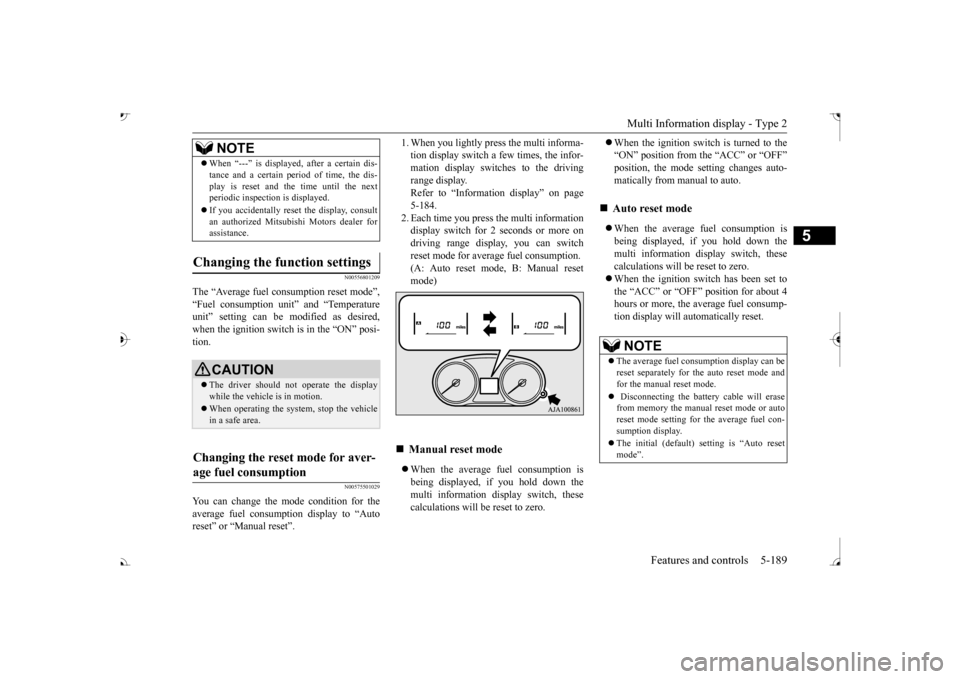
tion display switch a few times, the infor-mation display switches to the driving range display. Refer to “Information display” on page5-184. 2. Each time you press the multi information display switch for 2 seconds or more ondriving range display, you can switch reset mode for average fuel consumption. (A: Auto reset mode, B: Manual reset mode) When the average fuel consumption is being displayed, if you hold down the multi information display switch, thesecalculations will
be reset to zero.
When the ignition switch is turned to the “ON” position from the “ACC” or “OFF”position, the mode se
tting changes auto-
matically from manual to auto. When the average fuel consumption is being displayed, if you hold down themulti information display switch, these calculations will be reset to zero. When the ignition switch has been set to the “ACC” or “OFF” position for about 4 hours or more, the average fuel consump-tion display will automatically reset.
When “---” is displaye
d, after a certain dis-
tance and a certain pe
riod of time, the dis-
play is reset and the time until the nextperiodic inspecti
on is displayed.
If you accidentally rese
t the display, consult
an authorized Mitsubishi Motors dealer for assistance.
Changing the function settings
CAUTION The driver should not operate the display while the vehicle is in motion. When operating the system, stop the vehicle in a safe area.
Changing the reset mode for aver- age fuel consumption
NOTE
Manual reset mode
Auto reset mode NOTE
The average fuel cons
umption display can be
reset separately for the auto reset mode and for the manual reset mode. Disconnecting the batt
ery cable will erase
from memory the manual reset mode or auto reset mode setting for the average fuel con-sumption display. The initial (default) setting is “Auto reset mode”.
BK0239700US.book 189 ページ 2016年6月16日 木曜日 午前10時58分
Page 277 of 521
Indicator light, warning light, and information screen display list (multi information display - Type 1)
5
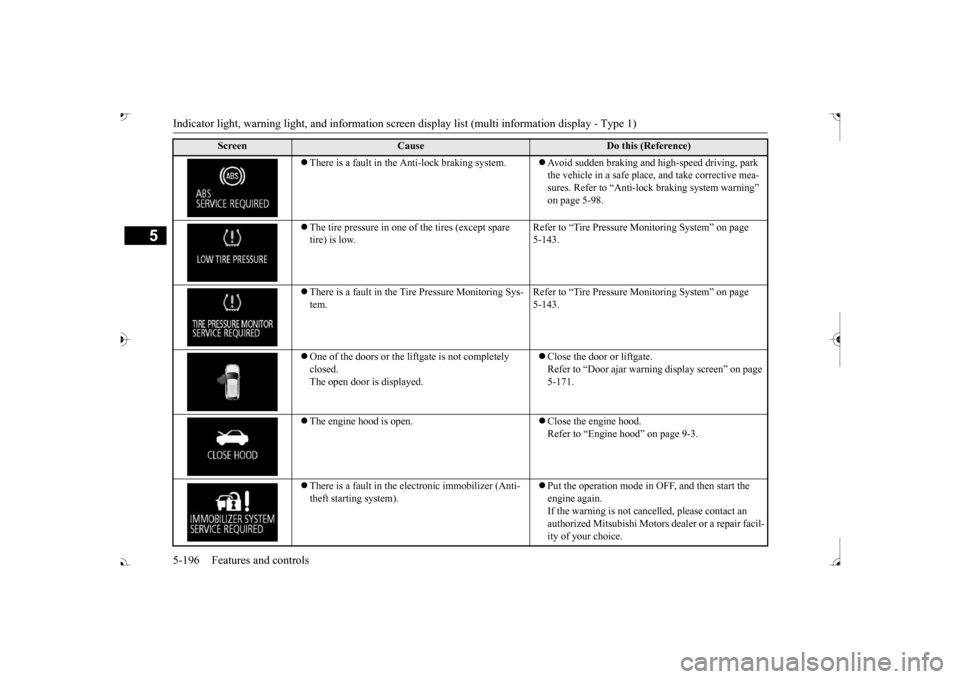
There is a fault in the Anti-lock braking system.
Avoid sudden braking and high-speed driving, park the vehicle in a safe place, and take corrective mea-sures. Refer to “Anti-lock
braking system warning”
on page 5-98.
The tire pressure in one of the tires (except spare tire) is low.
Refer to “Tire Pressure Monitoring System” on page 5-143.
There is a fault in the Tire Pressure Monitoring Sys- tem.
Refer to “Tire Pressure Monitoring System” on page 5-143.
One of the doors or the liftgate is not completely closed. The open door is displayed.
Close the door or liftgate. Refer to “Door ajar warnin
g display screen” on page
5-171.
The engine hood is open.
Close the engine hood. Refer to “Engine hood” on page 9-3.
There is a fault in the electronic immobilizer (Anti- theft starting system).
Put the operation mode in OFF, and then start the engine again.If the warning is not cancel
led, please contact an
authorized Mitsubishi Motors dealer or a repair facil- ity of your choice.
Screen
Cause
Do this (Reference)
BK0239700US.book 196 ページ 2016年6月16日 木曜日 午前10時58分
Page 297 of 521
Warning lights 5-216 Features and controls
5
N00520300147 N00520401552
This light comes on when the ignition switch is turned to the “ON” position (engine off) orthe operation mode is put in ON. When the engine is started, the light should go off a few seconds later. A warning is alsodisplayed in the multi information display. The warning light also illuminates after start- ing the engine under the following condi-tions. When the parking brake is still applied. When the brake fluid level is low. When the brake system circuit is not working properly.
When the vehicle is moving at more than 5 mph (8 km/h) and parking brake applied, abuzzer will sound to inform the driver that the parking brake is not properly release. Before driving, be sure
that the parking brake
is fully released and
brake warning light is
off.
N00591200030
This warning light will illuminate when there is a fault in the Electric parking brake system. Normally, this warning light illuminateswhen the operation mode is put in ON, and goes off in a few seconds.
NOTE
The ECO drive assist is displayed only when vehicle is driven with
the selector lever in
the “D” (DRIVE) positi
on or when vehicle is
driven in the sport mode (for vehicles equipped with sportroni
c steering wheel pad-
dle shifter).
Warning lights Brake warning light (red) and buzzer
CAUTION If the brake warning light and the Anti-lock braking system warning
light are illuminated
at the same time, the braking force distribu- tion function will not ope
rate, so the vehicle
may be destabilized
during sudden braking
under the following conditions.• When the brake warn
ing light does not go
out even when the parking brake is released.• When the brake warning light stays onwhile driving.• If the above occurs,
avoid sudden braking
and high-speed driving. Park the vehicle in a safe place, and contact an authorized Mit-subishi Motors dealer or a repair facility of your choice as soon as possible.
The vehicle should be bro
ught to a halt in the
following manner when
brake performance
is deteriorated.• Confirm that the vehicle slows down whenyou press down on the brake pedal harderthan usual. In some cases, the brake pedal may go all the way to the floor.
• Should the brakes fail, use engine braking to reduce your speed and observe the fol-lowings.[Vehicles with the parking brake of the lever type] Carefully pull the parking brake lever.[Vehicles with the Electric parking brake] Keep pulling the Electric parking brake switch. (Refer to “Electric parking brake” Depress the brake peda
l to illuminate the
stop lights to alert
the vehicles behind you.
Electric parking brake warning light (yellow)
(if so equipped)
BK0239700US.book 216 ページ 2016年6月16日 木曜日 午前10時58分
Page 298 of 521
Warning lights
Features and controls 5-217
5
N00520501814
This indicator is a part
of the onboard diag-
nostic (OBD) system which monitors the emissions, engine control system or auto- matic transaxle cont
rol system/continuously
variable transmission
(CVT) control system.
If a problem is detected in one of these sys- tems, this indicator illuminates or flashes.When the ignition switch is turned to the “ON” position or the operation mode is put in ON, this indicator
normally comes on and
goes off after the engine has started.
This indicator will come on if the fuel tank filler cap is not properly tightened. If thisindicator comes on and stays on after refuel- ing, stop the engine and check that the cap is properly tightened. (Turn the cap clockwiseuntil you hear clicking sounds.) If this indicator does not go off after several seconds or lights up whil
e driving, have the
system checked as s
oon as possible at an
authorized Mitsubishi Motors dealer or a repair facility of your choice.
N00520601323
This light comes on in the event of a malfunc-tion in the charging system or when the igni-
CAUTION When the warning light remains on or does not come on, there is the possibility that theparking brake cannot be operated orreleased. Immediately contact the nearest authorized Mitsubishi Motors dealer. When the warning light comes on during driving,immediately stop the vehi
cle in a safe place,
and contact an authorized Mitsubishi Motors dealer. If you inevitably have to park, parkthe vehicle on level and stable ground, shift the selector lever in
Page 299 of 521
Warning lights 5-218 Features and controls
5
tion switch is turned to the “ON” position (engine off) or the operation mode is put inON. On vehicle equipped with the multi information display - Type 1, a warning is also displayed in the multi information dis-play. When the engine is started, the light should go out. Check to make sure that the light has gone out before driving.
N00520701278
This light comes on when the engine oil pres-sure is below normal. If the light stays on while driving, stop the
engine as soon as pos-
sible. Do not run the engine until the cause ofthe low oil pressure is corrected.
N00575701021
This light comes on in red if the coolant tem- perature becomes excessively high.
N00520901339
This light comes on when any door or the lift- gate is open or not completely closed. When the vehicle is moving at more than 5 mph (8 km/h) and any door or the liftgate isopen or ajar, a tone will sound 4 times to inform the driver that any door or the liftgate is not properly shut.
CAUTION If the warning light stays on while the engine is running, park your ve
hicle in a safe place
as soon as possible and
contact an authorized
Mitsubishi Motors dealer
or a repair facility
of your choice to have the system checked.
Oil pressure warning light (Vehicle equipped with the multi information display - Type 2)
CAUTION If this light comes on when the engine oil level is not low, have
your vehicle checked at
an authorized Mitsubish
i Motors dealer or a
repair facility of your choice. This warning light does not show the amount of oil in the crankcase. This can only be determined by checking the oil level with the dipstick with the engine turned off.
High coolant temperature warning light - red (Vehicle equipped with the multi infor- mation display - Type 2)
CAUTION If the light comes on during vehicle opera- tion, it indicates that
the engine is possibly
overheating. Continue
d driving could make
the engine fail. Immedi
ately stop the vehicle
in a safe place and ta
ke appropriate action.
(Refer to
Page 300 of 521
Information screen display (Vehicle equipped with the multi information display - Type 1)
Features and controls 5-219
5
N00590300034
This light comes on when the washer fluid is running low.If the light comes on, replenish the container with washer fluid. Refer to “Washer fluid” on page 9-12.Refer to “Capacity” on page 11-7.
N00558301064 N00558401179
This warning is displayed if the vehicle is being driven with the parking brake stillapplied. The warning light in the instrument cluster only comes on when the parking brake is applied.
When the ignition switch is turned to the “ON” position or the operation mode is put inON, if the brake fluid is low, this warning is displayed. The warning light in the instrument cluster also illuminates.
NOTE
When the interior light
auto-cutout function
is been activated, th
e light goes out automat-
ically after about 30 minutes.Refer to “Interior light
auto-cutout function
(dome light and other
lights)” on page 5-275.
Washer fluid level warning light (Vehicle equipped with the multi information display - Type 2)
Information screen display (Vehicle equipped with the multi information display - Type 1) Brake warning display
CAUTION If a vehicle is driven
without releasing the
parking brake, the brakes will overheat, resulting in ineffectiv
e braking and possible
brake failure. If this warning is displayed, release the park- ing brake.
CAUTION If this warning stays on and does not go out while driving, there is
a danger of ineffective
braking. If this happens, park the vehicle in a safe place, and contac
t an authorized Mit-
subishi Motors dealer or
a repair facility of
your choice. If the brake warning display, brake warning light, and the Anti-lock braking system warning light are illuminated at the same time, the braking forc
e distribution function
will not operate, so the
vehicle may be desta-
bilized during sudden braking. Avoid sudden braking and high-speed driving. Park thevehicle in a safe place, and contact an autho- rized Mitsubishi Motors dealer or a repair facility of your choice. The vehicle should be br
ought to a halt in the
following manner when
brake performance
is deteriorated.
BK0239700US.book 219 ページ 2016年6月16日 木曜日 午前10時58分
Page 321 of 521
Bluetooth® 2.0 interface 5-240 Features and controls
5
Refer to “USB input terminal” on page 5-263. Refer to “Listen to an iPod” on page 7-32.Refer to “Listen to Audio Files on a USB Device” on page 7-34. Refer to “To play iPod/USB memory devicetracks via voice opera
tion” on page 7-37.
Refer to “Listen to Bl
uetooth Audio” on page
7-40. Bluetooth
® is a registered trademark of
BLUETOOTH SIG, INC.
N00563801070
You have acquired a device
that includes soft-
ware licensed to Mits
ubishi Motors Corpora-
tion from Visteon Corporation, and their subsequent 3rd party
suppliers. For a com-
plete list of these 3rd party products and theirend user license agreem
ents, please go to the
following website. http://www.jciblueconnect.com/faq/fulldis-closure.pdf
N00563901345
The Bluetooth
® 2.0 interface allows for mak-
ing/receiving hands-free
calls in the vehicle
using a Bluetooth
® compatible cellular
phone. It also allows the user to play music, saved in a Bluetooth
® music player, from the
vehicle’s speakers. The system is equipped with a voice recogni- tion function, which allows you to makehands-free calls by simple switch operations and voice command
operations using a
defined voice tree. The Bluetooth
® 2.0 interface can be used
when the ignition switch or the operation mode is in ON or ACC. Before you can use the Bluetooth
® 2.0 inter-
face, you must pair the Bluetooth
® device
and Bluetooth
® 2.0 interface. Refer to “Con-
necting the Bluetooth
® 2.0 interface and
Bluetooth
® device” on page 5-247.
Bluetooth
® is a registered trademark of
BLUETOOTH SIG, INC.
Link System End User License Agreement Bluetooth
® 2.0 interface
WA R N I N G Although the Bluetooth
® 2.0 interface
allows you to make ha
nds-free calls, if you
choose to use the cellular phone while driving, you must not allow yourself to bedistracted from the sa
fe operation of your
vehicle. Anything, including cellular phone usage, that distracts you from thesafe operation of your vehicle increases your risk of an accident. Refer to and comply with all state and local laws in your area regarding cellular phone usage wh
ile driving.
NOTE
If the ignition switch
or the operation mode
is left in ACC, the accessory power willautomatically turn off after a certain period of time and you will no
longer be able to use
the Bluetooth
® 2.0 interface. The accessory
power comes on again if
the ignition switch
or the engine switch is operated. Refer to“ACC power auto-cutout function” on page 5-20 and 5-64. The Bluetooth
® 2.0 interface cannot be used
if the Bluetooth
® device has a dead battery
or the device power is turned off. Hands-free calls
will not be possible if your
phone does not have
service available.
BK0239700US.book 240 ページ 2016年6月16日 木曜日 午前10時58分
Page 345 of 521
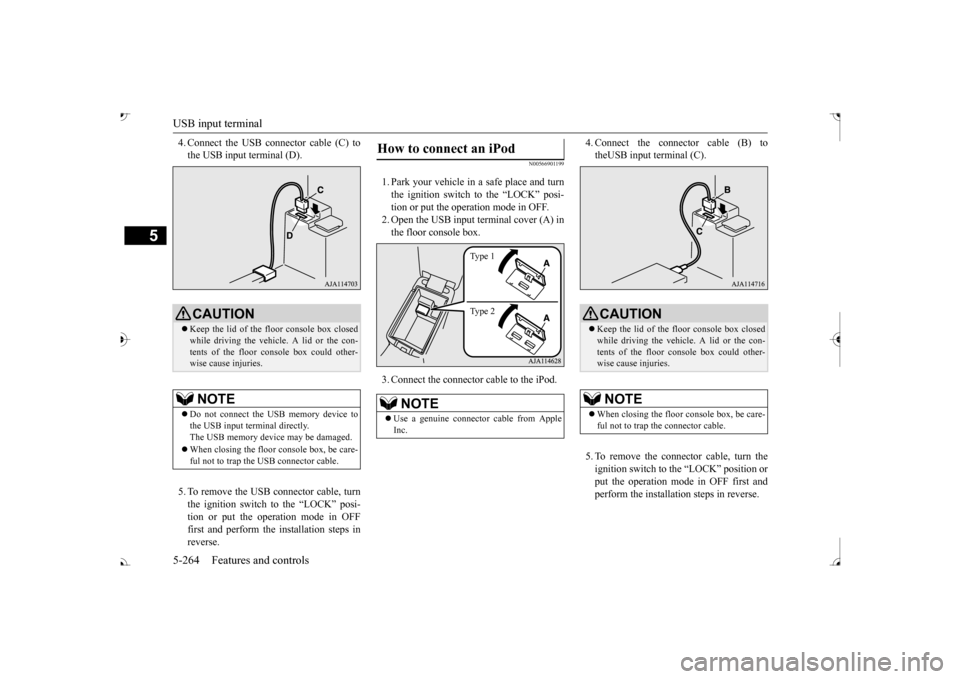
USB input terminal 5-264 Features and controls
5
4. Connect the USB connector cable (C) to the USB input terminal (D). 5. To remove the USB connector cable, turn the ignition switch to the “LOCK” posi- tion or put the operation mode in OFFfirst and perform the installation steps in reverse.
N00566901199
1. Park your vehicle in
a safe place and turn
the ignition switch to the “LOCK” posi-tion or put the operation mode in OFF. 2. Open the USB input terminal cover (A) in the floor console box. 3. Connect the connector cable to the iPod.
4. Connect the connector cable (B) to theUSB input terminal (C). 5. To remove the connect
or cable, turn the
ignition switch to the “LOCK” position orput the operation mode in OFF first and perform the installation steps in reverse.
CAUTION Keep the lid of the floor console box closed while driving the vehicle. A lid or the con- tents of the floor console box could other- wise cause injuries.NOTE
Do not connect the US
B memory device to
the USB input term
inal directly.
The USB memory devi
ce may be damaged.
When closing the floor
console box, be care-
ful not to trap the USB connector cable.
How to connect an iPod
NOTE
Use a genuine connector
cable from Apple
Inc.
Ty p e 1 Ty p e 2
CAUTION Keep the lid of the floor console box closed while driving the vehicle. A lid or the con- tents of the floor console box could other- wise cause injuries.NOTE
When closing the floor
console box, be care-
ful not to trap the connector cable.
BK0239700US.book 264 ページ 2016年6月16日 木曜日 午前10時58分