battery MITSUBISHI OUTLANDER PHEV 2018 (in English) Owner's Guide
[x] Cancel search | Manufacturer: MITSUBISHI, Model Year: 2018, Model line: OUTLANDER PHEV, Model: MITSUBISHI OUTLANDER PHEV 2018Pages: 538, PDF Size: 25.01 MB
Page 44 of 538
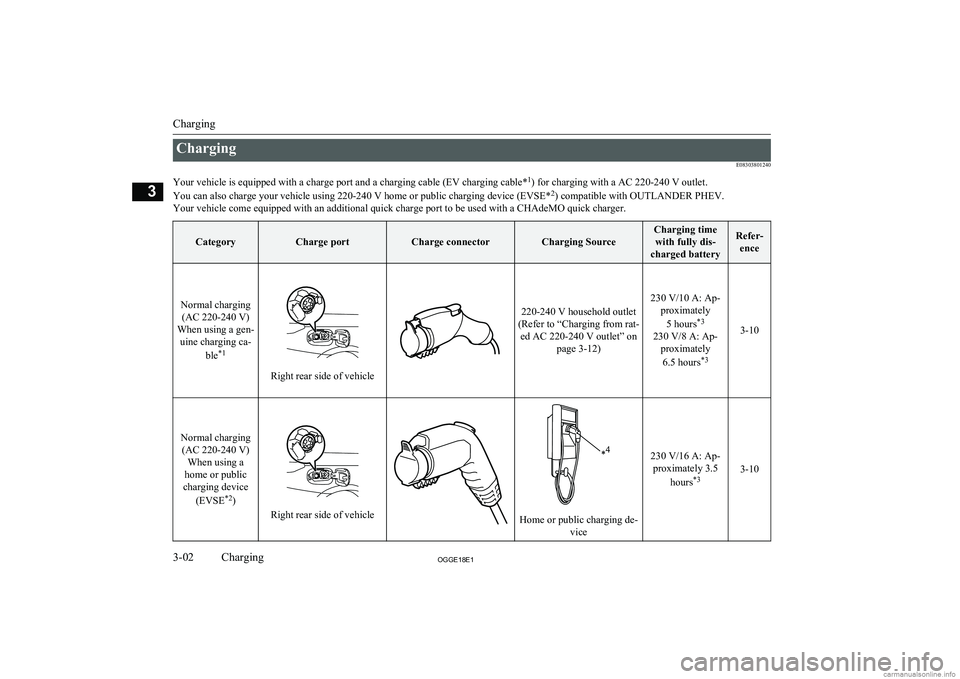
ChargingE08303801240
Your vehicle is equipped with a charge port and a charging cable (EV charging cable* 1
) for charging with a AC 220-240 V outlet.
You can also charge your vehicle using 220-240 V home or public charging device (EVSE* 2
) compatible with OUTLANDER PHEV.
Your vehicle come equipped with an additional quick charge port to be used with a CHAdeMO quick charger.CategoryCharge portCharge connectorCharging Source
Charging time with fully dis-
charged batteryRefer- ence
Normal charging(AC 220-240 V)
When using a gen- uine charging ca-
ble*1
Right rear side of vehicle
220-240 V household outlet
(Refer to “Charging from rat- ed AC 220-240 V outlet” on page 3-12)
230 V/10 A: Ap-proximately
5 hours *3
230 V/8 A: Ap- proximately
6.5 hours *3
3-10
Normal charging
(AC 220-240 V) When using a
home or public
charging device
(EVSE *2
)
Right rear side of vehicleHome or public charging de-
vice
230 V/16 A: Ap-proximately 3.5
hours *3
3-10
Charging
3-02OGGE18E1Charging3
Page 45 of 538
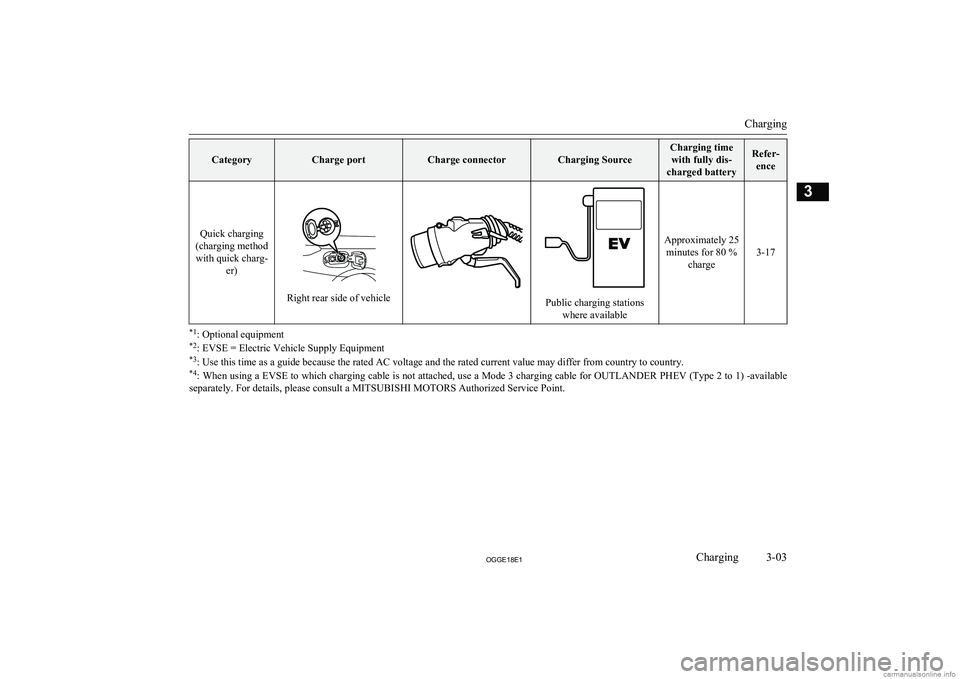
CategoryCharge portCharge connectorCharging Source
Charging timewith fully dis-
charged batteryRefer- ence
Quick charging
(charging method with quick charg- er)
Right rear side of vehiclePublic charging stationswhere available
Approximately 25minutes for 80 % charge
3-17
*1: Optional equipment
*2 : EVSE = Electric Vehicle Supply Equipment
*3 : Use this time as a guide because the rated AC voltage and the rated current value may differ from country to country.
*4 : When using a EVSE to which charging cable is not attached, use a Mode 3 charging cable for OUTLANDER PHEV (Type 2 to 1) -available
separately. For details, please consult a MITSUBISHI MOTORS Authorized Service Point.
Charging
3-03OGGE18E1Charging3
Page 46 of 538
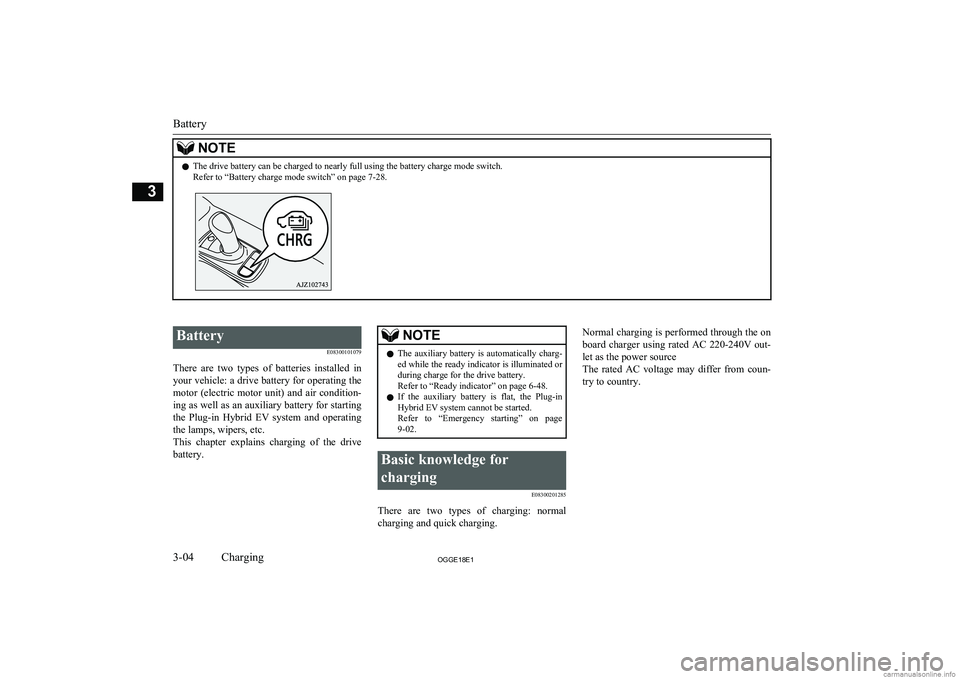
NOTElThe drive battery can be charged to nearly full using the battery charge mode switch.
Refer to “Battery charge mode switch” on page 7-28.
Battery
E08300101079
There are two types of batteries installed in your vehicle: a drive battery for operating the
motor (electric motor unit) and air condition-
ing as well as an auxiliary battery for starting the Plug-in Hybrid EV system and operatingthe lamps, wipers, etc.
This chapter explains charging of the drive battery.NOTEl The auxiliary battery is automatically charg-
ed while the ready indicator is illuminated orduring charge for the drive battery.
Refer to “Ready indicator” on page 6-48.
l If the auxiliary battery is flat, the Plug-in
Hybrid EV system cannot be started.Refer to “Emergency starting” on page
9-02.Basic knowledge for
charging E08300201285
There are two types of charging: normalcharging and quick charging.
Normal charging is performed through the on
board charger using rated AC 220-240V out-
let as the power source
The rated AC voltage may differ from coun-
try to country.
Battery
3-04OGGE18E1Charging3
Page 47 of 538
WARNINGlTo reduce the risk of electric shock or fire
due to electric leak, always use an earthed
outlet protected by a residual current de-
tector, rated for amperage equal to or greater than the value specified by MITSUBISHI MOTORS , and that is con-
nected to a dedicated branch circuit. If
the circuit is shared, and another electri- cal device is being used at the same time
as the vehicle is charging, the circuit may heat abnormally, the breaker may trip
and the circuit may cause adverse inter- ference on the household electrical appli-
ances such as TVs and audio systems.
l It is possible to charge even in rain or
snow. However, be sure to pay attention to the following:
• Do not touch normal charge port, nor-
mal charge connector, outlet and plug with wet hands.
• Keep away from water when connect-
ing the normal charge port, normal
charge connector, outlet and plug.
• Do not perform the charging in the out
of doors when heavy rain, heavy snow, strong winds, and when bad weather is
expected.
• Do not charge if there is possibility a
lightning strike. When thunder rum- bling begins suddenly during normal
charging, do not touch the vehicle and the EV charging cable and turn off the
breaker.WARNINGl If water goes into the normal charge port
or the normal charge connector, it couldcause a short circuit, a fire and an electric shock.
Be sure to completely close the charging
lid and the inner lid and do not leave the EV charging cable in an outdoors.
l If the connected part of the charging plug
has been buried in snow while charging, turn off the hand switch or the breaker
connected with the outlet first, then re- move the snow and disconnect the charg-
ing plug. If your vehicle body has been buried in snow while charging, remove
the snow and then disconnect the charge connector.
l When you perform the normal charging
at away from home, some normal charg-
ers may not correspond to your vehicle. Consult an administrator or a maker of
the normal charger that it corresponds to your vehicle before using it. Also perform
normal charging according to the operat-
ing procedure indicated on the body of
normal charger.
l Do not open the charging lid for anything
other than charging and using the exter-
nal power feed.CAUTIONl Do not attempt to perform a jump start on
the auxiliary battery at the same time that the
drive battery is being charged. Doing so may
damage the vehicle or charging cable and
could cause injury.
Refer to “Emergency starting” on page 9-02.NOTEl If you open the charging lid with the opera-
tion mode of the power switch is ON, a buz- zer sounds approximately 10 minutes inter-mittently to alert the charging cannot be star- ted. If you close the charging lid or put theoperation mode in OFF, the buzzer stops.
l If you insert the charge connector to the
charge port with the operation mode is ON,
a buzzer sounds continuously approximately
10 minutes to alert the charging cannot be started.
If you pull the charge connector out or put the operation mode in OFF, the buzzer stops.
l Repeatedly performing only quick charging
may reduce the battery capacity.
In usual charge, normal charging is recom-
mended.
l To maintain the capacity of the drive battery,
the following is recommended:
• If you repeatedly perform only the quick
charging, fully charge the vehicle in nor- mal charging every 2 weeks.
Basic knowledge for charging
3-05OGGE18E1Charging3
Page 48 of 538
NOTE•Do not repeat charging near the full
charge level.
l The quick charging gives priority when the
normal charging and the quick charging are performed at the same time. At this time, thenormal charging will be stopped.
l Even if the operation mode of the power
switch is OFF, you may hear the operating sound of the cooling fan for cooling the
drive battery during charging.
This is not a malfunction.
l If your vehicle is not used for a long time,
check the energy level gauge every 3 months. If the gauge shows 0, charge thedrive battery until some indication appears.
Alternatively, start the Plug-in Hybrid EV
System. Then the engine will automatically start to charge the drive battery. Wait until the engine automatically stops, then put theoperation mode of the power switch in OFF.
l In the event of an electrical power outage
while charging, charging restarts automati-
cally with the restoration of electricity.Charge port courtesy lamp
E08304300157
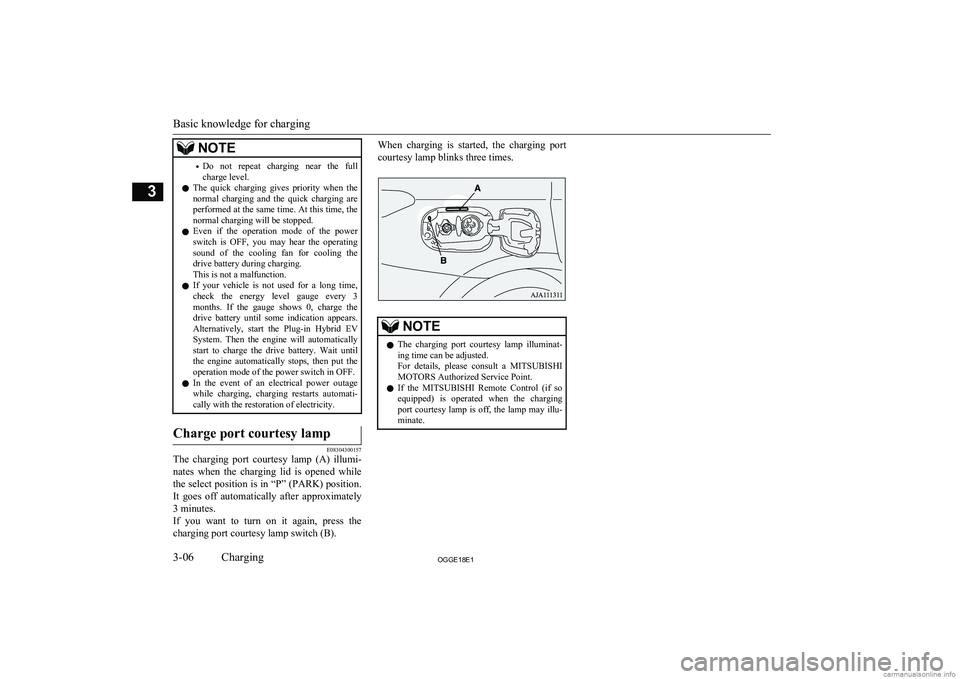
The charging port courtesy lamp (A) illumi-
nates when the charging lid is opened while
the select position is in “P” (PARK) position. It goes off automatically after approximately3 minutes.
If you want to turn on it again, press the charging port courtesy lamp switch (B).
When charging is started, the charging port
courtesy lamp blinks three times.NOTEl The charging port courtesy lamp illuminat-
ing time can be adjusted.
For details, please consult a MITSUBISHI
MOTORS Authorized Service Point.
l If the
MITSUBISHI Remote Control (if so
equipped) is operated when the charging
port courtesy lamp is off, the lamp may illu-
minate.
Basic knowledge for charging
3-06OGGE18E1Charging3
Page 50 of 538
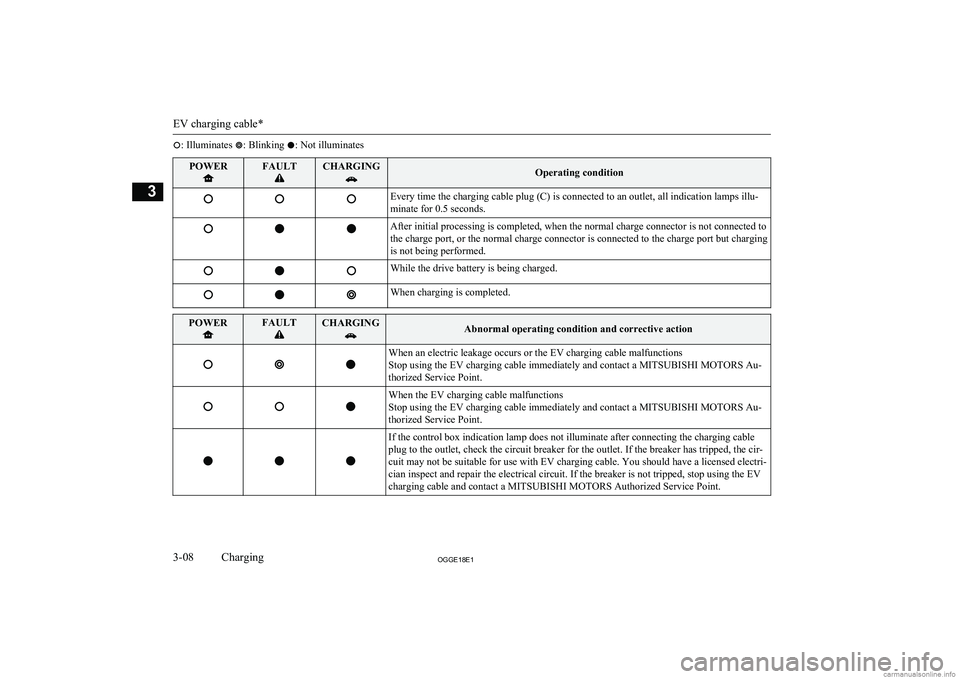
: Illuminates : Blinking : Not illuminatesPOWERFAULTCHARGINGOperating conditionEvery time the charging cable plug (C) is connected to an outlet, all indication lamps illu-
minate for 0.5 seconds.After initial processing is completed, when the normal charge connector is not connected to
the charge port, or the normal charge connector is connected to the charge port but charging
is not being performed.While the drive battery is being charged.When charging is completed.POWERFAULTCHARGINGAbnormal operating condition and corrective actionWhen an electric leakage occurs or the EV charging cable malfunctions
Stop using the EV charging cable immediately and contact a MITSUBISHI MOTORS Au-
thorized Service Point.When the EV charging cable malfunctions
Stop using the EV charging cable immediately and contact a MITSUBISHI MOTORS Au-
thorized Service Point.If the control box indication lamp does not illuminate after connecting the charging cable
plug to the outlet, check the circuit breaker for the outlet. If the breaker has tripped, the cir-
cuit may not be suitable for use with EV charging cable. You should have a licensed electri-
cian inspect and repair the electrical circuit. If the breaker is not tripped, stop using the EV
charging cable and contact a MITSUBISHI MOTORS Authorized Service Point.
EV charging cable*
3-08OGGE18E1Charging3
Page 53 of 538
WARNING•Do not open the tailgate, for example to
remove or place an item in the cargo area.
Charging may affect the operation of elec-
tric medical devices and result in serious personal injury or death.
l Do not charge when the EV charging ca-
ble is coiled up.
Doing so the cable may be heated abnor- mally and this might result in fire.
l Before charging, make sure that there is
no foreign matter such as dust at the nor-
mal charge port and the normal charge connector.
At this time, do not touch the normal
charge port.
l When the normal charge connector is
connected to the charge port, prevent for- eign matter such as water or dust from
entering in the connection.
Connection with foreign matter such as
water or dust may cause fire or an electric shock. Do not perform charging if there
might be strong exposure to water at the connection.
l Never pull the cable to remove the plug.
And never submerge the EV charging
connector, control box or plug in water.
l Please observe the following in order to
prevent accidents during charging such as
electrocution.
• Only use the EV charging cable that is
supplied with the vehicle.WARNING• Do not charge another vehicle by the
EV charging cable. The cable may overheat and this may result in a fire.
• When charging outdoors, make sure to
use an outlet that is protected from wa-
ter entering.
• Do not perform charging with the vehi-
cle covered by a car cover, except for
the MITSUBISHI MOTORS GENU-
INE car cover.
• Do not connect or disconnect the plug
and connector with wet hands.
l While it is normal for the connector and
charging cable to become warm during charging, discontinue use immediately if
the connector or charging cable becomes hot to the touch.
l While it is normal for the control box to
become warm during charging, discontin-
ue use immediately if the control box be- comes hot to the touch.
l If abnormal smells are detected or the ve-
hicle produces smoke, quickly stop charg-
ing.
l Do not perform charging in a poorly ven-
tilated area or in an enclosed area. Keep
sparks, cigarettes, and flames away from
the auxiliary battery.
Flammable gas generated from the auxili- ary battery during charging may be trap- ped, resulting in explosion.
If charging is inevitably required, venti-
late the area well.WARNINGl Grasp the normal charge connector when
connecting or disconnecting the EVcharging cable.
Grasping the cable may damage the cable
and could cause an electric shock, short circuit, and/or fire.CAUTIONl During charging, the cooling fans inside the
engine compartment may automatically be operated even if the operation mode of the
power switch is in OFF.
Keep your hands away from the cooling fan during charging.
l Do not perform charging from other power
source like a generator. Doing so could cause a malfunction.NOTEl If the charge connector is not easily connec-
ted to the charge port due to foreign materialentering, never force the connection. Doing so could damage the charging equipment or
the vehicle. Please contact a MITSUBISHI
MOTORS Authorized Service Point.
l The on board charger is only for rated AC
220-240V outlets.
Normal charging (charging method with rated AC 220-240V outlet)
3-11OGGE18E1Charging3
Page 57 of 538
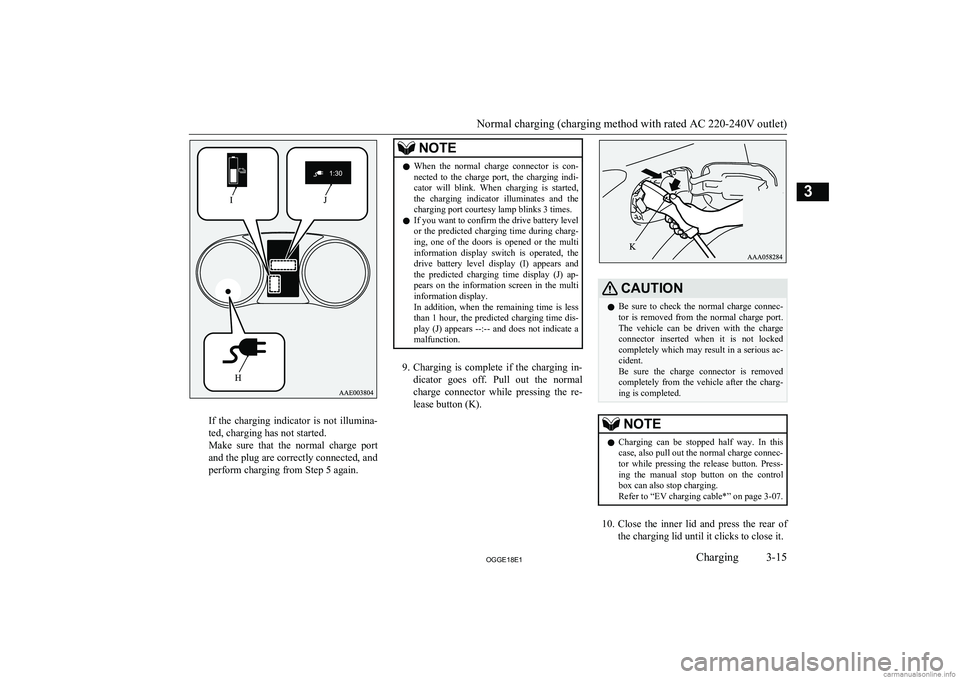
If the charging indicator is not illumina-
ted, charging has not started.
Make sure that the normal charge port
and the plug are correctly connected, and
perform charging from Step 5 again.
NOTEl When the normal charge connector is con-
nected to the charge port, the charging indi-
cator will blink. When charging is started, the charging indicator illuminates and thecharging port courtesy lamp blinks 3 times.
l If you want to confirm the drive battery level
or the predicted charging time during charg-
ing, one of the doors is opened or the multi
information display switch is operated, the drive battery level display (I) appears and the predicted charging time display (J) ap-
pears on the information screen in the multi
information display.
In addition, when the remaining time is less than 1 hour, the predicted charging time dis- play (J) appears --:-- and does not indicate a
malfunction.
9. Charging is complete if the charging in-
dicator goes off. Pull out the normal charge connector while pressing the re-
lease button (K).
CAUTIONl Be sure to check the normal charge connec-
tor is removed from the normal charge port.The vehicle can be driven with the charge
connector inserted when it is not locked completely which may result in a serious ac-
cident.
Be sure the charge connector is removed
completely from the vehicle after the charg- ing is completed.NOTEl Charging can be stopped half way. In this
case, also pull out the normal charge connec-tor while pressing the release button. Press- ing the manual stop button on the control
box can also stop charging.
Refer to “EV charging cable*” on page 3-07.
10. Close the inner lid and press the rear of
the charging lid until it clicks to close it.
Normal charging (charging method with rated AC 220-240V outlet)
3-15OGGE18E1Charging3
Page 61 of 538
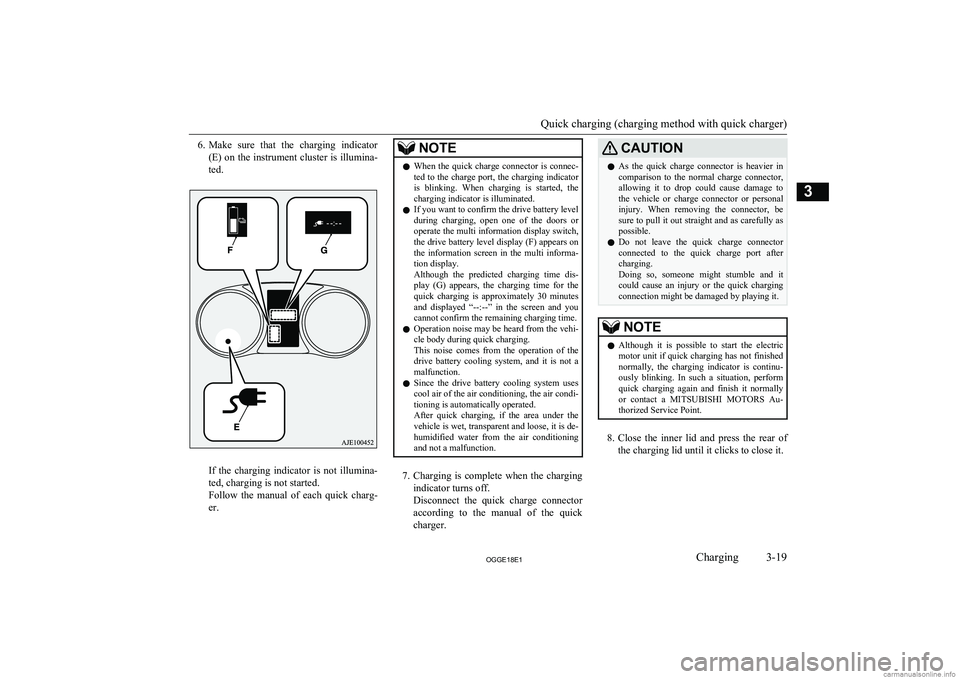
6.Make sure that the charging indicator
(E) on the instrument cluster is illumina-
ted.
If the charging indicator is not illumina-
ted, charging is not started.
Follow the manual of each quick charg-
er.
NOTEl When the quick charge connector is connec-
ted to the charge port, the charging indicator
is blinking. When charging is started, the charging indicator is illuminated.
l If you want to confirm the drive battery level
during charging, open one of the doors or operate the multi information display switch,
the drive battery level display (F) appears on the information screen in the multi informa-tion display.
Although the predicted charging time dis- play (G) appears, the charging time for the
quick charging is approximately 30 minutes and displayed “--:--” in the screen and you
cannot confirm the remaining charging time.
l Operation noise may be heard from the vehi-
cle body during quick charging.
This noise comes from the operation of the drive battery cooling system, and it is not a
malfunction.
l Since the drive battery cooling system uses
cool air of the air conditioning, the air condi-tioning is automatically operated.
After quick charging, if the area under the
vehicle is wet, transparent and loose, it is de- humidified water from the air conditioning
and not a malfunction.
7. Charging is complete when the charging
indicator turns off.
Disconnect the quick charge connector according to the manual of the quick
charger.
CAUTIONl As the quick charge connector is heavier in
comparison to the normal charge connector, allowing it to drop could cause damage to
the vehicle or charge connector or personal injury. When removing the connector, besure to pull it out straight and as carefully as
possible.
l Do not leave the quick charge connector
connected to the quick charge port after charging.
Doing so, someone might stumble and it
could cause an injury or the quick charging connection might be damaged by playing it.NOTEl Although it is possible to start the electric
motor unit if quick charging has not finishednormally, the charging indicator is continu-
ously blinking. In such a situation, perform quick charging again and finish it normally
or contact a MITSUBISHI MOTORS Au-
thorized Service Point.
8. Close the inner lid and press the rear of
the charging lid until it clicks to close it.
Quick charging (charging method with quick charger)
3-19OGGE18E1Charging3
Page 63 of 538
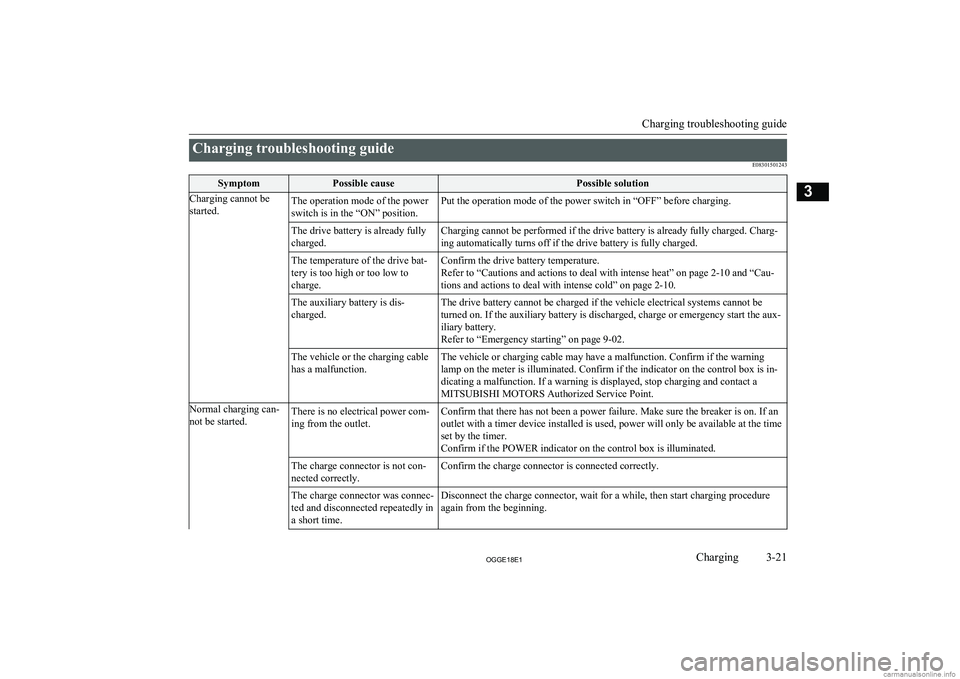
Charging troubleshooting guideE08301501243SymptomPossible causePossible solutionCharging cannot be
started.The operation mode of the power
switch is in the “ON” position.Put the operation mode of the power switch in “OFF” before charging.The drive battery is already fully
charged.Charging cannot be performed if the drive battery is already fully charged. Charg- ing automatically turns off if the drive battery is fully charged.The temperature of the drive bat-
tery is too high or too low to
charge.Confirm the drive battery temperature.
Refer to “Cautions and actions to deal with intense heat” on page 2-10 and “Cau-
tions and actions to deal with intense cold” on page 2-10.The auxiliary battery is dis-
charged.The drive battery cannot be charged if the vehicle electrical systems cannot be
turned on. If the auxiliary battery is discharged, charge or emergency start the aux- iliary battery.
Refer to “Emergency starting” on page 9-02.The vehicle or the charging cable
has a malfunction.The vehicle or charging cable may have a malfunction. Confirm if the warning
lamp on the meter is illuminated. Confirm if the indicator on the control box is in-
dicating a malfunction. If a warning is displayed, stop charging and contact a
MITSUBISHI MOTORS Authorized Service Point.Normal charging can-
not be started.There is no electrical power com-
ing from the outlet.Confirm that there has not been a power failure. Make sure the breaker is on. If an
outlet with a timer device installed is used, power will only be available at the time
set by the timer.
Confirm if the POWER indicator on the control box is illuminated.The charge connector is not con-
nected correctly.Confirm the charge connector is connected correctly.The charge connector was connec-
ted and disconnected repeatedly in
a short time.Disconnect the charge connector, wait for a while, then start charging procedure again from the beginning.
Charging troubleshooting guide
3-21OGGE18E1Charging3