battery MITSUBISHI OUTLANDER PHEV 2018 (in English) Owner's Guide
[x] Cancel search | Manufacturer: MITSUBISHI, Model Year: 2018, Model line: OUTLANDER PHEV, Model: MITSUBISHI OUTLANDER PHEV 2018Pages: 538, PDF Size: 25.01 MB
Page 64 of 538
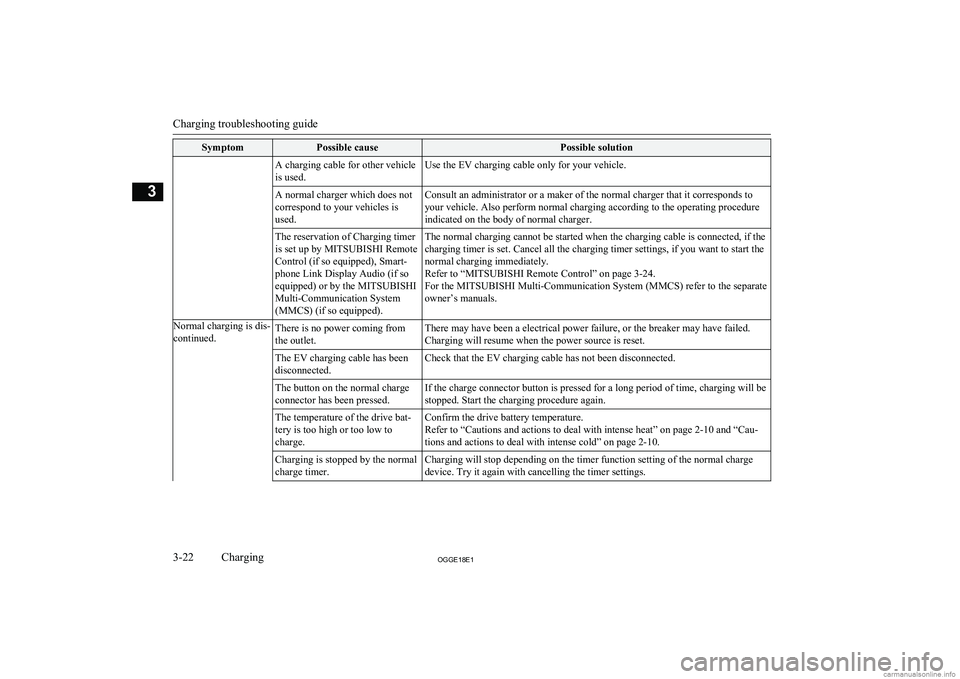
SymptomPossible causePossible solutionA charging cable for other vehicle
is used.Use the EV charging cable only for your vehicle.A normal charger which does not
correspond to your vehicles is
used.Consult an administrator or a maker of the normal charger that it corresponds to
your vehicle. Also perform normal charging according to the operating procedure
indicated on the body of normal charger.The reservation of Charging timer
is set up by MITSUBISHI Remote
Control (if so equipped), Smart-
phone Link Display Audio (if so
equipped) or by the MITSUBISHI
Multi-Communication System
(MMCS) (if so equipped).The normal charging cannot be started when the charging cable is connected, if the charging timer is set. Cancel all the charging timer settings, if you want to start the
normal charging immediately.
Refer to “MITSUBISHI Remote Control” on page 3-24.
For the MITSUBISHI Multi-Communication System (MMCS) refer to the separate owner’s manuals.Normal charging is dis-
continued.There is no power coming from
the outlet.There may have been a electrical power failure, or the breaker may have failed. Charging will resume when the power source is reset.The EV charging cable has been
disconnected.Check that the EV charging cable has not been disconnected.The button on the normal charge
connector has been pressed.If the charge connector button is pressed for a long period of time, charging will be
stopped. Start the charging procedure again.The temperature of the drive bat-
tery is too high or too low to
charge.Confirm the drive battery temperature.
Refer to “Cautions and actions to deal with intense heat” on page 2-10 and “Cau-
tions and actions to deal with intense cold” on page 2-10.Charging is stopped by the normal
charge timer.Charging will stop depending on the timer function setting of the normal charge device. Try it again with cancelling the timer settings.
Charging troubleshooting guide
3-22OGGE18E1Charging3
Page 65 of 538
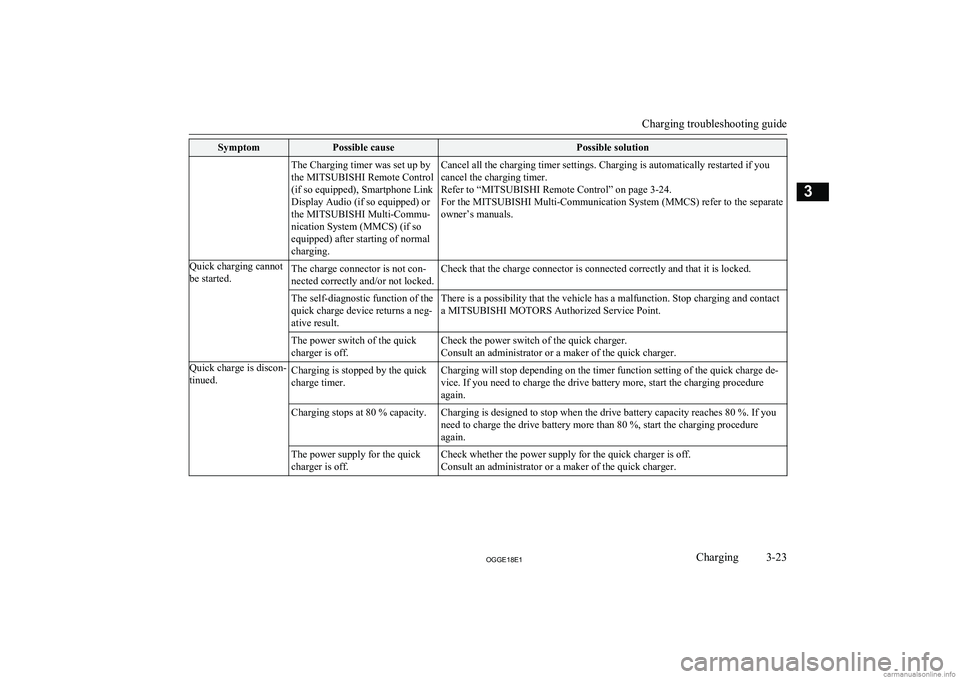
SymptomPossible causePossible solutionThe Charging timer was set up by
the MITSUBISHI Remote Control
(if so equipped), Smartphone Link
Display Audio (if so equipped) or
the MITSUBISHI Multi-Commu-
nication System (MMCS) (if so
equipped) after starting of normal
charging.Cancel all the charging timer settings. Charging is automatically restarted if you cancel the charging timer.
Refer to “MITSUBISHI Remote Control” on page 3-24.
For the MITSUBISHI Multi-Communication System (MMCS) refer to the separate
owner’s manuals.Quick charging cannot
be started.The charge connector is not con-
nected correctly and/or not locked.Check that the charge connector is connected correctly and that it is locked.The self-diagnostic function of the
quick charge device returns a neg-
ative result.There is a possibility that the vehicle has a malfunction. Stop charging and contact
a MITSUBISHI MOTORS Authorized Service Point.The power switch of the quick
charger is off.Check the power switch of the quick charger.
Consult an administrator or a maker of the quick charger.Quick charge is discon-
tinued.Charging is stopped by the quick
charge timer.Charging will stop depending on the timer function setting of the quick charge de-
vice. If you need to charge the drive battery more, start the charging procedure again.Charging stops at 80 % capacity.Charging is designed to stop when the drive battery capacity reaches 80 %. If you
need to charge the drive battery more than 80 %, start the charging procedure again.The power supply for the quick
charger is off.Check whether the power supply for the quick charger is off. Consult an administrator or a maker of the quick charger.
Charging troubleshooting guide
3-23OGGE18E1Charging3
Page 67 of 538
lCharging timer
If you specify the charge start and/or stop time with the normal charge cable
connected, charging is started and/or
stopped at that time.
l Remote Climate Control
By setting the remote climate control to
operate at a predetermined time, cabin comfort can be improved or visibilitycan be ensured (defrosting/demisting)
before getting in the vehicle.
l Customize (function setting change)
The function setting of the keyless oper-
ation system, outside rear-view mirror,
operation mode of the power switch, air conditioning, lamps and windscreen
wipers can be changed by MITSUBISHI
Remote Control.NOTEl The electric heater is required to activate the
reservation functions of heater, defroster and
demister.
l In a vehicle equipped with the MITSUBISHI
Multi-Communication System (MMCS), it
is possible to change the setting by means of screen operations.
Refer to the separate owner’s manual for de-
tails.NOTEl If you want to cancel the charging timer in
cases of battery exhaustion or loss of a wire-
less LAN device, you can temporarily cancel the charging timer by pressing the switch
(A) of the keyless operation key twice with-
in 2 seconds. When the charging timer is cancelled, the hazard warning lamps will
blink four times.
l When using the charging timer, use the EV
charging cable. When using a home or pub- lic charging device (EVSE: Electric Vehi-
cles Supply Equipment), the charging timer
may not be started.
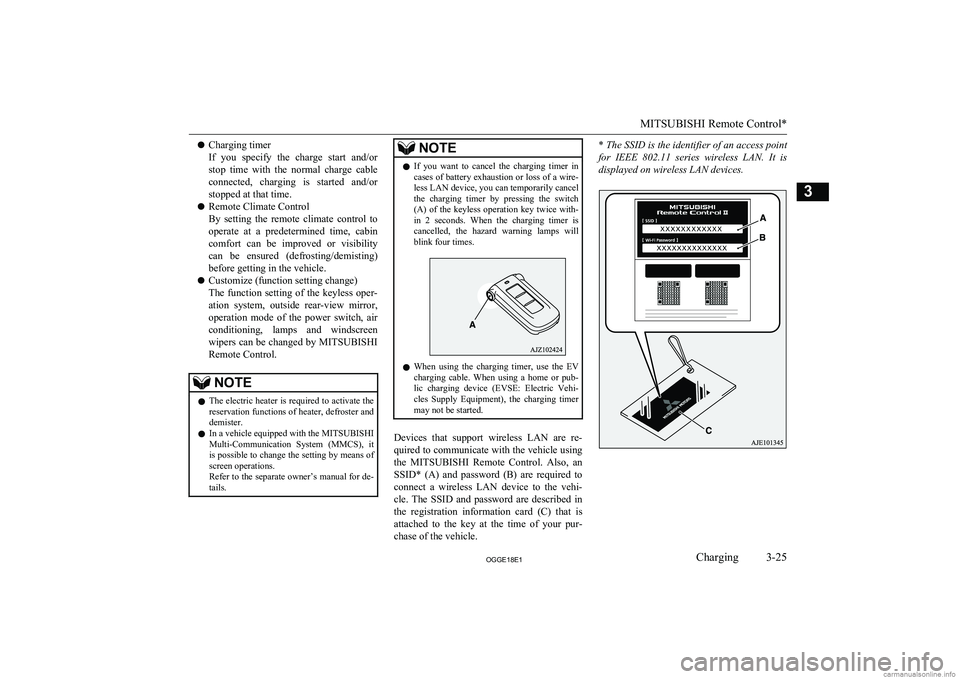
Devices that support wireless LAN are re-
quired to communicate with the vehicle using
the MITSUBISHI Remote Control. Also, an
SSID* (A) and password (B) are required to
connect a wireless LAN device to the vehi-
cle. The SSID and password are described in the registration information card (C) that is
attached to the key at the time of your pur- chase of the vehicle.
* The SSID is the identifier of an access point
for IEEE 802.11 series wireless LAN. It is
displayed on wireless LAN devices.
MITSUBISHI Remote Control*
3-25OGGE18E1Charging3
Page 68 of 538
For the operation method of theMITSUBISHI Remote Control, please visit
the MITSUBISHI MOTORS Web site:
http://www.mitsubishi-motors.com/en/prod-
ucts/outlander_phev2/app/remote/
l If you need further information, please
contact a MITSUBISHI MOTORS Au-
thorized Service Point.WARNINGl Do not use the
MITSUBISHI Remote
Control if children, persons in need of care, pets, etc. are in the vehicle. Even if the remote climate control is used, thecabin may become hot or cold due to somereasons such as automatic stop of the sys-
tem. The cabin temperature may quickly
rise in sunshine, which poses a risk of heat
stroke and dehydration. In cold weather, on the other hand, the cabin temperature
may quickly drop. Either of which could lead to death in the worst case.
In addition, children can activate switches and controls, resulting in injury or a fatal
accident.
l The cooling fan in the engine compart-
ment may operate automatically when
charging or when operating air condition- er. Do not bring your hand close to the
cooling fan during charging.CAUTIONl Do not use a car cover except for the
MITSUBISHI MOTORS GENUINE car
cover, when using the charging timer or the remote climate control.NOTEl Keep the following points in mind when us-
ing a wireless LAN device:
• Communication speed and range vary de-
pending on the wireless LAN devices and the surrounding conditions (radio environ-
ment, obstacles, parking area environ- ment, etc.).
• Due to the characteristics of radio waves,
communication speed tends to decrease as the communication distance increases.
Use your wireless LAN device at a short
distance from the vehicle for better re- sponse.
• When a microwave oven or ISM (indus-
trial, scientific and medical) equipment is being used, the communication speed andrange of wireless LAN devices may de-crease. Use your wireless LAN device
away from these appliances and equip-
ment.NOTE• If a wireless LAN device and Bluetooth
(registered trademark of Bluetooth SIG, Inc.) are used simultaneously, the com-
munication speed and range of each de- vice may decrease. Use your wireless
LAN device away from Bluetooth devi- ces.
l Wireless LAN devices may not communi-
cate with the vehicle, or may not operate
normally or stably in the following environ- ment or situations. Check that the device cancommunicate with your vehicle before use.
• There is an obstruction such as a concrete
or metal wall between the vehicle and
wireless LAN device.
• The vehicle is surrounded by tall vehicles
in a parking lot.
• There are facilities nearby that emit strong
radio waves, such as a TV tower, trans-
former substation, broadcasting station or airport.
• There is a communication device such as
a mobile phone or radio, or an electric de- vice such as a personal computer near thewireless LAN device.
• The wireless LAN device is in contact
with or covered by a metal object.
• The battery of the wireless LAN device
has run down.
l The
MITSUBISHI Remote Control cannot
be used under the following conditions:
• The wireless LAN device is turned off.
• The
MITSUBISHI Remote Control appli-
cation software is not installed.
MITSUBISHI Remote Control*
3-26OGGE18E1Charging3
Page 69 of 538
NOTE•The
MITSUBISHI Remote Control appli-
cation software is not running.
• The wireless LAN device is not registered
on the vehicle or it is not connected to the
vehicle.
• The wireless LAN device is out of the
communication range.
• The wireless LAN device is connected to
other wireless LAN device.
• The wireless LAN device has failed, or its
battery has run out.
l Some charging facilities have a timer func-
tion that turns the power on or off at a spe-
cific time of the day. When charging at a fa- cility with a timer function, make sure that the charging timer is set within the time peri-od when the power in the charging facility is on.
l The auxiliary battery is automatically and
periodically charged using electrical power
stored in the drive battery. A buzzer sounds in the cabin while the auxiliary battery is be-
ing charged.
l While the remote climate control is operat-
ing or the charging, the cooling fan or air conditioner compressor may start operating and its sound may be heard. This is normal.
l The remote climate control operates in its
own mode based on the mode selected on
the wireless LAN device, regardless of the switch setting of the vehicle’s air condition-
er.
l Air conditioning performance may deterio-
rate or the remaining charge in the drive bat-NOTEtery may decrease under the following con-ditions:
• In extremely hot weather.
• In hot sunshine.
• In extremely cold weather.
l If the remote climate control is started dur-
ing charging, the time until full charge may extend or the charging rate may decrease.
l When the remaining quantity of the drive
battery is decreased, the remote climate con-
trol does not operate or it may stop on the way.
l When the auxiliary battery is removed, the
timer control of the MITSUBISHI Remote
Control is reset and each function of the MITSUBISHI Remote Control cannot be
used. Also the drive battery cannot be
warmed up.
Communicate the wireless LAN device and your vehicle again.
MITSUBISHI Remote Control*
3-27OGGE18E1Charging3
Page 74 of 538
To lock
Press the LOCK switch (1). All the doors andthe tailgate will be locked. The turn-signal
lamps will blink once when the doors and the
tailgate are locked.
To unlock
Press the UNLOCK switch (2). All the doors
and the tailgate will be unlocked. If the doors and tailgate are unlocked when the frontroom lamp switch is in the “DOOR” positionor the rear room lamp switch is in the middle
(•) position, the room lamp will illuminate for
approximately 15 seconds and the turn-signal lamps will blink twice.
The position and tail lamps can also be set to
turn on for approximately 30 seconds. Refer to “Instruments and controls: Welcome light”
on page 6-58.
NOTEl For the operation of the Electric tailgate
switch (3), refer to “Electric tailgate” onpage 4-20.
l For the operation of the Charging timer can-
cel switch (5), refer to “MITSUBISHI Re-
mote Control” on page 3-24.NOTEl The door and tailgate unlock function can be
set so that only the driver’s door unlocks
when the UNLOCK switch (2) is pressed once.
If the door and tailgate unlock function is set
to work as described above, all the doors and
the tailgate unlock when the UNLOCK switch is pressed two times in succession.
Refer to “Setting of door and tailgate unlock
function” on page 4-05.
l If the UNLOCK switch (2) is pressed and no
door or tailgate is opened within approxi-mately 30 seconds, relocking will automati-
cally occur.
l If either of the following problems occurs,
the battery may be exhausted.
• The remote control switch is operated at
the correct distance from the vehicle, but
the doors and tailgate are not locked/
unlocked in response.
• The indication lamp (4) is dim or does not
come on.
For further information, please consult your MITSUBISHI MOTORS Authorized
Service Point.
If you replace the battery yourself, refer to
“Procedure for replacing the remote con-
trol switch battery” on page 4-06.
l It is possible to modify functions as follows:
For further information, please contact your MITSUBISHI MOTORS Authorized Serv-
ice Point.
On vehicles equipped with the Smartphone Link Display Audio or the MITSUBISHINOTEMulti-Communication System (MMCS),
screen operations can be used to make theadjustment. Refer to the separate owner’s
manual for details.
• The time for automatic relocking can be
changed.
• The confirmation function (flashing of the
turn-signal lamps) can be set to operateonly when the doors and backdoor arelocked or only when the doors and back-
door are unlocked.
• The confirmation function (this indicates
locking or unlocking of the doors and tail-
gate with the blink of the turn-signal lamps) can be deactivated.
• The number of times the turn-signal
lamps are flashed by the confirmation function can be changed.Operation of the outside rear-
view mirrors (Vehicles equip- ped with mirror retractorswitch)
E00310801581
To fold
Within 30 seconds of locking the doors and tailgate using the LOCK switch (1), press the LOCK switch twice rapidly to fold the out-
side rear-view mirrors.
Keyless entry system
4-04OGGE18E1Locking and unlocking4
Page 76 of 538
Procedure for replacing the re-mote control switch battery
E00309501243
Before replacing the battery, remove static
electricity from your body by touching a met- al grounded object.
WARNINGl Danger of explosion if battery is incor-
rectly replaced.
Replace only with the same battery or an equivalent type.CAUTIONl When the remote control switch case is
opened, be careful to keep water, dust, etc. out. Also, do not touch the internal compo-
nents.NOTEl You may purchase a replacement battery at
an electric appliance store.
l A
MITSUBISHI MOTORS Authorized
Service Point can replace the battery for you
if you prefer.
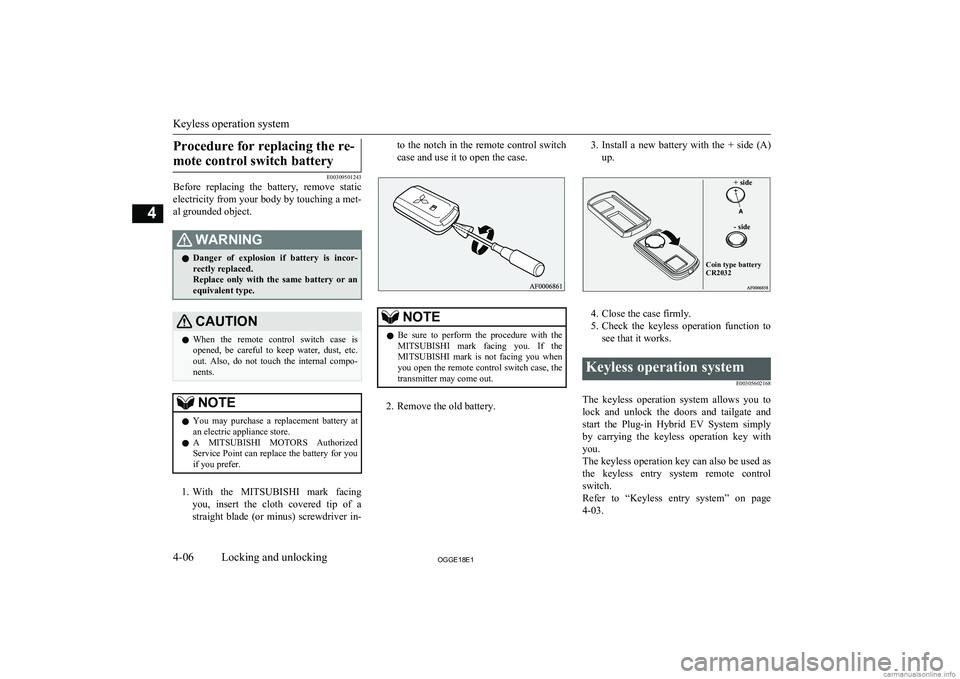
1. With the MITSUBISHI mark facing
you, insert the cloth covered tip of a
straight blade (or minus) screwdriver in-
to the notch in the remote control switch
case and use it to open the case.NOTEl Be sure to perform the procedure with the
MITSUBISHI mark facing you. If the
MITSUBISHI mark is not facing you when
you open the remote control switch case, the transmitter may come out.
2. Remove the old battery.
3. Install a new battery with the + side (A)
up.+ side- sideCoin type battery CR2032
4. Close the case firmly.
5. Check the keyless operation function to
see that it works.
Keyless operation system
E00305602168
The keyless operation system allows you tolock and unlock the doors and tailgate andstart the Plug-in Hybrid EV System simplyby carrying the keyless operation key with
you.
The keyless operation key can also be used as
the keyless entry system remote control switch.
Refer to “Keyless entry system” on page
4-03.
Keyless operation system
4-06OGGE18E1Locking and unlocking4
Page 77 of 538
The driver should always carry the keylessoperation key. This key is necessary for lock-
ing and unlocking the doors and tailgate,
starting the Plug-in Hybrid EV System and otherwise operating the vehicle, so before locking and leaving the vehicle, be sure to
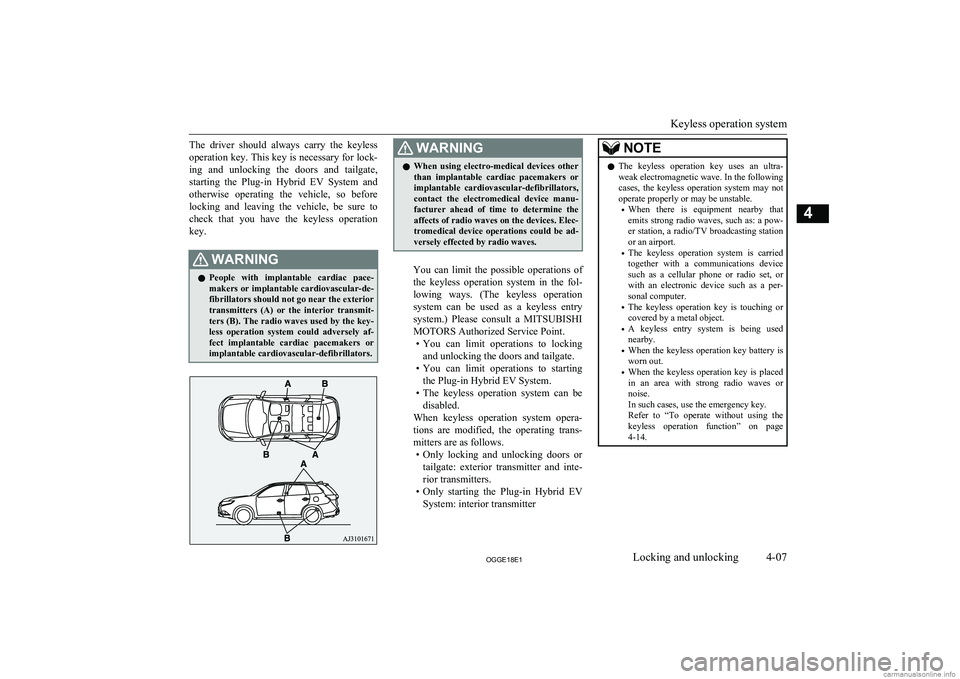
check that you have the keyless operation key.WARNINGl People with implantable cardiac pace-
makers or implantable cardiovascular-de-
fibrillators should not go near the exterior
transmitters (A) or the interior transmit- ters (B). The radio waves used by the key-
less operation system could adversely af- fect implantable cardiac pacemakers or
implantable cardiovascular-defibrillators.WARNINGl When using electro-medical devices other
than implantable cardiac pacemakers or implantable cardiovascular-defibrillators,
contact the electromedical device manu- facturer ahead of time to determine theaffects of radio waves on the devices. Elec-
tromedical device operations could be ad-
versely effected by radio waves.
You can limit the possible operations of
the keyless operation system in the fol-
lowing ways. (The keyless operation system can be used as a keyless entry system.) Please consult a MITSUBISHI
MOTORS Authorized Service Point. • You can limit operations to locking
and unlocking the doors and tailgate.
• You can limit operations to starting
the Plug-in Hybrid EV System.
• The keyless operation system can be
disabled.
When keyless operation system opera- tions are modified, the operating trans-mitters are as follows. • Only locking and unlocking doors or
tailgate: exterior transmitter and inte-
rior transmitters.
• Only starting the Plug-in Hybrid EV
System: interior transmitter
NOTEl The keyless operation key uses an ultra-
weak electromagnetic wave. In the following
cases, the keyless operation system may not
operate properly or may be unstable.
• When there is equipment nearby that
emits strong radio waves, such as: a pow-
er station, a radio/TV broadcasting station or an airport.
• The keyless operation system is carried
together with a communications device such as a cellular phone or radio set, or
with an electronic device such as a per- sonal computer.
• The keyless operation key is touching or
covered by a metal object.
• A keyless entry system is being used
nearby.
• When the keyless operation key battery is
worn out.
• When the keyless operation key is placed
in an area with strong radio waves or noise.
In such cases, use the emergency key.
Refer to “To operate without using the
keyless operation function” on page 4-14.
Keyless operation system
4-07OGGE18E1Locking and unlocking4
Page 78 of 538
NOTElBecause the keyless operation key receives
signals in order to communicate with the transmitters in the vehicle, the battery con-tinually wears down regardless of keylessoperation key use. The battery life is 1 to 3
years, depending on usage conditions. When the battery wears out, replace the battery ac-cording to the description in this manual or
have it replaced at your MITSUBISHI
MOTORS Authorized Service Point.
Refer to “Procedure for replacing the remote control switch battery” on page 4-06.
l Because the keyless operation key continual-
ly receives signals, strong radio wave recep-
tion could affect battery wear. Do not leave
the key near a TV, personal computer, or other electronic device.Operating range of the keyless
operation system
E00305701830
If you are carrying the keyless operation key, enter the operating range of the keyless oper-
ation system, and press the driver’s or front
passenger’s door lock/unlock switch, the tail-
gate LOCK switch or the tailgate open
switch, the ID code for your key is verified.
You can lock and unlock the doors and tail-
gate and start the Plug-in Hybrid EV Systemonly if the ID codes of your keyless operation
key and the vehicle match.NOTEl If the keyless operation key battery is wear-
ing out or there are strong electromagnetic
waves or noise present, the operating range
may become smaller and operation may be-
come unstable.Operating range for locking
and unlocking the doors andtailgate
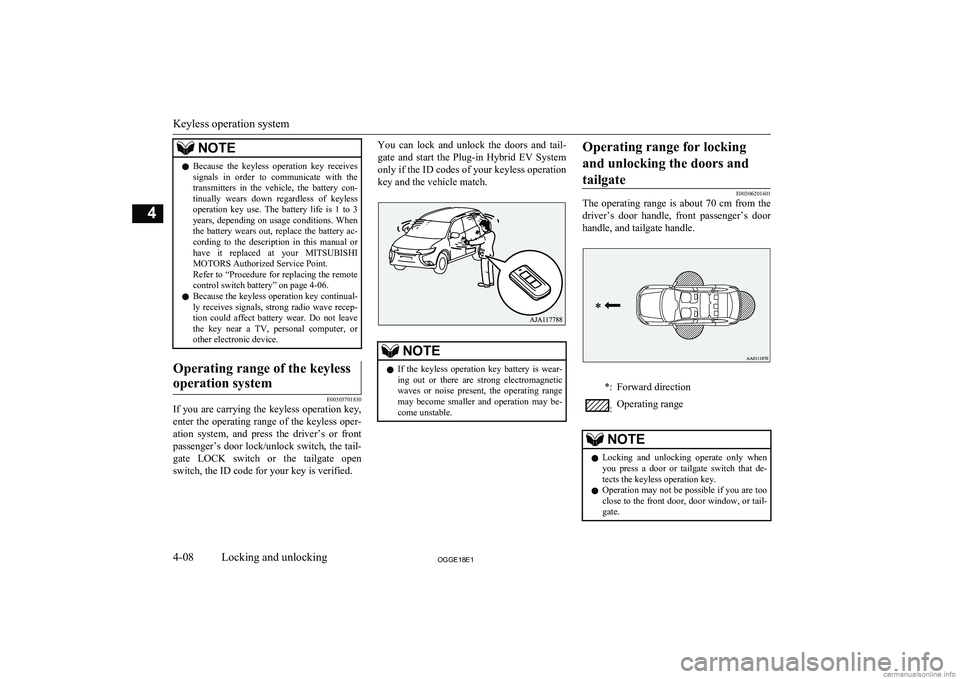
E00306201601
The operating range is about 70 cm from the
driver’s door handle, front passenger’s door handle, and tailgate handle.
*:Forward direction:Operating rangeNOTEl Locking and unlocking operate only when
you press a door or tailgate switch that de-
tects the keyless operation key.
l Operation may not be possible if you are too
close to the front door, door window, or tail-
gate.
Keyless operation system
4-08OGGE18E1Locking and unlocking4
Page 82 of 538
Warning activation
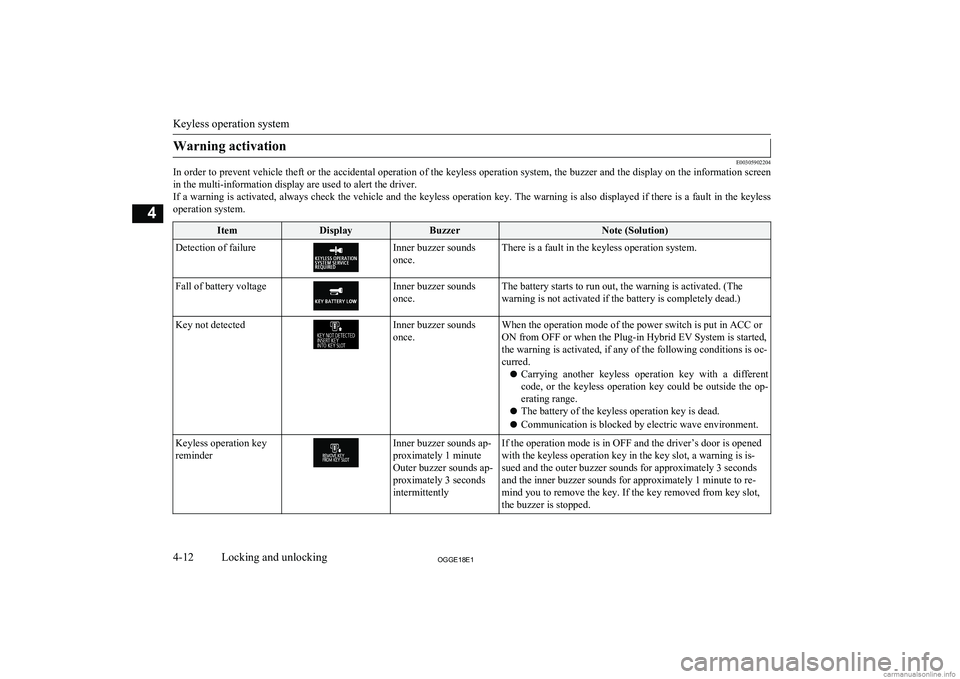
E00305902204
In order to prevent vehicle theft or the accidental operation of the keyless operation system, the buzzer and the display on the information screen
in the multi-information display are used to alert the driver.If a warning is activated, always check the vehicle and the keyless operation key. The warning is also displayed if there is a fault in the keyless operation system.
ItemDisplayBuzzerNote (Solution)Detection of failureInner buzzer sounds
once.There is a fault in the keyless operation system.Fall of battery voltageInner buzzer sounds
once.The battery starts to run out, the warning is activated. (The warning is not activated if the battery is completely dead.)Key not detectedInner buzzer sounds
once.When the operation mode of the power switch is put in ACC or
ON from OFF or when the Plug-in Hybrid EV System is started, the warning is activated, if any of the following conditions is oc-
curred.
l Carrying another keyless operation key with a different
code, or the keyless operation key could be outside the op- erating range.
l The battery of the keyless operation key is dead.
l Communication is blocked by electric wave environment.Keyless operation key
reminderInner buzzer sounds ap-
proximately 1 minute
Outer buzzer sounds ap-
proximately 3 seconds
intermittentlyIf the operation mode is in OFF and the driver’s door is opened
with the keyless operation key in the key slot, a warning is is-
sued and the outer buzzer sounds for approximately 3 seconds
and the inner buzzer sounds for approximately 1 minute to re-
mind you to remove the key. If the key removed from key slot,
the buzzer is stopped.
Keyless operation system
4-12OGGE18E1Locking and unlocking4