window MITSUBISHI OUTLANDER SPORT 2014 3.G Owner's Manual
[x] Cancel search | Manufacturer: MITSUBISHI, Model Year: 2014, Model line: OUTLANDER SPORT, Model: MITSUBISHI OUTLANDER SPORT 2014 3.GPages: 384, PDF Size: 46.94 MB
Page 183 of 384
Combination headlights and dimmer switch 5-120 Features and controls
5
N00558700090
Ty p e 1 Ty p e 2 If the engine oil pressure drops while the engine is running, the warning display is dis-played on the information screen in the multi- information display.
N00522501759
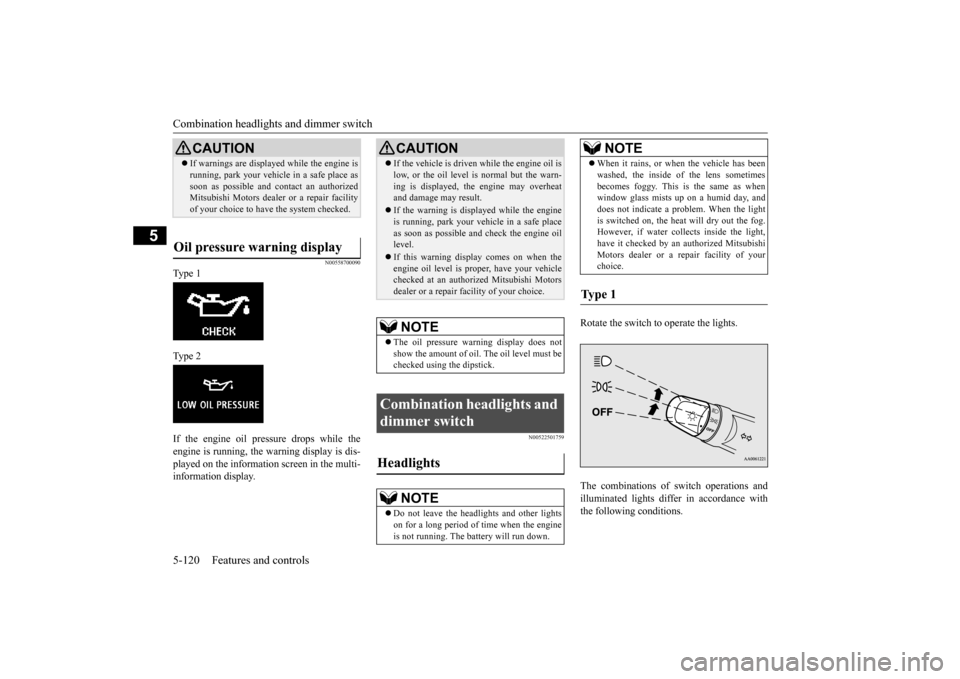
Rotate the switch to operate the lights. The combinations of switch operations and illuminated lights differ in accordance with the following conditions.
CAUTION If warnings are displayed while the engine is running, park your vehicle in a safe place as soon as possible and contact an authorized Mitsubishi Motors dealer or a repair facility of your choice to have the system checked.
Oil pressure warning display
CAUTION If the vehicle is driven while the engine oil is low, or the oil level is normal but the warn- ing is displayed, the engine may overheat and damage may result. If the warning is displayed while the engine is running, park your vehicle in a safe place as soon as possible and check the engine oillevel. If this warning display comes on when the engine oil level is proper, have your vehicle checked at an authorized Mitsubishi Motors dealer or a repair facility of your choice.NOTE
The oil pressure warning display does not show the amount of oil. The oil level must be checked using the dipstick.
Combination headlights and dimmer switch Headlights
NOTE
Do not leave the headlights and other lights on for a long period of time when the engineis not running. The battery will run down.
When it rains, or when the vehicle has been washed, the inside of the lens sometimes becomes foggy. This is the same as when window glass mists up on a humid day, and does not indicate a problem. When the lightis switched on, the heat will dry out the fog. However, if water collects inside the light, have it checked by an authorized MitsubishiMotors dealer or a repair facility of your choice.
Ty p e 1
NOTE
BK0202700US.book
120 ページ 2013年3月28日 木曜日 午前11時54分
Page 191 of 384
Wiper and washer switch 5-128 Features and controls
5
The windshield wiper and washer can be operated with the ignition switch or the oper-ation mode is in ON or ACC. If the blades are frozen to the windshield, do not operate the wipers until the ice has meltedand the blades are freed, otherwise the wiper motor may be damaged.
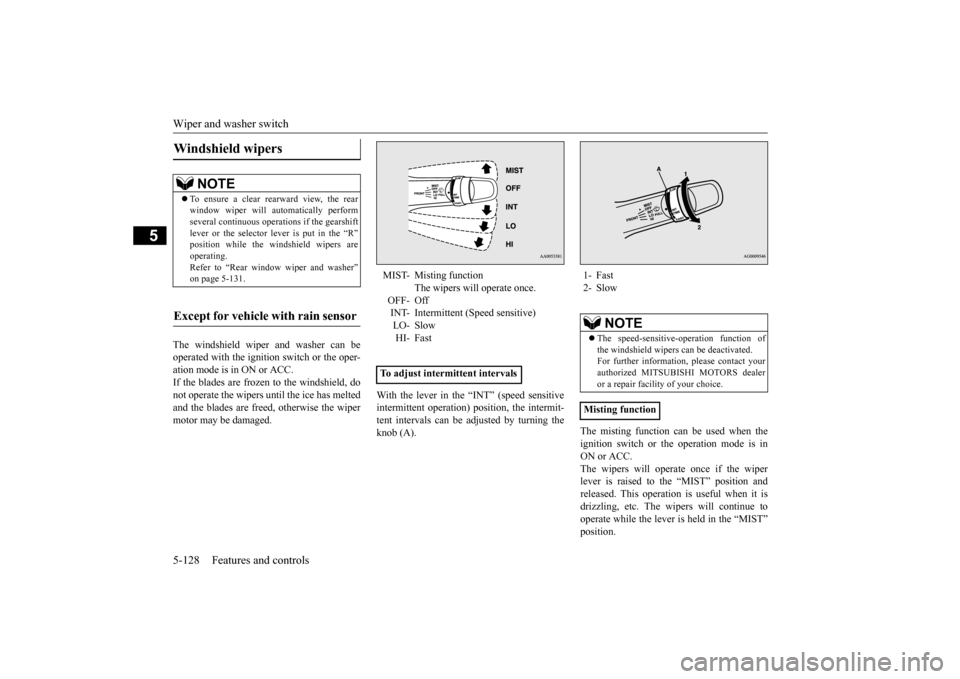
With the lever in the “INT” (speed sensitive intermittent operation) position, the intermit- tent intervals can be adjusted by turning theknob (A).
The misting function can be used when the ignition switch or the operation mode is in ON or ACC.The wipers will operate once if the wiper lever is raised to the “MIST” position and released. This operation is useful when it isdrizzling, etc. The wipers will continue to operate while the lever is held in the “MIST” position.
Windshield wipers
NOTE
To ensure a clear rearward view, the rear window wiper will automatically perform several continuous operations if the gearshift lever or the selector lever is put in the “R”position while the windshield wipers are operating. Refer to “Rear window wiper and washer”on page 5-131.
Except for vehicle with rain sensor
MIST- Misting function
The wipers will operate once.
OFF- Off INT- Intermittent (Speed sensitive) LO- SlowHI- Fast
To adjust intermittent intervals
1- Fast 2- Slow
NOTE
The speed-sensitive-operation function of the windshield wipers can be deactivated. For further information, please contact yourauthorized MITSUBISHI MOTORS dealer or a repair facility of your choice.
Misting function
BK0202700US.book
128 ページ 2013年3月28日 木曜日 午前11時54分
Page 192 of 384
Wiper and washer switch
Features and controls 5-129
5
The windshield wipers can be operated with the ignition switch or the operation mode is inON or ACC. If the blades are frozen to the windshield or rear window, do not operate the wipers untilthe ice has melted and the blades are freed,otherwise the wiper motor may be damaged.
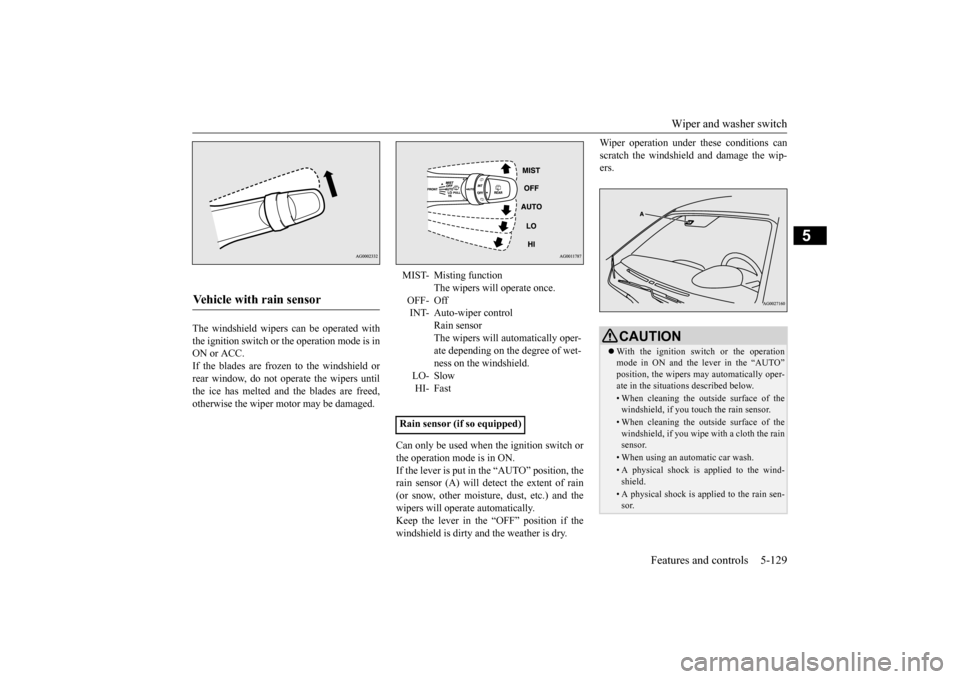
Can only be used when the ignition switch or the operation mode is in ON.If the lever is put in the “AUTO” position, the rain sensor (A) will detect the extent of rain (or snow, other moisture, dust, etc.) and thewipers will operate automatically. Keep the lever in the “OFF” position if the windshield is dirty and the weather is dry.
Wiper operation under these conditions can scratch the windshield and damage the wip- ers.
Vehicle with rain sensor
MIST- Misting function
The wipers will operate once.
OFF- Off INT- Auto-wiper control
Rain sensorThe wipers will automatically oper- ate depending on the degree of wet- ness on the windshield.
LO- SlowHI- Fast
Rain sensor (if so equipped)
CAUTION With the ignition switch or the operation mode in ON and the lever in the “AUTO”position, the wipers may automatically oper- ate in the situations described below.• When cleaning the outside surface of thewindshield, if you touch the rain sensor.• When cleaning the outside surface of thewindshield, if you wipe with a cloth the rain sensor.• When using an automatic car wash.• A physical shock is applied to the wind- shield.• A physical shock is applied to the rain sen-sor.
BK0202700US.book
129 ページ 2013年3月28日 木曜日 午前11時54分
Page 194 of 384
Wiper and washer switch
Features and controls 5-131
5
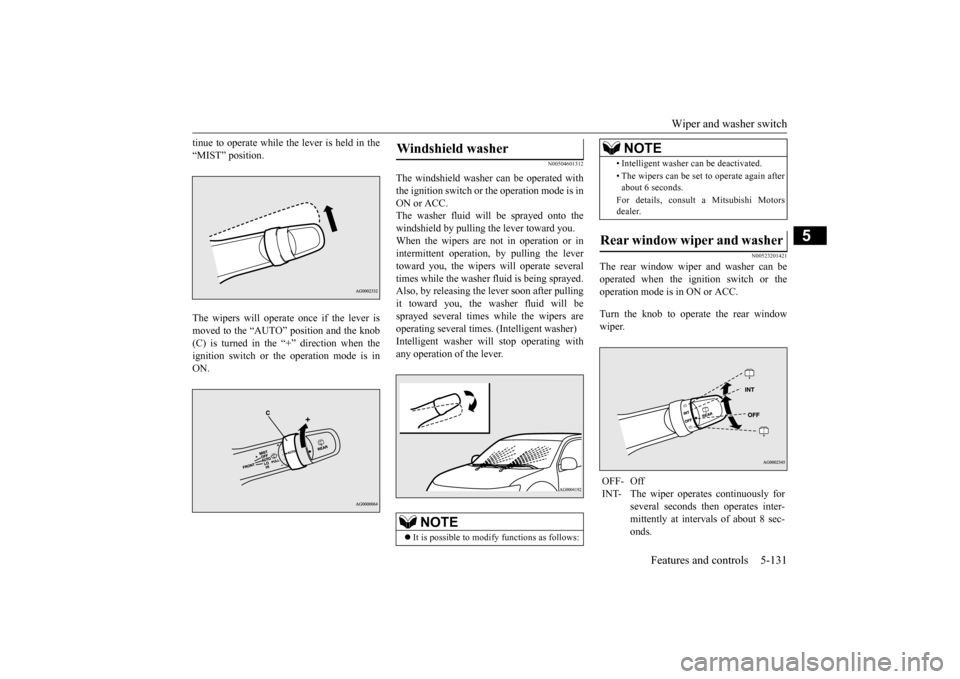
tinue to operate while the lever is held in the “MIST” position. The wipers will operate once if the lever is moved to the “AUTO” position and the knob(C) is turned in the “+” direction when the ignition switch or the operation mode is in ON.
N00504601312
The windshield washer can be operated withthe ignition switch or the operation mode is inON or ACC. The washer fluid will be sprayed onto the windshield by pulling the lever toward you.When the wipers are not in operation or in intermittent operation, by pulling the lever toward you, the wipers will operate severaltimes while the washer fluid is being sprayed.Also, by releasing the lever soon after pulling it toward you, the washer fluid will be sprayed several times while the wipers areoperating several times. (Intelligent washer) Intelligent washer will stop operating with any operation of the lever.
N00523201421
The rear window wiper and washer can beoperated when the ignition switch or the operation mode is in ON or ACC. Turn the knob to operate the rear window wiper.
Windshield washer
NOTE
It is possible to modify functions as follows:
• Intelligent washer can be deactivated. • The wipers can be set to operate again after about 6 seconds. For details, consult a Mitsubishi Motors dealer.
Rear window wiper and washer OFF- Off INT- The wiper operates continuously for
several seconds then operates inter- mittently at intervals of about 8 sec- onds.NOTE
BK0202700US.book
131 ページ 2013年3月28日 木曜日 午前11時54分
Page 195 of 384
Electric rear window defogger switch 5-132 Features and controls
5
N00523500195
N00523700373
The rear window defogger can be used when the engine is running.The indicator light (A) will come on when you press the electric rear window defogger switch. Electric current will flow through theheating wires on the rear window to help clear away moisture or frost.
-
Washer fluid will be sprayed onto the rear window glass while the knob isturned fully in either direction. When the washer fluid is sprayed, the wiper will automatically operate 2 or3 times.NOTE
The rear window wiper will automatically perform several continuous operations if the gearshift lever or the selector lever is put inthe “R” position while the windshield wipers or the rear window wiper is operating.(auto- matic operation mode)After the automatic operation, the rear win- dow wiper will stop operating if the knob is in the “OFF” position. If the knob is in the“INT” position, the rear window wiper will return to the intermittent operation. It is possible to set the rear window wiper toperform the automatic operation only if the gearshift lever or the selector lever is put in the “R” position while the rear windowwiper is operating with the knob in the “INT” position. See your authorized Mitsubishi Motorsdealer for details. If the knob is in the “OFF” position, turn the knob to the “INT” position twice quickly to operate the rear window wiper continuously.(continuous operation mode) Turn the knob to the “OFF” position to stop the rear window wiper continuous operation.
The wiper intermittent
operation time can be
adjusted. See your authorized Mitsubishi Motors dealer for details. The washer fluid reservoir is located in the engine compartment. Check the fluid level regularly and refill ifnecessary. (Refer to “Washer fluid” on page 9-11.)
Precautions to observe when using wipers and washers
CAUTION If the washer is used in cold weather, the washer fluid sprayed onto the glass might freeze, blocking your view. Heat the glass with the defroster before using the washer.NOTE
Do not use the wipers when the windshield is dry. This could scratch the glass and wear thewiper blades prematurely. Before using the wipers in cold weather, check to be sure that the wiper blades are not frozen to the windshield or rear window. Using the wipers while the blades are frozencould cause the wiper motor to burn out.NOTE
If the wipers become blocked by ice or other deposits on the glass, the motor may still burn out even if the wiper switch is OFF. If deposits form on the windshield, park your vehicle in a safe place, turn off the engine,and clean the glass so that the wipers can operate smoothly. Avoid using the washer for more than 20 sec- onds at a time. Do not operate the washer when the washer fluid reservoir is empty orthe pump may fail. During cold weather, add a recommended washer solution that will not freeze in the washer fluid reservoir. Otherwise the washer may not work or may be damaged. Replace the wiper blades when they are worn. Use the proper size replacementblades. For further information, please con- tact your authorized Mitsubishi Motors dealer.
Electric rear window defog- ger switch
NOTE
BK0202700US.book
132 ページ 2013年3月28日 木曜日 午前11時54分
Page 196 of 384
Horn switch
Features and controls 5-133
5
After about 20 minutes of operation, the sys- tem will shut off automatically. To switch the defogger OFF before 20 min-utes have passed, press the switch again. The indicator light will go out and the defogger will turn off.If you need the defogger for more than 20minutes, press the switch
again. This will add
20 more minutes.
N00523801209
To honk the horn, press around the “ ” mark on the steering wheel.
N00563701082
The Link System takes overall control of thedevices connected via the USB input terminal or the Bluetooth
® 2.0 interface allowing the
connected devices to be operated by using theswitches in the vehicle or voice commands. See the following section for details on how to operate. Refer to “Bluetooth
® 2.0 interface” on page
5-134.Refer to “USB input terminal” on page 5-155. Refer to “Listen to Audio Files on a USB Device” on page 7-46.Refer to “Listen to Bluetooth Audio” on page 7-49. Bluetooth
® is a registered trademark of
BLUETOOTH SIG, INC.
N00563800015
You have acquired a device that includessoftware licensed by Mitsubishi Motors Cor- poration from JOHNSON CONTROLS Inc (the automotive experience business unit),and their subsequent 3rd party suppliers. For a complete list of these 3rd party products
CAUTION The rear window defogger is not designed to melt snow. Remove any snow manuallybefore using the rear window defogger. Use the rear window defogger only after the engine has started and is running. Be sure to turn the defogger switch off immediately after the window is clear to save on batterypower.
Do not place stickers, tape, or other items that are attached with adhesive over the grid wires on the rear window. When cleaning the inside rear window, use a soft cloth and wipe lightly over the grid wires.NOTE
As your vehicle is equipped with heated mir- rors, mist can also be removed from the out-side rearview mirrors when the rear window defogger switch is pressed. (Refer to “Door mirror heater” on page 5-44.)
Horn switch
CAUTION
Link System
(if so equipped)
Link System End User License Agreement
BK0202700US.book
133 ページ 2013年3月28日 木曜日 午前11時54分
Page 199 of 384

Bluetooth® 2.0 interface (if so equipped) 5-136 Features and controls
5
• To establish a three-way call in such sit- uations, press the SPEECH button to enter voice recognition mode and then say “Join calls.”
Press this button when an incoming call is received to refuse the call. Press this button during a call to end the current call.When another call is on hold, you will switch to that call. If this button is pressed in the voice recog- nition mode, the voice recognition mode will be deactivated.
Your voice will be recognized by a micro- phone in the overhead console, allowing you to make hands-free calls with voice com- mands.
N00564101139
The Bluetooth
® 2.0 interface is equipped
with a voice recognition function.Simply say voice commands and you can per-form various operations and make or receive hands-free calls. With the Bluetooth
® 2.0 interface, voice rec-
ognition is possible for US English, North
American Spanish, Canadian French and Jap- anese. The factory setting is “English.” 1. Press the SPEECH button (except for vehicles with Mitsubishi Multi-Commu-nication System) or PICK-UP button (forvehicles with Mitsubishi Multi-Commu- nication System). 2. Say “Setup.”3. Say “Language.”
HANG-UP button
NOTE
When you press the SPEECH button (except for vehicles with Mitsubishi Multi-Commu-nication System) or PICK-UP button (for vehicles with Mitsubishi Multi-Communica- tion System) to enter voice recognition modewith a cellular phone paired to the system, current information on the cellular phone, such as “remaining battery life,” “signal strength” or “roaming,” will be displayed on the audio display.
*
* : Some cellular phones will not send this information to the Bluetooth
® 2.0 interface.
Call waiting and three-way calls can be used by the Bluetooth
® 2.0 interface, only if it is
possible to use those services with your cel- lular phone.
Microphone
NOTE
If a cellular phone is within close proximity of the microphone, it may distort the sound quality. In this case, place the cellular phone as far as possible from the microphone.
Voice recognition function
NOTE
NOTE
If the voice command that you say differs from the predefined command or cannot be recognised due to ambient noise or some other reason, the Bluetooth
® 2.0 interface
will ask you for the voice command again up to 3 times. For best performance and further reduction of ambient noise, the vehicle windowsshould be closed SPEECH button (except for vehicles with Mitsubishi Multi-Communica- tion System) or PICK-UP button (for vehi-cles with Mitsubishi Multi-Communication System) while engaging the voice recogni- tion function. Some voice commands have alternative commands. Depending on the selected language, some functions may not be available.
Selecting the language
BK0202700US.book
136 ページ 2013年3月28日 木曜日 午前11時54分
Page 202 of 384

Bluetooth® 2.0 interface (if so equipped)
Features and controls 5-139
5
5. When the disabling of the passcode is completed, the voice guide will say “Pass- code is disabled” and the system will return to the main menu.
N00564700011
The Bluetooth
® 2.0 interface can use the
speaker enrollment function to create a voicemodel for one person per language. This makes it easier for the Bluetooth
® 2.0
interface to recognise voice commands said by you. You can turn a voice model registered with the speaker enrollment function on and off whenever you want.
N00564801123
It takes about 2 to 3 minutes to complete thespeaker enrollment process.To ensure the best results, run through the process while in the driver’s seat, in an envi- ronment that is as quiet as possible (whenthere is no rain or st
rong winds and the vehi-
cle windows are closed). Please turn off your phone while in speaker enrollment to preventinterruption of the process. Use the following procedure for speaker enrollment.
1. Stop your vehicle in a safe area, put the gearshift lever in the “N” (Neutral) posi- tion (manual transaxle), or the selector lever in the “P” (PARK) position (contin-uously variable transmission (CVT)), and pull the parking brake lever. 2. Press the SPEECH button (except for vehicles with Mits
ubishi Multi-Commu-
nication System) or PICK-UP button (for vehicles with Mits
ubishi Multi-Commu-
nication System). 3. Say “Voice training.”
4. The voice guide will say “This operation must be performed in a quiet environment while the vehicle is stopped. See the owner’s manual for the list of requiredtraining phrases. Press and release the SPEECH button when you are ready to begin. Press the HANG-UP button to can-cel at any time.” Press the SPEECH button to start the speaker enrollment process.
Speaker enrollment function Speaker enrollment
NOTE
Speaker enrollment is not possible unless the vehicle is parked. Make sure you park the vehicle in a safe area before attemptingspeaker enrollment.
NOTE
If you do not start the speaker enrollment process within 3 minutes after pressing the SPEECH button, the speaker enrollment function will time out. The voice guide will say “Speaker enroll- ment has timed out.” The system will then beep and the voice recognition mode will bedeactivated.
BK0202700US.book
139 ページ 2013年3月28日 木曜日 午前11時54分
Page 235 of 384
Vehicle preparation before driving 6-4 Driving safety
6
N00629000669
For a safer and more enjoyable trip, always check for the following: Before starting the vehicle, make certain that you and all passengers are seated and wearing their seat belts properly (with children in the rear seat, in appropriaterestraints), and that all the doors and lift- gate are locked. Move the driver’s seat as far backward as possible, while still keeping good visibil- ity, and good control of the steering wheel, brakes, accelerator, and controls.Check the instrument panel indicators and multi-information display for any possible problem. In the same way, the front passenger seat should also be moved as far back as possi- ble. Make sure that infants and small children are properly restrained in accordance with all laws and regulations.
Check these by selecting the defroster mode, and set the blower switch on high. Youshould be able to feel the air blowing against the windshield. Refer to “Defrosting or defogging (wind-shield, door windows)” on page 7-8, 7-13, 7-19, 7-24. Check all the tires for heavy tread wear or uneven wear patterns. Look for stones, nails, glass, or other objects stuck in the tread. Look for any tread cuts or sidewall cracks. Checkthe wheel nuts for tightness, and the tires (including spare tire) for proper pressure. Replace your tires before they are heavilyworn out. As your vehicle is equipped with a tire pres- sure monitoring system, there is a risk ofdamage to the tire inflation pressure sensors when the tire is replaced on the rim. Tire replacement should, therefore, be performedonly by an authorized Mitsubishi Motors dealer.
Have someone watch while you turn all the exterior lights on and off. Also check the turnsignal indicators and high-beam indicators on the instrument panel. Check the ground under the vehicle after parking overnight, for fuel, water, oil, or other leaks. Make sure all the fluid levels are correct. Also, if you can smell fuel, you needto find out why immediately and have it fixed.
N00629200094
Even this vehicle’s safety equipment, andyour safest driving, cannot guarantee that you can avoid an accident or injury. However, ifyou give extra attention to the following areas, you can better protect yourself and your passengers: Drive defensively. Be aware of traffic, road and weather conditions. Leave plenty of stopping distance between your vehicle and the vehicle ahead.
Vehicle preparation before driving Seat belts and seats
Defrosters Tires
Lights Fluid leaks Safe driving techniques
BK0202700US.bo
ok 4 ページ 2013年3月28日 木曜日 午前11時54分
Page 238 of 384
Loading information Driving safety 6-7
6
More effort could be required to turn the steering wheel.Refer to “Electric power steering system (EPS)” on page 5-66. Always remove the key from the ignition switch and lock all doors and the liftgate when leaving the vehicle unattended.Always try to park your vehicle in a well lit area.
N00629900408
It is very importan
t to know how much
weight your vehicle can carry. This weight is called the vehicle capacity weight andincludes the weight of all occupants, cargo (including the roof load), non-factory-
installed options, if any, being towed. The tire and loading information placard located on the driver’s door sill of your vehicle will show how much weight it may properly carry. It is important to fami
liarize yourself with the
following terms before loading your vehicle: Vehicle maximum load on the tire: load on an individual tire that is determined by distributing to each axle its share of the maximum loaded vehicle weight anddividing by two. Vehicle normal load on the tire: load on an individual tire that is determined bydistributing to each axle its share of the curb weight, accessory weight, and nor- mal occupant weight and dividing by two. Maximum loaded vehicle weight: the sum of - (a) Curb weight;(b) Accessory weight; (c) Vehicle capacity weight; and (d) Production options weight.
Curb weight: the weight of a motor vehi- cle with standard equipment including the maximum capacity of fuel, oil, and cool- ant. Accessory weight: the combined weight (in excess of those standard items which may be replaced) of automatic transmis-sion, power steering, power brakes, power windows, power seats, radio, and heater, to the extent that these items are availableas factory- installed equipment (whetherinstalled or not). Vehicle capacity weight: the rated cargo and luggage load plus 150 lbs (68 kg)
*
times the vehicle’s designated seating capacity. Production options weight: the combined weight of those installed regular produc- tion options weighing over 5 lbs (2.3 kg) in excess of those standard items whichthey replace, not previously considered in curb weight or accessory weight, includ- ing heavy duty brakes, ride levelers, roofrack, heavy duty battery, and special trim. Normal occupant weight: 150 lbs (68 kg)
* times the number of specified
occupants. (In your vehicle the number is 3)
WA R N I N G Do not park your vehicle in areas where combustible materials such as dry grass or leaves can come in contact with a hot exhaust, since a fire could occur.
Do not keep the steering wheel fully turned for a long time When leaving the vehicle Loading information
WA R N I N G Never overload your vehicle. Overloading can damage your vehicle, adversely affectvehicle performance, including handling and braking, cause tire failure, and result in an accident.
BK0202700US.bo
ok 7 ページ 2013年3月28日 木曜日 午前11時54分