ECU MITSUBISHI OUTLANDER SPORT 2014 3.G Owner's Guide
[x] Cancel search | Manufacturer: MITSUBISHI, Model Year: 2014, Model line: OUTLANDER SPORT, Model: MITSUBISHI OUTLANDER SPORT 2014 3.GPages: 388, PDF Size: 20.04 MB
Page 277 of 388
Antenna8-40 For pleasant driving
8
E00710500686
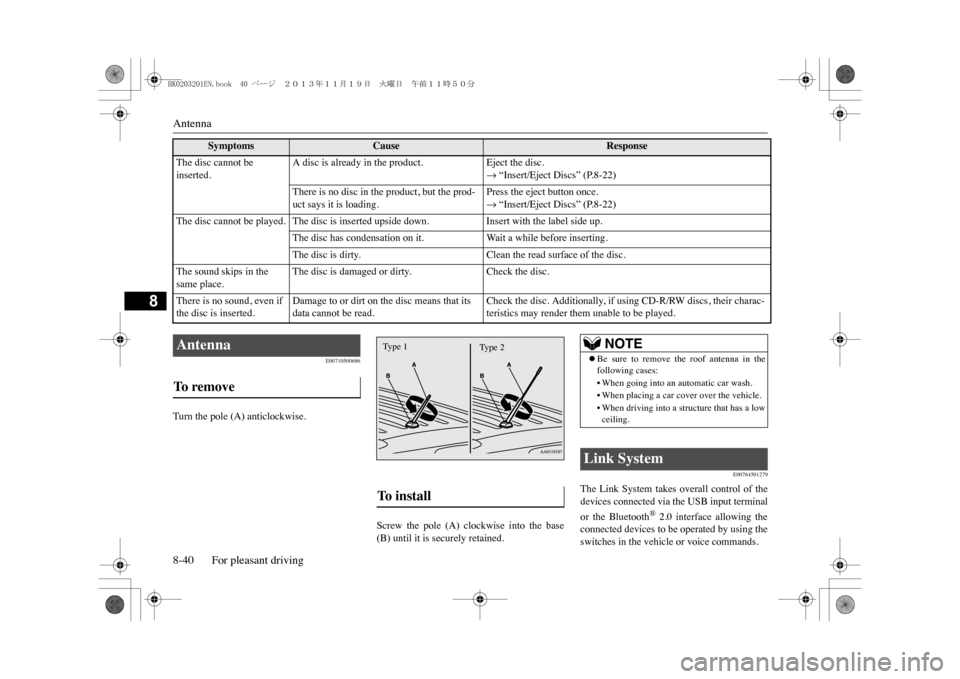
Turn the pole (A) anticlockwise.
Screw the pole (A) clockwise into the base(B) until it is securely retained.
E00764501279
The Link System takes overall control of thedevices connected via the USB input terminalor the Bluetooth
® 2.0 interface allowing the
connected devices to be operated by using theswitches in the vehicle or voice commands.
The disc cannot be inserted.
A disc is already in the product.
Eject the disc.m “Insert/Eject Discs” (P.8-22)
There is no disc in the product, but the prod-uct says it is loading.
Press the eject button once.m “Insert/Eject Discs” (P.8-22)
The disc cannot be played. The disc is inserted upside down.
Insert with the label side up.
The disc has condensation on it.
Wa i t a w h i l e b e f o r e i n s e r t i n g .
The disc is dirty.
Clean the read surface of the disc.
The sound skips in the same place.
The disc is damaged or dirty.
Check the disc.
There is no sound, even if the disc is inserted.
Damage to or dirt on the disc means that its data cannot be read.
Check the disc. Additionally, if using CD-R/RW discs, their charac-teristics may render them unable to be played.
Symptoms
Cause
Response
Antenna To r e m o v e
To i n s t a l l Ty p e 1
Ty p e 2
NOTE
zBe sure to remove the roof antenna in thefollowing cases:•When going into an automatic car wash.•When placing a car cover over the vehicle.•When driving into a structure that has a lowceiling.
Link System
BK0203201EN.book 40 ページ 2013年11月19日 火曜日 午前11時50分
Page 280 of 388
Bluetooth® 2.0 interface
For pleasant driving 8-43
8
•In such circumstances, you can press thebutton briefly to switch between callers.Yo u w i l l s w i t c h t o t h e f i r s t c a l l e r a n d t h eother caller will be put on hold.•To establish a three-way call in such situ-ations, press the SPEECH button to entervoice recognition mode and then say“Join calls.”
zPress this button when an incoming call isreceived to refuse the call.zPress this button during a call to end thecurrent call.When another call is on hold, you willswitch to that call.zIf this button is pressed in the voice recog-nition mode, the voice recognition modewill be deactivated.
Yo u r v o i c e w i l l b e r e c o g n i z e d b y a m i c r o -phone in the overhead console, allowing youto make hands-free calls with voice com-mands.
E00727300514
The Bluetooth
® 2.0 interface is equipped
with a voice recognition function.Simply say voice commands and you can per-form various operations and make or receivehands-free calls.With the Bluetooth
® 2.0 interface, voice rec-
ognition is possible for English, French,
Spanish, Italian, German, Dutch, Portugueseand Russian. The factory setting is “English”or “Russian.”1. Press the SPEECH button.2. Say “Setup.”3. Say “Language.”4. The voice guide will say “Select a lan-guage: English, French, Spanish, Italian,German, Dutch, Portuguese or Russian”Say the desired language. (Example:“English”)
HANG-UP button
NOTE
zWhen you press the SPEECH button to entervoice recognition mode with a cellular phonepaired to the system, current information onthe cellular phone, such as “remaining bat-tery life,” “signal strength” or “roaming,”will be displayed on the audio display.
*
*: Some cellular phones will not send thisinformation to the Bluetooth
® 2.0 interface.
zCall waiting and three-way calls can be usedby the Bluetooth
® 2.0 interface, only if it is
possible to use those se
rvices with your cel-
lular phone.
Microphone
NOTE
zIf a cellular phone is brought close to themicrophone, it may create noise in the voiceon the phone. In such a case, take the cellularphone at a place as far as possible from themicrophone.
Vo i c e r e c o g n i t i o n f u n c t i o n
NOTE
NOTE
zIf the voice command that you say differsfrom the predefined command or cannot berecognised due to ambient noise or someother reason, the Bluetooth
® 2.0 interface
will ask you for the voice command again upto 3 times. zFor best performance
and further reduction
of ambient noise, the vehicle windowsshould be closed, lower the blower speed andrefrain from conversa
tion with your passen-
gers while engaging the voice recognitionfunction.zSome voice commands have alternativecommands.zDepending on the selected language, somefunctions may not be available.
Selecting the language
BK0203201EN.book 43 ページ 2013年11月19日 火曜日 午前11時50分
Page 281 of 388
Bluetooth® 2.0 interface8-44 For pleasant driving
8
5. The voice guide will say “English(French, Spanish, Italian, German, Dutch,Portuguese or Russian) selected. Is thiscorrect?” Say “Yes.”If you say “No,” the system will return toStep 4.6. When the voice guide says “English(French, Spanish, Italian, German, Dutch,Portuguese or Russian) selected,” the lan-guage change process will be completedand the system will return to the mainmenu.
E00760000019E00760100010
The Bluetooth
® 2.0 interface is equipped
with a help function. If you say “Help” when the system is waitingfor a voice command input, the system willtell you a list of the commands that can beused under the circumstances.
E00760200011
There are 2 cancel functions.If you are at the main menu, say “Cancel” toexit from the Bluetooth
® 2.0 interface.
If you are anywhere else within the system,say “Cancel” to return to the main menu.
E00760400013
The Bluetooth
® 2.0 interface is equipped
with a confirmation function.With the confirmation function activated, youare given more opportunities than normal toconfirm a command when making varioussettings to the Bluetooth
® 2.0 interface. This
allows you to decrease the possibility that asetting is accidentally changed. The confirmation function can be turned onor off by following the steps below. 1. Press the SPEECH button.2. Say “Setup.”3. Say “Confirmation prompts.”4. The voice guide will say “Confirmationprompts are
E00760501242
It is possible to use a password as a securityfunction by setting a password of your choicefor the Bluetooth
® 2.0 interface.
When the security function is turned on, it isnecessary to make a voice input of a 4-digitpassword in order to use all functions of theBluetooth
® 2.0 interface, except for recep-
tion. Use the following procedure to turn on thesecurity function by setting a password.
NOTE
zThe voice guide will repeat the same mes-sage twice. The first message is in the cur-rent language, and the second message is inthe selected language.zIf many entries are registered in the vehiclephonebook, changing the language will takea longer time.zChanging the language deletes the mobilephonebook imported to the Bluetooth
® 2.0
interface. If you wish to use it, you will haveto import it again.
Useful voice commands Help function Canceling Confirmation function setting
Security function Setting the password
BK0203201EN.book 44 ページ 2013年11月19日 火曜日 午前11時50分
Page 282 of 388
Bluetooth® 2.0 interface
For pleasant driving 8-45
8
1. Press the SPEECH button.2. Say “Setup.”3. Say “Password.”4. The voice guide will say “Password is dis-abled. Would you like to enable it?”Answer “Yes.”Answer “No” to cancel the setting of thepassword and return to the main menu. 5. The voice guide will say “Please say a 4-digit password. Remember this password.It will be required to use this system.” Say a 4-digit number which you want toset as a password.6. For confirmation purposes, the voiceguide will say “Password <4-digit pass-word>. Is this correct?” Answer “Yes.”Answer “No” to return to the passwordinput in Step 5. 7. When the registration of the password iscompleted, the voice guide will say “Pass-word is enabled” and the system willreturn to the main menu.
If a password has been set and the securityfunction is enabled, the voice guide will say“Hands-free system is locked. State the pass-word to continue” when the SPEECH buttonis pressed to enter voice recognition mode.Say the 4-digit password number to enter thepassword. If the entered password is wrong, the voiceguide will say “<4-digit password>, Incorrectpassword. Please try again.” Enter the correctpassword.
Use the following procedure to turn off thesecurity function by disabling the password. 1. Press the SPEECH button.2. Say “Setup.”3. Say “Password.”4. The voice guide will say “Password isenabled. Would you like to disable it?”Answer “Yes.”Answer “No” to cancel the disabling ofthe password and return to the mainmenu. 5. When the disabling of the password iscompleted, the voice guide will say “Pass-word is disabled” and the system willreturn to the main menu.
E00727400209
The Bluetooth
® 2.0 interface can use the
speaker enrollment function to create a voicemodel for one person per language.
NOTE
zAfter activating Plug-in Hybrid EV systemagain and pressing SPEECH button, you areasked to tell your password.
zThe set password is actually recorded in theLink system after a while after the readyindicator goes out.If you set the operation mode to ACC or ONor activate Plug-in Hybrid EV system soonafter the ready indicator goes out, the setpassword may not be recorded in the Linksystem in some cases. In such a case, setyour password again.
Entering the password
NOTE
zYo u c a n r e e n t e r t h e p a s s w o r d a s m a n y t i m e sas you want. zIf you have forgotten your password, say“Cancel” to quit the voice input mode andthen check with a MITSUBISHI MOTORSAuthorised Service Point.NOTE
Disabling the password
NOTE
zSystem must be unlocke
d to disable the pass-
word.
Speaker enrollment function
BK0203201EN.book 45 ページ 2013年11月19日 火曜日 午前11時50分
Page 309 of 388
Assist grips8-72 For pleasant driving
8
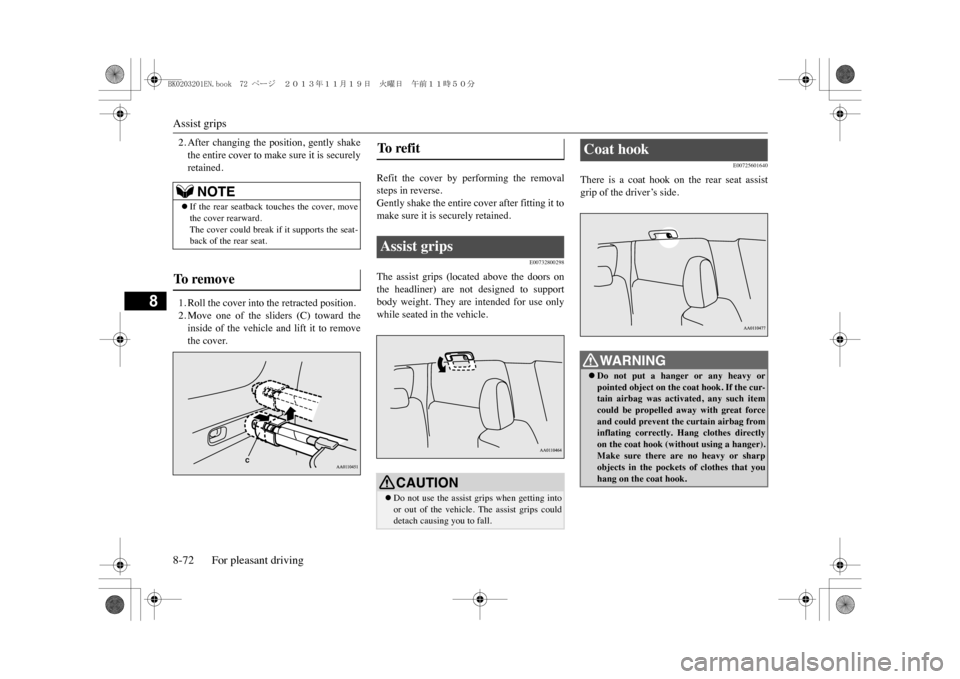
2. After changing the position, gently shakethe entire cover to make sure it is securelyretained.1. Roll the cover into the retracted position.2. Move one of the sliders (C) toward theinside of the vehicle and lift it to removethe cover.
Refit the cover by performing the removalsteps in reverse.Gently shake the entire cover after fitting it tomake sure it is securely retained.
E00732800298
The assist grips (located above the doors onthe headliner) are not designed to supportbody weight. They are intended for use onlywhile seated in the vehicle.
E00725601640
There is a coat hook on the rear seat assistgrip of the driver’s side.
NOTE
zIf the rear seatback touches the cover, movethe cover rearward.The cover could break if it supports the seat-back of the rear seat.
To r e m o v e
To r e f i t Assist grips
CAUTIONzDo not use the assist grips when getting intoor out of the vehicle. The assist grips coulddetach causing you to fall.
Coat hook
WA R N I N GzDo not put a hanger or any heavy orpointed object on the
coat hook. If the cur-
tain airbag was activated, any such itemcould be propelled away with great forceand could prevent the curtain airbag frominflating correctly. Hang clothes directlyon the coat hook (without using a hanger).Make sure there are no heavy or sharpobjects in the pockets of clothes that youhang on the coat hook.
BK0203201EN.book 72 ページ 2013年11月19日 火曜日 午前11時50分
Page 310 of 388
Luggage hooks
For pleasant driving 8-73
8
E00715700579
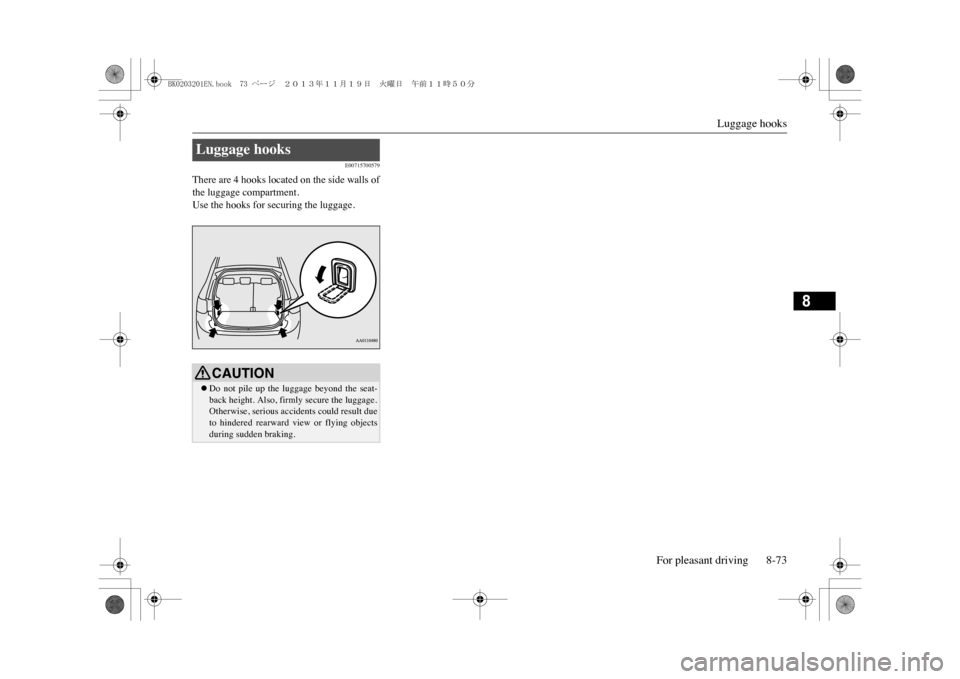
There are 4 hooks located on the side walls ofthe luggage compartment.Use the hooks for securing the luggage.Luggage hooks
CAUTIONzDo not pile up the luggage beyond the seat-back height. Also, firmly secure the luggage.Otherwise, serious ac
cidents could result due
to hindered rearward
view or flying objects
during sudden braking.
BK0203201EN.book 73 ページ 2013年11月19日 火曜日 午前11時50分
Page 321 of 388
Tyre repair kit9-10 For emergencies
9
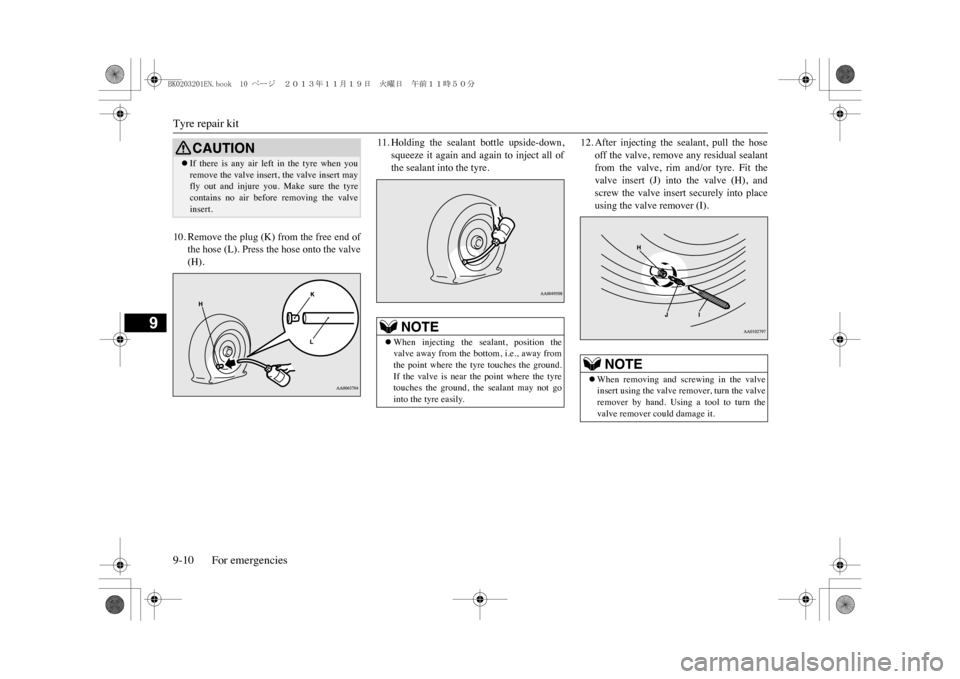
10. Remove the plug (K) from the free end of
the hose (L). Press the hose onto the valve(H).
11. Holding the sealant bottle upside-down,
squeeze it again and again to inject all ofthe sealant into the tyre.
12. After injecting the sealant, pull the hose
off the valve, remove any residual sealantfrom the valve, rim and/or tyre. Fit thevalve insert (J) into the valve (H), andscrew the valve insert securely into placeusing the valve remover (I).
CAUTIONzIf there is any air left in the tyre when youremove the valve insert, the valve insert mayfly out and injure you. Make sure the tyrecontains no air before
removing the valve
insert.
NOTE
zWhen injecting the sealant, position thevalve away from the bottom, i.e., away fromthe point where the tyre touches the ground.If the valve is near the point where the tyretouches the ground, the sealant may not gointo the tyre easily.
NOTE
zWhen removing and screwing in the valveinsert using the valve remover, turn the valveremover by hand. Using a tool to turn thevalve remover could damage it.
BK0203201EN.book 10 ページ 2013年11月19日 火曜日 午前11時50分
Page 322 of 388
Tyre repair kit
For emergencies 9-11
9
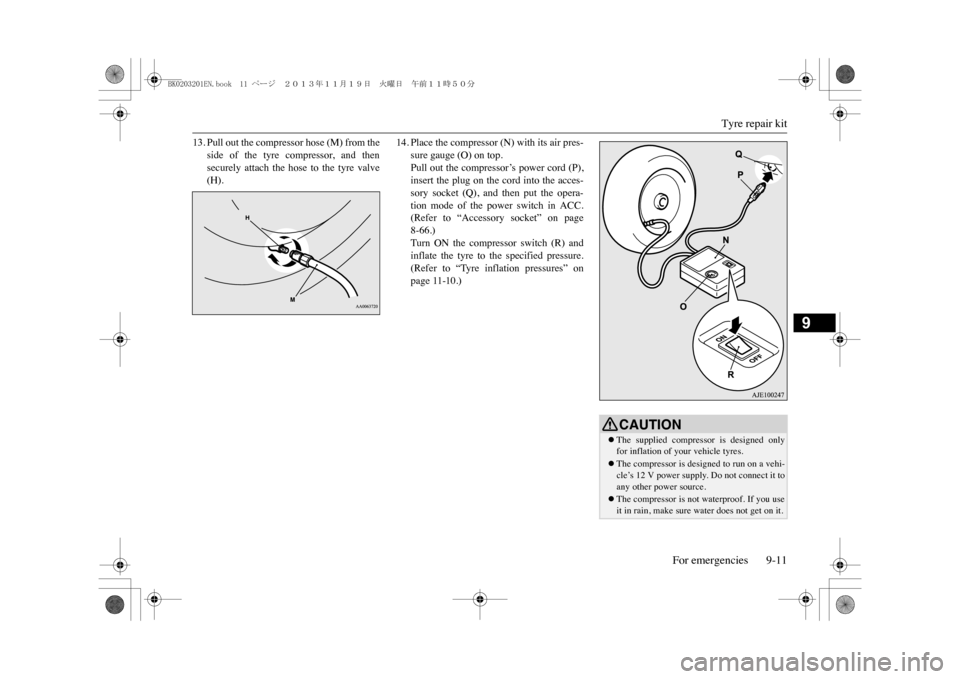
13. Pull out the compressor hose (M) from the
side of the tyre compressor, and thensecurely attach the hose to the tyre valve(H).
14. Place the compressor (N) with its air pres-
sure gauge (O) on top.Pull out the compressor’s power cord (P),insert the plug on the cord into the acces-sory socket (Q), and then put the opera-tion mode of the power switch in ACC.(Refer to “Accessory socket” on page8-66.)Turn ON the compressor switch (R) andinflate the tyre to the specified pressure.(Refer to “Tyre inflation pressures” onpage 11-10.)
CAUTIONzThe supplied compress
or is designed only
for inflation of y
our vehicle tyres.
zThe compressor is designed to run on a vehi-cle’s 12 V power supply. Do not connect it toany other power source.zThe compressor is not waterproof. If you useit in rain, make sure water does not get on it.
BK0203201EN.book 11 ページ 2013年11月19日 火曜日 午前11時50分
Page 332 of 388
Towing
For emergencies 9-21
9
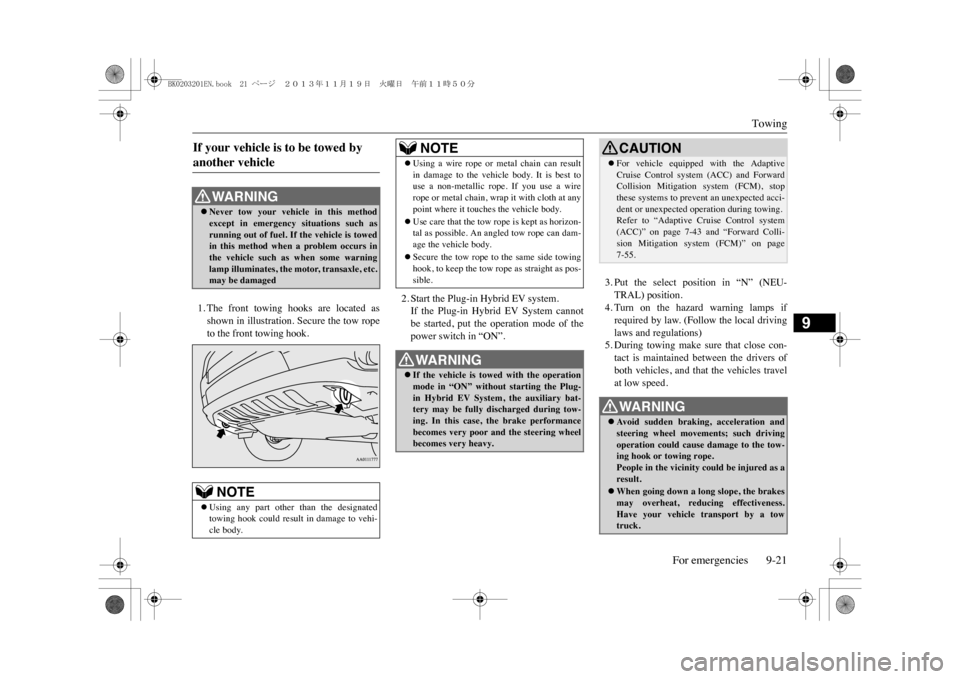
1. The front towing hooks are located asshown in illustration. Secure the tow ropeto the front towing hook.
2. Start the Plug-in Hybrid EV system.If the Plug-in Hybrid EV System cannotbe started, put the operation mode of thepower switch in “ON”.
3. Put the select position in “N” (NEU-TRAL) position.4. Turn on the hazard warning lamps ifrequired by law. (Follow the local drivinglaws and regulations)5. During towing make sure that close con-tact is maintained between the drivers ofboth vehicles, and that the vehicles travelat low speed.
If your vehicle is to be towed by another vehicle
WA R N I N GzNever tow your vehicle in this methodexcept in emergency situations such asrunning out of fuel. If
the vehicle is towed
in this method when
a problem occurs in
the vehicle such as when some warninglamp illuminates, the motor, transaxle, etc.may be damagedNOTE
zUsing any part other than the designatedtowing hook could result in
damage to vehi-
cle body.
zUsing a wire rope or metal chain can resultin damage to the vehicle body. It is best touse a non-metallic rope. If you use a wirerope or metal chain, wrap it with cloth at anypoint where it touches the vehicle body.zUse care that the tow rope is kept as horizon-tal as possible. An angled tow rope can dam-age the vehicle body.zSecure the tow rope to the same side towinghook, to keep the tow rope
as straight as pos-
sible.WA R N I N GzIf the vehicle is towed with the operationmode in “ON” withou
t starting the Plug-
in Hybrid EV System, the auxiliary bat-tery may be fully discharged during tow-ing. In this case, the brake performancebecomes very poor and the steering wheelbecomes very heavy.NOTE
CAUTIONzFor vehicle equipped with the AdaptiveCruise Control system (ACC) and ForwardCollision Mitigation system (FCM), stopthese systems to prevent an unexpected acci-dent or unexpected op
eration during towing.
Refer to “Adaptive Cruise Control system(ACC)” on page 7-43 and “Forward Colli-sion Mitigation system (FCM)” on page7-55.WA R N I N GzAv o i d s u d d e n b r a k i n g ,
acceleration and
steering wheel movements; such drivingoperation could cause damage to the tow-ing hook or towing rope.People in the vicinity could be injured as aresult.zWhen going down a long slope, the brakesmay overheat, reducing effectiveness.Have your vehicle transport by a towtruck.
BK0203201EN.book 21 ページ 2013年11月19日 火曜日 午前11時50分
Page 333 of 388
Operation under adverse driving conditions9-22 For emergencies
9
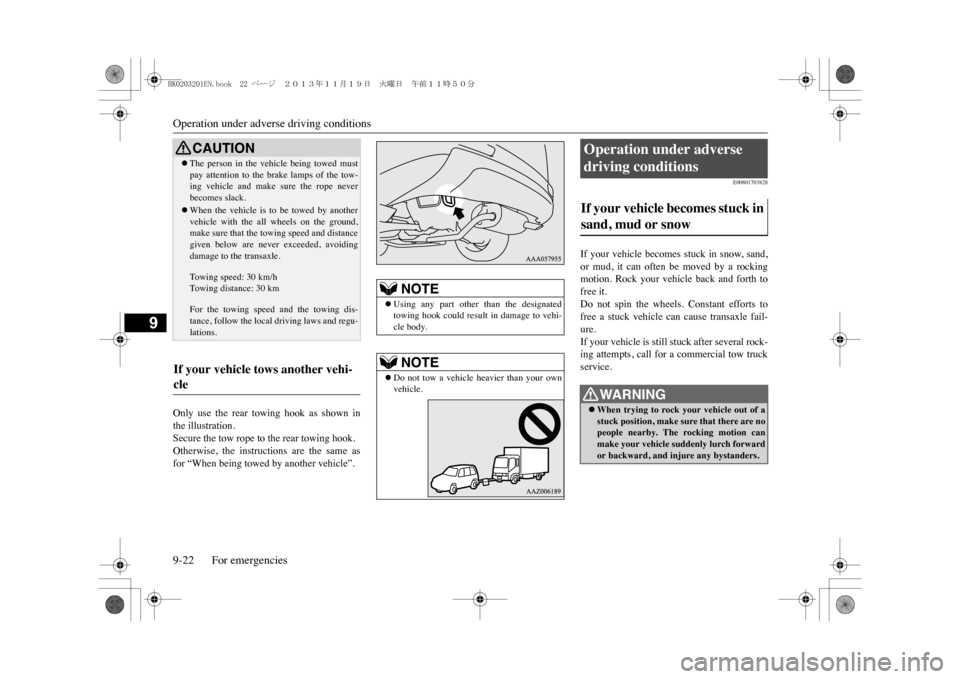
Only use the rear towing hook as shown inthe illustration.Secure the tow rope to the rear towing hook.Otherwise, the instructions are the same asfor “When being towed by another vehicle”.
E00801703828
If your vehicle becomes stuck in snow, sand,or mud, it can often be moved by a rockingmotion. Rock your vehicle back and forth tofree it.Do not spin the wheels.
Constant efforts to
free a stuck vehicle can cause transaxle fail-ure.If your vehicle is still stuck after several rock-ing attempts, call for a commercial tow truckservice.
CAUTIONzThe person in the vehicle being towed mustpay attention to the brake lamps of the tow-ing vehicle and make sure the rope neverbecomes slack.zWhen the vehicle is to be towed by anothervehicle with the all wheels on the ground,make sure that the towing speed and distancegiven below are neve
r exceeded, avoiding
damage to the transaxle.To w i n g s p e e d : 3 0 k m / hTo w i n g d i s t a n c e : 3 0 k mFor the towing speed and the towing dis-tance, follow the local driving laws and regu-lations.
If your vehicle tows another vehi-cle
NOTE
zUsing any part
other than the designated
towing hook could result in damage to vehi-cle body.NOTE
zDo not tow a vehicle heavier than your ownvehicle.
Operation under adverse driving conditions If your vehicle becomes stuck in sand, mud or snow
WA R N I N GzWhen trying to rock your vehicle out of astuck position, make sure that there are nopeople nearby. The rocking motion canmake your vehicle suddenly lurch forwardor backward, and inju
re any bystanders.
BK0203201EN.book 22 ページ 2013年11月19日 火曜日 午前11時50分