phone MITSUBISHI OUTLANDER SPORT 2014 3.G Owner's Guide
[x] Cancel search | Manufacturer: MITSUBISHI, Model Year: 2014, Model line: OUTLANDER SPORT, Model: MITSUBISHI OUTLANDER SPORT 2014 3.GPages: 388, PDF Size: 20.04 MB
Page 294 of 388

Bluetooth® 2.0 interface
For pleasant driving 8-57
8
1. Press the SPEECH button.2. Say “Phonebook.”3. The voice guide will say “Select one ofthe following: new entry, edit number,edit name, list names, delete, erase all, orimport contact”. Say “Edit number.”4. The voice guide will say “Please say thename of the entry you would like to edit,or say list names.” Say the name of thephonebook entry you want to edit.5. The voice guide will say “Home, work,mobile or other?” Select and say the loca-tion where the telephone number youwant to change or add is registered.When the confirmation function is on, thesystem will check the target name andlocation again. Answer “Yes” if you wantto continue with the editing.Answer “No,” the system will return toStep 3.
6. The voice guide will say “Number,please.” Say the telephone number youwant to register.7. The voice guide will repeat the telephonenumber.When the confirmation function is on, thesystem will ask if the number is correct.Answer “Yes.”Answer “No,” the system will return tothe Step 3.8. Once the telephone number is registered,the voice guide will say “Number saved”and then the system will return to themain menu.
1. Press the SPEECH button.2. Say “Phonebook.”3. The voice guide will say “Select one ofthe following: new entry, edit number,edit name, list names, delete, erase all, orimport contact.” Say “Edit name.”4. The voice guide will say “Please say thename of the entry you would like to edit,or say list names.” Say the name you wantto edit.5. The voice guide will say “Changing
em will return to
Step 4.6. The voice guide will say “Name please.”Say the new name you want to register.7. The registered name will be changed.When the change is complete, the systemwill return to the main menu.
Page 295 of 388

Bluetooth® 2.0 interface8-58 For pleasant driving
8
E00739900025
1. Press the SPEECH button.2. Say “Phonebook.”3. The voice guide will say “Select one ofthe following: new entry, edit number,edit name, list names, delete, erase all, orimport contact.” Say “List names.”4. Bluetooth
® 2.0 interface will read out the
entries in the phonebook in order.5. When the voice guide is done reading thelist, it will say “End of list, would you liketo start from the beginning?” When youwant to check the list again from thebeginning, answer “Yes.”When you are done, answer “No” toreturn to the previous or main menu.
E00740000026
1. Press the SPEECH button.2. Say “Phonebook.”3. The voice guide will say “Select one ofthe following: new entry, edit number,edit name, list names, delete, erase all, orimport contact.” Say “Delete.”4. The voice guide will say “Please say thename of the entry you would like todelete, or say list names.” Say the name ofthe phonebook entry in which the tele-phone number you want to delete is regis-tered.
5. If only one telephone number is registeredin the selected phonebook entry, the voiceguide will say “Deleting
Page 296 of 388

Bluetooth® 2.0 interface
For pleasant driving 8-59
8
7. When the telephone number deletion iscomplete, the voice guide will say“
E00740100027
Yo u c a n d e l e t e a l l r e g i s t e r e d i n f o r m a t i o nfrom the vehicle phonebook.1. Press the SPEECH button.2. Say “Phonebook.”3. The voice guide will say “Select one ofthe following: new entry, edit number,edit name, list names, delete, erase all, orimport contact.” Say “Erase all.”4. For confirmation purposes, the voiceguide will ask “Are you sure you want toerase everything from your hands-freesystem phonebook?” Answer “Yes.”Answer “No” to cancel the deletion of allregistered information in the phonebookand return to the main menu.
5. The voice guide will say “You are aboutto delete everything from your hands-freesystem phonebook. Do you want to con-tinue?” Answer “Yes” to continue.Answer “No” to cancel the deletion of allregistered information in the phonebookand return to the main menu.6. The voice guide will say “Please wait,erasing the hands-free system phone-book” and then the system will delete alldata in the phonebook.When the deletion is complete, the voiceguide will say “Hands-free system phone-book erased” and then the system willreturn to the main menu.
E00763900080
All entries in the phonebook stored in the cel-lular phone can be transferred in a batch andregistered in the mobile phonebook.Up to 7 mobile phonebooks, each containingup to 1,000 names, can be registered.The Bluetooth
® 2.0 interface automatically
converts from text to voice the names regis-tered in the transferred phonebook entries,and creates names.
Follow the steps below to transfer to themobile phonebook the phonebook stored inthe cellular phone.
Page 297 of 388

Bluetooth® 2.0 interface8-60 For pleasant driving
8
1. Press the SPEECH button.2. Say “Phonebook.”3. The voice guide will say “Select one ofthe following: new entry, edit number,edit name, list names, delete, erase all, orimport contact.” Say “Import contact.”4. The voice guide will say “Would you liketo import a single entry or all contacts?”Say “All contacts.”
5. The voice guide will say “Importing thecontact list from the mobile phonebook.This may take several minutes to com-plete. Would you like to continue?”Answer “Yes,” transferring to the mobilephonebook the phonebook stored in thecellular phone will start.Answer “No,” the system will return tothe main menu.
6. When the transfer is complete, the voiceguide will say “Import complete” andthen the system will return to the mainmenu.
zThe maximum supported telephone numberlength is 19 digits. Any telephone number of20 digits or more will be truncated to the first19 digits.zIf telephone numbers contain charactersother than 0 to 9,
*, # or +, these characters
are deleted before the transfer.zFor the connection settings on the cellularphone side, refer to the instructions for thecellular phone.NOTE
NOTE
zThe transfer may take some time to completedepending on the number of contacts.zIf the Bluetooth
® 2.0 interface could not be
connected to the Bluetooth
® compatible cel-
lular phone, the voice guide will say “Unableto transfer contact
list from phone” and then
the system will return to the main menu.zIf you press the HANG-UP button or pressand hold the SPEECH button during the datatransfer, the transfer will be cancelled andthe system will return to the main menu.zIf an error occurs during the data transfer, alltransfer will be cancelled and the voice guidewill say “Unable to complete the phonebookimport” and then the system will return tothe main menu.zIf there are no contacts in the phonebook, thevoice guide will say “There are no contactson the connected phone.”
BK0203201EN.book 60 ページ 2013年11月19日 火曜日 午前11時50分
Page 301 of 388
Sun visors8-64 For pleasant driving
8
*: “iPod,” “iPod classic,” “iPod nano,” “iPodtouch” and “iPhone” are registered trade-marks of Apple Inc. in the United States andother countries.
E00762400033
Yo u c a n p l a y m u s i c f i l e s o f t h e f o l l o w i n gspecifications that are saved in a USB mem-ory device or other device supporting massstorage class. When you connect your iPod,playable file specifications depend on theconnected iPod.
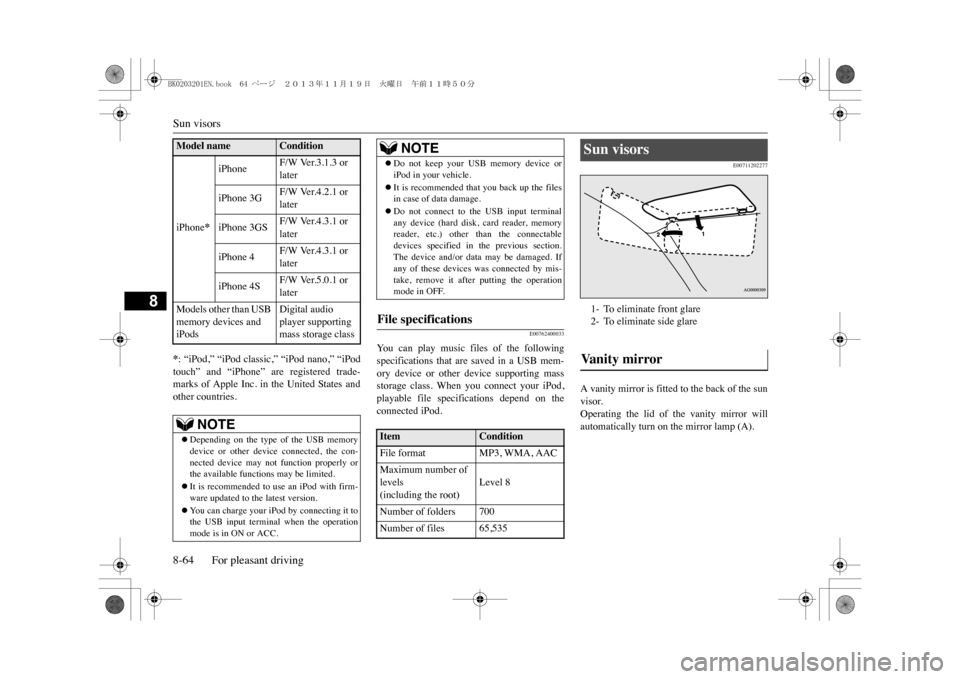
E00711202277
A vanity mirror is fitted to the back of the sunvisor.Operating the lid of the vanity mirror willautomatically turn on the mirror lamp (A).
iPhone
*
iPhone
F/W Ver.3.1.3 or later
iPhone 3G
F/W Ver.4.2.1 or later
iPhone 3GS
F/W Ver.4.3.1 or later
iPhone 4
F/W Ver.4.3.1 or later
iPhone 4S
F/W Ver.5.0.1 or later
Models other than USB memory devices and iPods
Digital audio player supporting mass storage class
NOTE
zDepending on the type of the USB memorydevice or other device connected, the con-nected device may not function properly orthe available functions may be limited.zIt is recommended to use an iPod with firm-ware updated to th
e latest version.
zYo u c a n c h a r g e y o u r i P o d b y c o n n e c t i n g i t t othe USB input terminal when the operationmode is in ON or ACC.
Model name
Condition
zDo not keep your USB memory device oriPod in your vehicle.zIt is recommended that you back up the filesin case of data damage.zDo not connect to the USB input terminalany device (hard disk, card reader, memoryreader, etc.) other than the connectabledevices specified in the previous section.The device and/or data
may be damaged. If
any of these devices
was connected by mis-
take, remove it after putting the operationmode in OFF.
File specifications Item
Condition
File format
MP3, WMA, AAC
Maximum number of levels(including the root)
Level 8
Number of folders 700Number of files 65,535
NOTE
Sun visors 1- To eliminate front glare2- To eliminate side glareVa n i t y m i r r o r
BK0203201EN.book 64 ページ 2013年11月19日 火曜日 午前11時50分