lock MITSUBISHI PAJERO IV 2011 Owners Manual
[x] Cancel search | Manufacturer: MITSUBISHI, Model Year: 2011, Model line: PAJERO IV, Model: MITSUBISHI PAJERO IV 2011Pages: 377, PDF Size: 29.43 MB
Page 271 of 377
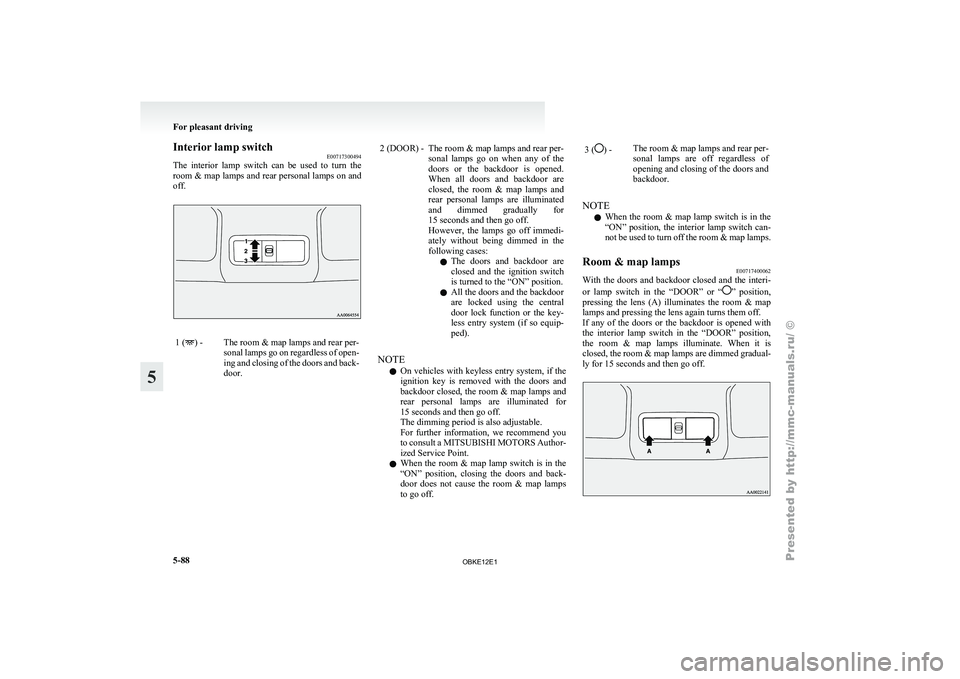
Interior lamp switch
E00717300494
The interior lamp
switch can be used to turn the
room & map lamps and rear personal lamps on and
off. 1 ( ) - The room & map lamps and rear per-
sonal lamps go
on regardless of open-
ing and closing of the doors and back-
door. 2 (DOOR) - The room & map lamps and rear per-
sonal lamps go
on when any of the
doors or the backdoor is opened.
When all doors and backdoor are
closed, the room & map lamps and
rear personal lamps are illuminated
and dimmed gradually for
15 seconds and then go off.
However, the lamps go off immedi-
ately without being dimmed in the
following cases:
l The doors and backdoor are
closed and the ignition switch
is turned to the “ON” position.
l All the doors and the backdoor
are locked using the central
door lock function or the key-
less entry system (if so equip-
ped).
NOTE l On
vehicles with
keyless entry system, if the
ignition key is removed with the doors and
backdoor closed, the room & map lamps and
rear personal lamps are illuminated for
15 seconds and then go off.
The dimming period is also adjustable.
For further information, we recommend you
to consult a MITSUBISHI MOTORS Author-
ized Service Point.
l When the room & map lamp switch is in the
“ON” position, closing the doors and back-
door does not cause the room & map lamps
to go off. 3 ( ) -
The room & map lamps and rear per-
sonal lamps are
off regardless of
opening and closing of the doors and
backdoor.
NOTE l When
the room
& map lamp switch is in the
“ON” position, the interior lamp switch can-
not be used to turn off the room & map lamps.
Room & map lamps E00717400062
With the doors and backdoor closed and the interi-
or lamp switch
in the “DOOR” or “ ” position,
pressing the
lens (A) illuminates the room & map
lamps and pressing the lens again turns them off.
If any of the doors or the backdoor is opened with
the interior lamp switch in the “DOOR” position,
the room & map lamps illuminate. When it is
closed, the room & map lamps are dimmed gradual-
ly for 15 seconds and then go off. For pleasant driving
5-88
5
OBKE12E1
Page 272 of 377
NOTE
l When
any of
the doors or the backdoor is
opened and the interior lamp switch in the
“ ” position, the room & map lamps remain
on even when the lens is pressed.
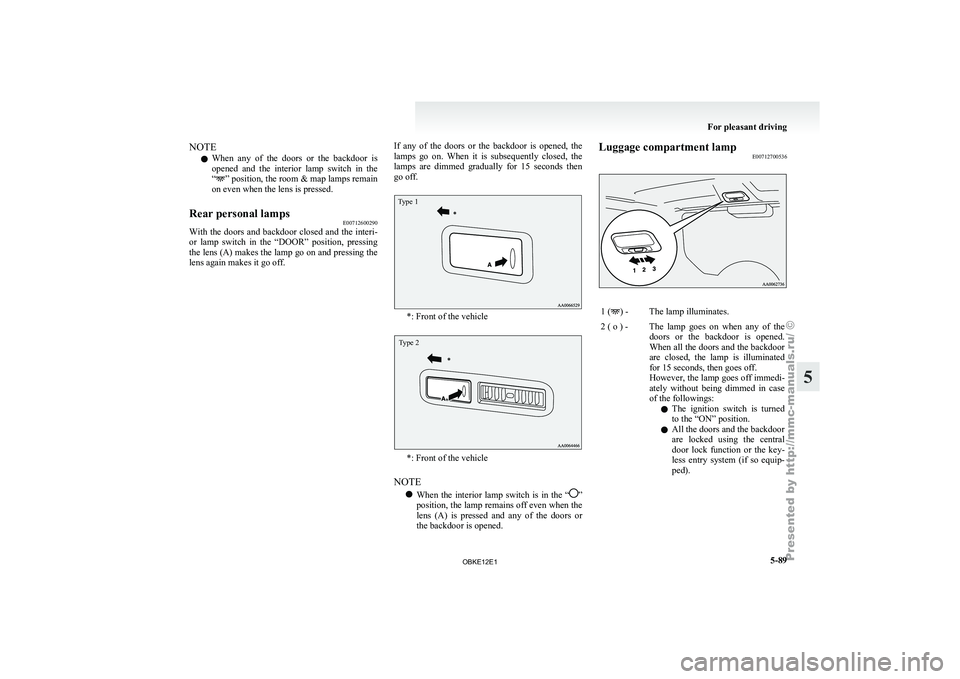
Rear personal lamps E00712600290
With the
doors and backdoor closed and the interi-
or lamp switch
in the “DOOR” position, pressing
the lens (A) makes the lamp go on and pressing the
lens again makes it go off. If any of the doors or the backdoor is opened, the
lamps go
on.
When it is subsequently closed, the
lamps are dimmed gradually for 15 seconds then
go off.
Type 1 *: Front of the vehicle
Type 2
*: Front of the vehicle
NOTE l When
the interior
lamp switch is in the “ ”
position, the lamp
remains off even when the
lens (A) is pressed and any of the doors or
the backdoor is opened. Luggage compartment lamp
E00712700536 1 ( ) - The lamp illuminates.
2 ( o ) - The lamp goes on when any of the doors or the
backdoor is opened.
When all the doors and the backdoor
are closed, the lamp is illuminated
for 15 seconds, then goes off.
However, the lamp goes off immedi-
ately without being dimmed in case
of the followings:
l The ignition switch is turned
to the “ON” position.
l All the doors and the backdoor
are locked using the central
door lock function or the key-
less entry system (if so equip-
ped). For pleasant driving
5-89 5
OBKE12E1
Page 273 of 377
NOTE
l On
vehicles with
keyless entry system, when
the ignition key is removed with the doors
and the backdoor closed, the lamp is illumi-
nated for 15 seconds, then goes off.
The dimming period is also adjustable.
For further information, we recommend you
to consult a MITSUBISHI MOTORS Author-
ized Service Point.
3 ( ) -
The lamp goes off.
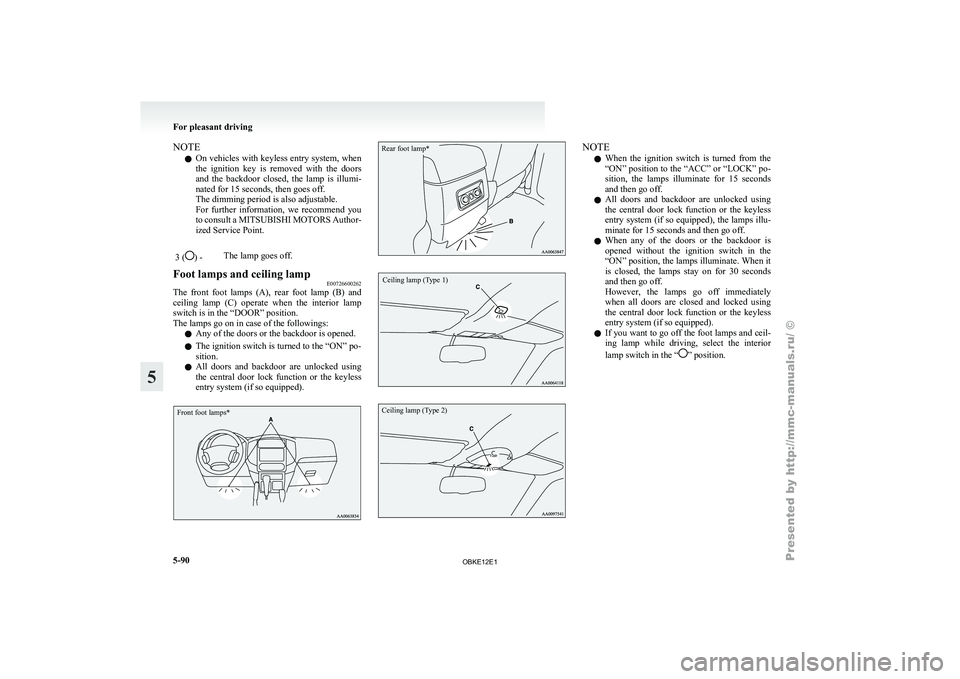
Foot lamps and ceiling lamp E00726600262
The front foot lamps (A), rear foot lamp (B) and
ceiling lamp (C)
operate when the interior lamp
switch is in the “DOOR” position.
The lamps go on in case of the followings:
l Any of the doors or the backdoor is opened.
l The ignition switch is turned to the “ON” po-
sition.
l All doors and backdoor are unlocked using
the central door lock function or the keyless
entry system (if so equipped).
Front foot lamps*
Rear foot lamp*
Ceiling lamp (Type 1)
Ceiling lamp (Type 2) NOTE
l When
the ignition
switch is turned from the
“ON” position to the “ACC” or “LOCK” po-
sition, the lamps illuminate for 15 seconds
and then go off.
l All doors and backdoor are unlocked using
the central door lock function or the keyless
entry system (if so equipped), the lamps illu-
minate for 15 seconds and then go off.
l When any of the doors or the backdoor is
opened without the ignition switch in the
“ON” position, the lamps illuminate. When it
is closed, the lamps stay on for 30 seconds
and then go off.
However, the lamps go off immediately
when all doors are closed and locked using
the central door lock function or the keyless
entry system (if so equipped).
l If you want to go off the foot lamps and ceil-
ing lamp while driving, select the interior
lamp switch in the “ ” position.For pleasant driving
5-90
5
OBKE12E1
Page 275 of 377

1- Sunglasses holder*
2- Glove box
3-
Accessory box*
4-
Centre console box
5- Side box*
6- Luggage floor box
Glove box E00717601162
The glove box can be locked and unlocked using
the key. 1- To lock
2- To unlock
3-
To open, pull the lever NOTE
l When
the lamp
switch is in the “ ” or
“ ” position, the lower glove box lamp illu-
minates.
l The Auxiliary
Audio connector (RCA) (A)
or the Auxiliary Video connector (RCA) (A)
is located in the glove box (if so equipped).
For details, refer to “To use the external au-
dio input function” on page 5-56.
l The USB input terminal (B) is located in the
glove box (if so equipped). For details, refer
to “USB input terminal” on page 5-82.
l Small articles can be stored in the upper area
(C) of the glove box. Centre console box
E00722600105
Upper and lower boxes are located inside the cen-
tre console box. The centre console box can also be used as an arm-
rest. Refer to “Armrest” on page 2-08.
1- Upper box
2- Lower box
Upper box
To open
the upper box, lift the left upper release lev-
er (A) and raise the lid. For pleasant driving
5-92
5
OBKE12E1
Page 281 of 377
Installation position for warning
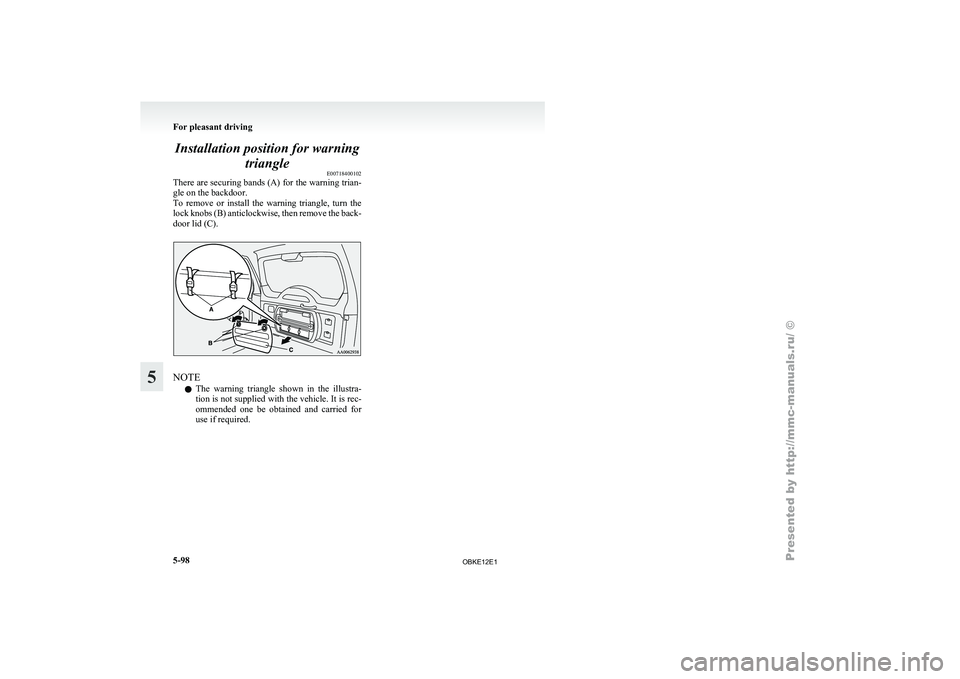
triangle E00718400102
There are securing
bands (A) for the warning trian-
gle on the backdoor.
To remove or install the warning triangle, turn the
lock knobs (B) anticlockwise, then remove the back-
door lid (C). NOTE
l The
warning triangle
shown in the illustra-
tion is not supplied with the vehicle. It is rec-
ommended one be obtained and carried for
use if required. For pleasant driving
5-98
5
OBKE12E1
Page 284 of 377

3000, 3800 models3200 models*: Optional equipment
6. Connect one end
of the other jumper cable to
the negative (-) terminal of the booster bat-
tery (C), and the other end to the engine
block of the vehicle with the discharged bat-
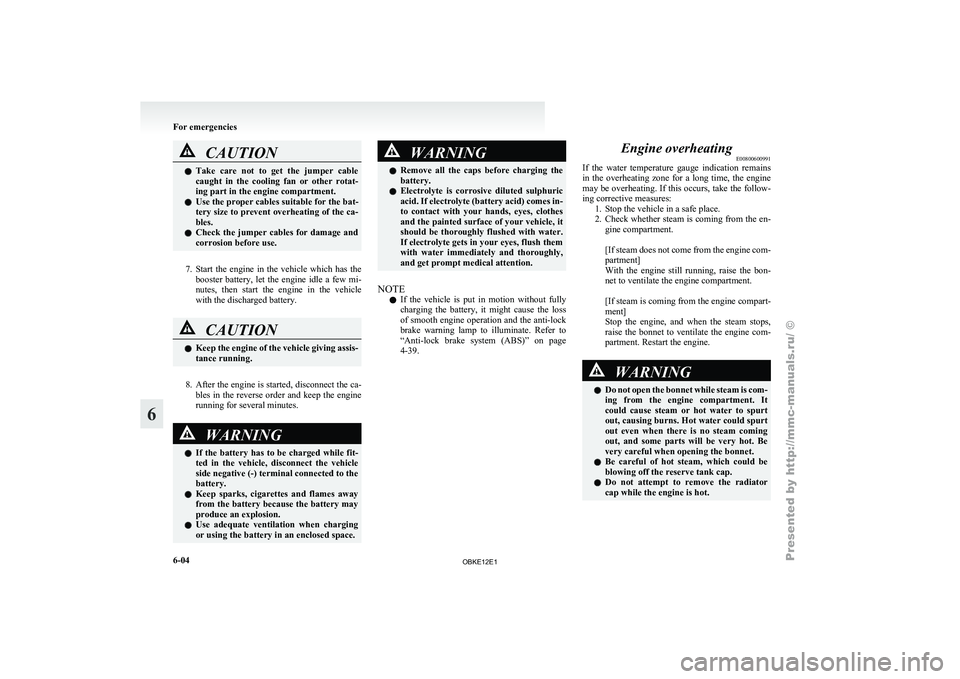
tery at the point farthest from the battery. WARNING
l Be sure
to
observe the connecting se-
quence of .
l Make sure that the connection is made
to the appointed
position (shown in the il-
lustration). If the connection is made di-
rectly to the negative side of the battery,
the inflammable gasses generated from
the battery might catch fire and explode. WARNING
l When connecting
the
jumper cables, do
not connect the positive (+) cable to the
negative (-) terminal. Otherwise sparks
might cause explosion of the battery. For emergencies
6-03 6
OBKE12E1
Page 285 of 377
CAUTION
l
Take care not to get the jumper cable
caught in the cooling fan or other rotat-
ing part in the engine compartment.
l Use the proper cables suitable for the bat-
tery size to prevent overheating of the ca-
bles.
l Check the jumper cables for damage and
corrosion before use.
7. Start the engine in the vehicle which has the
booster battery,
let the engine idle a few mi-
nutes, then start the engine in the vehicle
with the discharged battery. CAUTION
l
Keep the engine
of the vehicle giving assis-
tance running.
8. After the engine is started, disconnect the ca-
bles in
the reverse order and keep the engine
running for several minutes. WARNING
l If the
battery
has to be charged while fit-
ted in the vehicle, disconnect the vehicle
side negative (-) terminal connected to the
battery.
l Keep sparks, cigarettes and flames away
from the battery because the battery may
produce an explosion.
l Use adequate ventilation when charging
or using the battery in an enclosed space. WARNING
l Remove all the
caps before charging the
battery.
l Electrolyte is corrosive diluted sulphuric
acid. If electrolyte (battery acid) comes in-
to contact with your hands, eyes, clothes
and the painted surface of your vehicle, it
should be thoroughly flushed with water.
If electrolyte gets in your eyes, flush them
with water immediately and thoroughly,
and get prompt medical attention.
NOTE l If
the vehicle
is put in motion without fully
charging the battery, it might cause the loss
of smooth engine operation and the anti-lock
brake warning lamp to illuminate. Refer to
“Anti-lock brake system (ABS)” on page
4-39. Engine overheating
E00800600991
If the water
temperature gauge indication remains
in the overheating zone for a long time, the engine
may be overheating. If this occurs, take the follow-
ing corrective measures: 1. Stop the vehicle in a safe place.
2. Check whether steam is coming from the en-gine compartment.
[If steam does not come from the engine com-
partment]
With the engine still running, raise the bon-
net to ventilate the engine compartment.
[If steam is coming from the engine compart-
ment]
Stop the engine, and when the steam stops,
raise the bonnet to ventilate the engine com-
partment. Restart the engine. WARNING
l Do not
open
the bonnet while steam is com-
ing from the engine compartment. It
could cause steam or hot water to spurt
out, causing burns. Hot water could spurt
out even when there is no steam coming
out, and some parts will be very hot. Be
very careful when opening the bonnet.
l Be careful of hot steam, which could be
blowing off the reserve tank cap.
l Do not attempt to remove the radiator
cap while the engine is hot. For emergencies
6-04
6
OBKE12E1
Page 290 of 377

To use the jack handle
E00802400023
1. While pushing the
snap pin (A), remove the
inside handle (B). 2. With the snap pin (C) pushed, insert the in-
side handle until it is locked. How to change a tyre
E00801201601
Before changing a
tyre, first stop your vehicle in a
safe, flat location. 1. Park the vehicle on level and stable ground.
2. Set the parking brake firmly.
3. On vehicles with M/T, turn the ignitionswitch to the “LOCK” position, move the
gearshift lever to the “R” (Reverse) position.
On vehicles with A/T, move the selector lev-
er to the “P” (PARK) position, turn the igni-
tion key to the “LOCK” position.
4. Turn on the hazard warning flashers and set up a warning triangle, flashing signal lamp,
etc., at an adequate distance from the vehi-
cle, and have all your passengers leave the ve-
hicle.
5. To prevent the vehicle from rolling when it is raised on the jack, place chocks or blocks
(A) at the tyre that is diagonally opposite
from the tyre (B) you are changing. WARNING
l Be sure to
apply chocks or blocks to the
correct tyre when jacking up the vehicle.
If the vehicle moves while jacked up, the
jack could slip out of position, leading to
an accident.
NOTE l The
chocks shown
in the illustration do not
come with your vehicle. It is recommended
that you keep one in the vehicle for use if nee-
ded.
l If chocks are not available, use stones or any
other objects that are large enough to hold
the wheel in position.
6. Get the spare wheel, jack, jack handle and wheel nut wrench ready. Refer to “Tool, jack
and jack handle” on page 6-07.
Spare wheel information E00803600266
Check the air pressure of the spare tyre frequently
and make sure
it is ready for emergency use at any
time.
Maintaining the spare wheel at the highest speci-
fied air pressure will ensure that it can always be
used under any conditions (city/high-speed driving,
varying load weight, etc.). For emergencies
6-09 6
OBKE12E1
Page 291 of 377
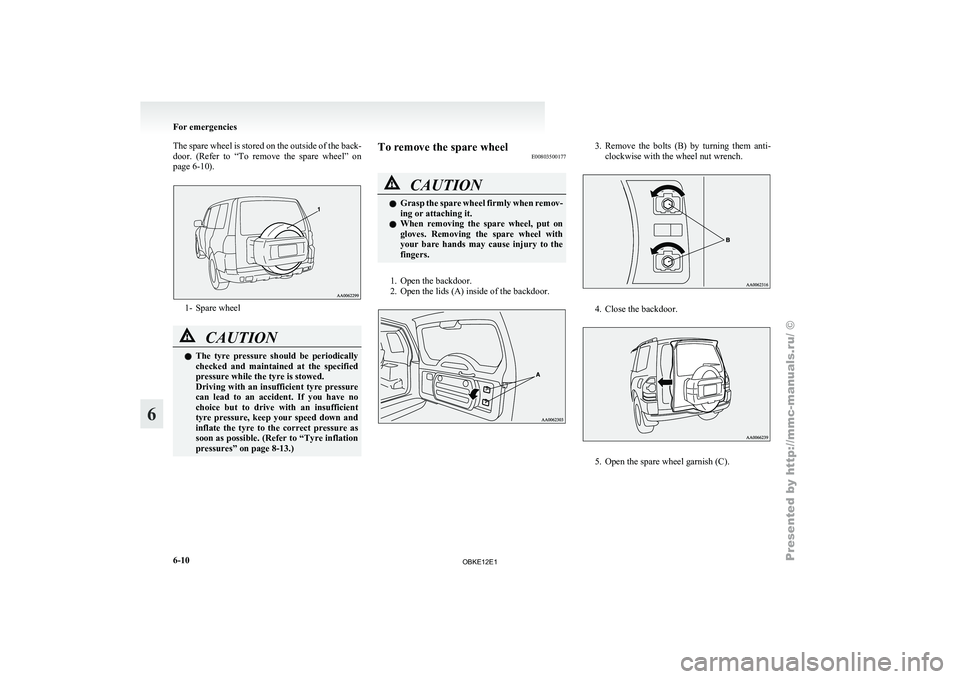
The spare wheel is stored on the outside of the back-
door. (Refer to
“To remove the spare wheel” on
page 6-10). 1- Spare wheel
CAUTION
l
The tyre pressure
should be periodically
checked and maintained at the specified
pressure while the tyre is stowed.
Driving with an insufficient tyre pressure
can lead to an accident. If you have no
choice but to drive with an insufficient
tyre pressure, keep your speed down and
inflate the tyre to the correct pressure as
soon as possible. (Refer to “Tyre inflation
pressures” on page 8-13.) To remove the spare wheel
E00803500177 CAUTION
l
Grasp the
spare
wheel firmly when remov-
ing or attaching it.
l When removing the spare wheel, put on
gloves. Removing the spare wheel with
your bare hands may cause injury to the
fingers.
1. Open the backdoor.
2. Open the lids (A) inside of the backdoor. 3. Remove the bolts (B) by turning them anti-
clockwise with the wheel nut wrench. 4. Close the backdoor.
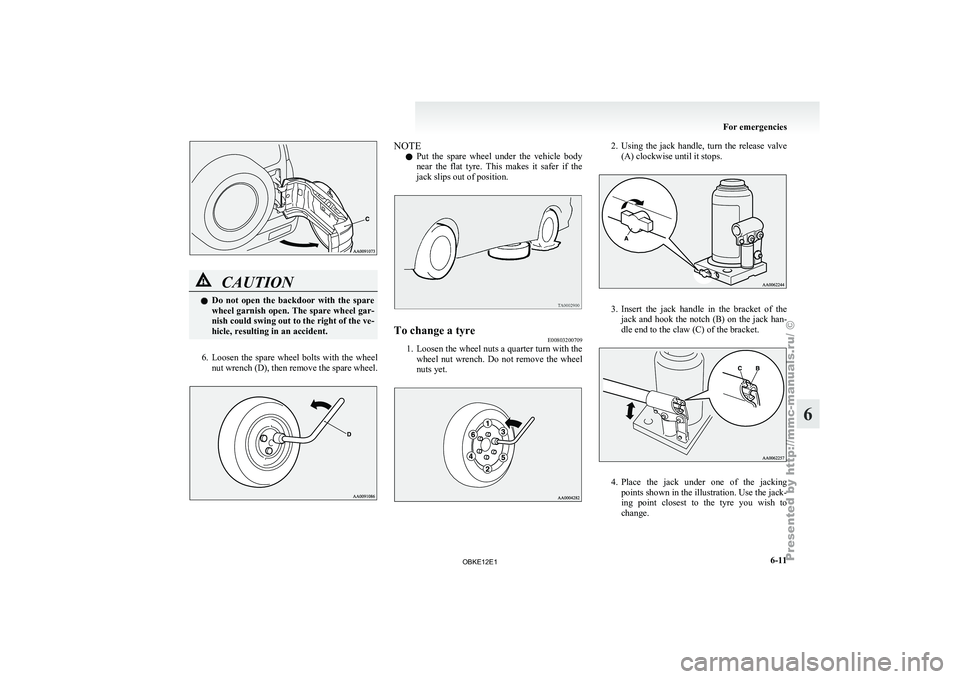
5. Open the spare wheel garnish (C).For emergencies
6-10
6
OBKE12E1
Page 292 of 377
CAUTION
l
Do not
open the backdoor with the spare
wheel garnish open. The spare wheel gar-
nish could swing out to the right of the ve-
hicle, resulting in an accident.
6. Loosen the spare wheel bolts with the wheel
nut wrench
(D), then remove the spare wheel. NOTE
l Put
the spare
wheel under the vehicle body
near the flat tyre. This makes it safer if the
jack slips out of position. To change a tyre
E00803200709
1. Loosen the wheel nuts a quarter turn with the
wheel nut
wrench. Do not remove the wheel
nuts yet. 2. Using the jack handle, turn the release valve
(A) clockwise until it stops. 3. Insert the jack handle in the bracket of the
jack and
hook the notch (B) on the jack han-
dle end to the claw (C) of the bracket. 4. Place
the jack under one of the jacking
points shown in the illustration. Use the jack-
ing point
closest to the tyre you wish to
change. For emergencies
6-11 6
OBKE12E1