transfer MITSUBISHI PAJERO IV 2011 User Guide
[x] Cancel search | Manufacturer: MITSUBISHI, Model Year: 2011, Model line: PAJERO IV, Model: MITSUBISHI PAJERO IV 2011Pages: 377, PDF Size: 29.43 MB
Page 158 of 377
CAUTION
l
Selecting the “4HLc” or “4LLc” position
to drive on dry paved road will increase
the fuel consumption with possible noise
generation and early tyre wear.
It may also increase the differential oil
temperature, resulting in possible dam-
age to the driving system.
Further, the drive train will be subjected
to excessive loading, possibly leading to
oil leakage, component seizure, or other
serious faults.
Driving on snowy or icy roads
Set the transfer
shift lever to the “4H” or “4HLc”
position in accordance with the road conditions,
and then gradually depress the accelerator pedal for
a smooth start.
NOTE
l The use of snow tyres and/or tyre chains is
recommended.
l In order to ensure that the anti-lock brake sys-
tem (ABS) will operate correctly in situa-
tions where tyre chains have been fitted,
drive in the “4H”, “4HLc” or “4LLc” position.
l Maintain a safe distance between vehicles,
avoid sudden braking, and use engine brak-
ing (downshifting). CAUTION
l
Avoid sudden braking,
sudden accelera-
tion, and sharp turning; such operations
could cause skidding and spinouts. Driving on sandy or muddy roads
Set the
transfer
shift lever to the “4HLc” or “4LLc”
position and then gradually depress the accelerator
pedal for a smooth start. Keep the pressure on the
accelerator pedal as constant as possible, and drive
at low speed. CAUTION
l
Do not
force
the vehicle or drive reckless-
ly on sandy surfaces. In comparison with
normal road surfaces, the engine and oth-
er drive-system components are put un-
der excessive strain when driving on such
a surface, and this could lead to accidents.
l If any of following conditions occur while
the vehicle is being driven, immediately
park your vehicle in a safe place and fol-
low these procedures:
• The needle in the temperature gaugeapproaches the overheating zone.
Refer to “Engine overheating” on
page 6-04.
• A/T fluid temperature warning lamp illuminates.
Refer to “When the A/T fluid temper-
ature warning lamp comes on” on
page 4-22. WARNING
l When attempting to rock your vehicle out
of a stuck
position, be sure that the area
around the vehicle is clear of people and
physical objects. The rocking motion may
cause the vehicle to suddenly launch for-
ward or backward, causing injury or dam-
age to nearby people or objects.
NOTE l Avoid
sudden braking,
acceleration, and turn-
ing; such operations could result in the vehi-
cle becoming stuck.
l If the vehicle becomes stuck in sandy or mud-
dy roads, it can often be moved with a rock-
ing motion. Move the selector lever rhythmi-
cally between the “D” (DRIVE) and “R” (RE-
VERSE) position (with M/T, between 1 st
and
Reverse), while applying slight pressure to
the accelerator pedal.
l It is recommended to start the vehicle with
parking brake partially, but not completely,
applied by slightly pulling the parking brake
lever.
After the vehicle has become free, do not for-
get to release the parking brake.
l If it is necessary to drive in extremely muddy
conditions, the use of tyre chains is recom-
mended. Because the extent of muddy condi-
tions is difficult to judge and the vehicle
could become bogged down very deeply, op-
eration should be at a low speed. If possible,
get out of the vehicle and check the condi-
tions ahead before proceeding. Starting and driving
4-33 4
OBKE12E1
Page 159 of 377
l
Driving over
roads in coastal areas or roads
on which anti-skid preparations have been
spread can cause rust on the vehicle; wash
the vehicle thoroughly as soon as possible af-
ter such use.
Climbing sharp grades
Set the transfer shift lever to the “4LLc” position to
maximize the engine torque. WARNING
l Go
straight
up.
Do not try to traverse
across a steep slope.
l If you begin to lose traction, ease off the
accelerator pedal and gently turn the
steering wheel alternatively left and right
to regain adequate traction again.
NOTE l Choose
as smooth
a slope as possible with
few stones or other obstacles.
l Before attempting to drive up the slope, walk
it up to confirm that the vehicle can handle
the grade.
Descending sharp grades
Set the transfer shift lever to the “4LLc” position,
use the engine brake (downshifting) and descend
slowly. WARNING
l Avoid
snaking
down
a sharp grade. De-
scend the grade as straight as possible. NOTE
l When descending a sharp grade, if the brakes
are
applied suddenly
because of an obstacle
encountered, control of the vehicle could be
lost. Before descending the slope, walk it
down and confirm the path.
l Before descending a grade, it is necessary to
choose the appropriate gear. Avoid changing
gears or depressing the clutch while descend-
ing the grade.
l MITSUBISHI MOTORS is not responsible
to the operator for any damage or injury
caused or liability incurred by improper and
negligent operation of a vehicle. All techni-
ques of vehicle operation described herein de-
pend on the skill and experience of the opera-
tor and other participating parties and any de-
viation from the recommended operation in-
structions above is at their own risk.
Turning sharp corners
When turning a sharp corner in the “4HLc” or
“4LLc” position at low speed, a slight difference in
steering may be experienced similar to as if the
brakes were applied. This is called tight corner brak-
ing and results from each of the 4 tyres being at a
different distance from the corner.
The phenomenon is peculiar to 4-wheel drive vehi-
cles. If this occurs, either straighten the steering
wheel, or change to rear-wheel drive.
Crossing a stream
4-wheel drive vehicles are not necessarily water-
proof. If the electrical circuits become wet, further
operation of the vehicle will be impossible; there-
fore, avoid crossing streams unless absolutely nec-
essary. If crossing a stream is unavoidable, use the
following procedure: 1. Check depths of a stream and geographical
features before
attempting to cross a stream
and ford the stream where the water is as shal-
low as practicable.
2. Cross at a place where the water is less than 70 cm deep.
3. Set the transfer shift lever to the “4LLc” po- sition.
4. Drive slowly at a speed of approximately 5 km/h (3 mph) to avoid splashing too much
water. CAUTION
l
Do not
attempt
to cross a stream at a
place where the water is more than 70 cm
deep.
l Cross a stream temporarily for emergen-
cies and avoid doing so for a long period
of time.
l After crossing a stream, apply the brakes
to be sure they are functioning properly.
If the brakes are wet and not functioning
properly, dry them out by driving slowly
while lightly depressing the brake pedal.
Inspect each part of the vehicle carefully.
NOTE l Because
the inside
of the vehicle is flooded
with water when crossing at a place where
the water is more than 50 cm deep, we recom-
mend you to have your vehicle inspected.
l Frequent crossing of streams can adversely af-
fect the life span of the vehicle; we recom-
mend you to take the necessary measures to
prepare, inspect, and repair the vehicle. Starting and driving
4-34
4
OBKE12E1
Page 160 of 377
Inspection and maintenance
following rough road operation E00606700048
After operating the
vehicle in rough road condi-
tions, be sure to perform the following inspection
and maintenance procedures:
l Check that the vehicle has not been damaged
by rocks, gravel, etc.
l Carefully wash the vehicle with water.
After washing, drive the vehicle slowly
while lightly depressing the brake pedal in or-
der to dry out the brakes. If the brakes still
do not function properly, we recommend you
to have the brakes checked as soon as possible
l Remove the insects, dried grass, etc. clog-
ging the radiator core.
l After crossing a stream, be sure to have the
following items inspected at a MITSUBISHI
MOTORS Authorized Service Point and take
the necessary measures.
• Check the brake system and, if necessary,have it serviced.
• Check the engine, transmission, transfer, and differential oil or grease level and tur-
bidity. If the oil or grease is milky, it indi-
cates water contamination. Replace it
with new oil or grease.
• Grease the propeller shaft.
• Check the inside of the vehicle. If ingress of water is found, dry the carpet etc.
• Inspect the headlamps. If the headlamp bulb is flooded with water, we recom-
mend you to have it drained. Cautions on handling of 4-wheel
drive vehicles E00606800401
Tyres and wheels
Since the driving
torque can be applied to the 4
wheels, the performance of the vehicle when oper-
ating in 4-wheel drive is greatly affected by the con-
dition of the tyres.
Pay close attention to the tyres.
l Install specified tyres on all wheels. Refer to
“Tyres and wheels” on page 9-12.
l Be sure to fit all 4 tyres and wheels of the
same size and type.
When replacement of any of the tyres or
wheels is necessary, replace all of them.
l All tyres should be rotated whenever the
wear difference between the front and rear
tyres is recognizable.
Good vehicle performance cannot be expected if
there is a difference in wear between tyres. Refer to
“Tyre rotation” on page 8-14. l Check the tyre inflation pressure regularly.
l If the tyre inflation pressure is inappropriate,
the transfer gear may make some noise and
shock while changing the drive mode. CAUTION
l
Always use tyres
of the same size, same
type, and same brand, and which have no
wear differences. Using tyres which differ
in size, type, brand or the degree of wear
will cause excessive loading, resulting in
possible damage to the drive system.
Towing
If towing is
necessary, we recommend you to have
it done by your MITSUBISHI MOTORS Author-
ized Service Point or a commercial tow truck service.
In the following cases, transport the vehicle using a
tow truck.
l The engine runs but the vehicle does not
move or abnormal noise is produced.
l Inspection of the vehicle’s underside reveals
that oil or some other fluid is leaking.
Only when you cannot receive a towing service
from a MITSUBISHI MOTORS Authorized Serv-
ice Point or commercial tow truck service, tow
your vehicle carefully in accordance with the in-
structions given in “Towing” on page 6-15. Starting and driving
4-35 4
OBKE12E1
Page 161 of 377

CAUTION
l
Be sure to shift the transfer shift lever to
the “2H” position. Never try to tow with
the transfer shift lever in the “4H”,
“4HLc” or “4LLc” positions and with
any of the wheels on the ground (Type A
or B). This could result in damage to the
vehicle’s driving system, or the vehicle
could become separated from the tow
truck and unexpected accident might re-
sult. If you cannot shift the transfer shift
lever to “2H” position or the transmission
is malfunctioning or damaged, transport
the vehicle with all the wheels on a car-
riage (Type C or D) as illustrated.
If you can shift the transfer shift lever to the “2H” position.
If you cannot shift the transfer shift lever to the “2H”
position. Jacking up a 4-wheel drive vehicle
WARNING
l Do not
crank
the engine while jacking up
the vehicle.
The tyre on the ground may turn and the
vehicle may roll off the jack. Clutch operation
Quick or
slight
clutch engagement made while the
engine is running at high speed will cause damage
to the clutch and transmission because the tractive
force is very great.
Operate the pedal slowly and positively. Starting and driving
4-36
4
OBKE12E1
Page 168 of 377
Driving hints
E00618100036
When extricating the
vehicle from mud, sand or
fresh snow with the transfer shift lever in the “2H”,
“4H”, or “4HLc” position, you may find that opera-
tion of the ASTC prevents the engine speed from in-
creasing in response to depression of the accelera-
tor pedal. If this happens and the vehicle remains
stuck as a result, place the transfer shift lever in the
“4LLc” position or turn the Active Stability Con-
trol switch OFF. The vehicle will then be easier to
extricate. (Brake control of the active traction con-
trol function is still working to prevent wheel spins
when ASC OFF switch “OFF” or “4LLc” position
selected.)
NOTE
l If the vehicle speed increases to about
120 km/h (75 mph) with the Active Stability
Control function deactivated, the Active Sta-
bility Control function automatically starts op-
erating. To subsequently stop the Active Sta-
bility Control function, stop the vehicle and
press the ASC OFF switch again.
Active stability control function E00613900097
The Active Stability Control function is designed
to help maintain
the vehicle’s control in slippery
conditions, or during rapid steering manoeuvres. It
works by controlling the engine output and brake
on each wheel. NOTE
l The
Active Stability
Control function does
not operate when the transfer shift lever is in
the “4LLc” position.
When the Active Stability Control function
is operating with the transfer shift lever in
the “2H”, “4H” or “4HLc” position, moving
the shift lever to the “4LLc” position makes
the Active Stability Control function deacti-
vate automatically.
l On vehicles with rear differential lock, the Ac-
tive Stability Control function does not oper-
ate when the rear differential lock is activated.
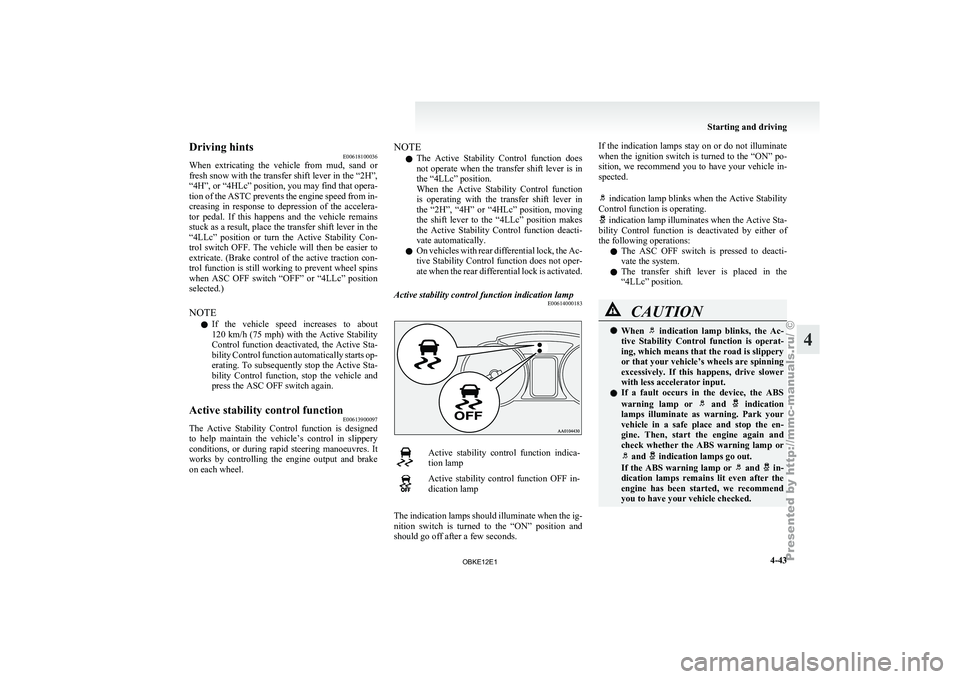
Active stability control function indication lamp E00614000183 Active stability control function indica-
tion lamp
Active stability control function OFF in-
dication lamp
The indication lamps should illuminate when the ig-
nition switch is
turned to the “ON” position and
should go off after a few seconds. If the indication lamps stay on or do not illuminate
when the
ignition
switch is turned to the “ON” po-
sition, we recommend you to have your vehicle in-
spected.
indication lamp blinks when the Active Stability
Control function is operating. indication lamp illuminates when the Active Sta-
bility Control function
is deactivated by either of
the following operations:
l The ASC OFF switch is pressed to deacti-
vate the system.
l The transfer shift lever is placed in the
“4LLc” position. CAUTION
l
When indication lamp blinks, the Ac-
tive Stability Control
function is operat-
ing, which means that the road is slippery
or that your vehicle’s wheels are spinning
excessively. If this happens, drive slower
with less accelerator input.
l If a fault occurs in the device, the ABS
warning lamp or and indication
lamps illuminate as
warning. Park your
vehicle in a safe place and stop the en-
gine. Then, start the engine again and
check whether the ABS warning lamp or and indication lamps go out.
If the ABS
warning lamp or and in-
dication lamps remains
lit even after the
engine has been started, we recommend
you to have your vehicle checked. Starting and driving
4-43 4
OBKE12E1
Page 182 of 377
NOTE
l To
prevent wind
noise or reduction in fuel
economy, remove the roof carrier when not
in use.
l Before using an automatic car wash, remove
the roof carrier.
l Be sure that adequate clearance is main-
tained for raising the sunroof (if so equip-
ped) when installing a roof carrier. Trailer towing
E00610000550
In order
to
tow a trailer with your vehicle, when hav-
ing a trailer towing device mounted that meets all
relevant regulations in your area, consult a
MITSUBISHI MOTORS Authorized Service Point.
The regulations concerning the towing of a trailer
may differ from country to country. You are ad-
vised to obey the regulations in each area. CAUTION
l
Danger of Accident!
A towing
bar
should be fitted according
to MITSUBISHI MOTORS guidelines.
When you are going to tow a trailer,
move the transfer shift lever to “4H” posi-
tion.
Selecting the “2H” drive may increase the
differential oil temperature, resulting in
possible damage to the driving system.
Further, the drive train will be subjected
to excessive loading possibly leading to oil
leakage, component seizure, or other seri-
ous faults.
Maximum towable weight with brake
and maximum trailer-nose weight
Never exceed the
maximum towable weight with
brake and the maximum trailer-nose weight as lis-
ted in the specifications. (Refer to “Vehicle
weight” on page 9-07 .)
If you tow a trailer at an altitude of more than
1,000 m above sea-level, reduce your weight by
10 % of the gross combination weight for every in-
crease of 1,000 m above sea-level, as the engine out-
put is lowered owing to decrease in atmospheric
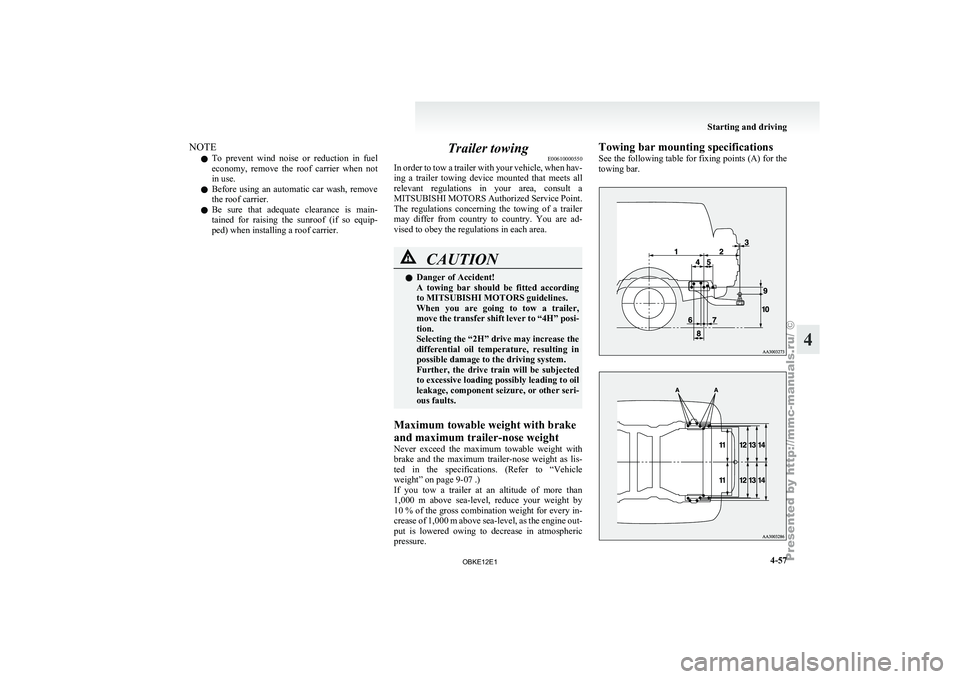
pressure. Towing bar mounting specifications
See
the following
table for fixing points (A) for the
towing bar. Starting and driving
4-57 4
OBKE12E1
Page 259 of 377

MUTE function
E00760300041
At any time
during a call, you can mute the vehicle
microphone.
Pressing the SPEECH button and then saying
“Mute” during a call will turn ON the MUTE func-
tion and mute the microphone.
Saying “Mute off” in the same way will turn off
the MUTE function and cancel the mute on the mi-
crophone.
Switching between hands-free mode and private
mode E00761400036
The Bluetooth ®
2.0 interface
can switch between
Hands-free mode (Hands-free calls) and private
mode (calls using cellular phone).
If you press the SPEECH button and say “Transfer
call” during a Hands-free call, you can stop the
Hands-free mode and talk in private mode.
To return to Hands-free mode, press the SPEECH
button again and say “Transfer call”.
Phone book function E00763700017
The Bluetooth ®
2.0 interface
has 2 types of unique
phone books that are different from the phone book
stored in the cellular phone. They are the vehicle
phone book and the mobile phone book.
These phone books are used to register telephone
numbers and to make calls to desired numbers via
the voice recognition function.
NOTE
l Disconnecting the battery cable will not de-
lete information registered in the phone book. Vehicle phone book
E00763800135
This phone book
is used when making calls with
the voice recognition function.
Up to 32 names can be registered in the vehicle
phone book per language.
Also, each entry has 4 locations associated with:
home, work, mobile and other. You can register
one telephone number for each location.
You can register a desired name as a name for any
phone book entry registered in the vehicle phone
book.
Names and telephone numbers can be changed lat-
er on.
The vehicle phone book can be used with all paired
cellular phones.
To register a telephone number in the vehicle
phone book
You can register a telephone number in the vehicle
phone book in the following 2 ways: Reading out a
telephone number, and selecting and transferring 1
phone book entry from the phone book of the cellu-
lar phone.
To register by reading out a telephone number
1. Press the SPEECH button.
2. Say “Phone book.”
3. The voice guide will say “Select one of thefollowing: new entry, edit number, edit
name, list names, delete, erase all, or import
contact.” Say “New entry.”
4. The voice guide will say “Name please.” Say your preferred name to register it. NOTE
l If
the maximum
number of entries are al-
ready registered, the voice guide will say
“The phone book is full. Would you like to
delete a name?” Say “Yes” if you want to de-
lete a registered name.
Say “No,” to return to the main menu.
5. When the name has been registered, the voice guide will say “home, work, mobile, or
other?” Say the location for which you want
to register a telephone number.
NOTE l When the confirmation function is on, the
voice guide will say “
rect?” Answer “Yes.”
Answer “No” to return to location selection
in Step 5.
If a telephone number has been registered for
the selected location, the voice guide will say
“The current number is
number please.”
If you do not want to change the telephone
number, say “cancel” or the original number
to keep it registered.
6. The voice guide will say “Number please.” Say the telephone number to register it.
NOTE l In the case of English, the system will recog-
nise both “zero” and “oh” (Letter “o”) for the
number “0.”
7. The voice guide will repeat the telephone number you have just read, and then register
the number. For pleasant driving
5-76
5
OBKE12E1
Page 260 of 377
When the telephone number has been regis-
tered, the voice
guide will say “Number
saved. Would you like to add another num-
ber for this entry?”
To add another telephone number for a new
location for the current entry, answer “Yes.”
The system will return to location selection
in Step 5.
Answer “No” to end the registration process
and return to the main menu.
NOTE l When the confirmation function is on, after
repeating the telephone number you have
read, the voice guide will ask “Is this cor-
rect?” Answer “Yes.”
Answer “No” to return to telephone number
registration in step 6.
To select and transfer one phone book entry
from the phone book of the cellular phone
You can select 1 phone book entry from the phone
book of the cellular phone and register it in the ve-
hicle phone book.
NOTE l Transfer is not permitted unless the vehicle
is parked.
Before transferring, make sure that the vehi-
cle is parked in a safe location.
l All or part of data may not be transferred,
even when the cellular phone supports Blue-
tooth ®
, depending on the compatibility of the
device. l
The
maximum supported telephone number
length is 19 digits. Any telephone number of
20 digits or more will be truncated to the
first 19 digits.
l If telephone numbers contain characters oth-
er than 0 to 9, *, # or +, these characters are
deleted before the transfer.
l For the connection settings on the cellular
phone side, refer to the instructions for the
cellular phone.
1. Press the SPEECH button.
2. Say “Phone book.”
3. The voice guide will say “Select one of the following: new entry, edit number, edit
name, list names, delete, erase all, or import
contact.” Say “Import contact.”
4. The voice guide will say “Would you like to import a single entry or all contacts?” Say
“Single entry.”
The Bluetooth ®
2.0 interface will become
ready to receive transferred phone book data.
NOTE l If the maximum number of entries are al-
ready registered, the voice guide will say
“The phone book is full. Would you like to
delete a name?” Say “Yes” if you want to de-
lete a registered name.
Say “No,” to return to the main menu.
5. After the voice guide says “Ready to receive a contact from the phone. Only a home, a
work, and a mobile number can be impor-
ted,” the Bluetooth ®
2.0 interface will re-
ceive the phone book data from the Blue-
tooth ®
compatible cellular phone. 6.
Operate the
Bluetooth ®
compatible cellular
phone to set it up so that the phone book en-
try you want to register in the vehicle phone
book can be transferred to the Bluetooth ®
2.0
interface.
NOTE l If the Bluetooth ®
2.0 interface cannot recog-
nise the Bluetooth ®
compatible cellular
phone or the connection takes too much
time, the voice guide will say “Import con-
tact has timed out” and then the system will
cancel the registration. In such case, start
over again from Step 1.
l Pressing the HANG-UP button or pressing
and holding the SPEECH button will cancel
the registration.
7. When the reception is complete, the voice guide will say “
source> numbers have been imported. What
name would you like to use for these num-
bers?”
Say the name you want to register for this
phone book entry.
NOTE l If the entered name is already used for other
phone book entry or similar to a name used
for other phone book entry, that name cannot
be registered. For pleasant driving
5-77 5
OBKE12E1
Page 263 of 377

6. The voice guide will say “Please wait, eras-
ing the handsfree system phone book” and
then the system will delete all data in the
phone book.
When the deletion is complete, the voice
guide will say “Hands-free system phone
book erased” and then the system will return
to the main menu.
Mobile phone book E00763900048
All entries in the phone book stored in the cellular
phone can be
transferred in a batch and registered
in the mobile phone book.
Up to 7 mobile phone books, each containing up to
1,000 names, can be registered.
The Bluetooth ®
2.0 interface automatically con-
verts from text to voice the names registered in the
transferred phone book entries, and creates names.
NOTE
l Only the mobile phone book transferred
from the connected cellular phone can be
used with that cellular phone.
l You cannot change the names and telephone
numbers in the phone book entries registered
in the mobile phone book. You cannot select
and delete specific phone book entries, either.
To change or delete any of the above, change
the applicable information in the source
phone book of the cellular phone and then
transfer the phone book again.
To import a devices phone book
Follow the steps below to transfer to the mobile
phone book the phone book stored in the cellular
phone. NOTE
l Transfer should be completed while the vehi-
cle is parked.
Before
transferring, make
sure that the vehi-
cle is parked in a safe location.
l The already stored phone book in the mobile
phone book is overwritten by the stored
phone book in the cellular phone.
l All or part of data may not be transferred,
even when the cellular phone supports Blue-
tooth ®
, depending on the compatibility of the
device.
l Only a home, a work, and a mobile number
can be imported.
l The maximum supported telephone number
length is 19 digits. Any telephone number of
20 digits or more will be truncated to the
first 19 digits.
l If telephone numbers contain characters oth-
er than 0 to 9, *, # or +, these characters are
deleted before the transfer.
l For the connection settings on the cellular
phone side, refer to the instructions for the
cellular phone.
1. Press the SPEECH button.
2. Say “Phone book.”
3. The voice guide will say “Select one of the following: new entry, edit number, edit
name, list names, delete, erase all, or import
contact.” Say “Import contact.”
4. The voice guide will say “Would you like to import a single entry or all contacts?” Say
“All contacts.”
5. The voice guide will say “Importing the con- tact list from the mobile phone book. This
may take several minutes to complete.
Would you like to continue?” Answer “Yes,”
transferring to the mobile phone book the phone book stored in the cellular phone will
start.
Answer “No,” to return to the main menu.
NOTE l The transfer
may
take some time to complete
depending on the number of contacts.
l If the Bluetooth ®
2.0 interface could not be
connected to the Bluetooth ®
compatible cel-
lular phone, the voice guide will say “Unable
to transfer contact list from phone” and then
the system will return to the main menu.
l If you press the HANG-UP button or press
and hold the SPEECH button during the data
transfer, the transfer will be cancelled and
the system will return to the main menu.
l If an error occurs during the data transfer, all
transfer will be cancelled and the voice guide
will say “Unable to complete the phone book
import” and then the system will return to
the main menu.
l If there are no contacts in the phone book,
the voice guide will say “There are no con-
tacts on the connected phone.”
6. When the transfer is complete, the voice guide will say “Import complete” and then
the system will return to the main menu. For pleasant driving
5-80
5
OBKE12E1
Page 297 of 377
The regulations concerning towing may differ from
country to country.
It is recommended that you
obey the regulations of the area where you are driv-
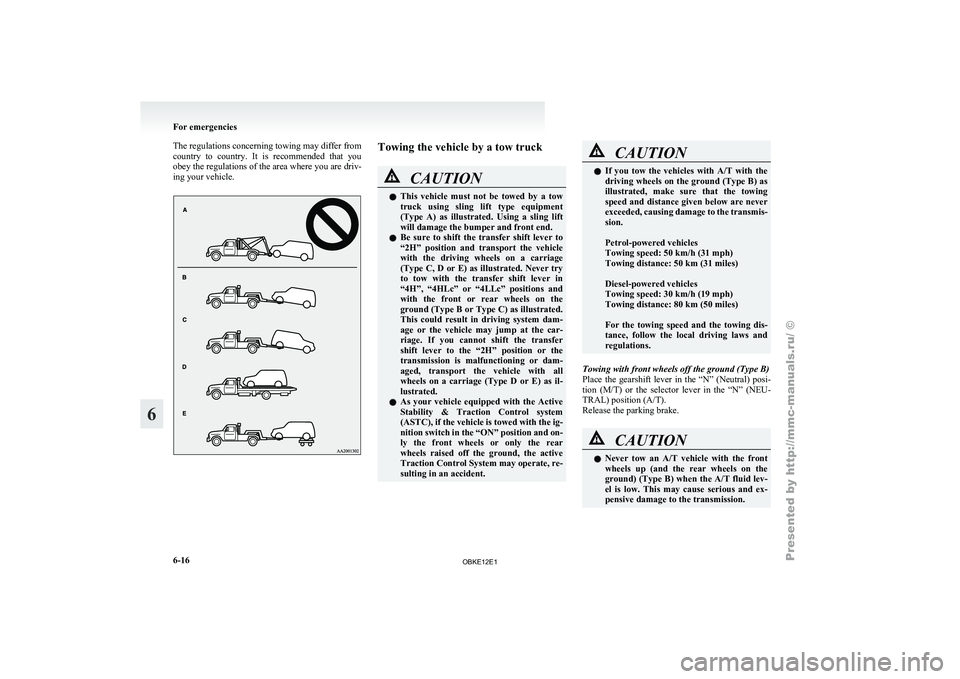
ing your vehicle. Towing the vehicle by a tow truck
CAUTION
l
This vehicle
must
not be towed by a tow
truck using sling lift type equipment
(Type A) as illustrated. Using a sling lift
will damage the bumper and front end.
l Be sure to shift the transfer shift lever to
“2H” position and transport the vehicle
with the driving wheels on a carriage
(Type C, D or E) as illustrated. Never try
to tow with the transfer shift lever in
“4H”, “4HLc” or “4LLc” positions and
with the front or rear wheels on the
ground (Type B or Type C) as illustrated.
This could result in driving system dam-
age or the vehicle may jump at the car-
riage. If you cannot shift the transfer
shift lever to the “2H” position or the
transmission is malfunctioning or dam-
aged, transport the vehicle with all
wheels on a carriage (Type D or E) as il-
lustrated.
l As your vehicle equipped with the Active
Stability & Traction Control system
(ASTC), if the vehicle is towed with the ig-
nition switch in the “ON” position and on-
ly the front wheels or only the rear
wheels raised off the ground, the active
Traction Control System may operate, re-
sulting in an accident. CAUTION
l
If you tow
the vehicles with A/T with the
driving wheels on the ground (Type B) as
illustrated, make sure that the towing
speed and distance given below are never
exceeded, causing damage to the transmis-
sion.
Petrol-powered vehicles
Towing speed: 50 km/h (31 mph)
Towing distance: 50 km (31 miles)
Diesel-powered vehicles
Towing speed: 30 km/h (19 mph)
Towing distance: 80 km (50 miles)
For the towing speed and the towing dis-
tance, follow the local driving laws and
regulations.
Towing with front wheels off the ground (Type B)
Place the gearshift
lever in the “N” (Neutral) posi-
tion (M/T) or the selector lever in the “N” (NEU-
TRAL) position (A/T).
Release the parking brake. CAUTION
l
Never tow
an
A/T vehicle with the front
wheels up (and the rear wheels on the
ground) (Type B) when the A/T fluid lev-
el is low. This may cause serious and ex-
pensive damage to the transmission. For emergencies
6-16
6
OBKE12E1