service MITSUBISHI PAJERO IV 2011 Owner's Manual
[x] Cancel search | Manufacturer: MITSUBISHI, Model Year: 2011, Model line: PAJERO IV, Model: MITSUBISHI PAJERO IV 2011Pages: 377, PDF Size: 29.43 MB
Page 84 of 377
Tripmeter
The tripmeter indicates
the distance travelled dur-
ing a particular trip or period.
There are two tripmeter displays: TRIP and
.
TRIP can be used to measure the distance trav-
elled since the
current trip began. At the same time,
TRIP can be used to measure the distance from
an intermediate location.
To switch the
display between TRIP and TRIP
, press the reset button (B) less than 1 second.
NOTE l If
you do
not push the button for about
10 seconds while the service reminder is
showing, the display will return to the odom-
eter indication.
l The odometer, tripmeter, and service remind-
er indications are given for 30 seconds after
the ignition switch has been turned to the
“ACC” or “LOCK” position.
l After the odometer, tripmeter, and service re-
minder indications have gone off, they come
back on for about 30 seconds if either of the
following actions takes place.
• The driver’s door is opened.
• The reset button is pressed.
To reset the tripmeter
To return the display to “0”, press the reset button
(B) for more than 2 seconds. Only the currently dis-
played value will be reset. NOTE
l When disconnecting
the
battery terminal for
a long time, the memory of tripmeter display
TRIP and are cleared, and the dis-
play returns to “0”. Service reminder
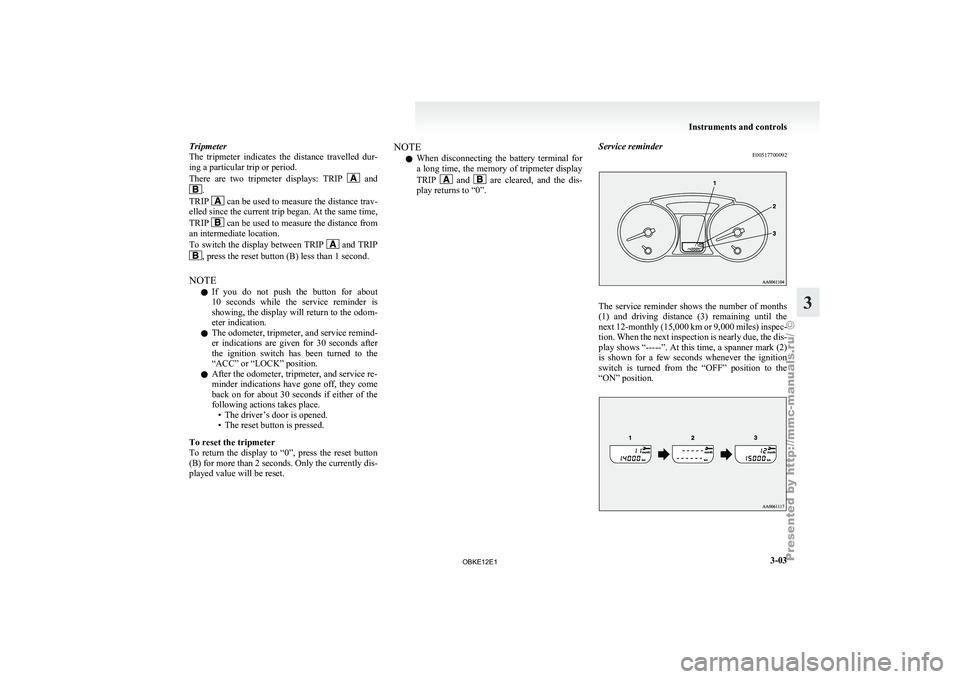
E00517700092 The service reminder shows the number of months
(1) and
driving
distance (3) remaining until the
next 12-monthly (15,000 km or 9,000 miles) inspec-
tion. When the next inspection is nearly due, the dis-
play shows “-----”. At this time, a spanner mark (2)
is shown for a few seconds whenever the ignition
switch is turned from the “OFF” position to the
“ON” position. Instruments and controls
3-03 3
OBKE12E1
Page 85 of 377
1. The display shows the number of months
and driving distance remaining until the next
inspection.
2. When the next inspection is nearly due, the display shows “-----”.
For further information, we recommend you
to consult a MITSUBISHI MOTORS Author-
ized Service Point. At this time, a spanner
mark is shown for a few seconds whenever
the ignition switch is turned from the “OFF”
position to the “ON” position. 3. When the vehicle is inspected at a
MITSUBISHI MOTORS
Authorized Service
Point, the number of months and driving dis-
tance remaining until the next inspection will
be shown.
NOTE l The indicated distance decreases in steps of
100 km or (100 miles). The indicated num-
ber of months decreases in steps of one month.
l It is possible to change the settings for the
service reminder. For further information, we recommend you to con-
sult a
MITSUBISHI
MOTORS Authorized Service
Point.
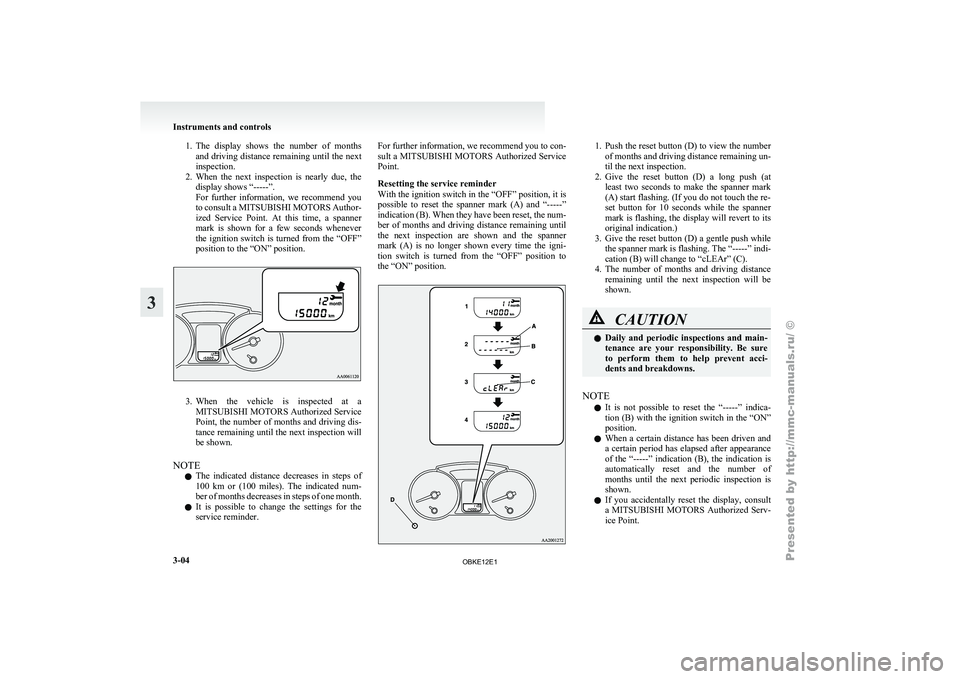
Resetting the service reminder
With the ignition switch in the “OFF” position, it is
possible to reset the spanner mark (A) and “-----”
indication (B). When they have been reset, the num-
ber of months and driving distance remaining until
the next inspection are shown and the spanner
mark (A) is no longer shown every time the igni-
tion switch is turned from the “OFF” position to
the “ON” position. 1. Push the reset button (D) to view the number
of months and driving distance remaining un-
til the next inspection.
2. Give the reset button (D) a long push (at least two seconds to make the spanner mark
(A) start flashing. (If you do not touch the re-
set button for 10 seconds while the spanner
mark is flashing, the display will revert to its
original indication.)
3. Give the reset button (D) a gentle push while the spanner mark is flashing. The “-----” indi-
cation (B) will change to “cLEAr” (C).
4. The number of months and driving distance remaining until the next inspection will be
shown. CAUTION
l
Daily and
periodic
inspections and main-
tenance are your responsibility. Be sure
to perform them to help prevent acci-
dents and breakdowns.
NOTE l It
is not
possible to reset the “-----” indica-
tion (B) with the ignition switch in the “ON”
position.
l When a certain distance has been driven and
a certain period has elapsed after appearance
of the “-----” indication (B), the indication is
automatically reset and the number of
months until the next periodic inspection is
shown.
l If you accidentally reset the display, consult
a MITSUBISHI MOTORS Authorized Serv-
ice Point. Instruments and controls
3-04
3
OBKE12E1
Page 88 of 377
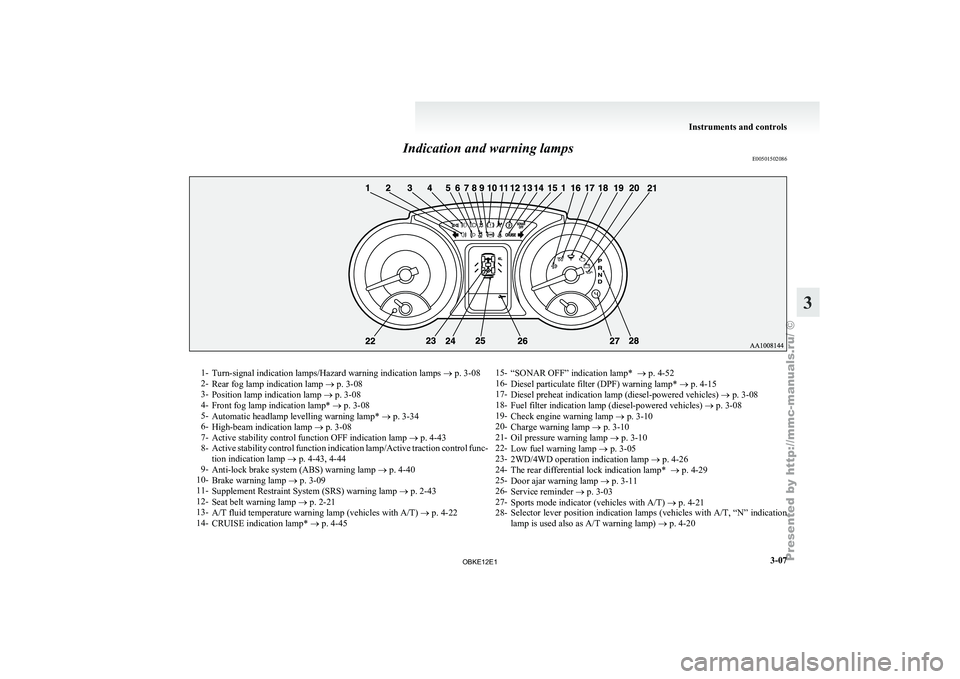
Indication and warning lamps
E005015020861-
Turn-signal indication lamps/Hazard warning indication lamps ® p. 3-08
2- Rear fog lamp indication lamp
® p. 3-08
3- Position lamp indication lamp ® p. 3-08
4- Front fog lamp indication lamp* ® p. 3-08
5- Automatic headlamp levelling warning lamp* ® p. 3-34
6- High-beam indication lamp ® p. 3-08
7- Active stability control function OFF indication lamp ® p. 4-43
8- Active stability control function indication lamp/Active traction control func-
tion indication lamp ® p. 4-43, 4-44
9- Anti-lock brake system (ABS) warning lamp ® p. 4-40
10- Brake warning lamp ® p. 3-09
11- Supplement Restraint System (SRS) warning lamp ® p. 2-43
12- Seat belt warning lamp ® p. 2-21
13- A/T fluid temperature warning lamp (vehicles with A/T) ® p. 4-22
14- CRUISE indication lamp* ® p. 4-45 15-
“SONAR OFF” indication lamp* ® p. 4-52
16- Diesel particulate filter (DPF) warning lamp* ®
p. 4-15
17- Diesel preheat indication lamp (diesel-powered vehicles) ® p. 3-08
18- Fuel filter indication lamp (diesel-powered vehicles) ® p. 3-08
19- Check engine warning lamp ® p. 3-10
20- Charge warning lamp ® p. 3-10
21- Oil pressure warning lamp ® p. 3-10
22- Low fuel warning lamp ® p. 3-05
23- 2WD/4WD operation indication lamp ® p. 4-26
24- The rear differential lock indication lamp* ® p. 4-29
25- Door ajar warning lamp ® p. 3-11
26- Service reminder ® p. 3-03
27- Sports mode indicator (vehicles with A/T) ® p. 4-21
28- Selector lever position indication lamps (vehicles with A/T, “N” indication
lamp is used also as A/T warning lamp) ® p. 4-20 Instruments and controls
3-07 3
OBKE12E1
Page 92 of 377
Door ajar warning lamp
E00503300635
This lamp illuminates
when a door or
the backdoor is either open or incomplete-
ly closed.
If the vehicle speed reaches approximate-
ly 8 km/h (5 mph) with a door or the back-
door open or incompletely closed, the
warning lamp flashes 8 times and a buz-
zer simultaneously sounds 8 times as a
warning. CAUTION
l
Before moving
your
vehicle,
check that the warning lamp is
OFF.
NOTE l On
vehicles with
keyless entry sys-
tem, the lamp remains illuminated
for a certain period and then goes
out automatically.
l Buzzer settings can be changed at
a your MITSUBISHI MOTORS
Authorized Service Point to:
• No buzzer operation (buzzerdisabled)
• Continuous buzzer operation Centre information display*
E00517800295 CAUTION
l
The driver
should
not operate the display
while the vehicle is in motion.
When the ignition switch is turned to the “ACC” po-
sition, the screen switches on automatically.
NOTE l Placing
a cellular
phone in the monitor’s
small storage compartment may weaken the
phone’s reception. This does not indicate a
fault with the system.
l Use of wireless devices such as transceivers
or a cellular phone near the monitor may
make the following condition on the display.
This does not indicate a fault with the system.
• The screen goes dark temporarily.
• The compass may not show the correct di-rection.
l Depending on the angle of view, you may
see reddish horizontal lines on the monitor.
The lines are a characteristic of the vacuum
fluorescent display (VFD) used in the moni-
tor. They do not indicate a fault. Instruments and controls
3-11 3
OBKE12E1
Page 112 of 377
Combination headlamps and
dipper switch E00506001513
Headlamps
NOTE l Do
not leave
the lamps on for a long time
while the engine is stationary (not running).
A rundown battery could result.
l When it rains, or when the vehicle has been
washed, the inside of the lens sometimes be-
comes foggy, but this does not indicate a func-
tional problem.
When the lamp is switched on, the heat will
remove the fog. However, if water gathers in-
side the lamp, we recommend you to have it
checked.
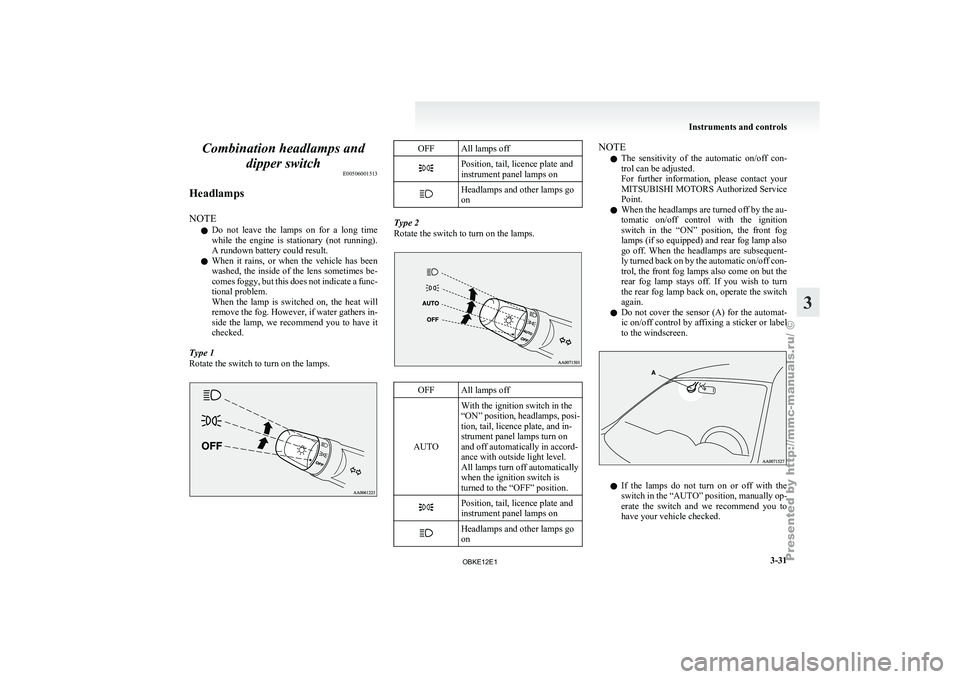
Type 1
Rotate the switch to turn on the lamps. OFF All lamps off
Position, tail, licence plate and
instrument panel lamps on
Headlamps and other lamps go
on
Type 2
Rotate the switch to turn on the lamps.
OFF All lamps off
AUTO With the ignition switch in the
“ON” position, headlamps,
posi-
tion, tail, licence plate, and in-
strument panel lamps turn on
and off automatically in accord-
ance with outside light level.
All lamps turn off automatically
when the ignition switch is
turned to the “OFF” position. Position, tail, licence plate and
instrument panel lamps on
Headlamps and other lamps go
on NOTE
l The
sensitivity of
the automatic on/off con-
trol can be adjusted.
For further information, please contact your
MITSUBISHI MOTORS Authorized Service
Point.
l When the headlamps are turned off by the au-
tomatic on/off control with the ignition
switch in the “ON” position, the front fog
lamps (if so equipped) and rear fog lamp also
go off. When the headlamps are subsequent-
ly turned back on by the automatic on/off con-
trol, the front fog lamps also come on but the
rear fog lamp stays off. If you wish to turn
the rear fog lamp back on, operate the switch
again.
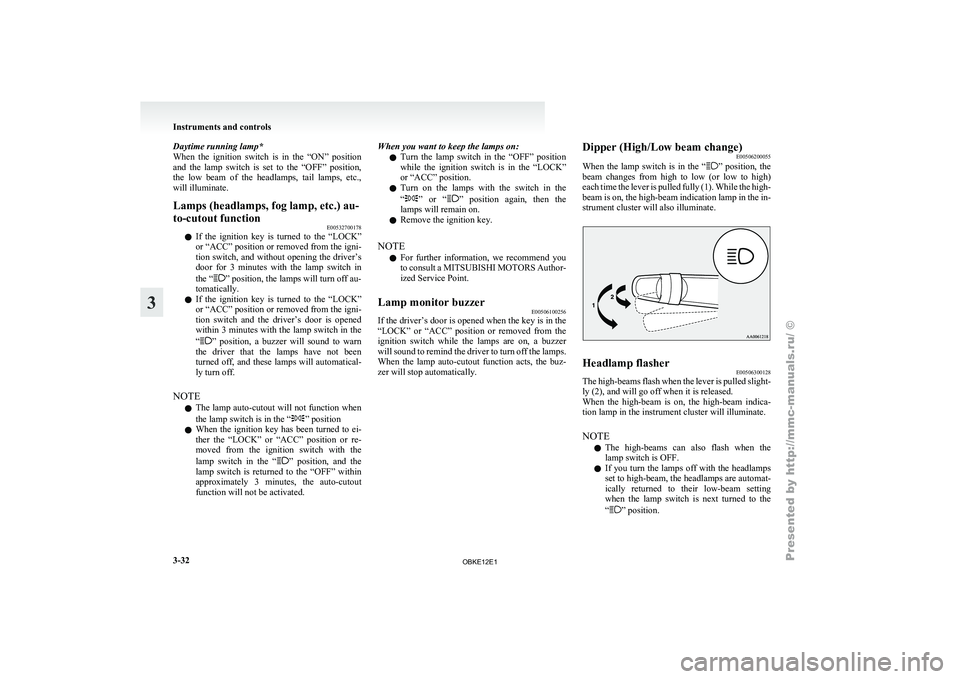
l Do not cover the sensor (A) for the automat-
ic on/off control by affixing a sticker or label
to the windscreen. l
If
the
lamps
do not turn on or off with the
switch in the “AUTO” position, manually op-
erate the switch and we recommend you to
have your vehicle checked. Instruments and controls
3-31 3
OBKE12E1
Page 113 of 377
Daytime running lamp*
When the ignition
switch is in the “ON” position
and the lamp switch is set to the “OFF” position,
the low beam of the headlamps, tail lamps, etc.,
will illuminate.
Lamps (headlamps, fog lamp, etc.) au-
to-cutout function E00532700178
l If the ignition
key is turned to the “LOCK”
or “ACC” position or removed from the igni-
tion switch, and without opening the driver’s
door for 3 minutes with the lamp switch in
the “ ” position, the lamps will turn off au-
tomatically.
l If the
ignition
key is turned to the “LOCK”
or “ACC” position or removed from the igni-
tion switch and the driver’s door is opened
within 3 minutes with the lamp switch in the
“ ” position, a buzzer will sound to warn
the driver
that the lamps have not been
turned off, and these lamps will automatical-
ly turn off.
NOTE l The lamp auto-cutout will not function when
the lamp switch is in the “ ” position
l When the
ignition
key has been turned to ei-
ther the “LOCK” or “ACC” position or re-
moved from the ignition switch with the
lamp switch in the “ ” position, and the
lamp switch
is returned to the “OFF” within
approximately 3 minutes, the auto-cutout
function will not be activated. When you want to keep the lamps on:
l Turn the
lamp
switch in the “OFF” position
while the ignition switch is in the “LOCK”
or “ACC” position.
l Turn on the lamps with the switch in the
“ ” or “ ” position again, then the
lamps will remain on.
l Remove the ignition key.
NOTE l For further
information, we recommend you
to consult a MITSUBISHI MOTORS Author-
ized Service Point.
Lamp monitor buzzer E00506100256
If the driver’s door is opened when the key is in the
“LOCK” or “ACC”
position or removed from the
ignition switch while the lamps are on, a buzzer
will sound to remind the driver to turn off the lamps.
When the lamp auto-cutout function acts, the buz-
zer will stop automatically. Dipper (High/Low beam change)
E00506200055
When the lamp
switch is in the “ ” position, the
beam changes
from high to low (or low to high)
each time the lever is pulled fully (1). While the high-
beam is on, the high-beam indication lamp in the in-
strument cluster will also illuminate. Headlamp flasher
E00506300128
The high-beams flash when the lever is pulled slight-
ly (2), and will go off when it is released.
When the high-beam
is on, the high-beam indica-
tion lamp in the instrument cluster will illuminate.
NOTE
l The high-beams can also flash when the
lamp switch is OFF.
l If you turn the lamps off with the headlamps
set to high-beam, the headlamps are automat-
ically returned to their low-beam setting
when the lamp switch is next turned to the
“ ” position.Instruments and controls
3-32
3
OBKE12E1
Page 116 of 377
Turn-signal lever
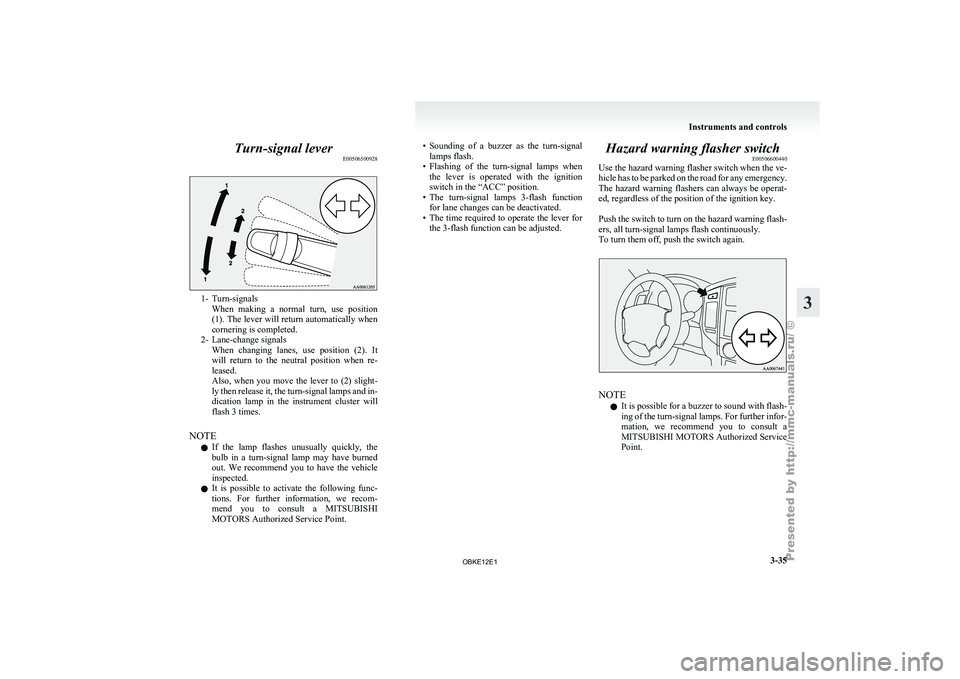
E005065009281- Turn-signals
When making a
normal turn, use position
(1). The lever will return automatically when
cornering is completed.
2- Lane-change signals When changing lanes, use position (2). It
will return to the neutral position when re-
leased.
Also, when you move the lever to (2) slight-
ly then release it, the turn-signal lamps and in-
dication lamp in the instrument cluster will
flash 3 times.
NOTE l If the lamp flashes unusually quickly, the
bulb in a turn-signal lamp may have burned
out. We recommend you to have the vehicle
inspected.
l It is possible to activate the following func-
tions. For further information, we recom-
mend you to consult a MITSUBISHI
MOTORS Authorized Service Point. • Sounding
of a buzzer as the turn-signal
lamps flash.
• Flashing
of the turn-signal lamps when
the lever is operated with the ignition
switch in the “ACC” position.
• The turn-signal lamps 3-flash function for lane changes can be deactivated.
• The time required to operate the lever for the 3-flash function can be adjusted. Hazard warning flasher switch
E00506600440
Use the hazard
warning flasher switch when the ve-
hicle has to be parked on the road for any emergency.
The hazard warning flashers can always be operat-
ed, regardless of the position of the ignition key.
Push the switch to turn on the hazard warning flash-
ers, all turn-signal lamps flash continuously.
To turn them off, push the switch again. NOTE
l It
is possible
for a buzzer to sound with flash-
ing of the turn-signal lamps. For further infor-
mation, we recommend you to consult a
MITSUBISHI MOTORS Authorized Service
Point. Instruments and controls
3-35 3
OBKE12E1
Page 118 of 377
Wiper and washer switch
E00507101191CAUTION
l
If the
washer is used in cold weather, the
washer fluid sprayed against the glass
may freeze, which may hinder visibility.
Warm the glass with the defroster or rear
window demister before using the washer.
Windscreen wipers E00516900273
Except for vehicles with rain sensor
The windscreen wipers can be operated with the ig-
nition switch in the “ON” or “ACC” position. If the blades are frozen to the windscreen or rear
window, do
not
operate the wipers until the ice has
melted and the blades are freed, otherwise the wip-
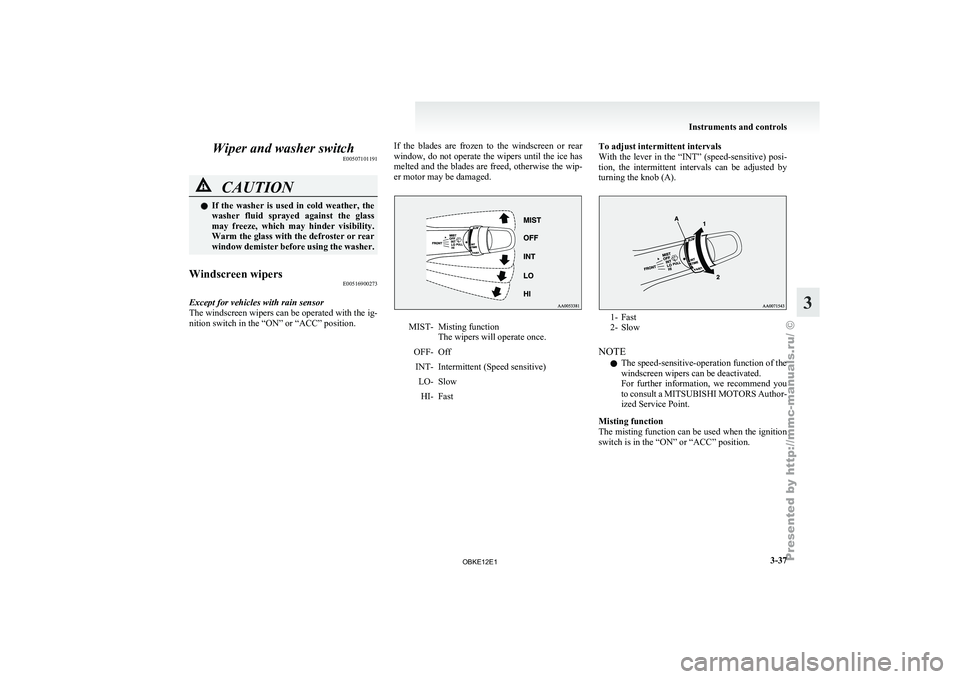
er motor may be damaged. MIST- Misting function
The wipers will operate once.
OFF- Off INT- Intermittent (Speed sensitive) LO- SlowHI- Fast To adjust intermittent intervals
With the lever
in the “INT” (speed-sensitive) posi-
tion, the intermittent intervals can be adjusted by
turning the knob (A). 1- Fast
2- Slow
NOTE l The speed-sensitive-operation function of the
windscreen wipers can be deactivated.
For
further
information, we recommend you
to consult a MITSUBISHI MOTORS Author-
ized Service Point.
Misting function
The misting function can be used when the ignition
switch is in the “ON” or “ACC” position. Instruments and controls
3-37 3
OBKE12E1
Page 120 of 377
CAUTION
l
With the ignition switch in the “ON” posi-
tion and the lever in the “AUTO” posi-
tion, the wipers may automatically oper-
ate in the situations described below.
If your hands get trapped, you could suf-
fer injuries or the wipers could malfunc-
tion. Be sure to turn the ignition switch to
the “OFF” position or move the lever to
the “OFF” position to deactivate the rain
sensor. • When cleaning the outside surface ofthe windscreen, if you touch the rain
sensor.
• When cleaning the outside surface of the windscreen, if you wipe with a
cloth the rain sensor.
• When using an automatic car wash.
• A physical shock is applied to the wind- screen.
• A physical shock is applied to the rain sensor.
NOTE l To
protect the
rubber parts of the wipers, this
operation of the wipers does not take place
when the vehicle is stationary and the ambi-
ent temperature is about 0 °C or lower.
l Do not cover the sensor by affixing a sticker
or label to the windscreen. Also, do not put
any water-repellent coating on the wind-
screen. The rain sensor would not be able to
detect the extent of rain, and the wipers
might stop working normally. l
In the
following
cases, the rain sensor may
be malfunctioning.
Have the vehicle inspected at a
MITSUBISHI MOTORS Authorized Service
Point. • When the wipers operate at a constant in-terval despite changes in the extent of rain.
• When the wipers do not operate even though it is raining.
l The wipers may automatically operate when
things such as insects or foreign objects are
affixed to the windscreen on top of the rain
sensor or when the windscreen is frozen. Ob-
jects affixed to the windscreen will stop the
wipers when the wipers cannot remove them.
To make the wipers operate again, place the
lever in the “LO” or “HI” position.
Also, the wipers may operate automatically
due to strong direct sunlight or electromag-
netic wave. To stop the wipers, place the lev-
er in the “OFF” position.
l Contact a MITSUBISHI MOTORS Author-
ized Service Point when replacing the wind-
screen or reinforcing the glass around the sen-
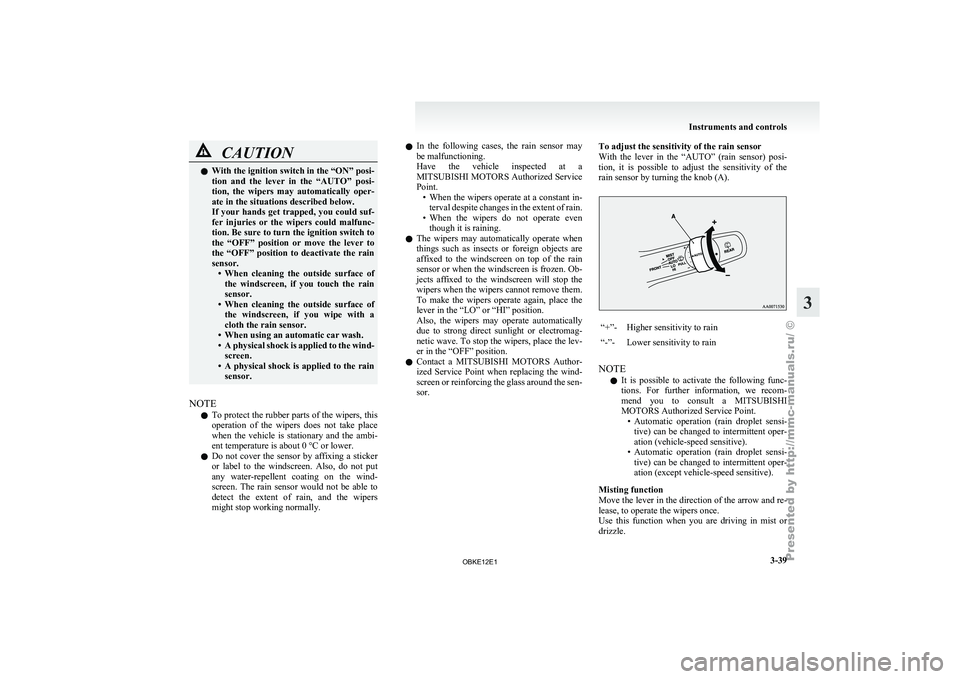
sor. To adjust the sensitivity of the rain sensor
With the
lever
in the “AUTO” (rain sensor) posi-
tion, it is possible to adjust the sensitivity of the
rain sensor by turning the knob (A). “+”- Higher sensitivity to rain
“-”- Lower sensitivity to rain
NOTE l It
is possible
to activate the following func-
tions. For further information, we recom-
mend you to consult a MITSUBISHI
MOTORS Authorized Service Point. • Automatic operation (rain droplet sensi-tive) can be changed to intermittent oper-
ation (vehicle-speed sensitive).
• Automatic operation (rain droplet sensi- tive) can be changed to intermittent oper-
ation (except vehicle-speed sensitive).
Misting function
Move the lever in the direction of the arrow and re-
lease, to operate the wipers once.
Use this function when you are driving in mist or
drizzle. Instruments and controls
3-39 3
OBKE12E1
Page 122 of 377
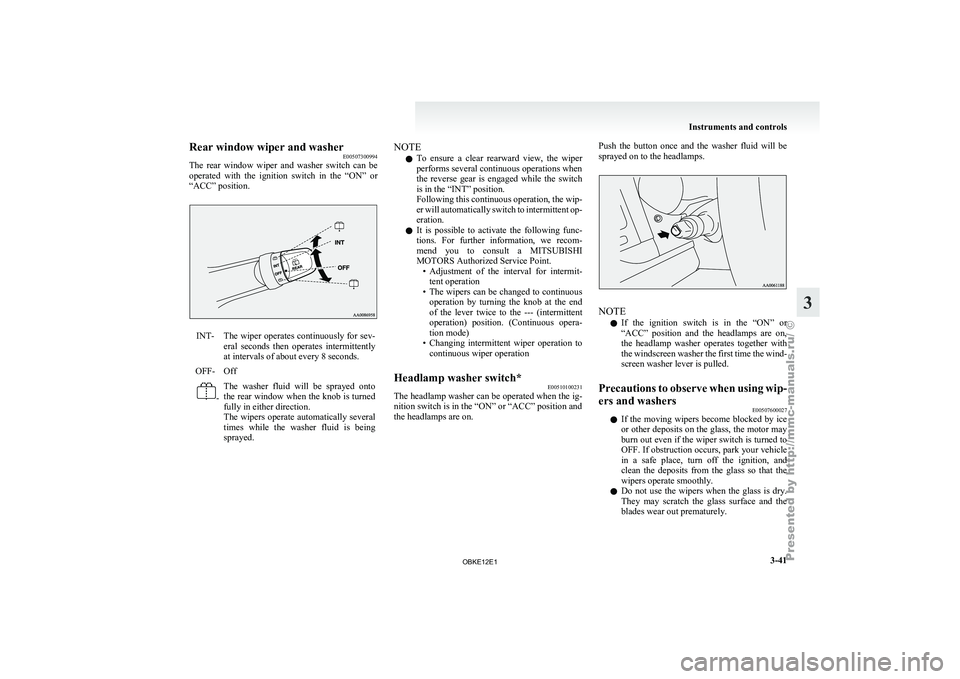
Rear window wiper and washer
E00507300994
The rear window
wiper and washer switch can be
operated with the ignition switch in the “ON” or
“ACC” position. INT- The wiper operates continuously for sev-
eral seconds then
operates intermittently
at intervals of about every 8 seconds.
OFF- Off -
The washer fluid will be sprayed onto
the
rear window
when the knob is turned
fully in either direction.
The wipers operate automatically several
times while the washer fluid is being
sprayed. NOTE
l To
ensure a
clear rearward view, the wiper
performs several continuous operations when
the reverse gear is engaged while the switch
is in the “INT” position.
Following this continuous operation, the wip-
er will automatically switch to intermittent op-
eration.
l It is possible to activate the following func-
tions. For further information, we recom-
mend you to consult a MITSUBISHI
MOTORS Authorized Service Point.
• Adjustment of the interval for intermit-tent operation
• The wipers can be changed to continuous operation by turning the knob at the end
of the lever twice to the --- (intermittent
operation) position. (Continuous opera-
tion mode)
• Changing intermittent wiper operation to continuous wiper operation
Headlamp washer switch* E00510100231
The headlamp washer can be operated when the ig-
nition switch is in the “ON” or “ACC” position and
the headlamps are on. Push the button once and the washer fluid will be
sprayed on to the headlamps.
NOTE
l If
the ignition
switch is in the “ON” or
“ACC” position and the headlamps are on,
the headlamp washer operates together with
the windscreen washer the first time the wind-
screen washer lever is pulled.
Precautions to observe when using wip-
ers and washers E00507600027
l If the
moving
wipers become blocked by ice
or other deposits on the glass, the motor may
burn out even if the wiper switch is turned to
OFF. If obstruction occurs, park your vehicle
in a safe place, turn off the ignition, and
clean the deposits from the glass so that the
wipers operate smoothly.
l Do not use the wipers when the glass is dry.
They may scratch the glass surface and the
blades wear out prematurely. Instruments and controls
3-41 3
OBKE12E1