service MITSUBISHI PAJERO IV 2011 Owner's Guide
[x] Cancel search | Manufacturer: MITSUBISHI, Model Year: 2011, Model line: PAJERO IV, Model: MITSUBISHI PAJERO IV 2011Pages: 377, PDF Size: 29.43 MB
Page 127 of 377
Economical driving
E00600100561
For economical driving,
there are some technical re-
quirements that have to be met. The prerequisite
for low fuel consumption is a properly adjusted en-
gine. In order to achieve longer life of the vehicle
and the most economical operation, we recommend
you to have the vehicle checked at regular intervals
in accordance with the service standards.
Fuel economy and generation of exhaust gas and
noise are highly influenced by personal driving hab-
its as well as the particular operating conditions.
The following points should be observed in order
to minimize wear of brakes, tyres and engine as
well as to reduce environmental pollution.
Starting
Avoid rapid acceleration and sudden starts; such op-
eration will result in higher fuel consumption.
Shifting
Shift only at an appropriate speed and engine
speed. Always use the highest gear possible.
The transfer shift lever should be set to “2H” when
driving on normal roads and express ways to obtain
best possible fuel economy.
City traffic
Frequent starting and stopping increases the aver-
age fuel consumption. Use roads with smooth traf-
fic flow whenever possible. When driving on con-
gested roads, avoid use of a low gear at high en-
gine speeds.
Idling
The vehicle consumes fuel even during idling.
Avoid extended idling whenever possible. Speed
At higher
vehicle
speed, more fuel is consumed.
Avoid driving at full speed. Even a slight release of
the accelerator pedal will save a significant amount
of fuel.
Tyre inflation pressure
Check the tyre inflation pressures at regular inter-
vals. Low tyre inflation pressure increases road re-
sistance and fuel consumption. In addition, low
tyre pressures adversely affect tyre wear and driv-
ing stability.
Load
Do not drive with unnecessary articles in the lug-
gage compartment. Especially during city driving
where frequent starting and stopping is necessary,
the increased weight of the vehicle will greatly af-
fect fuel consumption. Also avoid driving with un-
necessary luggage or carriers, etc., on the roof; the
increased air resistance will increase fuel consump-
tion.
Cold engine starting
Starting of a cold engine consumes more fuel.
Unnecessary fuel consumption is also caused by
keeping a hot engine running. After the engine is
started, commence driving as soon as possible.
Air conditioning
The use of the air conditioning will increase the
fuel consumption. Driving, alcohol and drugs
E00600200067
Driving after drinking
alcohol is one of the most fre-
quent causes of accidents.
Your driving ability can be seriously impaired even
with blood alcohol levels far below the legal mini-
mum. If you have been drinking, don’t drive. Ride
with a designated non-drinking driver, call a cab or
a friend, or use public transportation. Drinking cof-
fee or taking a cold shower will not make you sober.
Similarly, prescription and nonprescription drugs af-
fect your alertness, perception and reaction time.
Consult with your doctor or pharmacist before driv-
ing while under the influence of any of these medi-
cations. WARNING
l NEVER DRINK AND DRIVE.
Your perceptions
are
less accurate, your
reflexes are slower and your judgment is
impaired. Starting and driving
4-02
4
OBKE12E1
Page 137 of 377
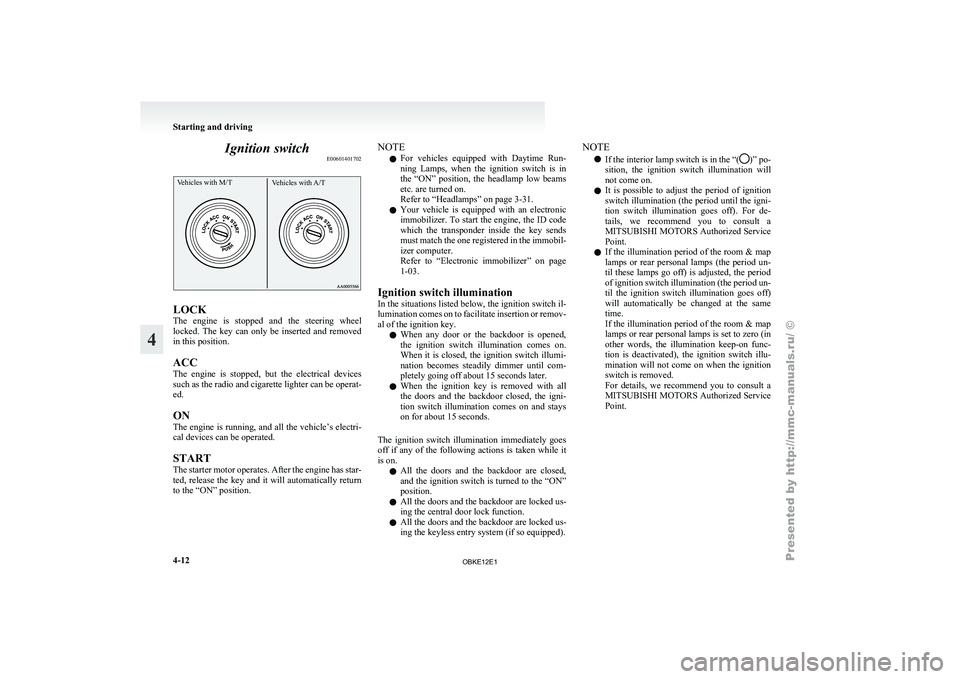
Ignition switch
E00601401702Vehicles with M/T Vehicles with A/TLOCK
The
engine is
stopped and the steering wheel
locked. The key can only be inserted and removed
in this position.
ACC
The engine is stopped, but the electrical devices
such as the radio and cigarette lighter can be operat-
ed.
ON
The engine is running, and all the vehicle’s electri-
cal devices can be operated.
START
The starter motor operates. After the engine has star-
ted, release the key and it will automatically return
to the “ON” position. NOTE
l For
vehicles equipped
with Daytime Run-
ning Lamps, when the ignition switch is in
the “ON” position, the headlamp low beams
etc. are turned on.
Refer to “Headlamps” on page 3-31.
l Your vehicle is equipped with an electronic
immobilizer. To start the engine, the ID code
which the transponder inside the key sends
must match the one registered in the immobil-
izer computer.
Refer to “Electronic immobilizer” on page
1-03.
Ignition switch illumination
In the situations listed below, the ignition switch il-
lumination comes on to facilitate insertion or remov-
al of the ignition key. l When any door or the backdoor is opened,
the ignition switch illumination comes on.
When it is closed, the ignition switch illumi-
nation becomes steadily dimmer until com-
pletely going off about 15 seconds later.
l When the ignition key is removed with all
the doors and the backdoor closed, the igni-
tion switch illumination comes on and stays
on for about 15 seconds.
The ignition switch illumination immediately goes
off if any of the following actions is taken while it
is on. l All the doors and the backdoor are closed,
and the ignition switch is turned to the “ON”
position.
l All the doors and the backdoor are locked us-
ing the central door lock function.
l All the doors and the backdoor are locked us-
ing the keyless entry system (if so equipped). NOTE
l If the interior
lamp switch is in the “( )” po-
sition, the ignition
switch illumination will
not come on.
l It is possible to adjust the period of ignition
switch illumination (the period until the igni-
tion switch illumination goes off). For de-
tails, we recommend you to consult a
MITSUBISHI MOTORS Authorized Service
Point.
l If the illumination period of the room & map
lamps or rear personal lamps (the period un-
til these lamps go off) is adjusted, the period
of ignition switch illumination (the period un-
til the ignition switch illumination goes off)
will automatically be changed at the same
time.
If the illumination period of the room & map
lamps or rear personal lamps is set to zero (in
other words, the illumination keep-on func-
tion is deactivated), the ignition switch illu-
mination will not come on when the ignition
switch is removed.
For details, we recommend you to consult a
MITSUBISHI MOTORS Authorized Service
Point. Starting and driving
4-12
4
OBKE12E1
Page 141 of 377
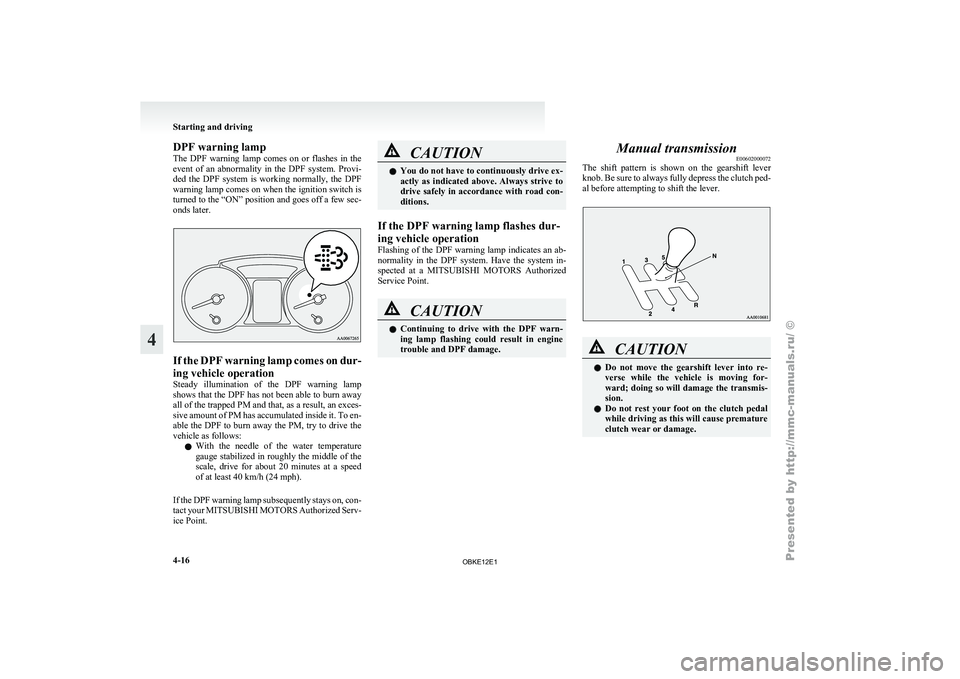
DPF warning lamp
The DPF
warning
lamp comes on or flashes in the
event of an abnormality in the DPF system. Provi-
ded the DPF system is working normally, the DPF
warning lamp comes on when the ignition switch is
turned to the “ON” position and goes off a few sec-
onds later. If the DPF warning lamp comes on dur-
ing vehicle operation
Steady illumination
of
the DPF warning lamp
shows that the DPF has not been able to burn away
all of the trapped PM and that, as a result, an exces-
sive amount of PM has accumulated inside it. To en-
able the DPF to burn away the PM, try to drive the
vehicle as follows:
l With the needle of the water temperature
gauge stabilized in roughly the middle of the
scale, drive for about 20 minutes at a speed
of at least 40 km/h (24 mph).
If the DPF warning lamp subsequently stays on, con-
tact your MITSUBISHI MOTORS Authorized Serv-
ice Point. CAUTION
l
You do not
have to continuously drive ex-
actly as indicated above. Always strive to
drive safely in accordance with road con-
ditions.
If the DPF warning lamp flashes dur-
ing vehicle operation
Flashing of the
DPF warning lamp indicates an ab-
normality in the DPF system. Have the system in-
spected at a MITSUBISHI MOTORS Authorized
Service Point. CAUTION
l
Continuing to
drive
with the DPF warn-
ing lamp flashing could result in engine
trouble and DPF damage. Manual transmission
E00602000072
The shift pattern
is shown on the gearshift lever
knob. Be sure to always fully depress the clutch ped-
al before attempting to shift the lever. CAUTION
l
Do not move
the gearshift lever into re-
verse while the vehicle is moving for-
ward; doing so will damage the transmis-
sion.
l Do not rest your foot on the clutch pedal
while driving as this will cause premature
clutch wear or damage. Starting and driving
4-16
4
OBKE12E1
Page 148 of 377
CAUTION
l
Do not race the engine with brake pedal
pressed when the vehicle is stationary.
This can damage the A/T.
Also, when you depress the accelerator
pedal while holding down the brake ped-
al with the selector lever in the “P”
(PARK), “N” (NEUTRAL) or “D”
(DRIVE) position, the increase in engine
revolutions may be limited.
Passing acceleration E00604500156
To gain extra acceleration in “D” (DRIVE) posi-
tion, push the
accelerator to the floor. The automat-
ic transmission will automatically downshift.
NOTE
l In “Sports mode”, downshifts do not take
place when the accelerator is depressed all
the way to the floor.
Uphill/downhill driving E00610500089
DRIVING UPHILL
The transmission
may
not upshift to a higher gear
if the computer determines the current speed can-
not be maintained once a higher gear is engaged.
For smoother vehicle performance, if you release
the throttle while climbing a steep grade, the trans-
mission may not upshift. This is normal, as the com-
puter is temporarily preventing shifting. After reach-
ing the top of the hill, normal gear shift function
will resume. DRIVING DOWNHILL
When travelling down
steep grades, the computer
may automatically select a lower gear. This func-
tion assists engine braking efforts, reducing the
need for using the service brakes.
Waiting E00604600245
For short waiting periods, such as at traffic signals,
the vehicle can
be left in gear and held stationary
with the service brake.
For longer waiting periods with the engine running,
place the selector lever in the “N” (NEUTRAL) po-
sition and apply the parking brake, while holding
the vehicle stationary with the service brake. CAUTION
l
Never hold
the
vehicle stationary on a hill
using the accelerator pedal (without us-
ing the brake pedal). Always apply the
parking brake and/or service brakes.
Parking E00604700161
To park the vehicle, first bring it to a complete
stop, fully engage
the parking brake, and then
move the selector lever to the “P” (PARK) position.
If you are going to leave the vehicle unattended, al-
ways switch off the engine and remove the ignition
key. NOTE
l On
a slope,
be sure to apply the parking
brake before moving the selector lever to the
“P” (PARK) position. If you move the selec-
tor lever to the “P” (PARK) position before
applying the parking brake, it may be diffi-
cult to disengage the selector lever from the
“P” (PARK) position when next you drive
the vehicle, requiring application of a strong
force to the selector lever to move from the
“P” (PARK) position.
When the A/T makes no speed change E00604800348
If the transmission does not change speeds while
driving, or
your
vehicle does not pick up enough
speed when starting on an uphill slope, it may be
that there is something unusual happening in the
transmission, causing a safety device to activate.
We recommend you to have your vehicle checked
as soon as possible. 1. If your vehicle has difficulty moving uphill,
shift the selector lever into 2 nd
gear of the
“Sports mode”.
This method might not work depending on
the transmission malfunction.
2. Once the vehicle is moving on a level road, move the selector lever back to “D” (DRIVE). Starting and driving
4-23 4
OBKE12E1
Page 160 of 377
Inspection and maintenance
following rough road operation E00606700048
After operating the
vehicle in rough road condi-
tions, be sure to perform the following inspection
and maintenance procedures:
l Check that the vehicle has not been damaged
by rocks, gravel, etc.
l Carefully wash the vehicle with water.
After washing, drive the vehicle slowly
while lightly depressing the brake pedal in or-
der to dry out the brakes. If the brakes still
do not function properly, we recommend you
to have the brakes checked as soon as possible
l Remove the insects, dried grass, etc. clog-
ging the radiator core.
l After crossing a stream, be sure to have the
following items inspected at a MITSUBISHI
MOTORS Authorized Service Point and take
the necessary measures.
• Check the brake system and, if necessary,have it serviced.
• Check the engine, transmission, transfer, and differential oil or grease level and tur-
bidity. If the oil or grease is milky, it indi-
cates water contamination. Replace it
with new oil or grease.
• Grease the propeller shaft.
• Check the inside of the vehicle. If ingress of water is found, dry the carpet etc.
• Inspect the headlamps. If the headlamp bulb is flooded with water, we recom-
mend you to have it drained. Cautions on handling of 4-wheel
drive vehicles E00606800401
Tyres and wheels
Since the driving
torque can be applied to the 4
wheels, the performance of the vehicle when oper-
ating in 4-wheel drive is greatly affected by the con-
dition of the tyres.
Pay close attention to the tyres.
l Install specified tyres on all wheels. Refer to
“Tyres and wheels” on page 9-12.
l Be sure to fit all 4 tyres and wheels of the
same size and type.
When replacement of any of the tyres or
wheels is necessary, replace all of them.
l All tyres should be rotated whenever the
wear difference between the front and rear
tyres is recognizable.
Good vehicle performance cannot be expected if
there is a difference in wear between tyres. Refer to
“Tyre rotation” on page 8-14. l Check the tyre inflation pressure regularly.
l If the tyre inflation pressure is inappropriate,
the transfer gear may make some noise and
shock while changing the drive mode. CAUTION
l
Always use tyres
of the same size, same
type, and same brand, and which have no
wear differences. Using tyres which differ
in size, type, brand or the degree of wear
will cause excessive loading, resulting in
possible damage to the drive system.
Towing
If towing is
necessary, we recommend you to have
it done by your MITSUBISHI MOTORS Author-
ized Service Point or a commercial tow truck service.
In the following cases, transport the vehicle using a
tow truck.
l The engine runs but the vehicle does not
move or abnormal noise is produced.
l Inspection of the vehicle’s underside reveals
that oil or some other fluid is leaking.
Only when you cannot receive a towing service
from a MITSUBISHI MOTORS Authorized Serv-
ice Point or commercial tow truck service, tow
your vehicle carefully in accordance with the in-
structions given in “Towing” on page 6-15. Starting and driving
4-35 4
OBKE12E1
Page 162 of 377
Braking
E00607001524
All the parts
of the brake system are critical to safe-
ty. We recommend you to have the vehicle
checked at regular intervals according to the serv-
ice booklet. CAUTION
l
Avoid driving
habits
that cause heavy
braking and never “ride” the brakes by
resting your foot on the brake pedal
while driving.
It causes brake overheating and fade.
Brake system
The service brake
is divided into two brake circuits
so that when one brake circuit fails, the other is
available to stop the vehicle. In this situation, even
if the brake pedal moves down to the very end of
its possible stroke, keep depressing the brake pedal
down harder than usual; stop driving as soon as pos-
sible and have the brake system repaired.
For details, refer to “Brake warning lamp” on page
3-09.
Power brakes
The power brakes use brake fluid pressurized by
the pump to power-assist the brake. If the brake sys-
tem fails during driving, the brake warning lamp
comes on and a buzzer sounds continuously. In this
case, the brake may not work properly.
If this buzzer should continue to sound, park your
vehicle in a safe place and have the system checked.
Refer to “Brake warning lamp” on page 3-09. CAUTION
l
Bring the vehicle
to halt in a safe location
by applying the brakes gently. Applying
the brakes rapidly or driving at high
speed may make the vehicle unstable.
NOTE l Depressing
the brake
pedal repeatedly may
turn on the brake warning lamp, ABS warn-
ing lamp and brake warning buzzer. (The
ASTC indication lamp and Active Stability
Control function OFF indication lamp also
turn on.) It is normal if the lamp goes out
and the buzzer stops sounding after a few sec-
onds.
l In certain cases immediately after the engine
has been started or when the brake pedal is
depressed repeatedly, a noise generated by op-
eration of brake devices may be heard com-
ing from the engine compartment, or the
brake pedal vibration may be felt. This type
of noise or vibration is normal and there is
no need for concern. In fact, it indicates that
the corresponding devices are operating nor-
mal. WARNING
l Do not
turn
off the engine while your ve-
hicle is in motion. If you turn off the en-
gine while driving, the power assistance
for the braking system will stop working
and your brakes will not work effectively. WARNING
l If the power
assist is lost or if either
brake hydraulic system stops working
properly, have your vehicle checked im-
mediately.
Warning lamp l The
brake warning
lamp illuminates to indi-
cate a fault in the braking system. Read
“Brake warning lamp” on page 3-09.
l On vehicles with the rear differential lock,
the active stability & traction control
(ASTC) and anti-lock brake system (ABS)
functions are suspended while the rear differ-
ential lock is activated. ASTC indication
lamp, Active Stability Control function OFF
indication lamp, ABS warning lamp and
brake warning lamp are illuminated while
these functions are suspended. It does not in-
dicate a problem. When the rear differential
lock is disengaged, these lamps go out and
function again.
Refer to “Brake warning lamp” on page 3-09,
“ABS warning lamp” on page 4-40, “ASTC
indication lamp” on page 4-42, “Active sta-
bility control function OFF indication lamp”
on page 4-43.
When brakes are wet
Check the brake system while driving at a low
speed immediately after starting, especially when
the brakes are wet, to confirm they work normally.
A film of water can be formed on the brake discs
and prevent normal braking after driving in heavy
rain or through large puddles, or after the vehicle is
washed. If this occurs, dry the brakes out by driv-
ing slowly while lightly depressing the brake pedal. Starting and driving
4-37 4
OBKE12E1
Page 164 of 377
Anti-lock brake system (ABS)
E00607101248
Environmental conditions can
have an effect on
braking. During sudden braking when there is
snow, ice, oil, water etc. on the road surface, a skid
may occur. In this situation, steering control and
braking effectiveness is reduced and the stopping
distance is increased. The vehicle may also go into
an uncontrolled spin.
The ABS helps prevent the wheels from locking dur-
ing braking, thus maintaining directional stability,
ensuring controllability and providing optimum
braking force.
Driving hints
l Always maintain the same distance from the
vehicle in front of you as you would for a ve-
hicle not equipped with ABS.
Compared with vehicles not fitted with ABS,
your vehicle may require a longer stopping
distance in the following cases:
• Driving on gravel or snow-covered roads.
• Driving with tyre chains installed.
• Driving on roads where the road surfaceis pitted or has other differences in sur-
face height.
• Driving on bumpy roads or other poor driv- ing surfaces.
l In order to ensure that the ABS will operate
correctly in situations where tyre chains have
been fitted, drive in the “4H”, “4HLc”, or
“4LLc” position. l
Operation of
ABS is not restricted to situa-
tions where brakes are applied suddenly.
This system may also operate to prevent
wheel lock when you are driving over man-
holes, steel road-work plates, or the vehicle
is driven over steps or level differences in
the road, road markings, or other surfaces
which are difficult for the wheels to grip.
l When the ABS is activated, you may feel the
brake pedal pulsation and the vibrations of
the vehicle body and steering wheel. You
may also hear a characteristic noise. At this
time, you may feel as if the pedal attempts to
resist being depressed.
This is a normal result of the ABS operation,
and does not indicate a problem.
In this situation, to let the ABS work for
you, just hold the brake pedal down more
firmly. Do not pump the brake. This will
result in reduced braking performance.
l When the engine starts and after starting to
drive, you might hear operation noise from
the engine compartment or feel a shock from
the brake pedal. This is normal. The ABS is
performing self-check.
l The ABS will operate after the vehicle has ac-
celerated to a speed in excess of approximate-
ly 10 km/h (6 mph). It stops operating when
the vehicle decelerates to a speed below
about 5 km/h (3 mph). CAUTION
l
Even the ABS
cannot prevent the natural
laws of physics from acting on the vehi-
cle. It cannot for instance avoid accidents
that may result from excessive speed on
bends or following another vehicle too
closely or aquaplaning. It should remain
the driver’s task to observe safety precau-
tions to judge speeds and brake applica-
tions correctly in such conditions.
l Be sure to use tyres of the same type and
size on 4 wheels.
If tyre types or sizes are mixed, ABS may
not function normally.
l Never install a limited-slip differential,
which is not a MITSUBISHI MOTORS
genuine part, as the ABS may not func-
tion normally.
We recommend you to consult a
MITSUBISHI MOTORS Authorized
Service Point. Starting and driving
4-39 4
OBKE12E1
Page 173 of 377
To temporarily increase or decrease
the speed
E00619500037
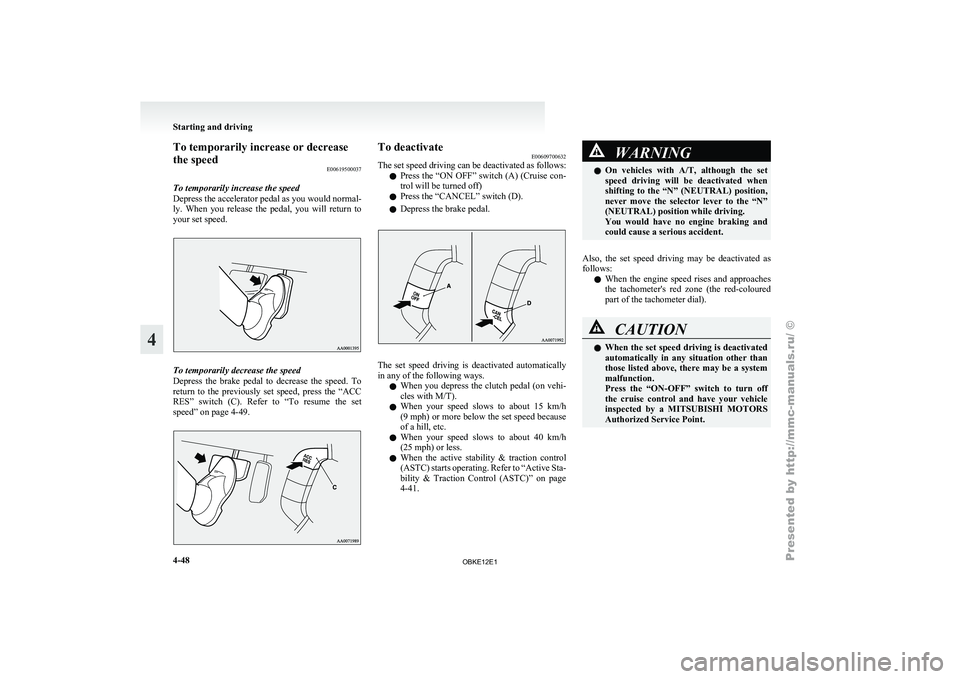
To temporarily increase the speed
Depress the accelerator
pedal as you would normal-
ly. When you release the pedal, you will return to
your set speed. To temporarily decrease the speed
Depress the
brake
pedal to decrease the speed. To
return to the previously set speed, press the “ACC
RES” switch (C). Refer to “To resume the set
speed” on page 4-49. To deactivate
E00609700632
The set speed
driving can be deactivated as follows:
l Press the “ON OFF” switch (A) (Cruise con-
trol will be turned off)
l Press the “CANCEL” switch (D).
l Depress the brake pedal. The set speed driving is deactivated automatically
in any of the following ways.
l When you
depress
the clutch pedal (on vehi-
cles with M/T).
l When your speed slows to about 15 km/h
(9 mph) or more below the set speed because
of a hill, etc.
l When your speed slows to about 40 km/h
(25 mph) or less.
l When the active stability & traction control
(ASTC) starts operating. Refer to “Active Sta-
bility & Traction Control (ASTC)” on page
4-41. WARNING
l On vehicles with
A/T, although the set
speed driving will be deactivated when
shifting to the “N” (NEUTRAL) position,
never move the selector lever to the “N”
(NEUTRAL) position while driving.
You would have no engine braking and
could cause a serious accident.
Also, the set speed driving may be deactivated as
follows: l When
the engine
speed rises and approaches
the tachometer's red zone (the red-coloured
part of the tachometer dial). CAUTION
l
When the set
speed driving is deactivated
automatically in any situation other than
those listed above, there may be a system
malfunction.
Press the “ON-OFF” switch to turn off
the cruise control and have your vehicle
inspected by a MITSUBISHI MOTORS
Authorized Service Point. Starting and driving
4-48
4
OBKE12E1
Page 181 of 377
Cargo loads
E00609901224
Cargo loads precautions CAUTION
l
When
loading
luggage, be careful to the
following. • Stow cargo and luggage in the luggagecompartment whenever possible.
• Distribute cargo or luggage evenly not to be unbalanced in weight.
• Do not place cargo or luggage on the instrument panel.
Also, do not stack up cargo or luggage
on the front passenger’s seat or the
rear seats.
Having the driver’s vision blocked,
and your cargo being thrown inside
the cabin if you suddenly have to
brake can cause a serious accident or
injury.
Loading a roof carrier CAUTION
l
Use a
roof
carrier that properly fits your
vehicle.
Do not load luggage directly onto the roof.
For installation, refer to the instruction
manual accompanying the roof carrier. Roof carrier mounting brackets*
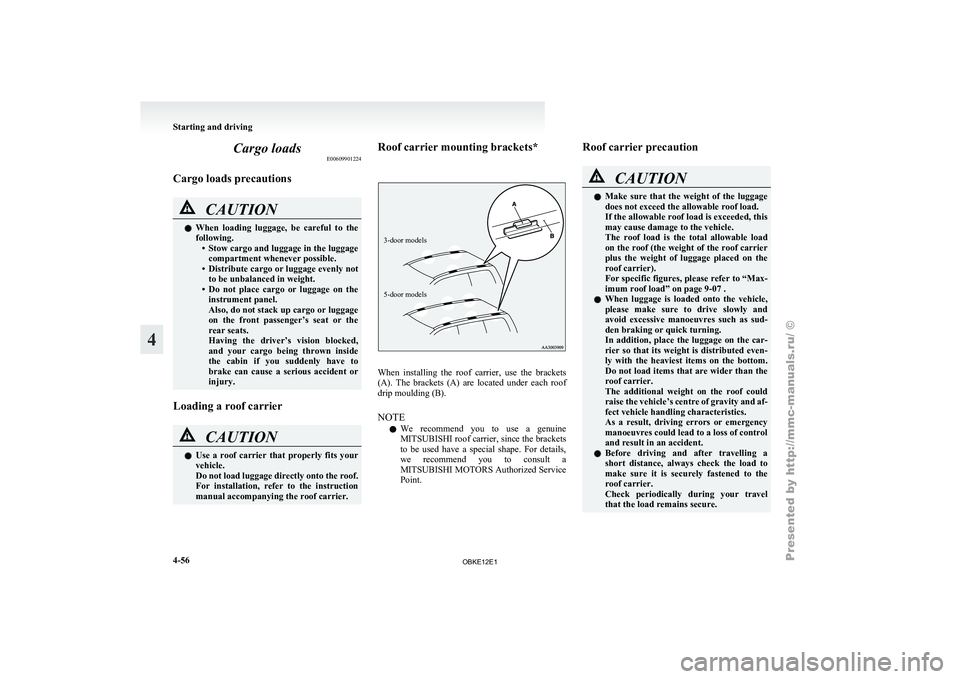
3-door models
5-door models
When installing the roof carrier, use the brackets
(A). The
brackets
(A) are located under each roof
drip moulding (B).
NOTE
l We recommend you to use a genuine
MITSUBISHI roof carrier, since the brackets
to be used have a special shape. For details,
we recommend you to consult a
MITSUBISHI MOTORS Authorized Service
Point. Roof carrier precaution CAUTION
l
Make sure
that
the weight of the luggage
does not exceed the allowable roof load.
If the allowable roof load is exceeded, this
may cause damage to the vehicle.
The roof load is the total allowable load
on the roof (the weight of the roof carrier
plus the weight of luggage placed on the
roof carrier).
For specific figures, please refer to “Max-
imum roof load” on page 9-07 .
l When luggage is loaded onto the vehicle,
please make sure to drive slowly and
avoid excessive manoeuvres such as sud-
den braking or quick turning.
In addition, place the luggage on the car-
rier so that its weight is distributed even-
ly with the heaviest items on the bottom.
Do not load items that are wider than the
roof carrier.
The additional weight on the roof could
raise the vehicle’s centre of gravity and af-
fect vehicle handling characteristics.
As a result, driving errors or emergency
manoeuvres could lead to a loss of control
and result in an accident.
l Before driving and after travelling a
short distance, always check the load to
make sure it is securely fastened to the
roof carrier.
Check periodically during your travel
that the load remains secure. Starting and driving
4-56
4
OBKE12E1
Page 182 of 377
NOTE
l To
prevent wind
noise or reduction in fuel
economy, remove the roof carrier when not
in use.
l Before using an automatic car wash, remove
the roof carrier.
l Be sure that adequate clearance is main-
tained for raising the sunroof (if so equip-
ped) when installing a roof carrier. Trailer towing
E00610000550
In order
to
tow a trailer with your vehicle, when hav-
ing a trailer towing device mounted that meets all
relevant regulations in your area, consult a
MITSUBISHI MOTORS Authorized Service Point.
The regulations concerning the towing of a trailer
may differ from country to country. You are ad-
vised to obey the regulations in each area. CAUTION
l
Danger of Accident!
A towing
bar
should be fitted according
to MITSUBISHI MOTORS guidelines.
When you are going to tow a trailer,
move the transfer shift lever to “4H” posi-
tion.
Selecting the “2H” drive may increase the
differential oil temperature, resulting in
possible damage to the driving system.
Further, the drive train will be subjected
to excessive loading possibly leading to oil
leakage, component seizure, or other seri-
ous faults.
Maximum towable weight with brake
and maximum trailer-nose weight
Never exceed the
maximum towable weight with
brake and the maximum trailer-nose weight as lis-
ted in the specifications. (Refer to “Vehicle
weight” on page 9-07 .)
If you tow a trailer at an altitude of more than
1,000 m above sea-level, reduce your weight by
10 % of the gross combination weight for every in-
crease of 1,000 m above sea-level, as the engine out-
put is lowered owing to decrease in atmospheric
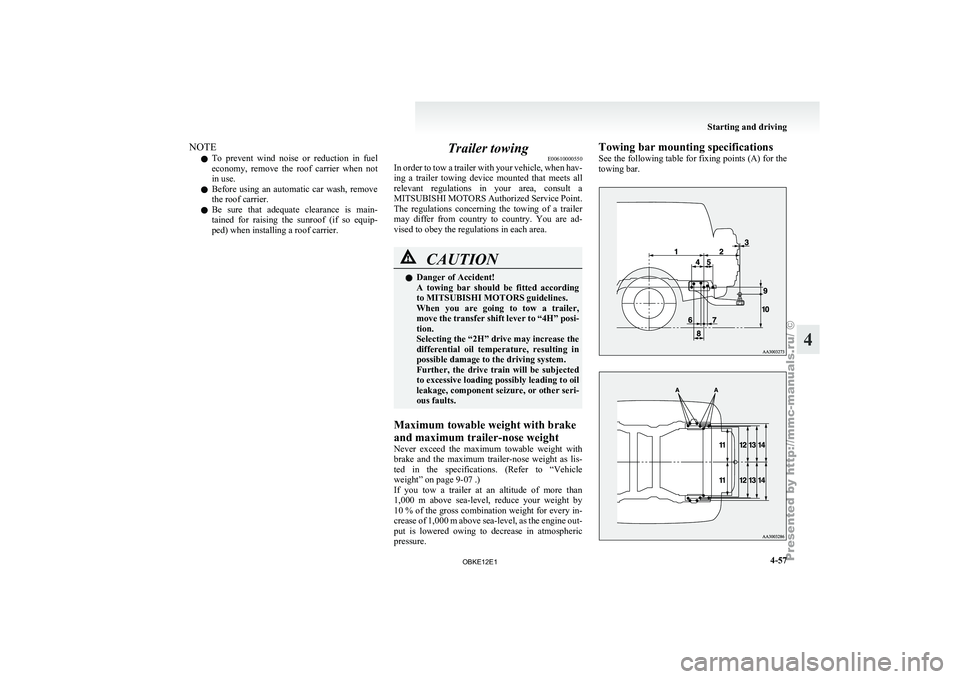
pressure. Towing bar mounting specifications
See
the following
table for fixing points (A) for the
towing bar. Starting and driving
4-57 4
OBKE12E1