service MITSUBISHI PAJERO IV 2011 Service Manual
[x] Cancel search | Manufacturer: MITSUBISHI, Model Year: 2011, Model line: PAJERO IV, Model: MITSUBISHI PAJERO IV 2011Pages: 377, PDF Size: 29.43 MB
Page 200 of 377
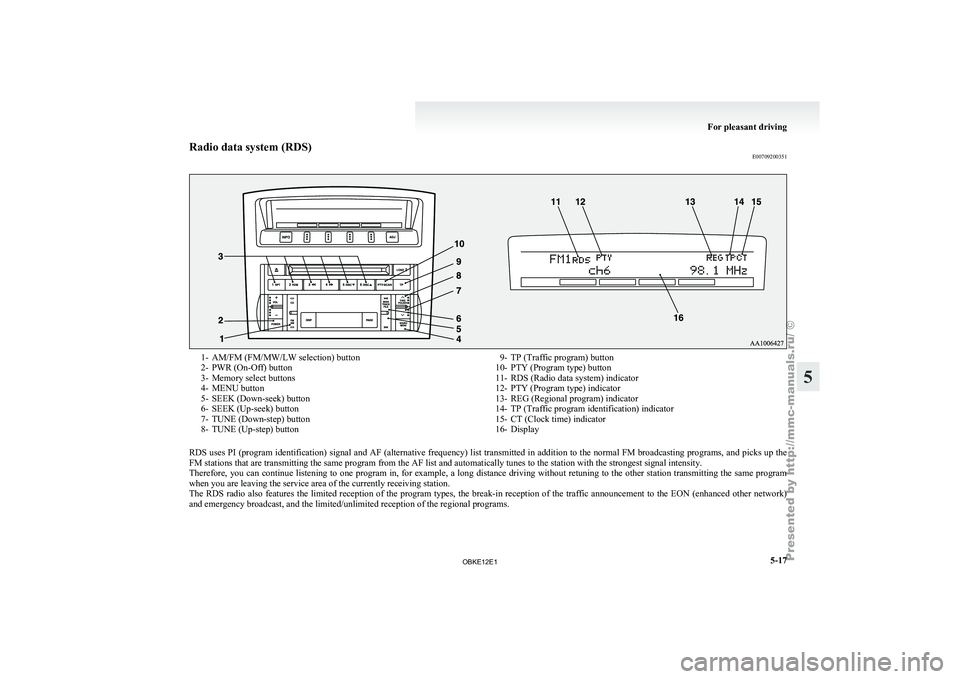
Radio data system (RDS)
E007092003511- AM/FM (FM/MW/LW selection) button
2- PWR (On-Off) button
3-
Memory select buttons
4-
MENU button
5- SEEK (Down-seek) button
6- SEEK (Up-seek) button
7- TUNE (Down-step) button
8- TUNE (Up-step) button 9- TP (Traffic program) button
10- PTY (Program type) button
11- RDS (Radio data system) indicator
12-
PTY (Program type) indicator
13- REG (Regional program) indicator
14- TP (Traffic program identification) indicator
15- CT (Clock time) indicator
16- Display
RDS uses PI (program identification) signal and AF (alternative frequency) list transmitted in addition to the normal FM broadcasting programs, and picks up the
FM stations that are transmitting the same program from the AF list and automatically tunes to the station with the strongest signal intensity.
Therefore, you can
continue listening to one program in, for example, a long distance driving without retuning to the other station transmitting the same program
when you are leaving the service area of the currently receiving station.
The RDS radio also features the limited reception of the program types, the break-in reception of the traffic announcement to the EON (enhanced other network)
and emergency broadcast, and the limited/unlimited reception of the regional programs. For pleasant driving
5-17 5
OBKE12E1
Page 215 of 377

Radio data system (RDS)
E007092003641- AM/FM (FM/MW/LW selection) button
2- PWR (On-Off) button
3-
Memory select buttons
4-
MENU button
5- SEEK (Down-seek) button
6- SEEK (Up-seek) button
7- TUNE (Down-step) button
8- TUNE (Up-step) button 9- TP (Traffic program) button
10- PTY (Program type) button
11- RDS (Radio data system) indicator
12-
PTY (Program type) indicator
13- REG (Regional program) indicator
14- TP (Traffic program identification) indicator
15- CT (Clock time) indicator
16- Display
RDS uses PI (program identification) signal and AF (alternative frequency) list transmitted in addition to the normal FM broadcasting programs, and picks up the
FM stations that are transmitting the same program from the AF list and automatically tunes to the station with the strongest signal intensity.
Therefore, you can
continue listening to one program in, for example, a long distance driving without retuning to the other station transmitting the same program
when you are leaving the service area of the currently receiving station.
The RDS radio also features the limited reception of the program types, the break-in reception of the traffic announcement to the EON (enhanced other network)
and emergency broadcast, and the limited/unlimited reception of the regional programs. For pleasant driving
5-32
5
OBKE12E1
Page 243 of 377

Error display Problem Item Repair
NO DISC No disc inserted Disc is not in CD player.Insert disc.
ERROR 01 Focus error Disc is not loaded correctly, or condensation on
disc.Insert disc with label facing up. Remove
moisture from disc.
ERROR 02 Disc error Disc is dirty, scratched, or deformed; or exces-
sive vehicle vibration.Clean or replace disc. Retry when vibra-
tions stop.
ERROR 03 Mechanism error Loading or eject error. Pick-up is out of position.Eject disc and reload. If disc will not eject,
have the equipment inspected.
ERROR HOT Inside of audio system is hot. Internal protection against high temperatures. Allow radio to cool by waiting about
30 minutes.
ERROR Communication or power supply
error Communication error between external device
and audio equipment.
Power supply error of ex-
ternal device. Consult a MITSUBISHI MOTORS Author-
ized Service Point.For pleasant driving
5-60
5
OBKE12E1
Page 245 of 377
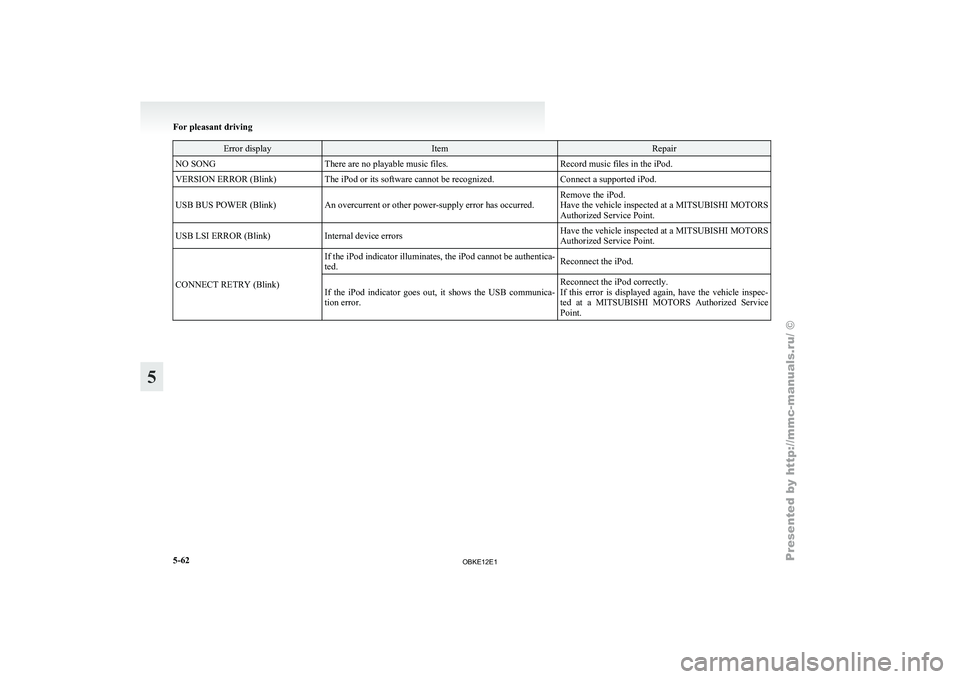
Error display Item Repair
NO SONG There are no playable music files. Record music files in the iPod.
VERSION ERROR (Blink) The iPod or its software cannot be recognized. Connect a supported iPod.
USB BUS POWER (Blink) An overcurrent or other power-supply error has occurred. Remove the iPod.
Have the vehicle inspected at a MITSUBISHI MOTORS
Authorized Service Point.
USB LSI ERROR (Blink) Internal device errors Have the vehicle inspected at a
MITSUBISHI MOTORS
Authorized Service Point.
CONNECT RETRY (Blink) If the iPod indicator illuminates, the iPod cannot be authentica-
ted.
Reconnect the iPod.
If the iPod indicator goes out, it shows the USB communica-
tion error. Reconnect the iPod correctly.
If this error
is displayed again, have the vehicle inspec-
ted at a MITSUBISHI MOTORS Authorized Service
Point. For pleasant driving
5-62
5
OBKE12E1
Page 247 of 377
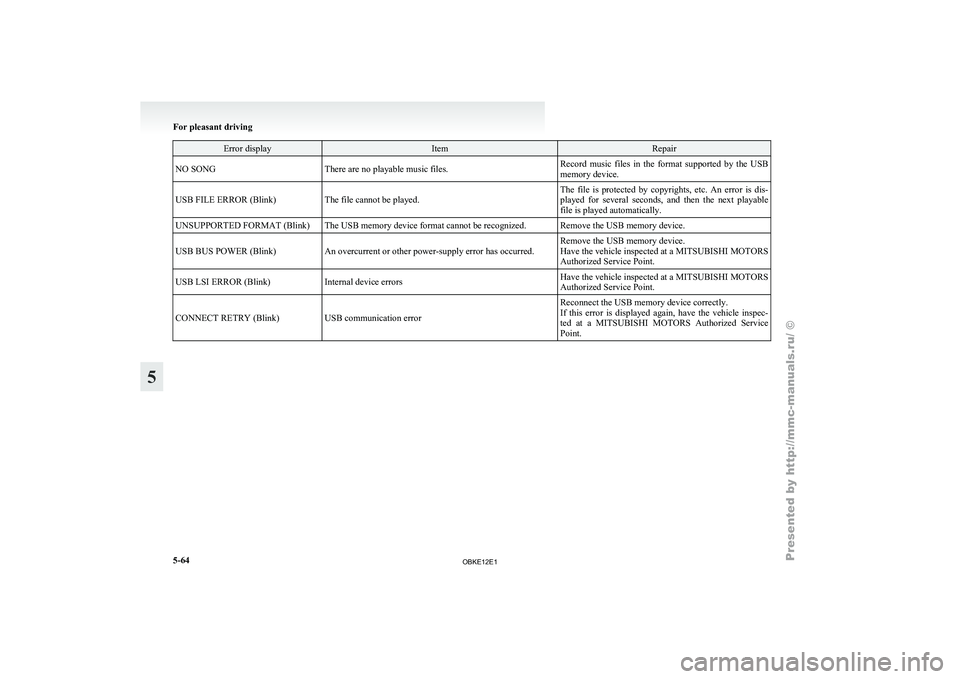
Error display Item Repair
NO SONG There are no playable music files. Record music files in the format supported by the USB
memory device.
USB FILE ERROR (Blink) The file cannot be played. The file is protected by copyrights, etc. An error is dis-
played for several
seconds, and then the next playable
file is played automatically.
UNSUPPORTED FORMAT (Blink) The USB memory device format cannot be recognized. Remove the USB memory device.
USB BUS POWER (Blink) An overcurrent or other power-supply error has occurred. Remove the USB memory device.
Have the vehicle inspected at a MITSUBISHI MOTORS
Authorized Service Point.
USB LSI ERROR (Blink) Internal device errors Have the vehicle inspected at a
MITSUBISHI MOTORS
Authorized Service Point.
CONNECT RETRY (Blink) USB communication error Reconnect the USB memory device correctly.
If this error
is displayed again, have the vehicle inspec-
ted at a MITSUBISHI MOTORS Authorized Service
Point. For pleasant driving
5-64
5
OBKE12E1
Page 249 of 377

ing properly and you may not be able to eject
the compact disc.
Notes on CD-Rs/RWs
E00725100026
l You may
have trouble playing back some
CD-R/RW discs recorded on CD recorders
(CD-R/RW drives), either due to their record-
ing characteristics or dirt, fingerprints,
scratches, etc. on the disc surface.
l CD-R/RW discs are less resistant to high tem-
peratures and high humidity than ordinary mu-
sic CDs. Leaving them inside a vehicle for ex-
tended periods may damage them and make
playback impossible.
l The unit may not successfully play back a
CD-R/RW that was made by the combina-
tion of writing software, a CD recorder
(CD-R/RW drive) and a disc if they are in-
compatible with one another.
l This player cannot play the CD-R/RW discs
if the session is not closed.
l This player cannot play CD-R/RW discs
which contain other than CD-DA or MP3 da-
ta (Video CD, etc.). l
Be sure
to
observe the handling instructions
for the CD-R/RW disc. WARNING
l Operating the
CD
player in a manner oth-
er than specifically instructed herein may
result in hazardous radiation exposure.
Do not remove the cover and attempt to
repair the CD player by yourself. There
are no user serviceable parts inside. In
case of malfunction, we recommend you
to have it checked. Antenna
E00710500455
Glass antenna
Antenna leads (1)
are printed on the left-hand side
of inside of the rear side window (3-door models)/
quarter window (5-door models) glass. NOTE
l When
the rear
side/quarter window glass is
cleaned, wipe the glass with a soft cloth by
moving the cloth along the antenna so as not
to damage it. For pleasant driving
5-66
5
OBKE12E1
Page 250 of 377

Link System*
E00764500012
The Link System
takes overall control of the devi-
ces connected via the USB input terminal or the
Bluetooth ®
2.0 interface allowing the connected de-
vices to be operated by using the switches in the ve-
hicle or voice commands.
See the following section for details on how to op-
erate.
Refer to “Bluetooth ®
2.0 interface” on page 5-67.
Refer to “USB input terminal” on page 5-82.
Refer to “To play tracks from USB device” on
page 5-43.
Refer to “To play tracks from a Bluetooth ®
device”
on page 5-53.
Refer to “To use the external audio input function”
on page 5-56.
Bluetooth ®
is a registered trademark of BLUE-
TOOTH SIG, INC.
Link System End User Licence Agree-
ment E00764600013
You have acquired a device that includes software
licensed by MITSUBISHI
MOTORS CORPORA-
TION from JOHNSON CONTROLS Inc (the auto-
motive experience business unit), and their subse-
quent 3 rd
party suppliers. For a complete list of
these 3 rd
party products and their end user licence
agreements, please go to the following website.
http://www.jciblueconnect.com/faq/fulldisclo-
sure.pdf Bluetooth
®
2.0 interface*
E00726000572
The Bluetooth ®
2.0 interface
allows for making/re-
ceiving hands-free calls in the vehicle using a Blue-
tooth ®
compatible cellular phone based on the wire-
less communication technology commonly known
as Bluetooth ®
. It also allows the user to play mu-
sic, saved in a Bluetooth ®
music player, from the
vehicle’s speakers.
The system is equipped with a voice recognition
function, which allows you to make hands-free
calls by simple switch operations and voice com-
mand operations using a defined voice tree.
The Bluetooth ®
2.0 interface can be used when the
ignition switch is in the “ON” or “ACC” position.
Before you can use the Bluetooth ®
2.0 interface,
you must pair the Bluetooth ®
device and Blue-
tooth ®
2.0 interface. Refer to “Connecting the Blue-
tooth® 2.0 interface and Bluetooth® device” on
page 5-71.
Bluetooth ®
is a registered trademark of BLUE-
TOOTH SIG, INC. WARNING
l Although the
Bluetooth®
2.0 interface al-
lows you to make hands-free calls, if you
choose to use the cellular phone while driv-
ing, you must not allow yourself to be dis-
tracted from the safe operation of your ve-
hicle. Anything, including cellular phone
usage, that distracts you from the safe op-
eration of your vehicle increases your
risk of an accident. WARNING
l Refer to and
comply with all state and lo-
cal laws in your area regarding cellular
phone usage while driving.
NOTE l The Bluetooth ®
2.0
interface cannot be used
if the Bluetooth ®
device has a flat battery or
the device power is turned off.
l Hands-free calls will not be possible if your
phone does not have service available.
l If you place the Bluetooth ®
device in the ve-
hicle’s third seat or luggage compartment,
you may not be able to use the Bluetooth ®
2.0 interface.
l Some Bluetooth ®
devices are not compatible
with the Bluetooth ®
2.0 interface.
l For details on the Bluetooth ®
2.0 interface,
you can see them by accessing the
MITSUBISHI MOTORS website.
Please read and agree on the “Warning about
Links to the Web Sites of Other Companies”
because it connects to other than
MITSUBISHI MOTORS website.
http://www.mitsubishi-motors.com/en/prod-
ucts/index.html
Steering control switch ® p. 5-68
Voice recognition function ® p. 5-68
Useful voice commands ® p. 5-69
Speaker enrollment function ® p. 5-70
Connecting the Bluetooth® 2.0 interface and Blue-
tooth® device ® p. 5-71
Operating a music player connected via Blue-
tooth® ® p. 5-74 For pleasant driving
5-67 5
OBKE12E1
Page 251 of 377
How to make or receive hands-free
calls ® p. 5-74
Phone book function ® p. 5-76
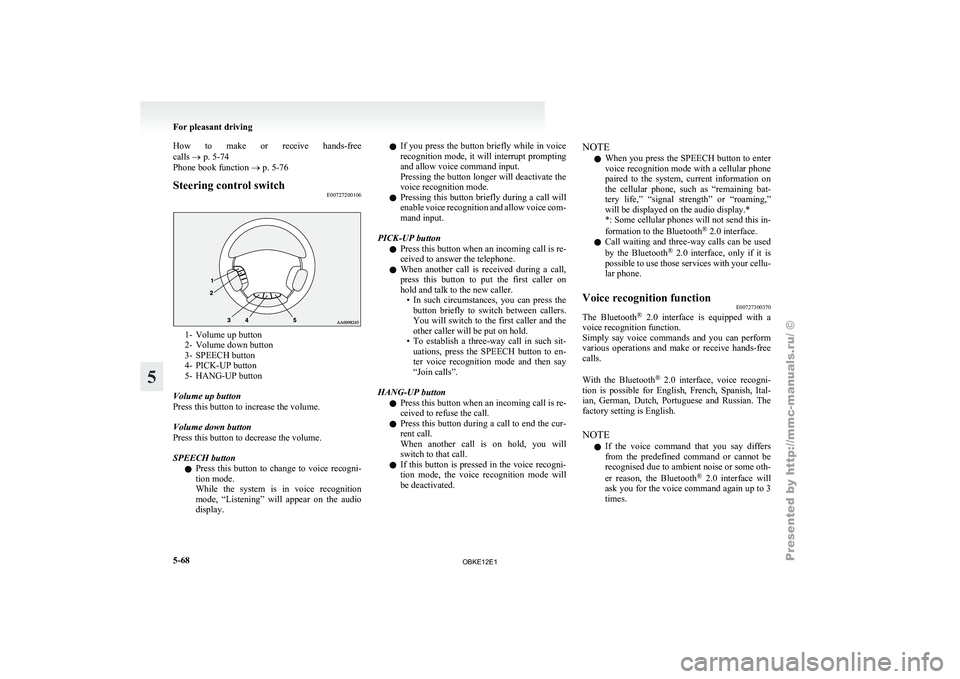
Steering control switch
E007272001061- Volume up button
2- Volume down button
3-
SPEECH button
4-
PICK-UP button
5- HANG-UP button
Volume up button
Press this button to increase the volume.
Volume down button
Press this button to decrease the volume.
SPEECH button l Press this button to change to voice recogni-
tion mode.
While the system is in voice recognition
mode, “Listening” will appear on the audio
display. l
If you
press
the button briefly while in voice
recognition mode, it will interrupt prompting
and allow voice command input.
Pressing the button longer will deactivate the
voice recognition mode.
l Pressing this button briefly during a call will
enable voice recognition and allow voice com-
mand input.
PICK-UP button l Press this button when an incoming call is re-
ceived to answer the telephone.
l When another call is received during a call,
press this button to put the first caller on
hold and talk to the new caller.
• In such circumstances, you can press thebutton briefly to switch between callers.
You will switch to the first caller and the
other caller will be put on hold.
• To establish a three-way call in such sit- uations, press the SPEECH button to en-
ter voice recognition mode and then say
“Join calls”.
HANG-UP button l Press this button when an incoming call is re-
ceived to refuse the call.
l Press this button during a call to end the cur-
rent call.
When another call is on hold, you will
switch to that call.
l If this button is pressed in the voice recogni-
tion mode, the voice recognition mode will
be deactivated. NOTE
l When
you press
the SPEECH button to enter
voice recognition mode with a cellular phone
paired to the system, current information on
the cellular phone, such as “remaining bat-
tery life,” “signal strength” or “roaming,”
will be displayed on the audio display.*
*: Some cellular phones will not send this in-
formation to the Bluetooth ®
2.0 interface.
l Call waiting and three-way calls can be used
by the Bluetooth ®
2.0 interface, only if it is
possible to use those services with your cellu-
lar phone.
Voice recognition function E00727300370
The Bluetooth ®
2.0 interface
is equipped with a
voice recognition function.
Simply say voice commands and you can perform
various operations and make or receive hands-free
calls.
With the Bluetooth ®
2.0 interface, voice recogni-
tion is possible for English, French, Spanish, Ital-
ian, German, Dutch, Portuguese and Russian. The
factory setting is English.
NOTE
l If the voice command that you say differs
from the predefined command or cannot be
recognised due to ambient noise or some oth-
er reason, the Bluetooth ®
2.0 interface will
ask you for the voice command again up to 3
times. For pleasant driving
5-68
5
OBKE12E1
Page 253 of 377
NOTE
l Password
will be
required to access the sys-
tem after the next ignition cycle.
l It is required for a little time after engine
stop that the entered password is actually re-
corded in the system.
If the ignition switch is made to “ACC” or
“ON” or the engine is started immediately af-
ter engine stop, there is a case when the en-
tered password is not recorded in the system.
At this time, please try to enter the password
again.
Entering the password
If a password has been set and the security function
is enabled, the voice guide will say “Hands-free sys-
tem is locked. State the password to continue”
when the SPEECH button is pressed to enter voice
recognition mode. Say the 4-digit password num-
ber to enter the password.
If the entered password is wrong, the voice guide
will say “<4- digit password>, Incorrect password.
Please try again”. Enter the correct password.
NOTE l You can re-enter the password as many times
as you want.
l If you have forgotten your password, say
“Cancel” to quit the voice input mode and
then check with a MITSUBISHI MOTORS
Authorized Service Point.
Disabling the password
Use the following procedure to turn off the security
function by disabling the password. NOTE
l System
must be
unlocked to disable the pass-
word.
1. Press the SPEECH button.
2. Say “Setup”.
3. Say “Password.”
4. The voice guide will say “Password is ena- bled. Would you like to disable it?” Answer
“Yes.”
Answer “No” to cancel the disabling of the
password and return to the main menu.
5. When the disabling of the password is com- pleted, the voice guide will say “Password is
disabled” and the system will return to the
main menu.
Speaker enrollment function E00727400209
The Bluetooth ®
2.0 interface
can use the speaker en-
rollment function to create a voice model for one
person per language.
This makes it easier for the Bluetooth ®
2.0 inter-
face to recognise voice commands said by you.
You can turn a voice model registered with the
speaker enrollment function on and off whenever
you want.
Speaker enrollment E00727500196
It takes about 2 to 3 minutes to complete the speak-
er enrollment process.
To ensure the
best results, run through the process
while in the driver’s seat, in an environment that is
as quiet as possible (when there is no rain or strong
winds and the vehicle windows are closed). Please
turn off your phone while in speaker enrollment to
prevent interruption of the process.
Use the following procedure for speaker enrollment. 1. Stop your vehicle in a safe area, put the gear-
shift lever
in the “N” (Neutral) position
(M/T), or the selector lever in the “P”
(PARK) position (A/T), and pull the parking
brake lever.
NOTE l Speaker enrollment is not possible unless the
vehicle is parked. Make sure you park the ve-
hicle in a safe area before attempting speaker
enrollment.
2. Press the SPEECH button.
3. Say “Voice training”.
4. The voice guide will say “This operation must be performed in a quiet environment
while the vehicle is stopped. See the owner’s
manual for the list of required training phra-
ses. Press and release the SPEECH button
when you are ready to begin. Press the HANG-
UP button to cancel at any time”.
Press the SPEECH button to start the speaker
enrollment process.
NOTE l If you do not start the speaker enrollment proc-
ess within 3 minutes of pressing the
SPEECH button, the speaker enrollment func-
tion will time out.
The voice guide will say “Speaker Enroll-
ment has timed out”. The system will then
beep and the voice recognition mode will be
deactivated.
5. The voice guide will prompt for phrase 1. Re- peat the corresponding phrase listed in table
“Enrollment commands” on page 5-81. For pleasant driving
5-70
5
OBKE12E1
Page 271 of 377
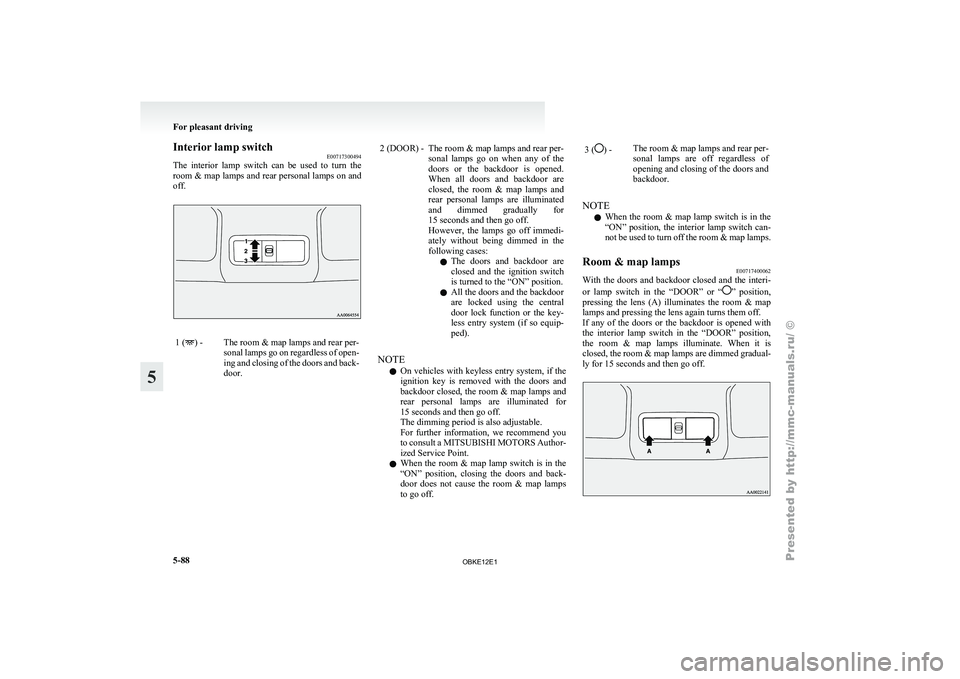
Interior lamp switch
E00717300494
The interior lamp
switch can be used to turn the
room & map lamps and rear personal lamps on and
off. 1 ( ) - The room & map lamps and rear per-
sonal lamps go
on regardless of open-
ing and closing of the doors and back-
door. 2 (DOOR) - The room & map lamps and rear per-
sonal lamps go
on when any of the
doors or the backdoor is opened.
When all doors and backdoor are
closed, the room & map lamps and
rear personal lamps are illuminated
and dimmed gradually for
15 seconds and then go off.
However, the lamps go off immedi-
ately without being dimmed in the
following cases:
l The doors and backdoor are
closed and the ignition switch
is turned to the “ON” position.
l All the doors and the backdoor
are locked using the central
door lock function or the key-
less entry system (if so equip-
ped).
NOTE l On
vehicles with
keyless entry system, if the
ignition key is removed with the doors and
backdoor closed, the room & map lamps and
rear personal lamps are illuminated for
15 seconds and then go off.
The dimming period is also adjustable.
For further information, we recommend you
to consult a MITSUBISHI MOTORS Author-
ized Service Point.
l When the room & map lamp switch is in the
“ON” position, closing the doors and back-
door does not cause the room & map lamps
to go off. 3 ( ) -
The room & map lamps and rear per-
sonal lamps are
off regardless of
opening and closing of the doors and
backdoor.
NOTE l When
the room
& map lamp switch is in the
“ON” position, the interior lamp switch can-
not be used to turn off the room & map lamps.
Room & map lamps E00717400062
With the doors and backdoor closed and the interi-
or lamp switch
in the “DOOR” or “ ” position,
pressing the
lens (A) illuminates the room & map
lamps and pressing the lens again turns them off.
If any of the doors or the backdoor is opened with
the interior lamp switch in the “DOOR” position,
the room & map lamps illuminate. When it is
closed, the room & map lamps are dimmed gradual-
ly for 15 seconds and then go off. For pleasant driving
5-88
5
OBKE12E1