Temperature MITSUBISHI PAJERO IV 2011 Owners Manual
[x] Cancel search | Manufacturer: MITSUBISHI, Model Year: 2011, Model line: PAJERO IV, Model: MITSUBISHI PAJERO IV 2011Pages: 377, PDF Size: 29.43 MB
Page 13 of 377
Fuel selection
E00200102587Recom-
mended
fuel
Petrol-powered vehicles
Unleaded petrol octane
num-
ber (EN228) 90 RON or higher (3000
models)
95 RON or higher (3800
models)
Diesel-powered vehicles
Vehicles to comply with the Euro 4
and Euro 5 regulation Cetane number (EN590)51 or higher
Vehicles to comply with the Euro 3
regulation Cetane number45 or higher CAUTION
l
For petrol-powered vehicles,
the use of lea-
ded fuel can result in serious damage to
the engine and catalytic converter. Do not
use leaded fuel.
l Diesel-powered vehicles to comply with
the Euro 4 and Euro 5 regulation are de-
signed to use only diesel fuel that meets
the EN 590 standard.
Use of any other type of diesel fuel would
adversely affect the engine’s performance
and durability. CAUTION
l
For diesel-powered vehicles,
if proper
“winter” fuel is not used in winter, the die-
sel preheat indication lamp may blink
and the engine speed may not rise above
the idling speed because of fuel freezing.
In this case, keep the engine idling for
about ten minutes, then turn off the igni-
tion switch and immediately turn it on
again to confirm that the diesel preheat in-
dication lamp is off. (Refer to “Diesel pre-
heat indication lamp” on page 3-08)
NOTE l It is advisable to sufficiently warm up the en-
gine
after starting
it when the outside temper-
ature is below zero °C.
l Due to the separation of paraffin, the fluidity
of the fuel decreases considerably as the tem-
perature falls. Because of this fact there are
two kinds of fuel: “summer” and “winter”.
This must be considered in winter use.
Select either of the two kinds of fuel in ac-
cordance with ambient temperature.
Above -5 °C: “Summer” diesel
Below -5 °C: “Winter” diesel
When travelling abroad, find out in advance
about the fuels served in local service stations.
l Petrol-powered vehicles have the knock con-
trol system so that you can use unleaded pet-
rol 91 RON as an emergent measure in case
unleaded petrol 95 RON or higher is not avail-
able on journey, etc. In such a case, you
don’t need to adjust the engine specially.
In case of using unleaded petrol 91 RON, the
engine performance level is reduced. l
In petrol-powered
vehicles,
repeatedly driv-
ing short distances at low speeds can cause
deposits to form in the fuel system and en-
gine, resulting in poor starting and poor accel-
eration.
If these problems occur, you are advised to
add a detergent additive to the gasoline when
you refuel the vehicle. The additive will re-
move the deposits, thereby returning the en-
gine to a normal condition. Be sure to use a
genuine MITSUBISHI FUEL SYSTEM
CLEANER. Using an unsuitable additive
could make the engine malfunction.
For details, please contact a MITSUBISHI
MOTORS Authorized Service Point.
l Poor quality petrol can cause problems such
as difficult starting, stalling, engine noise
and hesitation. If you experience these prob-
lems, try another brand and/or grade of petrol.
If the check engine warning lamp flashes,
have the system checked as soon as possible
at a MITSUBISHI MOTORS Authorized
Service Point.
l In diesel-powered vehicles, poor-quality die-
sel fuel can cause deposits form in the injec-
tor, resulting in black smoke and rough idling.
If these problems occur, you are advised to
add a cleaning additive to the diesel fuel
when you refuel the vehicle. The additive
will break up and remove the deposits, there-
by returning the engine to a normal condition.
Be sure to use a genuine MITSUBISHI DIE-
SEL FUEL SYSTEM CLEANER. Using an
unsuitable additive could make the engine
malfunction. For details, please contact a
MITSUBISHI MOTORS Authorized Service
Point. General information
02
OBKE12E1
Page 19 of 377
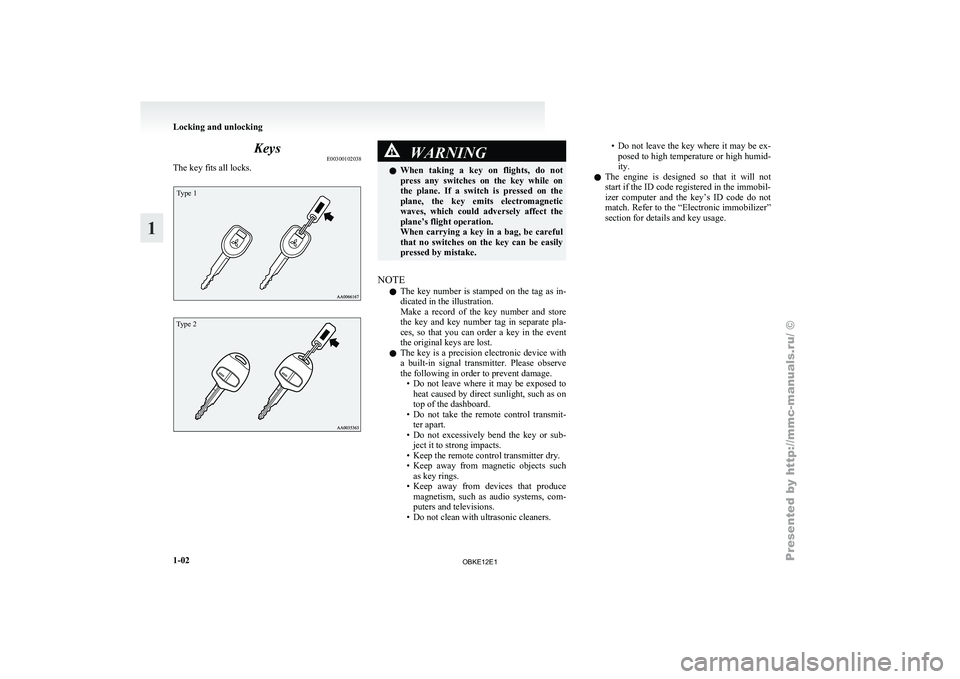
Keys
E00300102038
The key fits all locks.Type 1
Type 2 WARNING
l When taking a
key on flights, do not
press any switches on the key while on
the plane. If a switch is pressed on the
plane, the key emits electromagnetic
waves, which could adversely affect the
plane’s flight operation.
When carrying a key in a bag, be careful
that no switches on the key can be easily
pressed by mistake.
NOTE l The
key number
is stamped on the tag as in-
dicated in the illustration.
Make a record of the key number and store
the key and key number tag in separate pla-
ces, so that you can order a key in the event
the original keys are lost.
l The key is a precision electronic device with
a built-in signal transmitter. Please observe
the following in order to prevent damage.
• Do not leave where it may be exposed toheat caused by direct sunlight, such as on
top of the dashboard.
• Do not take the remote control transmit- ter apart.
• Do not excessively bend the key or sub- ject it to strong impacts.
• Keep the remote control transmitter dry.
• Keep away from magnetic objects such as key rings.
• Keep away from devices that produce magnetism, such as audio systems, com-
puters and televisions.
• Do not clean with ultrasonic cleaners. • Do
not leave the key where it may be ex-
posed to
high temperature or high humid-
ity.
l The engine is designed so that it will not
start if the ID code registered in the immobil-
izer computer and the key’s ID code do not
match. Refer to the “Electronic immobilizer”
section for details and key usage. Locking and unlocking
1-02
1
OBKE12E1
Page 45 of 377
NOTE
l To
prevent the
battery from running down,
operate the power seat with the engine run-
ning.
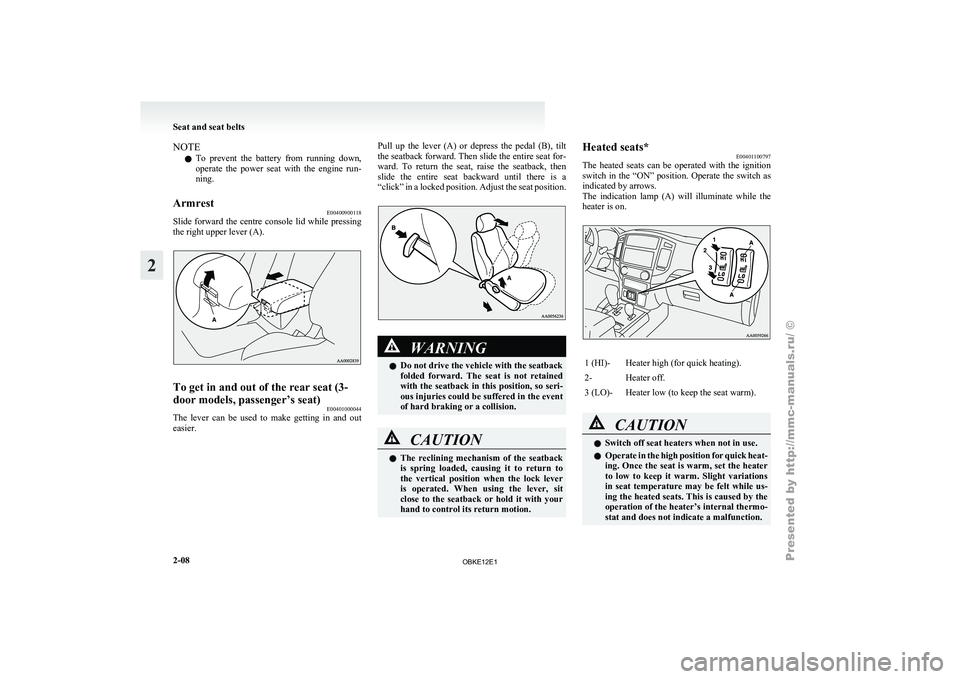
Armrest E00400900118
Slide forward the centre console lid while pressing
the right upper lever (A). To get in and out of the rear seat (3-
door models, passenger’s seat)
E00401000044
The lever can be used to make getting in and out
easier. Pull up the lever (A) or depress the pedal (B), tilt
the seatback forward.
Then slide the entire seat for-
ward. To return the seat, raise the seatback, then
slide the entire seat backward until there is a
“click” in a locked position. Adjust the seat position. WARNING
l Do not drive the vehicle with the seatback
folded forward. The
seat is not retained
with the seatback in this position, so seri-
ous injuries could be suffered in the event
of hard braking or a collision. CAUTION
l
The reclining
mechanism
of the seatback
is spring loaded, causing it to return to
the vertical position when the lock lever
is operated. When using the lever, sit
close to the seatback or hold it with your
hand to control its return motion. Heated seats*
E00401100797
The heated seats
can be operated with the ignition
switch in the “ON” position. Operate the switch as
indicated by arrows.
The indication lamp (A) will illuminate while the
heater is on. 1 (HI)- Heater high (for quick heating).
2- Heater off.
3 (LO)- Heater low (to keep the seat warm).
CAUTION
l
Switch off seat heaters when not in use.
l Operate in
the
high position for quick heat-
ing. Once the seat is warm, set the heater
to low to keep it warm. Slight variations
in seat temperature may be felt while us-
ing the heated seats. This is caused by the
operation of the heater’s internal thermo-
stat and does not indicate a malfunction. Seat and seat belts
2-08
2
OBKE12E1
Page 83 of 377
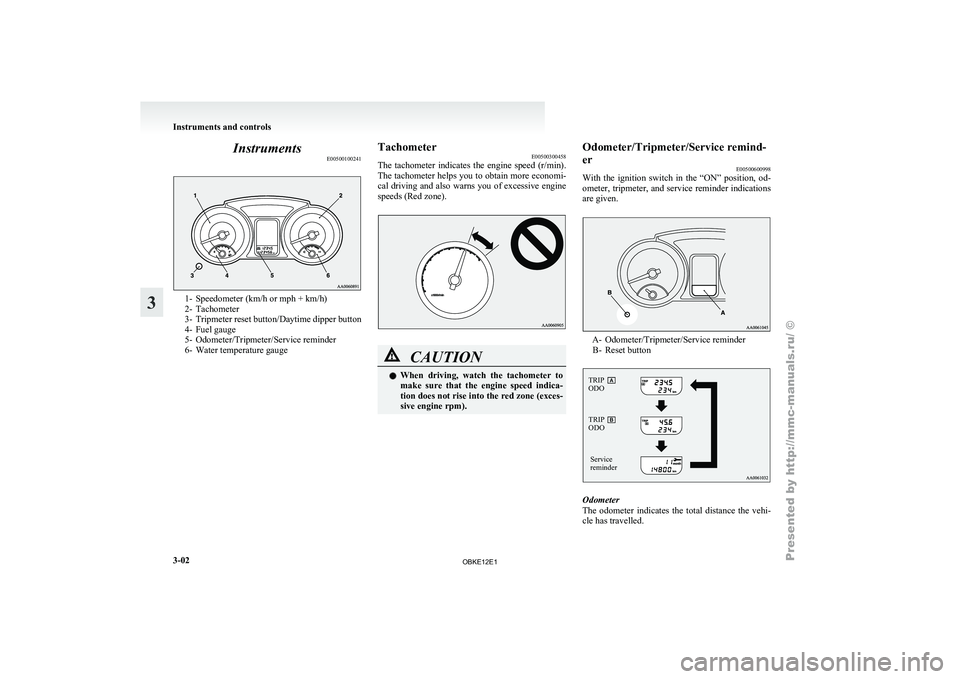
Instruments
E005001002411- Speedometer (km/h or mph + km/h)
2- Tachometer
3-
Tripmeter
reset button/Daytime dipper button
4- Fuel gauge
5- Odometer/Tripmeter/Service reminder
6- Water temperature gauge Tachometer
E00500300458
The tachometer indicates
the engine speed (r/min).
The tachometer helps you to obtain more economi-
cal driving and also warns you of excessive engine
speeds (Red zone). CAUTION
l
When driving, watch
the tachometer to
make sure that the engine speed indica-
tion does not rise into the red zone (exces-
sive engine rpm). Odometer/Tripmeter/Service remind-
er
E00500600998
With the ignition
switch in the “ON” position, od-
ometer, tripmeter, and service reminder indications
are given. A- Odometer/Tripmeter/Service reminder
B- Reset button
TRIP
ODO
Service
reminder
TRIP
ODO Odometer
The
odometer indicates
the total distance the vehi-
cle has travelled. Instruments and controls
3-02
3
OBKE12E1
Page 86 of 377
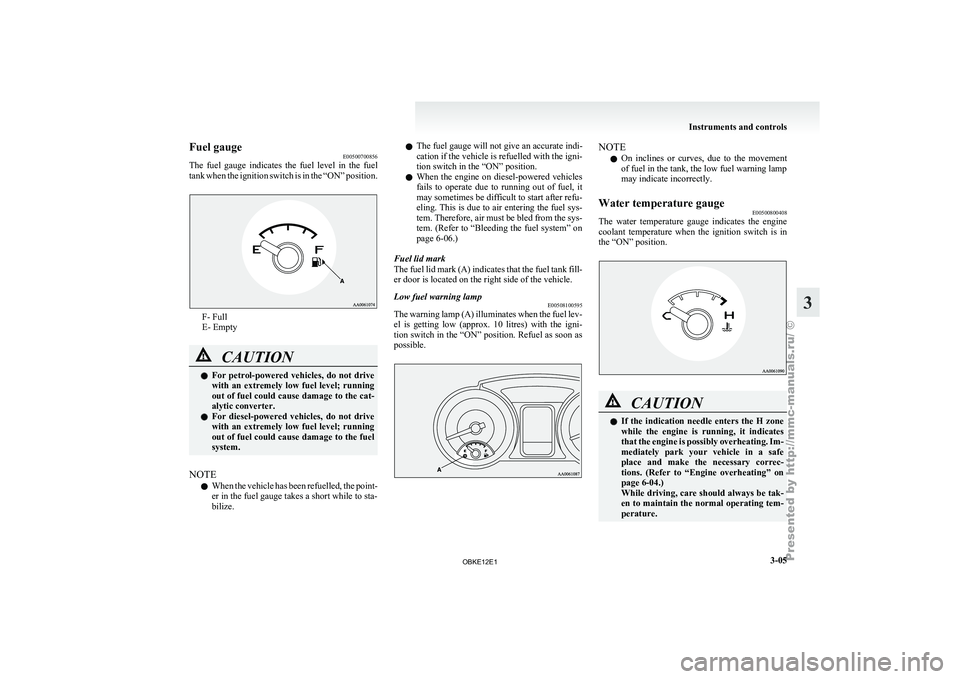
Fuel gauge
E00500700856
The fuel gauge
indicates the fuel level in the fuel
tank when the ignition switch is in the “ON” position. F- Full
E- Empty
CAUTION
l
For petrol-powered
vehicles,
do not drive
with an extremely low fuel level; running
out of fuel could cause damage to the cat-
alytic converter.
l For diesel-powered vehicles, do not drive
with an extremely low fuel level; running
out of fuel could cause damage to the fuel
system.
NOTE l When
the vehicle
has been refuelled, the point-
er in the fuel gauge takes a short while to sta-
bilize. l
The fuel gauge will not give an accurate indi-
cation
if
the
vehicle is refuelled with the igni-
tion switch in the “ON” position.
l When the engine on diesel-powered vehicles
fails to operate due to running out of fuel, it
may sometimes be difficult to start after refu-
eling. This is due to air entering the fuel sys-
tem. Therefore, air must be bled from the sys-
tem. (Refer to “Bleeding the fuel system” on
page 6-06.)
Fuel lid mark
The fuel lid mark (A) indicates that the fuel tank fill-
er door is located on the right side of the vehicle.
Low fuel warning lamp E00508100595
The warning lamp (A) illuminates when the fuel lev-
el is getting
low (approx. 10 litres) with the igni-
tion switch in the “ON” position. Refuel as soon as
possible. NOTE
l On
inclines or
curves, due to the movement
of fuel in the tank, the low fuel warning lamp
may indicate incorrectly.
Water temperature gauge E00500800408
The water temperature gauge indicates the engine
coolant temperature when
the ignition switch is in
the “ON” position. CAUTION
l
If the indication
needle enters the H zone
while the engine is running, it indicates
that the engine is possibly overheating. Im-
mediately park your vehicle in a safe
place and make the necessary correc-
tions. (Refer to “Engine overheating” on
page 6-04.)
While driving, care should always be tak-
en to maintain the normal operating tem-
perature. Instruments and controls
3-05 3
OBKE12E1
Page 88 of 377
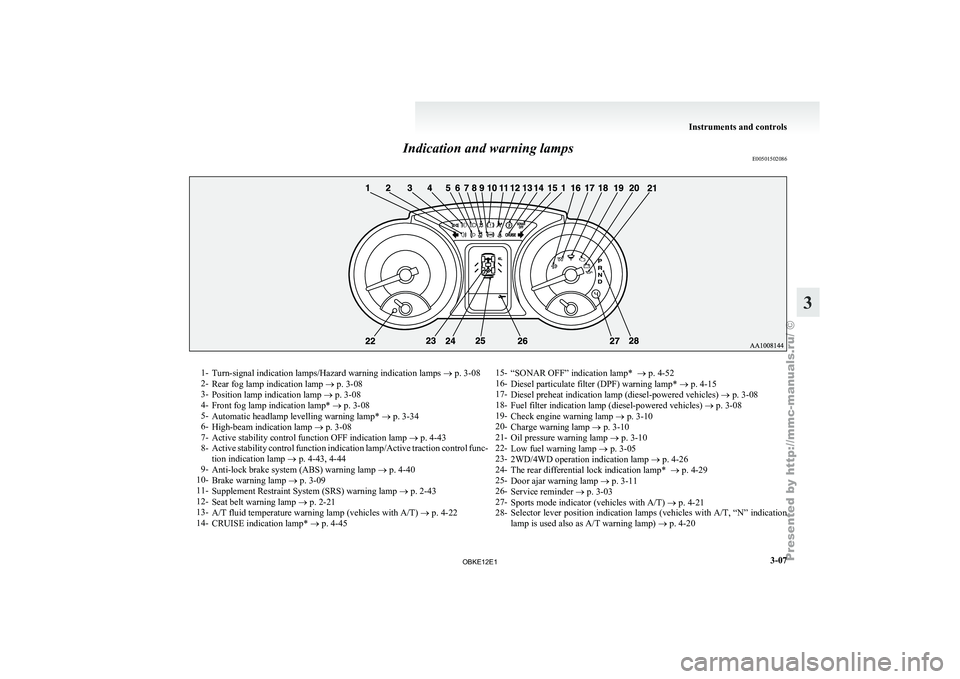
Indication and warning lamps
E005015020861-
Turn-signal indication lamps/Hazard warning indication lamps ® p. 3-08
2- Rear fog lamp indication lamp
® p. 3-08
3- Position lamp indication lamp ® p. 3-08
4- Front fog lamp indication lamp* ® p. 3-08
5- Automatic headlamp levelling warning lamp* ® p. 3-34
6- High-beam indication lamp ® p. 3-08
7- Active stability control function OFF indication lamp ® p. 4-43
8- Active stability control function indication lamp/Active traction control func-
tion indication lamp ® p. 4-43, 4-44
9- Anti-lock brake system (ABS) warning lamp ® p. 4-40
10- Brake warning lamp ® p. 3-09
11- Supplement Restraint System (SRS) warning lamp ® p. 2-43
12- Seat belt warning lamp ® p. 2-21
13- A/T fluid temperature warning lamp (vehicles with A/T) ® p. 4-22
14- CRUISE indication lamp* ® p. 4-45 15-
“SONAR OFF” indication lamp* ® p. 4-52
16- Diesel particulate filter (DPF) warning lamp* ®
p. 4-15
17- Diesel preheat indication lamp (diesel-powered vehicles) ® p. 3-08
18- Fuel filter indication lamp (diesel-powered vehicles) ® p. 3-08
19- Check engine warning lamp ® p. 3-10
20- Charge warning lamp ® p. 3-10
21- Oil pressure warning lamp ® p. 3-10
22- Low fuel warning lamp ® p. 3-05
23- 2WD/4WD operation indication lamp ® p. 4-26
24- The rear differential lock indication lamp* ® p. 4-29
25- Door ajar warning lamp ® p. 3-11
26- Service reminder ® p. 3-03
27- Sports mode indicator (vehicles with A/T) ® p. 4-21
28- Selector lever position indication lamps (vehicles with A/T, “N” indication
lamp is used also as A/T warning lamp) ® p. 4-20 Instruments and controls
3-07 3
OBKE12E1
Page 93 of 377
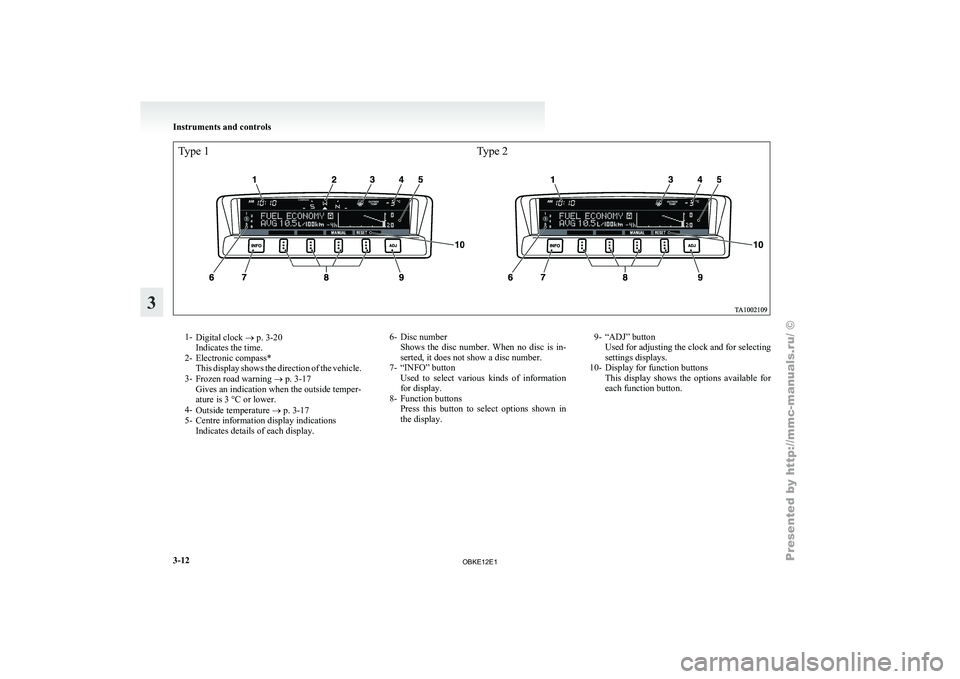
Type 1Type 21-
Digital clock ®
p. 3-20
Indicates the time.
2- Electronic compass* This display shows the direction of the vehicle.
3- Frozen road warning ® p. 3-17
Gives an indication when the outside temper-
ature is 3 °C or lower.
4- Outside temperature ® p. 3-17
5- Centre information display indications Indicates details of each display. 6- Disc number
Shows the disc
number. When no disc is in-
serted, it does not show a disc number.
7- “INFO” button Used to select various kinds of information
for display.
8- Function buttons Press this button to select options shown in
the display. 9- “ADJ” button
Used for adjusting the clock and for selecting
settings displays.
10- Display for function buttons This display
shows the options available for
each function button. Instruments and controls
3-12
3
OBKE12E1
Page 95 of 377
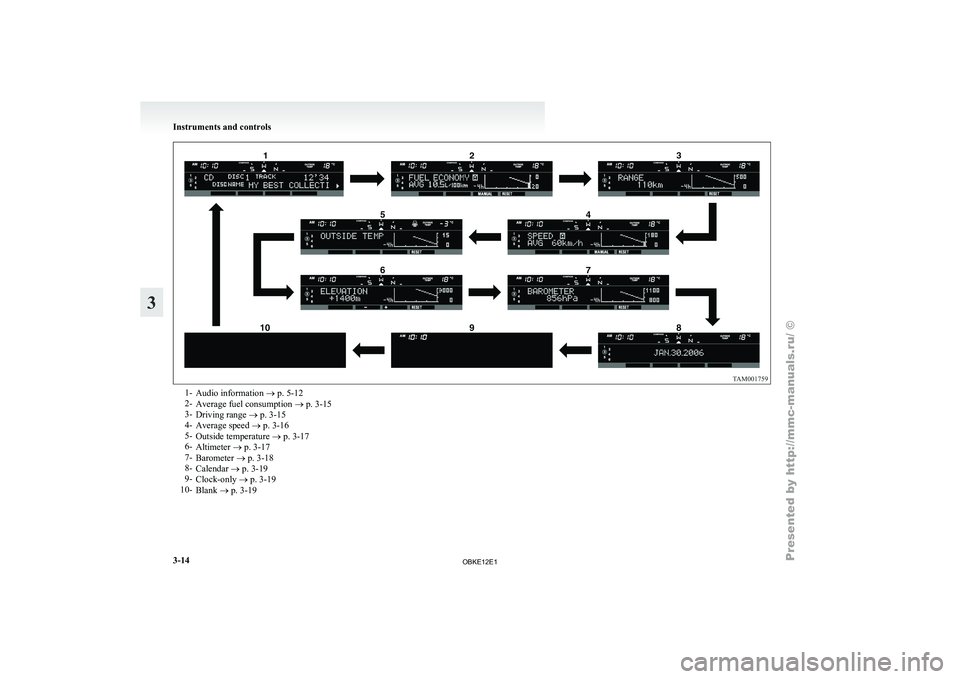
1-
Audio information ® p. 5-12
2- Average fuel consumption ®
p. 3-15
3- Driving range ® p. 3-15
4- Average speed ® p. 3-16
5- Outside temperature ® p. 3-17
6- Altimeter ® p. 3-17
7- Barometer ® p. 3-18
8- Calendar ® p. 3-19
9- Clock-only ® p. 3-19
10- Blank ® p. 3-19 Instruments and controls
3-14
3
OBKE12E1
Page 98 of 377
NOTE
l The
average speed
can be reset separately for
the auto reset mode and for the manual reset
mode.
l When you turn the ignition switch to the
“ON” position about 4 hours (or more) after
turning it from the “ON” position to the
“ACC” or “LOCK” position in the auto reset
mode, the average speed indication will auto-
matically be reset.
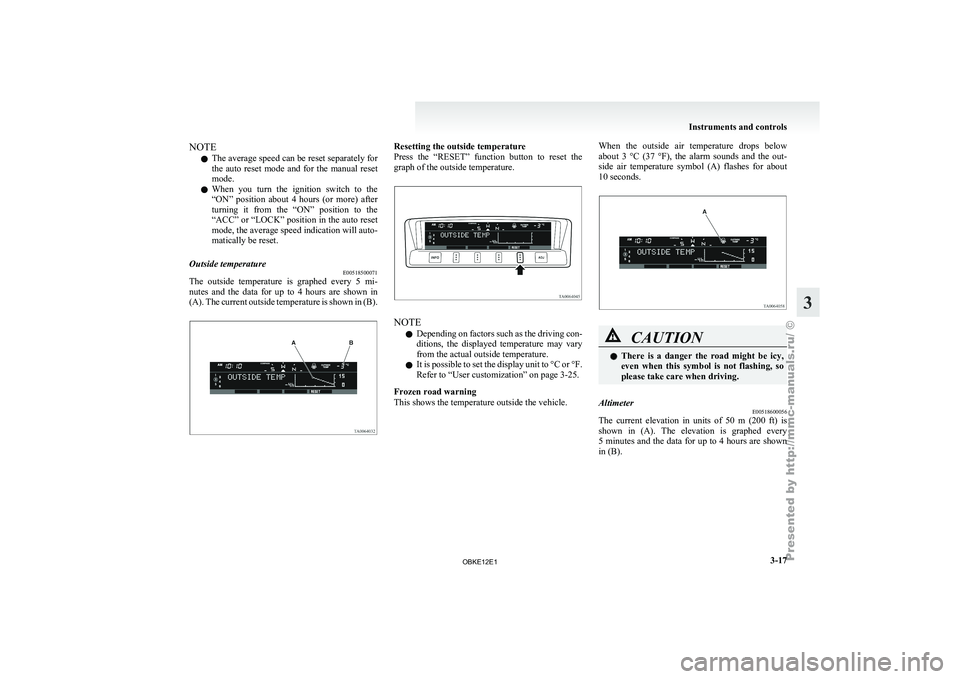
Outside temperature E00518500071
The outside temperature is graphed every 5 mi-
nutes and
the
data for up to 4 hours are shown in
(A). The current outside temperature is shown in (B). Resetting the outside temperature
Press the “RESET”
function button to reset the
graph of the outside temperature. NOTE
l Depending
on factors
such as the driving con-
ditions, the displayed temperature may vary
from the actual outside temperature.
l It is possible to set the display unit to °C or °F.
Refer to “User customization” on page 3-25.
Frozen road warning
This shows the temperature outside the vehicle. When the outside air temperature drops below
about 3
°C
(37 °F), the alarm sounds and the out-
side air temperature symbol (A) flashes for about
10 seconds. CAUTION
l
There is
a
danger the road might be icy,
even when this symbol is not flashing, so
please take care when driving.
Altimeter E00518600056
The current elevation in units of 50 m (200 ft) is
shown in (A).
The elevation is graphed every
5 minutes and the data for up to 4 hours are shown
in (B). Instruments and controls
3-17 3
OBKE12E1
Page 107 of 377
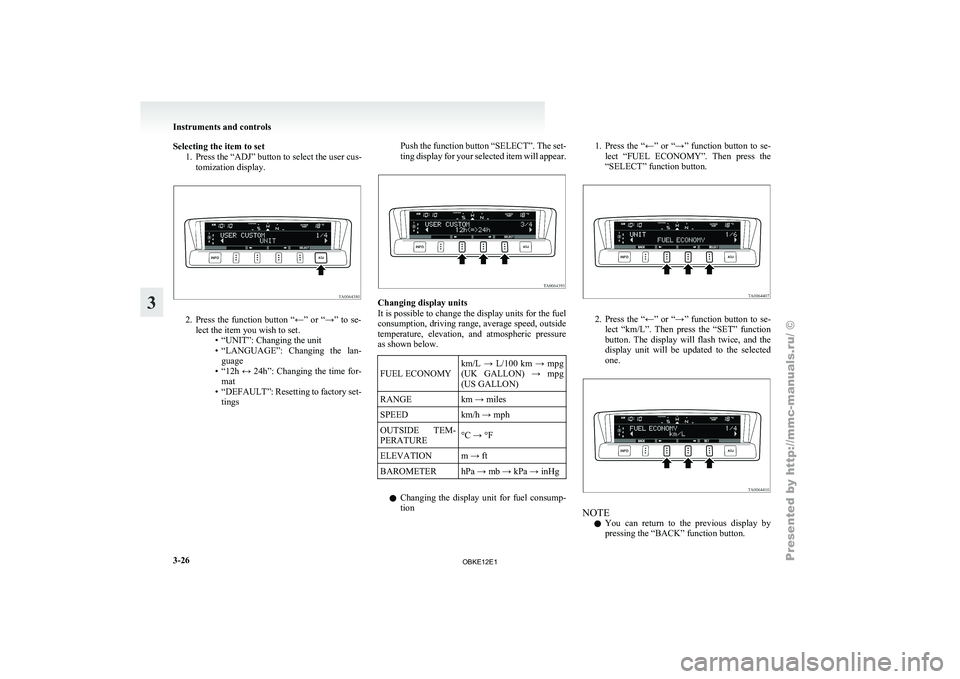
Selecting the item to set
1. Press the “ADJ” button to select the user cus-tomization display. 2. Press the function button “←” or “→” to se-
lect the item you wish to set. •“UNIT”: Changing the unit
•
“LANGUAGE”: Changing the lan-guage
• “12h ↔ 24h”: Changing the time for- mat
• “DEFAULT”: Resetting to factory set- tings Push the function button “SELECT”. The set-
ting display
for
your selected item will appear. Changing display units
It is possible to change the display units for the fuel
consumption, driving range,
average speed, outside
temperature, elevation, and atmospheric pressure
as shown below.
FUEL ECONOMY km/L → L/100 km → mpg
(UK GALLON)
→
mpg
(US GALLON)
RANGE km → miles
SPEED km/h → mph
OUTSIDE TEM-
PERATURE °C → °F
ELEVATION m → ft
BAROMETER hPa → mb → kPa → inHg
l Changing the
display
unit for fuel consump-
tion 1. Press the “←” or “→” function button to se-
lect “FUEL
ECONOMY”. Then press the
“SELECT” function button. 2. Press the “←” or “→” function button to se-
lect “km/L”.
Then press the “SET” function
button. The display will flash twice, and the
display unit will be updated to the selected
one. NOTE
l You
can return
to the previous display by
pressing the “BACK” function button. Instruments and controls
3-26
3
OBKE12E1