radio controls MITSUBISHI SHOGUN 2003 Owner's Manual (in English)
[x] Cancel search | Manufacturer: MITSUBISHI, Model Year: 2003, Model line: SHOGUN, Model: MITSUBISHI SHOGUN 2003Pages: 392, PDF Size: 14.34 MB
Page 250 of 392
To change the order of tracks
played back (For CD player)Press the RDM button (11), and the RDM
indicator (16) will light and will be ran-
domly selected, tracks for playback. To
release, press the button again.To change the order of discs
played back (For CD autochanger)Press the RDM button (11), and the RDM
indicator (16) will light and tracks for play-
back will be selected randomly from all
discs loaded into the changer.
To release, press the button again.How to use the SCAN buttonUse the SCAN button (9) to search for a
particular track, etc. When this button is
pressed, the first 10 seconds of each track
on the disc will be played.
The disc will advance at fast-forward speed
between each 10-second play. When a
track you want to listen to is played in this
way, press the SCAN button again, that
track will then be played from its begin-
ning. After completion of this scanning of
tracks, the disc will begin ordinary play.
H11C004A
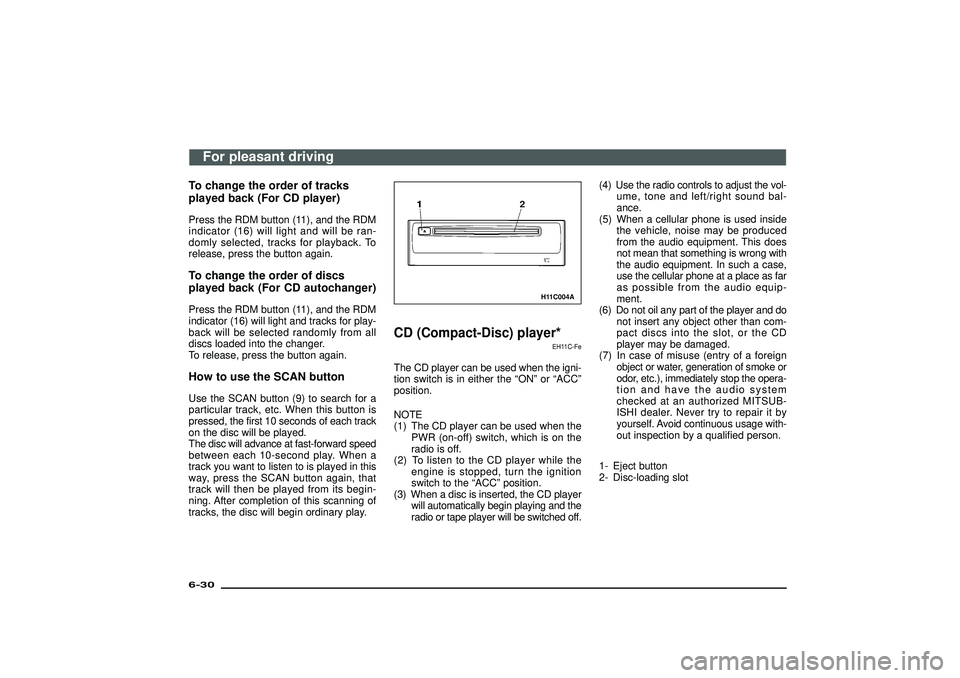
CD (Compact-Disc) player*
EH11C-Fe
The CD player can be used when the igni-
tion switch is in either the“ON”or“ACC”
position.
NOTE
(1) The CD player can be used when the
PWR (on-off) switch, which is on the
radio is off.
(2) To listen to the CD player while the
engine is stopped, turn the ignition
switch to the“ACC”position.
(3) When a disc is inserted, the CD player
will automatically begin playing and the
radio or tape player will be switched off.(4) Use the radio controls to adjust the vol-
ume, tone and left/right sound bal-
ance.
(5) When a cellular phone is used inside
the vehicle, noise may be produced
from the audio equipment. This does
not mean that something is wrong with
the audio equipment. In such a case,
use the cellular phone at a place as far
as possible from the audio equip-
ment.
(6) Do not oil any part of the player and do
not insert any object other than com-
pact discs into the slot, or the CD
player may be damaged.
(7) In case of misuse (entry of a foreign
object or water, generation of smoke or
odor, etc.), immediately stop the opera-
tion and have the audio system
checked at an authorized MITSUB-
ISHI dealer. Never try to repair it by
yourself. Avoid continuous usage with-
out inspection by a qualified person.
1- Eject button
2- Disc-loading slot
For pleasant driving
6-30Div:
Out put date:
Page 251 of 392
To listen to a disc1. Insert the disc with the label facingupward.
When a disc is inserted, the CD player
will begin playing even if the radio or
tape player is being used.
2. To adjust the volume and tone, use the controls on the radio.
Refer to “How to adjust the volume ”and
“ How to adjust the tone ”on page 6-4.
3. When the eject button (1) is pressed, the disc will automatically stop and be
ejected.
4 . Whe nthe 3-inc hcompac tdis cis used,
playback can be made without using the
adapter. Insert the disc about in the cen-
tre of the discloading slot.
5. For information concerning the han- dling of compact discs, refer to the sec-
tion “Handling of compact discs ”on
page 6-33.
H12H079A
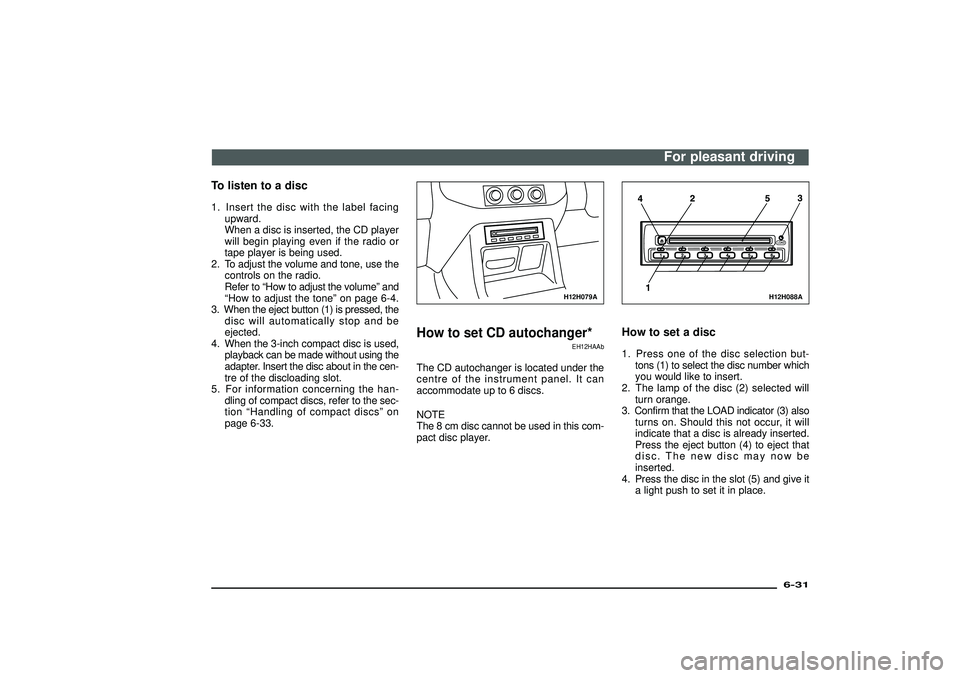
How to set CD autochanger*
EH12HAAb
The CD autochanger is located under the
centre of the instrument panel. It can
accommodate up to 6 discs.
NOTE
The 8 cm disc cannot be used in this com-
pact disc player.
H12H088A
How to set a disc1. Press one of the disc selection but- tons (1) to select the disc number which
you would like to insert.
2. The lamp of the disc (2) selected will turn orange.
3. Confirm that the LOAD indicator (3) also turns on. Should this not occur, it will
indicate that a disc is already inserted.
Press the eject button (4) to eject that
disc. The new disc may now be
inserted.
4. Press the disc in the slot (5) and give it a light push to set it in place.
For pleasant driving
6-31
Div:
Out put date: