service MITSUBISHI SHOGUN 2017 (in English) Service Manual
[x] Cancel search | Manufacturer: MITSUBISHI, Model Year: 2017, Model line: SHOGUN, Model: MITSUBISHI SHOGUN 2017Pages: 394, PDF Size: 19 MB
Page 198 of 394
Roof carrier precautionCAUTIONlMake sure that the weight of the luggage
does not exceed the allowable roof load.
If the allowable roof load is exceeded, this may cause damage to the vehicle.
The roof load is the total allowable load on
the roof (the weight of the roof carrier plus
the weight of luggage placed on the roof car- rier).
For specific figures, please refer to “Maxi-
mum roof load” on page 11-06 .
l When luggage is loaded onto the vehicle,
please make sure to drive slowly and avoid
excessive manoeuvres such as sudden brak- ing or quick turning.
In addition, place the luggage on the carrier
so that its weight is distributed evenly with the heaviest items on the bottom. Do not load items that are wider than the roof carri-
er.
The additional weight on the roof could raise
the vehicle’s centre of gravity and affect ve- hicle handling characteristics.
As a result, driving errors or emergency ma-
noeuvres could lead to a loss of control and
result in an accident.
l Before driving and after travelling a short
distance, always check the load to make sure it is securely fastened to the roof carrier.
Check periodically during your travel that
the load remains secure.NOTEl To prevent wind noise or reduction in fuel
economy, remove the roof carrier when not
in use.
l Before using an automatic car wash, remove
the roof carrier.
l Be sure that adequate clearance is main-
tained for raising the sunroof (if so equip-
ped) when installing a roof carrier.Trailer towing
E00610001850
In order to tow a trailer with your vehicle,
when having a trailer towing device mounted that meets all relevant regulations in your
area, consult a MITSUBISHI MOTORS Au-
thorized Service Point.
The regulations concerning the towing of a
trailer may differ from country to country. You are advised to obey the regulations in
each area.
CAUTIONl Danger of Accident!
A towing bar should be fitted according to MITSUBISHI MOTORS guidelines.
When you are going to tow a trailer, move
the transfer shift lever to “4H” position.
Selecting the “2H” drive may increase the differential oil temperature, resulting in pos-sible damage to the driving system.
Further, the drive train will be subjected to
excessive loading possibly leading to oil leakage, component seizure, or other serious faults.
Maximum towable weight with
brake and maximum trailer- nose weight
Never exceed the maximum towable weight
with brake and the maximum trailer-nose weight as listed in the specifications. (Referto “Vehicle weight” on page 11-06 .)
If you tow a trailer at an altitude of more than
1,000 m above sea-level, reduce your weight
by 10 % of the gross combination weight for
every increase of 1,000 m above sea-level, as the engine output is lowered owing to de-
crease in atmospheric pressure.
Trailer towing
6-60OVWX17E1Starting and driving6
Page 213 of 394
NOTElThe rear air conditioning will not operate
unless the front air conditioning compressor
is operating.
Always switch the front air conditioning
compressor on before using the rear air con- ditioning. If the front air conditioning com-
pressor is not operating, the system will just operate as a blower.Important operation tips for
the air conditioning E00708302261
lPark the vehicle in the shade.
Parking in the hot sun will make the ve-
hicle inside extremely hot, and it will re-
quire more time to cool the interior.
If it is necessary to park in the sun, open the windows for the first few minutes of
air conditioning operation to expel the
hot air.
l Close the windows when the air condi-
tioning is in use. The entry of outside air
through open windows will reduce the cooling efficiency.
l Too much cooling is not good for the
health. The inside air temperature should
only be 5 to 6 °C below the outside air temperature.
l When operating the system, make sure
the air intake, which is located in front
of the windscreen, is free of obstructions such as leaves and snow. Leaves collec- ted in the air-intake plenum may reduce
air flow and plug the plenum water
drains.
Air conditioning system refrig- erant and lubricant recommen-dations
If the air conditioning seems less effective than usual, the cause might be a refrigerant
leak. We recommend you to have the system inspected.
[Except for vehicles equipped with air condi- tioning refrigerant (HFO-1234yf) label]
The air conditioning system in your vehicle must be charged with the refrigerant
HFC-134a and the lubricant ND-OIL8.
[Vehicles equipped with air conditioning re- frigerant (HFO-1234yf) label]
The air conditioning system in your vehicle must be charged with the refrigerant
HFO-1234yf and the lubricant ND-OIL12.
Refer to “Refill capacities” on page 11-14.
For details, we recommend you to consult a
MITSUBISHI MOTORS Authorized Service
Point.
During a long period of disuse
The air conditioning should be operated for at
least five minutes each week, even in cold weather. This is to prevent the compressor
from seizing and to maintain the air condi- tioning in the best operating condition.
Air purifier (with
deodorizing function) E00708400183
An air filter is incorporated into the air condi-tioning system to remove pollen, dust, tobac-
co smells and exhaust smells.
The air filter’s ability to collect pollen and
dirt is reduced as it becomes dirty, so replace it periodically. For the maintenance interval, refer to the “SERVICE BOOKLET”.
NOTEl Operation in certain conditions such as driv-
ing on a dusty road and frequent use of the air conditioning can lead to reduction of
service life of the filter. When the air flow rate suddenly drops or when the windscreenor windows start to fog up easily, the air fil-
ter requires replacement. We recommend
you to have it checked.
Important operation tips for the air conditioning
7-11OVWX17E1For pleasant driving7
Page 223 of 394
Important Points on Safetyfor the Customer E00737000035
This product features a number of pictorial indications as well as points concerning han-
dling so that you can use the product correct-
ly and in a safe manner, as well as prevent in-
jury or damage to yourself, other users, or
property.WARNINGl The driver should not pay close attention
to the display while driving.
This may prevent the driver looking where they are going, and cause an acci-
dent.
l The driver should not perform complica-
ted operations while driving.
Performing complicated operations while driving may prevent the driver looking
where they are going, and cause an acci- dent.
Therefore stop the vehicle in a safe loca- tion before performing such operations.
l Do not use during malfunctions, such as
when no sound is audible.
This may lead to accident, fire, or electric shock.
l Ensure water or other foreign objects do
not enter the product.
This may lead to smoking, fire, electric shock, or malfunction.WARNINGl Do not insert foreign objects into the disc
slot.
This may lead to fire, electric shock, or malfunction.
l In the event of abnormalities occurring
when foreign objects or water enter the
product, resulting in smoke or a strange
smell, immediately stop using the product, and consult a MITSUBISHI MOTORS
Authorized Service Point.
Continuing to use the product may result in accident, fire, or electric shock.
l Do not disassemble or modify the prod-
uct.
This may lead to malfunction, fire, or
electric shock.
l During thunderstorms, do not touch the
antenna or the front panel.
This may lead to electrical shock from lightning.CAUTIONl Do not block ventilation holes or heat sinks
on the product.
Blocking ventilation holes or heat sinks may prevent heat from escaping from within theproduct, leading to fire or malfunction.CAUTIONl Do not turn the volume up to the extent that
you cannot hear sounds from outside the ve-
hicle while driving.
Driving without being able to hear sounds from outside the vehicle may result in an ac-
cident.
l Do not insert your hand or fingers into the
disc slot.
This may result in injury.Operation Keys
E00737100023Turn the Power ON/ OFF
E00737200024
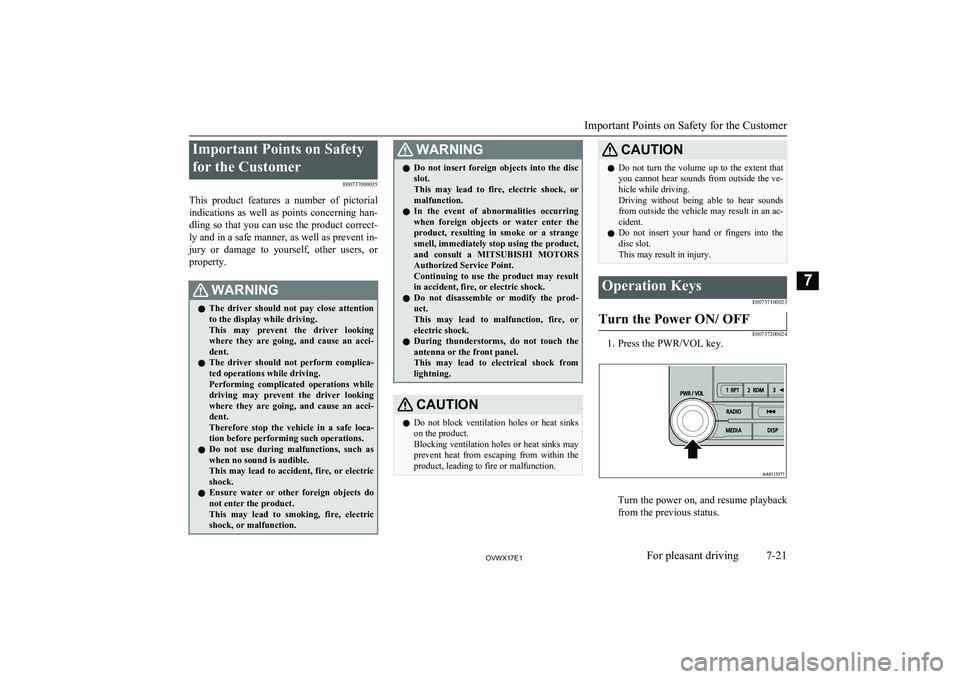
1. Press the PWR/VOL key.
Turn the power on, and resume playback
from the previous status.
Important Points on Safety for the Customer
7-21OVWX17E1For pleasant driving7
Page 226 of 394
15- key/ key
For audio, select audio track/file; for ra-
dio, perform automatic station selection
or ensemble/service station selection.16- MENU key Switch to Menu mode.17-/SEL key
Adjust audio quality and select items.
For radio, manually select stations.*:Requires a separately-purchased Bluetooth-capable audio device in equipment by type (vehicles with a Bluetooth ®
2.0 interface).
Steering wheel audio remote
control switches*
E00737601214
1- Vol + key, - key Adjust audio functions and the mobile
phone function volume.
2- CH
key, key
Select CD and other audio source tracks
and radio stations.
Hold down to skip up and down through tracks.
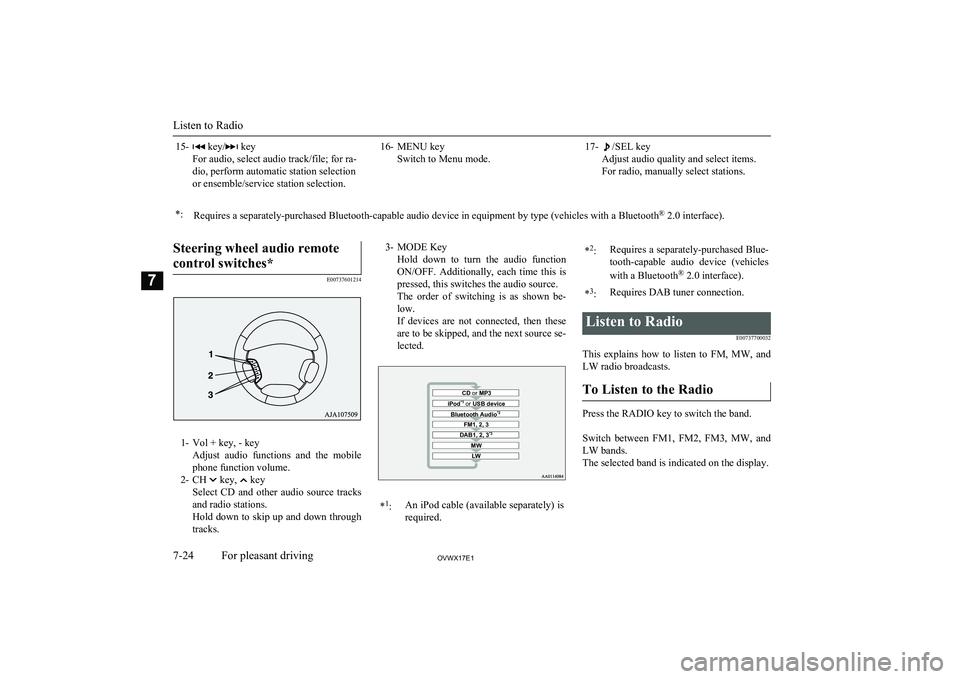
3- MODE Key
Hold down to turn the audio functionON/OFF. Additionally, each time this is
pressed, this switches the audio source.
The order of switching is as shown be- low.
If devices are not connected, then these are to be skipped, and the next source se-lected.CD or MP3MWLWDAB1, 2, 3 *3FM1, 2, 3Bluetooth Audio *2iPod*1
or USB device*1
:An iPod cable (available separately) is
required.* 2
:Requires a separately-purchased Blue-
tooth-capable audio device (vehicles
with a Bluetooth ®
2.0 interface).*3
:Requires DAB tuner connection.Listen to Radio
E00737700032
This explains how to listen to FM, MW, and
LW radio broadcasts.
To Listen to the Radio
Press the RADIO key to switch the band.
Switch between FM1, FM2, FM3, MW, and LW bands.
The selected band is indicated on the display.
Listen to Radio
7-24OVWX17E1For pleasant driving7
Page 228 of 394
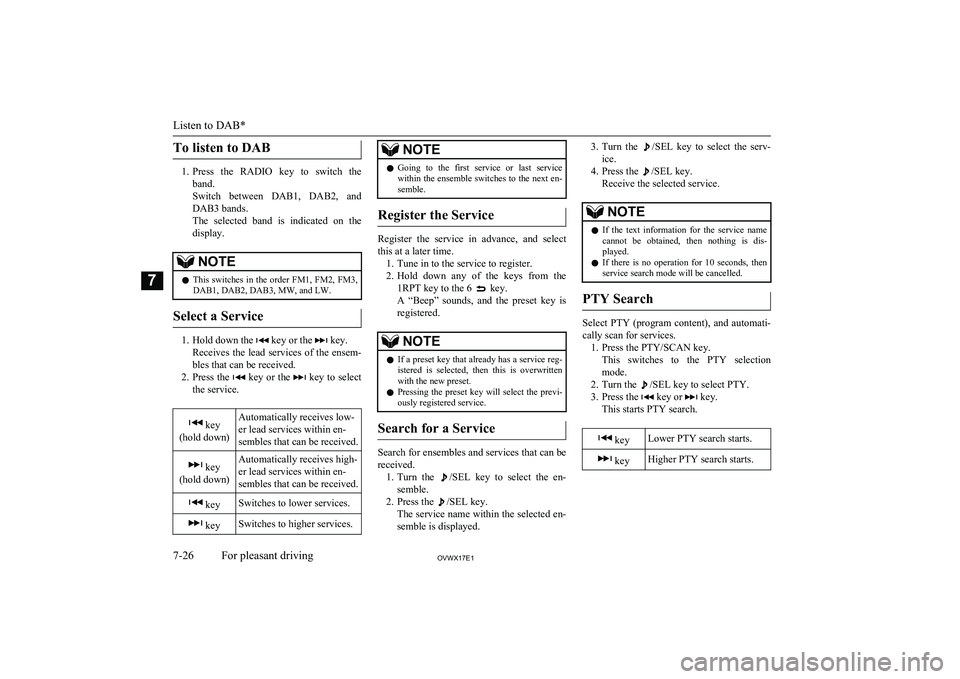
To listen to DAB
1.Press the RADIO key to switch the
band.
Switch between DAB1, DAB2, and DAB3 bands.
The selected band is indicated on the
display.
NOTEl This switches in the order FM1, FM2, FM3,
DAB1, DAB2, DAB3, MW, and LW.
Select a Service
1. Hold down the key or the key.
Receives the lead services of the ensem-
bles that can be received.
2. Press the
key or the key to select
the service.
key
(hold down)Automatically receives low-
er lead services within en-
sembles that can be received. key
(hold down)Automatically receives high-
er lead services within en-
sembles that can be received. keySwitches to lower services. keySwitches to higher services.NOTEl Going to the first service or last service
within the ensemble switches to the next en-
semble.
Register the Service
Register the service in advance, and select
this at a later time. 1. Tune in to the service to register.
2. Hold down any of the keys from the
1RPT key to the 6
key.
A “Beep” sounds, and the preset key is registered.
NOTEl If a preset key that already has a service reg-
istered is selected, then this is overwrittenwith the new preset.
l Pressing the preset key will select the previ-
ously registered service.
Search for a Service
Search for ensembles and services that can be
received. 1. Turn the
/SEL key to select the en-
semble.
2. Press the
/SEL key.
The service name within the selected en-
semble is displayed.
3. Turn the /SEL key to select the serv-
ice.
4. Press the
/SEL key.
Receive the selected service.
NOTEl If the text information for the service name
cannot be obtained, then nothing is dis-
played.
l If there is no operation for 10 seconds, then
service search mode will be cancelled.
PTY Search
Select PTY (program content), and automati-
cally scan for services. 1. Press the PTY/SCAN key. This switches to the PTY selection
mode.
2. Turn the
/SEL key to select PTY.
3. Press the
key or key.
This starts PTY search.
keyLower PTY search starts. keyHigher PTY search starts.
Listen to DAB*
7-26OVWX17E1For pleasant driving7
Page 242 of 394
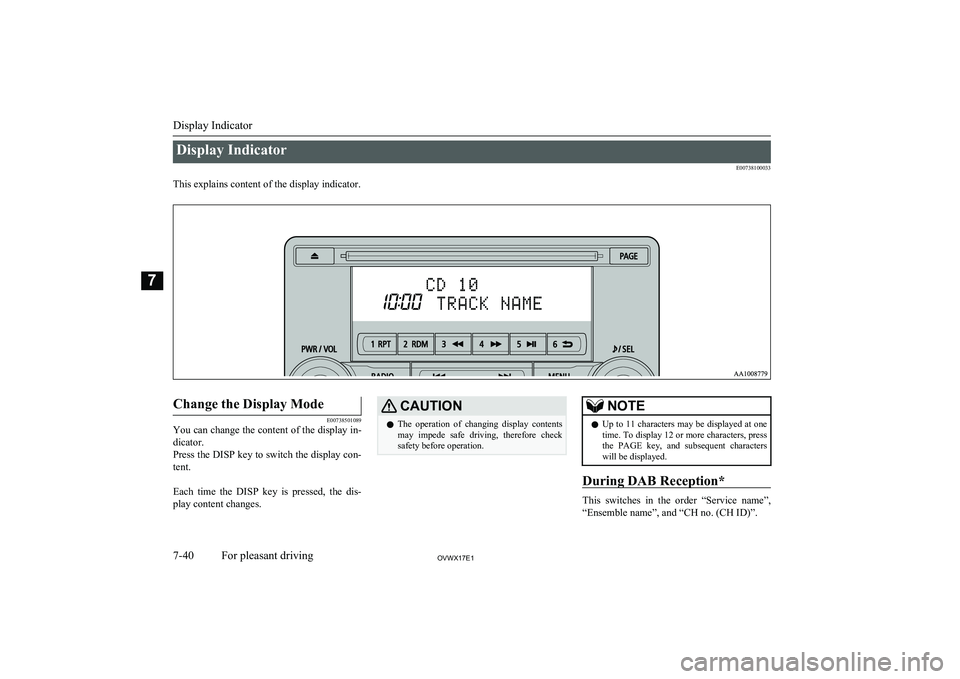
Display IndicatorE00738100033
This explains content of the display indicator.
Change the Display Mode
E00738501089
You can change the content of the display in-
dicator.
Press the DISP key to switch the display con- tent.
Each time the DISP key is pressed, the dis- play content changes.
CAUTIONl The operation of changing display contents
may impede safe driving, therefore check safety before operation.NOTEl Up to 11 characters may be displayed at one
time. To display 12 or more characters, pressthe PAGE key, and subsequent characters will be displayed.
During DAB Reception*
This switches in the order “Service name”,
“Ensemble name”, and “CH no. (CH ID)”.
Display Indicator
7-40OVWX17E1For pleasant driving7
Page 243 of 394
NOTElIf the text information for the service name
and ensemble name cannot be obtained, then
nothing is displayed.
During CD-DA playback
This switches in the order “Disc title”,
“Track title”, and “Operating status”.
NOTEl If there is no text information to display,
then “NO TITLE” is displayed.
During MP3/WMA/AAC Play-
back
This switches in the order “Folder title”,
“File title”, and “Operating status”.
NOTEl If there is no text information to display,
then “NO TITLE” is displayed.
Display the ID3tag
Hold down the DISP key.
This switches the ID3tag display.
[DISP] Each time the key is pressed, this
switches in the order “Album name”, “Track name”, “Artist name”, “Genre name”*, and “Operating status”.*:Displayed when playing back audio
files on a USB device (vehicles with a
Bluetooth ®
2.0 interface).NOTEl During display of the ID3tag, hold down the
DISP key to switch to the folder title dis- play.
l The genre name display may not be possible.During iPod Playback
E00738900015
This switches in the order “Albums”, “Track
name”, “Artist name”, “Genre name”*, and
“Operating status”.
NOTEl If there is no text information to display,
then “NO TITLE” is displayed.
l Displayed genre name in equipment by type
(vehicles with a Bluetooth ®
2.0 interface).
l The genre name display may not be possible.During Bluetooth ®
2.0 Audio
Playback*
E00739000013
Operating details are the same as in “During
iPod Playback” on page 7-41.
Audio Quality and Volume
Balance Adjustment E00738200021
Change audio quality settings.
Adjust Audio Quality and Vol-ume Balance
1. Press the /SEL key to select settings
items.
Each time the
/SEL key is pressed,
this switches in the order BASS, TRE-
BLE, FADER, BALANCE, SCV, and
Cancel.
2. Turn the
/SEL key to adjust.
Ad-
just-
ment
items
Turn counter- clockwiseTurn clockwise
BASS-6 to 0
(low low-pass
volume)0 to +6
(high low-pass
volume)
Audio Quality and Volume Balance Adjustment
7-41OVWX17E1For pleasant driving7
Page 249 of 394
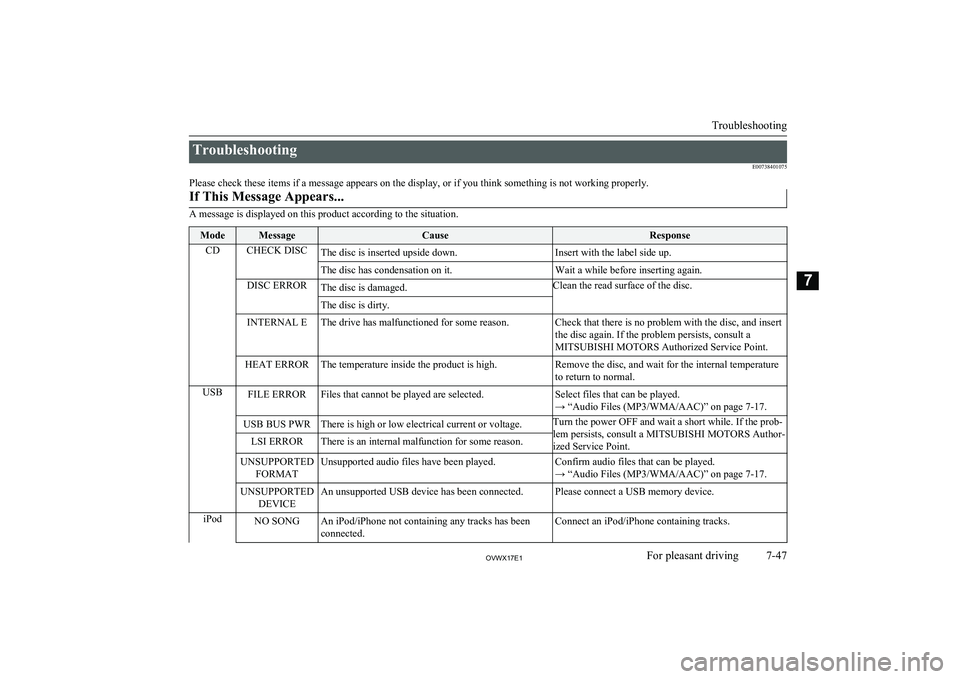
TroubleshootingE00738401075
Please check these items if a message appears on the display, or if you think something is not working properly.If This Message Appears...
A message is displayed on this product according to the situation.
ModeMessageCauseResponseCDCHECK DISCThe disc is inserted upside down.Insert with the label side up.The disc has condensation on it.Wait a while before inserting again.DISC ERRORThe disc is damaged.Clean the read surface of the disc.The disc is dirty.INTERNAL EThe drive has malfunctioned for some reason.Check that there is no problem with the disc, and insert
the disc again. If the problem persists, consult a
MITSUBISHI MOTORS Authorized Service Point.HEAT ERRORThe temperature inside the product is high.Remove the disc, and wait for the internal temperature
to return to normal.USBFILE ERRORFiles that cannot be played are selected.Select files that can be played.
→ “Audio Files (MP3/WMA/AAC)” on page 7-17.USB BUS PWRThere is high or low electrical current or voltage.Turn the power OFF and wait a short while. If the prob-
lem persists, consult a MITSUBISHI MOTORS Author- ized Service Point.LSI ERRORThere is an internal malfunction for some reason.UNSUPPORTED FORMATUnsupported audio files have been played.Confirm audio files that can be played.
→ “Audio Files (MP3/WMA/AAC)” on page 7-17.UNSUPPORTED DEVICEAn unsupported USB device has been connected.Please connect a USB memory device.iPodNO SONGAn iPod/iPhone not containing any tracks has beenconnected.Connect an iPod/iPhone containing tracks.
Troubleshooting
7-47OVWX17E1For pleasant driving7
Page 250 of 394
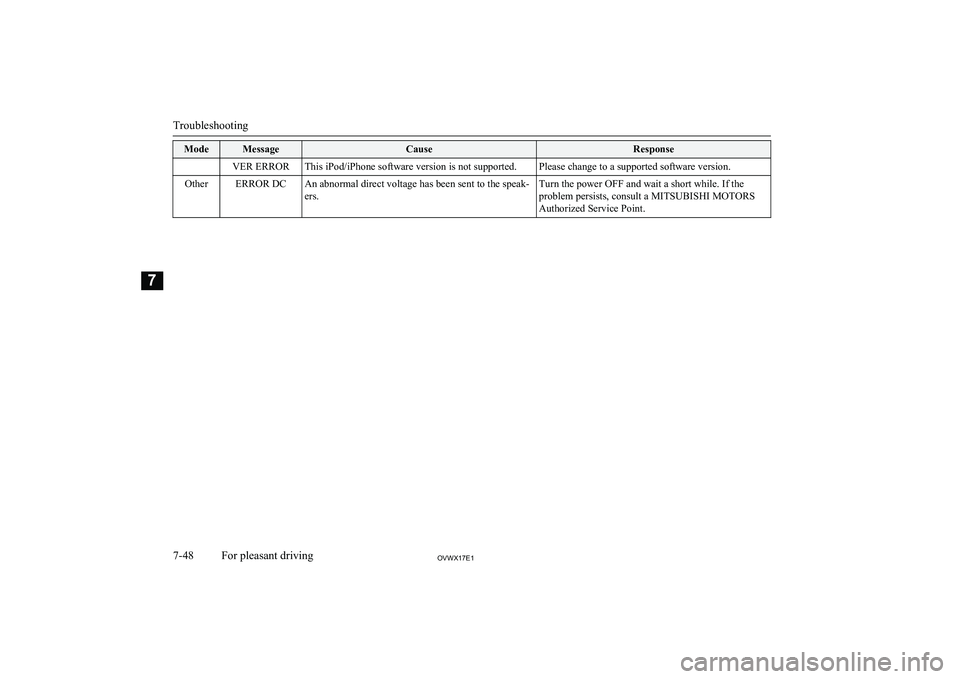
ModeMessageCauseResponseVER ERRORThis iPod/iPhone software version is not supported.Please change to a supported software version.OtherERROR DCAn abnormal direct voltage has been sent to the speak-
ers.Turn the power OFF and wait a short while. If the
problem persists, consult a MITSUBISHI MOTORS Authorized Service Point.
Troubleshooting
7-48OVWX17E1For pleasant driving7
Page 253 of 394
The Bluetooth®
2.0 interface can be used
when the ignition switch is in the “ON” or
“ACC” position.
Before you can use the Bluetooth ®
2.0 inter-
face, you must pair the Bluetooth ®
device
and Bluetooth ®
2.0 interface. Refer to “Con-
necting the Bluetooth® 2.0 interface and
Bluetooth® device” on page 7-56.
Bluetooth ®
is a registered trademark of
BLUETOOTH SIG, INC.WARNINGl Although the Bluetooth ®
2.0 interface al-
lows you to make hands-free calls, if you choose to use the cellular phone while
driving, you must not allow yourself to be
distracted from the safe operation of your vehicle. Anything, including cellularphone usage, that distracts you from the safe operation of your vehicle increases
your risk of an accident.
l Refer to and comply with all state and lo-
cal laws in your area regarding cellular phone usage while driving.NOTEl The Bluetooth ®
2.0 interface cannot be used
if the Bluetooth ®
device has a flat battery or
the device power is turned off.
l Hands-free calls will not be possible if your
phone does not have service available.
l If you place the Bluetooth ®
device in the ve-
hicle’s third seat or luggage compartment,
you may not be able to use the Bluetooth ®
2.0 interface.
l Some Bluetooth ®
devices are not compatible
with the Bluetooth ®
2.0 interface.
l You can confirm the Link System software
version by pressing the HANG-UP button 3
times (press and hold 2 times and then press briefly) within 10 seconds.
l For details on the Bluetooth ®
2.0 interface,
you can see them by accessing the
MITSUBISHI MOTORS website.
Please read and agree on the “Warning about
Links to the Web Sites of Other Companies” because it connects to other thanMITSUBISHI MOTORS website.
http://www.mitsubishi-motors.com/en/prod-
ucts/index.html
l Software updates by cellular phone/digital
audio device manufacturers may change/
alter device connectivity.
“Steering control switch and microphone” on
page 7-51
Voice recognition function ® p. 7-52
Useful voice commands ® p. 7-53
Speaker enrollment function ® p. 7-55
Connecting the Bluetooth® 2.0 interface and
Bluetooth® device ® p. 7-56
Operating a music player connected via Blue- tooth® ® p. 7-61
How to make or receive hands-free calls
® p. 7-61
Phone book function ® p. 7-64Steering control switch and mi-
crophone
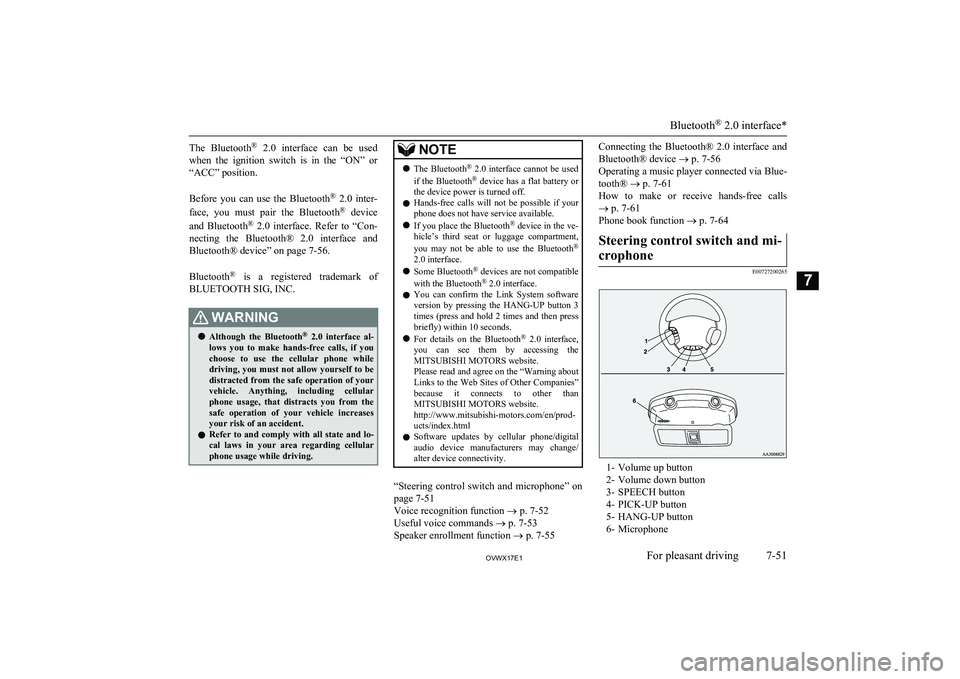
E00727200265
1- Volume up button
2- Volume down button
3- SPEECH button
4- PICK-UP button
5- HANG-UP button
6- Microphone
Bluetooth ®
2.0 interface*
7-51OVWX17E1For pleasant driving7