meter NISSAN 300ZX 1984 Z31 Electrical System Owner's Guide
[x] Cancel search | Manufacturer: NISSAN, Model Year: 1984, Model line: 300ZX, Model: NISSAN 300ZX 1984 Z31Pages: 116, PDF Size: 3.42 MB
Page 54 of 116
METER AND GAUGES - Digital Type Combination Meter
Speed Sensor Signal Check
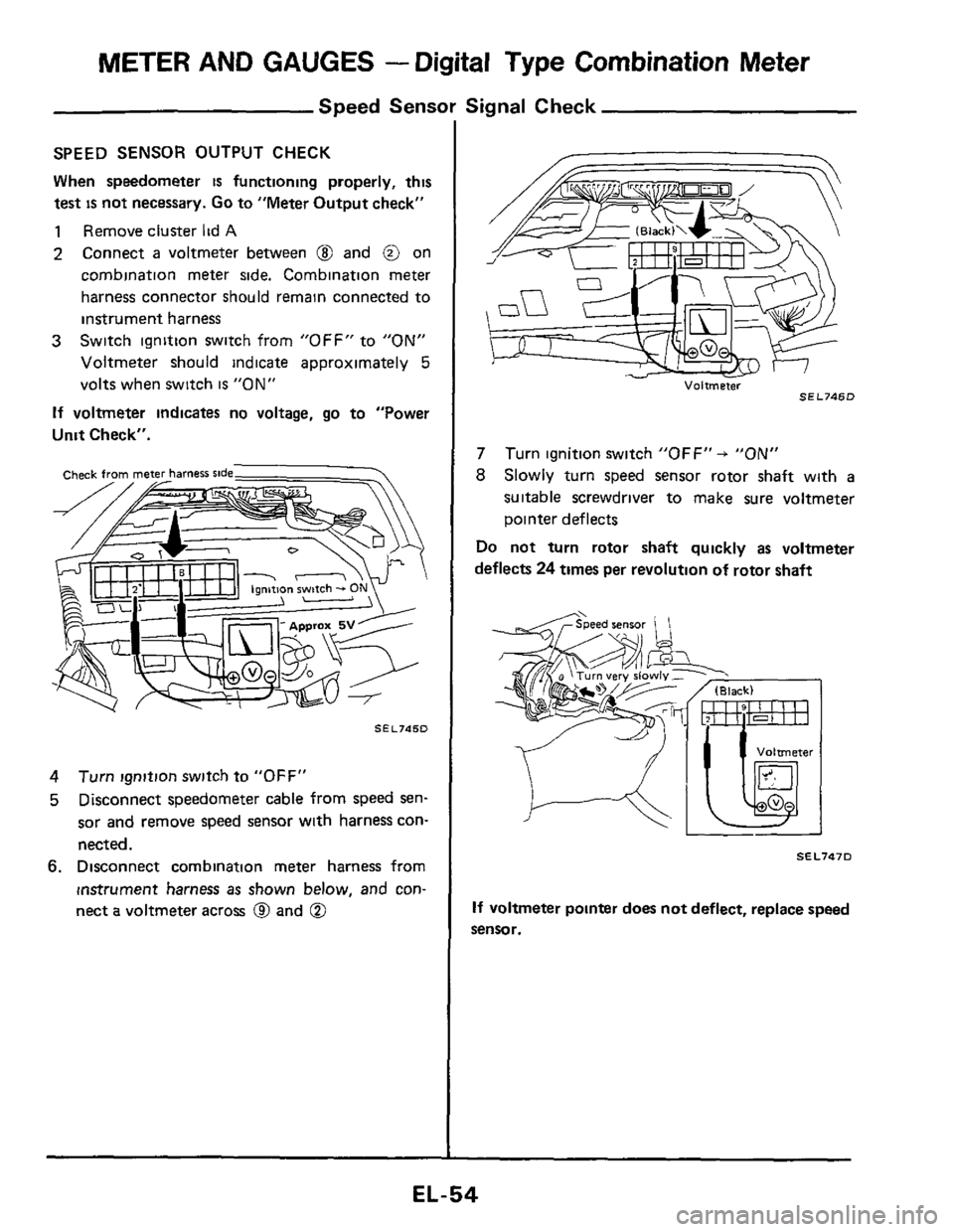
SPEED SENSOR OUTPUT CHECK
When speedometer
is functioning properly, this
test
is not necessary. Go to "Meter Output check"
1 Remove cluster lid A
2 Connect a voltmeter between @ and @ on
cornbination meter side. Combination meter
harness connector should remain connected to
instrument harness
Switch ignition switch from "OFF" to
"ON"
Voltmeter should indicate approximately 5
volts when switch is "ON"
If voltmeter indicates no voltage, go to "Power
Unit Check".
3
SEL745D
4
5
Turn ignition switch to "OFF"
Disconnect speedometer cable from speed
sen-
sor and remove speed sensor with harness con-
nected.
6. Disconnect combination meter harness from
instrument harness
as shown below, and con-
nect
a voltmeter across @ and @
Voltmeter SEL746D
7
8
Turn ignition switch "OFF" + "ON"
Slowly turn speed sensor rotor shaft with a
suitable screwdriver to make sure voltmeter
pointer deflects
Do not turn rotor shaft quickly as voltmeter
deflects
24 times per revolution of rotor shaft
SEL747D
If voltmeter pointer does not deflect, replace speed
sensor.
EL-54
Page 55 of 116
METER AND GAUGES - Digital Type Combination Meter
Speed Sensor Si!
METER OUTPUT CHECK
Combination meter emits speed sensor signal to
control
E C.C.S. control unit, A.S.C D. control
unit, voice warning
unit and AIT control unit.
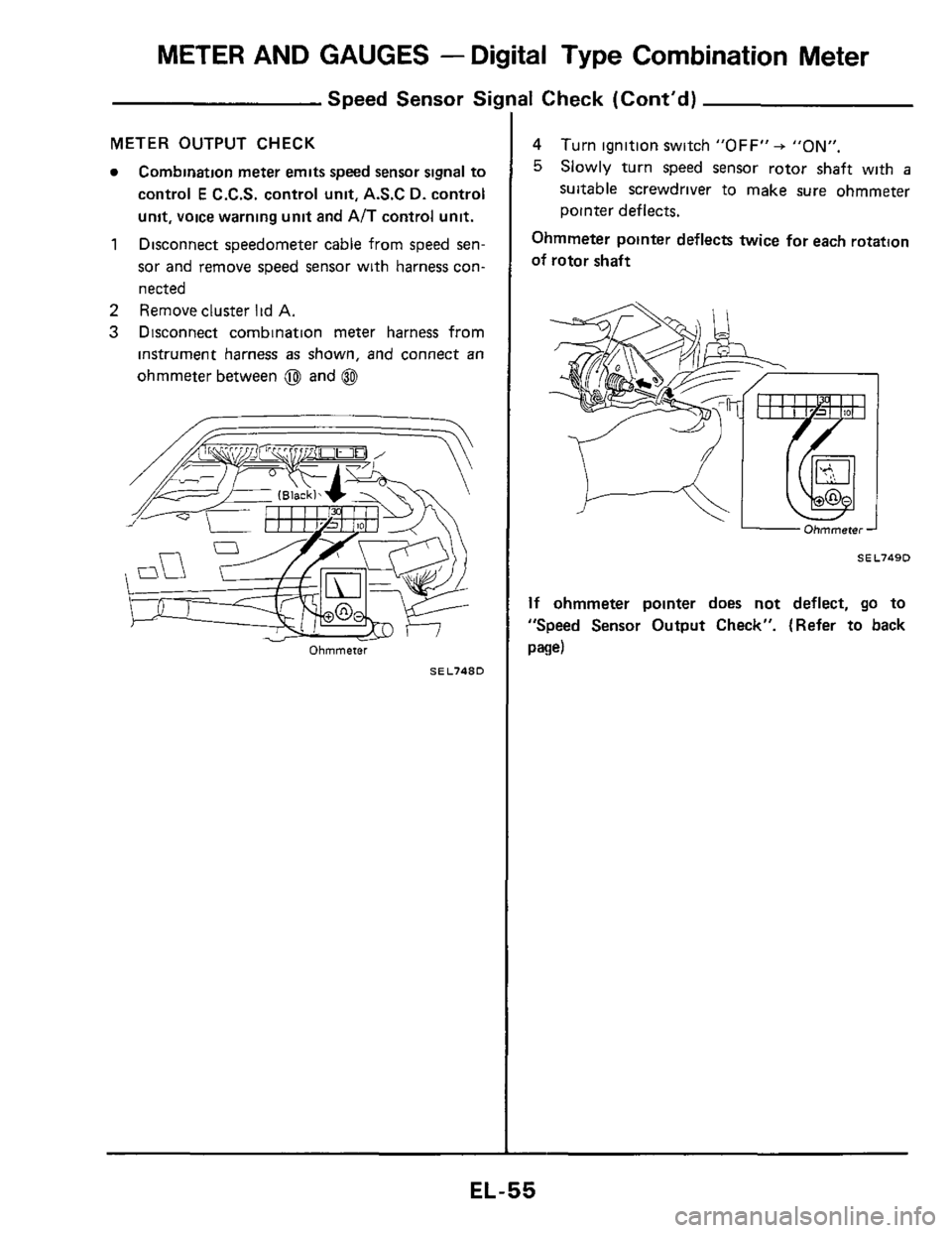
Disconnect speedometer cable from speed sen-
sor and remove speed sensor with harness con-
nected 1
2 Remove cluster lid A.
3 Disconnect combination meter harness from
instrument harness
as shown, and connect an
ohmmeter between @ and 0
Ohmmeter
SEL748D
11 Check (Cont'd)
4
5
Turn ignition switch "OFF" + "ON".
Slowly turn speed sensor rotor shaft with a
suitable screwdriver to make sure ohmmeter
pointer deflects.
Ohmmeter pointer deflects twice for each rotatton
of rotor shaft
Ohmmeter -
SEL7490
If ohmmeter pointer does not deflect, go to
"Speed Sensor Output Check". (Refer to back
paw)
EL-55
Page 56 of 116
METER AND GAUGES - Digital Type Combination Meter
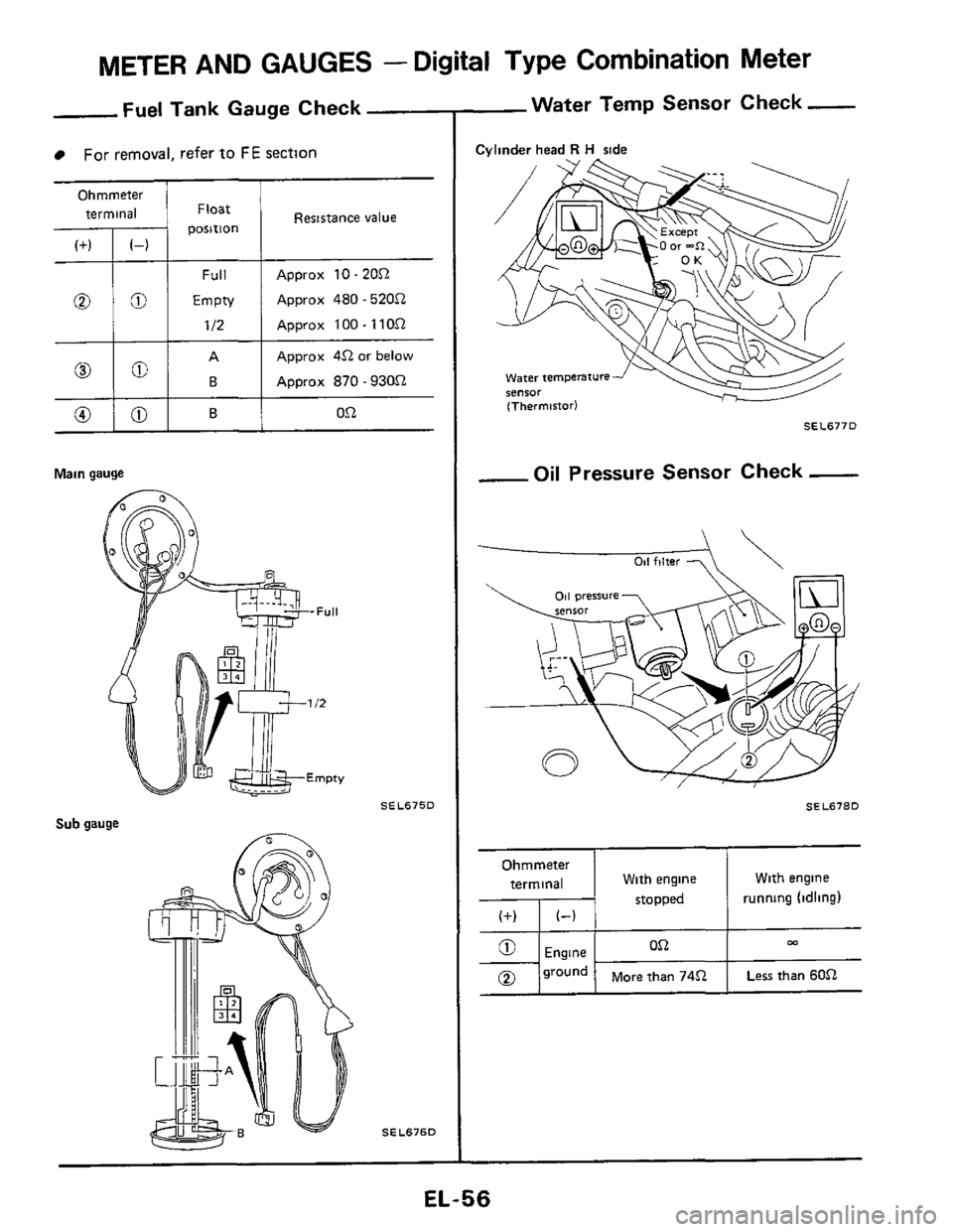
Fuel Tank Gauge Check
For removal, refer to FE section
Ohmmeter terminal Float
Main gauge
Resistance value
Approx 10 - 20Q
Approx 480 - 520Q
Approx 100 - 1 1 OQ
Approx 4Q or below
Approx
870.930Q
Sub gauge
SEL675D
SEL676D
-Water Temp Sensor Check -
Cylinder head R H side
SEL677D
-Oil Pressure Sensor Check -
-
011 filter 7 \
SEL678D
Ohmmeter
terminal With engine With engine
stopped 1 running (idling)
ca On
+I;'''' I More than 74Q I Less than 60.Q
EL-56
Page 57 of 116
METER AND GAUGES -Digital Type Combination Gauge
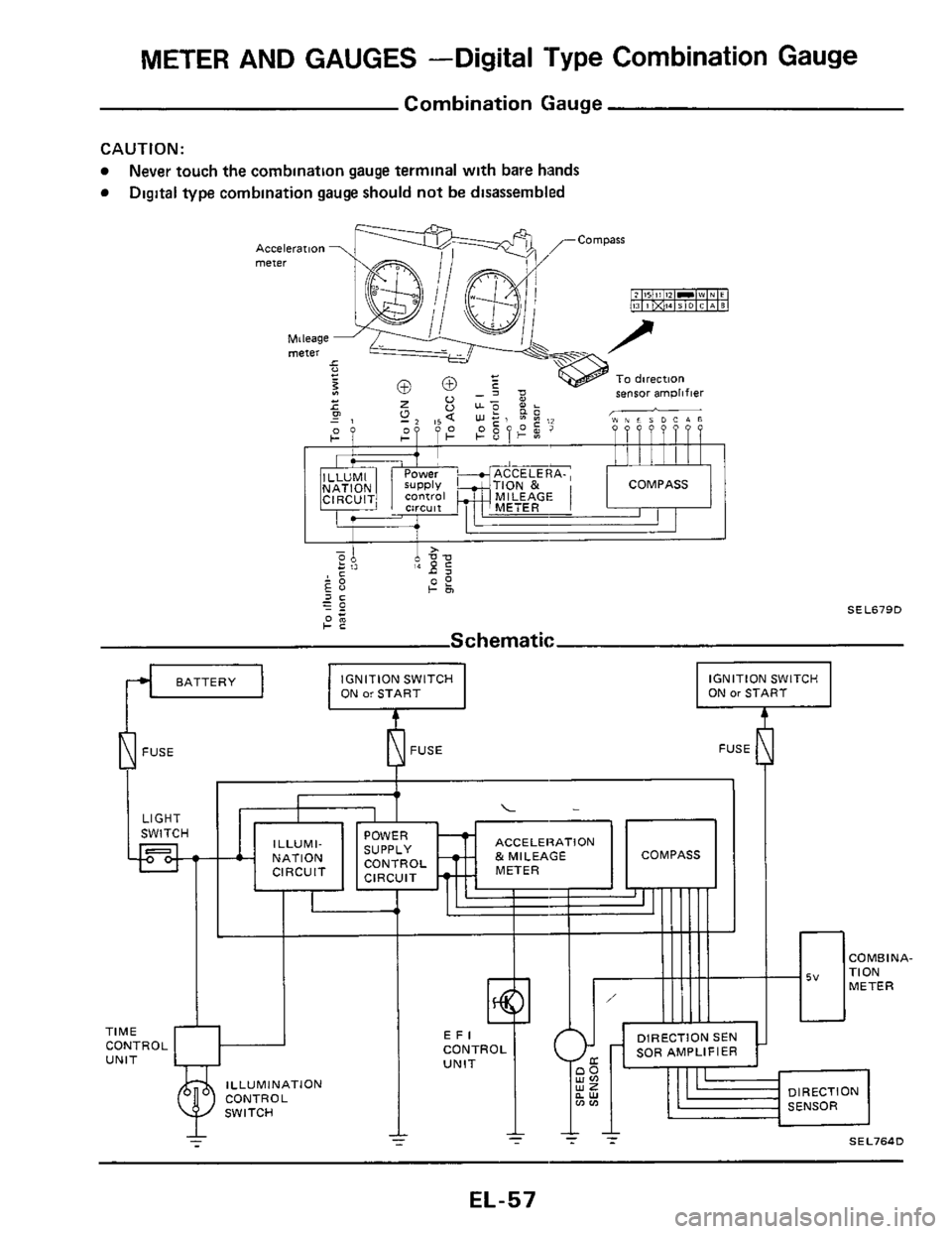
Combination Gauge
CAUTION:
Never touch the combination gauge terminal with bare hands
Digital type combination gauge should not be disassembled
ON or START IGNITION SWITCH
FUSE ~
PFUSE L-l
I
1
ACCELERATION
ILLUMINATION
EL-57
Page 58 of 116
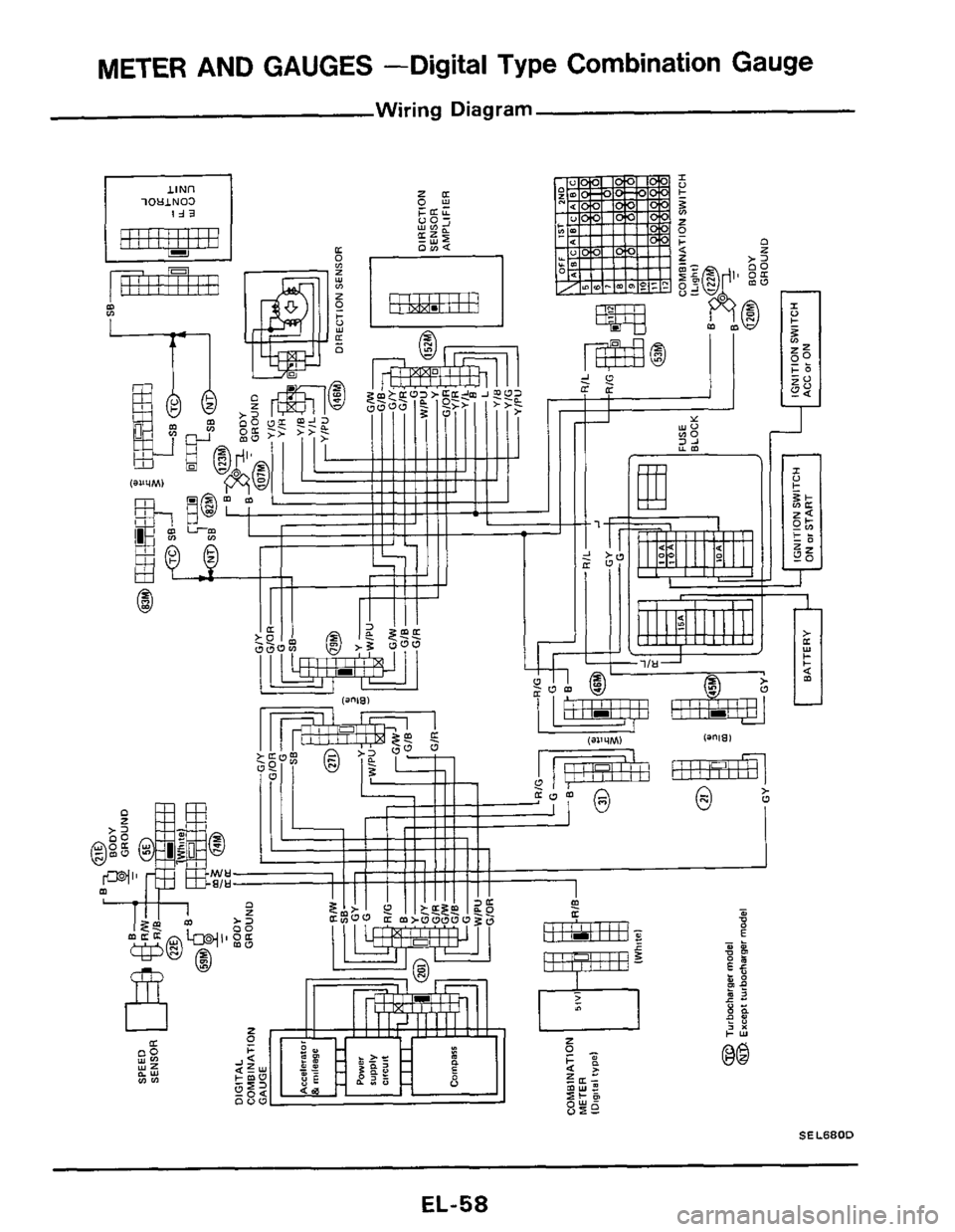
METER AND GAUGES -Digital Type Combination Gauge
Wiring Diagram
lOUlN03
m m
.? I
@q .
w-@ I I
SEL680D
EL-58
Page 59 of 116
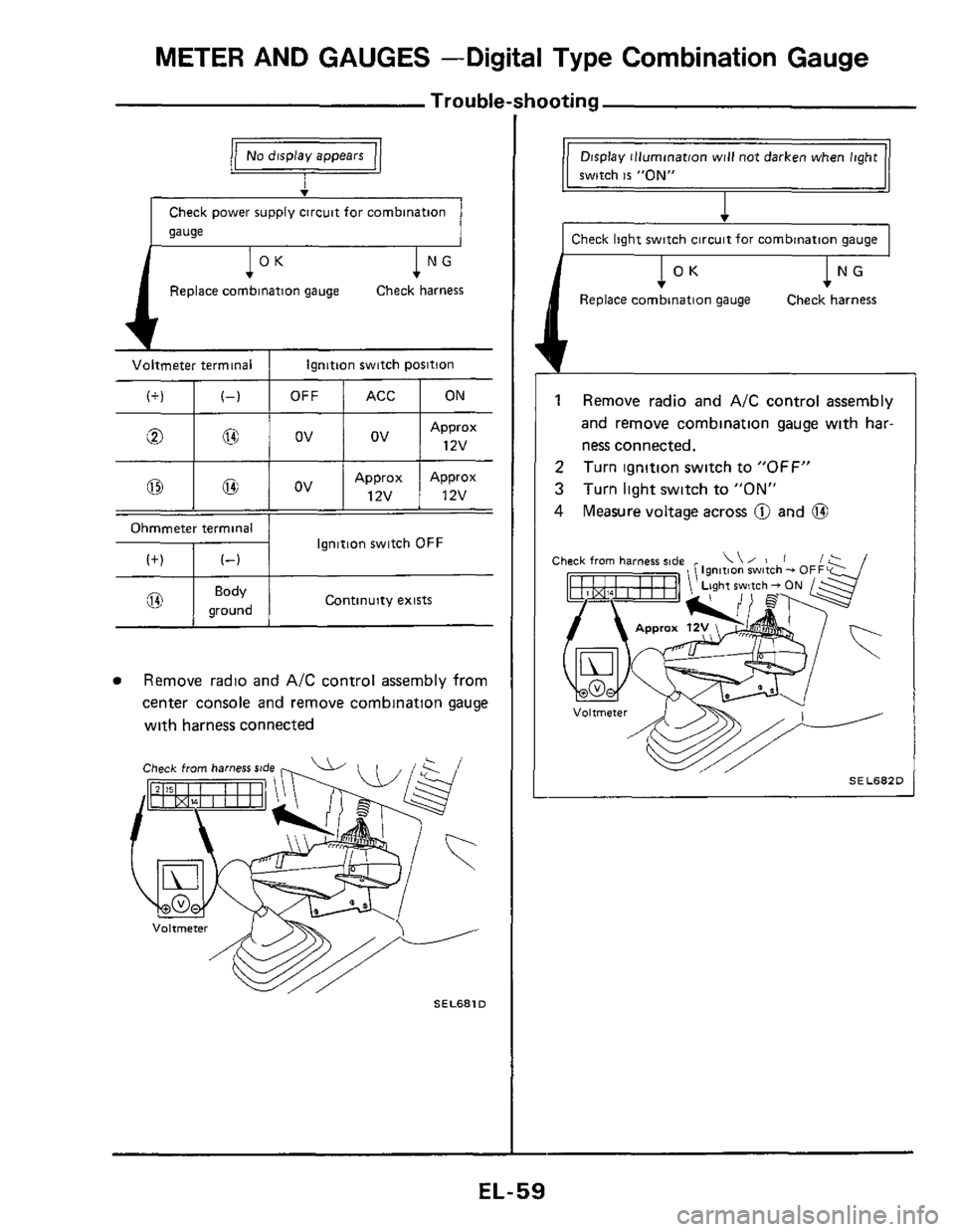
METER AND GAUGES -Digital Type Combination Gauge
Trouble-shooting
(+)
v
Check power supply circuit for combination
gauge
(-1
l°K 1 NG
Replace combination gauge Check harness
Voltmeter terminal I Ignition switch position
Approx Approx
@ I 03 I OV I 12v ! 12v
Continuity exists @ I gK:d I
Remove radio and A/C control assembly from
center console and remove combination gauge
with harness connected
Check from harness rtde
SEL681D
Display illumination will not darken when light
1 switch is "ON"
I Check light switch circuit for combination gauge I
1 Remove radio and A/C control assembly
and remove combination gauge with har-
ness connected.
Turn ignition switch to
"OFF"
Turn light switch to "ON"
Measure voltage across @ and @
2
3
4
Ignition switch - 0
ht switch - ON
SEL682D L
EL-59
Page 60 of 116
METER AND GAUGES -Digital Type Combination Gauge
,- Trouble-shooting (Cont'd)
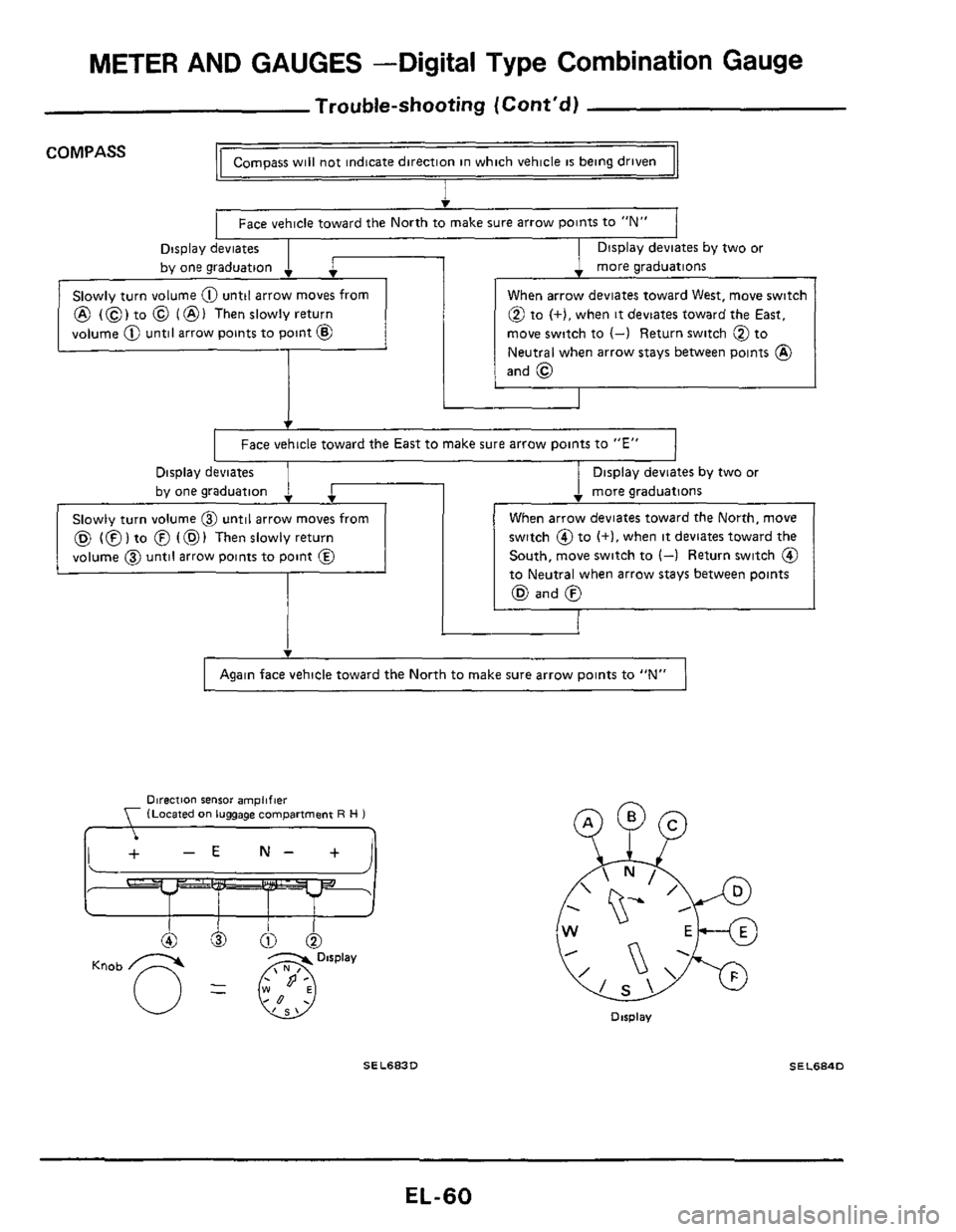
Compass will not indicate direction in which vehicle is being driven COMPASS
I
Face vehicle toward the North to make sure arrow points to "N"
Display deviates
by one graduation
. more graduations
Display deviates by two or
. 1 SIOWI~ turn volume 0 until arrow moves from
@ (0) to @ (@I Thenslowlyreturn
volume
@ until arrow points to point @
When arrow deviates toward West, move switch
@ to (+),when it deviates toward the East,
move switch to
(-) Return switch @ to
Neutral when arrow stays between points
@)
and @
I Face vehicle toward the East to make sure arrow points to "E" 1
Display deviates
SIOWIV turn volume @ until arrow moves from
(Q (0) to @ (@I Then slowly return
volume
@ until arrow points to point @
1 Display deviates by two or
. more graduations
switch @to (+I, when it deviates toward the
South, move switch
to (4 Return switch @
to Neutral when arrow stays between points
(Q and 0
I Again face vehicle toward the North to make sure arrow points to "N" 1
Direction sensor amplifier (Located on luggage compartment R H 1 , ,
Dirplav
SEL683D SEL684D
EL-60
Page 61 of 116
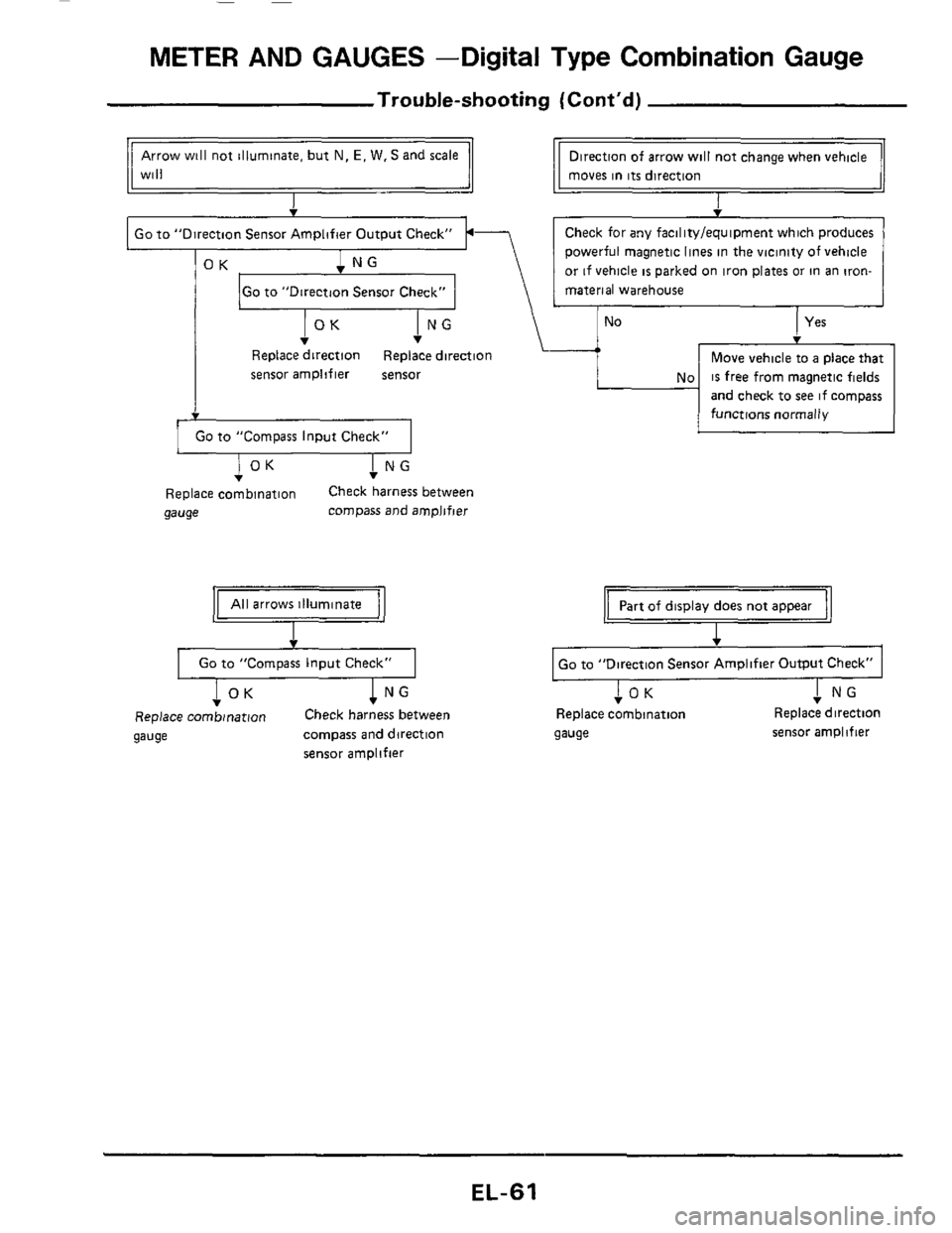
METER AND GAUGES -Digital Type Combination Gauge
Trouble-shooting (Cont'd)
Go to "Direction Sensor Check"
Arrow will not illuminate, but N, E, W. S and scale
Will
No
Direction of arrow will not change when vehicle
moves in
its direction
I
Yes
I Go to "Direction Sensor Amplifier Output Check" I.-
No
Move vehicle to a place that
is free from magnetic fields
and check to
see if compass
functions normally
I NG v
Replace direction Replace direction
sensor amplifier sensor
1 GO to "Compass Input Check" I
I NG T I OK T
Replace combination Check harness between
gauge compass and amplifier
All arrows illuminate
v
Go to "Compass Input Check"
T I OK ! NG
Replace combination Check harness between
gauge compass and direction
sensor amplifier
Part of display does not appear
I
Go to "Direction Sensor Amplifier Output Check"
I NG !OK T Replace combination Replace direction
gauge sensor amplifier
EL-61
Page 62 of 116
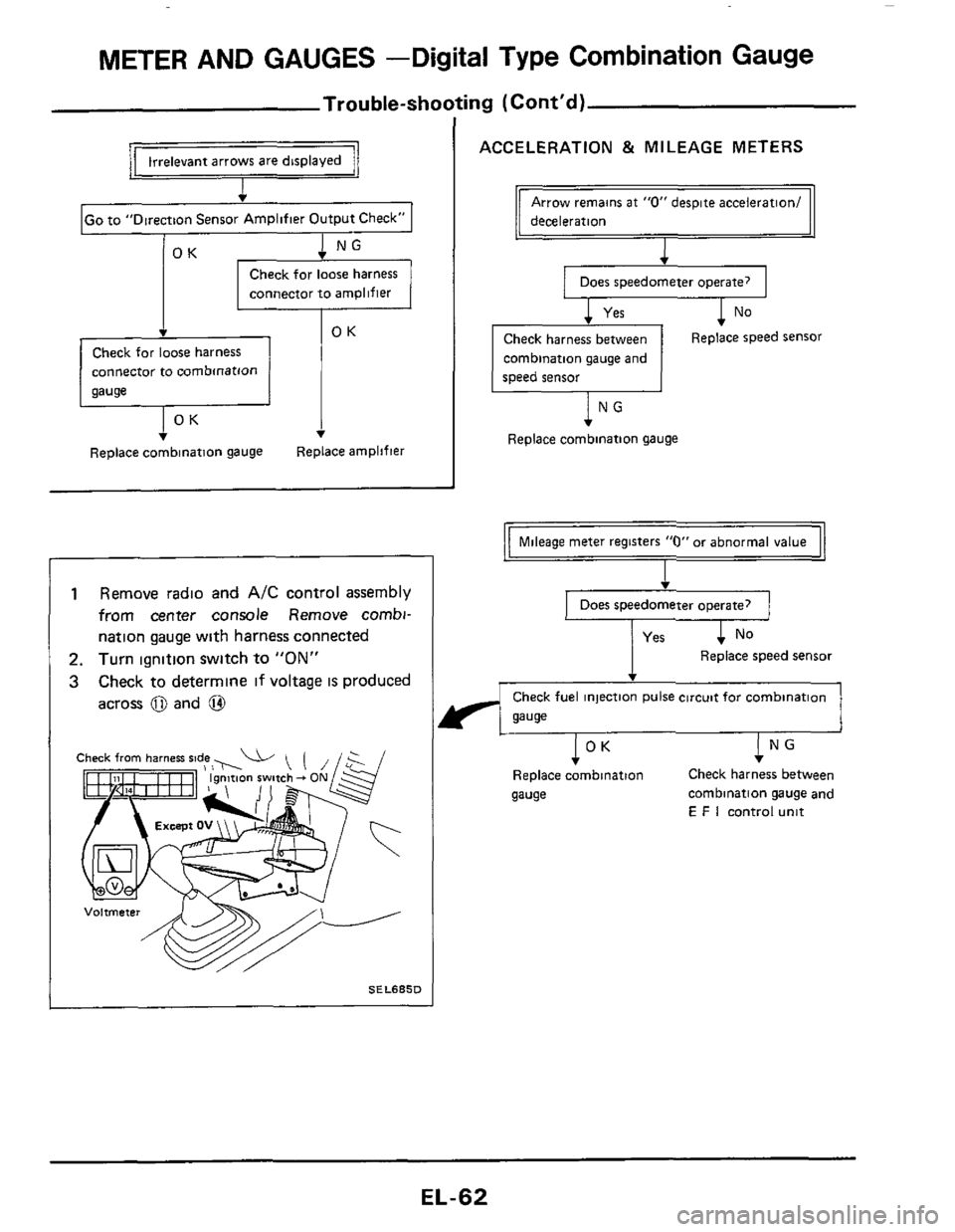
METER AND GAUGES -Digital Type Combination Gauge
Trouble-shooting (Cont'd)
v
IGo to "Direction Sensor Amplifier Output Check" I
1 NG v
Check for loose harness
connector to
amplifier
Check for loose harness
connector to combmatlon
Replace combinatlon gauge Replace amplifier
I
1 Remove radio and AIC control assembly
from center console Remove combi-
nation gauge with harness connected
2. Turn ignition switch to "ON"
3 Check to determine if voltage IS produced
across
0 and @
SELSBSD
ACCELERATION & MILEAGE METERS
deceleration
Does speedometer operate?
1 No
Check harness between
combination gauge and
speed sensor Replace speed sensor
lNG
Replace combination gauge
Mileage meter registers "0" or abnormal value
I
Does speedometer operate?
Replace speed sensor
Check fuel injection pulse circuit for combination
gauge
I NG v
Check harness between
Replace combination
gauge combination gauge and
E F I control unit
IOK
EL-62
Page 63 of 116
METER AND GAUGES -Digital Type Combination Gauge
@@6
100
100
100
100
010
010
010
010
001
001
001
001
000
000
000
000
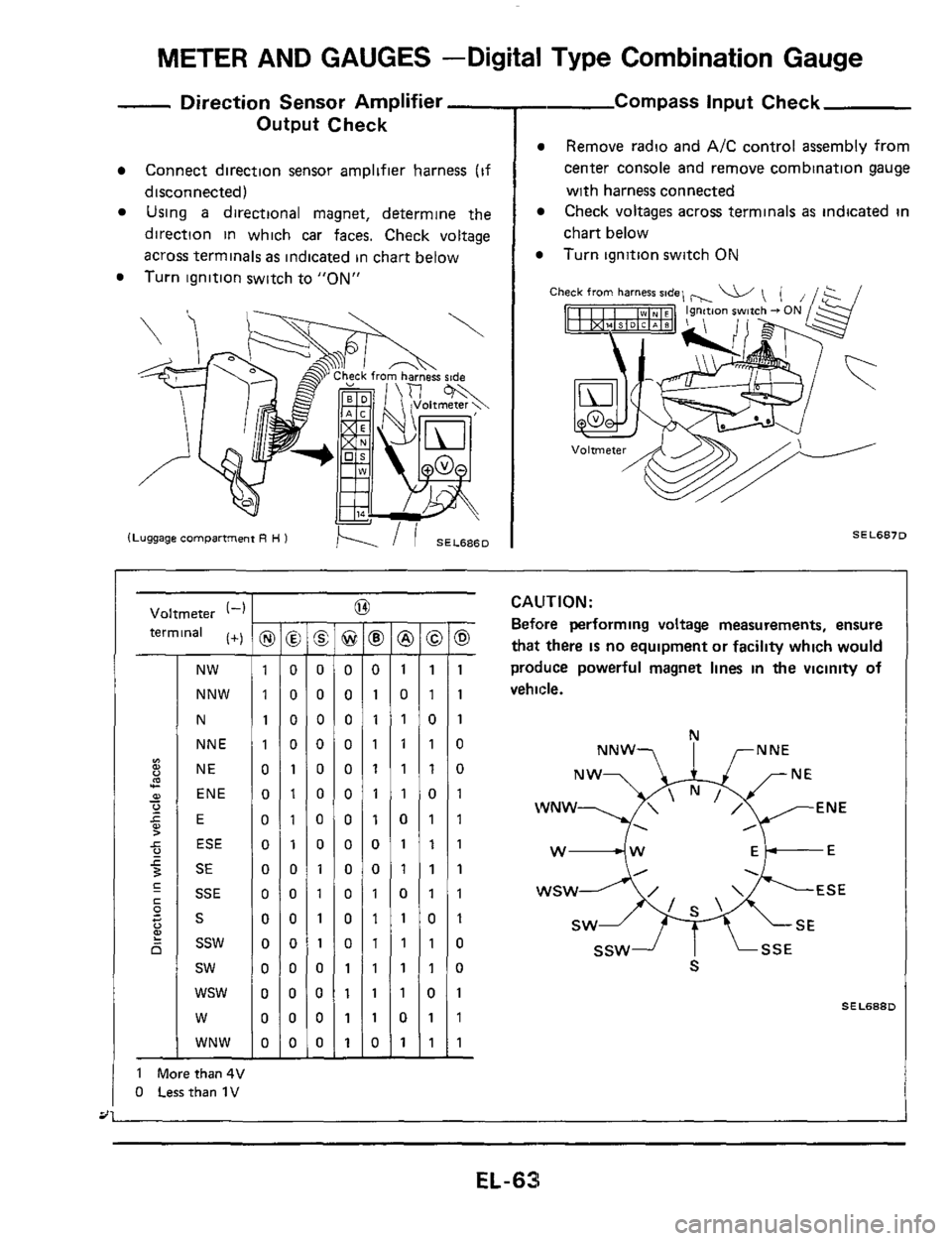
- Direction Sensor Amplifier -
Output Check
Connect direction sensor amplifier harness (if
disconnected)
Using a directional magnet, determine the
direction in which car faces. Check voltage
across terminals
as indicated in chart below
Turn ignition switch to
"ON"
- Compass input Check
Remove radio and A/C control assembly from
center console and remove combination gauge
with harness connected
Check voltages across terminals
as indicated in
chart below
Turn ignition switch ON
Ch
SEL6870
Voltmeter (-1
terminal (+)
NW
NNW
N
NNE
NE
ENE
E
ESE
SE
SSE
S
ssw
sw
wsw
W
WNW
1 Morethan4V
0 Lessthan 1V
I -
@ -
0
0
0
0
0
0
0
0
0
0
0
0
1
1
1
1 -
-
8 -
0
1
1
1
1
1
1
0
0
1
1
1
1
1
1
0 -
-
@ -
1
0
1
1
1
1
0
1
1
0
1
1
1
1
0
1 -
-
-
1
1
0
1
1
0
1
1
1
1
0
1
1
0
1
1
-
-
0 -
1
1
1
0
0
1
1
1
1
1
1
0
0
1
1
1 -
CAUTION:
Before performing voltage measurements, ensure
that there IS no equipment or facility which would
produce powerful magnet lines
in the vicinity of
vehicle.
N
NNW? I rNNE
WNW ENE
. ,
w4w Ek-E
SEL688D
EL-63