start NISSAN 370Z COUPE 2018 Workshop Manual
[x] Cancel search | Manufacturer: NISSAN, Model Year: 2018, Model line: 370Z COUPE, Model: NISSAN 370Z COUPE 2018Pages: 453, PDF Size: 2.23 MB
Page 271 of 453
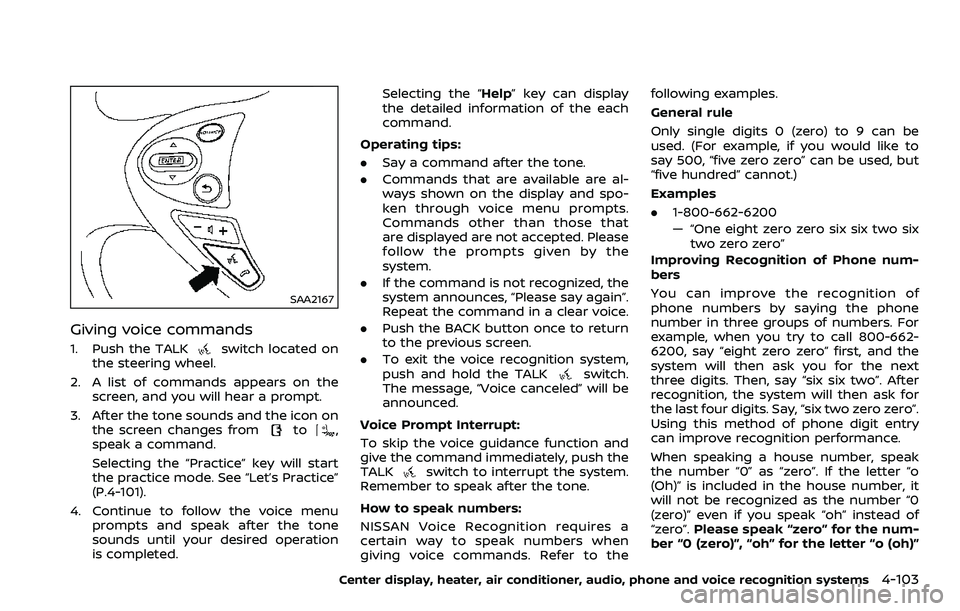
SAA2167
Giving voice commands
1. Push the TALKswitch located on
the steering wheel.
2. A list of commands appears on the screen, and you will hear a prompt.
3. After the tone sounds and the icon on the screen changes from
to,
speak a command.
Selecting the “Practice” key will start
the practice mode. See “Let’s Practice”
(P.4-101).
4. Continue to follow the voice menu prompts and speak after the tone
sounds until your desired operation
is completed. Selecting the “Help” key can display
the detailed information of the each
command.
Operating tips:
. Say a command after the tone.
. Commands that are available are al-
ways shown on the display and spo-
ken through voice menu prompts.
Commands other than those that
are displayed are not accepted. Please
follow the prompts given by the
system.
. If the command is not recognized, the
system announces, “Please say again”.
Repeat the command in a clear voice.
. Push the BACK button once to return
to the previous screen.
. To exit the voice recognition system,
push and hold the TALK
switch.
The message, “Voice canceled” will be
announced.
Voice Prompt Interrupt:
To skip the voice guidance function and
give the command immediately, push the
TALK
switch to interrupt the system.
Remember to speak after the tone.
How to speak numbers:
NISSAN Voice Recognition requires a
certain way to speak numbers when
giving voice commands. Refer to the following examples.
General rule
Only single digits 0 (zero) to 9 can be
used. (For example, if you would like to
say 500, “five zero zero” can be used, but
“five hundred” cannot.)
Examples
.
1-800-662-6200
— “One eight zero zero six six two six
two zero zero”
Improving Recognition of Phone num-
bers
You can improve the recognition of
phone numbers by saying the phone
number in three groups of numbers. For
example, when you try to call 800-662-
6200, say “eight zero zero” first, and the
system will then ask you for the next
three digits. Then, say “six six two”. After
recognition, the system will then ask for
the last four digits. Say, “six two zero zero”.
Using this method of phone digit entry
can improve recognition performance.
When speaking a house number, speak
the number “0” as “zero”. If the letter “o
(Oh)” is included in the house number, it
will not be recognized as the number “0
(zero)” even if you speak “oh” instead of
“zero”. Please speak “zero” for the num-
ber “0 (zero)”, “oh” for the letter “o (oh)”
Center display, heater, air conditioner, audio, phone and voice recognition systems4-103
Page 274 of 453
4-106Center display, heater, air conditioner, audio, phone and voice recognition systems
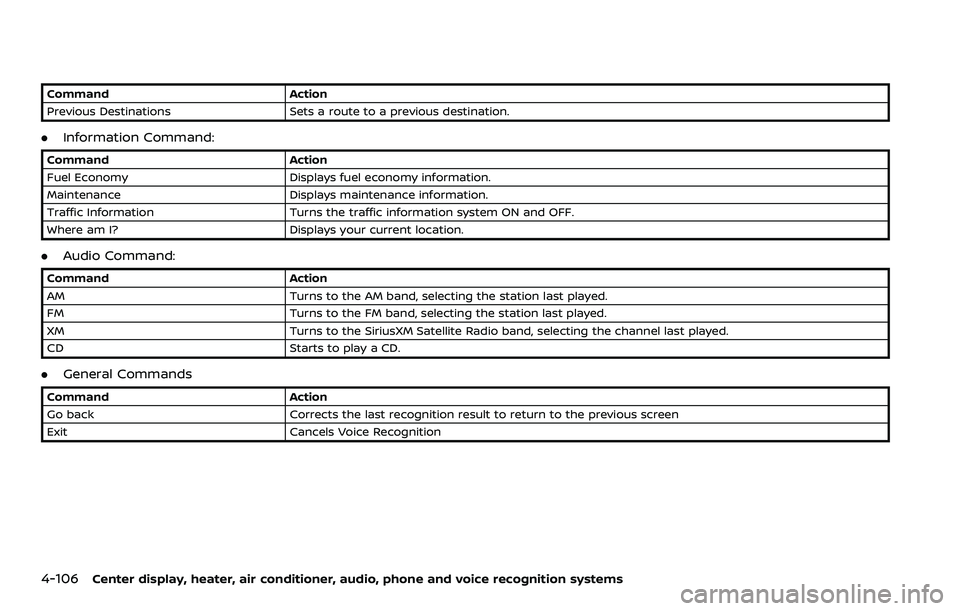
CommandAction
Previous Destinations Sets a route to a previous destination.
.Information Command:
Command Action
Fuel Economy Displays fuel economy information.
Maintenance Displays maintenance information.
Traffic Information Turns the traffic information system ON and OFF.
Where am I? Displays your current location.
.Audio Command:
Command Action
AM Turns to the AM band, selecting the station last played.
FM Turns to the FM band, selecting the station last played.
XM Turns to the SiriusXM Satellite Radio band, selecting the channel last played.
CD Starts to play a CD.
.General Commands
Command Action
Go back Corrects the last recognition result to return to the previous screen
Exit Cancels Voice Recognition
Page 282 of 453
4-114Center display, heater, air conditioner, audio, phone and voice recognition systems
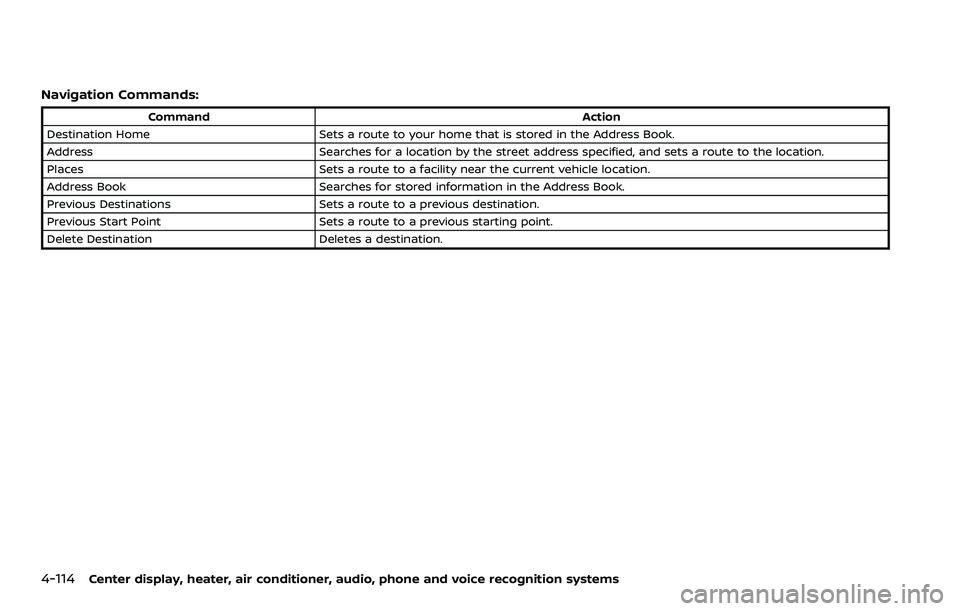
Navigation Commands:
CommandAction
Destination Home Sets a route to your home that is stored in the Address Book.
Address Searches for a location by the street address specified, and sets a route to the location.
Places Sets a route to a facility near the current vehicle location.
Address Book Searches for stored information in the Address Book.
Previous Destinations Sets a route to a previous destination.
Previous Start Point Sets a route to a previous starting point.
Delete Destination Deletes a destination.
Page 284 of 453
4-116Center display, heater, air conditioner, audio, phone and voice recognition systems
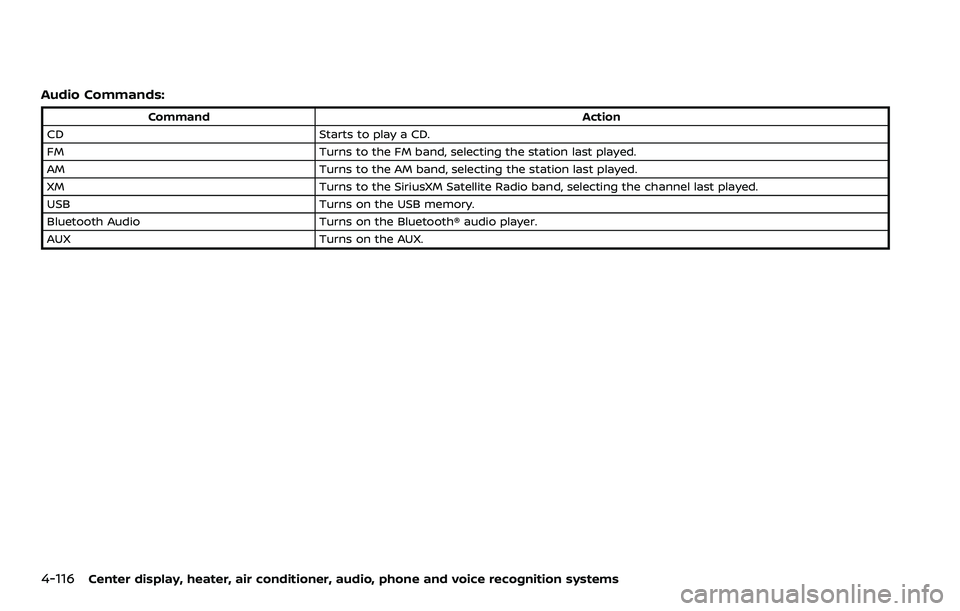
Audio Commands:
CommandAction
CD Starts to play a CD.
FM Turns to the FM band, selecting the station last played.
AM Turns to the AM band, selecting the station last played.
XM Turns to the SiriusXM Satellite Radio band, selecting the channel last played.
USB Turns on the USB memory.
Bluetooth Audio Turns on the Bluetooth® audio player.
AUX Turns on the AUX.
Page 287 of 453
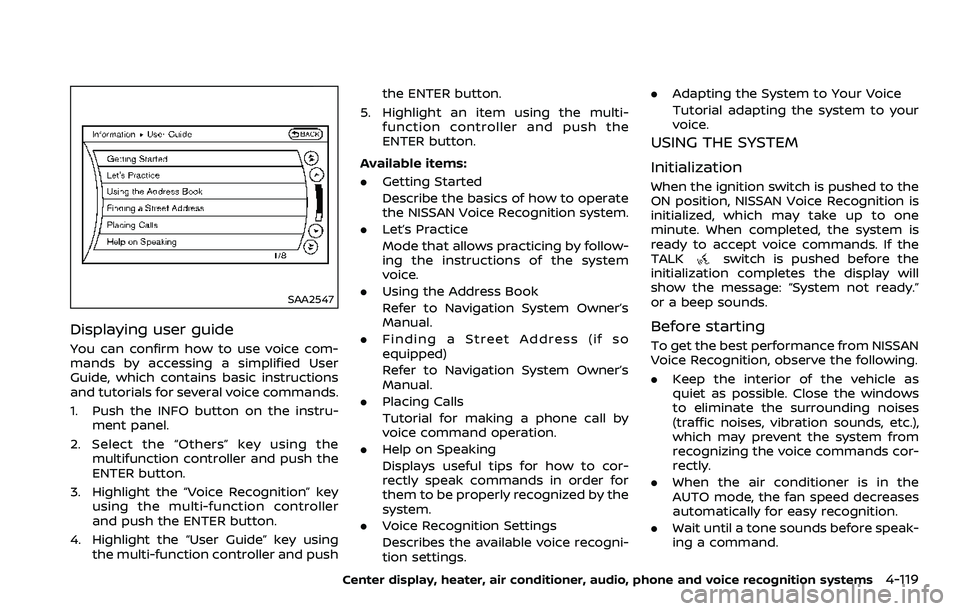
SAA2547
Displaying user guide
You can confirm how to use voice com-
mands by accessing a simplified User
Guide, which contains basic instructions
and tutorials for several voice commands.
1. Push the INFO button on the instru-ment panel.
2. Select the “Others” key using the multifunction controller and push the
ENTER button.
3. Highlight the “Voice Recognition” key using the multi-function controller
and push the ENTER button.
4. Highlight the “User Guide” key using the multi-function controller and push the ENTER button.
5. Highlight an item using the multi- function controller and push the
ENTER button.
Available items:
. Getting Started
Describe the basics of how to operate
the NISSAN Voice Recognition system.
. Let’s Practice
Mode that allows practicing by follow-
ing the instructions of the system
voice.
. Using the Address Book
Refer to Navigation System Owner’s
Manual.
. Finding a Street Address (if so
equipped)
Refer to Navigation System Owner’s
Manual.
. Placing Calls
Tutorial for making a phone call by
voice command operation.
. Help on Speaking
Displays useful tips for how to cor-
rectly speak commands in order for
them to be properly recognized by the
system.
. Voice Recognition Settings
Describes the available voice recogni-
tion settings. .
Adapting the System to Your Voice
Tutorial adapting the system to your
voice.
USING THE SYSTEM
Initialization
When the ignition switch is pushed to the
ON position, NISSAN Voice Recognition is
initialized, which may take up to one
minute. When completed, the system is
ready to accept voice commands. If the
TALK
switch is pushed before the
initialization completes the display will
show the message: “System not ready.”
or a beep sounds.
Before starting
To get the best performance from NISSAN
Voice Recognition, observe the following.
. Keep the interior of the vehicle as
quiet as possible. Close the windows
to eliminate the surrounding noises
(traffic noises, vibration sounds, etc.),
which may prevent the system from
recognizing the voice commands cor-
rectly.
. When the air conditioner is in the
AUTO mode, the fan speed decreases
automatically for easy recognition.
. Wait until a tone sounds before speak-
ing a command.
Center display, heater, air conditioner, audio, phone and voice recognition systems4-119
Page 290 of 453
4-122Center display, heater, air conditioner, audio, phone and voice recognition systems
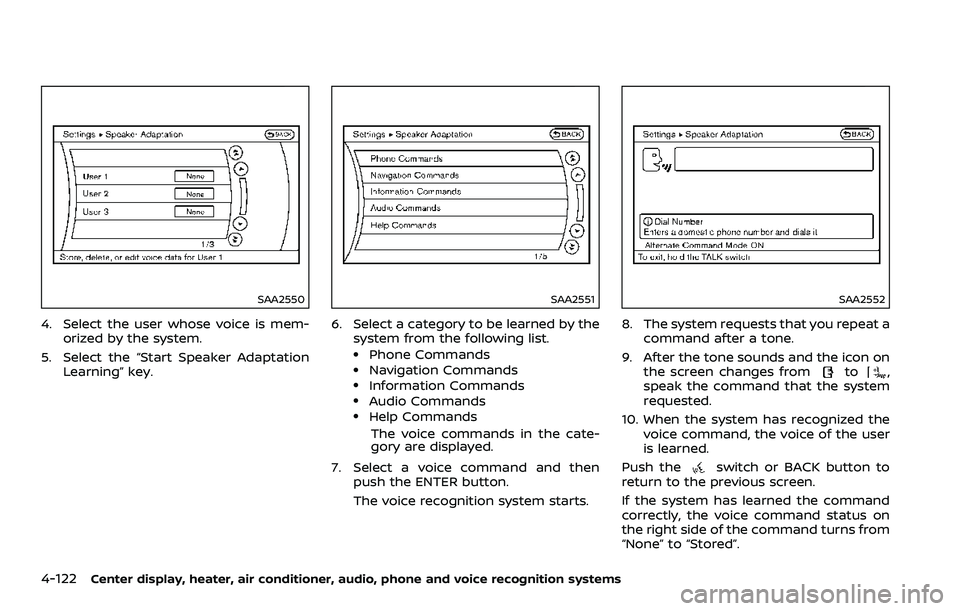
SAA2550
4. Select the user whose voice is mem-orized by the system.
5. Select the “Start Speaker Adaptation Learning” key.
SAA2551
6. Select a category to be learned by the
system from the following list.
.Phone Commands.Navigation Commands.Information Commands.Audio Commands.Help Commands
The voice commands in the cate-
gory are displayed.
7. Select a voice command and then push the ENTER button.
The voice recognition system starts.
SAA2552
8. The system requests that you repeat a
command after a tone.
9. After the tone sounds and the icon on the screen changes from
to,
speak the command that the system
requested.
10. When the system has recognized the voice command, the voice of the user
is learned.
Push the
switch or BACK button to
return to the previous screen.
If the system has learned the command
correctly, the voice command status on
the right side of the command turns from
“None” to “Stored”.
Page 292 of 453
4-124Center display, heater, air conditioner, audio, phone and voice recognition systems
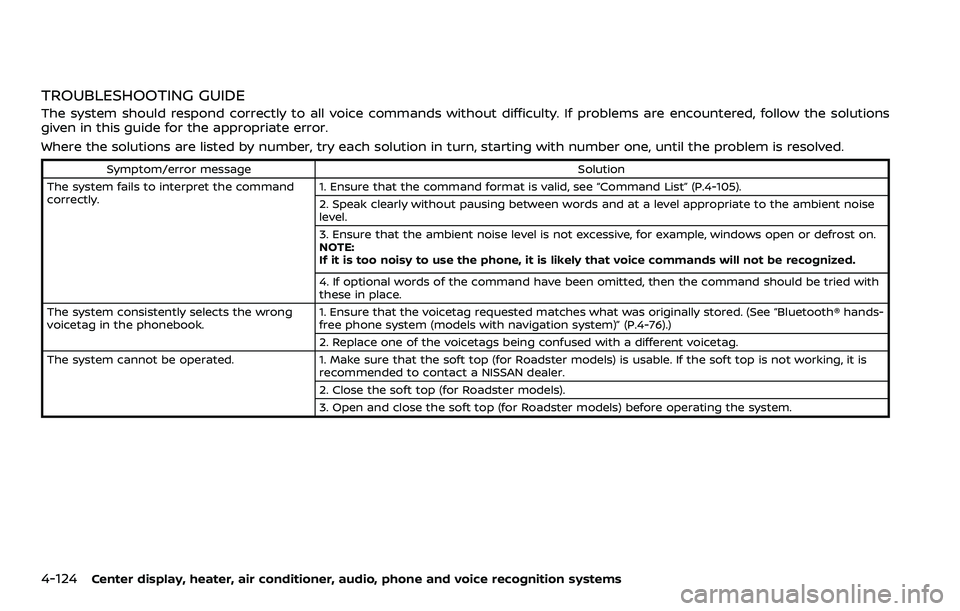
TROUBLESHOOTING GUIDE
The system should respond correctly to all voice commands without difficulty. If problems are encountered, follow the solutions
given in this guide for the appropriate error.
Where the solutions are listed by number, try each solution in turn, starting with number one, until the problem is resolved.
Symptom/error messageSolution
The system fails to interpret the command
correctly. 1. Ensure that the command format is valid, see “Command List” (P.4-105).
2. Speak clearly without pausing between words and at a level appropriate to the ambient noise
level.
3. Ensure that the ambient noise level is not excessive, for example, windows open or defrost on.
NOTE:
If it is too noisy to use the phone, it is likely that voice commands will not be recognized.
4. If optional words of the command have been omitted, then the command should be tried with
these in place.
The system consistently selects the wrong
voicetag in the phonebook. 1. Ensure that the voicetag requested matches what was originally stored. (See “Bluetooth® hands-
free phone system (models with navigation system)” (P.4-76).)
2. Replace one of the voicetags being confused with a different voicetag.
The system cannot be operated. 1. Make sure that the soft top (for Roadster models) is usable. If the soft top is not working, it is
recommended to contact a NISSAN dealer.
2. Close the soft top (for Roadster models).
3. Open and close the soft top (for Roadster models) before operating the system.
Page 293 of 453
5 Starting and driving
Precautions when starting and driving ....................... 5-2Exhaust gas (carbon monoxide) ................................. 5-2
Three-way catalyst ................................................................ 5-3
Tire Pressure Monitoring System (TPMS) ............ 5-3
Avoiding collision and rollover ..................................... 5-6
Off-road recovery ................................................................... 5-6
Rapid air pressure loss ....................................................... 5-6
Drinking alcohol/drugs and driving ......................... 5-7
Push-button ignition switch ................................................. 5-8 Operating range for engine start function ........ 5-8
Push-button ignition switch operation ................. 5-9
Push-button ignition switch positions .................. 5-9
Emergency engine shut off .......................................... 5-10
Intelligent Key battery discharge ............................. 5-10
Before starting the engine .................................................... 5-11
Starting the engine ..................................................................... 5-11
Driving the vehicle ...................................................................... 5-12 Automatic transmission .................................................. 5-12
Manual Transmission ......................................................... 5-17
Parking brake ........................................................................\
......... 5-21
Cruise control ........................................................................\
........ 5-22 Precautions on cruise control ................................... 5-22
Cruise control operations ............................................. 5-23
Break-in schedule ...................................................................... 5-24
Fuel efficient driving tips ...................................................... 5-24 Increasing fuel economy ..................................................... 5-25
Parking/parking on hills ....................................................... 5-26
Power steering ........................................................................\
..... 5-27
Brake system ........................................................................\
........ 5-27
Braking precautions ........................................................ 5-27
Parking brake break-in ................................................. 5-28
Brake assist ........................................................................\
............ 5-28 Brake assist ........................................................................\
.... 5-28
Anti-lock Braking System (ABS) ............................. 5-28
Vehicle Dynamic Control (VDC) system ................... 5-30
Performance dampers (NISMO models) .................. 5-32
Cold weather driving .............................................................. 5-33 Freeing a frozen door lock ........................................ 5-33
Antifreeze ........................................................................\
......... 5-33
Battery ........................................................................\
................ 5-33
Draining of coolant water .......................................... 5-33
Tire equipment .................................................................... 5-33
Special winter equipment .......................................... 5-33
Driving on snow or ice .................................................. 5-33
Engine block heater (if so equipped) ................ 5-34
Active noise cancellation/Active sound
enhancement (if so equipped) ........................................ 5-35 Active noise cancellation ............................................ 5-35
Active sound enhancement ...................................... 5-35
Page 294 of 453
5-2Starting and driving
WARNING
.Do not leave children or adults
who would normally require the
support of others alone in your
vehicle. Pets should not be left
alone either. They could acciden-
tally injure themselves or others
through inadvertent operation of
the vehicle. Also, on hot, sunny
days, temperatures in a closed
vehicle could quickly become
high enough to cause severe or
possibly fatal injuries to people or
animals.
. Properly secure all cargo to help
prevent it from sliding or shifting.
Do not place cargo higher than
the seatbacks. In a sudden stop
or collision, unsecured cargo
could cause personal injury
(Coupe models).
. Closely supervise children when
they are around cars to prevent
them from playing and becoming
locked in the trunk where they
could be seriously injured. Keep
the car locked with the trunk
closed when not in use, and pre-
vent children’s access to car keys (Roadster models).
If the engine oil temperature is high, the
engine protection mode, which helps
reduce the chance of engine damage,
could activate and automatically de-
crease engine power. Driving while the
engine oil temperature is high may
result in engine damage.
EXHAUST GAS (carbon monoxide)
WARNING
. Do not breathe exhaust gases;
they contain colorless and odor-
less carbon monoxide. Carbon
monoxide is dangerous. It can
cause unconsciousness or death.
. If you suspect that exhaust fumes
are entering the vehicle, drive
with all windows fully open, and
have the vehicle inspected imme-
diately.
. Do not run the engine in closed
spaces such as a garage.
. Do not park the vehicle with the
engine running for any extended
length of time.
. Keep the rear hatch/trunk lid
closed while driving, otherwise exhaust gases could be drawn
into the passenger compartment.
If you must drive with the rear
hatch/trunk lid open, follow these
precautions:
1) Open all the windows.
2) Set the
air recirculation to
off and the fan control to high
to circulate the air.
. The exhaust system and body
should be inspected by a quali-
fied mechanic whenever:
— The vehicle is raised for ser-
vice.
— You suspect that exhaust fumes are entering into the
passenger compartment.
— You notice a change in the sound of the exhaust system.
— You have had an accident involving damage to the ex-
haust system, underbody, or
rear of the vehicle.
PRECAUTIONS WHEN STARTING
AND DRIVING
Page 295 of 453
THREE-WAY CATALYST
The three-way catalyst is an emission
control device installed in the exhaust
system. Exhaust gases in the three-way
catalyst are burned at high temperatures
to help reduce pollutants.
WARNING
.The exhaust gas and the exhaust
system are very hot. Keep people,
animals or flammable materials
away from the exhaust system
components.
. Do not stop or park the vehicle
over flammable materials such as
dry grass, waste paper or rags.
They may ignite and cause a fire.
CAUTION
.Do not use leaded gasoline. De-
posits from leaded gasoline ser-
iously reduce the three-way
catalyst’s ability to help reduce
exhaust pollutants.
. Keep your engine tuned up. Mal-
functions in the ignition, fuel in-
jection, or electrical systems can cause overrich fuel flow into the
three-way catalyst, causing it to
overheat. Do not keep driving if
the engine misfires, or if notice-
able loss of performance or other
unusual operating conditions are
detected. Have the vehicle in-
spected. It is recommended you
visit a NISSAN dealer for this
service.
. Avoid driving with an extremely
low fuel level. Running out of fuel
could cause the engine to misfire,
damaging the three-way catalyst.
. Do not race the engine while
warming it up.
. Do not push or tow your vehicle
to start the engine.
TIRE PRESSURE MONITORING SYS-
TEM (TPMS)
Each tire, including the spare (if provided),
should be checked monthly when cold
and inflated to the inflation pressure
recommended by the vehicle manufac-
turer on the vehicle placard or tire infla-
tion pressure label. (If your vehicle has
tires of a different size than the size
indicated on the vehicle placard or tire
inflation pressure label, you should deter-
mine the proper tire inflation pressure for those tires.)
As an added safety feature, your vehicle
has been equipped with a Tire Pressure
Monitoring System (TPMS) that illumi-
nates a low tire pressure telltale when
one or more of your tires is significantly
under-inflated. Accordingly, when the low
tire pressure telltale illuminates, you
should stop and check your tires as soon
as possible, and inflate them to the
proper pressure. Driving on a significantly
under-inflated tire causes the tire to
overheat and can lead to tire failure.
Under-inflation also reduces fuel effi-
ciency and tire tread life, and may affect
the vehicle’s handling and stopping abil-
ity.
Please note that the TPMS is not a
substitute for proper tire maintenance,
and it is the driver’s responsibility to
maintain correct tire pressure, even if
under-inflation has not reached the level
to trigger illumination of the TPMS low
tire pressure telltale.
Your vehicle has also been equipped with
a TPMS malfunction indicator to indicate
when the system is not operating prop-
erly. The TPMS malfunction indicator is
combined with the low tire pressure tell-
tale. When the system detects a malfunc-
tion, the telltale will flash for
approximately one minute and then re-
Starting and driving5-3