low NISSAN GT-R 2013 R35 Multi Function Display Owner's Manual
[x] Cancel search | Manufacturer: NISSAN, Model Year: 2013, Model line: GT-R, Model: NISSAN GT-R 2013 R35Pages: 315, PDF Size: 6.96 MB
Page 76 of 315
![NISSAN GT-R 2013 R35 Multi Function Display Owners Manual 2-48Navigation
2. Information about the location is displayed.
3. Push<BACK> to return to the previous
screen.
INFO:
. If [Call] is displayed on the right side of the
screen, it is possible to call th](/img/5/316/w960_316-75.png "NISSAN GT-R 2013 R35 Multi Function Display Owners Manual 2-48Navigation
2. Information about the location is displayed.
3. Push<BACK> to return to the previous
screen.
INFO:
. If [Call] is displayed on the right side of the
screen, it is possible to call th")
2-48Navigation
2. Information about the location is displayed.
3. Push
screen.
INFO:
. If [Call] is displayed on the right side of the
screen, it is possible to call the location
indicated.
. The Bluetooth
®Hands-Free Phone system
is required to be active and the cellular
phone connected to call the location in-
dicated.
. Information about locations is not displayed
while driving.
ABOUT ROUTE GUIDANCE
After setting the route, select [Start] to begin
route guidance.
Throughout route guidance, the system navi-
gates you through the guide points using visual
and voice guidance.
CAUTION
.The navigation system’s visual and
voice guidance is for reference pur-
poses only. The contents of the
guidance may be inappropriate de-
pending on the situation.
. Follow all traffic regulations when
driving along the suggested route
(e.g., one-way traffic) .
“Route guidance” (page 11-8)
Voice guidance during route gui-
dance
When approaching a guide point (intersection or
corner) , destination, etc. during route guidance,
voice guidance announces the remaining dis-
tance and/or turning direction. Push
Page 80 of 315
2-52Navigation
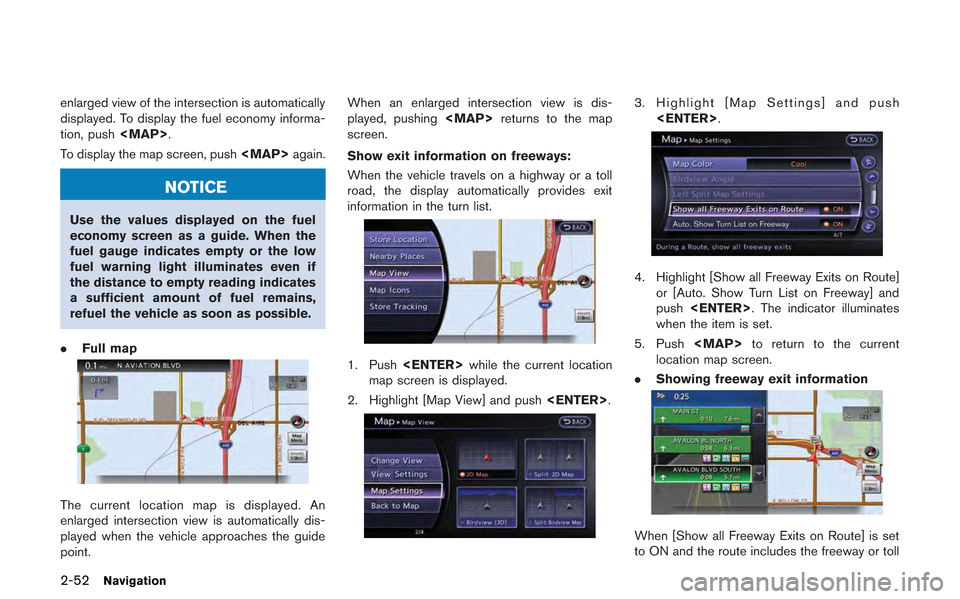
enlarged view of the intersection is automatically
displayed. To display the fuel economy informa-
tion, push
Page 93 of 315
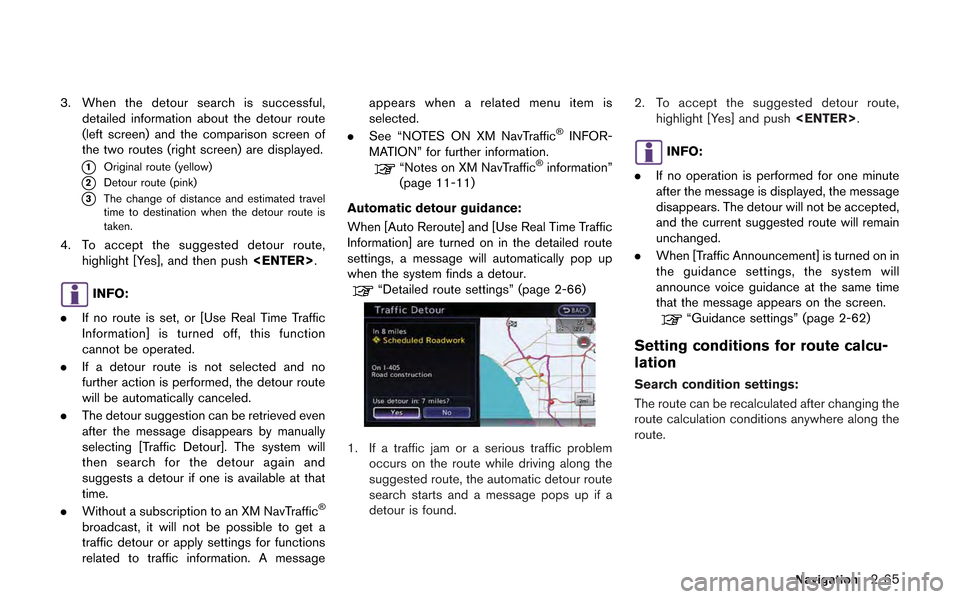
3. When the detour search is successful,detailed information about the detour route
(left screen) and the comparison screen of
the two routes (right screen) are displayed.
*1Original route (yellow)
*2Detour route (pink)
*3The change of distance and estimated travel
time to destination when the detour route is
taken.
4. To accept the suggested detour route,
highlight [Yes], and then push
INFO:
. If no route is set, or [Use Real Time Traffic
Information] is turned off, this function
cannot be operated.
. If a detour route is not selected and no
further action is performed, the detour route
will be automatically canceled.
. The detour suggestion can be retrieved even
after the message disappears by manually
selecting [Traffic Detour]. The system will
then search for the detour again and
suggests a detour if one is available at that
time.
. Without a subscription to an XM NavTraffic
®
broadcast, it will not be possible to get a
traffic detour or apply settings for functions
related to traffic information. A message appears when a related menu item is
selected.
. See “NOTES ON XM NavTraffic
®INFOR-
MATION” for further information.
“Notes on XM NavTraffic®information”
(page 11-11)
Automatic detour guidance:
When [Auto Reroute] and [Use Real Time Traffic
Information] are turned on in the detailed route
settings, a message will automatically pop up
when the system finds a detour.
“Detailed route settings” (page 2-66)
1. If a traffic jam or a serious traffic problem occurs on the route while driving along the
suggested route, the automatic detour route
search starts and a message pops up if a
detour is found. 2. To accept the suggested detour route,
highlight [Yes] and push
INFO:
. If no operation is performed for one minute
after the message is displayed, the message
disappears. The detour will not be accepted,
and the current suggested route will remain
unchanged.
. When [Traffic Announcement] is turned on in
the guidance settings, the system will
announce voice guidance at the same time
that the message appears on the screen.
“Guidance settings” (page 2-62)
Setting conditions for route calcu-
lation
Search condition settings:
The route can be recalculated after changing the
route calculation conditions anywhere along the
route.
Navigation2-65
Page 95 of 315
![NISSAN GT-R 2013 R35 Multi Function Display Owners Manual .[Use Ferries]:
Includes the use of ferries.
. [Use Learned Routes]:
Uses the roads that are most frequently
traveled with the help of self-learning
technology.
. [Auto Reroute]:
If the vehicle deviat](/img/5/316/w960_316-94.png "NISSAN GT-R 2013 R35 Multi Function Display Owners Manual .[Use Ferries]:
Includes the use of ferries.
. [Use Learned Routes]:
Uses the roads that are most frequently
traveled with the help of self-learning
technology.
. [Auto Reroute]:
If the vehicle deviat")
.[Use Ferries]:
Includes the use of ferries.
. [Use Learned Routes]:
Uses the roads that are most frequently
traveled with the help of self-learning
technology.
. [Auto Reroute]:
If the vehicle deviates from the suggested
route, the system automatically recalculates
a route that leads the vehicle to the
suggested route.
INFO:
. The recalculated route may not be the
shortest route because the system priori-
tizes roads that are easy to drive for safety
reasons.
. If route conditions are set from [Route
Settings], all sections in the route are
subject to the same route conditions even
though different route conditions have been
set for different sections in [Edit/Add to
Route].
. If [Use Time Restricted Roads] is deacti-
vated, the system calculates a route without
any consideration of the regulations con-
cerning the time or day of the week. There-
fore, the suggested route may include a road subject to traffic regulations concerning the
time or day of the week. When driving along
the route, always follow all traffic regulations
regardless of whether [Use Time Restricted
Roads] is set to on or off.
. If the system cannot calculate any alternative
routes, it displays the previous route.
. If the vehicle greatly deviates from the
suggested route, the system calculates a
new route.
. Statistical traffic information is based on
previous traffic data. When the traffic situa-
tion rapidly changes due to unexpected
accidents, construction work, traffic restric-
tions, emergencies, etc., the prediction
accuracy of the system may be reduced.
. Traffic jam information displayed on the map
screen is not statistical traffic information.
. When [Use Statistical Traffic Information] is
turned on, the system may lead to a road
where a traffic jam occurs or to a detour
even though the shortest route does not
have a traffic jam.
. Even when [Use Real Time Traffic Informa-
tion] is turned on, if traffic information has
not been provided for the area, sometimes it
is possible that a detour will not be indicated
in a location where a traffic jam occurs. .
The system may not lead to a detour if traffic
closure or a traffic jam occurs far from the
present location.
. The system calculates to reduce the time
required for the entire route from the start to
the destination. If there are no appropriate
routes, the system may lead to a route where
a traffic jam occurs instead of leading to a
detour.
. This system can learn and memorize the
route that is most frequently used. However,
despite driving on the same route several
times so that the system can learn the route,
the system may have difficulty learning the
route under the following conditions.
— [Use Time Restricted Roads] is set to on.
— [Use Real Time Traffic Information] is set
to on.
Navigation2-67
Page 101 of 315
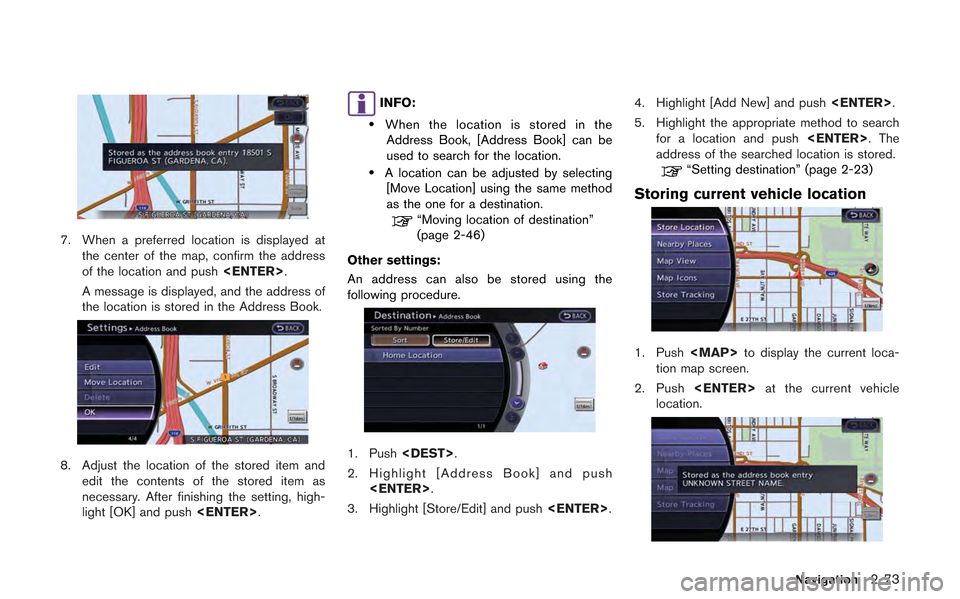
7. When a preferred location is displayed atthe center of the map, confirm the address
of the location and push
A message is displayed, and the address of
the location is stored in the Address Book.
8. Adjust the location of the stored item and edit the contents of the stored item as
necessary. After finishing the setting, high-
light [OK] and push
INFO:
.When the location is stored in the
Address Book, [Address Book] can be
used to search for the location.
.A location can be adjusted by selecting [Move Location] using the same method
as the one for a destination.
“Moving location of destination”
(page 2-46)
Other settings:
An address can also be stored using the
following procedure.
1. Push
2. Highlight [Address Book] and push
3. Highlight [Store/Edit] and push
5. Highlight the appropriate method to search for a location and push
address of the searched location is stored.
“Setting destination” (page 2-23)
Storing current vehicle location
1. Push
Page 103 of 315
STORING ROUTE
A maximum of 5 calculated routes can be
stored. Stored routes can be easily retrieved
and set as the suggested route.
INFO:
Stored route includes only locations (destination
and waypoints) and route calculation conditions,
not the route itself.
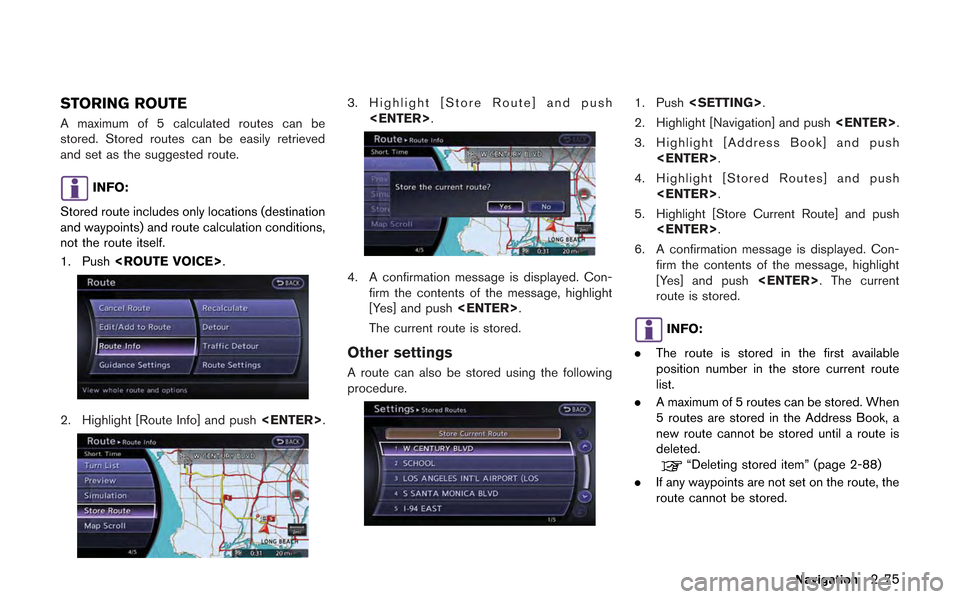
1. Push
2. Highlight [Route Info] and push
3. Highlight [Store Route] and push
4. A confirmation message is displayed. Con-firm the contents of the message, highlight
[Yes] and push
The current route is stored.
Other settings
A route can also be stored using the following
procedure.
1. Push
2. Highlight [Navigation] and push
3. Highlight [Address Book] and push
4. Highlight [Stored Routes] and push
5. Highlight [Store Current Route] and push
6. A confirmation message is displayed. Con- firm the contents of the message, highlight
[Yes] and push
route is stored.
INFO:
. The route is stored in the first available
position number in the store current route
list.
. A maximum of 5 routes can be stored. When
5 routes are stored in the Address Book, a
new route cannot be stored until a route is
deleted.
“Deleting stored item” (page 2-88)
. If any waypoints are not set on the route, the
route cannot be stored.
Navigation2-75
Page 104 of 315
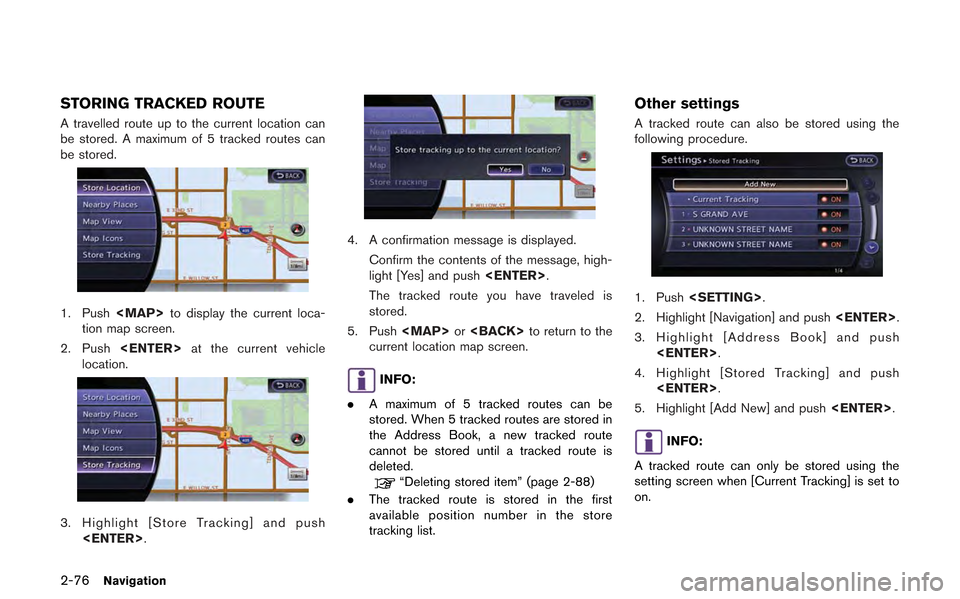
2-76Navigation
STORING TRACKED ROUTE
A travelled route up to the current location can
be stored. A maximum of 5 tracked routes can
be stored.
1. Push
Page 106 of 315
![NISSAN GT-R 2013 R35 Multi Function Display Owners Manual 2-78Navigation
7. Set the following items for the searchedlocation.
Available setting items:
.[Rename]:
Changes the name.
“Rename” (page 2-86)
.[Move Location]:Adjusts the location of the Avoid Ar](/img/5/316/w960_316-105.png "NISSAN GT-R 2013 R35 Multi Function Display Owners Manual 2-78Navigation
7. Set the following items for the searchedlocation.
Available setting items:
.[Rename]:
Changes the name.
“Rename” (page 2-86)
.[Move Location]:Adjusts the location of the Avoid Ar")
2-78Navigation
7. Set the following items for the searchedlocation.
Available setting items:
.[Rename]:
Changes the name.
“Rename” (page 2-86)
.[Move Location]:Adjusts the location of the Avoid Area.
“Move Location” (page 2-86)
.[Resize Area]:
Adjusts the range of the Avoid Area.
“Resize Area” (page 2-87)
.[FWY]:Avoids Freeways.
“FWY” (page 2-87)
.[Delete]:Deletes the avoid area.
“Delete” (page 2-87)
8. After finishing the setting, highlight [OK] and push
EDITING ADDRESS BOOK
Items stored in the Address Book can be
modified. These settings can be edited to make
the navigation system more useful.
Basic operation
1. Push
2. Highlight [Navigation] and push
3. Highlight [Address Book] and push
4. Highlight the preferred item and push
Available setting items
. [Stored Location]:
Edits the information of a stored home and
Address.
“Editing stored home and address”
(page 2-79) .
[Stored Routes]:
Edits the information of a stored route.
“Editing stored route” (page 2-84)
. [Stored Tracking]:
Edits the information of a stored tracked
route.
“Editing stored tracking” (page 2-84)
. [Avoid Area]:
Edits the information of a stored Avoid Area.
“Editing avoid area” (page 2-86)
. [Delete Stored Items]:
Deletes a stored location or route.
“Deleting all stored items” (page 2-89)
. [Transfer Address Book]:
Imports or exports the data of the stored
items using a USB memory.
Page 107 of 315
![NISSAN GT-R 2013 R35 Multi Function Display Owners Manual Editing stored home and address
1. Highlight [Stored Location] and push<ENTER>.
2. Highlight the stored home location or pre- ferred stored address and push <ENTER>.
INFO:
Highlighting [Sort] displays](/img/5/316/w960_316-106.png "NISSAN GT-R 2013 R35 Multi Function Display Owners Manual Editing stored home and address
1. Highlight [Stored Location] and push<ENTER>.
2. Highlight the stored home location or pre- ferred stored address and push <ENTER>.
INFO:
Highlighting [Sort] displays")
Editing stored home and address
1. Highlight [Stored Location] and push
2. Highlight the stored home location or pre- ferred stored address and push
INFO:
Highlighting [Sort] displays a list of various
sort functions.
3. Highlight the preferred item and push
Available setting items
. [Edit]:
Edits the stored address information.
. [Move Location]:
Adjusts the location of the stored address.
. [Delete]:
Deletes the stored address.
. [OK]:
Applies the settings.
Other settings:
A stored address can also be edited using the
following procedure.
1. Push
2. Highlight [Address Book] and push
Minor adjustment of home or stored
address
When [Edit] is selected, you can edit the
following items of the home or stored location
can be edited.
.[Show Icon on Map]:
. [Name] (only for stored locations):
. [Voicetag] (only for stored locations):
. [Icon]:
. [Sound]:
. [Direction]:
. [Distance]:
. [Phone No.]:
. [Group] (only for stored locations):
. [Entry Numbers] (only for stored locations):
Show Icon on Map:
Displays the home icon or the stored address
icon on the map.
Navigation2-79
Page 117 of 315
![NISSAN GT-R 2013 R35 Multi Function Display Owners Manual 7. A confirmation message is displayed. Con-firm the contents of the message, highlight
[Yes] and push <ENTER>. The stored item
is deleted from the Address Book.
Other settings:
A stored address can a](/img/5/316/w960_316-116.png "NISSAN GT-R 2013 R35 Multi Function Display Owners Manual 7. A confirmation message is displayed. Con-firm the contents of the message, highlight
[Yes] and push <ENTER>. The stored item
is deleted from the Address Book.
Other settings:
A stored address can a")
7. A confirmation message is displayed. Con-firm the contents of the message, highlight
[Yes] and push
is deleted from the Address Book.
Other settings:
A stored address can also be deleted using the
following procedure.
1. Push
2. Highlight [Address Book] and push
3. Highlight [Store/Edit] and push
4. Highlight [Edit or Delete an Entry] and push
5. Highlight a preferred address and push
“Setting destination” (page 2-23)
INFO:
This procedure applies only for deleting a stored
home or address. A stored route, tracking or
avoid area cannot be deleted using this proce-
dure.
Deleting individual item on map
1. Align the cross pointer over the preferred stored location for deletion by moving on the
map. Then push
2. Highlight [Delete] and push
3. A confirmation message is displayed. Con-
firm the contents of the message, highlight
[Yes] and push
The stored item is deleted from the Address
Book.
Deleting all stored items
1. Push
2. Highlight [Navigation] and push
Navigation2-89