voice NISSAN MURANO 2006 1.G Navigation Manual
[x] Cancel search | Manufacturer: NISSAN, Model Year: 2006, Model line: MURANO, Model: NISSAN MURANO 2006 1.GPages: 272, PDF Size: 5.53 MB
Page 251 of 272
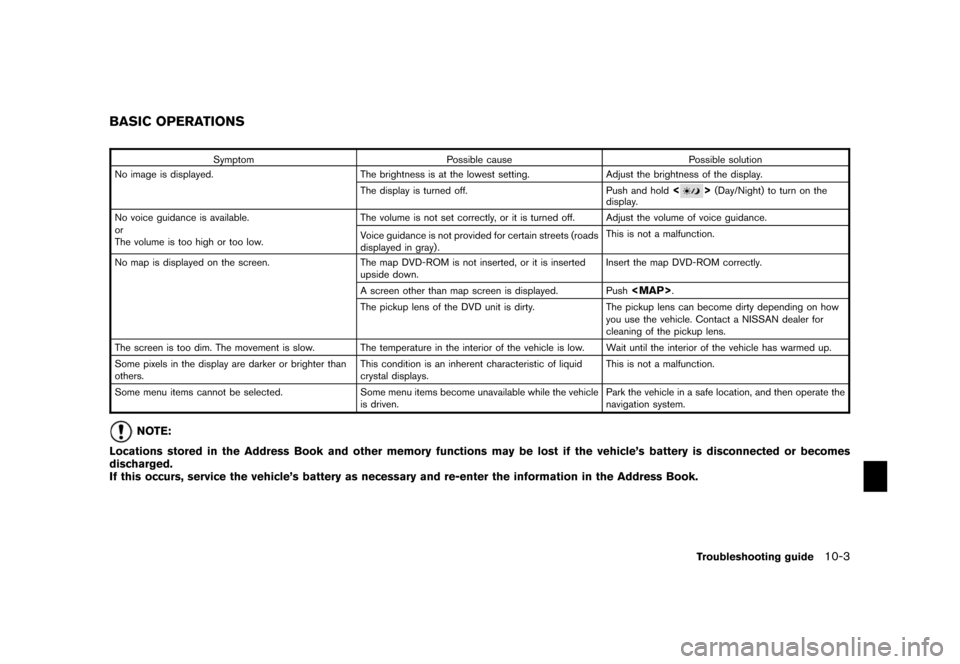
SymptomPossible cause Possible solution
No image is displayed. The brightness is at the lowest setting. Adjust the brightness of the display.
The display is turned off. Push and hold
<
>(Day/Night) to turn on the
display.
No voice guidance is available.
or
The volume is too high or too low. The volume is not set correctly, or it is turned off.
Adjust the volume of voice guidance.
Voice guidance is not provided for certain streets (roads
displayed in gray) . This is not a malfunction.
No map is displayed on the screen. The map DVD-ROM is not inserted, or it is inserted
upside down. Insert the map DVD-ROM correctly.
A screen other than map screen is displayed. Push
Page 257 of 272
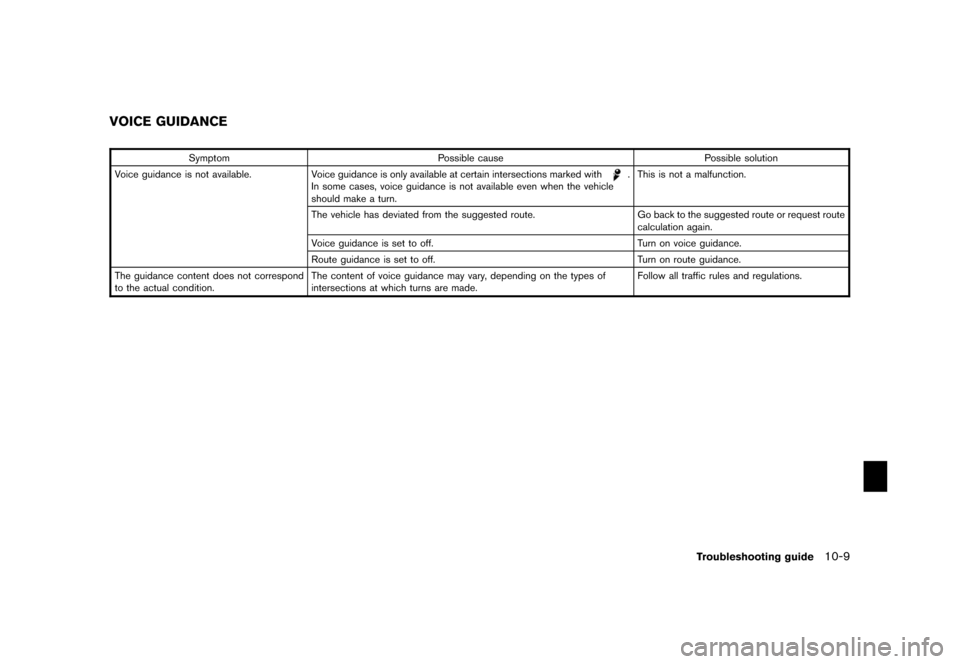
SymptomPossible cause Possible solution
Voice guidance is not available. Voice guidance is only available at certain intersections marked with
.
In some cases, voice guidance is not available even when the vehicle
should make a turn. This is not a malfunction.
The vehicle has deviated from the suggested route. Go back to the suggested route or request route
calculation again.
Voice guidance is set to off. Turn on voice guidance.
Route guidance is set to off. Turn on route guidance.
The guidance content does not correspond
to the actual condition. The content of voice guidance may vary, depending on the
types of
intersections at which turns are made. Follow all traffic rules and regulations.
VOICE GUIDANCE
Troubleshooting guide
10-9
Page 263 of 272
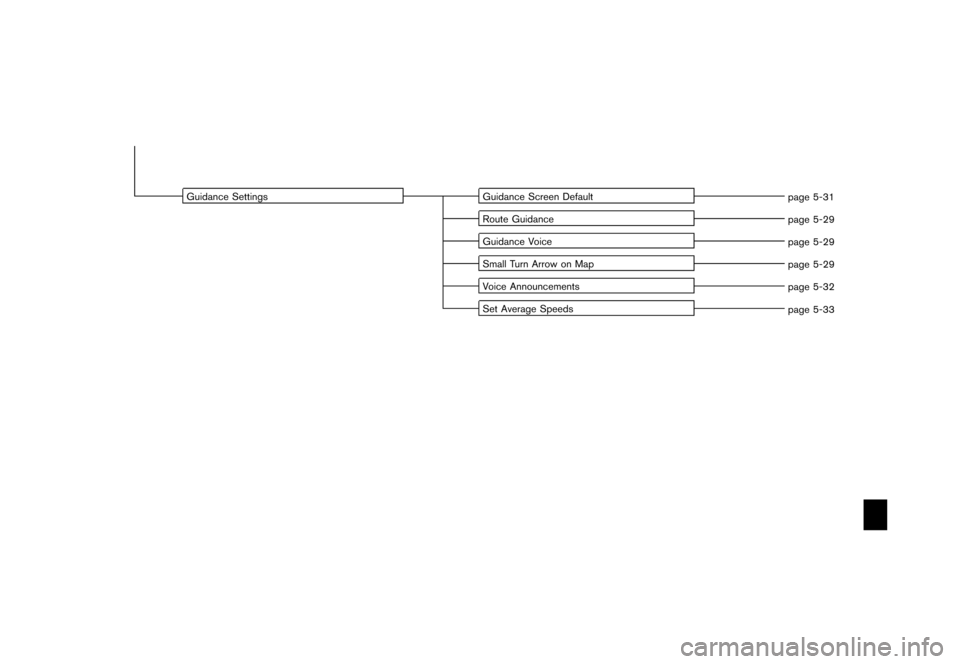
Guidance SettingsGuidance Screen Default
page 5-31
Route Guidance page 5-29
Guidance Voice page 5-29
Small Turn Arrow on Map page 5-29
Voice Announcements page 5-32
Set Average Speeds page 5-33
Page 266 of 272
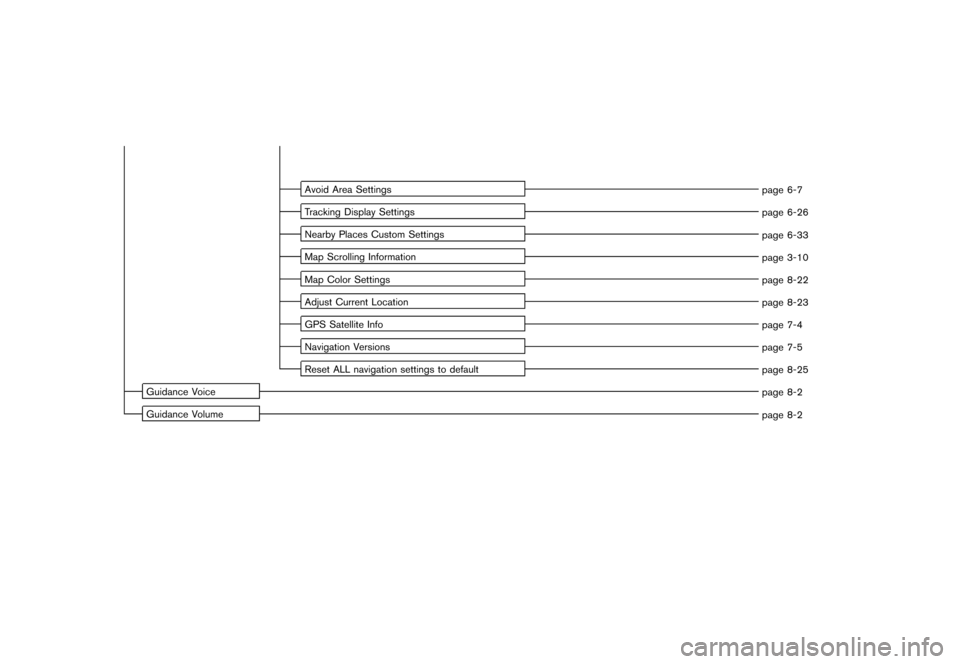
Avoid Area Settingspage 6-7
Tracking Display Settings page 6-26
Nearby Places Custom Settings page 6-33
Map Scrolling Information page 3-10
Map Color Settings page 8-22
Adjust Current Location page 8-23
GPS Satellite Info page 7-4
Navigation Versions page 7-5
Reset ALL navigation settings to default page 8-25
Guidance Voice page 8-2
Guidance Volume page 8-2
Page 269 of 272
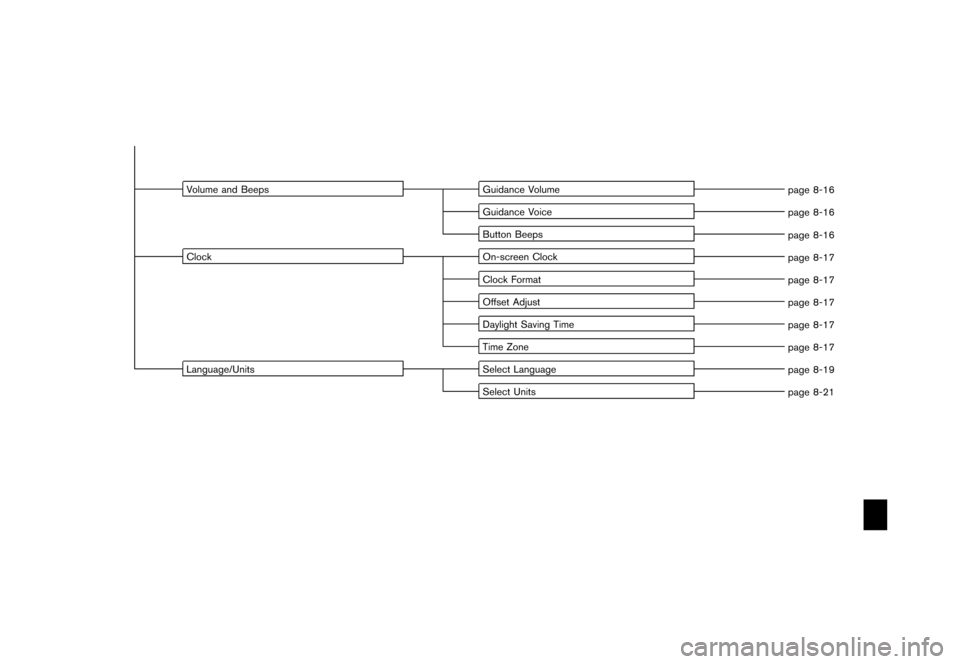
Volume and BeepsGuidance Volume
page 8-16
Guidance Voice page 8-16
Button Beeps page 8-16
Clock On-screen Clock
page 8-17
Clock Format page 8-17
Offset Adjust page 8-17
Daylight Saving Time page 8-17
Time Zone page 8-17
Language/Units Select Language
page 8-19
Select Units page 8-21
Page 271 of 272
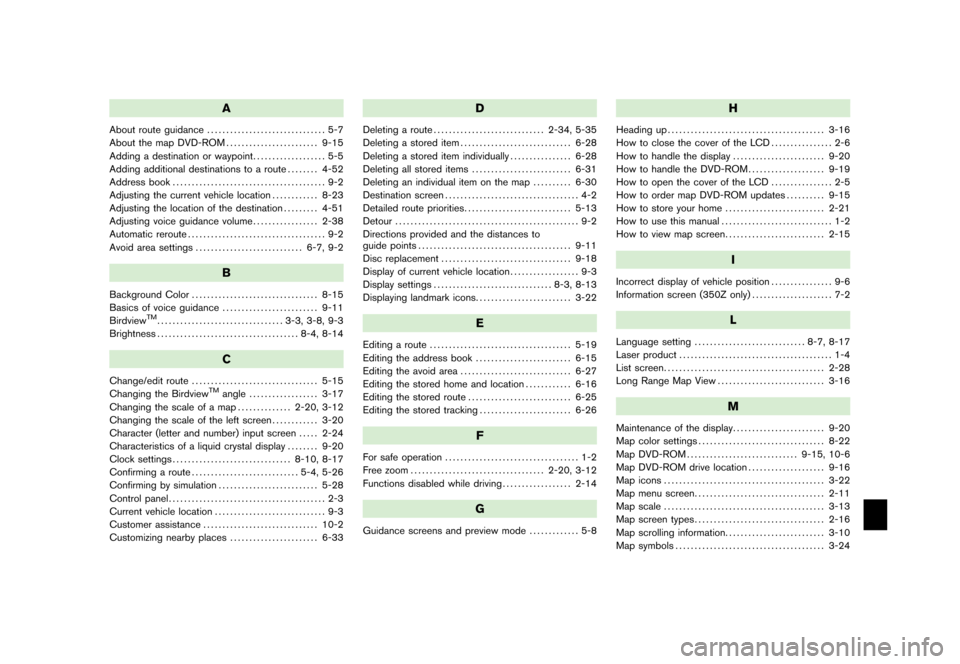
A
About route guidance............................... 5-7
About the map DVD-ROM ........................ 9-15
Adding a destination or waypoint ................... 5-5
Adding additional destinations to a route ........ 4-52
Address book ........................................ 9-2
Adjusting the current vehicle location ............ 8-23
Adjusting the location of the destination ......... 4-51
Adjusting voice guidance volume ................. 2-38
Automatic reroute .................................... 9-2
Avoid area settings ............................ 6-7, 9-2
B
Background Color................................. 8-15
Basics of voice guidance ......................... 9-11
Birdview
TM................................. 3-3, 3-8, 9-3
Brightness ..................................... 8-4, 8-14
C
Change/edit route ................................. 5-15
Changing the Birdview
TM
angle .................. 3-17
Changing the scale of a map .............. 2-20, 3-12
Changing the scale of the left screen ............ 3-20
Character (letter and number) input screen ..... 2-24
Characteristics of a liquid crystal display ........ 9-20
Clock settings ............................... 8-10, 8-17
Confirming a route ............................ 5-4, 5-26
Confirming by simulation .......................... 5-28
Control panel ......................................... 2-3
Current vehicle location ............................. 9-3
Customer assistance .............................. 10-2
Customizing nearby places ....................... 6-33
D
Deleting a route............................. 2-34, 5-35
Deleting a stored item ............................. 6-28
Deleting a stored item individually ................ 6-28
Deleting all stored items .......................... 6-31
Deleting an individual item on the map .......... 6-30
Destination screen ................................... 4-2
Detailed route priorities ............................ 5-13
Detour ................................................ 9-2
Directions provided and the distances to
guide points ........................................ 9-11
Disc replacement .................................. 9-18
Display of current vehicle location .................. 9-3
Display settings ............................... 8-3, 8-13
Displaying landmark icons ......................... 3-22
E
Editing a route..................................... 5-19
Editing the address book ......................... 6-15
Editing the avoid area ............................. 6-27
Editing the stored home and location ............ 6-16
Editing the stored route ........................... 6-25
Editing the stored tracking ........................ 6-26
F
For safe operation................................... 1-2
Free zoom ................................... 2-20, 3-12
Functions disabled while driving .................. 2-14
G
Guidance screens and preview mode ............. 5-8
H
Heading up
......................................... 3-16
How to close the cover of the LCD ................ 2-6
How to handle the display ........................ 9-20
How to handle the DVD-ROM .................... 9-19
How to open the cover of the LCD ................ 2-5
How to order map DVD-ROM updates .......... 9-15
How to store your home .......................... 2-21
How to use this manual ............................. 1-2
How to view map screen .......................... 2-15
I
Incorrect display of vehicle position ................ 9-6
Information screen (350Z only) ..................... 7-2
L
Language setting
............................. 8-7, 8-17
Laser product ........................................ 1-4
List screen .......................................... 2-28
Long Range Map View ............................ 3-16
M
Maintenance of the display ........................ 9-20
Map color settings ................................. 8-22
Map DVD-ROM ............................. 9-15, 10-6
Map DVD-ROM drive location .................... 9-16
Map icons .......................................... 3-22
Map menu screen .................................. 2-11
Map scale .......................................... 3-13
Map screen types .................................. 2-16
Map scrolling information .......................... 3-10
Map symbols ....................................... 3-24
Page 272 of 272
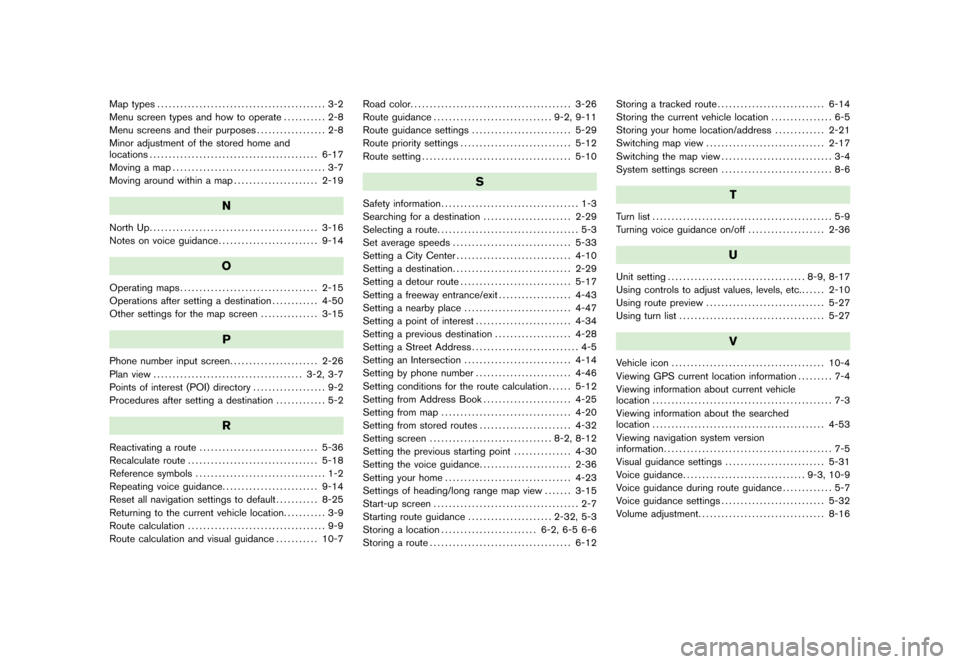
Map types............................................ 3-2
Menu screen types and how to operate ........... 2-8
Menu screens and their purposes .................. 2-8
Minor adjustment of the stored home and
locations ............................................ 6-17
Moving a map ........................................ 3-7
Moving around within a map ...................... 2-19
N
North Up............................................ 3-16
Notes on voice guidance .......................... 9-14
O
Operating maps.................................... 2-15
Operations after setting a destination ............ 4-50
Other settings for the map screen ............... 3-15
P
Phone number input screen
....................... 2-26
Plan view ....................................... 3-2, 3-7
Points of interest (POI) directory ................... 9-2
Procedures after setting a destination ............. 5-2
R
Reactivating a route
............................... 5-36
Recalculate route .................................. 5-18
Reference symbols .................................. 1-2
Repeating voice guidance ......................... 9-14
Reset all navigation settings to default ........... 8-25
Returning to the current vehicle location ........... 3-9
Route calculation .................................... 9-9
Route calculation and visual guidance ........... 10-7Road color.
......................................... 3-26
Route guidance ............................... 9-2, 9-11
Route guidance settings .......................... 5-29
Route priority settings ............................. 5-12
Route setting ....................................... 5-10
S
Safety information .................................... 1-3
Searching for a destination ....................... 2-29
Selecting a route ..................................... 5-3
Set average speeds ............................... 5-33
Setting a City Center .............................. 4-10
Setting a destination ............................... 2-29
Setting a detour route ............................. 5-17
Setting a freeway entrance/exit ................... 4-43
Setting a nearby place ............................ 4-47
Setting a point of interest ......................... 4-34
Setting a previous destination .................... 4-28
Setting a Street Address ............................ 4-5
Setting an Intersection ............................ 4-14
Setting by phone number ......................... 4-46
Setting conditions for the route calculation ...... 5-12
Setting from Address Book ....................... 4-25
Setting from map .................................. 4-20
Setting from stored routes ........................ 4-32
Setting screen ................................ 8-2, 8-12
Setting the previous starting point ............... 4-30
Setting the voice guidance ........................ 2-36
Setting your home ................................. 4-23
Settings of heading/long range map view ....... 3-15
Start-up screen ...................................... 2-7
Starting route guidance ...................... 2-32, 5-3
Storing a location ......................... 6-2, 6-5 6-6
Storing a route ..................................... 6-12 Storing a tracked route
............................ 6-14
Storing the current vehicle location ................ 6-5
Storing your home location/address ............. 2-21
Switching map view ............................... 2-17
Switching the map view ............................. 3-4
System settings screen ............................. 8-6
T
Turn list............................................... 5-9
Turning voice guidance on/off .................... 2-36
U
Unit setting.................................... 8-9, 8-17
Using controls to adjust values, levels, etc. ...... 2-10
Using route preview ............................... 5-27
Using turn list ...................................... 5-27
V
Vehicle icon........................................ 10-4
Viewing GPS current location information ......... 7-4
Viewing information about current vehicle
location ............................................... 7-3
Viewing information about the searched
location ............................................. 4-53
Viewing navigation system version
information ............................................ 7-5
Visual guidance settings .......................... 5-31
Voice guidance ................................ 9-3, 10-9
Voice guidance during route guidance ............. 5-7
Voice guidance settings ........................... 5-32
Volume adjustment ................................. 8-16