voice NISSAN MURANO 2006 1.G Navigation Manual
[x] Cancel search | Manufacturer: NISSAN, Model Year: 2006, Model line: MURANO, Model: NISSAN MURANO 2006 1.GPages: 272, PDF Size: 5.53 MB
Page 218 of 272
![NISSAN MURANO 2006 1.G Navigation Manual
VOLUME ADJUSTMENTThis allows you to turn on and off, as well as
adjust, the voice guide function and the beep
function.Basic operation1. Highlight [Volume and Beeps] and push<ENTER> .
2. Highlight th](/img/5/699/w960_699-217.png "NISSAN MURANO 2006 1.G Navigation Manual
VOLUME ADJUSTMENTThis allows you to turn on and off, as well as
adjust, the voice guide function and the beep
function.Basic operation1. Highlight [Volume and Beeps] and push<ENTER> .
2. Highlight th")
VOLUME ADJUSTMENTThis allows you to turn on and off, as well as
adjust, the voice guide function and the beep
function.Basic operation1. Highlight [Volume and Beeps] and push
2. Highlight the preferred adjustment item and push
3. Use the joystick to adjust the volume. Push
4. After setting, push
to apply the setting.
5. Push
screen. Push
Page 229 of 272
9 General system informationFeatures of this navigation system.......................... 9-2
Route guidance ............................................. 9-2
Points of interest (POI) directory ........................ 9-2
Address book ................................................ 9-2
Avoid area .................................................... 9-2
Automatic reroute ........................................... 9-2
Detour ......................................................... 9-2
Birdview
TM
................................................... 9-3
Voice guidance .............................................. 9-3
Current vehicle location ....................................... 9-3
Display of current vehicle location ...................... 9-3
What is GPS (Global Positioning System)? .......... 9-3
Accuracy of positioning ................................... 9-4
Incorrect display of vehicle position .................... 9-6
Detailed Map Coverage Areas (MCA) for the
navigation system ........................................... 9-8
When a gray road is displayed on the map .......... 9-9Route calculation
............................................... 9-9
Route guidance ............................................... 9-11
Basics of voice guidance ............................... 9-11
Directions provided and the distances to
guide points ................................................ 9-11
Repeating voice guidance .............................. 9-14
Notes on voice guidance ............................... 9-14
Map DVD-ROM ............................................... 9-15
How to order map DVD-ROM updates .............. 9-15
About the map DVD-ROM ............................. 9-15
Map DVD-ROM drive location ......................... 9-16
Disc replacement ......................................... 9-18
How to handle the DVD-ROM ......................... 9-19
How to handle the display .................................. 9-20
Characteristics of a liquid crystal display ............ 9-20
Maintenance of the display ............................. 9-20
Page 230 of 272
ROUTE GUIDANCEThe main features of the NISSAN Navigation
System are visual guidance and voice guidance
in selected map coverage areas. Utilizing a
network of GPS (Global Positioning System)
satellites, the NISSAN Navigation System tracks
your location on the map and navigates you to a
preferred location.
Once you set the destination in a map coverage
area, the NISSAN Navigation System will
calculate a route from your current location to
your destination. The real-time map display and
turn-by-turn voice guidance leads the driver
along the route.
These features can be especially helpful when
driving to unfamiliar locations.
The system may be unable to set a destination
and/or calculate a route when the destination is
outside the map coverage area. Additionally,
voice guidance may not be available if the
destination is outside the map coverage area.
For more information on how to set a destina-
tion, refer to section 4.POINTS OF INTEREST (POI) DIREC-
TO RYThe NISSAN Navigation System offers an
extensive Points of Interest (POI) directory in
map coverage areas. This directory includes awide variety of destinations ranging from gas
stations, ATMs, and restaurants to casinos, ski
resorts, shopping centers and businesses. By
accessing the Points of Interest directory, you
can search for addresses and phone numbers
for a destination, and just by pushing a button,
the NISSAN Navigation System will calculate a
route to the destination.
The POI directory has many uses. For example,
the directory can be sorted by the various types
of restaurants near your current location. If you
need an ATM or gas station, the NISSAN
Navigation System can navigate you to the
closest preferred location.
For more information on how to use the Points of
Interest directory, refer to section 4.
ADDRESS BOOKThe Address Book can store up to 100 locations
from map coverage areas into a personal
directory. This is especially useful for frequently
visited locations, such as clients, relatives and
friends. The Address Book function allows easy
access to frequently visited locations when
setting them as your destination.
For more information on how to use the Address
Book, refer to section 6.
AVOID AREAThe Avoid Area function allows you to identify
areas or freeways that you would like the
NISSAN Navigation System to avoid when
calculating routes. For example, if a freeway or
area is always congested with traffic, you can
set the NISSAN Navigation System to calculate
routes that exclude that freeway or area.
For more information on the Avoid Area function,
refer to section 6.AUTOMATIC REROUTEIf you deviate from the suggested route, the
NISSAN Navigation System will automatically
recalculate a new route to your destination.
For more information on the Automatic reroute
function, refer to section 5.DETOURIf you want to make a detour due to traffic
conditions, you can use the Detour function to
calculate an alternative route. The NISSAN
Navigation System can calculate a route using
secondary roads that will return you to primary
roads after a specified number of miles.
For more information on the Detour function,
refer to section 5.
FEATURES OF THIS NAVIGATION
SYSTEM9-2
General system information
Page 231 of 272
NAV2710
BIRDVIEW
TM
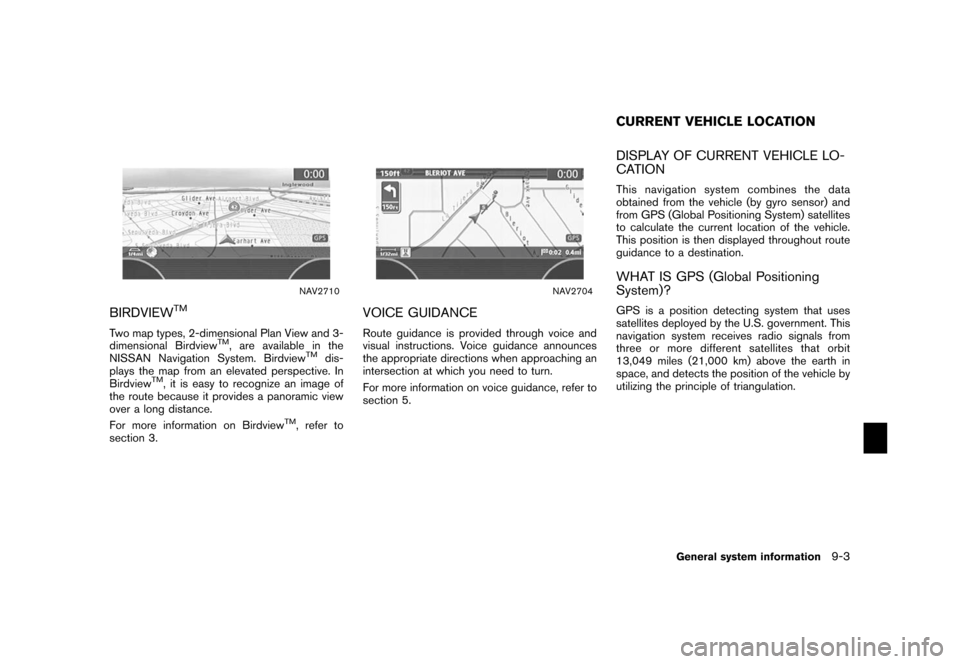
Two map types, 2-dimensional Plan View and 3-
dimensional Birdview
TM, are available in the
NISSAN Navigation System. Birdview
TM
dis-
plays the map from an elevated perspective. In
Birdview
TM, it is easy to recognize an image of
the route because it provides a panoramic view
over a long distance.
For more information on Birdview
TM, refer to
section 3.
NAV2704
VOICE GUIDANCERoute guidance is provided through voice and
visual instructions. Voice guidance announces
the appropriate directions when approaching an
intersection at which you need to turn.
For more information on voice guidance, refer to
section 5.
DISPLAY OF CURRENT VEHICLE LO-
CATIONThis navigation system combines the data
obtained from the vehicle (by gyro sensor) and
from GPS (Global Positioning System) satellites
to calculate the current location of the vehicle.
This position is then displayed throughout route
guidance to a destination.WHAT IS GPS (Global Positioning
System)?GPS is a position detecting system that uses
satellites deployed by the U.S. government. This
navigation system receives radio signals from
three or more different satellites that orbit
13,049 miles (21,000 km) above the earth in
space, and detects the position of the vehicle by
utilizing the principle of triangulation.CURRENT VEHICLE LOCATION
General system information
9-3
Page 237 of 272
WHEN A GRAY ROAD IS DISPLAYED
ON THE MAP.When you are driving on a road displayed in
gray after the vehicle has deviated from the
suggested route during route guidance,
automatic rerouting may not start immedi-
ately.
. The navigation system does not provide
route guidance for roads displayed in dark
green. Therefore, if the destination is set on
a road displayed in dark green, the enlarged
map display will return to the ordinary map
screen at some point on a suggested route
that is near the destination. Also, voice
guidance will stop at some point on a
suggested route that is near the destination.
. POI information and street names near
roads displayed in gray may not be con-
tained in the map data. .
There may be cases that carpool lanes are
included on a suggested route when the
automatic rerouting function is activated,
even if the “Use Time Restricted Roads” is
turned off.
“SETTING CONDITIONS FOR THE
ROUTE CALCULATION”
(page 5-12)
. The navigation system does not provide
route guidance for roads displayed in dark
green.
. If the destination is set on a dark green road,
the enlarged map display will switch to the
ordinary map screen at some point and
suggest a route that is near the destination.
The distance and direction to the endpoint
of the suggested route will be displayed in
the lower right corner of the screen.
Also, at this time, voice guidance will
announce, “En route to your destination,
some roads contain incomplete map data.
Turn guidance will not be provided in this
area”.
When approaching the endpoint of the
suggested route, voice guidance will an-
nounce, “Entering the road with incomplete
map data. Please use the direction arrow
and distance information to proceed to your
destination.”
To reach your destination, refer to the map screen. Always follow actual roads and
regulations and drive safely.
. The suggested route may not be the short-
est, nor are other circumstances such as
traffic jams considered.
. Because of the inevitable difference in road
conditions and circumstances between the
time you use this system and the time the
information was produced for the DVD,
there may be discrepancies in roads and
regulations. In such cases, follow the actual
information available.
. During route calculation, the map will not
scroll, however the vehicle icon will move
with the actual vehicle’s movement.
. During route calculation, buttons such as
Page 239 of 272
INFO:
The announcement of the street name during
route guidance is available only when English is
set as the language for the system. Street
names are not announced if French is set for the
system.
BASICS OF VOICE GUIDANCEVoice guidance announces which direction to
turn when approaching an intersection in which
a turn is necessary.
NOTE:
. There may be some cases in which
voice guidance and actual road condi-
tions do not correspond. This may
occur because of discrepancies be-
tween the actual road and the informa-
tion on the DVD-ROM, or it is due to the
vehicle’s speed.
. In case voice guidance does not corre-
spond to the actual road conditions,
follow the information obtained from
traffic signs or notices on the road. .
Route guidance provided by the navi-
gation system does not take carpool
lane driving into consideration, espe-
cially when carpool lanes are separated
from other road lanes.
DIRECTIONS PROVIDED AND THE
DISTANCES TO GUIDE POINTSDirections will differ, depending on the road
type.
INFO:
Distances may vary, depending on the vehicle
speed.
ROUTE GUIDANCE
General system information
9-11
Page 240 of 272
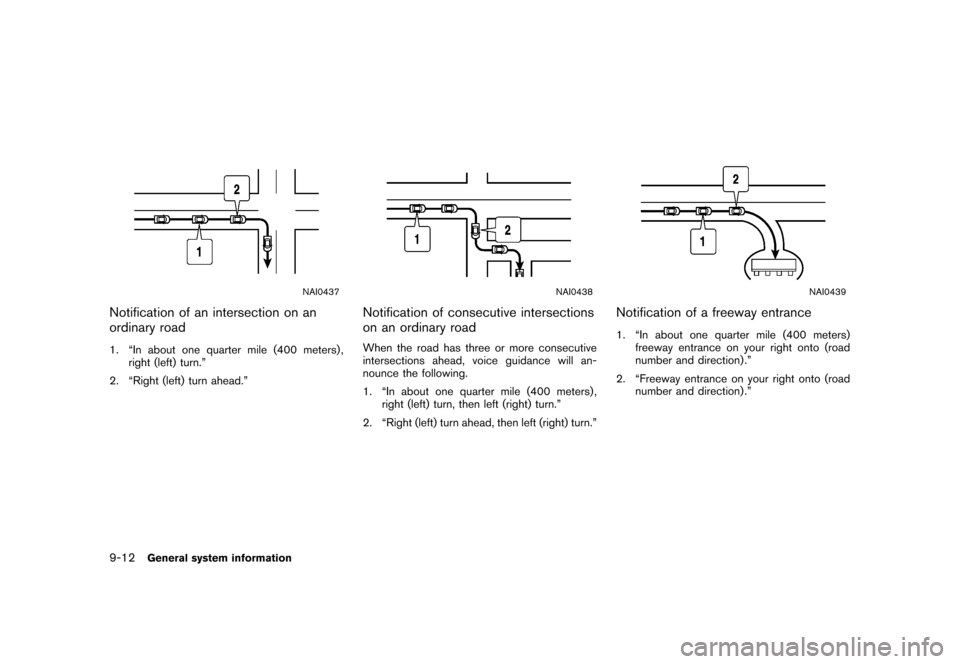
NAI0437
Notification of an intersection on an
ordinary road1. “In about one quarter mile (400 meters) ,right (left) turn.”
2. “Right (left) turn ahead.”
NAI0438
Notification of consecutive intersections
on an ordinary roadWhen the road has three or more consecutive
intersections ahead, voice guidance will an-
nounce the following.
1. “In about one quarter mile (400 meters) , right (left) turn, then left (right) turn.”
2. “Right (left) turn ahead, then left (right) turn.”
NAI0439
Notification of a freeway entrance1. “In about one quarter mile (400 meters) freeway entrance on your right onto (road
number and direction) .”
2. “Freeway entrance on your right onto (road number and direction) .”
9-12
General system information
Page 242 of 272
Notification when approaching the des-
tinationOrdinary road:
When approaching the destination, voice gui-
dance will announce, “You have arrived at your
destination. Ending route guidance.” To finally
reach your destination, refer to the map screen.
Dark green road:
After passing the last turning point on a
suggested route, voice guidance will announce,
“En route to your destination, some roads
contain incomplete map data. Turn guidance
willnotbeprovidedinthisarea.”When
approaching the endpoint of the suggested
road, voice guidance will announce, “Entering
the road with incomplete map data. Please use
the direction arrow and distance information to
proceed to your destination.”
REPEATING VOICE GUIDANCEThis function is available throughout route
guidance, from the time after the route calcula-
tion is completed until the vehicle arrives at the
destination.
Push
Voice guidance will be repeated.
INFO:
. If you push
when you have deviated from the suggested
route and when the automatic reroute
function is off, voice guidance will announce,
“Proceed to the highlighted route.”
. If you push
when you are going in the wrong direction,
voice guidance will announce: “Please make
a legal U-turn if possible.”
NOTES ON VOICE GUIDANCE. Voice guidance in this system should be
regarded as a supplem entary function.
When driving your vehicle, check the route
on the map and follow the actual roads and
traffic regulations.
. Voice guidance is activated only for inter-
sections with certain conditions. There may
be cases that the vehicle has to turn, but
voice guidance is not provided.
. Voice guidance contents may vary, depend-
ing on the direction of the turn and the type
of intersection.
. The voice guidance timing will vary depend-
ing on the situation.
. When the vehicle has deviated from the
suggested route, voice guidance is not
available. The system will not announce this
to you. Refer to the map and recalculate the
route.
“RECALCULATE ROUTE”
(page 5-18)
. Voice guidance may not accurately corre-
spond with road numbers and directions at
freeway junctions.
. Voice guidance may not accurately corre-
spond to street names at freeway exits.
9-14
General system information
Page 243 of 272
![NISSAN MURANO 2006 1.G Navigation Manual .The displayed street names may sometimes
differ from the actual names, or “UN-
KNOWN STREET NAME” may be dis-
played.
. Voice guidance is not available when the
[Guidance Voice] indicator is not](/img/5/699/w960_699-242.png "NISSAN MURANO 2006 1.G Navigation Manual .The displayed street names may sometimes
differ from the actual names, or “UN-
KNOWN STREET NAME” may be dis-
played.
. Voice guidance is not available when the
[Guidance Voice] indicator is not")
.The displayed street names may sometimes
differ from the actual names, or “UN-
KNOWN STREET NAME” may be dis-
played.
. Voice guidance is not available when the
[Guidance Voice] indicator is not illuminated.
. Voice guidance will start when the vehicle
enters the suggested route. Refer to the
map for directions to the starting point of the
route.
. When approaching a waypoint, voice gui-
dance will announce, “You have arrived at
waypoint 1 (2, 3, 4,...) .” Voice guidance will
switch to the next section of the route. When
voice guidance is not available, refer to the
map for directions.
. In some cases, voice guidance ends before
arrival at the destination. Refer to the
destination icon on the map to reach the
destination.
. If the system recognizes on which side the
destination (waypoint) is located, voice
guidance will announce “on the right/left”
after announcing the arrival at the destina-
tion.
. Voice guidance may be partially operational
or inoperative due to the angle of roads at an
intersection.
HOW TO ORDER MAP DVD-ROM
UPDATESTo order updated map DVD-ROMs or additional
map DVD-ROMs, contact the NISSAN NAVI-
GATION SYSTEM HELPDESK at:
. ADDRESS: P.O. Box 2082, Burlingame, CA
94011
. E-MAIL: [email protected]
. WEB SITE: www.zenrin.com
.
PHONE: 1-888-661-9995
. HOURS: 6:00 AM to 5:00 PM (Pacific
Time)
ABOUT THE MAP DVD-ROM1. This map DVD-ROM has been prepared by
ZENRIN CO., LTD. under license from
Navigation Technologies Corporation.
ZENRIN CO., LTD. has added, processed
and digitized data based on the digital road
map data of Navigation Technologies Cor-
poration. Due to the production timing of the
map data, some new roads may not be
included in this map data or some of the
names or roads may be different from those
at the time you use this map DVD-ROM.
2. Traffic control and regulation data used in this map DVD-ROM may be different from
those at the time you use this map DVD-
ROM due to the data production timing.
When driving your vehicle, follow the actual
traffic control signs and notices on the
roads.
3. Reproducing or copying this map software is strictly prohibited by law.
Published by NISSAN North America, Inc.*C2002 Navigation Technologies. All rights
reserved. “Certain business data provided by
infoUSA.com, Inc. Copyright 2002. All rights
reserved”.
MAP DVD-ROM
General system information
9-15
Page 249 of 272
10 Troubleshooting guideCustomer assistance......................................... 10-2
Basic operations .............................................. 10-3
Vehicle icon .................................................... 10-4 Map DVD-ROM
............................................... 10-6
Route calculation and visual guidance ................... 10-7
Voice guidance ................................................ 10-9